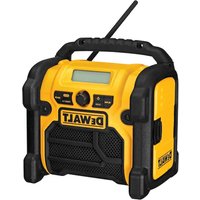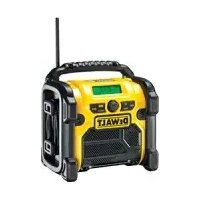
DC010 - Radio DEWALT - Free user manual and instructions
Find the device manual for free DC010 DEWALT in PDF.



| Product Type | Jobsite Radio |
| Brand | DeWalt |
| Model | DC010 |
| Power Supply | Mains 230 V AC or battery 7.2-18 V DC |
| Weight | 5.5 kg |
| Mains Voltage | 230 V AC |
| Battery Voltage Range | 7.2 - 18 V DC |
| Fuse | 10 A (230 V tools) |
| Double Insulation | Yes, conforming to EN 60065 |
| Battery Compatibility | DeWALT NiCd and NiMH battery packs 7.2-18 V |
| Reception Modes | AM, FM, FM stereo |
| Controls | Volume, station selection, mode selector |
| Indicators | Power, stereo |
| Usage | Indoor and outdoor |
| Package Contents | Radio, instruction manual, exploded drawing |
| Maintenance | Clean with a soft cloth, keep ventilation slots clean |
| Warranty | 30-day satisfaction, 1 year free maintenance, 1 year warranty |
| Safety | Detailed safety instructions in the manual |
Frequently Asked Questions - DC010 DEWALT
User questions about DC010 DEWALT
0 question about this device. Answer the ones you know or ask your own.
Ask a new question about this device
Download the instructions for your Radio in PDF format for free! Find your manual DC010 - DEWALT and take your electronic device back in hand. On this page are published all the documents necessary for the use of your device. DC010 by DEWALT.
USER MANUAL DC010 DEWALT
You have chosen a DEWALT tool. Years of experience, thorough product development and innovation make DEWALT one of the most reliable partners for professional power tool users.
Technical data
| DC010 | ||
| Power source AC/DC | ||
| Mains voltage V | AC | 230 |
| (U.K. & Ireland only) V 230/115 | ||
| Battery voltage V | DC | 7.2 - 18 |
| Weight kg 5.5 | ||
Fuses:
Europe 230 V tools 10 Amperes, mains
U.K. & Ireland 230 V tools 13 Amperes, in plugs
The following symbols are used throughout this manual:

Denotes risk of personal injury, loss of life or damage to the tool in case of non-observation of the instructions in this manual.

Denotes risk of electric shock.
EC-Declaration of conformity

DC010
DEWALT declares that these power tools have been designed in compliance with: 89/336/EEC, 73/23/EEC, EN 60065, EN 50081, EN 50082, EN 55013, EN 55020, EN 61000-3-2 & EN 61000-3-3.
For more information, please contact DEWALT at the address below, or refer to the back of the manual.
Director Engineering and Product Development Horst Großmann
D-65510, Idstein, Germany
Safety instructions
When using power tools, always observe the safety regulations applicable in your country to reduce the risk of fire, electric shock and personal injury. Read all of this manual carefully before operating the tool.
Save this manual for future reference.
General
1 Keep work area clean
Cluttered areas and benches can cause accidents.
2 Consider work area environment
Keep the work area well lit (250 - 300 Lux). Do not use the tool where there is a risk of causing fire or explosion, e.g. in the presence of flammable liquids and gases.
3 Guard against electric shock
Prevent body contact with earthed surfaces (e.g. pipes, radiators, cookers and refrigerators). When using the tool under extreme conditions (e.g. high humidity, when metal swarf is being produced, etc.), electric safety can be improved by inserting an isolating transformer or a (FI) earth-leakage circuit-breaker.
4 Keep children away
Do not allow children, visitors or animals to come near the work area or to touch the tool or the mains cable.
5 Use appropriate tool
The intended use is described in this instruction manual. Do not force small tools or attachments to do the job of a heavy-duty tool. The tool will do the job better and safer at the rate for which it was intended. Do not force the tool.
Warning! The use of any accessory or attachment or performance of any operation with this tool other than those recommended in this instruction manual may present a risk of personal injury.
6 Check for damaged parts
Before using the tool, carefully check it for damage to ensure that it will operate properly and perform its intended function. Check for misalignment and seizure of moving parts, breakage of parts and any other conditions that may affect its operation. Have damaged guards or other defective parts repaired or replaced as instructed. Do not use the tool if the switch is defective. Have the switch replaced by an authorized DEWALT repair agent.
7 Store idle tools
When not in use, tools must be stored in a dry place and locked up securely, out of reach of children.
8 Maintain tools with care
Keep the tools in good condition and clean for better and safer performance. Follow the instructions for maintenance and changing accessories. Keep all handles and switches dry, clean and free from oil and grease.
9 Repairs
This tool is in accordance with the relevant safety regulations. Have your tool repaired by an authorised DeWALT repair agent. Repairs should only be carried out by qualified persons using original spare parts; otherwise this may result in considerable danger to the user.
Safety instructions for mains-powered tools
10 Extension cables
Before use, inspect the extension cable and replace if damaged. When using the tool outdoors, only use extension cables intended for outdoor use and marked accordingly.
11 Unplug tool
Switch off and wait for the tool to come to a complete standstill before leaving it unattended. Unplug the tool when not in use, before changing any parts of the tools, accessories or attachments and before servicing.
12 Do not abuse cord
Never carry the tool by its cord. Never pull the cord to disconnect from the socket.
Keep the cord away from heat, oil and sharp edges.
Safety instructions for battery-powered tools
13 Remove the battery pack
Switch off and wait for the tool to come to a complete standstill before leaving it unattended. Remove the battery pack when not in use, before changing any parts of the tools, accessories or attachments and before servicing.
Package contents
The package contains:
1 Radio
1 Instruction manual
1 Exploded drawing
- Check for damage to the tool, parts or accessories which may have occurred during transport.
- Take the time to thoroughly read and understand this manual prior to operation.
Description (fig. A)
Your DC010 radio has been designed for playing radio transmissions at construction sites.
Working on mains (corded) or battery (cordless) power the tool can be used both indoor and outdoor.
For cordless applications, the tool accepts DEWALT NiCd and NiMH battery packs ranging from 7.2 to 18V
1 Volume control
2 Mode selector
3 Station selector
4 Latch
5 Scale
Electrical safety
The electric motor has been designed for one voltage only. Always check that the power supply corresponds to the voltage on the rating plate.

Your DEWALT tool is double insulated in accordance with EN 60065; therefore no earth wire is required.
Mains plug replacement (U.K. & Ireland only)
- Should your mains plug need replacing and you are competent to do this, proceed as instructed below. If you are in doubt, contact an authorized DeWALT repair agent or a qualified electrician.
- Disconnect the plug from the supply.
- Cut off the plug and dispose of it safely; a plug with bared copper conductors is dangerous if engaged in a live socket outlet.
- Only fit 13 Amperes BS1363A approved plugs fitted with the correctly rated fuse (1).
- The cable wire colours, or a letter, will be marked at the connection points of most good quality plugs. Attach the wires to their respective points in the plug (see below). Brown is for Live (L) (2) and Blue is for Neutral (N) (4).
- Before replacing the top cover of the mains plug ensure that the cable restraint (3) is holding the outer sheath of the cable firmly and that the two leads are correctly fixed at the terminal screws.
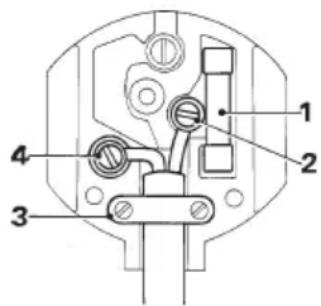

Never use a light socket.
Never connect the live (L) or neutral (N) wires to the earth pin marked E or 1一
For 115V units with a power rating exceeding 1500W , we recommend to fit a plug to BS4343 standard.
Using an extension cable
If an extension cable is required, use an approved extension cable suitable for the power input of this tool (see technical data). The minimum conductor size is 1.5mm^2
When using a cable reel, always unwind the cable completely.
Also refer to the table below.
| Conductor size (mm2) Cable rating (Amperes) | ||||||||
| 0.75 6 | ||||||||
| 1.00 10 | ||||||||
| 1.50 15 | ||||||||
| 2.50 20 | ||||||||
| 4.00 25 | ||||||||
| Cable length (m) | ||||||||
| 7.5 15 25 30 45 60 | ||||||||
| Voltage Amperes Cable rating (Amperes) | ||||||||
| 1 1 | 5 | 0 | - | 2 | . | 0 | 6 | 6 |
| 2.1 - | 3.4 | 6 | 6 | 6 | 6 | 15 | 15 | |
| 3.5 - | 5.0 | 6 | 6 | 10 | 15 | 20 | 20 | |
| 5.1 - | 7.0 | 10 | 10 | 15 | 20 | 20 | 25 | |
| 7.1 - | 12.0 | 15 | 15 | 20 | 25 | 25 | - | |
| 12.1 - | 20.0 | 20 | 20 | 20 | 25 | - | - | |
| 230 | 0 - | 2.0 | 6 | 6 | 6 | 6 | 6 | 6 |
| 2.1 - | 3.4 | 6 | 6 | 6 | 6 | 6 | 6 | |
| 3.5 - | 5.0 | 6 | 6 | 6 | 6 | 10 | 15 | |
| 5.1 - | 7.0 | 10 | 10 | 10 | 10 | 15 | 15 | |
| 7.1 - | 12.0 | 15 | 15 | 15 | 15 | 20 | 20 | |
| 12.1 - | 20.0 | 20 | 20 | 20 | 20 | 25 | - | |
Assembly

- Prior to assembly always unplug the tool.
- Prior to assembly, check for the presence of a battery pack and remove it if present.
Inserting a battery pack (fig. B)
- Release the latch (4) to open the battery compartment cover.
- Insert the battery pack (6) into the receptacle until it is fully seated.
- Close the battery compartment cover.

Always switch off the tool before inserting or removing the battery pack.
Battery pack condition
- Make sure your battery pack is (fully) charged. If the battery pack does not produce sufficient power, charge the battery pack following the instructions in the manual of the charger.

Use only DEWALT battery packs and chargers.
Instructions for use

Always observe the safety instructions and applicable regulations.
Radio operation
Volume control (fig. A)
- Turn the volume control (1) to the desired level.
Mode selection (fig. A & C)
- Turn the mode selector (2) to the desired mode: AM, FM or FM stereo. The power light (9) will be lit.
- To switch the radio off, turn the mode selector to the setting off.
Station selector (fig. A & C)
- Turn the station selector (3) to the desired frequency setting, which is indicated by the pointer (10).
In the FM stereo mode, the stereo indicator (8) will be lit in case of stereo reception.
Power source
The tool runs either on mains power or battery power. The tool will switch between AC (mains) and DC (battery) power automatically.
Maintenance
Your DEWALT power tool has been designed to operate over a long period of time with a minimum of maintenance. Continuous satisfactory operation depends upon proper tool care and regular cleaning.

Cleaning
- Unplug the tool from the mains and remove the battery pack before cleaning the housing with a soft cloth.
- Keep the ventilation slots clear and regularly clean the housing with a soft cloth.

Unwanted tools and the environment
Take your tool to an authorized DEWALT repair agent where it will be disposed of in an environmentally safe way.

Rechargeable battery pack
A long life battery pack must be recharged when it fails to produce sufficient power on jobs which were easily done before. At the end of its technical life, discard it with due care for our environment:
- Run the battery pack down completely, then remove it from the tool.
- NiCd and NiMH cells are recyclable. Take them to your dealer or a local recycling station. The collected battery packs will be recycled or disposed of properly.
GUARANTEE
30 DAY NO RISK SATISFACTION GUARANTEE
If you are not completely satisfied with the performance of your DEWALT tool, simply return it within 30 days, complete as purchased, to the point of purchase, for a full refund or exchange. Proof of purchase must be produced.
- ONE YEAR FREE SERVICE CONTRACT
If you need maintenance or service for your DeWALT tool, in the 12 months following purchase, it will be undertaken free of charge at an authorized DeWALT repair agent. Proof of purchase must be produced. Includes labour and spare parts for Power Tools. Excludes accessories.
- ONE YEAR FULL WARRANTY
If your DeWALT product becomes defective due to faulty materials or workmanship within 12 months from the date of purchase, we guarantee to replace all defective parts free of charge or, at our discretion, replace the unit free of charge provided that:
The product has not been misused.
- Repairs have not been attempted by unauthorized persons.
Proof of purchase date is produced. This guarantee is offered as an extra benefit and is additional to consumers statutory rights.
For the location of your nearest authorized DEWALT repair agent, please use the appropriate telephone number on the back of this manual. Alternatively, a list of authorized DEWALT repair agents and full details on our after-sales service are available on the Internet at www.2helpU.com
RADIO DC010
Enhorabuena!
Director Engineering and Product Development Horst Großmann
Lea Completely is the best way to use a herring.
No permitted to be seen. No permit to be seen.
13 Retirer le pack-batteries
L'emballage contient:
Selection de station (fig. A & C)
Batterie rechargeable
Director Engineering and Product Development Horst Großmann
DEWALT, Richard-Klinger-Straße 11, D-65510, Idstein, Duitsland
Director Engineering and Product Development Horst Großmann
DEWALT, Richard-Klinger-Straße 11, D-65510, Idstein, Tyskland
1 ARS FRI VEDLIKEHOLDSERVICE
Director Engineering and Product Development Horst Großmann
DEWALT, Richard-Klinger-Straße 11, D-65510, Idstein, Alemanha
Director Engineering and Product Development Horst Großmann
Director Engineering and Product Development Horst Großmann
DEWALT, Richard-Klinger-Straße 11, D-65510, Idstein, Tyskland
6 Eéyεεε ev to εpyaεio oac exi 6a8e
Piv xpoaiooETo epyaleio, EeYTe To npoeekTia yia evexóvec βáβεγia va Bβaωθeite oti θα λεitoupynoi onwc npénei. EeYTe eav ta kivnta epn eiva owoTa ouvdepeva kaluypamaigeva, av dEv exouv onaoi koupatia, av eiva owoTa ouvapmooyneva kal ev npouvtai oεC oU vthkeyia tn owtn λεitoupyia tou epyaieou. Pooataeutika kaúmuata n aλla eapntma Tou exouv xaaloei npenei va eπokuaovta i na v atikaotavtaoi uφwva μe tic odnyic xnpoeos.
Mn xnpoioieTo epyaio ev o diakontns
eivai xaaoevoc kal povtioTe yia tnv
avtkataoTou ano EgouoiOtoEv
ouvepyeo ouvtnpnoewc.
7 uayet Ta epyaia oac o aopaae c epoc
Epyaia nou v xpnoiolovtal npenla quaoovtae Teyvoc, kaiotouc xwpouc, akiia ano naia.
8 Euvtnpeite Emea wcs ta epyaia oac
Aiatnpεite Ta εpyaεia oac KoPεpa Ka kaθapá ωoTE va εiOTe oE θeON va εpyaεOTe KaIutepa KAI aφaλεOtepa. AkoIouθεITE Tc odnyieç ouvtnpnoεωc KAI TIC UNODεiεic yia tvn aaayn EApntmuTsw. Povtiote oεc oI λαβεc KAI OI dIakONTεc va εival OTeyvoi, kaθapoikai xwiç λáδi n ypáσa.
9 ENIOKEUeC
To a o 0aC nIpoi Touc IoxuovTeKavovc aOpaAeiaC.
Eπoεuaετε Ta εpyaεia oac σε
εξouioδotmévo σtaθμο ouvtnpnoεωc tnc
DEWALT. OI επoεuec θa πeπει va yivovtat
μóvo aπo εiokuévouc texviokouc kal μεtn
xρση anokλiotikayvnaow avtaaktkwv,
diapopetika unapxei to evδexóveo oβapoukivduovyia to xρσtη.