MINIAK - Hi-fi system AKAI - Free user manual and instructions
Find the device manual for free MINIAK AKAI in PDF.



| Product Type | Virtual analog synthesizer |
| Brand | AKAI |
| Model | MINIAK |
| Power Supply | AC adapter (power cable included) |
| Audio Connectivity | Stereo L/R outputs, microphone input, headphone jack, sustain input, expression input |
| MIDI Connectivity | MIDI input/output (not specified but likely) |
| Main Controls | MOD1, MOD2 wheels, PITCH wheel, X/Y/Z potentiometers, OCTAVE buttons, TAP TEMPO, PHRASE ARP, LATCH ARP, PATTERN PLAY |
| Operating Modes | Programs, Rhythms, Sequences, Multi |
| Advanced Functions | Arpeggiator, riff recording, parameter editing, controller assignment |
| Included Accessories | Directional microphone, user guide, reference guide, safety booklet |
| Display | LCD screen for navigation and parameters |
| Safety | Detailed instructions in the provided booklet |
Frequently Asked Questions - MINIAK AKAI
User questions about MINIAK AKAI
0 question about this device. Answer the ones you know or ask your own.
Ask a new question about this device
Download the instructions for your Hi-fi system in PDF format for free! Find your manual MINIAK - AKAI and take your electronic device back in hand. On this page are published all the documents necessary for the use of your device. MINIAK by AKAI.
USER MANUAL MINIAK AKAI
• Safety Instructions & Warranty Information Booklet
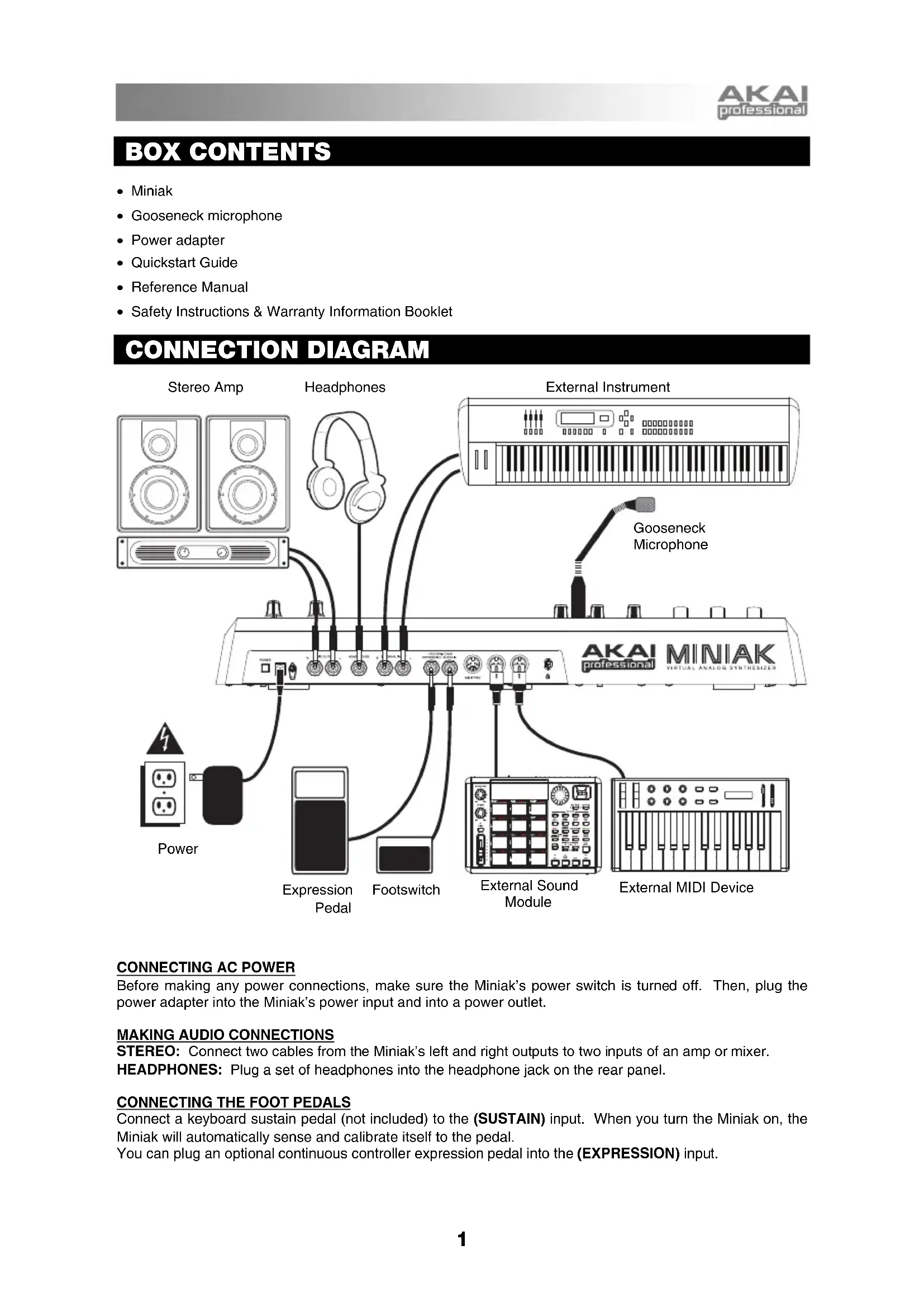
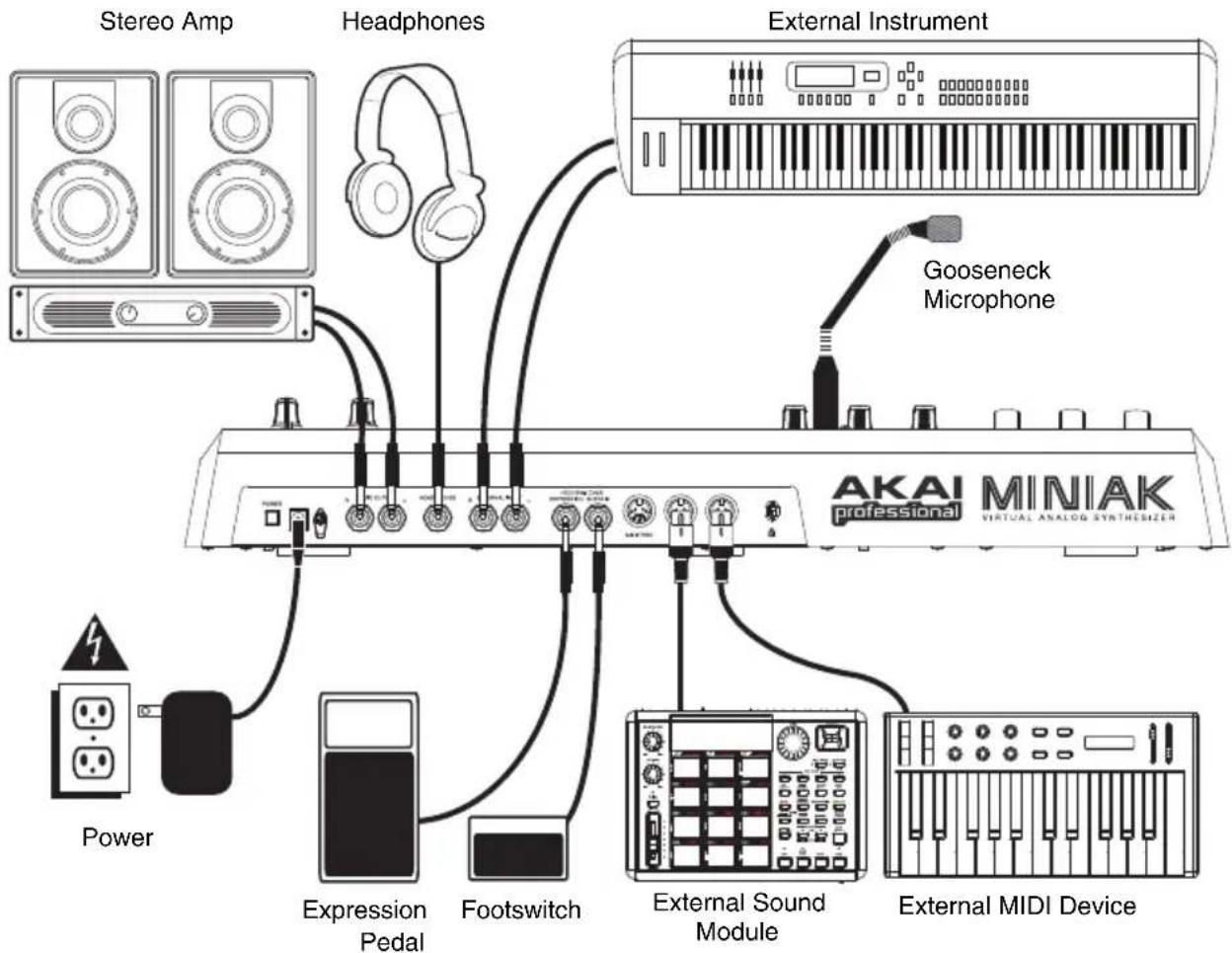
CONNECTION DIAGRAM
flowchart
graph TD
    A["Stereo Amp"] --> B["Headphones"]
    C["External Instrument"] --> D["AKAI MINIAK professional"]
    E["Power"] --> F["Expression Pedal"]
    F --> G["Footswitch"]
    G --> H["External Sound Module"]
    H --> I["External MIDI Device"]
    J["Gooseneck Microphone"] --> K["External Instrument"]
CONNECTING AC POWER
Before making any power connections, make sure the Miniak's power switch is turned off. Then, plug the power adapter into the Miniak's power input and into a power outlet.
MAKING AUDIO CONNECTIONS
STEREO: Connect two cables from the Miniak's left and right outputs to two inputs of an amp or mixer.
HEADPHONES: Plug a set of headphones into the headphone jack on the rear panel.
CONNECTING THE FOOT PEDALS
Connect a keyboard sustain pedal (not included) to the (SUSTAIN) input. When you turn the Miniak on, the Miniak will automatically sense and calibrate itself to the pedal.
You can plug an optional continuous controller expression pedal into the (EXPRESSION) input.
OVERVIEW OF THE CONTROLS
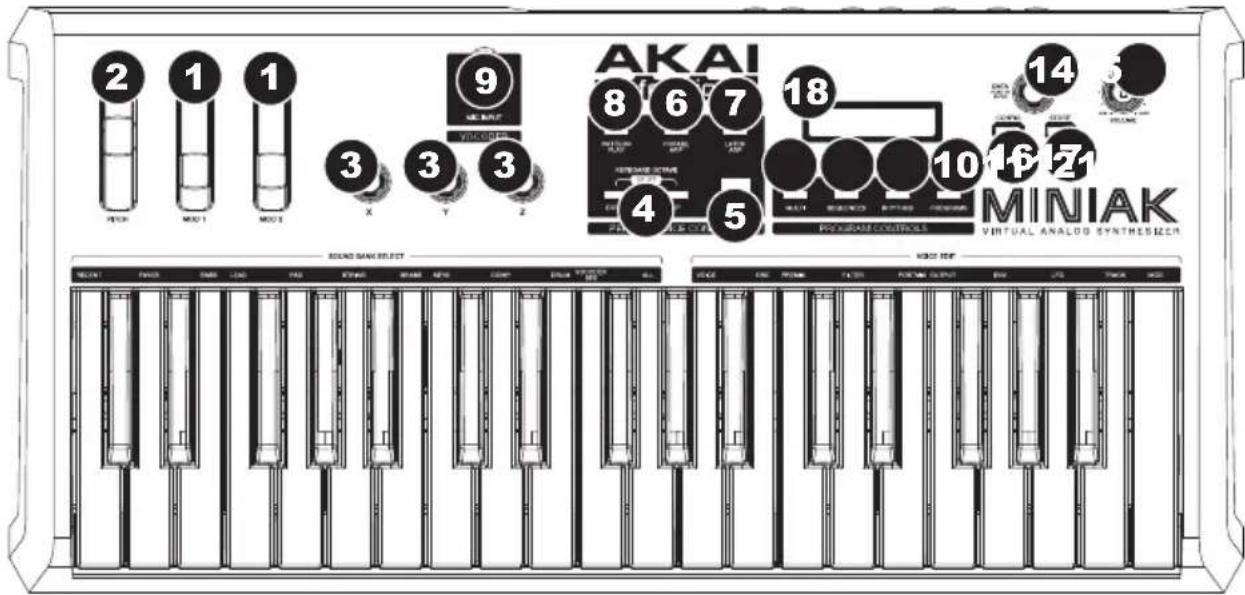
REAL-TIME CONTROLLERS
Despite its small size, the Miniak has six powerful real-time controllers. These controls put the incredible expressivity of virtual analog synthesis at your fingertips.
- (MOD1) and (MOD2) wheels: The (MOD1) wheel generally adds vibrato. (MOD2) most often sweeps the filter.
- (PITCH) wheel: The (PITCH) wheel typically raises or lowers the pitch by a whole step, allowing you to gently or heavily detune your sound.
- (X/Y/Z) knobs: The (X/Y/Z) knobs have different effects depending upon the program.
PERFORMANCE CONTROLS
The performance buttons are clustered together to the left of the display.
- [OCTAVE]: Extend the Miniak's playing range by using the two [OCTAVE] buttons. Each press of the [DOWN] or [UP] button shifts the transposition by one octave. The appropriate button glows with increasing intensity as the octave transposition increases.
- [TAP TEMPO]: The [TAP TEMPO] LED always blinks at the current tempo. Tap this button at the desired rate to determine the tempo. (For finer control, you can also hold down [TAP TEMPO] and turn the control knob.)
- [PHRASE ARP]: Use [PHRASE ARP] to capture and play back riffs that you play on the keyboard.
- [LATCH ARP]: [LATCH ARP] acts like a sustain pedal. When [LATCH ARP] is selected, notes continue to play even after you remove your hands from the keyboard. Press [LATCH ARP] a second time to turn the function off.
- [PATTERN PLAY]: [PATTERN PLAY] works along with Multis. When [PATTERN PLAY] is glowing, the accompaniment feature is active, allowing you to trigger Sequences and Rhythms within Multi Mode. When [PATTERN PLAY] is not glowing, all sequencing features are disabled, and the Miniak only plays the keys you press.
- MIC INPUT: Connect the included gooseneck microphone to this input. (Note that the microphone will be bypassed when the left audio input is being used.)
PROGRAM CONTROLS
The Program Control buttons access the Miniak's four different modes: Programs, Rhythms, Sequences, and Multi. Press one of the buttons to enter its mode. Then spin the DATA DIAL for different sounds.
- PROGRAMS: Programs are the heart of the Miniak – its lead, bass, drum, pad, and other virtual analog sounds. To jump to a Program category, hold down the [PROGRAMS] button while pressing the appropriate white key on the keyboard. The "recent" category remembers the most recent Programs you've used. Add a Program to the "faves" category by pressing the DATA DIAL twice.
- RHYTHMS: Drum grooves comprised of one or more drum sounds, each playing its own rhythm. Play the left side of the keyboard to hear the complete groove. Trigger individual drums using the keys on the right side.
- SEQUENCES: Melodic passages that you can compose and then trigger chromatically, beginning on any key.
- MULTI: The Miniak's most powerful and sophisticated mode, simultaneously combining multiple programs, rhythms, sequences, and more into powerful and expressive combinations.
DATA & VOLUME CONTROLS
- DATA DIAL: This dial can also be used to increment and decrement values and settings.
- VOLUME KNOB: Adjusts the Miniak's master volume level.
- [CONFIG]: The Miniak's configuration options. Global transposition and tuning, keyboard velocity curve, MIDI settings, and more.
- [STORE]: The [STORE] button lights when you have made edits. Press it to save your changes.
- LCD: The display is used for navigating menus, displaying data, and affecting change on Miniak's options and parameters.
SHORTCUTS
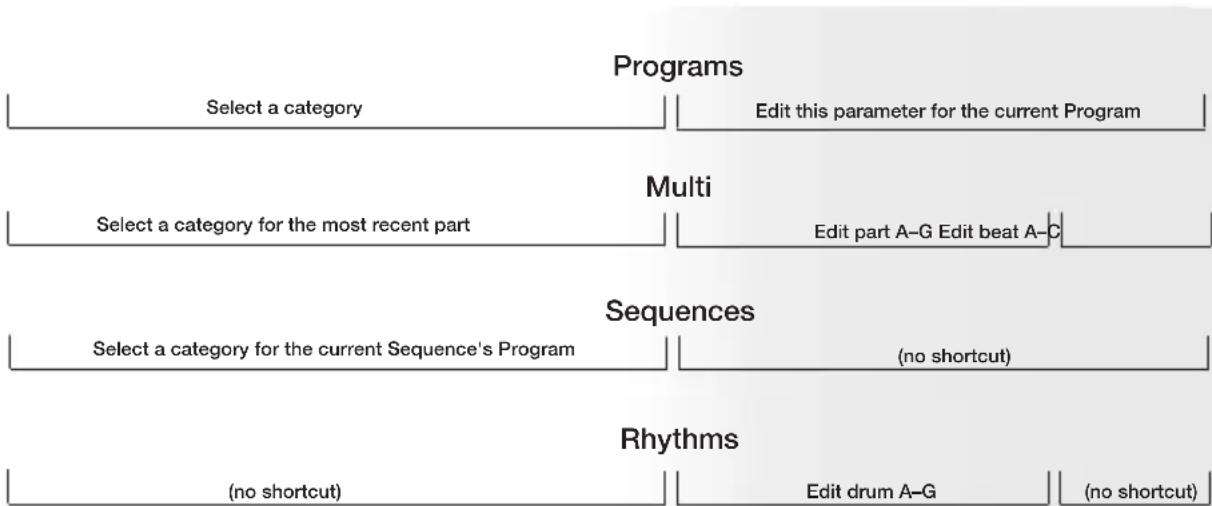
PRESS-AND-HOLD SHORTCUTS FOR THE PROGRAM CONTROLS
Hold down one of the [PROGRAMS], [RHYTHMS], [SEQUENCES] or [MULTI] buttons while playing the keyboard to access various editing and selection shortcuts.
The text printed just above the keyboard provides a key to many of these shortcuts.

flowchart
graph TD
    A["Select a category"] --> B["Edit this parameter for the current Program"]
    C["Select a category for the most recent part"] --> D["Edit part A-G Edit beat A-C"]
    E["Select a category for the current Sequence's Program"] --> F["(no shortcut)"]
    G["(no shortcut)"] --> H["Edit drum A-G"] --> I["(no shortcut)"]
    J["Multi"] --> K["Edit part A-G Edit beat A-C"]
    L["Sequences"] --> M["(no shortcut)"]
    N["Rhythms"] --> O["(no shortcut)"]
MODE-JUMPING SHORTCUTS
Access each of these shortcuts by holding one of the [PROGRAMS], [RHYTHMS], [SEQUENCES] or [MULTI] buttons and then pressing one of the other buttons.
[PROGRAMS]
Press [MULTI]: set the most recent part's Program. Press [SEQUENCES]: set the Sequence's Program. Press [RHYTHMS]: set the most recent drum's Program (for drum Programs only).
[MULTI]
Press [PROGRAMS]: jump to the most recent part's Program. Press [SEQUENCES]: jump to the Sequence of the most recent part (if any). Press [RHYTHMS]: jump to the Rhythm of the most recent beat (if any).
[SEQUENCES]
Press [PROGRAMS]: jump to the Sequence's Program. Press [MULTI]: set the most recent part's Sequence. Press [RHYTHMS]: (no shortcut).
[RHYTHMS]
Press [PROGRAMS]: jump to the Program of the most recent drum. Press [MULTI]: set the most recent beat's Rhythm. Press [SEQUENCES]: (no shortcut).
OTHER SHORTCUTS
In most areas, pressing the control knob twice (double-click) restores the default value.
Button-specific shortcuts:
[OCTAVE]: Press both [OCTAVE] buttons simultaneously to return to the default octave range of C3 through C6.
[TAP TEMPO]: Hold [TAP TEMPO] and turn the control knob for fine control over the tempo.
[PROGRAMS]: When editing a parameter, hold down the control knob and wiggle an (X/Y/Z) knob to assign the knob to that parameter.
[MULTI]: For each part, hold down [MULTI] and move a slider or the pitch wheel to jump to the controller assignment options for that part. Do the same with the (X/Y/Z) knobs.
EDITING ON THE MINIAK
Right out of the box, the Miniak offers all the great sounds and operation that most users will ever want. But, if you're a "power user," you'll find a wealth of easy-to-access editing capabilities.
To dig deep into the Miniak's capabilities, push the DATA DIAL to edit the parameters associated with the current operating mode (Programs, Multi, Sequences, Rhythms, or Config). The current mode's light will glow red once you begin editing.
Turn the DATA DIAL to cycle through various parameters. Push and turn the DATA DIAL to edit; push once more to accept your changes.
The [STORE] button lights when you have made edits. Press it to save your changes.
Push the DATA DIAL twice in quick succession to reset a parameter to its default (factory) value.
For much more detail on editing, see the Reference Manual.
CONTENIDO DE LA CAJA
COMMANDES EN TEMPS RÉEL
COMANDI IN TEMPO REALE
REAL-TIME CONTROLLER
Synthesis: Virtual analog (subtractive), noise generator, FM
Polyphony: Up to 8 voices
Timbrality: Up to 8 parts
Oscillators: 3 per voice with continuously variable waveshapes, sync, linear and exponential FM, Ring Mod, routable modulation matrix per voice
Filters: 2 multi-mode resonating filters per voice with 16 filter types
Modulation: 2 LFOs with multiple wave shapes, sample and hold, tracking generator, freely-routable modulation matrix per voice
Effects: 4 drive effects, 1 per part; master effects
Sequencing: Step sequencer, arpeggiator, drum machine/rhythm sequencer, and phrase sequencer
Program memory: Up to 1,000 programs and multi-timbral setups
Velocity sensitive: Yes
Keyboard: 37-key, semi-weighted
External control: MIDI in/out/thru
Inputs: 2 balanced 1/4" TRS, mic
Outputs: 2 balanced 1/4" TRS, 1/4" TRS headphone
Pitch wheel, two assignable Q-Link modulation wheels, X, Y, and Z parameter Controls: knobs, pattern play, phrase arpeggiator, latch arpeggiator, keyboard octave, tap tempo, program controls, data push-knob, config, store, master volume
Pedal Inputs: Assignable expression pedal, sustain pedal
AKAI
professional