
Studiophile BX8 D2 - Speaker M-AUDIO - Free user manual and instructions
Find the device manual for free Studiophile BX8 D2 M-AUDIO in PDF.



| Type | Two-way direct field studio monitor |
| Brand | M-Audio |
| Model | Studiophile BX8 D2 |
| Woofer | 8 inch (203 mm) Kevlar, magnetic shielding, high temperature voice coil, rubber surround |
| Tweeter | 1 inch (25 mm) natural silk, magnetic shielding |
| Frequency response | 38 Hz – 22 kHz |
| Crossover frequency | 2.2 kHz |
| Low frequency amplifier power | 70 W |
| High frequency amplifier power | 60 W |
| Signal-to-noise ratio | > 100 dB (typical, A-weighted) |
| Input connectors | 1 x balanced XLR, 1 x balanced/unbalanced TRS |
| Input impedance | 20 kΩ balanced, 10 kΩ unbalanced |
| Input sensitivity | 85 mV for 90 dB SPL at 1 m (max volume) |
| Protection | RF, current limiting, overheat, power on/off transients, subsonic filter, external fuse |
| Power supply | 115 V or 230 V ~50/60 Hz (selectable) |
| Power consumption | Not specified |
| Dimensions (H x W x D) | 381 x 254 x 305 mm |
| Weight | 12 kg |
| Cabinet material | High acoustic efficiency MDF panels, vinyl wrapped |
| Indicator | LED power indicator (front panel) |
| Controls | Volume, power switch, voltage selector |
| Included accessories | 1 AC power cable, user guide, safety instructions |
Frequently Asked Questions - Studiophile BX8 D2 M-AUDIO
User questions about Studiophile BX8 D2 M-AUDIO
0 question about this device. Answer the ones you know or ask your own.
Ask a new question about this device
Download the instructions for your Speaker in PDF format for free! Find your manual Studiophile BX8 D2 - M-AUDIO and take your electronic device back in hand. On this page are published all the documents necessary for the use of your device. Studiophile BX8 D2 by M-AUDIO.
USER MANUAL Studiophile BX8 D2 M-AUDIO
User Guide (English)
Introduction
The BX8 D2 was designed and tested by veteran audio engineers to meet your needs in a studio monitoring environment. It is focused on the functional goal of delivering pure, original sound without any additional coloration. The BX8 D2 monitor is self-powered, directly accepting a line-level signal from a variety of sources.
The Stadiophile BX8 D2 is designed to overcome all the limitations of conventional studio reference monitors within the digital audio environment. This system delivers a wide-range frequency response by employing two extraordinary drivers and unique crossover technology licensed by M-Audio. It boasts a stable and balanced low-mid frequency response along with a defined mid and high frequency response as well. Both drivers are magnetically shielded for desktop music production.
For pro engineers at commercial studios to home studio owners, the Stadiophile BX8 D2 sets a new affordable standard in studio monitoring.
Box Contents
1 BX8 D2 speaker
- 1 detachable AC power cord
- User Guide
- Safety & Warranty Manual
Support
For complete system requirements, compatibility information, and product registration, visit the M-Audio website: m-audio.com.
For additional product support, visit m-audio.com/support.
Features
Woofer: The woofer unit is 8 inches (203 mm) in diameter with a magnetically shielded Kevlar cone, high-temperature voice coil and damped rubber surround. It is designed to deliver balanced mid and low-frequency response. M-Audio's new BX8 D2 employs Kevlar for low-frequency driver construction. The same material used in bullet-proof vests, Kevlar's high resilience makes it ideal for use in speaker cones—although it is typically reserved for monitors with higher price tags than the BX8 D2. Needless to say, Kevlar represents a significant improvement over the polypropylene and paper used in most monitors at this price.
Tweeter: By employing a specially developed 1-inch (25 mm) silk dome with magnetic shielding, the tweeter can deliver distortion-free original sound and offer an extremely natural response. Its design minimizes reaction time by using a specially shaped silk dome for excellent delivery, and also minimizes resonance by adapting a unique internal damping technology.
Sub-Frequency Port: The air vent hole in the rear panel is called a Sub-Frequency Vent Port and is designed to allow the discharge of extremely low frequencies occurring below 60Hz .
Enclosure: Like the other components, the BX8 D2's enclosure has an important role in shaping the overall sonic response. In order to provide more stable performance, the BX8 D2's enclosure employs a special high acoustic efficiency MDF and unique interior reinforcement designed to absorb vibration and impact generated under extreme conditions. The custom design on the front panel will aid in diffraction and will benefit stereo imaging.
Network and Power Amplifiers: The active crossover network and power amplifiers for the BX8 D2 are specially designed for its woofer and tweeter. The network properly distributes low, mid, and high frequencies to the driver components in order to reduce distortion and loss of sound, thus achieving a naturally balanced sound.
In order to generate powerful, ultra-crisp sound, there are two separate power amplifiers inside the BX8 D2 for driving the woofer and tweeter separately in a high-end bi-amp structure. The power delivered to the woofer driver at a low-rated distortion is 40W , and 30W is also delivered to the tweeter.
Rear Panel
-
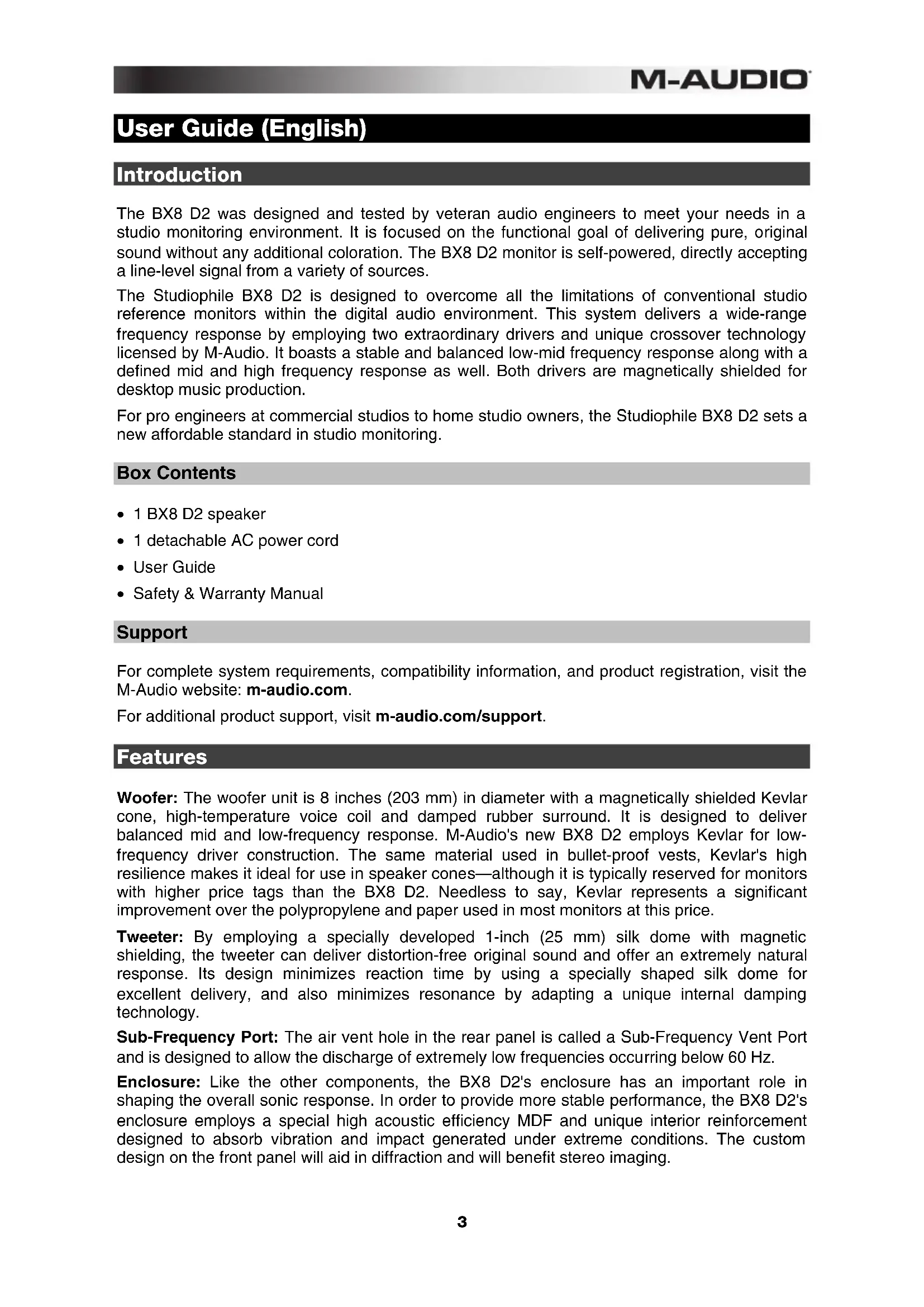
XLR Input: This jack accepts XLR input connections with either balanced or unbalanced wiring. The input wiring of an XLR connector should be as follows:
-
XLR Pin 1: signal ground (shield)
- XLR Pin 2: signal positive (+)
-
XLR Pin 3: signal negative (-)
-
TRS Input: This jack accepts 1/4 connections with either balanced or unbalanced wiring. For balanced wiring, a three-conductor TRS plug is necessary. The input wiring of a TRS connector should be as follows:
-
TRS Tip: signal positive (+)
- TRS Ring: signal negative (-)
- TRS Sleeve: signal ground (shield)
Unbalanced 1/4 wiring can be done with either a two- or three-conductor (TS or TRS) plug. A two-conductor (TS) plug automatically grounds the signal negative input, whereas a three
onductor (TRS) plug, wired unbalanced, provides the option of leaving the negative input open or grounded. We recommend that you ground the unused negative input (this can be done by wiring the ring and sleeve of the TRS plug together).
The TRS input is summed through a balanced input amplifier with the XLR input, allowing both inputs to be used simultaneously. Input specifications apply to both.
- Product Specification: This label contains the model and specification information.
- Sub-Frequency Vent Port: This port aids in reproduction of very low frequencies by discharging frequencies below 60 Hz.
- Volume Control: Use the volume control to set the output sound pressure from the BX8 D2 to proper levels as required.
- Power Switch: This switch turns the monitor on and off.
- Power Receptacle: Accepts a detachable 3-circuit line cord in order to power the monitor.
- Fuse Holder: Holds the external main fuse.
- Voltage-Select Switch: Provides two selections, 115V AC and 230V AC, and should be set to match the "house supply" (receptacle) voltage of the country or location in which the speaker is used. The 115V setting is correct for the USA, while the 230V setting is correct for most of the UK and Europe.
Front Panel
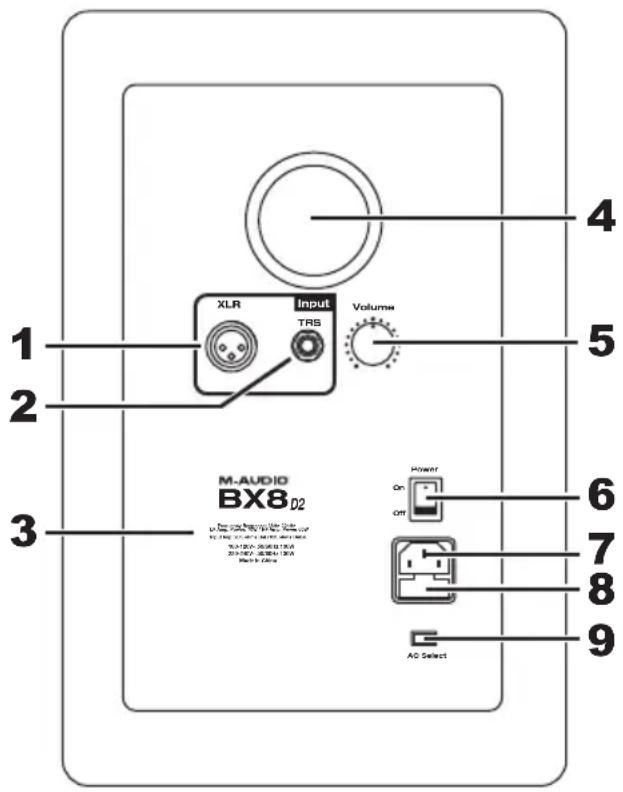
The front panel houses the Power LED, which indicates whether the speakers (amplifier) power is on or off.
- Power LED
- HF Driver (tweeter)
- LF Driver (woofer)
Installation
For optimal performance of the BX8 D2, please read the following thoroughly and carefully prior to installation.
Precautions
- Handling: Please do not touch the speaker cones. The BX8 D2 set is packaged in the box tightly, so your attention is required when taking the monitors out of the box. To avoid possible damage to the speaker units, hold both sides of the monitor in order to pull it out of the box. The speaker cones should not be touched in order to avoid damage even after they are out of the box.
- Correct Power Operation: Since the BX8 D2 contains its own amplifier, it must be connected to a power outlet using the detachable AC cable provided. Before connecting power, please make sure that the Voltage-Select Switch located on the speaker's rear panel is set to the appropriate position, as described in the rear-panel features list appearing earlier in this manual.
WARNING! Use of improper Voltage-Select Switch combinations may result in hazardous conditions and/or damage to speaker components not covered by speaker warranty.
- Connections: You can connect either an XLR balanced cable or TRS balanced/unbalanced cable from the input of each BX8 D2 to your corresponding preamp, computer or game console outputs. We recommend that you use high-quality balanced or unbalanced cables for input connections. Also, ALWAYS turn off the power of the BX8 D2 and turn the volume of the BX8 D2 down to a minimum before making the necessary connections.
XLR Balanced Connection
Assure that the power switch of the BX8 D2 is turned off and that the volume control of the BX8 D2 is turned down to a minimum. Connect the male end of an XLR balanced cable to the balanced input of the BX8 D2 (refer to the following diagram for balanced connection).
TRS Balanced/Unbalanced Connection
Assure that the power switch of the BX8 D2 is turned off and that the volume control of the BX8 D2 is turned down to a minimum. Connect the male end of a TRS balanced or TS unbalanced cable to the TRS input of the BX8 D2 (refer to the following diagram for TRS connection).
Connecting to Preamp or Computer Outputs
Before connecting, make sure the output device's power has been turned off. Plug the XLR balanced, TRS balanced or TS unbalanced cable to the corresponding output connectors of a pre-amplifier, computer or game console.
Speaker Placement
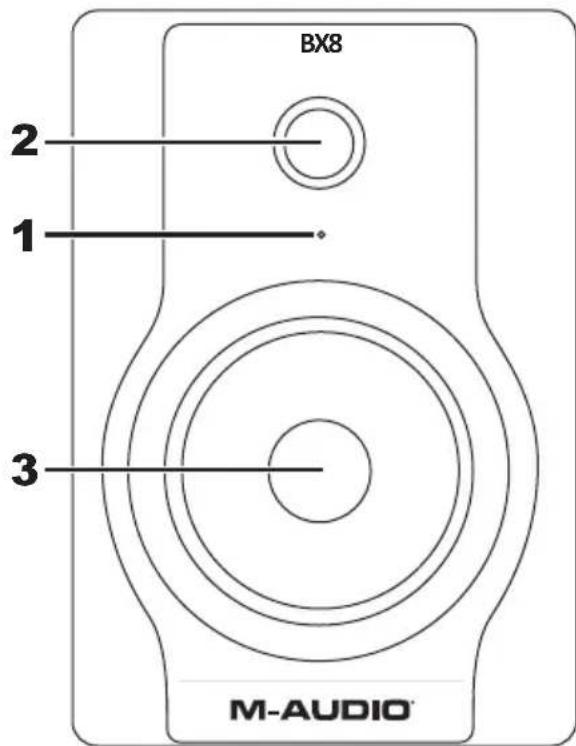
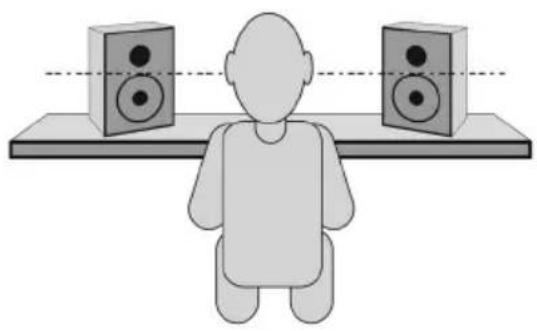
Placing the speakers is one of the most important procedures in order to monitor sound accurately. To monitor with the BX8 D2s performing to their maximum capability, an appropriate listening environment and correct placement are required. Please refer to the following for correct BX8 D2 placement.
- The two units and the listener should basically align to form a regular triangle. Refer to the following diagram.
- Position the monitors so that the top of the woofers are level with your ears in a normal listening environment. Refer to the following diagram.
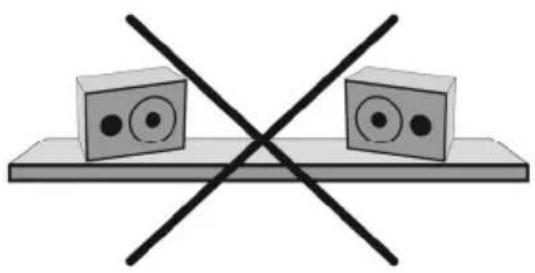
- Place the monitors vertically with the woofer on the bottom. Placing the BX8 D2 horizontally is not recommended.
Remarks: DO NOT place any obstacles that may block the flow of air in front or between the monitors. Also remove reflective materials such as glass, mirrors or metal from the monitoring environment. PLACE THOSE MATERIALS AWAY FROM THE PATH OF THE SOUND FROM THE BX8 D2s.
Technical Specifications
| Type | 2-way near-field studio reference monitors |
| LF Driver | 8-inch (203 mm) Kevlar curved cone with high temperature voice coil and damped rubber surround, magnetically shielded |
| HF Driver | 1-inch (25 mm) magnetically shielded natural silk dome |
| Frequency Response | 38 Hz – 22 KHz |
| Crossover Frequency | 2.2 KHz |
| LF Amplifier Power | 70 W |
| HF Amplifier Power | 60 W |
| Signal-to-Noise Ratio | >100 dB typical A-weighted |
| Input Connectors | 1 x XLR balanced input connector1 x TRS balanced/unbalanced input connector |
| Polarity | Positive signal at + input produce outward LF cone displacement |
| Input Impedance | 20 KΩ balanced, 10 KΩ unbalanced |
| Input Sensitivity | 85 mV pink noise input produces 90 dBA output SPL at 1 meter with volume control at maximum |
| Protection | RF interference, output current limiting, over temperature, turn-on/off transient, subsonic filter, external mains fuse. |
| Indicator | Power on/off indicator on rear panel |
| Power Requirements | Factory-programmed for 115 V ~50/60 Hz, 230 V ~50/60 Hz, or 100 V ~50/60 Hz |
| Cabinet | Vinyl-laminated high-acoustic-efficiency MDF |
| Dimension(height x width x depth) | 15" x 10" x 12"381 mm x 254 mm x 305 mm |
| Weight(without packing) | 26.4 lbs.12 kg |
- Specifications are subject to change without notice.