NSP436 - Speakers YAMAHA - Free user manual and instructions
Find the device manual for free NSP436 YAMAHA in PDF.


| Brand | YAMAHA |
| Model | NSP436 |
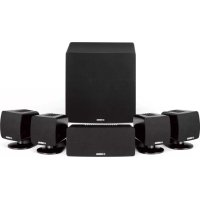
| Product type | 6.1 Home Theater Speaker Set (5 satellites, 1 center, 1 subwoofer) |
| Category | Speakers |
| Set composition | 5 NX-430P satellite speakers, 1 NX-C430 center speaker, 1 YST-SW015 subwoofer |
| Satellite speaker type | Two-way, acoustic suspension, magnetic shielding |
| Center speaker type | Two-way, acoustic suspension, magnetic shielding |
| Subwoofer type | Active Servo Processing (Advanced Yamaha Active Servo Technology) |
| Nominal input power (satellites/center) | 30 W |
| Maximum input power (satellites/center) | 100 W |
| Impedance (satellites/center) | 6 Ω |
| Frequency response (satellites/center) | 70 Hz to 60 kHz |
| Subwoofer amplifier output | 70 W / 5 Ω |
| Subwoofer frequency response | 30 Hz to 200 Hz |
| Power supply (subwoofer) | AC 220-240 V, 50/60 Hz (EU model); voltage selector 110-120/220-240 V |
| Power consumption (subwoofer) | 70 W (standby: 0.8 W) |
| Subwoofer dimensions (W x H x D) | 280 x 325 x 320 mm |
| Subwoofer weight | 9.2 kg |
| Weight of one satellite speaker | 1.2 kg |
| Center speaker weight | 1.7 kg |
| Main subwoofer functions | B.A.S.S. (Music/Movie), HIGH CUT (50-150 Hz), VOLUME, PHASE (NORM/REV), AUTO STANDBY (HIGH/LOW/OFF), QD-Bass Technology |
| Maintenance and cleaning | Use a clean, dry cloth. Do not use chemical solvents. |
| Safety | Do not expose to rain or moisture. Leave at least 20 cm of space around the subwoofer. Do not place flammable objects or liquids on the speakers. |
| Spare parts and accessories | Yamaha SPS-10MM speaker stands (optional), wall mounting brackets, anti-slip pads included |
| General information | Manual available in multiple languages (FR, EN, DE, ES, IT, NL, SV). Warranty: consult dealer. |
Frequently Asked Questions - NSP436 YAMAHA
User questions about NSP436 YAMAHA
0 question about this device. Answer the ones you know or ask your own.
Ask a new question about this device
Download the instructions for your Speakers in PDF format for free! Find your manual NSP436 - YAMAHA and take your electronic device back in hand. On this page are published all the documents necessary for the use of your device. NSP436 by YAMAHA.
USER MANUAL NSP436 YAMAHA
UNPACKING Please check to make sure all listed items are included.
natural_image
Front view of a white industrial washing machine with control panel and speaker grille (no visible text or symbols)●Speaker cables
●Câbles d'enceintes
natural_image
Coiled cable with a 4-meter measurement label and 'X 3' annotation (no other text or symbols)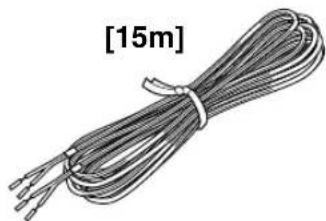
natural_image
Coiled wire with three leads, labeled [15m] (no other text or symbols)●Subwoofer cable
natural_image
Illustration of a coiled cable with two connectors (no text or symbols)●Fasteners (for NX-C430)
●Nonskid pads (for YST-SW015)
CAUTION: Read this before operating your unit.
●To assure the finest performance, please read this manual carefully. Keep it in a safe place for future reference.
- Install the speakers in a cool, dry, clean place – away from windows, heat sources, sources of excessive vibration, dust, moisture and cold. Avoid sources of humming (transformers, motors). To prevent fire or electric shock, do not expose the speakers to rain or water.
●To prevent the enclosure from warping or discoloring, do not place the speakers where they will be exposed to direct sunlight or excessive humidity.
●Avoid installing the speakers where foreign objects may fall onto them and/or where they may be exposed to liquid dripping or splashing.
Do not place the following objects on top of the speakers:
- Other components, as they might cause damage and/or discoloration on the surface of the speakers.
- Burning objects (i.e. candles), as they might cause fire, damage to the speakers and/or personal injury.
-
Containers with liquid in them, as they might cause electric shock to the user and/or damage to the speakers.
-
Do not place the speakers where they are liable to be knocked over or struck by falling objects. Stable placement will also ensure better sound performance.
●Placing the speakers on the same shelf or rack as the turntable can result in feedback. - Secure placement or installation is the owner's responsibility. YAMAHA shall not be liable for any accident caused by improper placement or installation of speakers.
● Any time you note distortion, reduce the volume control on your amplifier to a lower setting. Never allow your amplifier to be driven into "clipping". Otherwise the speakers may be damaged. - When using an amplifier with a rated output power higher than the nominal input power of the speakers, care should be taken never to exceed the speakers' maximum input.
- Do not attempt to clean the speakers with chemical solvents as this might damage the finish. Use a clean, dry cloth.
- Do not attempt to modify or fix the speakers. Contact qualified YAMAHA service personnel when any service is needed. The cabinet should never be opened for any reason.
- Be sure to read the "TROUBLESHOOTING" section regarding common operating errors before concluding that the speakers are faulty.
For YST-SW015
- Do not operate this unit upside down. It may overheat, possibly causing damage.
- Do not use excessive force on switches, controls or connection wires. When moving this unit, first disconnect the power plug and the wires connected to other equipments. Never pull the wires themselves.
●Since this unit has a built-in power amplifier, heat will radiate from the rear panel. Place the unit apart from the walls, allowing enough spaces above, behind and on both sides of the unit to prevent fire or damage. Furthermore, do not position with the rear panel facing down on the floor or other surfaces.
Be sure to allow spaces of at least 20 cm above, behind and on both sides of the unit.
- When using a humidifier, be sure to avoid condensation inside this unit by allowing enough spaces around this unit or avoiding excess humidification. Condensation might cause a fire, damage to this unit, and/or electric shock.
- Do not cover the rear panel of this unit with a newspaper, a tablecloth, a curtain, etc. in order not to obstruct heat radiation. If the temperature inside this unit rises, it may cause fire, damage to this unit and/or personal injury.
- Do not plug in this unit to a wall outlet until all connections are completed.
●The voltage to be used must be the same as that specified on the rear panel. Using this unit with a higher voltage than specified is dangerous and may cause fire, damage to this unit, and/or personal injury. YAMAHA will not be held responsible for any damage resulting from use of this unit with a voltage other than specified.
●To prevent lightning damage, disconnect the AC power plug when there is an electric storm.
●Super-bass frequencies reproduced by this unit may cause a turntable to generate a howling sound. In such a case, move this unit away from the turntable. - This unit may be damaged if certain sounds are continuously outputted at high volume level. For example, if 20 Hz–50 Hz sine waves from a test disc, bass sounds from electronic instruments, etc. are continuously outputted, or when the stylus of a turntable touches the surface of a disc, reduce the volume level to prevent this unit from being damaged.
- If you hear distorted noise (i.e. unnatural, intermittent "rapping" or "hammering" sounds) coming from this unit, reduce the volume level. Extremely loud playing of a movie soundtrack's low frequency, bass-heavy sounds or similarly loud popular music passages can damage this speaker system.
●Vibration generated by super-bass frequencies may distort images on a TV. In such a case, move this unit away from the TV set. - When disconnecting the power cord from the wall outlet, grasp the plug; do not pull the cord.
- When not planning to use this unit for a long period (i.e. vacation, etc.), disconnect the AC power plug from the wall outlet.
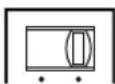
●VOLTAGE SELECTOR
(For China, Korean and General models)
The voltage selector switch on the rear panel of this unit must be set for your local main voltage BEFORE plugging this unit into the AC main supply.
Voltages are 110-120/220-240 V AC, 50/60 Hz.
110V-120V 220V -240V
↓VOLTAGE ↓
SELECTOR
Standby mode
If the POWER switch is set to the ON position and the AUTO STANDBY switch is set to the HIGH or LOW position, this unit turns into the standby mode when no signal is received by this unit for 7 to 8 minutes.
In this state, this unit is designed to consume a very small quantity of power.
WARNING
TO REDUCE THE RISK OF FIRE OR ELECTRIC SHOCK, DO NOT EXPOSE THIS UNIT TO RAIN OR MOISTURE.
The speaker package "NS-P430 and NS-P436" is designed for use in a multi-channel audio system such as a home theater system.
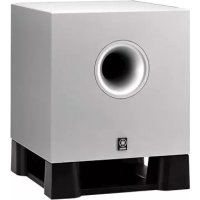
NS-P430 includes four NX-430P speaker systems, one NX-C430 speaker system and one YST-SW015 subwoofer system.
NS-P436 includes five NX-430P speaker systems, one NX-C430 speaker system and one YST-SW015 subwoofer system.
2-way acoustic-suspension speaker system used for the main and rear speakers (and rear center speaker for NS-P436)
2-way acoustic-suspension speaker system used for the center speaker
Active Servo Processing Subwoofer System with a built-in power amplifier
- This subwoofer system employs Advanced Yamaha Active Servo Technology which YAMAHA has developed for reproducing higher quality super-bass sound. (Refer to page 14 for details on Advanced Yamaha Active Servo Technology.) This super-bass sound adds a more realistic, theater-in-the-home effect to your stereo system.
●The HIGH CUT control enables you to adjust the tone balance between the subwoofer and the main speakers.
●The Automatic power-switching function saves you the trouble of pressing the STANDBY/ON button to turn the power on or turn it to the STANDBY mode.
QD·Bass
TECHNOLOGY
QD-Bass Technology
QD-Bass (Quatre Dispersion Bass) technology uses square, pyramid-shaped reflective plates to radiate the sound in four horizontal directions.
CONTENTS
UNPACKING ...... Inside of Front Cover
CAUTION 1
COMPONENTS OF THE PACKAGE ...... 2
SETTING UP THE SPEAKERS 3
Placing the subwoofer 4
Placing the center speaker 4
Mounting the main/rear/center speakers (and rear center speaker for NS-P436) on a wall 5
Mounting the main/rear speakers (and rear center speaker for NS-P436) by using commercially available speaker stands or brackets 6
CONNECTIONS....7
An example of basic connections .... 7
How to connect speaker cables to the input and output terminals of the speakers ...... 9
USING THE SUBWOOFER (YST-SW015) ... 10
Controls and their functions 10
Automatic power-switching function 11
Adjusting the subwoofer before use 12
Frequency characteristics.... 13
ADVANCED YAMAHA ACTIVE SERVO
TECHNOLOGY (for YST-SW015) 14
TROUBLESHOOTING 15
SPECIFICATIONS 16
■About this manual
- This manual is printed prior to production. Design and specifications are subject to change in part for the reason of the improvement in operativity ability, and others. In this case, the product has priority.
- Some of the illustrations and names of the package contents etc. written in this manual may differ from the actual products and the names written on the package etc.
SETTING UP THE SPEAKERS
Before making connections, place all speakers in their respective positions. The positioning of the speakers is important because it controls the whole sound quality of this system.
Place the speakers depending on your listening position by following the instructions below.
Speaker configuration
This speaker package employs a 6 speaker configuration: 2 main speakers, 2 rear speakers, a center speaker and a subwoofer.
The main speakers emit main source sound. The rear speakers emit surround sounds, and the center speaker emits center sounds (dialog etc.). The subwoofer emits reinforcing low frequencies on your audio system.
This speaker package employs a 7 speaker configuration: 2 main speakers, 2 rear speakers, a center speaker, a rear center speaker and a subwoofer.
The main speakers emit main source sound. The rear and rear center speakers emit surround sounds, and the center speaker emits center sounds (dialog etc.). The subwoofer emits reinforcing low frequencies on your audio system.
Note
In this speaker package, the same speakers (NX-430P) are used for the main and rear speakers (and rear center speaker for NS-P436).
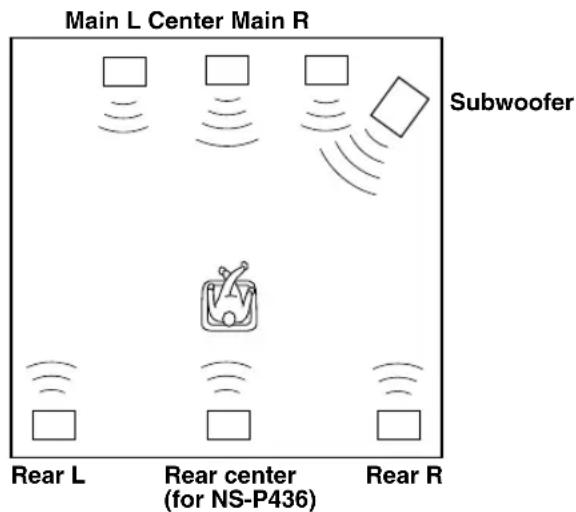
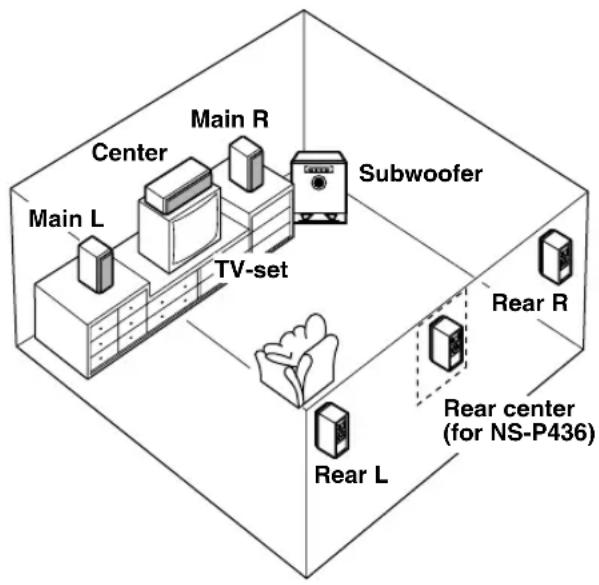
Placing speakers
Main speakers: On both sides of and at approximately the same height as the TV set.
Rear speakers: Behind your listening position, facing slightly inward. About 1.8 m (approx. 6 feet) from the floor.
Center speaker: Precisely between the main speakers.
Rear center speaker (for NS-P436):
Precisely between the rear speakers.
Subwoofer: The position of the subwoofer is not so critical because low bass tones are not highly directional.
Refer to "Placing the subwoofer" on page 4 for a recommended positioning of the subwoofer.
These speakers feature a magnetically shielded design, but there is still a chance that placing them too close to a TV set might impair picture color. Should this happen, move the speakers away from the TV set.
■ Placing the subwoofer
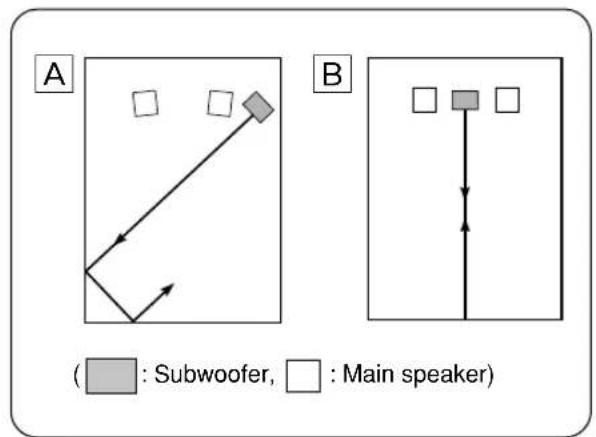
It is recommended to place the subwoofer on the outside of either the right or the left main speaker. (See fig. A.) The placement shown in fig. B is also possible, however, if the subwoofer system is placed directly facing the wall, the bass effect may die because the sound from it and the sound reflected by the wall may cancel out each other. To prevent this from happening, face the subwoofer system at an angle as shown in fig. A.
Note
There may be a case that you cannot obtain enough superbass sounds from the subwoofer when listening in the center of the room. This is because “standing waves” have been developed between two parallel walls and they cancel the bass sounds.
In such a case, face the subwoofer obliquely to the wall. It also may be necessary to break up the parallel surfaces by placing bookshelves etc. along the walls.
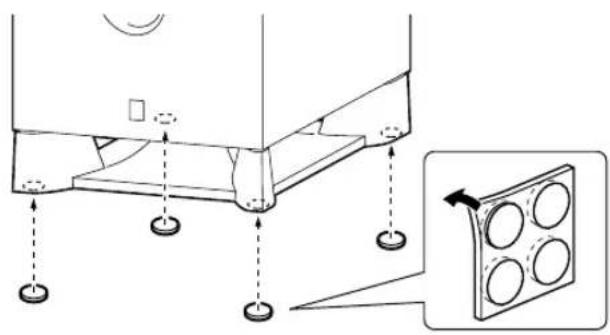
Use the nonskid pads
Put the provided nonskid pads at the four corners on the bottom of the subwoofer to prevent the subwoofer from moving by vibrations etc.
■Placing the center speaker
You can place the speaker on top of the TV if the top is flat, on the floor under the TV, or inside the TV rack. Be sure to place the speaker in a stable position.
When placing the speaker on top of the TV, to prevent the speaker from falling, attach the provided fasteners at two points on the bottom of the speaker and on the top of the TV.
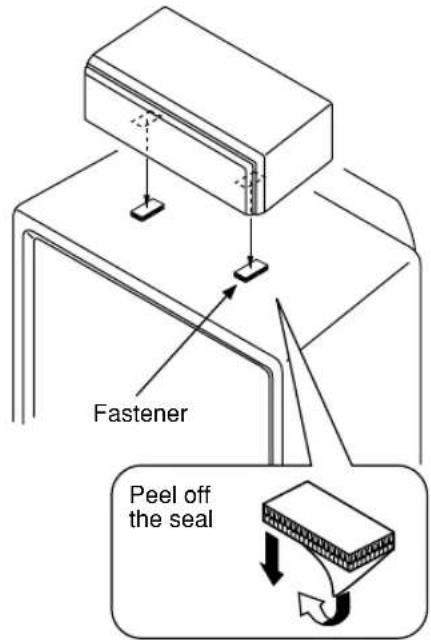
Notes
- Do not place the speaker on top of a TV whose area is smaller than the bottom of the speaker. If placed, the speaker may fall and cause injury.
- Do not place the speaker on top of a TV if the top is inclined.
- Do not touch the adhesive surface after peeling off the seal as this will weaken its adhesive strength.
●Thoroughly wipe clean the surface where the fastener is to be applied. Note that adhesive strength is weakened if the surface is dirty, oily or wet and that this may cause the center speaker to fall.
■Mounting the main/rear/center speakers (and rear center speaker for NS-P436) on the wall
1
Tapping screw
(Available at the hardware store)
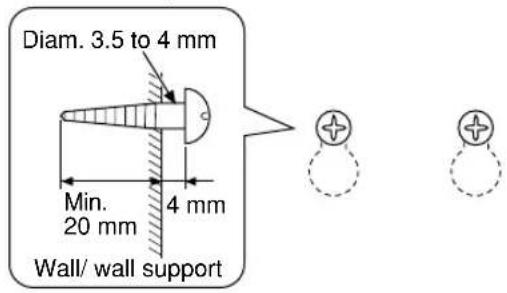
2
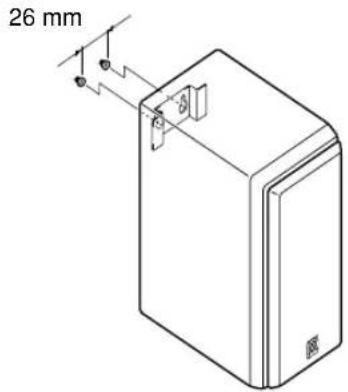
Main/rear/rear center (for NS-P436)
Center
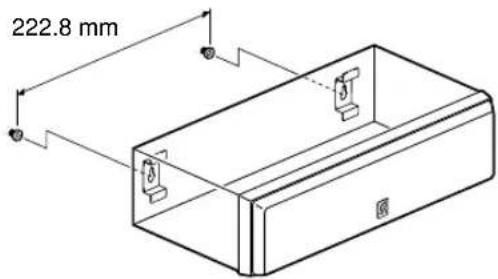
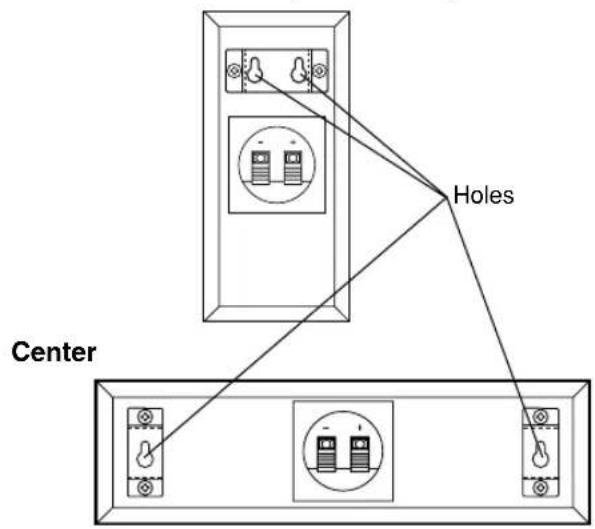
You can mount the main, rear and/or center speakers (and/or rear center speaker for NS-P436) on a wall. To mount the speakers on a wall, use the holes of the brackets attached on the speakers' back panels.
Main/rear/rear center (for NS-P436)
1 Fasten two screws into a firm wall or wall support at the interval shown below.
Main/rear/rear center (for NS-P436) ..... 26 mm (1")
Center 222.8 mm (8-3/4")
2 Hang the speaker by mounting the holes on the protruding screws.
* Make sure that the screws are securely affixed by the narrow parts of the holes.
WARNING
●Each speaker weighs as follows.
Main/rear/rear center (for NS-P436) .... 1.2 kg (2 lbs. 10 oz.) Center .... 1.7 kg (3 lbs. 12 oz.)
Do not mount them on thin plywood or a wall composed of a soft surface material. If mounted, the screws may pull out of the flimsy surface and the speakers may fall. This may damage the speakers or cause personal injury.
- Do not affix the speakers to a wall using nails, adhesives, or any other unstable hardware. Long-term use and vibrations may cause the speakers to fall.
- To avoid accidents resulting from tripping over loose speaker cables, fix the cables to the wall.
- Select an appropriate position on the wall to mount the speaker so that no one will injure his/her head or face.
■Mounting the main/rear speakers (and rear center speaker for NS-P436) by using commercially available speaker stands or brackets
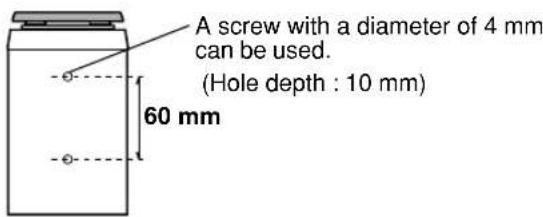
You can also use the screw holes on the bottom of the speaker for installing the speakers on commercially available speaker stands (if you do not use the attached mounting brackets.)
Using the Yamaha Speaker Stand SPS-10MM (option)
By using the Yamaha Speaker Stand SPS-10MM, speakers can be placed on the floor. (Two stands make a set.)
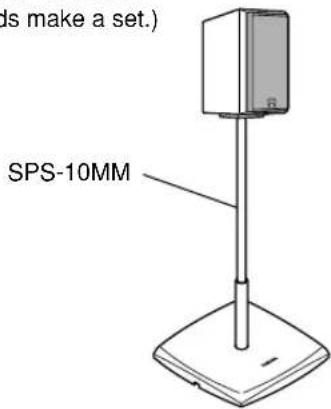
* The SPS-10MM is not available in some areas.
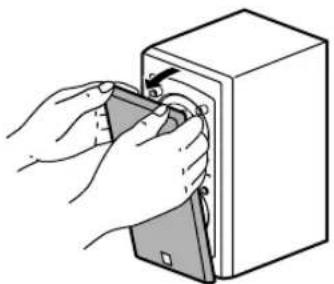
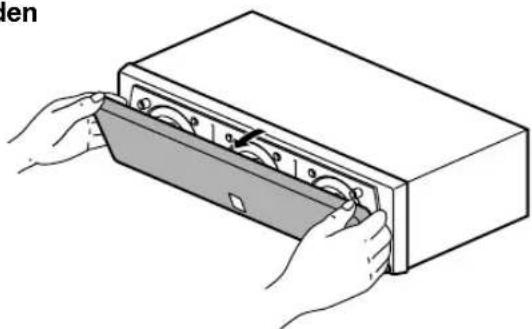
Removing the front cover
Main/rear/rear center (for NS-P436)
natural_image
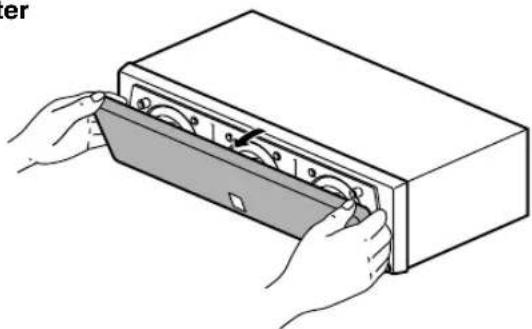
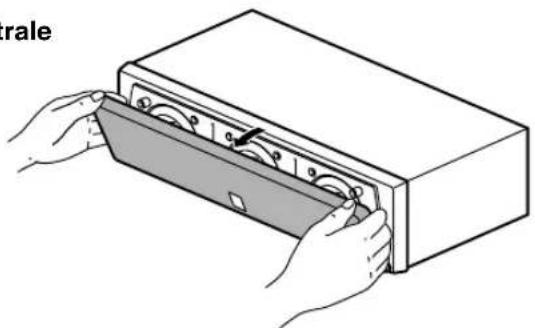
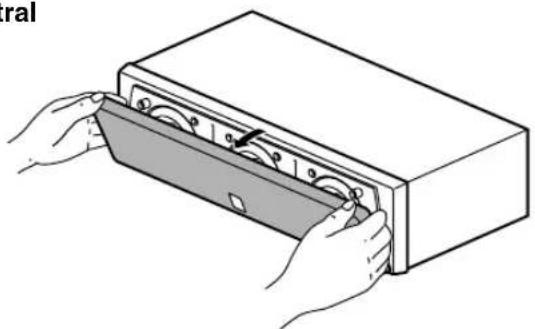
Illustration of hands inserting a device into a box (no text or symbols)The front cover is fastened to the enclosure at four points and can be removed if desired. To remove the cover, hold on to both sides and slowly pull straight away from the speaker. To reattach, line up the four holes on the inner surface of the cover with the four corresponding pegs on the speaker and push gently.
Note
When the cover is removed, be sure not to touch the speaker units with your hands or to exert excessive force with tools.
Center
natural_image
Illustration of hands installing or opening a device into a rectangular box (no text or symbols visible)CONNECTIONS
Caution: Plug in the subwoofer and other audio/video components after all connections are completed.
■An example of basic connections
flowchart
graph TD
    A["Main speakers"] --> B["Front R"]
    A --> C["Front L"]
    D["Center speaker"] --> E["Center"]
    F["Amplifier"] --> G["Speaker 1"]
    F --> H["Speaker 2"]
    I["Subwoofer"] --> J["Input: MONO, AUTO STANDBY, PHASE OFF LOW HIGH NORM REV"]
    J --> K["Output: OUT INPUT"]
    K --> L["Rear speaker Right"]
    K --> M["Rear center speaker (for NS-P436)"]
    K --> N["Rear speaker Left"]
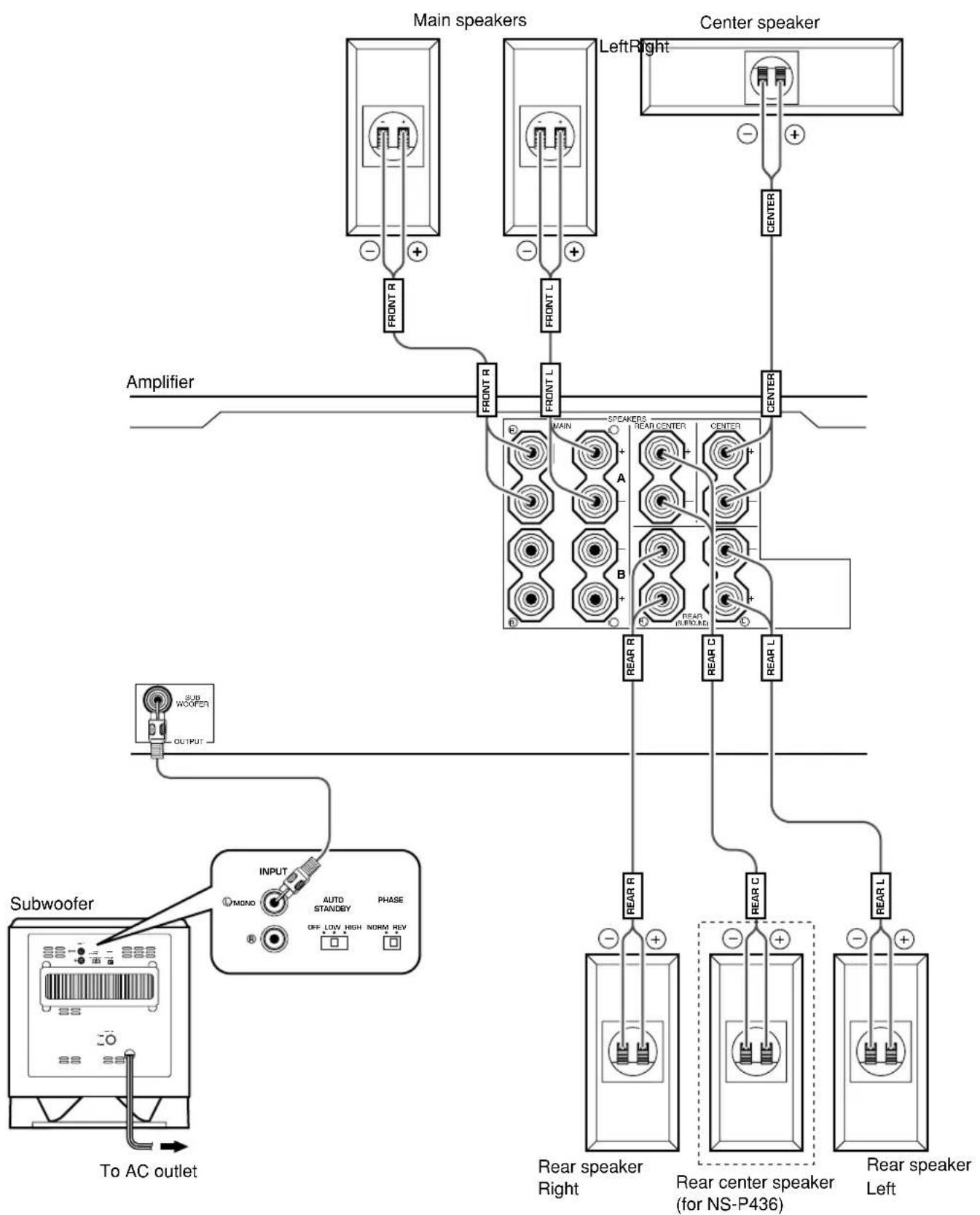
- Connect the main, center and rear speakers (and rear center speaker for NS-P436) to the speaker output terminals of your amplifier with the provided speaker cables.
* The provided speaker cables have labels marked FRONT L, FRONT R, CENTER, REAR L, REAR R (and REAR C for NS-P436). Connect each speaker cable to the corresponding speaker by following the figure on page 7.
(The speaker cables marked FRONT L/R are used for connecting the main speakers to the MAIN speakers' terminals on the amplifier.)
* Connect each speaker making sure not to reverse the polarity (+, -). If the speaker is connected with reversed polarity, the sound will be unnatural and lack bass.
* For the main and rear speakers only, connect one speaker to the left (marked L) terminals of your amplifier, and another speaker to the right (marked R) terminals.
- Connect the subwoofer to the line output (pin jack) terminal(s) of the amplifier.
* To connect with a YAMAHA DSP amplifier (or AV receiver), connect the SUBWOOFER (or LOW PASS etc.) terminal on the rear of the DSP amplifier (or AV receiver) to the Ⓐ/MONO INPUT terminal of the subwoofer.
* To connect the subwoofer to the SPLIT SUBWOOFER terminals on the rear of the DSP amplifier, connect them to both the left Ⓐ/MONO and right Ⓡ INPUT terminals of the subwoofer.
Note
When connecting to a monaural line output terminal of the amplifier, connect to the Ⓛ/MONO INPUT terminal.
■How to connect speaker cables to the input terminals of the speakers
For connections, keep the speaker cables as short as possible. Do not bundle or roll up the excess part of the cables. If the connections are faulty, no sound will be heard from the speakers.
Main speakers
Center speaker
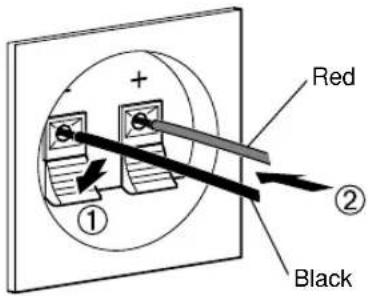
Use the provided speaker cables (4 m). One side of the speaker cable is red and the other side is black.
Connect the (+) terminals on both the speaker and the amplifier using the red side of the cable. Connect the (−) terminals on both components using the black side.
Red: positive (+)
Black: negative (−)
Rear speakers
Rear center speaker (for NS-P436)
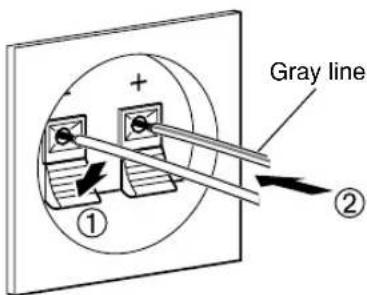
Use the provided speaker cables (15 m). One side of the speaker cable has a gray line and the other side has no line. Connect the (+) terminals on both the speaker and the amplifier using the side with a gray line. Connect the (−) terminals on both components using the side with no line.
Red: positive (+)
Black: negative (−)
Before connecting
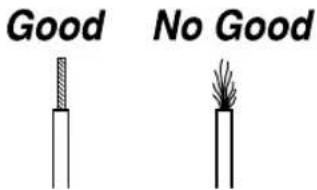
Remove the insulation coating at the extremity of each speaker cable by twisting the coating off.
How to Connect:
①Press and hold the terminal's tab, as shown in the figure.
②Insert the bare wire.
③ Release your finger from the tab to allow it to lock securely on the cable's wire end.
④Test the firmness of the connection by pulling lightly on the cable at the terminal.
Note
Do not let the bare speaker wires touch each other as this could damage the speaker or the amplifier, or both of them.
USING THE SUBWOOFER (YST-SW015)
■ Controls and their functions
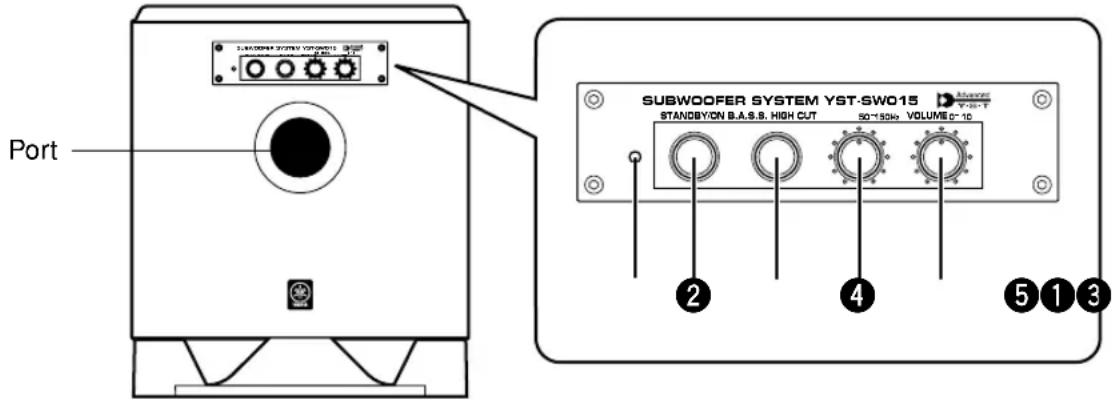
Front panel
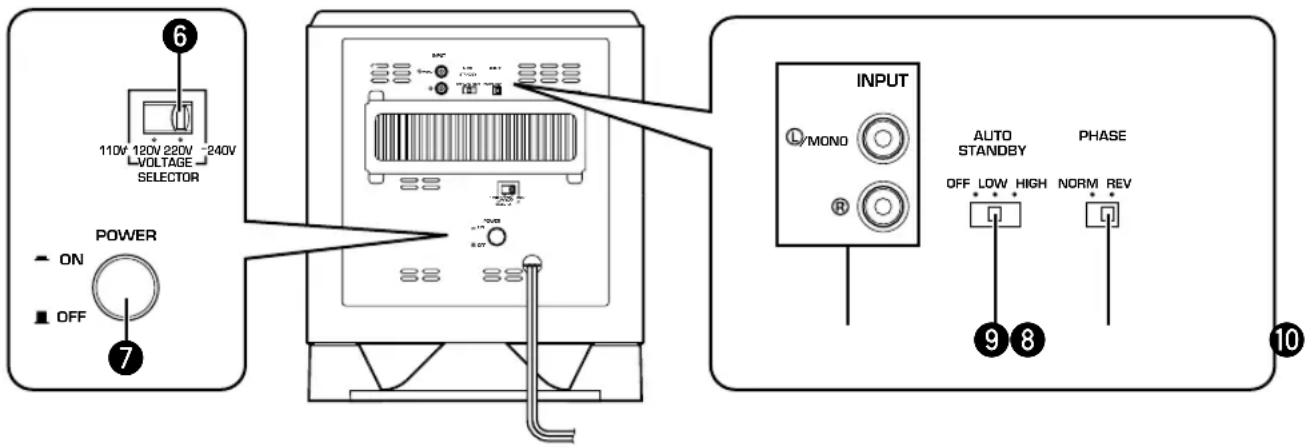
Rear panel (General model)
1 Power indicator
Lights up in green while the subwoofer is on.
Lights up in red while the subwoofer is set in the standby mode by the operation of the automatic power-switching function.
Goes off when the subwoofer is set in the standby mode.
② STANDBY/ON button
Press this button to turn on the power when the POWER (7) switch is set in the ON position. (The power indicator lights up in green.)
Press again to set the subwoofer in the standby mode. (The power indicator goes off.)
Standby mode
The subwoofer is still using a small amount of power in this mode.
③ B.A.S.S. (Bass Action Selector System) button
When this button is pressed in to the MUSIC position, the bass sound in audio software is well reproduced.
By pressing the button again so that it pops out at the MOVIE position, the bass sound in video software is well reproduced.


MOVIE
MUSIC
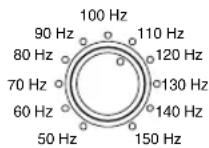
4 HIGH CUT control
Adjusts the high frequency cut off point.
Frequencies higher than the frequency selected by this control are all cut off (and no output).
* One graduation of this control represents 10 Hz.
⑤ VOLUME control
Adjusts the volume level. Turn the control clockwise to increase the volume, and counterclockwise to decrease the volume.
6 VOLTAGE SELECTOR switch
(For China, Korean and General models)
If the preset setting of the switch is incorrect, set the switch to the proper voltage range (220V-240V or 110V-120V) of your area.
Consult your dealer if you are unsure of the correct setting.
WARNING
Be sure to unplug the subwoofer before setting the VOLTAGE SELECTOR switch correctly.
7 POWER switch
Normally, set this switch to the ON position to use the subwoofer. In this state, you can turn on the subwoofer or turn the subwoofer into the standby mode by pressing the STANDBY/ON (②) button. Set this switch to the OFF position to completely cut off the subwoofer's power supply from the AC line.
8 INPUT terminals
Used to input line level signals from the amplifier. (Refer to "CONNECTIONS" for details.)
9 AUTO STANDBY (HIGH/LOW/OFF) switch
This switch is originally set to the OFF position. By setting this switch to the HIGH or LOW position, the subwoofer's automatic power-switching function operates as described below. If you do not need this function, leave this switch in the OFF position.
* Make sure to change the setting of this switch only when the subwoofer is set in the standby mode by pressing the STANDBY/ON (2) button.
10 PHASE switch
Normally this switch is to be set to the REV (reverse) position. However, according to the listening condition or your preference, there may be a case when better sound quality is obtained by setting this switch to the NORM (normal) position. Select the better position by monitoring the sound.
■ Automatic power-switching function
If the source being played is stopped and the input signal is cut off for 7 to 8 minutes, the subwoofer automatically switches to the standby mode. (When the subwoofer switches to the standby mode by the automatic power-switching function, the power indicator lights up in red.) When you play a source again, the power of the subwoofer turns on automatically by sensing audio signals input to the subwoofer.
This function operates by sensing a certain level of low frequency input signal. Usually set the AUTO STANDBY switch to the LOW position. However, if this function does not operate smoothly, set the switch to the HIGH position. In the HIGH position, the power will turn on even with a low level of input signal. But please be aware that the subwoofer may not switch to the standby mode when there is an extremely low input signal.
* The power might turn on unexpectedly by sensing noise from other appliances. If that occurs, set the AUTO STANDBY switch to the OFF position and use the STANDBY/ON button to switch the power between on and in the standby mode manually.
* This function detects the low-frequency components below 200 Hz of the input signals (i.e., the explosion in the action movie, the sound of the bass guitar or the bass drum, etc.).
* The minutes required to switch the subwoofer to the standby mode might change by sensing noise from other appliances.
This function is available only when the power of the subwoofer is on (by pressing the STANDBY/ON button).
■ Adjusting the subwoofer before use
Before using the subwoofer, adjust the subwoofer to obtain the optimum volume and tone balance between the subwoofer and the main speakers by following the procedures described below.
Front panel
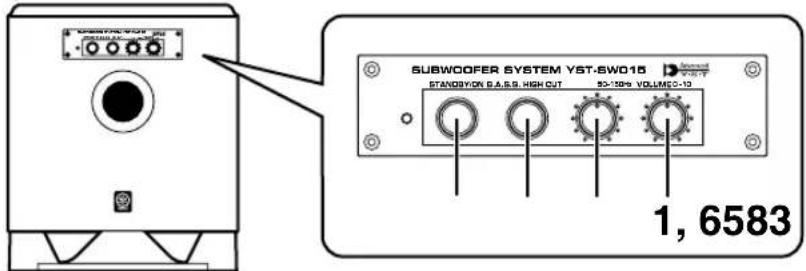
Rear panel
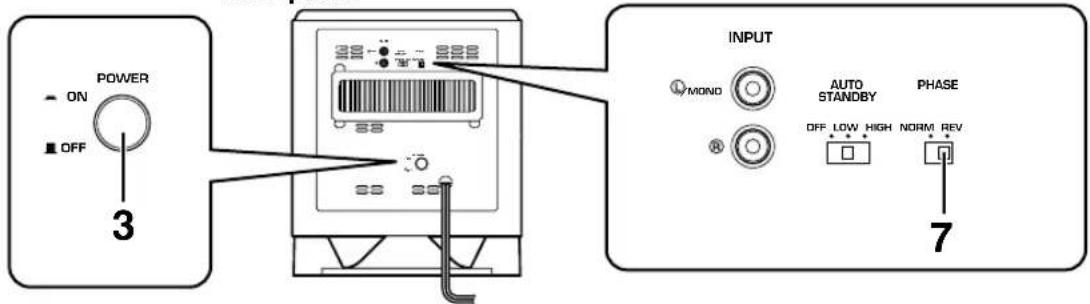
1 Set the VOLUME control to minimum (0).
2 Turn on the power of all the other components.
3 Make sure that the POWER switch is set to the ON position, then press the STANDBY/ON button to turn on the subwoofer.
* The Power indicator lights up in green.
4 Play a source containing low-frequency components and adjust the amplifier's volume control to the desired listening level.
5 Adjust the HIGH CUT control to the position where the desired response can be obtained.
This system is designed so that the optimum tone balance between the subwoofer and the main speakers (NX-430P) is obtained when this control is set at 110 Hz. However, the tone balance may change depending on the room size, the distance from the subwoofer to the main speakers, etc. So, if you prefer, turn the HIGH CUT control and set it to a position where a better tone balance is obtained.
6 Increase the volume gradually to adjust the volume balance between the subwoofer and the main speakers.
7 Set the PHASE switch to the position which gives you the better bass sound.
Normally, set the switch to the REV (reverse) position. If the desired response cannot be obtained, set the switch to the NORM (normal) position.
8 Select "MOVIE" or "MUSIC" according to the played source.
MOVIE: When a movie type source is played, the low-frequency effects are enhanced to allow the listener enjoy more powerful sound. (The sound will be thicker and deeper.)
MUSIC: When an ordinary music source is played, the excessive low-frequency components are cut off to make the sound clearer. (The sound will be lighter and reproduces the melody line more clearly.)
- Once the volume balance between the subwoofer and the main speakers is adjusted, you can adjust the volume of your whole sound system by using the amplifier's volume control.
However, if you change the main speakers NX-430P to others, you must make this adjustment again.
- For adjusting the VOLUME control, the HIGH CUT control and the PHASE switch, refer to “Frequency characteristics” on the next page.
■ Frequency characteristics
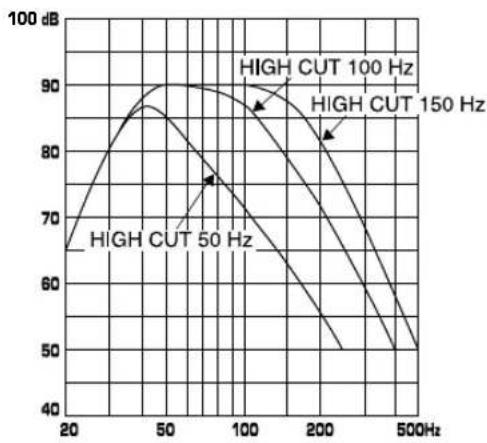
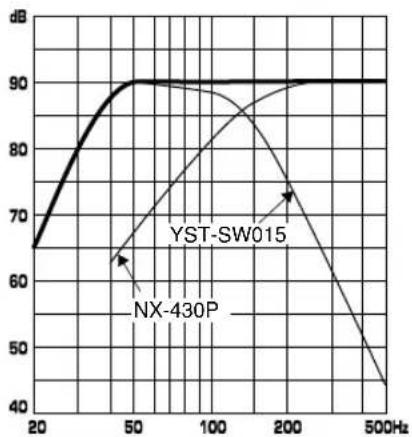
Adjustment of the VOLUME control, the HIGH CUT control and the PHASE switch should be changed depending on the room size, the distance from the subwoofer to the main speakers, sources, etc.
Following figures show the optimum adjustment of each control and the frequency characteristics when this subwoofer is combined with NX-430P.
Frequency characteristics of this subwoofer (YST-SW015)
line
| Frequency | High CUT 50 Hz | High CUT 100 Hz | High CUT 150 Hz | | --------- | --------------- | ---------------- | ---------------- | | 20 | 68 | - | - | | 50 | 88 | - | - | | 100 | 76 | 90 | - | | 200 | - | - | 83 | | 500 | - | - | 50 |- When combined with NX-430P
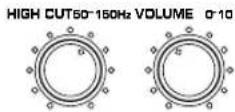
PHASE—Set to the REV (reverse) position.
B.A.S.S.—MOVIE
line
| Frequency | YST-SW015 (dB) | NX-430P (dB) | | --------- | -------------- | ------------ | | 20 | 65 | - | | 50 | 90 | 65 | | 100 | 90 | - | | 200 | 90 | 75 | | 500 | 90 | 45 |ADVANCED YAMAHA ACTIVE SERVO TECHNOLOGY (for YST-SW015)
The theory of Yamaha Active Servo Technology has been based upon two major factors, the Helmholtz resonator and negative-impedance drive. Active Servo Processing speakers reproduce the bass frequencies through an “air woofer”, which is a port or opening in the speaker’s cabinet. This opening is used instead of, and performs the functions of, a woofer in a conventionally designed speaker system. Thus, signals of low amplitude within the cabinet can, according to the Helmholtz resonance theory, be outputted from this opening as waves of great amplitude if the size of the opening and the volume of the cabinet are in the correct proportion to satisfy a certain ratio.
In order to accomplish this, moreover, the amplitudes within the cabinet must be both precise and of sufficient power because these amplitudes must overcome the “load” presented by the air that exists within the cabinet.
Thus it is this problem that is resolved through the employment of a new design in which the amplifier supplies special signals. If the electrical resistance of the voice coil could be reduced to zero, the movement of the speaker unit would become linear with respect to signal voltage. To accomplish this, a special negative-impedance output-drive amplifier for subtracting output impedance of the amplifier is used. By employing negative-impedance drive circuits, the
amplifier is able to generate precise, low-amplitude, low-frequency waves with superior damping characteristics. These waves are then radiated from the cabinet opening as high-amplitude signals. The system can, therefore, by employing the negative-impedance output drive amplifier and a speaker cabinet with the Helmholtz resonator, reproduce an extremely wide range of frequencies with amazing sound quality and less distortion.
The features described above, then, are combined to be the fundamental structure of the conventional Yamaha Active Servo Technology.
Our new Active Servo Technology — Advanced Yamaha Active Servo Technology — adopted Advanced Negative Impedance Converter (ANIC) circuits, which allows the conventional negative impedance converter to dynamically vary in order to select an optimum value for speaker impedance variation. With this new ANIC circuits, Advanced Yamaha Active Servo Technology can provide more stable performance and improved sound pressure compared with the conventional Yamaha Active Servo Technology, resulting in more natural and dynamic bass reproduction.
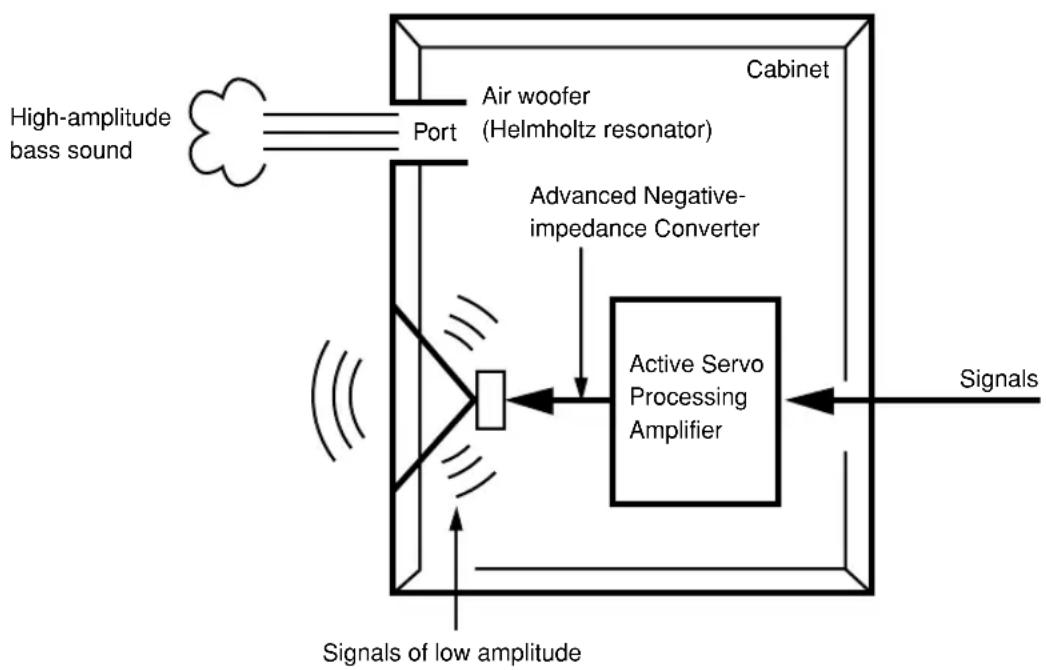
flowchart
graph TD
    A["High-amplitude bass sound"] --> B["Port"]
    B --> C["Air woofer (Helmholtz resonator)"]
    C --> D["Advanced Negative-impedance Converter"]
    D --> E["Active Servo Processing Amplifier"]
    E --> F["Signals of low amplitude"]
    E --> G["Cabinet"]
    E --> H["Signals"]
Refer to the chart below when this unit does not function properly. If the problem you are experiencing is not listed below or if the instructions given below do not help, disconnect the power cord and contact your authorized YAMAHA dealer or service center.
| Problem | Cause | What to Do |
| No sound. | Speaker cables are not connected securely. | Connect them securely. |
| Sound level is too low. | Speaker cables are not connected correctly. | Connect them correctly, that is L (left) to L, R (right) to R, “+” to “+” and “-” to “-”. |
For YST-SW015
| Problem | Cause | What to Do |
| Power is not supplied even though the STANDBY/ON button is set to the ON position. | The power plug is not securely connected. | Connect it securely. |
| The POWER switch is set to the OFF position. | Set the POWER switch to the ON position. | |
| No sound. | The VOLUME control is set to 0. | Turn the VOLUME control to the right. |
| Speaker cables are not connected securely. | Connect them securely. | |
| Sound level is too low. | Speaker cables are not connected correctly. | Connect them correctly, that is L (left) to L, R (right) to R, “+” to “+” and “-” to “-”. |
| Setting of the PHASE switch is not proper. | Set the switch to the other position. | |
| A source sound with few bass frequencies is played. | Play a source sound with bass frequencies.Set the HIGH CUT control to a higher position. | |
| It is influenced by standing waves. | Reposition the subwoofer or break up the parallel surface by placing bookshelves etc. along the walls. | |
| The subwoofer does not turn on automatically. | The POWER switch is set to the OFF position. | Set the POWER switch to the ON position. |
| The STANDBY/ON button is set to the OFF position. | Set the STANDBY/ON button to the ON position. | |
| The AUTO STANDBY switch is set to the OFF position. | Set the AUTO STANDBY switch to the “HIGH” or “LOW” position. | |
| The level of input signal is too low. | Set the AUTO STANDBY switch to the “HIGH” position. | |
| The subwoofer does not turn into the standby mode automatically. | There is an influence of noise generated from external appliances etc. | Move the subwoofer further away from such appliances and/or reposition the connected speaker cables.Otherwise, set the AUTO STANDBY switch to the “OFF” position. |
| The AUTO STANDBY switch is set to the OFF position. | Set the AUTO STANDBY switch to the “HIGH” or “LOW” position. | |
| The subwoofer turns into the standby mode unexpectedly. | The level of input signal is too low. | Set the AUTO STANDBY switch to the “HIGH” position. |
| The subwoofer turns on unexpectedly. | There is an influence of noise generated from external appliances etc. | Move the subwoofer farther away from such appliances and/or reposition the connected speaker cables.Otherwise, set the AUTO STANDBY switch to the “OFF” position. |
■ NX-430P, NX-C430
Type ...... 2-way acoustic-suspension speaker system Magnetic shielding type
Driver
Nominal Input Power 30W
Maximum Input Power 100W
Impedance 6Ω
Frequency Response 70 Hz to 60 kHz
Sensitivity
Dimensions (W x H x D)
(3-7/16" x 7-1/4" x 5-13/16")
(10-3/4"×3-3/16"×5-13/16")
Weight
■ YST-SW015
Type ...... Advanced Yamaha Active Servo Technology Magnetic shielding type
Driver 16 cm (6-1/2") cone woofer
Amplifier Output 70 W/5Ω
Frequency Response 30 Hz to 200 Hz
Power Supply
U.S.A. and Canada models ...... AC 120V, 60 Hz
U.K. and Europe models ...... AC 230V, 50 Hz
Australia model.... AC 240V, 50 Hz
China, Korean and General models
AC 110-120/220-240V, 50/60 Hz
Power Consumption 70 W
Standby Power Consumption 0.8 W
Dimensions (W x H x D) ..... 280 mm x 325 mm x 320 mm (11" x 12-13/16" x 12-5/8")
Weight 9.2 kg (20 lbs. 4 oz.)
* Specifications are subject to change without notice due to product improvements.
Dimensions (L x H x P)
Poids
■ YST-SW015
natural_image
Illustration of hands inserting a device into a box (no text or symbols)natural_image
Illustration of hands inserting a device into a box (no text or symbols visible)Hinweis
PLACERING AV HÖGTALARNA 3
HÖGTALAREN (YST-SW015) 10
PLACERING AV HÖGTALARNA
natural_image
Illustration of hands inserting a card into a rectangular box (no text or symbols)COMPONENTI INCLUSI NEL PACCHETTO....2
INSTALLAZIONE DEGLI ALTOPARLANTI.....3
Pozisionamento del subwoofer 4
natural_image
Illustration of hands inserting a card into a box (no text or symbols)Centrale
natural_image
Illustration of hands installing or removing a device into a rectangular box (no text or symbols)Dimensioni (L x A x P)
Peso
■YST-SW015
Tipo ...... Advanced Yamaha Active Servo Technology tipo con schermatura magnetica
Pilota ....woofer conico da 16 cm
flowchart
graph TD
    A["Altavoz de ultragraves"] --> B{Flow Direction}
    B --> C["Square at top"]
    B --> D["Square at bottom"]
    E["Altavoz principal"] --> F["Square at bottom"]
    E --> G["Square at top"]
    style A fill:#ccc,stroke:#333
    style E fill:#ccc,stroke:#333
natural_image
Illustration of hands inserting a device into a box (no text or symbols)Central
natural_image
Illustration of hands installing or removing a device into a rectangular box (no text or symbols)natural_image
Illustration of hands inserting a device into a box (no text or symbols visible)Midden
natural_image
Illustration of hands installing or removing a device into a rectangular box (no text or symbols)Driver 16 cm konus-woofer