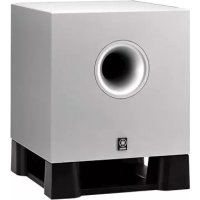
NSU40P - Speakers YAMAHA - Free user manual and instructions
Find the device manual for free NSU40P YAMAHA in PDF.


| Type | Satellite speaker 2-way acoustic suspension |
| Brand | YAMAHA |
| Model | NSU40P |
| Category | Speakers |
| Magnetic shielding | Yes |
| Driver | 5 cm cone type in spruce |
| Nominal input power | 15 W |
| Maximum input power | 50 W |
| Impedance | 4 Ω |
| Frequency response | 120 Hz – 25 kHz |
| Sound pressure (Sensitivity) | 82 dB |
| Dimensions (W × H × D) | 70 mm × 95 mm × 118 mm |
| Weight | 0.3 kg |
| Supplied speaker cables | 3 m × 3, 7 m × 2 |
| Included accessories | Cable clamp, anti-slip pads (20), monitor bracket |
| Recommended use | Home cinema system (5 satellites) |
| Wall mounting | Possible (4 mm self-tapping screws, not supplied) |
| Front angle adjustment | Yes, via screw under the bracket |
| Maintenance and cleaning | Clean dry cloth, no chemical solvents |
| Safety | Do not exceed maximum input, avoid distortion |
| Repairability | Spare parts not listed, consult authorized service |
Frequently Asked Questions - NSU40P YAMAHA
User questions about NSU40P YAMAHA
0 question about this device. Answer the ones you know or ask your own.
Ask a new question about this device
Download the instructions for your Speakers in PDF format for free! Find your manual NSU40P - YAMAHA and take your electronic device back in hand. On this page are published all the documents necessary for the use of your device. NSU40P by YAMAHA.
USER MANUAL NSU40P YAMAHA
See page 3 on how to connect the speakers to your amplifier or receiver.
Please read the following operating precautions before use. YAMAHA will not be held responsible for any damage and/or injury caused by not following the cautions below.
- To assure the finest performance, please read this manual carefully. Keep it in a safe place for future reference.
- To prevent the enclosure from warping or discoloring, do not place the speakers where they will be exposed to direct sunlight or excessive humidity.
- Do not place the speakers where they are liable to be knocked over or struck by falling objects. Stable placement will also ensure better sound performance.
- Placing the speakers on the same shelf or rack as the turntable can result in feedback.
- Any time you note distortion, reduce the volume control on your amplifier to a lower setting. Never allow your amplifier to be driven into "clipping". Otherwise the speakers may be damaged.
- When using an amplifier with a rated output power higher than the nominal input power of the speakers, care should be taken never to exceed the speakers' maximum input.
- Do not attempt to clean the speakers with chemical solvents as this might damage the finish. Use a clean, dry cloth.
- Secure placement or installation is the owner's responsibility. YAMAHA shall not be liable for any accident caused by improper placement or installation of speakers.
These speakers feature a magnetically shielded design, but there is still a chance that placing them too close to a TV or a computer monitor might impair picture color. Should this happen, move the speakers away from the TV or the computer monitor.
Unpacking
After unpacking, check that the following parts are included.
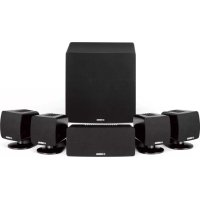
- Satellite speaker x 5
- Accessories
- Speaker cable (3m) x 3
- Speaker cable (7m) x 2
- Cable holder x 1
- Pad x 20
- Fastener x 1
Setting up the speakers
This speaker package is designed to be suitable for use in a home theater sound system.
The included five full-range satellite speakers are all the same models. When using these speakers in a home theater sound system, assign them to two front speakers, one center speaker and two rear speakers respectively.
Recommended speaker placement
Before making connections, place all speakers in their respective positions. The positioning of the speakers is important because it controls the overall sound quality of your audio system.
Place the speakers depending on your listening position by following the instructions below.
* The speakers can be mounted on a wall. (See the next page.)
Front speakers: On both sides of and at approximately the same height as the TV (or computer monitor).
Rear speakers: Behind your listening position or on both sides of the listening room. Normally, set the rear speakers at positions higher than your ears when you sit at the listening position.
Center speaker: Precisely between the front speakers.
* When mounting the center speaker on the monitor, see the next page.
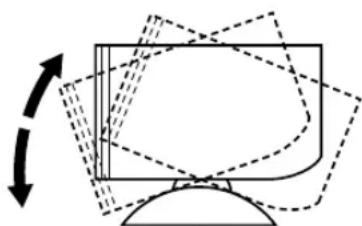
■ Adjusting the front angle of the speakers
The front angle of the speakers can be adjusted as shown below.
1 Loosen the screw on the bottom of the speaker stand.
* Attach the supplied nonskid pads at the four corners on the bottom of the stand to prevent the speaker from moving by vibrations.
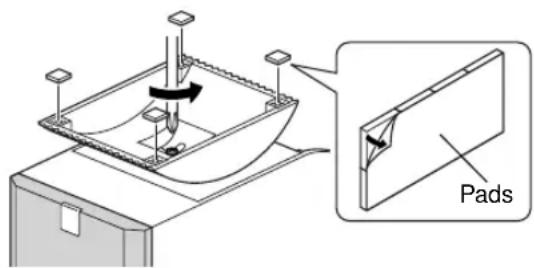
2 Adjust the speaker angle on the stand as you prefer, and then tighten the screw.
natural_image
Diagram of a computer monitor with dashed lines indicating motion or movement, no text or symbols present■ Mounting the speakers on a wall
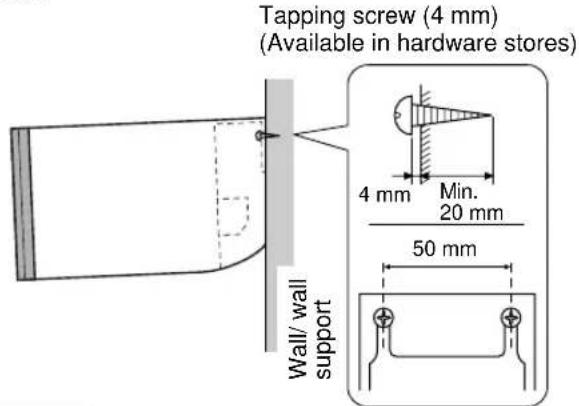
The speakers can also be hung on the wall.
Fasten screws into a firm wall or wall support as shown in the figure, and hang the slits on the rear of the speaker on the protruding screws.
* Make sure that the screws are securely caught by the slits.
Warning
- Each speaker weighs 0.3 kg (0.6 lbs.). Do not mount them on thin plywood or a wall with soft surface material. If mounted, the screws may come out of the flimsy surface and the speakers may fall. This could damage the speakers and cause personal injury.
- Do not install the speakers on a wall with nails, adhesives, or any other unstable hardware. Long-term use and vibrations may cause them to fall.
- To avoid accidents resulting from tripping over loose speaker cables, fix them to the wall.
■ Placing the center speaker on top of the monitor
A speaker used for the center speaker can be placed on top of the monitor. Follow one of the two procedures below for placing a speaker on top of the monitor.
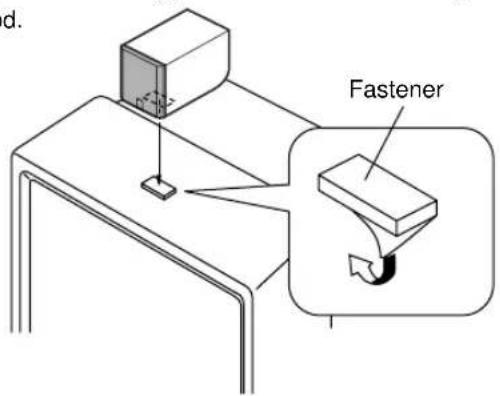
Placing the center speaker on top of the monitor by using the provided fastener
First remove the stand from the speaker, and attach the provided fastener at the bottom of the speaker and on top of the monitor to prevent the speaker from falling.
* This is the recommended method for placing a speaker on top of the monitor. If discoloration of picture occurs, or you need the speaker stand to adjust the speaker angle on top of the monitor, you can select the following method.
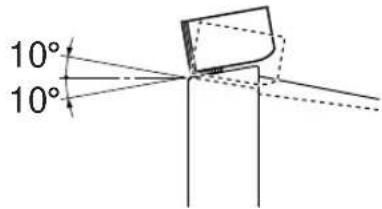
Note
Do not place the speaker on top of the monitor with an inclination of more than 10 degrees.
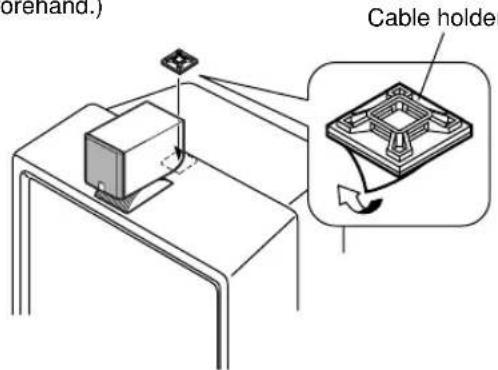
Placing the center speaker on top of the monitor with the speaker stand attached to the speaker
In this method, you need to fix the speaker cable on the monitor by using the provided cable holder to prevent the speaker from falling.
1 Remove the backing sheet from the holder, and attach the holder on top of the monitor by pressing it down forcibly. (The top of the monitor must be cleaned beforehand.) Cable holder
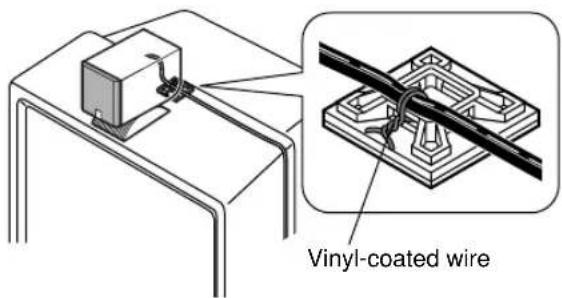
2 Tie the speaker cable to the holder firmly with a provided vinyl-coated wire (which is originally used for bundling the speaker cables) as shown below.
Note
Though this speaker is a magnetically shielded type, there may be some influence on the monitor picture depending on the type of monitor or the placement of the speaker. In such a case, place the speaker further apart from the monitor until there is no influence on the monitor picture.
Connection to your amplifier
(See the figure inside the front cover.)
Before making connections, make sure that the amplifier is switched off.
Notes on connections
- Connect the push-type input terminals at the rear of the speakers to the speaker output terminals of your amplifier with the provided speaker cables.
- One side of the speaker cable has a white broken line. Connect the (+) terminals on both the amplifier and the speakers using the side with a white broken line. Connect the (−) terminals on both components using the side with no line.
- Connect one speaker to the left (marked L) terminals of your amplifier, and the other speaker to the right (marked R) terminals, making sure not to reverse the polarity (+, -). If one speaker is connected with reversed polarity, the sound will be unnatural and lack bass.
- The provided speaker cables have labels marked FRONT L, FRONT R, CENTER, REAR L or REAR R. Connect each speaker cable to the corresponding speaker.
- When using this speaker system connecting with a multichannel amplifier (RP-U200 etc.), also be sure to use a subwoofer (YST-SW45 etc.). Moreover, set the multichannel amplifier or a DVD player etc. which sends signals to the amplifier in the “small speaker mode”. If it is set in the “large speaker mode”, the speakers may reproduce distorted sounds due to excessive input of low frequency signals, or the speakers may be damaged.
How to Connect:
① Press and hold the terminal's tab, as shown in the figure.
② Insert the bare wire end properly into the terminal hole. [Remove approx. 10 mm (3/8") insulation from the speaker cable.]
③ Release your finger from the tab to allow it to lock securely on the cable's wire end.
* Test the firmness of the connection by pulling lightly on the cable at the terminal.
Notes
- Do not let the bare wires touch each other as this could damage the speaker or the amplifier, or both of them.
- Insert the speaker cables into the terminal holes securely, taking care not to let the bare wires touch both (+) and (−) terminals. If the cables are not inserted securely, it may cause noises or no sound from the speakers, or damage the speakers.
- Insert the bare wires only into the terminal holes. If the insulated (vinyl) part of the cable is inserted, no sound will be reproduced from the speaker.
- Fix the speaker cables to avoid catching your hands or feet on the loose cables.
Specifications
Type ......Full range speaker system Magnetically shielded type
Driver.... 5 cm (2") cone type
Nominal Input Power 15W
Maximum Input Power 50W
Impedance 4Ω
Frequency Response.... 120 Hz–25 kHz
Sensitivity 82 dB
Dimensions (W x H x D).... 70 mm x 95 mm x 118 mm (2-3/4" x 3-3/4" x 4-5/8")
Weight 0.3 kg (0.6 lbs.)
Accessories
Speaker cable (3m) x 3
Speaker cable (7m) x 2
Cable holder x 1
Pad x 20
Fastener x 1
* Please note that all specifications are subject to change without notice.