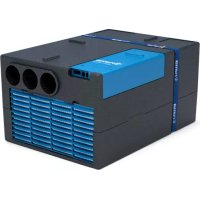
Saphir compact - Air Conditioning TRUMA - Free user manual and instructions
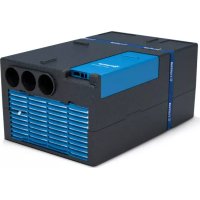
Find the device manual for free Saphir compact TRUMA in PDF.



| Product type | Roof air conditioner for motorhome and caravan |
| Brand | Truma |
| Model | Saphir compact |
| Power supply | 230 V – 240 V ~, 50 Hz |
| Max cooling power | 1800 W |
| Starting current | 15 A (150 ms) |
| Current consumption | 2.8 A at 35 °C |
| Max cold air flow | 310 m³/h |
| Refrigerant | R 407C, 0.39 kg |
| Global warming potential (GWP) | 1774 |
| CO₂ equivalent | 691.9 kg |
| Maximum operating slope | 8% |
| Operating temperature range | +16 °C to +40 °C |
| Protection type | IP X5 (mounted) |
| Operating modes | Cooling, air circulation, sleep function |
| Remote control | Infrared remote control with timer and display |
| Filters | Pre-filter (cleanable) and particulate filter (annual) |
| Maintenance | Clean the pre-filter twice a year, replace the particulate filter each season |
| Optional accessories | Silencer, exhaust duct, flexible intake, Truma CP plus, Truma iNet Box |
| Safety | Installation and repair by a specialist only |
| Manufacturer warranty | 24 months (EU, Iceland, Norway, Switzerland, Turkey) |
Frequently Asked Questions - Saphir compact TRUMA
User questions about Saphir compact TRUMA
0 question about this device. Answer the ones you know or ask your own.
Ask a new question about this device
Download the instructions for your Air Conditioning in PDF format for free! Find your manual Saphir compact - TRUMA and take your electronic device back in hand. On this page are published all the documents necessary for the use of your device. Saphir compact by TRUMA.
USER MANUAL Saphir compact TRUMA
EN Operating instructions
To be kept in the vehicle
Page 11
DA Brugsanvising
Side 43
Skal medbringes i koretojet
FR Mode d'emploi
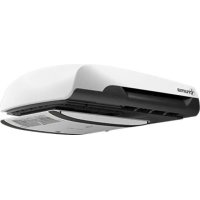
1 Saphir compact air conditioningsystem
2a Supply air intake
2b Supply air outlet
3a Circulated air intake
3b Cold air outlets
4 Infrared (IR) remote control
5 Infrared (IR) receiver
FR
Exemple de montage
Symbols used 11
Safety instructions 11
Notes on using air conditioning systems 12
Operating instructions
Remote control 13
Start-up 14
Switching on 14
Temperature 14
Mode 14
Fan 14
Sleep function 14
Switching off 14
Time 14
Timer OFF 14
Reset 14
Resend 14
Setup 14
IR receiver and manual on/off 14
Function indicator 15
Red LED illuminates 15
Maintenance 15
Troubleshooting 15
IR remote control battery change 15
Disposal 16
Accessories 16
Technical data 17
Installation dimensions 17
Manufacturer's Warranty
(European Union) 18
Symbols used
The device must only be installed and repaired by an expert.
Symbol indicates a possible hazard.
Note containing information and tips.
Safety instructions
Only competent and trained persons (experts) may install, repair or perform the function check on the Truma product in accordance with the installation and operating instructions and the currently accepted technical regulations. Experts are persons who, based on their specialist instruction and training, their knowledge and experience with Truma products and the relevant standards, can carry out the necessary work properly and identify potential hazards.
Repairs may only be carried out by an expert!
To avoid transportation damage, the device may only be dispatched if the Truma Service Centre has been consulted beforehand.
The power supply must be disconnected from the mains (all poles) before opening the housing.
The 230 V, T 5 A H-type (slow, IEC 127) device fuse can be found on the electronic control unit in the device, and must always be replaced with an identical fuse.
The device fuses and connection cables must only be replaced by experts.
Guarantee claims, warranty claims and acceptance of liability will be ruled out in the event of the following:
- Modifications to the device (including accessories)
- Failure to use original Truma parts as replacement parts and accessories
- Failure to follow the installation and operating instructions
This may also invalidate the device operating permit, which in many countries also denotes cancellation of the vehicle operating permit.
The refrigerant circuit contains R 407C refrigerant and must only be opened in the factory.
The cold air outlet and and the circulated air intake must not be obstructed under any circumstances. This is essential in order to ensure that your device operates correctly.
The openings beneath the floor of the vehicle must be kept free of dirt and slush. These openings must not be within the range of the wheel spray - fit splash guard if necessary.
If underbody protection is being applied to the floor of the vehicle, all openings beneath the vehicle must be covered so that the spray mist that is created does not penetrate the device and cause malfunctions. Remove covers again when the work is complete.
To prevent damage to the appliance, it should not be operated continuously at an incline of more than 8% .
Do not operate the device in cooling mode for long periods with the vehicle at an angle, since the condensation that is produced may not be able to run away and may penetrate the vehicle under unfavourable circumstances.
In order to ensure that the equipment works properly and to avoid damage, only power supply sources with a purely sinusoidal waveform (e.g. voltage converter, generator) and without voltage peaks must be used.
When the floor of the vehicle is being cleaned, it must be ensured that no water penetrates the openings in the base of the device when spraying with a high-pressure cleaner, for example.
This appliance may be used by children from 8 years old and by persons with disabilities or with a lack of experience only if they are supervised or have been instructed in the safe use of the appliance and understand the resulting risks.
Notes on using air conditioning systems
-
The Saphir compact air conditioning system is designed for minimal power consumption. You should still check whether the camp site has adequate fuse protection (min. 3 A) before starting the equipment up.
-
Park the vehicle in the shade if possible.
-
Darkening with shutters and / or a canopy reduces the amount of heat radiation.
-
Clean your roof at regular intervals (a dirty roof heats up more than a clean roof).
-
The vehicle must be properly ventilated before starting the equipment in order to remove accumulated warm air from the vehicle.
-
When aprons or the like are being fitted, please ensure that adequate openings are present for dissipating the supply air. The opening for the warm outgoing air should not be at the inlet side.
-
In order to obtain a healthy room climate, the difference between the inside and outside temperatures should not be too great. The recirculated air is cleaned and dried during operation. A pleasant room climate is produced by drying the moist air, even if the temperature difference is minimal.
-
Keep all doors and windows closed when in cooling mode.
Always observe the operating instructions and the "Safety instructions" prior to starting! The vehicle owner is responsible for correct operation of the appliance.
Remote control

The symbols in the display are visible depending on the settings.

Operating instructions can be viewed in offline mode with a mobile device and the Truma App. Download the eating instructions when you have a WiFi connection and them on your mobile device.
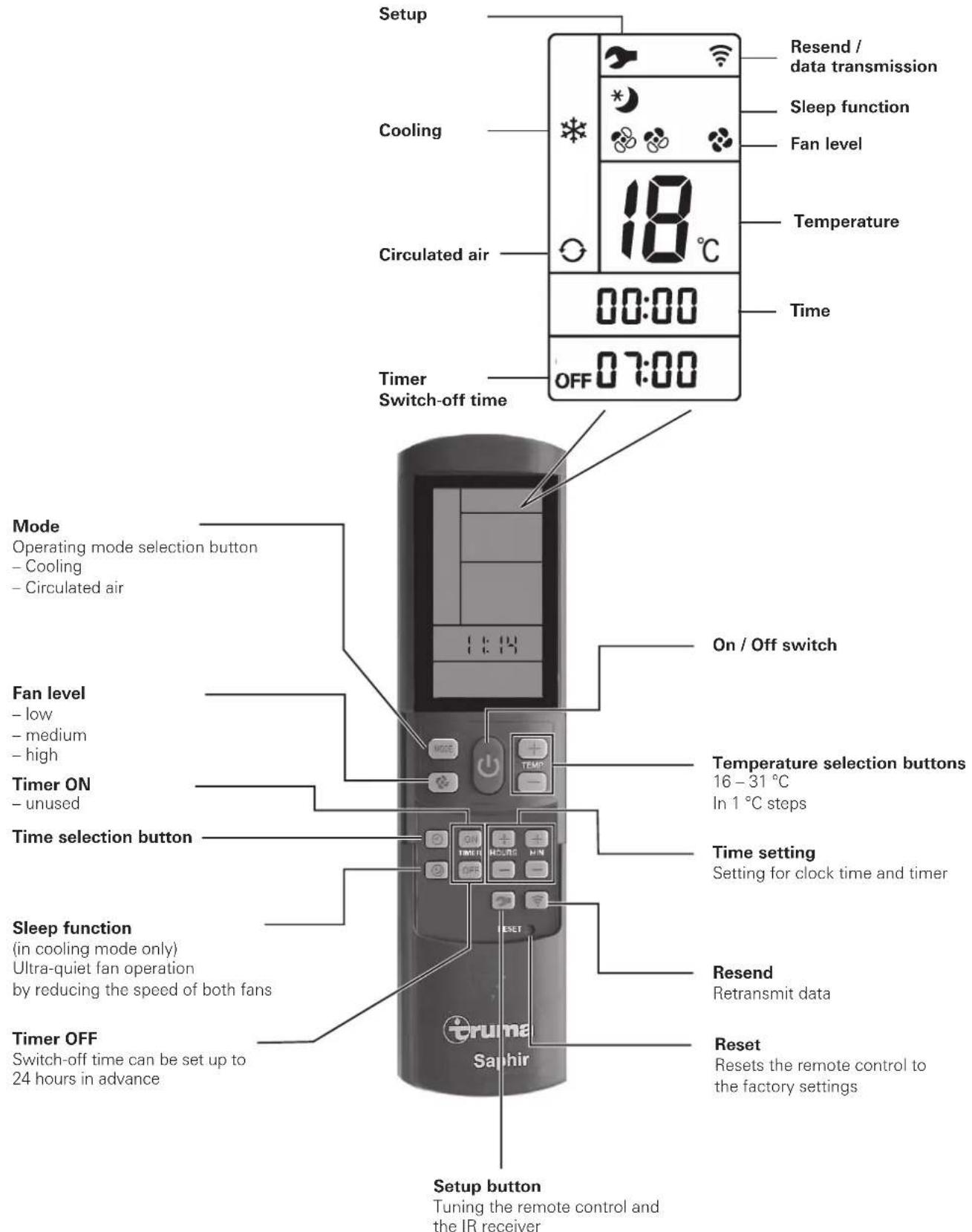
Fig. 2
Start-up
Before switching on, be sure to check that the camp site has adequate power supply fusing (230 V / min. 3 A).
In order to prevent the power cable of the recreational vehicle from overheating (minimum cross-section 3 × 2.5 mm^2 ) the cable drum must be fully unwound.
The remote control must always be pointed at the infra-red receiver in order to perform the individual switching commands.
Before switching on for the first time, the remote control must be tuned to the IR receiver.
- Insert batteries (pay attention to polarity)
- Setup symbol flashes
(if symbol does not flash, perform Reset) - Point remote control at IR receiver
- Press Setup button and hold down
- When red LED on the IR receiver flashes, release Setup button.
The remote control is tuned to the IR receiver, the Setup symbol goes off and the air conditioning system starts in circulated air mode, at low fan level and with no timer set.
Switching on
Switch on the air conditioning system using the "On / Off switch" of the remote control. The previous settings are taken over.
The circulated air fan runs after switching on. The compressor switches itself on after no more than 3 minutes, and the green LED (cooling) flashes.
Temperature
If necessary, use the "Temperature selection buttons" to set the required room temperature with "+" and "-".
Mode
Select the required operating mode by pressing the "MODE" button one or more times.
- Cooling
Circulated air
When the room temperature that was selected using the remote control is reached in cooling mode, the compressor switches off and the green LED in the IR receiver goes off. The circulated air fan continues to run in order to provide ventilation. If the room temperature setting is exceeded, the device automatically reverts to cooling mode.
In circulated air mode, the interior air is recirculated and cleaned by the filters. No LED's illuminate in the IR receiver.
Fan
Select the required fan level by pressing the "Fan level" button one or more times.
Fan level
- low
-medium - high
Sleep function
In "Sleep function" the internal and external fans operate at slow speed and are therefore extremely quiet.
Switching off
To switch off, press the "On / Off switch" on the remote control. The remote control and the device are switched off.
If the air conditioning system is switched on again, the green LED flashes. The circulated air fan runs, and the compressor switches on after no more than 3 minutes.
Time
Press "Time selection button" (time flashes) and set current time using the "Time setting" buttons.
The time always appears on the display.
The time always has to be reset after a battery change, a time change or synchronisation with the remote control and the IR receiver.
Timer OFF
The switch-off time of the air conditioning system can be set in advance for a minimum of 15 minutes to a maximum of 24 hours, starting from the current time, using the integrated timer.
The device must be switched on using the remote control in order to program it.
Set required operating mode and room temperature.
Then select TIMER OFF. Set the required Off time using the "Time setting" buttons (15 minutes to 24 hours) and confirm with TIMER OFF.
Pressing the Timer OFF button again deactivates the timer function.
The air conditioning system must be switched on for the programming to be active. The remote control can be switched off by covering the infrared transmitter on the front of the remote control. This prevents the air conditioning system from being accidentally switched off and/or the switch-off time from being re-programmed.
Reset
Reset the settings of the remote control to the factory settings when pressed using a ballpoint pen, for example. Setup symbol flashes.
Resend
The previous settings are resent.
Setup
Tune the remote control to the air conditioning system that is going to be operated. Settings set to "Circulated air", fan level low, no timer set.
IR receiver and manual on / off
There is an additional pushbutton on the receiver (m), with which the unit can also be switched on and off without the remote control (e.g. with a ballpoint pen).
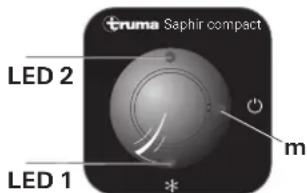
Fig. 3
If the unit is switched on using this pushbutton, the system is automatically reset to the factory settings (cooling, fan level high, TEMP. 21°C).
Function indicator
LED 1 illuminates in green - Cooling
LED 1 flashes in green - The circulated air fan runs, and the compressor switches itself on after no more than 3 minutes.
LED 1 flashes briefly in green - Only in the event of operation with power inverter: Wait for engine to start or function change via remote control
LED 2 flashes in red - Data transfer in progress or power supply being connected
LED 2 illuminates in red - Fault
Red LED illuminates
The device is indicating a fault. Switch device off, wait for a short time and switch on again. If red LED continues to illuminate, please contact Truma Service.
Maintenance
There is a fluff filter (n) and a particle filter (p) on the front of the device for cleaning the room air.
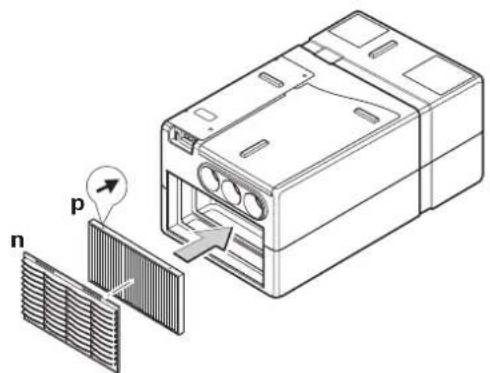
Fig. 4
The fluff filter (n) must be cleaned at regular intervals (at least 2 x per annum) and changed if required (part no. 40090-64600).
We recommend replacing the particle filter (p) every year at the beginning of the season (part no. 40090-58100).
The cold air ducts must be removed before replacing the filters. Pull the fluff filter (n) a little way forward at the recesses at the top edge and remove from above. Then remove particle filter (p) from the front.
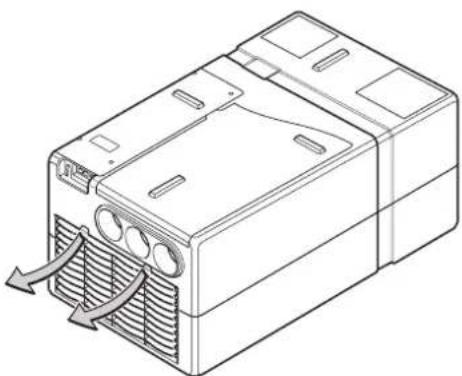
Fig. 5
When installing the particle filter (p) the printed arrows must point towards the device - they indicate the circulated air flow direction. Never operate the device without filters. Operating the device without filters can cause evaporator coil soiling, which can have a detrimental effect on the performance of the device!
The condensation drain is under the floor of the vehicle. In order to allow the condensation to drain away freely, check whether the drain is free of dirt, leaves and the like at regular intervals. Failure to do this may allow condensation to penetrate the vehicle!
Troubleshooting
Is the motor home / caravan 230 V power supply lead properly connected, and are the fuses and circuit breakers OK?
Fault Cause / Remedy
Device not cooling - Thawing process in progress / wait until thawing process is complete.
The temperature set on the remote control has been reached / set temperature on remote control to less than room temperature.
Device providing insufficient cooling or no cooling at all
- Filters soiled / change filters.
Moisture at cold air ducts
External air routes soiled, blocked / clear air routes.
Remote control not working
High air humidity / close windows and doors and select high fan level.
Device not reacting to remote control commands
-
Check batteries in remote control / replace batteries if necessary.
-
Check whether there are obstructions between the remote control and the IR receiver / remove obstructions if necessary
-
Is the remote control tuned to the IR receiver? / tune remote control to IR receiver
If these actions fail to remedy the fault, please contact Truma Service.
IR remote control battery change
Only use micro-batteries that will not leak, type LR 3, AM4, AAA, MN 2400 (1.5 V).
The battery compartment is on the rear of the remote control.
When inserting new batteries, make sure the positive / negative terminals are connected correctly!
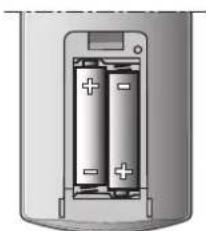
Fig. 6
Empty, used batteries can leak and damage the remote control! Remove the batteries if the remote control is not being used for a long period of time.

The tuning between the remote control and the air conditioning system is retained if the batteries are removed.
No warranty is given for damage caused by leaking batteries.
Disposal
Before disposing of a defective remote control, always remove the batteries and dispose of them correctly.
The device must be disposed of in accordance with the administrative regulations of the respective country in which it is used. National regulations and laws (in Germany, for example, the End-of-life Vehicle Regulation) must be observed.
Accessories
Sound muffler for installation in the cold air duct for additional noise reduction within the living compartment (part no. 40090-00038).
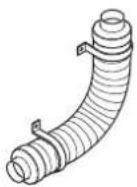
Fig. 7
Air outlet channel for additional noise reduction outside the living compartment. Installation beneath vehicle (part no. 40040-32500).
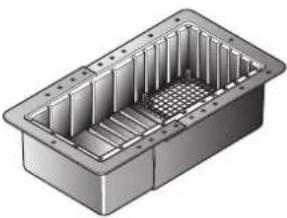
Fig. 8
The flexible air conditioning intake allows the air conditioning system to be installed in a space that is sealed off from the interior (e.g. false floor or rear storage space) and prevents contaminated air from being drawn in (part no. 40090-59100).
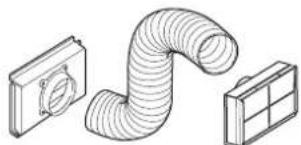
Fig. 9
Truma CP plus
Truma CP plus digital control panel with automatic air conditioning system for the iNet-capable Truma heaters Combi and Truma air conditioning systems Aventa eco, Aventa comfort (from serial number 24084022 - 04/2013), Saphir comfort RC and Saphir compact (from serial number 23091001 - 04/2012)
- The automatic air conditioning system function automatically controls the heater and the air conditioning system until the required temperature is reached in the vehicle.
With the Truma iNet Box extension, all TIN-Bus-capable Truma appliances can also be controlled via the Truma App.
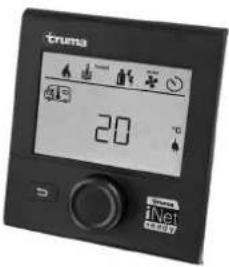
Figure 10
Truma iNet Box
The Truma iNet Box for simple networking and control of Truma appliances with a smartphone or tablet computer using the app.
-
Simple installation and start-up via the Truma App
-
Can be extended with the update function, which ensures that it is always up to date
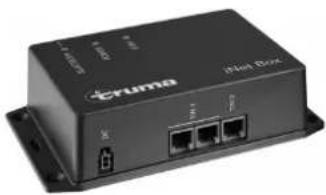
Figure 11
Technical data
Determined on the basis of EN 14511 or Truma test conditions
Designation
Saphir compact, comfort air conditioning system
Dimensions (L x W x H)
560× 400× 290mm
Weight
20 kg
Power supply
230V - 240V ,50Hz
Maximum cooling power
1800W
Starting current
15 A (150 ms)
Power consumption
2.8A/35℃
Protection class:
IP X5 (when installed)
Volume flow (cold air)
max. 310m^3 /h
Refrigerant
R 407C / 0.39 kg
Contains fluorinated greenhouse gases covered by the Kyoto Protocol. Hermetically sealed.
Global warming potential (GWP) 1774
CO_2 equivalent
691.9 kg
Maximum incline of vehicle during
operation
8%
Usage limits
+16°C to +40°C.
- An interior air sensor prevents the compressor from operating at temperatures of less than +16^ .
- An anti-freeze sensor prevents non-permitted ice formation on the evaporator coil.
- A temperature switch prevents excessive current and temperature at the compressor.

E24 10R-040991
Right reserved to make technical changes!
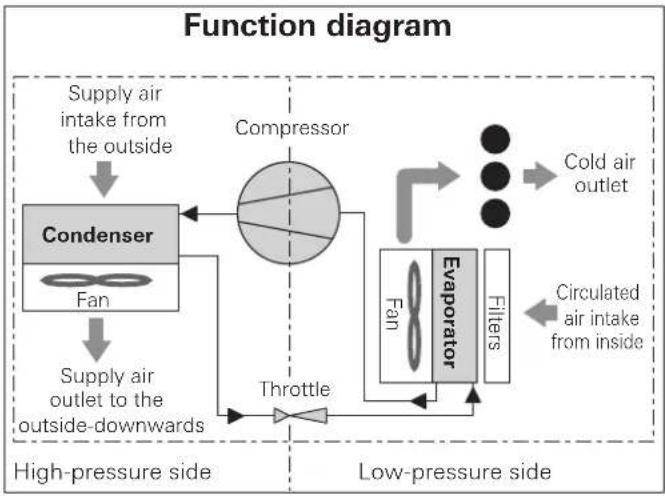
Fig. 12
Installation dimensions
The dimensions are in mm.
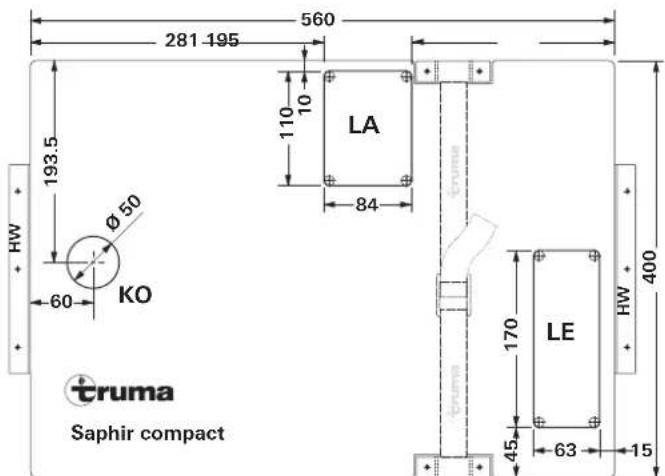
Fig. 13
Manufacturer's Warranty (European Union)
1. Scope of Manufacturer's Warranty
As the Manufacturer of the unit, Truma undertakes a warranty towards the Consumer that covers any material and/or manufacturing defects of the unit.
This Warranty is applicable in EU member states as well as in Iceland, Norway, Switzerland and Turkey. A Consumer is the natural person who was the first one to purchase the unit from the Manufacturer, OEM or dealer and who neither resold the unit in a commercial or self-employed professional capacity nor did he or she install it for a third party in such a capacity.
The Manufacturer's Warranty covers any of the aforementioned defects that occur within 24 months upon concluding the purchase agreement between the seller and the Consumer. The Manufacturer or an authorised service partner undertakes to remedy such defects through subsequent fulfilment, i.e. at its discretion either by repairing or replacing the defective item. Any defective parts shall become the property of the Manufacturer or the authorised service partner. If the unit is no longer manufactured at the time of defect notification and if replacement delivery has been opted for, then the Manufacturer may deliver a similar product.
If the Manufacturer remedies a defect under its warranty commitment, the term of the Warranty shall not recommence anew with regard to the repaired or replaced parts; rather, the original warranty period shall continue to be applicable to the unit. Only the Manufacturer itself and an authorised service partner shall be entitled to conduct a warranty job. Any costs that occur in the event of a warranty claim shall be settled directly between the authorised service partner and the Manufacturer. The Warranty does not cover additional costs arising from complicated removal or installation jobs on the unit (e.g. dismantling of furnishings or parts of the vehicle body), and neither does it cover travel expenses incurred by the authorised service partner or the Manufacturer.
No further-reaching claims shall be permitted, especially damage claims presented by the Consumer or third parties. This provision shall not affect the validity of the German Product Liability Act (Produkttaftungsgesetz).
Neither does the voluntary Manufacturer's Warranty affects the Consumer's legally applicable claims for defects towards the seller in the relevant country of purchase. In individual countries there may be warranties that can be issued by the relevant dealer (official distributor, Truma Partner). In such cases the warranty can be implemented directly through the dealer from whom the Consumer bought the unit. The warranty regulations of the country in which the unit was purchased by the Consumer for the first time shall also be applicable.
2. Warranty exclusions
No warranty claim shall be applicable under the following circumstances:
- Improper, unsuitable, faulty or negligent use and any use that is not compliant with the intended purpose
-
Improper installation, assembly or commissioning, contrary to operating or installation instructions
-
Improper operation or operation contrary to operating or installation instructions, particularly any disregard for maintenance, care or warning notes,
-
Instances where installations, repairs or any other procedures have been conducted by non-authorised parties
- Consumable materials and parts which are subject to natural wear and tear
-
Installation of replacement, supplementary or accessory parts that are not original manufacturer's parts or which have not been approved by the manufacturer. If the device is subject to networked control, this applies, in particular, if the control units or the software have not been approved by Truma or if the Truma control unit (e.g. Truma CP plus or Truma iNet Box) has not been exclusively used for controlling Truma devices or devices approved by Truma.
-
Damage arising from foreign substances (e.g. oil or, plasticisers in the gas), chemical or electrochemical influences in the water, or cases when the unit has come into contact with unsuitable substances (e.g. chemical products, flammable substances or unsuitable cleaning agents)
-
Damage caused by abnormal environmental or unsuitable operating conditions
-
Damage caused by force majeure or natural disasters or any other influences not within Truma's responsibility
- Damage resulting from improper transport
- End customer's or third-party modifications of the device, including any replacement, supplementary or accessory parts, or installation of the same, especially concerning the exhaust gas system or the cowl.
3. Making a warranty claim
The warranty must be claimed with an authorised service partner or at the Truma Service Centre. All the relevant addresses and phone numbers can be found at www.truma.com, in the "Service" section.
The Manufacturer's address is:
85640 Putzbrunn, Germany
To ensure a smooth procedure, we should be grateful if you could have the following details ready before contacting us:
Detailed description of the defect
- Serial number of the unit
-Date of purchase
The authorised service partner or the Truma Service Centre will then specify the further procedure. To avoid transport damage, the affected unit must only be shipped upon prior arrangement with the authorised service partner or the Truma Service Centre.
If the warranty claim is recognised by the Manufacturer, then the transport expenses shall be borne by the same. If no warranty claim is applicable, the Consumer will be notified accordingly and any repair and transport expenses shall then be the Consumer's liability. We must ask you not to send in a unit without prior arrangement.
Table des matieres
Symbolesutilisés 19
Dimensions (L x I x H)
560× 400× 290mm
Poids
20 kg
Saphir compact, comfort-airconditioner
Saphir compact, Komfort-airconditionanlaeg
Mäl (I x b x h):
560× 400× 290mm
Vægt:
20 kg
Spændingsforsyning:
230V-240V\~,50Hz
Maksimal koleeffekt:
1800W
Startstrøm:
15 A (150 ms)
Strømforbrug:
2.8A/35℃
Kapslingsklasse:
IP X5 (i monteret tilstand)
Volumenström (kold luft):
maks. 310m^3 /h
Kolemiddel:
R 407C / 0,39 kg
EN Should problems occur, please contact the Truma Service Centre or one of our authorised service partners (see www.truma. com).
In order to avoid delays, please have the unit model and serial number ready (see type plate).
- FR
- Exemple de montage
- Operating instructions
- Symbols used
- Safety instructions
- Notes on using air conditioning systems
- Remote control
- Start-up
- Switching on
- Temperature
- Mode
- Fan
- Fan level
- Sleep function
- Switching off
- Time
- Timer OFF
- Reset
- Resend
- Setup
- IR receiver and manual on / off
- Function indicator
- Red LED illuminates
- Maintenance
- Troubleshooting
- Fault Cause / Remedy
- IR remote control battery change
- Disposal
- Accessories
- Truma CP plus
- Truma iNet Box
- Technical data
- Designation
- Dimensions (L x W x H)
- Weight
- Power supply
- Maximum cooling power
- Starting current
- Power consumption
- Protection class:
- Volume flow (cold air)
- Refrigerant
- Global warming potential (GWP) 1774
- CO_2 equivalent
- Maximum incline of vehicle during
- operation
- Usage limits
- Installation dimensions
- Manufacturer's Warranty (European Union)
- Scope of Manufacturer's Warranty
- Warranty exclusions
- Making a warranty claim
- Table des matieres
- Poids
Brand : TRUMA
Model : Saphir compact
Category : Air Conditioning