MDRRF430RK - Earphones SONY - Free user manual and instructions
Find the device manual for free MDRRF430RK SONY in PDF.


| Product Type | Wireless Infrared Stereo Headphones |
| Brand | Sony |
| Model | MDR-RF430RK |
| Transmission Type | Infrared (433.40 - 434.40 MHz) |
| Frequency Response | 20 - 20,000 Hz |
| Transmitter Power Supply | DC 9 V via supplied mains adapter |
| Headphone Power Supply | 2 R6/AA batteries or 2 supplied Ni-Cd rechargeable batteries NC-AA-HJ |
| Battery Life (Headphones) | Up to 60 h (LR6 alkaline batteries); 20 h (rechargeable batteries) |
| Battery Charging Time | Approximately 50 minutes for a full charge |
| Transmitter Dimensions | Approx. 120 mm diameter × 290 mm |
| Transmitter Weight | Approx. 155 g |
| Headphone Weight (including batteries) | Approx. 215 g |
| Main Functions | Automatic power on/off, mute, battery charging via transmitter, channel selection, frequency tuning |
| Supplied Accessories | Transmitter, mains adapter, connection cord (RCA/mini-jack plug), universal plug adapter (mini-jack to RCA), NC-AA-HJ rechargeable batteries |
| Care and Cleaning | Clean with a dry cloth; replace ear pads if necessary |
| Safety | Do not expose to rain or moisture; avoid prolonged listening at high volume |
| Spare Parts and Repairability | Ear pads available from Sony dealer; repair by a professional |
| General Information | Optimal range of about 100 m; designed for home use |
Frequently Asked Questions - MDRRF430RK SONY
User questions about MDRRF430RK SONY
0 question about this device. Answer the ones you know or ask your own.
Ask a new question about this device
Download the instructions for your Earphones in PDF format for free! Find your manual MDRRF430RK - SONY and take your electronic device back in hand. On this page are published all the documents necessary for the use of your device. MDRRF430RK by SONY.
USER MANUAL MDRRF430RK SONY
Wireless Stereo Headphone System
Operating Instructions EN
Mode d'emploi F
To avoid electrical shock, do not open the cabinet. Refer servicing to qualified personnel only.
Owner's Record
The model number is located at the bottom of the transmitter and the inner side of the self adjusting band.
The serial number is located at the bottom of the transmitter and in the battery compartment of the headphones.
Record these numbers in the spaces provided below. Refer to them whenever you call upon your Sony dealer regarding this product.
Model No.
Transmitter
Headphones
Serial No.
Transmitter
Headphones
Welcome!
Thank you for purchasing the Sony MDR-RF430RK Wireless Stereo Headphone System. Before operating the unit, please read this manual thoroughly and retain it for future reference.
Some features are:
- Wireless system that allows you to listen to a program free from the restriction of a cord.
High fidelity sound reproduction - Compact transmitter which operates on AC power using the supplied AC power adaptor and which also functions as battery charger
- Comfortable Supra-aural headphones with self adjusting head band
Automatic ON/OFF function on headphones to preserve battery power - Mute function to avoid noise when no audio signal is available.
- Either supplied rechargeable batteries or commercially available R6 (size AA) dry batteries are used for the power source of the headphone.
Notes on receiving performance
The system for this equipment utilizes very high frequency signals in the 400MHz band so the receiving performance may deteriorate due to the surroundings. The following examples illustrate conditions that may reduce the possible receiving range or cause interference with reception.
- Inside a building with walls containing steel beams.
- Area with many steel file cabinets, etc.
- Area with many electrical appliances capable of generating electromagnetic noise.
- Transmitter is placed on a metal instrument.
Area facing roadways. - Noise or interfering signals exist in the surroundings due to radio transceivers in trucks, etc.
- Noise or interfering signals exist in the surroundings due to wireless communication systems installed along roadways.
Table of contents
Getting started
Unpacking 4
Charging the headphones' batteries.... 4
Setting up the headphones 6
Setting up the transmitter 7
Operating the system
Listening to a program 9
The effective areas of the transmitter 10
Replacing the ear pads 11
Additional information
Precautions 11
Troubleshooting 12
Specifications 13
Unpacking
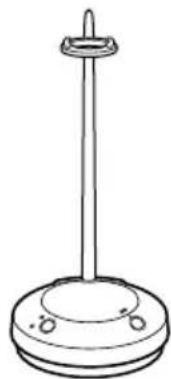
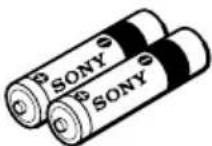
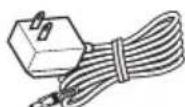
Check that you have the following items:
The transmitter
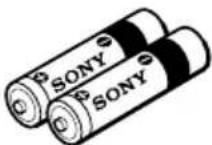
- Ni-Cd rechargeable batteries NC-AA-HJ
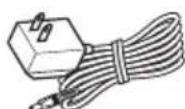
- AC power adaptor
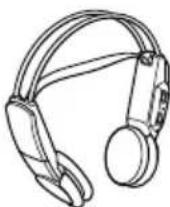
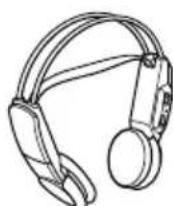
The headphones
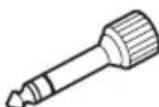
- Unimatch plug adaptor (stereo mini jack stereo phone plug)
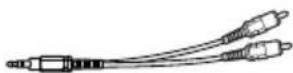
- Connecting cord (phono plugs stereo mini plug), 1m
Charging the headphones' batteries
Using the headphones for the first time
The headphones are powered by either supplied rechargeable batteries or commercially available R6 (size AA) batteries.
When you use the headphones with the supplied rechargeable batteries NC-AA-HJ for the first time, charge the batteries in the following manner.
NC-AA-HJ is applicable only for Sony cordless/ wireless headphone systems. Never use for any other purpose.
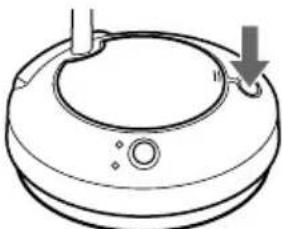
1 Press the OPEN button to open the battery compartment lid of the transmitter.
2 Insert two NC-AA-HJ batteries supplied by matching the and on the batteries to the and in the battery compartment.
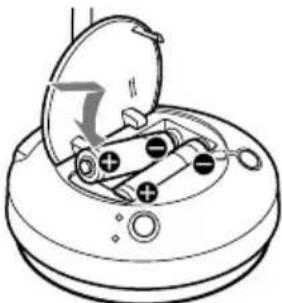
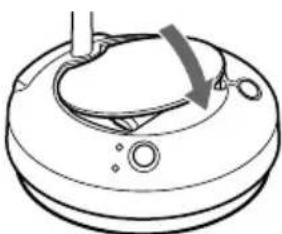
3 Close the battery compartment.
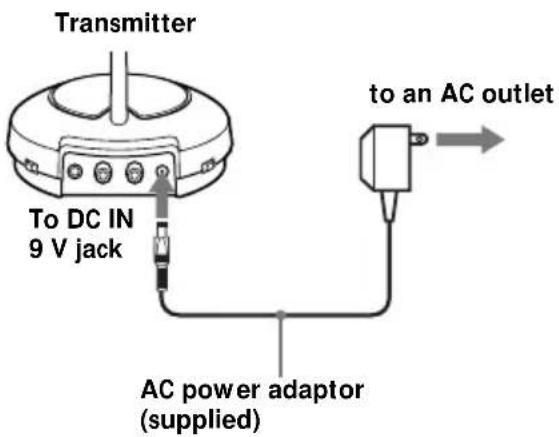
4 Connect the transmitter to a power source.
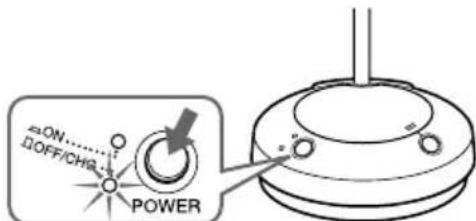
5 Press the OFF/CHG·POWER ON switch so that the OFF/CHG indicator lights up green. Charging starts.
Notes
- Charge only the supplied rechargeable batteries NC-AA-HJ.
- You cannot recharge other R6 (size AA) rechargeable batteries (NC-AA etc.) with this unit.
- Be sure to charge both the rechargeable batteries at a time. The charger cannot charge the batteries one by one.
- Use only the supplied AC power adaptor. Do not use any other AC power adaptor.
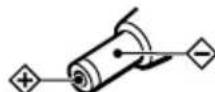
Polarity of the plug
If the indicator is not lit
Check that the supplied rechargeable batteries are correctly inserted in the battery compartment of the transmitter.
To recharge the headphones' batteries after use
To charge the batteries, follow steps above. Since little electric current is used for charging, there is no need to worry about overcharging.
Charging and using hours
| Approx. charging hours | Approx. using time* |
| 1 | 50 minutes |
| 24** | 20 hours |
- at 1 kHz, 1 mW + 1 mW output
** The hours required to fully charge empty batteries
Setting up the headphones
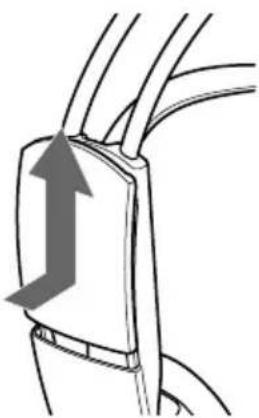
1 Open the battery compartment lid on the left outer side of the head band.
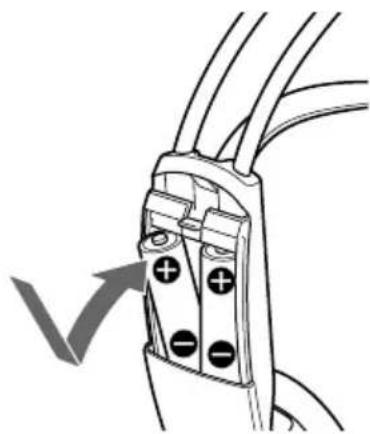
2 Insert two charged NC-AA-HJ batteries by matching the and on the batteries to the and in the battery compartment.
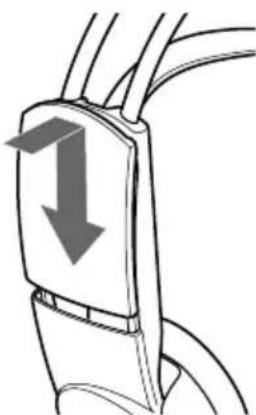
3 Close the battery compartment lid.
Using the headphones with a commercially available R6 (size AA) dry batteries
Install the batteries in the manner as described in "Setting up the headphones."
Battery life
| Battery | Approx. hours* |
| Sony alkaline battery | 60 |
| LR6 (SG) | |
| Sony battery R6P (SR) | 30 |
- at 1 kHz, 1 mW + 1 mW output
Notes on batteries
To avoid damage to the system caused by battery leakage and corrosion;
- Install the batteries with the correct polarity.
- Do not try to recharge dry batteries.
- Remove the batteries if the system is not to be used for a long period of time.
In case of battery leakage, wipe off any deposit in the battery compartments before installing new batteries.
Check the remaining power of the headphones' battery
Pull up the self adjusting band, and check that the headphones' power indicator lights in red. You can now use the headphones.
Charge the battery or install a new dry battery, if the power indicator light is weak or turned off and the sound become distorted or has a lot of noise.
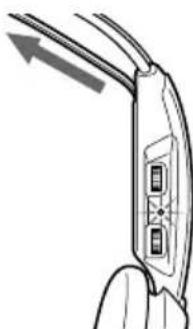
Notes
- During recharging, the transmitter is turned off.
- When the life of the rechargeable batteries are shortened by half even after a proper recharging, replace them with new NC-AA-HJ batteries.
Setting up the transmitter
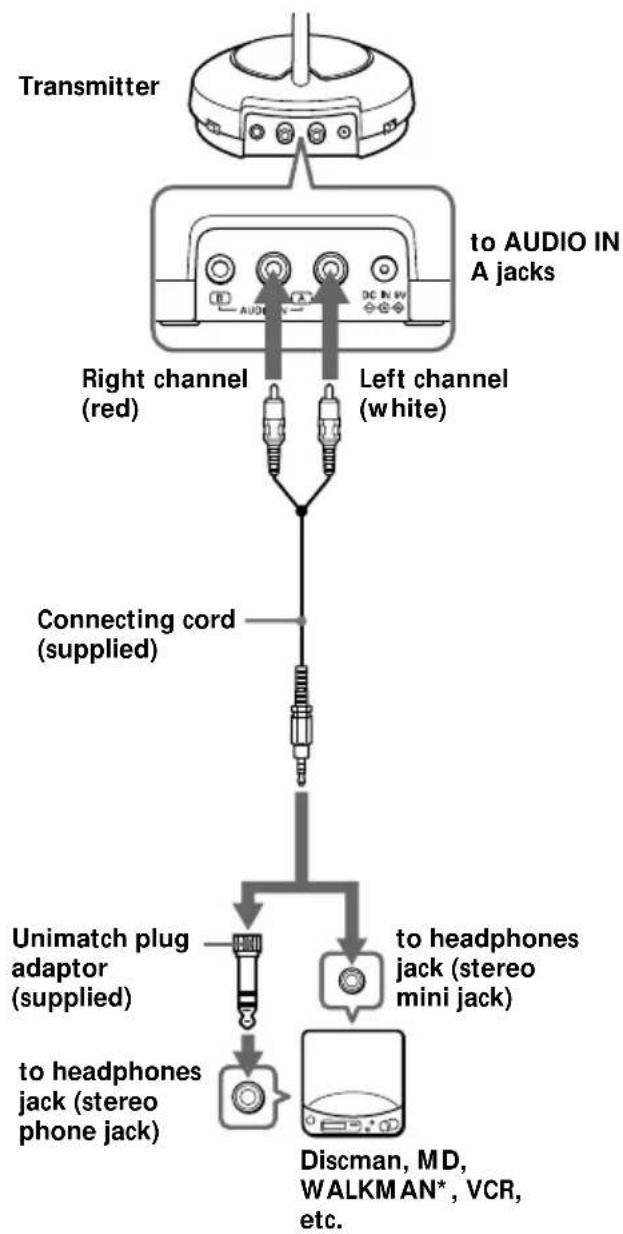
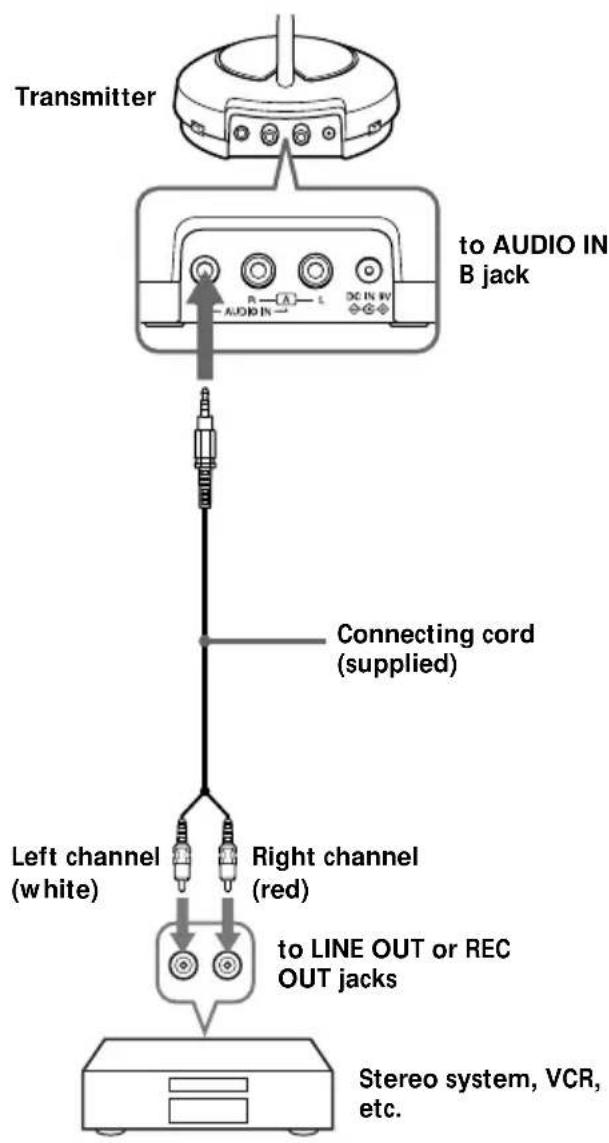
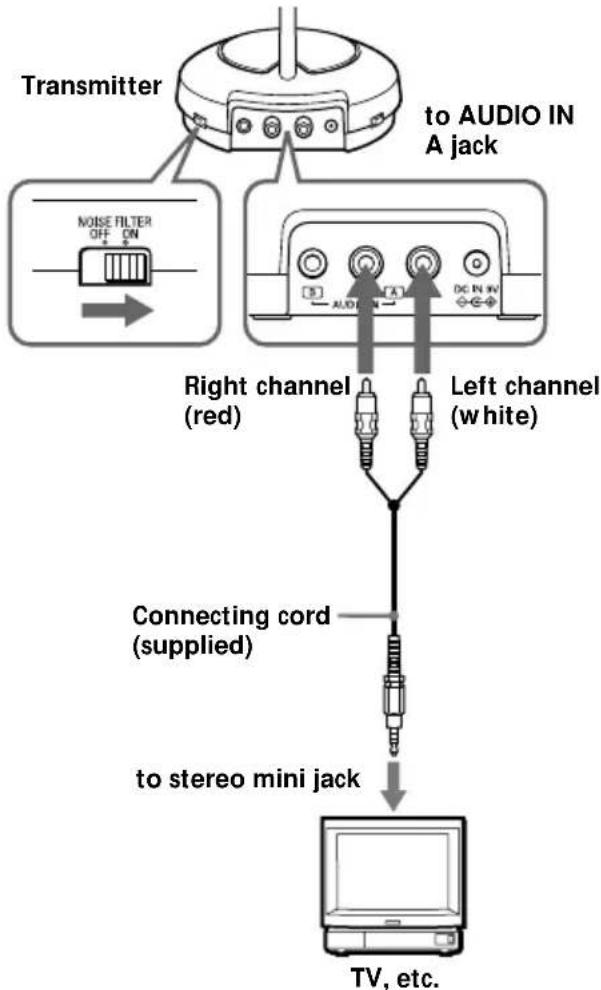
1 Connect the transmitter to audio/video equipment. Select one of the hookups below depending on the jack type:
a To connect to a headphones jack
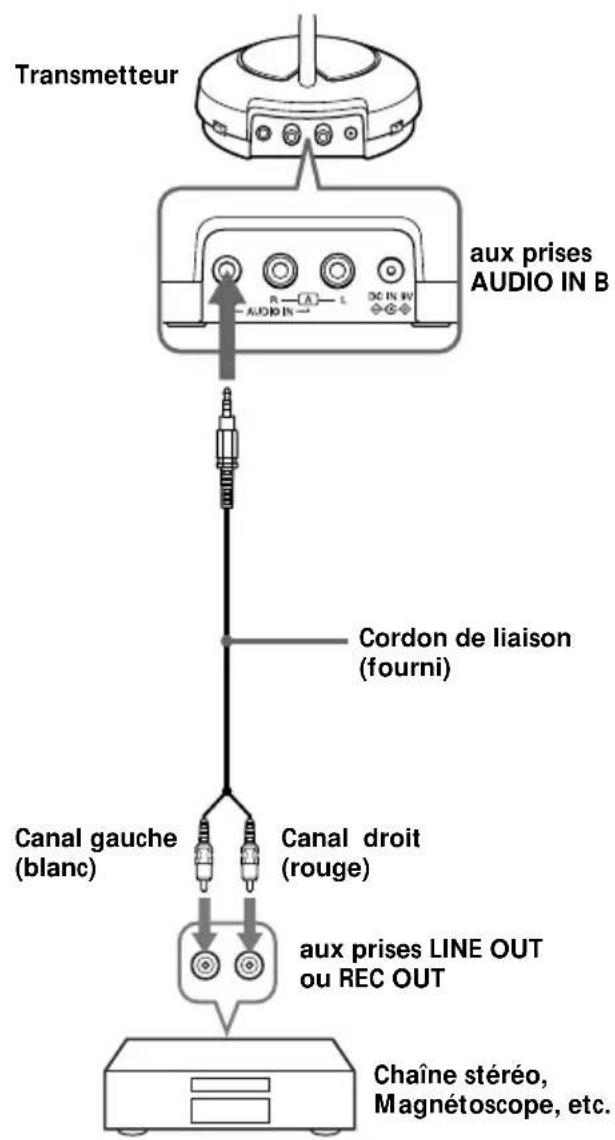
b To connect to LINE OUT or REC OUT jacks
To connect to TV etc.
If noise occurs when the transmitter is connected to your TV or VCR, set the NOISE FILTER switch to ON.
Notes
- If you connect the transmitter to LINE OUT or REC OUT jack of an audio reproducer such as an MD player or CD player, do not set the NOISE FILTER switch to ON. Otherwise, the volume will be limited.
- The NOISE FILTER switch effects the sound only in cases such as connection diagram . In diagrams a and b on page 7, the switch has no effect.
- When the transmitter is placed on or near a TV, it may pick up a noise.
In such case, place the transmitter away from the TV.
2 Connect the transmitter to an AC outlet using the supplied AC power adaptor.
Notes
- Use only the supplied AC power adaptor. Do not use any other AC power adaptor.
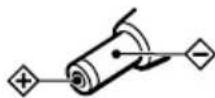
Polarity of the plug
- When you connect the connecting cord directly to an earphone jack, the audio signal will not be output through the right channel. In such a case, use the separately sold PC-236HG plug adaptor.
- If the connected equipment has the AVLS (Automatic Volume Limiter System) function, be sure to turn the function off when using the transmitter. Otherwise, you will have to turn up the volume of the headphones, and that may cause noise.
- WALKMAN is a registered trademark of Sony Corporation.
Listening to a program
1 First turn on the audio/video equipment, then turn on the transmitter.
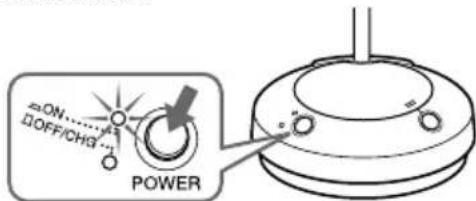
2 Select the radio frequency with the CHANNEL selector switch.
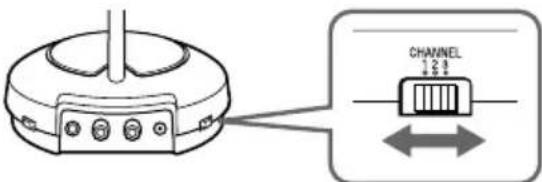
3 Put on the headphones and the power turns on automatically.
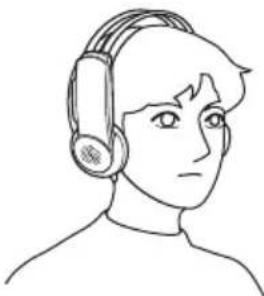
4 Turn up the volume to a moderate level with the VOL control, then tune the headphones in to the frequency of the transmitter with the TUNING control until you can hear the audio signal loud and clear.
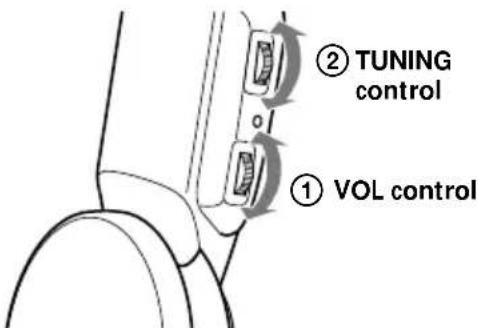
Try the above steps 2 and 4 until the receiving performance becomes better.
Sending RF signals from the Transmitter
The transmitter starts sending the RF signals automatically, when it detects audio signals from the equipments connected.
If it does not detect an audio signal for more than approximately one minute, the transmitter will stop sending RF signals.
But the Power indicator remains lighting. When the transmitter receives an audio signal again, it starts sending the RF signals.
If the audio signal is very weak, the transmitter does not send RF signals automatically. In this case, make sure the volume of the equipments connected is set to 5-6.
You may not hear the beginning of the sound from the headphones until the transmitter starts sending the RF signals after detecting an audio signal.
Note
If the transmitter is connected to the headphones jack of the source equipment, set the volume of that equipment as high as possible without distorting the audio signal.
Auto power on/off function
When you remove the headphones, the power turns off automatically. Do not allow the self adjusting band to be pulled up, otherwise the headphones will be switched on.
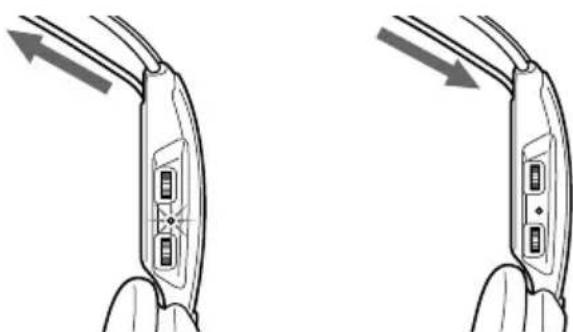
The power turns on. The power turns off.
Mute function
If a hissing noise is heard when the headphones are used outside of the effective range (see the next section), the mute function will be activated and the sound will not be heard from the headphones. To restore the sound, move near toward the transmitter.
After listening to a program
Take the headphones off and rest them away on the holder of the transmitter as shown below.
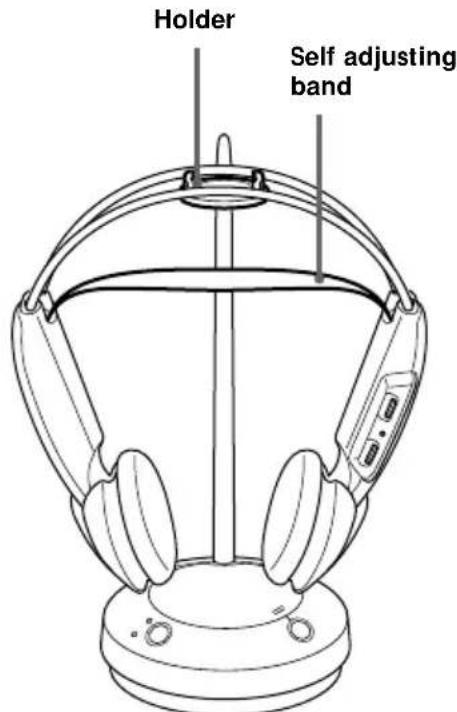
Note
Do not hang the headphones by the self adjusting band, otherwise, the self adjusting band will be pulled up and the headphones will be switched on.
The effective areas of the transmitter
The optimum distance is up to approximately 100m without the system picking up some interference. However, the distance may vary according to the surroundings and environment. If the system picks up some noise while using it within the above mentioned distance, reduce the distance between the transmitter unit and the headphones, or select the other channel.
Notes
- When you use the headphones inside the effective areas of the transmitter, the transmitter can be placed in any direction from the listener.
- Even within the signal reception area, there are some spots (dead spot) where the RF signal can not be received. This characteristics is inherent to RF signals, and does not indicate malfunction. By slightly moving the transmitter, location of the dead spot can be changed.
Replacing the ear pads
When the ear pads become dirty or damaged, you can get replacements from your Sony dealer. Replace them as illustrated below.
1 Remove the old ear pad by pulling it out of the groove on the housing.
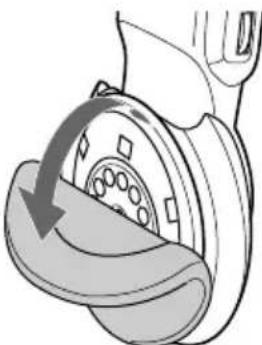
2 Place the new ear pad on the driver unit and insert the edge of the pad into the groove as illustrated.
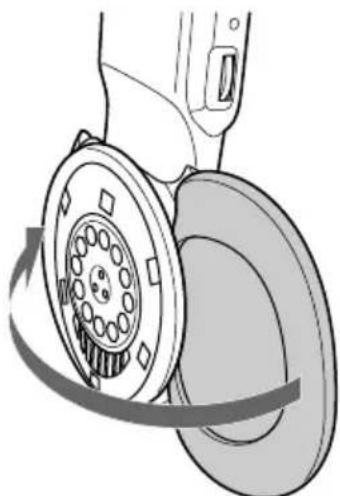
Make sure that the entire edge of the ear pad is securely inserted into the groove.

Additional information
Precautions
- When the headphones are not to be used for a long period of time, remove the batteries to avoid damage caused by battery leakage and subsequent corrosion.
- When the transmitter is not to be used for a long period of time, disconnect the AC power adaptor from the AC outlet holding the plug. Do not pull on the cord.
Also remove the batteries to avoid damage caused by battery leakage and subsequent corrosion.
- Do not leave the wireless stereo headphone system in a location subject to direct sunlight, heat or moisture.
Notes on headphones Preventing hearing damage
Avoid using headphones at high volume. Hearing experts advise against continuous, loud and extended play. If you experience a ringing in your ears, reduce the volume or discontinue use.
Caring for others
Keep the volume at a moderate level. This will allow you to hear outside sounds and to be considerate to the people around you.
If you have any questions or problems concerning the system that are not covered in this manual, please consult the nearest Sony dealer.
Be sure to bring the headphones and the transmitter to the Sony dealer when requiring repair work.
Troubleshooting
| Problem | Solution |
| No sound/Muffled sound | Turn on the transmitter first, then put on the headphones. |
| Check the connection of the audio/video equipment or the AC power adaptor. | |
| Check that the audio/video equipment is turned on. | |
| Turn up the volume on the connected audio/video equipment, if the transmitter is connected to the headphones jack. | |
| Select the radio frequency with the CHANNEL selector, then tune the headphones in the frequency of the transmitter with the TUNING control. | |
| The mute function is activated.Use the headphones near the transmitter. | |
| The headphones' POWER indicator light is weak or turned off.•Charge the rechargeable batteries or if the POWER indicator is still off after charging the batteries, replace them with new NC-AA-HJ batteries.•If you are using the conventional dry batteries, replace it with new ones. | |
| If you connect the transmitter to LINE OUT or REC OUT jack of an audio reproducer, make sure that the NOISE FILTER switch is set to OFF. |
| Problem | Solution |
| Distortion | If the transmitter is connected to the headphones jack, turn down the volume of the connected audio/video equipment. |
| Select the radio frequency with the CHANNEL selector. | |
| The headphones' POWER indicator light is weak or turned off. •Charge the rechargeable batteries or if the POWER indicator is still off after charging the batteries, replace them with new NC-AA-HJ batteries. •If you are using the conventional dry batteries, replace it with new ones. | |
| If you connect the transmitter to LINE OUT or REC OUT jack of an audio reproducer, make sure that the NOISE FILTER switch is set to OFF. | |
| Loud background noise | Move closer to the transmitter. As you move away from the transmitter, more noise is likely to be heard. |
| If the transmitter is connected to the headphones jack, turn up the volume of the connected audio/video equipment. | |
| Select the radio frequency with the CHANNEL selector, then tune in the frequency of the transmitter with the TUNING control. | |
| The headphones' POWER indicator light is weak or turned off. •Charge the rechargeable batteries or if the POWER indicator is still off after charging the batteries, replace them with new NC-AA-HJ batteries. •If you are using the conventional dry batteries, replace it with new ones. | |
| If you connect the transmitter to LINE OUT or REC OUT jack of an audio reproducer, make sure that the NOISE FILTER switch is set to OFF. | |
| The batteries cannot be charged. | The dry batteries are installed. • Install the supplied rechargeable batteries. |
| The rechargeable batteries other than NC-AA-HJ are installed. • Install NC-AA-HJ rechargeable batteries. | |
| Incapable of the tuning | Turn up the volume moderately, then tune in the frequency. |
Specifications
General
Carrier frequency 433.40 - 434.40 MHz
Channel Ch1, Ch2, Ch3
Modulation FM stereo
Frequency response 20 - 20,000Hz
Transmitter
Power source DC 9 V: supplied AC power adaptor
Audio input phono jacks/stereo mini jack
Dimensions Approx. 120mm dia · 290mm (43 / _4· 111 / _2in.) (w/h)
Mass Approx. 155g (5.5 oz.)
Headphones
Power source DC 3 V:2-R6 (size AA) battery or 2 supplied NC-AA-HJ Ni-Cd rechargeable battery
Mass Approx. 215g (7.6 oz.) incl. Ni-Cd batteries
Supplied Ni-Cd rechargeable batteries
Model name NC-AA-HJ
Voltage 1.2V
Capacity 600mAh
Optional accessories
Ni-Cd rechargeable battery NC-AA-HJ
Design and specifications are subject to change without notice.
AVERTISSEMENT
- Piles rechargeable Ni-Cd NC-AA-HJ
Adaptateur secteur
Casque
Raccordement aux prises LINE OUT ou REC OUT
Modulation FM stereo
Piles rechargeables Ni-Cd fournies
Nom de modele NC-AA-HJ
Tension 1,2 V
Capacité 600 mAh
Accessoires en option
Batterie rechargeable Ni-Cd NC-AA-HJ
Adaptateur de fiche PC-236HG (minijack stereo minifiche mono)
Draaggolf-frequencies 433,40 - 434,40 MHz
Kanalen Ch1, Ch2, Ch3
Modulatiesystem FM stereo
Frequeniebereik 20 - 20.000Hz
Zendeenheid

- Wireless Stereo Headphone System
- Owner's Record
- Welcome!
- Notes on receiving performance
- Table of contents
- Getting started
- Operating the system
- Additional information
- Unpacking
- Charging the headphones' batteries
- Using the headphones for the first time
- Notes
- Polarity of the plug
- If the indicator is not lit
- To recharge the headphones' batteries after use
- Setting up the headphones
- Using the headphones with a commercially available R6 (size AA) dry batteries
- Notes on batteries
- Check the remaining power of the headphones' battery
- Setting up the transmitter
- Connect the transmitter to an AC outlet using the supplied AC power adaptor.
- Listening to a program
- Sending RF signals from the Transmitter
- Note
- Auto power on/off function
- Mute function
- After listening to a program
- The effective areas of the transmitter
- Replacing the ear pads
- Precautions
- Notes on headphones Preventing hearing damage
- Caring for others
- Troubleshooting
- Specifications
- General
- Transmitter
- Headphones
- Supplied Ni-Cd rechargeable batteries
- Optional accessories
- AVERTISSEMENT
- Piles rechargeables Ni-Cd fournies
- Accessoires en option
- Zendeenheid
Brand : SONY
Model : MDRRF430RK
Category : Earphones