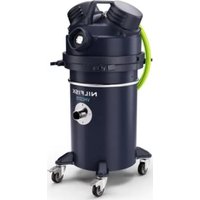
Extreme X110 - Vacuum Cleaner NILFISK - Free user manual and instructions
Find the device manual for free Extreme X110 NILFISK in PDF.


User questions about Extreme X110 NILFISK
0 question about this device. Answer the ones you know or ask your own.
Ask a new question about this device
Download the instructions for your Vacuum Cleaner in PDF format for free! Find your manual Extreme X110 - NILFISK and take your electronic device back in hand. On this page are published all the documents necessary for the use of your device. Extreme X110 by NILFISK.
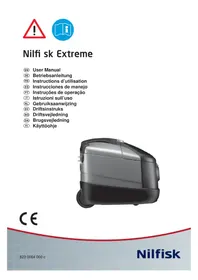
USER MANUAL Extreme X110 NILFISK
natural_image
Exterior view of a modern vacuum cleaner (no text or symbols visible)CE
| English | 4 |
| Deutsch | 12 |
| Français | 20 |
| Español 28 | |
| Português | 36 |
| Italiano | 44 |
| Nederlands | 52 |
| Svenska | 60 |
| Norsk | 68 |
| Dansk 76 | |
| Suomi | 84 |
| Illustrations | 92-93 |
| WEEE | 94-95 |
www.nilfi sk.com
Welcome!
Thank you for choosing a Nilfi sk Extreme vacuum cleaner.
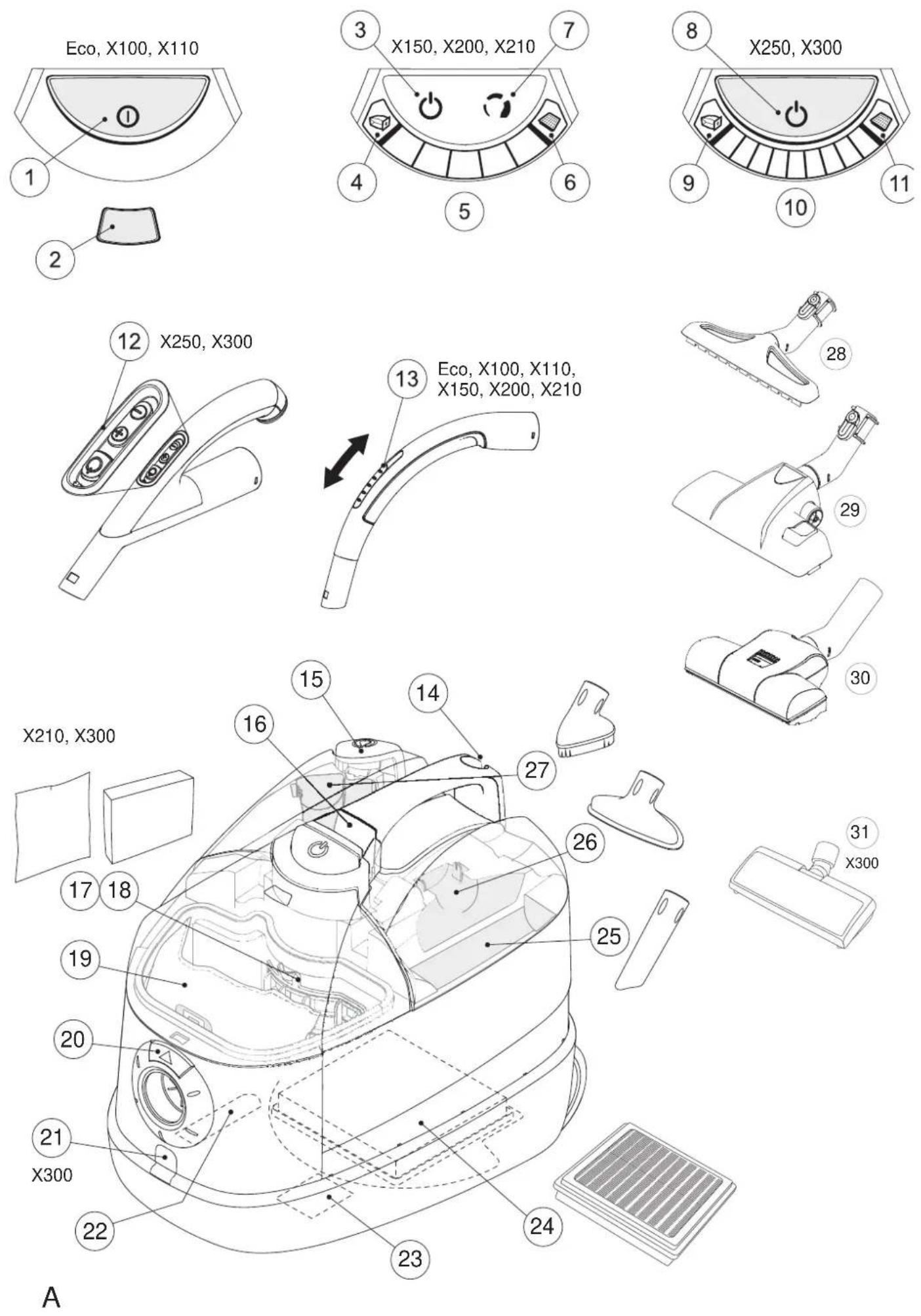
Overview - (illustrations inside front cover)
1 On/off button
2 Dust bag indicator, mechanical
3 On/off button, touch control
4 Dust bag indicator, electronic
5 Power level indicator
6 HEPA fi Iter indicator
7 Power level 1-2-3, touch control
8 On/off button
9 Dust bag indicator, electronic
10 Power level indicator
11 HEPA fi Iter indicator
12 On/off button and power level 1-2-3-4-5, remote control
13 Sliding valve
14 Parking bracket
15 Cable rewinder
16 Open/close button, accessory lid
17 Active carbon filter
18 Prefi Iter
19 Dust bag
20 Open/close button, dust container
21 Outlet for electro nozzle
22 Parking bracket
23 Rating plate
24 HEPA fi Iter
25 Crevice nozzle
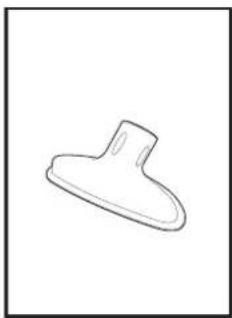
26 Upholstery nozzle
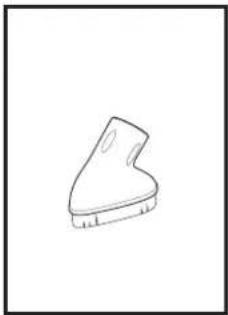
27 Brush nozzle
28 Hard fl oor nozzle (not standard on all models)
29 Combination nozzle
30 Turbo nozzle (not standard on all models)
31 Electro nozzle (optional accessory)
Table of contents
Overview 4
Display symbols 4
Safety instructions 5
Instructions for use 6
Cleaning tips 9
Trouble shooting 10
Service and maintenance etc. 10
Guarantee and service 11
Display symbols
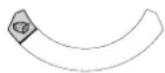
The dust bag is full and needs to be changed. Flashing indicator
- early warning, the dust bag soon needs to be changed.
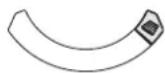
The HEPA fi Iter needs to be changed.
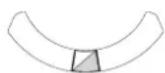
Flashing indicator - the machine is connected to a wall socket and in standby mode - X150, X200, X210, X250 and X300.
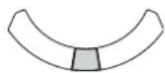
Machine ON - Eco, X100, and X110.
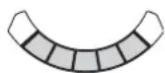
Indicates current power level.
Specifications and details are subject to change without prior notice.
Safety instructions
- Do not use the machine without dust bag and filters properly fitted.
- This machine is not intended for the suction of hazardous materials or gas, doing so may expose people to serious health risks.
- The machine must not be used for the suction of water or other liquids.
- Do not pick up sharp objects such as needles or pieces of glass.
- Do not pick up anything that is burning or smoking such as cigarettes, matches or hot ashes.
- Use and store this machine indoors and in a dry environment, 0 °C to 60 °C.
- Do not use the machine outdoors.
- Do not handle the machine with wet hands.
- Turn off the machine before unplugging.
- To unplug, grasp the plug, not by pulling on the cord. Do not carry or pull the machine by the cord.
- The machine must not be used if the cord shows any sign of damage. Regularly inspect the cord for damage, in particular if it has been crushed, shut in a door or run over.
- Do not use the machine if it appears faulty. Have the machine inspected by an authorized service center if the machine has been dropped, damaged, left outdoors or has been exposed to water.
- No changes or modifications to the mechanical or electrical safety devices should be made.
- All repair must be carried out by an authorized service center.
- Use only original dust bags, original fi Iters and original accessories from your local dealer. Use of unauthorized dust bags and fi Iters will void the warranty.
-
Turn off the machine and unplug before starting dust bag or filter change, grasp the plug, not by pulling on the cord.
-
Do not use the machine as a toy. Do not leave children with the machine without supervision.
- This appliance is not to be used by children or persons with reduced physical, sensory or mental capabilities, or lack of experience and knowledge, unless they have been given supervision or instruction. Children must be supervised not to play with the appliance.
- If the supply cord cord is damaged, it must be replaced by the manufacturer, its service agent or similarly qualified persons in order to avoid hazard.
The equipment meets the requirements in EN 61000-3-11, and connection to the public mains is possible following consultation with the power supplier.
The equipment may only be connected to the mains with a network impedance that is below 0,43 ohm. Network impedance at the point of delivery can be obtained from the power supplier. If the mains has a higher network impedance, momentary drops in mains voltage may occur during start/operation of the equipment. This may also affect or disrupt the operation of other equipment, e.g. flashing lights, particularly equipment that is connected to the same service line.
Instructions for use
Before using the machine make sure that the voltage shown on the rating plate underneath the machine corresponds with the mains voltage. The machine is supplied with dust bag and prefi iter.
Start and stop
Start
Pull out the cord and plug the machine to a wall socket.
Eco, X100, On/off button. X110
X150, X200, Touch control, one half on/off, other half power level 1-2-3.
X250, X300 On/off button on the machine and also remote control on the bent tube with on/off button and power level 1-2-3-4-5.
Stop
Turn off the machine and unplug. Unplug by grasping the plug, not by pulling on the cord.
Models with touch control - X150, X200 and X210
Power can alter between three settings. Current setting is shown on the display.
Models with remote control - X250, X300
Power can alter between fi ve settings. Current setting is shown on the display.
1 Connecting hose, tube and nozzles
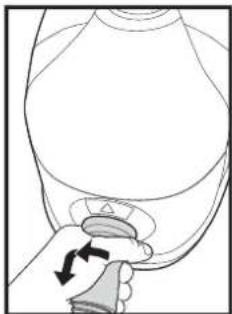
- Insert the hose connector into the suction inlet and turn it clockwise until it engages.
- Connect the bent tube to the tube and twist until they engage with a click.
- Connect the tube and nozzle and twist until they engage with a click.
- The tube is telescopic and can be adjusted to your height.
Pull out the adjusting handle to extend the tube, and pull back to shorten, to desired length.
Disengage
- Disengage the nozzle from the tube by pressing the button.
- Disengage the bent tube from the tube by pressing the button.
- To remove the hose connection from the suction inlet, turn counter-clockwise.
Change of dust bag and fi Iters
The size and quality of the dust bag and fi Iters affect the machine effi ciency. Use of non original dust bags or non original fi Iters can cause restricted air flow which may lead to machine overload. Using non-original dust bag or fi Iters will void the warranty.
2 Changing the dust bag
The dust bag indicator shows when to change the dust bag. Always use original dust bags.
- Release the hose connection from the suction inlet by turning the hose connection counter-clockwise and then remove it.
- Open the lid by pushing the button.
- Seal the dust bag by pulling the cardboard fl ap.
- Remove the dust bag.
- Insert the new dust bag by guiding the cardboard into the tracks and push it down.
- Unfold the new dust bag carefully. Check that the dust bag is correctly fitted.
- Close the lid.
- Insert the hose connection into the suction inlet and twist it clockwise to lock it.
3 Changing the prefi Iter
The prefi Iter protects the motor by absorbing micro-particles that the dust bag can not keep. Change the prefi Iter with every fourth dust bag. The prefi Iter is located behind the dust bag. Always use original fi Iters.
- Release the hose connection from the suction inlet by turning the hose connection counter-clockwise and then remove it.
- Open the lid by pushing the button.
- Seal the dust bag by pulling the cardboard fl ap.
- Remove the dust bag.
- Take out the fi Iter holder with prefi Iter.
- Open the filter holder.
- Take out the prefi iter.
- Fit the new prefilter and close the filter holder. Check that the prefilter is correctly fitted in the holder.
- Put the filter holder on the pin and push in place.
- Insert the new dust bag by guiding the cardboard into the tracks and push it down.
- Unfold the new dust bag carefully. Check that the dust bag is correctly fitted.
- Close the lid.
- Insert the hose connection into the suction inlet and twist it clockwise to lock it.
4 Changing the active carbon fi Iter
The active carbon fi Iter removes bad smell from the exhaust air. Change the active carbon fi Iter 1-2 times a year. The active carbon fi Iter is located behind the dust bag and prefi Iter. Always use original dust bags and fi Iters.
- Release the hose connection from the suction inlet by turning the hose connection counter-clockwise and then remove it.
- Open the lid by pushing the button.
- Seal the dust bag by pulling the cardboard fl ap.
- Remove the dust bag.
- Take out the filter holder.
- Remove the old active carbon filter.
- Fit the new active carbon filter.
- Insert the filter holder on the pin and push in place.
- Insert the dust bag. If the dust bag is closed push the cardboard fl ap down to open it. Check that the dust bag is correctly fitted.
- Close the lid.
- Insert the hose connection into the suction inlet and twist it clockwise to lock it.
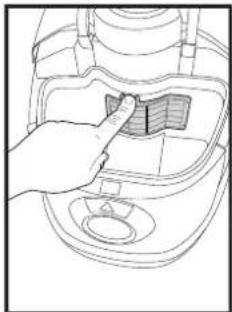
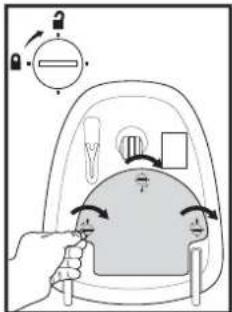
5 Changing the HEPA fi Iter
The HEPA fi liter cleans the exhaust air from micro particles the dust bag can not keep. The HEPA fi liter can not be brushed or washed clean. The X150, X200, X210, X250 and X300 models have an HEPA fi liter indicator that shows when to change the HEPA fi liter. Always use original dust bags and fi liters.
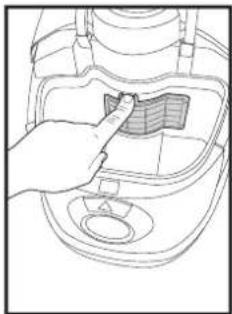
- Open the lid on the machine underside with a coin or a screw driver.
- Take out the HEPA fi Iter.
- Insert the new HEPA fi Iter. Check that the HEPA fi Iter is correctly fitted.
- Put the lid back and close it with a coin or a screw driver.
5b Adjust the suction power
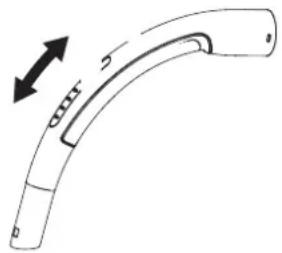
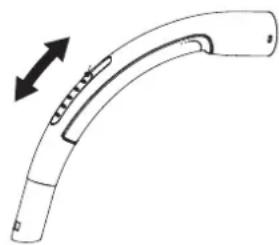
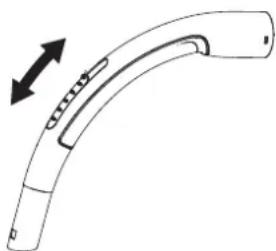
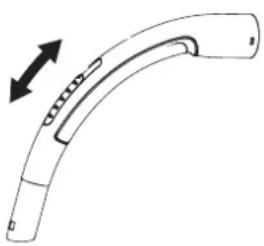
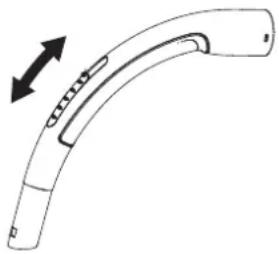
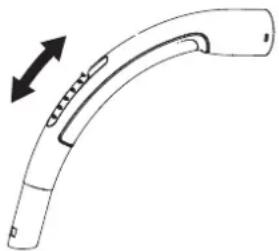
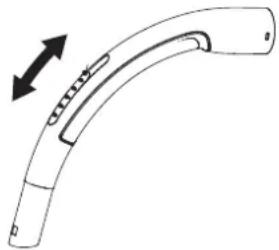
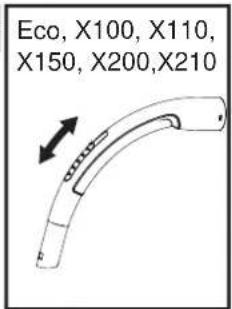
Models with a sliding valve on the hose handle - Eco, X100, X110, X150, X200 and X210
The suction power is maximal with
the sliding valve closed and minimal when all open. Adjust the suction power by putting the sliding valve in the desired position.
Eco, X100, X110, X150, X200, X210
natural_image
Line drawing of a curved mechanical component with an arrow indicating direction (no text or symbols)Models with three step adjustment - X150, X200 and X210
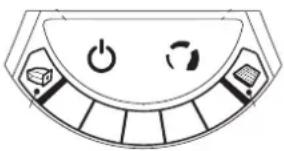
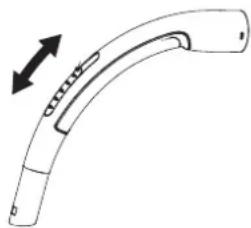
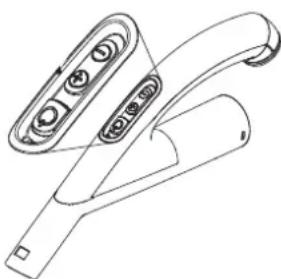
The suction power is adjusted with the sliding valve and also with the touch control on the machine.
X150, X200, X210
natural_image
Diagram of a solar panel with power and refresh buttons (no text or labels)Models with fi ve step adjustment remote control - X250, X300
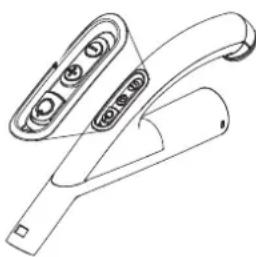
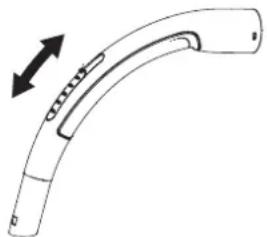
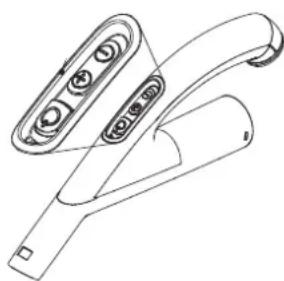
The suction power is adjusted on the remote control on the hose handle.
X250, X300
natural_image
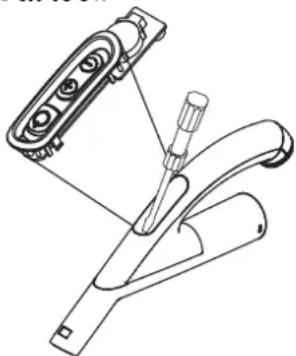
Line drawing of a handheld electronic device with buttons and ports (no text or symbols)Hose handle with remote control battery replacement, battery type CR2032
- Carefully remove the remote control unit with a small, fl at tool.
- Remove the old battery - replace with new type CR2032.
- Carefully reassemble the control unit back to the hose handle by pushing it in place at handle.
natural_image
Technical line drawing of a mechanical clamp or bracket assembly (no text or symbols)6 Parking the tube and nozzle
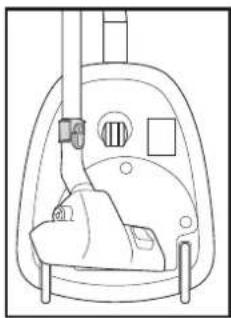
There are two grooves for parking. One located on the underside of the machine to use when machine stands on the back. The other on the back of the machine, to be use when the machine is standing on its wheels.
Standby mode
Model X150, X200, X210, X250 and X300 automatically puts the machine in standby mode when the nozzle is parked in the groove on the machine back side.
Thermal fuse
The machine is fitted with a thermal fuse, which prevents the machine from overheating. If the thermal fuse blow, the machine automatically switches off the motor and must cool before it can be started again.
Restart
- Turn off the machine and unplug from the wall socket.
- See to that nothing blocks the air flow through bent tube, hose, tube, nozzle, dust bag or filters.
- Let the machine cool.
- Plug in the machine again and push start button. The machine will not start until cool enough. If the machine does not start turn it off and unplug. Try again in a while.
WARNING
When activating the automatic cord rewind, care must be taken as the plug at the end of the cord can swing during the last part of the rewinding. It is recommended that you hold on to the plug while rewinding.
Cleaning tips
Adjust the suction power by means of the touch control or remote control or the sliding valve on the bent tube depending on model.
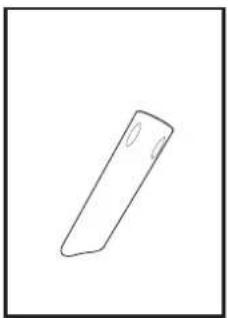
7 Crevice nozzle
Use the crevice nozzle for narrow spaces.
8 Upholstery nozzle
Use the upholstery nozzle for upholstered furniture.
9 Brush nozzle
Use the brush nozzle for curtains and window sills.
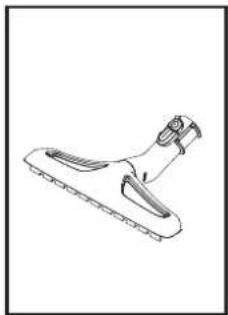
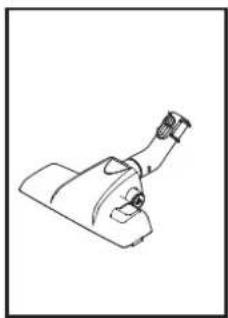
10 Hard £1 oor nozzle
Use the nozzle for hard fl oors.
11 Combination nozzle
Adjust the combination nozzle depending on type of floor.
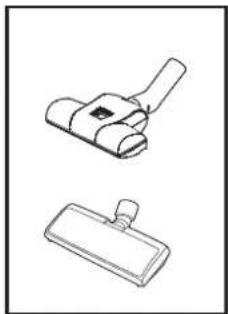
12 Turbo nozzle
Use the turbo nozzle for effi cient carpet cleaning.
13 Electro nozzle
Use the electro nozzle for deep cleaning of carpets.
The crevice, upholstery and brush nozzle are located under the accessory lid. The accessory lid is opened by pressing the release button downwards. The lid is closed by pushing at the centre of the button.
The different models of these vacuum cleaners can include different nozzles.
Trouble shooting
Repair or service of electrical components as cord or motor, must only be carried out by an authorized service center.
| If the machine does not start | See to that the plug is correctly fitted to the wall socket. |
| A fuse in the building may have blown and needs to be changed. | |
| The cord or plug can be damaged and must be repaired by an authorized service center. | |
| Reduced suction power | The dust bag can be full and needs to be changed, see instructions. |
| The prefliter, HEPA fliter or active carbon fliter can be blocked and have to be changed, see instructions. | |
| The bent tube, hose, tube or nozzle can be blocked and needs to be cleaned. | |
| If the machine stops | The thermal fuse may have blown, see instructions. |
| Accessory – The electro nozzle can be blocked. Turn off the machine and unplug. Clean the nozzle. |
Service and maintenance
- Store the machine indoors and in a dry environment.
- Change the prefi iter with every fourth dust bag. The dust bag package includes four dust bags and one prefi iter.
- Clean the machine surface with a dry cloth or a damp cloth with a little cleaning agent.
- Order original accessories from a local dealer.
• Service – contact your local dealer.
Recycling and scrapping
Recycle the wrapping and scrap the machine according to recommendations from the local authorities. Cut the cord as short as possible to avoid that someone gets injured on the scrapped machine.
Environmental commitment
This machine is designed with the environment in mind. All plastic parts is marked for recycling.
Responsibility
Nilfi sk disclaim all responsibility for all damage caused by incorrect use or modification of the machine.
Information
For more information see www.nilfi skextreme.com
Guarantee
The warranty can vary between different countries. Contact your local dealer for information.
Guarantee and service
This Nilfi sk Extreme Series vacuum cleaner is covered by a fi ve (5) year guarantee on the machine, which covers the motor, cable rewinder, switch and casing. The nozzles, fi Iters, hoses, tubes and other accessories are covered twelve months due to manufacturing fault only and excludes wear and tear.
The guarantee includes spare parts and labour costs, and covers manufacturing and material defects that may occur during normal domestic use.
Service under the guarantee will only be performed if it can be proven that the defect occurred within the product's guarantee period (a correctly completed guarantee certificate or printed/stamped cash register receipt with date and product type) and on the condition that the vacuum cleaner was bought as a new product in Great Britain/Ireland/Australia/New Zealand and distributed by Nilfi sk-Advance.
In the event of the repair of defects, the customer must contact Nilfi sk-Advance to be directed to a service agent at the customers own expense. Upon completion of any repairs necessary, the vacuum cleaner will be returned to the customer at the risk and expense of Nilfi sk-Advance.
The guarantee does not cover:
- Normal wear and tear of accessories and filters.
- Defects or damage occurring as a direct or indirect result of incorrect use - such as the vacuuming of rubble, hot ashes or carpet deodorant powder.
- Abuse, loss or lack of maintenance as described in Instructions for use.
- Plaster dust.
- Saw dust.
- Water.
- Should not be used for home renovations.
Nor will it cover incorrect or poor confi guration, i.e. setting up or connection, nor fire-damage, fire, lightning strike or unusual voltage fl uctuations or any other electrical disturbances such as defective fuses or defective electrical installations on the supply grid, and defects or damage in general that Nilfi sk-Advance consider to be the result of causes other than manufacturing and material defects.
The guarantee becomes void:
- If a defect is caused by the use of non-original Nilfi sk dust bags and fi Iters.
- If the identity number is removed from the vacuum cleaner.
- If the vacuum cleaner has been repaired by a non-Nilfi sk authorized dealer.
- If the machine is used in a commercial environment, i.e. building contractors, cleaning contractors, professional trades or any other non-domestic usage.
The guarantee is valid in:
Denmark, Sweden, Norway, Great Britain, Ireland, Belgium, Holland, France, Germany, Poland, Russia, Austria, Switzerland, Spain, Portugal, Australia and New Zealand, Estonia, Latvia, Lithuania, Hungary, Greece, Slovenia, Slovakia, the Czech Republic, Italy and Finland.
Eco, X100, X110, X150, X200, X210
natural_image
Line drawing of a curved mechanical handle with an arrow indicating direction (no text or symbols)natural_image
Top-down view of a mechanical control panel with power and refresh buttons (no text or symbols)natural_image
Line drawing of a handheld electronic device with control buttons and a handle (no text or symbols)natural_image
Technical line drawing of a mechanical device with a tool inserted, showing no text or symbolsEco, X100, X110, X150, X200, X210
natural_image
Line drawing of a curved mechanical component with an arrow indicating upward motion (no text or symbols)natural_image
Diagram of a rotary dial with power and refresh buttons (no text or labels)natural_image
Line drawing of a handheld electronic device with control buttons and a handle (no text or symbols)natural_image
Technical line drawing of a mechanical assembly with no visible text or symbols6
Eco, X100, X110, X150, X200, X210
natural_image
Line drawing of a curved mechanical component with an arrow indicating direction (no text or symbols)natural_image
Line drawing of a handheld electronic device with three buttons and a handle (no text or symbols)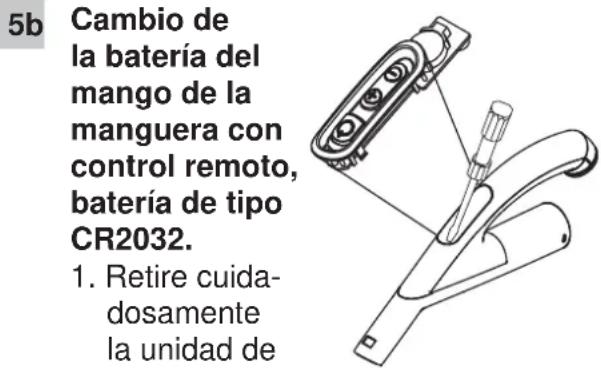
Eco, X100, X110, X150, X200, X210
natural_image
Line drawing of a curved mechanical component with an arrow indicating upward motion (no text or symbols)X150, X200, X210
natural_image
Diagram of a solar panel with power and cooling buttons (no text or labels)natural_image
Line drawing of a handheld electronic device with multiple ports and a handle (no text or symbols)natural_image
Technical line drawing of a mechanical tool assembly (no text or symbols)6
Eco, X100, X110, X150, X200, X210
natural_image
Line drawing of a curved mechanical component with an arrow indicating direction (no text or symbols)natural_image
Top-down view of a control panel with power and switch buttons (no text or symbols)natural_image
Line drawing of a handheld electronic device with ports and buttons (no text or symbols)natural_image
Line drawing of a curved mechanical component with an arrow indicating direction (no text or symbols)natural_image
Diagram of a control panel with power and refresh buttons (no text or labels)natural_image
Line drawing of a handheld electronic device with ports and a handle (no text or symbols)natural_image
Technical line drawing of a mechanical clamp or lever assembly (no text or symbols)6
Buis en slang opbergen
Eco, X100, Start/stopp-knapp. X110
Eco, X100, X110, X150, X200, X210
natural_image
Line drawing of a curved mechanical component with an arrow indicating upward motion (no text or symbols)natural_image
Diagram of a control panel with power and refresh buttons (no text or labels)natural_image
Line drawing of a handheld electronic device with buttons and a handle (no text or symbols)Slanghandtag med fjärrkontroll - batteribyte, batterityp CR2032
natural_image
Technical line drawing of a mechanical clamp or lever assembly (no text or symbols)Eco, X100, X110, X150, X200, X210
natural_image
Line drawing of a curved mechanical component with an arrow indicating upward motion (no text or symbols)natural_image
Top-down view of a curved mechanical or electrical component with three buttons and a central power symbol (no text or labels)X250, X300
Modeller med femtrinnsjuste- ring - X300
Sugeeffekten justeres med fjernkontrollen på det bøyde røret.
natural_image
Line drawing of a handheld electronic device with buttons and a handle (no text or symbols)Skifte batteri, batteritype CR2032, på slangehåndtak med fjernstyring
natural_image
Technical line drawing of a mechanical tool with a screwdriver inserted, showing assembly and component details (no text or symbols)Eco, X100, X110, X150, X200, X210
natural_image
Line drawing of a curved mechanical component with an arrow indicating upward motion (no text or symbols)Modeller med 3-trins-justering
natural_image
Top-down view of a mechanical control panel with power, refresh, and display buttons (no text or symbols)X250, X300
Modeller med 5-trins-justering - X250, X300
Du indstiller sugeeffekten på fjern- betjeningen på grebet.
natural_image
Line drawing of a handheld electronic device with ports and buttons (no text or symbols)natural_image
Technical line drawing of a mechanical device with a tool inserted, showing exploded view (no text or symbols)natural_image
Line drawing of a curved mechanical handle with an arrow indicating direction (no text or symbols)natural_image
Diagram of a solar panel with power and cooling buttons (no text or labels)natural_image
Line drawing of a handheld electronic device with ports and buttons (no text or symbols)natural_image
Technical line drawing of a mechanical clamp or lever assembly (no text or symbols)6
natural_image
Line drawing of a hand pressing down on a curved object with arrows indicating motion (no text or symbols)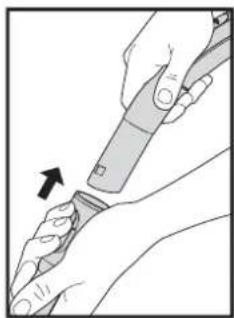
natural_image
Illustration of hands using a tool to adjust or install a piece of material, with an arrow indicating the process (no text or symbols present)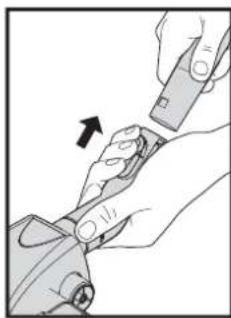
natural_image
Illustration of hands using a tool to adjust or install a mechanical component, with an arrow indicating the process (no text or symbols present)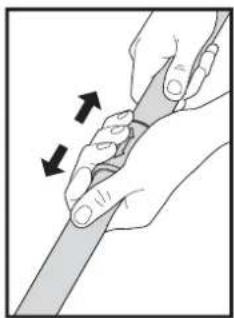
natural_image
Illustration of hands holding a tool with directional arrows indicating movement (no text or symbols)2
natural_image
Line drawing of a hand holding a small object with directional arrows indicating movement or force (no text or symbols)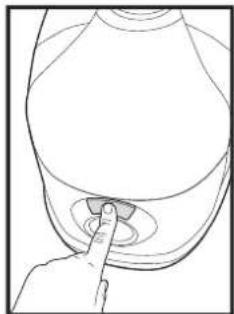
natural_image
Line drawing of a hand pressing a button on a circular object (no text or symbols)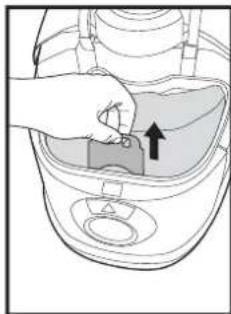
natural_image
Illustration of a hand inserting a component into a device housing (no text or symbols visible)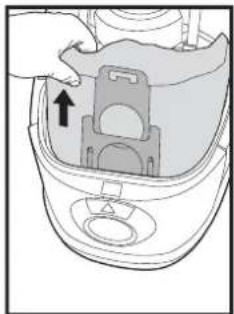
natural_image
Diagram of a robotic vacuum cleaner with a handle and control panel (no text or symbols)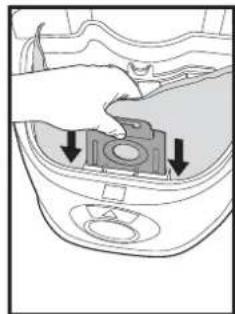
natural_image
Diagram of a hand placing a component into a car interior with arrows indicating direction (no text or symbols)3
natural_image
Line drawing of a hand inserting a small component into a device (no text or symbols)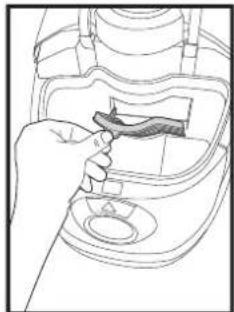
natural_image
Line drawing of a hand inserting a small object into a device (no text or symbols)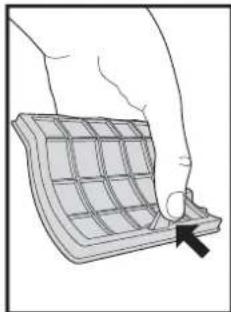
natural_image
Illustration of a hand pressing down on a grid-patterned object (no text or symbols)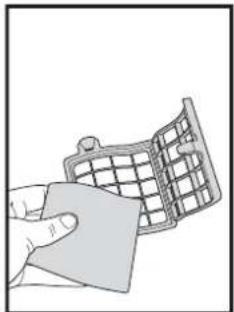
natural_image
Illustration of a hand holding a grid-patterned object (no text or symbols)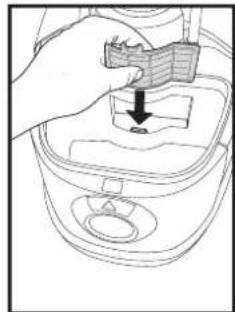
natural_image
Line drawing of a hand placing a small object into a container with a downward arrow (no text or symbols)4
natural_image
Line drawing of a hand inserting a small object into a container (no text or symbols)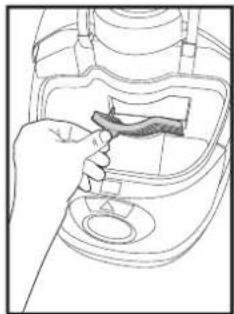
natural_image
Line drawing of a hand inserting a small object into a device (no text or symbols)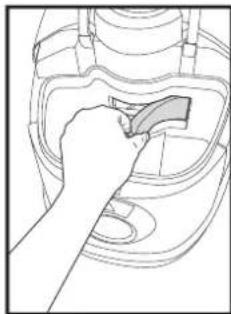
natural_image
Line drawing of a hand using a tool to clean or repair a mechanical component (no text or symbols visible)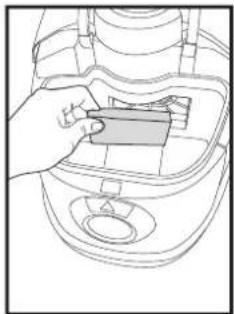
natural_image
Line drawing of a hand inserting a component into a device casing (no text or symbols)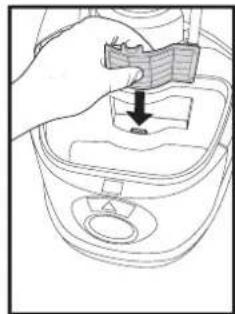
natural_image
Line drawing of a hand placing a small object into a container with a downward arrow (no text or symbols)5
text_image
Diagram illustrating a hand turning a car with directional arrows and a circular dial indicator, showing motion sequence.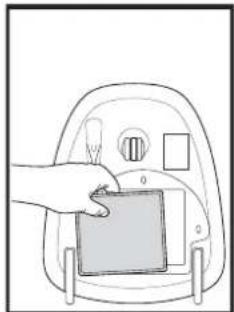
natural_image
Illustration of a hand placing a small object into a device inside a device casing (no text or symbols visible)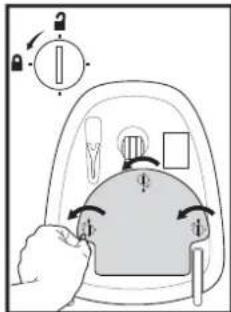
text_image
Diagram illustrating a hand pressing down on a device with directional arrows and labeled components, likely for electrical or mechanical control.5b
text_image
Eco, X100, X110, X150, X200,X210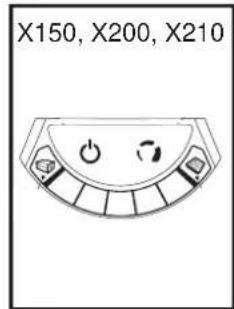
text_image
X150, X200, X210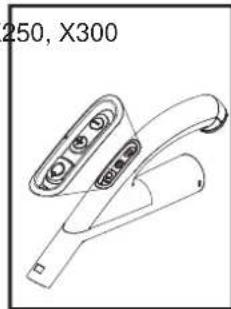
natural_image
Line drawing of a handheld electronic device with control buttons and a handle (no text or symbols)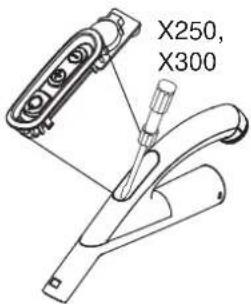
text_image
X250, X3006
natural_image
Line drawing of a mechanical device with no visible text or symbols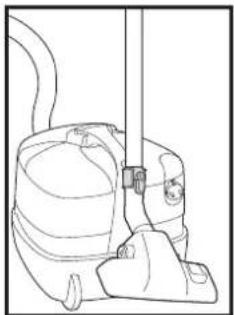
natural_image
Line drawing of a vacuum cleaner with attached hose and valve (no text or symbols)7
natural_image
Simple line drawing of a cylindrical object with a small circular mark on top (no text or symbols)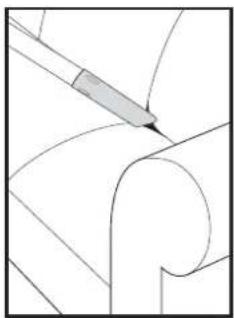
natural_image
Pure technical line drawing of a mechanical component with no text or symbols8
natural_image
Simple line drawing of a T-shaped object with a curved top (no text or symbols)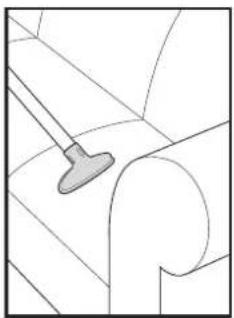
natural_image
Pure technical line drawing of a mechanical component without any text, numbers, or symbols9
natural_image
Simple line drawing of a stylized 3D object resembling a shoe or knob (no text or symbols)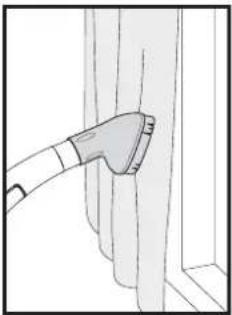
natural_image
Simple line drawing of a tool interacting with vertical panels (no text or symbols)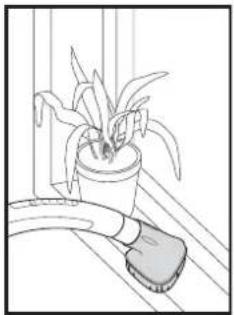
natural_image
Line drawing of a potted plant with long leaves placed on a surface, next to a curved tool (no text or symbols)10
natural_image
Line drawing of a cleaning tool with a handle and blade (no text or symbols)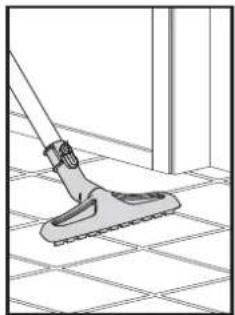
natural_image
Line drawing of a broom cleaning tiled floor (no text or symbols)11
natural_image
Line drawing of a mechanical device with a lever and base (no text or symbols)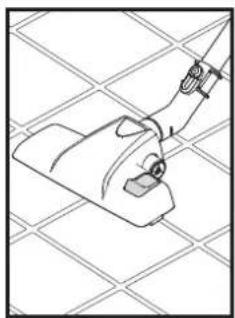
natural_image
Line drawing of a mechanical component with a handle and mounting bracket, set against a grid background (no text or symbols)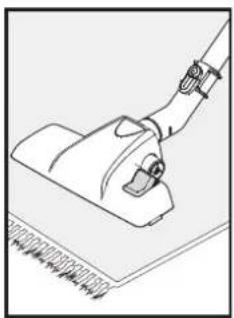
natural_image
Line drawing of a hand using a vacuum cleaner to clean or store floor (no text or symbols)12
natural_image
Two technical line drawings of mechanical components, one with a handle and the other with a base (no text or symbols)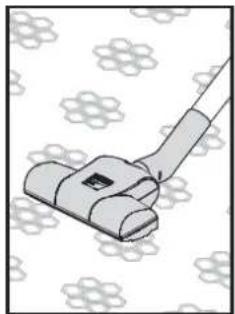
natural_image
Illustration of a vacuum cleaner on a patterned fabric background (no text or symbols)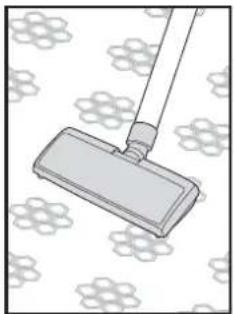
natural_image
Illustration of a mop on a patterned surface (no text or symbols)WEEE - Waste of Electric and Electronic Equipment

English
The symbol ■ on the product or on its packing indicates that this product may not be treated as household waste. Instead it shall be handed over to the applicable collection point for the recycling of electrical and electronic equipment. By ensuring this product is disposed of correctly, you will help prevent potential negative consequences for the environment and human health, which could otherwise be caused by inappropriate waste handling of this product. For more detailed information about recycling of this product, please contact your local city offi ce, your household waste disposal service or the shop where you purchased the product.

Deutch
WEEE - Waste of Electric and Electronic Equipment

Dansk
Nilfisk. Performance and durability since 1906