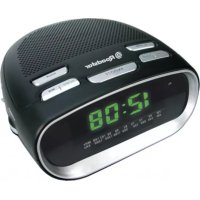
CLR200GSM - Alarm Clock ROADSTAR - Free user manual and instructions
Find the device manual for free CLR200GSM ROADSTAR in PDF.



| Product type | Digital AM/FM clock radio |
| Brand | Roadstar |
| Model | CLR200GSM |
| Mains power supply | 230 V ~ 50 Hz |
| Backup battery | 9 V type 6F22/006P (alkaline recommended) |
| Frequency bands | FM: 87.5 - 108 MHz; AM: 530 - 1600 kHz |
| Main functions | AM/FM radio, alarm by radio or buzzer, snooze (9 min), sleep timer (adjustable up to 59 min), USB charging |
| Display | LCD with backlight |
| Outputs | Headphone jack (3.5 mm), USB port 5 V / 250 mA for charging |
| Safety | Do not expose to humidity, rain, or heat sources; do not open the device (no user-serviceable parts) |
| Maintenance and cleaning | Clean with a soft, clean cloth, slightly damp (mild non-abrasive detergent solution) |
| Repairability | No user-serviceable parts; refer to a qualified technician |
| General information | 24-hour display; integrated FM antenna (positionable wire); integrated directional AM antenna |
Frequently Asked Questions - CLR200GSM ROADSTAR
User questions about CLR200GSM ROADSTAR
0 question about this device. Answer the ones you know or ask your own.
Ask a new question about this device
Download the instructions for your Alarm Clock in PDF format for free! Find your manual CLR200GSM - ROADSTAR and take your electronic device back in hand. On this page are published all the documents necessary for the use of your device. CLR200GSM by ROADSTAR.
USER MANUAL CLR200GSM ROADSTAR

AM/FM Radio Alarm Clock with USB Batery Charger
CLR-200GSM
Instruction manual
Bedienungsanleitung
- Your new unit was manufactured and assembled under strict ROADSTAR quality control.
Thank-you for purchasing our product for your
Music department. Before opening the unit, please read this
instruction manual carefully. Kescit sleep handy
for further future references.
the attentivement ce manuel instructions.
- Sperimente in his use of the use of the use
natural_image
Pure graphical representation of a color bar and a crosshair symbol without any text or labelsEnglish English
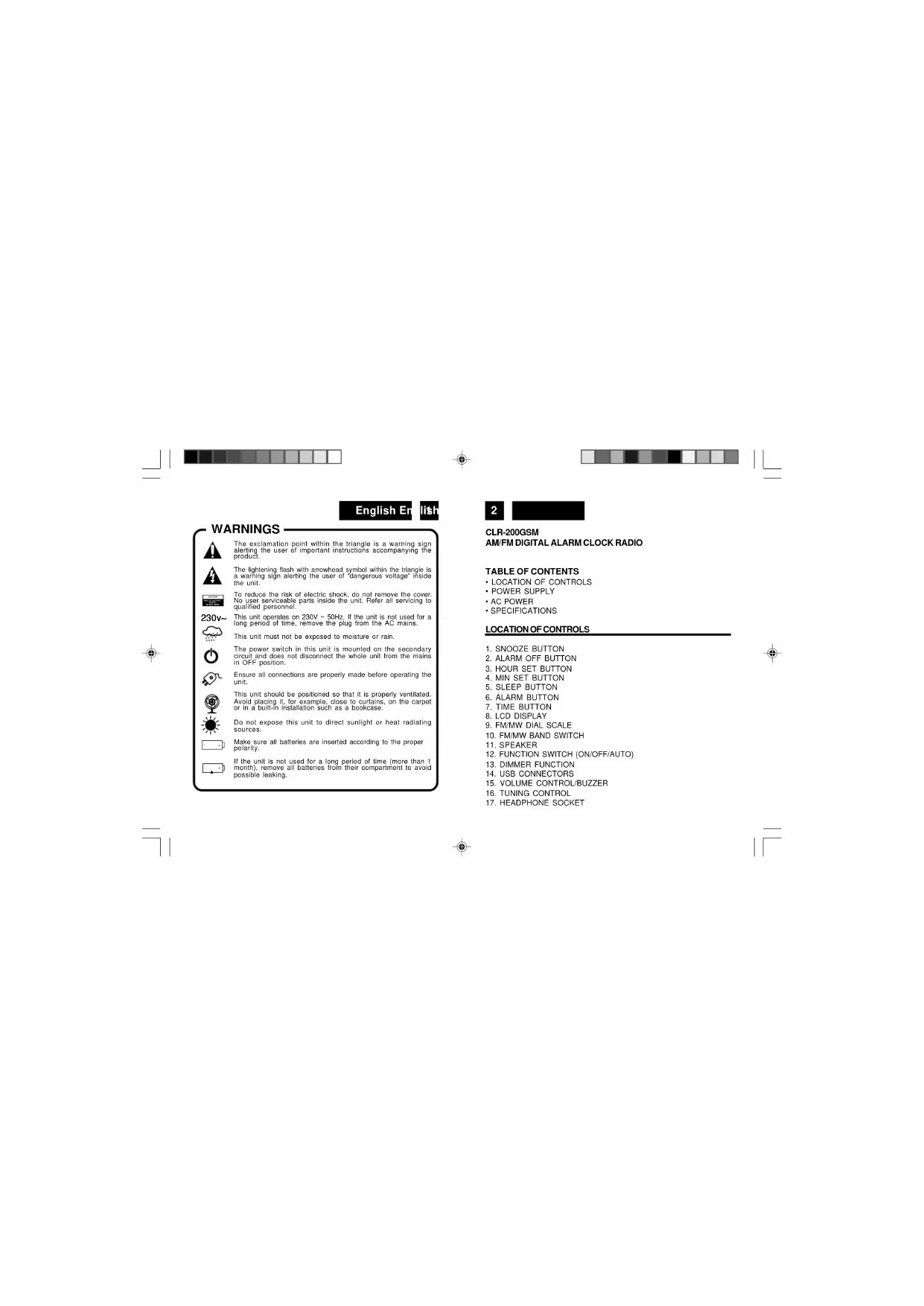
WARNINGS

The exclamation point within the triangle is a warning sign alerting the user of important instructions accompanying the product.

The lightening flash with arrowhead symbol within the triangle is a warning sign alerting the user of "dangerous voltage" inside the unit.

To reduce the risk of electric shock, do not remove the cover. No user serviceable parts inside the unit. Refer all servicing to qualified personnel.

This unit operates on 230V \~ 50Hz. If the unit is not used for a long period of time, remove the plug from the AC mains.

This unit must not be exposed to moisture or rain.

The power switch in this unit is mounted on the secondary circuit and does not disconnect the whole unit from the mains in OFF position.

Ensure all connections are properly made before operating the unit.

This unit should be positioned so that it is properly ventilated. Avoid placing it, for example, close to curtains, on the carpet or in a built-in installation such as a bookcase.

Do not expose this unit to direct sunlight or heat radiating sources.

Make sure all batteries are inserted according to the proper polarity.

If the unit is not used for a long period of time (more than 1 month), remove all batteries from their compartment to avoid possible leaking.
2
CLR-200GSM
AM/FM DIGITAL ALARM CLOCK RADIO
TABLE OF CONTENTS
• LOCATION OF CONTROLS
• POWER SUPPLY
- AC POWER
- SPECIFICATIONS
LOCATION OF CONTROLS
- SNOOZE BUTTON
- ALARM OFF BUTTON
- HOUR SET BUTTON
- MIN SET BUTTON
- SLEEP BUTTON
- ALARM BUTTON
- TIME BUTTON
- LCD DISPLAY
- FM/MW DIAL SCALE
- FM/MW BAND SWITCH
- SPEAKER
- FUNCTION SWITCH (ON/OFF/AUTO)
- DIMMER FUNCTION
- USB CONNECTORS
- VOLUME CONTROL/BUZZER
- TUNING CONTROL
- HEADPHONE SOCKET

natural_image
Pure graphical representation of a color bar with no text or symbolsEnglish English
POWERSUPPLY
This unit operates from a main supply of 230V \~ 50Hz. Connect the AC power cord to the AC household main outlet. Ensure that the voltage is as indicated on the rating plate on the rear of the unit.
Battery Back-up Power Failure Protection
This radio has a battery back up circuit that will keep the correct time and alarm settings in the event of a temporary power interruption. Install a 9-volt battery (type 6F 22/006P), not included, into the battery compartment located on the bottom of the unit.
Note: We recommend an alkaline battery for longer usable life. Change the battery every 9 to 12 months for best result and avoid possible battery leakage.
If power is temporarily interrupted the display will blink and the radio will not play. However, the battery back-up circuit will continue to maintain the clock and alarm settings. When power is restored the clock will display the correct time and alarm settings, and no adjustment is necessary.
Note: If power is interrupted and there is no battery in the compartment or the battery is exhausted. The time and alarm settings will be lost. When power is restored the clock will begin to flash indicating that the time and alarm settings must be corrected.
4
SETTING THE CORRECT TIME
- Press and hold the TIME Button (7).
- Press HOUR button (3) to advance hour
- Press MINUTE button (4) until the correct time is displayed.
- Release the TIME Button (7).
SETTING THE WAKE UPTIME
- Sel the FUNCTION Selector (12) to the OFF position.
- Set the alarm time by following this procedure:
- Press and hold the ALARM Button (6).
- Press the HOUR Button (3) to advance hour press MINUTE Button (4) until the desired alarm time is displayed.
- Release the ALARM Button (6).
- To check the correct alarm time is set, press the ALARM Button (6).
WAKETO BUZZERALARM
- Set the alarm time as shown above.
- Set the Function Selector (12) to the AUTO position. The ALARM ON "●" indicator will light up on the top left side of the display. Turn Off the Volume control until you hear a "click" (Buzzer).
- To switch off the alarm either press the AL. OFF Button (2), or set the FUNCTION Selector (12) to the OFF position.

natural_image
Pure graphical elements with no text, numbers, or symbolsEnglish English
WAKETOTHERADIO
- Set the alarm time as shown above.
- Set the Band Selector (10) to the desired radio band, and follow the procedure in LISTENING TO THE RADIO to tune the radio to a station.
- Set the VOLUME Control (15) to a level you feel will wake you.
- Set the FUNCTION Selector (12) to the AUTO position. ALARM ON "●" indicator will light up on the bottom left side of the display.
- To switch off the alarm either press the AL. OFF Button (2) or set the FUNCTION Selector (12) to the OFF position.
- Set the FUNCTION Selector (12) to the ON position.
- Set the BAND Selector (10) to the desired band (FM or MW).
- Turn the TUNING Knob (16) until the desired station is heard.
- Adjust the VOLUME Control (15) to a comfortable listening level.
- To turn off the radio, set the Function Selector (12) to the OFF position.
Note: For FM reception there is a built-in FM antenna wire at the rear of the unit. Move the wire around to obtain the best reception. The AM band uses a built in directional aerial. You may have to rotate the clock radio for the best reception.
6
SNOOZEFUNCTION
When the alarm sounds, pressing the SNOOZE Button (1) will temporary stop about 9 minutes then the alarm sounds again.
SLEEPFUNCTION
- This function enables you to go to sleep listening to the Radio.
- Set the FUNCTION Selector (12) to OFF or AUTO.
- Press the SLEEP Button (5). The clock display will show 59 minutes. The Radio turns on and will turn off automatically after 59 minutes
- To select a shorter time press the MINUTE Button (4) while holding the SLEEP Button (5) until the desired sleep time is displayed.
- To turn off the Radio at any time during the Sleep period, press the SNOOZE Button (1).
CARE AND MAINTENANCE
To prevent fire or shock hazard, do not allow this clock radio to be exposed to rain or moisture.
This clock radio should not be exposed to direct sunlight; very high or low temperature, moisture, vibration, or placed in a dusty environment. Do not use abrasives, benzine, thinners, or other solvents to clean the surfaces of the clock radio. To clean it, wipe with a mild non-abrasive detergent solution on a clean soft cloth.
Never attempt to insert wires, pins, or other objects into the ventilation

natural_image
Pure graphical representation of a color palette bar and a crosshair symbol (no text or labels)English English
holes or openings on the clock radio.
Note: When setting the Clock or Alarm times remember that this clock radio has a 24 Hour clock mode.
ACPOWER
For your own safety read following instructions carefully before attempting to connect this clock radio to the mains.
This unit is designed to operate on a 230V\~50Hz supply only. Connecting it to other power sources may damage it.
Ensure that supply corresponds to the information on the rating label on the bottom of the unit.
USB BATTERY RECHARGING FUNCTION
Use one of the two USB output (normal or Mini-USB socket, 14) to recharge your mobile phone or MP3 player.
IMPORTANT: The USB provide only the + 5V output for charging purpose and is not suitable to playback any kind of Audio file.
8
SPECIFICATIONS
FM Band: 87.5 to 108 MHz
AM Band: 530 to 1600 kHz
Power Supply: 230VAC. 50 Hz
Back-up Battery : 9V DC 006P
USB Output: + 5V, 250mA max
Design and specifications are subject to change without notice.

Correct Disposal of This Product
(Waste Electrical & Electronic Equipment)
This marking shown on the product or its literature, indicates that it should not be disposed with other household wastes at the end of its working life. To prevent possible harm to the environment or human health from uncontrolled waste disposal, please separate this from other types of wastes and recycle it responsibly to promote the sustainable reuse of material resources.
Household users should contact either the retailer where they purchased this product, or their local government office, for details of where and how they can take this item for environmentally safe recycling.
Business users should contact their supplier and check the terms and conditions of the purchase contract. This product should not be mixed with other commercial wastes for disposal.

Deutsch D

SICHERHEITSHINWEISE

natural_image
Pure graphical representation of a color palette bar and a grid of squares, without any text or symbolsDeutsch Deutsch
SPANNUNGSVERSORGUNG
natural_image
Pure graphical representation of a color bar and a crosshair symbol without any text or labelsDeutsch Deutsch
natural_image
Pure graphical representation of a color bar and a crosshair symbol without any text or labelsFrançais Fr 107a
ATTENTION
natural_image
Pure graphical representation of a color bar and a crosshair symbol without any text or labelsFrançais Franda
"clic" (Buzzer).
natural_image
Pure graphical representation of a color palette bar and a crosshair symbol (no text or labels)Français Fr 23a
ENTRETIEN
natural_image
Pure graphical representation of a color bar and a crosshair symbol without any text or labelsItaliano Ita
exib
natural_image
Pure graphical representation of a color bar and a crosshair symbol without any text or labelsEspañol Es

ATTENTIÓN
natural_image
Pure graphical elements with no text, numbers, or symbolsEspañol Es

natural_image
Pure graphical representation of a color bar and a crosshair symbol without any text or labelsEspañol Es año
DESPERTADOR CON ALARMA
natural_image
Pure graphical representation of a color bar and a crosshair symbol without any text or labelsEspañol Es

abrasivo.
natural_image
Pure graphical representation of a color palette bar and a crosshair symbol (no text or labels)Português F
Alo
ATENCÕES

natural_image
Pure graphical representation of a color bar and a crosshair symbol without any text or labelsPortuguês Portugal
ACORDAR AO SOM DO RÁDIO
- Programe a hora para o despertador como indicado anteriormente.
- Seleccione ON com a selector FUNCTION (12).
- Seleccione a banda desejada (FM / AM) (10), and follow the procedure in LISTENING TO THE RADIO to tune the radio to a station.
- Ajuste o volume ao nível desejado (14).
- Seleccione AUTO com o seletor FUNCTION (12). O indicador ALARM ON “●” se encende no display.
- Para desligar o alarme, pressione o botão ALARM OFF (2), ou seleccione OFF com o selector FUNCTION (12).
FUNÇÃO RÁDIO
natural_image
Pure graphical representation of a color bar and a crosshair symbol without any text or labels
- CLR-200GSM
- English English
- WARNINGS
- 2
- AM/FM DIGITAL ALARM CLOCK RADIO
- TABLE OF CONTENTS
- LOCATION OF CONTROLS
- POWERSUPPLY
- Battery Back-up Power Failure Protection
- 4
- SETTING THE CORRECT TIME
- SETTING THE WAKE UPTIME
- WAKETO BUZZERALARM
- WAKETOTHERADIO
- 6
- SNOOZEFUNCTION
- SLEEPFUNCTION
- CARE AND MAINTENANCE
- ACPOWER
- USB BATTERY RECHARGING FUNCTION
- 8
- SPECIFICATIONS
- Deutsch D
- SICHERHEITSHINWEISE
- Deutsch Deutsch
- SPANNUNGSVERSORGUNG
- Français Fr 107a
- ATTENTION
- Français Franda
- Français Fr 23a
- ENTRETIEN
- Italiano Ita
- exib
- Español Es
- ATTENTIÓN
- Español Es año
- DESPERTADOR CON ALARMA
- Português F
- ATENCÕES
- Português Portugal
- ACORDAR AO SOM DO RÁDIO
- FUNÇÃO RÁDIO
Brand : ROADSTAR
Model : CLR200GSM
Category : Alarm Clock