AC141 - Alarm clock radio AKAI - Free user manual and instructions
Find the device manual for free AC141 AKAI in PDF.



User questions about AC141 AKAI
0 question about this device. Answer the ones you know or ask your own.
Ask a new question about this device
Download the instructions for your Alarm clock radio in PDF format for free! Find your manual AC141 - AKAI and take your electronic device back in hand. On this page are published all the documents necessary for the use of your device. AC141 by AKAI.
USER MANUAL AC141 AKAI
natural_image
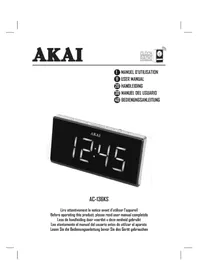
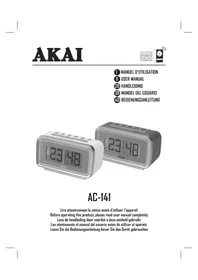
Two AKAI digital alarm clocks with dual dials showing 23:40 (no text or symbols on the devices themselves)AC-141
Lire attentivement la notice avant d'utiliser l'appareil Before operating this product, please read user manual completely Less de handleiding door voordat u deze eenheid gebruikt Lea atentamente el manual del usuario antes de utilizar el aparato Lesen Sie die Bedienungsanleitung bevor Sie das Gerät gebrauchen
POUR COMMENCER
RISQUE D'ÉLECTROCUTION NE PAS COUVRIR

ATTENTION: POUR RÉDURE LE RISQUE D'ÉLECTROCUTION, NE PAS RETIRER LE COUVERCLE L'INTÉRIEUR DE L'APPAREIL NE COMPORTE AUCUNE PIÈCE UTILE À L'UTILISATEUR CONFIEZ-EN L'ENTRETIEN A DU PERSONNEL QUALIFIE

text_image
M 12 18 DREGLAGE MANUEL DE L'HEURE & DU CALENDRIER
Thank you for purchasing the Alarm Clock Radio AKAI AC-141
This is your assurance of quality, performance and value. Our engineers have included many useful and convenient features in this product. Please be sure to read this instruction Manual completely to make sure you are getting the maximum benefit from each feature.
This product was manufactured using the highest quality components and standards of workmanship. It was tested by inspectors and found to be in perfect working order before it left our factory.
Model No: AKAI AC-141:
Serial Number:
IMPORTANT SAFETY INSTRUCTIONS



The lightning flash with arrowhead symbol within an equilateral triangle is intended to alert the user to the presence of uninsulated dangerous voltage within the product enclosure that may be of sufficient magnitude to constitute a risk of electric shock to persons.

The exclamation point within an equilateral triangle is intended to alert the user to the presence of important operating and maintenance (servicing) instructions in the literature accompanying the appliance.

To reduce the risk of electric shock or fire, do not open the cover. Refer servicing to qualified service personnel.
NOTE:
We reserve the right to make technical changes without notice in the interest of improvement
CAUTION
Danger of explosion if battery is incorrectly replaced. Replace only with the same or equivalent type of battery.
IMPORTANT!
It is recommended not to leave a mobile phone near the unit in order to avoid electromagnetic interference in the speakers

equipment is a Class II or double insulated electrical appliance. It been designed in such a way that it does not require a safety election to electrical earth.
PRECAUTIONS FOR USE
- No naked flame sources, such as lighted candles, should be placed on the apparatus.
- Do not place the product in closed bookcases or racks without proper ventilation.
- Where the mains plug is used as the disconnect device, the disconnect device shall remain readily operable.
- The ventilation should not be impeded by covering the ventilation openings with items, such as newspapers, table-cloths, curtains, etc.
- It shall not be exposed to dripping or splashing and that no objects filled with liquids, such as vases, shall be placed on the apparatus.
- Do not connect FM antenna to outside antenna.
- The unit should not be exposed to direct sunlight, very high or low temperature, moisture, vibrations or placed in dusty environment.
- Do not use abrasive, benzene, thinner or other solvents to clean the surface of the unit. To clean, wipe it will mild non-abrasive detergent solution and clean soft cloth.
- Never attempt to insert wires, pins or other such objects into the vents or opening of the unit.
- Disconnect device warning: Mains plug is used as the connection, so it should always remain ready operate.
- Batteries shall not be exposed to excessive heat such as sunshine, fire or the like.
Plug the AC power cord to a household outlet AC source.
BATTERY BACK-UP
- This unit is equipped with a battery back-up system, it requires a 3V CR2032 flat lithium battery (not included).
- Open the battery compartment by unscrewing the lid with a small screwdriver.
- Insert the battery in the battery compartment, making certain that the positive and negative (+ and -) battery terminals are attached to the corresponding terminals on the plate in the battery compartment.
- Screw the lid of the battery compartment to close.
Note : If an AC power failure occurs, the clock automatically switches to the battery power supply, the clock and timer memory continue running. When the AC power resumes, the clock switches back to AC again.
BATTERY CARE
- Use only the size and type of batteries specified.
- If the unit is not to be used for an extended period of time, remove the battery. Old or leaking batteries can cause damage to the unit.
- Do not try to recharge batteries not intended to be recharged; they can overheat and rupture (Follow battery manufacturer's directions).
- Do not dispose of batteries in fire, batteries may leak or explode.
DESCRIPTION OF UNIT AND LOCATION OF CONTROLS
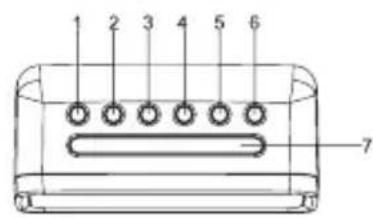
text_image
1 2 3 4 5 6 7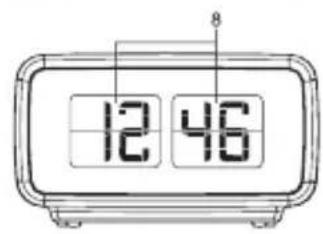
text_image
12 46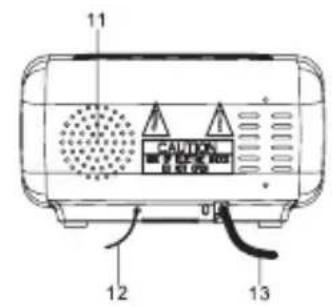
text_image
11 CAUTION 12 13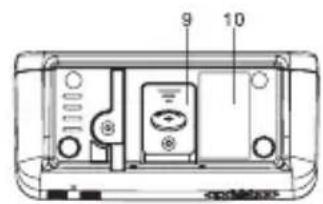
text_image
9 10FUNCTION AND CONTROLS
- VOLUME DOWN / ALARM 1 ON / OFF SET
- VOLUME UP / ALARM 2 ON / OFF SET
- ◀TUNE - / YEAR/MONTH/DAY / TOGGLE BETWEEN DISPLAY CONTENTS ON-OFF
- ▶▶/ TUNE + / DST
- CLOCK ADJ. / MEM.SET / M+
- ON / OFF RADIO / ALARM OFF
- SNOOZE / SLEEP / DIMMER
- DISPLAY
- BATTERY COMPARTMENT
- RATING LABEL
- SPEAKER
- FM ANTENNA
- AC POWER CORD
LCD DISPLAY MODE
TIME Indicator
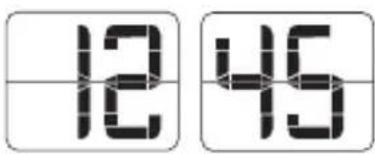
text_image
12 45YEAR Indicator
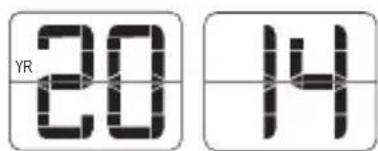
text_image
YR 20 14MONTH Indicator
DAY Indicator
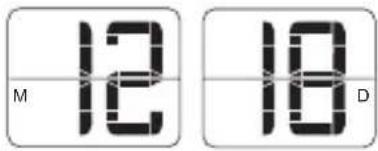
text_image
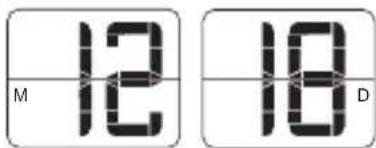
M 12 18 DTIME AND CALENDAR MANUAL SETTING
Setting Time and Calendar
Press Clock ADJ. (5) button in standby mode and keep depress over 2 seconds to enter time set mode, after enter the setting mode, press Clock ADJ. button (5) to change the mode cycle as follows :
Normal → Year → Month → Day → 12/24 H format → Real time Hour → Real time Min → Normal
Action (during data adjustment):
- Press ◀Tune - button (3) to adjust data backward.
- Press ▶/ Tune + button (4) to adjust data forward.
- Keep depressed ◀or ▶button for 2 seconds to enable auto forward.
- Use Clock ADJ. (5) button to confirm each setting.
ALARM SETTING
Setting Alarm 1 and Alarm 2
Press the alarm set button (1/2) during normal mode to show the alarm time. Afterwards keep depress the alarm set button (1/2) over 2 seconds to enter the alarm set mode. After enter the setting mode, press the alarm set button (1/2) to change the mode cycle as follows:
Normal → ALARM 1 Hour → ALARM 1 Min → ALARM 1 weekday Alarm → ALARM 1 wake beep → ALARM 1 wake radio → ALARM 1 wake radio volume → Normal.
Normal → ALARM 2 Hour → ALARM 2 Min → ALARM 2 weekday Alarm → ALARM 2 wake beep → ALARM 2 wake radio → ALARM 2 wake radio volume → Normal.
Select alarm weekday mode as follows:
1-5: Monday to Friday
1-7: Whole week
6-7: Saturday & Sunday
1-1: One day of week
Action (during data adjustment):
- Press ◀/Tune - (3) button to adjust data backward.
- Press ▶▶Tune + (4) button to adjust data forward.
- Keep depressed ◀◀ or ▶button for 2 seconds to enable auto forward.
- Use ALARM 1 / ALARM 2 set button to confirm each setting.
ALARM
Beep alarm or radio alarm will ring for 30 minutes if no key is pressed, then it will stop automatically and wait for same alarm time on next day.
ENABLE / DISABLE THE ALARM
Press and hold the "ALARM 1" (1) / "ALARM 2" (2) button to enable or disable the alarm. Once the alarm is activated, the bell symbol will be appeared on the display.
SNOOZE FUNCTION
When Alarm rings, press Snooze button (7) to suspend the alarm & to activate the snooze function, Beep or Radio alarm will stop. 9 minutes later the alarm will ring again. Press SNOOZE key again, alarm will be suspended again, another 9 minutes later the alarm will ring again and so on until the next alarm rings.
Note: The interval time of the Snooze function is 9 minutes.
- If you want to disable the SNOOZE function and stop alarm completely, press Radio ON/OFF button (6). If you don't press any button, the alarm will ring during 30 minutes & stop automatically.
- Icon of ALARM 1 and ALARM 2 will blink as long as Snooze function is still operating. Once Snooze is turned off icon of ALARM 1 / ALARM 2 stop blinking and lights on the display.
SLEEP OPERATION
When you listen to the radio, press the SNOOZE/SLEEP/DIMMER (7) button to enter into the sleep mode. You can adjust the sleep timer from 90 minutes to 15 minutes by pressing repeatedly the SNOOZE/SLEEP/DIMMER button (7). When sleep timer is selected, the unit will automatically turn off once time is up.
DISPLAY FUNCTIONS
DIMMER CONTROL
The dimmer button (7) allows you to set the brightness of the LCD display to high, medium and off 3 levels.
DAYLIGHT SAVING TIME (DST) MODE
For countries with daylight saving time (DST) (one hour of difference between summer time and winter time), this clock radio offers you DST option to adjust summer time.
In standby mode press and hold for 2 seconds the DST button (4).
The clock advances by one hour. To exit DST mode, repeat the above operation.
AUTO TOGGLING BETWEEN DISPLAY CONTENTS
In clock mode, press and hold DISPLAY button (3) for 3 seconds. "ON" appears on the display (8). Then the display (8) automatically shows below contents in 5-10 second intervals.
Current time > Month, Day
To deactivate this function, press and hold DISPLAY button (3) for 3 seconds. "OFF" appears on the display (8). Then the display switches back to the clock mode.
TIME Indicator
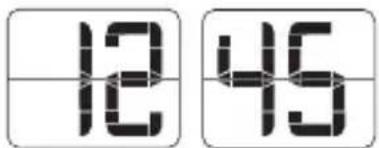
text_image
12 45MONTH Indicator DAY Indicator
text_image
M 12 18 DContents in 10-second intervals Contents in 5-second intervals
RADIO OPERATION
RADIO MODE
Note: Ensure that the FM antenna is completely unrolled and extended to have the best FM reception.
Press the Radio ON/OFF button (6) to turn the unit on.
Use the Tune - (3) or Tune + (4) button to select the desired radio station. If you press and hold the Tune - (3) or Tune + (4) button for one second, then release, the unit will automatically scan to the next broadcasting station.
Press the ON/OFF button (6) to turn the radio OFF.
To set / recall the radio presets
- Press the ON/OFF button (6) to turn the unit ON.
- Use the Tune + or Tune - button to select the desired radio station.
- Press and hold the memory / memory + button; "P01" will blink in the display.
- Use the Tune+ or Tune- button to select the desired preset station (P01-P10)
- Press the memory / memory + button again to set the preset.
- Repeat steps 2 through 5 to set more presets.
- The unit can preset 10 stations totally for FM.
- When "P01-P10" is blinking, press the Tune+ or Tune- button to select the preset number.
- When recalling preset stations, press memory / memory + button to select the preset number.
RESETTING
If the system does not respond or exhibits erratic or intermittent operation, you may have experienced an electrostatic discharge (ESD) or a power surge that triggered the internal microcontroller to shut down automatically. If this occurs, simply disconnect the ac power cord and remove the system backup battery, wait for at least 3 minutes and then setup the unit again as if it is a brand new unit.
TECHNICAL SPECIFICATIONS
Power Supply • AC 230V - 50 Hz
Power consumption · 5W
Standby power consumption • <1W
Battery backup • 3V (CR2032 Flat Lithium battery x 1) not included
Radio Frequency Coverage • FM: 87.5MHz - 108 MHz
Audio output power • 180MW RMS
Net Weight • 0.36kgs
Dimensions • 138 x 65 x 80 mm mm
IMPORTANT:
Due to continual revision and improvement on our products design, specifications are subject to change without further notice.
EXCLUSIVE IMPORTER
This product was imported by the Company : DEMSA S.A.S.
For any questions concerning the conformity of the product, thank you to send your request to :
DEMSA S.A.S.
END OF LIFE DISPOSAL
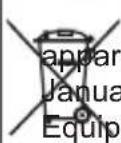
Warning! This logo set on the product means that the recycling of this status comes within the framework of the Directive 2002/96/CE of 27, 2003 concerning the Waste of Electrical and Electronic ment (WEEE).
This symbol means that used electrical and electronic products should not be mixed with general household waste. There is a separate collection system for these products.
If you want to dispose of this equipment, please do not use the ordinary dust bin!
- The presence of dangerous substances in the electrical and electronic equipments can have potential consequences on the environment and human health in the cycle of reprocessing this product.
- Therefore, at the end of its lifetime, this product shall not be disposed with other non-recycled waste. Used electrical and electronic equipment must be treated separately and in accordance with legislation that requires proper treatment, recovery and recycling of used electrical and electronic equipment.
- Local authorities and resellers have set special procedures for the purpose of collecting and recycling this product (please contact your local authority for further details). You have the obligation to use the selective waste collection systems put in place by your local authority.
- If your used electrical or electronic equipment has batteries or accumulators, please dispose of these separately beforehand according to local requirements.
- By disposing of this product correctly you will help ensure that the waste undergoes the necessary treatment, recovery and recycling and thus prevent potential negative effects on the environment and human health which could otherwise arise due to inappropriate waste handling.

Unit complies with European Council Directive 2006 / 95 CE (romagnetic Compatibility & Low Voltage Directives)
VOORDAT WE BEGINNEN
text_image
M 12 18 DDE TIJD EN KALENDER HANDMATIG INSTELLEN
text_image
M 12 10 Dtext_image
M 12 18 Dnatural_image
Two digital alarm clocks with visible time displays (no text or symbols on the devices themselves)AC-141