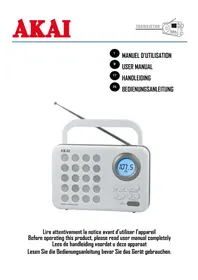
AR72 - Radio AKAI - Free user manual and instructions
Find the device manual for free AR72 AKAI in PDF.


| Product Type | FM Radio with Alarm and Wake-up |
| Brand | AKAI |
| Model | AR72 |
| Dimensions (W × D × H) | 210 × 53 × 139 mm |
| Weight | 700 g |
| Mains Power Supply | 230 V AC, 50 Hz |
| Battery Power Supply | 3 LR14 batteries (1.5 V, not included) |
| Power Consumption (Operating) | 4.5 W |
| Power Consumption (Standby) | 0.5 W |
| FM Frequency Range | 87.5 - 108 MHz |
| Speaker Power | 1.5 W RMS |
| Number of Presets | 50 stations |
| Main Functions | FM Radio, wake-up (buzzer or radio), snooze alarm, programmable sleep timer, 12/24 hour clock |
| Headphone Jack | 3.5 mm stereo jack |
| Antenna | Telescopic for FM |
| Maintenance and Cleaning | Clean with a soft, dry cloth. Do not use liquids or aerosols. |
| Safety | Do not open the device. Risk of electric shock. Refer all repairs to a qualified technician. |
| Spare Parts and Repairability | No spare parts provided. For any repairs, contact after-sales service. |
| General Information | Imported by DEMSA S.A.S., 28 Boulevard Zéphirin Camélinat, 92230 GENNEVILLIERS, France. Compliant with European directives. |
Frequently Asked Questions - AR72 AKAI
User questions about AR72 AKAI
0 question about this device. Answer the ones you know or ask your own.
Ask a new question about this device
Download the instructions for your Radio in PDF format for free! Find your manual AR72 - AKAI and take your electronic device back in hand. On this page are published all the documents necessary for the use of your device. AR72 by AKAI.
USER MANUAL AR72 AKAI
Specifications techniques
Thank you for purchasing the AKAI AR-72 a transistor with digital FM tuner & alarm clock.
This is your assurance of quality, performance and value. This product was manufactured using the highest quality components and standards of workmanship. Our engineers have included many useful and convenient features in this product. Please be sure to read this instruction Manual completely to make sure you are getting the maximum benefit from each feature.
It was tested by inspectors and found to be in perfect working order before it left our factory. If, after reading this manual, you experience any problems with the operation of this product, please refer to the instructions for obtaining services at the end of this Manual.
For future reference, record the serial number in the space provided.
Model No: AKAI AR-72
Serial Number:
Exclusive Importer
This product was imported by the Company: DEMSA S.A.S.
For any questions concerning the conformity of the product, thank you to send your request to:
DEMSA S.A.S.
Important safety instructions

CAUTION
RISK OF ELECTRIC SHOCK DO NOT OPEN


The lightning flash is intended to alert the user to the presence of dangerous voltage within the product's enclosure, and touching the inner parts may result in a risk of electric shock to persons.

The exclamatory mark is intended to alert the user to the presence of important operating instructions.
CAUTION
RISK OF ELECTRIC SHOCK DO NOT OPEN
ATTENTION : To reduce the risk of electric shock or fire, do not open the cover. Refer servicing to qualified service personnel.
- READ INSTRUCTIONS - All the safety and operating instructions should be read before the unit is operated.
- RETAIN INSTRUCTIONS - The safety and operating instruction should be retained for future reference.
- HEED WARNINGS - All warnings on the unit and in the operating instructions should be adhered to.
- FOLLOW INSTRUCTIONS - All operating instructions should be followed.
- WATER AND MOISTURE - The unit should not be used near water, for example, near a bathtub, washbowl, kitchen sink, laundry tub, swimming pool or in a wet basement.
- VENTILATION - The unit should be situated so that its location or position does not interfere with its proper ventilation. Do not place on bed, sofa, rug or similar surface that may block the ventilation openings, in a built-in installation, such as a bookcase or cabinet that may impede the flow of air through the ventilation openings. The normal ventilation of the product shall not be impeded for intended use.
- HEAT - The unit should be situated away from heat sources such as radiators, stoves, or other unit (including amplifiers) that produce heat.
- OBJECT and LIQUID ENTRY - Care should be taken so that objects do not fall and liquids are not spilled into the enclosure through openings.
- SERVICING - The user should not attempt to service the unit beyond that described in the user operating instructions. All other servicing should be referred to qualified service personnel.
- Power cord protection: Power supply cords should be routed so that they are not likely to be walked on or pinched by items placed upon or against them, paying attention to cords at plugs, convenience receptacles and the point where they exit from the product.
IMPORTANT!
It is recommended not to leave a mobile phone near the unit in order to avoid electromagnetic interference in the speakers

Notes:
- Reduce volume before plugging the earphones/headphone.
- Speaker of the unit is automatically disconnected while earphone /headphones are connected.
- Adjust the volume to a comfortable listening volume level.
Preparation for use
Unpacking and set up
| AKAI AR-72 | AC/DC ADAPTOR | Instructions Manuel | |
| AKAI ●● ●● ●● ●● ●● ●● ●● ●● ●● ●● ●● ●● ●● ●● ●● ●● ●● ●● ●● ●● ●● ●● ●● ●● ●● ●● ●● ●● ●● ●● ●● ●● ●● ●● |
Place your AKAI AR-72 on a flat and stable surface so that it cannot fall over.
- Carefully remove all the components from the carton and remove all packing materials from the components. Make sure noting is accidentally discarded with the packing materials.
- Save the carton and the packing materials, if possible, in the unlikely event that the unit ever needs to be returned for service. Using the original carton and packing material is the only proper way to protect the unit from shipping damage.
Power supply & Connection
AC operation
Connect the power adapter to the wall outlet.
Plug the other end of the power cord to the power input jack on the back of the unit.
To disconnect the AC power, remove the power cord from the wall outlet.
AC/DC operation precautions
- For AC operation, make sure the voltage is compatible. Always use the provided AC/DC adaptor; never use other adaptor.
- Always disconnect the AC power cord from the AC power source when it is not in use or when DC power is operating.
Battery Supply
To open the battery compartment, pull slightly to the place indicated and insert as indicated in the compartment 3 batteries type R14, UM2 or C cells.
Note: The battery supply is switched off when the set is connected to the mains. To change over to battery supply, pull out the plug from the MAINS socket.
Battery precautions
Follow these precautions when using batteries in this device.
- Use only the size and type of batteries specified.
- There is a danger of explosion if batteries are replaced incorrectly.
- Do not mix different types of batteries together (e.g. Alkaline and Carbon-zinc) or old batteries with fresh ones.
- If the device is not to be used for a long period of time, remove the batteries to prevent damage or injury from possible battery leakage.
Description of the unit & Controls location
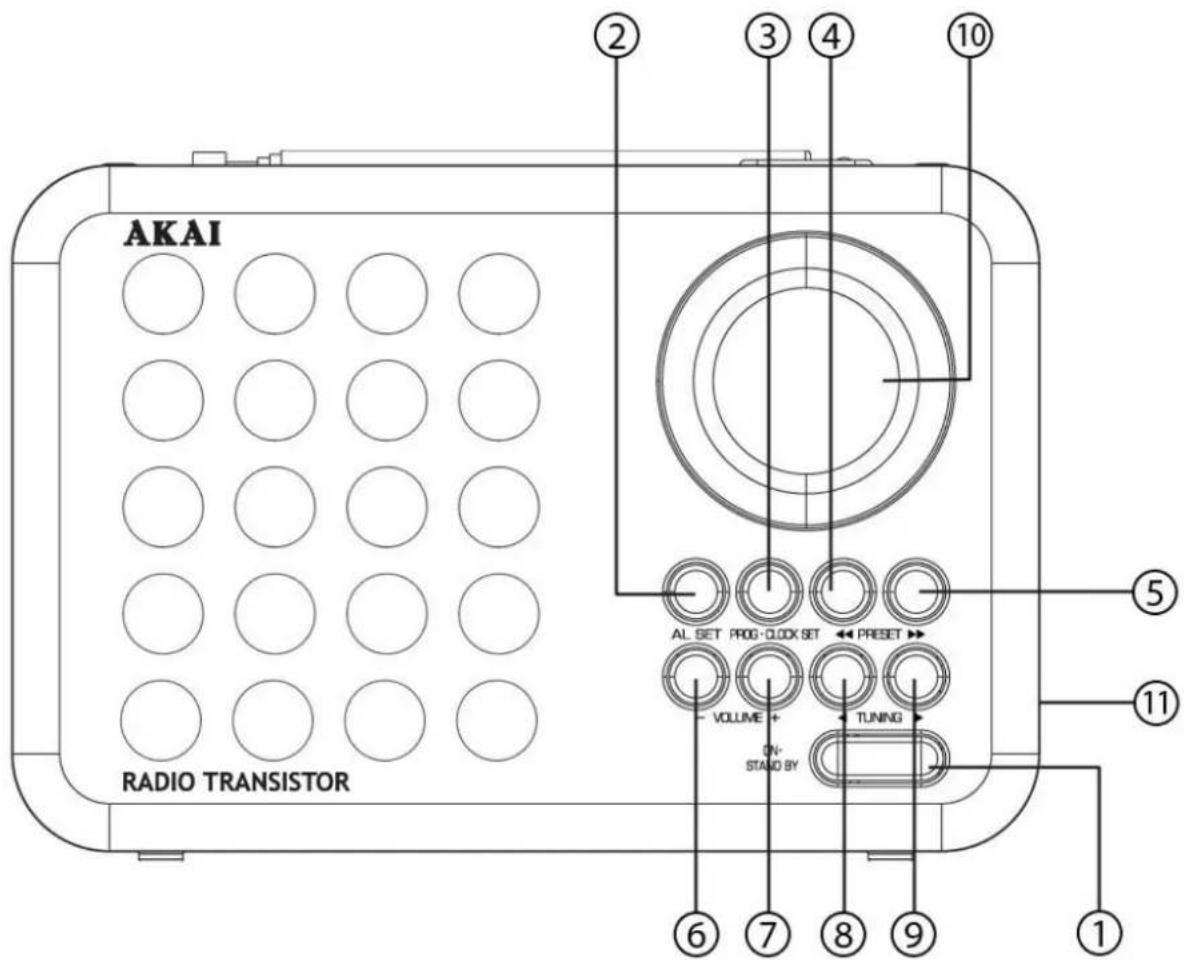
- ON/STANDBY
- ALARM SET
3.PROGRAM/CLOCKSET - PRESET
5.PRESET - VOLUME -
- VOLUME +
8.TUNING - TUNING
- LCD DISPLAY
- HEADPHONE JACK
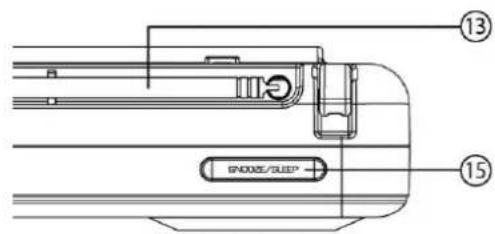
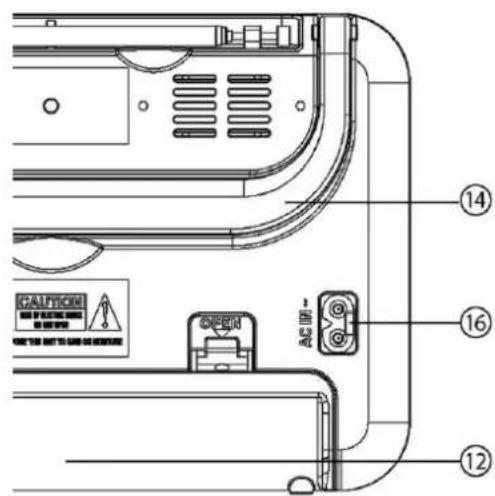
- BATTERY COMPARTMENT COVER
- ROD ANTENA
- CARRYING HANDLE
- SLEEP/SNOOZE
- AC SOCKET
Clock & Alarm settings
Clock setting
- In standby mode, press and hold (3 seconds) the CLOCK SET button (3) to enter in clock setting mode: "24H" will flash on the screen.
- Press the PRESET (4) ou PRESET (5) to select the clock format: 12H or 24H. Press CLOCK SET (3) to confirm the setting.
- The hours flash; press the PRESET (4) ou PRESET▶ (5) to adjust the hours. Press CLOCK SET (3) to confirm the setting.
- The minutes flash, press PRESET (4) or PRESET (5) to adjust the minutes.
- Press CLOCK SET (3) to confirm & to complete the clock setting.
Alarm setting
- In standby mode, press and hold (3 seconds) the AL. SET (2) to enter in alarm setting mode
- The hours flash; press the PRESET (4) ou PRESET (5) to adjust the hours. Press AL. SET (2) to confirm the setting.
- The minutes flash, press PRESET (4) ou PRESET (5) to adjust the minutes.
- Press AL. SET (2) to confirm the setting.
- Press PRESET (4) ou PRESET (5) to select the alarm sound as Buzzer - "bb" or Radio - "radio".
- Press AL. SET (2) to confirm & to complete the alarm setting.
Note:
Press AL SET (2) to enable/disable the alarm function.
Alarm duration
Beep alarm or radio alarm duration will continue output for 30 minutes if no key is pressed, it will stop automatically.
SNOOZE Function
When alarm rings, press SNOOZE button (15) to turn off the alarm temporary & to activate the snooze function, Beep alarm or Radio alarm will stop. The alarm will stop and ring again 9 minutes later.
- To disable SNOOZE function and completely stop the alarm, press the ON/STANDBY button (1). If you do not press any button, the alarm will sound for 30 minutes and then stop automatically.
Radio Operation
Power on
- Press ON/STANDBY (1) to switch on the radio.
- Adjust the volume level using the buttons VOLUME - / + (6) (7).
- To turn off the radio at any time, press the ON / STAND BY Button (1).
Manual tuning
Press briefly TUNING (8) / TUNING (9) buttons to select the desired radio station.
Automatic tuning
- Press and hold down TUNING (8) / TUNING (9) until the display frequency starts to run.
- When a station of sufficient strength has been found tuning stops, or you can stop automatic tuning by pressing TUNING (8) / TUNING (9) again.
To improve reception:
- For FM, pull out the telescopic aerial. To improve FM Reception incline and turn the aerial, reduce its length if the FM-signal is too strong (very close to a transmitter).
Presets
You can store the frequencies of up to 50 radio stations in the memory. A stored frequency can be erased from the memory by storing another frequency in its place.
Automatic Preset
- Press and hold down PROG (3) until the display frequency starts to run and stores up to 50 radio stations with strong signals.
Manual Preset
- In radio mode, tune the radio to your desired station.
- Press PROGRAM once to enter in programming mode.
- Press PRESET (4) ou PRESET (5) to select the desired memory location.
- Press PROGRAM (3) once again to confirm the selected station.
To listen to a preset station:
- Press ON/STANDBY (1) to switch on the radio.
- Press the PRESET (4) ou PRESET (5) for selecting your desired station.
SLEEP Function
When listening to radio, press SLEEP button (15) to enter sleep mode. You can just adjust the sleep timer from 90 minutes to 15 minutes by pressing the SLEEP button (15). The unit will automatically turn off after the selected time.
You can turn off the radio at any time, press the ON / STANDBY (1) Button.
Headphone jack
If you don't want to disturb other people during your listening, you can connect a stereo headphones (not supplied) with 3.5mm , into the PHONES jack (11). The audio from the speaker will be muted and you can enjoy your listening from your headphone.
Pay attention!
Establish a safe sound level: Over time your hearing will adapt to continuous loud sounds and will give the impression that the volume has in fact been reduced. What seems normal to you may in fact be harmful. To guard against this before your hearing adapts, set the volume to a low level.
Slowly increase the level until you can hear comfortably and clearly and without distortion. Damage to your hearing is accumulative and is irreversible. Any ringing or discomfort in the ears indicates that the volume is too loud. Once you have established a comfortable listening level, do not increase the sound level.
Technical Specifications
| Model | AR-72 |
| Power supply | AC 230VDC 4.5V (3 piles x 1.5V - type LR14 non fournies) |
| Power consumption in working mode | 4.5W |
| Power consumption in standby mode | 0.5 W |
| Radio Frequency range | FM: 87.5MHz - 108 MHz |
| Audio output | 1.5 W RMS |
| Net weight | 700 g |
| Dimensions | 210 x 53 x 139 mm (L×P×H) |
| IMPORTANT:Due to continual revision and improvement on our products design, specifications are subject to change without further notice. | |
End of Life Disposal
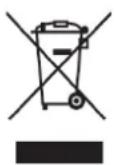
Warning! This logo set on the product means that the recycling of this apparatus comes within the framework of the Directive 2002/96/CE of January 27, 2003 concerning the Waste of Electrical and Electronic Equipment (WEEE). This symbol means that used electrical and electronic products should not be mixed with general household waste. There is a separate collection system for these products.
If you want to dispose of this equipment, please do not use the ordinary dust bin!
- The presence of dangerous substances in the electrical and electronic equipments can have potential consequences on the environment and human health in the cycle of reprocessing this product.
- Therefore, at the end of its lifetime, this product shall not be disposed with other nonrecycled waste. Used electrical and electronic equipment must be treated separately and in accordance with legislation that requires proper treatment, recovery and recycling of used electrical and electronic equipment.
- Local authorities and resellers have set special procedures for the purpose of collecting and recycling this product (please contact your local authority for further details). You have the obligation to use the selective waste collection systems put in place by your local authority.
- If your used electrical or electronic equipment has batteries or accumulators, please dispose of these separately beforehand according to local requirements.
- By disposing of this product correctly you will help ensure that the waste undergoes the necessary treatment, recovery and recycling and thus prevent potential negative effects on the environment and human health which could otherwise arise due to inappropriate waste handling.

This unit complies with European Council Directive 2006 / 95 CE (Electromagnetic Compatibility & Low Voltage Directives)
Voordat we beginnen
You can store the frequencies of up to 50 radio stations in the memory. A stored frequency can be erased from the memory by storing another frequency in its place.
Automatic Preset
- Press and hold down PROG (3) until the display frequency starts to run and stores up to 50 radio stations with strong signals.