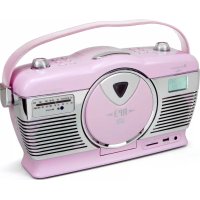
RCD1350 - Radio Soundmaster - Free user manual and instructions
Find the device manual for free RCD1350 Soundmaster in PDF.



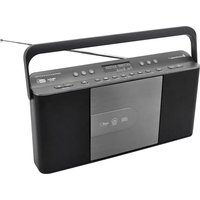
| Product type | Clock radio with CD player, USB, SD card, AM/FM tuner |
| Brand | Soundmaster |
| Model | RCD1350 |
| Main power supply | AC mains 230V/50Hz or 6 C-size batteries (UM-2) |
| Backup batteries | 2 AAA batteries (UM-4) for the clock |
| Main functions | AM/FM radio, CD/CD-R/CD-RW/MP3 player, USB input, SD/MMC card player, alarm with buzzer/natural sounds, timer, track programming, repeat/random, equalizer adjustment |
| Tuner | FM stereo, AM, FM wire antenna, AM ferrite antenna |
| Display | LCD with backlight |
| Maintenance and cleaning | Clean with a dry cloth, do not use detergents or abrasive products |
| Safety | Do not open the casing (risk of electric shock), refer all repairs to qualified personnel |
| Spare parts and repairability | Repair only by an authorized center, use of original parts |
| Included accessories | Remote control (batteries not included) |
| Laser class | Class 1 (for CD player) |
| Compliance | Directive 2014/53/EU |
| Compatibility | Audio CD, CD-R, CD-RW, MP3; USB up to 32 GB; SD/MMC card |
| Standby consumption | Compliant with ERP2 directive, automatic standby after 15 minutes without signal |
| General information | Leather carry handle, tuning LED indicator, alarm sound mode selector |
Frequently Asked Questions - RCD1350 Soundmaster
User questions about RCD1350 Soundmaster
0 question about this device. Answer the ones you know or ask your own.
Ask a new question about this device
Download the instructions for your Radio in PDF format for free! Find your manual RCD1350 - Soundmaster and take your electronic device back in hand. On this page are published all the documents necessary for the use of your device. RCD1350 by Soundmaster.
USER MANUAL RCD1350 Soundmaster
WIEDERGABEMODUSLCDDISPLAY
WIEDERH.1 TITEL REP
WIEDERH.ALBUM
WIEDERH.ALLE TITEL REP
ZUFALLSWIEDERGABEREAN
DEAKTIVIERT
ALARM (WECKEN) EINSTELLEN
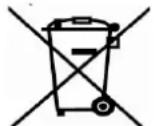
Do not dispose of this product with the normal household waste at the end of its life cycle. Return it to a collection point for the recycling of electrical and electronic devices. This is indicated by the symbol on the product, user manual or packaging.

The materials are reusable according to their markings. By reusing, recycling or other forms of utilization of old devices you make an important contribution to the protection of our environment.
Please contact your local authorities for details about collection points.
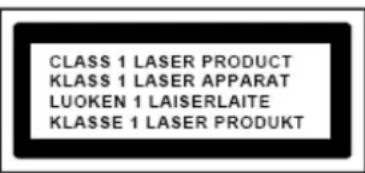
CAUTION - INVISIBLE LASER RADIATION WHEN OPENING THE COVER OR PRESSING THE SAFETY INTERLOCK. AVOID EXPOSURE TO THE LASER BEAM.
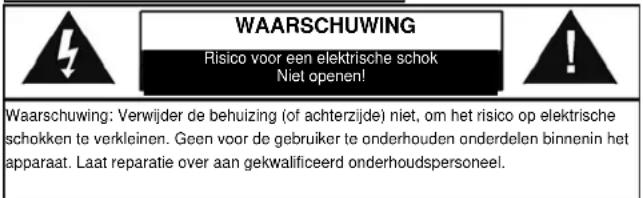
WARNING
Risk of electric shock
Do not open
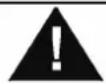
Caution: To reduce the risk of electric shock, do not remove the cover (or back). There are no user serviceable parts inside. Refer servicing to qualified service personnel.
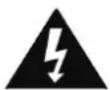
This symbol indicates the presence of dangerous voltage inside the enclosure, sufficient enough to cause electric shock.

This symbol indicates the presence of important operating and maintenance instructions for the device.
Safety, Environmental and Setup Instructions
- Use the device in dry indoor environments only.
- Protect the device from humidity.
Do not open the device. RISK OF ELECTRIC SHOCK! Refer opening and servicing to qualified personnel. - Connect this device to a properly installed and earthed wall outlet only. Make sure the mains voltage corresponds with the specifications on the rating plate.
Make sure the mains cable stays dry during operation. Do not pinch or damage the mains cable in any way. - Disconnect device warning: Main plug is used as the connection, so it should always remain ready operate.
The mains plug is used as the disconnect device, the disconnect device shall remain readily operable. - A damaged mains cable or plug must immediately be replaced by an authorized service center.
- In case of lightning, immediately disconnect the device from the mains supply.
Children should be supervised by parents when using the device. - Clean the device with a dry cloth only. Do NOT use CLEANING AGENTS or ABRASIVE CLOTHS!
- Do not expose the device to direct sunlight or other heat sources.
Install the device at a location with sufficient ventilation in order to prevent heat accumulation. - Do not cover the ventilation openings!
The ventilation should not be impeded by covering the ventilation openings with items, such as newspaper, table-cloths, curtains, etc.
It shall be not be exposed to dripping or splashing and that no objects filled with liquids, such as vases, shall be placed on the apparatus.
The unit should not be exposed to direct sunlight, very high or low temperature, moisture, vibrations or placed in dusty environment. - Never attempt to insert wires, pins or other such objects into the vents or opening of the unit.
- Install the device at a safe and vibration-free location.
- No naked flame sources, such as lighted candles, should be placed on the apparatus.
Install the device as far away as possible from computers and microwave units; otherwise radio reception may be disturbed.
Do not open or repair the enclosure. It is not safe to do so and will void your warranty. Repairs only by authorized service/ customer center.
The device is equipped with a "Class 1 Laser". Avoid exposure to the laser beam as this could cause eye injuries. - Only use mercury and cadmium-free batteries.
- Batteries shall not be exposed to excessive heat such as sunshine, fire or the like.
Used batteries are hazardous waste and NOT to be disposed of with the household waste!! Return the batteries to your dealer or to collection points in your community. - Keep batteries away from children. Children might swallow batteries. Contact a physician immediately if a battery was swallowed.
- Check your batteries regularly to avoid battery leakage.
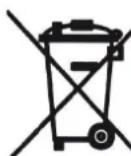
Used batteries are hazardous waste and NOT to be disposed of with the household waste! As a consumer you are legally obligated to return all batteries for environmentally responsible recycling - no matter whether or not the batteries contain harmful substances*).
Return batteries free of charge to public collection points in your community or to shops selling batteries of the respective kind.
Only return fully discharged batteries.
*) marked Cd = cadmium, Hg = mercury, Pb = lead
Location of controls
Usage of controls or adjustments or performance of procedures other than those specified herein may result in hazardous radiation exposure.
This unit should not be adjusted or repaired by anyone except qualified service personnel.
Precautions for use
Installation
- Unpack all parts and remove protective material.
- Do not connect the unit to the mains before checking the main voltage and before all other connections have been made.
- Do not cover any vents and make sure that there is a space of several centimeters at the back of the unit for ventilation.
AC connection
- Connect the one end of the detachable power cord to the AC socket (28) and the other end to the ac outlet.
- When you first plug the unit into the mains, the unit will go into standby mode.
- Turn on the unit by On/Standby button (6), the TUNER LED indicator (24) will light up.
DC connection
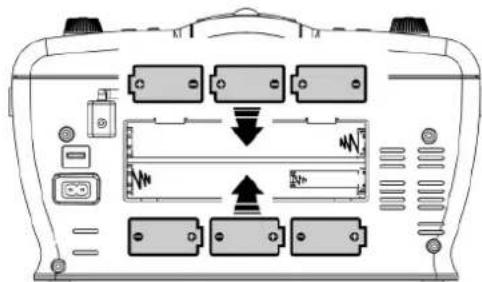
For DC operation, please insert 6 pcs size C (UM-2) battery at batter compartment (29) as below direction:
Setting the clock
- Set unit in standby mode.
- Press and hold the "Folder up/Clk-adj" button (10) a second, The minute digit flashing on the LCD display(16). Press skip up or skip down button (11) to set the correct minute. Press "Folder up/Clk-adj" button (10) to store the correct minute.
- The hour digit will flashing, press the skip up or skip down 口 button (11) to set the correct minutes. Then press "Folder up/Clk-adj" button (10) to store the correct hour.
The clock setting will automatically stored if no button is being pressed in a period of about 10 seconds during clock setting mode.
To avoid the re-set of clock frequently when exchange the battery, please insert 2 pcs AAA size (um-4) battery at the clock/alarm back-up battery compartment (30) in the direction as below direction:-
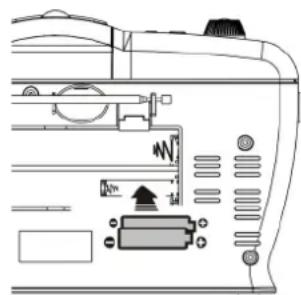
Remark : Pull down the ribbon while insert the battery, this can help to release it easier when changing the battery in the next time.
Listening to radio
Operation
- Turn on the unit by On/Standby button (6), unit defaulted on Tuner mode and the TUNER LED indicator (24) will light up.
- Select the described band by band switch (27)
- Turn the tuning knob (12) to set the station frequency as desired.
- adjust volume know (5) to the desired volume level.
Hints for best reception:
- FM : the receiver has rod antenna (26) hanging at the rear cabinet. this wire should be totally unraveled and extended for best reception.
AM: the receiver has a built-in am bar antenna. If am reception is weak, slightly rotate or re-positioning of the unit will usually improve the am reception.
FM-stereo reception
- The FM-stereo LED indicator (23) will light up to show FM stereo program is receiving.
Playing CD/MP3 disc
Getting start
- Press Function button (4) to select CD mode.
- Open the CD compartment by pressing the CD door open/close (20). Put a CD disc into the compartment and close the CD door.
- Focus search is performance if disc is inside. Total number of tracks is read.
- Play / pause mode

- Press the "play/pause button (13) to start playback, the first track will start playback.
- To interrupt, press the "play/pause " button (13) once, and the playing time will be freeze on the LCD display (16). Press again to resume normal playback.
- Stop mode
- If Stop button (14) is pressed during play or pause mode. Go to stop mode and display total number of track on the LCD display (16).
- Skip mode (skip up /skip down)
-
During play or pause mode, if skip up▶ button (11) is pressed it will go to next track and display the track no. and then continuous the play or pause mode.
-
During play or pause mode, if Skip down button (11) is pressed, it will go back to the beginning of the track, same track no. is display and continuous the play or pause mode.
- After step 2, press skip down button (11) again, it will go to the previous track and continuous the play or pause mode.
For MP3 disc/file
- Place the MP3-CD to CD compartment. After focus search is performing, the total number of track will be shown on the LCD display (16).
- Press Skip up or Skip down (11) button to select the track number.
- When the desired track and album is being selected, press the "Play/Pause button (13) to start playback.
Remark
- Press "Folder up on down button (9/10) on main unit can select the MP3 folder directly.
- The number of folder will display on LCD (16) for 1-2 seconds selected and then it will resume to the number of the track being playback
- Repeat/Random mode
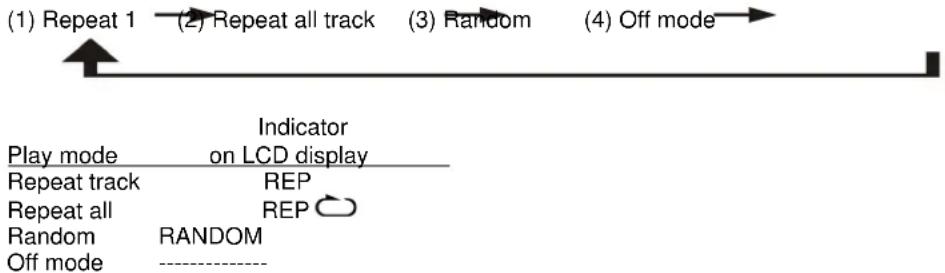
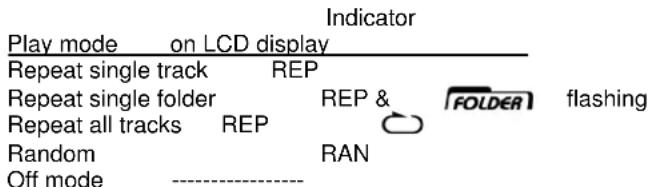
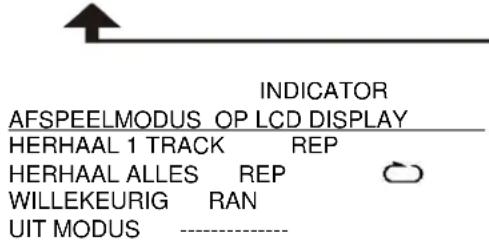
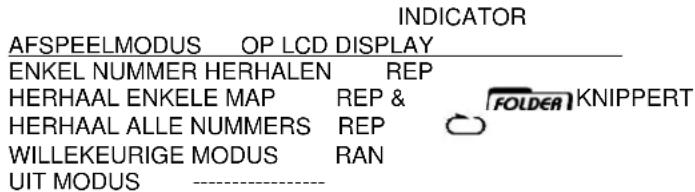
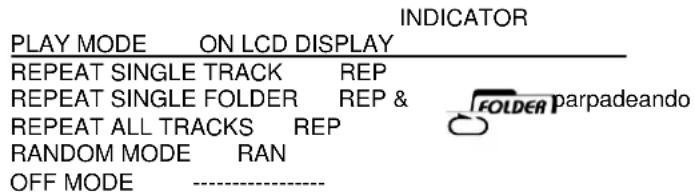
Press the "Rep/Ran" button (3) during playback to select repeat and random function, a single track, single folder (MP3 only) or all the tracks can be played in difference mode as follow:
For CD
For MP3 disc/file
(1) Repeat 1 (2) Repeat 1 folder
(3) Repeat all tracks
(4) Random 5) Off mode

Repeat play
You can listen the desired tracks or folder repeatedly by this function.
- Random play
You can listen all the tracks in a random order by this function
CD / MP3 disc programming
Up to 20 tacks can be programmed for disc play in any order. Before use, be sure to press the stop button.
- Set in CD mode.
- Press the Memory button (2), "MEMORY" & "P01" will appear and flashing on LCD display (16).
- Select a desired track by using the Skip up /Skip down buttons (11).
- Press the Memory button (2) to enter the track into the memory.
- Repeat steps 3 and 4 to enter additional tracks into the memory if necessary.
- When all the desired tracks have been programmed, press "Play/Pause " button (13) to play the disc in the order you have programmed.
- Press "Stop" button (14) to terminate program play.
Press "Stop" button (13) at CD stop mode to cancel all programmed memory until the "MEMORY" indicator disappear on LCD display (16).
For MP3 disc / file, press the "Folder up button (10) to select the 1st track of next folder directly and hence to speed up the song selection.
The programming mode will automatically stop if no button is being pressed in a period of about 30 seconds after pressing the Memory button (2).
Remark:-
MP3 track format requirement:
Bit rate : 32 kbps~320kbps, sampling rate : 32kHz, 44.1kHz and 48 kHz decodable
- The performance of playing MP3 disc is various from the quality of recording disc and the method of recording. Furthermore, the searching lead-time for MP3-CD is longer than normal CD due to difference format.
Playback of MP3 song via USB storage media or memory card
Connecting
The system is able to decode and playback all MP3 file which stored in the memory media with USB connecting port or SD/MMC memory card.
- Set the system at standby mode first or other function except USB/SD mode.
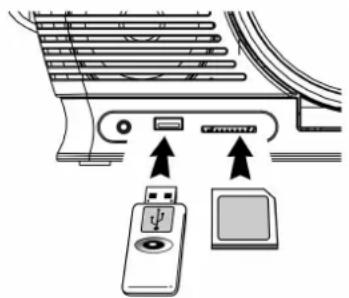
- Plug-in the USB pen-drive with the face up & make sure it going into completely or insert the memory card in the direction of the arrow as shown in the label on the underside of the memory card slot cover. Insert straight without bending..
- Connecting the USB upside down or backwards could damage the audio system or the storage media (USB thumb driver/SD/MMC card). Check to be sure the direction is correct before connection.
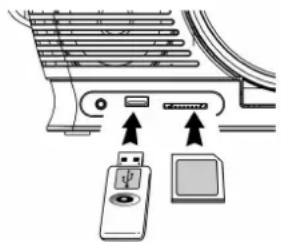
- Turn on the unit again by On/Standby button (6) and set press Function button (4) to select CD mode. Press Source button (8) to change to USB or SD mode. The system will start reading the storage media automatically after connecting, and LCD display (16) will show the total number of MP3 files being detected.
- Repeat the same playback procedure as playing CD/MP3 disc as above.
Remark
- The system can detect and read the file under MP3 format only at USB or SD mode but not other music file format.
If connect the system to MP3 player via the USB socket, due to variances in MP3 encoding format, some MP3 player may not be able to play via the USB socket. This is not a malfunction of the system.
USB port does not support connection with USB extension cable and is not designed for communication with computer directly
Due to ErP stage two requirement and protect the environment. The unit will switch to standby mode automatically once no any music playing over 15 minutes.
Removing of USB or memory card
To remove the USB turn off the power or switch the function mode to either cd or tuner mode first. For USB port - un-plug it by pulling out the USB socket directly. For memory card - pull out the SD/MMC card straightly without bending.
Setting the alarm
This unit able to set the alarm and wake up by buzzer, Ocean or bird sound
1 Set unit in standby mode.
2. Press and hold the "Folder down/Alarm" button (9) a second, the minute digit flashing on the LCD display (16). Press skip up or skip down button (11) to set the correct minute. Press "Folder down/Alarm" button (9) to store the correct minute.
3. The hour digit will flashing, press the skip up or skip down 口 button (11) to set the correct minutes. Then press "Folder down/Alarm" button (9) to store the correct hour.
4. Choose the wake up sound mode by Alarm sound mode selector (25).
Active/de-active timer function
- Press the "Folder down/Alarm" button (9) repeatedly until the timer indicator is shown on LCD display (16).
- To cancel alarm function by press again "Folder down/Alarm" button (9) until the timer indicator disappear.
Remark : When alarm sound press " snooze " button (15) once to terminate the alarm mode temporarily and it will alarm again after 9 minutes on each press. To cancel the alarm mode, press the "Folder down/Alarm" button (9). If no any button press during alarm, it will automatically stop after running one hour.
The alarm setting will be automatically stored if no button is being pressed in a period of about 10 seconds during alarm setting mode.
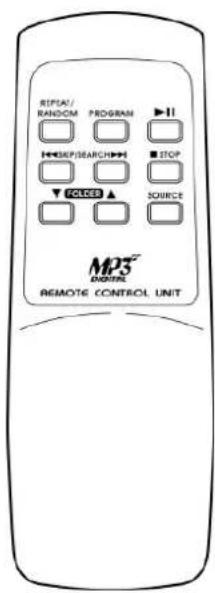
Remote control transmitter control functions
Battery installation (battery not provided)
The infra-red transmitter require 2 pcs AAA batteries for operation
Button description
Repeat/Random Press to active repeat/random function
Memory
Press to active program function
Play/pausePress once to start playback and press again to stop playback temporarily
Skip up/down Press to select previous / next track or press & hold to perform fast forward/backward function
Stop
Press to terminate playback or cancel programmed tracks
Folder up down
Press to skip up/down the MP3 folder
Source
Press to change mode between CD/SD/USB
PROTECTION DE L'ENVIRONNEMENT
CLASS 1 LASER PRODUCT
KLASSE 1 LASER PRODUKT
LUOKAN 1 LASER LAITE
KCLASS 1 LASER APPARAT
PRODUCTO LASER CLASE 1
ATTENTION - RADIATION LASER INVISIBLE LORSQUE VOUS OUVREZ LE COUVERCLE OU APPUYEZ SUR L'ENCLENCHEMENT DE SECURITE. EVITEZ Toute EXPOSITION AU RAYON LASER
ATTENTION
Copyright by Wörlein GmbH, 90556 Cadolzburg, Germany, www.woerlein.com
MILIEUBESCHERMING

CLASS 1 LASER PRODUCT
KLASSE 1 LASER PRODUKT
LUOKAN 1 LASER LAITE
KCLASS 1 LASER APPARAT
PRODUCTO LASER CLASE 1
WAARSCHUWING - ONZICHTBARE LASERSTRALING WANNEER DE BEHUIZING GEOPEND WORDT OF DE INTERNE BEVEILIGING UITGESCHAKELD. VERMIJD BLOOTSTELLING AAN DE LASERSTRAAL.

(1) HERHAAL 1 (2) HERHAAL ALLE TRACKS (3) WILEKEURIG (4) UIT MODIS
VOOR MP3/WMA DISK/BESTAND
(1) HERHAAL 1 (2) HERHAAL 1 FOLDER (3) HERHAAL ALLE TRACKS

HERHAALD AFSPELEN
MET DEZE FUNCIE KUNT U DE GEWENSTE TRACKS OF FOLDER HERHAALD AFSPELEN.
WILLEKEURIG AFSPELEN
MET DEZE FUNCIE KUNT U ALL TRACKS OF EEN FOLDER IN WILLEKEURIGE VOLGORDE AFSPELEN
CD / MP3 DISKS PROGRAMMEREN (VIA AFSTANDSBEDIENING)
U KUNT TOT OP 20 TRACKS VAN EEN DISK PROGRAMMEREN OM IN ELKE GEWENSTE VOLGORDE AF TE SPELEN. DRUK OP DE “STOP ■ ” TOETS (14) VOORDAT U DEZE FUNCITIE GEBRUIKT.
- STEL DE CD MODE.
- DRUK OP DE THE GEHEUGEN TOETS (2), "GEHEUGEN" & "P01" VERSCHIJNNEN EN KNIPPEREN OP HET LCD SCHERM (16).
- KIES HET GEWENSTE NUMMER DOOR EEN DRUK OP DE OVERSLAAN OMHOOGIOVERSLAAN OMLAAG TOETSEN (11).
- DRUK OP DE GEHEUGEN TOETS (2) OM HET NUMMER IN HET GEHEUGEN OP TE SLAAN.
- HERHAAL STAPPEN 3 EN 4 OM EXTRA NUMMERS TOE TE VOEGEN IN HET GEHEUGEN, INDIEN NODIG.
- ALS ALLE GEWENSTE NUMMERS ZIJN INGEPROGRAMMEERD, DRUK DAN OP DE "AFSPELEN/PAUZE " TOETS (13) OM DE CD IN DE GEPROGRAMMEERDE VOLGORDE AF TE SPELEN.
- DRUK OP DE “STOP TOETS (14) OM HET GEPROGRAMMERD AFSPELEN TE BEEINDIGEN.
DRUK OP DE “STOP■” TOETS (13) IN CD STOP MODE OM ALLE GEPROGRAMMEERDE NUMMERS TE VERWIJDEREN, TOTDAT DE “GEHEUGEN” INDICATOR VAN HET LCD SCHERM (16) VERDWIJNT.
VOOR MP3 CDS/BESTANDEN DRUKT U OP DE THE "MAP OMHOOG" TOETS (10) OM HET 1E NUMMER VAN DE VOLGENDE MAP TE KIEZEN, EN ZE DE NUMMERSELECTIE TE VERSNELLEN.
DE PROGRAMMA-INSTELLINGSMODE WORDT AUTOMATISCH BEEINDIGD ALS ER LANGER DAN 30 SECONDEN GEEN TOETS WORDT INGEDRUKT, NA HET INDRUKKEN VAN DE GEHEUGEN TOETS (2).
OPMERKING:
MP3 NUMMER ONDERSTEUND FORMAAT:
-
BITRATE : 32 KBPS~320KBPS, SAMPLEFREQUENCY : 32KHZ, 44.1KHZ EN 48 KHZ DECODEERBAAR
-
DE KWALITEIT VAN HET AFSPELEN VAN EEN MP SCHIJF IS AFHANKELIJK VAN DE KWALITEIT VAN DE OPGENOMEN CD, EN DE WIJZE VAN OPNAME. BOVENDIEN IS DE LAADTIJD VOOR MP3-CDS LANGER DAN BII J EEN NORMALE CD, DOOR HET VERSCHILLLENDE FORMAAT..
MP3/WMA TRACKS AFSPELEN VIA USB OPSLAGMEDIA OF GEHEUGENKAART
AANSLUITING
HET SYSTEEM KAN ALLE MP3/WMA BESTANDEN DECODEREN EN AFSPELEN DIE ZIJN OPGESLAGEN OP GEHEUGENMEDIA VIA DE USB INGANG OF EEN SD/MMC GEHEUGENKAART.
-
STEL HET SYSTEEM EERST IN OP STAND-BY MODUS OF EEN ANDERE FUNCTIE, BEHALVE SD OF USB MODUS.
-
SLUIT DE USB PEN-DRIVE AAN MET DE VOORKANT NAAR BOVEN & CONTROLEER OF HET ER VOLLEDIG IN ZIT, OF STEEK EEN GEHEUGENKAART IN DE INGANG IN DE RICHTING VAN HET PIJLTJE, ZOALS AFGEBEELD OP HET LABEL ONDER DE COVER VAN DE GEHEUGENKAARTINGANG. RECHT INSTEKEN ZONDER TE BUIGEN.
-
DOOR DE USB ER ONDERSTEBOVEN OF VERKEERD OM IN TE STEKEN, KAN HET AUDIOSYSTEME M OF DE OPSLAGMEDIA (USB THUMB DRIVE / SD/MMS KAART) BESCHADIGD RAKEN. CONTROLEER DE JUISTE RICHTING ALVORENS AAN TE SLUITEN.
-
ZET D.M.V. DE AAN/STANDBYTOETS (6) HET APPARAAT WEER AAN EN
DRUK OP DE FUNCTIETOETS (4) OM DE CD MODE TE KIEZEN. DRUK OP
DE BRON TOETS (8) OM TE WIJZIGEN TUSSEN USB OF SD MODE. HET SYSTEEM BEGINT AUTOMATISCH MET HET
LEZEN VAN DE OPSLAGMEDIA ZODRA DEZE WORDEN AANGESLOTEN, HET LCD SCHERM (16) TOONT HET
TOTaal AANTAL MP3 BESTANDEN DAT WORDEN GEVONDEN. -
NA DE AANSLUITING BEGINT HET SYSTEEM AUTOMATISCH MET INLEZEN VAN DE OPSLAGMEDIA, EN DE LCD DISPLAY (16) ZAL HET TOTALE AANTAL INGELEZEN MP3/WMA BESTANDEN TONEN.
OPMERKING
- WANNEER HET SYSTEEM IS AANGESLOTEN OP EEN MP3 SPELER VIA DE USB INGANG, KAN HET GBEUREN DAT EEN BEPAALDE MP3 SPELER NIET VIA DE USB INGANG AFGESPEELD KAN WORDEN VANWEGE DE VELE VERSCHILLEN IN MP3 CODEERFORMATEN. DIT DUIDT NIET OP EEN SYSTEEMDEFECT.
BESCHRIJVING KNOPPEN
HERHAAL/WILLEKEURIG DRUK HIEROP OM DE HERHAAL/WILLEKEURIGE AFSPEELFUNCTIE TE ACTIVEREN
GEHEUGEN
DRUK HIEROP OM DE PROGRAMMAFUNCTIE TE ACTIVEREN
AFSPELEN/PAUZEDRUK HIER EENMAAL OP OM HET AFSPELEN TE STARTEN, EN DRUK OPNIEUW OM
AFSPELEN TIJDELIJK TE ONDERBREKEN
OVERSLAAN OMHOOGIOMLAAGI
DRUK IN OM VORIGE/VOLGENDE NUMMERS TE KIEZEN EN
HOUDT VAST OM UIT TE VOEREN
SNEL VOORUIT/ACHTERUIT FUNCTIE
STOP
DRUK HIEROP OM HET AFSPELEN TE STOPPEN OF EEN AFSPEELPROGRAMMA TE
BEEINDIGEN
MAP OMHOOG /OMLAAG
DRUK HIEROP OP OMHOOG/OMLAAG DOOR DE MP3 MAPPEN TE BLADEREN
BRON
DRUK HIEROP OM DE MODE TE WISSELEN TUSSEN CD/SD/USB
Copyright by Wörlein GmbH, 90556 Cadolzburg, Germany, www.woerlein.com
PROTECCION MEDIOAMBIENTAL
CLASS 1 LASER PRODUCT
KLASSE 1 LASER PRODUKT
LUOKAN 1 LASER LAITE
KCLASS 1 LASER APPARAT
PRODUCTO LASER CLASE 1
PRECAUCION - RADIACION INVISIBLE DE LÁSER AL ABRIR LA TAPA O PULSAR EL INTERBLOQUEO DE SEGURIDAD. EVITE LA EXPOSICION AL HAZ DE LÁSER.

ADVERTENCIA

(1) REPEAT 1 (2) REPEAT 1 FOLER (3) REPEAT ALL TRACKS
REPEAT PLAY
*) markerade Cd = kadmium, Hg = kvicksilver, Pb = bly
D 90556 Cadolzburg, Germany
Tel: +49 9103 71 67 0
Fax: +49 9103 71 67 12
E-Mail: info@soundmaster.de
Internet: www.soundmaster.de
Hereby, Wörlein GmbH declares that this device is in compliance with the essential requirements and other relevant provisions of Directive 2014/53/EU.
A copy of the declaration of conformity can be obtained from the above address.

- ALARM (WECKEN) EINSTELLEN
- CAUTION - INVISIBLE LASER RADIATION WHEN OPENING THE COVER OR PRESSING THE SAFETY INTERLOCK. AVOID EXPOSURE TO THE LASER BEAM
- WARNING
- SAFETY, ENVIRONMENTAL AND SETUP INSTRUCTIONS
- LOCATION OF CONTROLS
- PRECAUTIONS FOR USE
- INSTALLATION
- AC CONNECTION
- DC CONNECTION
- SETTING THE CLOCK
- LISTENING TO RADIO
- OPERATION
- HINTS FOR BEST RECEPTION
- FM-STEREO RECEPTION
- PLAYING CD/MP3 DISC
- GETTING START
- PLAY / PAUSE MODE
- STOP MODE
- SKIP MODE (SKIP UP /SKIP DOWN)
- FOR MP3 DISC/FILE
- REMARK
- REPEAT/RANDOM MODE
- FOR CD
- REPEAT PLAY
- RANDOM PLAY
- CD / MP3 DISC PROGRAMMING
- PLAYBACK OF MP3 SONG VIA USB STORAGE MEDIA OR MEMORY CARD
- CONNECTING
- REMOVING OF USB OR MEMORY CARD
- SETTING THE ALARM
- ACTIVE/DE-ACTIVE TIMER FUNCTION
- REMOTE CONTROL TRANSMITTER CONTROL FUNCTIONS
- BATTERY INSTALLATION (BATTERY NOT PROVIDED)
- BUTTON DESCRIPTION
- PROTECTION DE L'ENVIRONNEMENT
- ATTENTION - RADIATION LASER INVISIBLE LORSQUE VOUS OUVREZ LE COUVERCLE OU APPUYEZ SUR L'ENCLENCHEMENT DE SECURITE. EVITEZ TOUTE EXPOSITION AU RAYON LASER
- ATTENTION
- MILIEUBESCHERMING
- WAARSCHUWING - ONZICHTBARE LASERSTRALING WANNEER DE BEHUIZING GEOPEND WORDT OF DE INTERNE BEVEILIGING UITGESCHAKELD. VERMIJD BLOOTSTELLING AAN DE LASERSTRAAL
- VOOR MP3/WMA DISK/BESTAND
- HERHAALD AFSPELEN
- WILLEKEURIG AFSPELEN
- CD / MP3 DISKS PROGRAMMEREN (VIA AFSTANDSBEDIENING)
- OPMERKING
- MP3/WMA TRACKS AFSPELEN VIA USB OPSLAGMEDIA OF GEHEUGENKAART
- AANSLUITING
- BESCHRIJVING KNOPPEN
- PROTECCION MEDIOAMBIENTAL
- PRECAUCION - RADIACION INVISIBLE DE LÁSER AL ABRIR LA TAPA O PULSAR EL INTERBLOQUEO DE SEGURIDAD. EVITE LA EXPOSICION AL HAZ DE LÁSER
- ADVERTENCIA
Brand : Soundmaster
Model : RCD1350
Category : Radio