MVH180UBG - Car stereo PIONEER - Free user manual and instructions
Find the device manual for free MVH180UBG PIONEER in PDF.


User questions about MVH180UBG PIONEER
0 question about this device. Answer the ones you know or ask your own.
Ask a new question about this device
Download the instructions for your Car stereo in PDF format for free! Find your manual MVH180UBG - PIONEER and take your electronic device back in hand. On this page are published all the documents necessary for the use of your device. MVH180UBG by PIONEER.
USER MANUAL MVH180UBG PIONEER
DIGITAL MEDIA RECEIVER
RECEPTEUR NUMERIQUE MULTIMEDIA
RICEVITORE MULTIMEDIALE DIGITALE
RECEPTOR DIGITAL DE MEDIOS
DIGITALER MEDIA RECEIVER
DIGITALE MEDIA-RECEIVER
LINΦPOBOM MEIINAPECUBEP
MVH-X380BT
MVH-180UI
MVH-180UBG
MVH-180UB
MVH-181UB


Bluetooth
Made for

d iPhone
Owner's Manual
Mode d'emploi
PykoBoDCTBO NOIb3OBaTeJIa
Table of Contents
Before You Start 3
Getting Started 4
Radio 7
USB/iPod/AUX 8
Bluetooth 10
App Mode. 14
Using Pioneer ARC APP 15
Settings. 16
FUNCTION settings 16
AUDIO settings. 17
SYSTEM settings 18
ILLUMINATION settings. 19
MIXTRAX settings. 19
Connections/Installation 20
Additional Information. 23
About this manual:
- In the following instructions, a USB memory or USB audio player are referred to as "USB device".
In this manual, iPod and iPhone are referred to as "iPod".
Declaration of Conformity with regard to the R&TTE Directive 1999/5/EC
C E
Manufacturer:
PIONEER CORPORATION
1-1, Shin-ogura, Salwai-ku, Kawasaki-shi, Kanagawa 212-0031, JAPAN
EU Representative's:
Pioneer Europe NV
Haven 1087, Keetberglaan 1, B-9120 Melsele, Belgium/Belgique
http://www.pioneer.eu
English: Hereby, Pioneer, declares that this MVH-X380BT is in compliance with the essential requirements and other relevant provisions of Directive 1999/5/ EC.
Suomi: Pioneer vakuuttaa taten etta MVH-X380BT typpinen latte on direktlin 1999/5/EY oleellsten vaatimusten ja sa tskoskevi direktlinu muiden ehtoen mukainen.
Nederlands: Hierbij verkaart Pioneer dat het toestel MWHX380BT in overeenstemming is met de essentiele eisen en de andere relevante bpalingen van richtijn 1999/5/EG
Français:
Par la presente Pioneer déclaré que l'appareil MVH-X380BT est conforme aux exigences essentielles et autres dispositions pertinentes de la directive 1999/5/CE
Svenska: Harmed intygar Pioneer attenna MVH-X380BT star I overens-stammelse med de vasantliga egeniskapskay och oyiga relevanta.
Bansk
Dansk:
Undertegnede Pioneer erklarer herved, at
folgende udstyr MVH-X380BT overholder de
vansentige krav og ovlige relevante krav i direktiv 1999/5/EF
Deutsch: Hiermit erklart Pioneer, dass sich dieses Gerät MVH-X380BT in Übereinstimmung mit den grundlegenden Anforderungen und den anderen relevanten Vorschriften der Richte 1999/5/EG befind. (BMWi)
EAAyik
ME THN NIAPOYZA PioneerE AHANIEOTI MVHX380BT YYM-MOPQNETAI PPOZ T1E OYIQAIEI AITAHIEEKAI T1E AOIIENEE XETIKEE DIATAEIEI THO ODHIAK 1999/SEK
Italiano:
Thank you for purchasing this PIONEER product
To ensure proper use, please read through this manual before using this product. It is especially important that you read and observe WARNINGS and CAUTIONs in this manual. Please keep the manual in a safe and accessible place for future reference.

If you want to dispose this product, do not mix it with general household waste. There is a separate collection system for used electronic products in accordance with legislation that requires proper treatment, recovery and recycling.
Private households in the member states of the EU, in Switzerland and Norway may return their used electronic products free of charge to designated collection facilities or to a retailer (if you purchase a similar new one).
For countries not mentioned above, please contact your local authorities for the correct method of disposal.
By doing so you will ensure that your disposed product undergoes the necessary treatment, recovery and recycling and thus prevent potential negative effects on the environment and human health.

WARNING
-
Do not attempt to install or service this product by yourself. Installation or servicing of this product by persons without training and experience in electronic equipment and automotive accessories may be dangerous and could expose you to the risk of electric shock, injury or other hazards.
-
Do not attempt to operate the unit while driving. Make sure to pull off the road and park your vehicle in a safe location before attempting to use the controls on the device.

CAUTION
- Do not allow this unit to come into contact with moisture and/or liquids. Electrical shock could result. Also, damage to this unit, smoke, and overheating could result from contact with liquids.
Always keep the volume low enough to hear outside sounds.
The CarStereo-Pass is for use only in Germany.
This product is evaluated in moderate and tropical climate condition under the Audio, video and similar electronic apparatus - Safety requirements, IEC 60065.
If you experience problems
Should this unit fail to work properly, please contact your dealer or nearest authorized PIONEER Service Station.
Getting Started
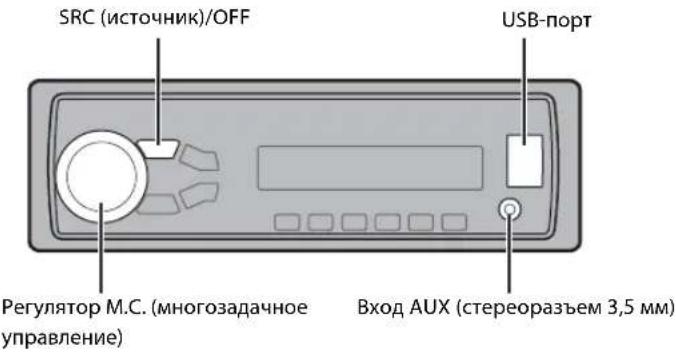
Basic operation
MVH-X380BT/180UI/180UBG/180UB/181UB
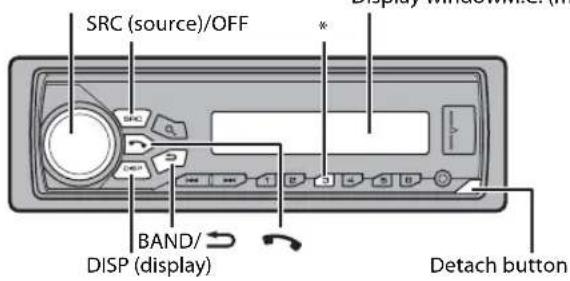
* The button indications vary depending on the unit.
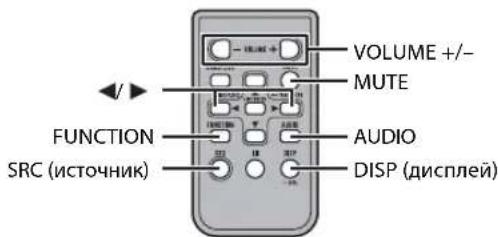
Remote Control
NOTE
Remote control is supplied only for MVH-181UB.
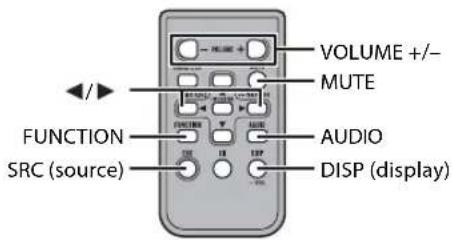
Frequently used operations
| Purpose | Operation | |
| Head Unit Remote | Control | |
| Turn on the power* | Press SRC/OFF to turn on the power. Press and hold SRC/OFF to turn off the power. | Press SRC to turn on the power. Press and hold SRC to turn off the power. |
| Adjust the volume | Turn the M.C. dial. | Press VOLUME + or -. Press MUTE to mute the unit. Press again to unmute. |
| Select a source Press SR | C/OFF repeatedly. | Press SRC repeatedly. |
| Change the display information | Press DISP repeatedly. | Press DISP repeatedly. |
| Return to the previous display/list | Press BAND/ | Press ↓/▶ to select the next/previous folder. |
| Return to the normal display from the menu | Press and hold BAND/ | - |
| Answering a call | Press | - |
| Ending a call | Press | - |
- When this unit's blue/white lead is connected to the vehicle's auto-antenna relay control terminal, the vehicle's antenna extends when this unit's source is turned on. To retract the antenna, turn the source off.
Display indication
| Indication Description | |
| Appears when a lower tier of the menu or folder exists. | |
| ↑ | Appears when a Bluetooth telephone is connected to this unit by HFP (Hands Free Profile) (page 10) and flashes while the telephone is on hold. (Only for Bluetooth-compatible models.) |
| ↓ | Appears when a Bluetooth audio player is connected to this unit by A2DP (Advanced Audio Distribution Profile) (page 10). (Only for Bluetooth-compatible models.) |
| P | Appears when the button is pressed. |
| LOC | Appears when the local seek tuning function is set (page 16). |
| TP Appears when a traffic program is received. | |
| TA Appears when the TA (traffic announcements) function is set (page 16). | |
| SATY | Appears when the sound retriever function is set (page 17). |
| XX | Appears when random/shuffle play is set (except when BT AUDIO is selected as the source). |
| ← | Appears when repeat play is set (except when BT AUDIO is selected as the source). |
| → | Appears when the iPod control function is set (page 10). |
| θ | Appears when a Bluetooth connection is made (page 10). (Only for Bluetooth-compatible models.) |
Detaching the front panel
Detach the front panel to prevent theft. Remove any cables and devices attached to the front panel and turn off the unit before detaching it.
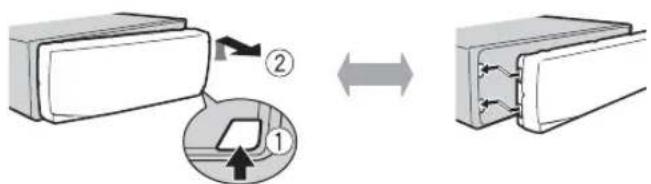
Detach Attach
4s16u3

Important
- Avoid subjecting the front panel to excessive shock.
- Keep the front panel out of direct sunlight and high temperatures.
Always store the detached front panel in a protective case or bag.
Preparing the remote control
Remove the insulation sheet before use.
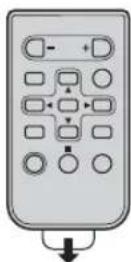
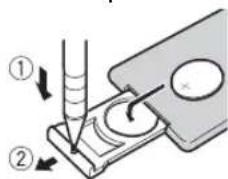
How to replace the battery
Insert the CR2025 (3 V) battery with the plus (+) and minus (-) poles orientated properly.

WARNING
- Do not ingest the battery, Chemical Burn Hazard.
- This product, including the supplied remote control, contains a coin/burner cell battery. If the coin/burner cell battery is swallowed, it can cause severe internal burns in just two hours and can lead to death.
-
Keep new or used batteries out of the reach of children. If the battery is swallowed or placed inside any part of the body, consult a doctor immediately.
-
If the battery compartment does not close securely, stop using the product and keep it away from children.
- Do not expose the battery or remote control to excessive heat such as direct sunlight or fire.
CAUTION
- There is a potential danger of explosion if the battery is incorrectly replaced. When replacing the battery, replace it with the same type.
- Do not handle or store the battery with metallic tools or objects.
- If the battery leaks, remove the battery and wipe the remote control completely clean. Then install a new battery.
- When disposing of used batteries, please comply with governmental regulations or environmental public institutions' rules that apply in your country/area.
Important
- Do not store the remote control in high temperatures or direct sunlight.
- Do not let the remote control fall onto the floor, where it may become jammed under the brake or accelerator pedal.
Setup menu
When you turn the ignition switch to ON after installation, [SET UP:YES] appears in the display.
1 Press the M.C. dial.
The setup menu disappears after 30 seconds of no operation. If you prefer not to set at this time, turn the M.C. dial to select [NO], then press to confirm.
2 Turn the M.C. dial to select the options, then press to confirm.
To proceed to the next menu option, you need to confirm your selection.
Menu Item Description
| LANGUAGE Select the language to display the text information from [ENG](English), [PYC](Russian), [TUR](Turkish) |
| CLOCK SET Set the clock. |
Menu Item Description
FM STEP Select the FM tuning step from 100kHz or 50kHz .
[100], [50]
3[QUIT:YES] appears when all the settings have been made.
To return to the first item of the setup menu, turn the M.C. dial to select [QUIT:NO], then press to confirm.
4 Press the M.C. dial to confirm the settings.
NOTES
- You can cancel the menu setting by pressing SRC/OFF.
- These settings can be made at any time from the SYSTEM settings (page 18) and INITIAL settings (page 6).
Canceling the demonstration display (DEMO OFF)
1 Press the M.C. dial to display the main menu.
2 Turn the M.C. dial to select [SYSTEM], then press to confirm.
3 Turn the M.C. dial to select [DEMO OFF], then press to confirm.
4 Turn the M.C. dial to select [YES], then press to confirm.
INITIAL settings
1 Press and hold SRC/OFF until the unit turns off.
2 Press and hold SRC/OFF to display the main menu.
3 Turn the M.C. dial to select [INITIAL], then press to confirm.
4 Turn the M.C. dial to select an option, then press to confirm.
NOTE
The options vary depending on the unit.
Menu Item Description
| FM STEP Select the F [100], [50] | M tuning step from 100 kHz or 50 kHz. |
| SP-P/O MODE Select [REAR/SUB.W] | when there is a full-range speaker connected to the rear speaker output leads and there is a subwoofer connected to the RCA output. |
| [SUB.W/SUB.W] Select when there is a passive subwoofer connected directly to the rear speaker output leads and there is a subwoofer connected to the RCA output. | |
| [REAR/REAR] Select when there are full-range speakers connected to the rear speaker output leads and RCA output. If there is a full-range speaker connected to the rear speaker output leads, and the RCA output is not used, you may select either [REAR/SUB.W] or [REAR/REAR]. | |
| S/W UPDATE Select to update the unit to the latest Bluetooth soft tware. For details on Bluetooth software and updating, visit our website. | |
| SYSTEM RESET Select [YES], [CANCEL] | [YES] to initialize the unit settings. The unit will be restarted automatically. (Some of the settings will be retained even after resetting the unit, such as Bluetooth pairing information, etc.) |
Radio
The tuner frequencies on this unit are allocated for use in Western Europe, Asia, the Middle East, Africa and Oceania. Use in other areas may result in poor reception. The RDS (radio data system) function only works in areas that broadcast RDS signals for FM stations.
Receiving preset stations
1 Press SRC/OFF to select [RADIO].
2 Press BAND/ to select the band from [FM1], [FM2], [FM3], [MW] or [LW].
3 Press a number button (1/ to 6/ ).
TIP
The 1 buttons can be also used to select a preset station when [SEEK] is set to [PCH] in the FUNCTION settings (page 17).
Best stations memory (BSM)
The six strongest stations are stored on the number buttons (1/ to 6/
After selecting the band, press the M.C. dial to display the main menu.
2 Turn the M.C. dial to select [FUNCTION], then press to confirm.
3 Turn the M.C. dial to select [BSM], then press to confirm.
To seek a station manually
1 After selecting the band, press to select a station.
Press and hold then release to seek an available station.
Scanning stops when the unit receives a station. To cancel seek tuning,
press
NOTE
[SEEK] needs to be set to [MAN] in the FUNCTION settings (page 17).
To store stations manually
1 While receiving the station you want to store, press and hold one of the number buttons (1 / to 6 / 一 ) until it stops flashing.
Using PTY functions
The unit searches for a station by PTY (program type) information.
1Press dGing FM reception.
2 Turn the M.C. dial to select a program type from [NEWS/INFO], [POPULAR], [CLASSICS] or [OTHERS].
3 Press the M.C. dial.
The unit begins to search for a station. When it is found, its program service name is displayed.
NOTES
To cancel the search, press the M.C. dial.
The program of some stations may differ from that indicated by the transmitted PTY.
- If no station is broadcasting the type of program you searched for, [NOT FOUND] is displayed for about two seconds and then the tuner returns to the original station.
PTY list
For more details about PTY list, visit the following site:
http://www.pioneer.eu/eur/products/25/121/tech/CarAudio/PTY.html
USB/iPod/AUX
NOTE
iPod function is not available for MVH-180UBG/180UB/181UB.
Playing back
Disconnect headphones from the device before connecting it to the unit.
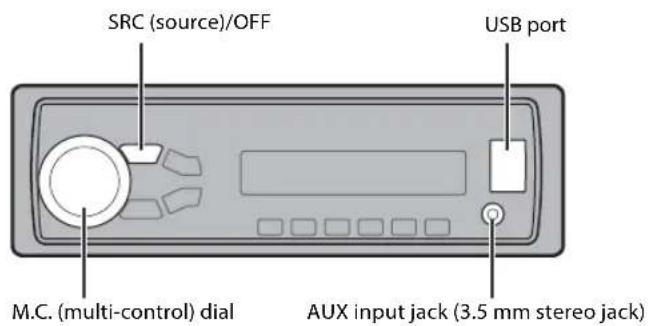
USB devices (including Android™)/iPod
1 Open the USB port cover.
2 Plug in the USB device/iPod using an appropriate cable.
NOTE
To automatically switch to [USB] source when a USB device/iPod is connected to the unit, set [USB AUTO] to [ON] in the SYSTEM settings (page 18).
CAUTION
Use an optional Pioneer USB cable (CD-U50E) to connect the USB device as any device connected directly to the unit will protrude out from the unit, which could be dangerous.
Before removing the device, stop playback.
AOA connections
For details on AOA connection, see page 15.
MTP connection
A device installed with Android OS 4.0 or later can be connected to the unit via MTP, using the cable supplied with the device. However, depending on the connected device and the numbers of the files in the device, audio files/songs may not be able to be played back via MTP. Note that MTP connection is not compatible with WAV and FLAC# file formats, and cannot be used with the MIXTRAX function.
The FLAC files are only compatible with MVH-180UI/180UBG/180UB/181UB.
NOTE
If you use an MTP connection, [ANDROID WIRED] needs to be set to [MEMORY] in the SYSTEM settings (page 19).
AUX
1 Insert the stereo mini plug into the AUX input jack.
2 Press SRC/OFF to select [AUX] as the source.
NOTE
If [AUX] is set to [OFF] in the SYSTEM settings, [AUX] cannot be selected as a source (page 18).
Operations
You can make various adjustments in the FUNCTION settings (page 16). Note that the following operations do not work for an AUX device. To operate an AUX device, use the device itself.
| Purpose Operation | |
| Select a folder/album*1 | Press 1/▲ or 2/▼. |
| Select a track/song (chapter) | Press ▲or ▲. |
| Fast forward or reverse*3 | Press and hold ▲or ▲. |
| Search for a file from a list | 1 Press □ to display the list. 2Turn the M.C. dial to select the desired file (folder) name or category, then press to confirm. 3Tu m the M.C. dial to select the desired file, then press to confirm. Playback starts. |
| View a list of the files in the selected folder/category*1 | Press the M.C. dial when a folder/ category is selected. |
| Play a song in the selected folder/ category*1 | Press and hold the M.C. dial when a folder/ category is selected. |
| Purpose Operation | |
| Alphabetical search (iPod only) | 1 Press to display the list. 2Turn the M.C. dial to select the desired category list, then press to enter the alphabetical search mode. (Turning the M.C. dial twice also enters the alphabetical search mode.) 3Tu m the M.C. dial to select a letter, then press to display the alphabetical list. To cancel alphabetical search, press BAND/ |
| Repeat play | Press 6/ |
| Random/shuffle play | Press 5/ |
| Shuffle all play (iPod only) | Press and hold 5/ |
| Pause/resume playback | Press 4/PAUSE. |
| Sound retriever*2 | Press 3/5.Rtrv. [1]: Effective for low compression rates [2]: Effective for high compression rates |
| Return to root folder (USB only)*1 | Press and hold . |
| Change drives in USB device (Devices that support the USB mass storage device class protocol only) | Press BAND/ |
1 Compressed audio files only
2 When there is no 3/S.Rtrv. button on the unit, the sound Rettriever function can be set by the FUNCTION settings.
*3 When you use the fast forward or reverse function while playing a VBR file, the playback time may be not correct.
Useful functions for iPod
Link play mode
You can access songs based on the artist, album, or genre currently playing.
1 While listening to a song, press and hold to enter the link play mode.
2 Turn the M.C. dial to select the mode ([ARTIST], [ALBUM], [GENRE]), then press to confirm.
The selected song/album will be played after the currently playing song.
NOTE
The selected song/album may be canceled if you use functions other than those from the link play mode (e.g. fast forward and reverse).
iPod control
You can control the unit via a connected iPod.
The following iPod models are not compatible with this function.
- i Pod nano 1st generation, iPod with video
1 Press BAND/ during playback, then select the control mode. [CONTROL iPod]: The unit's iPod function can be operated from th connected iPod.
[CONTROL AUDIO]: The unit's iPod function can only be operated by the buttons on the unit or supplied remote control. In this mode, the connected iPod cannot be turned on or off.
NOTES
- Pressing iPod can also switch the control mode (only for MVH-180UI).
- Switching the control mode to [CONTROL iPod] pauses song playback. Use the connected iPod to resume playback.
- The following operations are still accessible from the unit, even if the control mode is set to [CONTROL iPod].
-Pause, fast forward/reverse, song/chapter selection
The volume can only be adjusted from the unit.
About MIXTRAX (USB/iPod only)
(Only for MVH-X380BT)
The MIXTRAX function creates a non-stop mix of your music library. For details on MIXTRAX settings, see page 19.
NOTES
This function is not compatible with an Android device connected via MTP.
- When USB is selected as a source and the MIXTRAX function is in use, the sound retriever function is disabled.
- Depending on the file/song, sound effects may not be available.
1 Press 3/MIX to turn MIXTRAX on/off.
Bluetooth
(Only for MVH-X380BT)
Bluetooth connection
Important
If three or more Bluetooth devices (e.g. a phone and separate audio player) are connected, they may not work properly.
1Turn on the Bluetooth function of the device.
2Press to display the phone menu.
3 Turn the M.C. dial to select [BT SETTING], then press to confirm.
4 Turn the M.C. dial to select [ADD DEVICE], then press to confirm.
The unit starts to search for available devices, then displays them in the device list.
- To cancel searching, press the M.C. dial.
If the desired device is not in the list, select [RE-SEARCH]. - If there is no device available, [NOT FOUND] appears in the display.
5 Turn the M.C. dial to select a device from the device list, then press to confirm.
Press and hold the M.C. dial to switch the displayed device information between the Bluetooth device address and device name.
6Select [Pioneer BT Unit] shown in the device display.
7Make sure the same 6-digit number appears on this unit and the device, then select "Yes" on the device.
NOTES
- [DEVICE FULL] appears if the unit has already been paired with three other devices. In this case, delete one of the paired devices. See [DEL DEVICE] or [GUEST MODE] in the Bluetooth settings (page 11).
- Depending on the device, the PIN code is required in step 7. In this case, input [0000].
TIP
The Bluetooth connection can be also made by detecting the unit from the Bluetooth device. To do so, [VISIBLE] in the Bluetooth settings needs to be set to [ON]. For details on a Bluetooth device operations, refer to the operating instructions supplied with the Bluetooth device.
Bluetooth settings
| Menu Item Description | |
| DEVICELIST Display the list of paired Bluetooth devices. "*" appears on the device name when the Bluetooth connection is established. | |
| DEL DEVICE Delete the device information. | |
| [DELETE YES], [DELETE NO] | |
| ADD DEVICE Register a new device. | |
| A.CONN Select [ON] to connect to a Bluetooth device automatically. |
| Menu Item Description | |
| VISIBLE Select [ON] [ON], [OFF] | to that a Bluetooth device can detect the unit when the unit is connected via Bluetooth to another device. |
| PIN CODE Change the PIN code. | |
| 1Press the M.C . dial to display the setting mode. | |
| 2Turn the M.C. dial to select a number. | |
| 3Press the M.C. dial to move the cursor to the next position. | |
| 4Afer inputting the PIN code, press and hold the M.C. dial. | |
| After inputting the PIN code, pressing the M.C. dial returns you to the PIN code input display, and you can change the PIN code. | |
| DEV. INFO Switch the device information on the display between the device name and Bluetooth device address. | |
| GUEST MODE [ON], [OFF] | Select [ON] to move to the [DEL DEVICE] screen automatically when the unit has already been paired with three devices. |
| A.PAIRING [ON], [OFF] | Select [ON] to pair the unit and iPhone automatically when an iPhone is connected to the unit via USB. (This function may not be available depending on the version of iOS you are using.) |
Bluetooth telephone
First, make a Bluetooth connection with the Bluetooth telephone (page 10). Up to two Bluetooth telephones can be connected simultaneously.
Important
- Leaving the unit on standby to connect to your phone via Bluetooth while the engine is not running can drain the vehicle's battery.
- Be sure to park your vehicle in a safe place and apply the parking brake before operation.
To make a phone call
1 Press to display the phone menu.
When two phones are connected, a phone name appears first then a phone menu will display. To switch to another phone, press again.
2 Turn the M.C. dial to select [RECENTS] or [PHONE BOOK], then press to confirm.
If you select [PHONE BOOK], proceed to step 4.
3 Turn the M.C. dial to select [MISSED], [DIALLED] or [RECEIVED], then press to confirm.
4 Turn the M.C. dial to select a name or phone number, then press to confirm.
The phone call starts.
To answer an incoming call
1 Press when a call is received.
TIP
When two phones are connected to the unit via Bluetooth and there is an incoming call while one phone is being used for a call, a message will appear in the display. To answer that incoming call, you need to end the existing call.
Basic operations
| Purpose Operation | |
| End a call Press . | |
| Reject an incoming call | Press and hold when a call is received. |
| Switch between the current caller and a caller on hold | Press the M.C. dial. |
| Cancel a caller on hold Press and | hold . |
| Purpose Operation | |
| Adjust the volume of the caller's voice (When private mode is on, this function is not available.) | Tum the M. C. dial during the call. |
| Turn the privacy mode on or off | Press BAND/during the call. |
To preset phone numbers
1 Select a phone number from a phone book or call history.
2 Press and hold one of the number buttons (1 / to 6 / 一 The contact is stored in the selected preset number.
To make a call using a preset number, press one of the number buttons (1/ to 6/), then press the M.C dial.
Voice recognition (Only for iPhone)
This function is only available when an iPhone equipped with voice recognition is connected to the unit via Bluetooth.
1 Press and hold to activate the voice recognition mode.
2 Press the M.C. dial and then talk into the microphone to input voice commands.
To exit the voice recognition mode, press BAND/
NOTE
For details on the voice recognition features, refer to the manual supplied with your iPhone.
Phone menu
| Menu Item Description | |
| RECENTS Display the [MISSED] | missed call history. |
| [DIALLED] Display the dialed call history. | |
| [RECEIVED] Display the received call history. | |
| PHONE BOOK*1 | Display the contacts which have been transferred from your phone. Set [VISIBLE] in the Bluetooth settings to [ON] to browse the contacts via this unit. |
| PRESET 1-6 Recall the | preset phone numbers. You can also recall the preset phone numbers by pressing one of the number buttons (1/▲ to 6/▲). |
| A.ANSR*2 [ON], [OFF] | Select [ON] to answer an incoming call automatically. |
| R.TONE Select [ON] if [ON], [OFF] | the ring tone does not come out from the car speakers. Depending on the connected phone, this function may not work. |
| PB INVIT Invert the order of names in the phone book (name view). | |
| PB A.SYNC Select wh [ON], [OFF] | either or not to transfer the contacts from your phone automatically when your phone is connected to the unit. ·When connected for the first time, the contacts from your phone are transferred automatically, regardless of the [PB A.SYNC] setting. ·If you switch from [ON] to [OFF], the auto synchronization will not be performed on the next connection. ·If you switch from [OFF] to [ON], the auto synchronization will be performed when your phone is connected to the unit. ·During the auto synchronization, you cannot cancel the synchronization, even if you select [OFF]. |
Menu Item Description
| BT SETTING | You can adjust various settings for Bluetooth connections. For details on Bluetooth settings, see page 11. |
1 The contacts on your phone will normally be transferred automatically when the phone is connected. If they are not, use your phone to transfer the contacts.
2 If two phones are connected, this function does not work on incoming calls that are received while one of the phones is being used for a call.
Bluetooth audio

Important
- Depending on the Bluetooth audio player connected to this unit, the available operations will be limited to the following two levels:
- A2DP (Advanced Audio Distribution Profile) can only play back songs on your audio player.
AVRCP (Audio/Video Remote Control Profile) can perform functions such as playback, pause, select song, etc.
The sound of the Bluetooth audio player will be muted when the phone is in use. - When the Bluetooth audio player is in use, you cannot connect to a Bluetooth telephone automatically.
- Depending on the type of Bluetooth audio player you have connected to this unit, operation and information displayed may vary based on availability and functionality.
1 Make a Bluetooth connection with the Bluetooth audio player.
2 Press SRC/OFF to select [BT AUDIO] as the source.
3 Press BAND/ to start playback.
Basic operations
You can make various adjustments in the FUNCTION settings (page 16).
| Purpose | Operation |
| Fast forward or reverse | Press and hold 〈or〉. |
| Select a track | Press 〈or〉. |
| Repeat play* | Press 6/←. |
| Purpose Operation | |
| Random play* Press 5/ . | XX |
| Pause/resume playback | Press 4/PAUSE. |
| Search for a file from a list | 1 Press to display a list. 2Tum the M.C. d i al to select the desired folder name, then press to confirm. 3Tu m the M.C. d i al to select the desired file, then press to confirm. Playback starts. |
- Depending on the connected device, these operations may not be available.
App Mode
(APP mode is not available for MVH-180UBG/180UB/181UB.)
You can enjoy listening to an application on an iPhone/Android device via the unit. In some cases, you can control an application by using the unit. For details on compatible devices, visit our website.
Important
Use of third party apps may involve or require the provision of personally identifiable information, whether through the creation of a user account or otherwise, and for certain applications, the provision of geolocation data.
ALL THIRD PARTY APPS ARE THE SOLE RESPONSIBILITY OF THE PROVIDERS, INCLUDING WITHOUT LIMITATION COLLECTION AND SECURITY OF USER DATA AND PRIVACY PRACTICES. BY ACCESSING THIRD PARTY APPS, YOU AGREE TO REVIEW THE TERMS OF SERVICE AND PRIVACY POLICIES OF THE PROVIDERS. IF YOU DO NOT AGREE WITH THE TERMS OR POLICIES OF ANY PROVIDER OR DO NOT CONSENT TO THE USE OF GEOLOCATION DATA WHERE APPLICABLE, DO NOT USE THAT THIRD PARTY APP.
For iPhone users
This function is compatible with iPhones and iPod touches installed with iOS 5.0 or later.
For Android device users
This function is compatible with devices that have Android OS 2.3 or later installed and also support Bluetooth SPP (Serial Port Profile) and A2DP (Advance Audio Distribution Profile).
NOTE
PIONEER IS NOT LIABLE FOR ANY THIRD PARTY APPS OR CONTENT, INCLUDING WITHOUT LIMITATION THEIR ACCURACY OR COMPLETENESS. THE CONTENT AND FUNCTIONALITY OF SUCH APPS ARE THE SOLE RESPONSIBILITY OF THE APP PROVIDER.
Playback of an application via the unit
The Bluetooth connection is available for MVH-X380BT.
1Connect this unit with the mobile device.
- iPhone via USB (page 8)
Android device via Bluetooth (page 10)
2 Press the M.C. dial to display the main menu.
3 Turn the M.C. dial to select [SYSTEM], then press to confirm.
4 Turn the M.C. dial to select [APP CONN. SET], then press to confirm.
5 Turn the M.C. dial to select one of the below.
- Select [Wired] for iPhone.
- Select [BLUETOOTH] for an Android device.
6 Press SRC/OFF to select [APP].
7Operate the mobile device to start up the application.
Basic operations
You can make various adjustments in the FUNCTION settings (page 16).
| Purpose Operation | |
| Select a track | Press or▶. |
| Fast forward or reverse | Press and hold or▶. |
| Pause/resume playback | Press BAND. |
Using Pioneer ARC APP
(Pioneer ARC APP for iPhone is not available for MVH-180UBG/180UB/181UB.) You can operate the unit from Pioneer ARC APP installed on an iPhone/ Android device. In some cases, you can control aspects of the application, such as source selection, pause, etc., by using the unit. For details on what operations are available on the application, see the application's help section.

WARNING
Do not attempt to operate the application while driving. Make sure to pull off the road and park your vehicle in a safe location before attempting to use the controls on the application.
For iPhone users
This function is compatible with iPhones (iPhone 5 or later) and iPod touches installed with iOS 8.0 or later.
You can download Pioneer ARC APP on iTunes App Store.
For Android device users
This function is compatible with devices that have Android OS 4.1 or later installed and also support Bluetooth SPP (Serial Port Profile) and AOA (Android Open Accessory) 2.0.
You can download Pioneer ARC APP on Google PlayTM.
NOTE
Some Android devices connected via AOA 2.0 may not work properly or emit sounds due to their own software design, regardless of the OS version.
Making a connection with Pioneer ARC APP
The Bluetooth connection is available for MVH-X380BT.
1Connect this unit with the mobile device.
iPhoneAndroid device via USB (page 8)
Android device via Bluetooth (page 10)
2 Press the M.C. dial to display the main menu.
3 Turn the M.C. dial to select [SYSTEM], then press to confirm.
4 Turn the M.C. dial to select [APP CONN.SET], then press to confirm.
5 Turn the M.C. dial to select one of the below.
- Select [Wired] for a device connected via USB.
- Select [BLUETOOTH] for an Android device connected via Bluetooth. Proceed to step 9 if you select the USB connection for iPhone or the Bluetooth connection.
6 Press BAND/ to display the previous menu list.
7 Turn the M.C. dial to select [ANDROID WIRED], then press to confirm.
8 Turn the M.C. dial to select [APP CONTROL] for an Android device connected via USB.
If [ON] is selected in [P.APP AUTO ON] (page 19), Pioneer ARC APP on the Android device starts automatically, and all the steps are finished.
NOTE
If Pioneer ARC APP has not been installed on your Android device yet, a message that prompts you to install the application will appear on your Android device. Select [OFF] in [PAPP AUTO ON] to clear the message (page 19).
9 Press SRC/OFF to select any source.
10Launch Pioneer ARC APP on the mobile device.
NOTE
You can also launch the application by pressing and holding the M.C. dial if you select the USB connection for iPhone or the Bluetooth connection.
Listening to music on Android
1 Press SRC/OFF to select [ANDROID].
Basic operations
| Purpose Operation | |
| Select a track Press or . | ▶▶ |
| Fast forward or reverse | Press and hold ➔ or ➔. |
| Pause/resume playback | Press 4/PAUSE. |
| Sound retriever* | Press 3/5.Rtrv. [1]: Effective for low compression rates [2]: Effective for high compression rates |
- When there is no 3/S.Rtrv button on the unit, the sound retriever function can be set by the FUNCTION settings.
Settings
You can adjust various settings in the main menu.
1 Press the M.C. dial to display the main menu.
2 Turn the M.C. dial to select one of the categories below, then press to confirm.
FUNCTION settings (page 16)
- AUDIO settings (page 17)
SYSTEM settings (page 18)
ILLUMINATION settings (page 19)
- MIXTRAX settings (page 19)
3 Turn the M.C. dial to select the options, then press to confirm.
NOTES
- The Bluetooth-related menu items in the following tables are not available for MVH180UI/180UBG/180UB/181UB.
- iPod-related menu items in the following tables are not available for MVH-180UBG/180UB/181UB.
- APP mode-related menu items in the following tables are not available for MVH-180UBG/180UB/181UB.
| FUNCTION settings | |
| The menu items vary according to the source. | |
| Menu Item Description | |
| FM SETTING RADIO[TALK], [STANDARD], [MUSIC] Match the sound quality level with the broadcast signal conditions of the FM band signal. (Available only when FM band is selected.) | |
| BSM RADIO | Store the six strongest stations on the number buttons (1/▲ to 6/▲) automatically. |
| REGIONAL RADIO[ON], [OFF] | Limit the reception to the specific regional programs when AF (alternative frequencies search) is selected. (Available only when FM band is selected.) |
| LOCAL RADIOFM: [OFF], [LV1], [LV2], [LV3], [LV4]MW/LW: [OFF], [LV1], [LV2] | Restrict the tuning station according to the signal strength. |
| TA RADIO[ON], [OFF] | Receive current traffic information if available. (Available only when FM band is selected.) |
| AF RADIO[ON], [OFF] | Allow the unit to retune to a different frequency providing the same station. (Available only when FM band is selected.) |
Menu Item Description
NEWS
[ON], [OFF] Interrupt the currently selected source with
news programs. (Available only when FM
band is selected.
SEEK
[MAN], [PCH]
Assign or buttons to seek the
stations one by one (manual tuning) or
select a station from the preset channel.
SEL DEVICE
Connect a Bluetooth device in the list.
S.RTRV
[1] (effective for low
compression rates),
[2] (effective for high
compression rates), [OFF]
AUDIO BOOK
[FASTER], [NORMAL],
[S LOWER]
PAUSE
Enhance compressed audio and restore rich sound.
Not available when:
- USB is selected as a source and the MIXTRAX function is set to on.
The FLAC file is played back. (Available for MVH-180UI/180UBG/180UB/181UB)
Change the playback speed. (Not available)
when [CONTROL iPod] is selected in the
control mode.)
Pause or resume playback.
Start playback.
Stop playback.
AUDIO settings
Menu Item Description
FADER*1
Adjust the front and rear speaker balance.
BALANCE
Adjust the left and right speaker balance.
EQ SETTING
[SUPER BASS], [POWERFUL],
[NATURAL], [VOCAL],
[CUSTOM1], [CUSTOM2], [FLAT]
Select an equalizer band and level for further customizing.
Equalizer band: [80HZ],
[250HZ], [800HZ], [2.5KHZ], [8KHZ]
Equalizer level: [+6] to [-6]
Select or customize the equalizer curve. [CUSTOM1] can be set separately for each source. However, each of the below combinations are set to the same setting automatically.
-
USB, iPod, ANDROID, and APP (iPhone)
-
BT AUDIO,Android, and APP (Android) [CUSTOM2] is a shared setting used for all sources.
You can also switch the equalizer by
pressing repeatedly (Only for
MVH-180UBG/180UB/181UB).
LOUDNESS
[OFF], [LOW], [MID], [HI] Compensate for clear sound at low volume.
SUB.W*2
[NOR], [REV], [OFF] Select the subwoofer phase.
SUB.W CTRL*2*3
Cut-off frequency: [50HZ],
[63HZ],[80HZ],[100HZ],
[125HZ],[160HZ],[200HZ]
Output level: [-24] to [+6]
Slope level: [-12], [-24]
BASS BOOST
[0] to [+6] Select the bass boost level.
| Menu Item Description | |
| HPF SETTING | |
| Cut-off frequency: [OFF], [50HZ], [63HZ], [80HZ], [100HZ], [125HZ], [160HZ], [200HZ] | Only frequencies higher than the high-pass filter (HPF) cutoff are output from the speakers. |
| Slope level: [-12], [-24] | |
| SLA | |
| [+4] to [-4] Adjust the volume level for each source except FM. Each of the below combinations are set to the same setting automatically. • USB, iPod,Android, and APP (iPhone) • BT AUDIO,Android, and APP (Android) | |
1 Not available when [SUB.W/SUB.W] is selected in [SP-P/O MODE] in the INITIAL settings (page 7).
2 Not available when [REAR/REAR] is selected in [SP-P/O MODE] in the INITIAL settings (page 7).
*3 Not available when [OFF] is selected in [SUB.W].
SYSTEM settings
| You can also access to these menus when the unit is turned off. | |
| Menu Item Description | |
| LANGUAGE | |
| [ENG](English), [PVC] (Russian), [TUR](Turkish) | Select the language to display the text information from a compressed audio file. |
| CLOCK SET | |
| Set the clock (page 6). | |
| 12H/24H | |
| [12H], [24H] Select the time notation. | |
| Menu Item Description | |
| AUTO PI [ON], [OFF] Search for a different station with the same programming, even if using a preset station. | |
| AUX [ON], [OFF] Set to [ON] when using an auxiliary device connected to the unit. | |
| USB AUTO [ON], [OFF] Select [ON] to automatically switch to [USB] source when a USB device/iPod is connected to the unit. Select [OFF] when a USB device/iPod is being connected to the unit just for charging. | |
| BT AUDIO [ON], [OFF] Set the Bluetooth signal on/off. | |
| MUTE MODE (Only for MVH-180UI) [MUTE], [20dB ATT], [10dB ATT] Mute or attenuate sound automatically when a signal from equipment with a mute function is received. | |
| PW SAVE* [ON], [OFF] Reduce the battery power consumption. Turning on the source is the only operation allowed when this function is on. | |
| BT MEM CLEAR [YES], [CANCEL] Clear the Bluetooth device data (device list, PIN code, call history, phone book, preset phone numbers) stored in the unit. [CLEARRED] appears when data is successfully deleted. | |
| Menu Item Description | |
| BT VERSION | Displays the system version of the unit and the Bluetooth module. |
| APP CONN. SET [Wired], [Bluetooth] Select the appropriate connection method according to your device. | |
| ANDROID WIED [MEMORY], [APP CONTROL] Select the appropriate connection method for an Android device. · This setting is not available when [BLUETOOTH] is selected in [APP CONN. SET]. | |
| P.APP AUTOON [ON], [OFF] | Select [ON] to automatically launch the car remote application when an Android device is connected to the unit via AOA. (Not available when [MEMORY] is selected in [ANDROID WIRED].) |
- [PW SAVE] is canceled if the vehicle battery is disconnected and will need to be turned back on once the battery is reconnected. When [PW SAVE] is off, depending on connection methods, the unit may continue to draw power from the battery if your vehicle's ignition does not have an ACC (accessory) position.
ILLUMINATION settings
Menu Item Description
DIM SETTING
[SYNC CLOCK], [MANUAL] Change the display brightness.
BRIGHTNESS
[1] to [10] Change the display brightness.
The available setting ranges differ depending on [DIM SETTING].
MIXTRAX settings
(Only for MVH-X380BT)
Menu Item Description
SHORT PLAYBCK
[1.0 MIN], [1.5 MIN], [2.0 MIN], [2.5 MIN], [3.0 MIN], [OFF]
Select the length of the playback time.
MIX PATTERN
| [Sound Level] Change the MIXTRAX special effects according to the audio level. The mix pattern changes according to the sound level. | |
| [LOW PASS] | The mix pattern changes according to the bass level. |
| [RANDOM] | The mix pattern changes randomly according to the sound level mode and low pass mode. |
| PLAY FX | |
| [ON], [OFF] | Set the MIXTRAX special effects on/off. |
| T IN FX | |
| [ON], [OFF] | Turn the MIXTRAX sound effects on/off while manually changing the tracks. |
Connections/Installation
Connections
Important
- When installing this unit in a vehicle without an ACC (accessory) position on the ignition switch, failure to connect the red cable to the terminal that detects operation of the ignition key may result in battery drain.


ACC position No ACC position
- Use of this unit in conditions other than the following could result in fire or malfunction.
- Vehicles with a 12-volt battery and negative grounding.
- When speaker output is used by 4 channels, use speakers over 50 W (maximum input power) and between 4 Ω to 8 Ω (impedance value). Do not use 1 Ω to 3 Ω speakers for this unit.
- When rear speaker output is used by 2 Ω of subwoofer, use speakers over 70 W (maximum input power).
- Please refer to connections for a connection method.
To prevent a short-circuit, overheating or malfunction, be sure to follow the directions below. -
Disconnect the negative terminal of the battery before installation.
-
Secure the wiring with cable clamps or adhesive tape. Wrap adhesive tape around wiring that comes into contact with metal parts to protect the wiring.
- Place all cables away from moving parts, such as the shift lever and seat rails.
- Place all cables away from hot places, such as near the heater outlet.
- Do not connect the yellow cable to the battery by passing it through the hole to the engine compartment.
Cover any disconnected cable connectors with insulating tape. - Do not shorten any cables.
- Never cut the insulation of the power cable of this unit in order to share the power with other devices. The current capacity of the cable is limited.
- Use a fuse of the rating prescribed.
- Never wire the negative speaker cable directly to ground.
-
Never band together negative cables of multiple speakers.
-
When this unit is on, control signals are sent through the blue/white cable. Connect this cable to the system remote control of an external power amp or the vehicle's auto-antenna relay control terminal (max. 300mA 12 V DC). If the vehicle is equipped with a glass antenna,
connect it to the antenna booster power supply terminal.
- Never connect the blue/white cable to the power terminal of an external power amp. Also, never connect it to the power terminal of the auto antenna. Doing so may result in battery drain or a malfunction.
- The black cable is ground. Ground cables for this unit and other equipment (especially, high-current products such as power amps) must be wired separately. If they are not, an accidental detachment may result in a fire or malfunction.
The graphical symbol pl aced on the product means direct current.
This unit
MVH-X380BT/180UI/180UBG/180UB/ 181UB
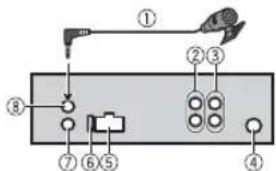
① Microphone 4 m (Only for MVHX380BT)
Rear output or subwoofer output
3Front output (Only for MVH-X380BT/180UI)
4 Antenna input
⑤ Power cord input
6Fuse(10A)
⑦ Wired remote input (Only for MVH-X380BT/180UI)
Hard-wired remote control adapter can be connected (sold separately).
Microphone input (Only for MVH-X380BT)
Power cord
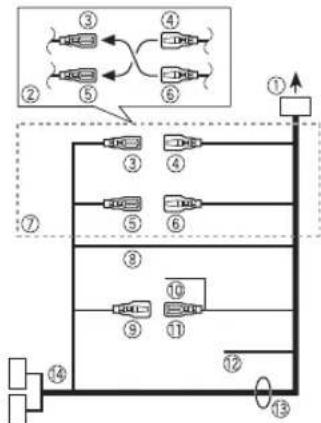
① To power cord input
② Depending on the kind of vehicle, the function of and may be different. In this case, be sure to connect 4 to 5 and 6 to 3.
③ Yellow
Back-up (or accessory)
④ Yellow
Connect to the constant 12V supply terminal.
⑤ Red
Accessory (or back-up)
⑥ Red
Connect to terminal controlled by the ignition switch (12 V DC).
Connect leads of the same color to each other.
Black (chassis ground)
Blue/white
The pin position of the ISO connector will differ depending on the type of vehicle. Connect and when Pin 5 is an antenna control type. In another type of vehicle, never connect and.
Blue/white
Connect to the system control terminal of the power amp (max. 300mA12VDC
Blue/white
Connect to the auto-antenna relay control terminal (max. 300mA12V DC).
Yellow/black (Only for MVH-180UI) If you use equipment with a Mute function, wire this lead to the Audio Mute lead on that equipment. If not, keep the Audio Mute lead free of any connections.
Speaker leads
White:Front left
White/black:Front left
Gray:Front right
Gray/black:Front right
Green: Rear left or subwoofer
Green/black:Rear left or
subwoofer
Violet: Rear right or subwoofer
Violet/black:Rear right subwoofer
ISO connector In some vehicles, the ISO connector may be divided into two. In this case, be sure to connect to both connectors.
NOTES
- Change the initial menu of this unit. Refer to [SP-P/O MODE] (page 7). The subwoofer output of this unit is monaural.
- When using a subwoofer of 2 , be sure to connect the subwoofer to the violet and violet/black leads of this unit. Do not connect anything to the green and green/black leads.
Power amp (sold separately)
Perform these connections when using the optional amplifier.
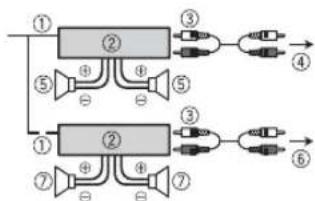
① System remote control
Connect to blue/white cable.
Power amp (sold separately)
3 Connect with RCA cables (sold separately)
④ To front output
⑤ Front speaker
⑥ To rear output or subwoofer output
⑦Rear speaker or subwoofer
* Only for MVH-X380BT/180UI
Installation

Important
- Check all connections and systems before final installation.
- Do not use unauthorized parts as this may cause malfunctions.
- Consult your dealer if installation requires drilling of holes or other
modifications to the vehicle. Do not install this unit where: it may interfere with operation of the vehicle.
-it may cause injury to a passenger as a result of a sudden stop. - The semiconductor laser will be damaged if it overheats. Install this unit away from hot places such as near the heater outlet.
Optimum
performance is obtained when the unit is installed at an angle of less than 60^
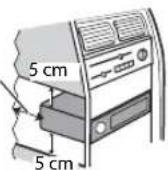
- When installing, to ensure proper heat dispersal when using this unit, make sure you leave ample space behind the rear panel and wrap any loose cables so they are not blocking the vents.
Leave ample space
DIN mount installation
1 Insert the supplied mounting sleeve into the dashboard.
2 Secure the mounting sleeve by using a screwdriver to bend the metal tabs (90^) into place.
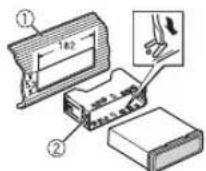
① Dashboard
品 Mounting sleeve
Make sure that the unit is installed securely in place. An unstable installation may cause skipping or other malfunctions.
When not using the supplied mounting sleeve
1 Line up the holes on the mounting bracket with the holes on the sides of the unit to attach the bracket.
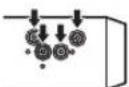
2 Screw in one screw on each side to hold the unit in place.
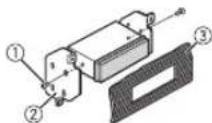
① Tapping screw (5mm× 9mm, not supplied with product)
② Mounting bracket
3 Dashboard or console ing the included bracket
Check to make sure that the included bracket matches your particular model of vehicle and then attach it to the unit as shown below.
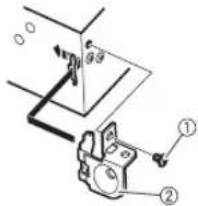
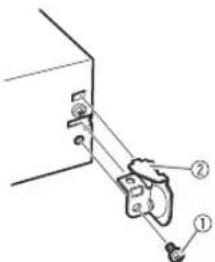
① Screw
② Bracket
Removing the unit (installed with the supplied mounting sleeve)
1 Remove the trim ring.
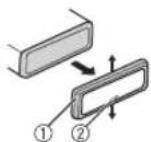
① Trim ring
Notched tab
Releasing the front panel allows easier access to the trim ring.
- When reattaching the trim ring, point the side with the notched tab down.
2 Insert the supplied extraction keys into both sides of the unit until they click into place.
3 Pull the unit out of the dashboard.
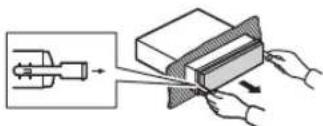
Installing the microphone
(Only for MVH-X380BT)
The microphone should be placed directly in front of the driver at a suitable distance to pick up their voice clearly.
CAUTION
It is extremely dangerous to allow the microphone lead to become wound around the steering column or shift lever. Be sure to install the microphone in such a way that it will not obstruct driving. It is recommended to use the clamps (sold separately) to arrange the lead.
To install on the sun visor
1 Fit the microphone lead into the groove.
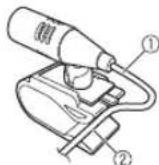
① Microphone lead ② Groove
2 Install the microphone clip on the sun visor. Lowering the sun visor reduces the voice recognition rate.
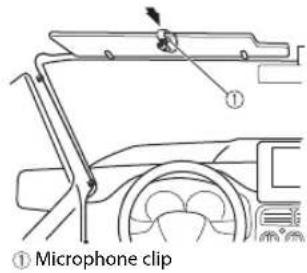
To install on the steering column
1 Slide the microphone base to detach it from the microphone clip.
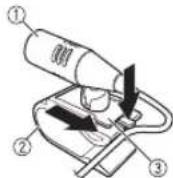
① Microphone
② Microphone clip
③ Microphone base
2 Install the microphone on the rear side of the steering column.
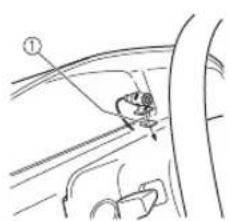
① Double-sided tape
Additional Information
Troubleshooting
The display automatically returns to the normal display.
No operations have been made for about 30 seconds.
Perform an operation.
The repeat play range changes unexpectedly.
Depending on the repeat play range, the selected range may change when another folder or track is being selected or during fast forwarding/reversing.
- Select the repeat play range again.
A subfolder is not played back.
Sub folders cannot be played when [FLD] (folder repeat) is selected.
- Select another repeat play range.
The sound is intermittent.
You are using a device, such as a cellular phone, that may cause audible interference.
- Move electrical devices that may be causing the interference away from the unit.
The sound from the Bluetooth audio source is not played back.
There is a call in progress on a Bluetooth-connected cellular phone.
The sound will be played back when the call is terminated.
A Bluetooth-connected cellular phone is currently being operated. Stop using the cellular phone.
The connection between the unit and the cellular phone is not established correctly after a call made by a Bluetooth-connected cellular phone.
Make a Bluetooth connection between the unit and the cellular phone again.
Error messages
Common
AMP ERROR
→Thisunit fails to operate or the speaker connection is incorrect.
→The protective circuit is activated. Check the speaker connection.
Turn the ignition switch OFF and back to ON again. If the message remains, contact your dealer or an authorized Pioneer Service
Station for assistance.
NO XXXX (NO TITLE, for example)
→There is no embedded text information.
- Switch the display or play another track/file.
USB device/iPod
FORMATREAD
→Sometimes there is a delay between the start of playback and when you start to hear any sound. Wait until the message disappears and you hear sound.
NO AUDIO
- There are no songs.
- Transfer the audio files to the USB device and connect.
The connected USB device has security enabled. - Follow the USB device instructions to disable the security.
SKIPPED
The connected USB device contains DRM protected files. -The protected files are skipped.
PROTECT
All the files on the connected USB device are embedded with DRM. Replace the USB device.
N/A USB
The connected USB device is not supported by this unit. -Disconnect your device and replace it with a compatible USB device.
HUB ERROR
→ The USB device connected via a USB hub is not supported by this unit.
-Connect the USB device directly to this unit using a USB cable.
CHECK USB
→ The USB connector or USB cable has short-circuited.
-Check that the USB connector or USB cable is not caught in something or damaged.
The connected USB device consumes more than maximum allowable current.
-Disconnect the USB device and do not use it. Turn the ignition switch OFF and back to ACC or ON. Connect only compliant USB devices.
The iPod operates correctly but does not charge.
Make sure the connection cable for the iPod has not shorted out (e.g., not caught in metal objects). After checking, turn the ignition switch OFF and back to ON, or disconnect the iPod and reconnect.
ERROR-19
Communication failed.
Perform one of the following operations, then return to the USB source.
- Turn the ignition switch OFF and back to ON.
- Disconnect the USB device.
- Change to a different source.
iPod failure.
- Disconnect the cable from the iPod. Once the iPod's main menu
is displayed, reconnect the iPod and reset it.
ERROR-23
USB device was not formatted properly.
-Format the USB device with FAT1 2, FAT16 or FAT32.
ERROR-16
The iPod firmware version is old.
- Update the iPod version. iPod failure.
- Disconnect the cable from the iPod. Once the iPod's main menu is displayed, reconnect the iPod and reset it.
STOP
→ There are no songs in the current list.
-Select a list that contains songs.
NOT FOUND
No related songs. -Transfer songs to the iPod.
Bluetooth device
ERROR-10
The power failed for the Bluetooth module of the unit.
- Turn the ignition switch OFF and back to ACC or ON.
Apps
NO BT DEVICE GO TO BT MENU TO REGISTER
No Bluetooth device found.
- Connect the unit and the device via Bluetooth (page 10).
CONN. Failed PRESS BAND KEY TO RETRY
Bluetooth connection failed.
- Press BAND/ to make a connection again.
DISCONNECTED PRESS BAND KEY TO RETRY
Bluetooth connection failed.
- Press BAND/ to make a connection again.
CHECKAPP
Connection to the application failed.
- Follow the instructions that appear on the screen.
STARTUPAPP
The application has not started running yet.
- Operate the mobile device to start up the application.
Handling guidelines
USB storage device
- Connections via USB hubs are not supported.
-
Firmly secure the USB storage device before driving. Do not let the USB storage device fall onto the floor, where it may become jammed under the brake or accelerator pedal.
-
Depending on the USB storage device, the following problems may occur.
-Operations may vary.
The storage device may not be recognized.
- Files may not be played back properly.
The device may cause audible interference when you are listening to the radio.
iPod
- Do not leave the iPod in places with high temperatures.
- Firmly secure the iPod when driving. Do not let the iPod fall onto the floor, where it may become jammed under the brake or accelerator pedal.
- The settings of the iPod such as the equalizer and repeat play are changed automatically when the iPod is connected to the unit. Once the iPod is disconnected, those settings will return to the original settings.
- Incompatible text saved on the iPod will not be displayed by the unit.
Compressed audio compatibility
Only the first 32 characters can be displayed as a file name (including the file extension) or a folder name.
- The unit may not work properly depending on the application used to encode WMA files.
- There may be a slight delay at the start of the playback of audio files embedded with image data, or audio files stored on a USB device with numerous folder hierarchies.
- Russian text to be displayed on this unit should be encoded in one of the following character sets:
-Unicode (UTF-8, UTF-16)
-A character set other than Unicode t that is used in a Windows environment and is set to Russian in the multi-language setting

CAUTION
- Pioneer cannot guarantee compatibility with all USB mass storage devices, and assumes no responsibility for any loss of data on media players, smartphones, or other devices while using this product.
- Do not leave discs or a USB storage device in any place that is subject to high temperatures.
WMA files
| File extension .wma | |
| Bit rate 48 kbps to 320 | kbps (CBR), 48 kbps to 384 kbps (VBR) |
| Sampling frequency | 32 kHz, 44.1 kHz, 48 kHz |
| Windows MediaTM Audio Professional, Lossless, Voice/ DRM Stream/ Stream with video | Not compatible |
MP3 files
| File extension.mp3 | |
| Bit rate 8 kbps to 320 | kbps (CBR), VBR |
| Sampling frequency | 8 kHz to 48 kHz (32 kHz, 44.1 kHz, 48 kHz for emphasis) |
| Compatible ID3 tag version | 1.0, 1.1, 2.2, 2.3, 2.4 (ID3 tag Version 2.x is given priority over Version 1.x.) |
| M3u playlist Not compatible | |
| MP3i (MP3 interactive), mp3 PRO | Not compatible |
WAV files
WAV file formats cannot be connected via MTP.
| File extension .wav | |
| Quantization bits 8 and 16 (LPCM), 4 (MSADPCM) | |
| Sampling frequency | 16 kHz to 48 kHz (LPCM), 22.05 kHz and 44.1 kHz (MS ADPCM) |
AAC files (MVH-X380BT only)
| Compatible format A | AC encoded by iTunes |
| File extension .m4a | |
| Sampling frequency | 11.025 kHz to 48 kHz |
| Transmission rate 16 | kbps to 320 kbps, VBR |
| Apple Lossless Not compatible | |
| AAC file bought from the iTunes Store (.m4p file extension) | Not compatible |
- FLAC file formats cannot be connected via MTP.
- FLAC files may not be playable, depending on the encoder.
| File extension .flac | |
| Sampling frequency | 8/11.025/12/16/22.05/24/32/44.1/48 kHz |
| Quantization bit rate | 16 bit |
| Channel mode | 1/2 ch |
USB device
- There may be a slight delay when starting playback of audio files on a USB storage device with numerous folder hierarchies.
| Playable folder hierarchy | Up to eight tiers (A practical hierarchy is less than two tiers.) |
| Playable folders Up to | 500 |
| Playable files Up to | 5000 |
| Playback of copyright-protected files | Not compatible |
| Partitioned USB device | Only the first partition can be played. |
iPod compatibility
This unit supports only the following iPod models. Supported iPod software versions are shown below. Older versions may not be supported.
Made for
-iPod touch (1st through 5th generation)
-iPod classic
- iPod with video
-iPod nano (1st through 7th generation)
-iPhone6
-iPhone 6 Plus
iPhone 5s
-iPhone 5c
iPhone 5
iPhone 4s
-iPhone4
iPhone 3GS
-iPhone 3G
-iPhone
- Operations may vary depending on the generation and/or software version of the iPod.
- Users of iPod with the Lightning Connector should use the Lightning to USB Cable (supplied with iPod).
- Users of iPod with the Dock Connector should use the CD-IU51. For details, consult your dealer.
Refer to the iPod manuals for information about the file/format compatibility. - Audiobook, Podcast: Compatible
CAUTION
Pioneer accepts no responsibility for data lost on the iPod, even if that data is lost while this unit is used.
Sequence of audio files
The user cannot assign folder numbers and specify playback sequences with this unit. Sequence of audio file depends on the connected device.
Note that the hidden files in a USB device cannot be played back.
Example of a hierarchy
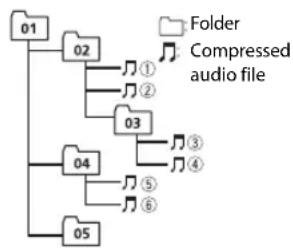
Level 1 Level 2 Level 3 Level 4
01 to 05: Folder number
① to Playback sequence
Russian character chart
| D: C | D: C | D: C |
| A: A | B: B | B: B |
| F: F | J: D | E: E, E |
| J: J | J: 3 | H: H, J |
| K: K | A: J | H: M |
| H: H | O: O | J: J |
| P: P | C: C | T: T |
| Y: Y | Φ: Φ | xxx |
| u: u | y: y | ü: Ü, Ü |
| ü: b | H: bI | b: b |
| J: J | H: IJ | J: J |
D:Display C:Character
Copyright and trademark
Bluetooth
The Bluetooth ^※ word mark and logos are registered trademarks owned by Bluetooth SIG, Inc. and any use of such marks by PIONEER CORPORATION is under license. Other trademarks and trade names are those of their respective owners.
iTunes
Apple and iTunes are trademarks of Apple Inc., registered in the U.S. and other countries.
WMA
Windows Media is either a registered trademark or trademark of Microsoft Corporation in the United States and/or other countries.
This product includes technology owned by Microsoft Corporation and cannot be used or distributed without a license from Microsoft Licensing, Inc.
FLAC
Copyright © 2000-2009 Josh Coalson
Copyright © 2011-2013 Xiph.Org Foundation
- Redistribution and use in source and binary forms, with or without modification, are permitted provided that the following conditions are met:
-Redistributions of source code must retain the above copyright notice, this list of conditions and the following disclaimer.
-Redistributions in binary form must reproduce the above copyright notice, this list of conditions and the following disclaimer in the documentation and/or other materials provided with the distribution.
-Neither the name of the Xiph.org Foundation nor the names of its contributors may be used to endorse or promote products derived from this software without specific prior written permission.
THIS SOFTWARE IS PROVIDED BY THE
COPYRIGHT HOLDERS AND
CONTRIBUTORS "AS IS" AND ANY
EXPRESS OR IMPLIED WARRANTYES,
INCLUDING, BUT NOT LIMITED TO, THE
IMPLIED WARRANTYES OF
MERCHANTABILITY AND FITNESS FOR A PARTICULAR PURPOSE ARE
DISCLAIMED. IN NO EVENT SHALL THE FOUNDATION OR CONTRIBUTORS BE LIABLE FOR ANY DIRECT, INDIRECT,
INCIDENTAL, SPECIAL, EXEMPLARY, OR CONSEQUENTIAL DAMAGES (INCLUDING, BUT NOT LIMITED TO,
PROCUREMENT OF SUBSTITUTE
GOODS OR SERVICES; LOSS OF USE, DATA, OR PROFITS; OR BUSINESS
INTERRUPTION) HOWEVER CAUSED AND ON ANY THEORY OF LIABILITY, WHERBether IN CONTRACT, STRICT
LIABILITY, OR TORT (INCLUDING
NEGLIGENCE OR OTHERWISE) ARISING IN ANY WAY OUT OF THE USE OF THIS SOFTWARE, EVEN IF ADJISSED OF THE
POSSIBILITY OF SUCH DAMAGE.
iPod & iPhone
iPhone, iPod, iPod classic, iPod nano, and iPod touch are trademarks of Apple Inc., registered in the U.S. and other countries. Lightning is a trademark of Apple Inc. "Made for iPod" and "Made for iPhone" mean that an electronic accessory has been designed to connect specifically to iPod or iPhone, respectively, and has been certified by the developer to meet Apple performance standards. Apple is not responsible for the
operation of this device or its compliance with safety and regulatory standards. Please note that the use of this accessory with iPod or iPhone may affect wireless performance.
Android & Google Play
Android, Google Play, and the Google Play logo are trademarks of Google Inc.
MIXTRAX
MIXTRAX is a trademark of the PIONEER CORPORATION.
Specifications
General
Power source: 14.4 VDC (10.8 V to 15.1 V allowable)
Grounding system: Negative type
Maximum current consumption: 10.0 A
Dimensions (W× H× D) DIN
Chassis: 178mm× 50mm× 97 mm
Nose: 188mm× 58mm× 17mm D
Chassis: 178mm× 50mm× 97 mm
Nose: 170mm× 46mm× 17mm light: 0.5kg
Audio
Maximum power output:
-
50 × 4 ch / 4 (for no subwoofer)
-
50W × 2ch / 4 + 70W × 1ch / 2 Ω (for subwoofer)
Continuous power output: 22W× 4 (50 Hz to 15 000 Hz, 5 % THD, 4 Ω load, both channels driven)
Load impedance: 4 Ω (4 Ω to 8 Ω allowable)
Preout maximum output level: 2.0V
Loudness contour: +10 dB (100 Hz), +6.5 dB (10 kHz) (volume: -30 dB)
Equalizer (5-Band Graphic Equalizer): Frequency: 80Hz / 250Hz / 800Hz/ 25kHz / 8kHz Equalization range: ± 12 dB (2 dB step)
Subwoofer (mono): Frequency: 50 Hz/63 Hz/80 Hz/ 100 Hz/125 Hz/160 Hz/200 Hz Slope: -12 dB/oct, -24 dB/oct
Gain: +6 dB to -24 dB
Phase: Normal/Reverse
USB
USB standard specification: USB 2.0 full speed
Maximum current supply: 1 A
USB Protocol:
MSC (Mass Storage Class)
MTP (Media Transfer Protocol)
AOA (Android Open Accessory) 20
WMA decoding format: Ver. 7, 7.1, 8, 9, 10, 11, 12 (2 ch audio) (Windows Media Player)
AAC decoding format: MPEG-4 AAC (iTunes encoded only) (Ver. 10.6 and earlier) (MVH-X380BT)
FLAC decoding format:v1.3.0 (Free Lossless Audio Codec) (MVH180UI/180UBG/180UB/181UB)
WAV signal format: Linear PCM & MS ADPCM (Non-compressed)
FM tuner
Frequency range: 87.5 MHz to 108.0 MHz
Usable sensitivity: 11 dBf (1.0 μV/75 Ω, mono S/N: 30 dB)
Signal-to-noise ratio: 72 dB (IEC-A network)
MWtuner
Frequency range: 531 kHz to 1602 kHz
Usable sensitivity: 25 V (S/N: 20 dB)
Signal-to-noise ratio: 62 dB (IEC-A network)
LWTuner
Frequency range: 153 kHz to 281 kHz
Usable sensitivity: 28 V (S/N: 20 dB)
Signal-to-noise ratio: 62 dB (IEC-A network)
Bluetooth
(MVH-X380BT)
Version: Bluetooth 3.0 certified
Output power: +4 dBm Maximum (Power class 2)
Frequency band(s): 2400 MHz to 2 483.5 MHz
Bluetooth profiles: GAP (Generic Access Profile)
SDAP (Service Discovery
Application Profile)
OPP (Object Push Profile)
HFP (Hands Free Profile) 1.6
PBAP (Phone Book Access Profile)
A2DP (Advanced Audio
Distribution Profile)
AVRCP (Audio/Video Remote)
Control Profile) 1.5
SPP (Serial Port Profile) 1.1
NOTE
Specifications and the design are subject to modifications without notice.
Table des matieres
Avant de commencer 2
Mise en route. 3
Radio 6
USB/iPod/AUX 7
Bluetooth 10
Mode d'application 14
Utilisation de Pioneer ARC APP 15
Réglages 16
Réglages FUNCTION 17
Réglages AUDIO. 18
Réglages SYSTEM 19
Réglages ILLUMINATION 20
Réglages MIXTRAX 20
Raccordements/Installation 21
Informations complémentaires 24
Raccordements/Installation
Raccordements
Important
-iPhone 3GS
-iPhone 3G
-iPhone
Copyright © 2000-2009 Josh Coalson
Copyright © 2011-2013 Xiph.Org Foundation
MSC (Mass Storage Class)
MTP (Media Transfer Protocol)
AOA (Android Open Accessory)
2.0
(Windows Media Player)
Format de decodage AAC:MPEG-4
AACiTunes encoded
GAP (Generic Access Profile)
SDAP (Service Discovery
Application Profile)
OPP (Object Push Profile)
HFP (Hands Free Profile) 1.6
PBAP (Phone Book Access Profile)
A2DP (Advanced Audio
Distribution Profile)
AVRCP (Audio/Video Remote
Control Profile) 1.5
SPP (Serial Port Profile) 1.1
REMARQUE
Best stations memory (BSM)
File AAC (solo MVH-X380BT)
| D: C | D: C | D: C |
| A: A | B: B | B: B |
| F: F | J: J | E: E, E |
| K: K | J: 3 | H: H, H |
| K: K | A: N | M: M |
| H: H | O: O | N: N |
| P: P | C: C | T: T |
| Y: Y | Φ: Φ | X: X |
| U: U | Y: Y | Z: Z, Z |
| J: J | H: b1 | b: b |
| J: Θ | H: Θ | η: η |
Copyright © 2000-2009 Josh Coalson
Copyright © 2011-2013 Xiph.Org
Foundation
MSC (Mass Storage Class)
MTP (Media Transfer Protocol)
AOA (Android Open Accessory)
2.0
(Windows Media Player)
GAP (Generic Access Profile)
SDAP (Service Discovery
Application Profile)
OPP (Object Push Profile)
HFP (Hands Free Profile) 1.6
PBAP (Phone Book Access Profile)
A2DP (Advanced Audio
Distribution Profile)
AVRCP (Audio/Video Remote
Control Profile) 1.5
SPP (Serial Port Profile) 1.1
NOTA
[TALK], [STANDARD], [MUSIC]
[2.5 MIN], [3.0 MIN], [OFF]
reproducción.
MIX PATTERN
AOA (Open Accessory de
Android) 2.0
[TALK], [STANDARD], [MUSIC]
Grenzfrequency: [OFF],
[50HZ], [63HZ], [80HZ],
(Nur fur MVH-X380BT)
[2.5 MIN], [3.0 MIN], [OFF]
MIX PATTERN
| D: C | D: C | D: C |
| A: A | B: B | B: B |
| F: F | J: J | E: E, E |
| K: K | J: 3 | H: H, H |
| H: K | J: J | H: M |
| H: H | O: O | H: J |
| P: P | C: C | T: T |
| Y: Y | Φ: Φ | X: X |
| U: U | Y: Y | U: U, U |
| J: J | H: b1 | b: b |
| J: Θ | H: Θ | J: J |
D:Anzeige C:Zeichen
AOA (Android Open Accessory) 2.0
(Windows Media Player)
GAP (Generic Access Profile)
SDAP (Service Discovery
Application Profile)
OPP (Object Push Profile)
HFP (Hands Free Profile) 1.6
PBAP (Phone Book Access Profile)
A2DP (Advanced Audio
Distribution Profile)
AVRCP (Audio/Video Remote
Control Profile) 1.5
SPP (Serial Port Profile) 1.1
HINWEIS
Best stations memory (BSM)
Copyright © 2000-2009 Josh Coalson
Copyright © 2011-2013 Xiph.Org
Foundation
THD, 4-Ω-belasting, beide
kanalen)
Helling: -12 dB/occt, -24 dB/occt
Gain: +6 dB tot -24 dB
Fase: Normaal/tegengesteld
USB
MSC (Mass Storage Class)
MTP (Media Transfer Protocol)
AOA (Android Open Accessory)
2.0
Bestandsystem: FAT12, FAT16, FAT32
GAP (Generic Access Profile)
SDAP (Service Discovery
Application Profile)
OPP (Object Push Profile)
HFP (Hands Free Profile) 1.6
PBAP (Phone Book Access Profile)
A2DP (Advanced Audio
Distribution Profile)
AVRCP (Audio/Video Remote
Control Profile) 1.5
SPP (Serial Port Profile) 1.1
OPMERKING
obpaehnKHeMyB6yDyem.

EcnBbJxNaeTaYtINnI3NpOABt DaHHee N3dene, He Bb6paCbBAIte ero BMeCTe C 06bHbIMb 6bTobMb MYcOpOM.CyueCTByET OTbEnaH CNTOB3OBaHHbIX 3NEKTPOHbHX IN3dEe B COOTBeTCTBN C zakoHOaTeBCTBM, KOTOPa npednonaerat COOTBeTCTBOUeee ObpaauHne, BO3BPaN npeepa6OtKy.
AchthneIaC BCTPAHxEbpocO3A,IIeBauPn HOpbernnMOTy 6cnpalHO BO3BaPaTaBtNCNlOB3oBAHHBe 3eKToPOnHbN 13dEnn B CnepaJIN3pOBAHbN IYHKTbI pIHPMe IIN B Ma3AHn (PNi NOKynke AnHOrMOH OBORo YCTPOBCTBA).
EcBn BaAa CtpaHa He yka3aHa B npBBeHem Bblwe nepeyHe, opaauTecb B opraHb MeCTHO npaBnEHA 3a HnCTpyKUIMN No npabInbHO YtINn3aUNnpOyKTa.
Tem cambim Bbl obecneuHTe ytnnna3aunH Baawero n3dennc c co6nloehem 06raTeNbHbI npocdp no 06pabotke, ytnnn3aunm H bTropuHNO nepepaBOTKe n, TAKIM O6p3oM, npedotBparntneTOHnauhBoe HeratmbHOe BO3dECTBHe Na OKpyxaiouy Cpey n 3doopoe bIOeJ.

Daty n3rotoblenn o6opuyoBaan moKHO onpeJeNTb no cepHmOHy Homepy, KOtOpbl codepkHT NfOpMaunIO mecu ne rOde npOn3BOcTBA.
A PEPDyPTEKDEHNE
He nbitaTebc camoCTOtenbHO npOn3BOuNTb yCTaHOBky nnnpeMOHTn3denny. YCTaHOBA knnpeMOHTn3denny nuaAMn, He o6naDauuMM cneuaNAbHBIMn HABbKaMn nONbTOM paBOt C 3NeKToPONHBM O6OpYDoBaHEm n ABTOmOBHBMn AkCECCyapAMn, MOrYT co3aTaONaCHOTb NopAkeHHN 3NEKTPnueckm TOKOM NHbX INHbIX INHdENTOB.
HnB KOEM CNYae HnBaTaeCbYnpABaTB YCTPOIcTBOM BO BpeM DAIBKHeH.IpeKeJe cem IcIOJIb3OaTB oPraHbl YpPaJIeHNI YCTPOIcTBOM, HeoBXODIMObexaTb CdoPOrN I npnAPOKaTB ATOBMOIbB 6E0JOnAHOM MecTe.
BHUMAHNE
HeOnyckaIteNoanaHnJIKOCTNHaYcTPOINCTBO.3oMOKETNOBNEbNOPAKHEA 3eKTPuHecMnTOKOM.KpOmeTO,nonaHnJIKOCTNBAcTPOINCTBO MOKET CTb npHHIOE BbXIOA3cTPOR,nepePBBeNnOBNEHbIMA.
Bcerda coxpaHReIte ypoBeHb rPOMKOCrN DOCTaOHO Hm3KIM, YTO6bI bbln CblnhBb 3Bky M3BHe.
Pioneer CarStereo-Pass npedHa3HaueH dna nCnoB3OBaHn TaBko B EpMaHn.
JANHOE 3ENJNE OUEHENO HA COOTBCTBME Tpe6oBaHnM CTAnJaPaTbIEC 60065, "Aynino-, BInJeO- AnAnorHAnrHAne 3NeKtPoHnAn annapatya. Tpe6oBaHnBe3OnaNchOtn" B yCNoBnHm YMepeHHOro N TpONHeCKORO KNIMAta.
PnB03HnKHOBeHNn np6Jem
При понолджх в робlete отого заим严禁а сбсговпс bрогшппгпспспспспспспспспспспспспспспспспспспспспспспспспспспспспспспспспспспспспспспспспспспспспспспспспспспcрлдддддддддддддддддддддддддддддддддддддддддддддддддддддддддддддддддддддддддддддддддддддддддддддддддддд徴ычнлрьгнлрьгнлрьгнлрьгнлрьгнлрьгнлрьгнлрьгнлрьгнлрьгнлрьгнлрьгнлрьгнлрьгнлрьгнлрьгнлрьгнлрьгнлрьгнлрьгнлрьgнлрьgнлрьgнлрьgнлрьgнлрьgнлрьgнлрьgнлрьgнлрьgнлрьgнлрьgнлрьgнлрьgнлрьgнлрьgнлрьgнлрьgнлрьgнлрьgнлрь
Haayano pa60Tbi
OchOBhble onepaun
MVH-X380BT/180UI/180UBG/180UB/181UB
PerynTop M.C.
(MHOrO3aHaHoe ynpabBHeHne)
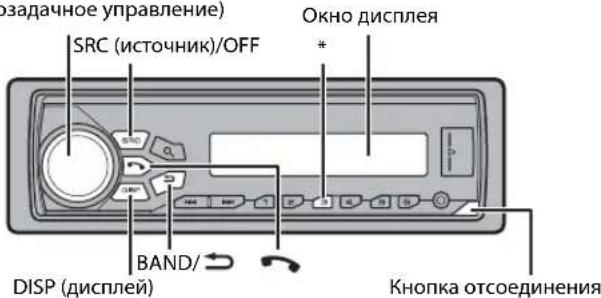
HINKauuN 3TOI KHOKN MOryT OTNIuHaTbcR B 3aBNCMOCTN OYCTPOJCTBa.
PnbydY
IPMMEYAHNE
IyBxOaNTB KOMnneKT NoCTaKN ToNbKO yCtpoiCTBa MVH-181UB.
Yacto nnonb3yemble onepaun
YCTPOICTBO BbINONHReT NOnCK CTAHCUN NO INHOpMaUN PTY (TNnporpamMbI).
1HaXmTe BOpemFM-npneMa.
2 NobeprHnTe M.C. dIy Bb6opa Tnna nporpammbu n3 [NEWS/INFO], [POPULAR], [CLASSICS] nnN [OTHERS].
3 HauKMITE perynIaTOp M.C..
UcpoCTBO HauHET NOnCK CTaHcNIN. Pocne HaxOxJdeHnra CTAHn OTO6pa3NTc H3BaHHe NpOrpaMMHO cnKbI.
IPIMEAHNA
-TO6bOTMCHHTbNONCKHAXMTcM.C.
PpRpMMbHekOTOpBxPaNIOCTaHcMnMOrT OINHcTaBcAOn pOrrpaMM, yka3aHbX B nepeBaAeMoM KOE PTY.
EcnHnOHa3cTAHnHEnepeaetnporpamMbHyKHO TnH,TOHdNtneeB TeHeeHnPmepHo DByx cekyHd 6ytend NOKaHaO [NOT FOUND], HaTeM ToHep nepeJeB PcXIM nPema CTAHnC, cKOTOPbBnHauT NaCK.
Cnncok PTY
ДяпolyeHHI DOONHHTeBHOI INHΦopMaUN O cIncKe PTY nocTeTne cnedyuOuN caIT:
http://www.pioneer.eu/eur/products/25/121/tech/CarAudio/PTY.html
USB/iPod/AUX
ПРМЕЧАНС
ФункияI Pod HeoocTyHa nM VH-180UBG/180UB/181UB.
Bocnpon3BeDHe
OTKnIOHTe OYcTPOIcTBa HayHnKn nepei noKnIOueHnEM K o6OpyOBAHIO.
YcTpoIcTa USB (BkIOuOa AndroidTM)/iPod
1 OTKpoTe KpbIwK npTa USB.
2 Pnokknoye yctpoiCTBO USB/iPod c nOmoBIO COOTBeTCTBYUoero Ka6eJ.
ПРМЕЧАНЕ
ДИН АБТОМАТУСЕСТО ПЕРКИОЧЕНИН HA NCTOCHNK [USB], KORДА YCTPOЛСТВО USB/IPod ПОДКИЗЕК R IANBOMHY YCTPOЛСТВ, YCTAHOBINTE DIN [USB AUTO] 3HAQUHENE [ON] B HACTPOKIAX SYSTEM (ctp. 20).

BHUMAHNE
IcnoB3yIe dononHnneBnaKaeB Pioneer US (CD-Us0E) nIa noKnHoeHH yCTPOiCTBA USB, nockoBky NIOBO cYTOpOCTbO, noNkIOHueHHe HnOpeCtBeHHo K rAHOBBY cYTOPOCTbY, 6yET BblCTynatb, YTO MOKET npEDctABTbOnaHObCTb.
Ipeepn3BneHemcYCTpoiCtBaOCTaHOBHTe BOCpOn3BeDeHne.
IopknoueHnAOA
Iy nonyeHn donoHNtEnbHbIX CBeDeHn O noKIOueHn AOA cm. cTp. 16.
IopknloueHne no MTP
yctpoCTBO c onepaunHOH CIETEM Ond A 4.0 mN 6oNEe no3nHE moKHO
NOKIOHtNo n pOToKOTky MTP c NOMUb Ka6JIa, npnaAemaO K yCTPOCTBy. OJHAKO
B 3ABNCMOCTN oT NOKIOUHYE HORO YcTOPTCHBA KONNUCTBa FAIIOB ayNDoPAHBI/
KOMNO3uMm MOYr 6bty h HeOCTynHb Ira BOCpOns3BeDHeHnpe3 MTP. O6paTNe
BHIMAHue, No TOKIOUHEHne No pOToKOTy MTP HECOBMECTMo c faINOBMI
fOpMATAM WAV i FLAC i He MoKeT HcNOnB3oBAtbC c FyHKiuee MIXTRAX.
*Faibl FLAC COMeTMMb TOJbKOc MVH-180UI/180BG/180UB/181UB.
ПРИМЕЧАНЕ
Пи ИСТВЗБАВИМ NOДКЛЮЧЕНИ MТР ДЯп паламетра [ANDROID WIRED] Heo6xOДIMO yCTAHOBNTB 3HAчЕне [MEMORY] B hashpoiKax SYSTEM (ctp.20).
AUX
1 BCTaBbTe MUNH-CTepeopazem B BXoHoi pa3bem AUX.
2 Haxmte SRC/OFF nra Bb6opa [AUX] KaueCTBe nctOHHka.
PIMMEYAHNE
Ecnn nnapametpa[AUX]yctahOBHeIO 3haeHne [OFF]B hAcTPOkX SYTEM,6yTeT HEB0M0KHO Bb6paTb[AUX]B KaueCTBe NcToHnKa (Ctp.20).
Onepaun
BbMoKeTe HaCTpOHTb pa3nHbIe npaMeTpbl B HAcTpoiKaX FUnCION (cTp.17).
06paTne BnHMaHne, yTO cNeIyOuIe onepaun He pa6oTaHr Ha yCTpoiCTBe AUX.ДЯ pa6oTbI C yCTpOInCTBOM AUX nCnonb3yIn Te yCTpoiCTBO HENOCpeDCTBeHHO.
(Tonbko nMVH-X380BT)
PoiKJIoueHne no Bluetooth
BaxHo
Ecn noKnioeHTo pnnn 60nee yctpoBt Bloutto (Hanpmepe, teneo H OTeJIbHbI aydnnoep), OHN MOry pa6oTaB HeNCnpaBHO.
1BkIOuHTe fynKUIO Bluetooth yctpoiCTBa.
2HaXMMTE,OTObI OTO6pa3NTb MeHIO TenefoHa.
3 NobeprHnTe M.C. nIa BbI6opa [BT SETTING], 3aTeM haxmnte dIra noDTBepXKeHnI.
4 NobepHnTe M.C. nIa BbI6opa [ADD DEVICE], 3aTeM HaxMnte nIa noTBePckdEHH.
YCTPOICTBO HAHHT NONCK DOCTyINhBIX yCTPOICTB, NOCE HERO OTO6pa3NT INB CnNcKe YCTPOICTB.
-TO6bIOTMEHHTB NOCK,HAKMUTeM.C.
- Ecln Heo6xOUMoro yCTpOcTBa HET B CnncKe, Bbl6epntE [RE-SEARCH].
- ECNI HET DOCTYNbIX yCtpoiCTB, Ha 3KpaHe OTo6pa3ntcR [NOT FOUND].
5 NOBEPHNTe M.C. dIa Bb6opa yctpoCTBa n3 cIINCKa yctpoiCTB, 3aTeM HAXMMTE IJIIOITBePJKDeHINJ.
HaKMMTe m yepxmbaTe M.C. nI nepeKIOeHn HΦopMaUNo 6yCTPOCTBE MeJdy aDpecom yCTPOCTBa Bluetooth n NMeHem yCTPOCTBA.
6BbIbepnte [Pioneer BT Unit] ha kpahe yctpoCTBA.
7y6eNTecb,yTO 3TO XE 6-3NaHoe YnCNO OTo6paXaeTcra Ha OCHOBHOM HnPOKJIIOUeHHOM yCTpoiCTBe,3aTEM HaxMMTe"Ja"Ha nOdkJIIOUeHHOM yCTpoiCTBe.
IPIMMEAHN
- Eclm yke o6p3oBaHa npa c TpeMa yctPoIcTBAMn, ot6pa3ntch coo6eHme [DEVICE FULL]. B 30m cnUyae Heo6xOdmo ChaHana ydaJIbNb OIOHO 3apeRcTnpoBAAhBx yctPoIcTB n3 naMAtn. CM. [DEL DEVICE] nn [GUEST MODE] B hAcToPoiKax Bluetooth (CTp. 12).
B3aBcMocTOnOTyCTPOINCTBAWARE7MOKETNtpe6oBaTBCHBBOPIN-KoDa.B3TOM CUYae BVEdnte [0000].
COBET
TnKIOHueHEe Bluetooth MOHO TAKJE yCTAHOBIT PyTEM O6hApyKeHHY cTPOIcTBa HA yctPOIcTBe Bluetooth.ДЯ 3TOrO DnA napaMeTpA [VISIBLE] B HAcTPOHKax Bluetooth Heo6xOIMO YCTAHOBIT 3HAeHHE[ON].ДЯ NOnyUeHHN CBeDeHn O paoTe yCTPOIcTBa Bluetooth CM INCHPTyKuIN NO EKnLnyATauIN, npInlaeraBmIE KcTPOIcTBy Bluetooth.
| HасторкnBluetooth |
| Злесent meио Oпсанue |
| DEVICELIST OTOбрахе списка с的对象 Альперовский усторьВBluetooth. "у STОбрахаетсь в Имени усторьСВ, сclи устенobleно подочени Bleuthooth. |
| DEL DEVICE Удалени винформацinn ob усторьСВ. |
| [DELETE YES], [DELETE NO] |
| ADD DEVICE Perictrpaцnia HOBOGO uSTOPICTBA. |
| A.CONN BыберITE [ON], [OFF] |
| VISIBLE BыберITE [ON], [OFF] |
| PIN CODE Измени PIN-кда.1HaЖмITE M.C., дя овскарения рекима насторь.2ПовернITE M.C., дя вьбoga Homepa.3НжмITE M.C., чтоы пелемецпь күрсор в сениюше поожени.4По се вьда PIN-кда, нажмITE и уderжимаite M.C..Посе вьда PIN-кда ри нажати M.C.Будэр Вылолен Возbat на захан вьда PIN-кда, яde вы сmosжete Изmenitb PIN-кда. |
| DEV.INFO Ппекліче снындаспee симени усторьСВ и adpeca уг роитсba Bluetooth. |
| GUEST MODE Bыбер [ON], [OFF] |
KoHTaKT 6yTeH Na3HaueH BbI6paHHOu HcNoBOn KhONKe.
YTO6bI BbINHHTB Bb3OB C NOMOUIIO pnyctAHOBNEHHORO HOMepa, HAXMITE ONDHYNCHNOBIX KHOKOT 1/ADo 6/),3aTEM HAXMITE M.C..
Pacno3habaHne roIoca (Tolbko dIy iPhone)
DHaHHa yHKnua DOctynH aToIbKO ecN yCTpoiCTBO iPhone, ochaueHoe fyHKuie paCnO3HaBaHnra TOnoca, noKnIOueHO KycTPOiCTBy C NOMOsbu Bluetooth.
1 HaxMnte n ydepKnBaTe, qTo6blakTNBupoBaTpeXm pacNo3HaBaHn rONoCa.
2 Haxmte M.C. nroBOpTe B MkpofoHnBA BBOda rONOCOBHXOMaHd
2 HaKMITE SRC/OFF dIa Bb6opa [BT AUDIO] BaKaeeCTBe nCTouHnka.
3 HaKMITE BAND/ DnHaHauJa BOCnpoun3BeDeHnA.
OchOBhble onepaun
BbMoKeTe HaCTpOuTb pa3nUHbIe npaMeTpbl B HacTpOaKax FUnCtION (cTp.17).
| Назнистору Спуновский Надостацем релегату Спуновский Послары Валшевский Послары Валшевский Послары Валшевский Послары Валшевский Послары Валшевский Послары Валшевский Послары Валшевский Послары Валшевский Послары Валшевский Послары Валшев斯基 Послары Валшев斯基 Послары Валшев斯基 Послары Валшев斯基 Послары Валшев斯基 Послары Валшев斯基 Послары Валшев斯基 Послары Валшев斯基 Послары Валшев斯基 Послары Валшев斯基 |
B 3aBcIMoCTn OT NOkNIOueHHOrO yCTpoIcTBa daHbIe OepauM MoryT 6blb HeOCTyHbI.
Pexim npiloxeHna
(PekIM APP HeDocTyneH MVAVH-180UBG/180UB/181UB.)
Bb MoKeTe IcNoIb3OaBt Ta dHaHoe IpnoJooHeMe Ha yctPoIcTBe iPhone/ Android c NomouBIO daHHoro yCTpoCTBa. B HeKoToPbIX Cnyaax Bbl MoKeTe YypnabJIb TpnoJIOHeM e C NOMouBIO yCTpoCTBa.
Дя npocmoTpa CbeHn O COBmctmbix yCTpoiCTbax Nocetnte HaW Be6- caT.
BaxHo
IcnoIb3oBaHne npInOxKeHHn CTOpOHHHx pa3pa6OTuKOB MoKeT BkIIOuA Tb Bce8a HnI Tpe6oBaT npDeOCTabNeHHn NmUHbX daHbIX (Co3aHne npOfHnN oNp3b3oBaTeN nI IpyrHe cnoCobbl), a JnI HeKoTobix npInOKeHHn - npDeOCTabNeHHn daHbIX o MEcToHAXOKeHHn.
BCE PIPINOJXEHNCTOPOHHNX PA3PA5OTUHKOB HAXOJATCR B CDEPE OTBETCTBEHOCHNTINXPA3PA5OTUHKOB, YTOE3OGPAAHIEHN BKJIOYAEET CCEB6 CBOP IN B3O10ACHOCbTIOJIb3OBATEbCKNX DAHHbIX IN OBPALSEHEC C AACTHOINHOFOPMAUJIEN.PINI NCIIOJIb3OBAHNIM PIPINOJXEHNCTOPOHHNX PA3PA5OTUHKOB Bbl COIIIAJEAETCb CUCIOBNIIM PEPIOCTABILEHNA CEPBICA INIOLINTIKO KOHΦINJEHIIANBJHOCTN PA3PA5OTUHKOB. ECJIINBbI HE COPIAChBI C YCLIOBIMNI IINI PONITIKO PA3PA5OTUKNKA INI HE JEXEAET PEPIOCTABITb DAHHbIE O CBOEM MECTOHAXOXJDEHNK, KOTDA 3TO TPEBYETCR, HE INCIPOJb3UYTE TAKOE PIPINOJXEHNE.
KOMTANHIA PIONEER HE HECET OTBETCTBEHHOCTN 3A IPIVIOXHEHNAIIN COIEPEXNMOE, IPEIOCTABJIIEHNOCTCPOHONHMNI PA3PABOTHTKAMNI, BKJIOYAH NIOCTOBEPHOCTb IIOJHOHTy.3A COIEPEXNMOE IN YPHKUNOHAIbHOCTb TAKNX PPINOJOKEHMI HECYT OTBETCTBEHHOCTb PA3PABOTUKNI PPINOJOKEHNI.
UcnoIb3OBaHnne npMIOxKeHna Ha yCTpOJCTBe
ПоdkluуенnoBluetoothdoctynnoMvH-X380BT.
1NoKIOHHTe DaHHoe yCTpoiCTBO K Mo6NlBHOmy yCTPOIcTBy. iPhone uepe3 USB (ctp.8)
- UCTPOCTBO Android uepe3 Bluetooth (cTp. 11)
2 Haxmte M.C. nIa oTo6paXeHn IraBHO MeHo.
3 NOBEPHNTe M.C. dIa BbIbopa [SYSTEM], 3aTeM HauKMITE nIy noTBePxxdHH.
4 NOBEPHnTe M.C. nIa BbI6opa [APP CONN. SET], 3aTeM haxMtTe dIy noTBePxxKeHn.
5 NobepHnTe peryIaTOp M.C. dIa BbIbopa oDHoro n3 cneDyUox npaMetpOB.
- BbIbepnte [Wired] iPhone.
- BbIbepeHte [BLUETOOTH] dny yctpoNCTBa Android.
6 HaxmTe SRC/OFF dIa BbI6opa [APP].
7nconno3yute mo6nbHoe yctpoCTBO dnyaynck npnIOKeHH.
Ochobhble onepaun
BbMoKeTe HaCtpoNTb pa3nHbIe npaMeTpbl B HacTpoKax FUnction (ctp.17).
HeNcNoB3yTeJaHnOeKHeNE BoIpeM BOXJDeHNA tAmo6BnJI. PnpKeJe cEm NcNoB3oBaTb NEMeHTbY npAbeHnE pInpOKeHnEM CBePHTe Ha oOouHny n PnpAnKpyTe TpaHCnopTHoe CpeCTBO.
Длгпьзователі iPhone
DanhaiyHKnnoNDepKnaBaTc iPhone (iPhone 5 nIN 60nee no3dneBepCne) i iPod touch c iOS 8.0 nIN 60nee no3dne BepCnei. BbMOXeTe 3aRpy3nTb Pioneer ARC APP B iTunes App Store.
Длг nonb3OBaTeIeN Android
Даннан Фуннданьовима сучторвами, на Которьх устовлеса OC Android 4.1 поаоу подени ворсши подени В�отBluetooth SPP (Serial Port Profile) n AOA (Android Open Accessory) 2.0. Bы можete загузпь Pioneer ARC APP B Google Play™.
PIMMEYAHNE
HekToTObYe TcOPTOBy Android, noDKnIOeHNbIe c NMOUPO AOA 2.0, MOrYt
fHyKNUHOPOBaTB HeNCpNABHO INI IN3dAbaTB NoCToPOnHHne 3BykN IN3-3a Ooc6eHNcTe Hx
nporpaMmHoro o6ceNeCHnIA, BHE 3aBcNIMcOTn OT BePCm OC.
Повлочнык Pioneer ARC APP
IopKIOueHnno Bluetooth DocTyNo nMvH-X380BT.
1NoKlnOHTe daHHe yCTpoIcTBO K Mo6nIbHOMy yCTpoIcTBy.
- YcTpoiCtBO iPhone/Android uepe3 USB (ctp. 8)
- UCTPOINCTBO Android uepe3 Bluetooth (ctp. 11)
2 HaxMMTe M.C. dny oTo6paXeHn rnaBHO MeHIO.
3 NobepHnTe M.C. nIa BbIbopa [SYSTEM], 3aTeM haxmTe nIa noTBePxKeHnA.
4 NOBEPHnTe M.C. nIa BbI6opa [APP CONN.SET], 3aTeM haxMtTe dna noTBePxKeHn.
5 NobepHnTe peryIaTOp M.C. dIa BbIbopa oDHoro n3 cneDuOx npaMetpOB.
- Bb6epnte [Wired] dny yctpoicTBa, noqKIOueHHoro c nomoubu USB.
- Bb6epnte [BLUETOOTH] dans yctpoiCTBa Android, noqKnIOueHoro c nOmoaBn Bluetooth.
IpeeJnte K 9ary 9 npn Bb6pe noKloueHn USB nPi nnn noKloueHn Bluetooth.
6 HaxmTe BAND/,TO6bI OTO6pa3ntb npdebyuun cnucOK MeHO.
7 NobeprHnte M.C.ДЯ BbI6opa [ANDROID WIRED], 3aTeM HaxMnte dna noTBePKeJHeHa.
8 NobepeHte peryIaTOp M.C., yTo6bI bbl6paTb [APP CONTROL] dny yctpoiCTBa Android, noqKnIOueHHoro no USB.
EcnBb6paHO[ON]BnyKTePAPP AUTO ON,npnIOxHeHne PioneerARC APP Ha yCtpoiCTBe Android 3anyCTTcA BTOMATueckn IN BCE deICTBn 6yDyT 3aBepWeHbl.
IPMMEAHHE
Ecn npnoKHeH PioneR ARC APP He yctaHOBeNo Ha yctpoCTbe Android,Ha 3kPahe yctpoCTBa Android oTo6pa3nTH hAmOnHHaNE O6 yctAHOBke npnoKHeH. Bb6epoe [OFF] b [PAPP AUTO ON], YTO6bYdaNJth cooUeHne (ctp.20).
9 HaxmTe SRC/OFF nBb6opa IIO6O ro NCTouHnka.
103anyctne Pioneer AR APP ha Mo6nblHom yctpoiCTBE.
IPMMEYAHNE
BbI Takke MoKTe 3aNyCTMb npInoKeHne, hAkaB N ypeKnBaB peryNtOp M.C., ecn Bb6paHO noKnIOeHne USB nIN iPhone mNn noKnIOeHne Bluetooth.
PpocnyuBaanHe My3bIKn Ha Android
1 HaxmTe SRC/OFF dna Bb6opa [ANDROID].
OchOBhble onepaun
[Custom1]MOXHO Bb6paTb OTDeJIbHO JnIa
KaJIORO NCTOHNka. OHaKo nlaIIO6bIX
KOMbHaun, yKa3aHHbIX HNXe,
ABTOMaTnueCKn yCTaHaBJIbNAIbKTCR
ODHnHaKOBbIe HaCTpoiKn.
BOCnpon3BODntbCraTOnbKOTe TaCTOTbl,
KOTOpblie HnKe yKa3aHHOro dHaNa3OHa
yactOT
3nemMeHO OnncAHne
BASS BOOST
OT[0]do[+6]BbI6Op yCuIIeHnHnx3ByKOBbx
CACTOT.
HPF SETTING
Yactota cpe3a:[OFF],[50HZ]
[63HZ], [80HZ], [100HZ],
[125HZ], [160HZ], [200HZ]
KpyTu3Ha
XapakTepnTuKn:
[-12],[-24]
HaHnHaMnKn 6yDyT BbBOuNTbcra TOnbKO
YaCTObl Bblie, yEm yCTaHOBNEHHbIe
ΦnnbTpOM BbICOKnx yactOT (HPF).
SLA
OT[+4]do[-4]HactpoKa ypOBn rPOMKoTn Dn
KaKdoIro NcToHnka KpOme FM.
HHE, aBTOMaTnueCKn yCTaHaBnBaIOTc
ODHnHaKOBbIe HAcTpoNk.
TEKCTOBHINΦOPMaUNCCKAToR
aynnofoaina.
| Эльемп мени Описане |
| CLOCK SET Настойка часов (ст. 6). |
| 12H/24H [12H], [24H] Вьбор Формата вретени. |
| AUTO PI [ON], [OFF] Понск друю с taiци с taiок ще Прогамmo Дадж Bo Вретя Вьзова Предварптейноги Настойки. |
| AUX [ON], [OFF] ВьберITE [ON] поочклочени к Дд Ному устрийсту Всимогаелову устрийства. |
| USB AUTO [ON], [OFF] ВьберITE [ON] dans abTomатческо пегклочени на Источник [USB], кordа устрийсту USB/iPod поочкочени к устрийсту. ВьберITE [OFF], кordа устрийсту USB/ iPod поочклочаetса К устрийсту dans Зapядки. |
| BT AUDIO [ON], [OFF] Вьбочени/OTКлочени сигналa Bluetooth. |
| MUTE MODE (Дoctуно толъдд MVH-180UI) [MUTE], [20dB ATT], [10dB ATT] Авtomатческо оTKлочени пли приглочени звka р pri поочени сигнала с оборUDOBANIA с Функциemes OTКлочени звka. |
| PW SAVE* [ON], [OFF] Рожим сизproсберень. При Вьбочени Функциemes за det Достуно Толък Вьбочени Источни. TOlbko |
[2.5 MIN], [3.0 MIN], [OFF]
Bb6op npoDOnxNtEnbHOCTn
Bocpon3BeJeHn.
MIX PATTERN
[SOUND LEVEL] N3meHHe CneuaanbHbix 3eKTOB
MIXTRAX B COOTBETCTBUN CypOBHEM
3ByKa.
3aCTaBkMeHReTcB 3aBNCIMOCTNOT
ypOBHrPOMKOCTn.
[LOW PASS] 3aCTaBkA MeHReTcB 3aBnCmOcTn OT
ypOBHn3KNXyACTOT.
[RANDOM] 3actaKa MeHReTc npOn3BolbHO
3a BNCIMOCNOT yPOBHBrPOMKOCTN
yPOBnHn3KnxHaCTOT.
DISPLAY FX
[ON], [OFF] BkIIOueHne/OTKIOueHne ΕΦΦeKTOB
MIXTRAX.
3JemEmT MeHIO OnncaHne
CUT IN FX
[ON], [OFF]
BkIIOUeHHe/OTKIOUeHHe 3BYKOBBbx
ΦΦeKToB MIXTRAX npn n3MeHeHm
DopokekBpyHyIO.
Повлочен/Установka
PoiKJIIOUeHn
Baxkho
-Пиу установке дан Horо устpoичыВ abTomobиke,Кога Клочахинаяне НaxoДИСТСьпложени ACC (akceccyap),OTCYTCTBnO NOKIIQUeHny KpachoroKa6eЯ K TepMHHaly, KOTOpbIФИКСРуET NOLOXeHne KJIOna3xazinahnia,MOKTe pINBecTи KaPraJKe AkkymyIATopa.

B polojekhny ACC

BHeNoJIOKeHnA ACC
NcnoNb3OBAHne daHHoro yctpOCTBa yCNOBnAX,OTMnUHBx OTykaaHHbX,MOKET npMBECTNK NOkapy Mm HEnCnpaBHOCT.
- ABTomo6nn c akkymnTOpH0B 6aatapee 12 B otpucaTeIbHbIM 3aemneHmE.
-ECINBbIXO,INHAMKNA
NcONb3yeTc4KaHANAMN,
NcONb3yIe TINHAMNK
MOUHOCTbIO 60Jee 50BT
(MAKCMALbHARBXODHAR
MOUHOCTb) INCONPOTNBEHNEHMOT
4Ωdo8Ω(3HAueHHe
CONPOTNBEHNE).HE NcONb3yIe
DnDAHHORO yCTPOINCTBa
HAMKNC COnpOtnBneHnem 1-3
-KordaBbXoJ3aDHeRoIuHAMnKa nCNoNb3yeTcCa6ByeFepOM c conpoTnBHeHMe2Ω, nCNoNb3yTe DnHAMnK6Ooe70 BT(MakcImaJIbHaBxOdHa MoUHOCTb).
* CM. PodknioHeynЯДЯ Вьбopa coOTBETCTbUcIeRo cNoCoc6a PodKnIOHeyn.
Bo 36ekaHne KopoTko 3aMbKaHHn, NpeperpeBa HnHn HncnpaBHOCTn CObIOaTe CnedyuOue yka3aHH.
-NepeyctahOBKOOTKNIOHTe OTPuataelbHyIO KEMMy 6aTapei.
3AkpenIte IPOBDAc NOMOUB
3aKIMOBnRA KaBeJeNn
KNEKOJIENTb.O6pHIne
KNEKYIOENTHY BOKpy IPOBOID,
KOTOpBE KACAOTCAMeTALINueCKIN
YAcTei, nA3aunblPOBOID.
-86epntBceKaBennoJaIbIweOT DnKxUxnxCyaTei,TAkNk Ka pIaHnepeKnIOeHnpepaHnHaPaeBnIOuOe CnDEHn.
-убенипддшо.TmNepaTPOHAPINPEHn
-He noKJIOUaTe JeNTbI Ka6eB K 6aTapen nyTEM npocobibaHna erO uepe3 OTBepCTne BDbraTeBbHbIOTCEK.
-3akneIte HeNoIOnKIIoueHHbIe pa3beMbI Ka6JIa N3OJeHToI.
-He ykopauhbaTe ka6eJn.
-He hapyaaiTe n30nauKa6ennaHnDaHHOrO yCTpoiCTBa dIraNTAHm dpynx yCTPOiCTB.EMKoCTb Ka6eJRAJIeTcORpaHnueHHoi.
-ncnolb3ynte nnaBkn npedoxpahnteb
He 3aMbkaTe OtpuCaTeNbHbI Ka6eBdINHaAMKOB HENOpCepDCTBeHHo Ha 3eMnIO. He C8Ba3bIaTe BMeTe OtpuKaTeHbIe Ka6eNl HECKOJBkX DInHaAMKOB
Korda yctpoiCTBO BKNIOUcHNO, CnHbIy npaBHeNHO TnpabraIOITcNO CINHEMy/6eIOMy Ka6EnIO. POnkIOuHTe DaHHb K Ka6Enb K ydaJIeHNOMY npaBLeHIO CNTeMoI BBEHHeRo YCUNITEIN NtepMNHaNy peJeHOrO ynpaBHeNn ABTomATNuCeKo aHTeHHb ABTOMO6NJMAkC.300MA,12B NoCT.TOKA).EcnI abTOMo6NJb OCHaueH aHTeHHo, BCTPOEHHO B NO6OBoe CTKeNIO, NOkNIouHTe ee K TePMHaNy NTaHnAHTeHHORO ycUNITEJ.
HnKOra He noKnIOaHTe CnHn/ 6enbl npoBOD K tepMHany nHTAHN BHEwHero ycunNTeHn. TaKke HnKOra He noKnIOauTe ero K TepMHany nTahnabTOMATNUeCKoAHTHeHb.B npOTNBOM CNyue ATO MOKeT npINBcTN K nPOTEKaHIO 6aTapeu nn ee HncnPabHocTH.
-epHbKa6eB3a3emHe.Ka6eH 3a3emEnn dna daHHo rYcTPOCTBa nDpyroEOBopyOBAHne (oc06EHHO yCtPOCTBa BbICOKoro HnPRAKeHn, HnPmEp ycUNTei) Heo6xOIMNO NOKIOUaT bOTDehBO. B npOTNBOM cNoyae cnyaHoe OTKNUeHE MoKeT npINBeCTN Knokapy nn HeNCnPabHOCTN.
-rgaqueckn CMBON Ha. 13denn03Haayet NOCTOAHbI TOK
DaHHoe yctpoIcTBO
MVH-X380BT/180UI/180UBG/180UB/ 181UB
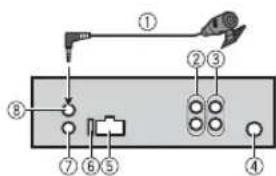
①MnKpOΦOH 4 M (TolbKO pIa MVH-X380BT)
② 3aHnBbXoAnnBbXoCa6Byepe
③Передни Вьхов (толбкдг MVH-X380BT/180UI)
④BxOДЯнгaHTeHHbI
BxOJ WHypa NITaHnI
6 Pnpdoxpanntb (10A)
⑦ BxO pI npOBaHOro npbTa DY (TolbKO pI MVH-X380BT/180UI) CIOA MOKHO NODKHOHTb npOBaHO aADTep DY (npno6petaeTcOTdENo
BxO MmKpOfoHa (Tolbko DNMy MVH-X380BT)
UHyp nHTAHn
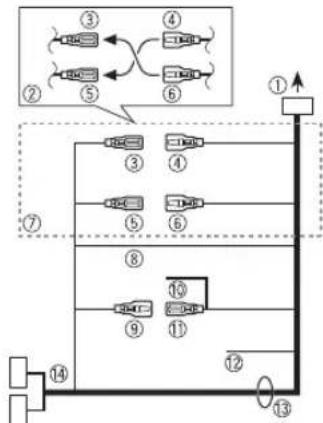
① Bo BXoD shHypa nHTaHn
2B3aBnCUMOCTNOTnA BTOMOBNHpyHKUN 5 MOrYT OTNIHATCB.NBtOM CNYae NNDKNIOHTe K.6
3 JeHbI PeepBbI (nnn onua)
4XeHTB BInIOHnIte NOKIOUcHHe K TepMHany C NoCToRHHbM HAnpXeHMeM 12 B.
KpaChbI Onu (nn pe3epBh)
6KpaChbIn
BbINOHnHaTe NoKnOuCheHne K TepMNAny,ynpAINHEMOMy KNIOOM 3aKInraHn (12 B nocr. TOKA).
7BbINHnIeNIOKIOUChHeN IPOBOIOB Dpyr KDPyR OHOHorO Ubeta.
⑧ YepHbɪn ("Macca")
CnH/6eBnI
NoJokHe KOHTaPa3bemaISO
6yTeOTNtuaTcB 3aBcIMocTn
OT TnA ABTOMO6JI. NpKIOUHTe
9 UcN5 KONTAKT OTBeaet
3a ynpabHe aHTeHHo. Ecn
KNOJb3yETc ABTOMO6Jb
DpyrOTo TnA, HkORJa He
POKIOUaTE n
CnH/6enbB BbONHnTe NOkNIOueHne K TepMNHy ynpaBHeNc CNTeMoY ycNtEnra (MaKc. 300 MA, 12 B NocT, TOka).
CnH/6enbBbINHnTe NOKIOUeHne KTePMHanypeNHOYnpaBHeNAABTOMaTHueckoAnHeHHb(Makc.300MA,12BnoCT.TOKa).
19 KeIbIyIeHbI (TolbKO pIa MVH-180UI) PnI nOJIb3OBaHNi O6OpYoBaHnC fOpKUeIe OTKnIOye 3BvKa IOpKnIOuHTe DaHHb IPOBOK NpOBOyO tOKIOyeH3BvKa o6OpYoBaHnR B npOTNBOM CJIyuae He NpOKnIOuayTe nPBoD OTKIOueH3 BvKa.
1PpOBoDa DnHaMnKa
Bebi:PiepdHn nebb
Bebbl/uehbl:IpeepnIeBbl
Cepb:PepeHn npabB+
CepbI/uehbn: Npeedn
PpBaBbI
3eHb:3aHnneBblnn ca6byep
3eHbI/epHbI:3aHnJIeBbI
mnnca6byΦep
ΦOneTOBbI:3aHnPiPaBBI ⊙ nnCa6ByΦep
ΦOneToBbI/YepeHbI:3aHnH npaBbIMnCa6Byepe
14 Pa3beM ISO
B HeKoTOpbIx aBtOMo6nIaX pa3BeM ISO MOeT 6bTb pa3deneH naDBA. B 3TOM cIyae BbIOJIHNe ToNkIQUHeH K OOBmPa3BeMaM.
PIMMEAHN
-ⅢMENHTe NcXoHoe MeHO DaHHoro yCTPOINCTBa.CM.[SP-P/O MODE] (CTp.7).BbIOK ca6bypepa DaHHoro yCTPOINCTBa ABnHETcN MOHOFOHNHECKIM.
- Pn nncno 30aHnn ca6byepa conpnoBneHem 2 O noKIOUaTe ca6byep K fNOIeTOBOMy I fNOIeTOBOMy/cePHOMY npOBoAM yctpoCTBa. He noKIIouaTe Hnuero K 3eNEHOMy nn 3eNEHOMy/ cepHOMy npOBoAM.
YcHnTeIb (npno6peTaetc0TdEnbHO)
BbInonHnTe daHHble nOdkIOueHnnpnncnoB3OBaHnDOnOHnTeIbHOyCunNTen.
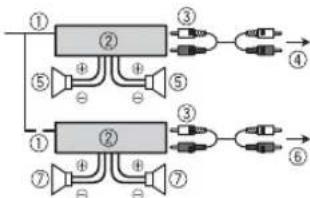
①PnBbDyCnCTeMoB BbONNHte NOKNIHouHeNc CnHemy/6enomyKa6enHO.
② Ycunntenb (npno6peaetca OTdienbHo)
BbIOHHTNEoKINIOUeHneC nMOOIOBRCA (npno6peTaetcT OTDENbHO)
4 KnepeHEmy BbIXOy
⑤ NpeHn DnHaMnK
6K3aHemyBbIXOyIINBbIXOy ca6ByΦepa
⑦3aHnHnHaMnKnnCa6ByΦep
Tonbko對於 MVH-X380BT/180UI
YcTaHOBKa

Baxkho
-Nepey yctaHOBKO npoBepbTe Bce NOKIOUeHIN N CNTEMbl.
He nObl3yIe HeOpunHnAbHbHe 3aNHaCTn, TAK KaK 3TO MoKeT npBBeCTKN HEuCnPaBHOCTM.
-Obpatntecb K DInepy,ecn dny yctaHOBN Tpe6byTcN 1000HHTeNbIbe OTBepCTN NMOIMDnKauIN B ABTOMOne.
He yctaHaBnBaIe TaHHeOyCTpoCTBO B CneDyUoXn CnyAax:
-ecnOHOMOKetHapuunTbpa60Ty aBtOMo6nIa
-ecmnoMOKetPnHINHTb TaBMy naccKinpy Bcnyae pe3kO octAHOBKn.
- NonynpobodnHOBbI na3ep 6ydet
NopBXeHN B Cnyae nepeRpeBa.
BbONnHHeTc yCTaHOBky dAnHORO
yCTpoiCTBa BdAIn OT MeC T
NoBbUeHHoTmPeHaTyPoI,
HapnPmeP neKN.
OTNIMAJbHAR npOn3B0nITeNbHOCTb DOCTHraTcR npr yCTAHOBKe yCTPOIcTBa NDyYrnom MeHee 60^
- TTo6blObeCneuHTb Heo6xOaIMoe pacnpedeHHe Tnna npn NcNoB3OBaHH yCTpOJICTBa, npn YctAHOBKe OCTabTe CBO6OdHoe MeTo 3a 3aHDHe NaHEbIO nCKpyTnte Ka6eN, YTO6bl OHn He 6bKnipobAn BENTINaIOHOHbIE OTBepTna.
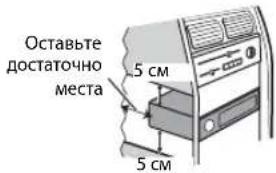
YcTaHOBKa KpenneHn DIN
1 YCTAHOBUte Ha npn6bophyio naHEnb BXOJMyu B KOMNNEKT yCTAHOBOUHyo WxTy.
23aKpenNTe yctaHOBOUHou xayTu, OTOrHyB cNoMoUbO ToBvptKn Metanlueckne Nankn (90°).
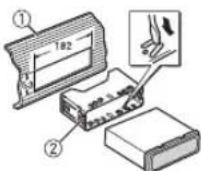
① PπiδopHα nαHενβ
② yCTaHOBOUHα ΦαXtα
-86eINTEcB, YTO yCTPOIcTBO y cTahOBHeNo npOuHO. HEnpOuaH aYcTaHOBKa MoXeT npMBecTN K BO3HNKHOBeHnnpOnyCKo npBOcPON3BedeHm N dpynx HncnPabHOCTeN.
EcnBxOJauaB KOMnneKt yCtAHOBouHaJ WaxTa He NCNoB3yETc
1 CoBmctnte OTBepCTnHa KpeneXHOM KPOHHTneH C OTBepCTnMa Ha KOpnyce yCtpoCTBa n 3aKpeNITe KPOHHTeH.
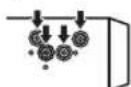
2BkpyTHeNoOJHOMByBnHTyc KaKDoI CTOpOHbI,QTObbl 3aΦuKcNpOBaTb yCTpoNCTBOHa MeCTe.
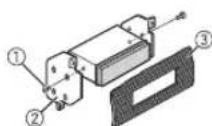
① Camope3 (5MM×9MM, He npnnaeraTcK yctpoTcbY)
KpenexHbKnpoHHTeH
3Pn6bnpnaHbnn KOHCOJIb
Kakncnolb3oBaTb KOMJIeKTHbIK POKHtTeH
y6eHntecb, yTO KOMNIEKTHbI
KPOHHTeH PAcCHHTaH Ha KPeNHe H
B BaEM ABTomObnE, a 3aTeM
PnPCoeHNteero KcYCTpOHCTBy,KaK
NOKAHO Danee.
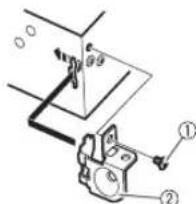
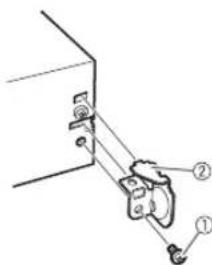
①BnHT
②KpoHwTeHH
I3BneHne yctpoiCTBa (yCTaHOBNEHORC NOMOUBIO npnlaraoemoy yCTaHOBOUHOu waxTb)
1 CHIMMTE OKAHTOBky.
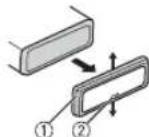
① OKaHTOBKa
JIanka c 3a3y6pHnHaM
-Писнгинпернн naHEnn 6OBneraetcdoCTyn KOKaHTOBKe.
-Пи NOBTOPHO yCTAHOBKe OKAHTOBK NOBEPHNTe NaHEIb CTOPHO C 3a3y6peHHoN naKoB BHIN3.
2 BCTabTe npnlaraeMbte KIOUH N3BHeueHnno 06eHM CTOpOHAM yCTpoiCTBa Do IeNka.
3 NotHHTe yCTPOCTBO n3 np60pHO nnEHI.
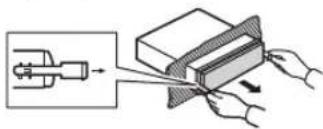
YctaHOBKa MmKpOfoHa
(Tonbko dMvH-X380BT) Minkpofoh Heo6xOdmo yCTaHaBnBaTb HEnOpceDCTBeHHo HAnpOTNB BOUHe Ta COOTBETCTByOHePacCTOHHIN DnPaBnHBOFmKcnpOBaHHrOLOca.
BHUMAHNE
3anytbbaHne npoB0a MmKpOphi BOKpy pynBeBO KONOHKnIINpbYarapeKIOUeHHNEpeaM oMeT PnPBCTN K 0B3HNKHOBEHNO UpeBbuaHNo OAnCHOnCITyaun.
YCTaHABINBATE MKNPOOHOH TAKIM
OBpAOM, YTO6bI OH He MeuAn
ynpABnTB ABOTOMOHNEM.
PekomeHpyTcNIOB3ObaTb 3axmMb (npno6peTaioCToTeNbHO) dHnFkcaunnpoBa.
UcTaHOBKaHa COINHue3aunTHbIKo3bIpeK
1 BCTaBtpe npoBOd MmKpOfoHa B XeNo6.
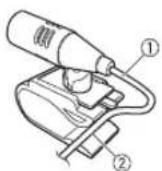
①UHyp MKNPOPOHA ②Xenob
2YCTAHOBITE3AXIMMVKpOfoHa HA cOnHcE3aunTHbI K03bipeK. Pn onyckahn coNHe3aunTHoro K03bpaKa paCNo3HaBaHne rOloca yXyDuaetc.
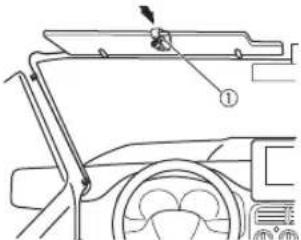
① 3aKIMMnKpOoHa
YcTaHOBkaHa pyNeByIO KOJOhKy
1 NepeBnHbTe OCHOBY MKNpOoHa, YTO6bl OTcoeHNHTb er0OT3aXmMaIJa MNKpOoHa.
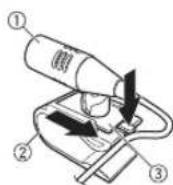
①MnKpOΦOH
② 3aKIMMMKpOoHa
OcHOBa MKNpOoHa
2YCTaHOBNTe MKNPOoOH Ha 3aHIOU Yactb pyneBOJ KOJOhKn.
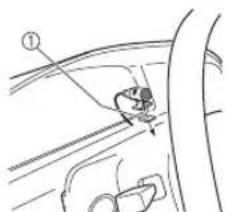
① DByCTOpOHnHnJeHTa
YcTaPaHeHne HEnCnpaBHOCTeI
Диспей abTomaTHeckn ВОЗьразаэтСВ IXСОДнIHpeхIM. →ВТseyehe30cekYHdHe6bIINO BbIOnHHeH NOHAKKxОпeрацIH. -BbIOnHnTeОпeрацIH.
Dnana30H NOBTOPHORO
BOCPON3BEDEHIN
CAMONPOIN3BOJbHO N3MEHReTcR.
→B3ABNCUMOCTN OT Bb6paHORo
Dnana30HA NOBTOPHORO
BOCPON3BEDEHIN OH MOKET
N3MEHATCBpN BiBbOpE ppyroI
nanKN INI DpOjckn, a TAKKe Ipn
pePemOTke Bnepe/Ha3aI.
-Bb6epITE Dnana30H NOBTOPHORO
BOCPON3BEDEHIN eue pa3.
BloxeHHa nanka He Bocnpn3BODITc. BloxeHbIe nankn He BOCpOn3BODATc, eCIn bIb6paH dnaPAn3OH [FLD] (noBtopHoe BOCpOn3BedeHne nankn). -BbIbepnte npyro nnana3OH noBtopHoro Bocnpn3BedeHn.
VMeOTcNOMExn3ByKa. → NcNoJIb3yETcYCTpOuCTBO, HAnpIMep, cOTobI TeIefoH, KOtOpoe MOKeT BblBbTa WymMbOE NOMEXn.
-86epnte npnbopby, Bb3bBaoune NOMEXN,OT 3T0R OYCTPOCTBA.
He Bocnpoun3BodnTc3Byk yctpoiCTBa Bluetooth, nCIOIb3yEMOro KaueCTBE NCTOUYHNA CIRHJHA.
→Полкlioуеннй УретаBluetooth
ТелефОн 3ангт 3вОнКOM.
-ВоспponиЗБеДени 3ыУкa
ВОзбовНсТСЯСпЕ
3аьершени 3вОнКa.
→ПлкючEHьЧepe3Bluetooth
ТелефонВданньIMOMeHT
ИспольуETС.
-HeИспольуTEВЗTOВрм
Телефон.
→CnmoBIO NOKNIQUeHHOrO uepe3 Bluetooth TeneoHa 6bl npno3BeHEn Cpayc6pOeH 3BOHok.Bpe3yNbTaTe 3TO rcoEINHeHne MeXy DaHHbIM yCTpoiCTBOM NMOBnIBhIM TeenoHOM 6bl0 3aBepHe HENPABINbHO.
-BoCTaHObTe CoeINHeHMeMekdy yCToPcTbOM BluetoothMO6MbHbHM TENEFOHOM.
Coo6ueHna 06 own6kax
067ne
AMP ERROR
→YctpoiCTBO He pa60Taet HnHnpeBaIVbHNO NOcOeINHeHdHAMNK.
→Cpa6oTalanaeBb3aunTbI.
-ΠροΒερβTe,ποДΚιουηνην Μινημακικ.
-ПовернITE Клоч Зжогань nnoхженE OFF n verHITe B noloxhenE ON.EcIn coo6eHnE He nCyeaet,CBaxITecb C dIJIepCKM CEHTpOM NnN aBTOPI3OBAHHbIM cepBnCHbIM nyKtOM Pioneer.
NO XXXX (NO TITLE, Hanpumep)
→HETBCTpoeHHoTEKCTOBIO HΦopMaun.
-NepeKIOUHTeJIMCNNEHnnBocnpon3BcEInTeDpyyIOpOxKy/afain.
USB-ycptpoctBo/iPod
FORMATREAD
→HOrJa npOnCxOxD3aepKka MekJy HauJOM BoCpON3BedeHn I NOBHeHM 3ByKa. -3ByK NoBNTc NocNe TORo Kc C nCnIeN cue3HET COo6uHne.
NO AUDIO
→KOMnO3nUuNOTCYTCTBYIOT.
-PereneCte ayufoaaibHa 3anomnhaoueyctpoiCTBO USB nnoKnIOHTeero.
→Ha noKJIIOUeHHom yCTpoiCTBe USB BKIOUeHa 3aIHTa.
- Cnedynte nHCTpykunm yctpoctba USB dna CHTINa 3auinbl.
SKIPPED
→IodKIOUeHHeOyCTpoiCTBO USB copejKtФaJIb,3auuieHHBtexHJOrnE DRM.
-3aunuenceHHbe faaihnponpyckaoTc.
PROTECT
->Bce faaibHa NIOKJIIOUeHOM yCTpoiCTBe USB 3aunuIeHbI no texHOJOnn DRM. -3aMeHHTe yCTpoIcTBo USB.
N/A USB
→Nodkluyehnoe yctpoiCTBO USB He noDdepKbAeTc daHHbIM yctpoICTOBM.
-OTKJNUOHTe yCTPOJCTBO N 3aMEHInTe eRO COBMeTINbIM yCTPOJCTBOM USB.
HUB ERROR
→YCTPOIcTBO USB,NOKIIIOeHHoeC nMOIOJIbIO KOJIeHTpATopAp USB,He NOIDepKINBAeTCaHHBIM YCTPOIcTBOM.
-NoKKnIOUHTe yCTPOINCTBO USB HENOCpeIcTBEHNO KAnHOMO YCTPOINCTB C NMOUbKa6eJIa USB.
CHECK USB
KOTOPKOE 3aMbKAHne Ha pa3beme USB nii Ka6ene USB.
-86eHNTecb,yTo pa3beM USBnN Ka6enb USB He 3aueMeHnHe NOBpeKeH.
→POnKIOUeHHOe 3aONMOHaIOUe
yCTpoIcBO USB NTpe6nAet
6OJIbIe MaKcIMMaJIbHO
DOnYcTUMoI CNJIb TOKa.
-OToeJdINHe 3aONMOHaIOUe
yCTpoIcBO USB N He
InCNoB3yIte erO. YcTaHOBITe
KIOU3aKIRAHNA B NpOJOKeHne
OFF, 3aTe -B NpOJOKeHne ACG
nn ON. POnKIOUaHTe TOnbKO
coBMecTmMbIE 3aONMOHaIOUe
ycTpoIcTBa USB.
iPod pa6oTaeT, Hn He No3apJkaeTc.
-86eINTEcb B OTCYCTBUN KOPOTKOrO 3aMbIKaHNb K aBeNe iPod (hAnpImpe, yTO KaBeNb He 3aKaT Mekdy MetaJIyueckmNn npeMTeAMn).Piocne npOBepKn Ka6eY yCTaHOBITE KIOU 3aKurHArNb B NpOKeHne OFF,a 3aTeM-B NpOJKeHne ON,LIb60 OTKIOUHTe N3aHOB ONDKIOHNTe iPod.
ERROR-19
→C60nCBn.
- BbIOnHnTe CJeDyUoJne Oepaun, 3aTeM ChOba BbIbePte USB B kaucTBe NCTouHnKa.
-ПовернITEКИОУЗКAZUGАHAIBN B NOLOKEHNE OFF И ВЕРНTE B NOLOKEHNE ON.
-OTKINIOHTyeCTPOINCTBOUSB.
- BbIOnHnTe nepeKIOUeHHe Ha DpyrO nCToHnK.
→C6ouiPod.
-OTKIOUHTe Ka6ebI ot iPod. PnO o6paKeHrnIraBHOro MeHIO iPod NepeoKnIOHTe iPod u BbINOJIHTe c6poc NaCTpoEK.
ERROR-23
→YcTpoiCtBO USB
OTOpMaTnPoBaHO HeBepHO.
-OTΦopMaTnpuTe yCTpOcTBO
USBB FAT12,FAT16 mnnFAT32
ERROR-16
YctapeBwaB BepCn npoWNbKn iPod.
-06HOBNTe BepcnIO iPod.
60 iPod.
-OTKIIIOUHTe Ka6Bb OT iPOD. Ipn OTO6pKaEHIN TnABHO MeHIO iPOD nepenOKnIOHTe iPOD n BInONHNTc 6C0PC NaCTPoeK.
STOP
→B Tekyuem CnMCKe OTCyTCTByOT KOMIO3NIM.
- Bb6epnte cncoc, codepkaun My3bikalhble KOMN03UN.
NOT FOUND
→Komno3nH He haIeHO.
3arpy3nTe KOMno3nHnHa iPod.
Bluetooth-устpoитбо
ERROR-10
→C6oI nITaHnMa MoyIa BluTooth DaHHoro yCTPOINCTBa.
- YctaHOBnTe KIOU 3aJxRHaHn noJoxHeHNE OFF,3aTeM-B nOJoxHeHNE ACC mN ON.
PpUIOKeHnA
NO BT DEVICE GO TO BT MENU TO REGISTER
→YCTpoiCtBO Bluetooth He HauDeHo.
CHOBA BbINONHTb COeINHHeHnE.
DISCONNECTED PRESS BAND KEY TO RETRY
→C6oI npKIOUeHn BluTooth. -HaXmTe BANOT 06bI
CHOBA BbIONHHTb COeINHeHne.
CHECK APP
→C6oI nOJKNIOUeHnK
PNDJIOXeHHIO.
CneyntnHCTpyKmHa Ha
OKpaHe.
STARTUPAPP
→PnnoKHe eH He 3anyeHo.
-ncnob3yntMo6nblhoe
yctpoCTBO Dnla 3ayncKa npINOxKeHn.
PekomeHdaun no o6paueHIO c n3dennem
3anomnhaiooee yctpoiCTBO USB
-Поглочиные USB
KOHcEHTpaTOp He noDpeXnBaETCA.
He npkIouaTe dpyrne
YcTpoINCTBa, kPOME 3anOMHaOuux
ycTpoINCTB USB. He donyckaTe
naDEHnY yCtpoINCTBa USB Ha non,
rJe OHO MOKeT 3aCtprTB nOd
peJaIbIO rA3a Nnn TOPMO3a.
B3aBcHMoCTNOTnna 3anOMHaIOJeroyCTpoIcTBA USB MOrYBo3HNKHyTbCneDyIOUe npObnmbl.
-ynpabneHme yHKUmaM MoKet OTNIuAToBcR.
-3anomimaohuey cystaltoBCTO MOKet he paclno3HABatbC.
-ФаиblMOryTH BOCNPOUN3BOJNTbC KOPPEKTHO.
-Утуроствам ВО может создаватушимовь посях ВО времпослійшань радио.
iPod
He octTabrIe iPod B MecTx C BBICOKOI TemnepaTPOI BO3Dyxa.
-ПиДВИЖЕHIN aBTOMO6HnI NaDEXHO 3aKpENITE iPod. He donyckaTe nadeHnY cTPOiC7Ba iPod Ha non, rde OHO moKet 3aCTPbTb NOD neJaIbIO rAa HnI TopMo3a.
Hactpoikn iPod, takne kak
KKBanai3ep n NOBTOphoe
BOCpOM3BeDEHeHne, I3MEHryOTcra
ABToMaTNUeCKn PnP NOKIOUeHmN
iPod KycTroPCbY. Nocne
OTKIOUeHmN iPod HactpoKn 6yDyT
BO3BpaueHb K XCOJHbM.
TeKCT HecOBMeCTMIMOFOFOpMaTa, coXpaHeHHbHa iPod, He 6yDeT oTo6paKaTaBcra yCtpoiCTBOM.
PoeepKa cKaTbix aynnoaainoB
B KaecTBe H3BaHnHa faiHa IINI rankn MOrY OTo6paXaTbCbTOnbKO nepBbte 32 cumbola (BKIOUaJ paacunpeHne).
-3to yctpoiCTBO MOKet pa6oTaB HeKOppeKTHO B 3aBcHcMocTb OT npINOKeHn, INCnONb3ObaHbHbIq nKaDIOPOBaAHWMA.
-ПинЧалЕ BOCPON3BEdENHny aydnofoaHOB,Coepkaunx n06paJekHNYaHIOmHaUOeYOCTPOCTBA USB, coepkaIe paoBETBHeHbIe nepapxNn NanOK, MoKet
PPOUCOuTb He6oJbua 3aepka.
Pyckm TeKCT dIy OTo6paKeHnHa DaHHOM yCtpoiCtBe DOnJKeH 6bTb
3aunnpoBaH BODHom n3 Cnedyuuxx fOpMaTOB:
- Unicode (UTF-8, UTF-16)
-Дуroy Формат,OTичньг ot Unicode,KOTOPBИСНОБУЕТСВ cpee Windowsи HabTePoEH Ha pyccknЯЗblk.

BHIMAHNE
Pioneer He rapaHTnpyeT COBMECTHMOCTb CO BCEMM yCTPOCTBAMU USBnHe Hecet OTBeTCTBEHHOCTN3a NIO6yIO NOTeIO DaHHix HaMeiAnpOINrPBtBATeNAX, CmAPTOHAX nDpyTRX yCTPOCTBAX npnNCONb3OBAHIN3TORO n3DENIA
He octablaIte ducckn nnn 3anomnaHauiee yctpoiCTBO USB B MeCtax C BbICOKoTempepaTyO B03dyxa.
Фаиbl WMA
| Расшерения. wma | |
| Скоростьпесдачни данных | ot 48 КБИТ/c до320 КБИТ/c (CBR),ot 48 КБИТ/c до384 КБИТ/c (VBR) |
| Частoraд��ckетиазаци | 32 кГ, 44,1 кГ,48 кГ |
| Windows Media™Audio Professional,Lossless, Voice/DRM Stream/Stream cpoindepжков вideо | He поденияваetedу |
Фаилbl MP3
| Расшиpenи.Мр3 |
-iPhone 3GS
-iPhone 3G
-iPhone
IocTy NbIe dyHKunn MOryt OTNtUaTcBcB 3BaNCIMoCTNOT POKOeHnN HINBepCnnporpaMmHO oBeceNeHn iPod.
-Пьлбоватям iPodс раьемOM Lightningnotpe6yetyraKaebLightning-USB(BxOДТВКOMПЛКТNoctabk iPod).
-Пльзователam iPod c
нгетрфейсOM Dock Connector
notpe6уетс Кабель CD-IU51.
Пдрpo6нунфорmaию можно
нolyчпь no месу поуким.
- O COBMECTHMOCTH ΦaIIOB/ΦOPMATOB CM. B PYKOBOCTBAX K iPod.
Ayd noOKHMn, noKacTbI: noDpeXnBaOTc

BHIMAHIVE
Konnahna Pioneer He Hecet OTBeTCTBEHOCHTa NotepeIO daHHbIX Ha iPod,daxe ecnn 3TN daHHbIe 6ydyT noTepeHbI BO BPEMNCN0Nb3OBaHnA daHHoro yctpoCTBa.
IocneObaTeIbHOCtB BocnpOn3BeDeHnaydnofoaioB
| D: C | D: C | D: C |
| A: A | B: B | B: B |
| F: F | J: J | E: E, E |
| K: K | J: 3 | H: H, H |
| H: H | O: O | I: I |
| P: P | C: C | T: T |
| Y: Y | Φ: Φ | X: X |
| U: U | Y: Y | U: U, U |
| J: J | H: b1 | b: b |
| J: Θ | H: Θ | η: η |
D:Диспел C:БукВа
AByTopcKoe npaBo mTOBapHbIe 3HaKn
Bluetooth
Bluetooth* (CNOB IN NOROTINBI) ABNNETCAperHnPobAHmTOBAPbHM3HAKOMn npHaHnPnKOMnHIMn BloHTbSIG, Inc. nCOnb3OBAHne PIONEORCORPORATION 3nXnTOBApbHX 3HaKOBpaepeHcOoTBeCTByIOUeI NIIeH3NeIPoOHe TOBAPbHX 3HaKINu TOpROBbIHaMHeHOABHHn pHaHnPekatCOOTBECTBYOUIM BNAJIeNBaAM.
iTunes
Apple i iTunes rBnIOTc TropOBbIMN 3AnakAMKOMNAHIN Apple Inc., 3aperncrtpnoBaHHbIMN B CLUA n dpyrrnx cTpaHax.
WMA
Windows Media - 3TO
3apernctpnpoBaHna ToproBa
Mapka nIu ToproBa Mapka Microsoft
Corporation B CUA u/nu npyrux
cTpaHax.
B daHHOM n3dJIu nCnoJIb3yUToC
TexHONOrn, npHaNJaEaJne
Koprnapaunu Microsoft, KOTOpbIe He
pa3pe7aetc nCIONb3ObAt b nIi
pacnpoCTpAraHb 6e3nueH3n ot
Microsoft Licensing, Inc.
FLAC
© 2000-2009 Josh Coalson
© 2011-2013 Xiph.org Foundation
PacnpoctpaHenne HnncnoBbOBaHne B
BnDE nCXoDhbX KODOB nn6nHapHBx
fainob, C moDnOphKaUmaMn nn6e3,
pa3pe7aetc npn co6IIOJENH nCneDyOuNX yCNOBn:
-BpaccpoctpaHemOMNxCODHM KOdeDONXHO6bITbCOxPAHEO yBeOMnHeNe 06abTOpCKOM npaBe, HAcToAun CnCOKyCIOBmU ycOBnO6 OrpaHnueHn OTBETCTBEHHoCTN.
-Пи pacnpoctpaHeHm 6nHaHPbIx
faiIOB 063aTeNbHO
BOcnpOn3BeDeHne
BblUeYnOMyHToro yBeDMnEHHo 6b ABTOpCKOM nPaBe, HACToIgero
CnNcKa ycNoBn N pRbEdeHHbx
HnKe YcNoBn 6O rPAnuHeynn
OTBeTCTBeHHocn B DOKymeHTaNN
N/INn DpyrNx cOpBoDInTeNbHx
MaTePnJAAx.
-HaMeHOBaHHe Xiph.org Foundation
nIMeHa yUactHKnOB He DoJIKbI
NCIOJIb3OBAbC4nI NOpDepKKn
NII IN PpOdBxKeHnTOBapOB,
Co3dAnHbIX C nPmEHeHEm
DAHORo npOrpAMMHO
06ecneHEny, 6e3
npEdbapITeBnHO nCsbMeHnHO
papaeeHEny nPaoboo6naDATEnA.
DAHHOE IIO PPEIOCTABLRETC
PPABOO6JIADATEJLMN
COABTOPAMN“KAKECTb"HHE
PNEIOCTABJETNIKAKNXRBbIX
NJI NIOPA3YMEBAEMBIX
TAPAHNTINPIRFOHOCTINJIA
PNOJAXNI KOKHPETHO
NCIOJIb3OBAHN. HNI PNI KAKNX
OBCTOTERbCTBAX YNPABJIOUIIIE
IN COABTOBIPHEHCETY
OTBTCTBEHOCHTN3A INPMAbIE,
KOCBEHbIE,CNUAHyHBie,
UTPAΦHbIE NIN NOCLEDyOUINE
YbITKn (BKJIQUAY, HO HE
OGPAHmHVBABc 3ATPATAMN HA
IPNIOBPETEHE NAMEHIOUX
TOBAPOB IN YCUYT, YTPATOI
BO3MOXHOCTNI NCIOJb3OBAHNA,
NOTEPEN DAHHbIX, YNUSEHHO
BblFObl NIObIMN YbTIKAMN B
PE3VbTATE PINOCTAHOBKN
DERTENbHOCTNI, BO3NHKAIOUINE
HA OCHOBE COTLAUEHIN, HECEHIN
OTBTCTBEHHOCTNI NIN
HAPUHEH N OB3ATEJIbCTB
(BKJIQUAY HEPEXHOCTb) PPI
NCIOJIb3OBAHIN DAHHOTO
PPOPGAMMHO O EBCNEUEHIN,
DAJXE ECIN KOMPAHNA BblA
PDEUYPEXKJEHA O BO3MOXHOCTNI
TAKOTO UCEP5A.
iPod & iPhone
iPhone, iPod, iPod classic, iPod nano n iPod touch JBIAHOTCA TOBAPbIMn 3HaKaMn KOMNaHm Apple Inc., 3apericntpnpoBaHHbIMN B CUSA m Dpyrnx CTpaHax.
Lightning ABnEaTcTopoBbIM 3HaKOM
KOMnAHm Apple Inc.
"Made for iPod" "Made for iPhone"
03Naayet, chTo 3eKeTPOHbI np6obp
6bln pa3pa6oTaH c ceIbHo
noKnIoueHnO nppeDeneHNO K iPod
nni iPhone cooTBeCTBeHHO, n
nMeETc cepTnOuNkAua
pa3pa6oTuHka O COoTBeCTBnC
TexHnueckmX xapaKTePncTknAmn
Apple. Apple He hecet
OTBCTBEHHOCT3a pa6oTy daHORo
ycTroNCTBa Nn erO COoTBeCTBne Co
CTaHdapTaMn NToTexHnke
6e3oNaChOCTn INI peryIaIINBbIMN HOpMAMn. IoxkanyIcta, 06patnte BHMaHHe, yTO INONB3OBaHHe DaHnHO rnp6Ob c IPod nnn iPhone MOKeT OTPnIaTeNb HO CKa3bIbTaCbHa KaYeCTBe 6ecnPobODHO CB3N.
Android & Google Play
Android, Google Play IN norotin
Google Play YBnIOTcT ToBapHbIMN
zhakami Google Inc.
MIXTRAX
MIXTRAXЯнгетсторовмарко PIONEERCORPORATION.
CepnHbI Homep
Ha 3TOM pncyHke noka3aHa INHOFpMaunr O MeCrae N rOge nI3rTOBnEHn yctpoNCTBa.

Data n3rOToBHeHnO6OpyDoBaHHa
P1-ToI3rTOBnEHn
| Гол 2001 2002 2003 2004 2005 2006 2007 2008 2009 2010 | ||||||||
| Симbor | A B C D | E F G H I J | ||||||
| Гол 2011 2012 2013 2014 2015 2016 2017 2018 2019 2020 | ||||||||
| Симbor | КLMN | ОРQ | RST | |||||
P2-Mecu n3roTOBHeHH
| Месац | 1 | 2 | 3 | 4 | 5 | 6 | 7 | 8 | 9 | 10 | 11 | 12 |
| Символ | A | B | C | D | E | F | G | H | I | J | K | L |
TexHnueckne xapakTepncTNKu
067ne
NCTOCHNK NITAHNIA:14,4 B NOCT. TOKA (DONYCTMNB Dnana3OH OT 10,8B Do 15,1B)
CnCTema 3a3emmHnra:3a3emnHne OTpuataTebHorO NOIOCA
MaKcMaJIbHbI NOTpe6JIReMbI TOK: 10,0 A
Pa3MepbI (U X B X Γ): DIN
Uaccu: 178 mm × 50 mm × 97 mm
Pepednnaenb:188MM×58 MM×17 MM D
Uaccn:178mm × 50mm× 97 mm
NepednnaHene:170MM×46 MM×17MM
Macca:0.5 Kr
Aydno
MaKcImaIbHaB BixOHaHa MOUHocTb: 50BTx4KaHaHa/4( ca6Byepea)
GAP (Generic Access Profile)
SDAP (Service Discovery
Application Profile)
OPP (Object Push Profile)
HFP (Hands Free Profile) 1.6
PBAP (Phone Book Access Profile)
A2DP (Advanced Audio
Distribution Profile
AVRCP (Audio/Video Remote
Control Profile) 1.5
SPP (Serial Port Profile) 1.1
PpMueaHne:
B COBTETCBN mo CstbE 5 3aOKH Opcncko FepaepaNN «O 3aunTe npab Notpebnten» n
NocHTAHOBLeHMeNpABTEnCBTaB PocchienKHeDepeaN N720 30
16.06.97 Kompanha Pioneer Europe NV Oorobapara stc ncldyuocn csp cnkyb
HnEJnI, OΦHnAIBHO NOCTABREbMX HApocnsKBNpbHIOK.
ABTOMo6nBHaH 3nEeKtpoHnKa:6 nET
Information for users on collection and disposal of old equipment and used batteries
(Symbol for equipment)
(Symbol examples for batteries)


These symbols on the products, packaging, and/or accompanying documents mean that used electrical and electronic products and batteries should not be mixed with general household items.
For proper treatment, recovery and recycling of old products and used batteries, please take them to reliable collection point in order to with your national legislation.
By disposing of those products and bacteria completely, you will help to save valuable resources and prevent any potential negative costs on human health and the environment which could otherwise be avoided.
For more information about collection and recycling of old products and betteries, please contact your local government office or the National Library of Wales on a short of time where you purchased the items. These symbols are only valid in the European Union.
For countries outside the European Union:
If you wish to discard these items, please contact your legal authorities or the law enforcement agency for the correct method of disposal.
Français
Visit www.pioneer.co.uk (or www.pioneer.eu) to register your product.
Pioneer CarStereo-Pass
Please fill out immediately after purchase.
PIONEER ELECTRONICS (USA) INC.
P.O.Box 1540, Long Beach, California 90801-1540,U.S.A.
TEL: (800) 421-1404
PIONEER ELECTRONICS OF CANADA, INC.
340 Ferrier Street, Unit 2, Markham, Ontario L3R 2Z5, Canada
TEL:1-877-283-5901
TEL:905-479-4411
PIONEER ELECTRONICS ASIACENTRE PTE. LTD.
2 Jalan Kilang Barat, #07-01, Singapore 159346
TEL:65-6378-7888
PIONEER ELECTRONICS AUSTRALIA PTY. LTD.
5 Arco Lane, Heatherton, Victoria, 3202 Australia
TEL (03) 9586-6300
PIONEER ELECTRONICS DE MEXICO, S.A. de C.V.
Blvd.Manuel Avila Camacho 138 10 piso
Col.Lomas de Chapultepec, Mexico, D.F 11000
TEL:55-9178-4270
先锋股份有限公司
台北市内湖县瑞光路407号8楼