
PAS 0740 - Air conditioner BOSCH - Free user manual and instructions
Find the device manual for free PAS 0740 BOSCH in PDF.
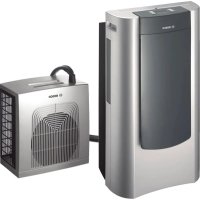



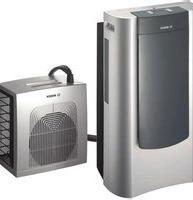
| Product type | Mobile split air conditioner (indoor and outdoor units) |
| Operating modes | Air conditioning, dehumidification, purification |
| Power supply | 220-240 V, 50 Hz, grounded outlet, 16 A slow-blow fuse |
| Temperature range (air conditioning) | 18 °C to 30 °C, adjustable in 1 °C increments |
| Fan speeds | Manual (maximum, silent) and automatic |
| Water tank capacity | Removable tank (capacity not specified); continuous drainage possible |
| Filters | Washable basic filter + dual active purification filter (optional) |
| Timer | On/off programming, adjustable in 15-minute steps |
| Side louvers | Adjustable (controlled opening/closing) |
| Display | Screen with key navigation (up/down, left/right) |
| Unit connection | Removable flexible hose, max. 1.5 m height difference |
| Maintenance and cleaning | Clean basic filter with clean water; replace purification filter once a year or upon alert |
| Safety | Automatic shut-off if tank full; child lock; disconnect before cleaning |
| Included accessories | Mounting plate, wall pass-through accessories, hose clamp |
| Transport | Integrated wheels on indoor unit; possibility to hang outdoor unit |
Frequently Asked Questions - PAS 0740 BOSCH
User questions about PAS 0740 BOSCH
0 question about this device. Answer the ones you know or ask your own.
Ask a new question about this device
Download the instructions for your Air conditioner in PDF format for free! Find your manual PAS 0740 - BOSCH and take your electronic device back in hand. On this page are published all the documents necessary for the use of your device. PAS 0740 by BOSCH.
USER MANUAL PAS 0740 BOSCH
Recommendations for the disposal of packaging
Respect the environment when disposing of the packaging your appliance comes packed in. Our products are carefully packed for transportation. All of the material used in our packaging is environmentally friendly (the cardboard is manufactured from used paper) and may be recycled. Recycling packaging helps conserve raw materials and reduces the amount of waste produced in the world. - Actively help protect the environment by disposing of packaging properly. Take it to your nearest local council disposal point or it may be possible to return it to your supplier. - Packaging material is not a toy. To prevent the risk of asphyxia, do not let children play with the cardboard or plastic used for packaging.
Recommendations for the disposal of your old appliance
Unplug your appliance from the mains electricity supply and cut the power cable.
□ Appliances of this kind include both recyclable material, which may be used again, and hazardous products (such as heavy metals and liquid refrigerants), which may pollute the soil or the atmosphere. Actively help protect the environment by ensuring that your old appliance is disposed of in accordance with environmentally friendly practices. Dispose of your appliance at an official disposal or recycling point (ask your Local council where the nearest disposal point is). Appliances of this kind contain refrigerants which must be disposed of in accordance with current regulations.
This appliance complies with European Directive 2002/96/EC on waste electrical and electronic equipment. The directive provides the general framework valid throughout the European Union for the disposal and reuse of waste electric and electronic ap
Recommendations for saving energy
Your appliance consumes energy when in use. The consumption of energy produces an environmental impact. Energy consumption can be reduced, enhancing the efficiency of your appliance. To do this:
Turn your air appliance off when it is not needed. - Select an ideal temperature; excessively low temperatures result in high energy consumption. - Locate your appliance away from possible heat sources (sunlight, etc.) and in a position with good air circulation. - Ensure that your appliance is installed properly. Energy consumption can be cut by up to 30% by reducing the entry of heat into the room with awnings, blinds or curtains over glazed surfaces. Use the accessories supplied with your appliance and the specific accessories described in "Description of accessories" in order to minimise the entry of air from outside the room. When using accessories which require holes to be drilled in walls or windows, the hole should be as precise as possible and sealed with silicon, plaster or similar to prevent air from flowing through any gaps. - When expelling hot air through sliding windows, install the accessory which prevents hot air from outdoors from entering the room and enhances efficiency. Make sure that the air intakes and outlets are not blocked. Keep them clean and free of dirt, dust and foreign objects. Make sure that the filters fitted on your appliance are clean and installed properly (see "Cleaning and Maintenance"). In the summer, ventilate the building when the air outdoors is at its coolest (early morning, night).
Before connecting your appliance
- Read the instructions book before using the appliance for the first time. It contains important information concerning not only how to use the appliance, but also maintenance and personal safety.
- Keep this instructions book. It may be needed by another user at a later date. Do not use the appliance when damaged.
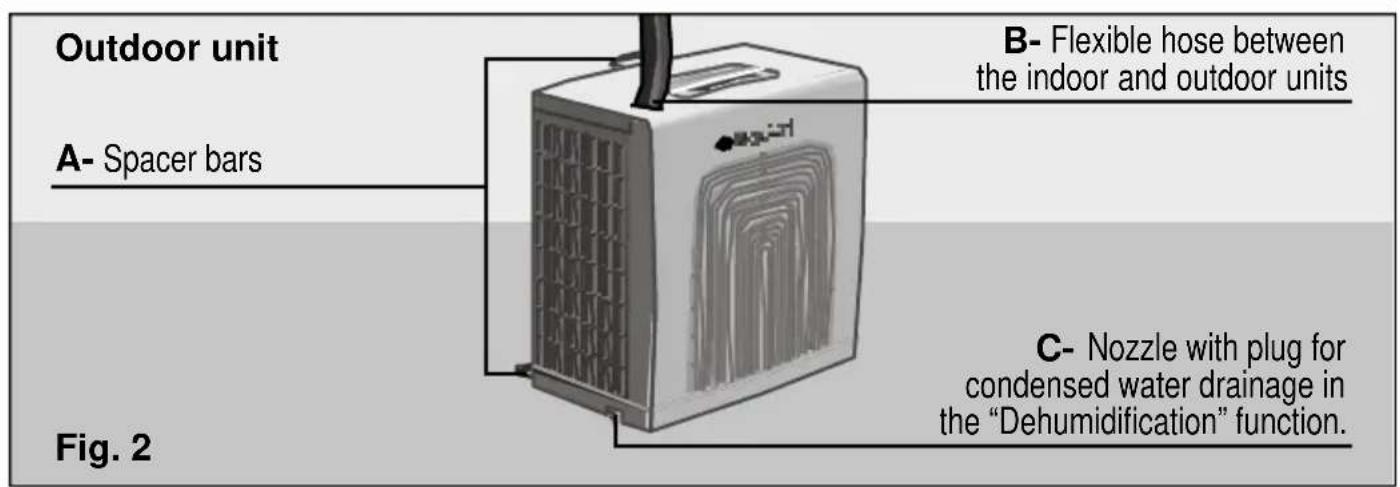
- Your appliance should be assembled and connected to the mains electricity supply in accordance with the assembly instructions and current regulations. You may lose your warranty if you fail to observe the instructions for installation and use. Our appliances are manufactured in accordance with current safety regulations. Only technicians instructed in these matters are authorised to repair them. Your safety is at stake. Make sure that plugs N, Fig. 1 and C, Fig. 2 are properly inserted. They may have come loose during transportation. The manufacturer informs that these appliances are exclusively intended for household and/or commercial use, commercial being understood as offices or rooms, the size and characteristics of which comply with those specified in the commercial catalogues. The use of this appliance is not guaranteed for industrial environments, industrial being understood as large areas or in the proximity of non-ambient heat sources (elements, heaters, etc.).
Important!
In order to take up less space, hose B, Fig. 2, is rolled up when supplied. When preparing the appliance for use, the manufacturer recommends that you first unwind the loops of the hose carefully.
There are tubes inside the hose which may break if crushed or twisted.
On models with disconnectable hoses, it is recommended that you disconnect the hose in order to unwind the loops more easily. On models with fixed hoses, it is necessary to rotate the outdoor unit.
If there are children in the home
The front flap and the air-conditioning appliance must not be sat upon, climbed on or leant against. The appliance may fall over, hurting persons and/or damaging objects. Do not allow children to play with the appliance or insert objects in the air outlets, the grille on the outdoor unit or any other cavity on the appliance. Keep small children away from the air-conditioning appliance, particularly when the front flap is open, to prevent them from hanging from or leaning against it. It may fall over. Do not allow children to play with or insert objects in the air outlets or any other cavity on the appliance.
Description of the appliance
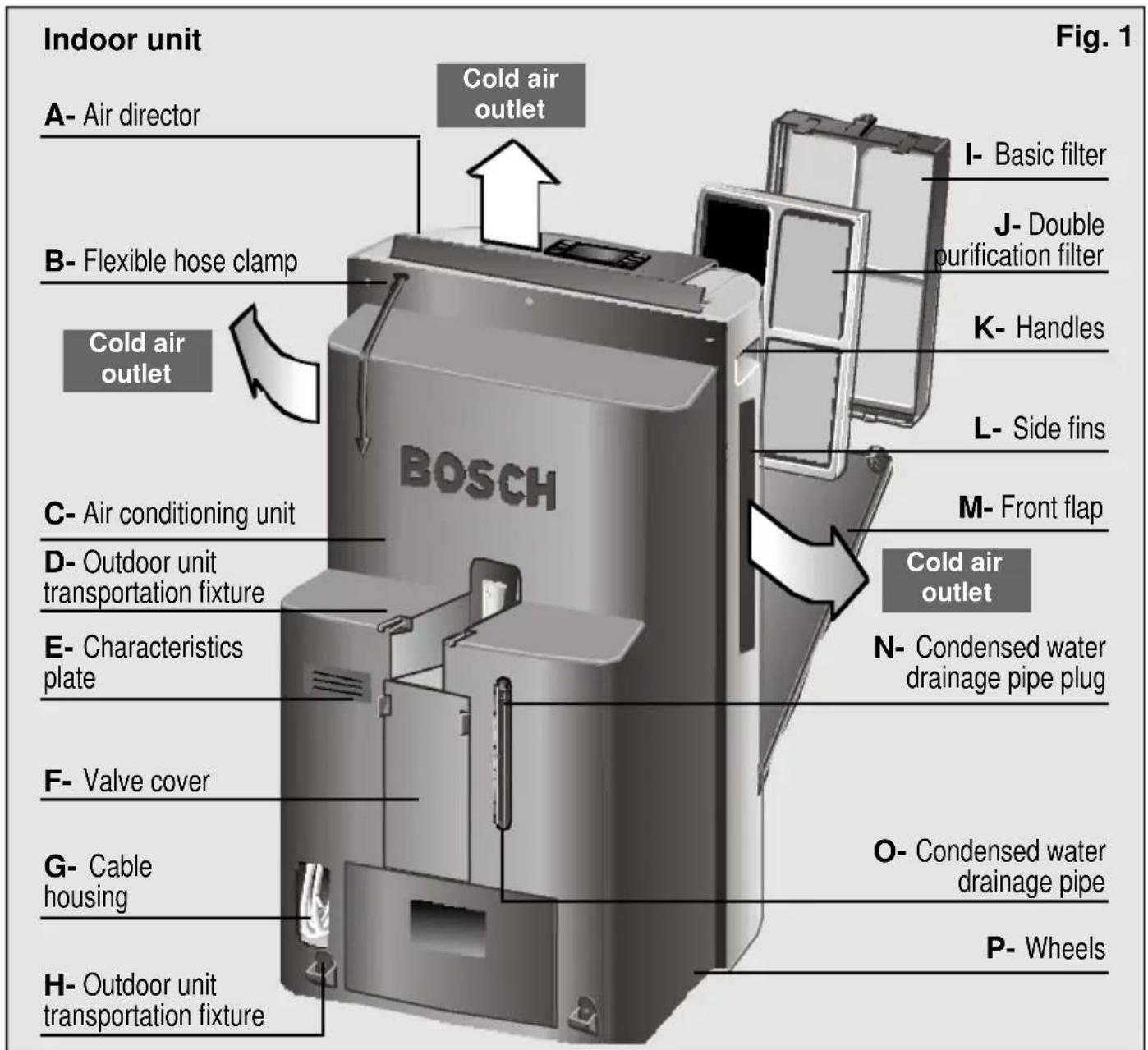
Your new appliance
Control panel
Your new appliance
Description of accessories
Support plate with wall plugs and screws to hang the outdoor unit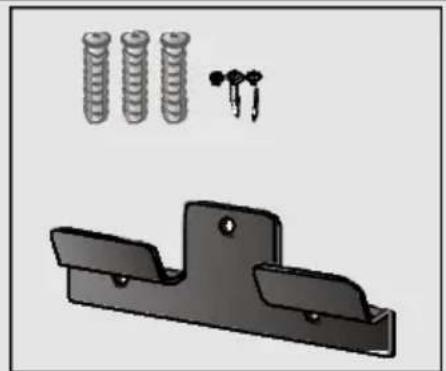
Wall access accessories Fig. 5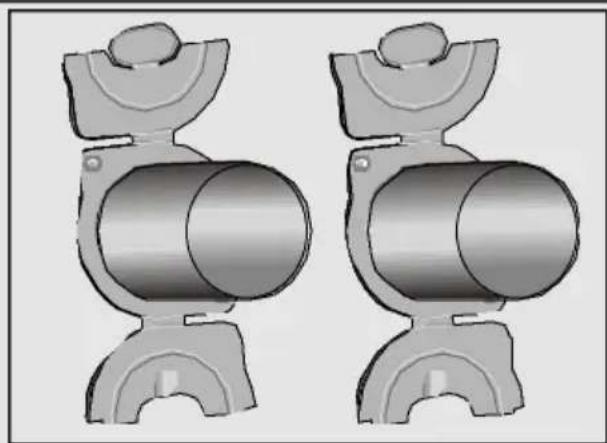
| Base filter Double active filter Sliding balcony accessory Art. №: PAZ10000 Art. №:448069 | |||
| PAS0720 / | √ | √● | ★ |
| Approx. max. (length x width) cm. | 70x10/ 205x10 | ||
Standard accessories: These accessories are supplied with the appliance. Optional accessories: These accessories are available for purchase from the manufacturer's official technical service and authorised distributors. Optional accessories: These accessories are only available for purchase from the manufacturer's official technical service.
Requirements for use
Installation requirements
This home appliance should be connected to a 220/240 V, 50 Hz mains electricity supply via an earthed socket. It must be protected with a 16 A slow-action fuse. Should an extension lead be required, then it should be at least 1.5 mm² per terminal thick, less than 25 m long and earthed. There is a cavity at the back of the appliance to house the mains electricity supply cable. See G, Fig. 1.
Do not cover or allow water to enter the air intakes/outlets on the indoor unit.
Important!
The mains electricity supply connection cable must only be replaced by authorized members of the manufacturer's Official Technical Service.
Remember that when the appliance is turned off, it is necessary to wait for approximately 3 minutes before turning it back on again.
This period of time is required in order to ensure correct appliance operation.
Requirements for use
Transportation requirements
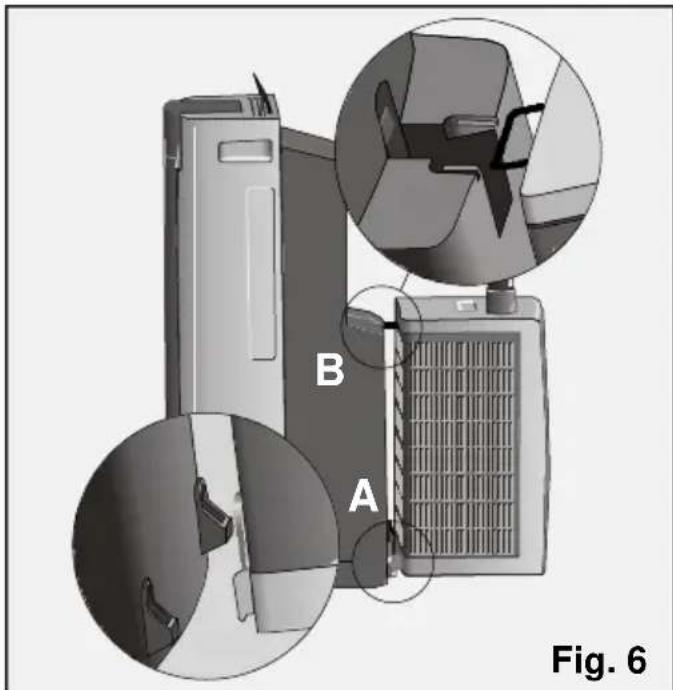
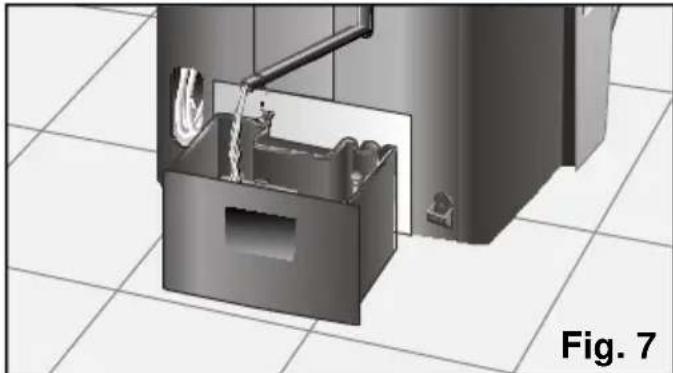
The indoor unit is fitted with wheels to make transportation easier. To make transporting the entire appliance easier, hang the outdoor unit onto the indoor unit as shown in Fig. 6. First, insert the lower extremities (A) and then the upper bar (B) of the outdoor unit into the indoor unit. If it is necessary to tilt the appliance in order to transport it, empty any water from the internal tank by removing the drainage tube from its housing and removing the plug, Fig. 7 to drain any water deposited. Do not forget to replace the plug and reinsert the pipe in its housing when the tank is empty. You should not turn the appliance back on again for a minimum period of one hour. If you are only transporting the outdoor unit, first disconnect the appliance, remove plug C, Fig. 2 from the outdoor unit, tilt it slightly and empty any water it may contain.
Important!
If you notice water on the base of the outdoor unit, this is a perfectly normal consequence of appliance operation and is not a cause for concern.
Preparing the appliance before use
Positioning the outdoor unit
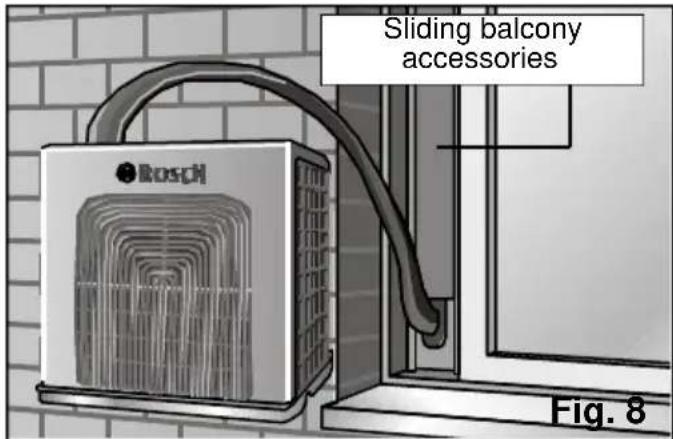
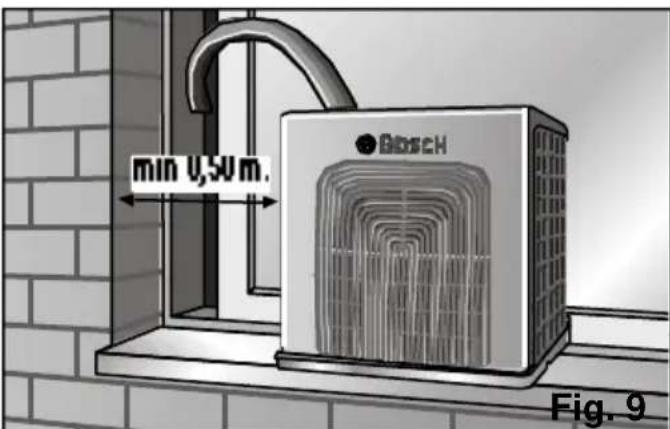
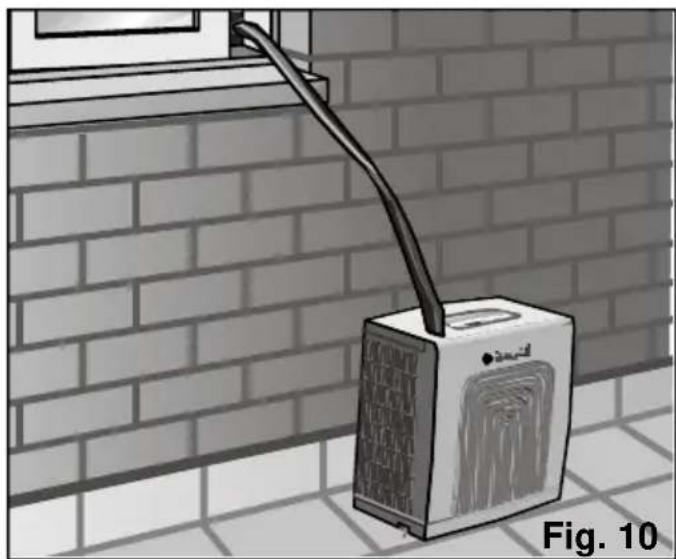
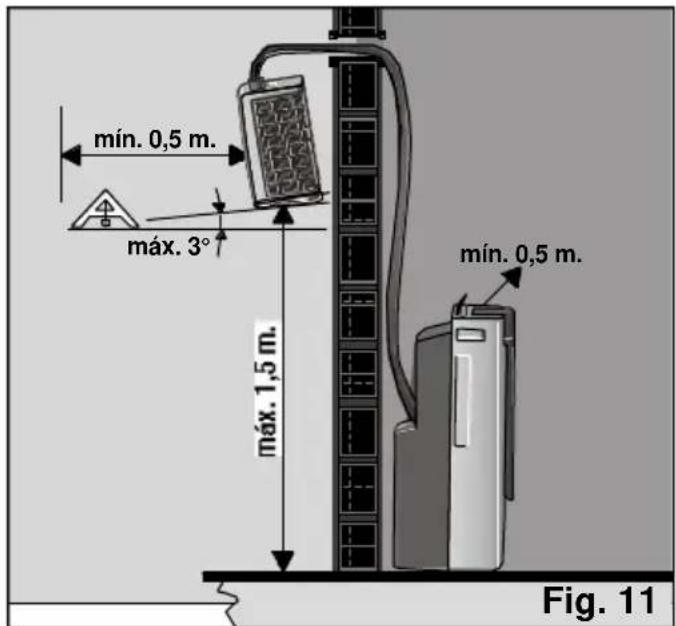
The outdoor unit can be set in any of the three positions shown in figures 8, 9 and 10, depending on the preference of the user and space conditions. Remember that it should be positioned on a surface as near to horizontal as possible, with a maximum inclination of 30. Fig. 11. Use the Support Plate accessory to hang the outdoor unit from its hook.
Preparing the appliance before use
Important!
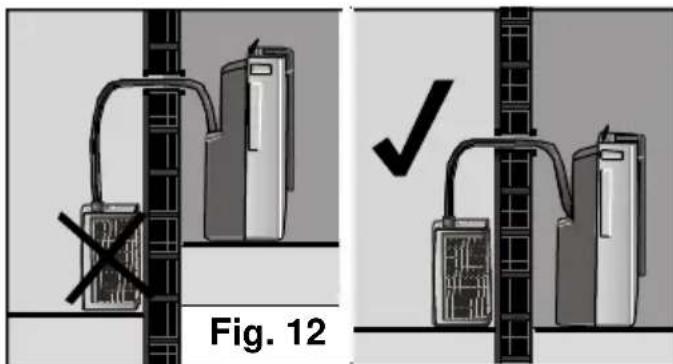
Remember to unwind the hose loops first! (see Important Information) Make sure that the appliance is hanging horizontal, otherwise the lower tray may shed water. To do this, use the lower spacer bar, see A, Fig 2. For safety reasons, do not simply hang the outdoor unit from the hose which joins it to the interior. Do not mount the outdoor unit higher than permitted or at a level lower than the indoor unit. Maintain minimum distances with regard adjacent objects. See figs 9, 11 and 12.
Do not crush or twist the flexible hose that connects the two appliances.
Connecting the indoor and outdoor units
The two units are connected by a flexible hose. When you want to use the appliance, you can choose to:
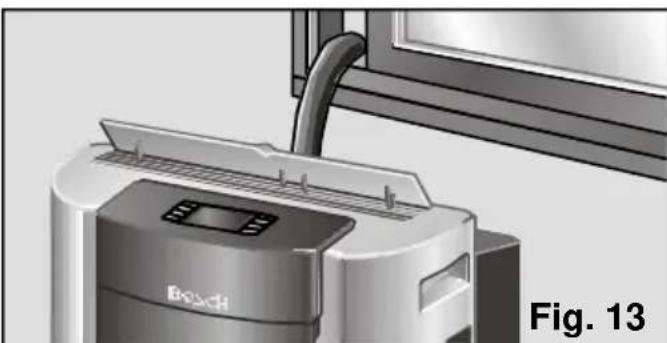
Pass the hose through a door or window left slightly open, as shown in Fig. 13.
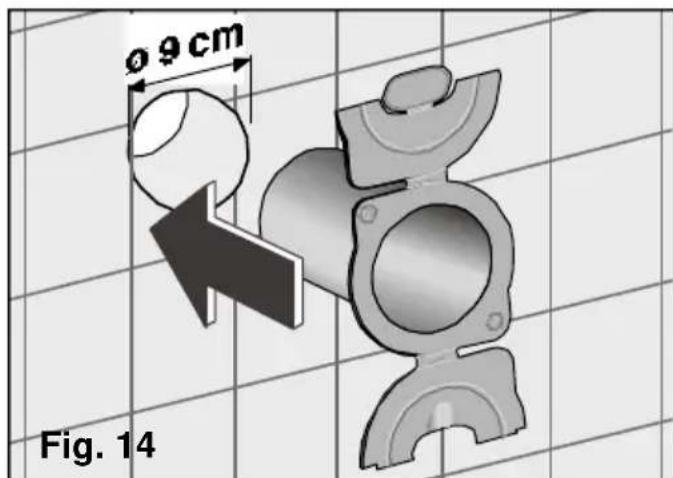
Make a hole 9 cm in diameter in the wall and install the wall access accessories on both the inside and outside of the wall, as shown in Fig. 14.
Preparing the appliance before use
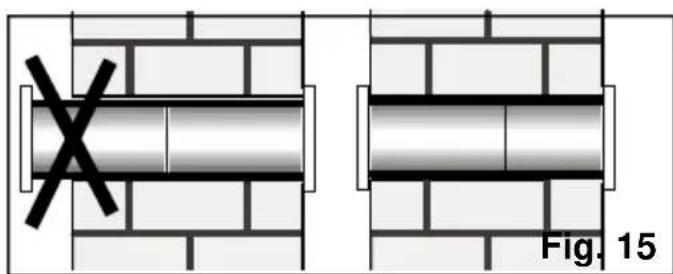
If the accessories are too long, you can cut one of them to fit the thickness of the wall, as shown in Fig. 15.
This accessory can be attached to the wall using screws and wall plugs, or with silicone, plaster, etc.

If you do not wish or need to use the air conditioning, remove the hose from the hole and close the covers on the accessory to seal the hole in the wall.
Disconnecting the flexible hose from the indoor unit
The hose must be disconnected from the indoor unit to pass it through the wall (this is only possible on models with a detachable hose). To do this, follow these steps:
- Disconnect the appliance from the mains power supply.
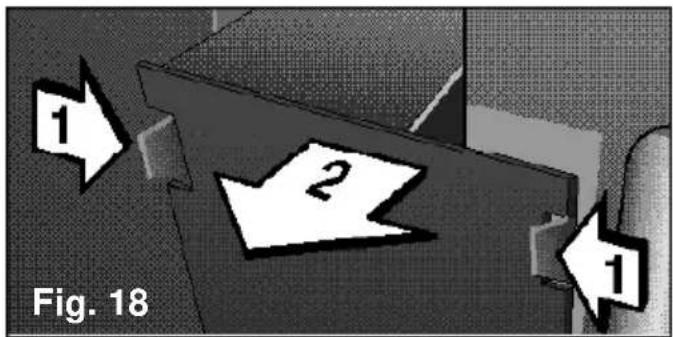
- Remove cover F, shown in Fig. 1, from the indoor unit. The flexible hose connection is now visible, as shown in Fig. 18.
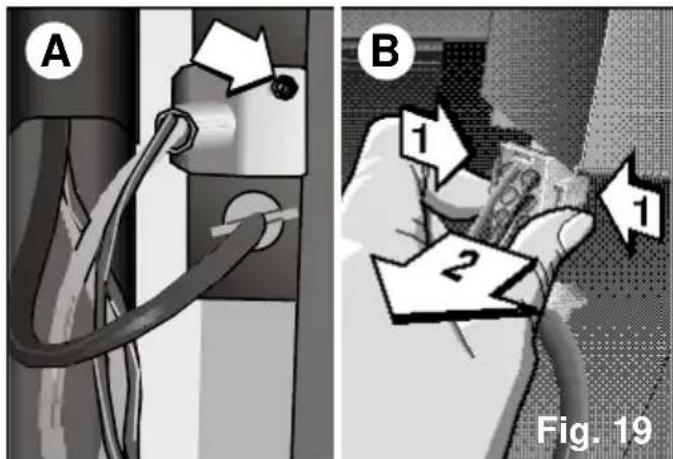
To remove the electrical connection, take out the screw, shown in Fig. 19 A, and the cover that hides it. Gently press the tabs on the side of the connector and pull it out of its housing, as shown in Fig. 19 B.
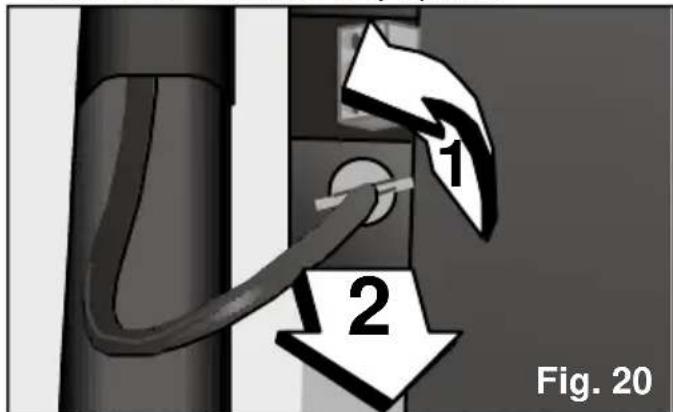
Disconnect the condensed water drainage tube by turning it a quarter turn counterclockwise and pulling it out, as shown in Fig. 20. Be especially careful when removing this tube, as some of the water it contains may spill.
- Keep tab A, which secures the position of the lever, pressed in. Pull it upwards (be careful with the spring of the lever), making sure that it remains at its maximum height, Fig. 21.
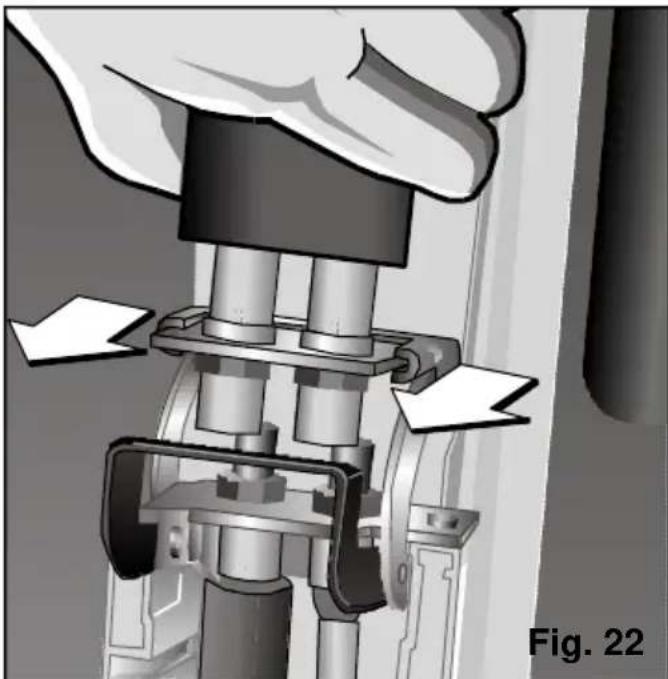
Pull the hose off its housing guides. Fig. 22.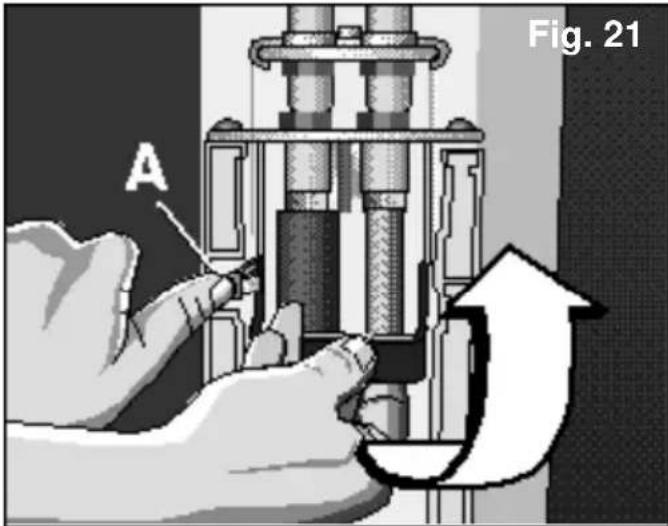
In the event of the indoor and outdoor units being disconnected for a long period of time, protect the free end of the hose against dirt and dust by fitting the protection cap (See Fig 23).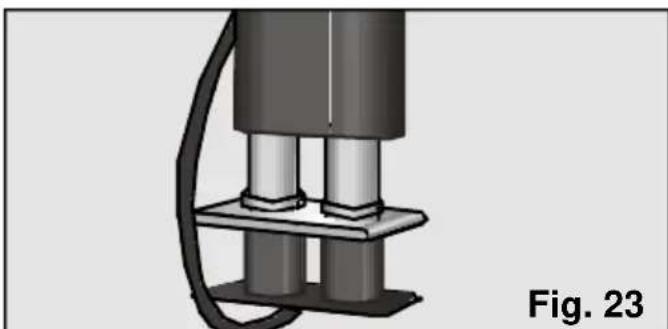
Before connecting the two parts again, it is recommended that you clean any dirt which has built up on the indoor unit connection with a clean, dry cloth.
Important!
To prevent the risk of refrigerant loss, we do not recommend that the hose be left disconnected from the indoor unit for more than one day. Never operate the indoor unit without the outdoor unit.
Joining the flexible hose to the indoor unit
Connect the flexible hose back onto the indoor unit by following the steps described above in reverse order.
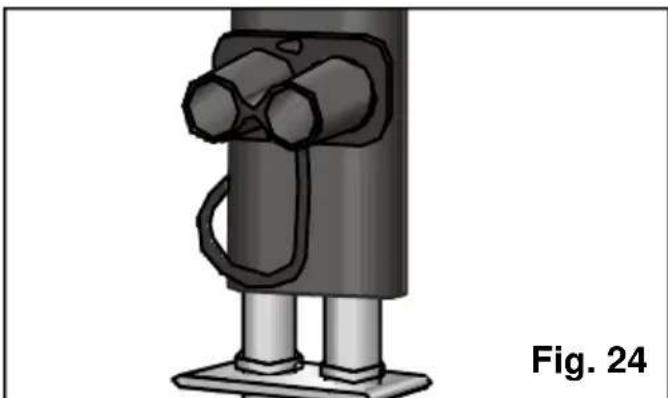
If the rubber cap is fitted on the free end of the hose, remove it and position it as shown in Fig. 24 before fitting the entire assembly onto the indoor unit.
Important!
The hose has only one assembly position.
Make sure that the lever is secured by safety tab A, Fig. 21. Only then is the connection correct.
Make sure that the electrical connection is covered by the cover and secured with the relevant screw. Fig. 19.
Make sure that the water tube is fitted properly to prevent water from dripping onto the support surface. To do this, follow the indications shown in Fig. 20 in reverse order.
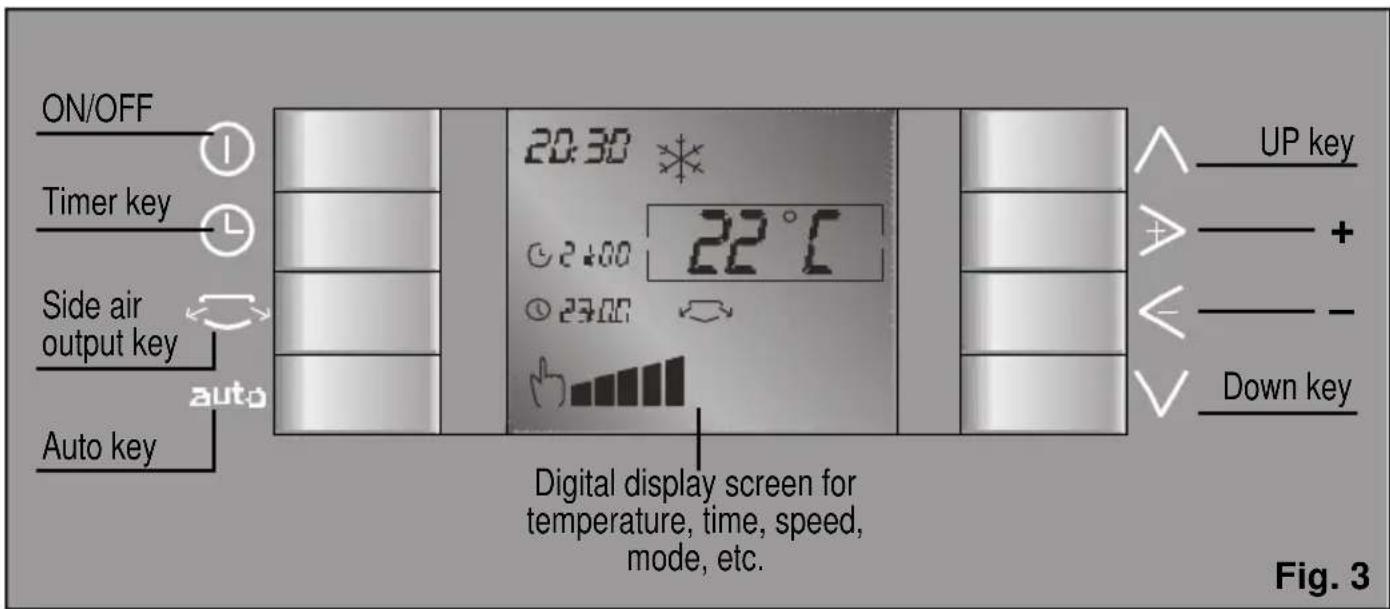
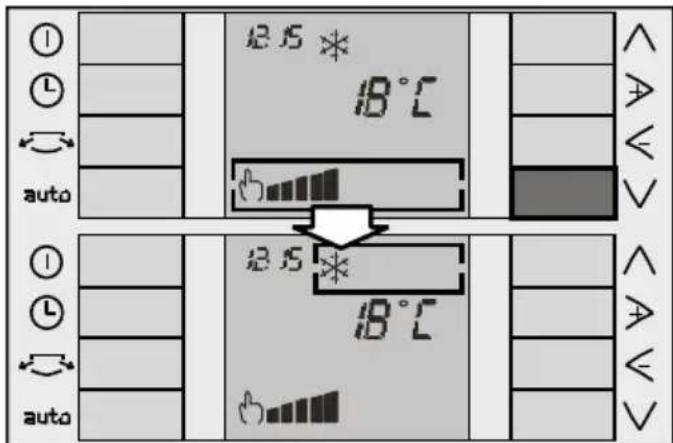
The control panel is designed to make it easier to use your appliance. The following points need to be taken into consideration. The "up" and "down" keys are used to move up and down the screen. The "+" and "-" keys (right and left) are used to move to the right and to the left in the selection box. The box shows the function selected for modification. The following is an example of navigation:
Up and down keys
The "up" and "down" keys are used to move up and down the screen.
"Down" key V.
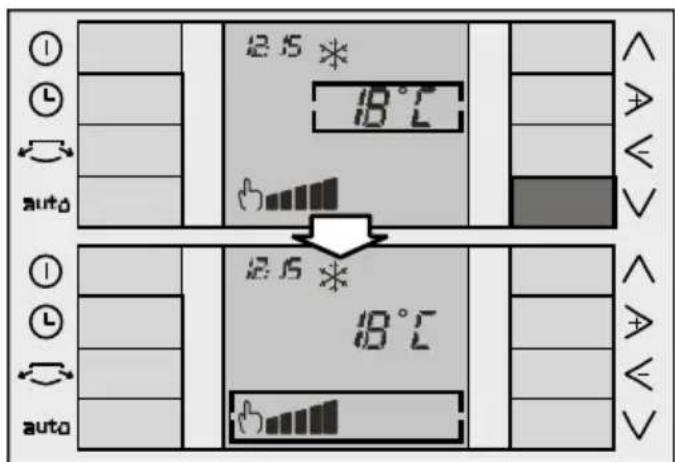
Starting from the screen shown in the first figure (the selection box is situated on the operation function option). If you press key , the selection box moves down to the "Temperature selection" function.
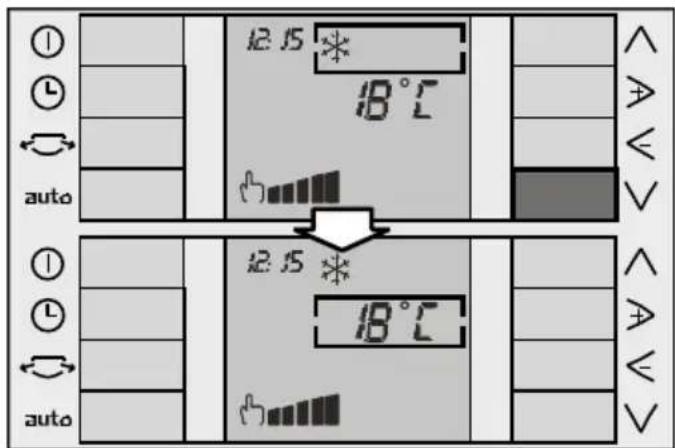
If you press key again, the selection box moves down to the "speed selection" function.
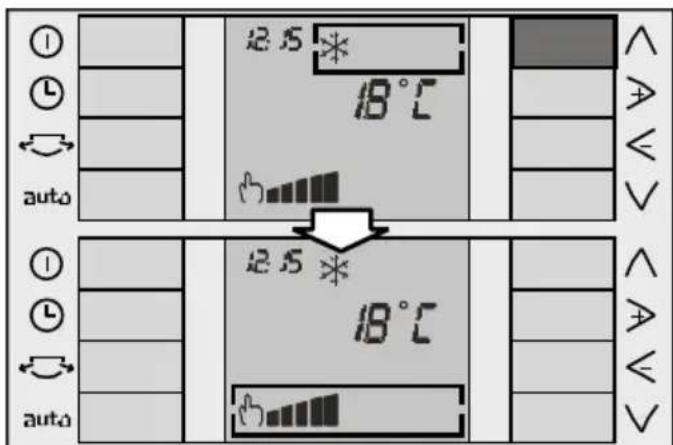
"Up" key
Key works in exactly the same way as key , the selection box moving up rather than down.
Cyclical operation:
Both keys work cyclically, i.e. if the selection box is at the bottom of the screen and key is pressed again, the selection box moves to the top of the screen. Likewise, if the selection box is at the top of the screen and key is pressed, the selection box moves to the bottom of the screen.
" +" and "- " keys
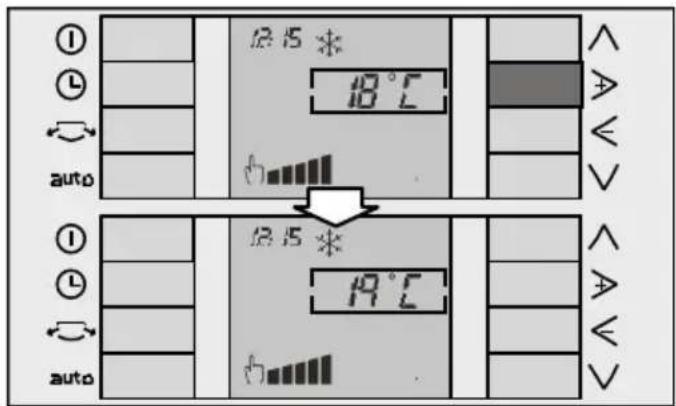
The "+" and "-" keys are used to move to the right and to the left within the selection box. If the function selected is temperature, these keys are used to increase and reduce < the desired temperature as shown below:
Navigation
Instructions for Use
Before using for the first time
Check that the hose, the electrical connection and the water tube are properly connected to the indoor unit and that plugs N, Fig. 1 and C, Fig. 2, are in their housings to prevent water from leaking onto the support surface.
Turning the appliance on and off
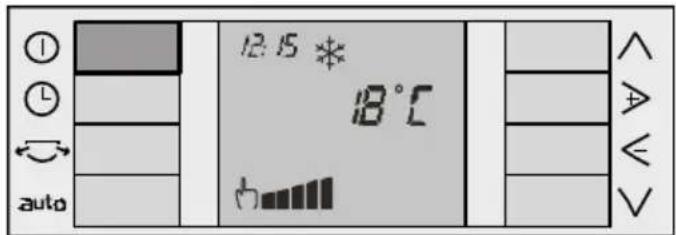
After making sure that the appliance is plugged into the mains electricity supply, start it up by pressing ①.
Selecting the operation function
The following functions can be selected on your appliance:
* cooling.
dehumidification.
air purification.
Place the selection box on the Operation Function menu using the ∧ and ∨ keys (see "Navigation": ∧ and ∨ keys).
Use the ▷ and < keys to move on the menu and select the desired function (see "Navigation": ▷ and ≤ keys).
Function 水 air conditioning
In this function, the appliance reduces ambient temperature until the desired temperature is reached. The appliance dehumidifies and purifies the air in the room at the same time in order to create a pleasant atmosphere.
To do this:
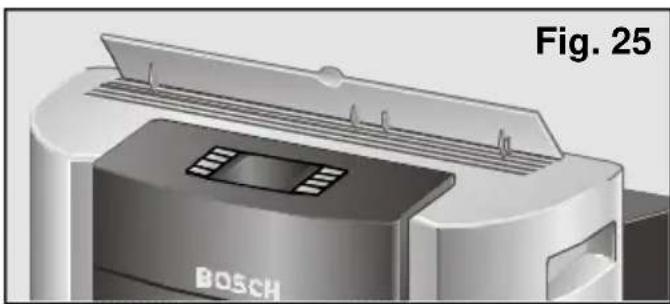
Check that the hose, the electrical connection and the water tube are properly connected to the indoor unit. Make sure that plugs N, Fig. 1 and C, Fig. 2, are in their housings to prevent water from leaking onto the support surface. Turn the appliance on by pressing the ① key. - Lift the air director on the top of the appliance Fig. 25, and, if you wish, open the side fins, see A and L, Fig. 1 (see "Side fins"), for enhanced air distribution within the room. It is recommended that these air outlets be left fully open or fully closed in order to prevent unpleasant noise.
Select the air conditioning function 水 (see "Selecting the operation function"). - Select the desired temperature, (see "Selecting the temperature"). If the appliance turns itself off automatically because the desired temperature for the room has been reached, it will not start working again until ambient temperature rises 2 - 3°C . Finally, make sure that the flexible hose which joins the two units is not crushed or restricted, that the difference in height between the units does not exceed 1.5m Fig. 11, and that the outdoor unit is not lower than the indoor unit, Fig. 12. - Select the operation speed, (see "Selecting the speed").
Condensed water normally evaporates through the outdoor unit. If there is too much water, it may not be possible to expel it all. If this happens, it accumulates on the base of the outdoor unit and may drip. Do not worry, this is normal. Simply place a receptacle beneath nozzle C (Fig. 2) and remove the accumulated water.
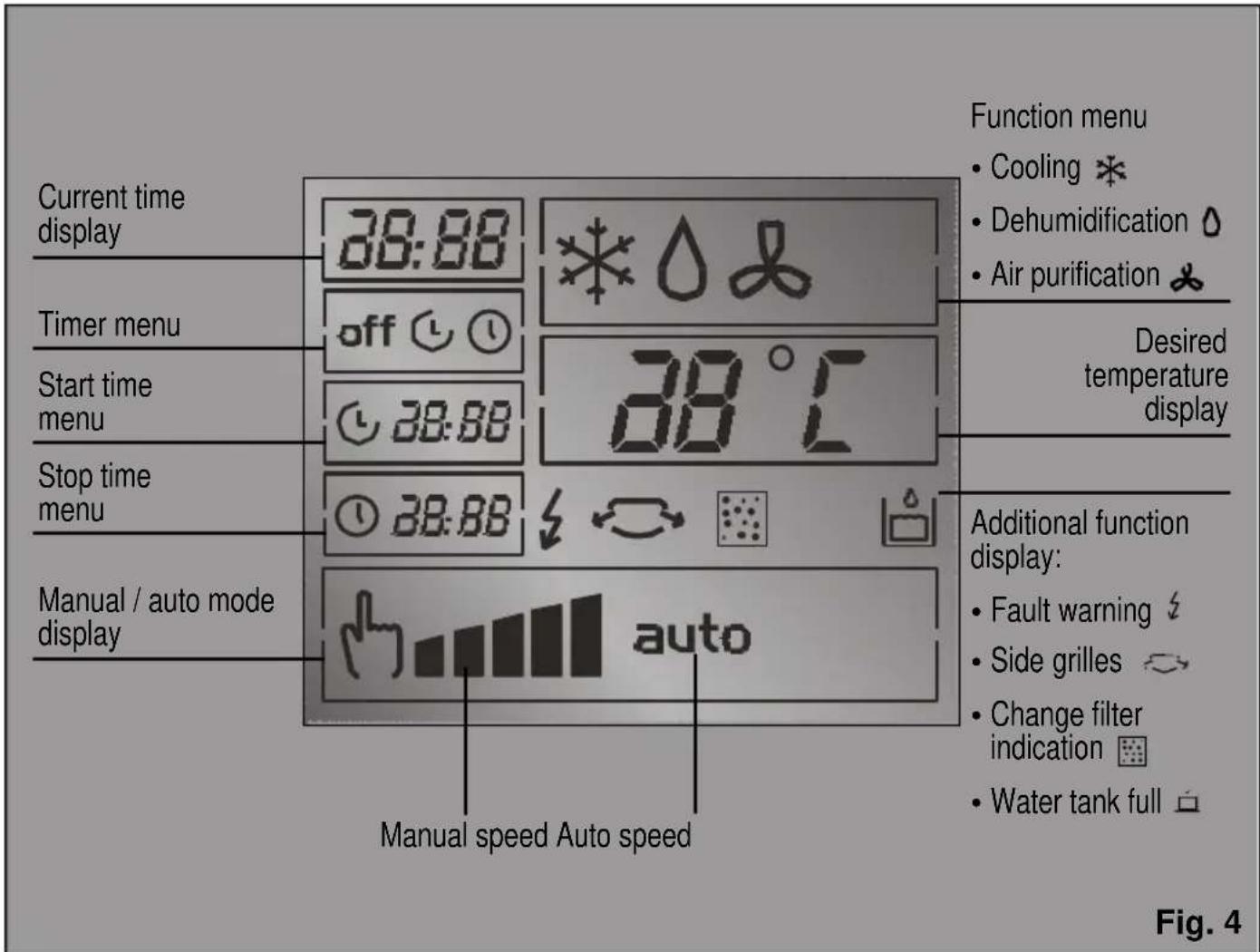
When the water in tank Q (Fig. 1) reaches a certain level, the appliance beeps for two seconds and the tank full symbol appears on the screen to indicate that it needs to be emptied. The appliance stops working when this happens. To empty the removable tank, carefully remove it and empty it down the nearest drain.
Important!
When you turn the appliance back on again, do not forget to fit the tank back onto the appliance properly. Should you fail to do so, the symbol will not disappear from the screen and the appliance will not work.
Remember that when the appliance is turned off and turned back on, it is necessary to wait for approximately 3 minutes before the compressor starts up again. This period of time is required in order to ensure correct appliance operation.
Dehumidification function
In this operation function, the appliance reduces the humidity in the atmosphere. The appliance purifies the air in the room at the same time in order to create a pleasant atmosphere.
Check that there is no water in the outdoor unit by removing plug C (Fig. 2). Put it back in position after extracting the water. - Transport the outdoor and indoor units to the room you wish to dehumidify. See Transportation requirements. Plug the appliance into the mains electricity supply. Lift air director A (Fig. 1) and, if you wish, open side fins L (Fig. 1) (see "Side fins").
There are two ways of expelling condensed water: via removable tank P (Fig. 1) and in continuous mode.
Dehumidification via the removable tank:
- Check that the tank is fitted properly (the symbol on the display screen indicates that it is not) and that plug C (Fig. 2) is in position to prevent water from leaking onto the support surface.
- Select the dehumidification function (see "Selecting the operation function").
- Select the operation speed (see "Selecting the speed").
- The water level in the removable tank rises. When it reaches its maximum level, the appliance beeps for approximately two seconds and the symbol appears on the display screen.
- Extract the tank and pour the water carefully down the nearest drain.
Dehumidification in continuous mode:
- Place a receptacle at the outlet of tube O, Fig. 1 to collect the condensed water or direct it to the nearest drain.
- Remove plug N, Fig. 1. When operating in this mode, the appliance does not stop or warn that the receptacle is full by beeping or via the symbol .
- Select the dehumidification function Δ (see "Selecting the operation function").
- Select the operation speed, (see "Selecting the speed").
Important
The amount of water dehumidified may vary depending on ambient conditions (See "Technical Information").
When the appliance is operating in the dehumidification function, the temperature does not appear on the screen and cannot be selected or modified.
Warning!
Do not forget to fit plug N, Fig. 1 when you change function. Otherwise the appliance will shed water when operated.
Remember that ambient temperature must be 18°C or higher in order for the appliance to work.
In this operation function, room temperature rises slightly.
Function air purification
The air inside the room (ventilation) is circulated through a filtering system when the appliance is set to this function.
The appliance comes with a basic filter (already fitted on the appliance) and a double active filter to be fitted by the user (see "Fitting the purifying filter") against:
- Smells and smoke.
- Pollen, bacteria and dust.
Plug the appliance into the mains electricity supply. Lift air director A, Fig. 1, and, if you wish, open side fins L, Fig. 1 (see "Side fins"). Select the air purification function (see "Selecting the operation function"). Select the operation speed (see "Selecting the speed"). The use of the purifying filters is especially indicated in order to achieve greater efficiency when using the dehumidification and air purification functions.
Selecting the temperature
This option is only available in the air conditioning function. Place the selection box on the temperature selection menu (see the ∧ and ∨ keys). Use the ▷ and < keys to set the desired temperature (see the ▷ and < keys).
The ▷ key increases the desired temperature and the < key reduces the desired temperature.
The temperature selectable ranges from 18°C to 30°C and can be set to the nearest 1°C. Keep the key pressed in to increase or decrease the desired temperature more quickly.
Selecting the speed
There are two manual speeds (maximum and silent) and one automatic speed "auto" available on your appliance.
The automatic speed setting works in maximum or silent mode depending on room conditions and the temperature set by the user.
Manual speeds:
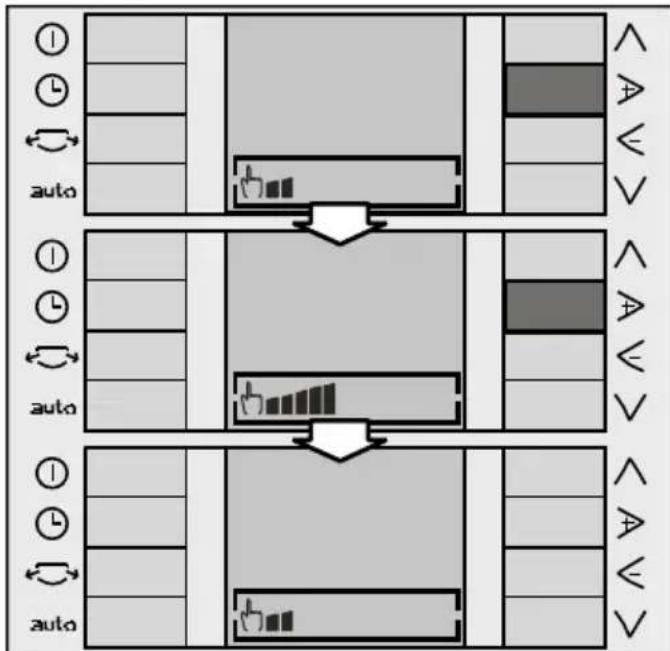
Place the selection box on the speed selection menu (see the ∧ and ∨ keys). Use the ▷ and ≤ keys to move within the menu to set the desired speed (see the ▷ and ≤ keys).
The manual symbol appears on the screen followed by the last speed set. Press the ▷ and < keys to change the speed from maximum to silent and vice versa.
Automatic speed:
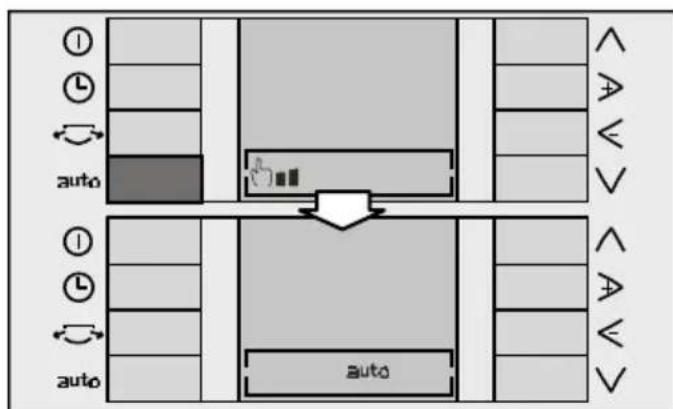
Press the auto key on the control panel to activate this speed. The manual symbol disappears and the auto symbol is displayed on the screen.
Press the auto key again to deactivate automatic speed. The auto symbol disappears and the appliance returns to the manual speed previously set.
Side fins
Your appliance is fitted with side fins which can be activated to distribute the air more efficiently.
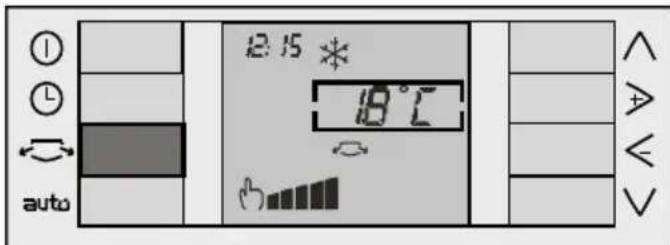
Press the side fin key to open the fins and activate their operation. The symbol is displayed on the screen.
Press the same key again to close the fins. The symbol disappears from the screen and the fins close.
Setting the clock / Programming the timer
Setting the clock
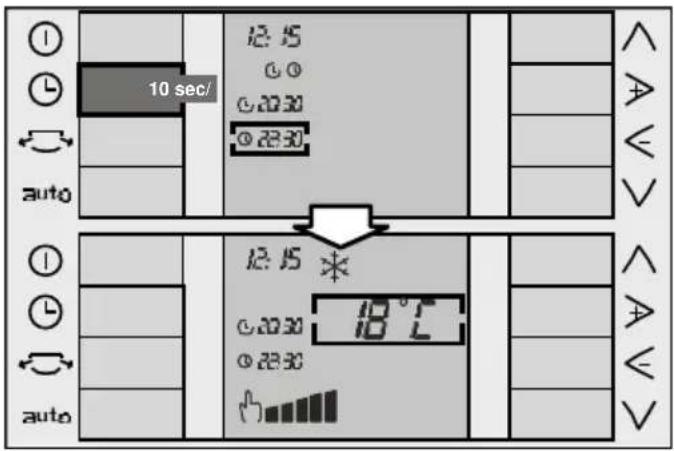
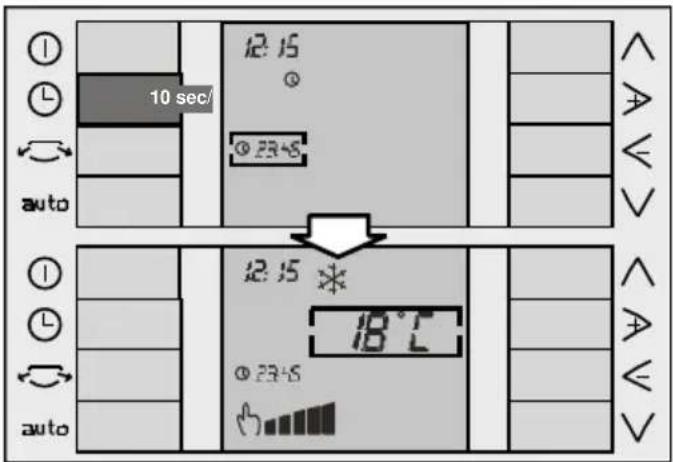
The current time (24-hour clock) is displayed in the top left-hand corner of the screen the first time the appliance is connected to the mains electricity supply. 00:00 flashes by default. To set the time, it is necessary to turn the appliance on by pressing the ① key. If you take more than 10 seconds to perform the next operation while programming / setting the clock on your appliance, the screen automatically returns to the main menu and the factory-set default settings are displayed or, if this is not the first time that the timer is set, the last settings used are displayed on the screen.
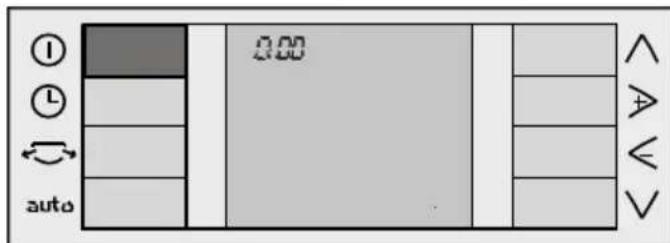
Press the key. The selection box appears on the timer menu with the last option selected ("Off" is displayed by default).
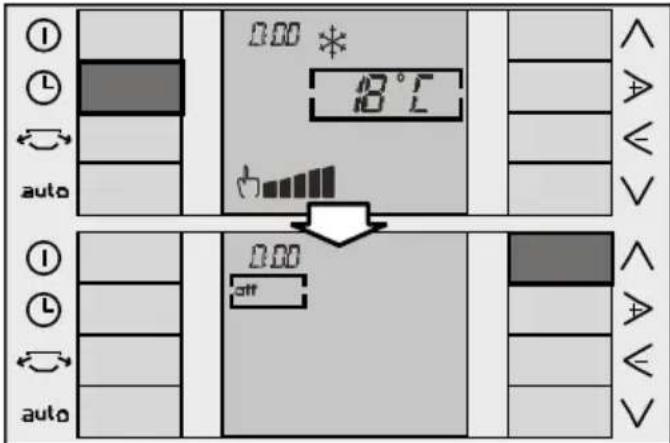
Press to position the box on the time. The time is changed via the ▶ and keys. The time increases or decreases by one minute each time one of these keys is pressed. Keep the key pressed in to increase or decrease the minutes more quickly.
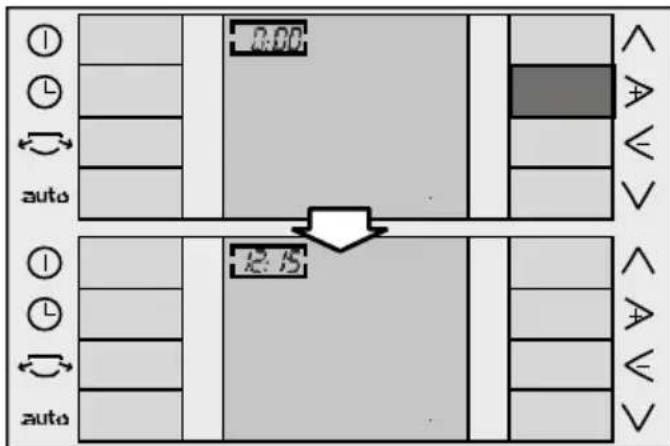
Press the key or wait 10 seconds without pressing any key to memorise the time. The screen returns to the main menu.
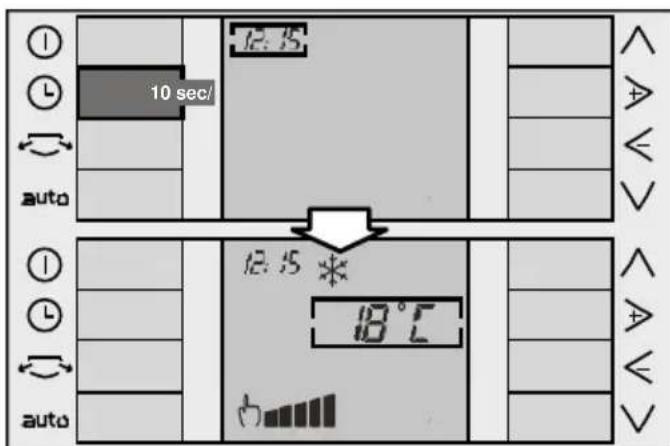
Programming the timer
The appliance needs to be turned on with the clock set in order to programme start / stop times.
Press the L key to navigate through the timer menu. Press the "+" key to programme the different options available on your appliance.
- "Off" ①: appliance not programmed. "Start" programming the appliance start time. "Start/Stop" programming the appliance start and stop time.
- "Stop"①: programming the appliance.
Programming the appliance start time
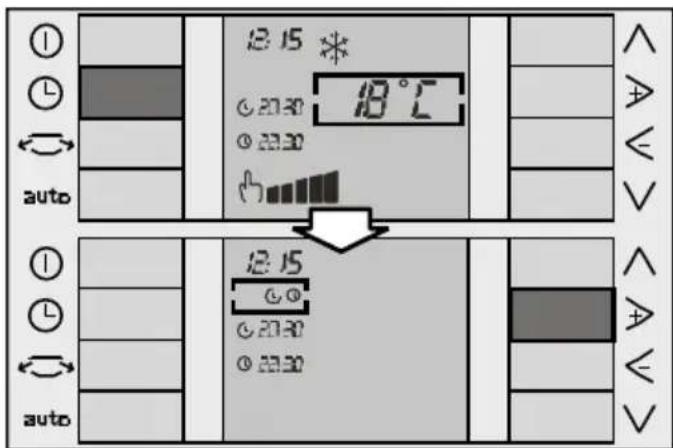
Press the key to position the cursor on the timer menu. The last option programmed appears by default.
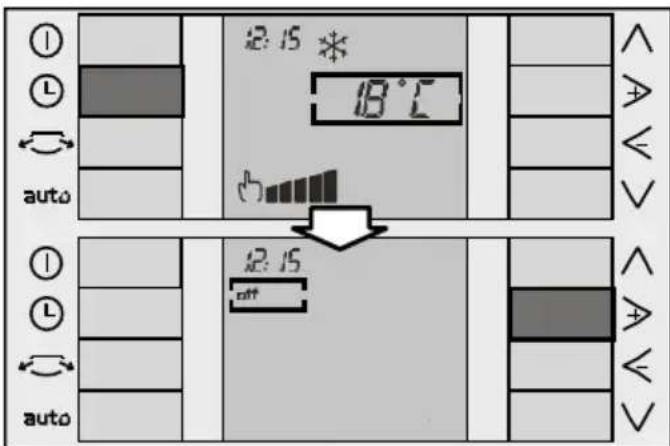
Use the + and - keys to select the option (see "+" and "-" keys).
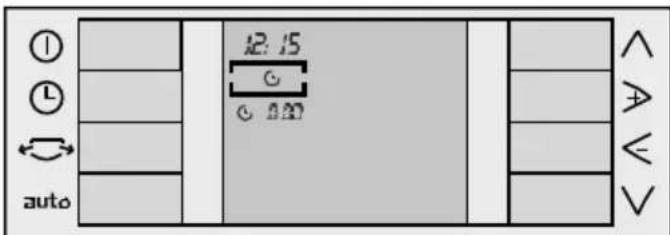
Use the down arrow key (see "Up" and "down" keys) to lower the cursor to the start time menu. Then use the right and left arrow keys to modify the programmed time until the desired time is reached.
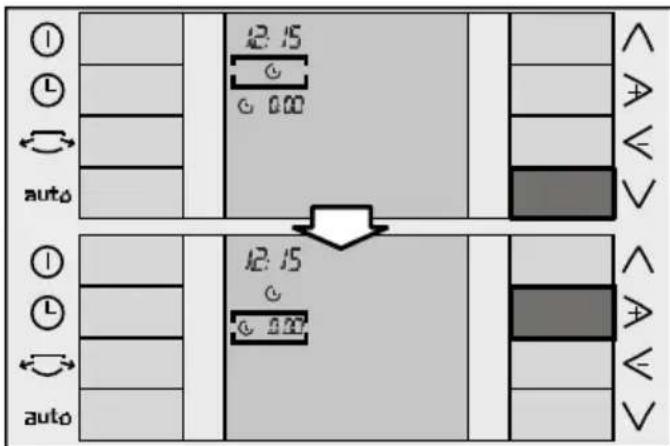
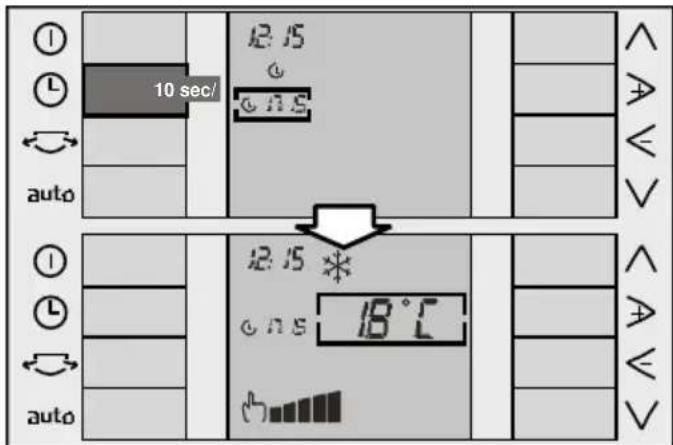
The time can be modified in steps of 15 minutes. Press the key or wait for 10 seconds without touching any keys to memorise the start time set. The set time is displayed on the screen together with the relevant symbol and the functions set.
Programming the appliance start / stop time
Press the key to position the cursor on the timer menu. The last option programmed appears by default.
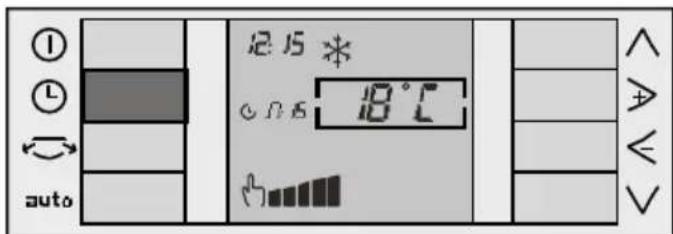
Use the right and left arrow keys to select the option (see right and left arrow keys). Use the down arrow key (see up and down keys) to lower the cursor to the start time menu. Then use the right and left arrow keys to modify the programmed time until the desired time is reached.
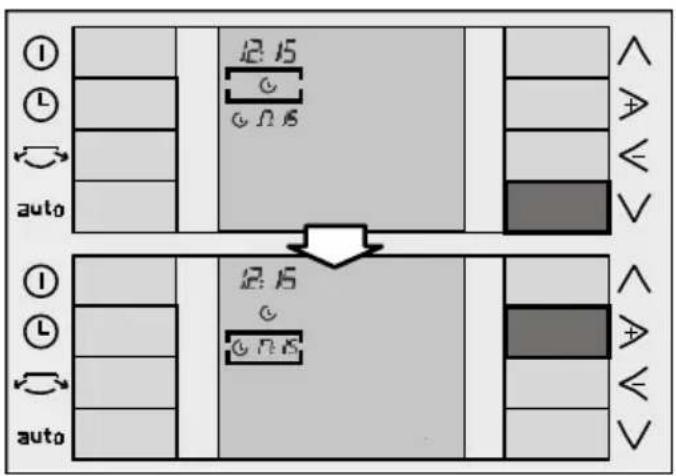
Press the up arrow key again to position the cursor on the timer menu. Use the right and left arrow keys to select the option (see right and left arrow keys).
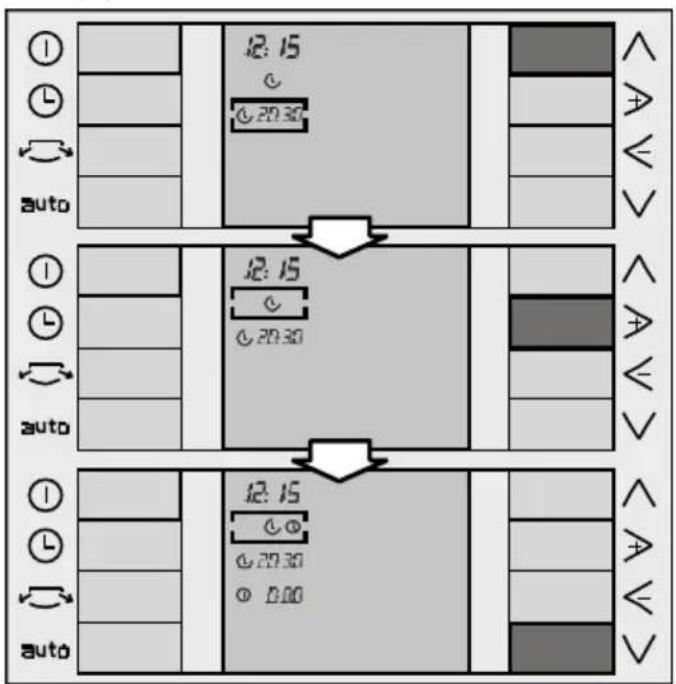
Use the down arrow key to position the cursor on the stop time menu. Then use the right and left arrow keys to modify the stop time until the desired time is reached. The time changes 15 minutes at a time.
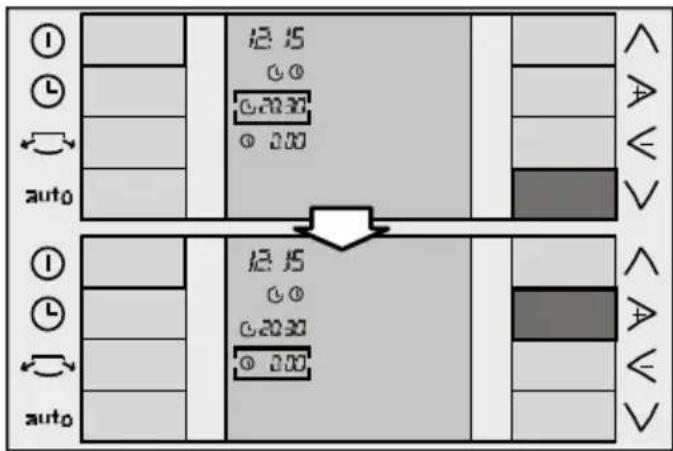
Press the key or wait for 10 seconds without touching any keys to memorise the start / stop times set. The set time is displayed on the screen.
Programming the appliance stop time
Press the key to position the cursor on the timer menu. The last option programmed appears by default.
Instructions for Use
Use the ▷ and < keys to select the ① option (see ▷ and < keys).
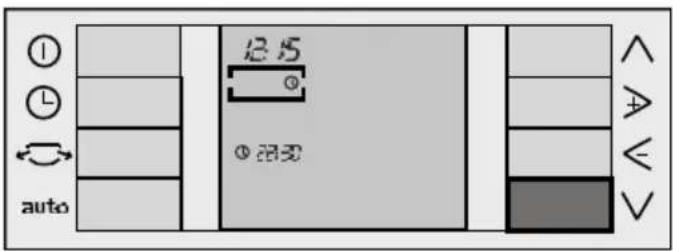
Use the ∨ key (see ∧ and keys) to lower the cursor to the stop time menu. Then use the ▷ and ≤ keys to modify the stop time until the desired time is reached. The time changes 15 minutes at a time.
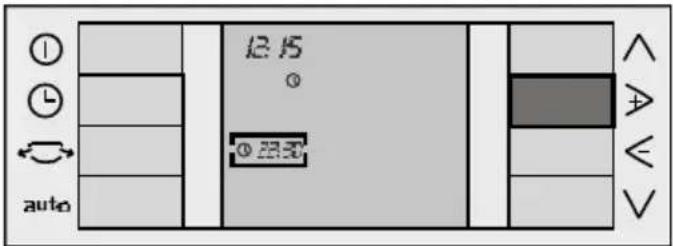
Press the key or wait for 10 seconds without touching any keys to memorise the stop time set. The set time is displayed on the screen.
Turning the timer off
Press the key to position the cursor on the timer menu. The last option programmed appears by default.
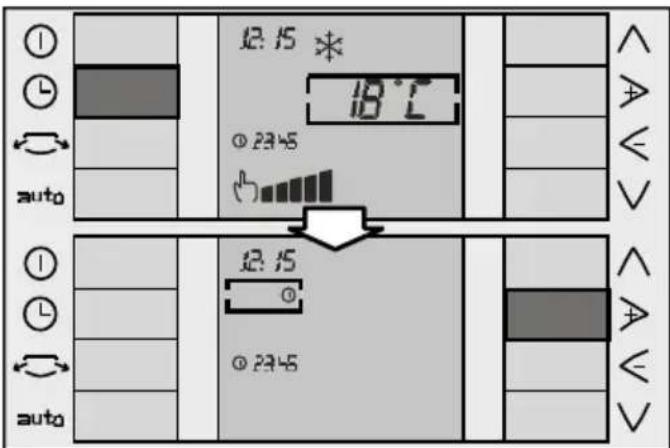
Use the ▷ and keys to select the option. Press the key or wait for 10 seconds without touching any keys to turn the timer off. No set time is displayed on the screen.
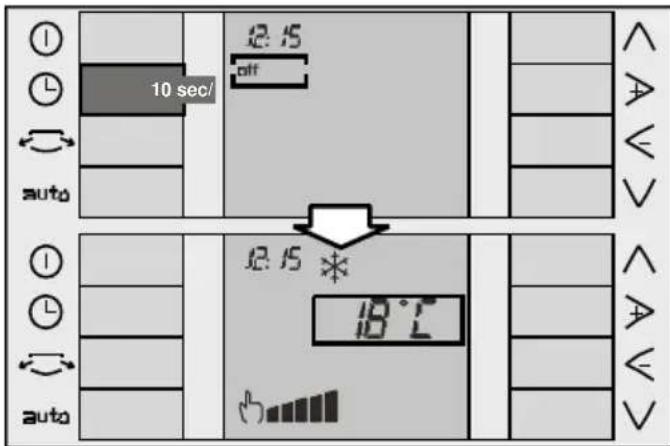
The times and options set on the timer remain active and the programmed operation is repeated every day at the set times until deactivated or cancelled as described above.
Cleaning and Maintenance
Cleaning the appliance
For safety reasons, you should unplug the appliance from the mains electricity supply before cleaning. The appliance can be cleaned with a cloth or sponge, slightly warm water and a mild detergent. - Never use hot water (more than 40°C), bleach, petrol, acid, scouring pads, brushes or strong detergents. Prevent water from entering the appliance. Do not clean the appliance with a water hose or compressed air.
Cleaning and changing the purifying filters
Press the side tabs, (Fig. 26, 1.), on the front flap of the appliance and pull it open (it is not necessary to remove it), (Fig. 26, 2.). The flap is fitted with a stop and can be opened up to this point without risk of falling.
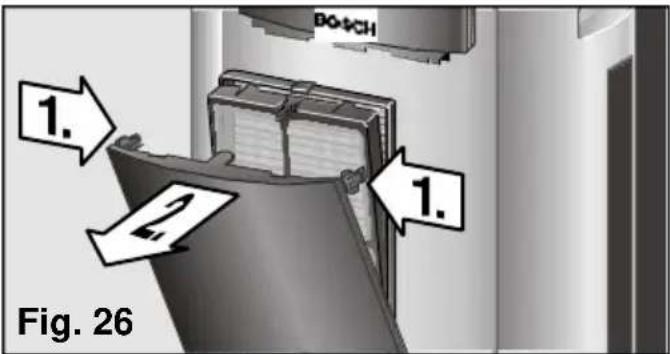
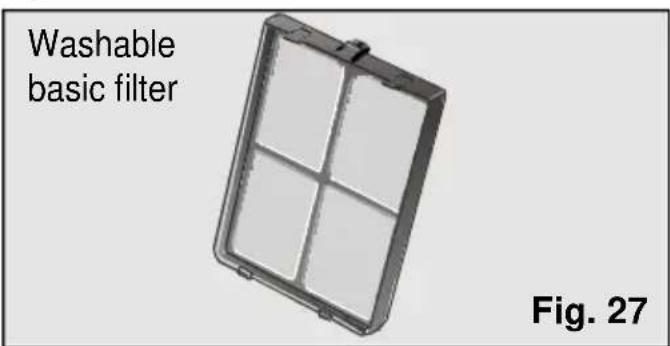
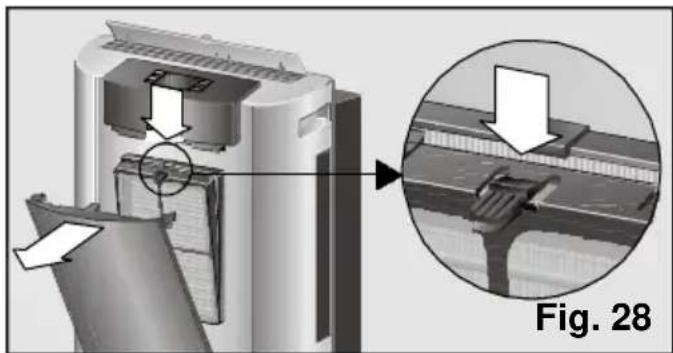
All models are fitted with a basic filter which needs to be cleaned regularly, Fig. 27. The filter is accessed by pressing the tab at the top and removing it from its housing, Fig. 28. The filter is cleaned under a cold tap, dried and replaced.
Warning!!!
Do not try to clean the basic filter in a dishwasher. The plastic on the basic filter is not suitable for dishwashers and is unable to withstand the high temperatures involved in washing programmes. It will deform and may even break.
These models also come with a purifying filter (double active) to be fitted by the user (See "Fitting the purifying filter").
The purifying filter further purifies the air in the room which passes through the appliance.
When the purifying filter is fitted, the appliance's cooling capacity may drop slightly. This is particularly the case when the filter is saturated or worn. It is, therefore, recommended that you check and change the filter at least once a year or when the "change filter" symbol is displayed. These accessories are available for purchase from the Manufacturer's Official Technical Service and authorised distributors (See "Description of accessories").
Press the "+" and the "-" key at the same time to make the symbol disappear from the screen after changing the filter. The symbol disappears from the screen and the filter is operational again.
Fitting the purifying filter (double active):
- Check that the purifying filter is fitted in the positioner. If it is not, fit as shown on Fig 29. Place the dark part of the filter in contact with the positioner.
Fig. 29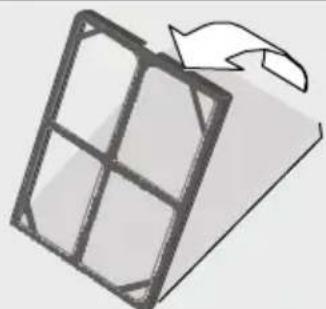
- Remove the basic filter from the appliance, Fig. 28.
- Insert the double active filter + positioner in the basic filter as shown on Fig. 30, remembering that it must be housed on the lower studs first.
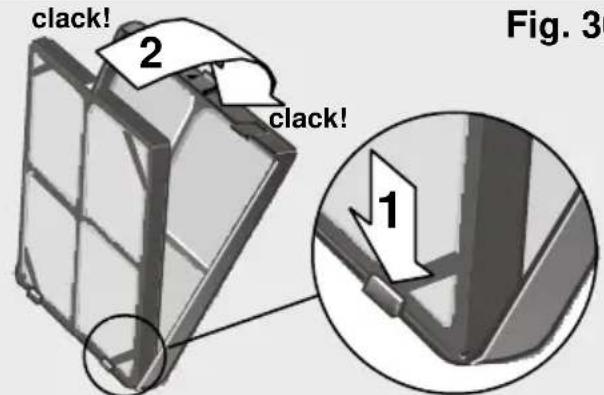
- Install the assembly onto the appliance by lining the lower studs up with the slots on the front casing of the appliance and pressing the top clip in until it clicks into position. The assembly is fitted properly when it clicks into position.
- Close the front flap.
Important!
Fit only one set of filters onto the support in order to ensure correct appliance operation.
Notes:
The front flap can also be removed in order to clean the appliance or change the filters more easily. To do this, open the flap up to the safety stop (the flap opens to a slight angle, Fig. 30) and pull outwards firmly. In order to refit it, line the lower studs on the flap up with the holes on the casing until the studs meet the tabs on the casing.
Storage requirements
When the appliance is out of use for a long period, fit the outdoor unit onto the indoor unit so that the appliance takes up as little space as possible. See "Transportation requirements".
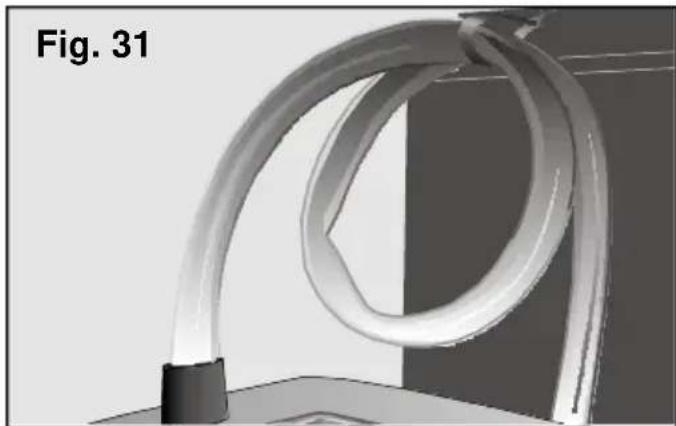
Wind the hose up and secure it with clamp B, Fig. 1. Fig. 31.
Prior to use at change of season
Clean the basic filter and, if necessary, change the purifying filter. Then clean the upper and side air directors to eliminate dust and dirt. Remember to unwind the hose carefully when preparing the appliance for use (see Important Information).
General requirements for operation What to do if ...
... the appliance does not work ...
Check that it is plugged in properly. Check that there is power in the mains supply. Check that no fuses have been tripped. Set the thermostat to its minimum temperature position.
... the appliance does not work and the symbol indicating that the condensed water tank is full is displayed on the screen ...
Position the indoor unit on a flat surface. If the symbol does not disappear, empty the water tank. (See instructions in "Air conditioning"). Check the condition of the flexible hose. It should not be crushed or restricted. The difference in height between the indoor and outdoor units should be no greater than 1.5 m.
... the appliance works for a period of time, but then turns itself off before the room reaches the set temperature ...
Make sure that the air intakes and outlets are not obstructed. Should the outdoor temperature rise above 43°C, the appliance may turn itself off for a short period of time, after which it then turns itself back on again. Should either the indoor or the outdoor temperature fall below 20°C, the appliance may turn itself off temporarily in order to prevent frost or ice from forming on the evaporator. Make sure that the connection between the outdoor and indoor units is properly fitted.
... the appliance does not reduce room temperature sufficiently ...
Make sure that windows or doors are opened as little as possible (to minimise the entry of outdoor air). This is particularly important when a window or door must be left ajar to accommodate the flexible hose.
Check the condition of the flexible hose. It should not be crushed or restricted. Lower blinds to reduce direct sunlight.
... the appliance is connected, but the compressor does not work...
The temperature inside the room must be higher than 18°C for the dehumidification or air conditioning functions to work. The room has reached the set temperature. If you turn the appliance off after it has been working for a period of time and then try to turn it back on again immediately, it takes a certain amount of time before the compressor starts up again. This period of time is required in order to ensure correct appliance operation.
... water drips from the outdoor unit ...
Check that the outdoor unit is level. Check that the outdoor unit is not lower than the indoor unit. Check that the plug is fitted correctly.
... there is water on the upper and side air directors or in the basic filter housing ...
There is no cause for concern. This is normal.
... the fault symbol is displayed on the screen ...
Get in touch with an authorised dealer, customer service or the manufacturer's Technical Service Network.
Noise
... the appliance makes a lot of noise ...
Some noise is normal and other types of noise can be solved easily. You need to be able to distinguish between these types of noise:
Perfectly normal noise
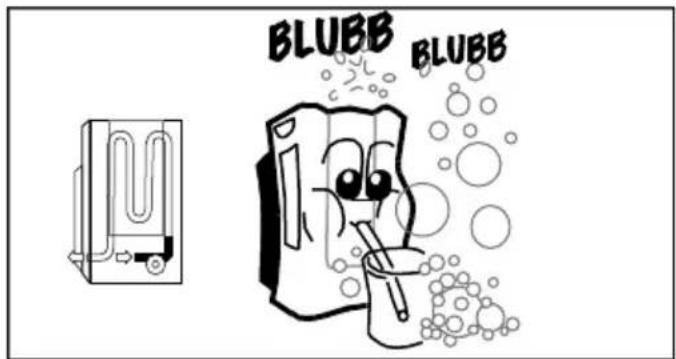
The sound of water flowing in cycles, gurgling, is due to the pump, which circulates the water to enhance the power of the appliance.
Things to check before calling the Technical Service
A dull, humming sound is inevitable due to the compressor. A faint, whistling sound is due to refrigerant passing through the thinner pipes on the appliance when the compressor starts up.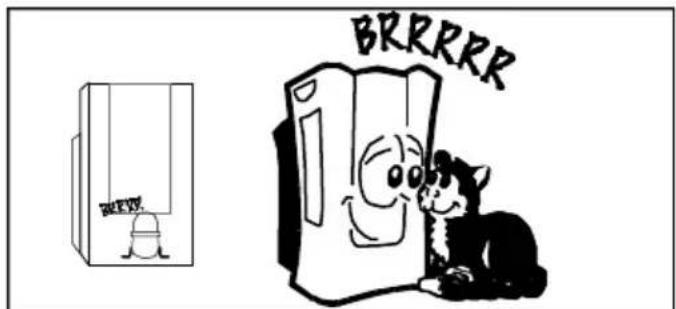
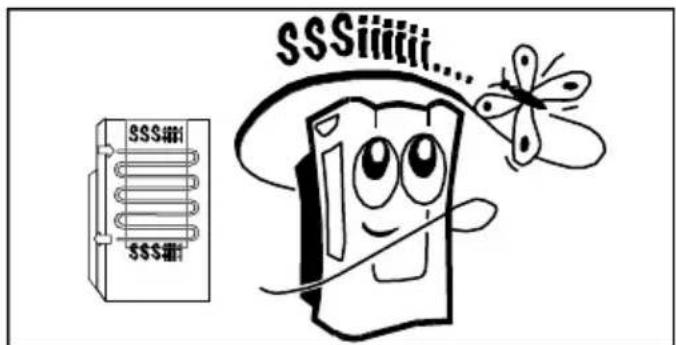
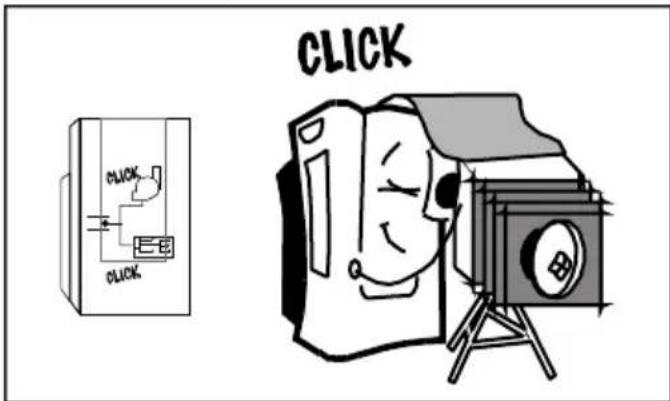
A short clicking sound is produced when the pump connects and disconnects or when the regulator connects or disconnects the electronics system.
Easy-to-solve noises
Make sure that the air intakes and outlets on the appliance are free of obstruction. Make sure that the appliance is not in direct contact with furniture or other appliances. The air output may be flowing directly onto these and increasing the noise level. An irritating noise is produced when the side air directors are left ajar. Open or close them fully.
Any other type of fault or repair work should be dealt with by a specialised Technician. Get in touch with your authorised dealer, customer service or the Manufacturer's Technical Service Network.
Technical service / Warranty
Technical service
Should your appliance fail to work properly and all the instructions for use and installation (especially the section headed
"Requirements....") have been carefully observed, then remember that our Technical Service Network is at your full disposal.
When contacting the Technical Service, quote the model code (E-NR) and the appliance's factory number (FD). This information can be found on characteristics plate, E, Fig. 1.
Warranty
The conditions of warranty depend on the relevant Supplier in a particular country. Contact the establishment where you purchased your appliance for more information and quote the appliance model and factory number. The receipt of purchase for the appliance must be produced prior to any work carried out under warranty.
Transport conditions
"Up" and "down" keys
- RECOMMENDATIONS FOR THE DISPOSAL OF PACKAGING
- RECOMMENDATIONS FOR THE DISPOSAL OF YOUR OLD APPLIANCE
- RECOMMENDATIONS FOR SAVING ENERGY
- BEFORE CONNECTING YOUR APPLIANCE
- IMPORTANT
- IF THERE ARE CHILDREN IN THE HOME
- DESCRIPTION OF THE APPLIANCE
- YOUR NEW APPLIANCE
- CONTROL PANEL
- DESCRIPTION OF ACCESSORIES
- REQUIREMENTS FOR USE
- INSTALLATION REQUIREMENTS
- TRANSPORTATION REQUIREMENTS
- PREPARING THE APPLIANCE BEFORE USE
- POSITIONING THE OUTDOOR UNIT
- CONNECTING THE INDOOR AND OUTDOOR UNITS
- DISCONNECTING THE FLEXIBLE HOSE FROM THE INDOOR UNIT
- JOINING THE FLEXIBLE HOSE TO THE INDOOR UNIT
- UP AND DOWN KEYS
- DOWN" KEY V
- UP" KEY
- CYCLICAL OPERATION
- AND "- " KEYS
- NAVIGATION
- INSTRUCTIONS FOR USE
- BEFORE USING FOR THE FIRST TIME
- TURNING THE APPLIANCE ON AND OFF
- SELECTING THE OPERATION FUNCTION
- FUNCTION 水 AIR CONDITIONING
- DEHUMIDIFICATION FUNCTION
- DEHUMIDIFICATION VIA THE REMOVABLE TANK
- DEHUMIDIFICATION IN CONTINUOUS MODE
- WARNING
- FUNCTION AIR PURIFICATION
- SELECTING THE TEMPERATURE
- SELECTING THE SPEED
- MANUAL SPEEDS
- AUTOMATIC SPEED
- SIDE FINS
- SETTING THE CLOCK / PROGRAMMING THE TIMER
- SETTING THE CLOCK
- PROGRAMMING THE TIMER
- PROGRAMMING THE APPLIANCE START TIME
- PROGRAMMING THE APPLIANCE START / STOP TIME
- PROGRAMMING THE APPLIANCE STOP TIME
- TURNING THE TIMER OFF
- CLEANING AND MAINTENANCE
- CLEANING THE APPLIANCE
- CLEANING AND CHANGING THE PURIFYING FILTERS
- NOTES
- STORAGE REQUIREMENTS
- PRIOR TO USE AT CHANGE OF SEASON
- GENERAL REQUIREMENTS FOR OPERATION WHAT TO DO IF
- THE APPLIANCE DOES NOT WORK AND THE SYMBOL INDICATING THAT THE CONDENSED WATER TANK IS FULL IS DISPLAYED ON THE SCREEN
- THE APPLIANCE WORKS FOR A PERIOD OF TIME, BUT THEN TURNS ITSELF OFF BEFORE THE ROOM REACHES THE SET TEMPERATURE
- THE APPLIANCE DOES NOT REDUCE ROOM TEMPERATURE SUFFICIENTLY
- THE APPLIANCE IS CONNECTED, BUT THE COMPRESSOR DOES NOT WORK
- WATER DRIPS FROM THE OUTDOOR UNIT
- THERE IS WATER ON THE UPPER AND SIDE AIR DIRECTORS OR IN THE BASIC FILTER HOUSING
- THE FAULT SYMBOL IS DISPLAYED ON THE SCREEN
- NOISE
- THE APPLIANCE MAKES A LOT OF NOISE
- PERFECTLY NORMAL NOISE
- THINGS TO CHECK BEFORE CALLING THE TECHNICAL SERVICE
- EASY-TO-SOLVE NOISES
- TECHNICAL SERVICE / WARRANTY
- TECHNICAL SERVICE
- WARRANTY
- TRANSPORT CONDITIONS
- UP" AND "DOWN" KEYS
Brand : BOSCH
Model : PAS 0740
Category : Air conditioner