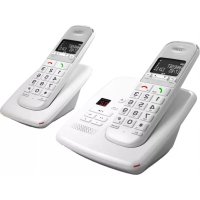
TD 352 Pillow - Téléphone TELEFUNKEN - Free user manual and instructions
Find the device manual for free TD 352 Pillow TELEFUNKEN in PDF.
Download the instructions for your Téléphone in PDF format for free! Find your manual TD 352 Pillow - TELEFUNKEN and take your electronic device back in hand. On this page are published all the documents necessary for the use of your device. TD 352 Pillow by TELEFUNKEN.

USER MANUAL TD 352 Pillow TELEFUNKEN
C. RIPRODUCI / FERMA
TELEFUNKEN TD 301 Pillow Digital cordless phone
Activation Important information This document is only a quick-start guide. Full operating instructions are available on the website www.telefunken-digital.com. Box contents 1 cordless handset 1 base 1 power adapter 1 telephone cord 1 German plug 1 French plug 2 AAA NiMh 550 mAh rechargeable batteries 1 quick start guide Locating the Base A site should be chosen with the following characteristics: A flat and stable surface At most 1.8 meters from a power outlet and a telephone jack At least 1 meter from any other electronic appliance to avoid interference Out of direct sunlight and a sufficient distance from any heat source Away from any wet or damp area, such as a bathroom Your TELEFUNKEN telephone has a range of 300m outdoors when there is a clear line of sight between the base and the handset. Any obstacle between the base and the handset seriously reduces the range. If the base is indoors and the handset is either indoors or outdoors, the range is up to 50m. Very thick walls can affect the range.49
Activation Connection Base Plug the transparent connector of the power adapter into the place marked underneath the base, and plug the other end into a wall outlet. Handset
1. Insert the 2 AAA NiMH batteries supplied into the handset. Slide the battery
compartment cover back into place.
2. Place the handset in the base, and leave it to charge for at least 24 hours. Make sure
it is inserted in the right direction. When the handset is charged, the symbol is displayed.
3. After 24 hours, plug the telephone cord into the base and into the telephone wall jack.
Set Date and Time If you subscribe to your telephone operator‟s Caller ID service, the date and time will be automatically set on all the handsets upon each call received. If you do not subscribe to this service, you can set the date and time manually.
14-45 for 14:45 or 2:45pm.
10. Press „MENU/OK‟ to confirm, or press to return to standby mode.
Power outage If the power goes out, you can only use the base to receive and make calls. The telephone will ring when a call comes in, but the screen will not illuminate, and caller ID will not be saved to the calls list. You will not be able to use the other features of the base or the handset until power is restored.50
Accesses the menu and its various options. Confirms a selection.
Accesses the phonebook. Scrolls downward through options. Lowers the volume in the earpiece.
In STANDBY / PREPARATORY DIALLING mode: makes a call. Redial list / call log / phonebook: makes a call to the selected contact. When the telephone is ringing: answers a call.51
Accesses the calls list. Returns to the previous menu. Turns off the microphone during a call. Deletes a mistake when typing a number or a name.
Accesses the list of calls received. Scrolls upward through options. Raises the volume in the earpiece.
During a call: ends the call and returns to standby mode. Turns the handset on/off.
Intercom key Makes an internal call to another handset.
12. PAGE HANDSET KEY
Press to make all the handsets registered to the base ring. You can use this function to locate missing handsets. Press and hold this key to enter „Register a new handset‟ mode.
Holds the handset in place when the base is attached to a wall.
15. CHARGING CONTACTS
Charge the batteries. These parts must remain clean and dry.
Telephoning Making a Call Press and dial the number. Or you can use 'preparatory dialing' mode to enter a number and check it before making the call. Enter the telephone number, and press or to dial the number. By pressing , a 'HANDSFREE' call is made. Press 'C' to delete if you make a mistake. Answering a Call When the handset rings, pick up the handset to answer the call. Adjusting the Volume During a call, press ▲ or ▼ to adjust the earpiece or speaker volume. The sound level is shown on the screen. Turning off the Microphone Turning off the microphone lets you to speak to another person nearby without letting your caller hear.
1. During a call, press „C‟. The microphone is cut off.
2. Press „C‟ again to turn the microphone back on.
Ending a Call Press . Phonebook The TELEFUNKEN TD 300 can store up to 100 names and numbers. The numbers can have up to 24 digits, and names can have up to 12 letters. Entries are in alphabetical order. Adding a contact
Phonebook NOTE: You can link names to different groups. For example, group A may contain work colleagues. You can also link a specific ringtone to each group. This function is only available if you subscribe to your operator‟s Caller ID service. You can cancel a new entry you are inputting by pressing the key at any time. Deleting a contact
Deleting all contacts
Resetting Your Telephone Resetting lets you return to the telephone‟s default settings.
Answering Machine The answering machine of your TD 300 records missed calls when it is enabled. It can record up to 59 messages for a total recording time of 12 minutes. Each message can last 3 minutes. Your greeting can last 1 minute. Operating the answering machine from the base Enable/Disable the answering machine Start or stop message playback Skip to the next message during playback Replay the current message. Press 2 times to return to the previous message. Delete the current message during playback. Press and hold to delete all messages when the answering machine is on standby Increase or decrease the volume during message playback Answer mode There are two pre-recorded messages and you can also record your own greeting. Answer & record The caller can leave a message. The pre-recorded message is "Hello, I cannot answer you right now; please leave a message after the beep" Answer only The caller hears your greeting but cannot leave a message. The pre-recorded message is "Hello, I cannot answer you right now and you cannot leave a message, please call again later" Record, listen to or delete your greeting
1. Press MENU and scroll using to ANSWERING MACHINE and press
4. READ is displayed. Press MENU. The current message is read.
Scroll using to select RECORD and press MENU. The screen displays RECORD and you hear a beep. Dictate your message. Press MENU to stop recording. DELETE is displayed. Press MENU. The pre-recorded message will be automatically reactivated.
Warranty This telephone comes with a 24-month warranty, starting from the date the phone was purchased. For more information on the applicability of this warranty, please refer to the full operating instructions available on the website www.telefunken-digital.com After-Sales Service Contact In the event of a technical problem, feel free to contact our after-sales service. assistance@sopeg.fr or +33 (0) 545 608 251 (International number)56
ManualGo.com