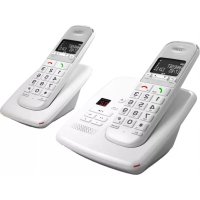
TB 303 - Phone TELEFUNKEN - Free user manual and instructions
Find the device manual for free TB 303 TELEFUNKEN in PDF.



| Product type | DECT cordless phone |
| Brand | Telefunken |
| Model | TB 303 |
| Base power supply | Mains adapter (included) |
| Handset power supply | 2 AAA NiMH rechargeable batteries (included) |
| Standby time | Approximately 100 hours |
| Talk time | Approximately 10 hours |
| Outdoor range | Up to 300 meters in direct line of sight |
| Indoor range | Up to 50 meters |
| Display | LCD display with status icons |
| Phonebook | Up to 50 contacts (name and number) |
| Call list | Yes (received, missed, dialed calls) |
| Main functions | Internal calls, call transfer, conference, key lock, handset finder |
| Integrated answering machine | Available on models TB 351/TB 352 (max duration 13 min) |
| Base dimensions | Approximately 12 x 8 x 5 cm |
| Handset dimensions | Approximately 18 x 5 x 3 cm |
| Base weight | Approximately 150 g |
| Handset weight | Approximately 200 g (with batteries) |
| Maintenance and cleaning | Clean with a soft, dry cloth. Do not use abrasive products. |
| Safety | Do not expose to moisture, direct heat or liquids. Use only the supplied adapter. |
| Spare parts and repairability | Rechargeable batteries available. Contact customer service for any repairs. |
| Warranty | 24 months from date of purchase |
| General information | Manufactured by SOPEG for Telefunken. Declaration of conformity available on request. |
Frequently Asked Questions - TB 303 TELEFUNKEN
User questions about TB 303 TELEFUNKEN
0 question about this device. Answer the ones you know or ask your own.
Ask a new question about this device
Download the instructions for your Phone in PDF format for free! Find your manual TB 303 - TELEFUNKEN and take your electronic device back in hand. On this page are published all the documents necessary for the use of your device. TB 303 by TELEFUNKEN.
USER MANUAL TB 303 TELEFUNKEN
This document is only a quick-start guide. Full operating instructions are available on the website www.telefunken-digital.com.
Box contents
1 cordless handset
1 telephone base
1 AC adapter
1 RJ11 telephone cord
- 2 rechargeable AAA NiMH batteries
1 quick-start guide
Siting the base
A site should be chosen with the following characteristics:
A flat and stable surface
- At most 2 metres from a power outlet and a telephone jack
- At least 1 metre from any other electronic appliance to avoid interference
- Out of direct sunlight and a sufficient distance from any heat source
- Away from any wet or damp area, such as a bathroom
Note: since the base and the portable handset communicate via radio waves, it is important that the base is located in an open area to ensure the best possible signal. The normal range is approximately 300 metres when there is a direct line of sight to the base, and approximately 50 metres when the base is indoors and the phone is outdoors. Thick
concrete walls significantly reduce this range.
The symbol on the portable handset indicates when you are in range of the base. Whenever you are outside range of the base, the symbol blinks, and a warning tone is emitted.
Connecting the base
- Under the base, plug the power cord holding a clear connector in the plug labelled
- Connect the other end of the power cord into the power wall outlet. The device switches on, as indicated by the green light from the base.
- Under the base, connect the telephone jack to the plug labelled and the other end into the telephone connector plug. Then plug the connector to the telephone wall jack.
- Verify that the green light of the base is lit.
Recharging the handset
- On the handset, slide the cover and insert the 2 NiMH batteries supplied. Always observe the direction of insertion. Close the lid.
- Place the handset on the base and allow charging for at least 24 hours before its first use, until the handset icon indicates
- If necessary, do the same for other handsets.
Handset
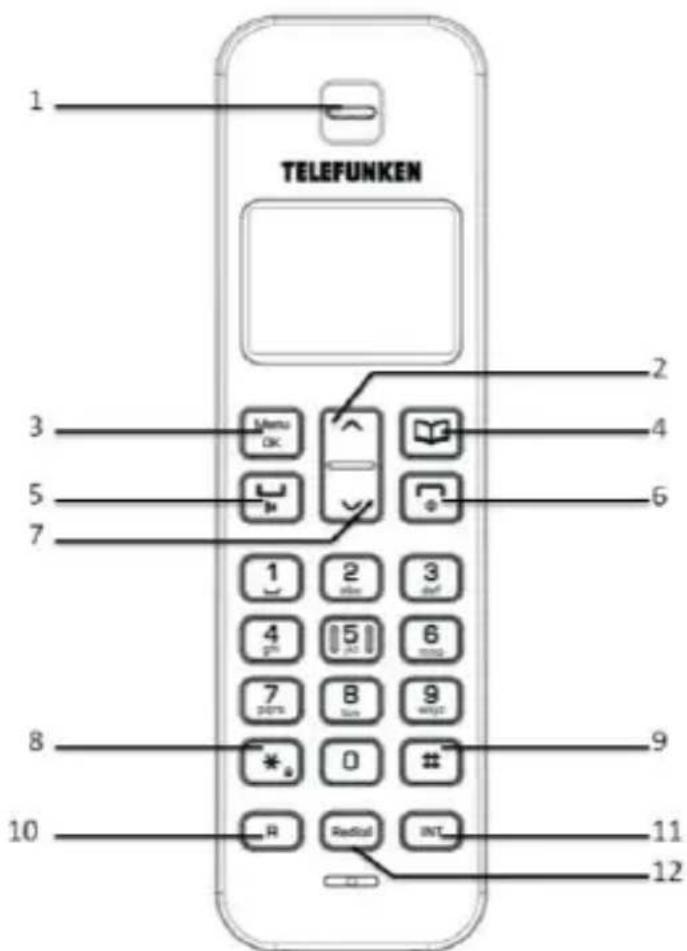
1. EARPIECE
2. UP KEY
Scroll through options.
Increase earpiece volume.
3. OK/MENU
Press to open the menu,
Press this key to select an option of the menu and to validate a choice.
4. PHONEBOOK
Press this key to display the phonebook.
Use this key to go back in a menu or erase a typed number.
5. TALK
Press to make and receive calls.
6.ENDCALL/POWERONOFF
Press to end call or go back to the main screen.
Press and hold to switch the handset on/off
7. TOUCHE DIRECTIONNELLE BAS
Press to open and scroll through the Calls list.
Decrease earpiece volume.
8. KEYPAD LOCK
Use to lock/unlock the keypad to prevent accidental dialling.
9. TOUCHE #
Press to stop an OGM record.
10. R
Use with switchboard services and some network services.
11. INT
Use to make internal calls and transfer calls to other.
Balance handsets registered to the base
12. REDIAL
Press to redial the last called number.
TELEFUNKEN
Base (without Answering Machine TB 301-TB 302)
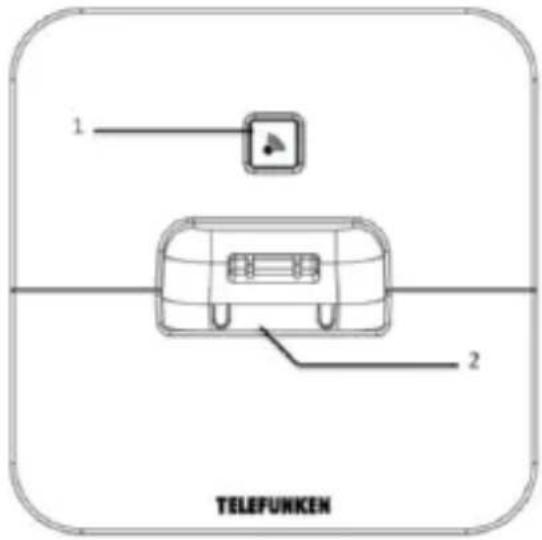
1. FIND HANDSET
Press to find misplaced handsets
registered to the base.
Use to register handsets and de-register
handsets registered to the base.
2. CHARGING CONTACTS
Base (with Answering Machine TB 351 - TB 352)
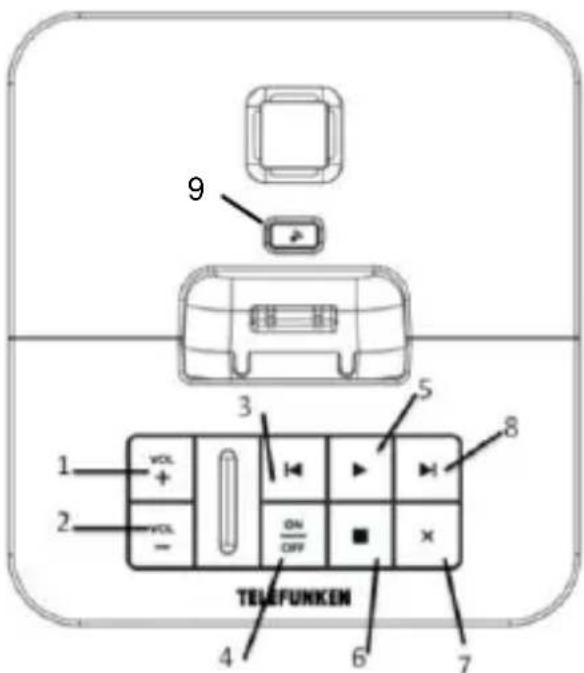
5. PLAY/PAUSE
Play or pause recorded messages.
Press to play new messages or press and hold to play all messages.
6. STOP
Stops message playback.
Press to announce the current day and time setting.
7. SUPP.
Press to delete recorded messages during playback.
- INCREASE THE VOLUME
- DECREASE THE VOLUME
- PREVIOUS
Press to skip backward through your answering machine messages. Press to turn message alert on/off.
4. POWER ON/OFF
Switches the answering machine on/off. Announces the current OGM.
8. NEXT
Press to skip forward through your answering machine messages.
Press to announce the current answer delay setting.
9. FIND HANDSET
Press to find misplaced handsets registered to the base.
Use to register handsets and de-register handsets registered to the base.
Handset icons
EXT
Flashes to indicate an incoming external call

External call in progress
INT
Flashes to indicate an incoming internal call

Internal call in progress

3 Way call in progress or transfer external call to another Balance handset registered to the base during an external call

Indicates signal strength
Flashes when handset is not registered to the base or if you go out of range

Menu open

Phonebook open

Flashes to indicate new calls list entries received*

Answered call (when viewing the Calls list)*

Unanswered call (when viewing the Calls list)*

Keypad locked

The displayed number is longer than 12 digits

Battery charge full

Battery charge medium

Battery charge low

Flashing - Battery charge nearly empty
TELEPHONING
Making a call - In direct dialing
- Press

- Wait for the dial tone and then dial the number.
-In pre-dialling
- Dial the number. In case of error, press

- Press

the number is dialled.
- Press
again to make a HF call.
Ending a call
- Press .

Once the handset is replaced, the call duration is displayed for 15 seconds.
Internal calls
- Calling another handset
If you have more than one handset registered to the database, you can make internal calls between two handsets.
- Press the
button (bottom right of
keypad) followed by the number of the handset number (1 to 5) that you wish to call.
- Press OK to dial.
Note: When receiving an internal call, the display shows
TELEFUNKEN
- Transferring a call
You can transfer an external call to another handset registered on the base.
During the call:
- Press the button followed by the
number of the handset number (1 to 5) that you wish to call.
- Press to end the transfer or press

to switch between the two callers.
Answering a call
Upon receipt of an external call, the handset rings. The screen displays and the subscriber number or, if the number is stored in the phonebook, the caller's name.
- When the handset rings, press. Note: an incoming call has priority over other events. Thus, any operations in progress such as phone setting, menu navigation, are immediately discontinued.
Adjusting the volume
During the conversation, press or to adjust the volume of the earpiece or loudspeaker.
Locking the keypad
Press and hold the button. The display shows
Unlocking the keypad
Within three seconds after pressing any button, press.
With a locked keypad, it is always possible to answer incoming calls.
PHONEBOOK
The handset's phonebook can hold up to 50 names and telephone numbers. The numbers can have up to 20 digits, and names can have up to 12 characters.
Adding a contact

- Press . The display shows phone
book, press - The display shows Add Entry. Press .
- The display shows Name ? . Use the keypad to enter the name and press
- The display shows Number?. Use the keypad to enter the phone number and press .
- The display shows Melody 1. Press or to select the ringtone you want.
Deleting a contact
- Press . The display shows Phone
Book, press

TELEFUNKEN
2.Scroll or to Delete Entry and press Menu OK
3. Scroll or to the entry you want delete, or search alphabetically.
4. Press . The display shows Confirm ?
5. Press to confirm or to cancel
ANSWERING MACHINE
When activated, the voicemail of the TB 351 / TB 352 stores messages for unanswered calls. A maximum of 13 minutes can be stored.
Setting the day
- Press , scroll to Tam Settings and press to confirm.
- Scroll to Day Setting and press The current day is displayed.
- Press or to select the required day and press to confirm.
Setting the time
-
Press, scroll to Date-Time and press.
-
Scroll to Clock Set and press .The current time is displayed.
- Use the keypad to set the required time in 24 hour format, e.g. 18-30 for 6.30pm.
- Press to confirm.
Checking the current day and time setting
Press . The current day and time setting is announced.
Activating/deactivating the voicemail
- From the handset
- Press Menu OK, scroll to Tam Settings and press . Menu OK
- Ans On/Off is displayed, press .
- Press or to select either ON or OFF and press .
- From the base
- Press . The new setting is announced.
Recording an announcement
An announcement is the message which will first be heard by the caller after the call is detected by the voicemail. You can select one
TELEFUNKEN
of two pre-recorded messages or similarly record your own message.
From the handset
- Press Menu OK, scroll to Tam Settings and press . Menu OK
2.Scroll to Ogm Setting and press .
3.Scroll to Record Ogm and press . - Press or to select either Ans And Rec or Ans Only and press .
- Place the handset at your ear. You will hear Please speak after the tone. To end recording, press #.
- After the long beep speak your message slowly and clearly into the handset, to end recording press Your message will then be played back to you through the handset.
Listening to messages - From the base
Press . The number of new messages is announced and the new message(s) will be played.
Or
Press and hold and the numbers of all (new and old) messages are announced. The oldest message is played first.
During playback:
Press to pause a message. You will hear a beep every 10 seconds.
Press again to resume playback.
Press to play the next message.
Press once to repeat the current message.
Press twice to play the previous message.
Press to delete the current message. You will hear Message deleted.
Press and hold to play messages at 1.5 times normal speed. Release the button to continue playback at normal speed.
Press to return to the current answering machine mode On or Off.
- From the handset
-
Press Play Message is displayed, press . Menu OK
-
NewMsgis displayed and the number of new messages.
TELEFUNKEN
- Press to play new messages only or
scroll to AllMsg and press
play all of your messages. You will need to place the handset to your ear to hear the message(s).
During playback:
Press or to adjust the playback volume.
Press on once to repeat the
current message.
Press on twice to play the
previous message.
Press or to play the next
message.
Press to delete the current message.
You will hear Message Deleted.
At the end of playback:
You will hear End of messages. To delete all messages, press delete. To delete all messages, press , you will hear, All messages deleted.
WARRANTY
This telephone comes with a 24-month warranty, starting from the date the phone was purchased.
For more information on the applicability of this warranty, please refer to the full operating instructions available on the website www.telefunken-digital.com
After-Sales Service Contact
In the event of a technical problem, feel free to contact our after-sales service.
assistance@sopeg.fr or +33 (0)5 456 082 51 (International Number)