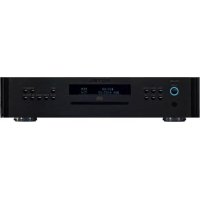
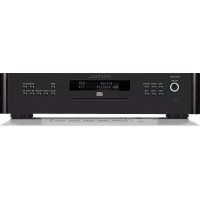
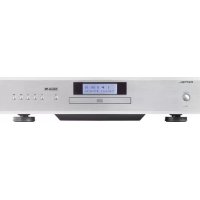
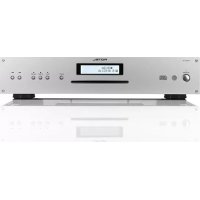
RCD1520 V2 - Cd player/recorder ROTEL - Free user manual and instructions
Find the device manual for free RCD1520 V2 ROTEL in PDF.

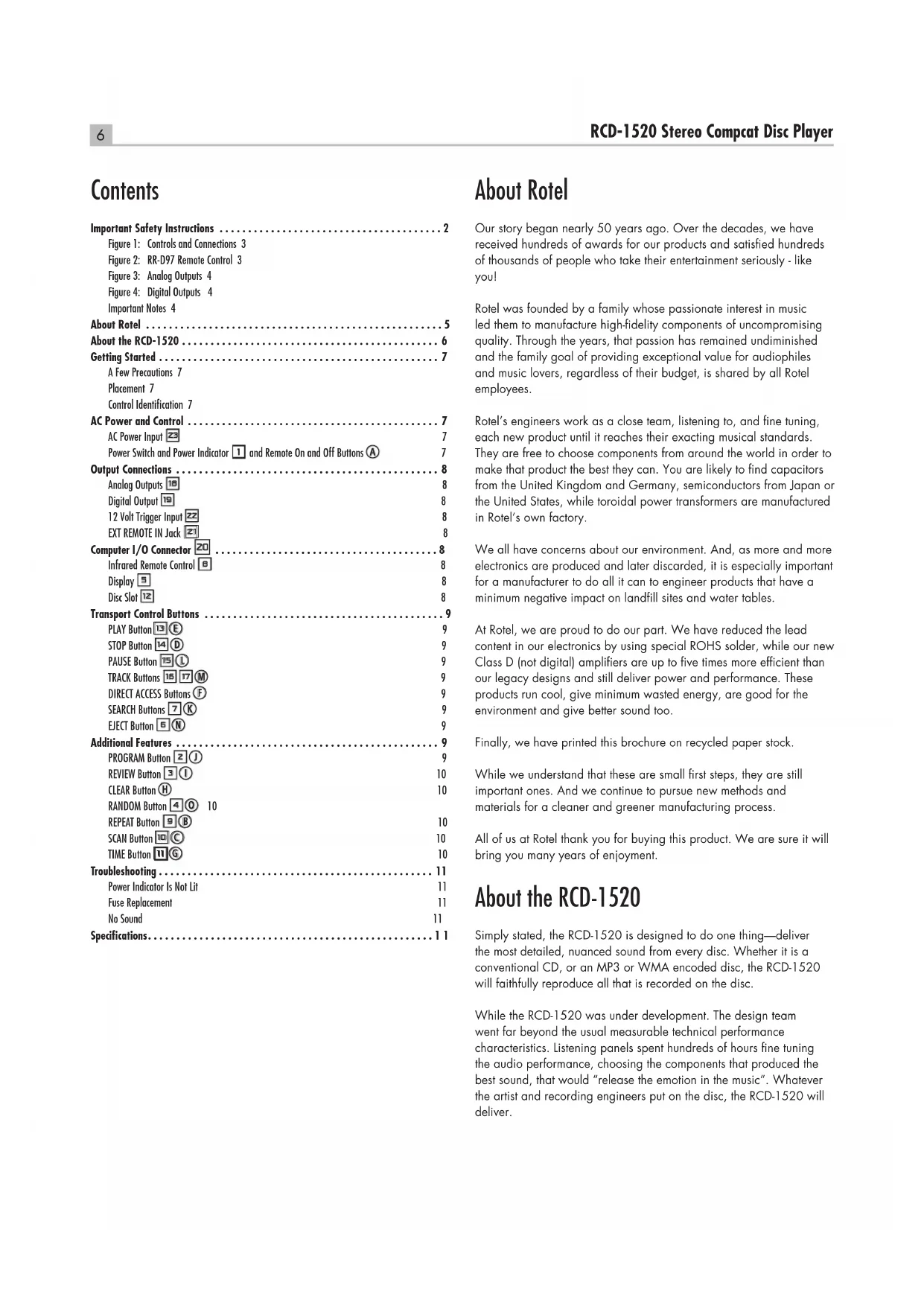


| Product type | CD player/recorder |
| Brand | Rotel |
| Model | RCD1520 V2 |
| Front panel height (for rack mounting) | 2U / 88.1 mm |
| Weight | 6.5 kg |
| Mains power supply | 120 V~ 60 Hz (USA) / 230 V~ 50 Hz (Europe) |
| Maximum power consumption | 20 watts |
| Digital-to-analog converter | Wolfson (state of the art) |
| Analog outputs | 1 pair of RCA jacks (stereo) |
| Digital output | Coaxial, RCA jack, 75 ohms |
| Maximum line output level | 2 V RMS |
| Output impedance | 100 ohms |
| Signal-to-noise ratio | > 100 dB |
| Dynamic range | > 96 dB |
| Total harmonic distortion + noise | 0.0045% @ 1 kHz |
| Frequency response | 20 - 20,000 Hz (±0.5 dB) |
| Supported formats | CD-DA, CD-R/RW (MP3, WMA) |
| Special functions | Programming (20 tracks), repeat, random playback, intro scan, time display, direct track access |
| Remote control | RR-D95 with AAA batteries supplied |
| 12V trigger input | Yes (3-30 V AC/DC) |
| External remote input | 3.5 mm jack |
| Computer I/O input | RJ-45 8-pin |
| Maintenance and cleaning | Clean with a dry cloth or vacuum cleaner; unplug before cleaning |
| Safety | Double electrical insulation; do not open the cover (risk of laser and electric shock); do not expose to moisture |
| Spare parts and repairability | No user-serviceable parts; contact an authorized Rotel repairer if a problem occurs |
Frequently Asked Questions - RCD1520 V2 ROTEL
User questions about RCD1520 V2 ROTEL
0 question about this device. Answer the ones you know or ask your own.
Ask a new question about this device
Download the instructions for your Cd player/recorder in PDF format for free! Find your manual RCD1520 V2 - ROTEL and take your electronic device back in hand. On this page are published all the documents necessary for the use of your device. RCD1520 V2 by ROTEL.
USER MANUAL RCD1520 V2 ROTEL
Stereo Compact Disc Player
Important Safety Instructions
WARNING: There are no user serviceable parts inside. Refer all servicing to qualified service personnel.
WARNING: To reduce the risk of fire or electric shock, do not expose the unit to moisture or water. Do not expose the unit to dripping or splashing. Do not place objects filled with liquids, such as vases, on the unit. Do not allow foreign objects to get into the enclosure. If the unit is exposed to moisture, or a foreign object gets into the enclosure, immediately disconnect the power cord from the wall. Take the unit to a qualified service person for inspection and necessary repairs.
Read all the instructions before connecting or operating the component.
Keep this manual so you can refer to these safety instructions. Heed all warnings and safety information in these instructions and on the product itself. Follow all operating instructions.
Clean the enclosure only with a dry cloth or a vacuum cleaner.
Do not use this unit near water.
You must allow a minimum 10cm or 4 inches of unobstructed clearance around the unit.
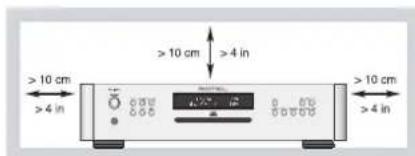
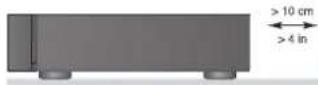
Do not place the unit on a bed, sofa, rug, or similar surface that could block the ventilation openings. If the unit is placed in a bookcase or cabinet, there must be ventilation of the cabinet to allow proper cooling.
Keep the component away from radiators, heat registers, stoves, or any other appliance that produces heat.
WARNING: The rear panel power cord connector is the mains power disconnect device. The apparatus must be located in an open area that allows access to the cord connector.
The unit must be connected to a power supply only of the type and voltage specified on the rear panel. (USA: 120 V/60Hz, EC: 230V/50Hz)
Connect the component to the power outlet only with the supplied power supply cable or an exact equivalent. Do not modify the supplied cable. A polarized plug has two blades, with one wider than the other. A grounding plug has two blades plus a third grounding prong. These are provided for your safety. Do not defeat grounding and/or polarization safety provisions. If the supplied plug does not fit your outlet, please consult an electrician for replacement of the obsolete outlet. Do not use extension cords.
The main plug of the power cordset is a disconnect device of the apparatus. In order to completely disconnect the apparatus from the supply mains, the main plug of the power cordset should be unplugged from the mains (AC) outlet. The stand-by LED indicator will not be lit up to show the power cord is unplugged. The disconnect device shall remain readily operable.
Do not route the power cord where it will be crushed, pinched, bent, exposed to heat, or damaged in any way. Pay particular attention to the power cord at the plug and where the cord exits the back of the unit.
The power cord should be unplugged from the wall outlet during a lightning storm or if the unit is to be left unused for a long period of time.
Use only accessories specified by the manufacturer.
Use only with a cart, stand, rack, bracket or shelf system recommended by Rotel. Use caution when moving the unit in a stand or rack to avoid injury from a tip-over.

Immediately stop using the component and have it inspected and/or serviced by a qualified service agency if:
The power supply cord or plug has been damaged
- Objects have fallen or liquid has been spilled into the unit
The unit has been exposed to rain
The unit shows signs of improper operation
The unit has been dropped or damaged in any way

CAUTION
RISK OF ELECTRIC SHOCK DO NOT OPEN

CAUTION:TO REDUCE THE RISK OF ELECTRIC SHOCK,DO NOT REMOVE COVER. NO USER-SERVICEABLE PARTS INSIDE REFER SERVICING TO QUALIFIED SERVICE PERSONNEL.
APPLICABLE FOR USA, CANADA OR WHERE APPROVED FOR THE USAGE
CAUTION: TO PREVENT ELECTRIC SHOCK, MATCH WIDE BLADE OF PLUG TO WIDE SLOT. INSERT FULLY.
ATTENTION: POUR EVITER LES CHOCES ELECTRIQUES, INTRODUIRE LA LAME LA PLUS LARGE DE LA FICHE DANS LA BORNE CORRESPONDANTE DE LA PRISE ET POUSSER JUSQU AU FOND.

This symbol is to alert the user to the presence of uninsulated dangerous voltages inside the product's enclosure that may constitute a risk of electric shock.

This symbol is to alert the user to important operating and maintenance (service) instructions in this manual and literature accompanying the product.

Rotel products are designed to comply with international directives on the Restriction of Hazardous Substances (RoHS) in electrical and electronic equipment and the disposal of Waste Electrical and Electronic Equipment (WEEE). The crossed wheelie bin symbol indicates compliance and that the products must be appropriately recycled or processed in accordance with these directives.

This symbol means that this unit is double insulated. An earth connection is not required.

IMPORTANT FOR LASER PRODUCTS
- CLASS 1 LASER PRODUCT
- DANGER:Visible laser radiation when open and interlock failed or bypassed. Avoid direct exposure to beam.
- CAUTION: Do not open the top cover. There are no user serviceable parts inside the player; leave all servicing to qualified service personnel.
WARNING!
To reduce the risk of electrical shock, fires, etc.:
- Do not remove screws, covers or cabinet.
- Do not expose the unit to rain or moisture.
- Do not touch the power cord or plug with wet hands.
| CAUTION | -LASER RADIATION WHEN OPEN. DO NOT STARE INTO BEAM. |
| ATTENTION | -RAYMONNEMENT LASER EN CAS D'OUVERTURE. NE PAS RégARDER DANS LE FAISCEAU. |
| VORSicht | -LASER STRAHLUNG, WENN ABOCKING GOFFENET. NICT IN DEN STRAH L BICKEN. |
| ADVASCER | -LASERSTRALING VED ABNING. SE IKKE IND I STRALEN. |
| ADVASCER | -LASERSTRALING NAR DEKSEL APNES. STRRR IKKE IIN I STRALEN. |
| VARNING | -LASERSTRALING NAR DENNA DEL AR OPPND. STRRA EJ IN I STRALEN. |
| VARO! | AVATTALESSA OLET ALTTINA LASERSATELYLLE. ALA TULOTA SATESEEN. |
| 注意 | 当打开这里会出现激光,请不要互相激光。 |
| 注意 | 二、此光可由以下光源发出: |
Commandes et branchements Bedienelemente und Anschlusses Controles y Conexiones De bedieningsorganen en aansluitingen Controll e connessioni Funktioner och anslutninger Opranby npablenn npa3bembl
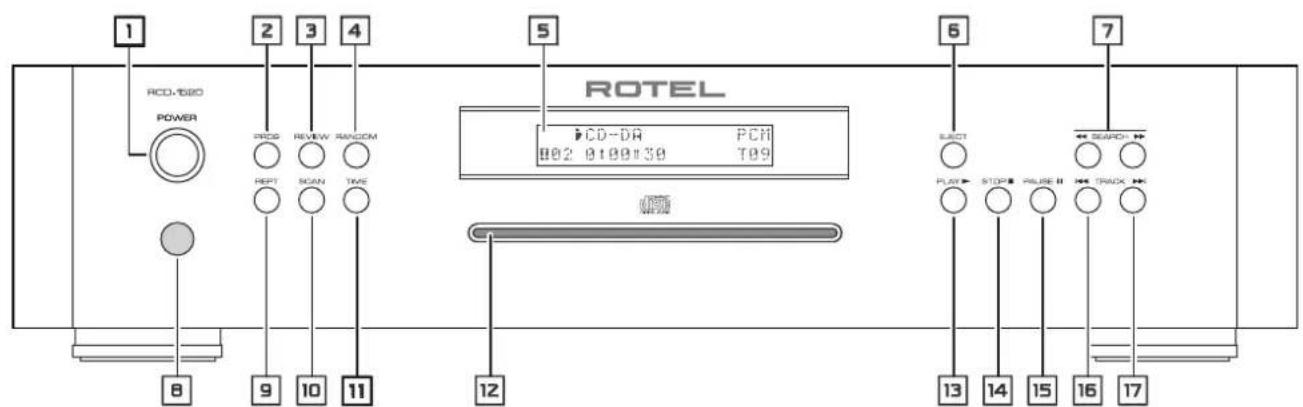
Figure 1: Controls and Connections
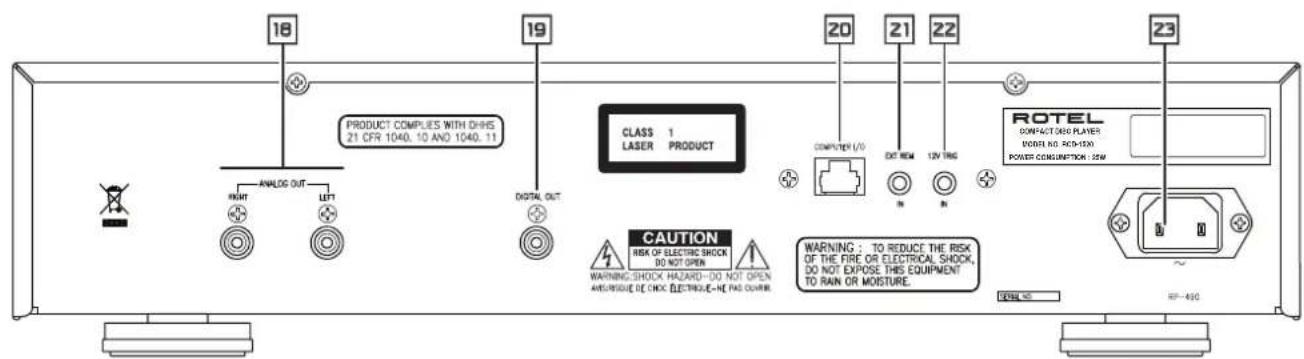
Figure 2: RR-D97 Remote Control
Telekomande RR-D97
Fernbedienung RR-D97
Mandoa Distancia RR-D97
De afstandsbediening RR-D97
Telecomando RR-D97
Fjarrkontroll RR-D97
IyBt Dy RR-D97
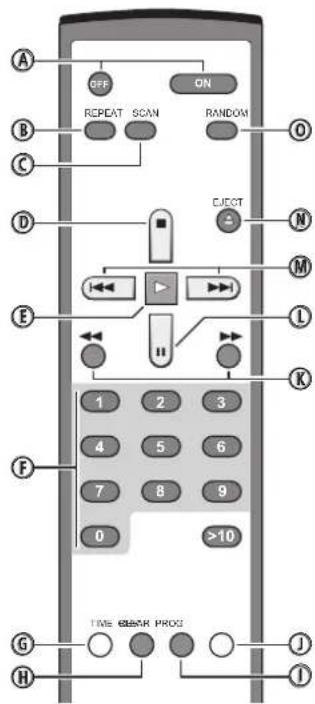
Figure 3: Analog Outputs
Sorties analogiques
Analoge Ausgabe
Salidas Analogicas
De analoge uigangen
Uscite Analogiche
Analoga utgangar
Cxema noDcoeHHeHHaHAnorOBOro BbIXOa
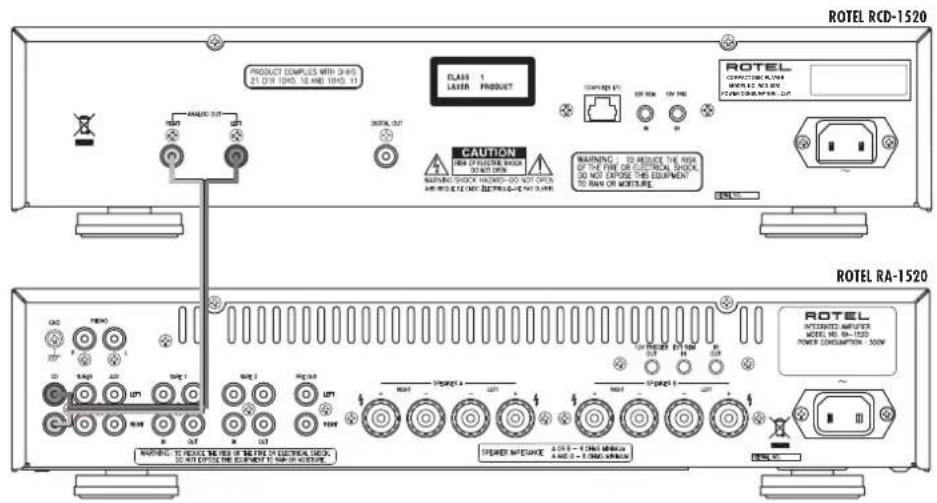
Figure 4: Digital Outputs
Sorties numériques
Digitalausgang
Salidas Digitales
When making connections be sure to:
Turn off all the components in the system before hooking up any components, including loudspeakers.
Turn off all components in the system before changing any of the connections to the system.
It is also recommended that you:
Turn the volume control of the amplifier all the way down before the amplifier is turned on or off.
Remarques importantes
Important Safety Instructions 2
Figure 1: Controls and Connections 3
Figure 2: RR-D97 Remote Control 3
Figure 3: Analog Outputs 4
Figure 4: Digital Outputs 4
Important Notes 4
About Rotel 5
About the RCD-1520 6
Getting Started 7
A Few Precautions 7
Placement 7
Control Identification 7
AC Power and Control 7
AC Power Input 7
Power Switch and Power Indicator 1 and Remote On and Off Buttons A
Output Connections 8
Analog Outputs 8
Digital Output 8
12 Volt Trigger Input 8
EXT REMOTE IN Jack 8
Computer I/O Connector 20 8
Infrared Remote Control 8
Display 8
Disc Slot 12 8
Transport Control Buttons 9
PLAY Button 9
STOP Button 14 D 9
PAUSE Button ① 9
TRACK Buttons 16 7 M 9
DIRECT ACCESS BUTTONS F 9
SEARCH Buttons 9
EJECT Button 9
Additional Features 9
PROGRAMButton ① 9
REVIEWButton 10
CLEAR Button H 10
RANDOM Button 4 10
REPEAT Button 10
SCAN Button 10
TIME Button 10
Troubleshooting 11
Power Indicator Is Not Lit 11
Fuse Replacement 11
No Sound 11
Specifications. 11
About Rotel
Our story began nearly 50 years ago. Over the decades, we have received hundreds of awards for our products and satisfied hundreds of thousands of people who take their entertainment seriously - like you!
Rotel was founded by a family whose passionate interest in music led them to manufacture high-fidelity components of uncompromising quality. Through the years, that passion has remained undiminished and the family goal of providing exceptional value for audiophiles and music lovers, regardless of their budget, is shared by all Rotel employees.
Rotel's engineers work as a close team, listening to, and fine tuning, each new product until it reaches their exacting musical standards. They are free to choose components from around the world in order to make that product the best they can. You are likely to find capacitors from the United Kingdom and Germany, semiconductors from Japan or the United States, while toroidal power transformers are manufactured in Rotel's own factory.
We all have concerns about our environment. And, as more and more electronics are produced and later discarded, it is especially important for a manufacturer to do all it can to engineer products that have a minimum negative impact on landfill sites and water tables.
At Rotel, we are proud to do our part. We have reduced the lead content in our electronics by using special ROHS solder, while our new Class D (not digital) amplifiers are up to five times more efficient than our legacy designs and still deliver power and performance. These products run cool, give minimum wasted energy, are good for the environment and give better sound too.
Finally, we have printed this brochure on recycled paper stock.
While we understand that these are small first steps, they are still important ones. And we continue to pursue new methods and materials for a cleaner and greener manufacturing process.
All of us at Rotel thank you for buying this product. We are sure it will bring you many years of enjoyment.
About the RCD-1520
Simply stated, the RCD-1520 is designed to do one thing-deliver the most detailed, nuanced sound from every disc. Whether it is a conventional CD, or an MP3 or WMA encoded disc, the RCD-1520 will faithfully reproduce all that is recorded on the disc.
While the RCD-1520 was under development. The design team went far beyond the usual measurable technical performance characteristics. Listening panels spent hundreds of hours fine tuning the audio performance, choosing the components that produced the best sound, that would "release the emotion in the music". Whatever the artist and recording engineers put on the disc, the RCD-1520 will deliver.
That said, the RCD-1520 does feature some impressive hardware. The digital-to-analogue converter is a state of the art DAC from the world renowned British manufacturer, Wolfson. This very high performance stereo DAC is specifically designed for audio applications such as CD, DVD, and home theatre systems.
All this, combined with Rotel's Balanced Design, ensures the RCD-1520 will deliver the highest level of audio performance. When used in a high-quality audio system, your Rotel CD player will provide years of enjoyment.
Getting Started
A Few Precautions
Please read this manual carefully. In addition to installation and operating instructions, it provides valuable information on various RCD-1520 system configurations as well as general information that will help you get optimum performance from your system. Please contact your authorized Rotel dealer for answers to any questions you might have. In addition, all of us at Rotel welcome your questions and comments.
Save the RCD-1520 shipping carton and all enclosed packing material for future use. Shipping or moving the RCD-1520 in anything other than the original packing material may result in severe damage that is not covered by the warranty.
Fill out and send in the owner's registration card packed with the RCD-1520. Also be sure to keep the original sales receipt. It is your best record of the date of purchase, which you will need in the event warranty service is required.
Placement
Use common sense when placing the RCD-1520 in a cabinet or when stacking other equipment. Make sure that the shelf or cabinet can support its weight. Do not stack components on top of the RCD-1520. Avoid placing the unit where it may be subject to excessive heat such as on top of a large power amplifier or near a heat register. For best performance, avoid placing the unit where it may be subject to vibration, such as near a speaker.
Control Identification
The cover of this manual has a fold out panel that shows illustrations of the front and rear panels and the RR-D97 remote control. Each item in the illustrations is identified with a call out. Throughout this manual the items referred to in the text are identified by the corresponding call out. The items on the front and rear panels are identified with a number call out, such a 1. The items on the remote control are labeled with a letter call out, such as A.
AC Power and Control
AC Power Input
Your RCD-1520 is configured at the factory for the proper AC voltage in the country where you purchased it, either 120 volts or 230 volts. The AC line configuration is noted on a decal on the back panel.
Note: Should you move your CD player to another country, it may be possible to reconfigure it for use on a different line voltage. Do not attempt to perform this conversion yourself. Opening the enclosure of the RCD-1520 exposes you to dangerous voltages. Consult a qualified service person or the Rotel factory service department for information.
The RCD-1520 should be plugged directly into a 2-pin polarized wall outlet or into the switched outlet on another component in your audio system. Do not use an extension cord.
Be sure the power switch on the front panel of the RCD-1520 is turned off (in the "out" position). Then, connect the supplied power cord to the AC power receptacle on the rear of the unit and the AC power outlet.
If you are going to be away from home for an extended period of time such as a month-long vacation, it is a sensible precaution to unplug your CD player (as well as other audio and video components) while you are away.
Power Switch and Power Indicator 1 and Remote On and Off Buttons A
The Power switch is located on the front panel of your CD player. To turn the CD player on, push the switch in. The ring around the switch and the Display will light up, indicating that the CD player is turned on. To turn the CD player off, push the button again and return it to the "out" position.
When the Power switch is in the On position, the remote control ON and OFF buttons may be used to activate the CD player or put it in Standby mode. In Standby mode the ring around the power switch remains lit, but the display is turned off.
Note: If you are using a switched outlet to turn on and off your CD player, you should leave the power switch in the "on" position. When AC power is applied to the unit, it will power up in fully active mode.
Output Connections
The RCD-1520 gives you a choice of two different kinds of outputs - an analog output signal from the built-in D/A converter for use with conventional analog audio components and a coax digital output which provides an unprocessed digital signal for use with outboard D/A converters or digital processors.
Note: To prevent loud noises that could damage your speakers, turn off all the system components when you make any signal connections.
Analog Outputs
[See Figure 3 for wiring illustration]
A pair of standard RCA jacks supplies an analog output signal from the RCD-1520 to the source inputs of an audio preamplifier, integrated amplifier, or receiver.
Select high quality audio interconnect cables. Connect the left and right channel outputs of the RCD-1520 to the corresponding inputs on the preamplifier or other component.
Digital Output
[See Figure 4 for wiring illustration]
If you are using an outboard D/A converter or other digital processor, you will need an unprocessed digital data stream from the RCD-1520. Using a standard 75 ohm coax digital cable, connect the RCD-1520's digital output to the digital input connector on the outboard D/A converter.
When playing CD-DA, MP3 and WMA discs the Digital Output provides a PCM data stream. When a dts-CD is played a dts data stream is provided.
Note: When an HDCD disc is played "HDCD" appears in the display. However the analog output is not HDCD decoded.
12 Volt Trigger Input
The RCD-1520 can be activated by a 12 volt trigger signal. The trigger input accepts any control signal (AC or DC) ranging from 3 volts to 30 volts. When a cable is connected to the 12V input and a trigger signal is present, the RCD-1520 is activated. When the trigger signal is turned off, the unit goes into standby mode. The front panel power indicator remains lit, but the display goes dark and the unit will not operate.
NOTE: When using the 12V Trigger feature, leave the POWER button in the ON position.
EXT REMOTE IN Jack
This 3.5mm mini-jack receives command codes from industry-standard infrared receivers via hard-wired connections. This feature could prove useful when the unit is installed in a cabinet and the front-panel sensor is blocked. Consult your authorized Rotel dealer for information on these external repeaters and the proper wiring of a jack to fit the mini-jack receptacle.
Computer I/O Connector 20
The RCD-1520 can be operated from a personal computer running audio system control software from third-party developers. This control is accomplished by sending the operating codes normally sent by the RR-D97 remote control over a hard-wired network connection from the computer.
The COMPUTER I/O input provides the necessary connection on the back panel. It accepts standard RJ-45 8-pin modular plugs, such as those commonly used in 10-BaseT UTP Ethernet cabling.
For additional information on the connections, software, and operating codes for computer control of the RCD-1520, contact your authorized Rotel dealer.
Operation
The RCD-1520 can be operated using its front panel buttons or from corresponding buttons on the supplied infrared remote control. Specific instructions for each of these controls are detailed below. Most of the buttons are duplicated on the front panel and on the IR remote control. However, there are a few exceptions where the buttons are only available on one or the other. These exceptions are noted in the instructions.
Infrared Remote Control
Before using the IR remote control, it is necessary to install two "UM-4/AAA" batteries (supplied). Remove the plastic cover on the back of the IR remote, install the batteries (observing the + and - polarity indications), and reinstall the cover.
To use the IR remote control, aim it at the IR sensor located in the lower left corner of the RCD-1520 front panel.
Display
A lighted Display on the front panel of the RCD-1520 provides useful information about the status of the unit, activation of special features, and track/time information for the disc being played. Each of these indicators is described in the detailed operating instructions that follow.
Disc Slot
A disc slot located in the center of the RCD-1520, accepts the disc and pulls it into the disc transport. Insert the disc label-side up. After the disc is loaded the display shows the number of tracks on the disc.
Transport Control Buttons
These buttons provide basic control functions for the disc transport mechanism. Except where noted, all functions are available on the RCD-1520 front panel and the IR remote control.
PLAYButton@E
After the disc is loaded, press the PLAY button to start playing the disc. The number of the track being played and the elapsed time will be shown in the display, along with the PLAY indicator. Normally, the disc will start playing with the first track. However, you can select a different track using the TRACK buttons or the DIRECT ACCESS buttons (see below) before pressing the PLAY button to start playing a different selection.
STOP Buiton 0
Press the STOP button once to stop disc play. Press the PLAY button to resume disc play where it was stopped. If the STOP button is press twice, disc play stops, the display shows STOP and programmed selections are deleted (see below). When the PLAY button is press after pressing the STOP button twice, the disc begins playing from the first track.
PAUSE Button 国①
The PAUSE II button is used to temporarily suspend play. The disc continues to spin and play will be resumed from the current position. The PAUSE indicator will light in the Display. To resume playing the disc, press the PLAY button.
TRACK Buttons
These buttons are used to select tracks on the disc. When a disc is playing, pressing the TRACK button advances to the beginning of the next track. Pressing the TRACK button returns to the beginning of the current track. Pressing TRACK twice quickly in succession returns to the beginning of the previous track. The new track number appears in the Display.
These buttons are also used to select a track before pressing the PLAY button or when memorizing tracks for the PROGRAM play mode (see below). These selections are made by continuously pressing the TRACK buttons until the desired track is reached.
In PROGRAM mode, the TRACK buttons advance or reverse to the next track in the memorized selection list.
DIRECT ACCESS Buttons ①
(relative only)
These eleven numeric buttons (labeled 1 through 0 and >10 ) are used to directly access a track from the IR remote control instead of stepping through the tracks using the TRACK buttons.
The first ten tracks on a disc can be selected by pressing the corresponding button. For example, to play the third track, press the 3 button on the remote control. To play track 10 press the 0 button.
To select track numbers greater than 10 use the >10 button. For example, to select track 14, press the >10 button followed by the 4 button. To select track 23, press the >10 button twice followed by the 3 button. The number of the selected track will appear in the main numeric area at the center of the Display.
The DIRECT ACCESS buttons may also be used to memorize tracks in PROGRAM mode (see PROGRAM Button section).
SEARCH Buttons
The and buttons fast forward or fast reverse through the disc that is playing. One press of the or button will fast forward or fast reverse at 2X normal speed. Pressing the or button repeatedly will fast forward or fast reverse at 4X, then 8X, 16X and 32X normal speed. One more press of the or button, or pressing the Play button, returns the RCD-1520 to normal speed play. While the buttons are pressed, you will hear high-speed audio.
EJECT Button
When a disc is inserted into the front panel Disc Slot it is pulled into the disc transport. To eject the disc press the EJECT button on the front panel or the remote control.
If you accidentally press either of these buttons, press the button again to re-load the disc.
Additional Features
These convenience features add extra functionality to the RCD-1520, including the ability to memorize a group of tracks to be played, to repeat a disc, a program, or a track over and over, to play the tracks on a disc in random order, to automatically play the first 10 seconds of each track, and to select from several available time displays.
PROGRAMButton ②①
This button, labeled PROG, allows you to memorize more than 20 tracks on the current disc for playback in a specific order. For example, you could instruct the RCD-1520 to play track 5, followed by track 3, followed by track 8.
Note: Programmed play lists cannot be set up with MP3 and WMA discs.
To begin a program:
- Insert a disc in the front panel slot. The RCD-1520 will read the contents of the disc. You may press the PLAY button if you would like to listen to the tracks while you program them.
-
Press the PROGRAM button on the front panel or the remote control. The PROGRAM indicator will light up in the Display, along with "P:00" indicating that the unit is waiting for the first track to be memorized.
-
To program tracks from the handheld remote control, enter the first track number using the DIRECT ACCESS ① buttons. Your selection will be memorized automatically and the Display indicator will change to "P:01", indicating that one track has been memorized. Continue entering the rest of your selections using the DIRECT ACCESS buttons. Note that there is no need to press the PROGRAM button as each selection is memorized as it is entered.
- To program tracks from the front panel, select the first track number using the TRACK [0] buttons. To memorize additional tracks, select them with the TRACK buttons, pressing the PROGRAM button after each selection.
Once you have memorized a play list, the RCD-1520 remains in PROGRAM mode until you eject the disc or press the STOP button twice in succession. If you press the PLAY button, the memorized program will play instead of the entire disc, starting with the first selection in the memorized list.
When a PROGRAM has been memorized, most functions that would normally affect the entire disc operate on just the memorized program. For example, the TRACK buttons advance to the next track in the memorized program, not the next track on the disc. Likewise, the REPEAT button (see below) continuously plays the memorized program, not the entire disc.
Note: The Random Play feature cannot be used when using the Programmed Play feature.
REVIEWButton ③①
This button is used to review the memorized tracks in Program Play mode. Press the button and the first memorized track number and "Prog Review" will appear in the Display. Pressing the REVIEW button again while the track number is displayed will continue the review sequence, showing the next memorized track. Continue pressing the REVIEW button to see the complete memorized track list.
If the REVIEW button is not press again, after 5 seconds the review process is terminated and the unit resumes whatever mode it was in before you started the review process or resumes Program Play with the current track.
You may remove a selection from the Program Play list during the review procedure using the CLEAR button, as described below.
CLEAR Button
(remotonly)
This button allows you to remove a track selection from the memorized program play list during the review procedure described above. Follow the review procedure until the desired track number appears. Then, instead of pressing the REVIEW button to continue, remove the track by pressing the CLEAR button while the track number is displayed. You may then continue the review procedure.
RANDOM Button 4
This instructs the CD player to play tracks from the entire disc in random order. Once all of the selections have been played once, the disc will stop playing, unless the REPEAT Button (see below) has been engaged, in which case the random play will continue until the STOP button is pressed. When the RANDOM button is engaged, the icon appears in the Display.
REPEAT Button
This button allows you to repeat the current track or the entire disc continuously until the feature is cancelled by disengaging the REPEAT button or pressing STOP. The REPEAT button steps sequentially through the available options. Press the button once and the RCD-1520 will repeat just the current track. The icon appears in the Display. Press the button a second time and the RCD-1520 will repeat the entire disc. A second icon appears in the Display. Press the button a third time to cancel the REPEAT function.
As noted above, REPEAT can be used in conjunction with the RANDOM play feature. The REPEAT and RANDOM play combination can also be used when playing CD-DA discs.
Note: The REPEAT function is automatically cancelled when the disc is ejected
SCAN Button
This feature automatically plays the first ten seconds of each track on the disc (or the memorized program). To activate the feature, press the SCAN button. The icon appears in the Display. To stop scanning and resume normal operation at the current track, press the SCAN button again or press the PLAY button.
The RANDOM and INTRO play combination can also be used when playing CD-DA discs.
TIME Button ⑥
Normally, the RCD-1520 displays the elapsed time of the currently playing track. The TIME button allows you to see alternative time displays. Pressing the button once displays the time remaining in the current track, which counts down as the track continues playing. Pressing the button a second time displays the time remaining on the entire disc (or memorized program). When the alternative time displays are selected an "R" icon appears in the display. Pressing the button a third time reverts to the standard elapsed time display.
Note: When playing MP3 and WMA discs, only the regular elapsed time and the time remaining in the current track can be displayed.
Troubleshooting
Most difficulties in audio systems are the result of incorrect connections, or improper control settings. If you encounter problems, isolate the area of the difficulty, check the control settings, determine the cause of the fault and make the necessary changes. If you are unable to get sound from the RCD-1520, refer to the suggestions for the following conditions:
Power Indicator Is Not Lit
The Power Indicator and the basic items in the Display window should be lit whenever the RCD-1520 is plugged into the wall power outlet and the Power button is pushed in. If it does not light, test the power outlet with another electrical device, such as a lamp. Be sure the power outlet being used is not controlled by a switch that has been turned off.
Fuse Replacement
If another electrical device works when plugged into the power outlet, but the Power Indicator and the Display still will not light when the RCD-1520 is plugged into the wall outlet, it indicates that the internal power fuse may have blown. If you believe this has happened, contact your authorized Rotel dealer to get the fuse replaced.
No Sound
Check the cables between the RCD-1520 and the amplifier inputs to be sure they are connected properly. Be sure the amplifier input that the RCD-1520 is selected. Be sure the tape monitor system of the amplifier has not been activated. Check the wiring between the amplifier and the speakers.
Specifications
Total Harmonic Distortion + Noise 0.0045% @ 1kHz
Intermodulation Distortion 0.0045% @ 1kHz
Frequency Response ± 0.5 20-20,000 Hz
Channel Balance ± 0.5 dB
Phase Linearity ± 0.5 degree
Channel Separation > 98 dB @ 1kHz
Signal to Noise Ratio >100dB
Dynamic Range >96 dB
Digital to Analog Converters Wolfson
Speed Accuracy,Wow & Flutter Quartz Crystal Precision
Maximum Audio Line Output 2V RMS
Output Impedance 100 Ohms
Digital Output Level (coax) 0.5 Volt, Peak to Peak
Digital Output Impedance 75 Ohms
Power Requirements
USA Version AC 120V,60 Hz
European Version AC 230V,50 Hz
Power Consumption 20 Watts
Dimensions (W× H× D)
17x4x125/8inches
Front Panel Height (for rack mount) 2U/3
431 × 99 × 320 mm
1/2 inches / 88.1 mm
Weight (net)
6.5 kg, 14.3 lb.
All specifications are accurate at the time of printing. Rotel reserves the right to make improvements without notice.
Rotel and the Rotel HiFi logo are registered trademarks of The Rotel Co, Ltd., Tokyo, Japan.
1. PRODUIT LASER CLASSES 1
Figure 2: Telecommandre RR-D97 3
Figure 3: Sorties analogiques 4
Entree commutation " trigger 12V 22 15
Prise d'entree telecommande EXT REMOTE IN 15
Prise ordinaire entree/sortie 1/0 20 15
TouchedeffacementCLEAR
BELANGRIJE INFORMATIE VOOR LASERPRODUCTEN
-
KLASSE 1 LASERPRODUCT
-
GEVAARLUK: Zichtbare
straling van de laser wanner de spelier geopend is of wanner
ALGEMENE WAARSCHUWINGI
Ingang for extern stymming [21] 50
COMPUTER I/O-kontakt 20 50
Fjarrkontroll 50
Display 50
Skivspringa 12 50
Grundfunktioner. 51
PLAY-knappen 51
STOP-knappen 51
PAUSE-knappen 51
Hoppa framat/bakat 51
Direktknappar F 51
SEARCH-knapparna 51
EJECT-knappen 51
Ytterligare functorer 51
PROGRAM-knappen 51
REVIEW-knappen 52
CLEAR-knuppen H 52
RANDOM-knappen 4 ⑨ 52
REPEAT-knappen 52
SCAN-knappen 52
TIME-knappen 116 52
Felsökning 53
Precision (Wow and Fluffer) Quartz Crystal-precision
Max linjesignal 2 volt RMS
Utgangsimpedans 100 ohm
Digital usignal 0,5 volt (peak to peak)
CetoeBOHnAPXHEM,KOTOPOMYNOEOOeHNRAETCN annapot, DOKJHO COOTBCTCBOBATb Tpe6oBHmUyKg3AHNBHM Ha3dHne HnEHn annapota.(CLUA:120B,60Tc,E 230B,50Tc)
NoooeHnHTe KOMnoHENTK NNTaHOuEe PO3eTKe TOnbKO
pH Noomouc CteBoro UHypo nKOMNNEKTo NOCTABKN, HnE
ero ToHOrO XKBHBaENTHa. He NepeDcIbAoiTe NOCTABNEmbY
UHyp. NoJrAHOBANbHm WTEKe MNEe DBO HOJEBXb KOHTAKo
OHN Hc KOTOpBX WHe APyTORe. 3a3EMNoUH WTEKe HMeET
Dg HOJEbIX KOHTAKTu HTrEtN 3a3EMHOuHM Wtbp5.
OhN OBeCNueuBaHOT BauSy Be30AnocHctb. He OTKa3bBAeTc6
OT MeP 6e30AnocHctn, PpeOCTOBnEMBX 3a3EMHOuHM NnN
NoJrHOBANbHM WTEKePOM. EcnN OTOBnEMbH WTEKeP
He NOxOaHT K BoWEn PO3eTKe, O6pTuTeCb K 3NeKTPKn yIaN
ZAMHe bY cTaPeBWeu PO3eTKn. He MCNoJIb3y Te YdINHITeB
NTHAHs.
OCHOBH uTekep CETeBO rHypa ABnTcER oTKHNOaEMbIM OT annapata NnNoHORo OTKNIOeHn HAEDINr OT nHTGIOeI cETn,OCHOHB uTekep CETeBO rKoBn CNEyET OTOeDNHbOT cETeBO pOeTKn NEpeMeHHORo ToKa. CBeToMDnHn HnIKDkTOp KxMyEero pExkMoLED He 6yEt ropetb, NOK3bBbOa, 4TO CETeBO uHpy OTKIOuEH.
He npoknabBaeTceBEOHHP T, 1e OH MoKet 6bIb
pa3aBneH, nepeXaT, cKpyE, noBepRyHT BoDBeCTNIO Tenna
mN NOBpEKdH KcKMM-NHO GnoC6oM. O6poaJIte oOc6oB
BHMMHHe HcTeBOW b6NJIN MTEKePnTAM, Ie OH
BXoJNT B3dHNO HNoHb YCTPOCTBA.
CBeBIOI HUYP CnEpyET OTOeDHHbTb OTcEHHOPO83Km BO BEmr pObo3uHIN PnHn PpHOp OCTaBHeN HcNtOb3yEBMbIM DnITeHIOB BEmr.
HnnohnyTe TOnbko npHNOeXHOCTM, yKa3aOHHe npKoOHTeEM.
NcnoB3yTe TnBko TneKxy, NoCTABKy, CTOHky, KPOHHTH Nm NNOKY CNTTEMbI, peKOMeHNBOAHHOH KOAMHOH MToL. ByIbTe OCToPoxHH npnpeMeueHHnnp60pa H NOCTABHm Nm CTKe BO m6EKAHnpeHnHr OT onpOKMdbAHH.

MnEeJHNO npKpOHTMe NcNlB3OBHHe KOMHOHETa HnpaeTae HA o6CnIeBOHMe M/NmN 0c6yKbHMHe KBANFMUPOBOHNN PemOHTHOr OprHn3uJIe cEM:
Cereboiunypnnnntekep6bnnopekdeH
BHytpb np60pa ypoHnnn npdeMeTb mnnpoHnn XNkOCTb.
Pn6op no6bina nOIOJdo
- Pn6op demoHcTpmyet npi3HaKHeHOpMaIbHoH pa60tbl.
- Pm60p yoHnn nn noBpeHnn HIO6bM npyHM cnooc6m.
| CAUTION | -LASER RADIATION WHEN OPEN. DO NOT STARE INTO BEAM. |
| ATTENTION | -RAYMONNEMENT LASER EN CAS D'OUVERTURE. NE PAS REGARDER DANS LE FAISCEAU. |
| VORSicht | -LASER STRAHLUNG, WENN ABOCKING GÖFFENET. NIGHT IN DEN STRAH BLICKEN. |
| ADVARSL | -LASERSTRALING VED ABNING. SE IKKE IND I STRALEN. |
| ADVARSL | -LASERSTRALING NAR DEKSEL APNES. STRRR IKKE IIN I STRALEN. |
| VARNING | -LASERSTRALING NAR DENNA DEL AR OPPND. STRRA EJ INI I STRALEN. |
| VARO! | AVATTALESSA OLET ALTTINA LASERSATELYLLE. ALA TULOTA SATESEEN. |
| 注意 | 当打开这里会出现激光,请不要互相激光。 |
| 注意 | 二、此卡可不光出卖者。 一、此卡可不光出卖者。 |
JUH CSHA, KAHABJI IN DPTYNX CTPAH, TGE YCTPOCTI BO ODOBPEHO K ICSIOHBAOHIO.
CAUTION: TO PREVENT ELECTRIC SHOCK, MATCH WIDE BLADE OF PLUG TO WIDE SLOT, INSERT FULLY.
ATTENTION: POUR EVITER LES CHOCES ELECTRIQUES, INTRODUIRE LA LAME LA PLUS LARGE DE LA FICHE DANS LA BORNE CORRESPONDANTE DE LA PRISÉ ET POUSSER JUSQU AU FOND.

036p6a9eBnE BCKNlAteBnIHO 3baka B pABHOCOPOHEn TpyTeHJNkke npDyynPExKaT aed nO bTaeeBnO hAnuHNb C BOPOBQADouo amnapat DOKYMmTauMn BBAHbIX MhCTyPKnO nKcKNPTaUaNI m TEYHNCWQOM cOySfXKBHAA

PpOdyKtBfoReI cnpoekTPOBOHbTaK, 406b6 COOTBEcTOBBoT TpeoobAHmM MEXyHApOBDHX DnEeKTHNo OOrpHnUHNO pIMMeHHN BpeDHBX BEeCTB B3NeKTPOTEXMHCKOM N3NeKTPOHHOM o6OpyOBaHHn (Restriction of Hazardous Substances -RoHS), TaKKe No o6pOuEHnIO COTcyKNBWMCBQoCpK 3NeKTPOTEXMHCKM N3NeKTPOHHbM o6OpyOBaHHm (Waste Electrical and Electronic Equipment - WEEE). M6OpOxHHe nepepekHyToR MycOpHOrO 6aKaHo KaONecax O3Haayet TaKke To, 0To 3TH npOyoTHb DOJNKHb 6bHTBtOpNHIO HcNpO3oBHb (peuKnHPOBaHb) INN Kc e6pOboTHb B COOTBEcTBnC yONMOHHTBM BBue IMpeKTHBAH.

3TOTCNMBOJ03HAAET,HTOYCTPOIcTBOMMEET BOIMHYMOJIAMNO.3aZemneHHe Tpe6yTeA.

CopepxaHne
Figure 1: Oprahy npablenna n pa3bemy 3
Figure 2:Пуньг DYRR-D973
Figure 3: Cxema noJcoeMHENHnA hAnloroBOrO bXdo4
Figure 4: Cxema nooCoeHHnHnna nHpOBoRo bVbXo4
Baxhhe3aMeayHnX5
Baxkhie MHCTpykunno 6e3onachoctn 54
OKOMUNHNNROTEL 55
Onpnrpbatene RCD-1520 55
Iepbte warn 56
PekomeHaoQmN 6oJero XapakTepe 56
PazmeueHne 56
063nauhenmopraHOBynpaBneHHM 56
Pntanme npomrpbBatea 56
BxdoHoi paoBemIaIeTeBoro uhyo 56
BbIkyHaeTeNbNTAHm,MHNKATOp NTAHm 1 KhoKnON/OFF Ha nyIbte A 56
IopcoeHHHeBbIXoOob. 56
AHAIOROBbI BbIXoD 18
LHΦpOoB BbIXoD 19 57
12-B rprrrpbrnBxOa 57
Bdo3eKpueckoro CnHana DnCTaHnHnHO ynpabHeNEX EXT REM IN [2] 57
Pa3bEM KOMBIOTepHO HHTeppeca-Computer I/O 20 57
IyIbT DnCTaHmOHHO ynpBHeH 57
Dmcnnne 57
Cnot 1n3aogpykHnKOB 12 57
KhoNNynpabneHnAaCKOBbIM npMBoDm. 58
KhoNka PLAY 58
Khonka STOP 14 D 58
KhoKa PAUSE 58
KhoKnTRACK 58
KhoonkDIRECT ACCESS F58
Khoonk SEARCH 58
KhoNka EJECT 58
IOnonHnTeIbIbe cyHKuM 58
KhoNka PROGRAM 21
KhoNka REVIEW 59
Khonka CLEAR H 59
KhoNka RANDOM 40
KhoKa REPT (REPEAT) 59
KhoNka SCAN 59
KhoNka TIME 59
Mharhoctka myctpaehme henoiaok. 60
He CBETNTCA HNDAKATOP NITAHNA 60
3aMeHa npedoxpaHnteJ 60
Hert8yka 60
TexHHueckne xapaKtepcnKKn 60
OKompanHnROTEL
NCTOPH Hauwekompann Hauanacb noHT 50 let Ha3ad.3a npowedwnie DecrTneTMy NOnyunn COTH HArpaD 3a Hauw npoodykTBn Cenapnn CactnBbMn COTH TbcraJ IIOdeK, KOTOpbie OTHocTcK CBOOM pa3BneHeHN BnONHe cepbe3HO-TAK KE,KAK Bu!
KOMnHnR RoteI 6bnaOCHOBaCemeBcTBOM, HbCTpAcTb K My3bke npoDnIa CTPeMJIeHne CO3dABat hi- kOMnHOENTbl
6eCKOMPommCCHO KAeCTBa.3a MHOrHe rObl 3Ta CPTaCtB HHyTyB
He OcnAba, n no CeI dNb OBuaq cIb - BInyckAtb IpOdykTb
NCKIOHTeBHOU CEHHOCIN DnA yAnocuOB uNo6nteMy3bIKu,
He3aBNCMO OT INx CFHANCOBbIX BO3MOXHOCTe, pa3dEnrTeCBAEM
cotpydnKamn RoteI.
HHepeBo Rotel pa6otaT KAc EINHAR KOMHa, npocnyuBa
n TtateBHO DOBDA KAKDb HOBb npOyKT Do TAkoro yPobH
coBepueHCTBA, KOrDa OH 6yDet yOoBNETBOPaTB Nx CTpornM
My3bKaIbHbIM CTanapTAM. Im PneIOCTaBHeNc CBO6Oda Bb6opa
KOMnEeKtyOuNX No BCeMY Mpy, YTO6bI cDenatb Annapat KAc MOKHO
nyUe. BepoTHo, Bbl CMoxTe HaTN B HAux annapatax OT6OpHbe
KOHDeHCATOpBb n3 BeNkO6pTuAHn n IepMaHNn, NOJynPoBOHKnN n3
JnoHN u CLUA, Ondako TopoAndlbhe CunOBBe TpaHcΦopMaTOpB
Mb n3rotabnBaem Ha Co6CTBeHHom 3aboDE ROTEL.
BceMb3a60tMc6OxpaHKeOpkyKaIOUeCpebl.NoMepeToro, KAK BCE 6oNbIe 3NEKTPOHbIX yCTPOINCB Mnpe BInyCKaETc,a nocne OKOHuaHcPcoka Cnyk6bl Bbl6pacbBaetc,Inn npOn3BOuNTen OOC6EHNO BaxHO pnp KOHCTpynpOBAHm npOyKTOB cDenatb BCE BO3MOXHoe,yTO6bl OHHaHOCINMNHHMaNbHbYuep63emne INCTOCHKAM BObl.
Mbl B KOMnAHn RoteI, ropDmC8 CBOUM BKJADOM B 06uee IENO.
Bo-nerBbIX, Mbl cokpatuN COepxAHne CBHua C B CBOE 3NEKtpOnHe, 3a ChT nONb3OBAHn npinor, OTBeauOJe Tpe6OBAHnR MOHS, BO-BTObIX, Hauu HOBHe ycHnTei, pa6oTaHouMe B KNaCe D, IMeHOT BnTePo 6Oone BcOKn K.n.D., Yem npEduyUne pa3pa6OtKn, npn OINHakOB BByxoHOn MoHocIn N KaeeCTBe 3ByaHn. Ndo6hHe npOdykTBn pApKTnueckn He BbldienT ToIIa, He pactpaYBaHOT noncyt 3HeprHIO, XopoWn C ToUKN 3peHn OkpaHbI OkpyKaIoUe e cpdbN BDO6abok nyuhe 3Byat.
Hakoheu, dake 3ty nHCTpykuuMo Myo TneuataaHa 6ymare, nonyueHHou H3 BtOpuHbix pecypcoB.
MBo noHmHaem, yTo 3To manehbkne WAnBn BpeD, Ho OHn OeyHb BaxHb. BeB Mb npOonXaem NOnCKN HOBbX MeTOOB MATEpnaIOB dIg 60one uCtbx n DpyKecTBENbIX K OKpyKaIOUe CpeTe xHoONOruecknx npoucecoB.
BceMb,coTpydHnK KOMnAHIN ROTEL,6NaorOapm Bac 3a noKynky 3TOrO n3DeJn. Mbl yBepeHb,4TO OHO DoCTABNT BAM MHORo ney DOBOBONbCTBN.
O npounrpbBaTeNe RCD-1520
RCD-1520 co3aH, npexde Bcero, nTTO, yTO6bI c HIO6OTo DNCKa
n3BNEKATb CAMOE dTeaJIbHOe 60ratoe HHOAHcMn 3ByuHHe. Bylb
3TO o6bHbN CD, nIN 3aINCb, KOINPOBaHNHAR B MP3 nIN WMA,
RCD-1520 npedEnbHO ToHObocnpOn3BeET BCE, yTO 6bINO Ha
dncke. KOrda RCD-1520 eue toIbko pa3pa6aTbBanc, kOMaHda nHKeHePob Bblua daNeKo 3a pamKn npocToO ueHKu N3MepeMbx texHnuecknx napametpo. rynna cneuaanictOB no npocnyuBaHHIO npOBena coTHN yacOB, TOHO HAcTpanBaJ KaueCTBO 3ByaHHa, OTbpaKOMNoHEtbl, daOHne HauNyUH pe3yIbTAT, cnOCo6Hbe «BbICBo6OaNTb 3MOuIN», coedeXaunecB My3bIke. KaKo 6bl uONHHTb Hb 6bl 3AncaH ha dncke, RCD-1520 cyMeet dohectn do Bac BCE 3MOuIN.
Bce3to robopntoTOM,4TO BHytpn RCD-1520 nCnoNb3OBAhbl BneatnaHouine KOMNoHEHTbI uTeaII. UcfoaHaONorOBbI KOHeBepT (LAJI) 3deCb camoro BicOKoro Knacca,OT N3BeCTHO 6pntanckoro npon3BoDnteJ-Wolfson.3TOT BICOKOKaeeCTBeHHbI LAIcnueunbHo cnpoeKtupobAH dnyo npmeHn,Taknx Ka CD,DVDn domaunne TeaTpbl.
Bce 3to coetaetc c konueiuee rapmoHnHoro KOHCTpynpoBAHHa "Balanced Design" n rapaHTnpyOT bIcoayuwee kaeeTBo Bocnpoun3BeDHeNRA 3Byka. B COCTABe BbICOKOkaeeTBHeHO aydnoocntembl npOnrpblBaTeNB RCD-15206ydet cnxykntb Bam mHorne robl.
PepBbIe warn
Pekomehdaunn oouero xapaktepa
Bnmatelbno npoutaite 3to pykooboctbo. NOMMO OCHOBhIX nHCTpykun no yctahOBke n 3Knnyataun RCD-1520,B hem coepjatc peKomeHdaun, KOtOpbe nomory Bam mKcmanbHO nONb3OBaTB BCE BO3MOXHOCTNaBwe CNTembl. NO BcEM nHTepeCyHouuB Bac Bonpocam o6paauTebc k yonHOMOeHHOMy dunepy Rotel. BceMb, cotpydNknRotel, Bcerda rotobb OTBeHtB Ha Baun BonpoCb n pinnrBaun 3ameyHna.
CoxpaHnTe Kopo6ky N Bceb ynaKoBOHyB MaTePnAn RCD-1520 nI INcNoJIb3OBAHnB 6ByuIeM. IpebcIka nnnepeBo3Ka annapata B IIO6oY naKOBke, KpOme 3aBODcKOn, MoKet Bbl3bBaTb cepBe3HbIe NOBpeXKeHnE, He nOKpbIABaEMbIe rapaHTne.
CoxpaHnTe BbDAnHHB Bam npn NOkynKe Yek. 3To HauNyuUe ne noTBePckDeHne datb NOKynK B Cnyae, eCNI notpe6yETc rapaHTnHb peMOHT.
PazmeuHne
YCTAHABINBRA RCD-1520 B Wkafty HnI CTOKe dIa annapatpyb,
pkyOBoCTByTecb COOpaXeHNMa 3dpaBOrO Cmblcna. Y6eJntEc, YTO
nonka WkaCb cnoocb HbdepeKATb Bec annpata. He CTabte Ha
npoIRpbBatel b Dpyrne KOMNoHemtIb. He pa3Meauite npoIRpbBatelb
tam, rDe OH 6ydt NODBePraTbc CaNbHomy HarpeBy, HanpImep, Ha
ycNJNTe moHOCTH nI IN PdOM C OTONITEbHMn pIn6Opamn. IJI
nonyueHHn LyuWx np6OuX xapakTepcnK He yCTaHABINBaIte
npoIRpbBatel B MecTx, rDe HA Hero MoKet BO3JeCTBOBATb
Bn6paun, HanpImep, OKONO Akyctnueckoi CnCTeMbI.
06o3haeHnOpraHOynpBHeHn
Ha 06noKke 3toi NcHctpyKuun IMeetcNnIIOCTpaunnepeaehn 3aAHe nAeHn, a TaKKe npbTa IV RR-D97. KaKdA detalb Ha He Hmeet yka3atEnb. Po Bcei NcHctpyKuun B daJIbeHauX OnNCAHnx CbIKn B vIe du cnp, taKnx KAK OTHocTcK JTeanampepeHne H 3aAHe nAeHn, a CbIKn B vIe du 6yKB, taKnx KAK A, OTHOcTcK KHNKAM HA npbTe.
IHTAHHe npOnrpbBaTeJIa
BxOHNpa3bEmIaIcTeBoroWhpyo
RCD-1520 Hactpoen Ha 3a0boge B cootbetCTBm CO CTanaptamn 3neKtpnueckoetnBaWaei Ctpane,120 B nIn 230 B. KOnchurpyaunnaeNektonuTahno6o3haueHa 3aHne naHenn annapata.
PIMMEAHNE: EcnBb nepeede B dpyruo ctpany, moxho npncnocobnt bpnpurpbbatel K dpyromy cetebomy HapxkeHHO. Ondako, He nbtaTecb caenatb 3TO camn. Pn otKpbHann KpbuKN Kopnyca Bbl moxete nonactb noa Bbcokoe HanpexHne. O6paNTecb K KBanuHpuOpBaHHOM My mactepy nnn B cepbchhycnyk6y RoteI.
RCD-1520 cneyet nocknouatb Hanpmyo K hactehno 2-nolochon cetebo po3eTke, n6o Ko po3eTke, paocnoIooKeHHo Ha nprom komonoHente BaewcncTeMb. He noIb3yTecb ydlnHnteJIaMn.
Y6eHNTecb, 4TO KhONKa NHTAHn HA nepeHne nahenn annapata HAXOHTCB BNOXKeHH "BbIKIOHeo" (BbCTynaet HAD NOBepxHOCTbO naHEn).3aTeM noCoeHNHTe WHPnTAnHn Annapata K pa3bemy Ha 3aHHe naneHn annapata n K cTeBOI po3eK.
EcnBbHaonroye3kaeteH3Doma,Hanpimep,Ha meca,pa3ymHO 6ydet BbHytb BNkN shypa nHTAHNA CD npoirpbibateen npyrnx KOMNOHEHTOCCTEMbln pO3ETOK.
BbIKIOaTeNb NTaHn, HNkATOp NTaHn 1 n KONKn ON/ OFF Ha nyIbTe A
BbkiouateNBnTAnHn HaxoundTCnHa nepeHne naHEnBaWero CD-nneepa. 4To6bl BkIOHTb npOurpbIbATEb, HxKMTe KhONky BbkiouateNBnTAnHn.3arOpNTc BbkiouateNBn Dncnne.4To6bl BbkioutbpOurpIbATEb, ChOBa HxKMITE KhONky. OHa DonXHa BePHyCbB OTKatoE nonOKeHne.
Korda bkiHouatEnb nHTAHn Power haxoNTcB noNOxehnOn, KhoKN ON n OFF ha npIbTe moXHO nCNoIb3ObaT bIra BKHooHn CD-nneepa nn nepeBaOera B pexm oxuHa Hn Standby. B peXnme Standby KObnO BOKpyr BkiHouatEnn HnTHAn npOdoNkaet CBETNbC, HO dncnne OTKHouaETc.
PIMMEAHNE: EcnBbBkHIOaete N BbIKHOaete nponrpmbateIb uepe3 OTKnIOaemyo po3eTKy Ha Dpyrom annapate, octabte KHONKY nHTAHBO BkHIOeHHOM NOXKeHH. Pnnoaee nTahraHa nponrpmbateIb OH 6ydet BkHIOaTbCBA NOHooehhpa6OHN peKmM.
IopcoeHHeBbIXoIOB
RCD-1520 MoKHO NOCoEOHNHT K aHAnorOBomy ayNo KOMNOHEHY uepe3 aHAnorobb bYbXo, N6o K uNpOboMy ayuNOKOMnoHETy (coepkaemy UAN nncpObo npouecop) uepe3 KoAKcnaNbbln cnpOboB bYbxo, HeCyuHne Heo6pa6oTaHHhe uNpOboB daHbIe.
INPME4AHNE:Bo 36eXaHne rpomKoro Wyma, onachoro dna Baunx KOHOHK, BbIKHOaHTe NtAOHne BCex KOMnoHEHOB CnCTembl, Yem npo3BODnTB NIO6be CoeUNHeHn.
AHAIOROBbI BbIXoD
(cm.puc.3)
Yepe3 ananorobb Bbixo, npedctabnoi co60n Dba rhe3a Tna RCA,CunHan C RCD-1520 noaetcHa aytno npedycnntenb, INTerpnpobAHb ycnntenb nnn pecncep.
Nob3yIteCb BbICOKOKaueCTBeHHbIMn CoeHNHTeBbHbIMn aydno Ka6enm. CoeHNHTe BbXOD neBOrKaHana RCD-1520 co BXoDMonBo rboKanana npEDynuTEnnn npDpyrO KOmNoHentA. CoeHNHTe Bxod npABoro KaHana RCD-1520 co BXoDM npABoro KaHana npEDynuTEnnn npDpyrO KOmNoHentA.
LHpOBoB BbIXoD
(cm.puc.4)
Дя подаи Ha Bhewни LAn nIn nCpOBoI npouecop Tpe6yetc notOK Heo6pa6oTaHHbIX uCpOBOx dAHbIX c RCD-1520. Tako nOTOK oEocneuBaET uCpOBOI bHXoR RCD-1520. NOpcoeHnHTe 3TOT bHXoD CTaHApTbIM 75-OmHbIM Ka6eNm, npEHa3HaueHHbIM dN nepeDAu CnCpOBoBx DAnHHbIX, K CnpOBoMBy BXOy BHeWhero LAn.
PnBocnpoun3BeHn CD-DA, MP3 u WMA nckOB ufoBoB BbXoD Digital Output bdaet notOK daHHbIX B opMaTe PCM. PnBocnpoun3BeHn dts-CD nckOB bdaeTcnotOK daHHbIX B opMaTe dts.
IPNMEUHNE:PnBocpon3BeDenHDCD nckOB Ha nncnlee noBbTeTcH uNdkoun "HDCD".OHaKO Ha aHaNoRbOM BbXoHe He noBbTeTc DeKoHupOBaHHb HDCD cnHan.
12-B TprnrrepnbBxOa
HITAHHE RCD-1520 MoXHO BKNIOUaTb TpURREPHbIM CnHAnOM yoBHr 12BOTnpEDYCUNIeTReTeL.TurpeRHeBbBXo npHmHaet IIO6Ou CnHAN ynpABNeHHN (nepeMeHHoro nIIN NOCTOHNO TOKa) HApJxKeHNcMOT3do30BObl. Poka CnHAN npCytCTByET, CD npOnrPbIBaTeB BKNIOueH.KorDa CnHAN npONaAeT, npOnrPbIBaTeB NEpEXoNTB pEKIM rOToBHOctN. B 3tOM pexKImE INdikatop Ha nepeDne NaHEn CBETTC, Ho dncnne NOraWeH annapat HAXODITCB Hepa6Oyem CoCTOHHN.
PIMMEAHHE: EcnB Bbl BKIOUaete N bblKIOUaete npounrpbIbaTeN bprrepHbIM CnHAnOM, OCTabTe KHONKY nHTAHN BO BKIOUeHHOM noJoxhen.
BxOJ 3JIeKTPueckoro CnHaaIa IInCTAHUHOHOro ynpabHeHHEXT REM IN21
Ha 3to 3,5 MM rHe3do, nomeeHnOe EXT REM IN, moXHO noDatb CnHAn OT BbIHeCehHOro CenCopa dNCTAHUOnHHOro ynpabEnHn. 3To nOle3Ho, KOrDa npOnrPbBateJIb HaxOJITcRe He B IaBHOH KOmHATE npocnyuWBAHn, a NOMEuEN B CkpyIyHO CTOnky BMeCTe C pyrMM KOMNoHEHTAMn DomaWHe ABtOMATnK; NIO6 npOnrPbBateJIb HaxOJITcB KOMHATE npocnyuWBAHn, HO B WkaFy dNl annapatypbl c TEMbHM CTeknAm - CNOBM, ecN CnHAN C nybTA He MOxET nonactb npAHO HA BCTpoEHnBI CEHCOP npOnrPbBateJIg. O BbIHOCbIX CeHCopax uN X NOCoEHNHn NpOKOHcyNbTupyTeCb y ABTOH2OBAHORO dInepa Rotel.
Pazbem KOMnbIOTepHoro HHTeppeca - Computer I/O
PpOurpbBateNem RCD-1520 MoXHO KOMAnDObatb c KOMnbTopepa, nONb3yI IO dny ynpabEnHn aydno CnCTeMaMn, pa3pa6OtahHoe cTOpOHmMn cHmuMaMn. Ia 3TOrO c KOMnbTopepa noCbnaIOtcr KoDbI onepaun, KOtophe 0b4Hu O bdaet npblt RR-D97, Ho uepe3 npOBoHDoe CETeBOe CoeUNHeHne c KOMnbTopeom.
BxodCOMPUTERI/O 06ecneuBaet Heo6xoDnMbIe ceteBbIe coeHHeHna3aHNe nAHeN. OH npHnMaET CTAndapThIbe MoynbIbe pa3bEmbl 8-pin RJ-45, KOtOpBle 06bUHO nCNOJb3yOTcB Ka6enbIbx cetx Ethernet 10-BaseT UTP.
O6paaatac b KaBawemy ABTopn30BaHOMy dunepy Rotel 3a Hbopmauei no pa3bemam, Ka6eIbHO pa3bOKe, PO, N KODAM KOMAHd nny npabeneR RCD-1520 ot KomnbioTepa.
YnpabBneHne
PiEEPOM RCD-1520 MoKHO ynpabnTb KaC c nepeHne naHEni, TAK C npnaraemoro nybTa. HcTpkyuN no nCnoNtBcOBAHnIO COOTBCTByIOxN KONOK pnpBeHbHnxke. BOnBshnHCTBO nHnx npOy6bnpObaHbI -Ha nepeHne naHEni, n Ha npbTe . Ondako IMeETCA HeckonbKO NCKHouHen, KOtopbe Yka3aHb B HcTpkyuN.
IyIbT nCTAHUHNOHHO ynpabHeHnA
PpeKJe, HEM noBbOBatc pybTom Dy, 3arpy3nTe B Hero Da
3nEmeHTa NtAHHn TnA UM-4/AAA, BXoJaUne B KOMnNeKT NoCTABKn.
CHmnte nNactIKOByKO pbluKy C o6paTHoi CTOpHObl yNtTa,
ycTahOBNTe 3nEmeHTb NtAHHn CO6NIOdA YkA3aHHy BHyTPN OTceKa
nonpHocTB (+ n -), 3aTEM BePHnte KpbIuKy Ha MeCTo.
NocbnaKOMaHy, HanpaBnIe NynbT B cToPOHy NK ceHcopa 8, HaxoJaUeroOcB HxKHeM neBOM yrny nepednei naHen npoorpbBatena.
Ducnne
Icnne n noCBetKoHa nepeHn naHn RCD-1520 oTo6paKaetkyuee coCTOHN eannapata, aKTUBHOCTb pa3NHybIX cyHKun, aTakke Homepa HBPem BOCnpou3BeHn DOpOKe npOnrpBbAemOrOdnka.Bce INHdkatOpby nix pa6ota onncbAokotc danee.
Cnot 3aRpy3Kn DnCKOB
Cnot()n7a3arpy3knDnCKOBpacnoonoxekaBceHTpe naHEn RCD-1520 n npHHMAe DnCKN, BTRINBAHXB pNBODnCKOB. NomeCTNTe DnCKB 9eNBMapKHPoBaHHO CTOPHOB BBepx.Nocne 3arpy3Kn DnCKAHa DnCnnee6yET NOKA3Ano KOnueCTBO TpeKB HA HEM.
KhoNk ynpabJeHnA nCKOBbIM npNBODom
3n KhoNk 06ecneuHbO T OCHBHe Oepaun No ynpabEnHO nCKOBbIM npBOOM. Kpome CneuaIbHO OTmeueHHbx KHOJOK, 6oJIbUHNCTBO N3 HIX npOy6IIpOBAHb - Ha nepeHHe naHEn RCD-1520, nHa nyIbTe.
KHonka PLAY
Iocne 3arpy3kn Dncka 3toi KhoKo3anyckaetcero Bocnpoun3BeDEHNE.B npoucece Bocnpoun3BedeHn Dncnnne OTo6paKaET Homepe Tekyuei DopokKn N Bpem, npoeJeWe C Hauana ee BOCnpoun3BedeHn.ObuHNO Bocnpoun3BedeHnHaHeTc C nepBoi dopokKn.OHaKO,ecJIO do Haxkatna KhoKn PLAY Bbl Bb6pani npryyo Dopokk Kyonkamn TRACK nIn DIRECT ACCESS, Bocnpoun3BedeHn HauHcTc C Hee.
KHonka STOP
Haxmte Ha KhoNky STOP Odnn pa3 dnn octaHObKn Bocnpoun3BeHeHH. HaxmuaTe Ha KhoNkY PLAY Dnna BO3o6HoBHeHH Bocnpoun3BeHeHH, ecn Oho 6bilo OctaHObHeNo. Ecnn 6bIcTpo Haxkat Ha KhoNkY STOP DaXkbI, Bocnpoun3BeHeHH dNcKa ocTahAbnBaETc, Ha DCnneB bYbOBDITcR STOP n BBeHeHH nporpamma Bocnpoun3BeHeHH CTpaetc N3 Namr (cm. Hxke).Ecnn Haxkatb Ha KhoNkY PLAY NOcNe Haxkatn DbaXkbI Ha STOP , Bocnpoun3BeHeHH dNcKa HAHTetc C nepBoro TpeKa.
KHonpaUSE
3a Khonka II cnnyknt nra BpeMeHHo octahOBKn Bocnpoun3BeHnna DnCKa. NcK npOdoJXaet BpaauTbca, noTOMy MOxHO BO306HOBNTb BOCpoun3BeHne c MeCTa, rKe OHO 6bIIO octAHOBNeHo. Ha dncnnee CBETTCa HnDnKaTOp PAUSE. YTo6b IBO306HOBNTb BOCpoun3BeHne, HoxMnte KhoNky PLAY.
KhoNkTRACK
3TN KHNKn NcONb3yOuTc DnB Bb6opa TpeKOB Ha DnCke. Ecnn nIeT Bocnpo3BeHne DNCKa, To HaxKatne npabBoi KHONKn TRACK Bb3bBAeT nepExoD K Hauany CnedyUoSei DopoXKn. HaxKatne neBoi KHONKn TRACK Bb3bBAeT nepExoD K Hauany TekyuSei DopoXKn, a Dba 6bictpbix Haxatna TRACK nOpRJa - K Hauany npedByuSei dopoxKn. Homep Bb6paHNoDopoXKn OTo6pxaetca Ha DnCnnee.
3TN KONKn Hcnonb3yOToTc TAKKe IINBb6Opa DopoXKn Do HaxKaTHN KONKN PLAY, INN BpeKmne nporpammmipobAHNA PROGRAM (cm. Hnke).IINBb6Opa Heo6xOIMNo HenpepbIBHO HaxKmAtb Ha KNONKN TRACK, NOKa He 6ydt DoctHHT KeNaembl TpeK.
PnBocnpo3BeHn nporpaMbI B peKmpe PROGRAM hKaTne KhONOK TRACK Bb3bBaet nepexoK cNeyuOeien nIn npdeIyueen dopokke nporpaMbI.
KhONKn DIRECT ACCESS
(TonbkoHa npynte)
OINHnHaatb ucpobBxk HONOK (nomeHHhie ot "1" do "0" n >10^n ), nCnoNb3yHotc dI npAIMO r Bb6opa DOpoxKu c nybTa, BmecTo toro, yTo6bl Do6upatbcra Do Hee nytem nepe6opa C nomoucbko KNONOK TRACK.
NepBbIe DecaTb DopoXek Bb6paHOTc npocTbIM HaxKATmEh KhoNKn, HanpImep, YTo6bbl6paTb TpeTbHO DopoXky, HaxMnTe KhoNky "3".YTo6bbl6paTb DopoXky CHomepOM 10, HaxMnTe "0".YTo6bbl6paTb DopoXky CHomepOM 6Onbue 10, nCnoJb3ynte KhoNky
>10 .Hanpimep,HTo6bbl6paTbDopoxkky14,Haxmnte " > 10" a3aTeM"4".HTo6bbl6paTbDopoxkky23,Haxmnte " > 10" DBaXkbIa3aTeM"3".Homep Bbl6paHHOJDPoxkKn OTo6paXkaetcB OCHOBHO uΦpOBOI oNactn BU eHTpe DnCnner.
KhoNkDIRECT ACCESS MoXHO TAKKe IcNoIb3ObaT bIra BBOda nporpamMbI B pexIme nporpamMnipoBaHna PROGRAM (cm. Hxke pa3dien-KhONka PROGRAM).
KhoNkN SEARCH
C NOMOJIbIO 3THX KNONK 一 _ 一 OcyuieCTBnIeTcYckOpEHoe BOCnpON3BeHHe B HAnpABNeHHn BnepeI nIu Ha3aI. OndHOKpAHOE HAKATNE HA KHONKY nIIN 一 BKIIHOaET nepEMOTKY BnepeI nIIN Ha3aI c yDBoEHHO CkOpocTbHO. Ecn HAXaTB eue HeCKoNbKO pa3, To CKOpocTb NepEMOTKn CTAHOBITcPabHOr 4x,8x,16x nIIN 32x KpatHOHOPMaNbHO. Pn DAnbHeMe HAXaTHN KNONK 一 _ 一 IIN 一 _ 一 IIN JKe KNONKN PLAY 一 npOn3oJET BO3BPAT K HopMaJIbHOMy BOCnpON3BeHHO. Ioka KNONK HAXaTbI, MOKHO YCbIwAtb 3ByK YCKOpENHORo BOCnpON3BeHHO.
KhonkaEJECT
Korda nck BCTabneB uenb (cnot) Ha nepeDne naHenn 12, OH BTARnBaETC BHYtpB B npuBOD nCKOB. Nna Blyaun nCKa o6paTHo Haxmamte Knonky EJECT 6 ha nepeDne naHenn, n6o Khonky N HA nyIbe.
EcnBbHeaHHO HaxannIO6yIO 3Tnx KhoNOK, Haxmnte Ha Hee eue pa3 dnn noBtOpHn 3arpy3Kn dncKa.
IOnoJIHnTeIbHbIe yHKcnn
3Tn cyHKcHm 06ecneuBaOT dononHnteHbHe yOo6CTBa B pa6ote c RCD-1520, BKnHoua BO3MOXHOCTb 3anOMHNb rpynny TpeKOB dIra BOcnpOn3BeHEnr, NOBTOp DnCKa, nporpaMmbl nIu TpeKa MHOKeCTBO pa3, cnYauHoro BOcnpOn3BeHEnr TpeKOB, ABTOMATnueckoro BOcnpOn3BeHEnr 10 nepBbIX cekyHd KaxDOrTo TpeKa, a TaKke BbOp OJHOro n3 HeckOJIbKnx BnIOB OTo6paXeHn HΦopMaun O BpemeHHa DnCnnee.
Khonka PROGRAM 2①
3a KhoNkca c 6o60haueHnem PROG no3BOnJET BBeCTn B nAmrB npOurpbBatena nporpammy Bocnpoun3BeHnna, coepkauyo do 20 dopoxek. Hanpimep, bbl moKete 3anporpammipobatb RCD-1520 ha Bocnpoun3BeHne Chauana Tpeka 5, 3aTeM Tpeka 3, notom Tpeka 8.
INPMEAHHE:CnncOKdIbBocnpOn3BeDeHnno nporpaMe HnB3a COCTABNTdIeNcKOBC CpaJnAmnB cOpMaTAX MP3 nWMA.
Khonka REPT (REPEAT) ②⑧
Nocne Haxatna 3toi KHONK NOBTOHoe BOCPONBedeHne DOpOxKn, ncka nn nporpammbl npoOnkAetcdo tex nop, noka he 6ydet OTmeHno KhoNko REPEAT nnn STOP.Haxmna HA KhoNky Heckonbko pa3 moXHO nepe6paTb BCE bapnntb noBtopa. NepBoe Haxatne KhoNkn REPEAT BKNIOUaET pexmNOBtopa Tekyuien DOPOXKn, BBBOJn HA dncnne nIKTORpammy IBTOpe Haxatne BKNIOUaET pexm NOBtopa BCero nCKa C BBODOM COOTBeCTByIOero CNMOIa Tpetbe Haxatne OTMeHre pexm NOBtopa.
Kak OTmeHc BbIe,peXmNOBtopa REPEAT moXeT 6bItb
NCNoJIb3OBAH COBMeCTHO C peXmMOM BOCpOn3BeDeHnB C LyuaiHOM
nopAKe RANDOM. KOM6nHaunpeXmMoB REPEAT n RANDOM
MOxet 6bItb TAKXe NCNoJIb3OBAHa np BOCpOn3BeHnDnCKOB
CD-DA.
PIMMEAHNE: Pekn noBtopa aBtOMaTneCKN OTMeHReTc npn BbIaue DnCKA.
Khonka SCAN
PnHaxKTHKNSCAN no oupeepi npourpBbAOTc nepBbIe DecTb cekynd kaskdo npoOxKn DnCKa (uNnporpAmbl,ecNb NamaTb BBeDeHa nporpAmma).Ha dncnnee 3aropaeTc CmBOI cKaHNPOBAHn.4To6bl npekpatntb cKaHNPOBAHne H npoJONKTb Bocpnoun3BeHene TKyuee npoOxKn B HopMaNBom pexKume, HAXMNTe KhoNky SCAN uNPLAY
Ko6nHaIe pexHmOB REPEAT n INTRO MoKeT 6bIt TaKKe IcNoB3OBAHa npN BocPon3BeEHn DnCKOB CD-DA.
Khonka TIME
B npouecce Bocnpoun3BeHnHa Dncnnee RCD-1520 oTo6paKaetc Homep Tekyuei dopoxKn n Bpem, npoweuee c hauana ee Bocnpoun3BeHn. KhONKa TIME no3BOJnE r3MeHnTb peKmO to6paXeHn BpeHn. NepBoe Haxatne KhoNk TI M EHe T npoWeDwe Bpem Ha OCTabUeecr do KOHua DopoxKn. BToOpoe HxakTne KhoNk TI ME YbIOuNT Ha DncnneB Bpem, octabUeecr do KOHua BOCpoun3BeHn DnCKa (nnn nporpAmbl, ecIn B NamrTB BBeHn nporpAmma). Ppi CmeHe pexKMa OTO6paXeHn BpeHn Ha DncnneB YbIOuNTc CMBOI R .TpTebe HxKatne KhoNkn BO3BpaAaet K 06bHuHM NOKa3AHM Dncnner.
PIMMEAHHE: PnBocpon3BeHm MP3 n WMA dNCKOB, TOnbKO 06byHoe NCTeKJee BpEmn BpEmn DO KOHcA TEKUero TpeKa MoXeT 6bIb BBBeHeO Ha dnCnnEi.
ДиагнoctикayuctpaHeHne HenoJaOK
BolbHnCTBO HENONAOK B ayDnOCnTeMaX npOnCxOaNT n3-3a HEnpabunbHbIX COeHNHeN Nnn HEnpabunbHbIX yCTaHOBOK oprAHOB ynpaBHeHNA. Ecn, HeCMOTpy HA TuaTeNbHyIO npOBepky coeHNHeHNI yCTaHOBOK, Bbl He MoXeTe Do6ntbcra 3Byka ot RCD-1520, npocMOTPte PpeCTaBHeHbN HnKe cnncok.
He cBTNTc HnDnKATOp nHTaHna
Korda Khonka nittanra RCD-1520 haxata, u Bnka ero shypa nittanra BCTABNEHa B cetebyko po3eKy,doXhbl CBETNbCg HnDnKaTOp nittanra N OCHOBHbIe 3NEMENTb DcNner. EcnOn OH He CBeTcR, npOBepbTe HanuHne HanpJxHennBa CteBoBpo3eKe dpyrUm 3NeKTponPi6Opom, HanpImep, lamNoi. Y6eInTeCb, yTo po3eTa He KOHTPOINPyETc KaKIM-Nn6o BbIKHOaTeIem, KOTOpB b DaHHbIM MOMENT BbIKHOueH.
3aMeHa npedoxpAHnteIa
Ecnnpyro3neKtponp6op,noKnHcHnKToJKe po3eKe, pa6oTaet, a RCD-1520-HET, Bo3MoXHo, neperopen BHTpeHHn nnabKn npdoxpanhtenbpnpbBatea. B 3om cnyuae o6patntecb B abTopu3OBaHHyO cepBnCHyO cnYk6y Rotel.
Het 3byka
PpOBeBte Ka6eHn, noCoEduHnoUne BbXoD RCD-1520 K ycInntenIO; tot IIN BXoD Bb6paH Ha ycInntene; He BKnIOHeH nHa ycInntene pexkM KOHTPOrCArHana, 3aNcBbAeMoRo Ha MarHINTocPON (Tape Monitor). PpOBeBte TAKKe noCoEOuHHeHne ycInntenK KOHOHKAM.
HHeHOCTbO304oCTOTHOxopAaTePnTHK+0.5rpayca
Pa3deneHne crepeokhanoe>98bHa1K
OTHOHNEH CHRAN/UMyM>100
HnHAMmueckn dHaonao>96
Ldpo-anaorosbnepeo6p308rwn Wolfson
Cto6nHbNoCTcbKoPoCTa,TeHOOua CTo6nHn3aun KBoOpueBBM
KpHCTaTNNOM
MaKc. ypoBaHb HnHeHoro bAxoJa 2 B RMS
BixkOHOH mnnnepa 100OM
Ldpoosb boko (ko0c.) po3max 0,5B
ImnadnokOKOHeHOrHpy3u 750
Tpe6oBAAH K aenKpOHTAHMO
BeBopnayGLHJA 120B,60
Bepn Eepn 230B,50T
Tnpe6nemMMOHOCb 20BT
431x99x320MM
Bucora nepenne naennn (MOHTOKA B CTOIKy) 2U 88.1 MM
Mocca Hrro 6,5
BceTexnueckneXapakTepeNCTKNOOTBCTBYOT DeHCTBnTeNbHOCTNaDAty n3doHNA.Φnpma Rotel octabniet 3a coo npBO moepn3npoBaTb n3dennn 6e3 npdeBopntbHoro yEdomenHn.
TOrOtnBt RoTeI n RoTeI HiFi YnHOTc3 aperncntpnpOBaHbIM TOptOBbIMm Mapkamn KomnaHm The Rotel Co, Ltd., Tokno, noHn.
ROTEL
The Rotel Co. Ltd.
10-10 Shinsen-Cho
Shibuya-Ku
Tokyo 150-0045
Japan
Rotel of America
54 Concord Street
North Reading, MA 01864-2699
USA
Phone: +1 978-664-3820
Fax: +1 978-664-4109
Rotel Europe
Dale Road
Worthing, West Sussex BN11 2BH
England
Phone: +44 (0)1903 221 761
Fax:+44(0)1903221525
Rotel Deutschland

- Important Safety Instructions
- APPLICABLE FOR USA, CANADA OR WHERE APPROVED FOR THE USAGE
- IMPORTANT FOR LASER PRODUCTS
- WARNING!
- When making connections be sure to:
- It is also recommended that you:
- Remarques importantes
- About Rotel
- About the RCD-1520
- Getting Started
- A Few Precautions
- Placement
- Control Identification
- AC Power and Control
- AC Power Input
- Power Switch and Power Indicator 1 and Remote On and Off Buttons A
- Output Connections
- Analog Outputs
- Digital Output
- Volt Trigger Input
- EXT REMOTE IN Jack
- Computer I/O Connector 20
- Operation
- Infrared Remote Control
- Display
- Disc Slot
- Transport Control Buttons
- PLAYButton@E
- STOP Buiton 0
- PAUSE Button 国①
- TRACK Buttons
- DIRECT ACCESS Buttons ①
- SEARCH Buttons
- EJECT Button
- Additional Features
- PROGRAMButton ②①
- REVIEWButton ③①
- CLEAR Button
- RANDOM Button 4
- REPEAT Button
- SCAN Button
- TIME Button ⑥
- Troubleshooting
- Power Indicator Is Not Lit
- Fuse Replacement
- No Sound
- Specifications
- Power Requirements
- PRODUIT LASER CLASSES 1
- TouchedeffacementCLEAR
- BELANGRIJE INFORMATIE VOOR LASERPRODUCTEN
- ALGEMENE WAARSCHUWINGI
- JUH CSHA, KAHABJI IN DPTYNX CTPAH, TGE YCTPOCTI BO ODOBPEHO K ICSIOHBAOHIO.
- CopepxaHne
- OKompanHnROTEL
- O npounrpbBaTeNe RCD-1520
- PepBbIe warn
- Pekomehdaunn oouero xapaktepa
- PazmeuHne
- 06o3haeHnOpraHOynpBHeHn
- IHTAHHe npOnrpbBaTeJIa
- BxOHNpa3bEmIaIcTeBoroWhpyo
- BbIKIOaTeNb NTaHn, HNkATOp NTaHn 1 n KONKn ON/ OFF Ha nyIbTe A
- IopcoeHHeBbIXoIOB
- AHAIOROBbI BbIXoD
- LHpOBoB BbIXoD
- 12-B TprnrrepnbBxOa
- BxOJ 3JIeKTPueckoro CnHaaIa IInCTAHUHOHOro ynpabHeHHEXT REM IN21
- Pazbem KOMnbIOTepHoro HHTeppeca - Computer I/O
- YnpabBneHne
- IyIbT nCTAHUHNOHHO ynpabHeHnA
- Ducnne
- Cnot 3aRpy3Kn DnCKOB
- KhoNk ynpabJeHnA nCKOBbIM npNBODom
- KHonka PLAY
- KHonka STOP
- KHonpaUSE
- KhoNkTRACK
- KhONKn DIRECT ACCESS
- (TonbkoHa npynte)
- KhoNkN SEARCH
- KhonkaEJECT
- IOnoJIHnTeIbHbIe yHKcnn
- Khonka PROGRAM 2①
- Khonka REPT (REPEAT) ②⑧
- Khonka SCAN
- Khonka TIME
- ДиагнoctикayuctpaHeHne HenoJaOK
- He cBTNTc HnDnKATOp nHTaHna
- 3aMeHa npedoxpAHnteIa
- Het 3byka
- ROTEL
Brand : ROTEL
Model : RCD1520 V2
Category : Cd player/recorder