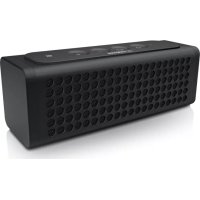
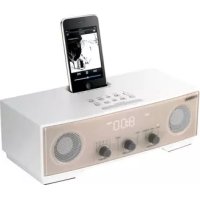
NXP100 - Docking station YAMAHA - Free user manual and instructions
Find the device manual for free NXP100 YAMAHA in PDF.



| Product type | Docking station (wireless portable speaker) |
| Brand | YAMAHA |
| Model | NXP100 |
| Dimensions (W × H × D) | 172 × 60 × 54 mm |
| Weight | 500 g |
| Power supply | AC adapter 5 V DC, 1 A (supplied); lithium-ion battery 3.6 V, 2100 mAh |
| Power consumption | 2 W (standby ≤ 0.5 W) |
| Battery life | Approx. 8 h (160 mW output) |
| Charging time | Approx. 5 h |
| Wireless connectivity | Bluetooth 2.1+EDR (A2DP, HFP, HSP); NFC (Android) |
| Bluetooth audio codecs | SBC, AAC, aptX |
| Connection ports | USB Type A (charging), USB Micro B, 3.5 mm AUX input |
| Audio functions | SR-Bass (bass reproduction technology), USB playback (96 kHz/24-bit) |
| Splash proof | Yes (do not immerse) |
| Voice guidance | 6 languages (French, English, German, Chinese, Korean, Japanese) |
| Voice control | Compatible with Siri and other assistants |
| Hands-free kit | Yes (via Bluetooth) |
| Auto power off | Yes (10 min without connection, 8 h during playback) |
| Supplied accessories | AC adapter, USB cable, 3.5 mm mini-jack cable, user manual |
| Maintenance and cleaning | Dry cloth; do not use solvents |
| Safety instructions | Read the manual; do not expose to water or heat; unplug during thunderstorms |
| Repairability | Contact a Yamaha authorized service center; do not open |
Frequently Asked Questions - NXP100 YAMAHA
User questions about NXP100 YAMAHA
0 question about this device. Answer the ones you know or ask your own.
Ask a new question about this device
Download the instructions for your Docking station in PDF format for free! Find your manual NXP100 - YAMAHA and take your electronic device back in hand. On this page are published all the documents necessary for the use of your device. NXP100 by YAMAHA.
USER MANUAL NXP100 YAMAHA
IMPORTANT SAFETY INSTRUCTIONS
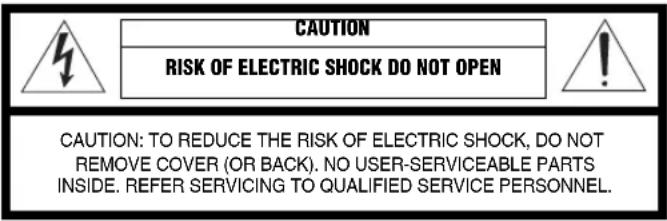

- Explanation of Graphical Symbols
The lightning flash with arrowhead symbol, within an equilateral triangle, is intended to alert you to the presence of uninsulated “dangerous voltage” within the product’s enclosure that may be of sufficient magnitude to constitute a risk of electric shock to persons.

The exclamation point within an equilateral triangle is intended to alert you to the presence of important operating and maintenance (servicing) instructions in the literature accompanying the appliance.
IMPORTANT
Please record the serial number of this unit in the space below.
MODEL:
Serial No.:
The serial number is located on the bottom of the unit. Retain this Owner's Manual in a safe place for future reference.
1 Read these instructions.
2 Keep these instructions.
3 Heed all warnings.
4 Follow all instructions.
5 Clean only with dry cloth.
6 Do not block any ventilation openings. Install in accordance with the manufacturer's instructions.
7 Do not install near any heat sources such as radiators, heat registers, stoves, or other apparatus (including amplifiers) that produce heat.
8 Do not defeat the safety purpose of the polarized or grounding-type plug. A polarized plug has two blades with one wider than the other. A grounding type plug has two blades and a third grounding prong. The wide blade or the third prong are provided for your safety. If the provided plug does not fit into your outlet, consult an electrician for replacement of the obsolete outlet.
9 Protect the power cord from being walked on or pinched particularly at plugs, convenience receptacles, and the point where they exit from the apparatus.
10 Only use attachments/accessories specified by the manufacturer.
11 Use only with the cart, stand, tripod, bracket, or table specified by the manufacturer, or sold with the apparatus. When a cart is used, use caution when moving the cart/apparatus combination to avoid injury from tip-over.
12 Unplug this apparatus during lightning storms or when unused for long periods of time.
13 Refer all servicing to qualified service personnel. Servicing is required when the apparatus has been damaged in any way, such as power-supply cord or plug is damaged, objects have fallen into the apparatus, does not operate normally, or has been dropped.

We Want You Listening For A Lifetime
Yamaha and the Electronic Industries Association's Consumer Electronics Group want you to get the most out of your equipment by playing it at a safe level. One that lets the sound come through loud and clear without annoying blaring or distortion – and, most importantly, without affecting your sensitive hearing. Since hearing damage from loud sounds is often undetectable until it is too late, Yamaha and the Electronic Industries Association's Consumer Electronics Group recommend you to avoid prolonged exposure from excessive volume levels.
FCC INFORMATION (for US customers)
1 IMPORTANT NOTICE: DO NOT MODIFY THIS UNIT!
This product, when installed as indicated in the instructions contained in this manual, meets FCC requirements. Modifications not expressly approved by Yamaha may void your authority, granted by the FCC, to use the product.
2 IMPORTANT: When connecting this product to accessories and/or another product use only high quality shielded cables. Cable/s supplied with this product MUST be used. Follow all installation instructions. Failure to follow instructions could void your FCC authorization to use this product in the USA.
3 NOTE: This product has been tested and found to comply with the requirements listed in FCC Regulations, Part 15 for Class "B" digital devices. Compliance with these requirements provides a reasonable level of assurance that your use of this product in a residential environment will not result in harmful interference with other electronic devices.
This equipment generates/uses radio frequencies and, if not installed and used according to the instructions found in the users manual, may cause interference harmful to the operation of other electronic devices.
Compliance with FCC regulations does not guarantee that interference will not occur in all installations. If this product is found to be the source of interference, which can be determined by turning the unit “OFF” and “ON”, please try to eliminate the problem by using one of the following measures:
Relocate either this product or the device that is being affected by the interference.
Utilize power outlets that are on different branch (circuit breaker or fuse) circuits or install AC line filter/s.
In the case of radio or TV interference, relocate/reorient the antenna. If the antenna lead-in is 300 ohm ribbon lead, change the lead-in to coaxial type cable.
If these corrective measures do not produce satisfactory results, please contact the local retailer authorized to distribute this type of product. If you can not locate the appropriate retailer, please contact Yamaha Corporation of America A/V Division, 6600 Orangethorpe Avenue, Buena Park, CA 90620, USA.
The above statements apply ONLY to those products distributed by Yamaha Corporation of America or its subsidiaries.
NOTICE
This equipment has been tested and found to comply with the limits for a Class B digital device, pursuant to part 15 of the FCC Rules. These limits are designed to provide reasonable protection against harmful interference in aresidential installation.
This equipment generates, uses and can radiate radio frequency energy and, if not installed and used in accordance with the instructions, may cause harmful interference to radio communications. However, there is no guarantee that interference will not occur in a particular installation. If this equipment does cause harmful interference to radio or television reception, which can be determined by turning the equipment off and on, the user is encouraged to try to correct the interference by one or more of the following measures:
– Reorient or relocate the receiving antenna.
– Increase the separation between the equipment and receiver.
- Connect the equipment into an outlet on a circuit different from that to which the receiver is connected.
- Consult the dealer or an experienced radio/TV technician for help.
This equipment compiles with FCC/IC radiation exposure limits set forth for uncontrolled equipment and meets the FCC radio frequency (RF) Exposure Guidelines in Supplement C to OET65 and RSS-102 of the IC radio frequency (RF) Exposure rules. This equipment has very low levels of RF energy that it deemed to comply without maximum permissive exposure evaluation (MPE). But it is desirable that it should be installed and operated with at least 20 cm and more between the radiator and person's body (excluding extremities: hands, wrists, feet and ankles).
This transmitter must not be co-located or operated in conjunction with any other antenna or transmitter.
FCC CAUTION
Change or modifications not expressly approved by the party responsible for compliance could void the user's authority to operate the equipment.
FOR CANADIAN CUSTOMERS
CAN ICES-3(B)/NMB-3(B)
This device complies with Industry Canada licence-exempt RSS standard(s). Operation is subject to the following two conditions:
(1) this device may not cause interference, and
(2) this device must accept any interference, including interference that may cause undesired operation of the device.
WARNING
TO REDUCE THE RISK OF FIRE OR ELECTRIC SHOCK, DO NOT EXPOSE THIS UNIT TO RAIN OR MOISTURE.
COMPLIANCE INFORMATION STATEMENT
(DECLARATION OF CONFORMITY PROCEDURE)
Responsible Party: Yamaha Corporation of America A/V Division
Address: 6600 Orangethorpe Avenue, Buena Park,
CA 90620, USA
Telephone: 1-714-522-9011
Type of Equipment: Portable Wireless Speaker
Model Name: NX-P100
This device complies with Part 15 of the FCC Rules.
Operation is subject to the following two conditions:
1) this device may not cause harmful interference, and
2) this device must accept any interference received including interference that may cause undesired operation of this device.
See user manual instructions if interference to radio reception is suspected.
CAUTION: READ THIS BEFORE OPERATING YOUR UNIT.
To assure the finest performance, please read this manual carefully. Keep it in a safe place for future reference.
1 Install this unit in a well ventilated, cool, dry, clean place - away from direct sunlight, heat sources, vibration, dust and/or cold. (Do not use/keep this unit in a car etc.)
2 Locate this unit away from other electrical appliances, motors, or transformers to avoid humming sounds.
3 Do not expose this unit to sudden temperature changes from cold to hot to prevent condensation inside this unit, which may cause an electrical shock, fire, damage to this unit, and/or personal injury.
4 Avoid installing this unit where foreign objects may fall onto this unit. On the top of this unit, do NOT place:
- Other components, as they may cause damage and/or discoloration on the surface of this unit.
- Burning objects (i.e. candles), as they may cause fire, damage to this unit, and/or personal injury.
- Containers with liquid in them, as they may fall and liquid may cause electrical shock to the user and/or damage to this unit.
5 Do not cover this unit with a newspaper, tablecloth, curtain, etc. in order not to obstruct heat radiation. If the temperature inside this unit rises, it may cause fire, damage to this unit, and/or personal injury.
6 Do not operate this unit upside-down. They may overheat, possibly causing damage.
7 Do not use force on switches, knobs, and/or cords.
8 When disconnecting the power cable from the wall outlet, grasp the AC plug; do not pull the cord.
9 Do not clean this unit with chemical solvents; this might damage the finish. Use a clean, dry cloth.
10 Only the voltage specified on this unit must be used. Using this unit with a higher voltage than specified is dangerous and may cause fire, damage to this unit, and/or personal injury. Yamaha will not be held responsible for any damage resulting from use of this unit with a voltage other than that specified.
11 Do not attempt to modify or fix this unit. Contact qualified Yamaha service personnel when any service is needed. The cabinet should
never be opened for any reason.
12 When not planning to use this unit for long periods of time (i.e. when going on vacation), disconnect the power cable from the AC wall outlet.
13 Be sure to read the "TROUBLESHOOTING" section regarding common operating errors before concluding that the unit is faulty.
14 Before moving this unit, disconnect the power cable from the wall outlet.
15 Be sure to use the AC adaptor supplied with this unit. Using an AC adaptor other than the one provided may cause fire or damage to this unit.
16 Install this unit near the wall outlet and where the power cable can be reached easily.
17 For added protection for this product during a lightning storm, or when it is left unattended and unused for long periods of time, unplug it from the wall outlet. This will prevent damage to the product due to lightning and power-line surges.
18 Never recharge this unit while it is wet, may cause fire or damage due to electric shock or short-circuit.
This unit is not disconnected from the AC power source as long as it is connected to the wall outlet, even if this unit itself is turned off by In this state, this unit is designed to consume a very small quantity of power.
This device contains a lithium-ion battery. After usage, you may recycle the battery, but never attempt to remove it by yourself. Have the device inspected by qualified Yamaha service personnel. If there is no Yamaha service personnel in your area, dispose of it properly according to relevant environmental laws and disposal rules in your area.
CONTENTS
CONTROLS AND FUNCTIONS ......2
Control buttons 2
Connectors 2
RECHARGING 3
Recharging this unit ....3
Recharging from a power outlet 3
Recharging from your PC 3
Recharging your smartphone or music player from this unit...4
CONNECTING 4
Connecting via Bluetooth connection ....4
Pairing 4
Connecting to an already-paired device
via Bluetooth connection 6
Disconnecting a Bluetooth connection 6
Connecting via AUX ....7
Connecting via USB 7
PLAYING MUSIC ....8
USING AS A SPEAKERPHONE 9
OTHER FUNCTIONS ......9
Voice guidance 9
Voice control function 9
Auto power off 9
TROUBLESHOOTING ....10
SPECIFICATIONS ....13
FEATURES
- Playing music via a wireless Bluetooth connection
- Easy pairing through the NFC (Near Field Communication) function
- Outdoor use also available through a splash-proof structure
- Playing music anywhere through a built-in lithium-ion battery
- Recharging your smartphone or music player from the built-in battery
- Playing music via a AUX connection
- Reproducing the bass beyond the size through the Yamaha-specific bass reproduction technology SR-Bass™
- Playing high-quality sounds and low-latency music through the aptX® codec
- Playing high-quality USB music through the Asynchronous Transfer Mode
- A handsfree talk with the supported device such as a mobile phone
- Works with Siri and other voice control functions
- Giving voice information about a remaining battery level, etc. (six languages to select from)
SUPPLIED ACCESSORIES
Please confirm that the following accessories are included before using the unit.
- AC adaptor
- USB cable
- 3.5 mm stereo mini plug cable
- Owner's manual (This manual)
CONTROLS AND FUNCTIONS
Control buttons
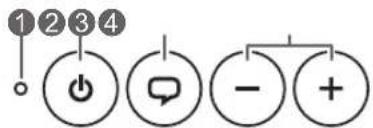
Indicates the status of this unit.
② Power button
Turn ON/OFF the power of this unit.
When you turn on the power, the LED indicator will light up in orange and a Bluetooth connection will be ready.
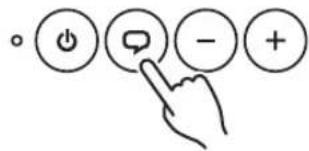
③Talk button
When pressing the Talk button while your mobile phone connected with this unit via Bluetooth connection is ringing, you can answer your phone with your hands free (P. 9). It also has the following functions.
•Giving voice information about a remaining battery level etc. (P.9)
• Voice-activated operation of device with voice control function (P.9)
④ Volume -/+ buttons
Adjust the volume.
Connectors
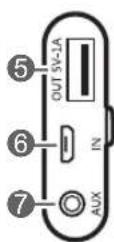
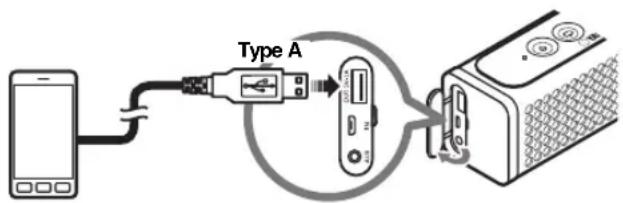
⑤USB port (Type A)
Connect the USB cable (with a larger plug P. 4).
⑥USB port (Micro B)
Connect the USB cable (with a smaller plug ☐) (P. 3, 7).
7AUX
Connect the 3.5 mm stereo mini plug cable (P. 7).
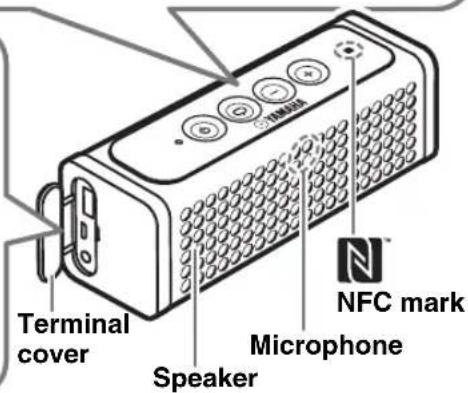
RECHARGING
You can recharge this unit by the following methods. You can also recharge your smartphone or music player from the battery in this unit.
Recharging this unit
◆Recharging from a power outlet
Connect the unit to an outlet using the supplied USB cable and AC adaptor.
◆Recharging from your PC
Connect the unit to your PC using the supplied USB cable.
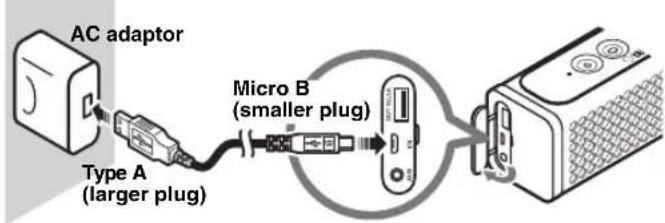
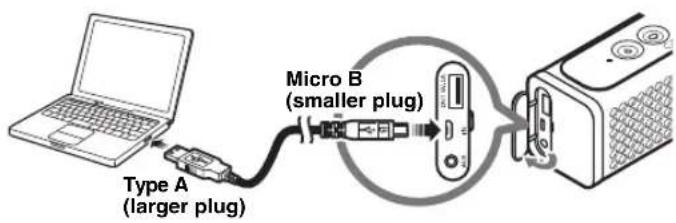

•Recharge time is about five hours.
- While this unit is being recharged, its LED indicator blinks slowly. It will light up after the unit has recharged (its light will go out if the power is turned off during recharging).
- When a remaining battery level of this unit has decreased, its LED indicator will blink rapidly.
!
- In the place where temperature is very high or low, the unit may be recharged earlier than usual or fail to be recharged.
- In order to maintain the function, the unit should be recharged every six months.
- The rechargeable battery has a limited lifespan. Its capacity decreases gradually with the frequency of use and the passage of time.
- The lifespan of the rechargeable battery varies according to how it is stored, usage conditions and usage environment.
Recharging your smartphone or music player from this unit
Connect the unit to your smartphone or music player using the USB cable that supports your device.
CONNECTING
!
- Some devices may not be recharged properly.
- The USB port (Type A) is designed for a recharge. No data communication is available.

During a recharge, turn off the power of this unit. After you turn off its power, the device can be recharged for a maximum of two hours.
This unit can be connected to an external device via Bluetooth connection, AUX, or USB.
Connecting via Bluetooth connection
◆ Pairing
Pairing is an operation that registers the communicating device (hereafter called “the connecting device”) with this unit.
You need to perform the pairing operation when using a Bluetooth connection for the first time or if the pairing data has been deleted.

- Make sure that the distance between this unit and the connecting device is within 10m (no obstacle).
- Check that the pairing process has completed successfully at the connecting device. If not, perform the pairing operation again.
- If the power supply to this unit is cut off during the pairing operation, the pairing data may be abandoned. In that case, perform the pairing operation again.
- This unit can be paired with up to eight connecting devices. When pairing with the ninth device has succeeded, pairing data for the device with the oldest Bluetooth connection date will be deleted.
- If this unit is connected with another device via Bluetooth connection, disconnect the connection with that device before performing the pairing operation (P.6).
CONNECTING
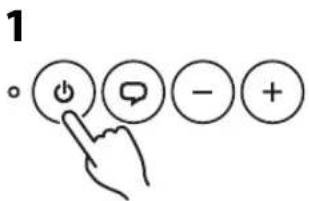
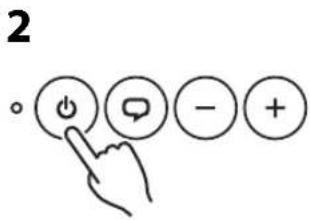
- Press the (Power) button to turn on the power of this unit.
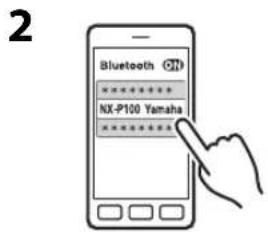
- Perform the pairing operation on the connecting device (for details, refer to the owner's manual of the connecting device).
This unit is indicated as "NX-P100 Yamaha" on the connecting device.
If you are asked to enter a passkey, enter the numerals "0000".
□ Easy pairing
For the smartphone with NFC (Near Field Communication) function, you can easily perform the pairing operation just by touching the NFC mark on this unit with your smartphone (you need to turn on the power of this unit and turn on the NFC function of the connecting device beforehand).
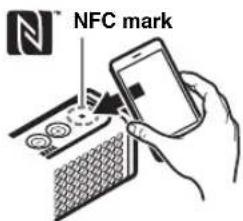

If the connection fails, move the smartphone slowly on the NFC mark. If the smartphone is equipped with a case, remove the case.
◆ Connecting to an already-paired device via Bluetooth connection
For pairing, please see "Pairing" (P.4).
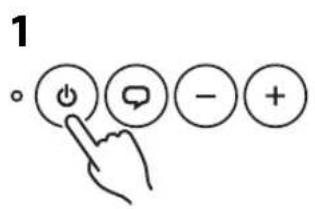
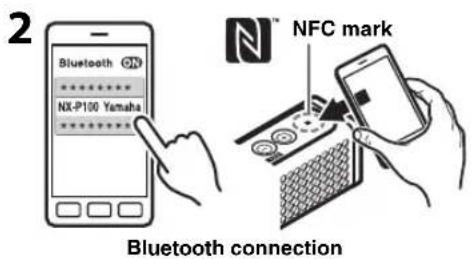

- Press the (Power) button to turn on the power of this unit.
- Connect the already-paired connecting device to this unit via Bluetooth connection.
When the Bluetooth connection has been established, the LED indicator will light in blue.

- You can omit this operation if the connecting device can be connected automatically via Bluetooth connection while pairing.
- If the device is latest recently connected one via Bluetooth connection, this unit and the connecting device are connected automatically via Bluetooth connection when you turn on the power of this unit.
◆ Disconnecting a Bluetooth connection
When you perform any one of the following operations during a Bluetooth connection, the connection will be disconnected.
- Hold down the ⏻(Power) button on this unit (for about one second).
- Disconnect the Bluetooth connection at the connecting device.
- Touch the NFC mark with the smartphone with NFC function during Bluetooth connection.
- Turn off the power of this unit.
When the connection is disconnected, the color of the LED indicator will change from blue to orange (when the power is turned off, its light will go out).
Connecting via AUX
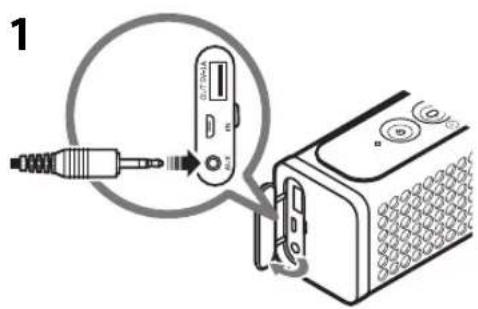
Turn off the power of this unit and connecting device before connection.
Connecting via USB
- Connect your smartphone or music player to the AUX using the supplied 3.5 mm stereo mini plug cable.
-
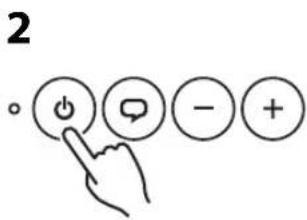
Press the (Power) button to turn on the power of this unit.
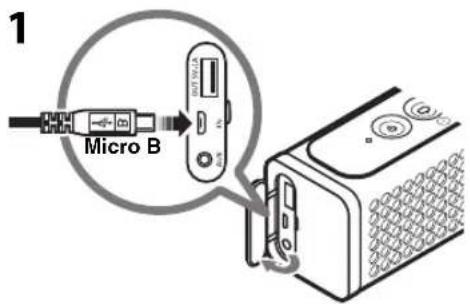
-
Connect your PC to the USB port (Micro B) using the supplied USB cable.

It cannot be connected to the Type A port.
- Press the (Power) button to turn on the power of this unit.
PLAYING MUSIC
1
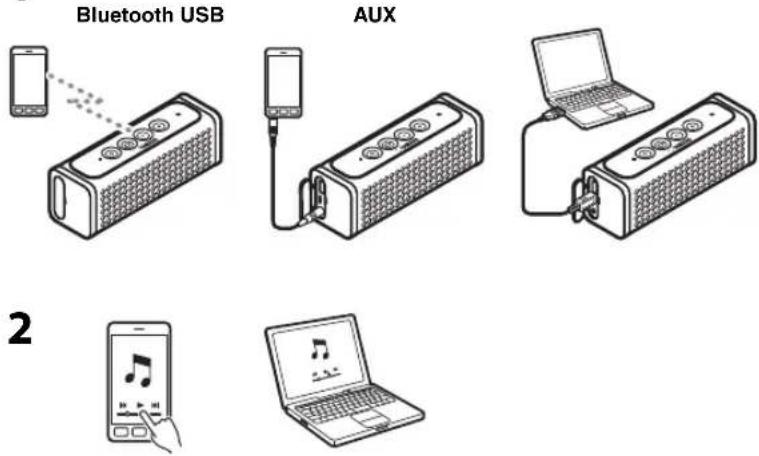
- Connect the device to this unit (P. 4, 7).
- Play back the connected device.

- Turn down the volume of this unit and connected device before playback.
• Take care that the volume setting of this unit is not too high. We recommend that you adjust the volume on the connecting device.

- If two or more devices are connected to this unit, those that play music will be prioritized in order: Bluetooth connection > AUX > USB.
- If this unit has been on without any operation for eight hours while playing music, its power will be turned off automatically.
USING AS A SPEAKERPHONE
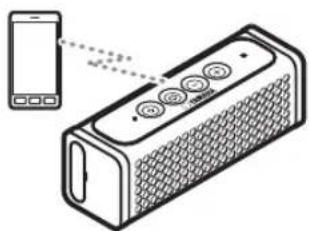
By connecting a handsfree-ready device, such as a mobile phone, via Bluetooth connection, you can talk with your hands free through the microphone and speaker of this unit.
1
natural_image
Illustration of a smartphone connected to a speaker with four buttons, showing no text or symbols present.2
-
Connect the handsfree-ready device to this unit via Bluetooth connection (P.4).
-
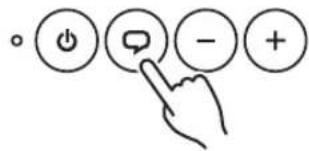
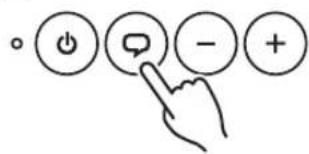
When your phone rings, press the (Talk) button on this unit.
A handsfree talk will begin. To finish it, press the (Talk) button once again.
OTHER FUNCTIONS
Voice guidance
When pressing the (Talk) button, you will obtain voice information about a remaining battery level of this unit, etc.
◆Selecting a language
When this unit is turned on the power without a Bluetooth connection, you can select a language by pressing the (Volume - or +) button while pressing the (Talk) button.

When you select a language, it will be announced by voice (if the voice guidance is disabled, a beep will sound instead). For selectable languages, please see "SPECIFICATIONS" (P. 13).
Voice control function
When a device with Siri or other voice control function is connected via Bluetooth connection, hold down the (Talk) button on this unit (about 1 second) to enable voice control of the device from this unit. For details, please refer to the instructions of the device.

May not function with some voice control applications.
Auto power off
If this unit has been on without a Bluetooth connection, AUX, or USB with your PC nor any operation for ten minutes, the power of the unit will be turned off automatically.
TROUBLESHOOTING
If this unit malfunctions, see the following troubleshooting first. If you encounter a problem that is not described below or if this unit still malfunctions after the following solutions are implemented, turn off the power of the unit and contact the nearest authorized Yamaha dealer or the service center.
General
| Problem Cause Solution | ||
| No sound. | The connection between this unit and the connecting device is not correct. | Establish the connection again (P. 4). |
| The volume on this unit or the connecting device is set to the minimum. | Raise the volume on this unit and the connecting device. | |
| The battery in this unit is weak. | Recharge the battery (P. 3). | |
| Even if the volume is raised, the sound level will not increase. | The protection circuitry has been activated by the excessive volume. | Lower the volume. |
| The volume on the connecting device is low. Raise the | volume on the connecting device. | |
| The LED indicator is blinking rapidly. | The battery in this unit is weak. | Recharge the battery (P. 3). |
| This unit does not work at all. | The battery in this unit is weak. | Recharge the battery (P. 3). |
| The unit may have received a strong electrical shock such as lightning or excessive static electricity. | Reset this unit by holding down the (Power) button for ten seconds or more.Reset has completed when the LED indicator is lit in white for a moment after you released the button.Wait for three seconds or more, and then turn on the power of this unit. | |
Bluetooth
| Problem Cause Solution | The connecting device does not support the Bluetooth profile of this unit. | Pair the unit with the supported device (P. 13). |
| Your device such as a Bluetooth adaptor has a passkey other than “0000”. | Use a device whose passkey is “0000”. | |
| This unit and the connecting device are too far apart. | Make sure that the distance between this unit and the connecting device is within 10 m. | |
| There is a device (a microwave oven, a wireless LAN, etc.) emitting signals in the 2.4 GHz frequency band nearby. | Move this unit away from the device that is emitting radio-frequency signals. | |
| The connection is already established with another device. | Disconnect another Bluetooth connection (P. 6). | |
| Cannot establish a Bluetooth connection. | Pairing with the connecting device is not complete successfully. | Perform the pairing operation again (P. 4). |
| No sound is produced or the sound is interrupted during playback. | The Bluetooth connection between this unit and the connecting device is disconnected. | Establish the connection again (P. 6). |
| This unit and the connecting device are too far apart. | Make sure that the distance between this unit and the connecting device is within 10 m. | |
| There is a device (a microwave oven, a wireless LAN, etc.) emitting signals in the 2.4 GHz frequency band nearby. | Move this unit away from the device that is emitting radio-frequency signals. | |
| The Bluetooth function of the connecting device is off. | Turn on the Bluetooth function of the connecting device. | |
| The connecting device is not sending Bluetooth signals to this unit. | Check whether the Bluetooth function of the connecting device is set up correctly. | |
| The connecting device is not targeted at this unit. | Change the target of the connecting device to this unit (NX-P100 Yamaha). | |
| Problem Cause Solution | ||
| The handsfree function is not available. | The connecting device does not support HFP or HSP. | Use a device that supports HFP or HSP. |
| When a handsfree-ready device is connected via Bluetooth connection, its ringtone cannot be heard from this unit. | The audio output of the device is not set to this unit. | Select this unit for the audio output by operating the device. |
USB
| Problem Cause Solution | ||
| No sound. | The connecting device is not targeted at this unit. | Change the target of the connecting device to this unit (NX-P100 Yamaha). |
| A cable is connected to the AUX. | When a cable is connected to the AUX, the playback from the AUX will take precedence. Remove the cable from the AUX. | |
Others
| Problem Cause Solution | ||
| The power of the unit is turned off unexpectedly. | The auto power off function was activated. | If this unit has been on without a Bluetooth connection, AUX, or USB with your PC nor any operation for ten minutes, the power of the unit will be turned off automatically.If, even while playing back music, this unit is left unattended for eight hours, its power will be turned off automatically. |
| The auto power off function does not work. | This unit is connected via Bluetooth connection, AUX, or USB with your PC. | Disconnect the Bluetooth connection, AUX, or USB with your PC. |
SPECIFICATIONS
[As of August, 2013]
Bluetooth
Bluetooth version ...... Ver. 2.1+EDR
Supported profile A2DP, HFP, HSP
Supported codec ....SBC, AAC, aptX®
Wireless output ...... Class 2
Maximum communication distance 10 m (no obstacle)
◆USB
Supported sample rate/bit 96 kHz/24 bit, 48 kHz/24 bit
Supported OS Windows XP, Vista, 7, 8
Mac OS 10.6.8, 10.7, 10.8
Input USB type ....USB Micro B
◆AUX
AUX input connector 3.5 mm (1/8 in.) stereo mini jack
◆NFC (Near Field Communication)
Supported model ......NFC-ready Android device Ver. 4.1, 4.2
* Some models may not work or be different in the required distance for connection.
◆Voice guidance
Supported language ....English, French, German, Chinese, Korean, Japanese
◆Smartphone recharge
Voltage/Current 5 V/I A
Output USB type .... USB Type A
◆Rechargeable battery
Built-in battery .... Lithium-ion battery
Capacity/Voltage 2100 mAh/3.6 V
Playable time ..... Under the fully recharged condition, about eight hours
(output: 160 mW)
Recharge time ....About five hours
Recharge temperature range 0 to 40 °C
Power
Power voltage/Frequency AC 120 V, 60 Hz
Power consumption 2 W
Standby power consumption with power "OFF" 0.5 W or less
AC adaptor ....MU05B2050100-A1 (DC 5 V, 1 A)
◆General
Dimensions (W × H × D) 172 × 60 × 54 mm
(6-3/4 × 2-3/8 × 2-1/8 in.)
Weight 500 g (1.1 lbs.)
* Specifications and appearances are subject to change for improvement without notice.
* The product label is located on the bottom of the unit.
* W i n d ^TM is a registered trademark of Microsoft Corporation in the U.S. and other countries.
* a p ℝ iXa trademark of CSR.
* Siri is a trademark of Apple Inc., registered in the U.S. and other countries.
Bluetooth
- Bluetooth is a technology for wireless communication between devices within an area of about 10 meters (33 ft.) employing the 2.4 GHz frequency band, a band which can be used without a license.
- Bluetooth is a registered trademark of the Bluetooth SIG and is used by Yamaha in accordance with a license agreement.
Handling Bluetooth communications
- The 2.4 GHz band used by Bluetooth compatible devices is a radio band shared by many types of equipment. While Bluetooth compatible devices use a technology minimizing the influence of other components using the same radio band, such influence may reduce the speed or distance of communications and in some cases interrupt communications.
- The speed of signal transfer and the distance at which communication is possible differs according to the distance between the communicating devices, the presence of obstacles, radio wave conditions and the type of equipment.
- Yamaha does not guarantee all wireless connections between this unit and devices compatible with Bluetooth function.
Do not use this unit within 22 cm (9 inches) of persons with a heart pacemaker implant or defibrillator implant.
Radio waves may affect electro-medical devices. Do not use this unit near medical devices or inside medical facilities.
Caution Regarding the Waterproofing
Although this unit's splash-proof design allows it to be used even where it may be exposed to a certain amount of rain, snow, or water spray, you should note and observe the following points.
- Do not allow large amounts of water to contact this unit.
- Do not place this unit in water. It may malfunction if it falls into water.
- If water droplets adhere to this unit, use a dry cloth to wipe them off as soon as possible. If this unit is exposed to a large amount of water, do not turn on the power immediately. Instead, let this unit dry out for at least one day in a dry location before you turn on the power.
- Since water may enter this unit through the slit on the bottom, place this unit with its control buttons facing upward.
- When using this unit in a location where it will be subject to water or high humidity, be sure to close the terminal cover.
- The AC adaptor is not splash-proof; do not let it get wet. Malfunctions caused by water entering this unit due to incorrect handling will not be covered by the warranty even if the warranty period is still in effect.
The user shall not reverse engineer, decompile, alter, translate or disassemble the software used in this unit, whether in part or in whole. For corporate users, employees of the corporation itself as well as its business partners shall observe the contractual bans stipulated within this clause. If the stipulations of this clause and this contract cannot be observed, the user shall immediately discontinue using the software.
PRÉCAUTIONS CONCERNANT LA SÉCURITÉ

DECLARATION D'INFORMATIONS DE CONFORMITE
(DECLARATION DE PROCEDURE DE CONFORMITE)
Entité responsable: Yamaha Corporation of America A/V Division
Adresse: 6600 Orangethorpe Avenue, Buena Park,
CA 90620, USA
Téléphone: 1-714-522-9011

natural_image
Diagram of a smartphone connected to a speaker with four buttons, showing sound waves and a grid pattern (no text or symbols)2
AUTRES FONCTIONS
Tension/Courant 5 V/1 A
◆Batterie rechargeable
Parte responsible: Yamaha Corporation of America A/V Division
Dirección: 6600
CA 90620, USA
Teléfono:
1-714-522-9011

The image is too blurry to recognize any text content.
natural_image
Illustration of a smartphone connected to a speaker grille device (no text or symbols present)2
◆NFC (Near Field Communication)
Modelo admitido ...... Dispositivo Android listo para NFC Ver. 4.1, 4.2
© 2013 Yamaha Corporation
YAMAHA CORPORATION
Printed in China ZH45910-1
- IMPORTANT SAFETY INSTRUCTIONS
- IMPORTANT
- We Want You Listening For A Lifetime
- FCC INFORMATION (for US customers)
- IMPORTANT NOTICE: DO NOT MODIFY THIS UNIT!
- NOTICE
- FCC CAUTION
- FOR CANADIAN CUSTOMERS
- WARNING
- COMPLIANCE INFORMATION STATEMENT
- CAUTION: READ THIS BEFORE OPERATING YOUR UNIT.
- CONTENTS
- CONTROLS AND FUNCTIONS ......2
- RECHARGING 3
- CONNECTING 4
- PLAYING MUSIC ....8
- USING AS A SPEAKERPHONE 9
- OTHER FUNCTIONS ......9
- TROUBLESHOOTING ....10
- SPECIFICATIONS ....13
- FEATURES
- SUPPLIED ACCESSORIES
- CONTROLS AND FUNCTIONS
- Control buttons
- ② Power button
- ③Talk button
- ④ Volume -/+ buttons
- Connectors
- ⑤USB port (Type A)
- ⑥USB port (Micro B)
- 7AUX
- RECHARGING
- Recharging this unit
- ◆Recharging from a power outlet
- ◆Recharging from your PC
- !
- Recharging your smartphone or music player from this unit
- CONNECTING
- Connecting via Bluetooth connection
- ◆ Pairing
- □ Easy pairing
- ◆ Connecting to an already-paired device via Bluetooth connection
- ◆ Disconnecting a Bluetooth connection
- Connecting via AUX
- Connecting via USB
- PLAYING MUSIC
- USING AS A SPEAKERPHONE
- OTHER FUNCTIONS
- Voice guidance
- ◆Selecting a language
- Voice control function
- Auto power off
- TROUBLESHOOTING
- SPECIFICATIONS
- Bluetooth
- ◆USB
- ◆AUX
- ◆NFC (Near Field Communication)
- ◆Voice guidance
- ◆Smartphone recharge
- ◆Rechargeable battery
- Power
- ◆General
- Handling Bluetooth communications
- Caution Regarding the Waterproofing
- PRÉCAUTIONS CONCERNANT LA SÉCURITÉ
- DECLARATION D'INFORMATIONS DE CONFORMITE
- AUTRES FONCTIONS
- ◆Batterie rechargeable
Brand : YAMAHA
Model : NXP100
Category : Docking station