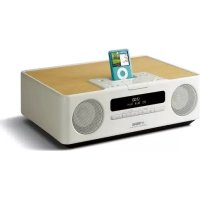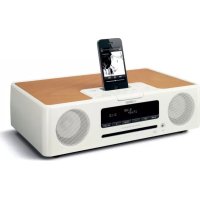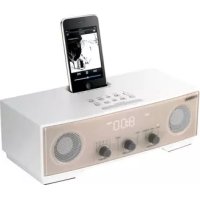
TSX80 - Docking station YAMAHA - Free user manual and instructions
Find the device manual for free TSX80 YAMAHA in PDF.


| Product type | Docking station |
| Brand | YAMAHA |
| Model | TSX80 |
| Dimensions (W x H x D) | 260 x 90 x 141 mm |
| Weight | 1.2 kg |
| Power supply | AC 120 V, 60 Hz (supplied AC adapter) |
| Power consumption | 10 W (operating), 1.2 W (off), 1.0 W (standby) |
| Output power | 4 W + 4 W + 8 W (1 kHz, 10% THD) |
| Speakers | 2 x 4 cm full-range speakers, 1 x 5.5 cm woofer with SR-Bass |
| Audio technologies | SR-Bass, DSP, 2.1 channel system |
| iPod/iPhone compatibility | iPod (5th generation, classic, nano, touch), iPhone, iPhone 3G, iPhone 3GS |
| Tuner | FM (87.50 - 107.90 MHz), AM (530 - 1710 kHz) |
| Auxiliary input | 3.5 mm stereo mini-jack |
| Supplied accessories | Remote control, AC adapter, power cord, docking station cover, FM indoor antenna, AM loop antenna |
| Main functions | iPod/iPhone player, FM/AM radio, AUX input, alarm, timer, sleep timer, clock, radio preset (5 FM + 5 AM) |
| Maintenance and cleaning | Clean with a dry and clean cloth. Do not use chemical solvents. |
| Safety | Respect ventilation clearances (15 cm above, 10 cm on rear and sides). Do not expose to water, rain or moisture. Use only the supplied AC adapter. |
| Repairability | Do not attempt to repair yourself. Consult a Yamaha authorized service. |
Frequently Asked Questions - TSX80 YAMAHA
User questions about TSX80 YAMAHA
0 question about this device. Answer the ones you know or ask your own.
Ask a new question about this device
Download the instructions for your Docking station in PDF format for free! Find your manual TSX80 - YAMAHA and take your electronic device back in hand. On this page are published all the documents necessary for the use of your device. TSX80 by YAMAHA.
USER MANUAL TSX80 YAMAHA
IMPORTANT SAFETY INSTRUCTIONS
CAUTION
RISK OF ELECTRIC SHOCK DO NOT OPEN

CAUTION: TO REDUCE THE RISK OF ELECTRIC SHOCK, DO NOT REMOVE COVER (OR BACK). NO USER-SERVICEABLE PARTS INSIDE. REFER SERVICING TO QUALIFIED SERVICE PERSONNEL.
- Explanation of Graphical Symbols
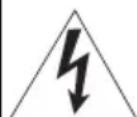
The lightning flash with arrowhead symbol, within an equilateral triangle, is intended to alert you to the presence of uninsulated "dangerous voltage" within the product's enclosure that may be of sufficient magnitude to constitute a risk of electric shock to persons.

The exclamation point within an equilateral triangle is intended to alert you to the presence of important operating and maintenance (servicing) instructions in the literature accompanying the appliance.
IMPORTANT
Please record the serial number of this unit in the space below.
MODEL:
Serial No.:
The serial number is located on the rear of the unit. Retain this Owner's Manual in a safe place for future reference.
1 Read these instructions.
2 Keep these instructions.
3 Heed all warnings.
4 Follow all instructi
5 Do not use this apparatus near water.
6 Clean only with dry cloth.
7 Do not block any ventilation openings. Install in accordance with the manufacturer's instructions.
8 Do not install near any heat sources such as radiators, heat registers, stoves, or other apparatus (including amplifiers) that produce heat.
9 Do not defeat the safety purpose of the polarized or grounding-type plug. A polarized plug has two blades with one wider than the other. A grounding type plug has two blades and a third grounding prong. The wide blade or the third prong are provided for your safety. If the provided plug does not fit into your outlet, consult an electrician for replacement of the obsolete outlet.
10 Protect the power cord from being walked on or pinched particularly at plugs, convenience receptacles, and the point where they exit from the apparatus.
11 Only use attachments/accessories specified by the manufacturer.
12 Use only with the cart, stand, tripod, bracket, or table specified by the manufacturer, or sold with the apparatus. When a cart is used, use caution when moving the cart/apparatus combination to avoid injury from tip-over.
13 Unplug this apparatus during lightning storms or when unused for long periods of time.
14 Refer all servicing to qualified service personnel. Servicing is required when the apparatus has been damaged in any way, such as power-supply cord or plug is damaged, liquid has been spilled or objects have fallen into the apparatus, the apparatus has been exposed to rain or moisture, does not operate normally, or has been dropped.
We Want You Listening For A Lifetime
Yamaha and the Electronic Industries Association's Consumer Electronics Group want you to get the most out of your equipment by playing it at a safe level. One that lets the sound come through loud and clear without annoying blaring or distortion – and, most importantly, without affecting your sensitive hearing. Since hearing damage from loud sounds is often undetectable until it is too late, Yamaha and the Electronic Industries Association's Consumer Electronics Group recommend you to avoid prolonged exposure from excessive volume levels.
FCC INFORMATION (for US customers)
1 IMPORTANT NOTICE: DO NOT MODIFY THIS UNIT!
This product, when installed as indicated in the instructions contained in this manual, meets FCC requirements. Modifications not expressly approved by Yamaha may void your authority, granted by the FCC, to use the product.
2 IMPORTANT: When connecting this product to accessories and/or another product use only high quality shielded cables. Cable/s supplied with this product MUST be used. Follow all installation instructions. Failure to follow instructions could void your FCC authorization to use this product in the USA.
3 NOTE: This product has been tested and found to comply with the requirements listed in FCC Regulations, Part 15 for Class "B" digital devices. Compliance with these requirements provides a reasonable level of assurance that your use of this product in a residential environment will not result in harmful interference with other electronic devices. This equipment generates/uses radio frequencies and, if not installed and used according to the instructions found in the users manual, may cause interference harmful to the operation of other electronic devices.
Compliance with FCC regulations does not guarantee that interference will not occur in all installations. If this product is found to be the source of interference, which can be determined by turning the unit "OFF" and "ON", please try to eliminate the problem by using one of the following measures:
Relocate either this product or the device that is being affected by the interference.
Utilize power outlets that are on different branch (circuit breaker or fuse) circuits or install AC line filter/s.
In the case of radio or TV interference, relocate/ reorient the antenna. If the antenna lead-in is 300 ohm ribbon lead, change the lead-in to coaxial type cable.
If these corrective measures do not produce satisfactory results, please contact the local retailer authorized to distribute this type of product. If you can not locate the appropriate retailer, please contact Yamaha Electronics Corp., U.S.A. 6660 Orangethorpe Ave., Buena Park, CA 90620.
The above statements apply ONLY to those products distributed by Yamaha Corporation of America or its subsidiaries.
FCC WARNING
Change or modifications not expressly approved by the party responsible for compliance could void the user's authority to operate the equipment.
FOR CANADIAN CUSTOMERS
To prevent electric shock, match wide blade of plug to wide slot and fully insert.
This Class B digital apparatus complies with Canadian ICES-003.
CAUTION: READ THIS BEFORE OPERATING YOUR UNIT.
1 To assure the finest performance, please read this manual carefully. Keep it in a safe place for future reference.
2 Install this unit in a well ventilated, cool, dry, clean place - away from direct sunlight, heat sources, vibration, dust, moisture and cold. For proper ventilation, allow the following minimum clearances. Top: 15cm (6 in) Rear: 10cm (4 in) Sides: 10cm (4 in)
3 Locate this unit away from other electrical appliances, motors, or transformers to avoid humming sounds.
4 Do not expose this unit to sudden temperature changes from cold to hot, and do not locate this unit in an environment with high humidity (i.e. a room with a humidifier) to prevent condensation inside this unit, which may cause an electrical shock, fire, damage to this unit, and/or personal injury.
5 Avoid installing this unit where foreign object may fall onto this unit and/or this unit may be exposed to liquid dripping or splashing. On the top of this unit, do not place:
- Other components, as they may cause damage and/or discoloration on the surface of this unit.
- Burning objects (i.e. candles), as they may cause fire, damage to this unit, and/or personal injury.
- Containers with liquid in them, as they may fall and liquid may cause electrical shock to the user and/or damage to this unit.
6 Do not cover this unit with a newspaper, tablecloth, curtain, etc. in order not to obstruct heat radiation. If the temperature inside this unit rises, it may cause fire, damage to this unit, and/or personal injury.
7 Do not plug in this unit to a wall outlet until all connections are complete.
8 Do not operate this unit upside-down. It may overheat, possibly causing damage.
9 Do not use force on switches, knobs and/or cords.
10 When disconnecting the power cable from the wall outlet, grasp the plug; do not pull the cable.
11 Do not clean this unit with chemical solvents; this might damage the finish. Use a clean, dry cloth.
12 Only voltage specified on this unit must be used. Using this unit with a higher voltage than specified is dangerous and may cause fire, damage to this unit, and/or personal injury. Yamaha will not be held responsible for any damage resulting from use of this unit with a voltage other than specified.
13 To prevent damage by lightning, keep the power cable disconnected from a wall outlet or this unit during a lightning storm.
14 Do not attempt to modify or fix this unit. Contact qualified Yamaha service personnel when any service is needed. The cabinet should never be opened for any reasons.
15 When not planning to use this unit for long periods of time (i.e. vacation), disconnect the AC power plug from the wall outlet.
16 Be sure to read the "TROUBLESHOOTING" section on common operating errors before concluding that this unit is faulty.
17 Before moving this unit, press set the system to off, and disconnect the AC power plug from the wall outlet.
18 Condensation will form when the surrounding temperature changes suddenly. Disconnect the power cable from the outlet, then leave this unit alone.
19 When using this unit for a long time, this unit may become warm. Turn the system off, then leave this unit alone for cooling.
20 Install this unit near the wall outlet and where the AC power plug can be reached easily.
21 The batteries shall not be exposed to excessive heat such as sunshine, fire or the like. When you dispose of batteries, follow your regional regulations.
22 Be sure to use the AC adaptor supplied with this unit. Using an AC adaptor other than the one provided may cause fire or damage to this unit.
This unit is not disconnected from the AC power source as long as it is connected to the wall outlet, even if this unit itself is turned off by in this state, this unit is designed to consume a very small quantity of power.
WARNING
TO REDUCE THE RISK OF FIRE OR ELECTRIC SHOCK,DO NOT EXPOSE THIS UNIT TO RAIN OR MOISTURE.
CAUTION
Danger of explosion if battery is incorrectly replaced. Replace only with the same or equivalent type.
There is a chance that placing this unit too close to a CRT-based (Braun tube) TV set might impair picture color. Should this happen, move this unit away from the TV set.
CONTENTS
NAMES OF PARTS AND THEIR FUNCTIONS
BASIC FUNCTIONS 4 LISTENING TO iPodTM AND EXTERNAL SOURCES. 6
LISTENING TO RADIO STATIONS 7
TROUBLESHOOTING 8
SPECIFICATIONS 9
■Features
- Hi-quality iPod/iPhone, radio and external device playability.
- Firm bass sound and spacious stereo sound from 2.1 ch speaker system (tweeter × 2, woofer × 1), SR-Bass™ (Yamaha Swing Radiator Bass technology) and DSP in a compact unit.
- Easy user-intuitive interface by buttons with Guide LED and knob dials.
■About this manual
- This unit is iPod and also iPhone-compatible. "iPod" described in this manual may also refer to "iPhone".
- This manual describes how to operate this unit using buttons on the unit. Some of these operations are also available using the remote control.
Supplied accessories
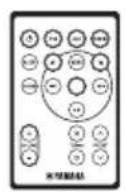
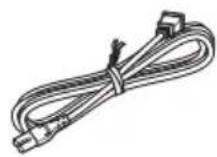
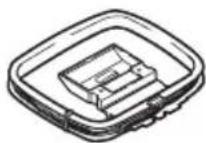
Remote control AC adaptor Power cable Dock cover Indoor FM antenna
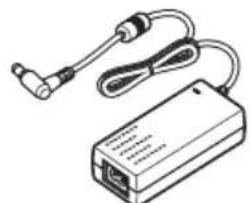
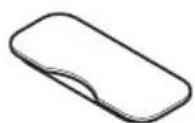
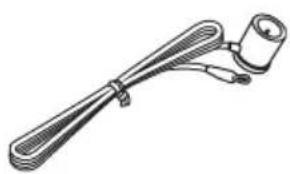
(DC 15 V, 2.66 A, model number: NU40-2150266-I3)
AM loop antenna
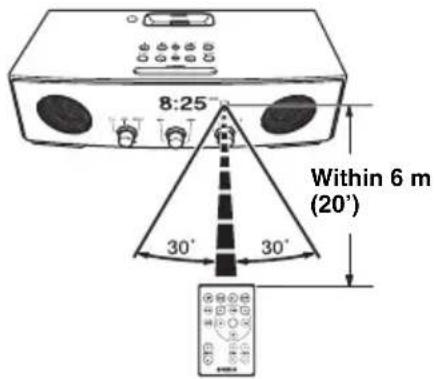
Using the remote control
Replacing the battery in the remote control
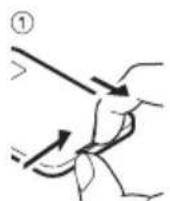
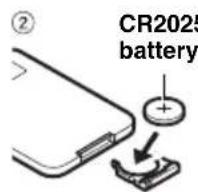
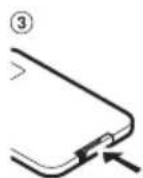
NAMES OF PARTS AND THEIR FUNCTIONS
■Front and top panel
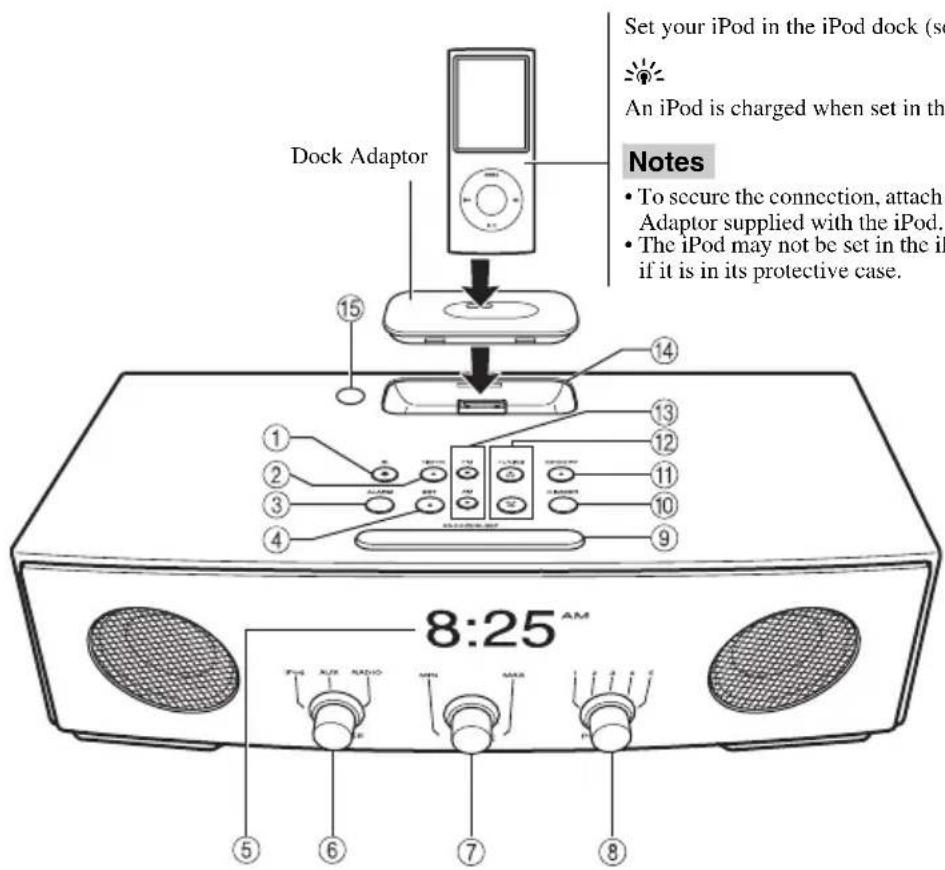
① :press to turn the system on/off.
Time is displayed even when the system is off.

- Press and hold the top of the unit for more than 3 seconds to set the system to standby mode. All the information on the front panel display is not displayed in standby mode. This can reduce power consumption. To cancel standby mode, press
- Even in system off/standby mode, the alarm function is available.
② TIMER: Timer setting (P. 5)
③ ALARM: Alarm on/off (P. 4)
④ SET: Alarm setting (P. 4)
⑤ Front panel display
⑥SOURCE: iPod, AUX, RADIO
⑦ VOLUME:Volume control
8 PRESET: Storing your favorite 5 FM and 5 AM stations (P.7)
⑨ SNOOZE/SLEEP (P.5)
DIMMER: Setting brightness of the front panel A (auto) 3 (brightest) 1 (darkest) back to A
When A (auto) is set, the brightness of the front panel is adjusted automatically depending on the brightness of the room.
⑪MEMORY (P.7)
TUNING (P.7)
⑬FM, AM: Switching FM/AM
iPod dock: Set an iPod.

Cover the iPod dock with the dock cover when not using.
⑤ Illumination sensor: Measuring surrounding illuminance. Do not cover this sensor.
Rear panel
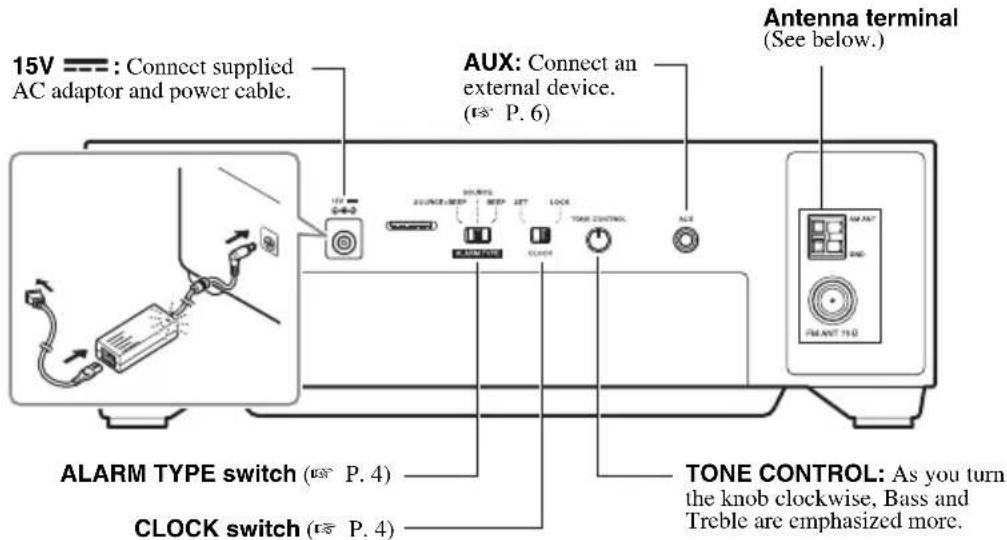
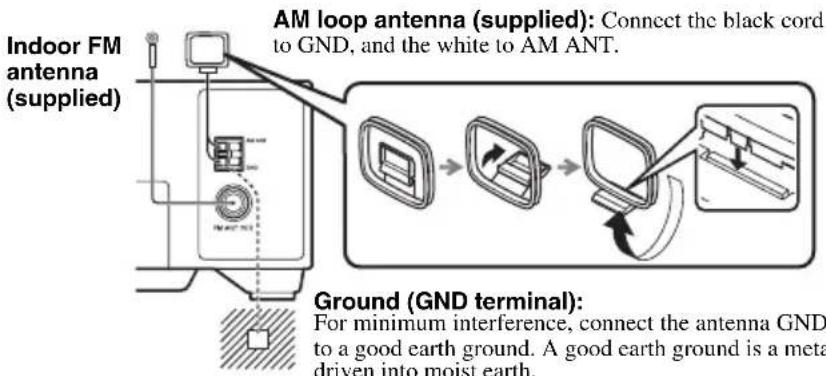
Connecting antennas
Notes
The antenna should be stretched out.
- If radio reception is poor, change the height, direction, or placement of the antenna.
If you use outdoor antennas instead of the supplied antennas, reception will be better.
Remote control
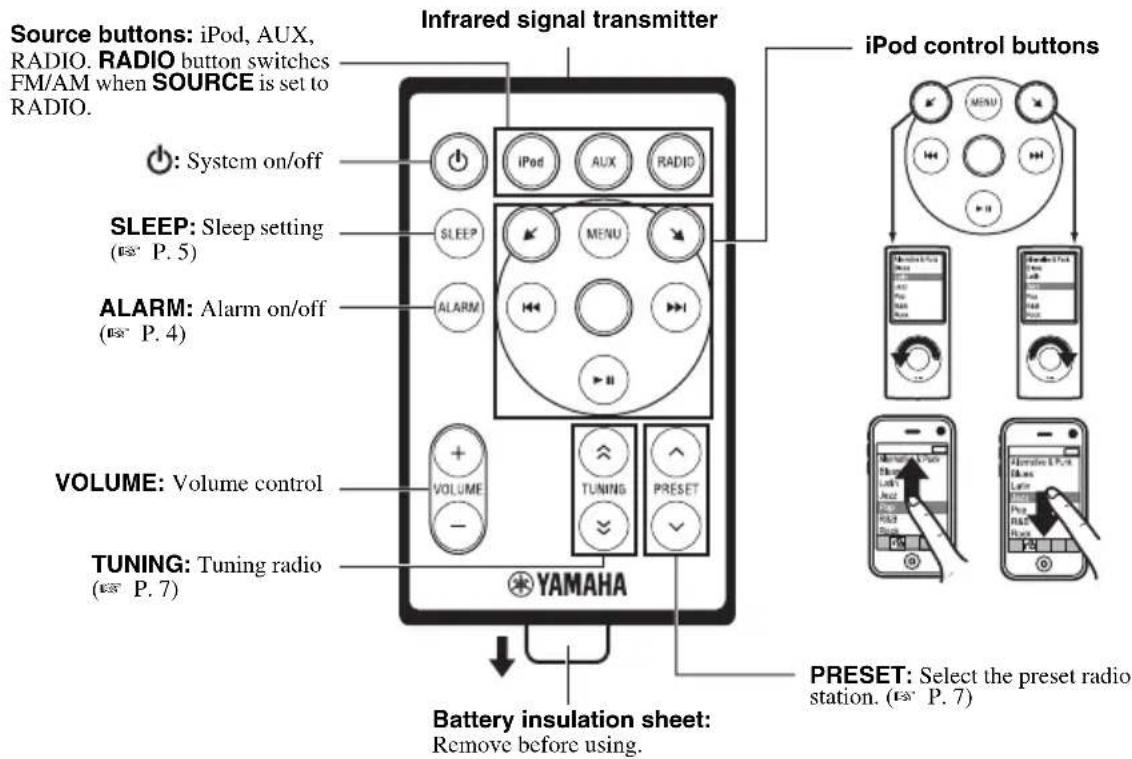
BASIC FUNCTIONS
Adjusting the clock
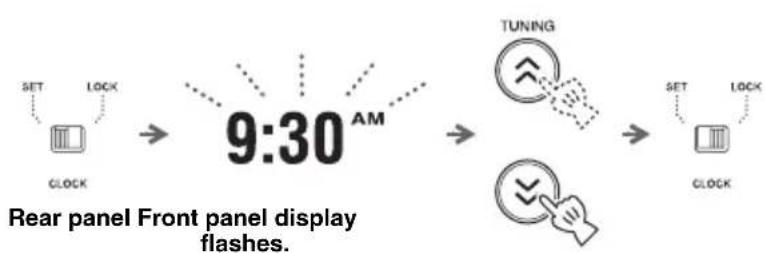
1 Set CLOCK to SET.
2 Set the time with TUNING.
3 Set CLOCK to LOCK.
Note
The time settings are lost approximately one week after unplugging the unit.
Alarm setting
This unit can play back iPod/radio and/or beep sound at the set time.
Setting the alarm time and sound
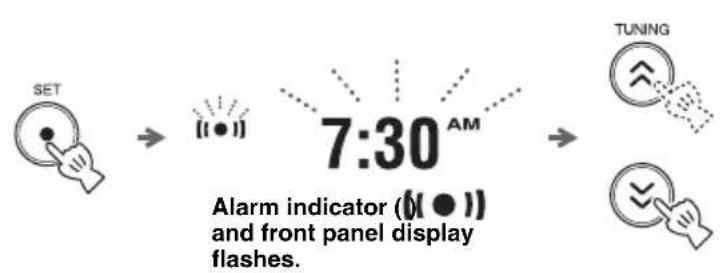
1 Press SET.
2 Set the alarm time with TUNING.
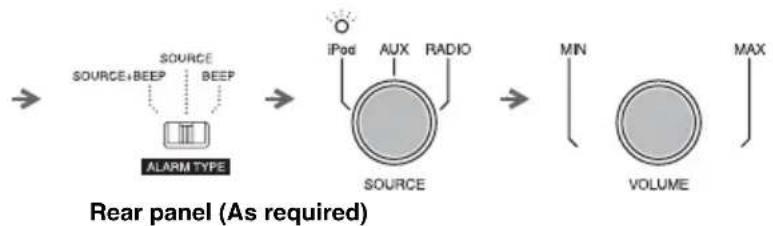
3 Set ALARM TYPE.
- SOURCE+BEEP: selected source (played back from 3 minutes before the alarm time) and beep sound (played back at the alarm time)
- SOURCE: selected source
BEEP: beep sound only
When you select SOURCE+BEEP or SOURCE, select:
- iPod: this unit resumes the song you listened to last time.
- RADIO: this unit plays back the radio station you listened to last time.
4 Set the alarm volume.
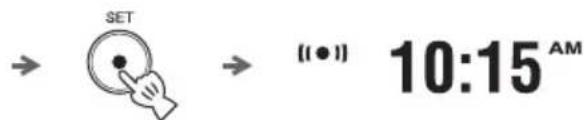
5 Press SET.
Alarm is set and the alarm indicator (up.
Note
When iPod is selected as a source, set the iPod in the iPod dock (P. 2). If iPod is not set at the alarm time, beep sound is played back.
Switching the alarm on/off
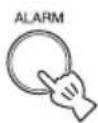
Switch on/off the alarm function.
When the alarm is on, the alarm indicator ( lights up and alarm time is displayed for a while.
Operations during playing back alarm sound
At the set time, alarm sound plays back. During playback, operations below are available.
Using the snooze function
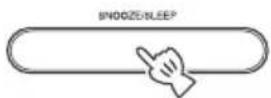
Press SNOOZE/SLEEP.
The alarm sound stops and resumes after 5 minutes.
■Stopping the alarm
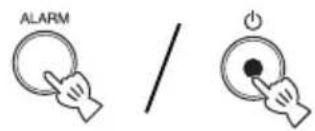
Press ALARM or
#
- Unless you stop the alarm, the alarm stops after 60 minutes automatically.
- When you stop the alarm, the alarm time setting, etc., is saved for convenient use next time.
Sleep setting
You can set the time to turn off the system automatically when sleep is set to on.
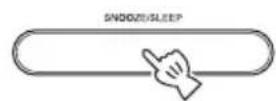
Press repeatedly.

Sleep indicator (and front panel display flash.
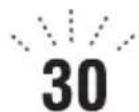
Select the sleep time.
You can set 30, 60, 90 or 120 minutes. When the sleep function is on, the sleep indicator (2) lights up.
中
To cancel the sleep, press SNOOZE/SLEEP.
Timer setting
You can set the countdown timer.
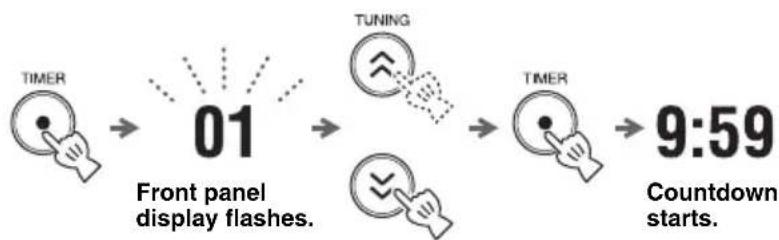
1 Press TIMER.
2 Set the countdown time with TUNING.
You can set the time,
- 1 to 15 minutes: minute steps.
20 to 120 minutes: 10-minute steps.
3 Press TIMER.
Countdown starts. When the timer reaches 0, the timer sound plays back.
#
- To stop the timer sound, press TIMER.
- To cancel the timer, press TIMER during countdown.
Note
Sleep and timer cannot be used together.
- Sleep cannot be set during countdown.
- Sleep is set to off when timer is set while sleep is on.
LISTENING TO iPod™ AND EXTERNAL SOURCES
Listening to your iPod™
For details on compatible iPod models, refer to "SPECIFICATIONS" (P.9).
■Playing back
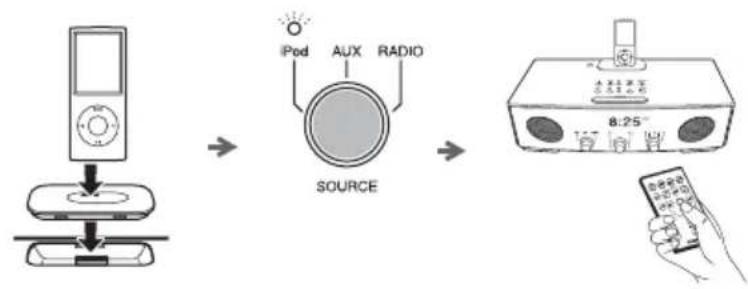
1 Set your iPod in the iPod dock.
2 S e t SOURCE to iPod.
3 Play the iPod.
Playback operations are available with both the remote control and the iPod set in the iPod dock.

- You can remove the iPod whenever you want.
- When music/video in the iPod is played back, this unit turns the system on automatically and plays back the iPod even if the unit is system off.
- This unit turns the system off automatically after a while if the iPod is turned off or removed from the iPod dock when SOURCE is set to iPod.
Playing back external sources
■Playing back
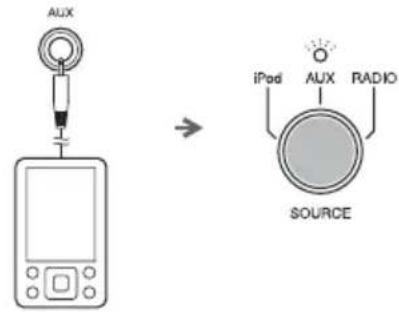
Rear panel
1 Connect your portable audio device to AUX using a commercially available 3.5mm (1/8 in) mini plug cable.
Note
Turn down the volume of this unit and your portable audio device before connection.
2 Set SOURCE to AUX.
3 Start playback on the connected portable audio device.
LISTENING TO RADIO STATIONS
Tuning radio stations
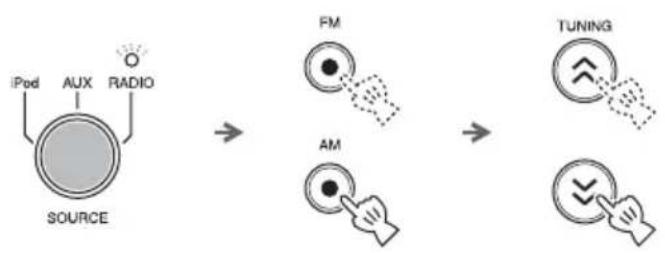
1 Set SOURCE to RADIO.
2 Select FM/AM.
3 For automatic tuning, press and hold TUNING.
For manual tuning, press TUNING repeatedly.
Note
If you tune to a station manually during FM reception, the sound is monaural.
Presetting radio stations
You can store your favorite 5 FM and 5 AM radio stations with the preset function.
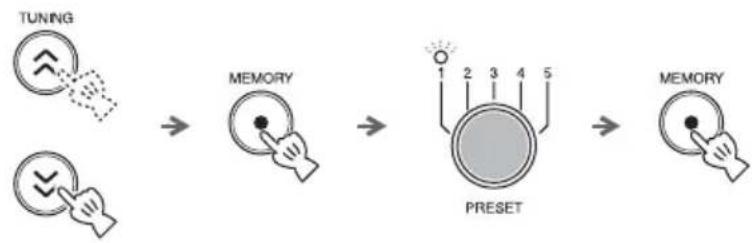
1 Tune into a favorite radio station.
2 Press MEMORY.
3 Select the PRESET number you want to store to.
#
To cancel the preset, press TUNING again.
4 Press MEMORY to complete.
Selecting preset radio stations
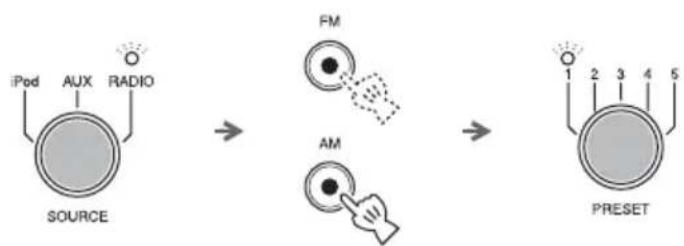
1 Set SOURCE to RADIO.
2 Select FM/AM.
3 Select the preset radio station with PRESET.
TROUBLESHOOTING
In case of a problem with the unit, check the following list first. If you cannot solve your problem with the suggested solutions or if your problem is not listed below, turn off and unplug the unit, and consult the nearest authorized Yamaha dealer or service center.
General
| Problem Cause Solution | ||
| The speakers make no sound. | The volume may be set to the minimum level. | Adjust the volume level. |
| The source may be incorrect. Select the correct source. | ||
| Sound suddenly turns off. | The sleep (P. 5) may be set. | Turn on the system and play the source again. |
| Sound is cracked/distorted or there is abnormal noise. | Input source volume is excessive, or volume of this unit is excessive (especially Bass). | Adjust volume with VOLUME, or adjust Bass with TONE CONTROL. |
| The unit does not operate properly. | The unit may have received a strong electrical shock such as lightning or excessive static electricity, or power supply may have dropped. | Set the system to off, and disconnect the power cable. Wait about 30 seconds, reconnect the power cable, and turn on the system. |
| The system turns on but immediately shuts off. | The power cable may be connected improperly. | Make sure the power cable is plugged into the wall outlet firmly. |
| The unit may have received a strong electrical shock such as lightning or excessive static electricity. | Set the system to off, and disconnect the power cable. Wait about 30 seconds, reconnect the power cable, and turn on the system. | |
| A digital or high-frequency equipment produces noises. | The unit may be placed too close to the digital or high-frequency equipment. | Place the unit farther away from the equipment. |
| The clock setting has been cleared. | The unit is left more than one week after you disconnect the power cable from the wall outlet. | Plug the power cable into the wall outlet firmly, and set the clock again (P. 4). |
| iPod does not play back at the alarm time even if SOURCE is set to iPod. | The iPod is not set in the iPod dock. | Set the iPod in the iPod dock (P. 2). |
| ALARM TYPE is set to BEEP. | Set ALARM TYPE to SOURCE+BEEP or SOURCE (P. 4). | |
| Clock flashes and the unit cannot be operated. | CLOCK on the rear panel is set to SET, and this unit is in clock setting mode. | Set CLOCK to LOCK. |
iPodTM
| Problem Cause Solution | ||
| No sound | The iPod is not set in the iPod dock firmly. | Set the iPod firmly. |
| Earphones are connected. Remove the earphones. | ||
| The iPod software version has not been updated. | Download the latest iTunes software to update the iPod software version to the latest. | |
| The iPod does not charge up. | The iPod is set in the iPod dock improperly. | Remove the iPod from the unit, and then set it in the iPod dock again (P. 2). |
Radio reception
| Problem Cause Solution | ||
| Too much noise during stereo broadcast. | The antenna may be connected improperly. | Make sure the antenna is connected properly (P. 3). |
| The radio station you selected may be far from your area, or the radio wave reception is weak in your area. | Try manual tuning to improve the signal quality (P. 7) or use a multi-channel outdoor antenna. | |
| Even with an outdoor antenna, radio wave reception is weak. (Sound is distorted.) | Multipath reflection or other radio interferences may have occurred. | Change the height, direction, or placement of the antenna. |
Remote control
| Problem Cause Solution | ||
| The remote control does not work properly. | The remote control may be operated outside its operation range. | For information on the remote control operation range, refer to “Using the remote control” (P.1). |
| The remote control sensor on the unit may be exposed to direct sunlight or lighting (inverted fluorescent lamps). | Change the lighting or orientation of the unit. | |
| The battery may be worn out. | Replace the battery with a new one(P.1). | |
| There are obstacles between the sensor of the unit and the remote control. | Remove the obstacles. |
SPECIFICATIONS
■PLAYER SECTION
iPod
- Supported iPod .........iPod (5th generation), iPod classic, iPod nano, iPod touch
- Supported iPhone............iPhone, iPhone 3G, iPhone 3GS
AUX IN
- Input connector .........STEREO L/R: 3.5 mm (1/8 in) STEREO mini jack
■AMPLIFIER SECTION
Maximum output power .4 W + 4 W + 8 W (6Ω1 kHz, 10% THD)
- Driver unit 4 cm (1 5/8 in) full-range driver × 2
5.5 cm (2 1/8 in) woofer + SR-Bass × 1
TUNER SECTION
Tuning range FM. .87.50 to 107.90 MHz AM .530 to 1710kHz
GENERAL
- Power supply AC 120 V, 60 Hz
Power consumption 10 W - System off consumption 1.2 W
- Standby consumption. 1.0 W or less
- Dimensions (W × H × D) 260 × 90 × 141 mm (10 1/4 × 3 1/2 × 5 1/2 in)
Weight. 1.2 kg (2.6 lbs.)
Specifications are subject to change without notice.
iPodTM, iPhoneTM
iPod is a trademark of Apple Inc., registered in the U.S. and other countries.
iPhone is a trademark of Apple Inc.
"Made for iPod" means that an electronic accessory has been designed to connect specifically to iPod and has been certified by the developer to meet Apple performance standards.
"Works with iPhone" means that an electronic accessory has been designed to connect specifically to iPhone and has been certified by the developer to meet Apple performance standards.
Apple is not responsible for the operation of this device or its compliance with safety and regulatory standards.
PRECAUTIONS CONCERNANT LA SÉCURITÉ
CAUTION
RISK OF ELECTRIC SHOCK DO NOT OPEN

ATTENTION:POUR REDUIRE LES RISQUES D'INCENDIE ET DE DECHARGE ELECTRIQUE,NE PAS RETIRER LE COUVERCLE (OU LE PANNEAU ARRÈRE). AUCUNE PIECE INTERNE NE POT ÉTRE CHANGÉE PAR L'UTILISATEUR. POUR L'ENTRETIEN, S'ADRESSER À UN PERSONNEL QUALIFIÉ.
2 Conserverces instructions.