VTBAL6 - Scale VELLEMAN - Free user manual and instructions
Find the device manual for free VTBAL6 VELLEMAN in PDF.

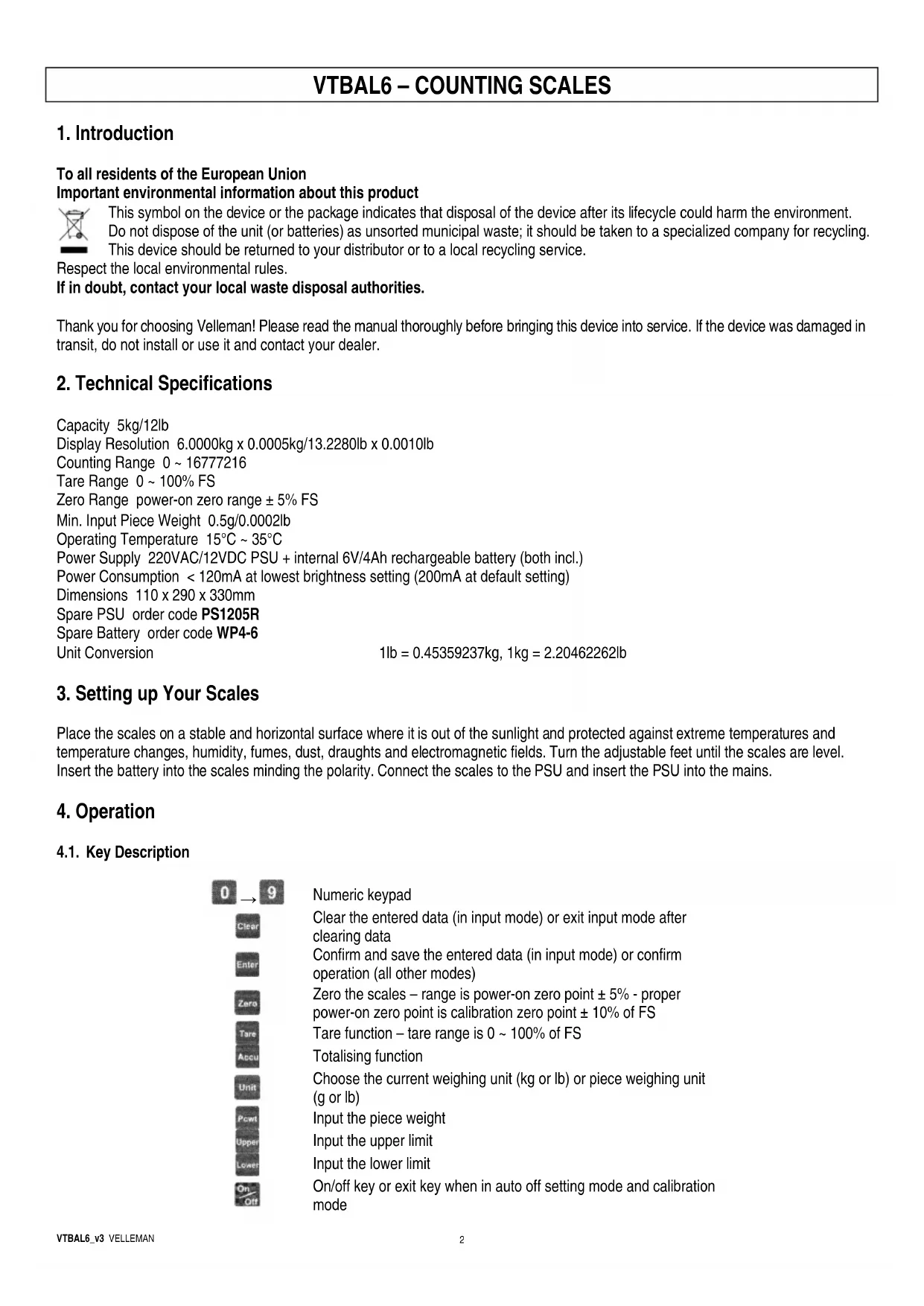


| Product type | Electronic counting scale |
| Brand | Velleman |
| Model | VTBAL6 |
| Dimensions | 110 x 290 x 330 mm |
| Power supply | Mains adapter 220 VAC / 12 VDC + internal battery 6 V / 4 Ah |
| Consumption | < 120 mA (200 mA default) |
| Maximum load | 5 kg / 12 lb |
| Resolution | 0.0005 kg (0.0010 lb) |
| Tare range | 0 to 100% of capacity |
| Minimum weight for counting | 0.5 g / 0.0002 lb |
| Measurement units | grams (g) or pounds (lb) |
| Operating temperature | 15 °C to 35 °C |
| Main functions | Weighing, tare, piece counting, totaling, upper/lower limits, auto-off timer |
| Display | Brightness adjustment (3 levels) |
| Calibration | Manual with calibration weight (25% to 100% of capacity) |
| Replacement battery | Part number WP4-6 (6 V / 4 Ah) |
| Replacement adapter | Part number PS1205R |
| Maintenance and cleaning | Clean with a soft, dry cloth; avoid moisture and harsh products |
| Safety | Use only original accessories; do not open the device |
| General information | Stable and horizontal surface; avoid magnetic fields and drafts |
Frequently Asked Questions - VTBAL6 VELLEMAN
User questions about VTBAL6 VELLEMAN
0 question about this device. Answer the ones you know or ask your own.
Ask a new question about this device
Download the instructions for your Scale in PDF format for free! Find your manual VTBAL6 - VELLEMAN and take your electronic device back in hand. On this page are published all the documents necessary for the use of your device. VTBAL6 by VELLEMAN.
USER MANUAL VTBAL6 VELLEMAN
To all residents of the European Union
Important environmental information about this product

This symbol on the device or the package indicates that disposal of the device after its lifecycle could harm the environment.
Do not dispose of the unit (or batteries) as unsorted municipal waste; it should be taken to a specialized company for recycling.
This device should be returned to your distributor or to a local recycling service.
Respect the local environmental rules.
If in doubt, contact your local waste disposal authorities.
Thank you for choosing Velleman! Please read the manual thoroughly before bringing this device into service. If the device was damaged in transit, do not install or use it and contact your dealer.
2. Technical Specifications
Capacity 5kg/12lb
Display Resolution 6.0000kg x 0.0005kg/13.2280lb x 0.0010lb
Counting Range 0 ~ 16777216
Tare Range 0 ~ 100% FS
Zero Range power-on zero range ± 5% FS
Min. Input Piece Weight 0.5g/0.0002lb
Operating Temperature 15^ 35^
Power Supply 220VAC/12VDC PSU + internal 6V/4Ah rechargeable battery (both incl.)
Power Consumption < 120mA at lowest brightness setting (200mA at default setting)
Dimensions 110 × 290 × 330mm
Spare PSU order code PS1205R
Spare Battery order code WP4-6
Unit Conversion
$$ 1 \mathrm {l b} = 0. 4 5 3 5 9 2 3 7 \mathrm {k g}, 1 \mathrm {k g} = 2. 2 0 4 6 2 2 6 2 \mathrm {l b} $$
3. Setting up Your Scales
Place the scales on a stable and horizontal surface where it is out of the sunlight and protected against extreme temperatures and temperature changes, humidity, fumes, dust, draughts and electromagnetic fields. Turn the adjustable feet until the scales are level. Insert the battery into the scales minding the polarity. Connect the scales to the PSU and insert the PSU into the mains.
4. Operation
4.1. Key Description
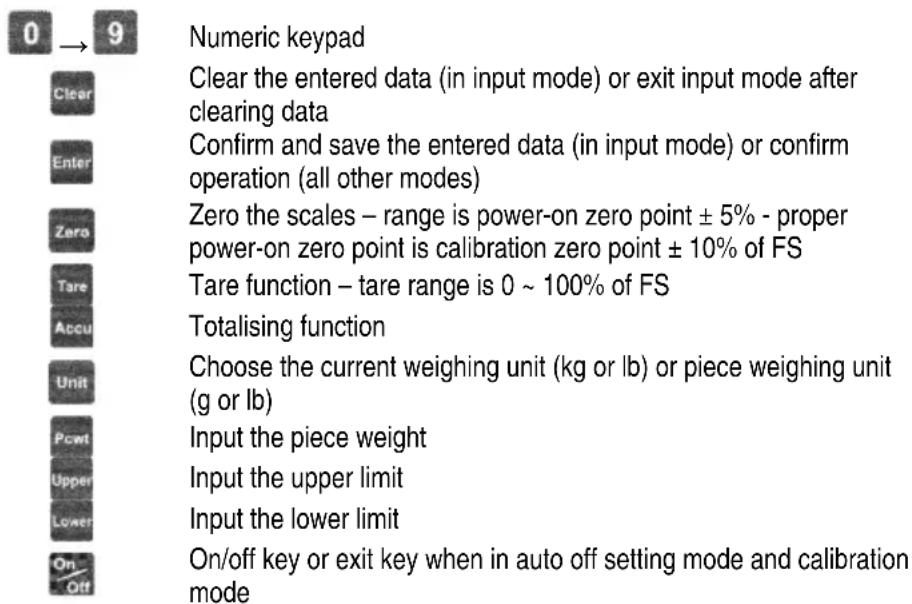
4.2. Setting the Display's Brightness
- Switch on the scales.
- Hold both and keys pressed to enter the setup mode.
- Set the brightness using numeric key 1, 2 or 3 (brightness settings from low to high with setting as default setting).
- Press to confirm your choice.
4.3. Selecting the Weight Unit
- Switch on the scales.
- Press to select your weight unit (g or lb). The corresponding LED will light.
4.4. Normal Weighing
- Switch on the scales.
- Place the object (or objects) onto the weighing platform. The WEIGHT window will display a number.
4.5. Totalising Function
4.5.1. How to Determine the Tare Weight
- Switch on the scales.
- Place the tare weight (usually a box or a tray) onto the weighing platform. The WEIGHT window will display a number.
- Press to tare the object. The WEIGHT window will return to a 0.000 display and the TARE LED will light.
- Remove the tare object from the weighing platform. Note that the tare weight is now preceded by a minus sign.
Note: Press to erase the tare value. The tare weight will be cancelled when switching off the scales.
4.5.2. How to Determine the Piece Weight
- Press to enter the mode.
- Place the object (or objects) onto the weighing platform or in the container. The WEIGHT window will display a number.
- Enter the weight manually in the PIECE WEIGHT window using the numeric keys. Confirm the value with
4.5.3. How to Determine the Piece Quantity
- When the piece weight is determined, determine the quantity using the numeric keys. The entered quantity will be displayed in the COUNT window.
- Confirm the value with
4.5.4. How to Determine the Upper and Lower Limits
- Press and enter the upper limit using the numeric keys.
- Press and enter the lower limit using the numeric keys.
- Place the object or objects onto the weighing platform or in the container. The WEIGHT and the COUNT windows will each display a number. The scales will sound if the displayed number is within the limit range.
Note: Make sure to respect following formula when determining the limits: upper limit ≥ lower limit > 0 .
4.5.5. How to Totalise
- Press to add the weight into the memory. The scales can totalise up to 999,999 values for a total weight value of 16,777,215.
- Press to clear the memory.
5. Other Functions
5.1. Setting the Auto Power-Off Timer
- Switch on the scales.
- Hold both and keys pressed to enter the setting mode.
- Set the timer using the numeric keys (timer range from 0 ~ 30 min). The scales will not switch off automatically when the timer is set to 0.
- Press to confirm your choice.
Note: This function is only valid when powering the scales with a battery.
5.2. Calibration
- Switch on the scales.
- Hold both and keys pressed to enter the calibration mode.
- Calibrate the zero point first. The scales display UNIT.O in the PIECE WEIGHT window. Make sure there is no object on the platform. Press
- The scales display UNLOAD in the PIECE WEIGHT window. Press to calibrate the zero point.
- The scales will now display LORD in the PIECE WEIGHT window. Place a reference weight onto the platform. The reference weight must be 25% 100% FS. Press when the displayed value has stabilised.
- The scales display INP.LD in the PIECE WEIGHT window. Now, enter the reference weight's value using the numeric keys and press Enter to confirm.
- Remove the reference weight from the platform and press to confirm the zero point again.
- The scales will now automatically reset and return to the normal weighing mode. Exit the calibration mode by pressing A calibration error will be reported by CAL_ERR .
6. Display Description
Overload or overrange
Uncertain value
Weight signal is too small
Zero point is too high
Zero point is too low
EEP.ERO EEPROM cannot be accessed
EEP.ER1 The EEPROM parameters differ from the backup data
EEP.ER2 The parameter has not been set
CRL_ERR Calibration error
RD- - - - Input signal over maximum range
RO- - - - Input signal under minimum range
CRP Capacity-related data display
UOL Voltage-related data display
ROO Totalised data
PCT Piece weighing
SPL.PCS Sample quantity
UP.PCS Upper limit
L0.PCS Lower limit
UNLOAD Unlod the weight from the platform
INP.LD Load the weight onto the platform
CRL.ON Calibration mode enabled
CALOFF Calibration mode disabled
Use this device with original accessories only. Velleman nv cannot be held responsible in the event of damage or injury resulted from (incorrect) use of this device.
For more info concerning this product, please visit our website www.velleman.eu.
The information in this manual is subject to change without prior notice.
1. Inleiding
Reservevoedingsadapter ordercode PS1205R
Reservebatterij ordercode WP4-6
Omzetting
1 lb. = 0,45359237 kg, 1 kg = 2,20462262 lb.