 ManualGo.com
 NXB55 - Haut-parleur YAMAHA - Free user manual and instructions
Find the device manual for free NXB55 YAMAHA in PDF.


Download the instructions for your Haut-parleur in PDF format for free! Find your manual NXB55 - YAMAHA and take your electronic device back in hand. On this page are published all the documents necessary for the use of your device. NXB55 by YAMAHA.
USER MANUAL NXB55 YAMAHA
Plays a variety of contents with high-quality sound.
Playing wirelessly via Bluetooth and connecting the audio cable to AUDIO INPUT connector allows you to connect a variety of external devices, such as
mobile phones, computers, portable players, etc.
AUTO STANDBY When no sound is input for a period of time, the speakers go to standby
Since you do not have to turn on/off the power every time, you can save
The Loudness control function of the speakers allows you to enjoy rich bass
tone sounds even at low volumes.
Gibt verschiedenste Inhalte in Ton von hoher Qualität
Характеристики Русскийi En
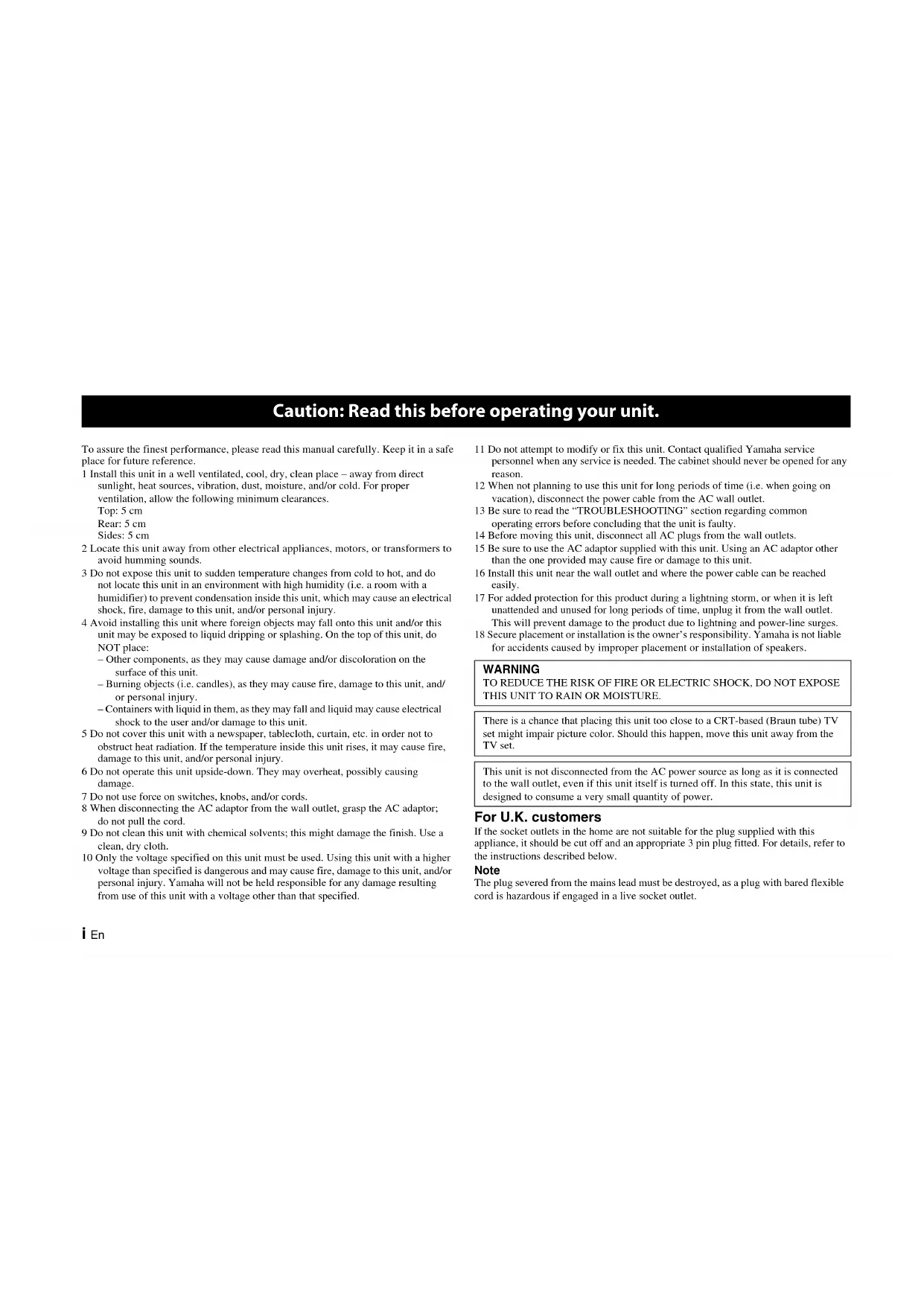
To assure the finest performance, please read this manual carefully. Keep it in a safe
place for future reference.
1 Install this unit in a well ventilated, cool, dry, clean place – away from direct
sunlight, heat sources, vibration, dust, moisture, and/or cold. For proper
ventilation, allow the following minimum clearances.
2 Locate this unit away from other electrical appliances, motors, or transformers to
avoid humming sounds.
3 Do not expose this unit to sudden temperature changes from cold to hot, and do
not locate this unit in an environment with high humidity (i.e. a room with a
humidifier) to prevent condensation inside this unit, which may cause an electrical
shock, fire, damage to this unit, and/or personal injury.
4 Avoid installing this unit where foreign objects may fall onto this unit and/or this
unit may be exposed to liquid dripping or splashing. On the top of this unit, do
– Other components, as they may cause damage and/or discoloration on the
surface of this unit.
– Burning objects (i.e. candles), as they may cause fire, damage to this unit, and/
– Containers with liquid in them, as they may fall and liquid may cause electrical
shock to the user and/or damage to this unit.
5 Do not cover this unit with a newspaper, tablecloth, curtain, etc. in order not to
obstruct heat radiation. If the temperature inside this unit rises, it may cause fire,
damage to this unit, and/or personal injury.
6 Do not operate this unit upside-down. They may overheat, possibly causing
7 Do not use force on switches, knobs, and/or cords.
8 When disconnecting the AC adaptor from the wall outlet, grasp the AC adaptor;
do not pull the cord.
9 Do not clean this unit with chemical solvents; this might damage the finish. Use a
10 Only the voltage specified on this unit must be used. Using this unit with a higher
voltage than specified is dangerous and may cause fire, damage to this unit, and/or
personal injury. Yamaha will not be held responsible for any damage resulting
from use of this unit with a voltage other than that specified.
11 Do not attempt to modify or fix this unit. Contact qualified Yamaha service
personnel when any service is needed. The cabinet should never be opened for any
12 When not planning to use this unit for long periods of time (i.e. when going on
vacation), disconnect the power cable from the AC wall outlet.
13 Be sure to read the “TROUBLESHOOTING” section regarding common
operating errors before concluding that the unit is faulty.
14 Before moving this unit, disconnect all AC plugs from the wall outlets.
15 Be sure to use the AC adaptor supplied with this unit. Using an AC adaptor other
than the one provided may cause fire or damage to this unit.
16 Install this unit near the wall outlet and where the power cable can be reached
17 For added protection for this product during a lightning storm, or when it is left
unattended and unused for long periods of time, unplug it from the wall outlet.
This will prevent damage to the product due to lightning and power-line surges.
18 Secure placement or installation is the owner’s responsibility. Yamaha is not liable
for accidents caused by improper placement or installation of speakers.
If the socket outlets in the home are not suitable for the plug supplied with this
appliance, it should be cut off and an appropriate 3 pin plug fitted. For details, refer to
the instructions described below.
The plug severed from the mains lead must be destroyed, as a plug with bared flexible
cord is hazardous if engaged in a live socket outlet.
Caution: Read this before operating your unit.
WARNING TO REDUCE THE RISK OF FIRE OR ELECTRIC SHOCK, DO NOT EXPOSE THIS UNIT TO RAIN OR MOISTURE.
There is a chance that placing this unit too close to a CRT-based (Braun tube) TV
set might impair picture color. Should this happen, move this unit away from the
This unit is not disconnected from the AC power source as long as it is connected
to the wall outlet, even if this unit itself is turned off. In this state, this unit is
designed to consume a very small quantity of power.ii En
SPECIAL INSTRUCTIONS FOR U.K. MODEL Controls and functions 1AUTO STANDBY 3Connections4 Bluetooth connection for playing music 5
Troubleshooting 8 Status indicator (LED) 11Specifications 11Before assembly and connecting, make sure you have received all of the following items.• AC adaptor × 1• 3.5 mm stereo mini plug cable (2.0 m) × 1IMPORTANTTHE WIRES IN THE MAINS LEAD ARE COLOURED IN ACCORDANCE WITH THE FOLLOWING CODE:Blue: NEUTRALBrown: LIVEAs the colours of the wires in the mains lead of this apparatus may not correspond with the coloured markings identifying the terminals in your plug, proceed as follows:The wire which is coloured BLUE must be connected to the terminal which is marked with the letter N or coloured BLACK. The wire which is coloured BROWN must be connected to the terminal which is marked with the letter L or coloured RED. Making sure that neither core is connected to the earth terminal of the three pin plug.Do not use this unit within 22 cm (9 inches) of persons with a heart pacemaker implant or defibrillator implant.Radio waves may affect electro-medical devices.Do not use this unit near medical devices or inside medical facilities. Precautions Please read the following operating precautions before use:• Use the AC adaptor designed specifically for this unit only. Yamaha is not responsible for damage caused by using other power adaptors.• Do not apply pressure or force the control knobs of this unit, or place heavy items on the cabinet.• Avoid outputting from test disks, electrical musical instruments, or from extremely loud or distorted input. It may cause a malfunction of the speakers.• This unit may cause picture distortion when placed close to a computer monitor or television. In this case, move the unit away from them.• Keep this unit away from magnetic media such as floppy disks and tapes. Otherwise the data on the media may become corrupted.• Remove the AC adaptor from the wall outlet immediately if any problem is found. Contents
Supplied accessories1 En
1 Headphones connector (3.5 mm stereo mini jack)
Use for a headphones connection. When headphones are connected, sound is not output through the speakers.To protect your hearing, make sure that the volume is low before headphones are used.• Do not use headphones with a loud volume for a long time. Otherwise, your hearing may be damaged.• Make sure that the volume of the audio devices is at minimum before headphones are connected. A sudden loud sound may damage your hearing. 2 VOL (volume) control
Controls the volume of the speakers and the headphones.
The volume becomes louder as the VOL (volume) control is rotated to
the right, and quieter as it is rotated to the left.
The Loudness control function of the speakers allows you to enjoy rich
bass tone sounds even at low volumes.
The function automatically corrects for optimum sound, depending on
the unit’s output level. Adjust the output sound level as follows;a After you connect an external device to this unit, turn on the power of this unit and then rotate the VOL (volume) control to the 2 o’clock position (see the illustration below).b Adjust the volume of the external device to the loudest level before the onset of distortion.For details about external devices, see their instruction manuals. c Rotate the VOL (volume) control of this unit to adjust the volume to the desired level. Controls and functions
R speaker (Right) (On the right side when facing the front of the speakers.) L speaker (Left) (On the left side when facing the front of the speakers.) Front panel2 En
3 p (power)/indicator (LED)
p (power), this unit will turn on and the indicator will
light up. Even when this unit is turned off or is in standby mode, it consumes a small amount of electricity. 4
Connects to an external device, such as a portable player, computer, TV,
etc., with the supplied 3.5 mm stereo mini plug cable.
6 TO LEFT SPEAKER Connects with a cable from the L speaker (Left) through this connector.
Make sure you use the supplied AC adaptor.
Controls and functions Off On Viewing the
p (power) button from the side…
Note Multi-Source MixWhile playing music via Bluetooth connection, the audio will be mixed and output from the speakers or headphones when the music is played via AUDIO INPUT. For example, you can listen to the news from a TV while playing the music from a portable player by mixing them.3 En
This unit has a function that automatically activates standby mode (power
save mode) when no audio signal is input from a connected device, or
when the connected device is playing at a low volume for a certain period
(about 30 minutes). In standby mode, the indicator light turns off.
Activates the auto-standby mode a Press p (power) to turn off this unit (Power off). b Set the AUTO STANDBY switch to ON. c Press p (power) to turn on this unit.• Auto-standby mode activates when the power is on.• The time it takes to enter standby mode is only a guide, and varies depending on the situation. If this unit enters standby mode while you are using it, perform either of
the steps below, or . Adjust the volume.a Slightly turn up the volume of the connected device. b Rotate the VOL (volume) control of this unit and adjust to the desired sound level. Set the AUTO STANDBY switch to OFF.a Press p (power) to turn off this unit. b Set the AUTO STANDBY switch on the rear to OFF
(power) to turn on this unit. • The default setting of the AUTO STANDBY switch is ON. • If this unit is not used for a long time, press p (power) for power off. • To activate auto-standby mode again, set the AUTO STANDBY switch on the rear to ON.
AUTO STANDBY Auto-power on • If the volume from a connected device is too low, this unit may not start. In this case, turn up the volume of the connected device.• If a device that emits electromagnetic waves, such as a mobile phone, is used near this unit, the unit may start by itself, or not enter standby mode as a result of input signal noise while making or receiving a phone call. 2 R speaker (Right)Rear panel Off
On Notes PLAY Notes Deactivating the auto-standby mode
On NotesPlay the connected device in standby mode...In standby mode, if signal is input, the unit turns on and sound is output from the speakers (Auto-power on).4 En
Connections R speaker (Right)Rear panelL speaker (Left) a Connect the cable from the
L speaker (Left) at the rear, to
TO LEFT SPEAKER on the rear
of the R speaker (Right). R speaker (Right)Rear panel b
Connect the supplied AC
and insert its plug to the wall
outlet. R speaker (Right)Rear panel Connect the supplied 3.5 mm stereo mini plug cable between
and the external device (TV, computer, etc.), as illustrated. For
details, see the external device’s operating instructions.
connection for playing music”
page 5). 3.5 mm stereo mini plug cable (supplied)Connect to the output connector of the connected device. Connect via
Connect an external device using the supplied cable.5 En
This unit enables you to enjoy music playback wirelessly with a Bluetooth device (such as mobile phones, computers, portable players, etc.) by pairing
(registering) with the device and establishing a Bluetooth connection with this unit. • Install in a stable place.• Do not place on top of steel or other metal.• Do not cover with a cloth, etc.• Install in the same room where the device is with which signals are to be exchanged (Bluetooth profile A2DP compatible portable music player, mobile phone, etc.) within a direct, maximum line-of-sight distance of 10 m (33 ft). • Make sure there are no obstacles between this unit and the Bluetooth device.
Pairing must be performed when using Bluetooth connection for the first time or if pairing data has been deleted. Pairing can be done within about 5
minutes after the power is turned on. • Check that the pairing process on the other device has been completed. If the pairing process fails, start over from step b. For details, see the other device’s operating instructions. • If the power supply to this unit is cut off during the pairing operation, the pairing data may be damaged. If so, perform the steps described in “Clearing all the pairing data” and then perform pairing again (☞ page 7). • This unit can be paired with up to 8 other devices. When pairing is conducted successfully with the 9th device and the pairing data is registered, the pairing data of the other device which is the least recently connected to this unit, is cleared. Bluetooth connection for playing music Within 10m (33 ft) Notes
Pairing (Registration) NX-B55 YamahaPower On
On Within about 5 minutesa Turn on the power of the other device you want to pair with.b Press p (power) to turn on this unit. c Operate the other device to search Bluetooth devices within about 5 minutes after turning on this unit. d Select “NX-B55 Yamaha” from the search results of the other device. If you are prompted to input a passkey, input “0000”.e Check the pairing is completed by the other device.What is pairing?Pairing is the operation to register a device (hereafter referred to as “other device”) for Bluetooth communications. Follow the steps described on the left to pair. Notes6 En
Bluetooth connection for playing music
PLAY Auto Connection
This unit and the other device are connected automatically if the device is the latest recently connected one
and ready to connect.
• Auto Connection may not be available depending on the other device.
• Operate the other device to establish Bluetooth connection if Auto Connection is not available.
a Press p (power) to turn on this unit.
b Operate the paired other device to establish the
Bluetooth connection.
The status indicator lights up in blue when
Bluetooth connection is completed.
c Start playback of the other device.
d Adjust the volume level using the VOL (volume)
control of this unit.
Some devices can be connected automatically while
pairing. In that case, you can omit step a and b.
The Bluetooth connection will be disconnected
by performing either of the steps below,
(power) to turn off this unit.
Set the Bluetooth function of other device to off.
Disconnecting Bluetooth7 En
Bluetooth connection for playing music
a Press p (power) to turn off this unit.
b Set the AUTO STANDBY switch on the rear to INIT..
p (power) to turn on this unit, and wait about 3 seconds.
All the pairing data in this unit will be deleted.
p (power) to turn off this unit.
e Set the AUTO STANDBY switch on the rear back to the previous position (ON in
Clearing all the pairing data
Only one other device can be connected to this unit at the same time. If
you want to switch the currently connected device to another one,
perform the following steps.
a Perform either of the steps below, or .
p (power) to turn off this unit once. Then,
p (power) to turn on this unit within 5 seconds.
Operate the other device which the Bluetooth connection has been
established with, to disconnect the Bluetooth connection.
b Operate the other device to which you want to switch Bluetooth connection.
If the other device is being paired with this unit for the first time, complete
pairing within about 5 minutes.
If more than about 5 minutes has passed since this unit is turned on again,
this unit may have automatically reconnected to its last-connected device,
through Auto Connection. In that case, start over from step a.
Switching to another Bluetooth device
Refer to the table below if the unit does not operate properly. If the problem you are experiencing is not listed below, or if the instruction does not help, turn
off the unit, disconnect the power cable, and contact the nearest authorized Yamaha dealer or service center.
This unit is not turned on. The AC adaptor is disconnected from the wall outlet or
Connect the AC adaptor to the wall outlet or 12V
p (power) is not turned on. Turn on the p (power). (The indicator lights up.)
No sound is output from
either of the speakers, or
the sound is too quiet.
This unit and the other device are not connected correctly. Make sure that this unit and the other device are connected
Connections are faulty (or the connections are incomplete). Check that the connections are made correctly. Or connect
this unit to the Bluetooth device, again.
This unit’s volume is set to too low. Turn the VOL (volume) control to the right to increase the
The sound from the connected device is too quiet. Increase the volume of the connected device.
Headphones are connected. (No sound comes from the
speakers when headphones are connected.)
Disconnect the headphones from this unit.
The AUTO STANDBY switch at the rear is set to INIT.. Set the AUTO STANDBY switch at the rear to ON or OFF,
again (ON in default setting. ☞ page 3).
The sound is distorted. The sound is too loud. Lower the volume of the connected device.
Noise is heard. Connections are faulty (or the connections are incomplete). Check that the connections are made correctly.
The output connector has a bad connection. Check that the stereo mini jack and stereo mini plug cable
are not dirty. If they are dirty, clean them.
External noise is picked up.
Make sure that devices which emit electromagnetic waves,
such as mobile phones, wireless appliances, microwaves or
inverter lighting equipment, are not near this unit.
Power-supply noise is picked up. Change the source of power supply by directly connecting
the AC adaptor to the wall outlet, etc.9 En
Auto-standby is functioning. Increase the volume level of the connected device, or press
(power) twice to turn on this unit. See “Deactivating the
The AUTO STANDBY switch is set to OFF. Set the AUTO STANDBY switch to ON.
Catching external noise. If this unit is close to mobile phones, radio devices,
microwaves, inverter lights, etc., install this unit away from
Auto-power on does not
The volume of the other device is low. Increase the volume level of the other device.
The played audio is too short. This unit is not turned on if the duration of the sound is
short, such as a click.
There is sound from the
TV, even though this unit
and TV are connected by
The TV is not suitably set. Change the settings of TV.
Symptoms Causes Remedies
Cannot make this unit
pair or connect with the
You can connect this unit to the other device within about
5 minutes of turning on this unit or stopping the Bluetooth
connection with the other device.
See “Pairing (Registration)” (☞ page 5).
The other device does not support A2DP. Perform the pairing operations with a device which supports
A Bluetooth adaptor, etc., that you want to pair with this unit
has a passkey other than “0000”.
Use a Bluetooth adaptor, etc., whose passkey is “0000”.
The distance between this unit and the Bluetooth device is
Reposition this unit within 10 m (33 ft) of the other device.
There is a device (microwave oven, wireless LAN, etc.) that
outputs signals in the 2.4 GHz frequency band nearby.
Install this unit away from such devices.
Bluetooth connection is already established with another
Stop the Bluetooth connection with another device.10 En
* If VOL (volume) stays at maximum after the p (power) is turned off, the slight sound may be heard from the headphones.
* iPad, iPhone, and iPod touch are trademarks of Apple Inc., registered in the U.S. and other countries.
Symptoms Causes Remedies
The iPhone/iPad/iPod touch stores any recently paired
device in memory to allow connection with the same device
again later. If NX-B55 is initialized, the iPhone/iPad/iPod
touch will recognize it as a different device.
Delete any pairing history of NX-B55 on the iPhone/iPad/
iPod touch, then pair with the NX-B55 again (“Pairing
(Registration)” ☞ page 5).
No sound is produced or
the sound is interrupted
The other device is not connected to this unit by Bluetooth.Perform Bluetooth connection. See “Playback via Bluetooth
connection” (☞ page 6).
The distance between this unit and the Bluetooth device is
Reposition this unit within 10 m (33 ft) of the other device.
There is a device (microwave oven, wireless LAN, etc.) that
outputs signals in the 2.4 GHz frequency band nearby.
Install this unit away from such devices.
The other device’s Bluetooth function is not enabled. Check that the Bluetooth function of the other device is set
This unit is not registered on the other device’s Bluetooth
Perform the pairing operations again.
The other device is not set to send Bluetooth audio signals to
Check that the Bluetooth function of the other device is set
The pairing setting of the other device is not set to this unit. Set the other device to pair with this unit.
The other device’s volume is set to too low. Increase the volume level of the other device.11 En
Status indicator (LED)
*1: If you perform the steps in “Switching to another Bluetooth device” (☞ page 7), the indicator flashes in green for several seconds, and then Auto Connection will be disabled for about 5 minutes. *2: When clearing all the pairing data according to the steps in “Clearing all the pairing data” (☞ page 7). Indicator (LED) Power Bluetooth
(flashes for several seconds,
Bluetooth version Ver. 2.1+EDR Supported profile A2DPSupported audio codec SBC, AAC RF output powerBluetooth Class 2 Maximum communications range 10 m (33 ft) without interference Input connector ø 3.5 mm (1/8 in.) stereo mini jack × 1 Headphone output connector ø 3.5 mm (1/8 in.) stereo mini jack × 1Power voltage/FrequencyU.S.A. and Canada modelsAC 120 V, 60 HzOther models AC 100 to 240 V, 50/60 HzPower consumption 13 W (speaker)Power consumption when powered off 0.5 W or less AC adaptor MU18-D120150-C5 (DC 12V, 1.5A) Weight Right speaker 1.1 kg (2.4 lbs)
Left speaker 1.0 kg (2.2 lbs)* * Including speaker cable (2.0 m)Specifications are subject to change without notice. Specifications
• Bluetooth is a technology for wireless communication between devices within an area of about 10 meters (33 ft) employing the 2.4 GHz frequency band, a band which can be used without a license. • Bluetooth is a registered trademark of the Bluetooth SIG and is used by Yamaha in accordance with a license agreement. Handling Bluetooth communications
• The 2.4 GHz band used by Bluetooth compatible devices is a radio band shared by many types of equipment. While Bluetooth compatible devices use a technology minimizing the influence of other components using the same radio band, such influence may reduce the speed or distance of communications and in some cases interrupt communications.• The speed of signal transfer and the distance at which communication is possible differs according to the distance between the communicating devices, the presence of obstacles, radio wave conditions and the type of equipment.• Yamaha does not guarantee all wireless connections between this unit and devices compatible with Bluetooth function. Specifications We, Yamaha Music Europe GmbH hereby declare that this unit is in compliance with the essential requirements and other relevant provisions of Directive 1999/5/ EC.
Yamaha Music Europe GmbH Siemensstr. 22-34 25462 Rellingen, GermanyTel: +49-4101-303-0 Information for Users on Collection and Disposal of Old
Equipment This symbol on the products, packaging, and/or accompanying documents means that used electrical and electronic products should not be mixed with general household waste.For proper treatment, recovery and recycling of old products, please take them to applicable collection points, in accordance with your national legislation and the Directives 2002/96/EC.By disposing of these products correctly, you will help to save valuable resources and prevent any potential negative effects on human health and the environment which could otherwise arise from inappropriate waste handling.For more information about collection and recycling of old products, please contact your local municipality, your waste disposal service or the point of sale where you purchased the items.[Information on Disposal in other Countries outside the European Union] This symbol is only valid in the European Union. If you wish to discard these items, please contact your local authorities or dealer and ask for the correct method of disposal.i Fr
Important Notice: Guarantee Information for customers in EEA* and Switzerland
For detailed guarantee information about this Yamaha product, and Pan-EEA* and Switzerland warranty service, please either visit the website address below (Printable file is available at our website) or contact the
Yamaha representative office for your country. * EEA: European Economic Area
http://europe.yamaha.com/warranty/
© 2013 Yamaha Corporation
Printed in China ZJ05610