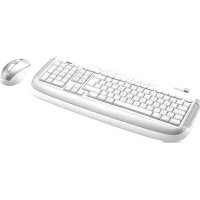
Wireless Laser Desk Set - Keyboard TRUST - Free user manual and instructions
Find the device manual for free Wireless Laser Desk Set TRUST in PDF.



| Product type | Wireless keyboard and mouse set |
| Brand | Trust |
| Model | Wireless Laser Desk Set |
| Category | Keyboard and mouse |
| Keyboard power supply | 2 AA batteries (non-rechargeable included) |
| Mouse power supply | 2 AA batteries (non-rechargeable included) |
| Connectivity | Wireless via USB receiver |
| Wireless range | Approximately 10 meters (estimated) |
| Special function keys | Volume, play/pause, tracks, eject, iTunes, browser, email, Spotlight, Dashboard, iPhoto, Finder, shutdown |
| Programmable keys | Yes (keyboard and mouse) |
| Mouse wheel | Tilt wheel with button function |
| Battery status indicator | Yes (green = OK) |
| Installation software | CD-ROM included (drivers and configuration application) |
| Compatible operating system | Mac OS X (keyboard configuration via System Preferences) |
| Laser | Class II – do not look directly at the beam |
| Care and cleaning | Clean with a dry cloth |
| Safety | Caution if wearing a pacemaker |
| Warranty | 2 years |
| Standards | CE, WEEE (recycling) |
Frequently Asked Questions - Wireless Laser Desk Set TRUST
User questions about Wireless Laser Desk Set TRUST
0 question about this device. Answer the ones you know or ask your own.
Ask a new question about this device
Download the instructions for your Keyboard in PDF format for free! Find your manual Wireless Laser Desk Set - TRUST and take your electronic device back in hand. On this page are published all the documents necessary for the use of your device. Wireless Laser Desk Set by TRUST.
USER MANUAL Wireless Laser Desk Set TRUST
Wireless Laser Desk Set
User's manual - Version 1.0


Блгарский
Cesky
Dansk
Deutsch
EλnviKa
English
Espanol
Français
Italiano
Magyar
Nederlandsls
Norsk
Polski
Portugues
Româna
Pycckn
Slovenscina
Suomi
Svenska
Türkce
中文
Trust
Trust
Trust
Trust
Trust
HΦopmaun3a npodykTa
| i | Клавиatype A: Контол Ha сиза Т ha 3Byka В: Рогамиремп сизорим Клавиши С: Кюч 3a Сбтоанно Ha 6aTeрята / С Beetонддкатор 3a Сбтоанно Ha 6aTeрята D: Клави за ИЗкlioоча E: Сених Клавиши 3a упавлиейп Ha iTunes 3a ФунkedиITE Ha сизалдпп Т клавиши Вижte Таблцада Haст.2. | Мишka: F: USB рpineмнik G: Льв 6уTOH H: Десен 6уTOH I: Коленье / Коленье 3a xopиоз�тално и ветTKКално сколара J: Рогамирем 6уTOH / С Beetонддкатор 3a Сбтоанно Ha 6aTeрята |
Cbbp3BaHe Ha ycTpoCTBOTO
| 1 | Посраве致电batерияа вklавиатураТa |
| 2 | Посраве致电batерияа в мшката |
| 3 | Вklю悔e мшката |
| 4 | Свъедине USB римемнika |
HCTaIpaHe Ha coΦTyepa
1.3 OTBopeTe Trust Keyboard
Kopurpane Ha Hactpoikte Ha KnaBnataPata
| 13 | Åbn Trust-tastatur (Trust Keyboard) |
Tilpas tastatures indstlinger
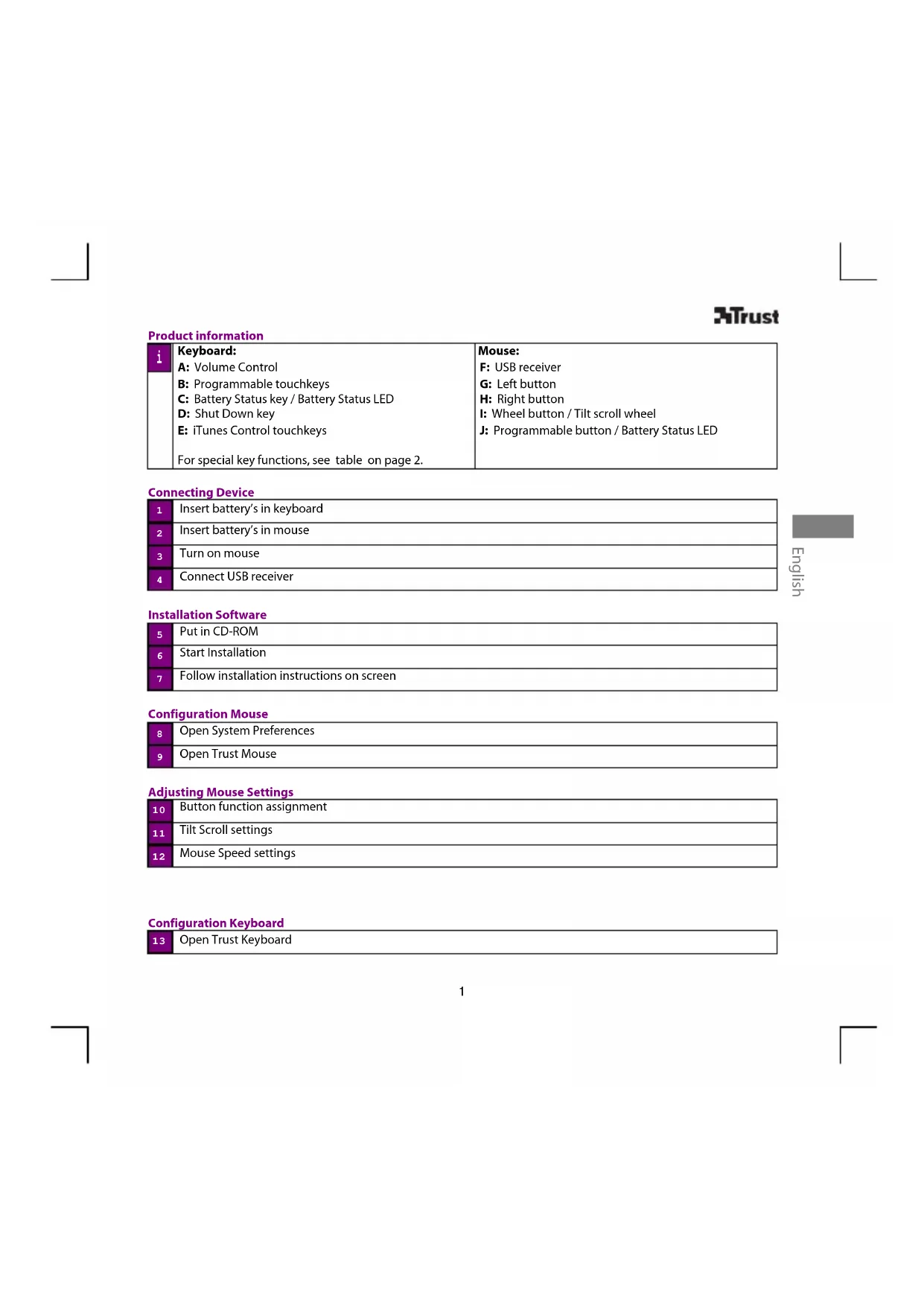
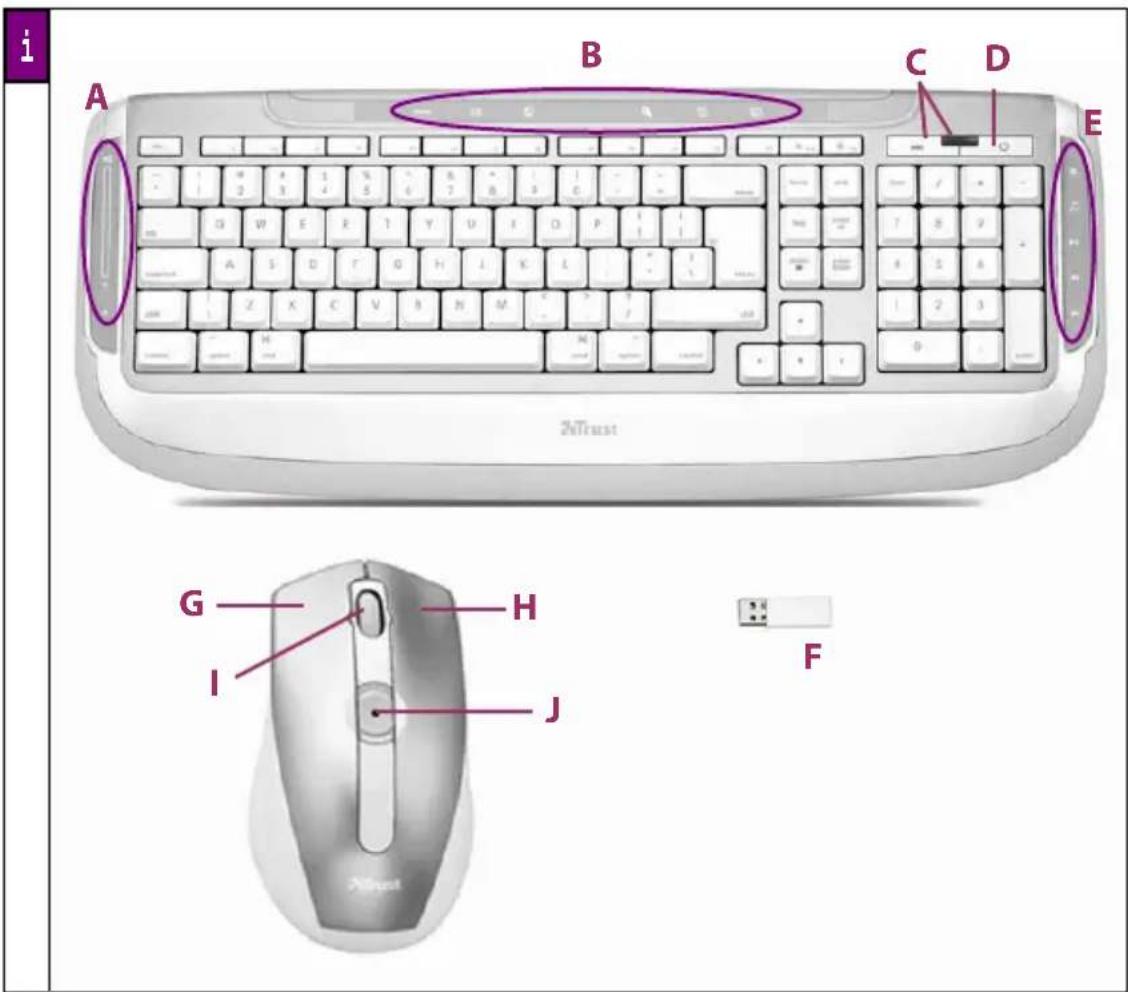
| i | Keyboard: A: Volume Control B: Programmable touchkeys C: Battery Status key / Battery Status LED D: Shut Down key E: iTunes Control touchkeys For special key functions, see table on page 2. | Mouse: F: USB receiver G: Left button H: Right button I: Wheel button / Tilt scroll wheel J: Programmable button / Battery Status LED |
Connecting Device
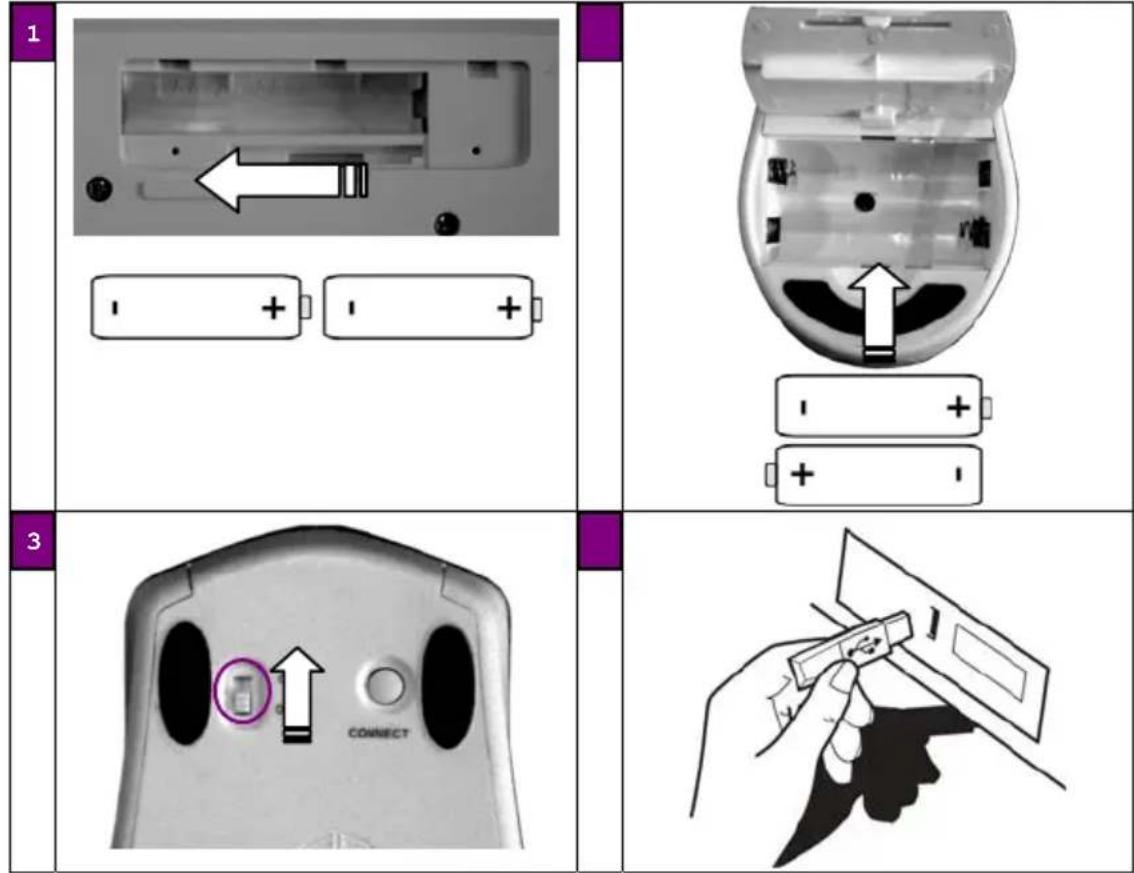
| 1 | Insert battery's in keyboard |
| 2 | Insert battery's in mouse |
| 3 | Turn on mouse |
| 4 | Connect USB receiver |
Installation Software
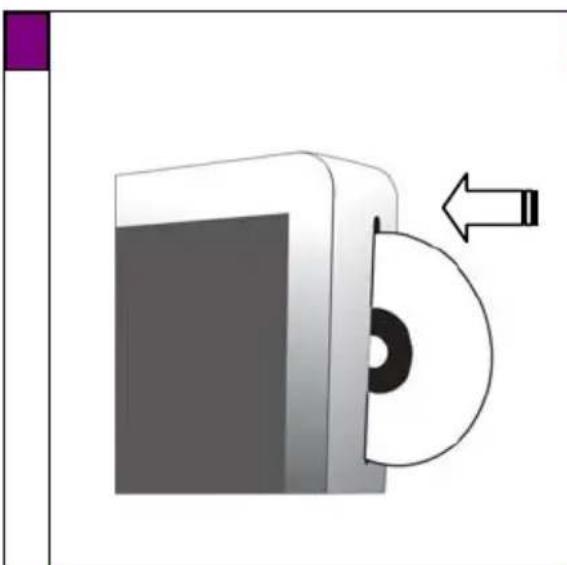
| 5 | Put in CD-ROM |
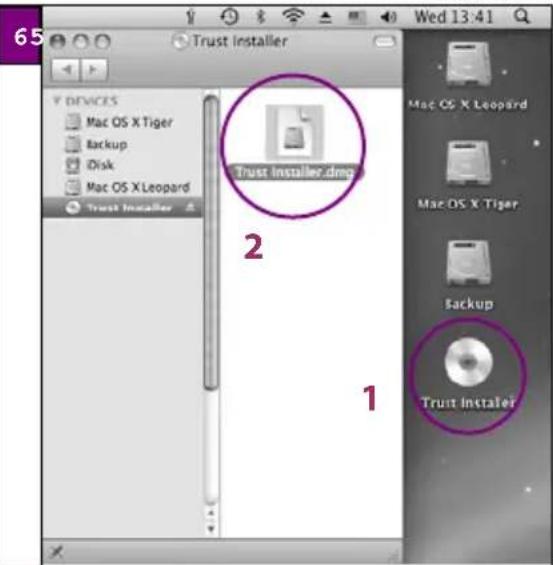
| 6 | Start Installation |
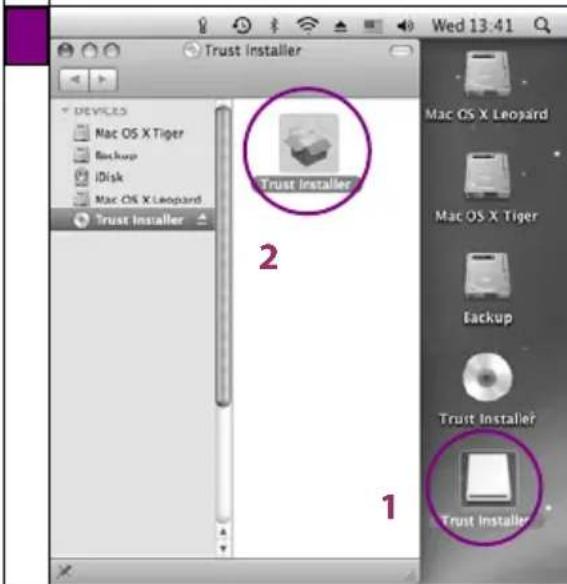
| 7 | Follow installation instructions on screen |
Configuration Mouse
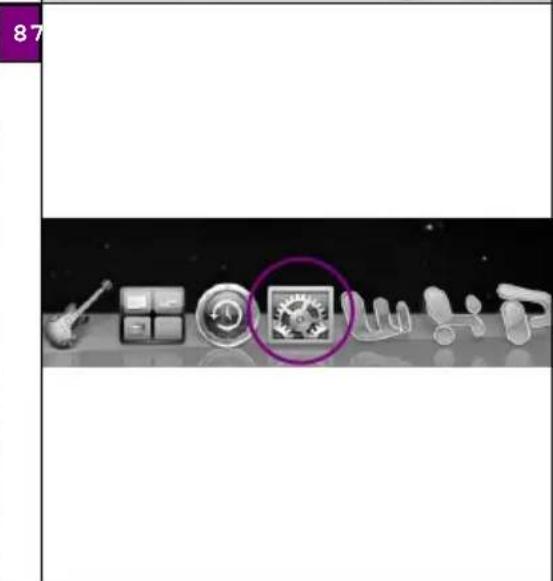
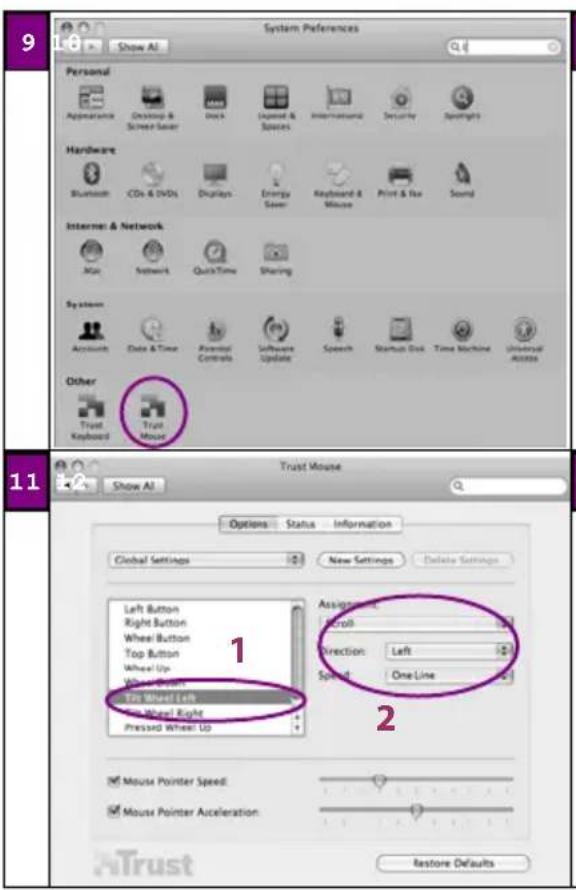
| 8 | Open System Preferences |
| 9 | Open Trust Mouse |
Adjusting Mouse Settings
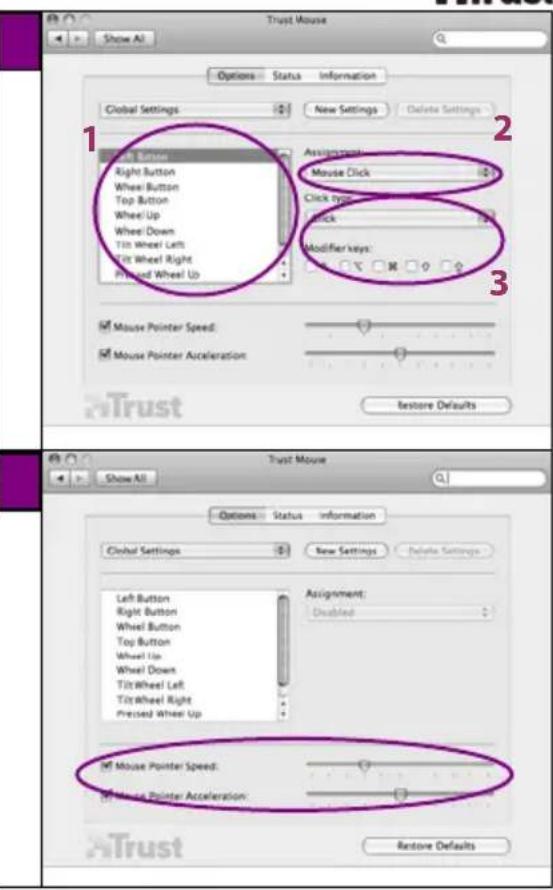
| 10 | Button function assignment |
| 11 | Tilt Scroll settings |
| 12 | Mouse Speed settings |
Configuration Keyboard
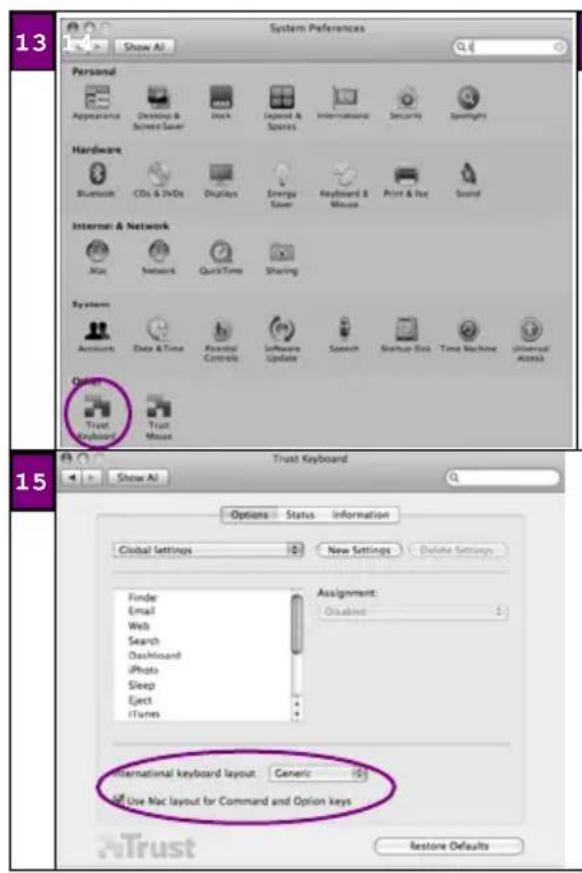
| 13 | Open Trust Keyboard |
Adjusting Keyboard Settings
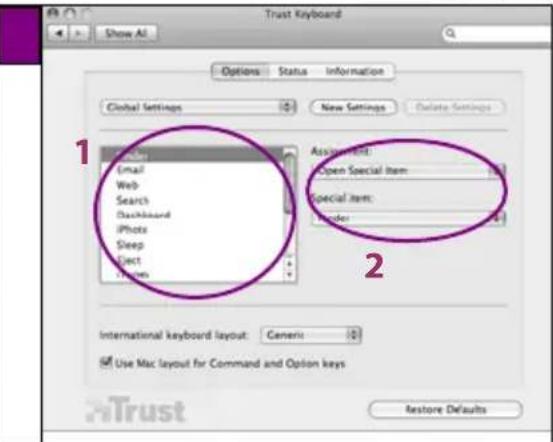
| 14 | Touchkey function assignment |
| 15 | Keyboard Layout settings |
Special function keys
| Volume up | Start E-mail program |
| Volume down | Start Internet Browser |
| Mute | Spotlight |
| Eject | Dashboard |
| iTunes | iPhoto |
| Play / Pause | Increase screen brightness |
| Previous track | Reduce screen brightness |
| Next track | battery level checker (green = ok) |
| Finder | Shut down |
Special characters
- The keyboard country layout settings in Mac OS should correspond with the keyboard layout of your Trust keyboard. Layout of the Trust keyboard is specified by a sticker on the Box. To set the keyboard Layout in Mac OS X: Go to: System Preferences International
- The Option key gives access to special characters like the € sign.
Wireless performance
- Reduced wireless performance can be caused by:
- Metal objects close to or between the adapter and the other device.
- Empty batteries.
- Other wireless devices close by.
- The reception is limited when the signal must pass through concrete walls and floors.
Solution
- Use an extension cable to move the adapter to a different location.
- Replace the batteries.
Trust
Energy
- For the best performance, use rechargeable AA NiMH batteries.
- To save energy, turn the device off after use.
- Never recharge the batteries provided and never throw them onto a fire.
- Observe local regulations when disposing of batteries.
Warnings
- LASER CLASS II device. Never look directly into the beam!

Wireless
- There are an increasing number of wireless products (video, audio, computer, etc.) which work in the same frequency range as this device. It may, therefore, be possible that the functionality of this product is limited by or is limiting for other wireless products. This can only be avoided by paying attention to the distance between products and, where possible, by changing channels.
- Be careful when using wireless devices if you have a pacemaker or are dependent on other life-saving, sensitive electronic equipment, because this device transmits radio signals.
Trouble shooting: See www.trust.com/15907 for up-to-date FAQs, drivers and instruction manuals. For extensive service, register at www.trust.com/register.
Safety instructions: Before use, read safety information at www.trust.com/safety. Only use this device as indicated in the user's guide. Device is intended for home or office use, except when otherwise indicated. Do not open or repair this device. Do not use the device in a damp environment. Clean the device with a dry cloth.
CE: This device meets the essential requirements and other relevant conditions of the applicable European directives. The Declaration of Conformity (DoC) is available at www.trust.com/15907/manuals.
WEEE: If possible, dispose of the device at a recycling centre. Do not dispose of the device with the household waste. Warranty & copyright: This device has a two-year product warranty which is valid from the date of purchase. See www.trust.com/warranty for more information. It is forbidden to reproduce any part of this instruction manual without the permission of Trust International B.V.
Trust
Trust
| 13 | Apne Trust-tastaturet |
Justere tastaturinnstlinger
KaueCTBO 6ecnpoBHOH CBA3N
HactpoKnpackkndKnKnaBnAtpydI nCTpaHBbMac OSdoJHKbcoBnadaTcpackkndko KnaBnAtpyb Trust. Packnda KnaBnAtpydTrust yka3aHa Ha Hakneke Kopo6Kn. YTo6bY cTaHOBtbpackndaKy KnaBnAtpyblnMaOS X: IpeuDnte: System Preferences International
- KnaBnua Option (Onu) OTKpbBaet Doctyn K cneuaNbHbIM 3HaKaM, HapnMpE K 3HaKy €.
- Heoctatoouhoe kaectBO 6ecnpoBDOHOn CB3n MOKet 6bIb Bbl3BAHO CLEdyIOUMN npuHaMn:
- Hanuhe metanuuecknx npedmetOB no6n30ctOn ot aadantepa li6o Mejdy aadantepom u npyum yctpoCTBOM.
-Pa3paKeHHbIe 6aTapeuKn.
-HaHnue no6n3ocT npynx 6ecnpoBoNDhby yCTpoiCTB.
- KaueCTBO npHema cnHnHaJa cnHxKaeTcB Tex cIyuaX, KOrJa cnHnHaJn pOxoAnIT cheE 6eToHHbI cTeHbI npeKePbITMa.
- Peuene
- BocnoB3yTEcB BHeHnM Ka6eJem, YTo6bI nepeMeCtNb aanTep B DpyroE MeCTO.
-3aMeHnTe 6aTapeuKn.
3Trust
Пунане
-Дя полученя ONТIMалььхи pe3yntaTOB,ИСпОЛьзУтЕ nepe3apЯжаembIe HnKeIb-KaДмИeBBIe 6aTeApEiKu AA.
-ДясберженязергиюспнлбзованьвiknOHTe yctpoIcTBO.
- HnKOrda He nbTaTaeB 3apXaTb npnlaeraMbIe 6aTapeKn n He 6pocai Te IN B orOHB.
Co6nloaTe npnHbte B BaWee cTpaHe npabuHa ytnn3auin 6aTaep.
PpeynpeckdHn
JI3EPHOE YCTPOINCTBO KJIACCA II. HnKOrDa He CMOtpnte nprmo Ha nyu!

BecnpoBnHaCBA3b
B HactoIe BpeM Bce 60nbwe ynclo 6ecnpobDhbx yctpoCTB (Bndeo,ayno, KOMNbIOtepbI nT.I.) IcNoIb3yIO TOT Xe Dnana3OH YactOT, UTO N daHHO yctpoCTBO. POaTomy yctpoCTBa Moryt co3daBaT nomexn B pa6ote npyra. 3TorO MoXHO 136ExKaTb ToNbKO nyTe mObecneHeH Heo6xOumoro PaCCTOaHmR MeKdy yctpoCTBaMn INCNOJIb3OBAHn PA3NIuHbIX KaHaJIOB.
Heo6xmoCo6nOaBtOcPOKHOCTbPnNCNOL3OBAHIN6ecnpoBOHbIXyCTpOCTB,ecnBlNcNOB3yeTe 3NEKTPOCTMMyTApOTNNDpyrOeYUBCTBNTenBHOeABAPmHO-CnacatEnbHOeO6OpydoBAHne,TAKKaKdaHoe yctpoIcTBOAIBTcNTOUHKOMpaNOCIRHAIOB.
DnaHocnka: NocJeHnE BepmIpaBepOB, pyKOBoCTB NOJb3OBATeJI N OTBeTOB Ha BONPOcbl MOxHO HaHTNHa Be6-ctpAHue www.trust.com/15907. YTo6bl BOCNoJIb3OBAtbcra pacuImpeHHbIMN ycLyramn, 3aperncTppyiTecb Ha Be6-ctpAHue www.trust.com/register.
HCTpykunnoTexnke 6e3onachoctn:peed Hauanopabotb npoHTne HfOpmauio nToTexnke 6e3onachoctn:www.trust.com/safety. Icnonb3yte daHHoe yctpoiCTBO TOnbKO B COOTBECTBUN C INHCTpyKUAMN, pINBeEHBM BY PkyOBODCTBE NOJb3OBATeIa DaHHoe yctpoiCTBO IppeHa3NaHeHO TOnbKO dIra NcNoJIb3OBAHIN DAOM iIN B OOFnce,ecNI He Yka3aHO IHoe. 3aIpeuaetcra OKpbIBaTb N pemOHtnPOBaTb yctpoiCTBO.He NCNoJIb3yIe daHHoe yctpoiCTBO B yCNOBnax nobBiWeHHo BlaXHoCTn. IpotnpaTe erO cyxoi TprAnKoI.
CE:3To yCTpoIcTB COOTBETCTByeT OCHOBHbIM Tpe6oBaHNM IpyrIM BaxHBIM YCIOBNM COOTBeTCTBYIOx eBPonecknx DnpeKTHB.3aBnHeHne O COOTBETCTBnN MoXHO NocMOtpeTb Ha Be6-caiTe www.trust.com/15907/manuals.
WEEE:IO BO3MOXHOCTN, yTUNIN3NpyIte yCTPOINCTBO B CEHTpe nepepa6OTKn. He BBipacbBaIte erO Bmecte C 6bITOBbIMN OTXODAMN.
RapaHTn ABTOPcKne npaba:Ha daHHe yCTpoNCTBO paCnpocTpaHReTc rapaHTn CpOKOM DBA rOda CMoMeHTa erOpno6peTHe. Ira nOnyHeHr DOONHHTeBHO HΦopMauCN CM. www.trust.com/warranty. 3anpeuaTeCActHHe Hn NOnHoe BOCPON3BeDeHHe DaHHORo PYKOBOCTBa 6e3 npedBapNTbHoro pa3peWeHn CO CTopoHbI Trust International B.V.
3Trust
DECLARATION OF CONFORMITY
We, the manufacturer / importer,
Trust International
Declare that the product
Kind of product Deskset for Mac
Type designation Wireless Laser Desk Set for Mac Item No. 15907 (plus all other country layout versions with same type designation)
Is in compliance with the essential requirements and other relevant provisions of the following directives:
Low-Voltage Directive (72/23/EC)
R&TTE Directive (1999/5/EC)
The products is compatible with the following norms / standards:
EN60950 (2001)
EN300328(V1.6.1)
EN300489-1V1.4.1
EN 301489-17 (V1.2.1)
Intended use: indoor
Restrictions for usage:
none
Manufacturer/Authorised representative

B. Schrijivers, M.Sc.
Dordrecht, 02-06-2008
Wireless information
This class 1 wireless device meets the essential requirements and other relevant conditions of R&TTE Directive 1999/5/EC. Be careful when using wireless devices if you have a pacemaker or are dependent on other life-saving, sensitive electronic equipment, because this device transmits radio signals.
www.trust.com/mac
© 2008 Trust International B.V., P.O. Box 8043, 3301 CA Dordrecht, The Netherlands. All rights reserved. All brand names are registered trademarks of their respective owners. Specifications are subject to change without prior notice. Mac and the Mac logo are trademarks of Apple Inc. in the US and other countries. Made in China.
- Wireless Laser Desk Set
- Trust
- HΦopmaun3a npodykTa
- Cbbp3BaHe Ha ycTpoCTBOTO
- HCTaIpaHe Ha coΦTyepa
- OTBopeTe Trust Keyboard
- Kopurpane Ha Hactpoikte Ha KnaBnataPata
- Tilpas tastatures indstlinger
- Connecting Device
- Installation Software
- Configuration Mouse
- Adjusting Mouse Settings
- Configuration Keyboard
- Adjusting Keyboard Settings
- Special function keys
- Special characters
- Wireless performance
- Energy
- Warnings
- Wireless
- Justere tastaturinnstlinger
- KaueCTBO 6ecnpoBHOH CBA3N
- 3Trust
- Пунане
- PpeynpeckdHn
- BecnpoBnHaCBA3b
- DECLARATION OF CONFORMITY
- Wireless information
Brand : TRUST
Model : Wireless Laser Desk Set
Category : Keyboard