USER MANUAL 60.2507 TFA
Operating Instructions
Mode d'emploi
Istruzioni
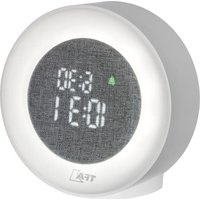
Radio controlled alarm clock with natural sounds GB
1. Features
- Highest precision radio-controlled clock
- With time zone and manual setting option
10 different natural sounds (birds, ocean etc.) and alarm sounds
- Snooze function
Day and date
- Indoor temperature
Colourful backlight
2. Elements
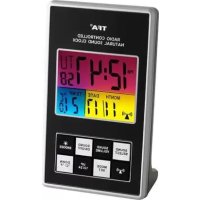
LCD (Fig. 1)
A:Clock
B:Weekday
C:Seconds
D: DCF signal
E:Date
F: Indoor temperature
G: SOUND/SELECT button
H: SOUND/VOLUME button
I: SOUND ON/OFF button
J: SNOOZE/LIGHT button
K: DCF signal button
L: MODE/SET button
M:UP/12/24 button
N:DOWN/°C/F button
Housing (Fig. 2)
O: Loudspeaker
P: Battery compartment
Q: Power socket
Radio controlled alarm clock with natural sounds

3. Getting started
- Pull off the protection foil on the display.
The alarm clock can be operated with 3 × 1,5V AAA batteries or with power adaptor (both not included).
- Open the battery compartment and insert the batteries, polarity as illustrated.
- Or: Insert the adapter (Q) into the jack. Connect the power adapter to a wall socket. Attention: Powered by adapter the light works continuously. Important! Make sure that your household voltage is 230V ! Otherwise your clock may be damaged.
The unit is now ready to use. A short melody will sound and all LCD segments will light up for about 2 seconds
- The clock will scan the DCF frequency signal and the DCF symbol flashes on the LCD. When the signal is received successfully after 5-10 minutes, the radio controlled time and the DCF symbol appears permanently.
The clock is able to scan the time signal manually by holding DCF signal button for 3 seconds.
- In case the clock cannot detect the DCF-signal (for example due to disturbances, transmitting distance, etc.), the time can be set manually. The clock will then work as a normal quartz clock. (see 4.1 Setting of clock and calendar)
- The manually set time will be overwritten by the DCF time when the signal is received successfully
Radio controlled time reception
The time base for the radio controlled time is a Caesium Atomic Clock operated by the Physikalisch Technische Bundesanstalt Braunschweig which has
Radio controlled alarm clock with natural sounds GB
a time deviation of less than one second in one million years. The time is coded and transmitted from Mainflingen near Frankfurt via frequency signal DCF-77 (77.5 kHz) and has a transmitting range of approximately 1,500 km. In Daylight Saving Time "DST" is shown on the LCD. The quality of the reception depends greatly on the geographic location. In normal cases, there should be no reception problems within a 1,500 km radius around Frankfurt.
Please take note of the following:
- Recommended distance to any interfering sources like computer monitors or TV sets is a minimum of 1.5 - 2 metres.
- Within ferro-concrete rooms (basements, superstructures), the received signal is naturally weakened. In extreme cases, please place the unit close to a window and/or point its front or back towards the Frankfurt transmitter.
- During night-time, the atmospheric disturbances are usually less severe and reception is possible in most cases. The alarm clock receives the signals at 0:00, 2:00, 4:00 and 6:00 o'clock in the morning. A single daily reception is adequate to keep the accuracy deviation below 1 second.
After the reception of the radio controlled time you can set the alarm time (see 4.2. Alarm setting).
4. How to operate
4.1 Manual setting of clock and calendar
- First select with the UP 12/24 button the 12 HR (PM appears on the display after noon) or 24 HR system.
Radio controlled alarm clock with natural sounds

- Hold MODE/SET button in normal mode for 3 seconds. The hour digit is flashing. Press UP 12/24 or DOWN ^ C / F button to adjust hours.
- Using MODE/SET button you can switch to setting minutes, year, month, day and time zone (+12/-12) and adjust with UP 12/24 or DOWN ^ C / ^ button.
The time zone is used for countries where the DCF signal can be received but the time zone is different from the German time (e.g. +1 = one hour later).
- Holding UP 12/24 or DOWN ^ C / ^ button, you will enter fast mode.
- The instrument will quit automatically the setting mode, if there is no button used within 20 seconds.
4.2 Alarm setting
- To enter alarm mode, press MODE/SET button in normal mode.
- AL appears on the display.
To activate the alarm press UP/12/24 button in alarm mode.
- The alarm symbol will appear on the display.
- Holding MODE/SET button and the hour digit is flashing. Press UP 12/24 or DOWN ^ C / F button to adjust hours. Holding UP/12/24 or DOWN/°C/°F button in setting mode and you will enter fast mode.
- Set minutes in the same way.
- Confirm with MODE/SET button.
- Press MODE/SET button again and you will return to normal mode.
Radio controlled alarm clock with natural sounds GB
- Once the alarm starts to ring, the alarm symbol flashes.
- Press any button to stop the alarm or press the SNOOZE/LIGHT button.
- Once the Snooze-function is activated, the alarm sound will be interrupted for 4 minutes. Zz flashes on the display.
- Press UP/12/24 button in the alarm mode to deactivate the alarm.
- The alarm symbol disappears on the display.
4.3 Setting the alarm melody
- Press SOUND ON/OFF button to turn on the select function.
- Press SOUND/SELECT button to change between 10 different natural sounds (e.g. birds, sound of the sea, rain and so on) and alarm sounds.
- Press SOUND/VOLUME button to regulate the sound.
- Press SOUND ON/OFF button to confirm your selection and turn off the sound.
5. Backlight
- Press SNOOZE/LIGHT button. The backlight will light for 5 seconds.
- Powered by adapter the light works continuously.
6. Temperature display
- Press DOWN/°C/°F button to change between °C (Celcius) or °F (Fahrenheit) as temperature unit.
Radio controlled alarm clock with natural sounds

7. Battery replacement
- Replace the batteries when the display becomes weak.
- Use alkaline batteries only. Observe correct polarity. Low batteries should be changed soon to avoid the damage resulting from a leaking battery. Batteries contain harmful acids. Wear protective glasses and gloves when handling with leaked batteries.
Attention: Please do not dispose of old electronic devices and empty batteries in household waste. To protect the environment, take them to your retail store or to appropriate collection sites according to national or local regulations.
8. Maintenance
- Keep it in a dry place.
- Do not expose the instrument to extreme temperatures, vibration or shock.
- Clean it with a soft damp cloth. Do not use solvents or scouring agents.
- Avoid placing the instrument near interference sources/metal frames such as computer or TV sets.
- Replace the batteries if the unit does not work properly.
The product is not a toy. Keep it out of reach of children.
The product is not to be used for medical purpose or for public information, but is determined for home use only.
Radio controlled alarm clock with natural sounds GB
- The specifications of this product may change without prior notice.
- No part of this manual may be reproduced without written consent of TFA Dostmann.
- Improper use or unauthorized opening of housing will mean the loss of warranty.
10. Specifications
Radio controlled clock: DCF-77 (77.5 kHz)
Temperature range: -15...+50°C
(5 +122^)
Operating temperature: 0....50°C (32...122°F)
Batteries 3 × 1,5 V AAA and AC/DC power adaptor (DC6V/300mA) not included
Herewith we declare, that this wireless transmission device does comply with the essentials requirements of R&TTE Directive 1999/5/EC.
A copy of the signed and dated Declaration of Conformity is available on request via info@tfa-dostmann.de.