EasyManual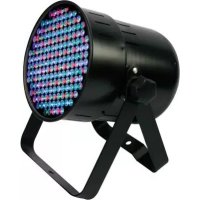
PAR64 - Effect machine HQ Power - Free user manual and instructions
Find the device manual for free PAR64 HQ Power in PDF.


User questions about PAR64 HQ Power
0 question about this device. Answer the ones you know or ask your own.
Ask a new question about this device
Download the instructions for your Effect machine in PDF format for free! Find your manual PAR64 - HQ Power and take your electronic device back in hand. On this page are published all the documents necessary for the use of your device. PAR64 by HQ Power.
USER MANUAL PAR64 HQ Power
To all residents of the European Union
Important environmental information about this product
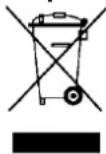
This symbol on the device or the package indicates that disposal of the device after its lifecycle could harm the environment. Do not dispose of the unit (or batteries) as unsorted municipal waste; it should be taken to a specialized company for recycling. This device should be returned to your distributor or to a local recycling service. Respect the local environmental rules.
If in doubt, contact your local waste disposal authorities.
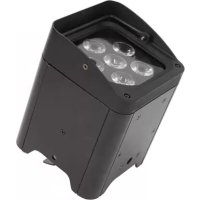
Thank you for choosing HQ-power! This LED parcan light with high-quality 10mm LEDs gives your stage or club a unique appearance. It offers you excellent colour mixing through pre-programmed effects or DMX control. Please read the manual thoroughly before bringing this device into service. If the device was damaged in transit, do not install or use it and contact your dealer.
2. Safety Instructions
| Be very careful during the installation: touching live wires can cause life-threatening electroshocks. | |
| → | Always disconnect mains power when device not in use or when servicing or maintenance activities are performed. Handle the power cord by the plug only. |
| ! | Keep this device away from children and unauthorized users. |
| Caution: device heats up during use. | |
| Do not stare directly at the light source, as this may cause epileptic seizure in sensitive people temporarily loss of sight (flash blindness) permanent (irreversible) eye damage | |
| There are no user-serviceable parts inside the device. Refer to an authorized dealer for service and/or spare parts. |
- This device falls under protection class I. It is therefore essential that the device be earthed. Have a qualified person carry out the electric connection.
- Make sure that the available voltage does not exceed the voltage stated in the specifications of this manual.
- Do not crimp the power cord and protect it against damage. Have an authorised dealer replace it if necessary.
- Respect a minimum distance of 0.5m between the device's light output and any illuminated surface.
- Use an appropriate safety cable to fix the device (e.g. VDLSC7 or VDLSC8).
3. General Guidelines
Refer to the Velleman® Service and Quality Warranty on the last pages of this manual.
| Indoor use only. Keep this device away from dust and extreme heat. Make sure the ventilation openings are clear at all times. For sufficient air circulation, leave at least 1" (±2.5 cm) in front of the openings. | |
| Keep this device away from dust and extreme heat. Make sure the ventilation openings are clear at all times. For sufficient air circulation, leave at least 1" (±2.5 cm) in front of the openings. | |
| Protect this device from shocks and abuse. Avoid brute force when operating the device. |
- Familiarise yourself with the functions of the device before actually using it. Do not allow operation by unqualified people. Any damage that may occur will most probably be due to unprofessional use of the device.
- All modifications of the device are forbidden for safety reasons. Damage caused by user modifications to the device is not covered by the warranty.
VDPLP64SB / VDPLP64SC
- Only use the device for its intended purpose. All other uses may lead to short circuits, burns, electroshocks, lamp explosion, crash, etc. Using the device in an unauthorised way will void the warranty.
- Damage caused by disregard of certain guidelines in this manual is not covered by the warranty and the dealer will not accept responsibility for any ensuing defects or problems.
- Mechanical wear is not covered by the warranty.
- A qualified technician should install and service this device.
- Do not switch the device on immediately after it has been exposed to changes in temperature. Protect the device against damage by leaving it switched off until it has reached room temperature.
- This device is designed for professional use on stage, in discos, theatres, etc. The VDPLP64SB/ VDPLP64SC can be used indoors with an alternating current of max. 230VAC/50Hz.
- Lighting effects are not designed for permanent operation: regular operation breaks will prolong their lives.
- Use the original packaging if the device is to be transported.
- Keep this manual for future reference.
4. Features
RGB colour mixing
output distance:20-25m
- master / slave or sound activated
- DMX-controlled : 4 channels with dimmer / strobe function
with built-in microphone for sound activation
5. Installation
a) Fixture
- Choose a suitable mounting location and mount the light in the desired angle.
- Use a waterproof cover when using the light outdoors.
- Insert the power cord into an appropriate outlet (230VAC / 50Hz).
- Switch off the power to the light when not in use.
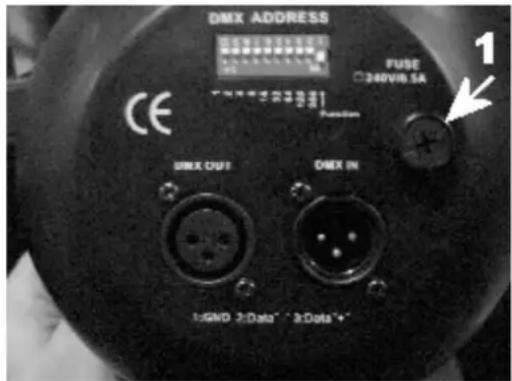
- This LED parcan is controlled through a 3-pin XLR (1 = GROUND, 2 = DATA-, 3 = DATA+)
b) Fuse
- Only fit or replace a fuse when the device is unplugged from the mains.
-
Replace a blown fuse with a fuse of the same type and rating (see "Technical Specifications"):
-
Remove the fuse holder (1) at the back using an appropriate screwdriver.
- Remove the old fuse and install a new one.
- Replace the fuse holder and fasten tight with the screwdriver.
c) Mounting the Device
- Have the device installed by a qualified person, respecting EN 60598-2-17 and all other applicable norms.
- The carrying construction must be able to support 10 times the weight of the device for 1 hour without deforming.
- The installation must always be secured with a secondary attachment e.g. a safety cable.
- Never stand directly below the device when it is being mounted, removed or serviced. Have a qualified technician check the device once a year and once before you bring it into service.
- Install the device in a location with few passers-by that is inaccessible to unauthorized persons.
- Overhead mounting requires extensive experience: calculating workload limits, determining the installation material to be used... Have the material and the device itself checked regularly. Do not attempt to install the device yourself if you lack these qualifications as improper installation may result in injuries.
- Adjust the desired inclination angle via the mounting bracket and tighten the bracket screws.
- Make sure there is no flammable material within a 0.5m radius of the device.
- Have a qualified electrician carry out the electric connection.
- Connect the device to the mains with the power plug. Do not connect it to a dimming pack.
- The installation has to be approved by an expert before the device is taken into service.
6. Use
- Auto: DIP switches as below (X means ON, 0 means OFF)
| Mode | DIP | Function | |||||||||
| 10 | 9 | 8 | 7 | 6 | 5 | 4 | 3 | 2 | 1 | ||
| Auto run (master projector) | 0 | 0 | X | X | 0 | 0 | 0 | 0 | 0 | 0 | Colour changing and fading. Select running speed via dip 7-8. |
| 0 | 0 | 0 | 0 | X | X | X | X | X | X | Static colour and flash. Select colour via dip 1-3, and flash speed via dip 4-6. | |
| Sound activated (master projector) | 0 | 1 | X | X | X | X | X | X | X | X | Sound-activated colour change. |
| DMX | 1 | X | X | X | X | X | X | X | X | X | DMX mode CH1 → R CH2 → G CH3 → B CH4 → Dimmer, strobe |
| Other | 1 | 0 | 0 | 0 | 0 | 0 | 0 | 0 | 0 | 1 | 1. DMX address is 1 when in DMX mode. 2. As slave projector when in M/S mode. |
| 1 | 0 | 0 | 0 | 0 | 0 | 0 | 0 | 0 | 0 | Black-out | |
- DMX512 mode:
Press 10 to ON to receive the DMX signal. 1-9 are used to select the requested address.
| 1 | 2 | 3 | 4 | 5 | 6 | 7 | 8 | 9 | 10 |
| 1 | 2 | 4 | 8 | 16 | 32 | 64 | 128 | 256 | |
Example: If the start address should be 95 the settings would be (for switches 1-10):
1111101000 (1 + 2 + 4 + 8 + 16 + 0 + 64 = 95)
This unit has 4 channels. Refer to the functions below:
Ch 1:0-255 Red dimmer
Ch 2:0-255 Green dimmer
Ch 3:0-255 Blue dimmer
Ch 4:0-189 Dimmer
190-250 Strobe
251-255 No function
- DMX512 Connection
Connect an XLR cable to the female 3-pin XLR output of your controller and the other side to the male 3-pin XLR input of the VDPLP64SB / VDPLP64SC. Multiple VDPLP64SB / VDPLP64SCs can be linked through serial linking. The linking cable should be a two-core screened cable with XLR input and output connectors.
- DMX-512 Chain with Termination
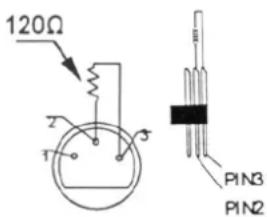
A DMX terminator is recommended for installations where the DMX cable has to run a long distance or is in an electrically noisy environment (e.g. discos). The terminator prevents corruption of the digital control signal by electrical noise. The DMX terminator is simply an XLR plug with a 120 resistor between pins 2 and 3, which is then plugged into the XLR output socket of the last device in the chain. Please see illustrations.
- Projector DMX start address selection
All DMX-controlled devices need a digital start address so that the correct device responds to the signals. This start address is the channel number from which the device starts to "listen" to the DMX controller. Enter the correct number and read it from the display located on the base of the VDPLP64SB / VDPLP64SC.
You can use the same starting address for a whole group of devices or enter an individual one for every device.
When all devices have the same address, all the VDPLP64SB / VDPLP64SCs will "listen" to the control signal on one particular channel. In other words: changing the settings of one channel will affect all devices simultaneously. If you set different addresses, each device will "listen" to a separate channel number. Changing the settings of one channel will only affect the device in question.
In the case of the 4-channel VDPLP64SB / VDPLP64SC, you will have to set the start address of the first VDPLP64SB / VDPLP64SC to 1, the second VDPLP64SB / VDPLP64SC to 5 (1 + 4), the third to 9 (5 + 4) and so on.
7. Cleaning and maintenance
- All screws should be tight and free of corrosion.
- The housing, the lenses, the mounting supports and the installation location (e.g. ceiling, suspension, trussing) should not be deformed, modified or tampered with e.g. do not drill extra holes in mounting supports, do not change the location of the connections ...
- Mechanically moving parts must not show any signs of wear and tear.
- The electric power supply cables must not show any damage. Have a qualified technician maintain the device.
- Disconnect the device from the mains prior to maintenance activities.
- Wipe the device regularly with a moist, lint-free cloth. Do not use alcohol or solvents.
- There are no user-serviceable parts apart from the fuse (see "Installation").
- Contact your dealer for spare parts if necessary.
8. Technical specifications
| Power Supply max. 230VAC / 50Hz | |
| Power Consumption max. 30W | |
| Fuse 0.5A, 250VAC (5 x 20mm) (order code FF0.5N) | |
| LEDs 183 pcs (red x 60, green x 60, blue x 60) | |
| LED diameter Ø 10mm | |
| DMX512 Connection 3-pin XLR socket | |
| Dimensions 300 x 220 x 230mm | |
| Total Weight 2.3kg | |
| Max. Ambient Temperature 45°C | |
| Max. Housing Temperature 80°C |
Use this device with original accessories only. Velleman nv cannot be held responsible in the event of damage or injury resulted from (incorrect) use of this device.
For more info concerning this product, please visit our website www.hqpower.eu.
The information in this manual is subject to change without prior notice.
© COPYRIGHT NOTICE
The copyright to this manual is owned by Velleman nv. All worldwide rights reserved. No part of this manual or may be copied, reproduced, translated or reduced to any electronic medium or otherwise without the prior written consent of the copyright holder.
GEBRUIKERSHANDLEIDING
1. Inleiding
Velleman® Service and Quality Warranty
Velleman® has over 35 years of experience in the electronics world and distributes its products in more than 85 countries. All our products fulfil strict quality requirements and legal stipulations in the EU. In order to ensure the quality, our products regularly go through an extra quality check, both by an internal quality department and by specialized external organisations. If, all precautionary measures notwithstanding, problems should occur, please make appeal to our warranty (see guarantee conditions).
General Warranty Conditions Concerning Consumer Products (for EU):
- All consumer products are subject to a 24-month warranty on production flaws and defective material as from the original date of purchase.
- Velleman® can decide to replace an article with an equivalent article, or to refund the retail value totally or partially when the complaint is valid and a free repair or replacement of the article is impossible, or if the expenses are out of proportion. You will be delivered a replacing article or a refund at the value of 100% of the purchase price in case of a flaw occurred in the first year after the date of purchase and delivery, or a replacing article at 50% of the purchase price or a refund at the value of 50% of the retail value in case of a flaw occurred in the second year after the date of purchase and delivery.
Not covered by warranty:
- all direct or indirect damage caused after delivery to the article (e.g. by oxidation, shocks, falls, dust, dirt, humidity...), and by the article, as well as its contents (e.g. data loss), compensation for loss of profits;
- frequently replaced consumable goods, parts or accessories such as batteries, lamps, rubber parts, drive belts... (unlimited list);
- flaws resulting from fire, water damage, lightning, accident, natural disaster, etc. ...
- flaws caused deliberately, negligently or resulting from improper handling, negligent maintenance, abusive use or use contrary to the manufacturer's instructions;
- damage caused by a commercial, professional or collective use of the article (the warranty validity will be reduced to six (6) months when the article is used professionally);
- damage resulting from an inappropriate packing and shipping of the article;
- all damage caused by modification, repair or alteration performed by a third party without written permission by Velleman®.
- Articles to be repaired must be delivered to your Velleman® dealer, solidly packed (preferably in the original packaging), and be completed with the original receipt of purchase and a clear flaw description.
- Hint: In order to save on cost and time, please reread the manual and check if the flaw is caused by obvious causes prior to presenting the article for repair. Note that returning a non-defective article can also involve handling costs.
- Repairs occurring after warranty expiration are subject to shipping costs.
- The above conditions are without prejudice to all commercial warranties.
The above enumeration is subject to modification according to the article (see article's manual).
NL
-性和 costs for the period of guarantía, including the cost of a new or revised legal document, professional fees, and other costs.
- costs for the period of guarantía, professional fees, and other costs for the period of a new or revised legal document, professional fees, and other costs.