
CPE510 - Access Point TP-LINK - Free user manual and instructions
Find the device manual for free CPE510 TP-LINK in PDF.
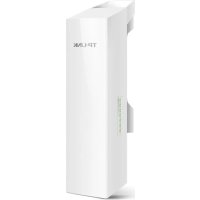



| Product Type | Outdoor Access Point (CPE) |
| Brand | TP-Link |
| Model | CPE510 |
| Dimensions | 227 x 120 x 84 mm |
| Weight | 2.4 kg (with mounting bracket) |
| Power Supply | PoE (Power over Ethernet) via included adapter |
| Frequency | 2.4 GHz |
| Maximum Data Rate | 300 Mbps |
| Antenna Gain | 13 dBi |
| Ports | 1 Ethernet port 10/100 Mbps |
| Operating Modes | Standalone, managed via Wi-Fi controller or centralized software |
| Mounting | On pole or wall (mounting plate included) |
| Wireless Security | WEP, WPA/WPA2-PSK, WPA/WPA2-Enterprise |
| Protection Rating | IP65 (weatherproof) |
| Maintenance | Clean with a dry, soft cloth. Do not use solvents. |
| Safety Instructions | Keep away from water, fire, humidity. Do not disassemble. |
| Spare Parts and Repairability | Not user-serviceable. Contact technical support. |
| Warranty | TP-Link limited warranty (duration indicated on packaging) |
| Operating Temperature | -30°C to 70°C |
Frequently Asked Questions - CPE510 TP-LINK
User questions about CPE510 TP-LINK
0 question about this device. Answer the ones you know or ask your own.
Ask a new question about this device
Download the instructions for your Access Point in PDF format for free! Find your manual CPE510 - TP-LINK and take your electronic device back in hand. On this page are published all the documents necessary for the use of your device. CPE510 by TP-LINK.
USER MANUAL CPE510 TP-LINK
Outdoor Access Point
CONTENTS
Deutsch
English
Espanol
Eλληνικό
François
Italiano
Português
Suomi
Nederlandss
Svenska
Norsk
Dansk
Hardware installation
Note: The image may differ from the actual product.
Typical Network Topology
- Managed Mode
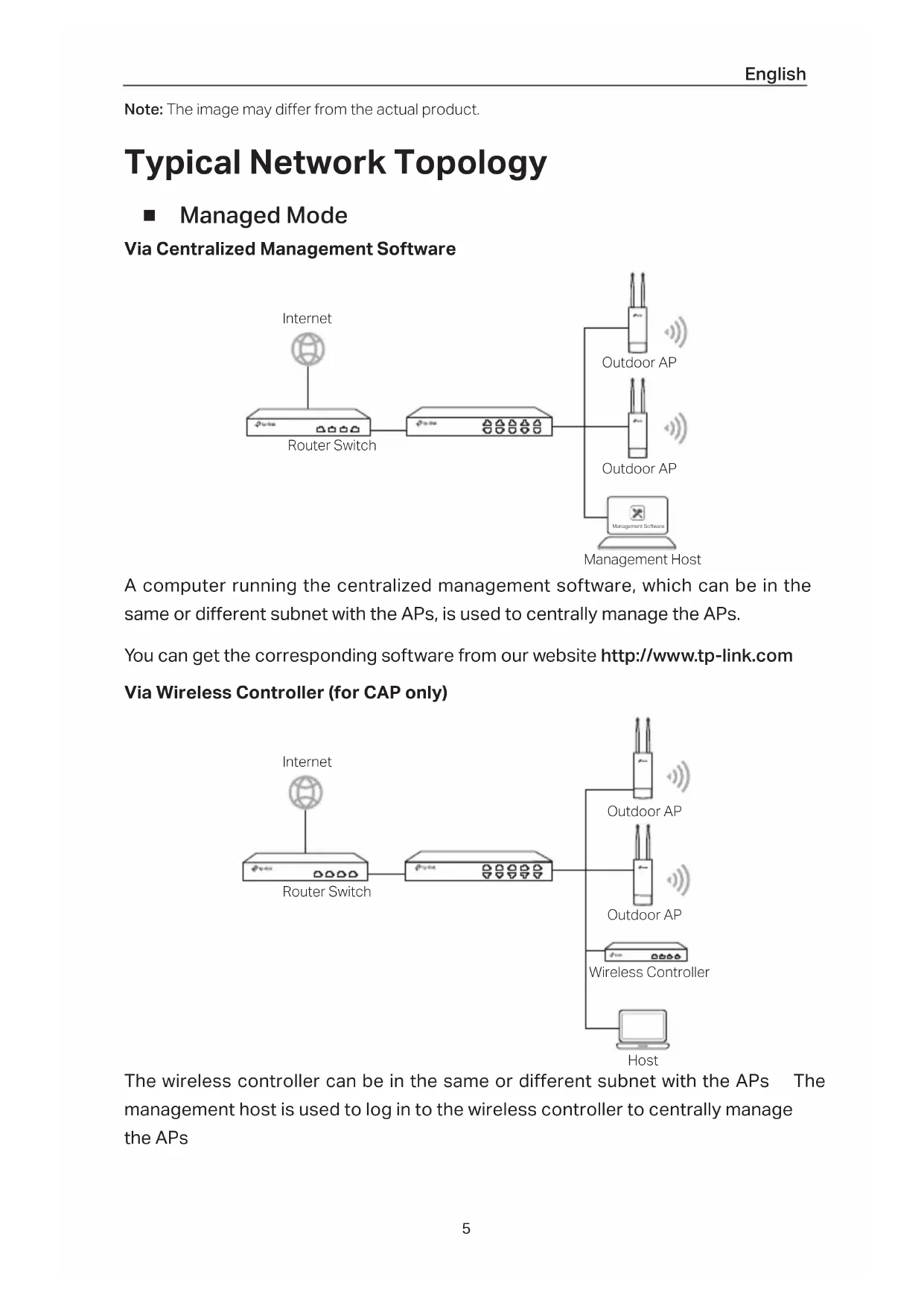
Via Centralized Management Software
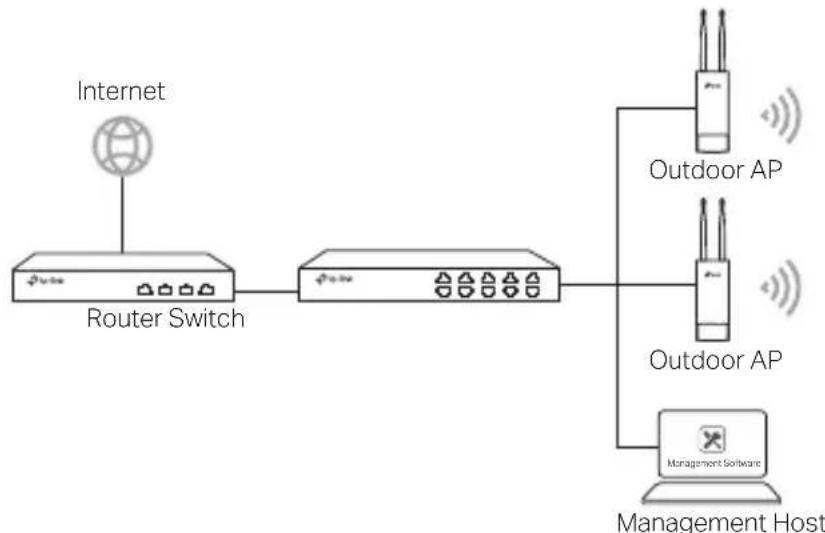
A computer running the centralized management software, which can be in the same or different subnet with the APs, is used to centrally manage the APs.
You can get the corresponding software from our website http://www.tp-link.com Via Wireless Controller (for CAP only)
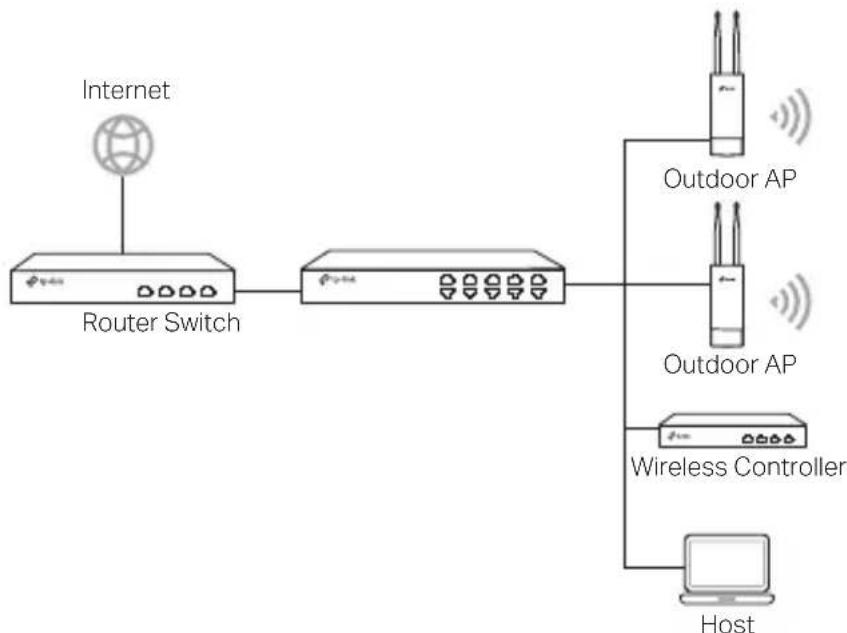
The wireless controller can be in the same or different subnet with the APs. The management host is used to log in to the wireless controller to centrally manage the APs.
Standalone Mode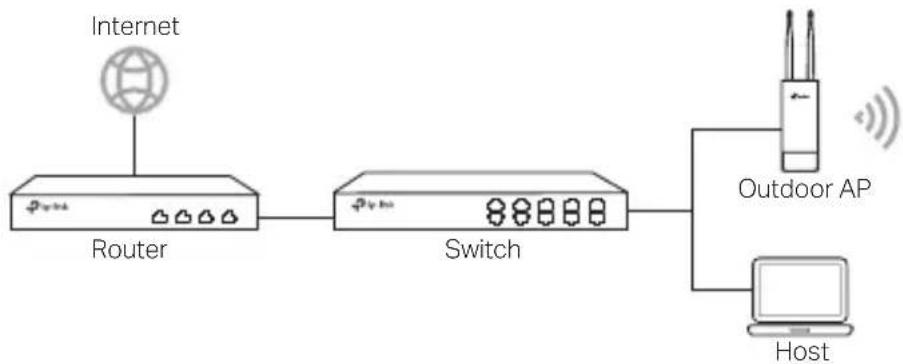
Hardware Connection
Choose a method to connect your device according to the accessories.
Via PoE Switch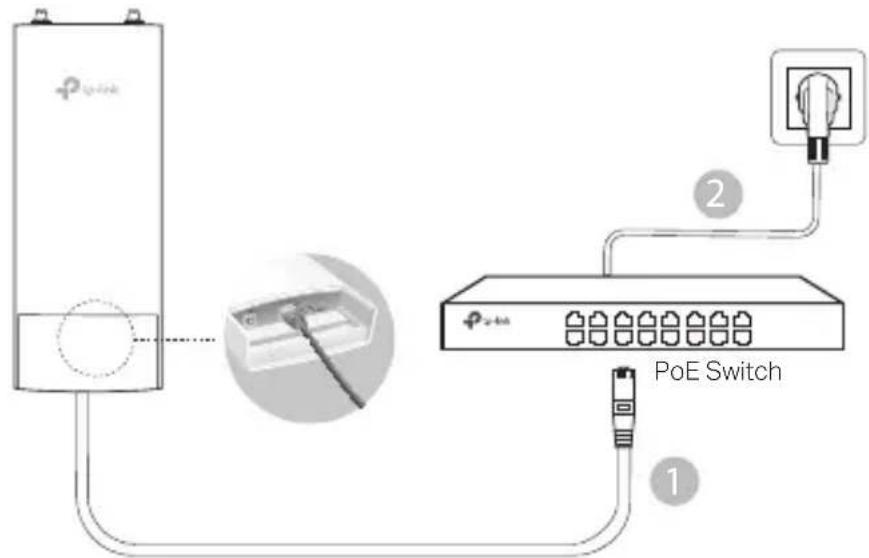
Via PoE Adapter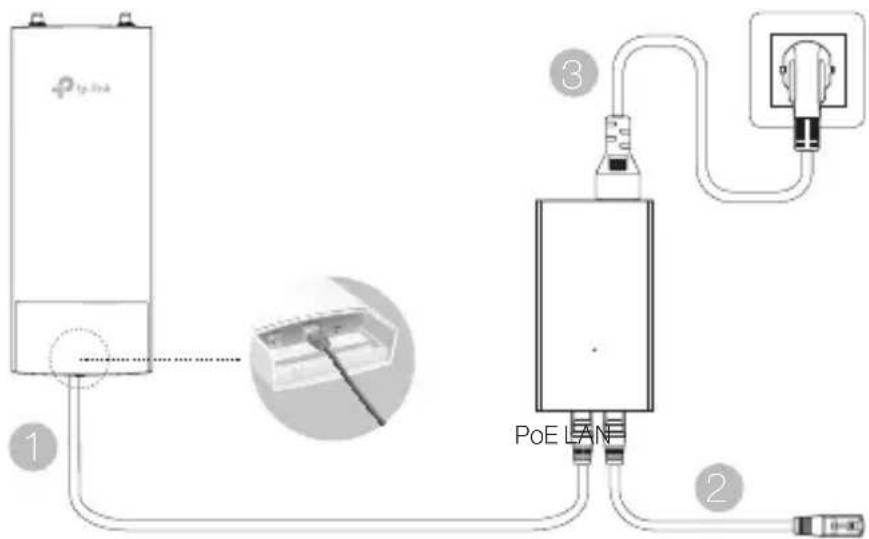
Or
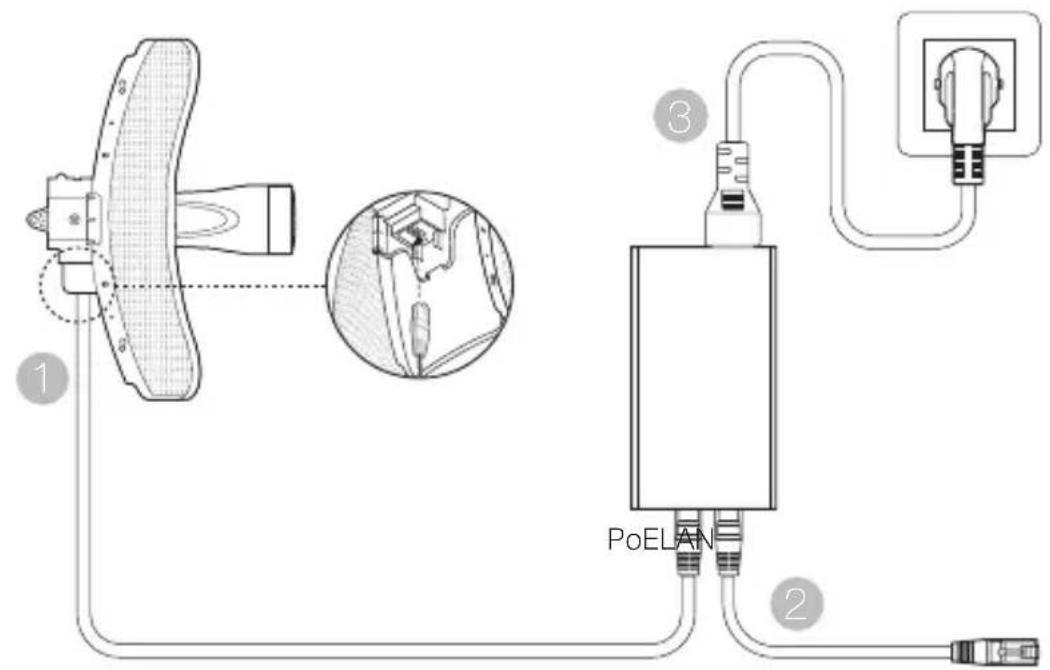
Hardware Installation
Choose a method to mount the device
Mounting the Device on a Pole
At the selected site, attach the device to a suitable point on the pole and then approximately align the device to the direction you have oriented.
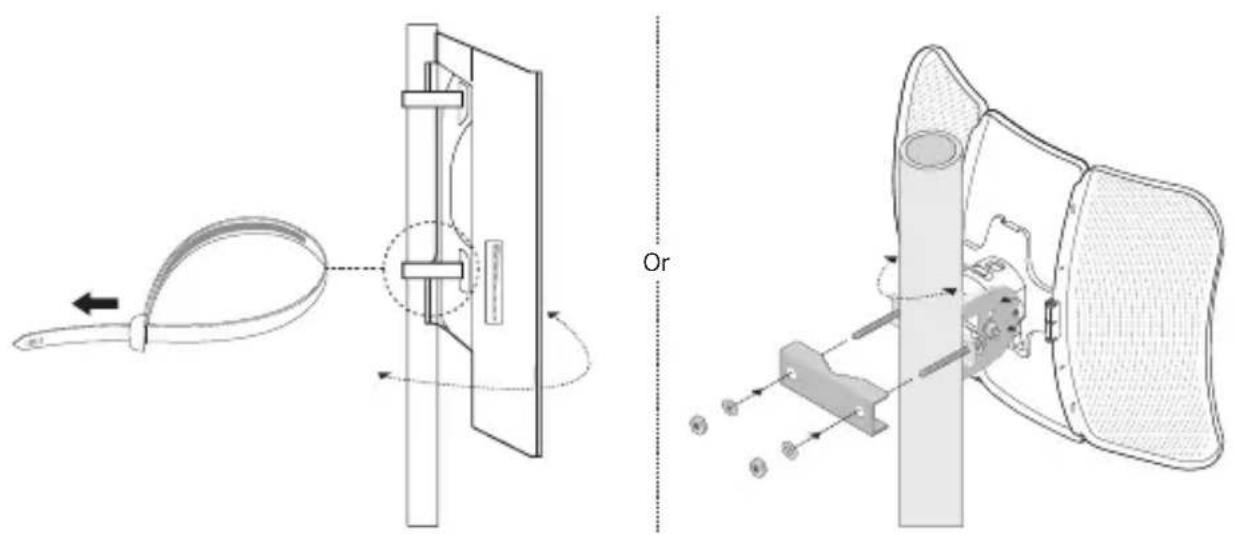
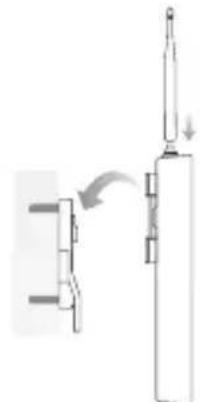
- Mounting the Device on the Wall (for the product with mounting brackets)
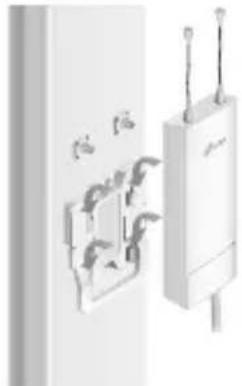
Mount the mounting bracket to the preferred position on the wall. Push and slide the device to lock it into place. Then connect the antennas to the device.
Mounting the Device on an Antenna (for WBS)
Mount the device on the antenna with the mounting bracket. Connect the RF cables from the device to the corresponding connectors on the antenna. Attach the protective cap.
Software Configurations
- Managed Mode
To configure mass devices via a centralized management software or a wireless controller, please refer to the corresponding User Guide. You can download the User Guide from our website http://www.tp-link.com
Standalone Mode
To configure a device through a web-based management system, please follow the steps below:
- Launch a web browser and enter the IP address of your device in the address bar and press Enter.
Note:
- For EAP, you can check the IP address through your router.
- For other products, the default IP address is 192.168.0.254 and the IP address of your computer should be set as 192.168.0.x ("x" is any number from 1 to 253).
- Enter admin for both User Name and Password for login
- Change the default User Name and Password to protect your device, then start configuring the device.
- Keep the device away from water, fire, humidity or hot environments.
- Do not attempt to disassemble, repair, or modify the device.
- Do not use damaged charger or USB cable to charge the device
- Do not use any other chargers than those recommended.
- Do not use the device where wireless devices are not allowed
- Adapter shall be installed near the equipment and shall be easily accessible.
Please read and follow the above safety information when operating the device. We cannot guarantee that no accidents or damage will occur due to improper use of device. Please use this product with care and operate at your own risk.
TP-Link Limited Product Warranty
For TP-Link Branded Products Only.
THIS WARRANTY GIVES YOU SPECIFIC LEGAL RIGHTS, AND YOU MAY HAVE OTHER RIGHTS THAT VARY FROM STATE TO STATE (OR BY COUNTRY OR PROVINCE).
TO THE EXTENT ALLOWED BY LOCAL LAW, THIS WARRANTY AND THE REMEDIES SET FORTH ARE EXCLUSIVE AND IN LIEU OF ALL OTHER WARRANTIES, REMEDIES AND CONDITIONS
TP-Link warrants the TP-Link branded hardware product contained in the original packaging against defects in materials and workmanship when used normally in accordance with TP-Link's guidelines for a period which depends on the local service from the date of original retail purchase by the end-user purchaser.
TP-Link hereby declares that the device is in compliance with the essential requirements and other relevant provisions of directives 2014/53/EU, 2009/125/EC and 2011/65/EU.
The original EU declaration of conformity may be found at http://www.tp-link.com/en/ce.
South Building (floors 1, 3, 4, 5) and 28 (floors 1-4), Central Science & Technology Park, Shennan Rd, Nanshan, Shenzhen, China
Unit 2 & 3 Riverview (142-144), Cardiff Road, Reading, RG1 8EW
TP-Link Italia S.r.l.
TP-Link Netherlands B.V.
Archimedesbaan 18, 3439 ME Nieuwegein
TP-Link (NORDIC) AB
Forumvagen 14, Plan 13, 131 53 Nacka, Sweden
TP-Link Hellas Ltd
Marathonodromou 77, Marousi 151 24, Greece
NWS TP-Link Portugal, Unipessoal, Lda
Brand : TP-LINK
Model : CPE510
Category : Access Point