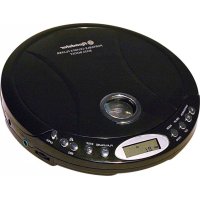
PCD495MPBK - Cd player/recorder ROADSTAR - Free user manual and instructions
Find the device manual for free PCD495MPBK ROADSTAR in PDF.



| Product type | Portable MP3 CD player/recorder |
| Brand | Roadstar |
| Model | PCD495MPBK |
| Category | CD player/recorder |
| Dimensions | 143 mm diameter × 24 mm thickness |
| Weight | 210 g |
| Power supply | 2 UM-3/AA alkaline batteries (1.5 V) or AC/DC mains adapter 230 V / 4.5 V (center positive) |
| Power consumption | 0.8 W (DC 3 V) under normal conditions |
| Supported formats | Audio CD, MP3 CD (up to 384 kbps, MPEG bitrates 8-48 kHz) |
| Shock protection memory | 45 seconds for CD, 120 seconds for MP3 |
| Playback functions | Play, pause, stop, skip forward/backward, fast search, repeat (1/album/disc), intro play (10 sec), random play, program (24 tracks) |
| Programming | Up to 24 tracks in programmed mode (audio CD and MP3 with album selection) |
| Bass Boost (BBS) | Bass enhancement activated by dedicated button |
| Auto off | After 60 seconds in stop/standby mode |
| Hearing protection | Volume limited at startup, can be disabled by holding the + button |
| Low battery indicator | "LOW BATTERY" symbol on LCD display |
| Battery type | Alkaline (non-rechargeable) or rechargeable Nickel-Cadmium (AA type) |
| Battery charging | ON/OFF switch, charging via mains adapter, 15 h duration, red LED |
| Maintenance | Clean the device with a soft, damp cloth (water + mild detergent) |
| CD cleaning | Soft, dry cloth, from center to edge, without chemicals |
| Laser safety | Invisible laser radiation class 1 (or similar) – do not open the casing |
| Repairs | Refer to qualified technician – no user-serviceable parts |
| Included accessories | Stereo headphones, AC/DC mains adapter, user manual (38 pages) |
Frequently Asked Questions - PCD495MPBK ROADSTAR
User questions about PCD495MPBK ROADSTAR
0 question about this device. Answer the ones you know or ask your own.
Ask a new question about this device
Download the instructions for your Cd player/recorder in PDF format for free! Find your manual PCD495MPBK - ROADSTAR and take your electronic device back in hand. On this page are published all the documents necessary for the use of your device. PCD495MPBK by ROADSTAR.
USER MANUAL PCD495MPBK ROADSTAR
PORTABLE AUDIO CD AND MP3 PLAYER WITH ANTI-ROLLING AND DIGITAL ANTI-SHOCK SYSTEM (45 SEC. IN CD/120 SEC. IN MP3)
PCD-495MP
Instruction manual
Bedienungsanleitung
Manueld'instructions
Roadstar Management SA, via Passegiata 7 CH 6883 Novazzano (Switzerland)
Roadstar
is a registered Trademark of Roadstar S.A. - Switzerland All rights reserved


INDEX
English Page 1
Deutsch Seite 13
Français Page 25
Italiano Pagina 37
Espanol Páginas 49
Portugues Pagina 61
- Your new unit was manufactured and assembled under strict ROADSTAR quality control. Thank you for purchasing our product for your music enjoyment. Before operating the unit, please read this instruction manual carefully. Keep it also handy for further future references.
- Voiture nouvellement appellé a été fabriqué et monté en étant saumis aux nombreaux tests ROADSTAR. Nous espèrons que oel appellé vousdonner entiree salitaction. Avant de vous adnommer à ces activités, veuillée lire attentivementce manuel d'instructions.Conservez-le a portée de main a fin de reference ultérieure.
Vuestro nuevo sistemas ha sido construido segnas
nomas estrcitas de control de calidad ROADSTAR. Lo felicitantes y lo damos las gracias por su eleccion de este aparecido.Por favor lear de manual antes deponer en functionamento el equipo y guardar esta
documentacion en case de que se necessite
nueveramente.
Hr neus Geral wurde unter Berachnung der stgrenen ROADSTAR-Qualitatsvorschriften gefertigt. Wir danken Ilhnon fur den Kauf unseros Produkttes und wünschen Ihnen optimalen Hörgenuss. Bittesen Lie diese Bedlunengansleitung durch, und haben Sie sie auf, um jederzeit darin nachschlagar zu können.
I vosto novo apporeccchio è stato prodotto ed assemblata sulla stro è controlo di qualità ROADSTAR.
Vi rrigaziamo di aver acquistato un nuovo prodotto per il vosto piacere d'ascollo. Prima di pratiche all'utilizzo dell'appareccchio, leggete attentamente la manuale d'struzioni e tenetelo sempre a portata di mano per futuri riferimenti.
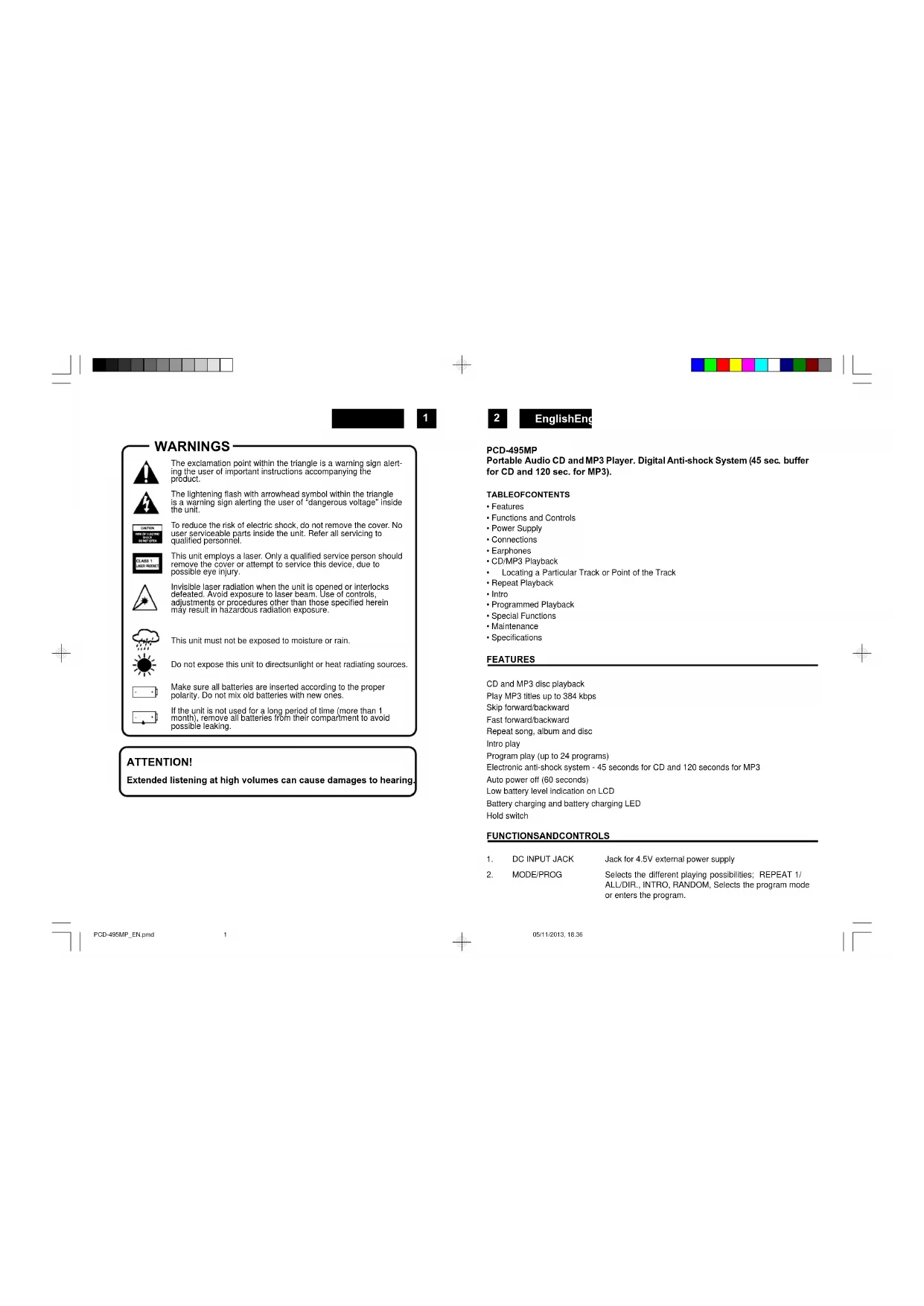
The exclamation point within the triangle is a warning sign alerting the user of important instructions accompanying the product.

The lightening flash with arrowhead symbol within the triangle is a warning sign alerting the user of "dangerous voltage" inside the unit.

To reduce the risk of electric shock, do not remove the cover. No user serviceable parts inside the unit. Refer all servicing to qualified personnel.

This unit employs a laser. Only a qualified service person should remove the cover or attempt to service this device, due to possible eye injury.

This unit must not be exposed to moisture or rain.

Do not expose this unit to direct sunlight or heat radiating sources.

If the unit is not used for a long period of time (more than 1 month), remove all batteries from their compartment to avoid possible leaking.
ATTENTION!
Extended listening at high volumes can cause damages to hearing.

EnglishEng
PCD-495MP
Portable Audio CD and MP3 Player. Digital Anti-shock System (45 sec. buffer for CD and 120 sec. for MP3).
TABLEOFCONTENTS
-Features
- Functions and Controls
Power Supply
- Connections
- Earphones
CD/MP3 Playback
- Locating a Particular Track or Point of the Track
- Repeat Playback
Intrc
- Programmed Playback
Special Functions
- Maintenance
- Specifications
FEATURES
CD and MP3 disc playback
Play MP3 titles up to 384 kbps
Skip forward/backward
East forward/backwa
Repeat song, album and disc
Intro play
Program play (up to 24 programs)
Electronic anti-shock system - 45 seconds for CD and 120 seconds for MP3
Auto power off (60 seconds)
Low battery level indication on LCD
Battery charging and battery charging LED
Hold switch
FUNCTIONSANDCONTROLS
- DC INPUT JACK
- MODE/PROG
Jack for 4.5V external power supply
Selects the different playing possibilities; REPEAT 1/
ALL/DIR., INTRO, RANDOM, Selects the program mode
or enters the program.





- DIR-UP/ASP
MP3: select the file search function by Directory (UP): Anti-Shock Protection on/off
- Display Window LCD function display
- Battery Compartment Install Battery
- PLAY/PAUSE Turns the set on, starts and interrupts CD play
-
SKIP+/SEARCH Skip or fast search tracks forward, and MP3 file SEARCH-RIGHT
-
CD Door Lift to place the disc
-
STOP
Stops CD play, erases a program and turns the set off, and MP3 file SEARCH-DOWN
- SKIP-SEARCH
Skip or fast search tracks backward, and MP3 file SEARCH-LEFT
- PHONE JACK
- BBS
- VOLUME
- +Button
- OPEN SWITCH
- Recharge Switch
- Recharge Switch
Adjusts the volume
to enable / disable the Volume limitation
Opens the CD lid
Set the switch to ON position to start charging.
Both batteries must be of rechargeable NICKEL-CADMIUM type.
- Recharge LED
The Red LED indicator will illuminate to slow that charging is taking place
POWERSUPPLY
Use with regular batteries
- Open the battery compartment door, located on the bottom of the unit, by sliding the door and lift it up. (Do not remove the battery door).
-
Insert 2 × 1.5V / UM3 / AA size alkaline batteries, following the correct polarity, as indicated in the battery compartment.
-
Close the battery compartment door.
Note: If the symbol "LOW BATTERY" appears in the display, batteries are weak and ought to be replaced.
4
EnglishEng
Use with AC/DC adaptor(included)
- Insert the DC plug, at the end of the AC/DC adaptor cord, into the DC 4.5 V INPUT socket (1) located on the back of the unit.
- Connect the AC/DC adaptor into a 230V 50Hz AC power outlet.
Notes:
- If the AC adaptor is connected when regular batteries are installed, the power supply automatically switches to the AC power source.
Use only the supplied AC/DC adaptor. Using other types of adaptor may damage the unit. - Make sure that the AC/DC adaptor matches with your household voltage before connecting it into the wall outlet.
- When not using AC power, disconnect the AC/DC adaptor from the wall outlet.
- Do not touch the AC/DC adaptor with wet hands.
Use rechargeable batteries
- Disconnect the AC/DC adaptor from the wall outlet if it is being connected to the unit.
- Open the battery compartment door as mentioned previously.
- Insert 2 recommended rechargeable batteries, following the correct polarity as indicated in the battery compartment.
- Close the battery compartment door.
-
Move the RECHARGE SWITCH (16) to ON to start recharging function. The red CHARGE indicator (17) will light up.
-
After 15 hours of charging set the RECHARGE SWITCH (16) to OFF.
Cautions:
DO NOT mix the rechargeable (Nickel-Cadmium) and regular(Carbon-zinc) batteries.
DO NOT charge continuously for 24 hours or more, otherwise it will deteriorate the performance of the rechargeable batteries.
DO NOT try to recharge normal (not rechargeable) batteries. They can explode!
Notes:
- If the rechargeable batteries are being charged for the first time, it will take approximately 15 hours to be fully charged.
- If the operating time decreases drastically even when the rechargeable batteries are properly recharged, purchase a new set of rechargeable batteries.
EARPHONES
Connect the stereo earphones (included) to the Phones jack (11).





5
CD/MP3PLAYBACK
- Connect the earphones (included) or optional headphones into the Phones jack.
- Press the Door Open button (15) to open the CD compartment door.
- Insert a disc with the label side facing up.
- Close the CD compartment door until a click is heard.
- Set the VOLUME control (13) to minimum.
- Press the PLAY/PAUSE button (6), the unit power will turn on automatically and show the number of the tracks.
INCASEOFCCDISC
The total number of tracks and total playing time appear on the display: Playback starts. During playback, the actual track and the elapsed time appear.
INCASEOFMP3 DISC
The total number of albums and tracks, and MP3 appear on the display: Playback starts. During playback, the actual album number, track and the elapsed time appear.
CD + MP3
- Adjust the VOLUME control to your desired listening level.
- To stop playback temporarily, press the PLAY/PAUSE button (6) once. The elapsed time will flash and track number compare on the display. Press the PLAY/PAUSE button again to resume playback.
- To stop playback, press the STOP (9) button once.
- To turn the unit off, press the STOP (9) twice.
Notes:
- When the CD door is accidentally opened during playback, "Open" will appear on the display.
- Wait until the disc is fully stopped before pressing the OPEN (15) button.
This unit can play 3'' (8cm) single CDs without an adaptor.
Playback information
- If a CD Rewritable (CD Recordable) is not recorded properly, "DISC" is displayed. For CD Audio, use FINALIZE on your CD recorder to complete the recording.
- Playback will stop if you open the CD Ild.
- If there is no activity for 10 seconds, the set will clear the display, and if there is no activity after another 50 seconds, the set will switch off automatically to save energy. Any settings

EnglishEng
like program and playing modes will be then lost.
LOCATING APARTICULAR TRACK ORPOINT OF THETRACK
INCD/MP3
- Press the BACKWARD (↑) (10) button once to go back to the beginning of the current track.
- Press the BACKWARD( 喜 ) button repeatedly to go back to previous tracks.
- Press the FORWARD (▶) (7) button repeatedly to go to next tracks.
- Press and hold either FORWARD (H) or BACKWARD (H) button to search backwards or forwards, at high speed, a particular point of track.
Note: Low level audio will be heard during the search process to assist in locating the correct point in the track.
Searching and selecting an MP3 track/album
The following table shows the different functions available when playing Audio CD or MP3 CDs.
- Single file is displayed when playing an MP3 CD with only a root directory which contains no additional albums (folders).
- With albums means a MP3 CD with more than one album (folders), and is shown by directory and a number on the display, as AL 09, AL10, etc.
| Function | CD audio | MP3 | MP3 (with multiple albums) |
| Track select | [ | [ | [ |
| Music search | [ | [ | [ |
| Fast track select | [ | [ | [ |
| Fast album select | [ |
REPEATPLAYBACK
INCD
- Press the PLAY/PAUSE button (6).
- To repeat the same track, press the MODE button (2) once. "REP 1" will appear on the
display.
The CD will start single repeat playback until STOP button (9) is pressed.
PresstheMODE button(2) button4times moreto cancel trackrepeat, 'REP 1' disappears from the display.
- To repeat the entire disc, press the MODE button (2) twice. "REP A" will appear on the display.
Press the MODE button 3 times more to cancel all disc repeat. The indicator 'REP A' disappears from the display.
IN MP3
-
Press the PLAY/PAUSE button (6).
-
To repeat the same track, press the MODE button (2) once during PLAYBACK. "REP 1" will appear on the display.
CD will start single track repeat playback until STOP button (9) is pressed. Press the
MODE button (2) 5 times to cancel single repeat. The 'REP 1' indicator disappears from the display.
- To repeat the entire ALBUM, press the MODE button (2) twice. "REP ALL" will appear on the display.
Press the MODE button (2) 3 times to cancel all Album repeat. The 'REP ALL' indicator disappears from the display.
- To repeat the entire MP3 disc, press the MODE (2) button (3) three times.
"REP DIR" will appear on the display.
Press the MODE button (2) 3 times to cancel all disc repeat. The "REP DIR" indicator
disappears from the display.
INTROPLAY
INCD
- Press the PLAY/PAUSE button (6).
- Press the MODE button (2) 3 times to enter the Intro mode, 'INT' appears on the display.
- Press PLAY, the CD start play the first 10 seconds of each track on the CD.
- Press MODE button (2) twice more to cancel Intro playback and resume normal playback
- Power is turned off automatically after 60 seconds, when all tracks have been played.
IN MP3
- Press the PLAY/PAUSE button (6).
- Press the MODE button (2) 4 times to enter the Intro mode, 'INT' appears on the display.
- Press PLAY, the CD start play the first 10 seconds of each track of each album on the CD.
8
EnglishEng
- Press MODE button(2) twicemoretocancel Intro playback and resume normal playback.
- Power is turned off automatically after 60 seconds, when all tracks have been played.
RANDOMPLAY
INCD
- Press the MODE button (2) 4 times to enter the Random mode. "RND" appears on the display
- The CD start playback in Random order.
- Press SKIP Forward (▶) button to go to next Random track.
- Press the MODE button (2) once more to return to the Normal Playback mode.
IN MP3
- Press the MODE button (2) 5 times to enter the Random mode. "RND" appears on the display, then the CD start playback of all tracks of all albums in Random order.
- Press SKIP (▶) button to go to next Random track.
- Press the MODE button 2) once more to return to the Normal Playback mode.
PROGRAMMEDPLAYBACK
INCD
- Press the PLAY/PAUSE button (6) and after 5 seconds the STOP button (9).
- PressthePROG/MODE button(2).Thetracknumberand"PGM"will appearthedisplay indicating the first selection.
PGM
ASP 00 01
TRACK NUMBER PROGRAM NUMBER
- Press SKIP Forward and Backward (10,7) buttons to select the desired track
- Press once the PROG/MODE button (2) to enter the track into memory.
- Repeat the steps 3 and 4 to program up to 64 tracks (files).
- Press PLAY/PAUSE (6) button once to start programmed playback.
- To cancel programmed playback, press the STOP button (9) twice.
Note: During program playback, if you wish to repeat the entire programmed playback, press the MODE button (2) repeatedly until the "REP A" indicator appears on the display.




IN MP3
- Press the PLAY/PAUSE button (6) and after 8 seconds the STOP button (9).
- Press the PROG/MODE button (2), the following will appear on the display
0000P-01
ALBUMNUMBER TRACK NUMBER PROGRAMNUMBER the Album no. will flash.
- Press the SKIP Forward and Backward (10,7) buttons to select the desired Album to be programmed.
- Press the PROG/MODE button (2) once to enter the Album Into memory. The Album number will stop flashing and the track number will start flashing.
-
Press the SKIP Forward and Backward (10,7) buttons to select the desired track to be programmed.
-
Press the PROG/MODE button (2) to select the desired track to be programmed.
- Repeat the steps 3 to 6 to program up to 24 tracks.
- Press PLAY/PAUSE button (6) once to start programmed playback.
- To cancel programmed playback, press the STOP button (9) twice.
SWITCH OFF THE VOLUME LIMITATION
To protect your hearing, after switched ON the unit is only available a limited Volume level. You can switch disable this limitation by keep pressed the the + button. The display flash "HIGH".
To disable this function, press the - button.
NOTE: The Voléumre restriction is reactivate every time that the unit is switched OFF or the disc is changed.
SPECIAL FUNCTIONS
Bass Boost
Press the BBS button (12) to switch ON the Bass Boost function.
Auto Power Off
When the unit is stopped (standby mode) for approximately 60 seconds, the Auto Power Off function will activated and turn the unit off automatically.
Anti-shockFunction
- Ifin use.the playersimilarly foreceive shockor vibrations(i.e.whilst walkingor ina moving vehicle).As soonasthePLAY;PAUSEbutton ispressed,theASPfunction isautomatically

EnglishEng
activated to allow uninterrupted playback. "ASP" will compare in the display.
- Should the player receive shocks for more than 45 seconds continuously in CD playback or 120secondsin MP3playback, thesound canmute fora veryshort while and willresume once the player has stabilised from the shock.
To disable ANTI-SHOCK Function, press ASP button (3) once (CD mode only).
Notes:
- When using the Anti-shock function, the disc will rotate faster than normal playback and memory is active. Only use the ANTI-SHOCK function when necessary to preserve the battery life.
- The Anti-shock function will not correct the errors arising from the use of defective scratched or dirty discs.
- IMPORTANT! During MP3 playback, the ANTI-SHOCKfunctionisalways ON and this function can not be deactivated.
ResumeFunction
End playback by pressing twice.
When playback is resumed, the last song re-start from position at which it has ended.
To start playback at the first track, press FF/REW once and start playback.
MAINTENANCE
Cleaningthe unit
Wipe the outside surface of the unit with a soft cloth moistened with water and mild soap.
HandlingCDs
Your CD player has been especially designed for the reproduction of compact discs bearing the CD mark. No other discs should be loaded into the player.
Always place the disc in tray with the label facing up.
Although compact discs are impervious to wear during play, damage to the surface of a disc through improper handling will result in playback irregularities.
To preserve your compact discs, please handle them with care.
Although minute dust particles and fingerprints should have no effect on playback, you should keep the surface of the recorded side of your discs clean by wiping the disc with a clean, dry, lint-free soft cloth with straight movements from the centre outwards.
Never use record cleaners, record sprays, antistatic sprays, liquids nor chemical based liquids to clean the surface of a disc. They may In fact Irrepairably damage the disc's plastic surface.
Always return the disc to its protective plastic case when not using it. Avoid exposing discs to direct sunlight, excessive temperatures or high humidity for extended periods of time. Do




11
12
EnglishEng
not write on the label side of the disc with a ball/point pen as this may scratch the disc.
SPECIFICATIONS
Audio
D/A conversion 1-bit DAC, 8 times oversampling
Frequency response 20-20,000Hz
Anti-shock 45 seconds CD/120 seconds MP3 memory
Wow and flutter Below measurable limits
No. of channels 2 channels (stereo)
Output level Line output: 0.6V rms (47KOhm)
Headphone: 20mW (32Ohm)
MP3
MPEG Rate 32-384 Kbps
Sampling Frequency
8/48KHz
MP3Playback
ISO9660 format compatible
Check the CD burner/ recorder's documentation to see if it complies with these specifications.
General
Power requirements
-2 x LR6 / UM-3 / "AA" alkaline battery
- DC in 4.5V jack accepts AC power adaptor
(centre positive)
Power consumption
0.8W(DC3V)
Dimension
Approx. 143mm of diameter X 24mm (D)
Weight (without balleries)
210g.
Note: Specifications and the design are subject to possible modifications without notice.


05/11/2013, 18:36



13
DeutschDe
SICHERHEITSHINWEISE

UNTER NORMALEN BEDINGUGEN
Scansione brani (Intro play)
- INGRESSO DC
- MODE/PROG
Repeticion cancellation, album y disco
Lectura casual (Random)
Lectura Intro
Lectura programada (hasta 24 programas)
BBS (Bass Boost System)
Abre el compartmento CD
- Selector RECARGA
1x = NORMAL, 2x = CLASSICO, 3x = POP, 4x = JAZZ, 5x = ROCK
Conversao D/A 1-bit DAC 4x oversampling
Resposta da Freqencia 20-20,000Hz
Anti-chogue.
de MP3
Movimento
Numero dos canais
Nivel de saida


- PCD-495MP
- INDEX
- ATTENTION!
- EnglishEng
- TABLEOFCONTENTS
- FEATURES
- FUNCTIONSANDCONTROLS
- POWERSUPPLY
- Use with regular batteries
- 4
- Use with AC/DC adaptor(included)
- Notes:
- Use rechargeable batteries
- Cautions:
- EARPHONES
- CD/MP3PLAYBACK
- INCASEOFCCDISC
- INCASEOFMP3 DISC
- CD + MP3
- Playback information
- LOCATING APARTICULAR TRACK ORPOINT OF THETRACK
- INCD/MP3
- Searching and selecting an MP3 track/album
- REPEATPLAYBACK
- INCD
- IN MP3
- INTROPLAY
- RANDOMPLAY
- PROGRAMMEDPLAYBACK
- PGM
- ASP 00 01
- TRACK NUMBER PROGRAM NUMBER
- 0000P-01
- SWITCH OFF THE VOLUME LIMITATION
- SPECIAL FUNCTIONS
- Bass Boost
- Auto Power Off
- Anti-shockFunction
- ResumeFunction
- MAINTENANCE
- Cleaningthe unit
- HandlingCDs
- SPECIFICATIONS
- Audio
- MP3
- General
- 13
- DeutschDe
- SICHERHEITSHINWEISE
Brand : ROADSTAR
Model : PCD495MPBK
Category : Cd player/recorder