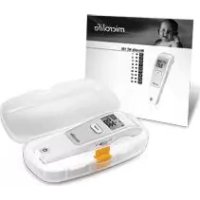
NC 150 - Thermometer MICROLIFE - Free user manual and instructions
Find the device manual for free NC 150 MICROLIFE in PDF.


| Product type | Non-contact infrared thermometer |
| Brand | Microlife |
| Model | NC 150 |
| Measurement range (body mode) | 34.0 °C – 43.0 °C / 93.2 °F – 109.4 °F |
| Measurement range (object mode) | 0.1 °C – 99.9 °C / 32.2 °F – 211.8 °F |
| Accuracy (laboratory) | ±0.2 °C (between 36.0 – 39.0 °C) |
| Resolution | 0.1 °C / °F |
| Internal memory | Last 30 measurements with date and time |
| Power supply | 2 AAA alkaline batteries 1.5 V |
| Battery life | Approx. 2000 measurements |
| Dimensions | 141.1 × 43.3 × 36.9 mm |
| Weight (with batteries) | 90 g |
| Display | Backlit LCD (green/red) |
| Audible signal | Adjustable beep (on/off) |
| Main functions | Non-contact measurement, body and object modes, 30-measurement memory, fever indicator backlight, °C/°F switching, auto shut-off |
| Care and cleaning | Clean with a soft cloth moistened with 70% isopropyl alcohol |
| Safety | Self-test at each startup, auto shut-off, protection against electromagnetic fields |
| Warranty | 5 years |
| Standards | ISO 80601-2-56, IEC 60601-1, IEC 60601-1-2 (EMC), IEC 60601-1-11 |
| Box contents | Thermometer, 2 AAA batteries, instruction manual |
Frequently Asked Questions - NC 150 MICROLIFE
User questions about NC 150 MICROLIFE
0 question about this device. Answer the ones you know or ask your own.
Ask a new question about this device
Download the instructions for your Thermometer in PDF format for free! Find your manual NC 150 - MICROLIFE and take your electronic device back in hand. On this page are published all the documents necessary for the use of your device. NC 150 by MICROLIFE.
USER MANUAL NC 150 MICROLIFE
① Measuring sensor
② Tracking light
③ Display
④ START button
⑤ ON/OFF button
(6) Mode switch
⑦ Battery compartment cover
M-button (memory)
9 All segments displayed
Memory
11 Ready for measuring
Measurement complete
13 Body mode
14 Object mode
15 Low battery indicator
16 Changing between Celsius and Fahrenheit
17 Recall mode
18 Recall the last 30 readings
19 Measured temperature too high
Measured temperature too low
② Ambient temperature too high
2 Ambient temperature too low
②3 Error function display
24 Blank display
25 Flat battery
26 Date/Time
27 Beeper function setting
28 Replacing the battery

Read the important information in these instructions for use before using this device. Follow the instructions for use for your safety and keep it for future reference.

Type BF applied part

Keep dry
This Microlife thermometer is a high quality product incorporating the latest technology and tested in accordance with international standards. With its unique technology, this device can provide a stable, heat-interference-free reading with each measurement.
The device performs a self-test every time it is switched on to always guarantee the specified accuracy of any measurement.
This Microlife thermometer is intended for the periodic measurement and monitoring of human body temperature.
This thermometer has been clinically tested and proven to be safe and accurate when used in accordance to the operating instruction manual.
Please read through these instructions carefully in order for you to understand all functions and safety information.
Table of contents
- The Advantages of this Thermometer
- Important Safety Instructions
- How this Thermometer measures Temperature
- Control Displays and Symbols
- Setting Date, Time and Beeper Functions
- Changing between Body and Object Mode
- Directions for Use
- Changing between Celsius and Fahrenheit
- How to recall 30 readings in Memory Mode
- Error Messages
- Cleaning and disinfecting
- Battery Replacement
- Guarantee
- Technical Specifications
- www.microlife.com
1. The Advantages of this Thermometer
Measures in a matter of seconds
The innovative infrared technology allows the measurement without even touching the object. This guarantees safe and sanitary measurements within seconds.
Multiple uses (wide range of measurement)
This thermometer offers a wide range of measurement from 0.1 - 99.9ircC / 32.2 - 211.8ircF , meaning the unit can be used to measure
body temperature or it also has a feature allowing it to be used to measure surface temperature of the following examples:
- Milk surface temperature in a baby's bottle
Surface temperature of a baby's bath - Ambient temperature
Accurate and reliable
The unique probe assembly construction incorporates an advanced infrared sensor, ensuring that each measurement is accurate and reliable.
Gentle and easy to use
- The ergonomic design enables simple and easy use of the thermometer.
- This thermometer can even be used on a sleeping child without causing any interruption.
- This thermometer is quick, therefore child-friendly.
Multiple readings recall
Users will be able to recall the last 30 readings with a record of both time and date when entering the recall mode, enabling efficient tracking of temperature variations.
Safe and hygienic
No direct skin contact.
- No risk of broken glass or mercury ingestion.
- Completely safe for use on children.
2. Important Safety Instructions
- Follow instructions for use. This document provides important product operation and safety information regarding this device. Please read this document thoroughly before using the device and keep for future reference.
- This device may only be used for the purposes described in these instructions. The manufacturer cannot be held liable for damage caused by incorrect application.
- Never immerse this device in water or other liquids. For cleaning please follow the instructions in the « Cleaning and disinfecting» section.
- Do not use this device if you think it is damaged or notice anything unusual.
- Never open this device.
-
A basic physiological effect called vasoconstriction can occur in the early stages of fever, resulting in a cool skin effect. The recorded temperature using this thermometer can, therefore, be unusually low.
-
If the measurement result is not consistent with the patient's finding or unusually low, repeat the measurement every 15 minutes or double check the result by another core body temperature measurement.
- This device comprises sensitive components and must be treated with caution. Observe the storage and operating conditions described in the «Technical Specifications» section.
- Ensure that children do not use this device unsupervised; some parts are small enough to be swallowed.
-
Do not use this device close to strong electromagnetic fields such as mobile telephones or radio installations. Keep a minimum distance of 3.3m from such devices when using this device.
-
Protect it from:
extreme temperatures
impact and dropping
contamination and dust
direct sunlight
heat and cold
- If the device is not going to be used for a prolonged period the batteries should be removed.

WARNING: The measurement results given by this device is not a diagnosis. It is not replacing the need for the consultation of a physician, especially if not matching the patient's symptoms. Do not rely on the measurement result only, always consider other potentially occurring symptoms and the patient's feedback. Calling a doctor or an ambulance is advised if needed.
3. How this Thermometer measures Temperature
This thermometer measures infrared energy radiated from the forehead as well as objects. This energy is collected through the lens and converted to a temperature value.
4. Control Displays and Symbols
- All segments displayed (9): Press the ON/OFF button (5) to turn on the unit; all segments will be shown for 1 second.
- Ready for measuring ⑪: When the unit is ready for measuring, the «°C» or «°F» icon will keep flashing while the mode icon (body or object) will be displayed.
- Measurement complete ⑫: The reading will be shown on the display ③ with the «°C» or «°F» icon and the mode icon
steady. The unit is ready for the next measurement as soon as the ircC or ircF icon is flashing again.
- Low battery indicator ⑤: When the unit is turned on, the «▼» icon will keep flashing to remind the user to replace the batteries.
5. Setting Date, Time and Beeper Functions
Setting the date and time
- After the new batteries are fitted, the year number flashes in the display 26. You can set the year by pressing the START button 4. To confirm and then set the month, press the M-button 8.
- Press the START button 4 to set the month. Press the Mbutton 8 to confirm and then set the day.
- Follow the previously mentioned instructions to set the day, 12 or 24 hour mode, hours and minutes.
- Once you have set the minutes and pressed the M-button ⑧, the date and time are set and the time is displayed.
If no button is pressed for 20 seconds, the device automatically switches to ready for measuring (11).
Cancel time setup: Press the ON/OFF button 5 during time setup. The LCD will show Date/Time icons with - After that press the ON/OFF button 5 to start the measurement. If no further action is taken within 20 seconds, the device will automatically turn off.
Change current date and time: Press and hold the Mbutton 8 for approx. 3 seconds until the year number starts to flash 26. Now you can enter the new values as described above.
Setting the beeper
- When the device is switched off, press and hold the ON/OFF button 5 for 5 seconds to set the beeper 27.
- Press the ON/OFF button 5 again to either turn the beeper on or off. The beeper is activated when the beeper icon 27 is not crossed-out.
If no button is pressed for 5 seconds, the device automatically switches to ready for measuring 11.
6. Changing between Body and Object Mode
For changing from body to object mode, slide the mode switch (6) at the side of the thermometer downwards. For switching back to body mode, slide the switch up again.
7. Directions for Use
Measuring in body mode
- Press the ON/OFF button ⑤. The display ③ is activated to show all segments for 1 second.
- When the «°C» or «°F» icon is flashing, a beep sound is heard and the thermometer is ready for measuring ⑪.
- Aim the thermometer at the center of the forehead with a distance of no more than 5cm . Please remove any hair, sweat or dirt from the forehead before measuring to improve the accuracy of the readings.
- Press the START button ④ and ensure that the activated blue tracking light is aimed at the center of the forehead. After 3 seconds a long beep will verify the completion of measurement.
- Read the recorded temperature from the LCD display.
Measuring in object mode
- Follow steps 1-2 above, then aim the thermometer at the center of the object you want to measure with a distance of no more than 5cm . Press the START button (4). After 3 seconds a long beep will verify the completion of measurement.
- Read the recorded temperature from the LCD display.
NOTE:
Patients and thermometer should stay in similar room condition for at least 30 minutes.
- Don't take a measurement while or immediately after nursing a baby.
- Don't use the thermometer in high humidity environments.
Patients should not drink, eat or exercise before/while taking the measurement.
- Don't move the measurement device from the measuring area before hearing the termination beep.
10 short beeps and a red LCD backlight alert the patient that he/she may have a temperature equal to or higher than 37.5ircC
- Always take the temperature in the same location, since temperature readings may vary according to locations.
- Doctors recommend rectal measurement for newborn infants within the first 6 months, as all other measuring methods might lead to ambiguous results. If using a non contact thermometer on those infants, we always recommend verifying the readings with a rectal measurement.
- In the following situations it is recommended that three temperatures are taken with the highest one taken as the reading:
Children under three years of age with a compromised immune system and for whom the presence or absence of fever is critical.
- When the user is learning how to use the thermometer for the first time until he/she has familiarized himself/herself with the device and obtains consistent readings.
- If the measurement is surprisingly low.
- Readings from different measuring sites should not be compared as the normal body temperature varies by measuring site and time of day, being highest in the evening and lowest about one hour before waking up.
Normal body temperature ranges:
Axillar: 34.7 - 37.3 °C / 94.5 - 99.1 °F
Oral: 35.5 - 37.5 °C / 95.9 - 99.5 °F
Rectal: 36.6 - 38.0 °C / 97.9 - 100.4 °F
Microlife NC 150 BT: 35.4 - 37.4 °C / 95.7 - 99.3 °F
8. Changing between Celsius and Fahrenheit
This thermometer can display temperature readings in either Fahrenheit or Celsius. To switch the display between irc C and irc F , simply turn OFF the unit, press and hold the START button 4 for 5 seconds; after 5 seconds, the current measurement scale ( «°C » or «°F » icon) will flash on the display 16. Change the measurement scale between irc C and irc F by pressing the START button 4. When the measurement scale has been chosen, wait for 5 seconds and the unit will automatically enter the «ready for measuring» mode.
9. How to recall 30 readings in Memory Mode
This thermometer can recall the last 30 readings with a record of both time and date.
- Recall mode ①: Press the M-button ⑧ to enter recall mode when the power is off. The memory icon «M» will flash.
- Reading 1 - the last reading (8): Press and release the M按钮 to recall the last reading. Number «1» and a flashing «M» are displayed.
- Reading 30 - readings in succession: Press and release the M-button ⑧ consecutively to recall the last 30 readings in succession.
Pressing and releasing the M-button ⑧ after the last 30 readings have been recalled will resume the above sequence from reading 1.
10.Error Messages
Measured temperature too high 19: Displays H when measured temperature is higher than 43ircC / 109.4ircF in body mode or 99.9ircC / 211.8ircF in object mode.
- Measured temperature too low (20): Displays «L» when measured temperature is lower than 34ircC / 93.2ircF in body mode or 0.1ircC / 32.2ircF in object mode.
- Ambient temperature too high (21): Displays «H» and when ambient temperature is higher than 40.0ircC / 104.0ircF .
- Ambient temperature too low ②: Displays «L» and when ambient temperature is lower than 15.0ircC / 59.0ircF in body mode or lower than 5.0ircC / 41.0ircF in object mode.
- Error function display ②3: The system has a malfunction.
- Blank display 24: Check if the batteries have been inserted correctly. Also check polarity (< + > and < -> of the batteries.
- Flat battery indicator 25: If only «▼» icon is shown on the display, the batteries should be replaced immediately.
11.Cleaning and disinfecting
Use an alcohol swab or cotton tissue moistened with alcohol (70% Isopropyl) to clean the thermometer casing and the measuring sensor. Ensure that no liquid enters the interior of the device. Never use abrasive cleaning agents, thinners or benzene for cleaning and never immerse the device in water or other cleaning liquids. Take care not to scratch the surface of the sensor lens and the display.
12.Battery Replacement
This device is supplied with 2 new, long-life 1.5V, size AAA batteries. Batteries need replacing when this icon «▼» ②5 is the only symbol shown on the display.
Remove the battery cover 28 by sliding it in the direction shown. Replace the batteries - ensure correct polarity as shown by the symbols in the compartment.

Batteries and electronic devices must be disposed of in accordance with the locally applicable regulations, not with domestic waste.
13.Guarantee
This device is covered by a 5 year guarantee from the date of purchase. During this guarantee period, at our discretion, Microlife will repair or replace the defective product free of charge. Opening or altering the device invalidates the guarantee. The following items are excluded from the guarantee:
- Transport costs and risks of transport.
- Damage caused by incorrect application or non-compliance with the instructions for use.
- Damage caused by leaking batteries.
- Damage caused by accident or misuse.
- Packaging/storage material and instructions for use.
- Regular checks and maintenance (calibration).
- Accessories and wearing parts: Batteries, Probe cover (optional).
Should guarantee service be required, please contact the dealer from where the product was purchased, or your local Microlife service. You may contact your local Microlife service through our website: www.microlife.com/support
Compensation is limited to the value of the product. The guarantee will be granted if the complete product is returned with the original invoice. Repair or replacement within guarantee does not prolong or renew the guarantee period. The legal claims and rights of consumers are not limited by this guarantee.
14. Technical Specifications
Type: Adjusted mode Non Contact Thermometer NC 150
Mode type: Adjust mode
Measuring site: Forehead
Reference body site: Sublingual
Measurement range: Body mode: 34.0 - 43.0 °C / 93.2 - 109.4 °F Object mode: 0.1 - 99.9 °C / 32.2 - 211.8 °F
Resolution: 0.1ircC / ircF
Measurement accu- 0± .2ircC,36.0 39.0ircC / ± 0.4ircF, racy (Laboratory): 96.8 102.2ircF
Clinical results: Repeatability: 0.09ircC Bias: 0.06ircC Limits of agreement: 0.54ircC Display: Liquid Crystal Display, 4 digits plus special icons
Acoustic: The unit is turned ON and ready for the measurement: 1 short beep. Complete the measurement: 1 long beep (1 sec.) if the reading is less than 37.5ircC /99.5F, 10 short «beep» sounds, if the reading is equal to or greater than 37.5ircC / 99.5ircF. System error or malfunction: 3 short «bi» sounds.
Memory: 30 readings recall in the memory mode with a record of both time and date.
Backlight: The display light will be GREEN for 1 second, when the unit is turned ON. The display light will be GREEN for 5 seconds, when a measurement is completed with a reading less than 37.5ircC / 99.5ircF. The display light will be RED for 5 seconds, when a measurement is completed with a reading equal to or higher than 37.5ircC / 99.5ircF.
Operating Body mode: 15 - 40.0 °C / 59 - 104.0 °F conditions: Object mode: 5 - 40.0 °C / 41 - 104.0 °F 15 - 95 % relative maximum humidity Storage conditions: -25 - +55 °C / -13 - +131 °F 15 - 95 % relative maximum humidity
Automatic Approx. 1 minute after last measurement
Switch-off: has been taken.
Battery: 2 × 1.5 V alkaline batteries; size AAA
Battery lifetime: approx. 2000 measurements (using new batteries)
Dimensions: 141.1 × 43.3 × 36.9 mm Weight: 90 g (with batteries), 67 g (w/o batteries)
IP Class: IP21
Reference to ISO 80601-2-56; IEC 60601-1; IEC
standards: 60601-1-2 (EMC); IEC 60601-1-11
Expected service life: 5 years or 12000 measurements
This device complies with the requirements of the Medical Device Directive 93/42/EEC.
Technical alterations reserved.
According to the Medical Product User Act a biennial technical inspection is recommended for professional users. Please observe the applicable disposal regulations.
15. www.microlife.com
Detailed user information about our thermometers and blood pressure monitors as well as services can be found at www.microlife.com.
Microlife NC 150
ES
www.microlife.com/support
Ekran: Siv Kristal Ekran (LCD),
4 basamak arti ozel simgeler
(Laboratoium): 96.8 ~ 102.2 F
Enueio metpnons: Metwto
j 3.3 jai y aal . jaiy 1 jaiy 1 jaiy 1 jaiy
12a aal 8
biàn wǎn lì
j 1
julal juaa 1
( 0,π 4) ± 1
y 1
gai jiai jiai jiai jiai jiai jiai jiai jiai jiai jiai jiai jiai jiai jiai jiai jiai jiai jiai jiai jiai jiai jiai jiai jiai jiai jiai jiai jiai jiai jiai jiai jiai jiai jiai

aJ 3
a a a a a a a a a a a a a a a a a a a a a a a a a a a a a a a a a a a a a a
4
aill jll plal aablljll
aalrall
2
aaiy
aagaaagaae aee
Jaaai 21 Jgog
Jewy, biny. ydy Jyoo Jyey yyy
i j 1
!
Jia 1
L
e 30 jg Jy
aag jul
Jy Jy Jy Jy
Jibil 1 Juauiuui uai
ai Q. = P( 1 + i = 0maik j = 1icij( kp) j - 1)
4 1 Jgall Jg aol glaag aal lgs jy g y. piau u Llal y 1
. 1 Jgall plaiu oaiy aaii gao aol g jgll Jgall IaLg 2
. 1 Jaiuall g llg 1g 1g 1g 1g 1g
. 1 Sjy . 1. kll d g ai nnnnll aas jzgl baa Jlaauiu nn say
. 1blal all piau y bnnn rnnnll ay gauu gauu gauu J
. (plal) (s) gil gail g al g jgll 13a Jaiy
. 1
y jai jia bao xie jil 1i jie jie jie jie
121 jieai 2
(vasoconstriction)
1 1 1 1 1 1 1 1 1 1 1 1 1 1 1 1 1 1 1 1 1 1 1 1 1 1 1 1 1 1 1 1 1 1
J 1
J 7
J
J
J
J
J
J
J
J
J
J
J
J
J
J
J
J
J
J
J
J
J
J
J
J
J
J
J
J
J
J
J
J
J
J
J
J
J
J
J
J
J
J
J
J
J
J
J
J
J
J
J
J
J
J
J
J
J
J
J
J
J
J
J
J
J
J
J
J
J
J
J
J
J
J
J
J
J
J
J
J
J
a. 11
- Microlife
F°
%70) 1jxlll jn lglg S y jaiit Jaoi Jyjiae jyjaiy jayaiy jayaiy jayaiy jayaiy jayaiy jayaiy jayaiy jayaiy jayaiy jayaiy jayaiy jayaiy jayaiy jayaiy jayaiy jayaiy jayaiy jayaiy jayaiy jayaiy jayaiy jayaiy jayaiy jayaiy jayaiy jjayjayaiy jayaiy jayaiy jayaiy jayaiy jayaiy jayaiy jayaiy jayaiy jayaiy jayaiy jayaiy jayaiy jayaiy jayaiy jayaiy jayaiy
A. 12
15 2 2 2 2 2 2 2 2 2 2 2 2 2 2 2 2 2 2 2 2 2 2 2 2 2 2 2 2 2 2 2 2 2 2 2 2 2 2 2 2 2 2 2 2 2 2 2 2 2 2 0
aai jgi jki 111111111111111111

Jalal.13
Lg,0dJlalll 5 Jlaaia jlaal l
LjIaiai Microlife a, Li
Jlaai Jb. yj gl jlae
:Jlaai Jtaa aill
Jabl Jblg Jall
Llalbll blln jne pali cll
pala 0 g 1234567890
palaal lalglai yjzill / aieillg aieill al
(8yall) aysssall yssall
. (y) all eblc, 1ylll: jge gag yss
el ydi yk yjy yjy yk k
Microlife Jauilikay Aicll Microlife aiai
liag aJis n aiaa
www.microlife.com/support
gajlal gajlal glaial giaia giaia giaia giaia giaia giaia giaia giaia giaia giaia giaia giaia giaia giaia giaia giaia giaia giaia giaia giaia giaia giaia giaia giaia giaia giaia giaia giaia giaia giaia giaia giaia giaia giaia
y 8
J 4 J F° C° J5 5 5 5 5 5 5 5 5 5 5 5 5 5 5 5 5 5 5 5 5 5 5 5 5 5 5 5 5 5 5 5 5 5 5 5 5 5
a 30 a jai .9
30 1
8M- j bai: 17 Ejuiu bai .
. 8M- j n e aie! 18 yaiy -1 5eJ
. 8M- j n e aie! 30 30 J
.30 J
.1 30
101
99.9 43°C/109.4°F C/211.8°F
34°C 0.1°C/32.2°F F93.2/
104.0 40.0 40.0 40.0 40.0 40.0 40.0 40.0 40.0 40.0 40.0 40.0 40.0 40.0 40.0 40.0 40.0 40.0 40.0 40.0 40.0 4
| 40-15°C/104.4-59°F:- -5-40.0°C/41:- F904.0 ΔSississississississississississississississississississississississississississississississississississississississississississississississississississississississississississississississississississississississississississississississississississississississississississississississississississississisissississississississississississississississississississississississississississississississississississississississississississississississississississississississississississississississississississississississississississississississississississississississississississississississississississessssssssssssssssssssssssssssssssssssssssssssssssssssssssssssssssssssssssssssssssssssssssssssssssssssssssssssssssssssssssssssssssssssssssssssssssssssssssssssssssssssssssssssssssssssssssssssssssssssssssssSSSSSSSSSSSSSSSSSSSSSSSSSSSSSSSSSSSSSSSSSSSSSSSSSSSSSSSSSSSSSSSSSSSSSSSSSSSSSSSSSSSSSSSSSSSSSSSSSSSSSSSSSSSSSSSSSSSSSSSSSSSSSSSSSSSSSSSSSSSSSSSSSSSSSSSSSSSSSSSSSSSSSSSSSSSSSSSSSSSSSSSSSSSSSSSSSSSSSSSSSSSSSSSSSSSSSSSSSSSSSSSSSSSSSSSSSSSSSSSSSSSSSSSSSSSSSSSSSSSSSSSSSSSSSSSSSSSSSSSSSSSSSSSSSSSSSSSSSSSSSSSSSSSSSSSSSSSSSSSSSSSSSSSSSSSSSSSSSSSSSSSSSSSSSSSSSSSSSSSSSSSSSSSSSSSSSSSSSSSSSSSSSSSSSSSSSSSSSSS |
| NC 1450 | |
| : √ √ √ √ √ √ √ √ √ √ √ √ √ √ √ √ √ √ √ √ √ √ √ √ √ √ √ √ √ √ √ √ √ √ √ √ √ √ √ √ √ √ √ √ √ √ √ √ √ √ ∇ √ √ √ √ √ √ √ √ √ √ √ √ √ √ √ √ √ √ √ √ √ √ √ √ √ √ √ √ √ √ √ √ √ √ √ √ √ √ √ √ √ √ √ √ √ √ √ √ √ ∶ √ √ √ √ √ √ √ √ √ √ √ √ √ √ √ √ √ √ √ √ √ √ √ √ √ √ √ √ √ √ √ √ √ √ √ √ √ √ √ √ √ √ √ √ √ √ √ √ √ ∙ √ √ √ √ √ √ √ √ √ √ √ √ √ √ √ √ √ √ √ √ √ √ √ √ √ √ √ √ √ √ √ √ √ √ √ √ √ √ √ √ √ √ √ √ √ √ √ √ √ ∗ √ √ √ √ √ √ √ √ √ √ √ √ √ √ √ √ √ √ √ √ √ √ √ √ √ √ √ √ √ √ √ √ √ √ √ √ √ √ √ √ √ √ √ √ √ √ √ √ √ ∘ √ √ √ √ √ √ √ √ √ √ √ √ √ √ √ √ √ √ √ √ √ √ √ √ √ √ √ √ √ √ √ √ √ √ √ √ √ √ √ √ √ √ √ √ √ √ √ √ √ ∞ √ √ √ √ √ √ √ √ √ √ √ √ √ √ √ √ √ √ √ √ √ √ √ √ √ √ √ √ √ √ √ √ √ √ √ √ √ √ √ √ √ √ √ √ √ √ √ √ √ ∼ √ √ √ √ √ √ √ √ √ √ √ √ √ √ √ √ √ √ √ √ √ √ √ √ √ √ √ √ √ √ √ √ √ √ √ √ √ √ √ √ √ √ √ √ √ √ √ √ √ ∫ ∫ ∫ ∫ ∫ ∫ ∫ ∫ ∫ ∫ ∫ ∫ ∫ ∫ ∫ ∫ ∫ ∫ ∫ ∫ ∫ ∫ ∫ ∫ ∫ ∫ ∫ ∫ ∫ ∫ ∫ ∫ ∫ ∫ ∫ ∫ ∫ ∫ ∫ ∫ ∫ ∫ ∫ ∫ ∫ ∫ ∫ ∫ ∫ ∫ ∱ ∫ ∫ ∫ ∫ ∫ ∫ ∫ ∫ ∫ ∫ ∫ ∫ ∫ ∫ ∫ ∫ ∫ ∫ ∫ ∫ ∫ ∫ ∫ ∫ ∫ ∫ ∫ ∫ ∫ ∫ ∫ ∫ ∫ ∫ ∫ ∫ ∫ ∫ ∫ ∫ ∫ ∫ ∫ ∫ ∫ ∫ ∫ ∫ ∫ ∭ ∫ ∫ ∫ ∫ ∫ ∫ ∫ ∫ ∫ ∫ ∫ ∫ ∫ ∫ ∫ ∫ ∫ ∫ ∫ ∫ ∫ ∫ ∫ ∫ ∫ ∫ ∫ ∫ ∫ ∫ ∫ ∫ ∫ ∫ ∫ ∫ ∫ ∫ ∫ ∫ ∫ ∫ ∫ ∫ ∫ ∫ ∫ ∫ ∫ ∅ ∅ ∅ ∅ ∅ ∅ ∅ ∅ ∅ ∅ ∅ ∅ ∅ ∅ ∅ ∅ ∅ ∅ ∅ ∅ ∅ ∅ ∅ ∅ ∅ ∅ ∅ ∅ ∅ ∅ ∅ ∅ ∅ ∅ ∅ ∅ ∅ ∅ ∅ ∅ ∅ ∅ ∅ ∅ ∅ ∅ ∅ ∅ ∅ ∅ ∆ ∅ ∅ ∅ ∅ ∅ ∅ ∅ ∅ ∅ ∅ ∅ ∅ ∅ ∅ ∅ ∅ ∅ ∅ ∅ ∅ ∅ ∅ ∅ ∅ ∅ ∅ ∅ ∅ ∅ ∅ ∅ ∅ ∅ ∅ ∅ ∅ ∅ ∅ ∅ ∅ ∅ ∅ ∅ ∅ ∅ ∅ ∅ ∅ ∅ ∈ ∅ ∅ ∅ ∅ ∅ ∅ ∅ ∅ ∅ ∅ ∅ ∅ ∅ ∅ ∅ ∅ ∅ ∅ ∅ ∅ ∅ ∅ ∅ ∅ ∅ ∅ ∅ ∅ ∅ ∅ ∅ ∅ ∅ ∅ ∅ ∅ ∅ ∅ ∅ ∅ ∅ ∅ ∅ ∅ ∅ ∅ ∅ ∅ ∅ ∲ ∅ ∅ ∅ ∅ ∅ ∅ ∅ ∅ ∅ ∅ ∅ ∅ ∅ ∅ ∅ ∅ ∅ ∅ ∅ ∅ ∅ ∅ ∅ ∅ ∅ ∅ ∅ ∅ ∅ ∅ ∅ ∅ ∅ ∅ ∅ ∅ ∅ ∅ ∅ ∅ ∅ ∅ ∅ ∅ ∅ ∅ ∅ ∅ ∅ ∬ ∅ ∅ ∅ ∅ ∅ ∅ ∅ ∅ ∅ ∅ ∅ ∅ ∅ ∅ ∅ ∅ ∅ ∅ ∅ ∅ ∅ ∅ ∅ ∅ ∅ ∅ ∅ ∅ ∅ ∅ ∅ ∅ ∅ ∅ ∅ ∅ ∅ ∅ ∅ ∅ ∅ ∅ ∅ ∅ ∅ ∅ ∅ ∅ ∅ ∍ ∅ ∅ ∅ ∅ ∅ ∅ ∅ ∅ ∅ ∅ ∅ ∅ ∅ ∅ ∅ ∅ ∅ ∅ ∅ ∅ ∅ ∅ ∅ ∅ ∅ ∅ ∅ ∅ ∅ ∅ ∅ ∅ ∅ ∅ ∅ ∅ ∅ ∅ ∅ ∅ ∅ ∅ ∅ ∅ ∅ ∅ ∅ ∅ ∅ ∼ ∅ ∅ ∅ ∅ ∅ ∅ ∅ ∅ ∅ ∅ ∅ ∅ ∅ ∅ ∅ ∅ ∅ ∅ ∅ ∅ ∅ ∅ ∅ ∅ ∅ ∅ ∅ ∅ ∅ ∅ ∅ ∅ ∅ ∅ ∅ ∅ ∅ ∅ ∅ ∅ ∅ ∅ ∅ ∅ ∅ ∅ ∅ ∅ ∅ ∽ ∅ ∅ ∅ ∅ ∅ ∅ ∅ ∅ ∅ ∅ ∅ ∅ ∅ ∅ ∅ ∅ ∅ ∅ ∅ ∅ ∅ ∅ ∅ ∅ ∅ ∅ ∅ ∅ ∅ ∅ ∅ ∅ ∅ ∅ ∅ ∅ ∅ ∅ ∅ ∅ ∅ ∅ ∅ ∅ ∅ ∅ ∅ ∅ ∅ ∿ ∅ ∅ ∅ ∅ ∅ ∅ ∅ ∅ ∅ ∅ ∅ ∅ ∅ ∅ ∅ ∅ ∅ ∅ ∅ ∅ ∅ ∅ ∅ ∅ ∅ ∅ ∅ ∅ ∅ ∅ ∅ ∅ ∅ ∅ ∅ ∅ ∅ ∅ ∅ ∅ ∅ ∅ ∅ ∅ ∅ ∅ ∅ ∅ ∅ ∫ ∅ ∅ ∅ ∅ ∅ ∅ ∅ ∅ ∅ ∅ ∅ ∅ ∅ ∅ ∅ ∅ ∅ ∅ ∅ ∅ ∅ ∅ ∅ ∅ ∅ ∅ ∅ ∅ ∅ ∅ ∅ ∅ ∅ ∅ ∅ ∅ ∅ ∅ ∅ ∅ ∅ ∅ ∅ ∅ ∅ ∅ ∅ ∅ ∈ ∂ ∂ ∂ ∂ ∂ ∂ ∂ ∂ ∂ ∂ ∂ ∂ ∂ ∂ ∂ ∂ ∂ ∂ ∂ ∂ ∂ ∂ ∂ ∂ ∂ ∂ ∂ ∂ ∂ ∂ ∂ ∂ ∂ ∂ ∂ ∂ ∂ ∂ ∂ ∂ ∂ ∂ ∂ ∂ ∂ ∂ ∂ ∂ ∂ ∂ ∇ ∅ ∅ ∅ ∅ ∅ ∅ ∅ ∅ ∅ ∅ ∅ ∅ ∅ ∅ ∅ ∅ ∅ ∅ ∅ ∅ ∅ ∅ ∅ ∅ ∅ ∅ ∅ ∅ ∅ ∅ ∅ ∅ ∅ ∅ ∅ ∅ ∅ ∅ ∅ ∅ ∅ ∅ ∅ ∅ ∅ ∅ ∅ ∅ ∅ ∇ ∅ ∅ ∅ ∅ ∅ ∅ ∅ ∅ ∅ ∅ ∅ ∅ ∅ ∅ ∅ ∅ ∅ ∅ ∅ ∅ ∅ ∅ ∅ ∅ ∅ ∅ ∅ ∅ ∅ ∅ ∅ ∅ ∅ ∅ ∅ ∅ ∅ ∅ ∅ ∅ ∅ ∅ ∅ ∅ ∅ ∅ ∅ ∅ ∈ ∃ (∃) (∃) (∃) (∃) (∃) (∃) (∃) (∃) (∃) (∃) (∃) (∃) (∃) (∃) (∃) (∃) (∃) (∃) (∃) (∃) (∃) (∃) (∃) (∃) (∃) (∃) (∃) (∃) (∃) (∃) (∃) (∃) (∃) (∃) (\#) (∕) (∕) (∕) (∕) (∕) (∕) (∕) (∕) (∕) (∕) (∕) (∕) (∕) (∕) (∕) (∕) (∕) (∕) (∕) (∕) (∕) (∕) (∕) (∕) (∕) (∕) (∕) (∕) (∕) (∕) (∕) (∕) (∕) (∕) | |
FA
NC 150 Microlife
| ### | 1 |
| ### | 2 |
| ### | 3 |
| ### | 4 |
| ### | 5 |
| ### | 6 |
| ### | 7 |
| ### | 8 |
| ### | 9 |
| ### | 10 |
| ### | 11 |
| ### | 12 |
| ### | 13 |
| ### | 14 |
| ### | 15 |
| ### | 16 |
| ### | 17 |
| ### | 18 |
| ### | 19 |
| ### | 20 |
| ### | 21 |
| ### | 22 |
| ### | 23 |
| ### | 24 |
| ### | 25 |
| ### | 26 |
| ### | 27 |
y 99.9-0.1C/32.2 j y j j j j j j j j j j j j j j j j j j j j j j j j j j j j j j j j j j j j j j j j j j j j j j j j j j j j j
1 1

4.1.2.1.2.2.2.2.2.2.2.2.2.2.2.2.2.2.2.2.2.2.2.2.2.2.2.2.2.2.2.2.2.2.2.2.2.2.2.2.2.2.2.2.2.2.2.2.2.2.2.2.2.2.
(BF)


microlife
| ### | |
| ### | |
| ### | |
| ### | |
| ### | |
| ### | |
| ### | |
| ### | |
| ### | |
| ### | |
| ### | |
| ### | |
| ### | |
| ### | |
| ### | |
| ### | |
| ### | |
| ### | |
| ### | |
| ### | |
| ### |
s s s s s s s s s s s s s s s s s s s s s s s s s s s s s s s s s s s s s s s s s s s s s s s s s s s s s s s s s s s s s s s s s s s s s s s s s s s s s s s s
4START 4.4
LCD 5
1 4START 1
LCD 2

30 1 4 2 1 1 1 1 1 1 1 1 1
1
j 1 j
J 10 J 37.5 j 1 y 1y 1y 1y 1y 1y
061 jj j j j j j j j j j j j j j j j j j j j j j j j j j j j j j j j j j j j j j j j j j j j j j j j j j j j j j j j j j j j j j j j j j j j j j j j j j j j j j j j j j j j j j j j j j jj
45 1
15 ⑤ jgolj gJgS j jS Jg S j 2
j ② ⑦ jlaa 0g 0g j. 0d 0d 0d
152 10
(1)
i 6
olalil slaij.7
40 ③ 5ON/OFF 1
12jc0
ii 1
45d j 13BP 2000000000000000000000000000000000000000000000000000000000000000000000000000000000
4.4
1000 8M 4
5 20 4 4 4
1 ⑤ gols/ jos Jgoln Jgl 20
3 3044g 18M 25:giis ccl g jy 1

yabj 99.9°C/211.8°F
a
0jdl4a5 20
0.1°C/32.2°F
Jai 《L》dai 34°C/93.2°F jus
1a
glas 4s r:21
H 104) 40
y



- Table of contents
- The Advantages of this Thermometer
- Measures in a matter of seconds
- Multiple uses (wide range of measurement)
- Accurate and reliable
- Gentle and easy to use
- Multiple readings recall
- Safe and hygienic
- Important Safety Instructions
- How this Thermometer measures Temperature
- Control Displays and Symbols
- Setting Date, Time and Beeper Functions
- Setting the date and time
- Setting the beeper
- Changing between Body and Object Mode
- Directions for Use
- Measuring in body mode
- Measuring in object mode
- NOTE:
- Changing between Celsius and Fahrenheit
- How to recall 30 readings in Memory Mode
- 10.Error Messages
- 11.Cleaning and disinfecting
- 12.Battery Replacement
- 13.Guarantee
- Technical Specifications
- www.microlife.com
- Microlife NC 150
- aJ 3
- 4
- a. 11
- 12
- Jalal.13
- y 8
- a 30 a jai .9
- FA
- NC 150 Microlife
Brand : MICROLIFE
Model : NC 150
Category : Thermometer