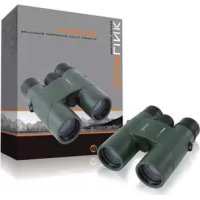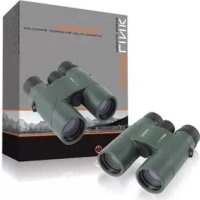
CLOAKHAM1042 - Binoculars CamLink - Free user manual and instructions
Find the device manual for free CLOAKHAM1042 CamLink in PDF.


| Product type | Binoculars |
| Brand | CamLink |
| Model | CLOAKHAM1042 |
| Magnification | 10x |
| Objective lens diameter | 42 mm |
| Prism type | BaK-4 roof prism |
| Lens coating | Fully coated |
| Field of view at 1000 m | 101 m |
| Field of view at 1000 yds | 304 ft |
| Angle of view | 5.8° |
| Exit pupil | 4.2 mm |
| Minimum focus distance | 4 m |
| Diopter adjustment | ±5 |
| Weight | 681 g |
| Waterproof | Yes (O-rings and nitrogen filled) |
| Fogproof | Yes (dry nitrogen filling) |
| Eyecups | Twist-up (glasses compatible) |
| Tripod mount | Yes |
| Included accessories | Carrying case, strap, manual |
| Maintenance | Clean with microfiber cloth, avoid harsh solvents |
| Warranty | No warranty in case of modification or incorrect use |
Frequently Asked Questions - CLOAKHAM1042 CamLink
User questions about CLOAKHAM1042 CamLink
0 question about this device. Answer the ones you know or ask your own.
Ask a new question about this device
Download the instructions for your Binoculars in PDF format for free! Find your manual CLOAKHAM1042 - CamLink and take your electronic device back in hand. On this page are published all the documents necessary for the use of your device. CLOAKHAM1042 by CamLink.
USER MANUAL CLOAKHAM1042 CamLink
natural_image
Green binoculars with black lenses, no visible text or symbols on the device itselfType: CL-OAKHAM842
CL-OAKHAM1042
Document version: 1

natural_image
Panoramic black-and-white landscape photo of snow-capped mountains under cloudy skies, with no visible text or symbols.| • GB | - | Nitrogen Filled Waterproof Binoculars | - | User manual | 3 |
| • DE | - | Stickstoffgefülltes, wasserdichtes Fernglas | - | Bedienungsanleitung | 5 |
| • FR | - | Jumelles étanches remplies d'azote | - | Manuel de l'utilisateur | 7 |
| • NL | - | Waterbestendige met Stikstof Gevulde Verrekijker | - | Gebruikershandleiding | 9 |
| • ES | - | Prismáticos impermeables rellenos de nitrógeno | - | Manual de Usuario | 11 |
| • IT | - | Binocolo impermeabile riempito con azoto | - | Manuale Utente | 13 |
| • FI | - | Typellä täytetyt vesitiiviit kiikarit | - | Käyttöopas | 15 |
| • SE | - | Kvävefyllda vattentäta kikare | - | Bruksanvisning | 17 |
| • NO | - | Nitrogen-Filled Waterproof Binoculars | - | Brukermanual | 19 |
| • DK | - | Kvælstoffyldt vandtæt kikkert | - | Brugervejledning | 21 |
| • CZ | - | Dalekohled plněný dusíkem | - | Návod k použití | 23 |
| • HU | - | Nitrogénnel töltött vízálló távcső | - | Használati útmutató | 25 |
| • GR | - | Αδιάβροχα κιάλια γεμισμένα με άζωτο | - | Εγχειρίδιο Χρήστη | 27 |
| • RO | - | Binoclu impermeabil umplut cu azot | - | Manual de instructiuni | 30 |
| • RU | - | Азото наполненный влагозащитный бинокль | - | Руководство пользователя | 32 |
CAMLINK
Nedis B.V., part of the Nedis Group
De Tweeling 28
5215 MC 's-Hertogenbosch
The Netherlands
Tel: +31 73 599 1055
Fax: +31 73 599 9699
Web: www.nedis.com or www.nedis.nl
© Any unauthorised use of the information in this manual is prohibited. No part of this manual may be reproduced, stored in a database or retrieval system, or published, in any form or in any way, electronically or mechanically, by print, photocopy, microfilm or by any other means without the express written permission of NEDIS.
CAMLINK
GB – English
Introduction
These binoculars are designed and built using the latest waterproof and anti-fogging technology. Integral O-ring seals give complete moisture protection. Dry nitrogen filling of the binoculars also prevents the internal optics from fogging.
Package contents:
- Binoculars
- Carry case
- Camera strap
- Manual
CAUTION DO NOT LOOK DIRECTLY AT THE SUN THROUGH YOUR BINOCULARS TO AVOID SEVERE EYE DAMAGE.
Technical specifications
CL-OAKHAM842
Type: 8 x 42
Magnification: 8x
Objective lens diameter: 42 mm
Type of prism: BaK-4 Roof Prism
Lens coating: Fully coated
View angle: 6.5°
Field of view at 1000 m: 114 m
Field of view at 1000 yd: 341 ft
Exit pupil: 5.2 mm
Minimum focal length: 4 m
Dioptre adjustment length: +-5
Weight: 649 g
CL-OAKHAM1042
Type: 10 x 42
Magnification: 10x
Objective lens diameter: 42 mm
Type of prism: BaK-4 Roof Prism
Lens coating: Fully coated
View angle: 5.8°
Field of view at 1000 m: 101 m
Field of view at 1000 yd: 304 ft
Exit pupil: 4.2 mm
Minimum focal length: 4 m
Dioptre adjustment length:+-5
Weight: 681 g
User instructions
text_image
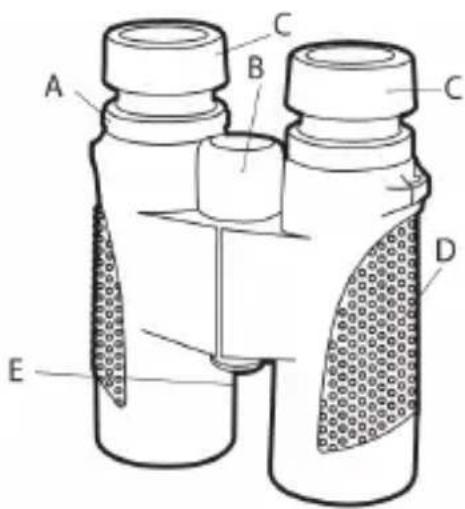
A B C C D EA: Dioptre adjustment ring
B: Central focus wheel
C: Twist up eye cups
D: Textured grip
E: Tripod socket
CAMLINK
How to adjust the binoculars to your eyes
The distance between the eyes, which is called the interpupillary distance, varies from person to person.
To achieve perfect alignment of the binoculars' lenses to your eyes, follow these simple steps:
- Hold your binoculars in the normal viewing position.
- Grasp each barrel firmly. Gently move the barrels closer together or further apart until you see a single circular field. Note the settings for future use.
How to adjust the individual eye strength
As individual eyesight varies from one person to another, there is a dioptre ring that allows you to fine-tune the binoculars to your vision as described below:
- Adjust the interpupillary distance as described above.
- Set the dioptre setting to zero and view a distant object.
- Keep both eyes open at all times.
- Using a lens cap, cover the right front objective lens (the side with the dioptre ring).
- Adjust the central focus wheel to focus on a distant object with fine detail (e.g. brick wall, tree branches etc.) until it appears as sharp as possible.
- Uncover the right objective lens and cover the left objective lens, then view the same object.
- Turn the dioptre ring until the object is as sharp as possible. Do not try to force the dioptre ring beyond its stop position as this may damage it.
- Your binoculars should now be adjusted to your eyes. Simply turn the central focus wheel to focus the binoculars to any distance. Make a note of the dioptre setting for your eyes for future use.
Eyecups (for spectacles/sunglasses users)
Make sure the eyecups are in the twist-down position if you wear spectacles. This will bring your eyes closer to the binoculars' lenses to improve your field of view.
Maintenance
Caring for your binoculars
- Always store your binoculars with eyecups extended. This avoids excessive stress and wear and tear on the eyecups when folded down.
- Do not drop the binoculars.
- Store in a cool and dry place.
Cleaning
- Blow away any loose dust or debris on the lens (or use a soft lens brush).
- To remove dirt or finger prints, clean gently with a good quality soft lens cloth. An unsuitable cloth or unnecessary rubbing may scratch the lens surface and eventually cause permanent damage. A microfibre cleaning cloth (available at most photo dealers) is ideal for routine cleaning of the optical surfaces.
For a more thorough cleaning, photographic lens tissue and photographic-type lens cleaning fluid or isopropyl alcohol may be used. Always apply cleaning fluid to the cleaning cloth - never directly to the lens.
Warranty
No guarantee or liability can be accepted for any changes and modifications of the product or damage caused due to incorrect use of this product.
Disclaimer
Designs and specifications are subject to change without notice.
All logos brands and product names are trademarks or registered trademarks of their respective holders and are hereby recognised as such. Keep this manual and packaging for future reference.
CAMLINK
DE-Deutsch
Einleitung
How to adjust the individual eye strength
Da individuelt syn varierer fra person til person, har kikkerten en diopterjustering som lar deg finjustere kikkerten til ditt syn, som vist nedenfor:
- Adjust the interpupillary distance as described above.