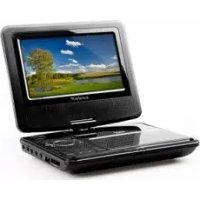
DLPM727 - DVD player Sunstech - Free user manual and instructions
Find the device manual for free DLPM727 Sunstech in PDF.



| Product type | Portable DVD player |
| Brand | Sunstech |
| Model | DLPM727 |
| Dimensions (L × W × H) | 204 × 165 × 41 mm |
| Weight | 0.77 kg |
| Power supply | AC 100-240 V, 50/60 Hz |
| Power consumption | < 10 W |
| Rechargeable battery | Lithium, 7.4 V |
| Charging time | 3 to 4 hours |
| Video output | 1 Vp-p (75 Ω) |
| Audio output | 1.4 Vrms (1 kHz, 0 dB) |
| Signal system | NTSC / PAL |
| Frequency response | 20 Hz - 20 kHz (±1 dB) |
| Signal-to-noise ratio | > 80 dB (analog output) |
| Dynamic range | > 85 dB (DVD/CD) |
| Laser | Diode laser, 650 nm |
| Playable formats | DVD, VCD, CD, MP3, WMA, JPEG |
| Playback functions | Repeat, program, zoom, slow motion, search |
| Remote control | Yes, included |
| Connectivity | AV output, USB, memory card |
| Car mount | Included (headrest attachment) |
| Parental control | Yes, with password (default 0000) |
| OSD languages | Multi-language (selectable) |
| Warranty | 2 years |
Frequently Asked Questions - DLPM727 Sunstech
User questions about DLPM727 Sunstech
0 question about this device. Answer the ones you know or ask your own.
Ask a new question about this device
Download the instructions for your DVD player in PDF format for free! Find your manual DLPM727 - Sunstech and take your electronic device back in hand. On this page are published all the documents necessary for the use of your device. DLPM727 by Sunstech.
USER MANUAL DLPM727 Sunstech
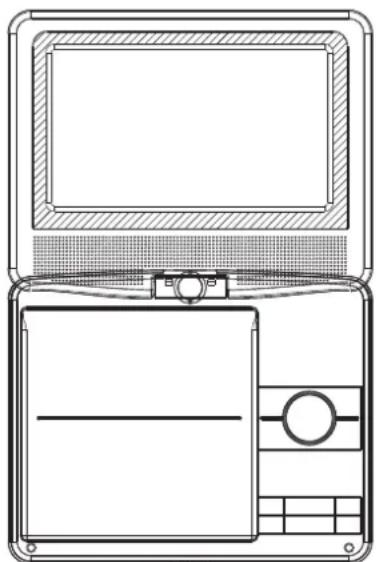
1.Fix Part 1 and Part 2 around the headrest
2.Fix Part 3(4pcs of screws) into the holes with a driver
3.Fix Part 5 into the back of unit with Part 4
the angle could be changed by adjusting Part 6
4.Fix Part A and Part B
Table of Contents
Table of Contents P1
Important Safety Instructions P2
Safety Precautions P3
Identification of Controls P4-P6
SETUP Menu Setting P7-P8
Parameters and specifications P9
Battery Parameters P9
Important Safety Instructions

Warning: To reduce the risk of electric shock, do not remove the cover or back. There are no user-serviceable parts inside. Refer servicing to qualified personnel.

Warning: To prevent fire or electric shock hazard, do not expose the unit to rain or moisture.
Do not expose the Adaptor and portable DVD to water (dripping or splashing) and no objects filled with liquids, such as vases, should be placed on the unit.
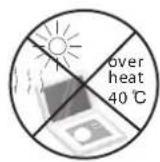
- Keep the portable DVD away from direct sunlight and heat source such as radiators or stoves.
Do not block the ventilation openings. Slots and openings on the unit are provided for ventilation. The openings should never be blocked by placing your portable DVD on a cushion, sofa or other similar surface.
Do not place the portable DVD on unstable cart, stand, tripod, bracket or table. The unit may fall, resulting in possible damage or injury.
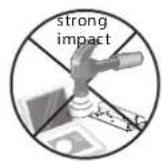
Never place heavy or sharp objects on the LCD panel or frame.
Only use the AC adapter included with portable DVD. Using any other adapter will void your warranty.
The plug of AC adaptor is used as the disconnect device, the disconnect device shall remain readily operable.
Unplug the power from the outlet when the unit is not in use.
Attention should be drawn to the environmental aspects of battery disposal.

CAUTION: Danger of explosion if battery is incorrectly replaced. Replace only with the same or equivalent type.

WARNING: The battery (battery or batteries or battery pack) shall not be exposed to excessive heat such as sunshine, fire or the like.

WARNING: Excessive sound pressure from earphones or headphones can cause hearing loss.

WARNING: Only use attachments/accessories specified provided by the manufacturer, the portable DVD is supplied by AC adapter, the AC adapter is used as disconnect device, the disconnect device shall remain readily operable.

Caution: Danger of explosion if battery is incorrectly replaced, replaced only with the same or equivalent type (Lithium battery)

This marking indicates that this product should not be disposed with other household wastes throughout the EU. To prevent possible harm to the environment or human health from uncontrolled waste disposal, recycle it responsibly to promote the sustainable reuse of material resources. To return your used device, please use the return and collection systems or contact the retailer where the product was purchased. They can take this product for environmental safe recycling.

Safety Precautions
WARNING
RISK OF ELECTRIC SHOCK
DO NOT OPEN

Warning: This digital video disc player employs a laser system. Use of controls, adjustments, or the performance of procedures other than those specified herein may result in hazardous radiation Exposure.

Warning: To prevent direct exposure to laser beam,do not open the enclosure.Visible laser radiation when open.

Warning: Never stare directly into the laser beam.

Caution: Do not install this product in a confined space such as a book case or similar unit.

Warning: when the unit using by child, parents must make sure to let the child understand all contents in Instruction book how battery using to guarantee using battery correctly all the time.

Warning: when find battery overheat, swell or dour, please stop using battery and contact service centre for getting replacement.

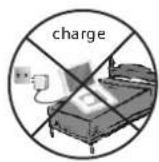
Warning: do not charging battery on the place of insufficient ventilation such as: mattress, sofa, cushion, soft mat....

Warning: we will not take any responsibility if user incorrectly use battery, not following our warning instruction label on the battery case.

Warning: more than 250mm USB extension cord is prohibited to use for USB port

Notes on Copyrights:
It is forbidden by law to copy, broadcast, show,broadcast via cable, play in public, or rent copyrighted material without permission.
This product features the copy protection function developed by Macrovision. Copy protection signals are recorded on some discs. When recording and playing the pictures of these discs picture noise will appear. This product incorporates copyright protection technology that is protected by method claims of certain U.S. Patents and other intellectual property rights owned by Macrovision Corporation and other rights owners. Use of this copyright protection technology must be authorized by Macrovision Corporation, and is intended for home and other limited viewing uses only unless otherwise authorized by macrovision Corporation. Reverse engineering or disassembly is prohibited.
SERIAL NUMBER:
You can find the serial number on the back of the unit.This number is unique to this unit and not available to others.You should record requested information here and retain this guide as a permanent record of your purchase.
Model No.
Serial No.
Date of Purchase

Identification of Controls
Main Unit
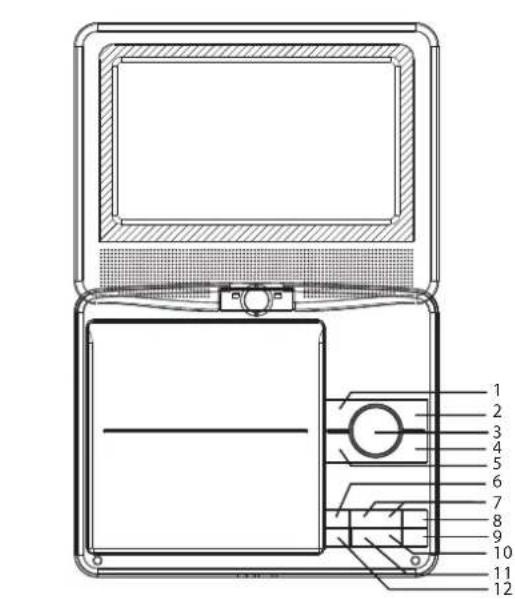
- Left/Fast Backword
- Right/Fast Forward
3.Enter
Confirms Menu Selection - Down/Reverse Skip
- Up/Forward Skip
- Menu
- VOL-/VOL+
-
Setup
9.Source -
■ Stop
- Play/ pause
12.Open
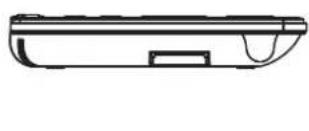
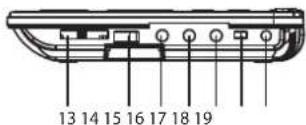
13.SD/MMC/MS
14.USB
15.AVOut - Earphone Socket
- Coaxial
- On/Off
19.DC in 9-12V
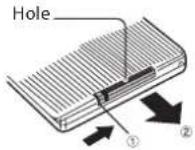
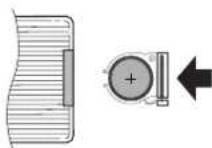
Insert the battery
1.Open the battery door.
2.Insert battery.

NOTES:
Remove battery during storage or when you are not using the DVD player for a long time.
Identification of Controls
Remote control unit
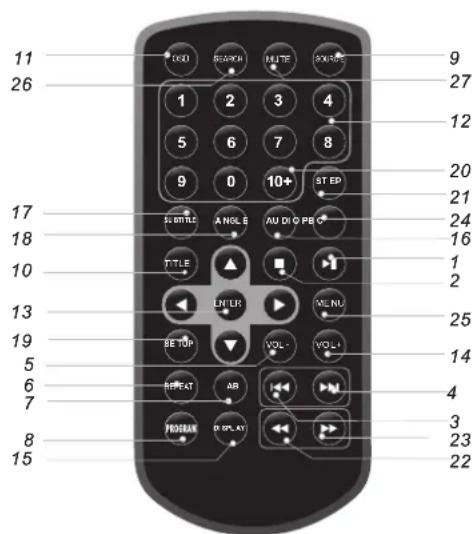
1.PLAY/PAUSE
Press PLAY/PAUSE once to pause playback, pressing PLAY/ PAUSE second time will resume the playback.
2.STOP
When this button is pressed once, the unit records the stopped point, from where playback will resume if ENTER is pressed after wards. But if STOP button is pressed again instead of ENTER button, there will be no resume function.
3.Reverse Skip
Go to previous chapter/ track to the beginning.
4.Forward Skip
Go to next chapter/ track.
5.VOL -
Adjust VOLUME.
6.REPEAT:
DVD :you can select CHAPTER/TITLE/ALL/RANDOM/OFF play mode on a disc.
VCD CD :you can select REP 1/REP ALL/RANDOM/OFF play mode on a disc.
Mp3 WMA :you can select REP 1/REP DIR/REP ALL/RANDOM/OFF play mode on a disc.
7.A B
To repeat a segment: press AB once to set the starting point for repeat segment, press it again to set an end point, and the player will repeat the segment from the start to the end point.
8.PROGRAM
DVD VCD CD Mp3 :The program function enables you to store your favourite tracks from the disc. Press PROGRAM button, then PROGRAM MENU will appear on screen, now you can use the number key to direct input the titles, chapters or tracks number and select PLAY option. TO resume normal playback, press PROGRAM and select CLEAR option on the program menu.
JPEG :You can press PROGRAM repeatedly to select the slide show mode, the are 16 types slide show.
Identification of Controls
Remote control unit
- SOURCE
DVD/CARD/USB.
- TITLE
Return to DVD title menu.
11.0SD
Select OSD language.
12.0-9 NUMBER BUTTON
Selects numbered items in a menu.
13.ENTER
Confirms menu selection.
14.VOL+
Adjust VOLUME.
15.DISPLAY
To display the playtime and status information.
16.AUDIO
DVD Press AUDIO repeatedly during playback to hear a different audio language or audio track, if available.
VCD Press AUDIO repeatedly during playback to hear a different audio channel (Stereo, Left, or Right).
17.SUBTITLE
Press SUBTITLE repeatedly during playback to hear a different subtitle languages.
18.ANGLE
Press ANGLE will change the view angle, on DVDs that support this feature.
- Setup
Accesses or removes setup menu.
20.10+ BUTTON
In order to select a track 10 or greater, first press 10+ , For example; select track 12, first press 10+ , and then press number 2 button.
21.STEP
Press STEP once to pause playback, Form this station, press STEP to advance one video frame.
- BUTTON
Press BUTTON allow skipping back at 5-level speed(X2->X4-> X8->X20), press ENTER button return to normal playback.
23.▶BUTTON
Press BUTTON allow skipping ahead at 5-level speed(X2->X4-> X8->X20), press ENTER button return to normal playback.
24.PBC
PBC on/off switch. Only for VCD, For other discs, the function
is invalid.
25.MENU
Accesses menu on a DVD disc.
26.SEARCH
Goto time point, title or chapter you want in DVD Mode.
- MUTE
Disable Audio output.
SETUP Menu Setting
System Setup Page
Press SETUP button to get the setup menu. Use direction buttons
to select the preferred item. After finishing settings, press SETUP again to normal display.
System Setup
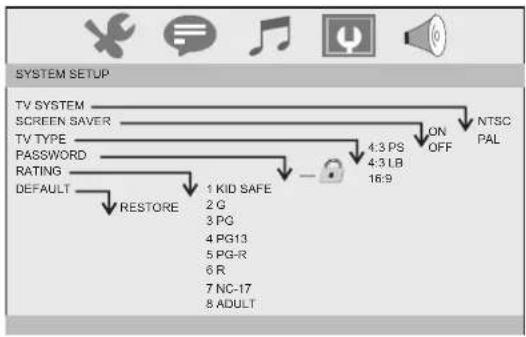
TV System
Selecting the color system that corresponds to your TV when AV output. This DVD Player is compatible with both NTSC and PAL. PAL - Select this if the connected TV is PAL system. It will change the video signal of a NTSC disc and output in PAL format. NTSC - Select this if the connected TV is NTSC system. It will change the video signal of a PAL disc and output in NTSC format.
Screen Saver
This function is used to turn the screen saver on or off.
TV Type
Selects the aspect ratio of the playback picture.
4:3 PS: if you have a normal TV and want both sides of the picture to be trimmed or formatted to fit your TV screen.
4:3 LB: if you have a normal TV. In this case, a wide picture with black bands on the upper and lower portions of the TV screen will be displayed.
16:9: wide screen display.
Password
Input user password. Default password is 0000.
Rating
After input correct password, you can change parental level.
Default
Restore the factory setting of setup menu.
Language Setup Page
Language setup
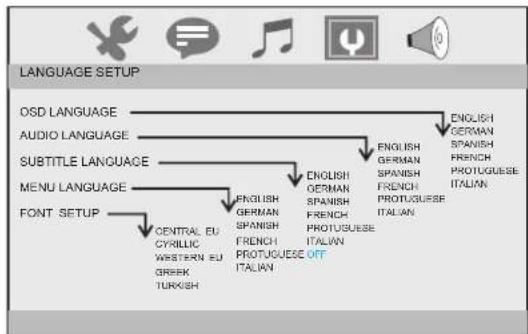
You can select OSD language, and select audio/subtitle/menu language of DVD discs if available. Also you can select font type for MPEG4 subtitle.
SETUP Menu Setting
Audio Setup Page
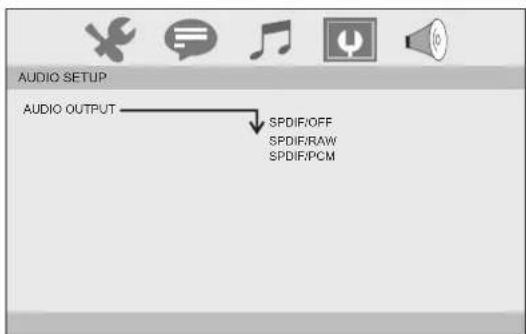
The function is used to select the SPDIF output:SPDIF off, SPDIF/RAW,SPDIF/PCM.
Video Setup Page
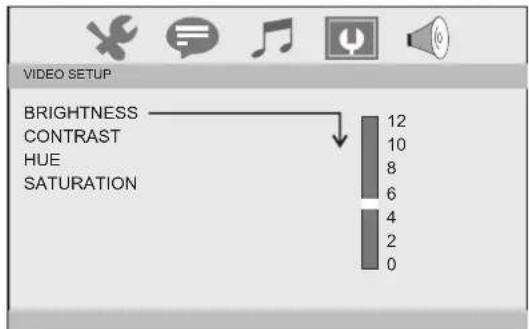
You can change the video setting: brightness, contrast, hue, saturation.
Speaker Setup
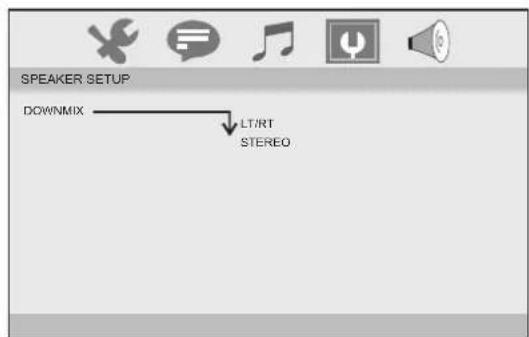
Downmix: LT/RT: When playing a 5.1ch DVD disc, the LS/RS/Center channel audio will output through both L and R channel. STEREO: When playing a 5.1ch DVD disc, the LS channel audio will output only through L channel, RS channel audio will output only through R channel, Center channel audio will output through both L and R channel.
Parameters and specifications
Battery Parameters
Electronical parameters
| Item | Standard requirement | |
| Power requirements | : AC 100-240 V, 50/60 Hz | |
| Dimensions (Approx.) | : 204(L)X165(W)X41(H)MM | |
| Power consumption | : <10W | |
| Weight (Approx.) | : 0.77 kg | |
| Operating humidity | : 5 % to 90 % | |
| Output | VIDEO OUT | :1 Vp-p(75 Ω) |
| AUDIO OUT | :1.4 Vrms (1 KHz, 0 dB) | |
Battery Specifications:
Output: 7.4V
Charge/Discharge Time:
Standard charge time: 3h 4h
Storage and work circumstances:
- Storage circumstances Temperature Humidity
6 months
-20℃~+45℃
65+20%
1week
-20℃~+65℃
65±20%
System
| Laser | :Semiconductor laser, wavelength 650 nm |
| Signal system | :NTSC / PAL |
| Frequency response | :20Hz to 20 kHz(1dB) |
| Signal-to-noise ratio | :More than 80 dB (ANALOG OUT connectors only) |
| Dynamic range | :More than 85 dB (DVD/CD) |
2.Work circumstances Temperature Humidity
Standard charge
0C~+45C
65± 20%
Standard discharge
-20℃~+65℃
65±20%

Note: Design and specifications are subject to change prior notice.
Warranty conditions
- The warranty of this product is for 2 years since the purchase date.
- The warranty will exclude breakdowns caused by bad use of the product, wrong installation or installation in not desirable places for a proper maintenance of the product, rips, updates of the products that are not the supplied by the brand, pieces wore away for its use or for not domestic or inappropriate use. Also are excluded breakdowns caused for manipulations of the products by people or companies alien to our company.
- For any request regarding the warranty terms, the purchase receipt must be attached.

Correct disposal of this Product
(Waste Electrical & Electronic Equipment(WEEE)
Your product is designed and manufactured with high quality materials and components which can be recycled and reused.
This symbol means that electrical and electronic equipment, at their end-of-life should be disposed of separately from your household waste.
Please dispose of this equipment at your local community waste collection/recycling centre.
In the European Union there are separate collection systems for used electrical and electronic products. Please help us to conserve the environment we live in!
sunstech
MANUEL DE L'UTILISATEUR DLPM727
- ■ Stop
- Lecture / Pause
- Ouyrir
- SD/MMC/MS
14.USB
15.AVOut - Prise casque
- Coaxial
- On/Off
19.DC in 9-12V
Insérer la batterie



- Table of Contents
- Important Safety Instructions
- Safety Precautions
- WARNING
- Notes on Copyrights:
- SERIAL NUMBER:
- Identification of Controls
- Main Unit
- Insert the battery
- NOTES:
- Remote control unit
- 7.A B
- 8.PROGRAM
- SETUP Menu Setting
- System Setup Page
- System Setup
- Language Setup Page
- Language setup
- Audio Setup Page
- Video Setup Page
- Speaker Setup
- Parameters and specifications
- Battery Parameters
- Electronical parameters
- System
- Warranty conditions
- Correct disposal of this Product
- sunstech
- Insérer la batterie
Brand : Sunstech
Model : DLPM727
Category : DVD player