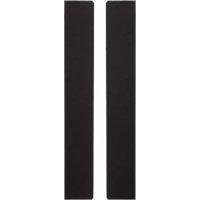
PDPS60 - Pregnant PIONEER - Free user manual and instructions
Find the device manual for free PDPS60 PIONEER in PDF.



| Product type | Acoustic speaker for plasma television |
| Brand | Pioneer |
| Model | PDP-S60 |
| Category | Speaker |
| Woofer | Cone type 6.6 cm × 10.6 cm |
| Tweeter | Semi-dome type 2.5 cm |
| Nominal impedance | 6 Ω |
| Frequency range | 60 Hz - 30,000 Hz |
| Sensitivity | 80 dB (1 m, 1 W) |
| Maximum power handling | 18 W |
| Nominal power handling | 6 W |
| Crossover frequency | 4 kHz |
| Dimensions (W × H × D) | 105 mm × 722 mm × 66 mm |
| Weight (per speaker) | 1.6 kg |
| Cabinet type | Bass-reflex |
| Compatibility | Exclusively with Pioneer plasma television |
| Included accessories | 2 speaker cables, 14 M5×10 mm screws, 4 mounting plates, instruction manual |
| Maintenance | Soft dry or slightly damp cloth; avoid chemical products |
| Safety | Do not lift the television by the speakers; respect cable polarity |
Frequently Asked Questions - PDPS60 PIONEER
User questions about PDPS60 PIONEER
0 question about this device. Answer the ones you know or ask your own.
Ask a new question about this device
Download the instructions for your Pregnant in PDF format for free! Find your manual PDPS60 - PIONEER and take your electronic device back in hand. On this page are published all the documents necessary for the use of your device. PDPS60 by PIONEER.
USER MANUAL PDPS60 PIONEER
Thank you for buying this Pioneer product.
Please read through these operating instructions before using your speaker system so you will know how to make the most of its performance. After you have finished reading the instructions, put them away in a safe place for future reference.
CAUTION
About compatibility
This product is designed exclusively for use with the Pioneer plasma television. For more information on compatibility, please consult with your nearest Pioneer authorized dealer or service center.
About installation and setting
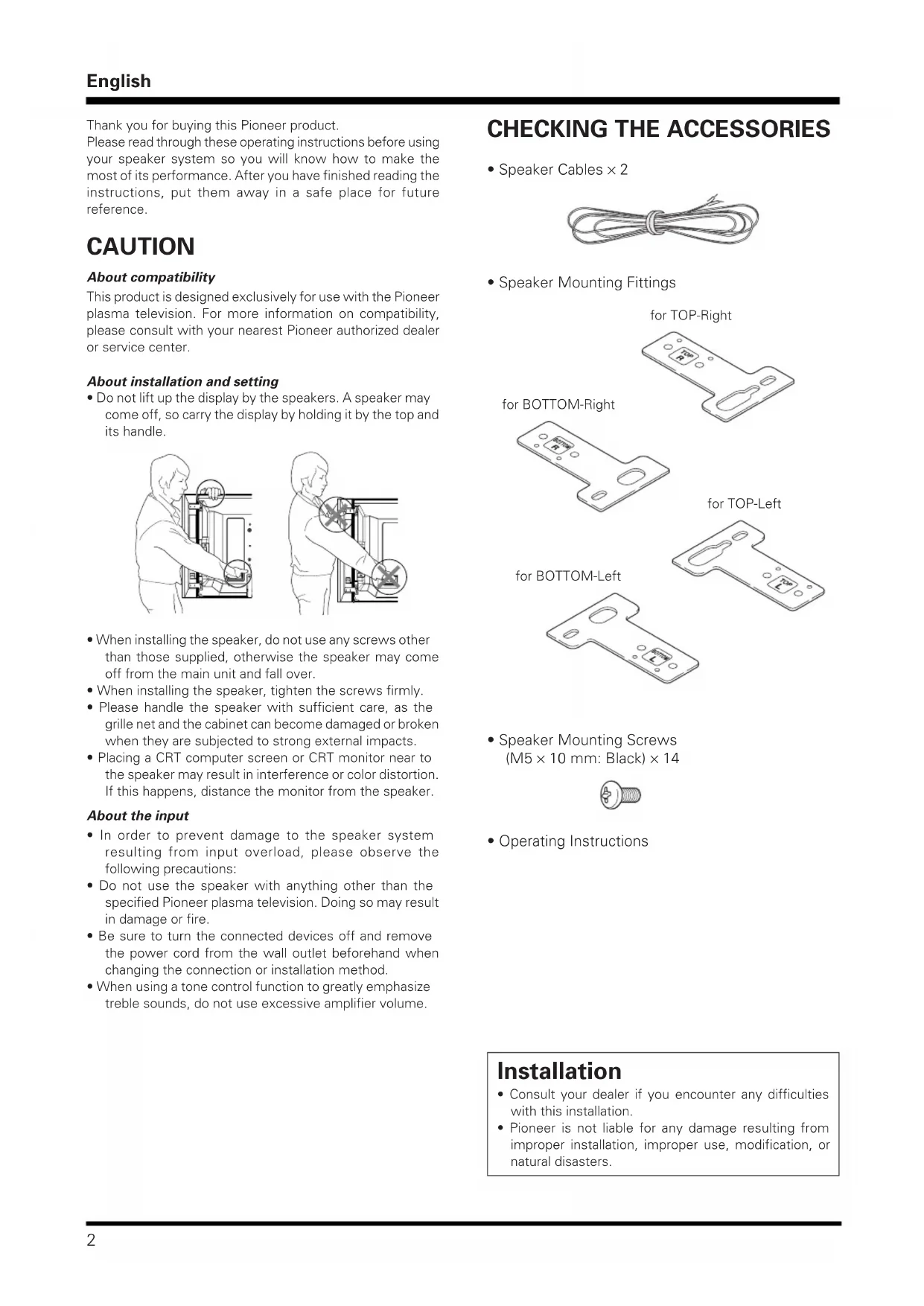
- Do not lift up the display by the speakers. A speaker may come off, so carry the display by holding it by the top and its handle.
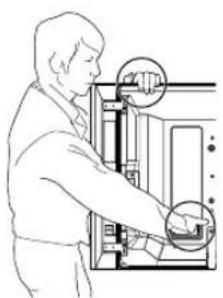
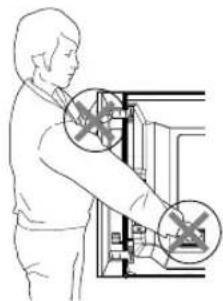
- When installing the speaker, do not use any screws other than those supplied, otherwise the speaker may come off from the main unit and fall over.
- When installing the speaker, tighten the screws firmly.
- Please handle the speaker with sufficient care, as the grille net and the cabinet can become damaged or broken when they are subjected to strong external impacts.
- Placing a CRT computer screen or CRT monitor near to the speaker may result in interference or color distortion. If this happens, distance the monitor from the speaker.
About the input
- In order to prevent damage to the speaker system resulting from input overload, please observe the following precautions:
- Do not use the speaker with anything other than the specified Pioneer plasma television. Doing so may result in damage or fire.
- Be sure to turn the connected devices off and remove the power cord from the wall outlet beforehand when changing the connection or installation method.
- When using a tone control function to greatly emphasize treble sounds, do not use excessive amplifier volume.
CHECKING THE ACCESSORIES
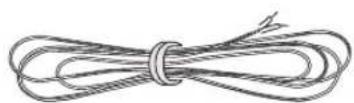
- Speaker Cables × 2
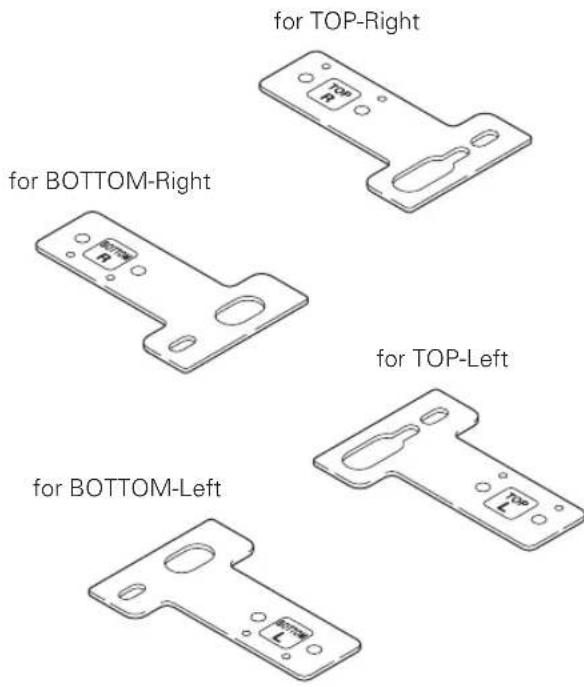
- Speaker Mounting Fittings
- Speaker Mounting Screws (M5 × 10 mm: Black) × 14

- Operating Instructions
Installation
- Consult your dealer if you encounter any difficulties with this installation.
- Pioneer is not liable for any damage resulting from improper installation, improper use, modification, or natural disasters.
INSTALLATION ON THE PLASMA TELEVISION
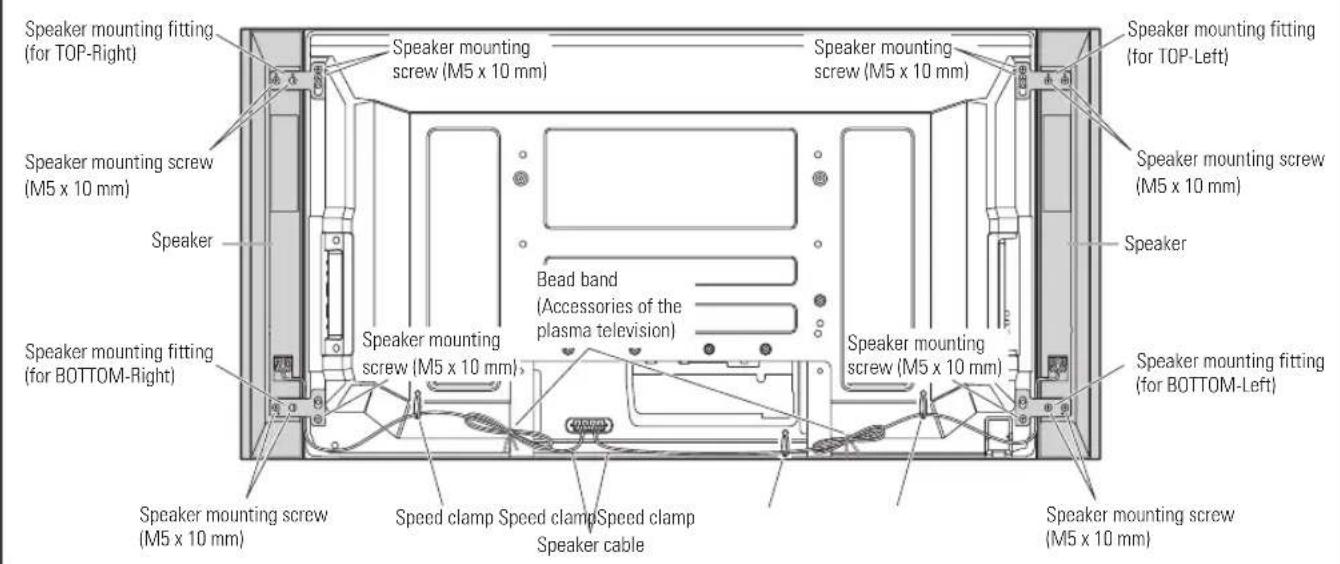
Plasma television with the speaker installed
When using the table top stand:

NOTE:
Before attaching the speaker, please attach the PDK-TS29A series table top stand (or another Pioneer plasma television stand) to the plasma television.
1. Attaching the Speaker Mounting Fittings to the Speakers.
There are top and bottom speaker mounting fittings for both the left and the right speaker. Attach the appropriate fittings to the top and the bottom on the back of the speakers using the supplied screws.
It shows the attachment of the fitting on the right side. It is attached on the left side by the same procedure.)
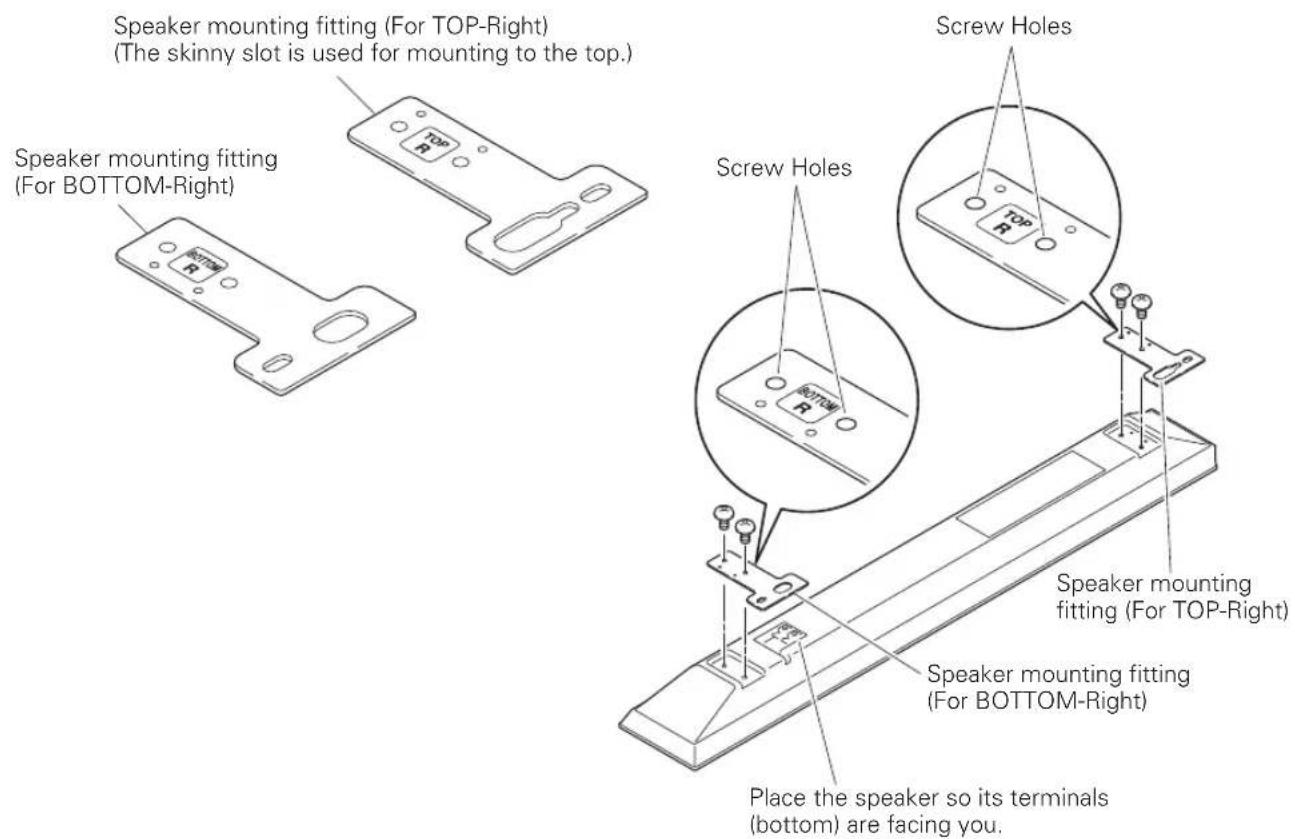
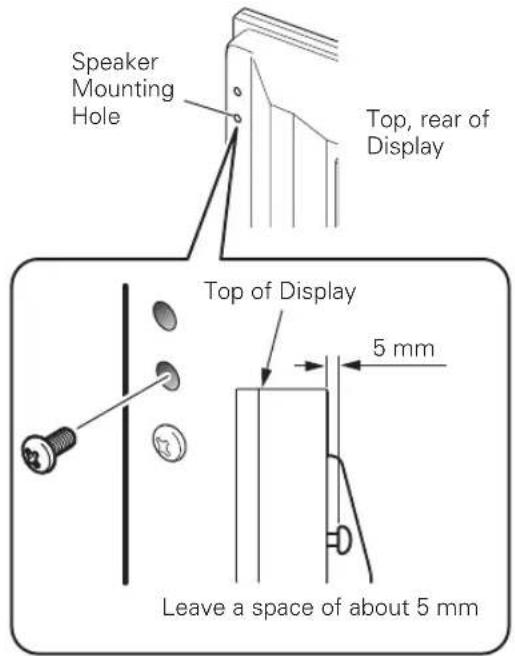
2. Screw an supplied screw into the speaker mounting hole (lower of the two) at the top, rear of the display.
Do not tighten it all the way yet. Leave it loose, with about 5mm left to tighten.
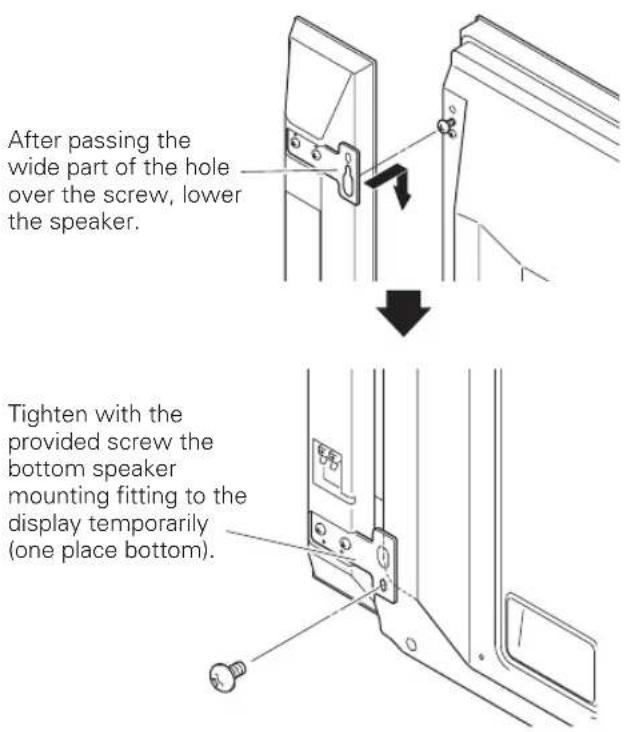
3. Hang the speaker mounting fitting on the screw you installed at the top by passing the wide part over it and lowering into the slot; screw in the lower screw temporarily.
After passing the wide part of the hole of the speaker mounting fitting (top) over the screw, lower the speaker onto it.
-
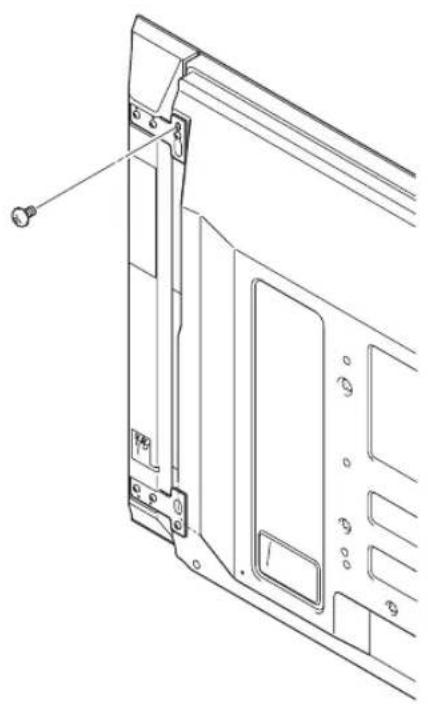
Adjust the position of the speaker and then tighten the upper screw firmly.
-
Tighten the screw, thus fixing the speakers to the display.
-
Pass the supplied speaker cable between the speaker and the plasma television (below the speaker mounting fitting) from below.
-
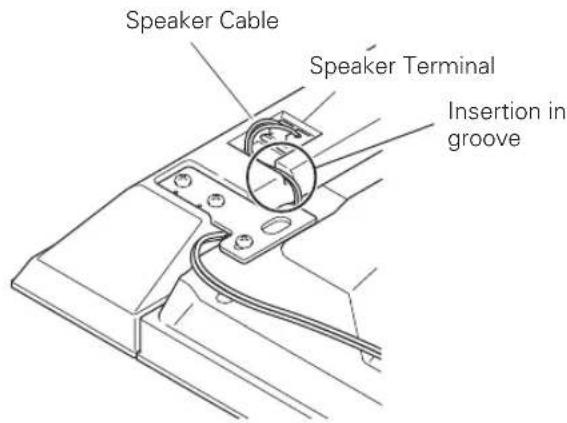
Connect the speaker cables to the speaker (see next page).
-
Insert the cable in the groove on the speaker.
- Connect the other end of the speaker cables to the rear of plasma television (see next page).
Connecting the speaker cables to the rear of plasma television.
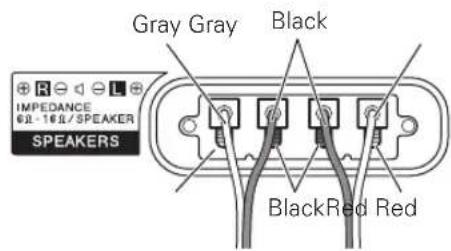
Connect the cables correctly with respect to the polarity of the plasma television speaker terminals, that is, cable (Gray) to terminals (Red) and cable (Black) to terminals (Black).
Connecting the speaker cables to the speaker.
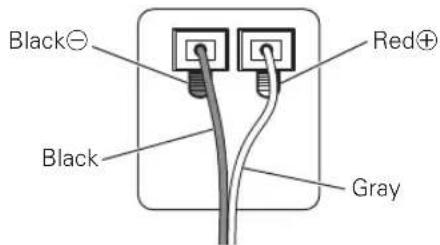
Connect the cables correctly with respect to the polarity of the speaker terminals, that is, cable (Gray) to terminals (Red) and cable (Black) to terminals (Black).
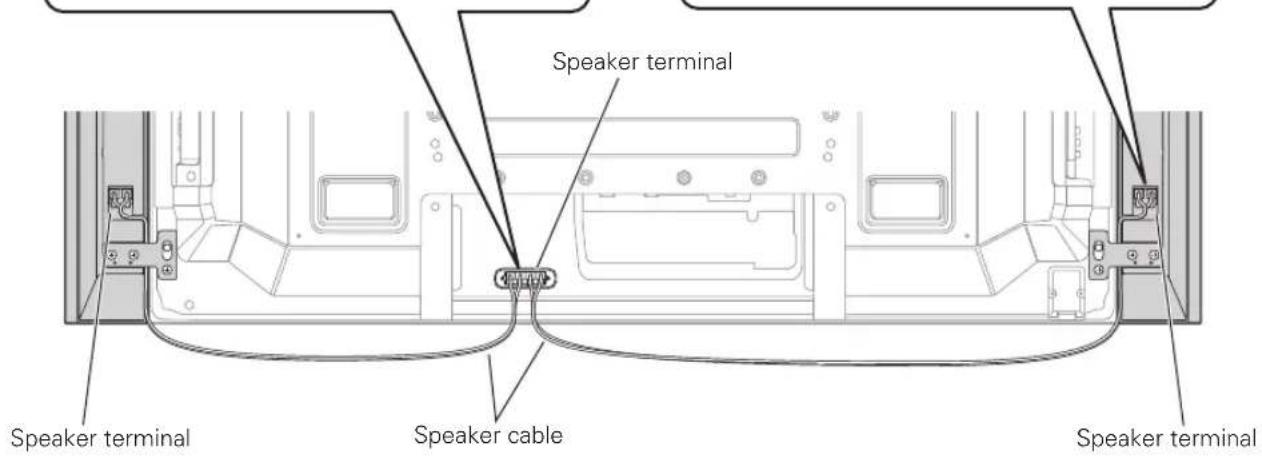
For illustrative purposes, the table top stand is not presented here.

NOTE:
- Press the lever and insert the end of the cable.
- When you release the lever, it clamps onto the speaker cable.


Caution
- Be sure to turn the connected devices off and remove the power cord from the wall outlet beforehand when changing the connection or installation method.
- If you insert the speaker cable too far so that the insulation is touching the speaker terminal, you may not get any sound. Please insert it with showing the copper wire.
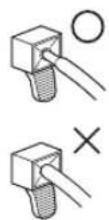
- Check if the end of the speaker cables are securely connected to the terminals by slightly tugging on the cable after making connections. Loose connections may result in sound dropouts or noise.
If there is a short in the and cables caused by an exposed lead wire, excessive load may be applied to the plasma television, resulting in interrupted operation or malfunction. - Incorrect connections of the speaker cable to the right or left of the plasma television terminals with respect to the polarity may result in insufficient stereo sound effects, delivering poor bass sounds or unstable sound image.
- Bundle the cable without pulling.
10. Bundling the cables.
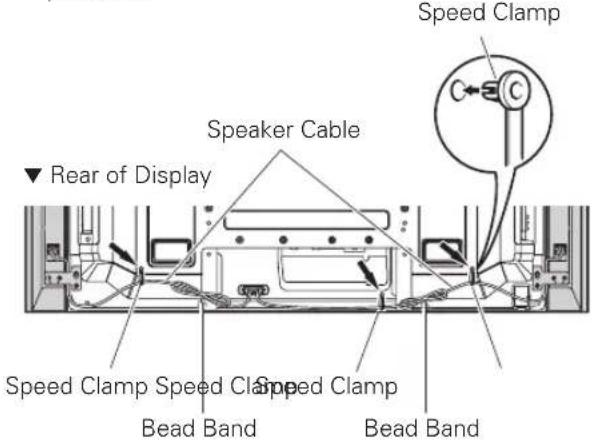
Speed clamps and bead band are included with the plasma television for tidying your cables and keeping extra cable length out of the way.
Attaching speed clamps to the plasma television
Attach the speed clamps using the holes marked with below, depending on your routing system.
Attaching and removing speed clamps
Insert [1] into an appropriate hole on the rear of the plasma television and snap [2] into the back of [1] to lock the clamp.
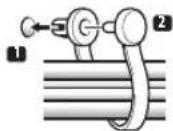
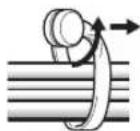
- Speed clamps are designed to be difficult to undo once in place. Please attach them carefully.
- Use pliers to twist the clamp 90^ , pulling outward. The clamp may deteriorate over time and become damaged if removed.
- Be careful not to subject any connecting cables to strain.

NOTE:
- Use the bead bands and speed clamps as necessary.
- When tidying up your speaker cables, make sure to bundle them so that they are not subjected to any pressure.
When using the hung on wall unit:

NOTE:
First lay the plasma television on top of a soft sheet etc., then attach the speakers.
- Attach the speakers to the plasma television (See procedures 1 to 10 on pages 3 to 6).
- Place the plasma television on the mounting fittings of the hung on wall unit.
For details, refer to the operating instructions supplied with the hung on wall unit.

Caution
Do not lift up the display by the speakers. A speaker may come off, so hold it by the bottom and top.
CABINET MAINTENANCE
- Use a polishing cloth or dry cloth to wipe off dust and dirt.
- When the cabinet is very dirty, wipe with a soft cloth moistened with water-diluted cleanser; then wipe again with a dry cloth. Do not use furniture wax or cleaners. They may damage the surface of the cabinet.
- Never use thinner, benzine, insecticide sprays and other chemicals on or near the cabinets, since these will corrode the surfaces.
- When a chemical cloth is used, read the cautions for the chemical cloth carefully.
SPECIFICATIONS
Cabinet Bass-reflex type
Used speakers (two-way system):
Woofer (for low tones).... 6.6 cm × 10.6 cm cone type
Tweeter (for high tones) 2.5 cm semidome type
Nominal impedance 6Ω
Frequency Range. 60 Hz to 30 000 Hz
Sensitivity (1 m, 1 W) 80 dB
Permissible input :
Max. input 18 W
Rated input 6 W
Crossover frequency 4 kHz
External Dimensions
Accessory parts (for two speakers)
Speaker cables × 2
Screws (M5× 10mm)× 14
Speaker Mounting Fittings
TOP-Left × 1
BOTTOM-Left × 1
TOP-Right × 1
BOTTOM-Right × 1
..Operating Instructions × 1
NOTE:
Specifications and design subject to possible modification without notice, due to improvements.
IMPORTANT NOTICE - RECORD THE MODEL NUMBER AND SERIAL NUMBERS OF THIS EQUIPMENT BELOW. THE NUMBERS ARE ON THE REAR.
MODEL NO. SERIAL NO.
KEEP THESE NUMBERS FOR FUTURE USE.
D1-4-2-6-2_En

If you want to dispose this product, do not mix it with general household waste. There is a separate collection system for used electronic products in accordance with legislation that requires proper treatment, recovery and recycling.
Private households in the member states of the EU, in Switzerland and Norway may return their used electronic products free of charge to designated collection facilities or to a retailer (if you purchase a similar new one).
For countries not mentioned above, please contact your local authorities for the correct method of disposal.
By doing so you will ensure that your disposed product undergoes the necessary treatment, recovery and recycling and thus prevent potential negative effects on the environment and human health.
K058_A_En
Published by Pioneer Corporation.
Copyright © 2007 Pioneer Corporation.
All rights reserved.
Publication de Pioneer Corporation.
© 2007 Pioneer Corporation.
INSTALLATION AM PLASMA-FERNSEHER
Ubergangsfrequency 4 kHz
AuBere Abmessungen 105 mm (B) × 722 mm (H) × 66 mm (T)
Gewicht 1,6 kg
Copyright © 2007 Pioneer Corporation.
Copyright © 2007 Pioneer Corporation.
Copyright © 2007 Pioneer Corporation.
AFTER-SALES SERVICE FOR PIONEER PRODUCTS
Please contact the dealer or distributor from where you purchased the product for its after-sales service (including warranty conditions) or any other information. In case the necessary information is not available, please contact the Pioneer's subsidiaries (regional service headquarters) listed below:
PLEASE DO NOT SHIP YOUR PRODUCT TO THE COMPANIES at the addresses listed below for repair without advance contact, for these companies are not repair locations.
AMERICA
PIONEER ELECTRONICS (USA) INC.
CUSTOMER SUPPORT DIVISION
P.O. BOX 1760, LONG BEACH, CA 90801-1760, U.S.A.
EUROPE
PIONEER EUROPE NV
EUROPEAN SERVICE DIVISION
HAVEN 1087, KEETBERGLAAN 1, B-9120 MELSELE, BELGIUM
ASEAN
PIONEER ELECTRONICS ASIACENTRE PTE. LTD.
SERVICE DEPARTMENT
253, ALEXANDRA ROAD #04-01 SINGAPORE 159936
JAPAN AND OTHERS
PIONEER CORPORATION (HEAD OFFICE)
CUSTOMER SUPPORT CENTER
Published by Pioneer Corporation.
Copyright © 2007 Pioneer Corporation.
All rights reserved.
Publication de Pioneer Corporation.
© 2007 Pioneer Corporation.
PIONEER ELECTRONICS (USA) INC.
P.O. BOX 1540, Long Beach, California 90801-1540, U.S.A. TEL: (800) 421-1404
PIONEER ELECTRONICS OF CANADA, INC.
300 Allstate Parkway, Markham, Ontario L3R 0P2, Canada TEL: 1-877-283-5901, 905-479-4411
PIONEER EUROPE NV
Haven 1087, Keetberglaan 1, B-9120 Melsele, Belgium TEL: 03/570.05.11
PIONEER ELECTRONICS ASIACENTRE PTE. LTD.
253 Alexandra Road, #04-01, Singapore 159936 TEL: 65-6472-7555
PIONEER ELECTRONICS AUSTRALIA PTY. LTD.
178-184 Boundary Road, Braeside, Victoria 3195, Australia, TEL: (03) 9586-6300
PIONEER ELECTRONICS DE MEXICO S.A. DE C.V.
Blvd.Manuel Avila Camacho 138 10 piso Col.Lomas de Chapultepec, Mexico,D.F. 11000 TEL: 55-9178-4270

- CAUTION
- About compatibility
- About installation and setting
- About the input
- CHECKING THE ACCESSORIES
- Installation
- INSTALLATION ON THE PLASMA TELEVISION
- When using the table top stand:
- NOTE:
- Attaching the Speaker Mounting Fittings to the Speakers.
- Screw an supplied screw into the speaker mounting hole (lower of the two) at the top, rear of the display.
- Hang the speaker mounting fitting on the screw you installed at the top by passing the wide part over it and lowering into the slot; screw in the lower screw temporarily.
- Connecting the speaker cables to the rear of plasma television.
- Connecting the speaker cables to the speaker.
- Bundling the cables.
- Attaching speed clamps to the plasma television
- Attaching and removing speed clamps
- When using the hung on wall unit:
- CABINET MAINTENANCE
- SPECIFICATIONS
- INSTALLATION AM PLASMA-FERNSEHER
- AFTER-SALES SERVICE FOR PIONEER PRODUCTS
- AMERICA
- EUROPE
- ASEAN
- JAPAN AND OTHERS
Brand : PIONEER
Model : PDPS60
Category : Pregnant