
CM-510ST - Loudspeaker PIONEER - Free user manual and instructions
Find the device manual for free CM-510ST PIONEER in PDF.


| Product Type | Kelton method subwoofer |
| Driver Configuration | 10" (250 mm) cone |
| Frequency Response (-10 dB, typical) | 45 Hz – 150 Hz |
| Sensitivity (1 W/1 m, half space) | 95 dB |
| Nominal Impedance | 8 Ω |
| Power Handling (RMS / Program) | 200 W / 400 W |
| Maximum SPL (peak, half space) | 124 dB |
| Transformer Taps (70 V) | 200 W / 100 W / 50 W / 25 W |
| Transformer Taps (100 V) | 200 W / 100 W / 50 W |
| Connector | Euroblock (4 pin) × 1 (input +/-, loop-thru +/-) |
| Dimensions (W x H x D) | 500.0 × 260.0 × 400.0 mm (19.69" × 10.23" × 15.75") |
| Weight (1 pc) | 17.9 kg / 39.5 lbs |
| Rigging & Hardware | 20 × M8 threaded mounting points |
| Enclosure Material | Wood with polyurethane paint (Black) or water-based paint (White) |
| Color Variants | Black (CM-510ST-K) / White (CM-510ST-W) |
| Accessories Included | 4-pin Euroblock connector × 1, Precautions for use |
| Installation | Professional installation required; use embedded nuts; suspend from at least 3 points |
| Safety Features | Fall prevention wire, redundant safety measures |
| Recommended Use | Indoor use only |
Frequently Asked Questions - CM-510ST PIONEER
User questions about CM-510ST PIONEER
0 question about this device. Answer the ones you know or ask your own.
Ask a new question about this device
Download the instructions for your Loudspeaker in PDF format for free! Find your manual CM-510ST - PIONEER and take your electronic device back in hand. On this page are published all the documents necessary for the use of your device. CM-510ST by PIONEER.
USER MANUAL CM-510ST PIONEER
Installation and Instruction Manual

CM Series
10" Subwoofer
CM-510ST
http://pioneerproaudio.com
For installation and other support information, visit the above site.
Introduction
Thank you for purchasing this product. Be sure to read the "Read Before Use" before using this product. Also, read the Installation and Instruction Manual from the support site that can be viewed from the URL or QR code given here. You may require the Installation and Instruction Manual in future, so keep them carefully at a safe location.
http://www.pioneerproaudio.com/en/sound/ceiling/surfacemountspeaker.html

Read Before Use (Important)
RECORD THESE NUMBERS ON YOUR ENCLOSED WARRANTY CARD AND KEEP IN A SAFE PLACE FOR FUTURE REFERENCE.
D36-AP9-1_A1_En
[For American Users and Canadian Users]
The Safety of Your Ears is in Your Hands
Get the most out of your equipment by playing it at a safe level – a level that lets the sound come through clearly without annoying blaring or distortion and, most importantly, without affecting your sensitive hearing. Sound can be deceiving. Over time, your hearing “comfort level” adapts to higher volumes of sound, so what sounds “normal” can actually be loud and harmful to your hearing. Guard against this by setting your equipment at a safe level BEFORE your hearing adapts.
ESTABLISH A SAFE LEVEL:
- Set your volume control at a low setting.
- Slowly increase the sound until you can hear it comfortably and clearly, without distortion.
• Once you have established a comfortable sound level, set the dial and leave it there.
BE SURE TO OBSERVE THE FOLLOWING GUIDELINES:
- Do not turn up the volume so high that you can't hear what's around you.
• Use caution or temporarily discontinue use in potentially hazardous situations.
- Do not use headphones while operating a motorized vehicle; the use of headphones may create a traffic hazard and is illegal in many areas.
S001a_A1_En
[For European Users]
![PIONEER CM-510ST - [For European Users] - 1](/content/2026/06/1151036/images/8cac8cdc36b8b3f99384c290c15d049d48cc9f78826755b2b3a7485e7a24fe71.jpg)
If you want to dispose of this product, do not mix it with general household waste. There is a separate collection system for used electronic products in accordance with legislation that requires proper treatment, recovery and recycling.
Private households in the member states of the EU, in Switzerland and Norway may return their used electronic products free of charge to designated collection facilities or to a retailer (if you purchase a similar new one).
For countries not mentioned above, please contact your local authorities for the correct method of disposal.
By doing so you will ensure that your disposed product undergoes the necessary treatment, recovery and recycling and thus prevent potential negative effects on the environment and human health. K058b_B_En
![PIONEER CM-510ST - [For European Users] - 2](/content/2026/06/1151036/images/c7e5e054bf7b488f6f5858a8b35e1e7ed99b4e7746dca1b7c9f15a5ce55ee16b.jpg)
WARNING
Installation
This loudspeaker should be installed by a professional installer.
There is a risk the loudspeaker may fall. Ask a professional installer that possesses sufficient skills and experience to install the loudspeaker. Two or more workers are also recommended for installation.
AlphaTheta Corporation bears no responsibility for accidents and damage resulting from deficient installation or mounting, misuse, modifications, and/or natural disasters.
Only the workers installing the loudspeaker should be near it during installation.
There is a risk of injury if parts fall.
Tighten the screws and bolts to the indicated torque.
Falling of screws and bolts may result in injury or accident.
Ensure safe installation by confirming the strength of the installation location and checking the installation method.
Make sure that the floor or stage where you are installing the loudspeaker can sufficiently handle its weight. Consult with a qualified
professional if you are unsure about the strength. If the installation location or installation means such as installation fixtures, etc. do not have enough strength to withstand the mass of the loudspeaker system, it could result in falling of the loudspeaker. Also, be sure to implement redundant safety measures such as by using wires, etc.
Arrange for wires with appropriate length and strength in consideration of the loudspeaker weight and installation condition. Secure the fall prevention wire on the building at a location different from where the loudspeaker mount is secured on the building.
Do not install the loudspeaker in the following environments.
- Locations with a large amount of oily smoke and smoke for theatrical or stage performances.
- Locations that are exposed to water.
- Locations with a large amount of oily smoke, such as inside kitchens or factories.
• Unstable locations, such as those exposed to vibrations. - Locations where flammable materials are used, such as alcohols and aerosol insecticides.
- Locations affected by heat generation, such as near light fixtures or heaters.
- Locations exposed to direct sunlight.
- Locations subject to extreme temperature changes.
Such conditions can cause the surface of the product and the wood to contract, and deformation or discoloration of the enclosure and failure of the loudspeaker. This may result in fire or the loudspeaker falling in a worst case scenario.
Take precautions to prevent excessive humidity when rapidly heating or cooling the room with an air conditioner or heater.
Do not place the loudspeaker near a window, etc.
Doing so could cause condensation to form on the inside of the loudspeaker.
To avoid danger of electric shock, do not install the loudspeaker outdoors or in humid locations.
This loudspeaker is designed for indoor use only.
Usage Methods
Be sure to inspect the loudspeaker after an earthquake.
A problem with the mounting part may occur, which could cause the loudspeaker to fall.
Do not open or modify the interior of the loudspeaker.
The interior has high voltage components, and there is a risk of fire and electric shock. Ask your dealer for inspection, maintenance, and repair of the interior of the loudspeaker.
Do not pull out or insert the cables with wet hands.
This could result in an electric shock.
Immediately stop using the loudspeaker if a problem occurs.
If a problem occurs, such as smoke, an unusual odor, or the loudspeaker is damaged by ingress of water or a foreign object, immediately turn off the power to the amplifier that is used, and then request repair. There is a risk of fire and electric shock if the loudspeaker is used when there is a problem.
To prevent a fire hazard, do not place any naked flame sources (such as a lighted candle) on the equipment.
Do not insert metallic or flammable objects into the holes on the front of the loudspeaker, and do not allow those objects to fall into the holes.
There is a risk of fire or electric shock if metallic or flammable objects get inside the loudspeaker. Be particularly careful in homes with children.
Do not place small parts within reach of young children.
Promptly consult with a physician if a small part is accidentally swallowed.
Do not put your hand into the duct or openings of the loudspeaker.
Doing so could result in injury.
Do not stand on or hang from the loudspeaker.
Pay particular attention to children around the loudspeaker. It could tip over and become damaged, resulting in injury.

CAUTION
Installation
When connecting the loudspeaker to other equipment, turn off the power to each piece of equipment.
Carefully read the user's manual for each piece of equipment, and connect the equipment according to the description in the manual. In addition, use the specified cords to connect the equipment. There is a risk of electric shock.
Check the stability of the loudspeaker after mounting it to the wall or ceiling.
Inspect the loudspeaker immediately after mounting it. In addition, check the stability of the loudspeaker regularly.
When using commercially available mounting fixtures, make sure they are strong enough to secure the loudspeaker.
Make sure to thoroughly read the precautions in this manual and the instructions included with the commercially available mounting fixtures. Take care not to place other equipment on top of the loudspeaker. Failure to properly secure them can cause the loudspeaker to fall and result in accidents.
Be careful of subwoofer vibrations.
When installing the loudspeaker in high locations, such as a stage, the subwoofer vibrations can cause the loudspeaker to move, making it fall to the floor, resulting in injury and accidents. Implement measures
to prevent the loudspeaker from slipping off the stage. The vibrations of the subwoofer can cause other loudspeakers to shift from their designated locations, so keep in mind the danger of such loudspeakers tipping over and falling.
Usage Methods
Do not use the loudspeaker in the following states.
• Do not exceed the permissible input.
- If greatly increasing sounds with a equalizer, do not increase the volume too much.
- Do not force the loudspeaker to produce loud sounds with a low output power amplifier.
- Do not use the loudspeaker for a long period of time when the sound is distorted.
The loudspeaker may be damaged, resulting in heat generation and fire.
Turn the volume all the way down before turning on the power and changing the connection.
There is a risk of hearing loss and other problems if the loudspeaker suddenly produces a loud sound.
Do not listen to the loudspeaker at high volumes for a long period of time.
There is a risk of hearing loss.
ALSO TAKE NOTE OF THE FOLLOWING CAUTIONS
Installation
Use the loudspeaker within the specified range of load impedance of the amplifier.
When connecting the loudspeakers in parallel, always connect within the specified range of load impedance of the amplifier. Failure to do so could result in malfunctioning of the amplifier.
About high-impedance connections
During a high-impedance connection, take note that the total output of each speaker does not exceed the rated output of the power amplifier.
Install the loudspeaker in accordance with the law.
Install the loudspeaker in accordance with all applicable laws, such as related rules and regulations.
Usage Methods
Do not wipe the loudspeaker with alcohol, thinner, benzene, etc. Wipe gently with a soft cloth during maintenance. If the loudspeaker is very dirty, wipe off the dirt with a soft cloth that has been immersed in a neutral detergent diluted up to 5 to 6 times with water, and then thoroughly squeezed. Thereafter, wipe with a dry cloth. Deposition of alcohol, thinner, benzene, and pesticides may cause peeling of prints or coatings. Also, exposing the loudspeaker to rubber and vinyl products for a long time may harm the cabinet, and must therefore be avoided. If you are using a chemical dust cloth, be sure to read the precautions appended with the chemical dust cloth. Remove the cables when performing maintenance.
This product may not be repainted.
Do not paint the surface of the product. Doing so could result in deteriorating the cabinet, causing cracks, deformation, damaging loudspeaker unit performance, and resulting in strange noises and shorts.
Only use the loudspeaker to play audio in a frequency band run through the recommended audio DSP filter.
All illustrations in this manual are provided to explain the operation of the loudspeaker. Therefore, some illustrations may differ from the actual specifications.
Checking the Accessories
• 4-pin Euroblock connector × 1
• Precautions for use, 1 unit

Installation and Connection

WARNING
• Make sure that the floor or wall where you are installing the loudspeaker is strong enough to support it.
- Use screws that are appropriate for supporting the weight of the loudspeaker.

CAUTION
• Supported wire diameter: 12 AWG to 22 AWG
- The walls and ceiling will resonate with loudspeaker output, causing impaired sound quality, so reinforce the wall or ceiling sufficiently.
Connecting and Setting the Input Selection Switch
This section describes how to connect the loudspeaker to a power amplifier or other speakers. The connector of this loudspeaker consists of four terminals; terminal 1 of the loop through terminal is "+" , terminal 2 is "+" , terminal 3 is "-" , and terminal 4 of the loop through terminal is "-". Terminals 1 and 2 and terminals 3 and 4 are connected inside the loudspeaker, respectively.
Parallel connection
Even if one speaker has a problem, other speakers will work fine. As shown below, connect the cable to the next speaker using the same terminal used for the cable from the previous speaker.

Loop through connection
With this connection method, it is easier to identify which speaker is experiencing trouble. If the Euroblock connector is disconnected from a speaker, subsequent speakers will no longer operate. Connect the cable from the previous speaker to the IN "+" (terminal 2) and "-" (terminal 3), and connect the cable to the next speaker to the loop through "+" (terminal 1) and "-" (terminal 4).

1 Strip away about 7 mm (0.3") of the insulation on the end of the speaker cable, insert the core wire of the speaker cable into each terminal of Euroblock connector ①, and tighten the screw ② to secure it.
The Euroblock connector is attached to the speaker's terminal at the time of shipment.


CAUTION
Twist the core wires of the speaker cable firmly so that the core wires do not come into contact with each other. This causes failure of the loudspeaker or power amplifier.
2 Insert the Euroblock connector ① into the rear socket ②.

3 Use a flat-bladed screwdriver to turn the input selection switch Ⓐ on the back of the loudspeaker, and then select the transmission method (100 V / 70 V / 8 Ω) and input wattage.
| 70 V 100 V | ||
| A 25 W 50 W | ||
| B 50 W 100 W | ||
| C 100 W 200 W | ||
| D 200 W --- | ||
| E BYPASS 8Ω | ||

CAUTION
Adjust the E position only when combined with a low impedance amplifier. An incorrect setting could cause a failure of the speaker or power amplifier.

WARNING
When performing this procedure, make sure to first turn off the power amplifier.
Installation Instructions Using the Embedded Nuts on the Loudspeaker
This loudspeaker has embedded nuts in the cabinet. Commercially available fittings and eye bolts can be used with the nuts. They use an M8 (screw length: 43 to 60 mm) thread hole.

WARNING
- Ask a professional technician to install the loudspeaker in a suspended configuration.
- Remove the nuts from the embedded nuts in the loudspeaker, then attach eye bolts.
- Do not use the loudspeaker with the screws removed. Doing so could cause air to leak, adversely affecting audio quality.
- Make sure to suspend the loudspeaker from at least three locations. Also, be sure to implement redundant safety and fall prevention measures such as by using wires, etc.
- Make sure to use fittings, wires, walls, and ceilings that can sufficiently handle the weight of the loudspeaker. Ask the dealer where the commercially available fittings were purchased for further details.
- Always make sure to perform a safety check after installation, and conduct periodic safety checks thereafter.
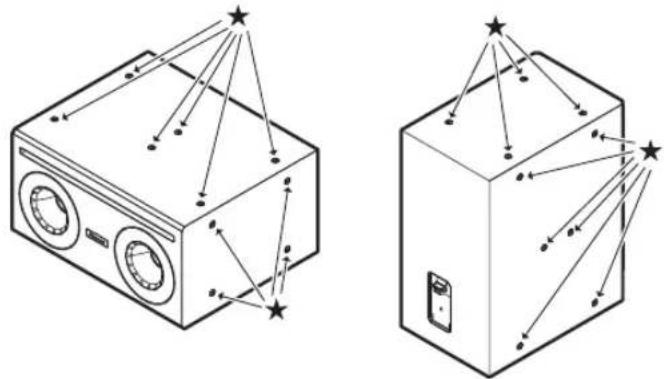
★ : Embedded nuts
Other
Specifications
| CM-510ST | ||
| Loudspeaker Type Kelton method subwoofer | ||
| Frequency response (- 10 dB, Typical) 45 Hz – 150 Hz | ||
| Sensitivity (1 W / 1 m) 95 dB (half space) | ||
| Nominal Impedance 8 Ω | ||
| Power Handling (RMS*1/ Program) 200 W / 400 W | ||
| Transformer taps | 70 V 200 W / 100 W / 50 W / 25 W | |
| 100 V 200 W / 100 W / 50 W | ||
| Maximum SPL*2 124 dB (peak, half space) | ||
| Driver configuration 10" (250 mm) cone | ||
| Connector Euroblock (4 pin) × 1 (input: +/-, loop-thru: +/-) | ||
| Dimensions (W x H x D) 500.0 × 260.0 × 400.0 mm (19.69" × 10.23" × 15.75") | ||
| Weight (1 pc) 17.9 kg / 39.5 lbs. | ||
| Rigging & Hardware 20 × M8 threaded mounting points | ||
| Enclosure | Black: Wood w/Polyuretane paintWhite: Wood w/water-based paint | |
| Color CM-510ST-K : Black, CM-510ST-W : White | ||
*1 IEC60268-5
*2 Calculated from the power handling and seisitivity
• The specifications and design of this product are subject to change without notice.
Dimensional Drawings
(Unit : mm (inches))

© 2021 AlphaTheta Corporation. All rights reserved.
AlphaTheta Corporation
6F, Yokohama i-Mark Place, 4-4-5 Minatomirai, Nishi-ku, Yokohama, Kanagawa 220-0012 JAPAN
AlphaTheta株式会社
AlphaTheta EMEA Limited
Artemis Building, Odyssey Business Park, West End Road, South Ruislip, Middlesex, HA4 6QE, U.K. TEL: +44-203-7617-220
AlphaTheta Music Americas, Inc.
2050 W. 190th Street, Suite 109, Torrance, CA 90504, U.S.A. TEL: +1 (424) 488-0480
- INSTALLATION AND INSTRUCTION MANUAL
- CM-510ST
- INTRODUCTION
- READ BEFORE USE (IMPORTANT)
- [FOR AMERICAN USERS AND CANADIAN USERS]
- THE SAFETY OF YOUR EARS IS IN YOUR HANDS
- ESTABLISH A SAFE LEVEL
- BE SURE TO OBSERVE THE FOLLOWING GUIDELINES
- [FOR EUROPEAN USERS]
- WARNING
- INSTALLATION
- THIS LOUDSPEAKER SHOULD BE INSTALLED BY A PROFESSIONAL INSTALLER
- ONLY THE WORKERS INSTALLING THE LOUDSPEAKER SHOULD BE NEAR IT DURING INSTALLATION
- TIGHTEN THE SCREWS AND BOLTS TO THE INDICATED TORQUE
- ENSURE SAFE INSTALLATION BY CONFIRMING THE STRENGTH OF THE INSTALLATION LOCATION AND CHECKING THE INSTALLATION METHOD
- DO NOT INSTALL THE LOUDSPEAKER IN THE FOLLOWING ENVIRONMENTS
- USAGE METHODS
- CAUTION
- ALSO TAKE NOTE OF THE FOLLOWING CAUTIONS
- CHECKING THE ACCESSORIES
- INSTALLATION AND CONNECTION
- CONNECTING AND SETTING THE INPUT SELECTION SWITCH
- PARALLEL CONNECTION
- LOOP THROUGH CONNECTION
- INSTALLATION INSTRUCTIONS USING THE EMBEDDED NUTS ON THE LOUDSPEAKER
- OTHER
- DIMENSIONAL DRAWINGS
Brand : PIONEER
Model : CM-510ST
Category : Loudspeaker