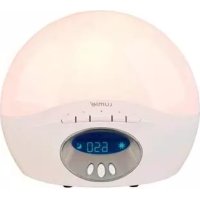
BodyClock Active 250 - Light therapy LUMIE - Free user manual and instructions
Find the device manual for free BodyClock Active 250 LUMIE in PDF.


User questions about BodyClock Active 250 LUMIE
0 question about this device. Answer the ones you know or ask your own.
Ask a new question about this device
Download the instructions for your Light therapy in PDF format for free! Find your manual BodyClock Active 250 - LUMIE and take your electronic device back in hand. On this page are published all the documents necessary for the use of your device. BodyClock Active 250 by LUMIE.
USER MANUAL BodyClock Active 250 LUMIE
If the product is damaged please contact us before use.
Do not use Bodyclock Active if the lamp cover is broken, damaged or missing. If you need to remove the lamp cover, unplug the unit first and let it cool down.
The lamp cover gets warm when the light is on, so keep the unit clear of anything that may be damaged by heat.

Do not open the base - there are no user-serviceable parts inside.
For indoor use only.

Keep away from water and damp.

Clean only with a dry or lightly moistened cloth.
Always use the correct bulb (maximum 42W E14 halogen bulb). Replacements are available from Lumie.
This product conforms to the electromagnetic compatibility standard for medical devices and is unlikely to cause interference affecting other electrical and electronic products in its vicinity. However, radio transmitting equipment, mobile phones and other electrical/electronic equipment can interfere with this product; if this happens simply move the product away from the source of interference.
Keep the cable away from heated surfaces. If the cable is damaged it must be replaced by Lumie, a Lumie distributor or suitably qualified person in order to avoid a hazard.
At the end of its life, do not throw the unit out with normal domestic waste. Please take it to an official recycling point to be disposed of responsibly.

| SN | Serial number | Do not place in household waste. Dispose of at a recycling centre. | Fuse | ||
| CE | European Declaration of Conformity: Class I Medical Device | Read instructions for use | Double-insulated (Class II electrical) | ||
| Manufacturer: Lumie, 3 The Links, Bar Hill, Cambridge, CB23 8UD, UK. | Caution | ~ | AC (alternating current) power supply | ||
| Keep dry | Caution – hot surface | Member of the 'Green Dot' recycling scheme | |||
| For indoor use only | Recyclable |
Introduction
Lumie Bodyclock Active wakes you with a sunrise that naturally helps to regulate your sleep and wake patterns. You'll wake up in a better mood, find it easier to get up, and feel more energetic during the day. There's also a fading sunset to help you unwind at the end of the day and drift off to sleep.
Ideally, you should use Bodyclock Active all year round to help keep your sleep and wake cycles on track.
In clinical trials, 'dawn simulators' such as Bodyclock Active have been shown to improve mood, energy, productivity and the quality of sleep and awakening†. They can also help sufferers of SAD (Seasonal Affective Disorder) and winter blues cope with dark winter mornings.
Lumie was the first to launch a dawn simulator range and began selling an early version of Bodyclock in 1993.
Please read these instructions carefully to get the most out of your Bodyclock Active.
† Acta Psychiatr Scand 1993 Jul; 88 (1):67-71.
Features
Bodyclock Active is supplied ready to use with the settings we've found most popular with users; all you need to do is fit the bulb, set the current time and set the time you want to wake up.
The standard settings are:
- An optional 30-minute sunset to help you get to sleep.
A 30-minute sunrise to wake you gently, followed by an alarm beep. - A clock display that automatically dims to a low level during sunset.
Alternatively, Bodyclock Active provides a range of other options to suit your personal preferences. For example, you can choose:
- A longer or shorter sunrise and sunset.
- A different alarm sound or the radio.
- A clock display that is off or stays bright at night.
Getting started
Here's how to set up your Bodyclock Active for the first time.
The bulb is supplied packed in a separate box and needs to be fitted into the Bodyclock Active before use.
The lamp cover may be supplied already separated from the base, in which case skip the next step.
To remove the lamp cover
The lamp cover is attached to the base of the Bodyclock Active by two internal clips, one at either end of the cover:
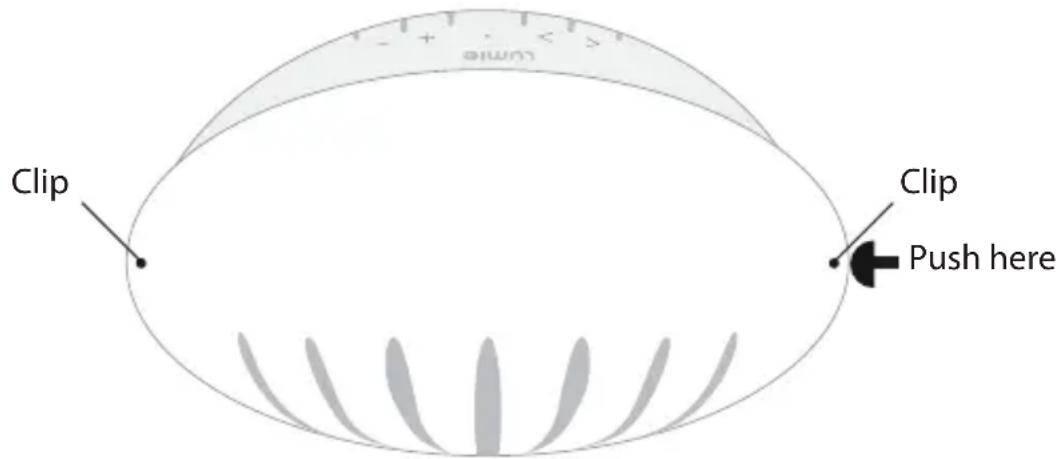
- Support the base of the Bodyclock Active with one hand.
- Push firmly at one end of the lamp cover to release the clip.
- Remove the lamp cover.
To fit the bulb
- Screw the bulb into the holder.
- Replace the lamp cover by pressing it down until the clips at each end pop into place.
To position Bodyclock Active
- Decide where to put your Bodyclock Active.
The ideal place is on a bedside table near the head of your bed, near a mains socket.
To set up Bodyclock Active
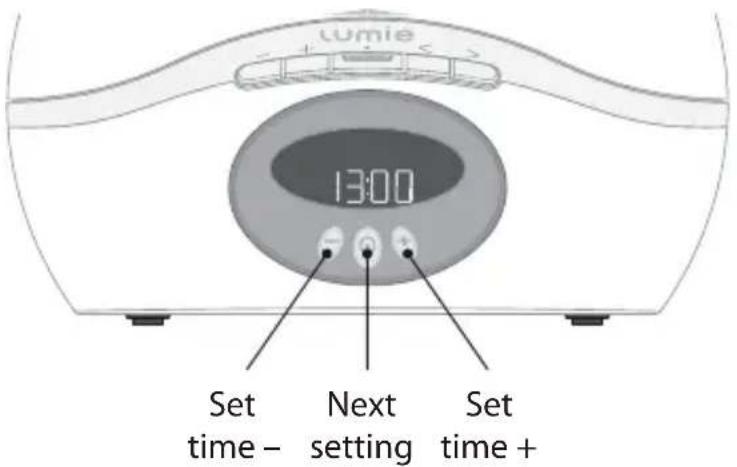
- Plug in the unit and switch on at the mains.
You will then be prompted to enter the essential settings:
Display shows (for example): What you do:
SET TIME
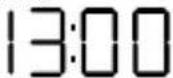
Use
or to set the current time (24-format).
Press
to continue.
SET WF
MAKEUP TIME
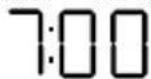
Use
or to set the time you want to open up (24-hour format).
Press
to continue.
WAKE SOUND
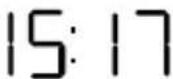
At this stage you can ignore the remaining options. Wait 12 seconds for the normal display.
To activate the alarm
When you're ready to go to sleep:
- Press
The display shows to confirm that the alarm is set with a sunrise and shows the alarm type and wake-up time you've set; for example:
ALARM BEEP

8:15
Using the bedside light and radio
Your Bodyclock Active can be used as a bedside light which you can set to your preferred brightness.
Bodyclock Active also incorporates an FM radio and has five other sound options to help you relax or mask other sounds when you're trying to sleep:
| Dawn chorus | Rooster Waves White | noise | Alarm beep | Radio | |
| fm | |||||
You can also use the radio or any of the sounds as an alarm sound.
Note: Extend the wire aerial for best reception.
To use the bedside light
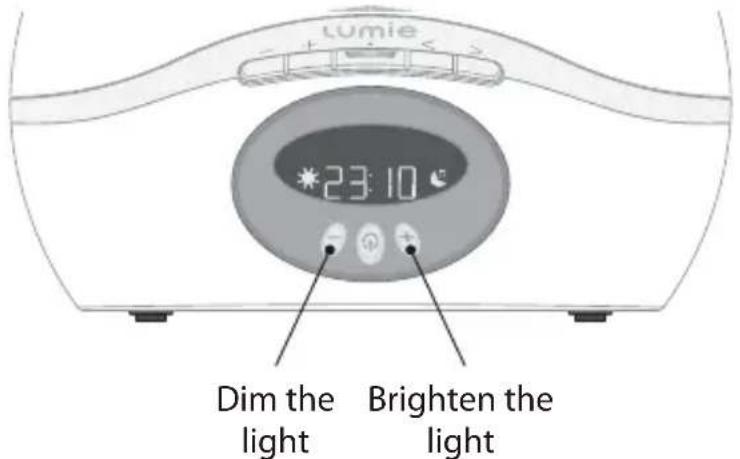
- Hold down to set the light level you want.
- Hold down to turn the light off.
Note: If you leave the light on it will automatically turn off after 90 minutes.
To use the radio
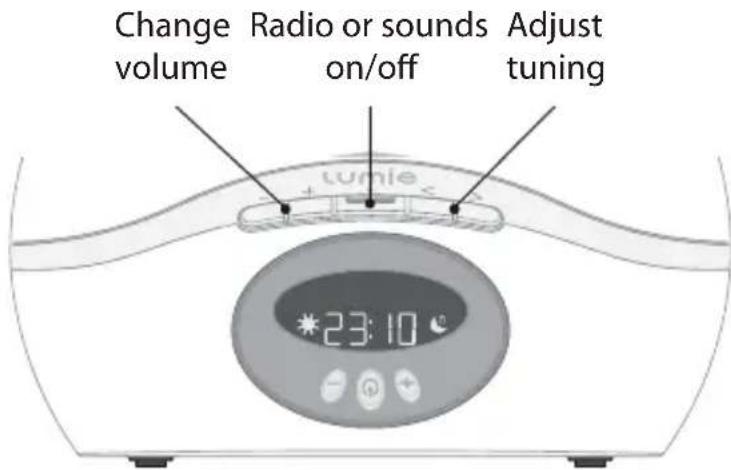
- Press to turn the radio on.
Use and to tune to a station. - Press or ^+ to adjust the volume.
A short press tunes manually. A longer press skips to the next station when you release the button.
- Press to turn the radio off.
Note: If the radio has been on for less than 12 seconds press again to skip the sounds.
To play a well-being sound
- Press twice to select the sounds.
- Use and to select the sound you want.
- Press or to adjust the volume of the sounds.
- Press to turn the sounds off.
Using the alarm
When you're ready to go to sleep you need to explicitly activate the alarm for the following morning. This starts dimming the light to give a sunset.
Bodyclock Active will wake you up with a gentle sunrise, ending with an alarm sound at the time you have set.
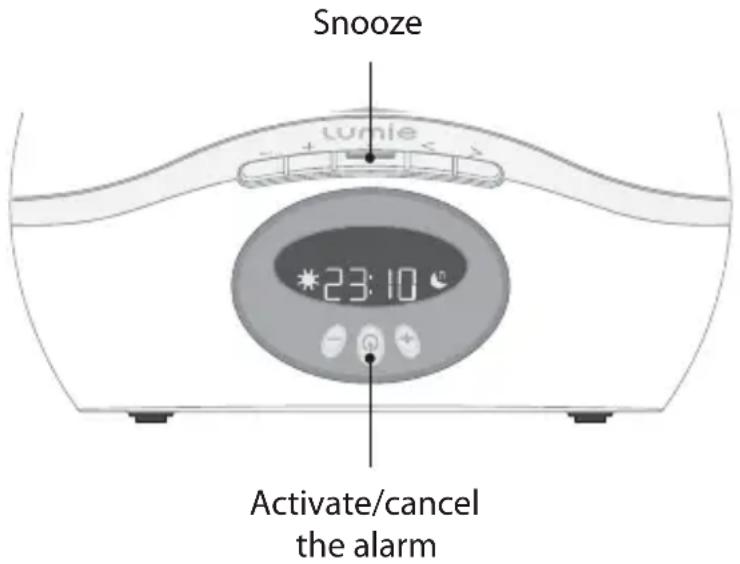
To activate the alarm
When you're ready to go to sleep:
Press
The display shows to confirm that the alarm is set with a sunrise, and shows the alarm sound and wake-up time that you've set; for example:

is shown if you have chosen one of the VOLUME FADE AUTO or VOLUME FADE PERM settings to fade off the radio or well-being sound; see Choosing sleep options, page 12.
If you leave the bedside light on, it will fade off gradually to help you go to sleep. Alternatively, to turn off the light immediately:
- Hold down .
To snooze
- Press
This gives you another nine minutes before the alarm sounds again.
To cancel the alarm sound
Press
To turn off the light
When the alarm is off:
- Hold down .
Alternatively, the alarm sound and light will turn off automatically after 30 minutes.
Choosing wake-up options
You can choose whether you wake to a sunrise followed by one of the relaxation/well-being sounds, to a sunrise and the radio, to a simple sunrise only or to a sunrise ending with a flashing light.
To set a wake-up option
- Press and hold until SET WAKEUP TIME shows.
- Press twice until the current WAKE setting is shown; for example: WAKE SOUND.
To choose a sound alarm
- Press or to set the WAKE setting to WAKE SOUND.
Press - Press or to step through and select the sound option you want:
Dawn chorus Rooster Waves White noise Alarm beep





- Press to set the sound option.
You are then prompted to set the wake-up volume.
- Press or to change the volume.
To set the volume press or wait 12 seconds.
To choose a radio alarm
- Press or to set the WAKE setting to WAKE RADIO.
Press - Choose an FM radio station by pressing (to tune down) or (to tune up). Note: Don't use the usual radio tuning buttons or .
-
Press to set the station.
-
Press or to change the volume.
To set the volume press or wait 12 seconds.
To choose a sunrise-only alarm
- Press or to set the WAKE setting to WAKE LIGHT.
- Press or wait 12 seconds.
This wakes you with a simple sunrise without any sound.
To choose a flashing light alarm
- Press or to set the WAKE setting to WAKE FLASH.
- Press or wait 12 seconds.
This gives you a sunrise followed by the light flashing on and off at the wake-up time without any sound.
Choosing sleep options
You can choose whether the time display is bright, dimly illuminated or off at night to minimise sleep disturbance.
If you go to sleep listening to the radio or a well-being sound you can choose whether to have the volume fade down gradually to silence or to a low level until you wake up (for example, to block out unwanted noise).
To set the display brightness
- Press and hold until SET WAKEUP TIME shows.
- Press repeatedly until the current DISPLAY option is shown; for example, DISPLAY AUTO.
- Press or to step through and select a DISPLAY setting:
Option: What it means:
DISPLAY AUTO The display dims to a low level when the light is low or off.
DISPLAY HIGH Keeps the display at its brightest setting without dimming at all.
DISPLAY AUTO OFF The display dims until it is completely off when the light is low or off.
To set, press or wait 12 seconds.
Note: If you have set DISPLAY AUTO OFF and you need to see the time when the display is off, press to light the display. After 5 seconds it will revert to being off.
To fade the radio or sounds
- Press and hold until SET WAKEUP TIME shows.
- Press repeatedly until the current VOLUME FADE option is shown; for example, VOLUME FADE OFF.
- Press or to step through and select a volume-fade option:
Option: What it means:
VOLUME FADE OFF The volume doesn't fade.
VOLUME FADE AUTO The volume fades to silence over the duration of the sunset.
VOLUME FADE PERM The volume fades over the duration of your sunset and then stays on at a low level.
To set, press or wait 12 seconds.
Note: If you have set VOLUME FADE AUTO or VOLUME FADE OFF, is shown in the display to remind you.
Customisation options
This section summarises the wake-up and sleep options already described, and explains the other options available in Bodyclock Active.
To check a setting
If the alarm is activated ( shown on display):
- Press to cancel it.
- Hold down until the display shows the first setting:
SET WAKEUP TIME
- Press to step through the options until the one you want is shown; see table below.
To change a setting
When the setting you want is shown:
- Press or to step through the alternative options.
- Press to confirm your setting.
- Either press to choose another setting or wait 12 seconds to return to normal operation.
The following table explains the meaning of each setting:
| Default display: What it does: Options: | |
| SET WAKEUP TIME Sets the time you want to be woken up. | Example: 07:00. |
| SET TIME Sets the current time. Example: 13:00. | |
| WAKE SOUND Sets the type of alarm; see Choosing wake-up options, page 10. | WAKE SOUND WAKE RADIO WAKE LIGHT WAKE FLASH |
| Default display: What it does: Options: | ||
| ALARM BEEP When WAKE SOUND is selected, sets the sound to use as the alarm sound; see Choosing wake-up options, page 10. | ALARM BEEP DAWN CHORUS ROOSTER WAVES WHITE NOISE | |
| When WAKE SOUND or WAKE RADIO is set, allows you to set the wake-up volume for your alarm sound or radio using the ⊙ or ⊙ buttons. | ||
| DISPLAY AUTO Sets whether the display dims; see Choosing sleep options, page 12. | DISPLAY AUTO DISPLAY HIGH DISPLAY AUTO OFF | |
| SUNRISE 30 | Sets the sunrise duration, in minutes. | SUNRISE 30 45 60 90 15 20 |
| SUNSET 30 | Sets the sunset duration, in minutes. | SUNSET 30 45 60 90 15 20 |
| VOLUME FADE OFF Sets whether the radio or sounds fade off during sunset; see Choosing sleep options, page 12. | VOLUME FADE OFF VOLUME FADE AUTO VOLUME FADE PERM | |
| NIGHTLIGHT OFF Sets an optional backlight, which stays on at a low level all night. | NIGHTLIGHT OFF NIGHTLIGHT ON | |
| SECURITY OFF Sets security mode; see To set security mode, page 16. | SECURITY OFF SECURITY ON | |
| ENGLISH Sets the language for the display messages. | ENGLISH FRANÇAIS DEUTSCH NEDERLANDS SVENSKA SUOMI ESPÁÑOL | |
To have a sunset without activating the alarm
If you don't need to be woken by the alarm, for example if the next day is a weekend, you can still activate the sunset feature to help you go to sleep:
- Press both and at the same time.
The display shows SUNSET and the light slowly starts to fade.
This also dims the display and fades the radio/well-being sound if you've selected these options.
To cancel the sunset and return to a normal display:
- Press both and at the same time again.
To set security mode
Security mode allows you to use Bodyclock Active as a security light when you're away. The light switches on and off at random times between 16:00 and 23:00 to give the impression that there's someone at home.
- Press and hold until SET WAKEUP TIME shows, then press repeatedly until SECURITY OFF shows.
- Press to select SECURITY ON.
- Wait 12 seconds.
In security mode you cannot use any of the other functions, and between the hours of 16:00 and 23:00 the display shows:
SECURITY
To cancel security mode and return to normal operation:
- Press any button.
Frequently asked questions
I tried out the sunrise but the light comes up really quickly
You probably didn't allow enough time for a full sunrise. For example, the default sunrise takes 30 minutes so if the clock shows the time as 11.00 then you need to set the wake-up time to at least 11.30.
What happens when I unplug my Bodyclock Active or there's a power cut?
Your Bodyclock Active keeps time for one hour; other settings are permanent, so you won't need to reprogram the unit, just plug it back in. If you need to adjust the time, see Customisation options, page 14.
The display panel is too bright when I'm trying to sleep; how can I change it?
See To set the display brightness, page 12.
What can I do if the display is working but the light doesn't come on?
Check to make sure the bulb is firmly screwed into the socket. If this doesn't work, replace the bulb.
Why is nothing happening when I press the buttons?
You may have accidentally set the unit to demonstration mode (only useful for shops, exhibitions etc!) so try pressing for 12 seconds. If that doesn't work or if the display shows RESET, see How do I restore the default factory settings? below.
How do I restore the default factory settings?
Turn off the power at the mains. Press and hold as you turn the power back on. Release the button when the software version number shows.
What can I do if neither the display nor light are working?
A fuse may have blown. With the unit unplugged, try replacing the 3A fuse in the plug or the 2A fuse in the unit; simply unscrew the black fuse holder underneath.
Please contact Lumie if you need a replacement bulb or if you still have a problem with your Bodyclock Active.
Warranty
This unit is covered under warranty against any manufacturing defect for two years from the date of purchase. This is in addition to your statutory rights. If possible, use the original packaging (including internal pieces) to return your Bodyclock Active for service. Make sure the plug is prevented from moving in transit and damaging the unit. If the unit is received damaged, through misuse or accidental damage, then we may have to charge to repair it; we will contact you first. Please call Lumie for further advice.
Technical specification
Subject to change without notice.
Lumie Bodyclock Active 250
If you receive a strong FM radio signal, the clock keeps accurate time when tuned to a station with RDS (Radio Data System) as it includes an embedded time signal.
230Vac, 50Hz, 50W
Halogen bulb 42W E14 maximum
Operating temperature range: 0^ to 35^
Class I Medical Device C€
Contact us
Lumie is Europe's leading specialist in light therapy. Our products are based on the latest scientific studies and we focus solely on light therapy and its benefits.
If you have any suggestions that you feel could help us improve our products or service, or if there are problems you think we should know about, please call the Lumie Careline on 01954 780500 or email info@lumie.com.
Lumie, 3 The Links, Trafalgar Way, Bar Hill, Cambridge, CB23 8UD, UK.
Lumie is a registered trademark of:
Outside In (Cambridge) Limited, incorporated in England and Wales.
Registered Number: 2647359. VAT No: GB 880 9837 71.
Bodyclock is a registered trademark of Outside In (Cambridge) Limited.
lumie® Bodyclock™ ACTIVE 250
GUIDE D'Utilisation

Important!
Lumie, 3 The Links, Trafalgar Way, Bar Hill, Cambridge, CB23 8UD, England.
Distributor details:
lumie
Lumie is a registered trademark of:
Outside In (Cambridge) Ltd
3 The Links, Trafalgar Way
Bar Hill
Cambridge CB23 8UD
UK
Bodyclock is a registered trademark of Lumie.
© Lumie 2013
BCAci1305