AquaTouch AT894 - Shaver PHILIPS - Free user manual and instructions
Find the device manual for free AquaTouch AT894 PHILIPS in PDF.



| Product Type | Electric Shaver |
| Brand | Philips |
| Model | AquaTouch AT894 |
| Usage | On dry or wet skin, usable in the shower or bath |
| Power Supply | Rechargeable (cordless), mains adapter 100-240V, output <24V |
| Charging Time | 1 hour |
| Battery Life | Approximately 50 minutes of shaving |
| Charge Indicator | Flashing orange/green light during charging, solid green when fully charged |
| Number of Shaving Heads | 3 |
| Shaving Head Type | Philips HQ8 (blades and foils) |
| Built-in Trimmer | Yes, for sideburns and mustache |
| Waterproof | Waterproof, can be used in the shower and rinsed under running water |
| Cleaning | Under running water or using the included cleaning brush. Philips Cleaning Spray HQ110 recommended |
| Included Accessories | Adapter, cleaning brush, storage pouch |
| Maximum Sound Level | 69 dB(A) |
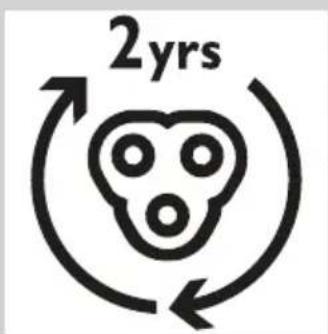
| Head Replacement | Every 2 years, HQ8 heads |
| Warranty | International (shaving heads excluded) |
Frequently Asked Questions - AquaTouch AT894 PHILIPS
User questions about AquaTouch AT894 PHILIPS
0 question about this device. Answer the ones you know or ask your own.
Ask a new question about this device
Download the instructions for your Shaver in PDF format for free! Find your manual AquaTouch AT894 - PHILIPS and take your electronic device back in hand. On this page are published all the documents necessary for the use of your device. AquaTouch AT894 by PHILIPS.
USER MANUAL AquaTouch AT894 PHILIPS
Always here to help you
Register your product and get support at www.philips.com/welcome
AT9XX, AT8XX, AT7XX

text_image
Question? Contact Philips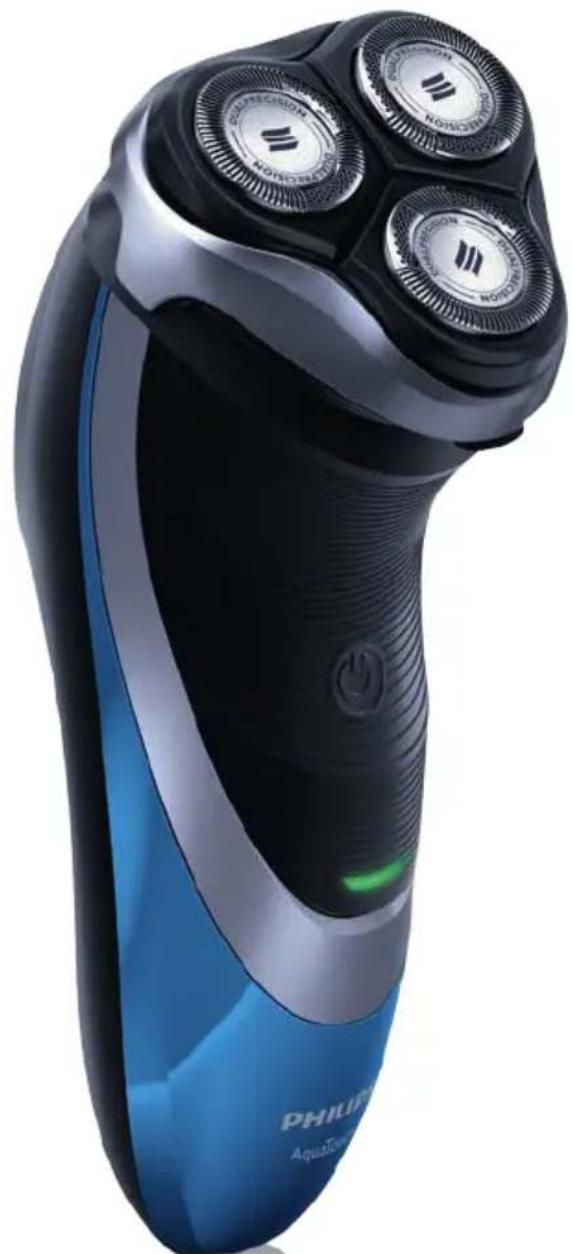
natural_image
Close-up of a Philips Aquatics electric shaver with three rotary dials (no visible text or symbols on body)PHILIPS
text_image
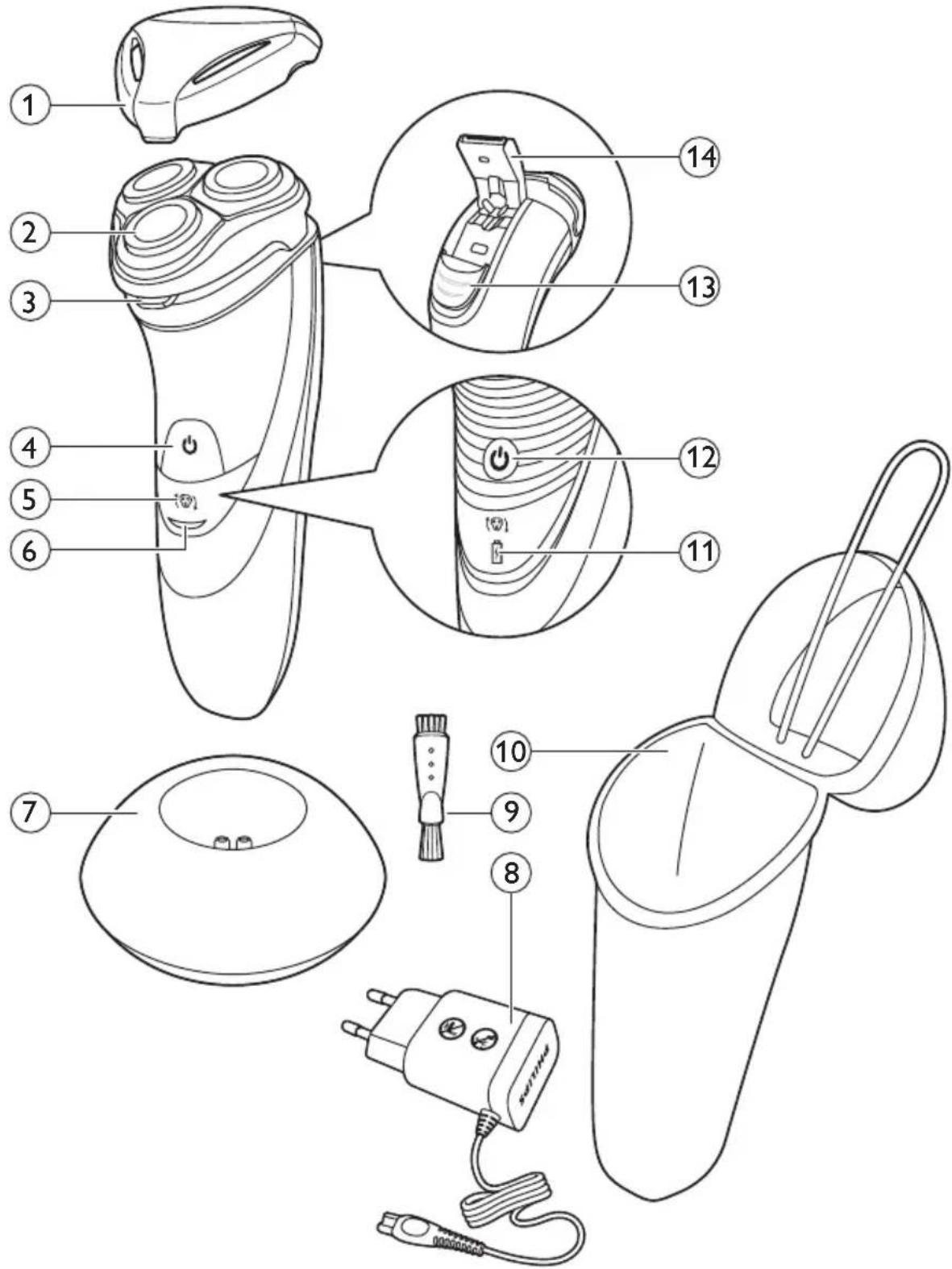
Technical diagram of an electric shaver with numbered parts and labeled functionsENGLISH 4
DANSK 18
DEUTSCH 32
ΕΛΛΗΝΙΚΑ 46
ESPAÑOL 61
SUOMI 75
FRANÇAIS 88
ITALIANO 102
NEDERLANDS 116
NORSK 130
PORTUGUÊS 144
SVENSKA 158
TÜRKÇE 172
Introduction
Congratulations on your purchase and welcome to Philips!
To fully benefit from the support that Philips offers, register your product at www.philips.com/welcome. Please read this user manual, as it contains information about the wonderful features of this shaver as well as some tips to make shaving easier and more enjoyable.
General description (Fig. 1)
1 Protection cap
2 Shaving unit
3 Shaving unit release button
4 Shaver on/off button (AT899/AT896/AT894/AT892/AT891/AT890/AT811/AT790/AT756/AT753/AT751/AT750 only)
5 Shaving head symbol
6 Charging light (AT899/AT896/AT894/AT892/AT891/AT890/AT811/AT790/AT756/AT753/AT751/AT750 only)
7 Charging stand (AT941/AT940 only)
8 Adapter
9 Cleaning brush
10 Storage pouch (AT941/AT940/AT897/AT894/AT891/AT890/AT796/AT790 only)
11 Battery symbol and shaving head symbol (AT941/AT940/AT897 only)
12 Shaver on/off button (AT941/AT940/AT897 only)
13 Trimmer release slide (AT941/AT940/AT918/AT897/AT896/AT894/AT891/AT890/AT889/AT887/AT886/AT872/AT811/AT799/AT797/AT796/AT790/AT756 only)
14 Trimmer (AT941/AT940/AT918/AT897/AT896/AT894/AT891/AT890/AT889/AT887/AT886/AT872/AT811/AT799/AT797/AT796/AT790/AT756 only)
Note: You can find the type number on the back of the shaver.
Important safety information
Read this important information carefully before you use the appliance and its accessories and save it for future reference. The accessories supplied may vary for different products.
Danger
- Keep the adapter dry.
Warning
- The adapter contains a transformer. Do not cut off the adapter to replace it with another plug, as this causes a hazardous situation.
- This appliance can be used by children aged from 8 years and above and persons with reduced physical, sensory or mental capabilities or lack of experience and knowledge if they have been given supervision or instruction concerning use of the appliance in a safe way and understand the hazards involved. Children shall not play with the appliance. Cleaning and user maintenance shall not be made by children without supervision.
- Always unplug the shaver before you clean it under the tap.
- Always check the appliance and its accessories before you use it. Do not use the appliance or its accessories if it is damaged, as this may cause injury. Always replace a damaged part with one of the original type.

natural_image
No sign depicting a faucet with a diagonal line and raindrops, commonly used to indicate no pollution or water use.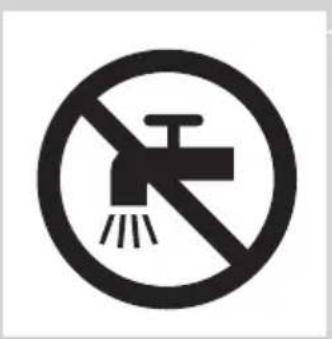
natural_image
Prohibition sign showing a faucet crossed out by a diagonal line, indicating no pollution or water release.Caution
- Never immerse the charging stand in water nor rinse it under the tap.
- Only use this appliance for its intended purpose as shown in the user manual.
- For hygienic reasons, the appliance should only be used by one person.
- Do not use the adapter in or near wall sockets that contain or have contained an electric air freshener to prevent irreparable damage to the adapter.
- Never use compressed air, scouring pads, abrasive cleaning agents or aggressive liquids such as petrol or acetone to clean the appliance.
- Water may drip from the socket at the bottom of the shaver when you rinse it. This is normal and not dangerous because all electronics are enclosed in a sealed power unit inside the shaver.
Electromagnetic fields (EMF)
- This Philips appliance complies with all applicable standards and regulations regarding exposure to electromagnetic fields.
General
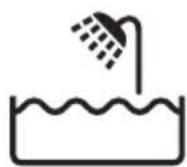
- This shaver is waterproof. It is suitable for use in the bath or shower and for cleaning under the tap. For safety reasons, the shaver can therefore only be used without cord.
- The appliance is suitable for mains voltages ranging from 100 to 240 volts.
- The adapter transforms 100-240 volts to a safe low voltage of less than 24 volts.
- Maximum noise level: Lc = 69dB(A)
Charging
Note: The shaver cannot be used directly from the mains.
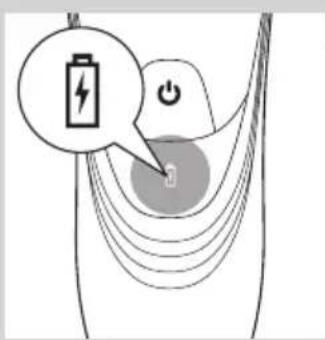
When you charge the shaver for the first time or after a long period of disuse, let it charge until the charging light lights up continuously.
See the table below for the charging time of your shaver.
Charging time 1 hour 8 hours
| AT941, AT940, AT918 | AT899, AT896, AT872 , | |
| AT897, AT896, AT894 | AT799, AT799, AT797, | |
| AT892, AT891, AT890 | AT796, AT790 AT770, | |
| AT889, AT887, AT886 | AT756, AT753 AT751, | |
| AT811 | AT750 |
The shaving time may be less than stated below in the table as a result of your shaving behaviour, your cleanings habits or your beard type.
| Shaving minutes | 60 min. | 50 min. | 45 min. | 40 min. |
| AT941 | AT897, AT894, AT892 | AT899 | AT790, AT756, AT753 | |
| AT940 | AT891, AT890, AT811, | AT896 | AT751, AT750 |
Charge indications
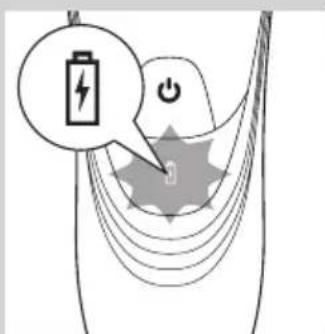
Battery low
- AT941/AT940/AT897: When the battery is almost empty (when there are only 5 or fewer shaving minutes left), the orange battery symbol starts to flash. When you switch off the shaver, the orange battery symbol continues to flash for a few seconds.
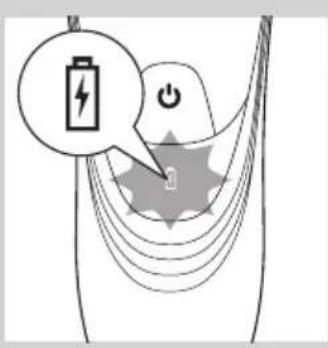
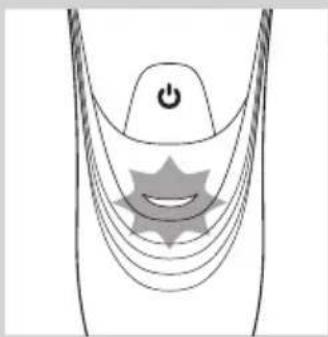
- AT899, AT896, AT918, AT896, AT894, AT891, AT890, AT889, AT887, AT886, AT872, AT811, AT799, AT797, AT796, AT790, AT770, AT756, AT753, AT751, AT750: When the battery is almost empty (when there are only 5 or fewer shaving minutes left), the charging light starts to flash orange. When you switch off the shaver, the charging light continues to flash orange for a few seconds.
Quick charging (AT941, AT940, AT918, AT897, AT896, AT894, AT891, AT890, AT889, AT887, AT886, AT811 only)
- AT941/AT940/AT897: When you start charging the empty battery, the battery symbol flashes orange and white.
Note: When the battery symbol flashes white and orange towards only white, you can have a quick shave of three minutes.
- AT918, AT896, AT894, AT891, AT890, AT889, AT887, AT886, AT811: When you start charging the empty battery, the charging light alternately flashes orange and green.
Note: When the charging light flashes orange and green towards only green, you can have a quick shave of three minutes.
Charging
- AT941/AT940/AT897: When the shaver is charging, the white battery symbol flashes.
text_image
Diagram showing a battery icon with lightning bolt and power symbol, overlaid on a stylized lightning bolt with starburst background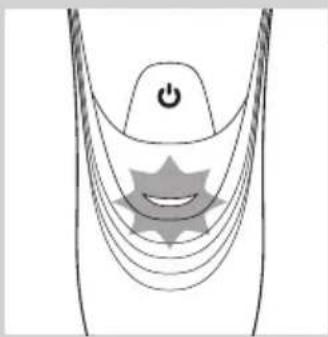
natural_image
Diagram of a medical or electrical device with curved lines and a central star-like symbol, no text or labels present.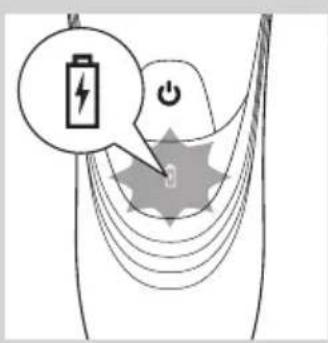
text_image
Diagram illustrating battery charging with a lightning bolt icon and power button, showing charging path and charge symbol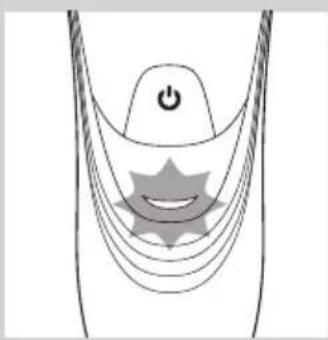
natural_image
Diagram of a medical or surgical device with a power button and a smiling star-shaped component (no text or symbols)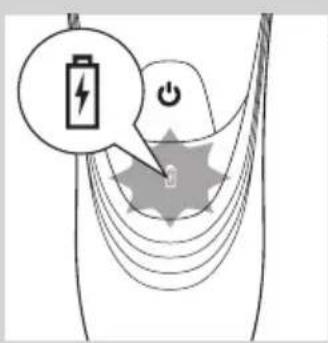
text_image
Diagram illustrating battery charging with a lightning bolt icon and power button, showing charging path and charge distribution.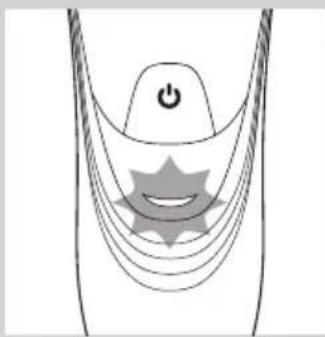
natural_image
Diagram of a medical or electrical device with a power button and star-shaped components (no text or symbols)- AT899, AT896, AT872, AT799, AT797, AT796, AT790, AT770, AT756, AT753, AT751, AT750:
When the shaver is charging, the charging light flashes green.
text_image
Diagram showing a battery icon with lightning bolt and power button, connected to a device with a switch symbolBattery fully charged
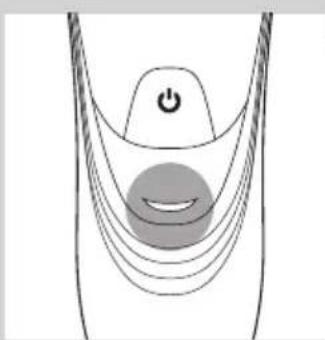
- AT941/AT940/AT897: When the battery is fully charged, the white battery symbol lights up continuously.
Note: After approx. 30 minutes, the battery symbol goes out to save energy.
natural_image
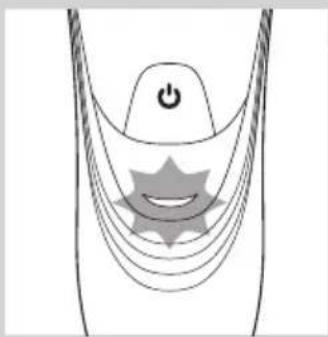
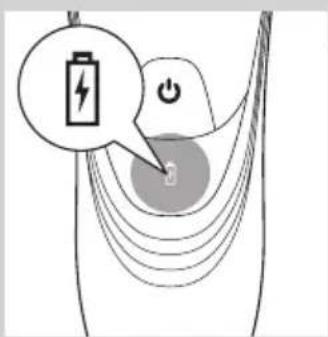
Diagram of a curved mechanical or electrical component with a power button and a circular button, no text or symbols present.- AT899, AT896, AT918, AT896, AT894, AT891, AT890, AT889, AT887, AT886, AT872, AT811, AT799, AT797, AT796, AT790, AT770, AT756, AT753, AT751, AT750: When the battery is fully charged, the charging light lights up green continuously.
Note: After approx. 30 minutes, the charging light goes out to save energy.
Charging
1 Put the small plug in the shaver.
2 Put the adapter in the wall socket.
The charging light shows the charging status of the shaver (see section 'Charge indications' in this chapter).
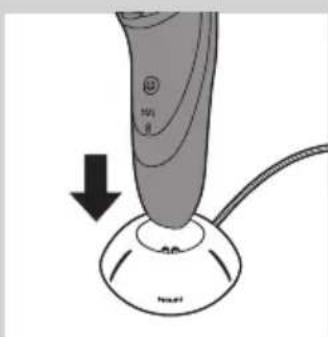
Charging in the charging stand (AT941/AT940 only)
natural_image
Close-up of a medical or electronic device with a black arrow pointing to a circular component labeled 'Neu' (no text or symbols on the device itself)1 Put the small plug in the charging stand.
2 Put the adapter in the wall socket.
3 Place the shaver in the charging stand.
The charging light shows the charging status of the shaver (see section 'Charge indications' in this chapter).
Using the shaver
Note: This shaver can be used in the bath or shower. It can therefore not be used directly from the mains for safety reasons.
Shaving tips and tricks
- This shaver is suitable for both wet and dry use. Use the shaver with shaving gel or foam for extra skin comfort, or use the shaver dry for extra convenience.
Note: We advise you to use the shaver with shaving gel or foam when you use it for a wet shave. Do not use thick shaving cream or shaving oil with this shaver.
- For optimal shaving results, make circular movements during use.
- The shaver is waterproof and can be used in the bath or shower.
- Your skin may need 2 or 3 weeks to get accustomed to the Philips shaving system.
Wet shaving

natural_image
Line drawing of a person applying facial massage to the ear (no text or symbols)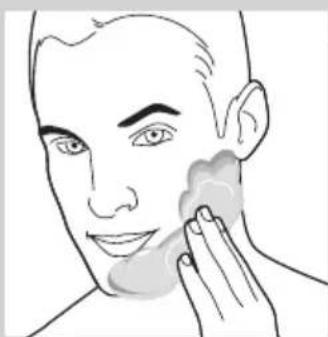
natural_image
Line drawing of a person applying product to their face, showing hand near product (no text or symbols)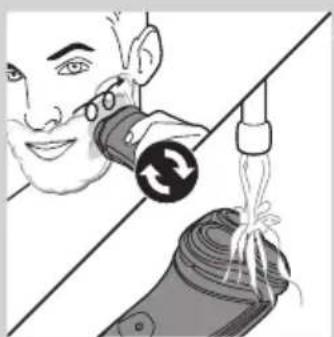
natural_image
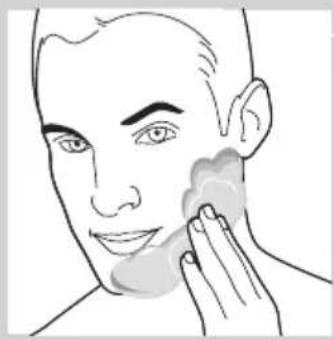
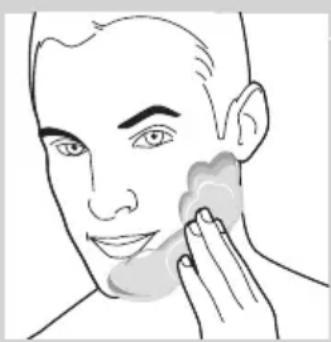
Illustration of a person using a device to interact with a device, showing hand positioning and wiring (no text or symbols)1 Apply some water to your skin.
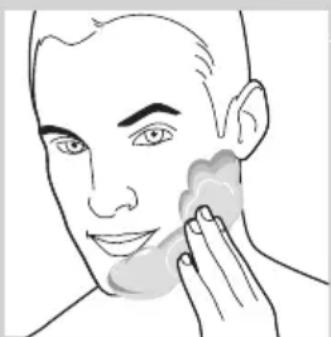
2 Apply shaving foam or shaving gel to your skin.
3 Rinse the shaving unit under the tap to ensure that the shaving unit glides smoothly over your skin.
4 Press the on/off button once to switch on the shaver.
5 Move the shaving heads in circular movements over your skin.
Note: Rinse the shaver under the tap regularly to ensure that it continues to glide smoothly over your skin.
6 After shaving, press the on/off button once to switch off the shaver and dry your face.
7 Clean the shaver (see chapter 'Cleaning and maintenance').
Note: Make sure you rinse all foam or shaving gel off the shaver.
Dry shaving
natural_image
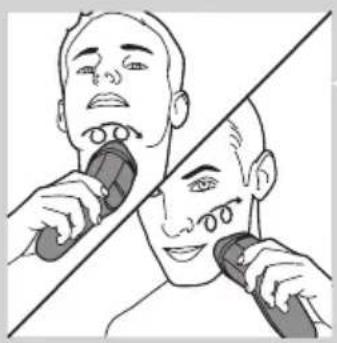
Illustration of a person using a handheld device to interact with another person (no text or symbols present)1 Press the on/off button once to switch on the shaver.
2 Move the shaving heads in circular movements over your skin.
3 After shaving, press the on/off button once to switch off the shaver.
4 Clean the shaver (see chapter 'Cleaning and maintenance').
Trimming (AT941/AT940/AT918/AT897/AT896/AT894/AT891/AT890/AT889/AT887/AT886/AT872/AT811/AT799/AT797/AT796/AT790/AT756 only)
natural_image
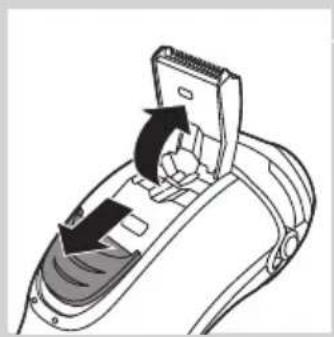
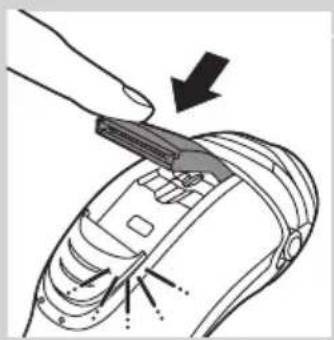
Diagram of a device's internal structure with arrows indicating movement or force (no text or symbols)You can use the trimmer to groom your sideburns and moustache.
1 Push the trimmer slide downwards to open the trimmer.
2 Press the on/off button once to switch on the shaver.
▶You can now start trimming.
3 After trimming, press the on/off button once to switch off the shaver.
natural_image
Illustration of a hand holding a tool with arrows indicating motion or force (no text or symbols)4 Clean the trimmer (see chapter 'Cleaning and maintenance').
natural_image
Diagram of a device being inserted into a component, showing tool and internal components (no text or symbols)5 Close the trimmer ('click').
Cleaning and maintenance
Never use compressed air, scouring pads, abrasive cleaning agents or aggressive liquids such as petrol or acetone to clean the shaver and the charging stand (AT941/AT940 only).
Always unplug the shaver before you clean it under the tap.
- Clean the shaver after every shave for optimal shaving performance.
- Regular cleaning guarantees better shaving performance.
- For the best cleaning results, we advise you to use the Philips Cleaning spray (HQ110).
- Be careful with hot water. Always check if the water is not too hot, to prevent your hands from getting burnt.
Note: Water may leak from the socket at the bottom of the shaver when you rinse it. This is normal and not dangerous because all electronics are enclosed in a sealed power unit inside the shaver.
Cleaning the shaving unit under the tap
natural_image
Illustration of a hand holding a mechanical component with arrows indicating motion (no text or symbols)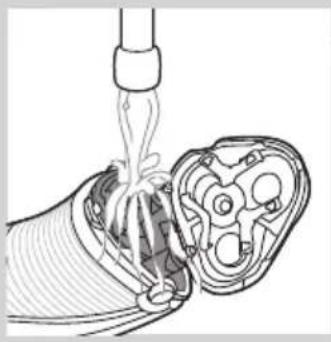
natural_image
Diagram of a cable being inserted into a multi-core socket (no text or labels)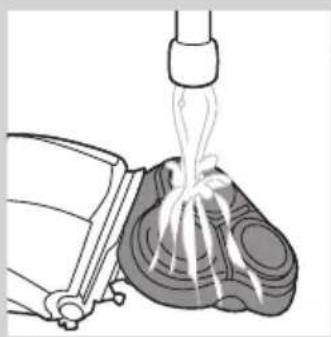
natural_image
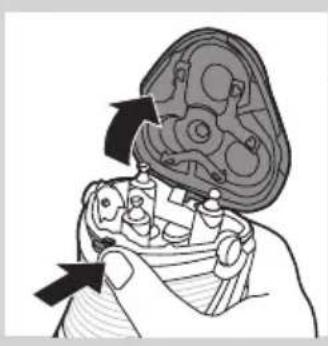
Illustration of a mechanical device emitting fluid from a nozzle (no text or symbols)1 Switch off the shaver.
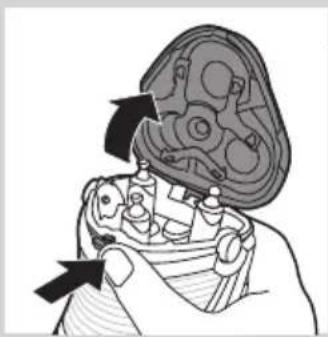
2 Press the release button to open the shaving unit.
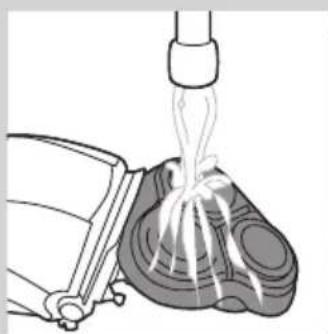
3 Rinse the shaving unit and hair chamber under a hot tap for 30 seconds.
Be careful with hot water. Always check if the water is not too hot, to prevent your hands from getting burnt.
- Rinse the hair chamber and the inside of the shaving unit.
- Rinse the outside of the shaving unit.
4 Close the shaving unit and shake off excess water.
Be careful not to hit the shaving unit against anything while shaking off excess water.
Never dry the shaving unit and the hair chamber with a towel or tissue, as this may damage the shaving unit.
5 Open the shaving unit again and leave it open to let the shaver dry completely.
Cleaning the shaving unit with the cleaning brush
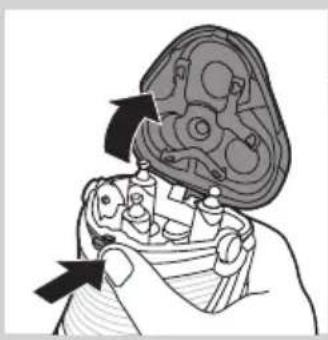
natural_image
Illustration of a hand holding a mechanical component with arrows indicating movement (no text or symbols)1 Switch off the shaver.
2 Press the release button to open the shaving unit.
3 Pull the shaving unit off the shaver.
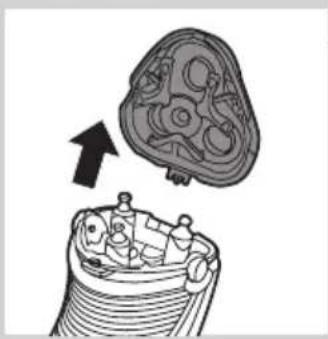
natural_image
Diagram of a mechanical component with an arrow indicating direction, showing internal structure (no text or symbols)4 Turn the lock anticlockwise (A) and remove the retaining frame (B).
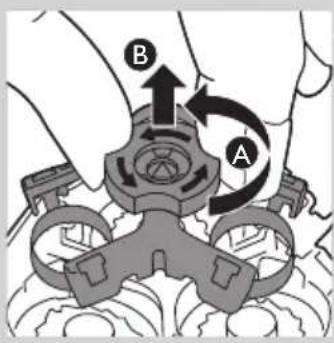
text_image
Diagram showing mechanical assembly with labeled parts A and B, indicating a turning or rotation process.5 Remove and clean one shaving head at a time. Each shaving head consists of a cutter and a guard.
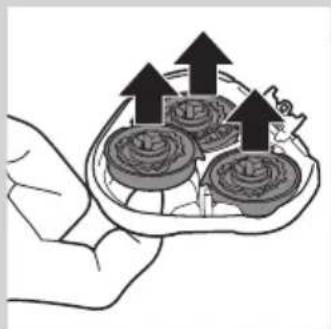
natural_image
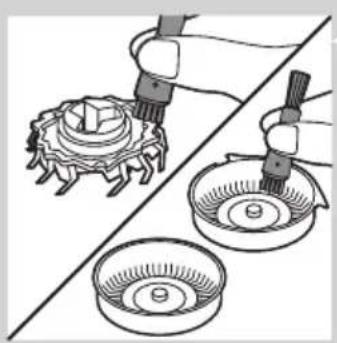
Illustration of a hand holding a tray with three food items and upward arrows indicating growth (no text or symbols)Note: Do not clean more than one cutter and guard at a time, since they are all matching sets. If you accidentally mix up the cutters and guards, it may take several weeks before optimal shaving performance is restored.
- Remove the cutter from the shaving guard and clean it with the brush.
ENGLISH ^12
natural_image
Illustration of a mechanical assembly with two views: top shows a gear-like component, bottom shows three bowls (no text or symbols)- Clean the inside and outside of the shaving guard with the brush.
natural_image
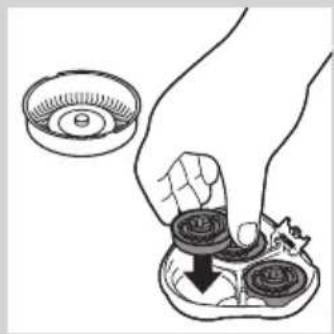
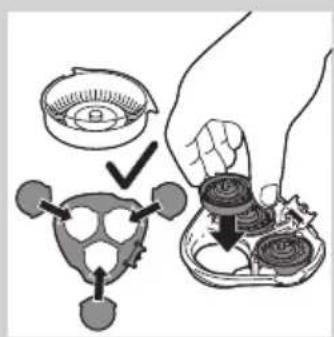
Illustration of a hand holding a small bowl with a downward arrow, next to a circular object (no text or symbols)6 Put the shaving heads back into the shaving unit.
text_image
Diagram illustrating a food preparation step with labeled steps and a hand holding a bowl containing food items.Make sure that the projections of the shaving heads fit exactly into the recesses.
text_image
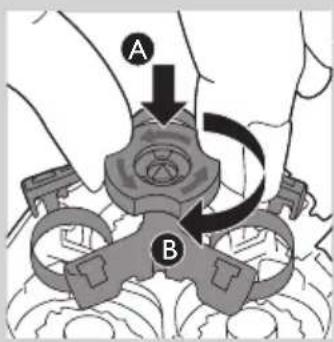
A B7 Put the retaining frame back into the shaving unit (A) and turn the lock clockwise (B).
natural_image
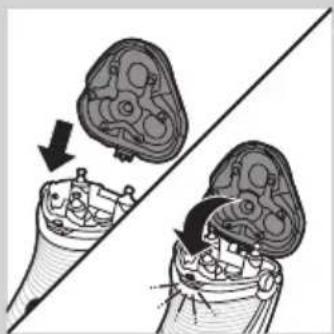
Diagram showing two views of a biological structure with arrows indicating movement or transformation (no text or labels)8 Insert the lug of the shaving unit into the slot in the top of the shaver. Then close the shaving unit.
Note: If the shaving unit does not close smoothly, check if you have inserted the shaving heads properly and if the retaining frame is locked.
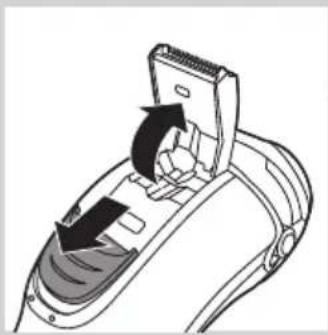
Cleaning the trimmer with the cleaning brush (AT941/AT940/AT918/AT897/AT896/AT894/AT891/AT890/AT889/AT887/AT886/AT872/AT811/AT799/AT797/AT796/AT790/AT756 only)
natural_image
Diagram of a hairdryer with directional arrows indicating movement or force (no text or symbols)Clean the trimmer every time you have used it.
1 Switch off the shaver.
2 Push the trimmer slide downwards to open the trimmer.
natural_image
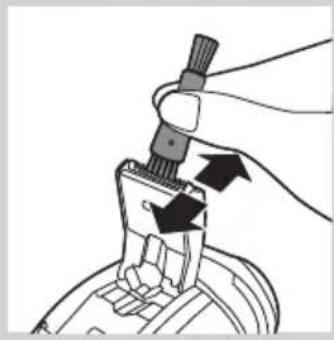
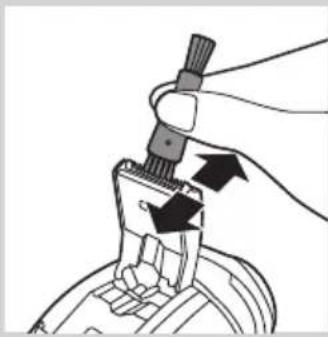
Illustration of a hand holding a tool with arrows indicating motion or force (no text or symbols)3 Clean the trimmer with the short-bristled side of the cleaning brush. Brush up and down along the trimmer teeth.
4 Close the trimmer ('click').
text_image
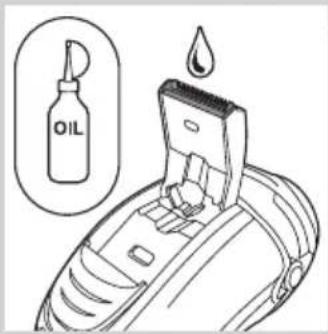
OILTip: For optimal trimming performance, lubricate the trimmer teeth with a drop of sewing machine oil every six months.
Storage
natural_image
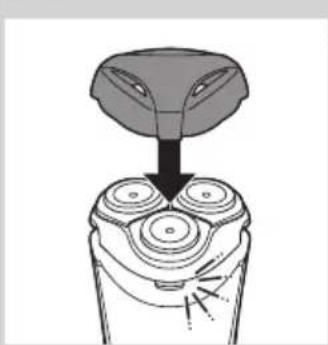
Diagram of a hand turning a three-pin electric shaver with a top handle (no text or symbols)- Put the protection cap on the shaver to prevent damage.
- AT941/AT940/AT897/AT894/AT892/AT891/AT890/AT796/AT790 only: Store the shaver in the pouch supplied.
Replacement
Replacement reminder
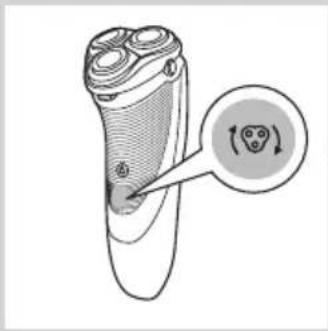
The shaving head symbol will light up to indicate that the shaving heads need to be replaced. Replace damaged shaving heads right away. Only replace the shaving heads with original HQ9 (AT941/AT940/AT918) or HQ8 (AT897/AT896/AT894/AT891/AT890/AT889/AT887/AT886/AT872/AT811/AT797/AT796/AT790/AT770/AT756/AT753/AT751/AT750) Philips Shaving Heads.
natural_image
Diagram of a hairbrush with a circular icon highlighting the inner ear area (no text or symbols present)1 The shaving head symbol lights up orange continuously.
2 Switch off the shaver. Disconnect the shaver from the mains or remove it from the charging stand (AT941/AT940 only).
natural_image
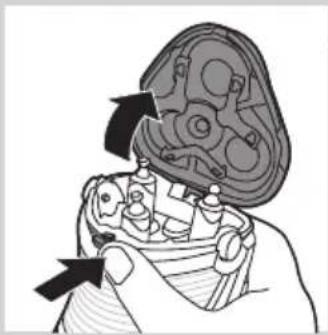
Illustration of a hand holding a mechanical component with arrows indicating assembly or repair (no text or symbols present)3 Press the release button to open the shaving unit.
4 Pull the shaving unit off the shaver.
text_image
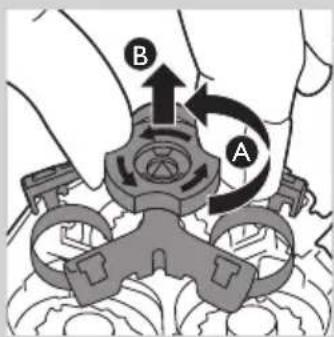
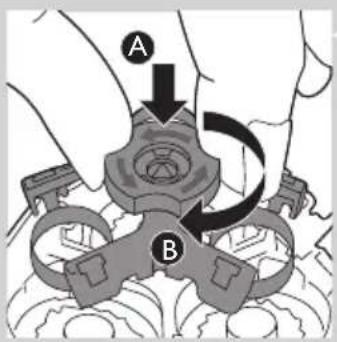
B A5 Turn the lock anticlockwise (A) and remove the retaining frame (B).
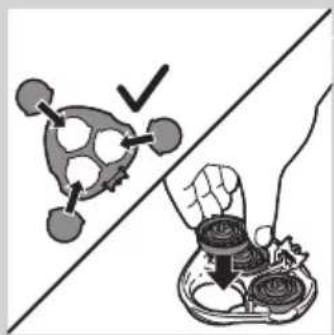
6 Remove the shaving heads and place new ones in the shaving unit.
text_image
Diagram showing a food safety symbol and hand holding a bowl with food, indicating inspection or cleaning steps.Make sure that the projections of the shaving heads fit exactly into the recesses.
text_image
A B7 Put the retaining frame back into the shaving unit (A) and turn the lock clockwise (B).
natural_image
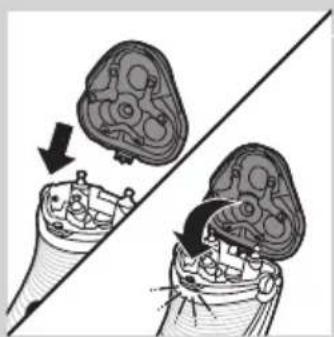
Medical illustration showing two views of a surgical instrument with arrows indicating movement or force (no text or symbols present)8 Insert the lug of the shaving unit into the slot in the top of the shaver. Then close the shaving unit.
Note: If the shaving unit does not close smoothly, check if you have inserted the shaving heads properly and if the retaining frame is locked.
text_image
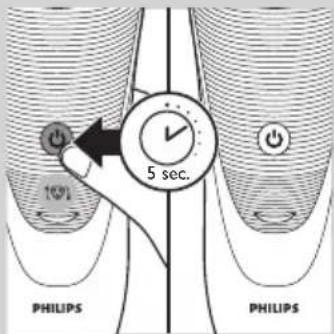
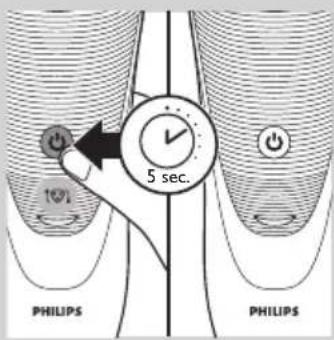
5 sec. PHILIPS PHILIPS9 Press and hold the on/off button for 5 seconds to reset the replacement reminder on the shaver. The orange light will go out.
Ordering accessories
text_image
2yrsTo buy accessories or spare parts, visit www.shop.philips.com/service or go to your Philips dealer. You can also contact the Philips Consumer Care Centre in your country (see the worldwide guarantee leaflet for contact details). To retain the top performance of your shaver, make sure you clean it regularly and replace its shaving heads at the recommended time.
Shaving heads
- We advise you to replace your shaving heads every two years. Always replace with HQ9 (AT941/AT940) or HQ8 (AT897/AT896/AT894/AT891/AT890/AT889/AT887/AT886/AT872/AT811/AT799/AT797/AT796/AT790/AT770/AT756/AT753/AT751/AT750) Philips Shaving Heads.
Cleaning
- Use Cleaning spray (HQ110) to clean the shaving heads thoroughly.
Recycling
natural_image
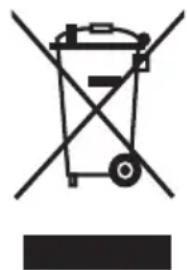
Symbol of a trash bin with crossed lines indicating no waste or restriction, and a solid black rectangle below (no text or symbols)- This symbol on a product means that the product is covered by European Directive 2012/19/EU.
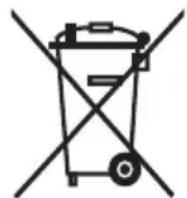
- This symbol means that the product contains a built-in rechargeable battery covered by European Directive 2006/66/EC which cannot be disposed of with normal household waste. We strongly advise you to take your product to an official collection point or a Philips service centre to have a professional remove the rechargeable battery.
- Inform yourself about the local separate collection system for electrical and electronic products and rechargeable batteries. Follow local rules and never dispose of the product and rechargeable batteries with normal household waste. Correct disposal of old products and rechargeable batteries helps prevent negative consequences for the environment and human health.
Removing the rechargeable shaver battery
Only remove the rechargeable battery when you discard the shaver. Make sure the rechargeable battery is completely empty when you remove it.
1 Undo the screws in the back of the shaver and in the hair chamber.
2 Remove the front panel and the back panel.
3 Bend the 6 hooks aside and take out the power unit.
Be careful, the hooks are sharp.
4 Remove the rechargeable battery.
Guarantee and support
If you need information or support, please visit www.philips.com/support or read the separate worldwide guarantee leaflet.
Guarantee restrictions
The shaving heads (cutters and guards) are not covered by the terms of the international guarantee because they are subject to wear.
Troubleshooting
This chapter summarises the most common problems you could encounter with the appliance. If you are unable to solve the problem with the information below, visit www.philips.com/support for a list of frequently asked questions or contact the Consumer Care Centre in your country.
Problem Possible cause Solution
| The shaver does not shave as well as it used to. | The shaving heads are damaged or worn. | Replace the shaving heads (see chapter ‘Replacement’). |
| Foam or gel residues clog up the shaving heads. | Rinse the shaving unit under a hot tap (see chapter ‘Cleaning and maintenance’). | |
| Long hairs obstruct the shaving heads. | Clean the shaving heads one by one (see chapter ‘Cleaning and maintenance’). | |
| You have not inserted the shaving heads properly. | Make sure that the projections of the shaving heads fit exactly into the recesses (see chapter ‘Cleaning and maintenance’). | |
| The shaver does not work when I press the on/off button. | The rechargeable battery is empty. | Recharge the battery (see chapter ‘Charging’). |
| The temperature of the shaver is too high. In this case, the shaver does not work. | As soon as the temperature of the shaver has dropped sufficiently, you can switch on the shaver again. | |
| The shaver does not work, although it is connected to the mains. | The shaver is not designed to be used directly from the mains. | Recharge the battery (see chapter ‘Charging’) and disconnect it from the mains. |
Introduktion
natural_image
Prohibition sign showing a faucet crossed out by a diagonal line, indicating no leakage or anti-poaching (no text present)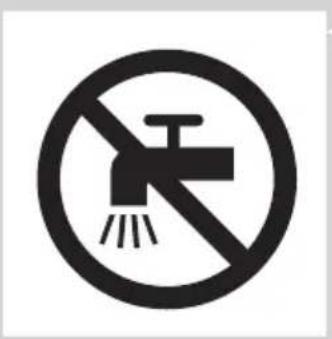
natural_image
Prohibition sign of a faucet with no text or symbolsForsigtig
text_image
Diagram illustrating battery charging mechanism with labeled components and charging symbolLavt batteriniveau
natural_image
Diagram of a stylized smiley face with curved lines and a power button, no text or symbols present- AT899, AT896, AT918, AT896, AT894, AT891, AT890, AT889, AT887, AT886, AT872, AT811, AT799, AT797, AT796, AT790, AT770, AT756, AT753, AT751, AT750: Når batteriet næsten er afladet (når der kun er 5 eller færre barberingsminutter tilbage), blinker opladeindikatoren orange. Når du slukker for shaveren, fortsætter opladeindikatoren med at blinke orange i et par sekunder.
text_image
Diagram illustrating battery charging with a lightning bolt icon and power button, showing charging path and charging symbolHurtig opladning (kun AT941, AT940, AT918, AT897, AT896, AT894, AT891, AT890, AT889, AT887, AT886, AT811)
natural_image
Diagram of a stylized ear with a power button and star-shaped graphic overlay (no text or symbols)- AT918, AT896, AT894, AT891, AT890, AT889, AT887, AT886, AT811: Når du starter opladningen af det tomme batteri, blinker opladeindikatoren skiftevis orange og grønt.
text_image
Diagram illustrating battery charging with a lightning bolt icon and power button, showing charging mechanismOpladning
- AT941/AT940/AT897: Når shaveren oplader, blinker det hvide batterisymbol.
natural_image
Diagram of a medical or electrical device with curved lines and a central power button, no text or symbols present.- AT899, AT896, AT872, AT799, AT797, AT796, AT790, AT770, AT756, AT753, AT751, AT750:
text_image
Diagram showing a battery icon with lightning bolt and power button, illustrating charging or discharging process.natural_image
Diagram of a curved mechanical or electrical component with a power button and a circular component, no text or symbols present.- AT899, AT896, AT918, AT896, AT894, AT891, AT890, AT889, AT887, AT886, AT872, AT811, AT799, AT797, AT796, AT790, AT770, AT756, AT753, AT751, AT750: Når batteriet er fuldt opladet, lyser opladeindikatoren konstant grønt.
natural_image
Close-up of a handheld device with a black arrow pointing to a circular base (no visible text or symbols)natural_image
Line drawing of a person applying facial contour or pressure application to the neck area (no text or symbols)1 Påfør lidt vand på din hud.
natural_image
Line drawing of a person applying product to their ear (no text or symbols)natural_image
Illustration of a person using a medical device to interact with a bandage, showing a circular arrow and rope (no text or symbols)natural_image
Illustration of a person using a handheld device to clean teeth (no text or symbols present)natural_image
Diagram of a hairdryer with directional arrows indicating movement or operation (no text or symbols present)natural_image
Illustration of a hand using a tool to adjust or install a mechanical component (no text or symbols visible)natural_image
Diagram of a hand using a tool to adjust or install a device component, with no visible text or symbols.natural_image
Illustration of a hand holding a mechanical component with arrows indicating movement (no text or symbols)natural_image
Diagram of a medical procedure showing fluid flow from a tube into a device (no text or labels)natural_image
Illustration of a mechanical device emitting white ribbons into a textured surface (no text or symbols)natural_image
Illustration of a hand holding a mechanical component with arrows indicating assembly or disassembly (no text or symbols present)natural_image
Diagram of a mechanical component with an arrow indicating upward motion (no text or symbols present)text_image
Diagram showing mechanical assembly with labeled parts A and B, indicating a turning or disassembly process.natural_image
Illustration of a hand holding a tray with three food items and upward arrows indicating growth (no text or symbols)natural_image
Illustration of a mechanical assembly with two views: top shows a gear-like component, bottom shows three circular components (no text or symbols)natural_image
Illustration of a hand holding a small bowl with a downward arrow, next to a circular object (no text or symbols)text_image
Diagram illustrating a food preparation step with labeled steps and directional arrows indicating processing or quality inspection.natural_image
Diagram showing two views of a mechanical component with arrows indicating direction (no text or symbols)natural_image
Diagram of a hairdryer with directional arrows indicating movement (no text or symbols)natural_image
Illustration of a hand holding a tool with arrows indicating motion or force (no text or symbols)natural_image
Diagram of a hand turning a three-pin electric shaver with a top handle (no text or symbols)- Sæt beskyttelseskappen på shaveren, så den ikke beskadiges.
- Kun AT941/AT940/AT897/AT894/AT892/AT891/AT890/AT796/AT790: Opbevar shaveren i den medfølgende pose.
Udskiftning
natural_image
Illustration of a hand holding a three-pin electric shaver with a circular arrow indicating rotation (no text or symbols)Skærene må kun udskiftes med originale HQ9 (AT941/AT940/AT918) eller HQ8 (AT897/AT896/AT894/AT891/AT890/AT889/AT887/AT886/AT872/AT811/AT797/AT796/AT790/AT770/AT756/AT753/AT751/AT750) Philips-skær.
natural_image
Illustration of a hand holding a mechanical component with arrows indicating movement (no text or symbols)1 Shaverhovedsymbolet lyser konstant orange.
text_image
Diagram showing mechanical assembly with labeled parts A and B, likely illustrating a gear or valve mechanism.text_image
Diagram showing a molecular structure with a checkmark and a hand holding food items, likely illustrating a chemical or biological process.natural_image
Diagram showing two views of a mechanical component with arrows indicating motion (no text or symbols)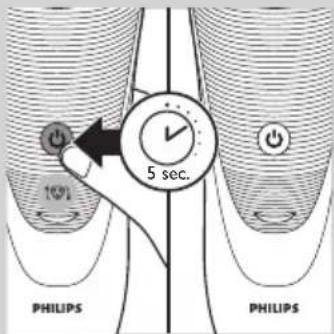
text_image
10% 5 sec. PHILIPS PHILIPSnatural_image
Symbol of a trash bin with crossed lines indicating no waste or restriction, and a solid black rectangle below (no text or labels)natural_image
No smoking sign with faucet symbol (no text)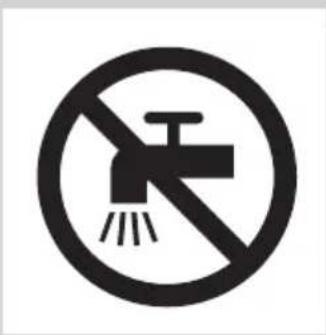
natural_image
Prohibition sign showing a faucet crossed out by a diagonal line, indicating no pollution or barrier (no text present)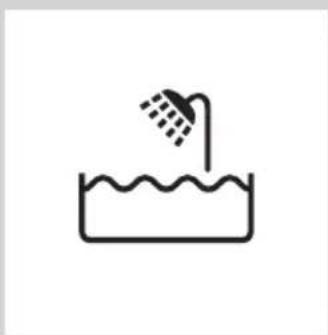
natural_image
Simple line drawing of a showerhead spraying over a water-filled basin (no text or symbols)text_image
Diagram illustrating battery charging and power connection with labeled icons and a lightning bolt symbol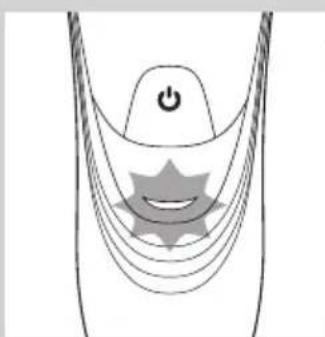
natural_image
Diagram of a medical or electrical device with a power button and star-shaped components (no text or symbols)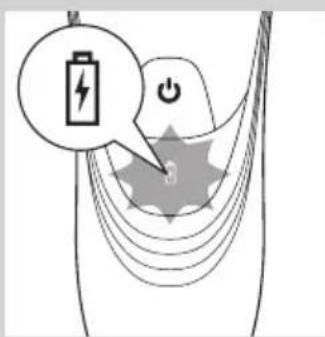
text_image
Diagram showing a battery icon with lightning bolt and power button, connected to a star-shaped symbol with arrows indicating flow or interaction.Akku fast leer
natural_image
Diagram of a medical or electrical device with curved lines and a central star-like symbol, no text or labels present.text_image
Diagram illustrating battery charging with a lightning bolt icon and power button, showing charging path and charging symbolLaden
natural_image
Diagram of a medical or electrical device with a power button and star-shaped component (no text or symbols)text_image
Diagram showing a battery icon with lightning bolt and power button, connected to a circular component labeled '0' with concentric lines.natural_image
Diagram of a curved mechanical or electrical component with a power button and a circular component, no text or symbols present.natural_image
Close-up of a handheld electronic device with a black arrow pointing to a circular base (no visible text or symbols)natural_image
Line drawing of a person applying facial massage or pressure to the ear (no text or symbols)natural_image
Line drawing of a person applying face-to-face care to their ear (no text or symbols)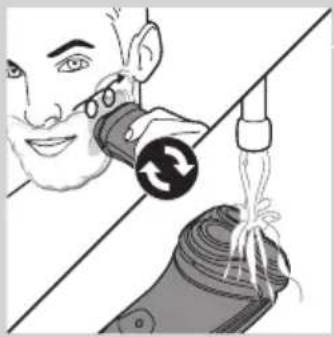
natural_image
Illustration of a person using a medical or cosmetic device to interact with a bottle, showing a circular arrow and rope (no text or symbols)natural_image
Illustration of a person using a handheld device to clean another (no text or symbols present)natural_image
Diagram of a hairdryer with directional arrows indicating movement or force (no text or symbols)natural_image
Illustration of a hand using a tool to adjust or install a mechanical component (no text or symbols visible)natural_image
Diagram of a hand using a tool to adjust or install a component, with arrows indicating direction (no text or symbols present)natural_image
Illustration of a hand holding a mechanical component with arrows indicating movement (no text or symbols)natural_image
Diagram of a medical procedure showing a catheter inserted into a device with internal components (no text or labels)natural_image
Diagram of a mechanical device pouring liquid into a container (no text or symbols)natural_image
Illustration of a hand holding a mechanical component with arrows indicating direction (no text or symbols)natural_image
Diagram of a mechanical component with an arrow indicating direction, showing internal parts and a top view (no text or symbols)text_image
Diagram showing mechanical assembly with labeled parts A and B, likely illustrating a gear or cam mechanism.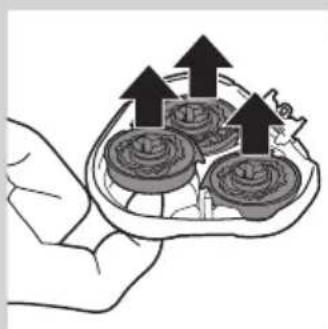
natural_image
Illustration of a hand holding a tray with coins and arrows indicating upward movement (no text or symbols)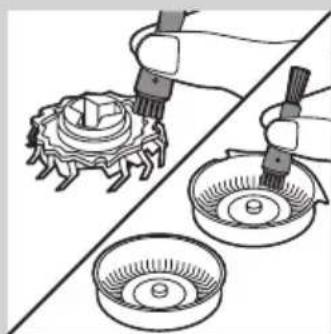
natural_image
Illustration of a mechanical assembly with three components: a gear-like component, a bowl with a screw, and a tool inserted into it (no text or symbols)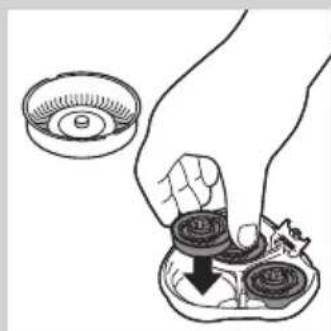
natural_image
Illustration of a hand holding a small bowl with a coin, being cut with a downward arrow (no text or symbols)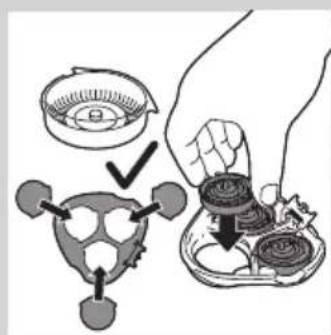
text_image
Diagram illustrating a hand holding a small object with a magnified view, showing steps to process a device or component.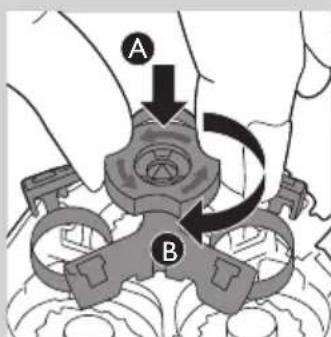
text_image
A Bnatural_image
Diagram showing two views of a mechanical component with arrows indicating motion, no text or symbols presentnatural_image
Diagram of a hairdryer with black arrows indicating force or movement (no text or symbols)natural_image
Hand holding a connector with arrows indicating assembly or connection (no text or symbols)natural_image
Diagram of a hand turning a three-pin electric shaver (no text or symbols present)natural_image
Illustration of a hand holding a small object, possibly a brush or platter, with no visible text or symbols.Ersatzanzeige
natural_image
Illustration of a hand holding a mechanical component with arrows indicating direction (no text or symbols)text_image
Diagram showing mechanical assembly with labeled parts A and B, indicating a rotating mechanism or assembly process.natural_image
Illustration showing a hand holding a tray with food items, alongside a molecular structure with a checkmark (no text or symbols)natural_image
Diagram showing two mechanical components with arrows indicating motion, no text or symbols presentnatural_image
Symbol of a trash bin with crossed lines indicating no waste or restriction, and a solid black rectangle below (no text or labels)natural_image
Prohibition sign showing a faucet without a shower, enclosed in a circle (no text or symbols)
natural_image
No sign depicting a faucet with a showerhead, crossed out by a diagonal line (no text or symbols)Κίνδυνος
text_image
Diagram illustrating battery charging with a lightning bolt icon and power button, showing charging path and charge distribution.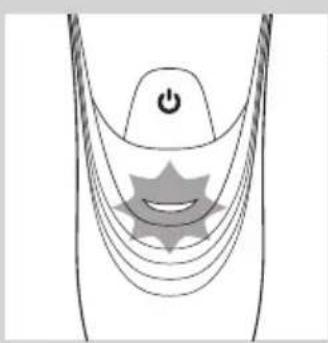
natural_image
Diagram of a medical or electrical device with curved lines and a central star-like symbol (no text or labels)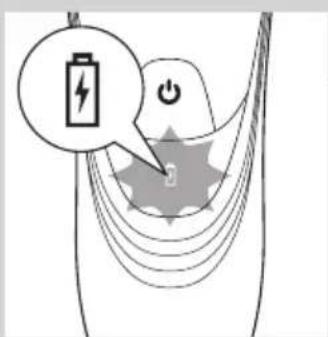
text_image
Diagram showing a battery icon with lightning bolt and power button, overlaid on a stylized gear-like shape with a starburst pattern.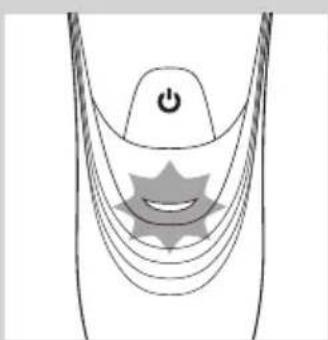
natural_image
Diagram of a stylized smiley face with curved lines and a power button, no text or symbols present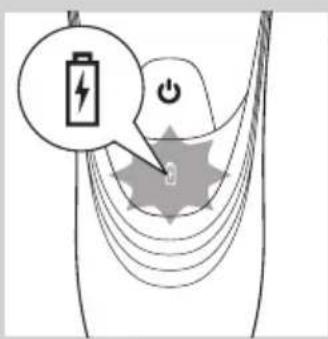
text_image
Diagram illustrating battery charging with a lightning bolt icon and power button, showing charging path and charge distribution.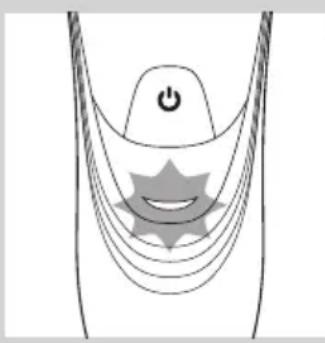
natural_image
Diagram of a medical or electrical device with a power button and star-shaped components (no text or symbols)text_image
Diagram showing battery charging process with lightning bolt and power button, labeled in Englishnatural_image
Diagram of a curved mechanical or electrical component with a power button and a circular component, no text or symbols present.natural_image
Diagram of a medical or laboratory device with a downward arrow pointing to a circular base (no text or symbols)natural_image
Line drawing of a person applying facial massage or pressure to the ear (no text or symbols)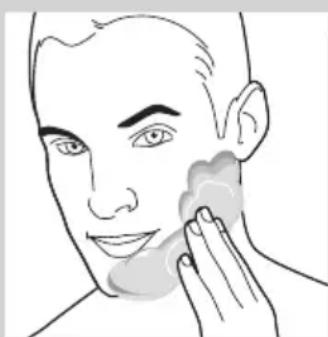
natural_image
Line drawing of a person applying face-to-face care to their cheek (no text or symbols)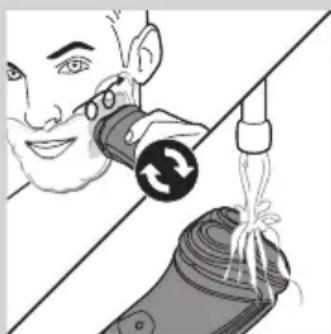
natural_image
Illustration of a person using a tool to lift a cylindrical object, with no visible text or symbolsnatural_image
Illustration of a person using a handheld device to clean another (no text or symbols present)natural_image
Diagram of a hairdryer with directional arrows indicating movement (no text or symbols)natural_image
Illustration of a hand using a tool to adjust or install a component, with arrows indicating direction (no text or symbols present)natural_image
Diagram of a hand using a tool to adjust or install electronic components, with no visible text or symbols.natural_image
Illustration of a hand holding a mechanical component with internal gears and a handle (no text or symbols)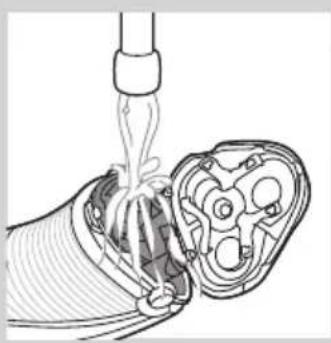
natural_image
Diagram of a medical procedure showing fluid flow through a tube into a device (no text or labels)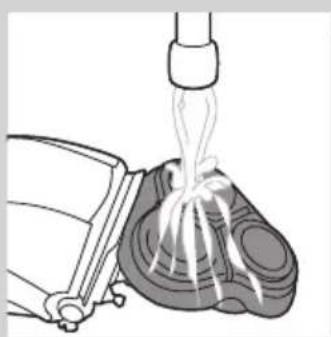
natural_image
Illustration of a mechanical device pouring liquid into a container (no text or symbols)natural_image
Illustration of a hand holding a mechanical component with arrows indicating movement or assembly (no text or symbols present)natural_image
Diagram of a mechanical component with an arrow indicating direction, showing internal structure (no text or symbols)text_image
Diagram showing mechanical assembly with labeled parts A and B, indicating a gear or mechanism mechanism.natural_image
Illustration of a hand holding a tray with three small round objects and upward arrows, no text or symbols present.natural_image
Illustration of two hands using pipette to clean a mechanical component, with no visible text or symbolsnatural_image
Illustration of a hand holding a small bowl with a downward arrow, next to a circular object (no text or symbols)text_image
Diagram illustrating a hand holding a bowl with a magnified view of the bulb, showing step-by-step instructions for cleaning or repair.natural_image
Diagram showing two views of a mechanical component with arrows indicating direction (no text or symbols)natural_image
Diagram of a hairdryer with black arrows indicating direction (no text or symbols)natural_image
Hand holding a tool with arrows indicating motion or movement (no text or symbols)natural_image
Diagram of a hand turning a leaf into a three-pin electric shaver (no text or symbols)natural_image
Illustration of a hand holding a small electric shaver with a circular button indicating rotation (no text or symbols)natural_image
Illustration of a hand holding a mechanical component with arrows indicating direction (no text or symbols)text_image
Diagram showing mechanical assembly with labeled parts A and B, likely illustrating a gear or valve mechanism.natural_image
Illustration of a food safety concept with a hand holding a bowl and a checkmark over a food item (no text or symbols)natural_image
Diagram showing two views of a mechanical component with arrows indicating direction (no text or symbols)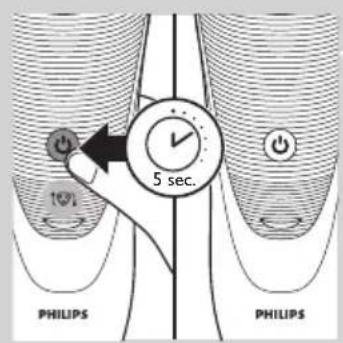
text_image
5 sec. 10% PHILIPS PHILIPSnatural_image
Symbol of a waste bin with crossed lines indicating no waste, and a solid black rectangle below (no text or labels)natural_image
Prohibition sign showing a faucet without a shower, enclosed in a circle (no text or symbols)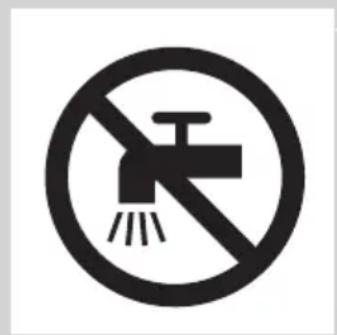
text_image
Prohibition sign with a faucet symbol and diagonal line, indicating no fire or water discharge.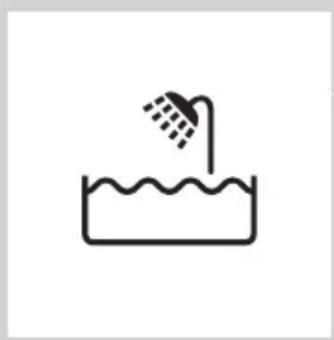
natural_image
Simple line drawing of a showerhead spraying over a water-filled basin (no text or symbols)text_image
Diagram illustrating battery charging and power connection with labeled icons and a lightning bolt symbolBatería baja
natural_image
Diagram of a stylized smiley face with curved lines and a power button, no text or symbols presenttext_image
Diagram illustrating battery charging with a lightning bolt icon and power button, showing charging mechanismCarga rápida (solo modelos AT941, AT940, AT918, AT 897, AT896, AT894, AT891, AT890, AT889, AT887, AT886, AT811)
natural_image
Diagram of a medical or electrical device with curved lines and a power button, no text or symbols presenttext_image
Diagram illustrating battery charging with a lightning bolt icon and power button, showing charging mechanismCarga
natural_image
Diagram of a stylized smiley face with curved lines and a power button, no text or symbols presenttext_image
Diagram showing a battery icon with lightning bolt and power button, indicating charging or discharging processnatural_image
Diagram of a curved mechanical or electrical component with a power button and circular base (no text or symbols)natural_image
Close-up of a handheld device with a black arrow pointing to a circular base labeled 'FHLA2' (no text or symbols on the device itself)natural_image
Line drawing of a person applying facial massage or pressure to the ear (no text or symbols)1 Humedézcase la piel.
natural_image
Line drawing of a person applying product to their face with a sponge (no text or symbols)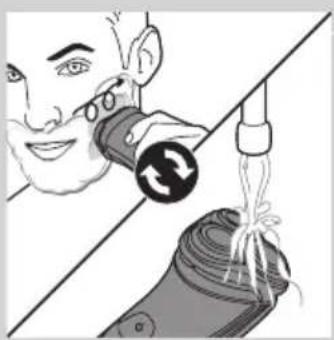
natural_image
Illustration of a person using a medical or cosmetic device to interact with a bag, showing a circular button and rope being inserted (no text or symbols present)natural_image
Illustration of two people using flashlights, separated by a diagonal line (no text or symbols)natural_image
Diagram of a hairdryer with black arrows indicating force or movement (no text or symbols)natural_image
Illustration of a hand using a tool to adjust or install a mechanical component (no text or symbols visible)natural_image
Diagram of a hand using a tool to adjust or install a component, with arrows indicating the process (no text or symbols present)natural_image
Illustration of a person holding a device with arrows indicating movement or force (no text or symbols)natural_image
Diagram of a medical procedure showing fluid flow through a tube into a cross-sectional view (no text or labels)natural_image
Illustration of a medical procedure showing fluid flow from a bottle onto a patient's foot (no text or symbols)natural_image
Diagram of a mechanical assembly with arrows indicating direction (no text or symbols present)natural_image
Diagram of a mechanical component with an arrow indicating upward motion (no text or symbols present)text_image
Diagram showing mechanical assembly with labeled parts A and B, indicating a rotating mechanism or motion path.natural_image
Illustration of a hand holding a tray with three circular objects and upward arrows, no text or symbols present.natural_image
Illustration of three mechanical components: a gear, a bowl with a screw, and a tool applying force to them (no text or symbols)natural_image
Illustration of a hand holding a small bowl with coins and a magnifying glass, no text or symbols presenttext_image
Diagram illustrating a mechanical or electrical component being handled, with arrows indicating assembly steps.natural_image
Diagram showing two views of a mechanical component with arrows indicating motion, no text or symbols presentnatural_image
Diagram of a hairdryer with directional arrows indicating movement (no text or symbols)natural_image
Illustration of a hand holding a tool with directional arrows indicating movement or force (no text or symbols)natural_image
Diagram of a hand holding a three-pin electric shaver with a top handle (no text or symbols)natural_image
Diagram of a hairbrush with a circular icon highlighting the blade (no text or symbols present)natural_image
Illustration of a hand holding a mechanical component with arrows indicating direction (no text or symbols)text_image
Diagram showing mechanical assembly with labeled parts A and B, indicating a turning or rotation process.natural_image
Illustration showing a hand holding a tray with food items, alongside a molecular structure with a checkmark (no text or symbols)natural_image
Diagram showing two mechanical components with arrows indicating motion, no text or symbols presenttext_image
5 sec. (0%) PHILIPS PHILIPSnatural_image
Symbol of a waste bin with no text or labelsnatural_image
Symbol of a trash bin crossed out by a diagonal line, representing no waste or discharge (no text or labels)natural_image
Prohibition sign showing a faucet crossed out by a diagonal line, indicating no leakage or disinfection (no text present)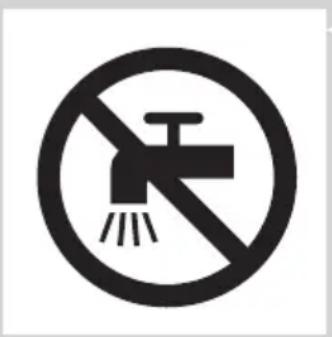
natural_image
No sign depicting a faucet crossed out by a diagonal line, indicating no pollution or water release.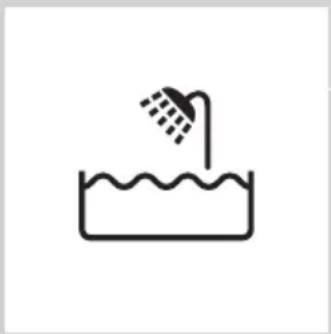
natural_image
Simple line drawing of a showerhead spraying over a water-filled basin (no text or symbols)Varoitus
text_image
Diagram illustrating battery charging with a lightning bolt icon and power button, showing charging path and charge distribution.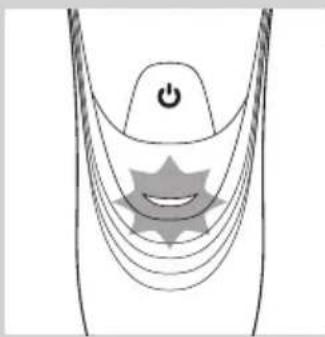
natural_image
Diagram of a stylized human head with a power button and star-shaped symbol (no text or labels)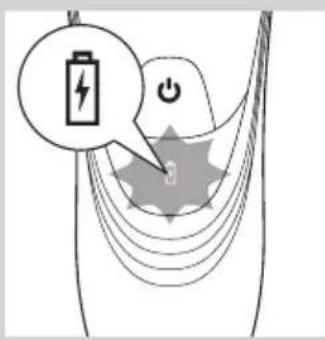
text_image
Diagram illustrating battery charging and power connection with labeled icons and arrows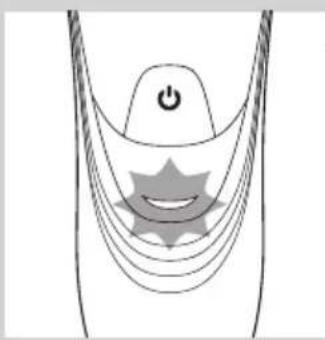
natural_image
Diagram of a stylized smiley face with curved lines and a power button, no text or symbols present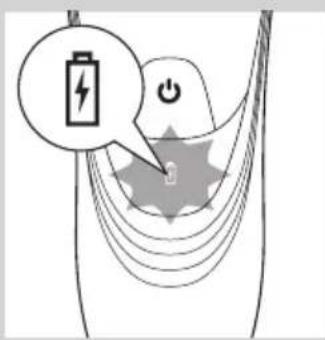
text_image
Diagram illustrating battery charging with a lightning bolt icon and power button, showing charging path and charge distribution.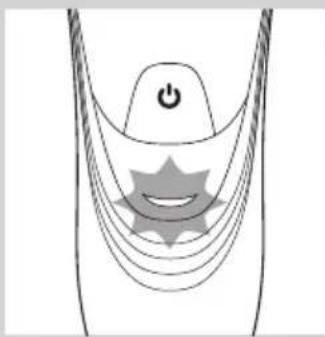
natural_image
Diagram of a stylized human head with curved lines and a central star-like symbol, no text or labels present.text_image
Diagram showing battery charging process with lightning bolt and power button, illustrating charging mechanismAkku täynnä
natural_image
Diagram of a curved mechanical or electrical component with a power button and a circular component, no text or symbols present.- Mallit AT899, AT896, AT918, AT896, AT894, AT891, AT890, AT889, AT887, AT886, AT872, AT811, AT799, AT797, AT796, AT790, AT770, AT756, AT753, AT751, AT750: Kun akku on täysin ladattu, latauksen merkkivalo palaa tasaisen vihreänä.
natural_image
Close-up of a handheld electronic device with a black arrow pointing to a circular base (no text or symbols visible)natural_image
Line drawing of a person applying facial massage or pressure to the ear (no text or symbols)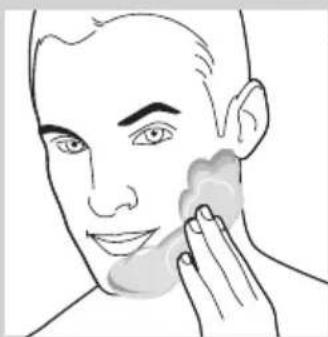
natural_image
Line drawing of a person applying a product to their face, no text or symbols present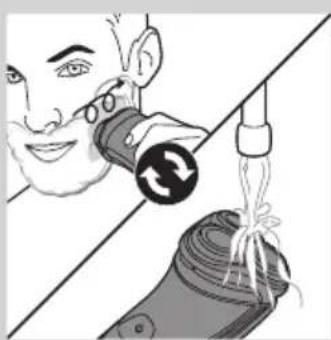
natural_image
Illustration of a person using a medical or cosmetic device to interact with another device (no text or symbols visible)natural_image
Illustration of a person using a handheld device to interact with another person (no text or symbols present)natural_image
Diagram of a device's internal structure with arrows indicating movement or force (no text or symbols)natural_image
Illustration of a hand holding a tool with arrows indicating movement or force (no text or symbols)natural_image
Diagram of a device being inserted into a component, showing tool and internal components (no text or symbols)natural_image
Illustration of a hand holding a mechanical component with arrows indicating movement (no text or symbols)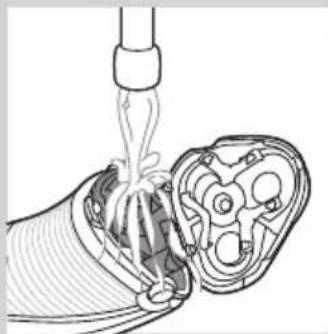
natural_image
Diagram of a medical procedure showing fluid flow through a device into a cross-sectional view (no text or labels)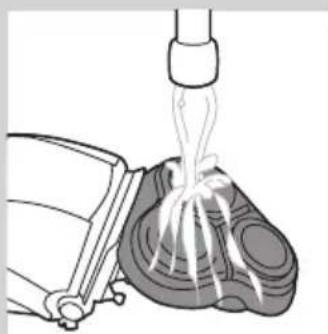
natural_image
Illustration of a mechanical device with a piping bag pouring liquid into a component (no text or symbols)natural_image
Illustration of a hand holding a mechanical component with arrows indicating movement (no text or symbols)natural_image
Diagram of a mechanical component with an arrow indicating direction, showing internal structure (no text or symbols)text_image
Diagram showing mechanical assembly with labeled parts A and B, indicating a turning or rotation process.natural_image
Illustration of a hand holding a tray with three food items and three upward-pointing arrows (no text or symbols)natural_image
Illustration of a mechanical assembly with two parts: a gear-like component and a bowl, both being handled by tool holders (no text or symbols present)natural_image
Illustration of a hand placing a small bowl into a tray with a downward arrow, no text or symbols presenttext_image
Diagram illustrating a hand holding a device with a compass and a magnified view of the device's internal structure.natural_image
Diagram showing two views of a mechanical component with arrows indicating direction (no text or symbols)natural_image
Diagram of a hairdryer with black arrows indicating direction (no text or symbols)natural_image
Illustration of a hand using a tool to adjust or install a mechanical component (no text or symbols visible)natural_image
Diagram of a hand turning a three-pin electric shaver (no text or symbols)natural_image
Diagram of a hand holding a small object with a circular arrow indicating rotation (no text or symbols present)natural_image
Diagram of a robotic hand holding a mechanical component, with arrows indicating movement or force direction (no text or symbols present)text_image
Diagram showing mechanical assembly with labeled parts A and B, indicating a gear or component mechanism.natural_image
Illustration of a food safety scenario showing a hand placing food into a tray with a checkmark (no text or symbols)natural_image
Diagram showing two views of a mechanical component with arrows indicating direction (no text or symbols)natural_image
Symbol of a trash bin with crossed lines indicating no waste or discharge, and a solid black rectangle below (no text or labels)natural_image
Symbol of a trash bin crossed with no visible text or labelsnatural_image
Prohibition sign showing a faucet without a shower, enclosed in a circle (no text or symbols)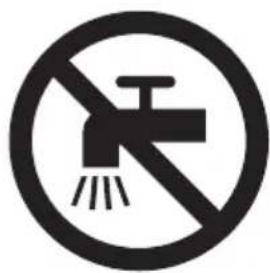
natural_image
Prohibition sign showing a faucet without a shower, enclosed in a circle (no text or symbols)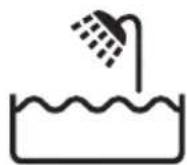
text_image
Diagram illustrating battery charging and power connection with labeled symbols for battery, power, and switchPiles faibles
natural_image
Diagram of a curved structure with layered lines and a central star-like shape, no text or symbols present.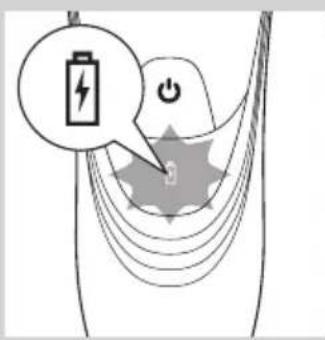
text_image
Diagram illustrating battery charging with a lightning bolt icon and power button, showing charging path and charge distribution.Charge rapide (AT941, AT940, AT918, AT 897, AT896, AT894, AT891, AT890, AT889, AT887, AT886, AT811 uniquement)
natural_image
Diagram of a medical or electrical device with a power button and star-shaped components (no text or symbols)text_image
Diagram illustrating battery charging and power connection with labeled icons and arrowsCharge
natural_image
Diagram of a stylized human head with a power button and star-shaped elements, no text or symbols present.text_image
Diagram showing a battery icon with lightning bolt and power button, illustrating charging or discharging process.natural_image
Diagram of a curved mechanical or electrical component with a power button and a circular component, no text or symbols present.text_image
Hosq.net Hosq.netnatural_image
Line drawing of a person applying facial massage or pressure to the ear (no text or symbols)natural_image
Line drawing of a person applying facial massage to the ear (no text or symbols)natural_image
Illustration of a person using a tool to interact with a device, showing motion and assembly (no text or symbols)natural_image
Illustration of a person using a handheld device to clean another's teeth (no text or symbols present)natural_image
Diagram of a hairdryer with directional arrows indicating movement or force (no text or symbols)natural_image
Illustration of a hand holding a tool with arrows indicating motion or force (no text or symbols)natural_image
Diagram of a hand using a tool to adjust or install a device component, with arrows indicating the process (no text or symbols present)5 Remettez la tondeuse en place (clic).
natural_image
Illustration of a hand holding a mechanical component with arrows indicating movement (no text or symbols)natural_image
Diagram of a medical procedure showing fluid flow through a tube into a device (no text or labels)natural_image
Illustration of a mechanical device emitting fluid from a nozzle (no text or symbols)natural_image
Illustration of a hand holding a mechanical component with arrows indicating direction (no text or symbols)text_image
Diagram showing mechanical assembly with labeled parts A and B, indicating a rotating mechanism or motion path.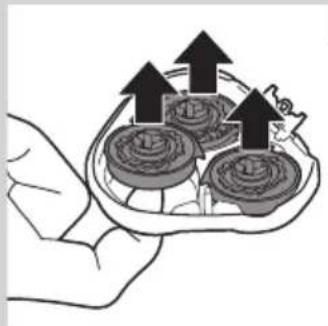
natural_image
Illustration of a hand holding a tray with three small food items, each with an upward arrow indicating growth (no text or symbols present)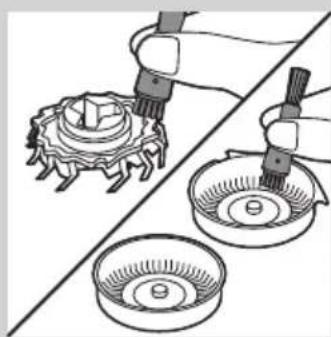
natural_image
Illustration of two hands using pipette to apply a mechanical component to a circular base (no text or symbols present)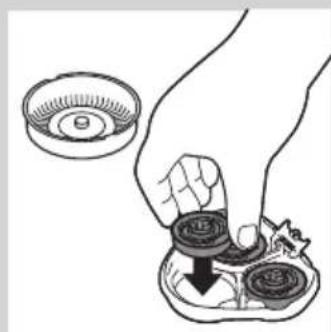
natural_image
Illustration of a hand holding a small mechanical component with a magnified inset showing a circular component (no text or symbols)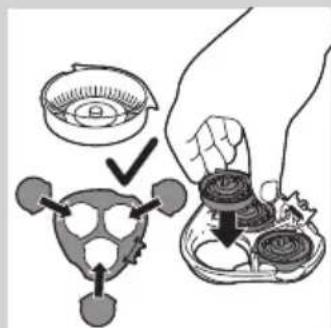
text_image
Diagram illustrating a hand holding a container with a magnified view of the lid, showing steps to process a device or component.natural_image
Diagram showing two views of a medical device with internal components and arrows indicating movement (no text or labels)natural_image
Diagram of a hairdryer with a brush and lever mechanism (no text or symbols)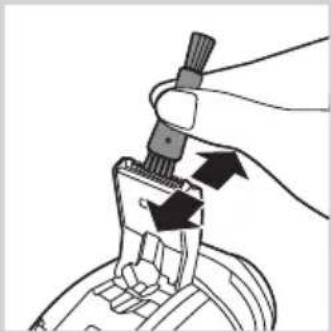
natural_image
Illustration of a hand holding a tool with arrows indicating motion or force (no text or symbols)natural_image
Diagram of a hand turning a three-pin electric shaver (no text or symbols)natural_image
Diagram of a hairbrush with a magnified inset showing internal teeth and a circular icon with arrows (no text or symbols)natural_image
Illustration of a hand holding a mechanical component with arrows indicating movement (no text or symbols)text_image
Diagram showing mechanical assembly with labeled parts A and B, indicating a rotating mechanism or motion path.natural_image
Illustration of a food item being cut off by a hand, with no visible text or symbolsnatural_image
Diagram showing two mechanical components with arrows indicating motion, no text or symbols presentnatural_image
Symbol of a trash bin with crossed lines indicating no waste or discharge, and a solid black rectangle below (no text or labels)natural_image
Symbol of a trash bin crossed with two crossed lines, representing no waste or discharge (no text or labels)natural_image
Prohibition sign showing a faucet without raindrops, enclosed in a circle (no text)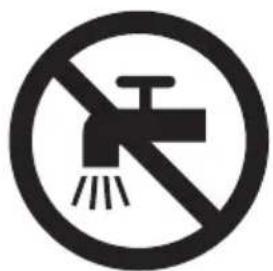
natural_image
Prohibition sign showing a faucet without a shower, enclosed in a circle (no text or symbols)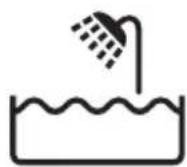
text_image
Diagram illustrating battery charging with a lightning bolt icon and power button, showing charging mechanism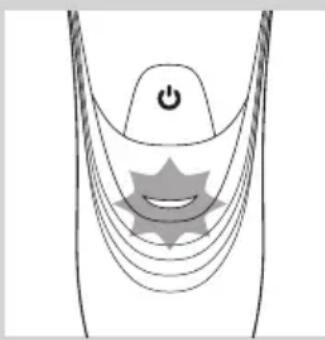
natural_image
Diagram of a stylized human head with a power button and star-shaped symbol (no text or labels)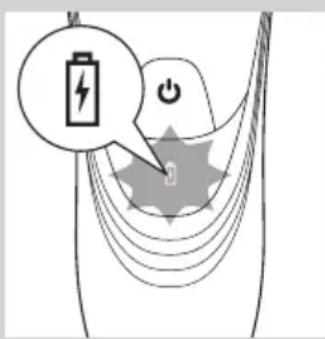
text_image
Diagram illustrating battery charging with a lightning bolt icon and power button, showing charging signal paths and power source.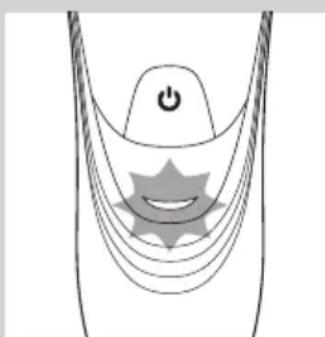
natural_image
Diagram of a stylized smiley face with curved lines and a power button, no text or symbols presentBatteria scarica
text_image
Diagram illustrating battery charging and power connection with labeled icons and a star-shaped symbolnatural_image
Diagram of a stylized human head with curved lines and a star-shaped symbol, no text or labels present- AT899, AT896, AT872, AT799, AT797, AT796, AT790, AT770, AT756, AT753, AT751, AT750:
text_image
Diagram showing a battery icon with a lightning bolt and power button, illustrating charging or discharging process.natural_image
Diagram of a medical or electronic device with a power button and curved lines, no text or symbols present.natural_image
Close-up of a medical or electronic device with a downward arrow and label 'Heliert' (no readable text beyond labels)natural_image
Line drawing of a person applying facial massage to the ear (no text or symbols)1 Bagnate la pelle.
natural_image
Line drawing of a person applying a sponge to their face (no text or symbols)natural_image
Illustration of a person using a handheld device to interact with a device, showing mechanical components and wiring (no text or symbols)natural_image
Illustration of a person using a handheld device to observe teeth (no text or symbols present)natural_image
Diagram of a hairdryer with a brush and lever mechanism (no text or symbols)natural_image
Illustration of a hand using a tool to adjust or install a component, with arrows indicating motion (no text or symbols present)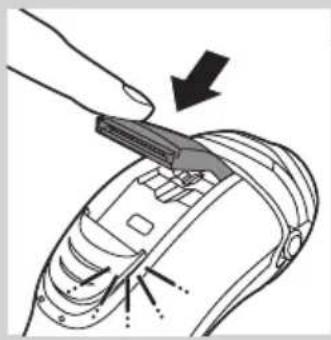
natural_image
Diagram of a hand using a tool to adjust or install a device component, with arrows indicating the process (no text or symbols present)natural_image
Illustration of a hand holding a mechanical component with arrows indicating movement (no text or symbols)natural_image
Diagram of a medical procedure showing fluid flow through a device into a cross-sectional view (no text or labels)natural_image
Illustration of a mechanical device emitting white ribbons into a textured surface (no text or symbols)natural_image
Illustration of a hand holding a mechanical component with arrows indicating movement (no text or symbols)natural_image
Diagram of a mechanical component with an arrow indicating direction, showing internal structure (no text or symbols)text_image
Diagram showing mechanical assembly with labeled parts A and B, likely illustrating a gear or mechanism mechanism.natural_image
Illustration of a hand holding a bowl with three food items and upward arrows indicating growth (no text or symbols)natural_image
Illustration of a mechanical assembly with two parts: one showing a tool interacting with a gear-like component, the other showing a bowl with a nut (no text or symbols)natural_image
Illustration of a hand holding three circular objects with a downward arrow, next to a small bowl (no text or symbols)text_image
Diagram illustrating a hand holding a bowl with a magnified view of the turtle, showing step-by-step instructions for cleaning or repair.natural_image
Diagram showing two views of a mechanical component with arrows indicating direction (no text or symbols)natural_image
Diagram of a hairdryer with a brush and lever mechanism (no text or symbols)natural_image
Hand holding a tool with arrows indicating motion or force (no text or symbols)natural_image
Diagram of a hand turning a three-pin electric shaver (no text or symbols)natural_image
Illustration of a hairbrush with a magnified inset showing internal structure (no text or symbols)natural_image
Illustration of a hand holding a mechanical component with arrows indicating direction (no text or symbols)text_image
Diagram showing mechanical assembly with labeled parts A and B, indicating a gear or component mechanism.natural_image
Symbol of a trash bin with crossed lines indicating no waste or restriction, and a solid black rectangle below (no text or labels)natural_image
Prohibition sign showing a faucet crossed out by a diagonal line, indicating no fire or water discharge (no text present)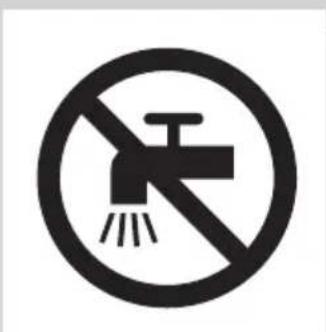
natural_image
Prohibition sign showing a faucet crossed out by a diagonal line, indicating no pollution or barrier (no text present)text_image
Diagram illustrating battery charging with a lightning bolt icon and power button, showing charging path and charge distribution.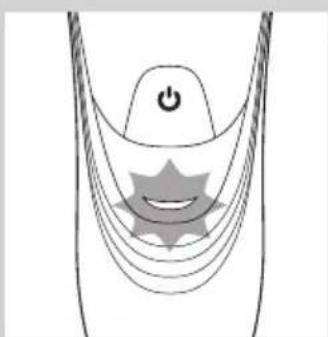
natural_image
Diagram of a medical or electrical device with curved lines and a central star-like symbol, no text or labels present.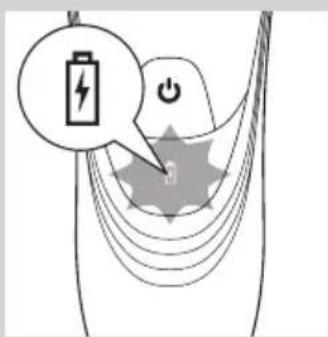
text_image
Diagram illustrating battery charging with a lightning bolt icon and power button, showing charging path and signal waveformAccu bijna leeg
natural_image
Diagram of a medical or electrical device with curved lines and a central star-like symbol, no text or labels present.text_image
Diagram illustrating battery charging with a lightning bolt icon and power button, showing charging path and charging symbolOpladen
natural_image
Diagram of a medical or electrical device with a power button and star-shaped component (no text or symbols)- AT899, AT896, AT872, AT799, AT797, AT796, AT790, AT770, AT756, AT753, AT751, AT750:
text_image
Diagram showing a battery icon with lightning bolt and power button, connected to a circular component labeled '0'Accu vol
natural_image
Diagram of a curved mechanical or electrical component with a power button and a circular component, no text or symbols present.- AT899, AT896, AT918, AT896, AT894, AT891, AT890, AT889, AT887, AT886, AT872, AT811, AT799, AT797, AT796, AT790, AT770, AT756, AT753, AT751, AT750: wanneer de accu volledig is opgeladen, blijft het oplaadlampje groen branden.
natural_image
Close-up of a handheld electronic device with a black arrow pointing to a circular base (no visible text or symbols)natural_image
Line drawing of a person applying facial contour or pressure application to the neck area (no text or symbols)natural_image
Line drawing of a person applying face-to-face massage waves (no text or symbols)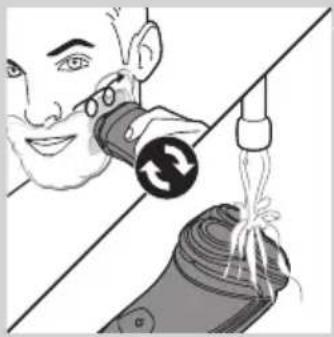
natural_image
Illustration of a person using a tool to lift a cylindrical object, with no visible text or symbolsnatural_image
Illustration of a person using a handheld device to observe teeth, separated by a diagonal line (no text or symbols)natural_image
Diagram of a hairdryer with arrows indicating movement or force (no text or symbols)natural_image
Hand holding a tool interacting with a mechanical component (no text or symbols visible)natural_image
Diagram of a hand using a tool to adjust or install a component, with arrows indicating the process (no text or symbols present)5 Klap de trimmer in ('klik').
natural_image
Illustration of a mechanical assembly with gears and components, showing a hand holding a tool (no text or symbols)natural_image
Diagram of a medical procedure showing fluid flow through a device into a cross-sectional view (no text or labels)- Spoel de haarkamer en de binnenkant van de scheerunit schoon.
natural_image
Illustration of a medical procedure showing fluid flow from a bottle onto a patient's foot (no text or symbols)natural_image
Illustration of a hand holding a mechanical component with arrows indicating direction (no text or symbols)natural_image
Diagram of a mechanical component with an arrow indicating direction, showing internal parts (no text or symbols)text_image
Diagram showing mechanical assembly with labeled parts A and B, indicating a rotating mechanism or motion sequence.natural_image
Illustration of a hand holding a tray with three circular objects and upward arrows, no text or symbols present.natural_image
Illustration of a mechanical assembly with two parts: one showing a gear-like component being inserted, the other showing a bowl with a nut (no text or symbols)natural_image
Illustration of a hand holding a small bowl with a downward arrow, next to a circular inset showing a magnified view (no text or symbols)text_image
Diagram illustrating a food preparation step with labeled steps and arrows indicating inspection or processing.natural_image
Diagram showing two views of a mechanical component with arrows indicating direction (no text or symbols)natural_image
Diagram of a hairdryer with a brush and lever mechanism (no text or symbols)natural_image
Illustration of a hand holding a tool with arrows indicating motion or force (no text or symbols)natural_image
Diagram of a hand holding a three-pin electric shaver with a top handle (no text or symbols)natural_image
Illustration of a hairbrush with a magnified inset showing facial changes (no text or symbols)Vervangingsherinnering
natural_image
Diagram of a mechanical assembly with arrows indicating direction (no text or symbols)text_image
Diagram showing mechanical assembly with labeled parts A and B, indicating a turning or rotation process.natural_image
Illustration showing a hand holding a tray of food items, with a checkmark and a gear-like object nearby (no text or symbols)natural_image
Diagram showing two mechanical components with arrows indicating motion or assembly, no visible text or symbolsnatural_image
Symbol of a trash bin crossed with no text or numbers, representing waste sorting or disposal (no text present)natural_image
Symbol of a trash bin crossed with a diagonal line, representing no waste or discharge (no text or numbers present)natural_image
Prohibition sign showing a faucet crossed out by a diagonal line, indicating no leakage or disinfection (no text present)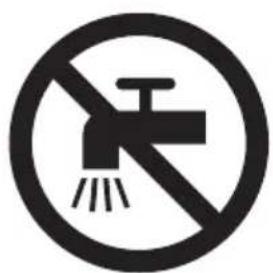
natural_image
Prohibition sign showing a faucet without a shower, enclosed in a circle (no text or symbols)- Kontroller alltid apparatet og tilbehøret før du bruker det. Ikke bruk apparatet eller tilbehøret hvis det er skadet. Det kan føre til personskade. Bytt alltid ut en ødelagt del med tilsvarende originaldel.
Forsiktig
text_image
Diagram illustrating battery charging with a lightning bolt icon and power button, showing charging process flow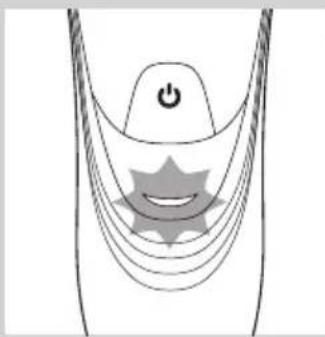
natural_image
Diagram of a medical or electrical device with a power button and star-shaped components (no text or symbols)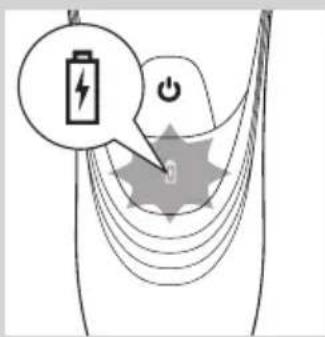
text_image
Diagram illustrating battery charging with a lightning bolt icon and power button, showing charging signal paths.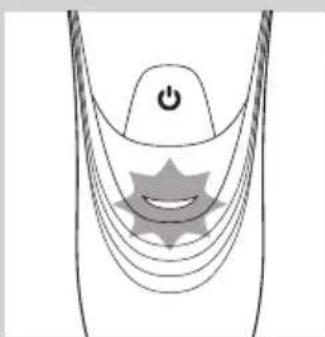
natural_image
Diagram of a stylized human head with a power button and star-shaped graphic overlay (no text or symbols)Lav batterikapasitet
text_image
Diagram illustrating battery charging with a lightning bolt icon and power button, showing charging mechanismLading
- AT941/AT940/AT897: Når barbermaskinen lader, blinker det hvite batterisymbolet.
natural_image
Diagram of a medical or electrical device with curved lines and a central power button, no text or symbols present.- AT899, AT896, AT872, AT799, AT797, AT796, AT790, AT770, AT756, AT753, AT751, AT750: Når barbermaskinen lades, blinker ladelampen grønt.
text_image
Diagram showing a battery icon with lightning bolt and power button, illustrating charging or discharging process.Fulladet batteri
- AT941/AT940/AT897: Når batteriet er fulladet, lyser det hvite batterisymbolet kontinuerlig.
natural_image
Diagram of a curved mechanical component with a power button and a circular feature, no text or symbols present.- AT899, AT896, AT918, AT896, AT894, AT891, AT890, AT889, AT887, AT886, AT872, AT811, AT799, AT797, AT796, AT790, AT770, AT756, AT753, AT751, AT750: Når batteriet er fulladet, lyser ladelampen kontinuerlig grønt.
natural_image
Close-up of a medical or electronic device with a downward arrow pointing to a circular component labeled 'NOSA' (no text or symbols on the device itself)3 Sett barbermaskinen i ladestativet.
Ladelampen viser ladestatusen til barbermaskinen (se avsnittet Ladeindikasjoner i dette kapittelet).
Bruke barbermaskinen
natural_image
Line drawing of a person applying facial massage or pressure to the ear (no text or symbols)natural_image
Line drawing of a person applying a sponge to their ear (no text or symbols)2 Smør huden med barberskum eller barbergel.
natural_image
Illustration of a person using a handheld device to lift a rolled-up cable or cable, with no visible text or symbols.natural_image
Illustration of a person using a handheld device to clean another (no text or symbols present)natural_image
Diagram of a hairdryer with directional arrows indicating movement or operation (no text or symbols present)natural_image
Illustration of a hand using a tool to adjust or install a mechanical component (no text or symbols visible)natural_image
Diagram of a hand using a tool to adjust or install electronic components, with arrows indicating action (no text or symbols present)5 Lukk trimmeren med et klikk.
natural_image
Illustration of a hand holding a mechanical component with arrows indicating movement or force (no text or symbols present)natural_image
Diagram of a medical procedure showing fluid flow through a tube into a cross-sectional view (no text or labels)natural_image
Illustration of a mechanical device emitting white ribbons into a textured surface (no text or symbols)natural_image
Illustration of a hand holding a mechanical component with arrows indicating direction (no text or symbols)natural_image
Diagram of a mechanical component with an arrow indicating upward motion (no text or symbols present)text_image
Diagram showing mechanical assembly with labeled parts A and B, indicating a rotating mechanism or motion sequence.natural_image
Illustration of a hand holding a bowl with three round food items and upward arrows indicating growth (no text or symbols)natural_image
Illustration of two hands using pipette to process a mechanical component on a cutting board (no text or symbols)natural_image
Illustration of a hand holding a small bowl with a downward arrow, next to a circular object (no text or symbols)text_image
Diagram illustrating a hand holding a bowl with a turtle, showing step-by-step instructions for cleaning or repair.natural_image
Diagram showing two views of a mechanical component with internal structures and directional arrows (no text or symbols)natural_image
Diagram of a hairdryer with directional arrows indicating movement (no text or symbols)natural_image
Illustration of a hand holding a tool with arrows indicating motion or force (no text or symbols)natural_image
Diagram of a hand turning a leaf into a three-pin shaver (no text or symbols)natural_image
Illustration of a hairbrush with a circular button and directional arrow (no text or symbols)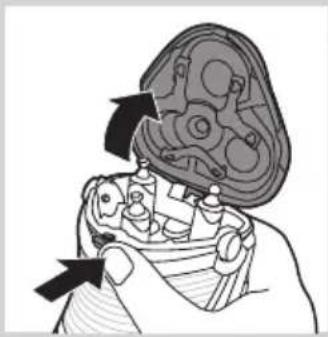
natural_image
Illustration of a hand holding a mechanical component with arrows indicating direction (no text or symbols)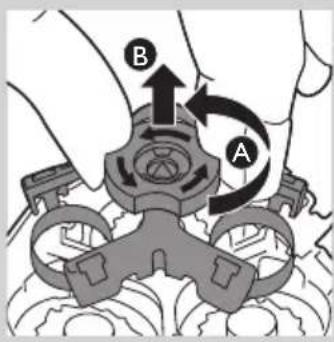
text_image
Diagram showing mechanical assembly with labeled parts A and B, indicating a turning or disassembly process.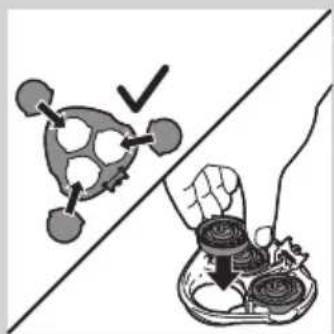
natural_image
Illustration showing a hand holding a bowl of food next to a stylized robot-like object, with no visible text or symbols.natural_image
Diagram showing two mechanical components with arrows indicating motion, no text or symbols presentnatural_image
Prohibition sign showing a faucet without a shower, enclosed in a circle (no text or symbols)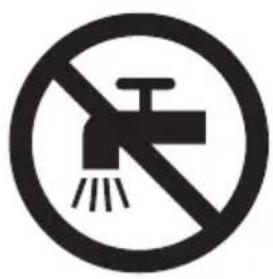
natural_image
Prohibition sign showing a faucet without a shower, enclosed in a circle (no text or symbols)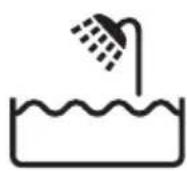
text_image
Diagram illustrating battery charging with a lightning bolt icon and power button, showing charging process flowBateria fraca
text_image
Diagram illustrating battery charging and power distribution with labeled icons for power, charge, and dischargenatural_image
Diagram of a medical or electrical device with curved lines and a central star-like symbol, no text or labels present.text_image
Diagram illustrating battery charging with a lightning bolt icon and power button, showing charging path and charging symbolCarregamento
natural_image
Diagram of a stylized smiley face with curved lines and a power button, no text or symbols present- AT899, AT896, AT872, AT799, AT797, AT796, AT790, AT770, AT756, AT753, AT751, AT750:
text_image
Diagram showing a battery icon with lightning bolt and power button, connected to a circular component labeled '0'natural_image
Diagram of a curved mechanical or electrical component with a power button and a circular component, no text or symbols present.- AT899, AT896, AT918, AT896, AT894, AT891, AT890, AT889, AT887, AT886, AT872, AT811, AT799, AT797, AT796, AT790, AT770, AT756, AT753, AT751, AT750: Quando a bateria estiver completamente carregada, a luz de carga permanece continuamente acesa a verde.
natural_image
Close-up of a handheld device with a black arrow pointing to a circular base labeled 'FHLA2' (no text or symbols on the device itself)natural_image
Line drawing of a person applying facial massage or pressure to the ear (no text or symbols)natural_image
Line drawing of a person applying face-to-face care to their ear (no text or symbols)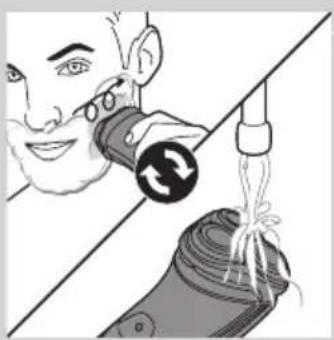
natural_image
Illustration of a person using a medical device to interact with a device, showing a circular button and rope (no text or symbols)natural_image
Illustration of a person using a handheld device to clean teeth, separated by a diagonal line (no text or symbols)natural_image
Diagram of a hairdryer with black arrows indicating movement or force (no text or symbols)natural_image
Illustration of a hand using a tool to adjust or install a mechanical component (no text or symbols visible)natural_image
Diagram of a hand using a tool to adjust or install a component, with arrows indicating direction (no text or symbols present)natural_image
Illustration of a hand holding a mechanical component with arrows indicating movement (no text or symbols)natural_image
Diagram of a medical procedure showing fluid flow through a tube into a cross-sectional view (no text or labels)natural_image
Illustration of a medical procedure showing fluid flow from a bottle into a patient's foot (no text or symbols)natural_image
Diagram of a mechanical assembly with arrows indicating direction (no text or symbols)natural_image
Diagram of a mechanical component with an arrow indicating upward motion, no text or symbols presenttext_image
Diagram showing mechanical assembly with labeled parts A and B, indicating a rotating mechanism or assembly process.natural_image
Illustration of a hand holding a tray with three circular objects and upward arrows, no text or symbols present.natural_image
Illustration of three mechanical components: a gear, a bowl with a screw, and a tool applying material (no text or symbols)natural_image
Illustration of a hand holding a small bowl with coins, and a magnified inset showing the lid (no text or symbols)text_image
Diagram illustrating a mechanical or electrical component being handled, with labeled parts and directional arrows indicating assembly or inspection.natural_image
Diagram showing two mechanical components with arrows indicating motion, no text or symbols presentnatural_image
Diagram of a hairdryer with black arrows indicating direction (no text or symbols)natural_image
Illustration of a hand holding a tool with arrows indicating motion or force (no text or symbols)natural_image
Diagram of a hand turning a three-pin shaver into a circular socket (no text or symbols)natural_image
Illustration of a hairbrush with a circular icon highlighting the brush tip (no text or symbols present)natural_image
Illustration of a hand holding a mechanical component with arrows indicating movement (no text or symbols)1 O símbolo da cabeça de corte permanece continuamente aceso a cor de laranja.
text_image
Diagram showing mechanical assembly with labeled parts A and B, indicating a turning or rotation process.natural_image
Illustration of a hand holding a tray with food items, separated by a diagonal line (no text or symbols)natural_image
Diagram showing two mechanical components with arrows indicating motion, no text or symbols presentEncomendar acessórios
natural_image
Symbol of a trash bin with crossed-out lanes and a blank rectangular base (no text or labels)natural_image
Prohibition sign showing a faucet without a shower, enclosed in a circle (no text or symbols)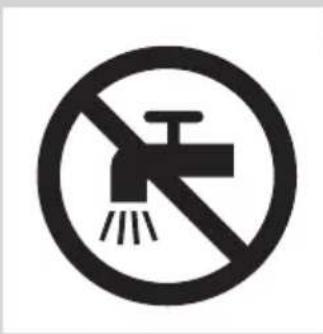
natural_image
No smoking sign with faucet symbol (no text or numbers)text_image
Diagram illustrating battery charging with a lightning bolt icon and power button, showing charging process flow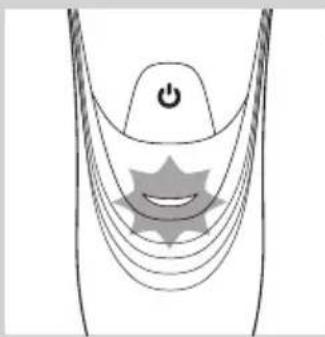
natural_image
Diagram of a medical or electrical device with a power button and star-shaped components (no text or symbols)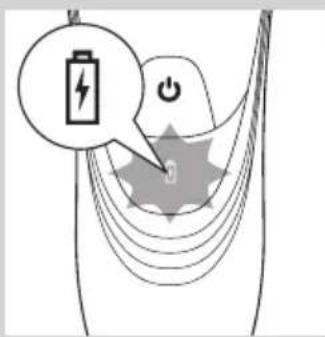
text_image
Diagram illustrating battery charging with a lightning bolt icon and power button, showing charging signal paths and power source.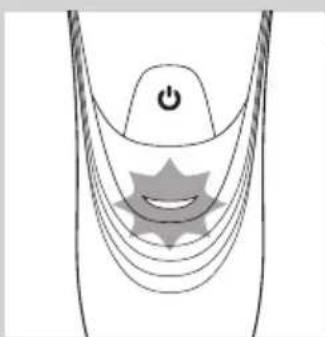
natural_image
Diagram of a stylized human head with curved lines and a star-shaped symbol, no text or labels presentLåg batterinivå
text_image
Diagram illustrating battery charging with a lightning bolt icon and power button, showing charging mechanismLaddning
- AT941/AT940/AT897: När rakapparaten laddas blinkar den vita batterisymbolen.
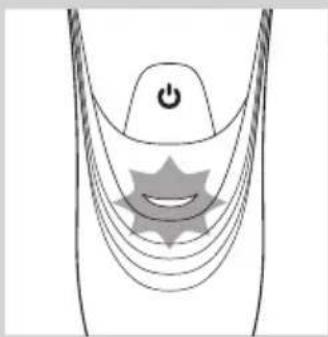
natural_image
Diagram of a medical or electrical device with curved lines and a central power button, no text or symbols present.- AT899,AT896,AT872,AT799,AT797,AT796,AT790,AT770,AT756,AT753,AT751,AT750:::
text_image
Diagram showing a battery icon with lightning bolt and power button, illustrating charging or discharging process.Batteriet fulladdat
natural_image
Diagram of a curved mechanical component with a power button and a circular feature, no text or symbols present.- AT899, AT896, AT918, AT896, AT894, AT891, AT890, AT889, AT887, AT886, AT872, AT811, AT799, AT797, AT796, AT790, AT770, AT756, AT753, AT751, AT750: När batteriet är helt laddat lyser laddningslampan med fast, grönt sken.
natural_image
Close-up of a medical or electronic device with a black arrow pointing to a circular base (no visible text or symbols)natural_image
Line drawing of a person applying facial contour or pressure application to the neck area (no text or symbols)natural_image
Line drawing of a person applying product to their ear (no text or symbols)natural_image
Illustration of a person using a handheld device to lift a rolled-up cable or cable, with no visible text or symbols.natural_image
Illustration of a person using a handheld device to clean teeth (no text or symbols present)natural_image
Diagram of a hairdryer with black arrows indicating direction (no text or symbols)natural_image
Illustration of a hand using a tool to adjust or install a component, with arrows indicating motion (no text or symbols present)natural_image
Diagram of a hand using a tool to adjust or install electronic components, with arrows indicating action (no text or symbols present)natural_image
Illustration of a hand holding a mechanical component with arrows indicating direction (no text or symbols)natural_image
Diagram of a medical procedure showing fluid flow from a pipette into a device (no text or labels)natural_image
Illustration of a mechanical device pouring liquid into a container (no text or symbols)natural_image
Diagram of a hand holding a mechanical component with arrows indicating movement or force (no text or symbols present)natural_image
Diagram of a mechanical component with an arrow indicating direction, showing internal parts and a top view (no text or symbols)text_image
Diagram showing hand positioning of a mechanical component with labeled parts A and B, indicating rotational or movement.natural_image
Illustration of a hand holding a tray with coins and upward arrows, no text or symbols presentnatural_image
Illustration of two hands using pipette to process a mechanical component on a cutting board (no text or symbols)natural_image
Illustration of a hand holding a small bowl with a downward arrow, next to a circular object (no text or symbols)text_image
Diagram illustrating a food preparation step with labeled steps and a hand holding a bowl containing food items.natural_image
Diagram showing two views of a mechanical component with internal structures and directional arrows (no text or labels)natural_image
Diagram of a hairdryer with directional arrows indicating movement or force (no text or symbols)natural_image
Illustration of a hand holding a tool with arrows indicating motion or force (no text or symbols)natural_image
Diagram of a hand turning a three-pin electric shaver with a top handle (no text or symbols)natural_image
Illustration of a hand holding a three-pin electric shaver with a circular arrow indicating rotation (no text or symbols)natural_image
Illustration of a hand holding a mechanical component with arrows indicating movement (no text or symbols)text_image
Diagram showing mechanical assembly with labeled parts A and B, likely illustrating a gear or valve mechanism.natural_image
Illustration showing a food item being cut off by a hand, with no visible text or symbols.natural_image
Diagram showing two mechanical components with arrows indicating motion, no text or symbols present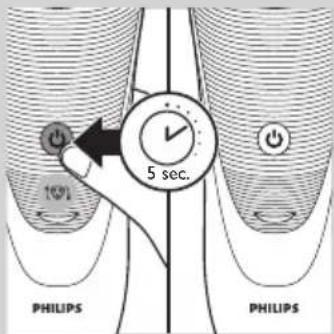
text_image
10% 5 sec. PHILIPS PHILIPSnatural_image
Symbol of a waste bin with crossed lines indicating no waste, and a solid black rectangle below (no text or labels)natural_image
Prohibition sign showing a faucet crossed out by a diagonal line, indicating no leakage or disinfection (no text present)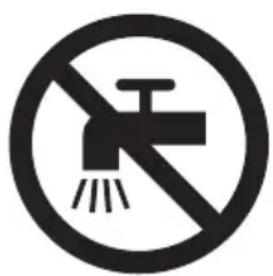
natural_image
No sign depicting a faucet crossed out by a diagonal line, indicating no pollution or water release.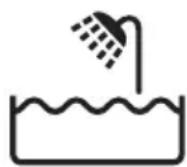
text_image
Diagram illustrating battery charging with a lightning bolt icon and power button, showing charging process flow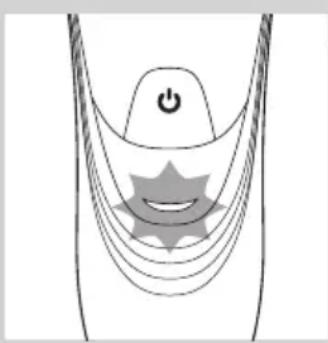
natural_image
Diagram of a stylized smiley face with curved lines and a power button, no text or symbols present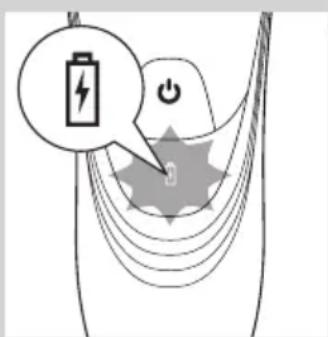
text_image
Diagram illustrating battery charging with a lightning bolt icon and power button, showing charging process flow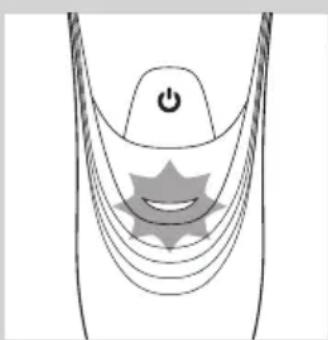
natural_image
Diagram of a stylized smiley face with curved lines and a power button, no text or symbols presentDüşük pil
text_image
Diagram illustrating battery charging with a lightning bolt icon and power button, showing charging mechanismŞarj etme
natural_image
Diagram of a medical or electrical device with curved lines and a central power button, no text or symbols present- AT899, AT896, AT872, AT799, AT797, AT796, AT790, AT770, AT756, AT753, AT751, AT750:
text_image
Diagram showing a battery icon with lightning bolt and power button, illustrating charging or discharging process.natural_image
Diagram of a curved mechanical component with a power button and a circular feature, no text or symbols present- AT899, AT896, AT918, AT896, AT894, AT891, AT890, AT889, AT887, AT886, AT872, AT811, AT799, AT797, AT796, AT790, AT770, AT756, AT753, AT751, AT750: Pil tamamen şarj olduğunda şarj ışığı sürekli yeşil renkte yanar.
natural_image
Close-up of a handheld device with a black arrow pointing to a circular base labeled 'NOLAT' (no text or symbols on the device itself)natural_image
Line drawing of a person applying facial massage to the ear (no text or symbols)natural_image
Line drawing of a person applying face-to-face care to their ear (no text or symbols)natural_image
Illustration of a person using a handheld device to lift a rolled-up cable or cable, with no visible text or symbols.natural_image
Illustration of a person using a handheld device to clean another (no text or symbols present)natural_image
Diagram of a hairdryer with directional arrows indicating movement or operation (no text or symbols present)natural_image
Illustration of a hand using a tool to adjust or install a mechanical component (no text or symbols visible)natural_image
Diagram of a hand using a tool to adjust or install a device component, with arrows indicating the process (no text or symbols present)natural_image
Illustration of a hand holding a mechanical component with arrows indicating movement or force (no text or symbols present)natural_image
Diagram of a medical procedure showing fluid flow from a pipette into a device (no text or labels)natural_image
Illustration of a medical procedure showing a tool injecting liquid into a patient's foot (no text or symbols present)natural_image
Diagram of a mechanical assembly with arrows indicating direction (no text or symbols present)1 Cihazı kapatın.
natural_image
Diagram of a mechanical component with an arrow indicating direction, showing internal structure (no text or symbols)text_image
Diagram showing mechanical assembly with labeled parts A and B, indicating a rotating mechanism or motion path.natural_image
Illustration of a hand holding a tray with three circular objects and upward arrows, no text or symbols present.natural_image
Illustration of two hands using pipette to process a mechanical component on a cutting board (no text or symbols)natural_image
Illustration of a hand holding a small bowl with a downward arrow, next to a circular object (no text or symbols)text_image
Diagram illustrating a food preparation step with labeled steps and a hand holding a bowl containing food items.natural_image
Diagram showing two views of a mechanical component with arrows indicating direction (no text or symbols)natural_image
Diagram of a hairdryer with directional arrows indicating movement (no text or symbols)natural_image
Illustration of a hand holding a tool with arrows indicating motion or force (no text or symbols)natural_image
Diagram of a hand turning a three-pin electric shaver (no text or symbols)natural_image
Diagram of a plush or electric shaver with a circular button and directional arrow, no text or symbols presentnatural_image
Illustration of a hand holding a mechanical component with arrows indicating direction (no text or symbols)natural_image
Illustration showing a food item being cut off by a hand using a bowl (no text or symbols present)natural_image
Diagram showing two mechanical components with arrows indicating motion, no text or symbols present