
7000 series S7550 - Razor PHILIPS - Free user manual and instructions
Find the device manual for free 7000 series S7550 PHILIPS in PDF.


| Product Type | Electric Shaver |
| Brand | Philips |
| Model | 7000 series S7550 |
| Dimensions (H x W x D) | 17.0 x 5.5 x 5.5 cm |
| Weight | 200 g |
| Power Source | Rechargeable Lithium-ion battery |
| Charging Time | 1 hour for full charge |
| Shaving Time | 50 minutes (cordless) |
| Blade System | MultiPrecision blade system for a close shave |
| Trimmer | Pop-up trimmer for sideburns and mustache |
| Wet & Dry Use | Yes, with or without shaving foam or gel |
| Display | LED display with battery and cleaning indicator |
| Cleaning System | Compatible with SmartClean Plus (optional) |
| Accessories Included | Protective cap, charging stand, cleaning brush |
| Water Resistance | Fully washable under the tap |
| Voltage | 100-240 V (auto voltage) |
| Travel Lock | Yes, prevent accidental activation |
| Release Switch | Yes, on the back for cleaning |
| Motor | Speed-controlled rotary motor |
| Skin Protection | Comfort rings with SensoTouch technology |
Frequently Asked Questions - 7000 series S7550 PHILIPS
User questions about 7000 series S7550 PHILIPS
0 question about this device. Answer the ones you know or ask your own.
Ask a new question about this device
Download the instructions for your Razor in PDF format for free! Find your manual 7000 series S7550 - PHILIPS and take your electronic device back in hand. On this page are published all the documents necessary for the use of your device. 7000 series S7550 by PHILIPS.
USER MANUAL 7000 series S7550 PHILIPS
Always here to help you
Register your product and get support at www.philips.com/welcome
series S7000


natural_image
Black-and-white photo of a Philips Series 7000 electric shaver with three rotary buttons and power button (no visible text or symbols on body)
ENGLISH 4
INDONESIA 36
한국어 69
BAHASA MELAYU 100
ภาษาไทย 133
TIÊNG VIÊT 161
繁體中文 193
简体中文 221

276

303
Introduction
Congratulations on your purchase and welcome to Philips! To fully benefit from the support that Philips offers, register your product at www.philips.com/welcome.
General description (Fig. 1)
1 Protection cap for cleansing brush attachment (specific types only)
2 Click-on cleansing brush attachment (specific types only)
3 Comb for beard styler attachment (specific types only)
4 Click-on beard stylister attachment (specific types only)
5 Click-on trimmer attachment (specific types only)
6 Click-on shaving unit
7 Handle
8 Socket for small plug
9 Battery charge indicator 1 light
10 Battery charge indicator 3 lights
11 'Unplug for use' symbol
12 Travel lock symbol
13 Replacement reminder
14 Cleaning reminder
15 Cleaning cartridge for SmartClean system
16 SmartClean system (specific types only)
17 Cap of SmartClean system
18 On/off button
19 Battery symbol
20 Ready symbol
21 Replacement symbol
22 Cleaning symbol
23 Adapter
24 Small plug
25 Pouch
Note: The accessories supplied may vary for different products. The box shows the accessories that have been supplied with your appliance.
Important safety information
Read this important information carefully before you use the appliance and its accessories and save it for future reference. The accessories supplied may vary for different products.
Danger
- Keep the adapter dry.
Warning
- The adapter contains a transformer. Do not cut off the adapter to replace it with another plug, as this causes a hazardous situation.
- This appliance is not intended for use by persons (including children) with reduced physical, sensory or mental capabilities, or lack of experience and knowledge, unless they have been given supervision or instruction concerning use of the appliance by a person responsible for their safety.
- Children should be supervised to ensure that they do not play with the appliance.
- Always unplug the shaver before you clean it under the tap.
- Always check the appliance before you use it. Do not use the appliance if it is damaged, as this may cause injury. Always replace a damaged part with one of the original type.

natural_image
Prohibition sign showing a faucet with a diagonal line and raindrops, enclosed in a circle (no text)
natural_image
Prohibition sign of a faucet with no text or symbolsCaution
- Never immerse the cleaning system or the charging stand in water and do not rinse it under the tap.
- Never use water hotter than 80^ C to rinse the shaver.
- Only use this appliance for its intended purpose as shown in the user manual.
- For hygienic reasons, the appliance should only be used by one person.
- Never use compressed air, scouring pads, abrasive cleaning agents or aggressive liquids such as petrol or acetone to clean the appliance.
- If your shaver comes with a cleaning system, always use the original Philips cleaning fluid (cartridge or bottle, depending on the type of cleaning system).
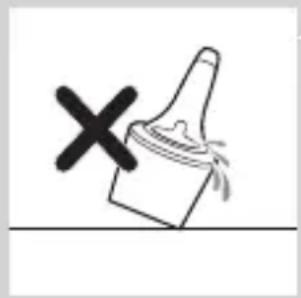
- Always place the cleaning system on a stable, level and horizontal surface to prevent leakage.
- If your cleaning system uses a cleaning cartridge, always make sure that the cartridge compartment is closed before you use the cleaning system to clean or charge the shaver.
- When the cleaning system is ready for use, do not move it to prevent leakage of cleaning fluid.
- Do not use the adapter in or near wall sockets that contain or have contained an electric air freshener to prevent irreparable damage to the adapter.
- Water may drip from the socket at the bottom of the shaver when you rinse it. This is normal and not dangerous because all electronics are enclosed in a sealed power unit inside the shaver.
natural_image
Simple line drawing of a showerhead spraying over a water-filled container (no text or symbols)Electromagnetic fields (EMF)
- This Philips appliance complies with all applicable standards and regulations regarding exposure to electromagnetic fields.
General
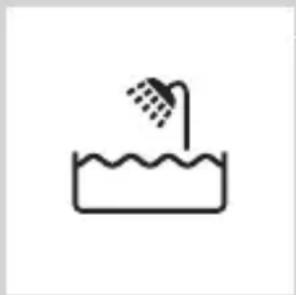
- This shaver is waterproof. It is suitable for use in the bath or shower and for cleaning under the tap. For safety reasons, the shaver can therefore only be used without cord.
- The appliance is suitable for mains voltages ranging from 100 to 240 volts.
- The adapter transforms 100-240 volts to a safe low voltage of less than 24 volts.
The display
Charging
Battery charge indicator with 3 lights
- Charging takes approx. 1 hour.
- Quick charge: When the appliance is connected to the mains, the lights of the battery charge indicator light up one after the other continuously. When the appliance contains enough energy for one shave, the bottom light of the battery charge indicator starts flashing slowly.
- If you leave the appliance connected to the mains, the charging process continues. To indicate that the appliance is charging, first the bottom light flashes and then lights up continuously. Then the second light flashes and then lights up continuously, and so on until the appliance is fully charged.

natural_image
Diagram of a medical or laboratory procedure showing a pointed tool interacting with a star-shaped object (no text or symbols present)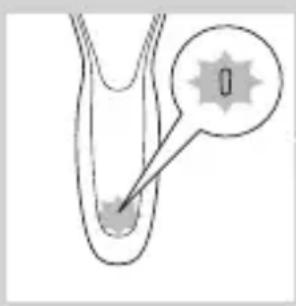
natural_image
Diagram of a biological or anatomical structure with a highlighted region and arrow, no visible text or symbolsBattery charge indicator with 1 light
- Charging takes approx. 1 hour.
- Quick charge: When the appliance does not contain enough energy for one shave, the battery charge indicator flashes fast. When the battery charge indicator starts to flash slowly, the appliance contains enough energy for one shave.
- If you leave the appliance connected to the mains, the charging process continues. To indicate that the appliance is charging, the battery charge indicator flashes slowly.
Battery fully charged
natural_image
Diagram of a biological structure with a highlighted region and arrow, no text or symbols presentNote: This appliance can only be used without a cord.
Note: When the battery is full, the display switches off automatically after 30 minutes. If you press the on/off button during charging, the ‘unplug for use’ symbol flashes white to remind you that you have to disconnect the appliance from the mains.
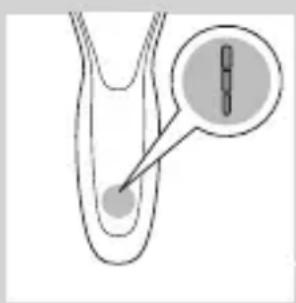
When the battery is fully charged, all lights of the battery charge indicator light up continuously.
- Battery charge indicator with 3 lights

natural_image
Diagram of a biological structure with a labeled point '0' and a directional arrow, no readable text or symbols present.- Battery charge indicator with 1 light
Battery low

natural_image
Diagram of a biological or medical structure with an arrow pointing to a star-shaped feature, no text or symbols present.When the battery is almost empty, the bottom light flashes orange.
- Battery charge indicator with 3 lights

- Battery charge indicator with 1 light
Remaining battery capacity

natural_image
Diagram of a biological structure with a magnified inset showing internal components (no text or labels)Battery charge indicator with 3 lights
- The remaining battery capacity is indicated by the lights of the battery charge indicator that light up continuously.
'Unplug for use' reminder

- The appliance is equipped with an ‘unplug for use’ reminder. The ‘unplug for use’ starts to flash to remind you that you have to disconnect the appliance from the adapter before you can switch it on.
Cleaning reminder
For optimal shaving performance, we advise you to clean the shaver after every use.
- When you switch off the shaver, the cleaning reminder flashes to remind you to clean the shaver.

Travel lock

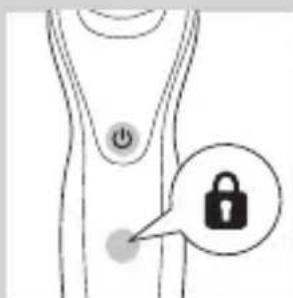
You can lock the shaver when you are going to travel. The travel lock prevents the shaver from being switched on by accident.

Activating the travel lock
1 Press the on/off button for 3 seconds to enter the travel lock mode.
- While you activate the travel lock, the travel lock symbol lights up continuously. When the travel lock is activated, the travel lock symbol flashes.
Deactivating the travel lock
1 Press the on/off button for 3 seconds.
- The travel lock symbol flashes and then lights up continuously. The shaver is now ready for use again.
Replacing shaving heads

natural_image
Diagram of a human body with a speech bubble containing three circular icons (no text or symbols)For maximum shaving performance, we advise you to replace the shaving heads every two years.
- The appliance is equipped with a replacement reminder which reminds you to replace the shaving heads. The replacement reminder lights up continuously.
Note: After replacing the shaving heads, you need to reset the replacement reminder by pressing the on/off button for 7 seconds.
Charging
Charging takes approx. 1 hour.
Note: This appliance can only be used without cord. Charge the shaver before you use it for the first time and when the display indicates that the battery is almost empty.
Charging with the adapter
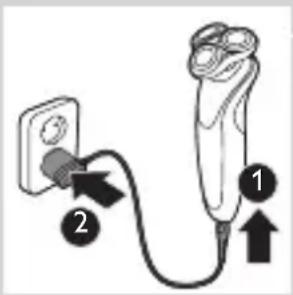
1 Insert the small plug into the appliance and put the adapter in the wall socket.
Charging in the SmartClean system (specific types only)

1 Put the small plug in the SmartClean system.
2 Put the adapter in the wall socket.
3 Press down the top cap to be able to place the shaver in the holder ('click').

natural_image
Close-up of a mechanical component with a downward arrow indicating force or direction (no text or symbols)4 Hold the shaver upside down above the holder. Make sure the front of the shaver points towards the SmartClean system.
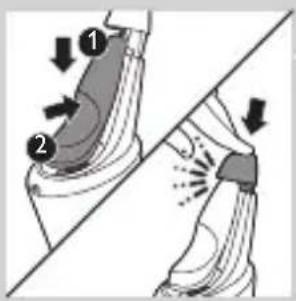
5 Place the shaver in the holder, tilt the shaver backwards and press down the top cap to connect the shaver ('click').
- The battery symbol flashes slowly to indicate the shaver is charging.
Using the shaver
Switching the appliance on and off
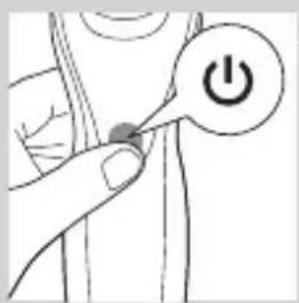
1 To switch on the appliance, press the on/off button once.
2 To switch off the appliance, press the on/off button once.
- Battery charge indicator with 3 lights: The display lights up for a few seconds to show the remaining battery status.
Shaving
Skin adaptation period
Your first shaves may not bring you the result you expect and your skin may even become slightly irritated. This is normal. Your skin and beard need time to adapt to any new shaving system.
We advise you to shave regularly (at least 3 times a week) with this shaver for a period of 3 weeks to allow your skin to adapt to the new shaver.
Note: This appliance can only be used without cord.

natural_image
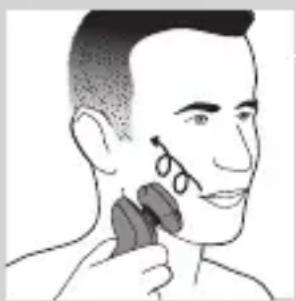
Illustration of a person applying facial hair to their ear with a brush (no text or symbols)1 Switch on the appliance.
2 Move the shaving heads over your skin in circular movements.
Note: Do not make straight movements.
3 Clean the shaver after use (see chapter ‘Cleaning and maintenance’).
Wet shaving
You can also use this shaver in the shower or on a wet face with shaving foam or shaving gel.
To shave with shaving foam or shaving gel, follow the steps below:

natural_image
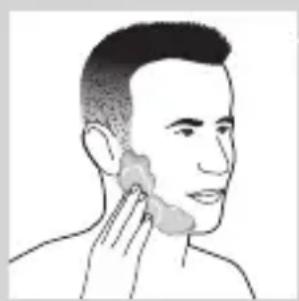
Line drawing of a person's face with hand near ear area (no text or symbols)1 Apply some water to your skin.
2 Apply shaving foam or shaving gel to your skin.
natural_image
Line drawing of a person applying a product to their ear (no text or symbols)
natural_image
Illustration of a hand washing a cup with a tool above it (no text or symbols)3 Rinse the shaving unit under the tap to ensure that the shaving unit glides smoothly over your skin.
4 Switch on the appliance.
natural_image
Illustration of a person applying a hair product to their ear (no text or symbols)5 Move the shaving heads over your skin in circular movements.
Note: Rinse the shaver under the tap regularly to ensure that it continues to glide smoothly over your skin.
6 Dry your face and thoroughly clean the shaver after use (see chapter ‘Cleaning and maintenance’).
Note: Make sure you rinse all foam or shaving gel off the shaver.
Using the click-on attachments
natural_image
Diagram showing a funnel with a cross symbol and an upward arrow, no text or labels presentNote: The accessories supplied may vary for different products. The box shows the accessories that have been supplied with your appliance.
Removing or attaching the click-on attachments
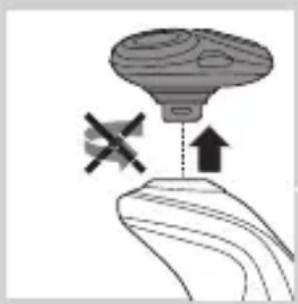
1 Make sure that the appliance is switched off.
2 Pull the attachment straight off the appliance.
Note: Do not twist the attachment while you pull it off the appliance.

natural_image
Illustration of a funnel pouring liquid into a curved pipe, with an inset showing a droplet (no text or symbols)3 Insert the lug of the attachment into the slot in the top of the appliance. Then press down the attachment to attach it to the appliance ('click').

natural_image
Illustration of a robotic arm with motion lines and a magnified inset showing internal components (no text or symbols)
natural_image
Illustration of a person using a hairpin to apply product (no text or symbols present)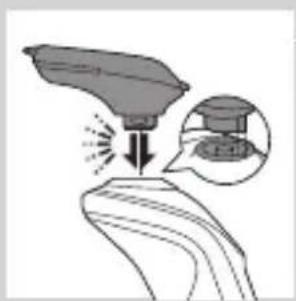
natural_image
Illustration of a robotic arm with a probe and a magnified inset showing the hand positioning (no text or symbols)
natural_image
Line drawing of a hairbrush cutting into a circular cutter (no text or symbols)Using the trimmer attachment
You can use the trimmer attachment to groom your sideburns and moustache.
1 Make sure the appliance is switched off.
2 Insert the lug of the trimmer attachment into the slot in the top of the appliance. Then press down the trimmer attachment to attach it to the appliance ('click').
3 Switch on the appliance.
4 You can now start trimming.
5 Clean the attachment after use (see chapter ‘Cleaning and maintenance’).
Using the beard styler attachment
1 Make sure the appliance is switched off.
2 Insert the lug of the attachment into the slot in the top of the appliance. Then press down the attachment to attach it to the appliance ('click').
Using the beard styler attachment with comb
You can use the beard styler attachment with the comb attached to style your beard at one fixed setting, but also at different length settings. You can use it also to pre-trim any long hairs before shaving to have a more comfortable shave.
The hair length settings on the beard styler attachment correspond to the remaining hair length after cutting and range from 1 to 5mm.
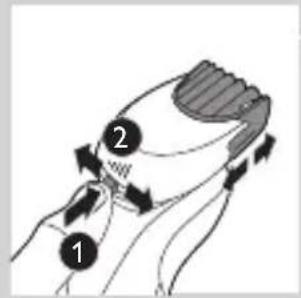
1 Slide the comb straight into the guiding grooves on both sides of the attachment ('click').

natural_image
Illustration of a man with a beard and a pipe, showing a hand holding a small object (no text or symbols present)2 Press the length selector and then push it to the left or right to select the desired hair length setting.
3 Switch on the appliance.
4 You can now start styling your beard by moving the attachment upwards with gentle pressure making sure the front of the comb is in full contact with the skin.
5 Clean the attachment after use (see chapter ‘Cleaning and maintenance’).
Using the beard styler attachment without comb
You can use the beard styler attachment without the comb to contour your beard, moustache, sideburns or neckline to a length of 0.5mm.
natural_image
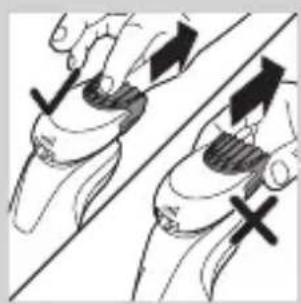
Illustration of two hands holding a device with directional arrows indicating movement (no text or symbols)1 Pull the comb off the attachment.
Note: Grab the comb in the centre to pull it off the attachment. Do not pull at the sides of the comb.
2 Switch on the appliance.
3 You can now start contouring your beard, moustache, sideburns or neckline by moving the styler downwards with gentle pressure while holding it perpendicular to the skin.
4 Clean the attachment after use (see chapter 'Cleaning and maintenance').
Using the cleansing brush attachment
Use the rotating cleansing brush attachment with your daily cleansing cream. The cleansing brush attachment removes oil and dirt, contributing to a healthy and oil-free skin.
natural_image
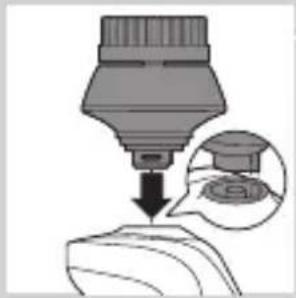
Illustration of a dropper dispensing liquid into a container with an inset showing a graduation cap (no text or symbols)1 Insert the lug of the attachment into the slot in the top of the appliance. Then press down the attachment to attach it to the appliance ('click').
natural_image
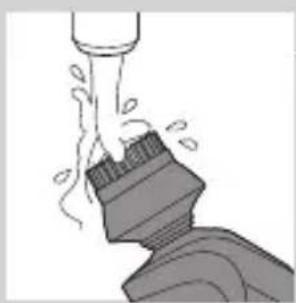
Illustration of a mechanical component with motion lines indicating movement (no text or symbols)2 Moisten the attachment with water. Do not use the appliance with a dry brush head, as this can irritate the skin.

natural_image
Illustration of a person applying facial care to their face, with no text or symbols present.Tip: Use the attachment before shaving for easier shaving and a more hygienic shaving result.
3 Moisten your face with water and apply a cleanser to your face.
4 Place the attachment on your right cheek.
5 Switch on the appliance.
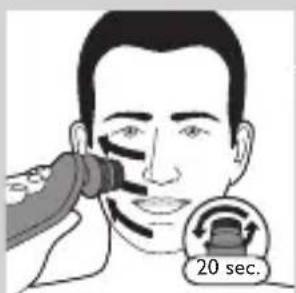
6 Gently move the attachment across your skin from the nose towards the ear. Do not push the attachment too hard onto the skin to make sure the treatment remains comfortable.
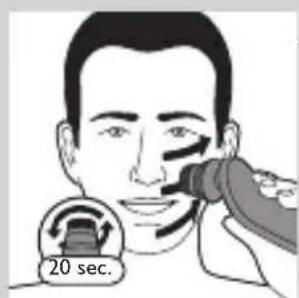
7 After approx. 20 seconds you can move the appliance to your left cheek and start cleansing this part of your face.
Caution: Do not clean the sensitive area around your eyes.

8 After approx. 20 seconds you can move the attachment to your forehead and start cleansing this part of your face. Gently move the brush head from left to right.
Note: We advise you to not overdo the cleansing and to not cleanse any zone longer than 20 seconds.

natural_image
Illustration showing facial massage technique with a magnified inset of the eye area (no text or symbols)9 After the treatment, rinse and dry your face. Your face is now ready for the next step of your daily skincare routine.
10 Clean the attachment after use (see chapter ‘Cleaning and maintenance’).
Cleaning and maintenance
Note: The accessories supplied may vary for different products. The box shows the accessories that have been supplied with your appliance.
Cleaning the shaver in the SmartClean system (specific types only)
natural_image
Simple line drawing of a paintbrush with a cross mark, no text or symbols presentDo not tilt the SmartClean system to prevent leakage.
Note: Hold the SmartClean system while you prepare it for use.
Note: If you clean the shaver in the SmartClean system once a week, the SmartClean cartridge will last approximately three months.

Preparing the SmartClean system for use
1 Put the small plug in the back of the SmartClean system.
2 Put the adapter in the wall socket.
3 Press the button on the side of the SmartClean system and lift the top part of the SmartClean system.
4 Pull the seal off the cleaning cartridge.
5 Place the cleaning cartridge in the SmartClean system.
6 Push the top part of the SmartClean system back down ('click').
Using the SmartClean system
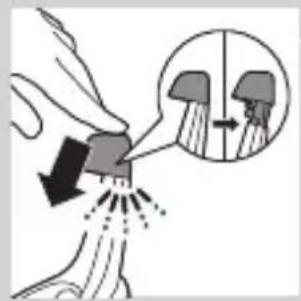
Always make sure to shake excess water off the shaver before you place it in the SmartClean system.
ENGLISH20
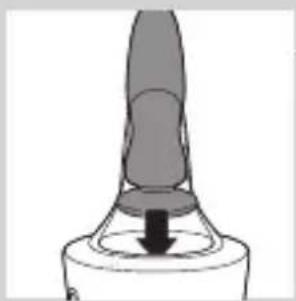
1 Press down the top cap to be able to place the shaver in the holder ('click').
natural_image
Close-up of a mechanical component with a downward arrow indicating force or direction (no text or symbols)2 Hold the shaver upside down above the holder. Make sure the front of the shaver points towards the SmartClean system.

3 Place the shaver in the holder, tilt the shaver backwards and press down the top cap to connect the shaver ('click').
- The battery symbol flashes slowly to indicate that the shaver is charging.

natural_image
Hand holding a device with two circular buttons labeled 'Power' and 'Spiral', no text or symbols present.4 Press the on/off button on the SmartClean system to start the cleaning program.
- During the cleaning program (which takes approx. 10 minutes), the cleaning symbol flashes.

natural_image
Diagram of a mechanical component with two circular indicators (one checked, one checked) and a checkmark symbol, no readable text or labels present.- When the cleaning program has been completed, the ready symbol lights up continuously.
- The battery symbol lights up continuously to indicate that the shaver is fully charged. This takes approx. 1 hour.
Note: If you press the on/off button of the SmartClean system during the cleaning program, the program aborts. In this case, the cleaning symbol stops flashing.


Note: If you remove the adapter from the wall socket during the cleaning program, the program aborts.
Note: 30 minutes after the cleaning program and charging have been completed, the SmartClean switches off automatically.
5 To let the shaver dry, you can leave it in the SmartClean system until your next shave. You can also remove the shaver from the SmartClean system, shake off excess water, open the shaving unit and let the shaver air dry.
Replacing the cartridge of the SmartClean System
Replace the cleaning cartridge when the replacement symbol flashes orange or when you are no longer satisfied with the cleaning result. If you clean the shaver in the SmartClean system once a week, the SmartClean cartridge will last approximately three months.
1 Press the button on the side of the SmartClean system and lift the top part of the SmartClean system.
2 Take the empty cleaning cartridge from the SmartClean system and pour any remaining cleaning fluid out of the cleaning cartridge.
You can simply pour the cleaning fluid down the sink.
3 Throw away the empty cleaning cartridge.
4 Unpack the new cleaning cartridge and pull the seal off the cartridge.
ENGLISH22
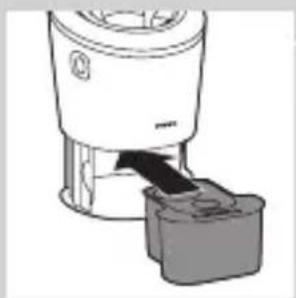
natural_image
Diagram of a blender with a black arrow pointing to its internal component (no text or symbols present)5 Place the new cleaning cartridge in the SmartClean system.

natural_image
Diagram of a mechanical component with a downward arrow indicating motion (no text or symbols)6 Push the top part of the SmartClean system back down ('click').
Cleaning the shaver under the tap
Clean the shaver after every shave for optimal shaving performance.
Be careful with hot water. Always check if the water is not too hot, to prevent your hands from getting burnt.
Never dry the shaving unit with a towel or tissue, as this may damage the shaving heads.
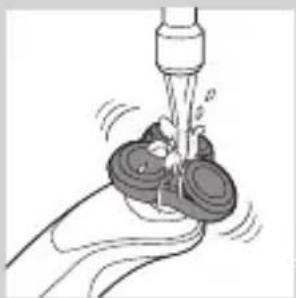
natural_image
Illustration of a hand using a tool to lift a small object, no text or symbols present1 Rinse the shaving unit under a warm tap for some time.
2 Pull the shaving head holder off the bottom part of the shaving unit.

natural_image
Illustration of a hand holding a circular object with an arrow pointing to a three-pin knob (no text or symbols)
natural_image
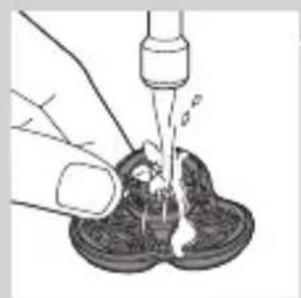
Illustration of a hand pouring liquid into a container with a dropper (no text or symbols)3 Rinse the shaving head holder under a warm tap for 30 seconds.
4 Carefully shake off excess water and let the shaving head holder dry.
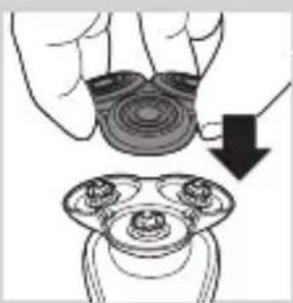
natural_image
Illustration of a hand holding a circular object with a downward arrow pointing to a three-cylinder-shaped object (no text or symbols)5 Reattach the shaving head holder to the bottom part of the shaving unit ('click').
Thorough cleaning method
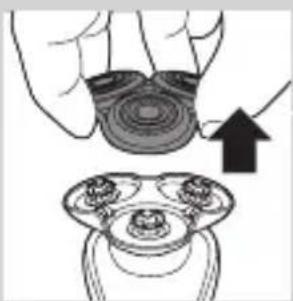
natural_image
Illustration of a hand holding a circular object with an arrow pointing to a three-pin knob (no text or symbols)Make sure the appliance is switched off.
1 Pull the shaving head holder off the bottom part of the shaving unit.

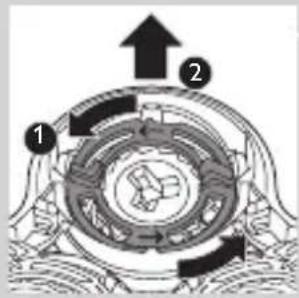
2 Turn the retaining rings anticlockwise and remove them.

natural_image
Diagram showing a device with three circular components and an arrow indicating direction, intersected by a diagonal line (no text or symbols)3 Remove the shaving heads from the shaving head holder. Each shaving head consists of a cutter and guard.
Note: Do not clean more than one cutter and guard at a time, since they are all matching sets. If you accidentally put a cutter in the wrong shaving guard, it may take several weeks before optimal shaving performance is restored.
ENGLISH24

natural_image
Diagram showing fluid flow between two vessels with bubbles and a central pipe (no text or symbols)4 Clean the cutter and guard under the tap.

natural_image
Mechanical gear assembly diagram showing a rotating shaft and flange (no text or symbols)5 After cleaning, place the cutter back into the guard.

flowchart
graph TD
    A[" "] --> B[" "]
    B --> C[" "]
    C --> D[" "]
    D --> A
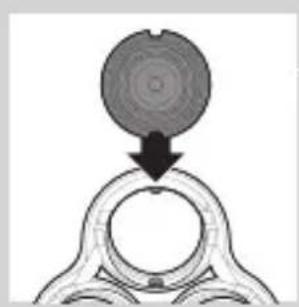
6 Put the shaving heads back into the shaving head holder.
natural_image
Diagram showing a circular object being lifted by a black arrow into a ring structure (no text or symbols)Note: Make sure the notches on both sides of the shaving heads fit exactly onto the projections in the shaving-head holder.

7 Place the retaining rings back onto the shaving head holder and turn them clockwise.

natural_image
Diagram showing two circular components with arrows indicating direction, one crossed over the other by a diagonal line (no text or symbols)- Each retaining ring has two recesses that fit exactly in the projections of the shaving head holder. Turn the ring clockwise until your hear ‘click’ and the ring is fixed.

Note: Hold the shaving head holder in your hand when you reinsert the shaving heads and reattach the retaining rings. Do not place the shaving head holder on a surface when you do this, as this may cause damage.
8 Reattach the shaving head holder to the bottom part of the shaving unit.
Cleaning the click-on attachments
Never dry the trimmer or beard styler attachments with a towel or tissue, as this may damage the trimming teeth.
Cleaning the beard styler attachment
Clean the beard styler attachment every time you have used it.

natural_image
Illustration of two hands holding a curved object with directional arrows indicating movement or force (no text or symbols)1 Pull the comb off the beard stylisty attachment.
Note: Grab the comb in the centre to pull it off the attachment. Do not pull at the sides of the comb.
2 Switch on the appliance.
3 Rinse the beard styler attachment and the comb separately under a hot tap for some time.
4 After cleaning, switch off the appliance.

natural_image
Illustration of two hands pouring liquid from a bottle onto a shoe and a shoe with steam rising (no text or symbols)
natural_image
Two cartoon fish jumping over a diagonal line, one falling and the other wading (no text or symbols)
natural_image
Illustration of a hand cleaning a shoe with a tool above it (no text or symbols)
natural_image
Illustration of a hand crushing debris with a magnified circular inset showing a broken rock (no text or symbols)
natural_image
Diagram of a mechanical component with a top cylindrical part and an upward arrow, no text or symbols present.
natural_image
Two hanging objects with ropes tied against a diagonal line, no text or symbols visible5 Carefully shake off excess water and let the beard styler attachment and comb dry.
Tip: For optimal trimmer performance, lubricate the trimmer teeth with a drop of sewing machine oil every six months.
Cleaning the trimmer attachment
Clean the trimmer attachment every time you have used it.
1 Switch on the appliance with the trimmer attachment attached.
2 Rinse the trimmer attachment under a hot tap for some time.
3 After cleaning, switch off the appliance.
4 Carefully shake off excess water and let the trimmer attachment dry.
Tip: For optimal trimmer performance, lubricate the trimmer teeth with a drop of sewing machine oil every six months.
Cleaning the cleansing brush attachment
Clean the cleansing brush attachment every time you have used it.
1 Make sure the appliance is switched off.
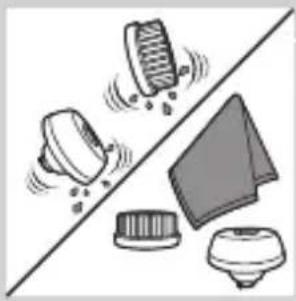
2 Detach the brush head from the brush base.
3 Clean both parts thoroughly with warm water and mild soap.
natural_image
Illustration of mechanical components and a gear mechanism (no text or symbols)4 Dry the cleansing brush attachment with a towel.
Storage
natural_image
Illustration of a stylized object with a downward arrow, possibly indicating a motion or change (no text or symbols present)Note: The accessories supplied may vary for different products. The box shows the accessories that have been supplied with your appliance.
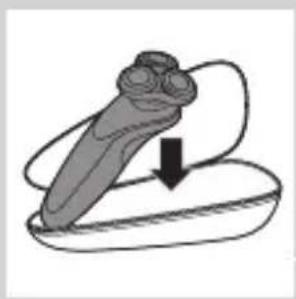
Note: We advise you to let the appliance and its attachments dry before you put the protection caps on the attachments and store the shaver in the pouch.
- Store the shaver in the pouch supplied.

natural_image
Diagram of a mechanical component with a downward arrow indicating force or direction (no text or symbols)- Put the protection cap on the cleansing brush attachment to protect it from dirt accumulation.
Replacement
Replacing the cleansing brush head

natural_image
Simple line drawing of a mechanical component with an upward arrow, no text or symbols present.- The cleansing brush head attachment should be replaced every 3 months or earlier if the filaments are deformed or damaged.
Replacing the shaving heads
For maximum shaving performance, we advise you to replace the shaving heads every two years.
Replacement reminder
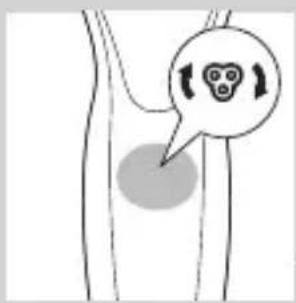
The shaving unit symbol will light up to indicate that the shaving heads need to be replaced. Replace damaged shaving heads immediately. Only replace the shaving heads with original Philips shaving heads as specified in chapter ‘Ordering accessories’.
natural_image
Simple line drawing of a human body with a speech bubble containing a skull icon (no text or symbols)
natural_image
Illustration of a hand holding a circular object with an upward arrow, alongside a magnified view of three circular objects (no text or symbols)1 The shaving unit symbol lights up continuously when you switch off the shaver to indicate that the shaving heads need to be replaced.
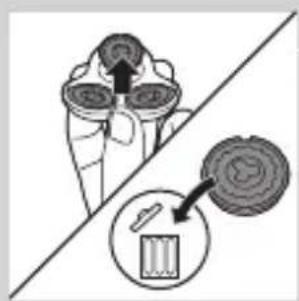
2 Pull the shaving head holder off the bottom part of the shaving unit.
natural_image
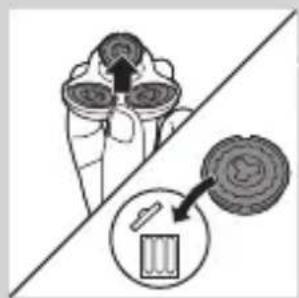
Diagram showing a device with a magnified view of its internal components (no text or symbols present)3 Turn the retaining rings anticlockwise and remove them.
4 Remove the shaving heads from the shaving head holder and throw them away.

flowchart
graph TD
    A["Top Node"] --> B["Left Node"]
    B --> C["Center Node"]
    C --> D["Right Node"]
    D --> E["Bottom Node"]
5 Place new shaving heads in the holder.

natural_image
Diagram showing a circular object being lifted by a black arrow, forming a ring structure (no text or symbols)Note: Make sure the notches on both sides of the shaving heads fit exactly onto the projections in the shaving-head holder.

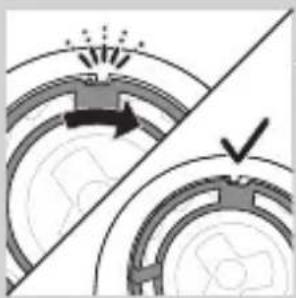
6 Place the retaining rings back onto the shaving heads and turn them clockwise.
natural_image
Diagram showing two mechanical components with arrows indicating motion, separated by a diagonal line (no text or symbols)- The retaining ring has two recesses that fit exactly in the projections of the shaving head holder. Turn the ring clockwise until you hear 'click' and the ring is fixed.

Note: Hold the shaving head holder in your hand when you reinsert the shaving heads and reattach the retaining rings. Do not place the shaving head holder on a surface when you do this, as this may cause damage.

natural_image
Illustration of a hand holding a circular object with a downward arrow, next to a mechanical component (no text or symbols)7 Reattach the shaving head holder to the bottom part of the shaving unit.

8 To reset the replacement reminder, press and hold the on/off button for approx. 7 seconds.
Ordering accessories
To buy accessories or spare parts, visit www.shop.philips.com/service or go to your Philips dealer. You can also contact the Philips Consumer Care Centre in your country (see the worldwide guarantee leaflet for contact details). The following parts are available:
- HQ8505 adapter
- SH70 Philips shaving heads
- HQ110 Philips Shaving Head Cleaning Spray
- RQ111 Philips beard stylister attachment
- SH575 Philips cleansing brush attachment
- SH560 Philips cleansing brush replacement head
- JC301, JC302, JC303, JC304, JC305 cleaning cartridge
Note: Availability of the accessories may differ per country.
Shaving heads
- We advise you to replace your shaving heads every two year. Always replace the shaving heads with original SH70 Philips shaving heads.

Recycling
Do not throw away the appliance with the normal household waste at the end of its life, but hand it in at an official collection point for recycling. By doing this, you help to preserve the environment.
Removing the rechargeable shaver battery

natural_image
Illustration of a hand operating a tool on a slide, with no visible text or symbolsOnly remove the rechargeable battery when you discard the shaver. Make sure the battery is completely empty when you remove it.
Be careful, the battery strips are sharp.
natural_image
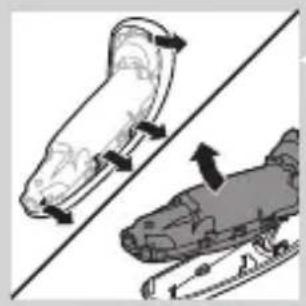
Two grayscale illustrations of a scooter or scooter with directional arrows indicating motion (no text or symbols)1 Remove the screw in the back panel with a screwdriver. Then remove the back panel.
2 Bend the hooks aside and remove the power unit.

natural_image
Two car seats with a diagonal line dividing the seats, one showing an upward arrow (no text or symbols)3 Break the snap hooks and remove the front panel of the power unit.

natural_image
Illustration of hands using a tool to adjust or install a mechanical component, no text or symbols present4 Take out the battery holder and cut the battery tags with a pair of cutting pliers.
Guarantee and support
If you need information or support, please visit www.philips.com/support or read the separate worldwide guarantee leaflet.
Guarantee restrictions
The shaving heads (cutters and guards) are not covered by the terms of the international guarantee because they are subject to wear.
Troubleshooting
This chapter summarises the most common problems you could encounter with the appliance. If you are unable to solve the problem with the information below, visit www.philips.com/support for a list of frequently asked questions or contact the Consumer Care Centre in your country.
Problem Possible cause Solution
The shaver does not shave as well as it used to.
The shaving heads are damaged or worn.
Replace the shaving heads (see chapter 'Replacement').
Hairs or dirt obstruct the shaving heads.
Clean the shaving heads by following the steps of the thorough cleaning method (see chapter ‘Cleaning and maintenance’).
Problem Possible cause Solution
| The shaver does not work when I press the on/off button. | The shaver is still attached to the mains. For safety reasons, the shaver can only be used without cord. | Disconnect the shaver from the mains and press the on/off button to switch on the shaver (see section ‘Unplug for use reminder’). |
| The rechargeable battery is empty. | Recharge the battery (see chapter ‘Charging’). | |
| The travel lock is activated. | Press the on/off button for 3 seconds to deactivate the travel lock. | |
| The shaving unit is soiled or damaged to such an extent that the motor cannot run. | Clean the shaving heads or replace them (see chapters ‘Cleaning and maintenance’ and ‘Replacement’). |
Problem Possible cause Solution
| The shaver is not entirely clean after I clean it in the SmartClean system. | You have not placed the shaver in the SmartClean system properly, so there is no electrical connection between the SmartClean system and the shaver. | Press down the top cap ('click') to ensure a proper connection between the shaver and the SmartClean system. |
| The cleaning cartridge is empty. The replacement symbol flashes to indicate you have to replace the cleaning cartridge. | Place a new cleaning cartridge in the SmartClean system (see chapter 'Cleaning and maintenance'). | |
| You have used another cleaning fluid than the original Philips cleaning cartridge. | Only use the original Philips cleaning cartridges. | |
| Water is leaking from the bottom of the shaver. | During cleaning, water may collect between the inner body and the outer shell of the shaver. | This is normal and not dangerous because all electronics are enclosed in a sealed power unit inside the shaver. |
| The SmartClean system does not work when I press the on/off button. | The SmartClean system is not connected to the mains. | Put the small plug in SmartClean system and put the adapter in the wall socket. |
Problem Possible cause Solution
| The shaver is not fully charged after I charge it in the SmartClean system. | You have not placed the shaver in the SmartClean system properly. | Make sure you press the shaver in the SmartClean system until it locks into place. |
| I replaced the shaving heads, but the replacement reminder symbol is still showing. | You have not reset the shaver. | Reset the shaver by pressing the on/off button for approx. 7 seconds (see chapter ‘Replacement’). |
| A shaving head symbol has suddenly appeared on the display. | This symbol is a replacement reminder. | Replace the shaving heads (see chapter ‘Replacement’). |
Pendahuluan
natural_image
No sign depicting a faucet without any text or symbols
natural_image
Prohibition sign of a faucet with no text or symbolsPerhatian
natural_image
Simple line drawing of a showerhead spraying over a water-filled container (no text or symbols)Medan elektromagnet (EMF)
natural_image
Diagram of a medical or laboratory procedure showing a pointed tool interacting with a small object (no text or symbols present)natural_image
Diagram of a biological or anatomical structure with a labeled point '0' and an arrow pointing to a feature (no text or symbols beyond the label)natural_image
Diagram of a biological structure with a magnified inset showing a chromosome (no text or labels)natural_image
Diagram of a biological or medical structure with a magnified inset showing a rod-like structure (no text or symbols present)Saat baterai hampir habis, lampu bawah akan berkedip oranye.
natural_image
Diagram of a biological structure with a labeled point '0' and a starburst symbol (no text or symbols present)natural_image
Diagram of a medical or laboratory procedure showing a pointed tool interacting with a central circular component (no text or labels)natural_image
Simple line drawing of a human torso with a starburst pattern and an electrical plug icon (no text or symbols)Mengaktifkan travel lock
- Saat Anda mengaktifkan travel lock, simbol travel lock akan terus menyala. Apabila travel lock diaktifkan, simbol travel lock akan berkedip.

Menonaktifkan travel lock
1 Tekan tombol on/off selama 3 detik.
natural_image
Simple line drawing of a human torso with a speech bubble containing a skull icon (no text or symbols)natural_image
Diagram of a mechanical component with a downward arrow indicating force or direction (no text or symbols)natural_image
Hand holding a button with an 'Power' icon, no text or symbols presentnatural_image
Illustration of a person applying a hair product to their ear (no text or symbols)natural_image
Illustration of a person's face with a hand touching the ear area (no text or symbols)Pencukuran basah
natural_image
Diagram showing a device with a bulb and a cross symbol, no text or labels presentnatural_image
Diagram of a funnel pouring liquid into a curved pipe, with an inset showing a graduation cap (no text or symbols present)natural_image
Illustration of a spray gun on a surface with an inset showing the tip and spray (no text or symbols)natural_image
Line drawing of a person applying makeup to their ear (no text or symbols)
natural_image
Illustration of a robotic arm with motion capture effect, showing head and torso movement (no text or symbols)natural_image
Line drawing of a hairbrush cutting into a toothbrush with motion arrows (no text or symbols)natural_image
Illustration of a man with a beard eating a spoon (no text or symbols)natural_image
Illustration of two hands holding a tool with directional arrows indicating movement or force (no text or symbols)
natural_image
Line drawing of a person applying a hair accessory to their neck (no text or symbols)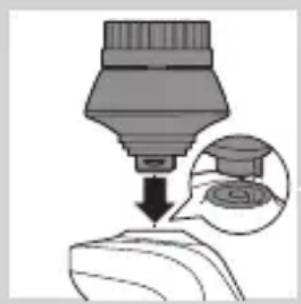
natural_image
Diagram showing a dropper tip dispensing liquid into a container, with an inset magnified view of the dropper's internal structure (no text or symbols)
natural_image
Illustration of a mechanical component with motion lines indicating movement (no text or symbols)natural_image
Illustration of a person applying facial care to their face, with no visible text or symbolsnatural_image
Illustration showing a person applying facial care to another person's face, with a magnified inset of the eye (no text or symbols)natural_image
Simple line drawing of a paintbrush with a cross mark and spray effect (no text or symbols)natural_image
Simple line drawing of a container with an upward arrow and label 'POTATO' (no text or symbols on the diagram itself)INDONESIA52

natural_image
Diagram of a blender with a black arrow pointing to its base, showing mechanical components (no text or symbols)natural_image
Diagram of a mechanical component with a downward arrow indicating direction (no text or symbols)natural_image
Close-up of a mechanical component with a downward arrow and a prohibition symbol (no text or labels)natural_image
Illustration of a hand holding a small object with arrows indicating motion or force, and an inset showing a magnified view of a mechanical component (no text or symbols)natural_image
Close-up of a mechanical component with a downward arrow indicating force or direction (no text or symbols)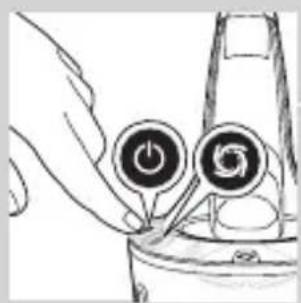
natural_image
Hand holding two circular buttons with power and spiral symbols, connected to a device (no text or labels visible)


natural_image
Diagram of a blender with a black arrow pointing to its internal component (no text or symbols present)
natural_image
Diagram of a mechanical component with a downward arrow indicating force or direction (no text or symbols)Mengganti kartrid Sistem SmartClean
natural_image
Illustration of a hand washing a cup with water spray (no text or symbols)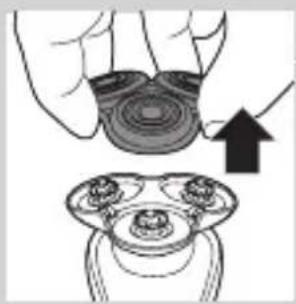
natural_image
Illustration of a hand holding a circular object with an arrow pointing to a three-pin connector (no text or symbols)
natural_image
Illustration of a hand using a pipette to lift liquid into a container (no text or symbols visible)
natural_image
Illustration of a hand holding a circular object with a downward arrow, alongside a close-up of a mechanical component (no text or symbols)natural_image
Illustration of a hand holding a circular object with an arrow pointing to a three-tiered mechanical component (no text or symbols)2 Putar cincin penahan berlawanan arah jarum jam, lalu lepaskan.

natural_image
Diagram showing two mechanical components with arrows indicating motion, no text or symbols presentnatural_image
Illustration of two mechanical components with fluid flow, no text or symbols presentnatural_image
Mechanical gear assembly diagram showing a rotating shaft and flange (no text or labels)flowchart
graph TD
    A[" "] --> B[" "]
    B --> C[" "]
    C --> D[" "]
    D --> A
natural_image
Diagram of a mechanical component with a circular top and downward arrow, no visible text or symbolsnatural_image
Diagram showing two mechanical components with arrows indicating motion or force, separated by a diagonal line (no text or symbols)natural_image
Illustration of two hands holding a tool with directional arrows indicating movement or force (no text or symbols)natural_image
Illustration of two kitchen utensils with liquid splashing, separated by a diagonal line (no text or symbols)natural_image
Illustration of a shoe being lifted by a bag (no text or symbols)natural_image
Illustration of a hand holding a small object with motion lines, accompanied by a circular icon showing a mountain and a cross symbol (no text or labels)natural_image
Diagram of a mechanical component with a top cylindrical part and an upward arrow indicating motion (no text or symbols)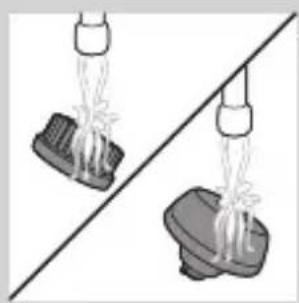
natural_image
Two identical objects hanging from a diagonal line, one with a bulb and the other with a base, against a plain background (no text or symbols)natural_image
Illustration of mechanical components and a gear mechanism (no text or symbols)Penyimpanan

natural_image
Illustration of a medical device with a downward arrow indicating compression or disassembly (no text or symbols)natural_image
Simple line drawing of a spray bottle with a handle and spout (no text or symbols)natural_image
Diagram of a mechanical component with a top cylindrical part and an upward arrow indicating motion (no text or symbols)natural_image
Simple line drawing of a human body with a speech bubble containing a skull icon (no text or symbols)natural_image
Illustration of a hand holding a circular object with an upward arrow, above a mechanical component (no text or symbols)3 Putar cincin penahan berlawanan arah jarum jam, lalu lepaskan.
natural_image
Diagram showing a device with three circular components and a magnified view of a battery (no text or symbols)natural_image
Diagram showing a circular object being lifted by a black arrow, forming a ring structure (no text or symbols)natural_image
Diagram showing two mechanical components with arrows indicating motion, separated by a diagonal line (no text or symbols)natural_image
Illustration of a hand holding a circular object with a downward arrow, alongside a magnified view of three circular objects (no text or symbols)natural_image
Illustration showing a tool tip and a foot with a hammer, both on a diagonal line (no text or symbols)natural_image
Illustration of two mechanical components with directional arrows indicating motion (no text or symbols)natural_image
Two car seats with arrows indicating seat movement (no text or symbols)3 Patahkan pengait kunci dan lepaskan panel depan unit daya.

natural_image
Diagram of a robotic arm gripping a tool, showing mechanical components and motion direction (no text or symbols)natural_image
No sign depicting a faucet with a showerhead, enclosed in a circle (no text or symbols)
natural_image
No sign depicting a faucet with a diagonal line and a diagonal line, crossed out by a diagonal line (no text or symbols)주의
natural_image
Simple line drawing of a showerhead spraying over a water-filled container (no text or symbols)EMF(전자기장)
natural_image
Diagram of a medical or laboratory procedure showing a cross-sectional view with an inset magnified view (no text or symbols)배터리 충전 표시등(표시등 3개)
배터리 충전 표시등(표시등 1개)
natural_image
Diagram of a biological structure with a magnified inset showing a single cell (no text or labels)natural_image
Diagram of a biological structure with a labeled point '0' and an arrow pointing to a circular feature (no text or symbols beyond the label)-배터리 총전 표시등(표시등 1개)
배터리 부족

natural_image
Diagram of a biological or medical structure with an arrow pointing to a star-shaped feature, no text or symbols present.natural_image
Diagram of a biological structure with a labeled point '0' and an arrow pointing to a feature (no text or symbols beyond the label)-배터리 총전 표시등(표시등 1개)
남은 배터리 용량

natural_image
Diagram of a biological structure with a magnified inset showing internal components (no text or labels)배터리 충전 표시등(표시등 3개)
natural_image
Line drawing of a human torso with a padlock icon and electrical button (no text or symbols)natural_image
Simple line drawing of a human body with a speech bubble containing a skull icon (no text or symbols)natural_image
Illustration of a hand holding a small object with arrows indicating motion or force, and a magnified inset showing a close-up of a mechanical component (no text or symbols)natural_image
Diagram of a mechanical component with a downward arrow indicating force or direction (no text or symbols)natural_image
Illustration of a person applying a hair accessory to their face (no text or symbols present)natural_image
Illustration of a person's face with hand near ear area, showing skin texture and hair (no text or symbols)
natural_image
Line drawing of a person applying a cotton or cotton product to their ear (no text or symbols)
natural_image
Illustration of a faucet spraying water onto a surface with a circular object underneath (no text or symbols)
natural_image
Illustration of a person applying makeup to their face with a brush (no text or symbols)습식 면도
natural_image
Diagram showing a funnel with a cross symbol and an upward arrow, no text or labels presentnatural_image
Diagram of a funnel pouring liquid into a curved pipe, with an inset showing a droplet (no text or symbols)natural_image
Diagram showing a device emitting heat or vibration from a surface, with an inset close-up of the component (no text or symbols)natural_image
Illustration of a person using a hairdryer to apply product (no text or symbols present)
natural_image
Illustration of a hand holding a device with an arrow indicating motion, and an inset showing a device inside (no text or symbols)
natural_image
Illustration of a hairbrush cutting into a pair of scissors with a downward arrow (no text or symbols)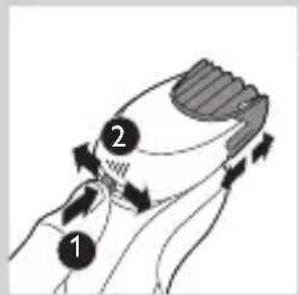

natural_image
Illustration of a man with a beard eating a spoon (no text or symbols)
natural_image
Illustration of two hands holding a curved object with directional arrows indicating movement or force (no text or symbols)natural_image
Line drawing of a person applying a hair accessory to their neck (no text or symbols)natural_image
Illustration of a dropper being inserted into a container with a magnified inset showing the tip (no text or symbols)natural_image
Illustration of a mechanical component with fluid flow, no text or symbols presentnatural_image
Illustration of a person applying facial care to their face, with no visible text or symbolsnatural_image
Illustration showing two men applying facial care to their face, one with a magnified inset of the first eye (no text or symbols present)natural_image
Simple line drawing of a paintbrush with a cross mark and label (no text or symbols)natural_image
Simple line drawing of a container with an upward arrow and label 'SARMA' (no text or symbols on the diagram itself)natural_image
Diagram of a blender with an arrow pointing to its internal component (no text or symbols present)natural_image
Diagram of a mechanical component with a downward arrow indicating motion (no text or symbols)natural_image
Illustration of a fire extinguisher with a prohibition symbol (no text or labels)스마트클린 시스템 사용
natural_image
Illustration of a hand holding a small object with arrows indicating motion or force, and a magnified inset showing a cross-section of a mechanical component (no text or symbols)natural_image
Close-up of a mechanical component with a downward arrow indicating force or direction (no text or symbols)natural_image
Hand holding two circular buttons with power and spiral symbols, connected to a device (no text or labels visible)
natural_image
Diagram of a mechanical component with two circular indicators (one checked, one not checked) and no visible text or symbols.

natural_image
Diagram of a blender with a black arrow pointing to its internal component (no text or symbols present)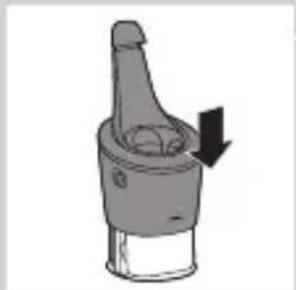
natural_image
Diagram of a mechanical component with a downward arrow indicating motion (no text or symbols)natural_image
Illustration of a hand washing a cup with water spray (no text or symbols)natural_image
Illustration of a hand holding a circular object with an arrow pointing to a separate view of a mechanical component (no text or symbols)natural_image
Illustration of a hand using a pipette to lift a dark liquid into a container (no text or symbols)natural_image
Illustration of a hand holding a circular object with a downward arrow, next to a magnified view of a mechanical component (no text or symbols)natural_image
Illustration of a hand holding a circular object with an upward arrow, alongside a close-up of a mechanical component (no text or symbols)natural_image
Diagram showing a mechanical component with three circular parts and an arrow indicating rotation or movement (no text or symbols)natural_image
Illustration of two mechanical components with fluid flow, no text or symbols presentnatural_image
Diagram of a mechanical component with a downward arrow, no visible text or symbols
flowchart
graph TD
    A[" "] --> B[" "]
    B --> C[" "]
    C --> D[" "]
    D --> A
natural_image
Diagram of a mechanical component with a circular top and downward arrow, no visible text or symbolsnatural_image
Mechanical gear assembly diagram showing two components with a checkmark indicating alignment (no text or symbols)natural_image
Illustration of two hands holding a tool with directional arrows indicating movement or force (no text or symbols present)natural_image
Illustration of two hands pouring liquid from a bottle onto a surface, separated by a diagonal line (no text or symbols)2 제품의 전원을 켜십시오.
natural_image
Two cartoon fish jumping over a diagonal line, one falling and the other rising (no text or symbols)natural_image
Illustration of a hand cleaning a shoe with a tool (no text or symbols)트리머 액세서리 세척
natural_image
Illustration of a hand crushing debris with a magnified inset showing a pile of debris (no text or symbols)natural_image
Simple line drawing of a mechanical component with an upward arrow, no text or symbols present.natural_image
Two hanging objects with ropes tied on a diagonal line, no text or symbols visiblenatural_image
Illustration of mechanical components and a gear mechanism (no text or symbols)natural_image
Simple line drawing of a mechanical component with a downward arrow indicating motion (no text or symbols)natural_image
Diagram of a mechanical component with a downward arrow indicating force or direction (no text or symbols)교체
클렌징 브러쉬 헤드 교체

natural_image
Diagram of a mechanical component with a top component and an arrow indicating upward motion (no text or symbols)natural_image
Simple line drawing of a human body with a speech bubble containing a skull icon (no text or symbols)natural_image
Illustration of a hand holding a circular object with an arrow pointing to a three-pin connector (no text or symbols)natural_image
Diagram showing a device with three circular components and a magnified view of a battery (no text or symbols)flowchart
graph TD
    A[" "] --> B[" "]
    B --> C[" "]
    C --> D[" "]
    D --> A
natural_image
Diagram showing a circular object being lifted by a black arrow, with no visible text or symbols.natural_image
Diagram showing mechanical components with arrows indicating motion or force, no readable text or symbols presentnatural_image
Illustration of a hand holding a circular object with a downward arrow, partially overlaid on a mechanical component (no text or symbols)natural_image
Illustration of a sewing machine tool and a sewing machine blade assembly (no text or symbols)natural_image
Two mechanical components with directional arrows indicating motion, no visible text or symbolsnatural_image
Two mechanical components with a diagonal line and an arrow indicating motion or assembly (no text or symbols)natural_image
Diagram of two robotic arms with a tool, showing mechanical assembly (no text or symbols)natural_image
No sign depicting a faucet without any text or symbols
natural_image
Prohibition sign showing a faucet without a shower, enclosed in a circle (no text or symbols)Awas
natural_image
Simple line drawing of a showerhead spraying over water (no text or symbols)natural_image
Diagram of a medical or laboratory procedure showing a pointed tool interacting with a curved structure, with an inset magnified view (no text or symbols)natural_image
Diagram of a biological or mechanical structure with a highlighted region and a starburst symbol (no text or labels)natural_image
Diagram of a biological structure with a labeled circular inset showing internal components (no text or symbols present)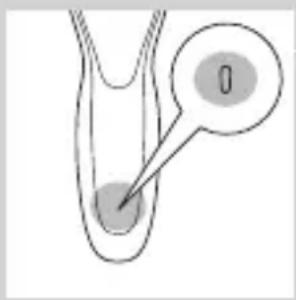
natural_image
Diagram of a medical or laboratory procedure showing a pointed tool interacting with a star-shaped object (no text or symbols present)
natural_image
Diagram of a biological or anatomical structure with a star-shaped annotation and arrow pointing to a small feature (no text or symbols present)natural_image
Diagram of a medical or laboratory procedure showing a pointed tube inserted into a container with an inset magnified view (no text or labels)

Mengaktifkan kunci kembara
natural_image
Illustration of a hand holding a small object with arrows indicating motion or force, and a magnified inset showing a close-up of a mechanical component (no text or symbols)natural_image
Close-up of a mechanical component with a downward arrow indicating force or direction (no text or symbols)
natural_image
Illustration of a person applying a hair product to their ear (no text or symbols)natural_image
Illustration of a person's face with a hand touching the cheek area (no text or symbols)natural_image
Line drawing of a person applying a product to their ear (no text or symbols)natural_image
Illustration of a hand washing a cup with water spray (no text or symbols)natural_image
Illustration of a person applying a hair product to their face (no text or symbols)natural_image
Diagram showing a hand holding a device with a bulb and a cross symbol, no text or labels presentnatural_image
Illustration of a funnel pouring liquid into a curved pipe with an inset showing a droplet (no text or symbols)natural_image
Illustration of a spray gun on a surface with an inset showing the spray gun's tip (no text or symbols present)natural_image
Line drawing of a person using a hairpin to apply product (no text or symbols)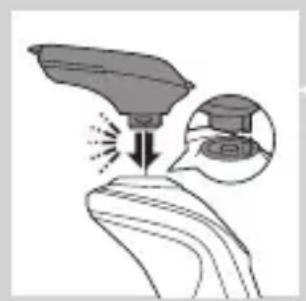
natural_image
Illustration of a hairdryer with an inset showing the tip and body area (no text or symbols)
natural_image
Line drawing of a hairbrush cutting into a square with a hand above it (no text or symbols)
natural_image
Illustration of a man with a beard and a pipe, showing a hand holding a small object (no text or symbols present)natural_image
Illustration of two hands holding a tool with directional arrows indicating movement or force (no text or symbols present)natural_image
Line drawing of a person applying a hair accessory to their neck (no text or symbols)natural_image
Illustration of a dropper dispensing liquid into a container with an inset showing a graduation cap (no text or symbols)natural_image
Illustration of a mechanical component with fluid flow, no text or symbols presentnatural_image
Illustration of a person applying facial care to their face, with no visible text or symbolsnatural_image
Illustration showing two men applying facial care to their face, one with a magnified inset of the eye (no text or symbols)natural_image
Simple line drawing of a paintbrush with a cross mark and spray effect (no text or symbols)natural_image
Simple line drawing of a container with an upward arrow and a shaded interior (no text or symbols)natural_image
Diagram of a blender with an arrow pointing to its internal component (no text or symbols present)natural_image
Illustration of a mechanical component with a downward arrow indicating force or direction (no text or symbols)natural_image
Illustration of a dropper tip with a downward arrow and a prohibition symbol (no text or labels)natural_image
Diagram of a mechanical component with a downward arrow indicating force or direction (no text or symbols)natural_image
Hand inserting a power button into a device (no text or symbols visible)natural_image
Diagram of a mechanical component with two circular indicators (one checked, one checked) and a checkmark symbol, no readable text or labels present.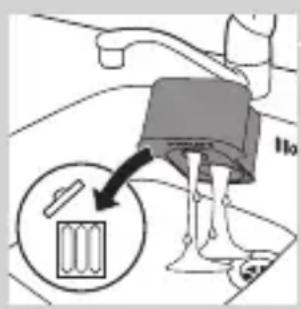
natural_image
Diagram of a blender with a black arrow pointing to its lid (no text or symbols present)natural_image
Diagram of a mechanical component with a downward arrow indicating rotation (no text or symbols)natural_image
Illustration of a hand washing a small object with motion lines indicating movement (no text or symbols)natural_image
Illustration of a hand holding a circular object with an arrow pointing to a three-pin ring (no text or symbols)BAHASA MELAYU120
natural_image
Illustration of a hand pouring liquid into a container with a dropper (no text or symbols)natural_image
Illustration of a hand holding a circular object with a downward arrow pointing to a three-cylinder-shaped object (no text or symbols)natural_image
Illustration of a hand holding a circular object with an arrow pointing to a three-pin knob (no text or symbols)natural_image
Diagram showing a mechanical component with three circular parts and directional arrows, intersected by a diagonal line (no text or symbols)natural_image
Illustration of a mechanical device with fluid flow and components, no text or symbols presentnatural_image
Mechanical gear assembly diagram showing a rotating shaft and gear teeth (no text or labels)flowchart
graph TD
    A[" "] --> B[" "]
    B --> C[" "]
    C --> D[" "]
    D --> A
natural_image
Diagram showing a circular object being lifted by a downward arrow into a ring-like structure (no text or symbols)natural_image
Diagram showing two circular components with arrows indicating direction, one crossed over the other by a diagonal line (no text or symbols)natural_image
Illustration of two hands holding a tool with directional arrows indicating movement or force (no text or symbols present)
natural_image
Illustration of two hands using a tool to lift or spread material, with no visible text or symbolsnatural_image
Two cartoon fish jumping over a diagonal line, one falling and the other wading (no text or symbols)natural_image
Line drawing of a shoe being lifted by a cloth, showing the fabric being lifted (no text or symbols)
natural_image
Illustration of a hand blowing bubbles with a magnified circular inset showing a hand holding a rock (no text or symbols)BAHASA MELAYU124

natural_image
Diagram of a mechanical component with a top component and an arrow indicating upward motion (no text or symbols)natural_image
Two identical diagrams showing a container being lifted by a tool, separated by a diagonal line (no text or symbols)natural_image
Illustration of a mechanical component with motion indicators, no text or symbols presentnatural_image
Illustration of a mechanical component with an arrow indicating downward motion (no text or symbols)natural_image
Diagram of a spray bottle with a handle and spout, showing internal structure (no text or symbols)natural_image
Simple line drawing of a mechanical component with a top cylindrical part and an upward arrow, no text or symbols present.natural_image
Illustration of a human body with a speech bubble containing a skull icon (no text or symbols present)natural_image
Illustration of a hand holding a circular object with an upward arrow, alongside a separate view of a mechanical component (no text or symbols)
natural_image
Diagram showing a hand holding three circular objects above a diagonal line, with an inset illustrating the same object (no text or symbols present)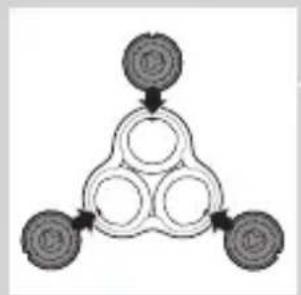
flowchart
graph TD
    A["Top Node"] --> B["Bottom Left Node"]
    B --> C["Bottom Right Node"]
    C --> D["Bottom Center Node"]
    D --> A

natural_image
Diagram showing a circular object being lifted by a black arrow, with no visible text or symbols.
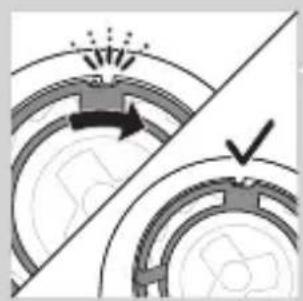
natural_image
Diagram showing mechanical components with arrows indicating motion or force direction (no text or symbols)
natural_image
Illustration of a hand holding a circular object with a downward arrow, next to a mechanical component (no text or symbols)
natural_image
Illustration of a tool interacting with a device, showing a tip and base (no text or symbols)natural_image
Illustration of two mechanical components with directional arrows indicating motion (no text or symbols)natural_image
Diagram showing two car wheel profiles with a directional arrow indicating motion (no text or symbols)natural_image
Diagram showing two mechanical components with a tool, one being inserted and the other holding a tool (no text or symbols present)natural_image
No sign depicting a faucet crossed out by a diagonal line, indicating no pollution or leakage (no text present)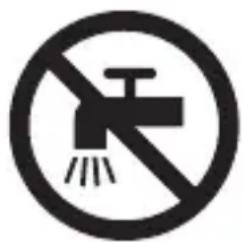
natural_image
No sign depicting a faucet with a diagonal line and a diagonal line, crossed out by a diagonal line (no text or symbols)ข้อควรระวัง
natural_image
Simple line drawing of a showerhead spraying over water (no text or symbols)natural_image
Diagram of a medical or laboratory procedure showing a pointed tool interacting with a star-shaped object (no text or symbols present)
natural_image
Diagram of a biological structure with a highlighted region and arrow, no text or symbols presentnatural_image
Diagram of a biological or anatomical structure with a labeled point '0' and an arrow pointing to a circular feature (no text or symbols beyond the label)natural_image
Diagram of a biological or medical structure with an arrow pointing to a star-shaped feature, no text or symbols present.natural_image
Diagram of a biological structure with a labeled point '0' and an arrow pointing to a small feature (no text or symbols beyond the label)natural_image
Diagram of a medical or laboratory procedure showing a pointed tool interacting with a circular component (no text or symbols present)การเปลี่ยนขุดหัวโกน
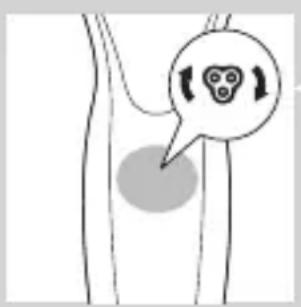
natural_image
Simple line drawing of a mechanical component with a downward arrow indicating force or direction (no text or symbols)
natural_image
Illustration of a person applying makeup to their ear with a brush (no text or symbols)ระยะปรับสภาพผิว
natural_image
Illustration of a person's face with hand near ear area, showing facial contour or skin texture (no text or symbols)natural_image
Line drawing of a person applying a product to their ear (no text or symbols)natural_image
Illustration of a hand washing a cup with water spray (no text or symbols)natural_image
Illustration of a person applying a hair product to their ear (no text or symbols)natural_image
Diagram showing a funnel with a cross symbol and an upward arrow, no text or labels presentnatural_image
Diagram of a funnel-shaped object with an inset showing a magnified view of a small object (no text or symbols present)natural_image
Illustration of a hairdryer with an inset showing the tip and base (no text or symbols)natural_image
Line drawing of a person applying makeup to their ear (no text or symbols)natural_image
Illustration of a hand holding a leaf with a magnified inset showing a device (no text or symbols)natural_image
Line drawing of a hairbrush cutting into a circular shape with a downward arrow (no text or symbols)natural_image
Illustration of a man with beard eating a spoon (no text or symbols)natural_image
Illustration of two hands holding a device with directional arrows indicating movement or force (no text or symbols present)natural_image
Line drawing of a person applying a hair product to their neck (no text or symbols)
natural_image
Illustration of a dropper dispensing liquid into a container with an inset showing a small object (no text or symbols)
natural_image
Illustration of a mechanical component with motion lines indicating movement (no text or symbols)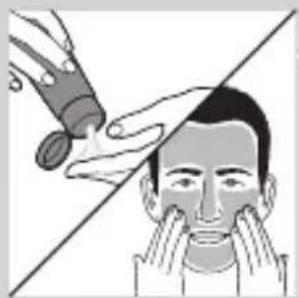
natural_image
Illustration of a person applying makeup to their face, showing hand holding a tool over the eye (no text or symbols)

natural_image
Illustration showing a person applying facial care to another person's face, with a magnified inset of the device (no text or symbols present)natural_image
Simple line drawing of a container with an upward arrow, no text or symbols presentnatural_image
Illustration of a blender with a black arrow indicating the process (no text or symbols present)natural_image
Diagram of a mechanical component with a downward arrow indicating rotation (no text or symbols)natural_image
Illustration of a spray bottle with a stopper and a prohibition symbol (no text or labels)natural_image
Close-up of a mechanical component with a downward arrow indicating force or direction (no text or symbols)natural_image
Hand holding a device with two circular buttons labeled 'Power' and 'Spiral', no visible text or symbolsnatural_image
Diagram of a mechanical component with two circular indicators (one checked, one not checked) and a checkmark symbol, no readable text or labels present.

natural_image
Diagram of a blender with a black arrow pointing to its internal component (no text or symbols present)
natural_image
Diagram of a mechanical component with a downward arrow indicating direction (no text or symbols)natural_image
Illustration of a hand using a tool to lift a cup (no text or symbols visible)natural_image
Illustration of a hand holding a circular object with an arrow pointing to a three-tiered mechanical component (no text or symbols)natural_image
Illustration of a hand pouring liquid into a container with a dropper (no text or symbols)natural_image
Illustration of a hand holding a circular object with a downward arrow, alongside a close-up of a mechanical component (no text or symbols)natural_image
Illustration of a hand holding a circular object with an upward arrow, next to a stylized object (no text or symbols)natural_image
Diagram showing a divided mechanical component with arrows indicating rotation or assembly (no text or symbols)natural_image
Illustration of a mechanical device with fluid flow and components, no text or symbols presentnatural_image
Mechanical gear assembly diagram showing a downward arrow and concentric rings (no text or symbols)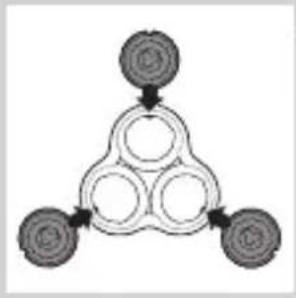
flowchart
graph TD
    A[" "] --> B[" "]
    B --> C[" "]
    C --> D[" "]
    D --> A
natural_image
Diagram showing a circular object being lifted by a black arrow, forming a ring-like structure (no text or symbols)natural_image
Diagram showing mechanical components with arrows indicating motion or force, no readable text or symbols presentnatural_image
Illustration of two hands holding a tool with directional arrows indicating movement (no text or symbols)natural_image
Illustration of two hands using a tool to lift or lift a shoe, separated by a diagonal line (no text or symbols)natural_image
Two cartoon fish jumping over a diagonal line, one falling and the other wading (no text or symbols)natural_image
Illustration of a shoe being squeezed from a bottle into a container (no text or symbols)natural_image
Illustration of a hand crushing debris with a magnified inset showing a pile of waste (no text or symbols)natural_image
Diagram of a mechanical component with a top component and an arrow indicating upward motion (no text or symbols)natural_image
Two identical objects hanging from a diagonal line, each with a spring or spring attached (no text or symbols visible)natural_image
Illustration of mechanical components including a drum, cloth, and baseplate arranged on a diagonal line (no text or symbols)natural_image
Illustration of a medical device with a downward arrow indicating force or movement (no text or symbols)natural_image
Simple line drawing of a spray bottle with a handle and spout (no text or symbols)natural_image
Diagram of a mechanical component with a top cylindrical part and an upward arrow, no text or symbols present.natural_image
Simple line drawing of a human body with a speech bubble containing a skull icon (no text or symbols)natural_image
Illustration of a hand holding a circular object with an upward arrow, next to a stylized mechanical component (no text or symbols)natural_image
Diagram showing a hand holding three circular objects above a divided line, with an inset illustrating the process of adding a battery (no text or symbols present)flowchart
graph TD
    A[" "] --> B[" "]
    B --> C[" "]
    C --> D[" "]
    D --> A
natural_image
Diagram showing a circular object being lifted by a downward arrow into a ring structure (no text or symbols)natural_image
Diagram showing two circular components with arrows indicating motion or flow, separated by a diagonal line (no text or symbols)natural_image
Illustration of a hand holding a circular object with a downward arrow, next to a separate view of a mechanical component (no text or symbols)natural_image
Illustration of a hand holding a screwdriver and a foot, with no visible text or symbolsnatural_image
Illustration of two mechanical components with directional arrows indicating motion (no text or symbols)natural_image
Two identical car seats with a diagonal line dividing them, one showing an upward arrow (no text or symbols)natural_image
Illustration of a robotic arm cutting a tool with a tool, showing mechanical components and motion (no text or symbols)natural_image
No sign depicting a faucet without any text or symbols
natural_image
No sign depicting a faucet with a diagonal line and a diagonal line, crossed out by a diagonal line (no text or symbols)Chú y
natural_image
Simple line drawing of a showerhead spraying over a water-filled container (no text or symbols)natural_image
Diagram of a medical or laboratory procedure showing a pointed tool interacting with a star-shaped object (no text or symbols present)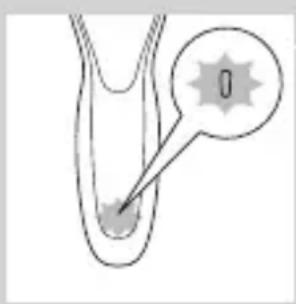
natural_image
Diagram of a biological structure with a labeled point '0' and an arrow pointing to a feature (no text or symbols beyond the label)natural_image
Diagram of a biological structure with a highlighted circular region and arrow pointing to a specific cell (no text or labels)natural_image
Diagram of a biological or anatomical structure with a labeled point '0' and an arrow pointing to a circular feature (no text or symbols beyond the label)natural_image
Diagram of a biological or medical structure with an arrow pointing to a star-shaped feature, no text or symbols present.natural_image
Diagram of a medical or laboratory procedure showing a pointed tool interacting with a circular component (no text or symbols present)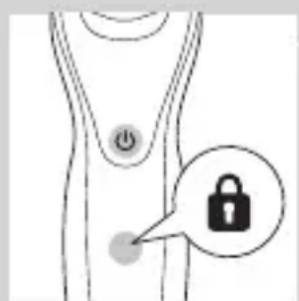
natural_image
Line drawing of a human torso with a padlock icon and a button (no text or symbols)natural_image
Simple line drawing of a human body with a speech bubble containing a skull icon (no text or symbols)natural_image
Diagram showing a hand pressing down on a surface with arrows indicating force or movement, and an inset magnified view of a mechanical component (no text or symbols)natural_image
Close-up of a mechanical component with a downward arrow indicating force or direction (no text or symbols)Sử dụng máy cạo râu
Bật và tắt thiết bị

natural_image
Hand holding a button with a power symbol (no text or labels)1 public sector public sector public sector public sector public sector public sector public sector public sector public sector public sector public sector public sector public sector public sector public sector public sector public sector public sector public sector public sector public sector public sector public sector public sector public sector public sector public sector public sector public sector public sector public sector public sector public sector public sector public sector public sector public sector public sector public sector public sector public sector public sector public sector public sector public sector public sector public sector public sector public sector public sector public Sector Public Sector Public Sector Public Sector Public Sector Public Sector Public Sector Public Sector Public Sector Public Sector Public Sector Public Sector Public Sector Public Sector Public Sector Public Sector Public Sector Public Sector Public Sector Public Sector Public Sector Public Sector Public Sector Public Sector Public Sector Public Sector Public Sector Public Sector Public Sector Public Sector Public Sector Public Sector Public Sector Public Sector Public Sector Public Sector Public Sector Public Sector Public Sector Public Sector Public Sector Public Sector Public Sector Public Sector Public Sector Public Sector Public Sector Public Sector Public Sector Public Sector Public Sector Private Sector Public Sector Private Sector Private Sector Private Sector Private Sector Private Sector Private Sector Private Sector Private Sector Private Sector Private Sector Private Sector Private Sector Private Sector Private Sector Private Sector Private Sector Private Sector Private Sector Private Sector Private Sector Private Sector Private Sector Private Sector Private Sector Private Sector Private Sector Private Sector Private Sector Private Sector Private Sector Private Sector Private Sector Private Sector Private Sector Private Sector Private Sector Private Sector Private Sector Private Sector Private Sector Private Sector Private Sector Private Sector Private Sector Private Sector Private Sector Private Sector Private Sector Private Sector Private Sector private sector private sector private sector private sector private sector private sector private sector private sector private sector private sector private sector private sector private sector private sector private sector private sector private sector private sector private sector private sector private sector private sector private sector private sector private sector private sector private sector private sector private sector private sector private sector private sector private sector private sector private sector private sector private sector private sector private sector private sector private sector private sector private sector private sector private sector private sector private sector private sector private sector private sector private-sector private sector private-sector private-sector private-sector private-sector private-sector private-sector private-sector private-sector private-sector private-sector private-sector private-sector private-sector private-sector private-sector private-sector private-sector private-sector private-sector private-sector private-sector private-sector private-sector private-sector private-sector private-sector private-sector private-sector private-sector private-sector private-sector private-sector private-sector private-sector private-sector private-sector private-sector private-sector private-sector private-sector private-sector private-sector private-sector private-sector private-sector private-sector private-sector private-sector private-sector private-sector private-
2 publicly state publical publical publical publical publical publical publical publical publical publical publical publical publical publical publical publical publical publical publical publical publical publical publical publical publical publical publical publical publical publical publical publical publical publical publical publical publical publical publical publical publical publical publical publical publical publical publical publical publical publical publica
natural_image
Illustration of a person applying makeup to their ear with a brush (no text or symbols)natural_image
Line drawing of a person's face with a hand near the ear, showing a stylized eye or mask (no text or symbols)Cạo râu ướt
natural_image
Line drawing of a person's head and neck with a hand near the ear area (no text or symbols)
natural_image
Illustration of a hand using a water spray to lift a small object (no text or symbols visible)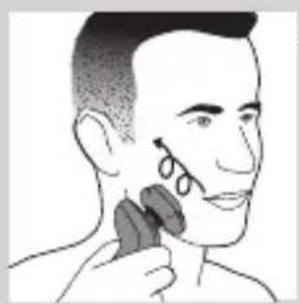
natural_image
Illustration of a person applying a hair accessory to their face (no text or symbols present)natural_image
Diagram showing a hand holding a device with a circular component and a cross symbol, no text or labels present.natural_image
Diagram of a funnel pouring liquid into a curved pipe, with an inset showing a graduation cap (no text or symbols)natural_image
Diagram showing a spray gun on a curved surface with an inset close-up of the spray (no text or symbols)natural_image
Line drawing of a person applying makeup to their ear (no text or symbols)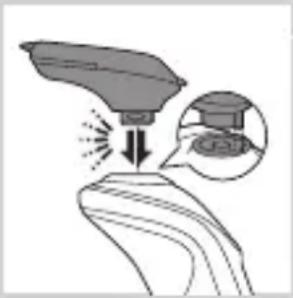
natural_image
Illustration of a hand holding a device with an inset showing a close-up of its component (no text or symbols present)natural_image
Illustration of a hairbrush cutting into a toothbrush with an arrow indicating the process (no text or symbols)natural_image
Illustration of a man with a beard eating a pipe (no text or symbols)natural_image
Illustration of two hands holding a tool with directional arrows indicating movement or force (no text or symbols present)
natural_image
Line drawing of a man applying a hair accessory to her neck (no text or symbols)
natural_image
Illustration of a dropper dispensing liquid into a container with an inset showing a graduation cap (no text or symbols)
natural_image
Illustration of a mechanical component with fluid flow, no text or symbols presentnatural_image
Illustration of a person applying facial care to their face, with no visible text or symbolsnatural_image
Illustration showing two individuals applying facial care to their face, with a magnified inset of the first eye (no text or symbols present)natural_image
Simple line drawing of a paintbrush with a cross mark and spray effect (no text or symbols)natural_image
Simple line drawing of a container with an upward arrow, no text or symbols present

natural_image
Hand holding two circular buttons with 'Power' and 'Rotate' symbols, connected to a device (no text or labels visible)
natural_image
Diagram of a mechanical component with two circular indicators (one checked, one not checked) and a checkmark symbol, no readable text or labels present.

natural_image
Diagram of a blender with a plastic container inserted, showing internal components (no text or symbols)
natural_image
Diagram of a mechanical component with a downward arrow indicating direction (no text or symbols)natural_image
Illustration of a hand using a tool to lift a cup (no text or symbols present)natural_image
Illustration of a hand holding a circular object with an arrow pointing to a three-tiered mechanical component (no text or symbols)natural_image
Illustration of a hand pouring liquid into a container with a dropper (no text or symbols)natural_image
Illustration of a hand holding a circular object with a downward arrow, partially overlaid on a mechanical component (no text or symbols)natural_image
Illustration of a hand holding a circular object with an arrow pointing to a three-pin device (no text or symbols present)natural_image
Diagram showing a mechanical component with three circular features and directional arrows, intersected by a diagonal line (no text or symbols)natural_image
Illustration of two mechanical components with fluid flow, no text or symbols presentnatural_image
Mechanical gear assembly diagram showing a rotating shaft and housing (no text or symbols)natural_image
Diagram of a mechanical component with a circular top and downward arrow, no visible text or symbolsnatural_image
Diagram showing two circular components with arrows and a checkmark, no readable text or symbols presentnatural_image
Illustration of two hands holding a tool with directional arrows indicating movement or force (no text or symbols)
natural_image
Illustration of two hands pouring liquid from a bottle onto a shoe and a bag, separated by a diagonal line (no text or symbols)
natural_image
Two cartoon fish jumping over a diagonal line, one falling and the other wading (no text or symbols)
natural_image
Illustration of a hand holding a shoe with a tool above it, no text or symbols presentnatural_image
Illustration of a hand blowing bubbles with a magnified circular inset showing a pile of dust (no text or symbols)natural_image
Diagram of a mechanical component with a top component and an arrow indicating upward motion (no text or symbols)natural_image
Two hanging objects with ropes tied on a diagonal line, no text or symbols visiblenatural_image
Illustration of mechanical components and a gear mechanism (no text or symbols)natural_image
Illustration of a mechanical component with a downward arrow indicating motion (no text or symbols)natural_image
Diagram of a mechanical component with a downward arrow indicating force or direction (no text or symbols)natural_image
Diagram of a mechanical component with a top cylindrical part and an upward arrow, no text or symbols present.
natural_image
Illustration of a hand holding a circular object with an arrow pointing to a three-pin connector (no text or symbols)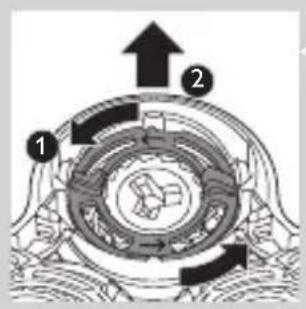

natural_image
Diagram showing a hand holding three cups above a divided tray and a magnified view of a cylindrical object inside (no text or symbols)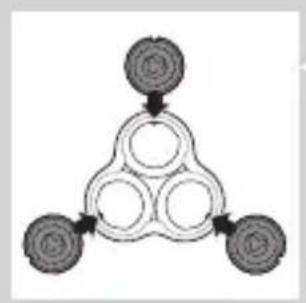
flowchart
graph TD
    A[" "] --> B[" "]
    B --> C[" "]
    C --> D[" "]
    D --> A
natural_image
Diagram showing a circular object with concentric rings above a ring, connected by a downward arrow (no text or symbols)natural_image
Diagram showing two mechanical components with arrows indicating motion or force, no text or symbols presentnatural_image
Illustration of a hand holding a circular object with a downward arrow, next to a mechanical component (no text or symbols)8 public health information and health information
Đặt mua phụ kiện
natural_image
Illustration showing a hand holding a tool and a small boat, with no visible text or symbolsnatural_image
Illustration of two skis with directional arrows indicating motion (no text or symbols)natural_image
Two views of a mechanical component with a diagonal line and an upward arrow, no visible text or symbolsnatural_image
Illustration of a hand using a tool to lift a small object, with no visible text or symbolsnatural_image
No sign depicting a faucet with a diagonal line, crossed out by a diagonal line (no text or symbols)
natural_image
Prohibition sign showing a faucet without raindrops, enclosed in a circle (no text)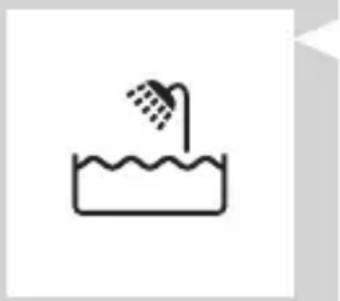
natural_image
Simple line drawing of a showerhead spraying over a water-filled basin (no text or symbols)natural_image
Diagram of a medical or laboratory procedure showing a pointed object with a magnified inset (no text or symbols)電池充電指示燈,1 個燈
natural_image
Diagram of a biological or mechanical structure with a highlighted region and a small circle containing the number 0 (no text or symbols present)電池充滿電
注意:本產品只能以無線方式使用。
natural_image
Diagram of a biological structure with a highlighted region and arrow, no text or symbols present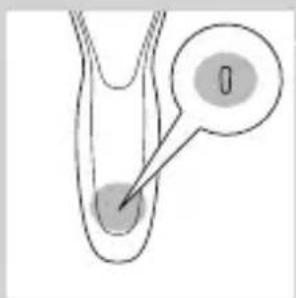
natural_image
Diagram of a biological structure with a labeled point '0' and an arrow pointing to a circular feature (no text or symbols beyond the label)- 電池充電指示燈,1 個燈
電量不足

natural_image
Diagram of a biological or anatomical structure with a magnified inset showing a rod-like feature (no text or symbols present)natural_image
Diagram of a biological or anatomical structure with a star-shaped annotation and arrow pointing to a region (no text or symbols present)- 電池充電指示燈,1 個燈
剩餘電池電量

natural_image
Diagram of a biological or anatomical structure with a magnified inset showing internal components (no text or labels)電池充電指示燈,3個燈

natural_image
Simple line drawing of a human body with a speech bubble containing a skull icon (no text or symbols)natural_image
Close-up of a mechanical component with a downward arrow indicating force or direction (no text or symbols)使用本電鬍刀
開啟及關閉本產品

natural_image
Illustration of a person applying makeup to their face with a brush (no text or symbols)natural_image
Illustration of a person's face with hand near ear area, no text or symbols present1 在皮膚上抹一點水。
2 將刮鬍泡或刮鬍凝膠抹到皮膚上。
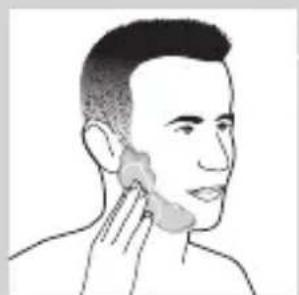
natural_image
Line drawing of a person's head and neck with a shaded area on the cheek (no text or symbols)natural_image
Illustration of a hand washing a small object with a water tap (no text or symbols)
natural_image
Illustration of a person applying makeup to their face with a brush (no text or symbols)natural_image
Diagram showing a hand holding a device with a cross symbol and an upward arrow, no text or labels present.natural_image
Illustration of a funnel pouring liquid into a curved pipe, with an inset showing a magnified view of the pipe (no text or symbols)natural_image
Illustration of a robotic arm with motion arrows and a magnified inset showing a mechanical component (no text or symbols)
natural_image
Illustration of a person applying a hair accessory to their ear (no text or symbols present)
natural_image
Illustration of a medical or laboratory procedure showing a device with a probe and magnified view of the process (no text or symbols)
natural_image
Cartoon illustration of a hairbrush cutting into a toothbrush (no text or symbols)

natural_image
Illustration of a man with a beard eating a spoon (no text or symbols)
natural_image
Illustration of two hands holding a curved object with directional arrows, one marked with a checkmark and the other with an 'X' (no text or symbols present)使用鬢角造型修容器配件
natural_image
Line drawing of a person applying a hair product to their ear (no text or symbols)natural_image
Illustration of a dropper dispensing liquid into a container with an inset showing a small object (no text or symbols)natural_image
Illustration of a mechanical component with motion lines indicating movement (no text or symbols)natural_image
Illustration of a person applying facial care to their face, with no visible text or symbolsnatural_image
Simple line drawing of a paintbrush with a cross mark, no text or symbols presentnatural_image
Illustration of a hand holding a small object with arrows indicating motion, alongside an inset showing a magnified view of a mechanical component (no text or symbols)natural_image
Close-up of a mechanical component with a downward arrow indicating force or direction (no text or symbols)natural_image
Hand holding two circular buttons with power and spiral symbols, connected to a device (no text or labels visible)natural_image
Technical line drawing of a mechanical component with two circular indicators (no text or symbols)
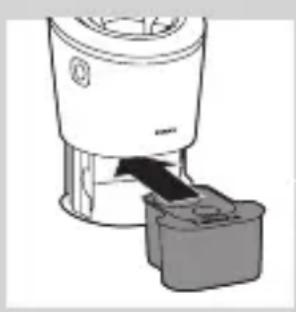
natural_image
Diagram of a blender with an arrow pointing to its internal component (no text or symbols present)
natural_image
Diagram of a mechanical component with a downward arrow indicating motion (no text or symbols)natural_image
Illustration of a hand washing a cup with water spray (no text or symbols)1 將電鬍刀組以溫水沖洗一段時間。
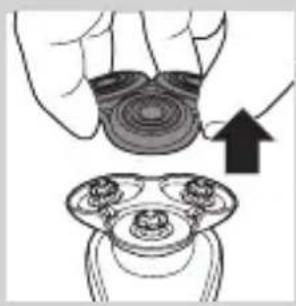
natural_image
Illustration of a hand holding a circular object with an arrow pointing to a separate view of a mechanical component (no text or symbols)natural_image
Illustration of a hand using a pipette to lift a small object into a dark container (no text or symbols)natural_image
Illustration of a hand holding a circular object with a downward arrow, alongside a close-up of a mechanical component (no text or symbols)natural_image
Illustration of a hand holding a circular object with an arrow pointing to a three-tiered mechanical component (no text or symbols)確定關閉本產品的電源。
natural_image
Diagram showing a hand holding three circular objects with arrows indicating direction, separated by a diagonal line (no text or symbols)natural_image
Illustration of two hands performing a manual valve operation with liquid and a gauze (no text or symbols)5 清洗後,請將刀片放回刀網中。

natural_image
Mechanical gear assembly diagram showing a rotating shaft and housing (no text or symbols)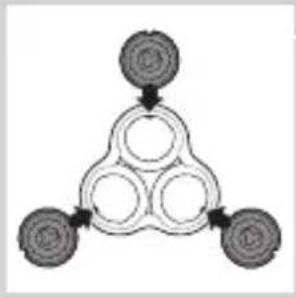
flowchart
graph TD
    A[" "] --> B[" "]
    B --> C[" "]
    C --> D[" "]
    D --> A
6 將電鬍刀刀頭裝回電鬍刀刀頭固定座。

natural_image
Diagram of a mechanical or electrical component with a circular top and downward arrow, no visible text or symbolsnatural_image
Diagram showing two circular components with arrows and a checkmark, no readable text or symbols presentnatural_image
Illustration of two hands holding a tool with directional arrows indicating movement or force (no text or symbols)
natural_image
Illustration of two hands pouring liquid from a bottle onto a surface, separated by a diagonal line (no text or symbols)
natural_image
Two cartoon fish jumping over a diagonal line, one falling and the other wading (no text or symbols)
natural_image
Illustration of a shoe being lifted by a bag, showing hair being lifted (no text or symbols)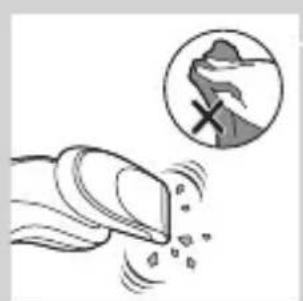
natural_image
Illustration of a hand crushing a rock with a magnified inset showing a pile of rocks (no text or symbols)natural_image
Diagram of a mechanical component with a top cylindrical part and an arrow indicating upward motion (no text or symbols)清潔潔面刷配件
每次使用潔面刷配件後都要清潔。
natural_image
Two identical mechanical components hanging from a diagonal line, no text or symbols visiblenatural_image
Illustration of a device with sound waves and a bell, no text or symbols present
natural_image
Illustration of a medical device with a downward arrow indicating compression or dissection (no text or symbols)
natural_image
Simple line drawing of a spray bottle with a handle and spout (no text or symbols)更换
更換潔面刷刷頭

natural_image
Simple line drawing of a mechanical component with a top and base, no text or symbols present.natural_image
Diagram of a human body with a speech bubble containing a skull icon and directional arrows, no text or symbols present.natural_image
Illustration of a hand holding a circular object with an arrow pointing to a three-pin ring (no text or symbols)natural_image
Diagram showing a divided container with three cups and a close-up of a circular object (no text or symbols)flowchart
graph TD
    A[" "] --> B[" "]
    B --> C[" "]
    C --> D[" "]
    D --> A
5 將新的電鬍刀刀頭放入固定座。

natural_image
Diagram showing a circular object being lifted by a black arrow into a ring-like structure (no text or symbols)natural_image
Diagram showing two circular components with arrows and a checkmark, no readable text or symbols presentnatural_image
Illustration of a hand holding a circular object with a downward arrow, partially overlaid on a mechanical component (no text or symbols)natural_image
Illustration showing a tool interacting with a device and a separate mechanical component (no text or symbols)natural_image
Two illustrations of a scooter climbing a slope, one with directional arrows indicating motion (no text or symbols)natural_image
Two types of shoe covers shown side by side, one with a black arrow indicating upward motion (no text or symbols)natural_image
Diagram showing two mechanical components with a tool, one being inserted and the other holding a tool (no text or symbols present)natural_image
No sign depicting a faucet with a diagonal line and a diagonal line, crossed out by a diagonal line (no text or symbols)
natural_image
No sign depicting a faucet with a diagonal line, crossed out by a diagonal line (no text or symbols)
natural_image
Simple line drawing of a showerhead spraying over a water-filled basin (no text or symbols)natural_image
Diagram of a medical or laboratory procedure showing a pointed object inside a tube with an arrow pointing to it, and a magnified inset showing a thermometer (no text or symbols present)电池充电指示灯(1级指示)
natural_image
Diagram of a biological or mechanical structure with a labeled point '0' and an arrow pointing to a feature (no text or symbols beyond the label)电池已完全充满
natural_image
Diagram of a biological structure with a highlighted region and arrow, no text or symbols present
- 电池充电指示灯(1级指示)
电池电量不足
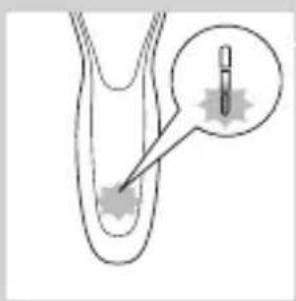
natural_image
Diagram of a medical or laboratory procedure showing a pointed tool interacting with a curved structure, with an inset magnified view (no text or symbols)natural_image
Diagram of a biological or anatomical structure with a star-shaped annotation and arrow pointing to a region (no text or symbols present)- 电池充电指示灯(1 级指示)
电池剩余电量
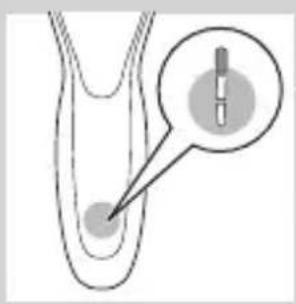
natural_image
Diagram of a biological structure with a magnified inset showing a droplet or droplet inside (no text or labels)电池充电指示灯(3级指示)
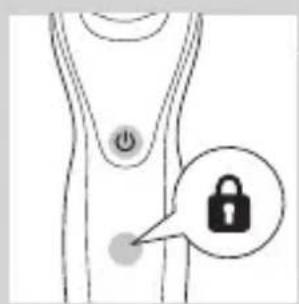
更换剃须刀头

natural_image
Simple line drawing of a human body with a speech bubble containing a skull icon (no text or symbols)natural_image
Illustration of a hand holding a small object with arrows indicating motion or force, and a magnified inset showing a close-up of a mechanical component (no text or symbols)natural_image
Close-up of a mechanical component with a downward arrow indicating force or direction (no text or symbols)natural_image
Illustration of a person applying makeup to their face with a circular brush (no text or symbols)natural_image
Line drawing of a person's face with hand near ear area (no text or symbols)natural_image
Line drawing of a person applying a product to their ear (no text or symbols)natural_image
Illustration of a hand washing a water tap with splashing bubbles (no text or symbols)
natural_image
Illustration of a person applying a hair product to their face (no text or symbols)使用卡入式附件

natural_image
Diagram showing a hand holding a device with a circular component and a cross symbol, no text or labels present.natural_image
Illustration of a funnel pouring liquid into a curved pipe, with an inset showing a graduation cap (no text or symbols)natural_image
Illustration of a spray gun on a curved surface with an inset showing a spray gun (no text or symbols)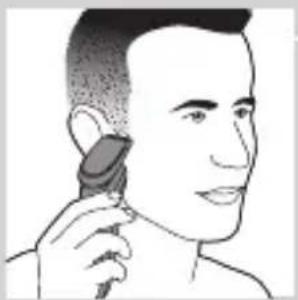
natural_image
Line drawing of a person using a hairbrush to trim the ear (no text or symbols)使用胡须造型器附件
natural_image
Illustration of a hand holding a leaf with a magnified inset showing a graduation cap (no text or symbols)使用带修剪梳的胡须造型器附件
natural_image
Line drawing of a hairbrush cutting into a circular shape with a downward arrow (no text or symbols)natural_image
Illustration of a man with a beard eating a small bowl (no text or symbols)natural_image
Illustration of two hands holding a device with directional arrows indicating movement (no text or symbols)1 将修剪梳从配件中拉出。
natural_image
Line drawing of a person applying a hair accessory to their neck (no text or symbols)简体中文232

natural_image
Illustration of a dropper dispensing liquid into a container with an inset showing a small object (no text or symbols)
natural_image
Illustration of a mechanical component with motion lines indicating movement (no text or symbols)
natural_image
Illustration of a person applying makeup to their face with a tool, no text or symbols present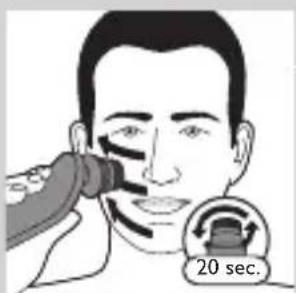

使用洁面刷附件
natural_image
Illustration showing a person applying facial care to another person's face, with a magnified inset of the device (no text or symbols present)natural_image
Simple line drawing of a container with an upward arrow, no text or symbols present4 将密封圈从清洁滤芯上拔下。

natural_image
Diagram of a blender with a black arrow indicating the process (no text or symbols present)natural_image
Diagram of a mechanical component with a downward arrow indicating direction (no text or symbols)natural_image
Illustration of a spray bottle with a stopper and a prohibition symbol (no text or labels)使用高效智能清洁系统
natural_image
Illustration of a hand holding a small object with arrows indicating motion, alongside a magnified inset showing a close-up of a mechanical component (no text or symbols)natural_image
Close-up of a mechanical component with a downward arrow indicating force or direction (no text or symbols)natural_image
Hand holding two circular buttons with power and spiral symbols, connected to a device (no text or labels visible)natural_image
Technical line drawing of a mechanical component with two circular indicators (no text or symbols)

natural_image
Diagram of a blender with a black arrow pointing to its base, showing mechanical components (no text or symbols)
natural_image
Diagram of a mechanical component with a downward arrow indicating motion (no text or symbols)natural_image
Illustration of a hand washing a cup with water spray (no text or symbols)1 在热水龙头下冲洗剃须刀头部件片刻。

natural_image
Illustration of a hand holding a circular object with an arrow pointing to a separate view of a device (no text or symbols present)natural_image
Illustration of a hand using a pipette to lift a small object into a container (no text or symbols visible)natural_image
Illustration of a hand holding a circular object with a downward arrow, alongside a close-up of a mechanical component (no text or symbols)natural_image
Illustration of a hand holding a circular object with an arrow pointing to a three-tiered mechanical component (no text or symbols)确保产品电源已关闭。
2 逆时针旋转固定环并将其取下。
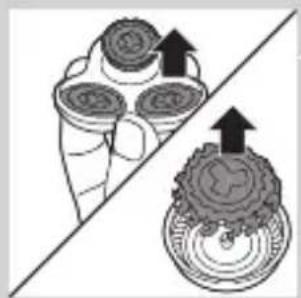
natural_image
Diagram showing a hand holding three circular objects with arrows pointing upward, separated by a diagonal line (no text or symbols)natural_image
Illustration of two hands performing a manual valve operation with liquid and a gauze (no text or symbols)5 清洁后,将刀片放回网罩中。

natural_image
Mechanical gear assembly diagram showing a rotating shaft and housing (no text or symbols)
flowchart
graph TD
    A[" "] --> B[" "]
    B --> C[" "]
    C --> D[" "]
    D --> A
6 将剃须刀头装回到剃须刀头支架中。

natural_image
Diagram of a mechanical or electrical component with a circular top and downward arrow, no visible text or symbolsnatural_image
Diagram showing two circular components with arrows indicating motion, separated by a diagonal line (no text or symbols)natural_image
Illustration of two hands holding a tool, with arrows indicating movement or force direction (no text or symbols)
natural_image
Illustration of two hands spraying water onto a surface, one with liquid and the other with residue (no text or symbols)
natural_image
Two cartoon-style illustrations of a fish and a boot, separated by a diagonal line (no text or symbols)
natural_image
Illustration of a shoe being lifted by a tool, showing the blade and handle (no text or symbols)
natural_image
Illustration of a funnel-shaped object emitting particles, with an inset showing a hand holding a rock and a cross symbol (no text or labels)natural_image
Diagram of a mechanical component with a top cylindrical part and an upward arrow indicating motion (no text or symbols)清洗洁面刷附件
每次使用后都要清洗洁面刷附件。
natural_image
Two identical mechanical components hanging from a diagonal line, no text or symbols visible3 用温水和中性肥皂彻底清洁两个部件。

natural_image
Illustration of mechanical components and a gear mechanism (no text or symbols)4 用毛巾擦干洁面刷附件。
存储
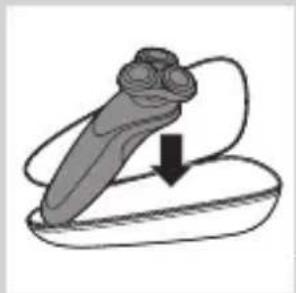
natural_image
Illustration of a stylized object with a curved arrow indicating motion or force (no text or symbols)注意: 随附的附件可能因产品而异。
包装盒将向您展示随附于您产品的附件。
natural_image
Simple line drawing of a spray bottle with a handle and spout (no text or symbols)natural_image
Simple line drawing of a mechanical component with a top and base, no text or symbols present.natural_image
Illustration of a hand holding a circular object with an arrow pointing to a three-pin ring (no text or symbols)3 逆时针旋转固定环并将其取下。

natural_image
Diagram showing a divided container with three cups and a close-up of a circular object (no text or symbols)4 将剃须刀头从剃须刀头支架上卸下并丢弃。

flowchart
graph TD
    A[" "] --> B[" "]
    B --> C[" "]
    C --> D[" "]
    D --> A
5 将新的剃须刀头放在支架中。

natural_image
Diagram showing a circular object being lifted by a black arrow into a ring (no text or symbols)natural_image
Diagram showing two circular components with arrows and a checkmark, no readable text or symbols presentnatural_image
Illustration of a hand holding a circular object with a downward arrow, next to a mechanical component (no text or symbols)natural_image
Illustration of a hand operating a screwdriver on a flat surface, with a separate close-up showing the same tool (no text or symbols present)只有在丢弃剃须刀时才可取下充电电池。
请确保在取下电池时电量已完全耗尽。
注意,电池带非常锋利。

natural_image
Two illustrations of a scooter climbing a slope, one with directional arrows indicating motion (no text or symbols)natural_image
Diagram showing two mechanical components with an upward arrow, no text or symbols present3 脱开安全钩,取下电源部件的前面板。

natural_image
Diagram showing two mechanical components with a tool, one being inserted and the other holding a tool (no text or symbols present)natural_image
Illustration of a hand using a tool to adjust or install a mechanical component, with no visible text or symbols.ضمانت و پشتیبانى
natural_image
Illustration of a hand holding a tool and a small object, both on a diagonal line (no text or symbols)
natural_image
Illustration of two skis in motion, one with directional arrows indicating movement (no text or symbols)natural_image
Two views of a mechanical component with arrows indicating motion or assembly (no text or symbols)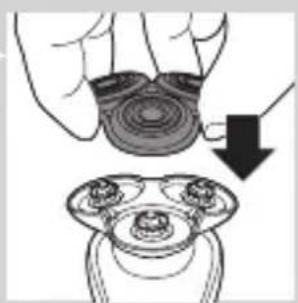
natural_image
Illustration of a hand holding a circular object with a downward arrow, next to a mechanical component (no text or symbols)
بسمفارش دادن لوازم
natural_image
Diagram showing a hand holding three circular objects above a diagonal line, with an inset illustrating a tool interacting with a battery (no text or symbols present)
flowchart
graph TD
    A[" "] --> B[" "]
    B --> C[" "]
    C --> D[" "]
    D --> A
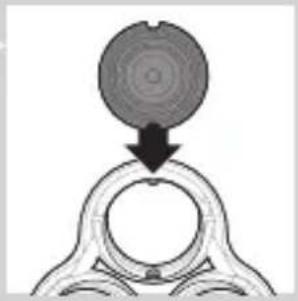
natural_image
Diagram showing a circular object being lifted by a black arrow into a ring structure (no text or symbols)

natural_image
Diagram showing mechanical components with arrows indicating motion or force, no readable text or symbols presentتعويض
natural_image
Diagram of a mechanical component with a top cylindrical part and an upward arrow, no text or symbols present.تعويض سريهاي اصدح
natural_image
Simple line drawing of a human body with a speech bubble containing a skull icon (no text or symbols)
natural_image
Illustration of a hand holding a circular object with an arrow pointing to a three-pin ring (no text or symbols)natural_image
Diagram of a mechanical or electrical component with directional arrows and labeled components (no readable text or symbols)natural_image
Two identical objects hanging from a diagonal line, one with a bulb and the other with a base, both emitting vapor or steam (no text or symbols visible)
natural_image
Illustration of mechanical components including a drum, roller, and base (no text or symbols)نگهداری
natural_image
Simple line drawing of a mechanical component with an arrow indicating downward motion (no text or symbols)
natural_image
Diagram of a mechanical component with a top handle and internal gear-like structure (no text or symbols)natural_image
Illustration of two hands pouring liquid from a bottle onto a surface, separated by a diagonal line (no text or symbols)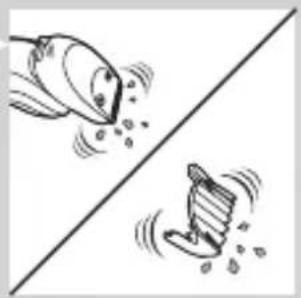
natural_image
Two cartoon fish jumping over a diagonal line, one falling and the other wading (no text or symbols)
natural_image
Simple line drawing of a shoe being lifted by a tool, no text or symbols present
natural_image
Illustration of a hand blowing bubbles with motion lines, accompanied by a magnified circular icon showing a hand holding a rock (no text or symbols)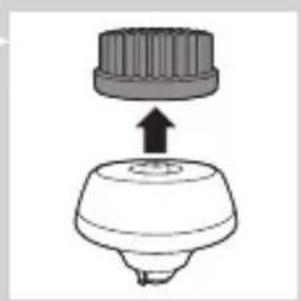
natural_image
Diagram of a mechanical component with a cylindrical top and a flanged base, showing an upward arrow (no text or symbols)
natural_image
Diagram showing a mechanical component with arrows indicating motion, divided by a diagonal line (no text or symbols)
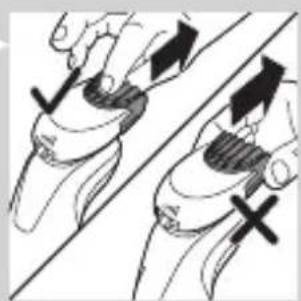
natural_image
Illustration of two hands holding a tool with directional arrows indicating movement or force (no text or symbols present)natural_image
Diagram showing a divided container with three circular cavities and an upward arrow, alongside a separate circular object with cross symbols (no text or labels)
natural_image
Illustration of two mechanical components with fluid flow, no text or symbols present
natural_image
Mechanical gear assembly diagram showing a rotating shaft and gear teeth (no text or labels)
flowchart
graph TD
    A["Top Node"] --> B["Three Circles"]
    B --> C["Bottom Left Node"]
    B --> D["Bottom Right Node"]

natural_image
Diagram showing a circular object being lifted by a black arrow, with no visible text or symbols.natural_image
Illustration of a hand holding a circular object with an arrow pointing to a three-part mechanical component (no text or symbols)
natural_image
Illustration of a hand pouring liquid into a container with a dropper (no text or symbols)
natural_image
Illustration of a hand holding a circular object with a downward arrow, partially overlaid on a mechanical component (no text or symbols)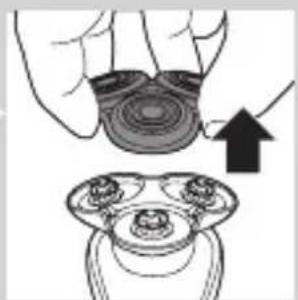
natural_image
Illustration of a hand holding a circular object with an arrow pointing to a three-tiered mechanical component (no text or symbols)
natural_image
Mechanical diagram showing a rotating component with directional arrows and labeled points (no text or symbols)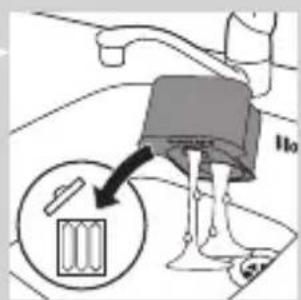
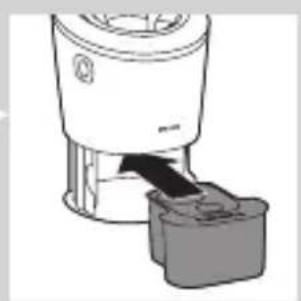
natural_image
Diagram of a blender with a black arrow indicating a process, showing no text or symbols
natural_image
Diagram of a mechanical component with a downward arrow indicating rotation (no text or symbols)
natural_image
Illustration of a hand washing a small object with a water dispenser above (no text or symbols)natural_image
Diagram showing foot positioning and impact technique with arrows indicating movement (no text or symbols)
natural_image
Hand holding two circular buttons with spiral patterns, connected to a device (no text or symbols visible)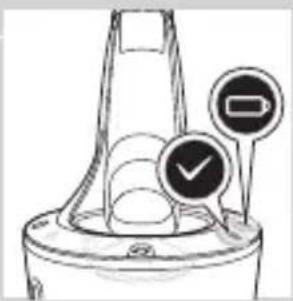
natural_image
Line drawing of a blender with a black arrow pointing to its tip, next to a gray plastic container (no text or symbols)
natural_image
Mechanical component diagram showing a lever mechanism with a downward arrow indicating motion (no text or symbols)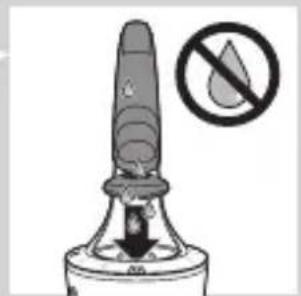
natural_image
Warning symbol of a fire extinguisher with no text or labels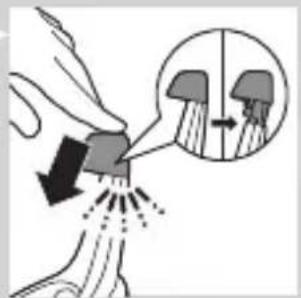
natural_image
Diagram showing a hand holding a small object with arrows indicating motion or force, and an inset magnified view of a mechanical component (no text or symbols)
natural_image
Close-up of a mechanical component with a downward arrow indicating force or direction (no text or symbols)natural_image
Illustration showing two people applying facial care to their face, one with a magnified inset of the first eye (no text or symbols present)تميزکردن و نگهداری

natural_image
Simple line drawing of a container with an upward arrow and label 'SAR' (no text or symbols on the diagram itself)natural_image
Illustration of a hand pouring liquid into a container with a brush (no text or symbols)
natural_image
Illustration of a person applying facial care to their face, with no visible text or symbols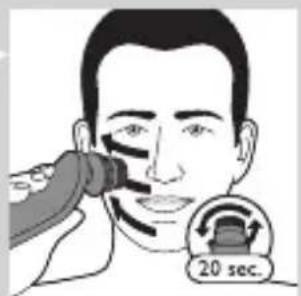


natural_image
Diagram of a hand holding a device with directional arrows indicating motion (no text or symbols)
natural_image
Illustration of a man with beard and mustache eating a spoon (no text or symbols)
natural_image
Illustration of two hands holding a curved object with directional arrows indicating movement or force (no text or symbols)
natural_image
Line drawing of a person applying a hair accessory to their ear (no text or symbols)
natural_image
Illustration of a dropper tip dispensing liquid into a surface, with an inset showing a magnified view of the dropper's tip (no text or symbols present)natural_image
Diagram of a mechanical device with a funnel and base, showing a close-up inset of a component (no text or symbols)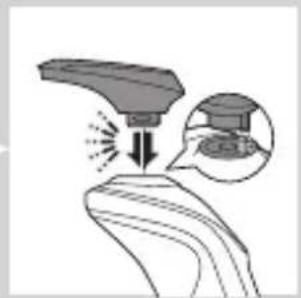
natural_image
Illustration of a robotic arm with motion arrows and a magnified inset showing a small object (no text or symbols)
natural_image
Line drawing of a person applying makeup to their ear (no text or symbols)
natural_image
Illustration of a robotic arm with a spray gun and a magnified inset showing the hand positioning (no text or symbols)
natural_image
Line drawing of a hairbrush cutting into a pair of scissors (no text or symbols)natural_image
Line drawing of a person applying a product to their ear (no text or symbols)
natural_image
Illustration of a hand using a water spray machine to lift a small object (no text or symbols visible)
natural_image
Illustration of a person applying a hair product to their ear (no text or symbols)
natural_image
Diagram showing a device with a bulb and a cross symbol, no text or labels presentاستفاده ازريش تراش
natural_image
Hand holding a small black dot next to a power button icon (no text or symbols present)دوره تطابق پوست
natural_image
Illustration of a person applying makeup to their face with a brush (no text or symbols)
natural_image
Illustration of a person's face with hand near mouth, showing skin texture (no text or symbols)شارز کردن
natural_image
Simple line drawing of a mechanical component with a downward arrow indicating force or direction (no text or symbols)natural_image
Illustration of two shoe legs with arrows indicating motion or force, no text or symbols present


باتری ضعیف
natural_image
Diagram of a medical or laboratory procedure showing a pointed tool interacting with a star-shaped object, with an inset magnified view (no text or symbols)natural_image
Diagram of a biological or anatomical structure with a highlighted region and a star-shaped annotation (no readable text or symbols)natural_image
Diagram of a biological structure with a magnified inset showing a central cell or vesicle (no text or labels)يادآوری تمیزکردن
natural_image
Diagram of a medical or laboratory procedure showing a pointed tool interacting with a small object, with no visible text or symbols.
natural_image
Diagram of a biological structure with a highlighted circular region containing a vertical bar (no text or symbols present)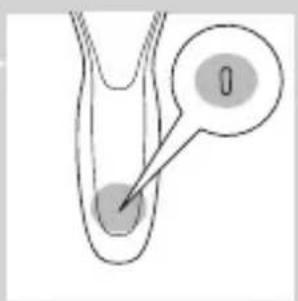
natural_image
Diagram of a biological structure with a labeled point '0' and an arrow pointing to a circular feature (no text or symbols beyond the label)natural_image
No sign depicting a faucet with a diagonal line and raindrops, commonly used in public safety measures (no text)
natural_image
No sign depicting a faucet with a diagonal line and a diagonal line, crossed out by a diagonal line (no text or symbols)مقدمه
natural_image
Illustration of a hand holding a tool with an arrow indicating motion, no text or symbols presentالضمان والدعم
natural_image
Illustration of three mechanical components: a tool, a curved component, and a small boat (no text or symbols)
natural_image
Two types of skis shown side by side, one with directional arrows indicating motion or movement (no text or symbols)
natural_image
Two views of a mechanical component with arrows indicating direction, no text or symbols present
natural_image
Illustration of a hand holding a circular object with a downward arrow, next to a mechanical component (no text or symbols)
طلب المлечات
natural_image
Diagram showing a hand holding three circular objects above a diagonal line, with an inset illustrating a battery cell (no text or symbols present)

flowchart
graph TD
    A["Top Circle"] --> B["Three Circles"]
    B --> C["Bottom Circle"]
    C --> A

natural_image
Diagram showing a circular object being lifted by a black arrow, forming a ring structure (no text or symbols)

natural_image
Diagram showing two mechanical components with a checkmark indicating a detail (no text or symbols present)الاستبideal
natural_image
Diagram of a mechanical component with a top cylindrical part and an upward arrow, no text or symbols present.natural_image
Simple line drawing of a human body with a speech bubble containing a skull icon (no text or symbols)
natural_image
Illustration of a hand holding a circular object with an arrow pointing to a three-pin connector (no text or symbols)natural_image
Diagram of a mechanical or electrical component with directional arrows and labeled components (no readable text or symbols)natural_image
Diagram of a mechanical component with a top cylindrical part and an upward arrow, no text or symbols present.
natural_image
Two identical objects hanging from a diagonal line, each with a bulbous structure attached (no text or symbols visible)
natural_image
Illustration of mechanical components including a drum, drumbell, and bow tie arranged on a diagonal line (no text or symbols)التخزين
natural_image
Illustration of a medical or anatomical device with a downward arrow indicating motion (no text or symbols)
natural_image
Diagram of a hairdryer with a handle and spout, showing mechanical components (no text or symbols)natural_image
Illustration of two hands holding a tool with directional arrows indicating movement or force (no text or symbols present)
natural_image
Illustration of two hands pouring liquid from a bottle onto a surface, separated by a diagonal line (no text or symbols)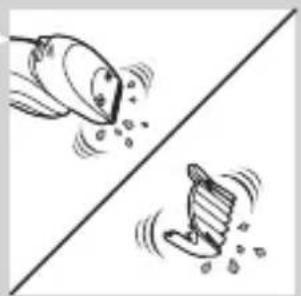
natural_image
Two cartoon fish jumping over a diagonal line, one falling and the other wading (no text or symbols)
natural_image
Illustration of a foot stepping on a shoe with a tool inserted (no text or symbols)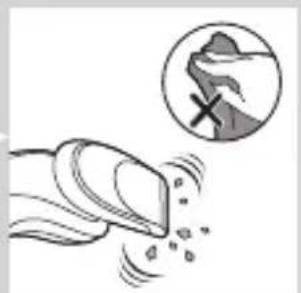
natural_image
Illustration of a hand blowing bubbles with a magnified circular inset showing a rock face (no text or symbols)flowchart
graph TD
    A[" "] --> B[" "]
    B --> C[" "]
    C --> D[" "]
    D --> A

natural_image
Diagram showing a circular object being lifted by a black arrow, forming a ring-like structure (no text or symbols)

natural_image
Diagram showing two circular components with arrows and a checkmark, no readable text or symbols present
natural_image
Illustration of a hand holding a circular object with an arrow pointing to a three-dot object on a ring (no text or symbols)
natural_image
Mechanical diagram showing a rotating motor or gear assembly with directional arrows (no text or labels)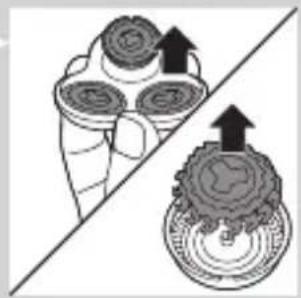
natural_image
Diagram showing a divided container with three circular objects and upward arrows indicating rotation or movement (no text or symbols)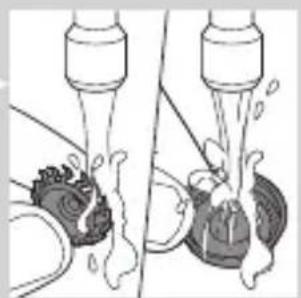
natural_image
Illustration of a hand turning a valve with liquid, showing mechanical components and fluid flow (no text or symbols)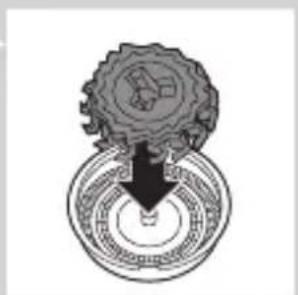
natural_image
Mechanical gear assembly diagram showing a rotating shaft and gear teeth (no text or labels)natural_image
Mechanical component diagram showing a lever with a downward arrow indicating motion (no text or symbols)
natural_image
Illustration of a hand washing a cup with a water dispenser (no text or symbols)
natural_image
Illustration of a hand holding a circular object with an arrow pointing to a three-cylinder-shaped object (no text or symbols)
natural_image
Illustration of a hand pouring liquid into a container with a dropper (no text or symbols)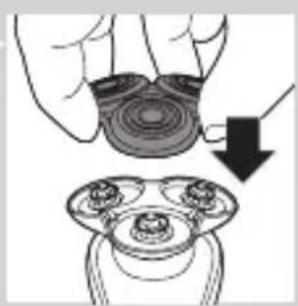
natural_image
Illustration of a hand holding a circular object with a downward arrow, next to a mechanical component (no text or symbols)natural_image
Technical line drawing of a mechanical component with two circular indicators (no text or symbols)


natural_image
Illustration of a blender with a black arrow pointing to its tip, next to a gray container (no text or symbols)
natural_image
Simple line drawing of a container with an upward arrow and label 'SARMA' (no text or symbols on the diagram itself)
natural_image
Illustration of a blender with a black plastic cup inserted (no text or symbols)
natural_image
Diagram of a mechanical component with a downward arrow indicating force or direction (no text or symbols)natural_image
Illustration of a person applying facial care to their face, with a hand holding a tool near the eye (no text or symbols present)

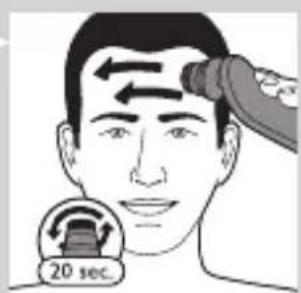

natural_image
Illustration showing a person applying facial care to another person's face, with no visible text or symbolsالتنظيف والصيانة
natural_image
Illustration of a man with beard and pipe, no text or symbols present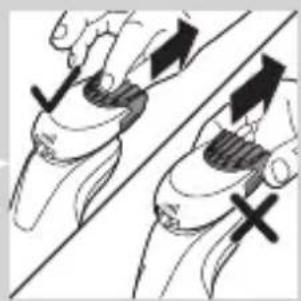
natural_image
Illustration of two hands holding a curved object with arrows indicating movement or force direction (no text or symbols)
natural_image
Line drawing of a person applying a hair accessory to their ear (no text or symbols)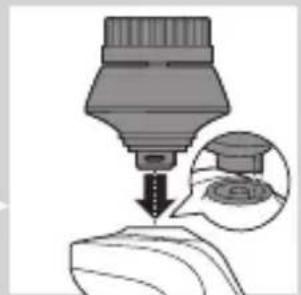
natural_image
Illustration of a mechanical tool tip pressing down on a surface, with an inset showing a magnified view of a small object (no text or symbols present)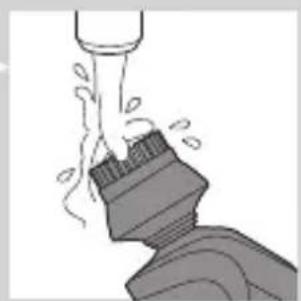
natural_image
Illustration of a mechanical component with fluid flow, no text or symbols presentnatural_image
Illustration of a robotic arm with motion arrows and a magnified inset showing internal components (no text or symbols)
natural_image
Line drawing of a person applying makeup to their ear (no text or symbols)
natural_image
Illustration of a hand holding a leaf with a magnified inset showing a small object (no text or symbols)
natural_image
Line drawing of a hairbrush cutting into a pair of fingers (no text or symbols)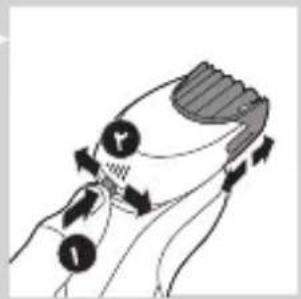
natural_image
Three-step illustration showing a person applying facial hair to another person's ear, with no text or symbols present.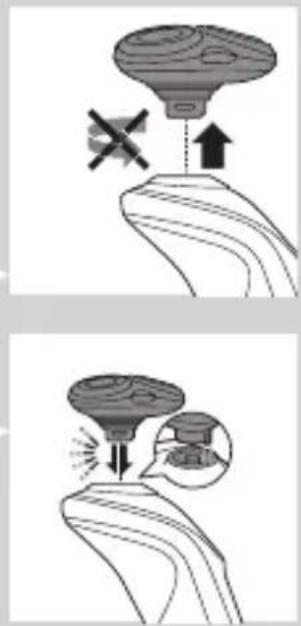
فترة تأqlلم البشرة
natural_image
Illustration of a person applying facial contour or mask to their cheek (no text or symbols)
natural_image
Illustration of a person's face with hand near ear area, showing facial features (no text or symbols)

natural_image
Simple line drawing of a mechanical component with a downward arrow indicating force or direction (no text or symbols)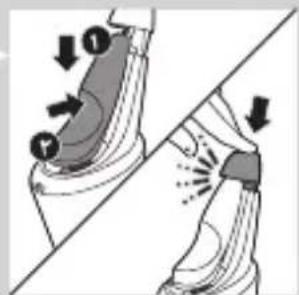
natural_image
Diagram showing foot positioning and impact technique with arrows indicating movement (no text or symbols)قال السفر


الشحن
natural_image
Diagram of a medical or laboratory procedure showing a pointed tool interacting with a small object, with no visible text or symbols.
natural_image
Diagram of a medical or laboratory procedure showing a pointed tool inserted into a tube with an inset magnified view (no text or labels)natural_image
Diagram of a medical or laboratory procedure showing a pointed tool interacting with a small object (no text or symbols present)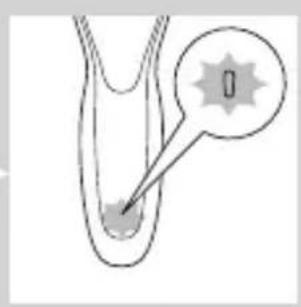
natural_image
Diagram of a biological structure with a labeled region (no text or symbols present)natural_image
Diagram of a biological structure with a highlighted region and arrow, no text or symbols present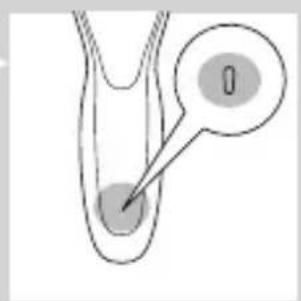
natural_image
Prohibition sign showing a faucet crossed out by a diagonal line, indicating no barrier to the water (no text present)
natural_image
Prohibition sign showing a faucet crossed out by a diagonal line, indicating no barrier to work or damage.مقدمة
- Always here to help you
- Introduction
- General description (Fig. 1)
- Important safety information
- Danger
- Warning
- Caution
- Electromagnetic fields (EMF)
- General
- The display
- Charging
- Battery charge indicator with 3 lights
- Battery charge indicator with 1 light
- Battery fully charged
- Battery low
- Remaining battery capacity
- 'Unplug for use' reminder
- Cleaning reminder
- Travel lock
- Activating the travel lock
- Deactivating the travel lock
- Replacing shaving heads
- Charging with the adapter
- Charging in the SmartClean system (specific types only)
- Using the shaver
- Switching the appliance on and off
- Shaving
- Skin adaptation period
- Wet shaving
- Using the click-on attachments
- Removing or attaching the click-on attachments
- Using the trimmer attachment
- Using the beard styler attachment
- Using the beard styler attachment with comb
- Using the beard styler attachment without comb
- Using the cleansing brush attachment
- Cleaning and maintenance
- Cleaning the shaver in the SmartClean system (specific types only)
- Preparing the SmartClean system for use
- Using the SmartClean system
- ENGLISH20
- Replacing the cartridge of the SmartClean System
- ENGLISH22
- Cleaning the shaver under the tap
- Thorough cleaning method
- ENGLISH24
- Cleaning the click-on attachments
- Cleaning the beard styler attachment
- Cleaning the trimmer attachment
- Cleaning the cleansing brush attachment
- Storage
- Replacement
- Replacing the cleansing brush head
- Replacing the shaving heads
- Replacement reminder
- Ordering accessories
- Shaving heads
- Recycling
- Removing the rechargeable shaver battery
- Guarantee and support
- Guarantee restrictions
- Troubleshooting
- Problem Possible cause Solution
- Pendahuluan
- Perhatian
- Medan elektromagnet (EMF)
- Mengaktifkan travel lock
- Menonaktifkan travel lock
- Tekan tombol on/off selama 3 detik.
- Pencukuran basah
- INDONESIA52
- Mengganti kartrid Sistem SmartClean
- Penyimpanan
- 주의
- EMF(전자기장)
- 배터리 충전 표시등(표시등 3개)
- 배터리 충전 표시등(표시등 1개)
- 배터리 부족
- 남은 배터리 용량
- 습식 면도
- 스마트클린 시스템 사용
- 트리머 액세서리 세척
- 교체
- 클렌징 브러쉬 헤드 교체
- Awas
- Mengaktifkan kunci kembara
- BAHASA MELAYU120
- BAHASA MELAYU124
- ข้อควรระวัง
- การเปลี่ยนขุดหัวโกน
- ระยะปรับสภาพผิว
- Chú y
- Sử dụng máy cạo râu
- Bật và tắt thiết bị
- Cạo râu ướt
- Đặt mua phụ kiện
- 電池充電指示燈,1 個燈
- 電池充滿電
- 電量不足
- 剩餘電池電量
- 電池充電指示燈,3個燈
- 使用本電鬍刀
- 開啟及關閉本產品
- 使用鬢角造型修容器配件
- 清潔潔面刷配件
- 更换
- 更換潔面刷刷頭
- 电池充电指示灯(1级指示)
- 电池已完全充满
- 电池电量不足
- 电池剩余电量
- 电池充电指示灯(3级指示)
- 更换剃须刀头
- 使用卡入式附件
- 使用胡须造型器附件
- 使用带修剪梳的胡须造型器附件
- 简体中文232
- 使用洁面刷附件
- 使用高效智能清洁系统
- 清洗洁面刷附件
- 存储
- ضمانت و پشتیبانى
- بسمفارش دادن لوازم
- تعويض
- تعويض سريهاي اصدح
- نگهداری
- تميزکردن و نگهداری
- استفاده ازريش تراش
- دوره تطابق پوست
- شارز کردن
- باتری ضعیف
- يادآوری تمیزکردن
- مقدمه
- الضمان والدعم
- طلب المлечات
- الاستبideal
- التخزين
- التنظيف والصيانة
- فترة تأqlلم البشرة
- قال السفر
- الشحن
- مقدمة
Brand : PHILIPS
Model : 7000 series S7550
Category : Razor