Mini 400 - Radio ETON - Free user manual and instructions
Find the device manual for free Mini 400 ETON in PDF.



| Product type | Analog portable radio |
| Brand | ETON |
| Model | Mini 400 |
| Frequency ranges | FM: 87-108 MHz MW (AM): 520-1710 kHz SW: SW1 and SW2 bands (shortwave) |
| Power supply | 2 AAA batteries (2×1.5 V) or DC 5 V AC adapter (positive polarity) |
| Speaker | Diameter 40 mm, impedance 4 Ω, power 0.25 W |
| Headphone jack | 3.5 mm |
| Dimensions (L × H × D) | 69 × 110 × 13 mm |
| Weight (without batteries) | Approximately 80 g |
| Main features | FM/AM/SW radio, alarm, wake-up, key lock, earphones |
| Time setting | With radio off, hold down the button, set hours and minutes |
| Alarm setting | Hold down alarm button, set hour and minutes, then activate |
| Antenna | Telescopic for FM/SW, internal ferrite for MW |
| Maintenance and cleaning | Clean with a dry cloth; do not use detergents or solvents |
| Safety | Do not expose to rain or moisture; unplug during storms; do not open the housing |
| Batteries | Use high-quality alkaline batteries; do not mix types or ages; remove if not used for a long time |
| Warranty | Limited warranty; register at www.etoncorp.com or by mail |
| Customer service | USA: 1-800-872-2228, Canada: 1-800-637-1648, other: 650-903-3866 |
Frequently Asked Questions - Mini 400 ETON
User questions about Mini 400 ETON
0 question about this device. Answer the ones you know or ask your own.
Ask a new question about this device
Download the instructions for your Radio in PDF format for free! Find your manual Mini 400 - ETON and take your electronic device back in hand. On this page are published all the documents necessary for the use of your device. Mini 400 by ETON.
USER MANUAL Mini 400 ETON
Super Compact AM/FM Shortwave Radio with Digital Display
OWNER'S MANUAL
Do You Need Help? Contact Us.
If you need help, please contact us, Monday-Friday, 8:30 a.m.-4:00 p.m., North American Pacific Time. 1-800-872-2228 from the U.S; 1-800-637-1648 from Canada; 650-903-3866, worldwide; FAX: 650-903-3867; web site, www.etoncorp.com; Etón Corporation, 1015 Corporation Way, Palo Alto, CA 94303, USA
WARNING
- Do not expose this appliance to rain or moisture.
- Do not submerge or expose for extended period to water.
- Protect from high humidity and rain.
- Unplug immediately if liquid has been spilled or object have fallen into the apparatus.
- Clean only with a dry cloth. Do not use detergents or chemical solvents as this might damage the finish.
- Unplug and disconnect external antennas (not included) during lightning storms.
- Do not remove cover [or back].
Refer servicing to qualified service personnel.
Disposal
According to the European Directive 2002/96/EC all electrical and electronic products must be collected separately by a local collection system. Please act according to your local rules and do not dispose of your old products with your normal household waste.

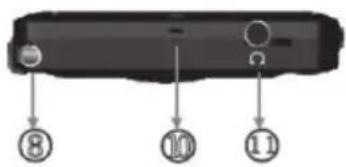
Top
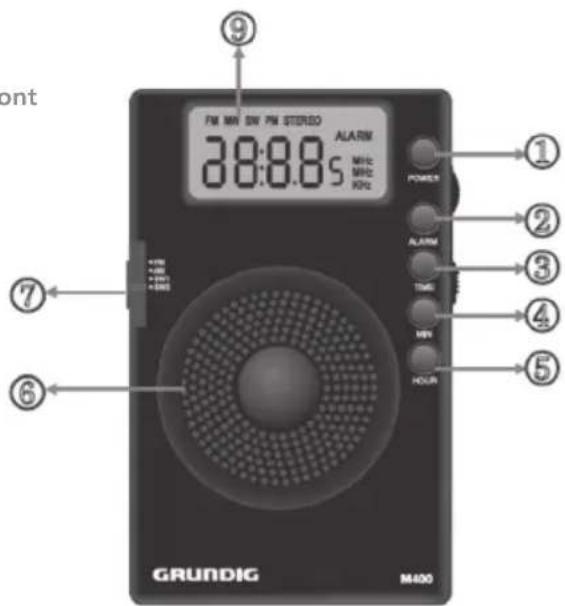
Front
- Power
- Strap Hole
- Alarm
- Earphone Jack
- Time
- Battery Compartment's Cover
- Minute +/-
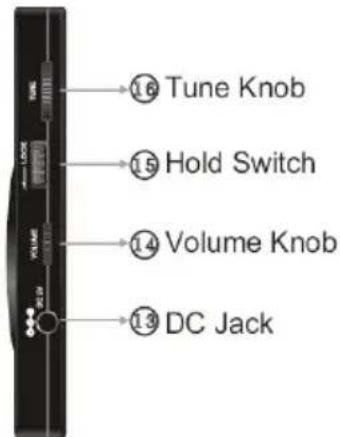
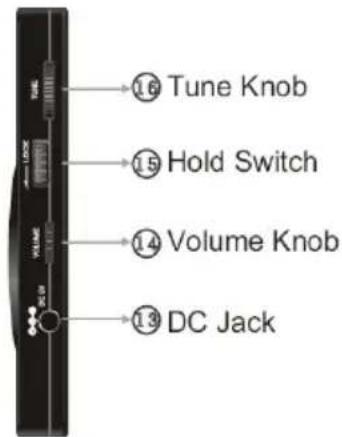
- DC Jack
- Hour +/-
- Volume Knob
- Speaker
- Lock
- Band Switch
- Tune Knob
- Telescopic Antenna
- Display
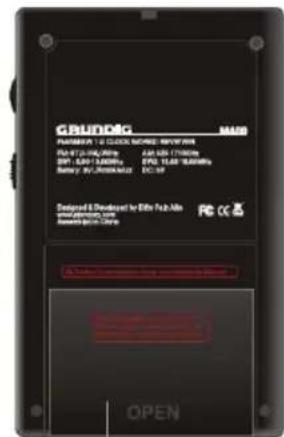
Back
Right Side
Battery Compartment's Cover
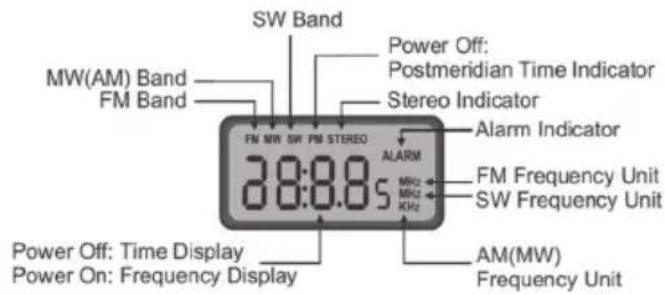
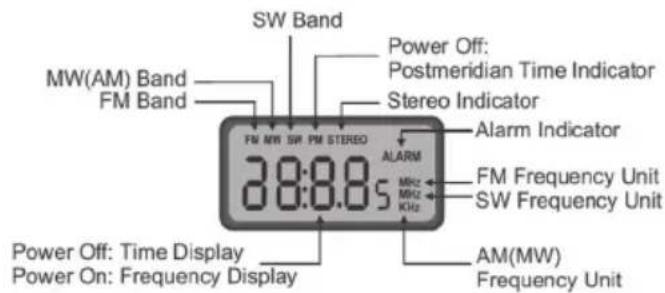
Display
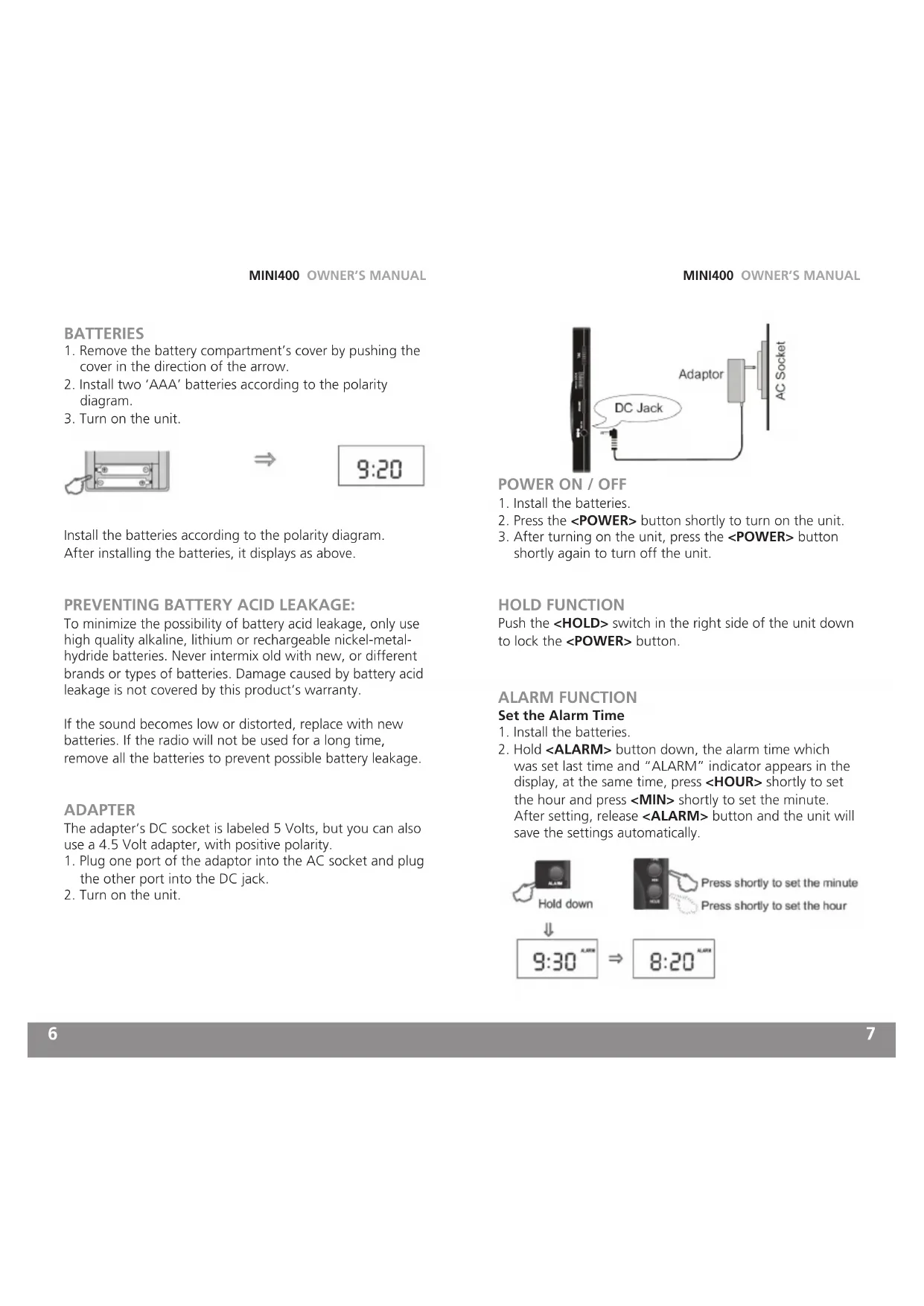
BATTERIES
- Remove the battery compartment's cover by pushing the cover in the direction of the arrow.
- Install two 'AAA' batteries according to the polarity diagram.
- Turn on the unit.

Install the batteries according to the polarity diagram. After installing the batteries, it displays as above.
PREVENTING BATTERY ACID LEAKAGE:
To minimize the possibility of battery acid leakage, only use high quality alkaline, lithium or rechargeable nickel-metal-hydride batteries. Never intermix old with new, or different brands or types of batteries. Damage caused by battery acid leakage is not covered by this product's warranty.
If the sound becomes low or distorted, replace with new batteries. If the radio will not be used for a long time, remove all the batteries to prevent possible battery leakage.
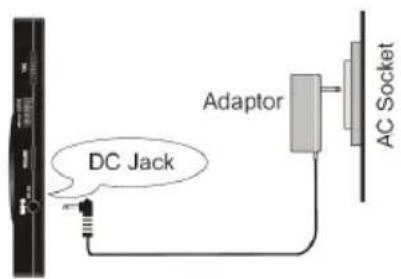
ADAPTER
The adapter's DC socket is labeled 5 Volts, but you can also use a 4.5 Volt adapter, with positive polarity.
- Plug one port of the adaptor into the AC socket and plug the other port into the DC jack.
- Turn on the unit.
POWER ON/OFF
- Install the batteries.
- Press the
button shortly to turn on the unit. - After turning on the unit, press the
button shortly again to turn off the unit.
HOLD FUNCTION
Push the
ALARM FUNCTION
Set the Alarm Time
- Install the batteries.
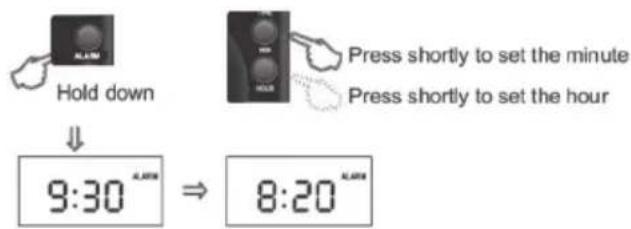
- Hold
button down, the alarm time which was set last time and "ALARM" indicator appears in the display, at the same time, press shortly to set the hour and press shortly to set the minute. After setting, release button and the unit will save the settings automatically.
Activate the Alarm Function
- After setting the alarm time, select the band.
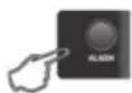
- Press
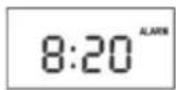
button shortly, the "ALARM" indicator appears and the alarm function is activated. - When reach the alarm time, the unit will turn on automatically and play the program which you selected.
Deactivate the Alarm Function
Press
ADJUST THE VOLUME
- Turn on the unit.
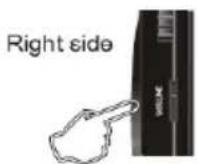
- Rotate the
knob to adjust the volume.
SELECT THE BAND
- Turn on the unit.
- Push the
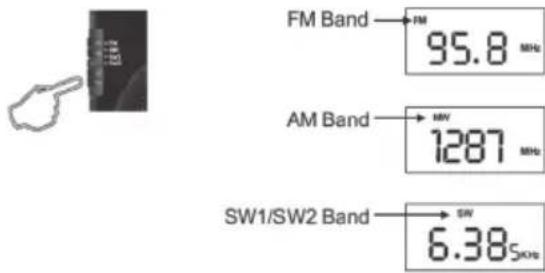
switch to select FM/AM/SW1/SW2.
NOTES:
When selecting the FM band, "FM" appears in the display; when selecting the AM (MW) band, "MW" appears in the
display; when selecting the SW1/SW2 band, "SW" appears in the display.
TUNING IN STATIONS
- Turn on the unit.
- Adjust the volume.
- Select the band.
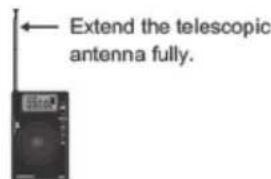
- When listening to FM and SW programs: Extend the telescopic antenna fully, get very close to a window, rotate the
knob and rotate the antenna for best reception.
When listening to AM (MW):
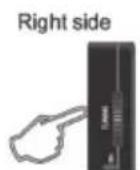
The radio uses an internal, directional, ferrite bar antenna for AM (MW). Please rotate the
NOTE: When listening to AM (MW) you need not extend the telescopic antenna.
Shortwave allows listening to stations from around the world. During the day, listen above 13 MHz. At night, listen below 13 MHz. To learn more use a search site on the Internet or use the two books below:
PASSPORT TO WORLD BAND RADIO Published by International Broadcasting Services (IBS); IBS North America, Box 300, Penn's Park PA 18943. Phone: (215) 598-9018. www.passband.com.
WORLD RADIO TV HANDBOOK Published in the USA by Watson-Guptill Publications, 770 Broadway, 7th Floor, New York, NY 10003-9595. www.watsonguptill.com.
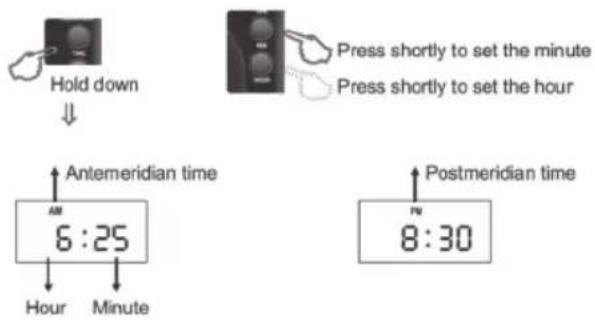
SETTING THE TIME
- Install the batteries.
- With the radio off, hold down the
CAUTIONS:
- Do not expose the radio to sunlight, leave it close to a heat source, or leave it in a place with excessive dust or mechanical shock.
- Do not expose the radio to rain or a humid environment.
- Do not change or modify the radio.
- Remove the batteries if the radio is not to be used for a long time. Otherwise, there may be battery acid leakage and/or corrosion. Battery acid leakage and the damage caused by leaked batteries are not covered by this warranty.
USING EARPHONES
- Please do not use earphones at a high volume and do not use it for extended periods of time.
- Please turn off the radio before sleeping.
- Please do not use the earphones while driving or riding/ walking across a road.
SPECIFICATIONS
- Frequency Range
FM:87-108MHz
MW:520-1710KHz
SW1:5.90-10.00MHz
SW2:11.65-18.00MHz
- Noise Limit Sensitivity
FM ≤ 10μV
MW≤1mv/m
SW≤ 30 V
-
Signal Selection ≥ 40dB
-
Power Supply
Batteries: 2xAAA Size (2x1.5V)
DC:5V
- Speaker: D40mm 4Ω 0.25W
- Earphones: D3.5mm
- Dimensions: 69 × 110 × 13 mm
- Weight: Approx 80g (excl. Batteries)
WARRANTY REGISTRATION
To ensure full warranty coverage or product updates, registration of your product should be completed as soon as possible after purchase or receipt. You may use one of the following options to register your product:
- By visiting our website at http://www.etoncorp.com.
- Mail in enclosed warranty card.
- Mail your registration card or information to following address; include your name, full mailing address, phone number, email address, model purchased, date purchased, retail vendor name:
Etón Corporation
1015 Corporation Way
Palo Alto, CA 94303
USA
LIMITED WARRANTY
Retain the warranty information from your warranty card with your proof of purchase or the Limited Warranty information can also be viewed at www.etoncorp.com.
SERVICE FOR YOUR PRODUCT
To obtain service for your product, we recommend first contacting an Etón service representative at 1-800-872-2228 US, 1-800-637-1648 Canada, (650) 903-3866 US, customersvc@etoncorp.com or your respective country distributor in Europe (see enclosed list) for problem determination and trouble-shooting. If further service is required, the technical staff will instruct how to proceed based on whether the radio is still under warranty or needs non-warranty service.
WARRANTY - If your product is still in warranty and the Etón service representative determines warranty service is needed, a return authorization will be issued and instructions will be given. DO NOT ship your radio back without obtaining the return authorization.
NON-WARRANTY - If your product is no longer under warranty and requires service, the Etón service representative will refer you to the nearest repair facility that will best handle the repair.
For service outside North America, please refer to the distributor information included at time of purchase/receipt.
AVEZ-VOUS BESOIN D'AIDE?
Battery Compartment's Cover
Affichage
PILES
FUNCTION HOLD (blocage)
SW1 (onde courte, OC1): 5.90 - 10.00 MHz
SW2 (onde courte, OC2): 11.65 - 18.00 MHz
Corporate Headquarters
1015 Corporation Way
Palo Alto, California 94303 USA
tel +1 650-903-3866
tel +1 800-872-2228
fax +1 650-903-3867
Etón Canada
1 Yonge Street, Suite 1801
Toronto, Ontario M5E 1W7 Canada
tel +1 416-214-6885


- Do You Need Help? Contact Us.
- WARNING
- Disposal
- BATTERIES
- PREVENTING BATTERY ACID LEAKAGE:
- ADAPTER
- POWER ON/OFF
- HOLD FUNCTION
- ALARM FUNCTION
- Set the Alarm Time
- Activate the Alarm Function
- Deactivate the Alarm Function
- ADJUST THE VOLUME
- SELECT THE BAND
- NOTES:
- TUNING IN STATIONS
- When listening to AM (MW):
- SETTING THE TIME
- CAUTIONS:
- USING EARPHONES
- SPECIFICATIONS
- WARRANTY REGISTRATION
- LIMITED WARRANTY
- SERVICE FOR YOUR PRODUCT
- AVEZ-VOUS BESOIN D'AIDE?
- PILES
- FUNCTION HOLD (blocage)
Brand : ETON
Model : Mini 400
Category : Radio