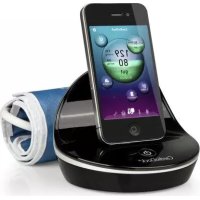
CardioDock 2 - Blood pressure monitor MEDISANA - Free user manual and instructions
Find the device manual for free CardioDock 2 MEDISANA in PDF.



| Product type | Electronic blood pressure monitor for upper arm |
| Brand and model | Medisana CardioDock 2 |
| Dimensions (housing) | Approx. 120 mm × 93.5 mm (diameter × height) |
| Weight | Approx. 213 g (without Apple device) |
| Power supply | Via USB (5 V===, 500 mA) or built-in Li-ion battery (3.7 V===, 500 mAh) |
| Measurement method | Oscillometric, single measurement or 3MAM (average of 3 measurements) |
| Inflation and deflation | Automatic by pump, automatic deflation |
| Blood pressure measurement range | 30 to 280 mmHg |
| Pulse measurement range | 40 to 200 beats/min |
| Static pressure accuracy | ±3 mmHg |
| Pulse accuracy | ±5% |
| Cuff (size M) | 22 to 32 cm, preformed, for adults |
| Apple compatibility | iPhone 3GS, 4, 4S / iPod touch 3rd and 4th generation / iPad 1 and 2 (iOS 5.0 or higher) |
| Main functions | Blood pressure / pulse measurement, arrhythmia detection, diary, statistics, email report sending, up to 4 user profiles |
| Care and cleaning | Soft cloth slightly soapy, do not immerse; cuff washable with soapy water, air dry |
| Safety | Emergency stop by Start/Stop button, automatic deflation in case of disturbance, distance > 30 cm from radio devices |
| Spare parts available | Cuff size M (ref. 51283), size L (ref. 51284) |
| Warranty | 3 years from purchase date |
| Operating conditions | +10 °C to +40 °C, relative humidity 15% to 90% |
| Storage | -20 °C to +55 °C, humidity 15% to 90% |
Frequently Asked Questions - CardioDock 2 MEDISANA
User questions about CardioDock 2 MEDISANA
0 question about this device. Answer the ones you know or ask your own.
Ask a new question about this device
Download the instructions for your Blood pressure monitor in PDF format for free! Find your manual CardioDock 2 - MEDISANA and take your electronic device back in hand. On this page are published all the documents necessary for the use of your device. CardioDock 2 by MEDISANA.
USER MANUAL CardioDock 2 MEDISANA
natural_image
Black and white photo of a CDTC Dock device with a small USB flash unit (no visible text or symbols on the device body)Instruction manual Please read carefully!
Description of the system..... 2 GB
Contents 3 GB
1 Explanation of symbols.... 5 GB
2 Safety Information....6 GB
3 Useful Information....11GB
4 Getting started....16 GB
5 Operation....21 GB
6 Miscellaneous ....30 GB
7 Warranty....35 GB
Please fold out this page and leave it folded out for quick reference.
text_image
Diagram of a smartwatch with labeled parts including top, front, back, and interior viewsnatural_image
VitaDock interface displaying bubbles labeled A, B, C, D against a teal gradient background (no readable text or symbols on bubbles)natural_image
Illustration of a person using a blood pressure monitor with an arrow indicating pressure direction (no text or symbols present)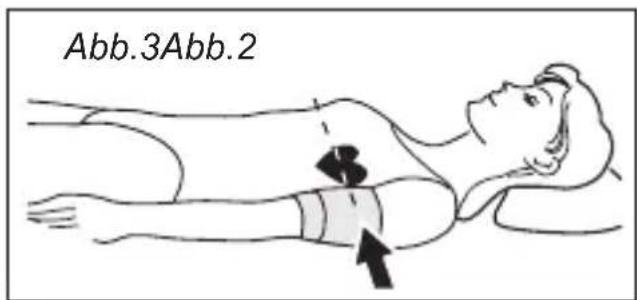
text_image
Abb.3Abb.2bubble
CardioDock Tagebuch 1 / 593 | Label | Value | |---|---| | systolic pressure (Systolic pressure) | 62 | | systolic volume (Systolic volume) | 122 | | Diastolic pressure (Diastolic pressure) | 79 | | systolic volume (Systolic volume) | 79 | | System pressure (SYS mmHg) | 50 | | Diastolic pressure (DIA mmHg) | 40 | 15.08.11 08:585.6.2 Tagebuch
natural_image
Simple line drawing of a trash bin with crossed lines indicating no waste or discharge (no text or symbols)Downloaded from WW.vanderboire.be
1 Connection slot on your iPhone, iPad or iPod touch
2 CardioDock blood pressure module
3 Upper arm pressure cuff
4 Air hose
5 CardioDock (rear view)
6 Connector for the cuff
7 Connection for micro USB plug
8 Start / Stop button
9 Connector for your iPhone, iPad or iPod touch
Description of the system 2
Contents.... 3
1 Explanation of symbols......
2 Safety Information
2.1 Tips for your well being.... 6
2.2 Important considerations 8
2.3 Information about the software 10
3 Useful Information
3.1 Items supplied and packaging 11
3.2 What is blood pressure? 12
3.3 How do you measure with CardioDock?...... 12
3.4 Why measure at home with CardioDock?...... 13
3.5 Blood pressure classification for adults 14
3.6 Influencing and evaluating readings.... 14
3.7 CardioDock as a charger for iPhone / iPad / iPod touch 15
4 Getting started
4.1 Charging the blood pressure module's battery...... 16
4.2 Installing the VitaDock® app 17
4.3 Settings 18
5 Operation
5.1 Putting on the upper arm pressure cuff ..... 21
5.2 Correct position for taking readings.... 21
5.3 Taking blood pressure readings 22
5.4 The measurement 24
5.5 3MAM measurement 25
5.6 Displaying and managing the measurements ..... 26
5.6.1 Statistics 26
5.6.2 Cardio diary 27
5.6.3 Sending a report ...... 27
5.7 Adding further user profiles 28
5.8 Deleting user profiles....29
6 Miscellaneous
6.1 Error messages 30
6.2 Care and maintenance 31
6.3 Guidelines / Standards 32
6.4 Disposal 32
6.5 Technical specifications.... 33
7 Warranty
7.1 Warranty and repair terms.... 35

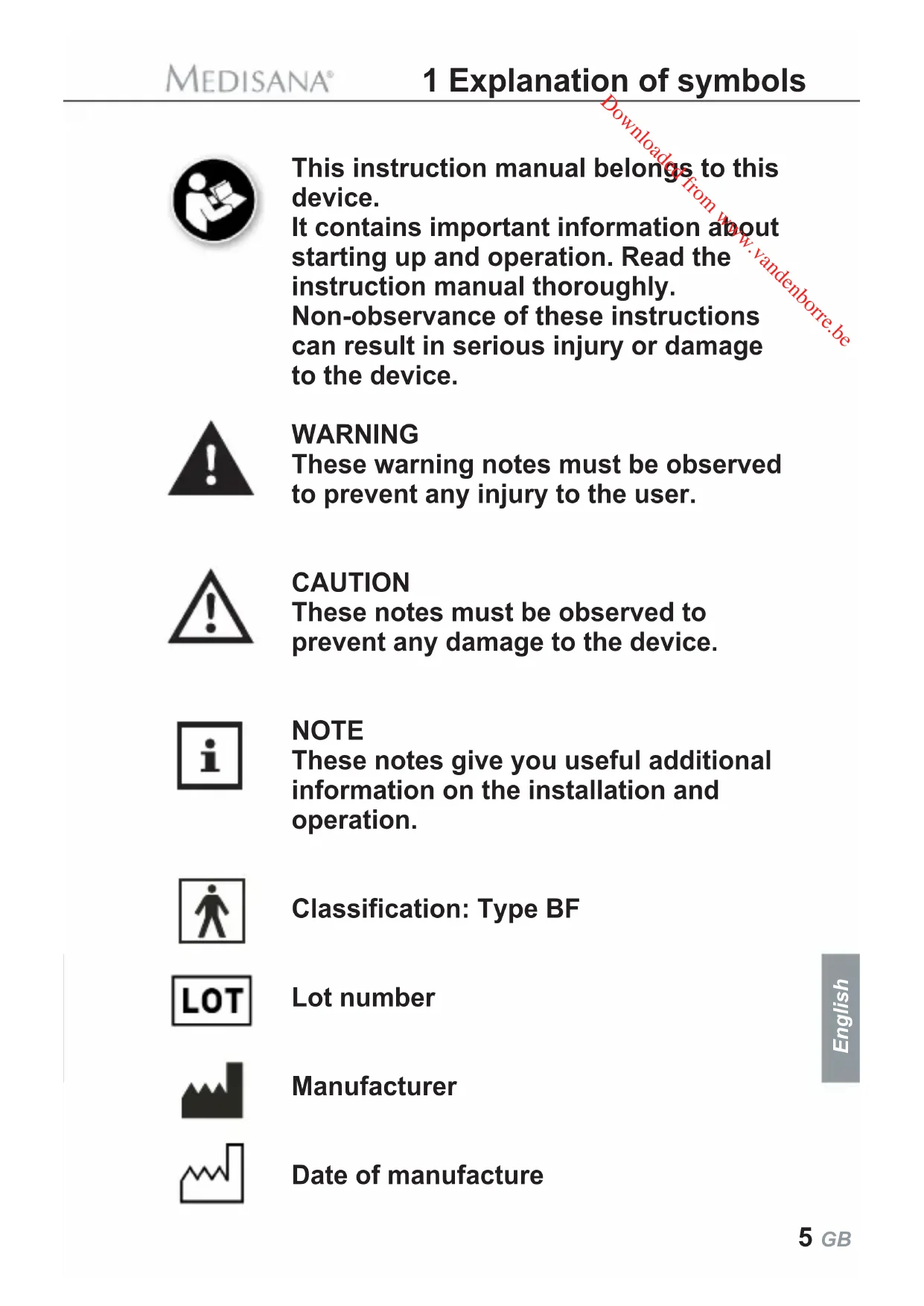
This instruction manual belongs to this device.
It contains important information about starting up and operation. Read the instruction manual thoroughly.
Non-observance of these instructions can result in serious injury or damage to the device.

WARNING
These warning notes must be observed to prevent any injury to the user.

CAUTION
These notes must be observed to prevent any damage to the device.

NOTE
These notes give you useful additional information on the installation and operation.

Classification: Type BF

Lot number

Manufacturer

Date of manufacture

IMPORTANT INFORMATION! RETAIN FOR FUTURE USE!
Read the instruction manual carefully before using this device, especially the safety instructions, and keep the instruction manual for future use.
Should you give this device to another person, it is vital that you also pass on these instructions for use.



Safety Information
2.1 Tips for your well being
Proper use
- The system is intended for measuring the blood pressure from the upper arm of an adult. It should be used together with Apple (iOS 5.0 or higher) devices (iPhone 3GS, 4, 4S / iPod touch 3^rd and 4 generation / iPad 1 + 2).
Contraindications
- The system is not suitable for measuring the blood pressure of children.
Ask your doctor before using it on older children. -
The device is not suitable for persons with acute arrhythmia.
-
Irregularity of pulse or arrhythmia can lead to difficulties in recording a correct reading when measurements are taken using oscillometric blood pressure devices. This device is electronically equipped to detect arrhythmia and what are known as movement artefacts, which it indicates on the display with the icon《♥》. In this case, the reading may be imprecise. Inform your doctor so that he or she can assess the situation.
- If you should suffer from conditions such as arterial occlusive disease, please consult your doctor before using the unit.
- The unit may not be used to check the heart rate of patients with a pacemaker.
- Pregnant patients should take their own personal state of health into consideration and take all necessary precautions before using the unit. If in doubt, consult your doctor.
- Should you experience discomfort or other complaints during measurement, for example pain in the upper arm, please take the following action: Press the Start/Stop button ⑧ on the CardioDock or the Stop button on the display to deflate the cuff immediately. Loosen the cuff and remove it from your arm. Please contact either your supplier or MEDISANA directly.
- Do not use the cuff on open wounds, in order to prevent the spread of infection.
• Patients with a weak pulse should raise their arm and open and close their hand around 10 times before taking a reading. This exercise optimizes the pulse and the measuring process.

WARNING
Do not take any therapeutic measures based on your own measurements! Never change the quantity of medication prescribed by your doctor!
2.2 Important considerations
- The CardioDock is only to be used for the specific purpose described in this instruction manual.
- The system is not intended for commercial use.
- Any misuse will void the warranty.
- On the rare occasion of a fault causing the cuff to remain fully inflated during measurement, open the cuff immediately.
- Do not operate the system in the vicinity of strong transmitters such as microwave and shortwave appliances. This may impair the correct functioning of the unit.
- To ensure CardioDock readings are accurate, keep at a minimum distance of about 30 cm from other wireless devices.
- If a call or a text message is received during a reading, the procedure is cancelled. The cuff deflates.
- This module is not designed to be used by persons (including children) with limited physical, sensory or mental abilities, or by persons with insufficient experience and/or knowledge, unless under observation by a person responsible for their safety, or unless they have been instructed in the use of the device.
• Children must be supervised to ensure that they do not play with the device.
- Do not use the module if it does not work properly, if it has been dropped or has fallen into water or become damaged.
- Do not use the module in damp environments.
- Protect the module from moisture. Should moisture enter the unit, stop using it immediately. In this case, please contact either your supplier or MEDISANA directly.
- If a fault occurs, do not try to repair the module yourself. Attempts to do so will void the warranty. Refer all servicing to authorized service personnel.
- Do not drop the module and protect it against impact and strong vibration.
• Always keep the module clean and store it in a safe place. Protect the module from direct sunlight to prolong its service life.
- For cleaning, follow the instructions in 6.2 Care and maintenance, page 31.
2.3 Information about the software
- Make sure that your Apple device is running on the latest operating system. For information about software updates, see the instructions for your Apple device.
- Make sure that your VitaDock app is updated at regular intervals. For information about App updates, see the instructions for your Apple device.
- Users should set password protection in the device settings and protect their user profile in VitaDock with a password.
- The app shows a window with a warning when you change settings. Before the changes come into effect, you have to confirm the warning message.
- For the module to function correctly, the Apple device has to be sufficiently charged. Users should have a power supply unit or a charging device to hand.
- Make sure that there is always enough memory available to back up the reading data on your Apple device.
- If you receive a call or a text message during a reading, the reading is cancelled for safety reasons. If you want to prevent your reading from being cancelled, we recommend switching your iPhone to flight mode.
Thank you very much
Thank you for your confidence in us and congratulations on your purchase!
By purchasing the CardioDock blood pressure module, you have gained a high-quality product made by MEDISANA. Experience the new standard in blood and pulse measurement. Measure your blood pressure easily and accurately with your iPod touch, iPad or iPhone. To derive the most success and to enjoy your CardioDock blood pressure module for a very long time, we recommend that you read the following information on the use and care of the appliance carefully.
3.1 Items supplied and packaging
Please check first of all that the device is complete and is not damaged in any way. In case of doubt, do not use the appliance and contact your supplier or your service centre.
The following parts are included:
• 1 CardioDock blood pressure module
• 1 Preformed upper arm cuff size M (22 - 32 cm)
• 1 USB cable for charging battery
• 1 Carrying case
• 1 Instruction manual
If you notice any transport damage during unpacking, please contact your supplier without delay.

WARNING
Please ensure that the polythene packing is kept away from the reach of children! Risk of suffocation!
3.2 What is blood pressure?
Blood pressure is the pressure created in the blood vessels by each heart beat. When the heart contracts (= systolic) and pumps blood into the arteries, it brings about a rise in pressure. The highest value is known as the systolic pressure and is the first value to be measured. When the cardiac muscle relaxes to take in fresh blood, the pressure in the arteries also falls. Once the arteries are relaxed, a second reading is taken – the diastolic pressure.
3.3 How do you measure with CardioDock?
The CardioDock blood pressure module, combined with the VitaDock app, turns your iPod touch, iPad or iPhone into an effective blood pressure device for use on the upper arm. The pressure is read by a pressure sensor that uses a microprocessor to evaluate the vibrations created when the pressure cuff is pumped up and released over an artery.
3.4 Why measure at home with CardioDock?
MEDISANA has had many years of experience in the field of blood pressure measurement. The high precision of the devices has been confirmed by clinical tests, carried out according to international standards. One strong argument in favour of taking blood pressure at home is the fact that the readings are taken in familiar surroundings under relaxed conditions. The most important reading is the so called „baseline value“, the one taken before breakfast, directly after getting up in the morning.
With CardioDock, you can see for the first time what effect your daily life has on your blood pressure. VitaDock uses your readings to create individual graphs clearly showing your blood pressure values. As far as it is possible, you should always try to take your blood pressure at the same time and under the same conditions each day. This ensures comparable results and helps in detecting the first signs of high blood pressure. If high blood pressure remains undetected, it increases the risk of further cardiovascular diseases.

THEREFORE WE RECOMMEND:
Take a blood pressure reading daily and on a regular basis, even if you are experiencing no apparent complaints.
3.5 Blood pressure classification for adults
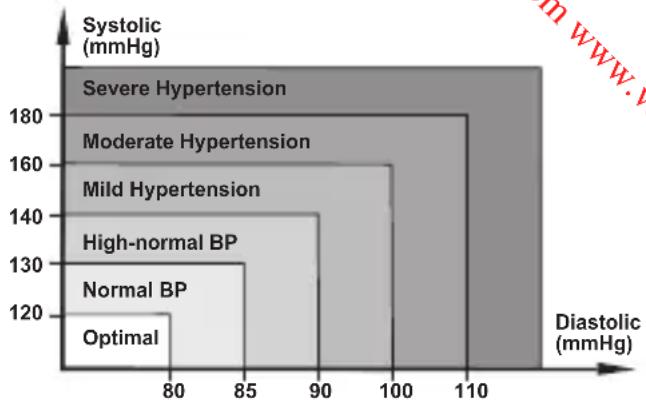
The table on the right shows the reference values for normal and high blood pressure, discounting age and sex.
The table represents the guidelines from the World Health Orga
bar
| Hypertension Category | Diastolic (mmHg) | | :--- | :--- | | Severe Hypertension | 115 | | Moderate Hypertension | 100 | | Mild Hypertension | 90 | | High-normal BP | 85 | | Normal BP | 80 | | Optimal | 120 || Blood pressure classification | Systolic (mmHg) | Diastolic (mmHg) | Colour Code |
| Optimal | < 120 | < 80 | Green |
| Normal | 120-129 | 80-84 | Green |
| High normal | 130-139 | 85-89 | Yellow |
| High blood pressure degree 1 | 140-159 | 90-99 | Orange |
| High blood pressure degree 2 | 160-179 | 100-109 | Red |
| High blood pressure degree 3 | ≥ 180 | > 110 | Red |
3.6 Influencing and evaluating readings
- Measure your blood pressure several times, then record and compare the results. Do not draw any conclusions from a single reading.
- Your blood pressure readings should always be evaluated by a doctor who is also familiar with your personal medical history. Take regular readings and inform your doctor from time to time.
- When taking readings, remember that the daily values are influenced by several factors. Smoking, consumption of alcohol, drugs and physical exertion influence the measured values in various ways.
• Measure your blood pressure before meals.
- Before taking readings, allow yourself at least five minutes rest.
- If the systolic and diastolic readings seem unusual (too high or too low) on several occasions, despite correct use of the unit, please inform your doctor. This also applies to the rare occasions when an irregular or very weak pulse prevents you from taking readings.

WARNING
Blood pressure that is too low represents just as great a health risk as blood pressure that is too high!
Fits of dizziness may lead to dangerous situations arising (e.g. on stairs or in traffic)!
3.7 CardioDock as a charger for iPhone / iPad / iPod touch
The CardioDock blood pressure module is more than just a blood pressure reader. It is also a charger and docking station for your iPod touch, your iPhone or your iPad. The iPad can only be charged properly, when using the iPad charging unit. You can also use the blood pressure module while looking at photos, surfing the web or reading your e-mails.
4.1 Charging the blood pressure module's battery
The CardioDock blood pressure module has an integrated lithium ion battery (3,7 V ≡ 500 mAh).
a. For charging the CardioDock battery, connect the CardioDock unit with an iPhone or iPad charging unit via the supplied USB cable. When CardioDock unit and iPhone are connected, the state of charge is displayed in the lower part of the VitaDock screen.
b. When the start/stop button ⏻ 8 of the CardioDock unit is highlighted in blue, the state of charge of the battery is over 20 %. Should the charge level drop below 20 %, the LED colour changes from blue to yellow. Please charge the battery now. Avoid letting the battery run down completely, as this shortens the battery's service life.
c. During the charging process, the start button is highlighted in yellow, until the battery is fully charged. When the battery is completely charged, the LED shortly lights up in blue, before the unit automatically switches off.

If the LED of the start/stop button ⏻ ⑧ is flashing alternatively in yellow and blue, the battery is defective.
4.2 Installing the VitaDock app
MEDISANA is setting new standards in mobile health with VitaDock.
VitaDock app, the central software application for displaying and evaluating the body's vital signs and health values, includes software for:
- the blood pressure and pulse module CardioDock®
- the blood glucose module GlucoDock®
- the infrared thermometer module ThermoDock®
- the body analysis scales TargetScale®
The GlucoDock-, ThermoDock- and TargetScale-software is only fully functioning if the relevant modules or scales are used.
To operate your new CardioDock-blood pressure module for iPod touch, iPad and iPhone, you have to install the free VitaDock app.
You can download it from Apple's app store and then install it.
To download the software, you need an Apple ID with an e-mail address and password, as well as an active Internet connection. Downloading the software may be subject to charges from your telephone provider.
- To find the VitaDock (app) in the App Store, enter the search term "VitaDock".
- Once the software has been successfully installed, the new "VitaDock" icon 📂 appears on your device.
4.3 Settings
Before using for the first time
Check the date and time settings on your iPod touch, iPad or iPhone. The date and time are important for evaluating the readings.
Start the CardioDock by touching the icon . The display briefly shows the "Vita Dock" start page and then automatically switches to an entry screen for your personal data.
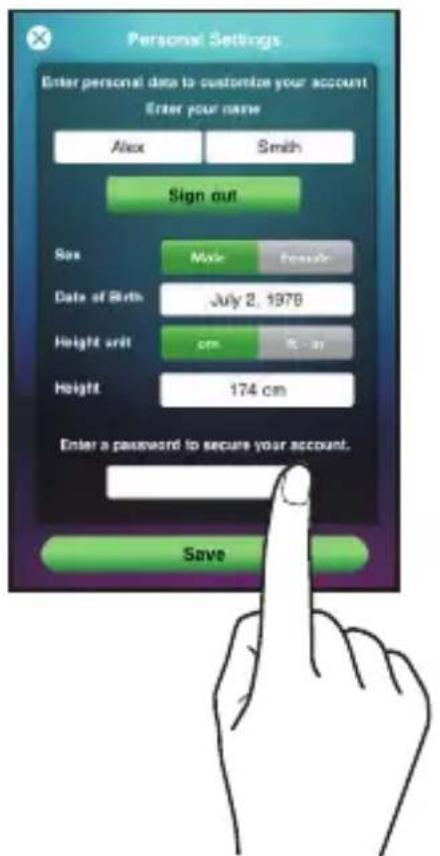
text_image
Personal Settings Enter personal data to customize your account Enter your name Alex Smith Sign out Sex Male Female Date of Birth July 2, 1978 Height unit cm 0 in Height 174 cm Enter a password to secure your account. SaveYou can create a total of 4 user profiles in the VitaDock.
In the first user profile, you can enter your personal data.
Pressing on a text field opens a keyboard field with which you can edit your data.
You have the option of activating a password for using the VitaDock app.
To do this, touch the "Password" text field and specify a password. You are asked to enter it twice, to make sure of it.
If you activate the password function, you have to enter the password each time the app restarts.
For more information, see page 28-29.
"CardioDock" settings
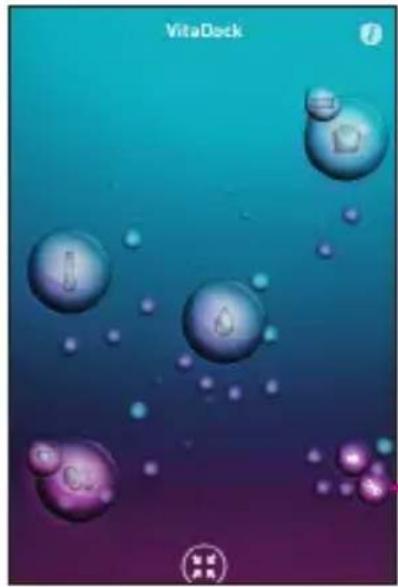
natural_image
VitaDeck game interface showing floating bubbles with purple and teal gradient background (no readable text or symbols)After you save your data, you enter the VitaDock universe.
Touch the "Setting" icon

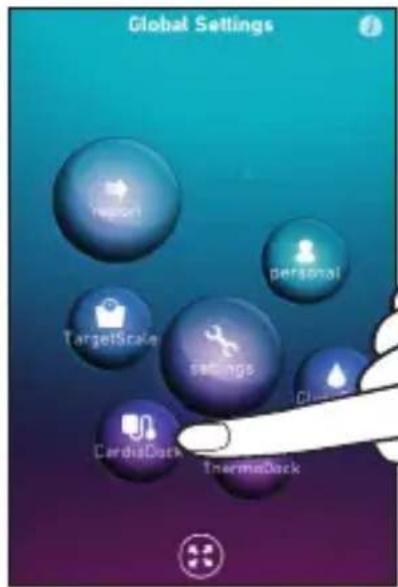
text_image
Global Settings Report personal TargetScale settings CardisDock ThermaDockTouch the "CardioDock" icon

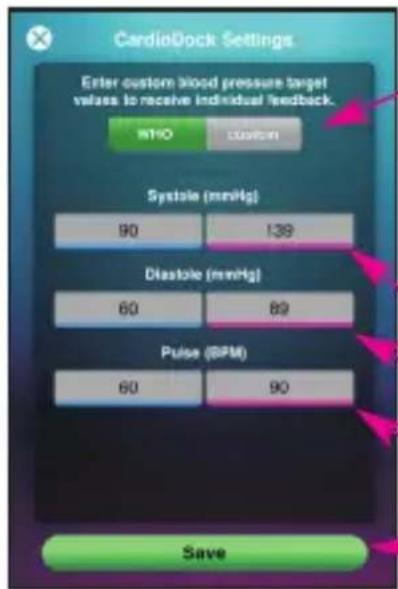
text_image
CardioDock Settings Enter custom blood pressure target values to receive individual feedback. WHO Custom Systole (mmHg) 90 139 Diastole (mmHg) 60 82 Pulse (BPM) 60 90 SaveChoose: "WHO" standard or "custom" settings. (WHO table on page 14) If you chose "Custom" settings, enter the target blood pressure values specified by your doctor: Systolic Diastolic Pulse Save your entries.
text_image
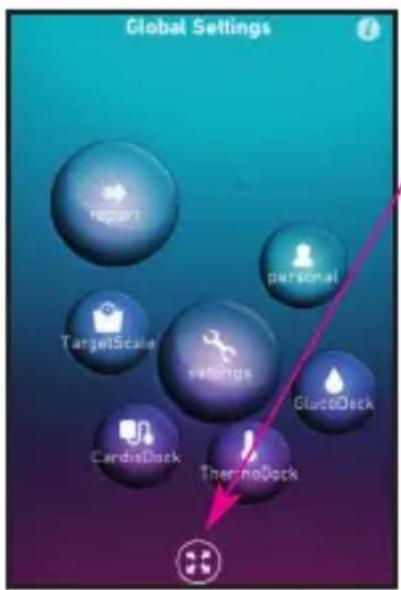
Global Settings Report personal TargetScale settings CluoDeck CardisDock ThermoDock"Zoom"
Once you have made all the CardioDock settings, you can zoom out and slide the display to reach the other applications (CardioDock, GlucoDock, ThermoDock and TargetScale).
Touching the icons takes you directly to the programme.
text_image
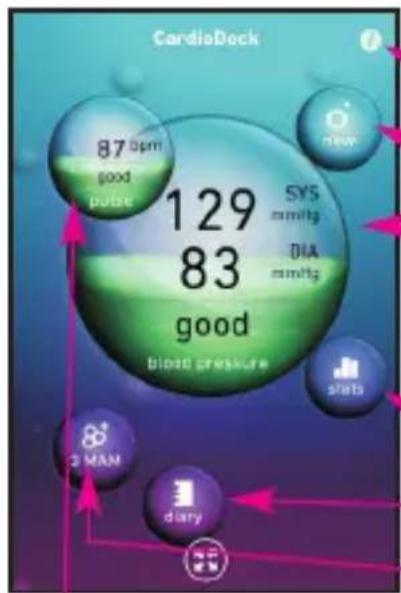
CardioDeck 87 bpm good pulse 129 83 good blood pressure SYS mmHg DIA mmHg new starts 2 MAN diary„CardioDock“ display
Disclaimer
New reading (page 22)
Result of last reading
Systolic and diastolic (mmHg) display of the readings as per WHO standard (page 14).
CardioDock statistics (page 26)
CardioDock diary (page 27)
3MAM reading (page 25)
Result of last reading Pulse/min
text_image
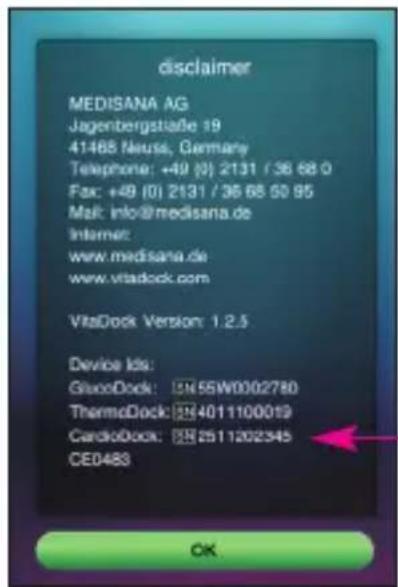
disclaimer MEDISANA AG Jagenbergstraße 19 41488 Neuss, Germany Telephone: +49 (0) 2131 / 36 68 0 Fax: +49 (0) 2131 / 36 68 50 95 Mail: info@medisana.de Internet: www.medisana.de www.vitadock.com VitaDock Version: 1.2.5 Device Ids: GlucDock: 5N55W0002780 ThermoDock: 554011100019 CardioDock: 552511202345 CE0483 OKWhen a VitaDock module is connected, the module's serial number appears in the masthead.
The serial numbers of all the modules used with VitaDock are displayed here and saved.
5.1 Putting on the upper arm pressure cuff
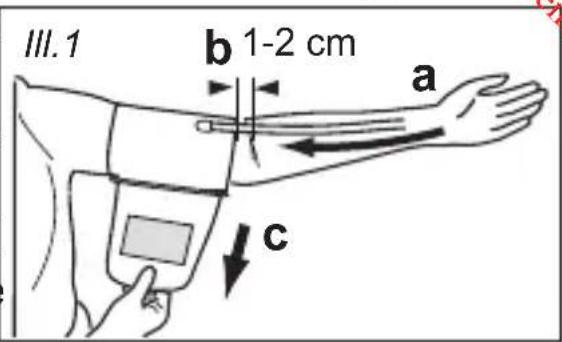
- First attach the free end of the cuff's air tube to the designated connector ⑥ on the unit.
- Slip the preformed cuff over the bare left upper arm.
- Position the air hose in the middle of your arm in line with your middle finger (ill.1 a). The lower edge of the cuff should be 1 - 2 cm above the crease of the elbow (ill.1
text_image
III. 1 b 1-2 cm a cb). Pull the cuff tight and close the Velcro fastener (ill. 1 c).
- Only position the cuff on the right arm if it cannot be used on the left arm. Always carry out measurements on the same arm.
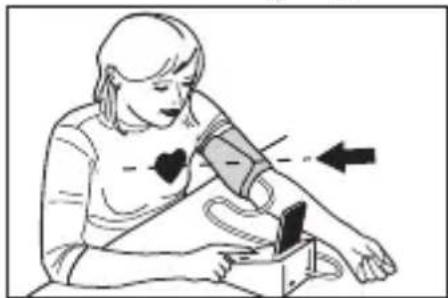
5.2 Correct position for taking readings
- If possible, take the reading while seated.
- Relax your arm and place it comfortably, on a table for instance. Keep still during the measurement: Do not move and do not talk as this may alter the measurements. The correct measuring position when sitting is shown in ill.2.
- In special cases the measurement can also be taken when lying down. The correct measuring position when lying down is shown in ill.3.
natural_image
Illustration of a person using a blood pressure monitor to measure the right side of the arm (no text or symbols present)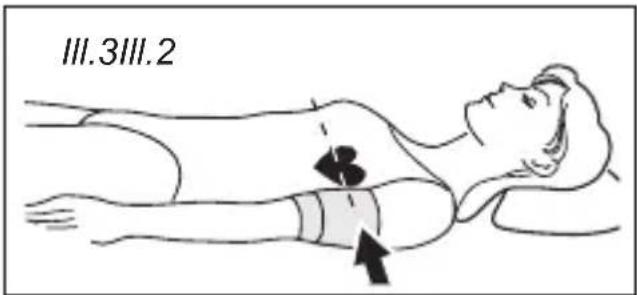
text_image
III.3III.2The cuff should always be at the same height as your heart.
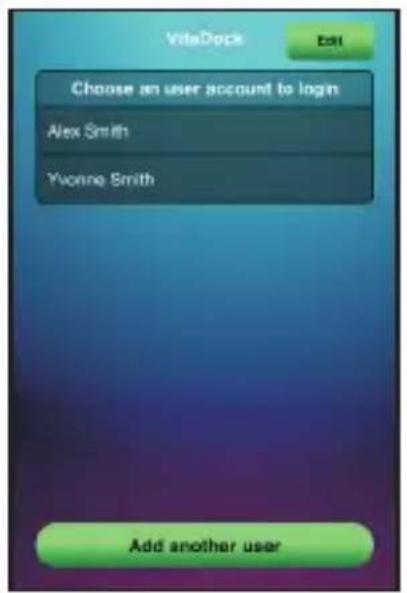
5.3 Taking blood pressure readings
To avoid disruption from an incoming call or text message during a reading, we recommend switching the iPhone to flight mode.
text_image
ViteDock Edit Choose an user account to login Alex Smith Yvonne Smith Add another user- You can activate the CardioDock's blood pressure measuring mode in two ways:
a) Plug & play: Insert the Apple device, when switched on, into the CardioDock module.
Select the user profile and enter the password, if necessary.
The VitaDock app starts automatically in blood pressure measuring mode.
text_image
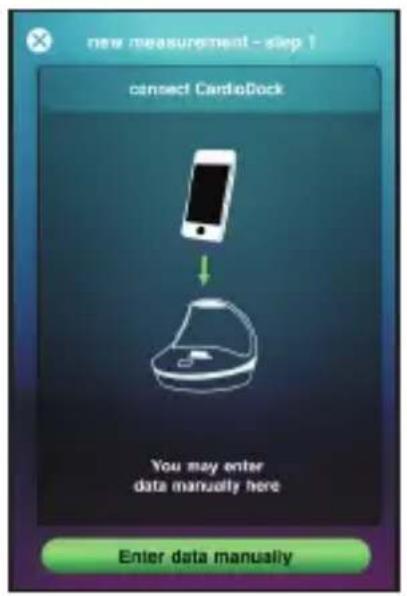
new measurement - step ? connect CardioDock You may enter data manually here Enter data manuallyb) Manual start: Start the VitaDock app. Select the user profile and enter the password, if necessary. The VitaDock universe appears.
Touch the "CardioDock" application and tap on the "new" icon .
The "NEW MEASUREMENT STEP 1" window opens.
You are prompted to the CardioDock module (or enter the value manually). Insert the Apple device in the CardioDock module.
text_image
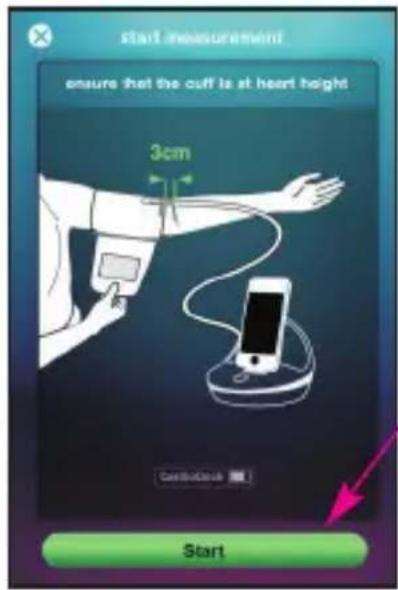
start measurement ensure that the cuff is at heart height 3cm CardioCard- Once you have put on the upper arm cuff and are in the measuring position, start the reading.
Start the blood pressure measurement by touching "Start" or pressing the start/stop button ⑧ on the CardioDock module.
text_image
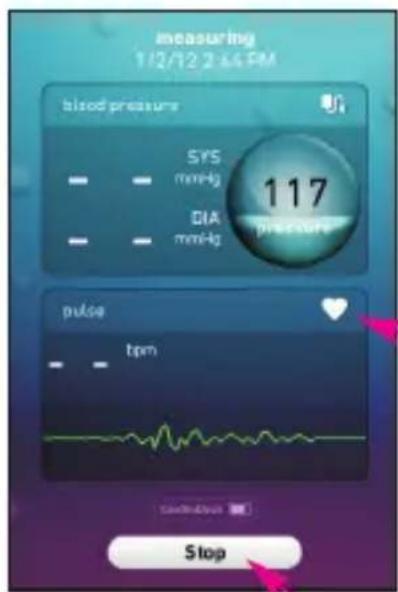
measuring 1/2/12 2:45 PM blood pressure SYS mmHg DIA mmHg 117 pressure pulse tpm Stop- The module automatically pumps up the cuff.
Remain at rest during the reading: Do not move and do not talk.
While the cuff is pumping up, the pulse icon flashes. The rising pressure is shown as an increasing number, the pulse is shown as a wave.
Important:
- You can cancel the measurement at any time by touching the "STOP" field or pressing the start/stop button ⑧ on the module.
The air escapes from the cuff.
- If a call or a text message is received during the reading, the measurement is cancelled. The cuff deflates.
5.4 The measurement
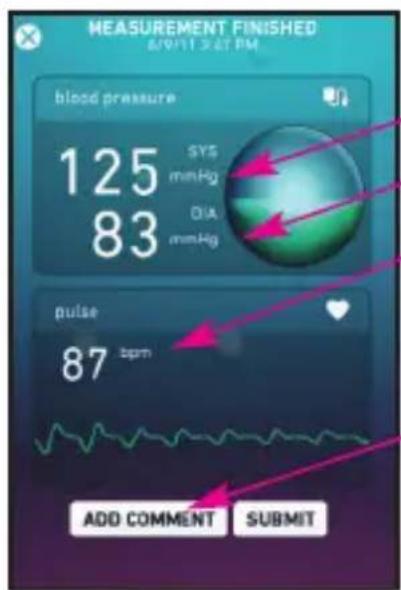
The unit inflates the cuff until sufficient pressure has built up for a measurement. Next, the device lets the air out of the cuff and shows the reading.
text_image
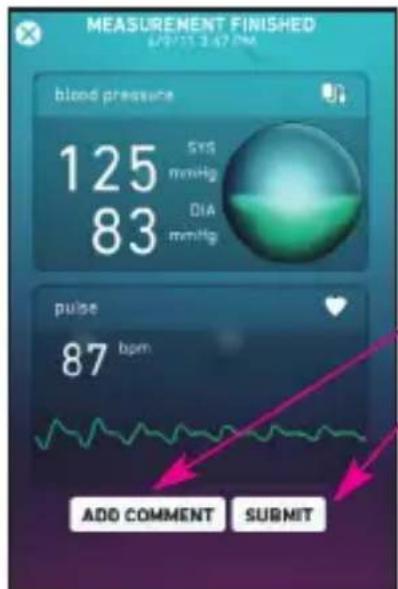
MEASUREMENT FINISHED BUTTER SET PM blood pressure 125 SYS mmHg 83 OIA mmHg pulse 87 bpm ADD COMMENT SUBMIT1. Display:
Systolic pressure
Diastolic pressure
Pulse rate
Touch the field
"ADD COMMENT" to open the entry field for comments about the reading.
text_image
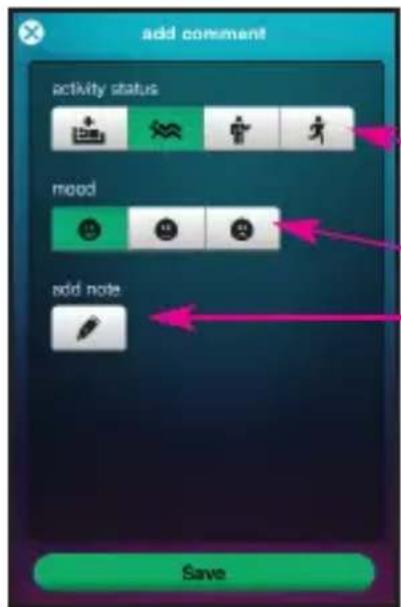
add comment activity status mood add note Save2. Optional comments:
- Activity (infirm, rest, normal activity, sport)
- Mood
- Notes
Comments are displayed in the statistics and in the log-book.
5.5 3MAM measurement
The 3MAM measurement can give you more precise readings, particularly if your blood pressure fluctuates.
Three readings are taken one after the other, and a weighted average is calculated from this.
text_image
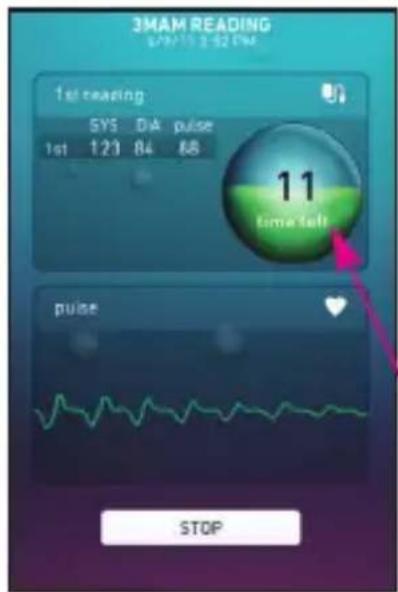
3MAM READING 07:15 2:32 PM 1st reading SYS D/A pulse 1st 123 84 88 11 time left pulse STOPYou can start the 3MAM measurement in the VitaDock app by touching the 3MAM-symbol in the CardioDock display.
3 readings are taken. There is a pause of 15 seconds between each reading. The display shows the time remaining until the next reading.
The follow-on measurements start automatically; remain sitting calmly during the process.
text_image
MEASUREMENT FINISHED 6/9/15 3:47 PM blood pressure 125 SYS mmHg 83 DIA mmHg pulse 87 bpm ADD COMMENT SUBMITWhen the last measurement is complete, the result is displayed: You can add comments and save it, as normal.
5.6 Displaying and managing the measurements
You can access the test results at any time. Touch the relevant icon to access the results.
line
| Date | Blood Pressure (mmol/L) | | -------- | ------------------------ | | 03.01.12 | 60 | | 04.01.12 | 60 | | 05.01.12 | 60 |5.6.1 Statistics
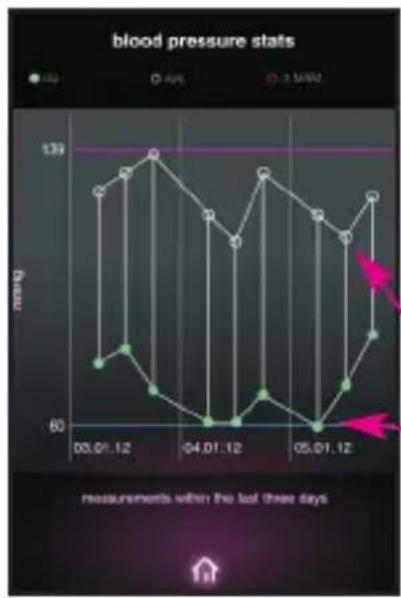
Touching the "stats" icon loads the CardioDock statistics The display shows the readings from the last three days.
Systolic = white circle
Diastolic= green dot
3MAM = red circle
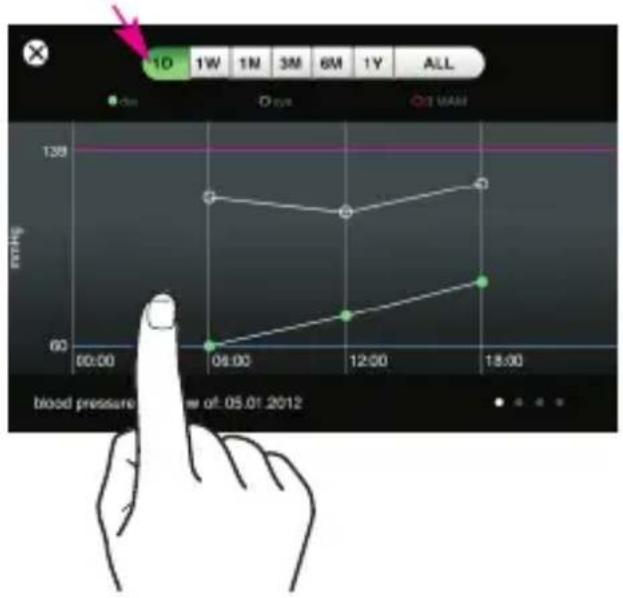
Rotate your device by 90^ and touch the relevant field to view additional test results:
1 day, 1 week, 1, 3, 6 month, 1 year or overall.
line
| Time | Blood Pressure (mmHg) | |--------|------------------------| | 06:00 | 60 | | 12:00 | ~70 | | 18:00 | ~90 |1 Day
The measurements for one day are displayed.
You can display the overview: mood and activity by sliding the display to the left.
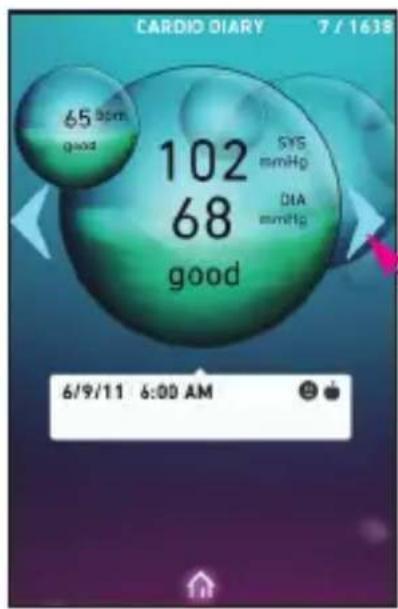
text_image
CARDIO DIARY 7 / 1638 65 am good 102 68 good SYS mmHp DIA mmHg 6/9/11 6:00 AM5.6.2 Cardio diary
Touching the "diary" icon loads the CardioDock diary for the active user profile.
Tap the arrows to page through the log book.

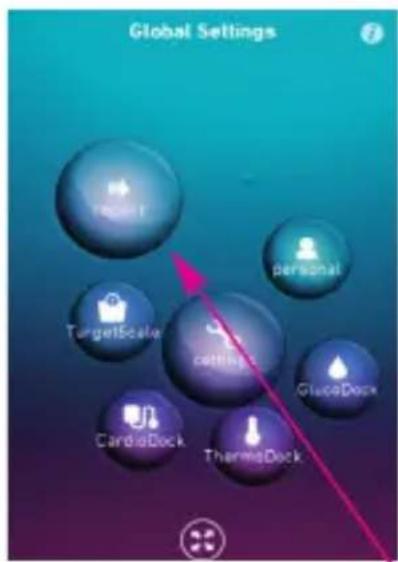
text_image
Global Settings RealE personal TargetScale cetings GlucoDock CardioDock ThermoDock5.6.3 Sending a report
You have the option of sending monthly reports for the active user profile by e-mail – to your doctor, for example. To set up the email address to send a report, see your iPhone/iPod touch/iPad manual.
When the CardioDock display is shown, touch the icon ⚙ and slide the display to "Global Settings".
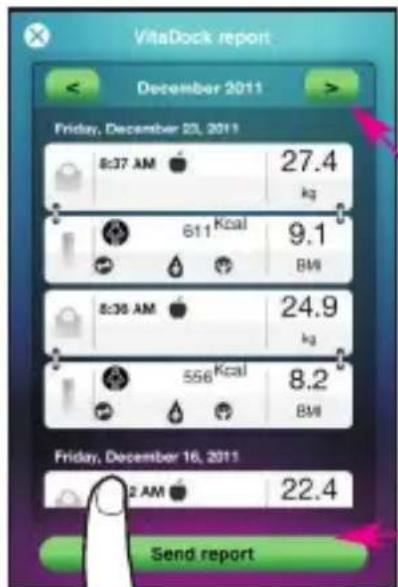
text_image
VitaDock report December 2011 Friday, December 23, 2011 8:37 AM 27.4 kg 611 Kcal 9.1 BM 8:36 AM 24.9 kg 556 Kcal 8.2 BM Friday, December 16, 2011 2 AM 22.4 Send reportTouch the "report" icon to display the monthly reports.
Touch the arrows to reach the previous or next month. Slide the display up or down to view the individual days in the month.
Tap "Send report" to send the data by e-mail.
5.7 Adding further user profiles
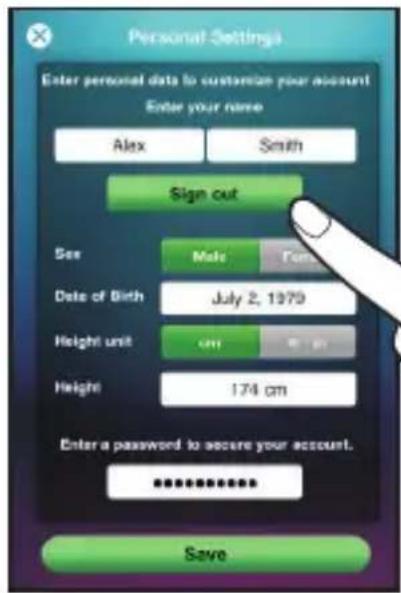
text_image
Personal Settings Enter personal data to customize your account Enter your name Alex Smith Sign out Sex Male Female Date of Birth July 2, 1979 Height unit cm 8 m Height 174 cm Enter a password to secure your account. ****** SaveYou have the option of creating up to three additional user profiles in the VitaDock app.
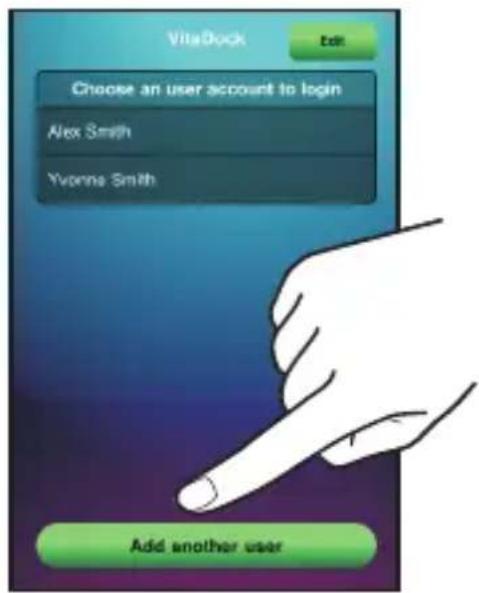
Touch "Personal settings" icon and log out of the current user profile by touching "Sign out".
text_image
VidaDock Edit Choose an user account to login Alex Smith Yvonne Smith Add another userOnce you have logged out of your user profile, you can create another user profile on the next screen. To do this, touch "Add another user" field at the bottom.
You can then create an additional user profile.

The red highlighted input fields have to be filled in.
5.8 Deleting user profiles
text_image
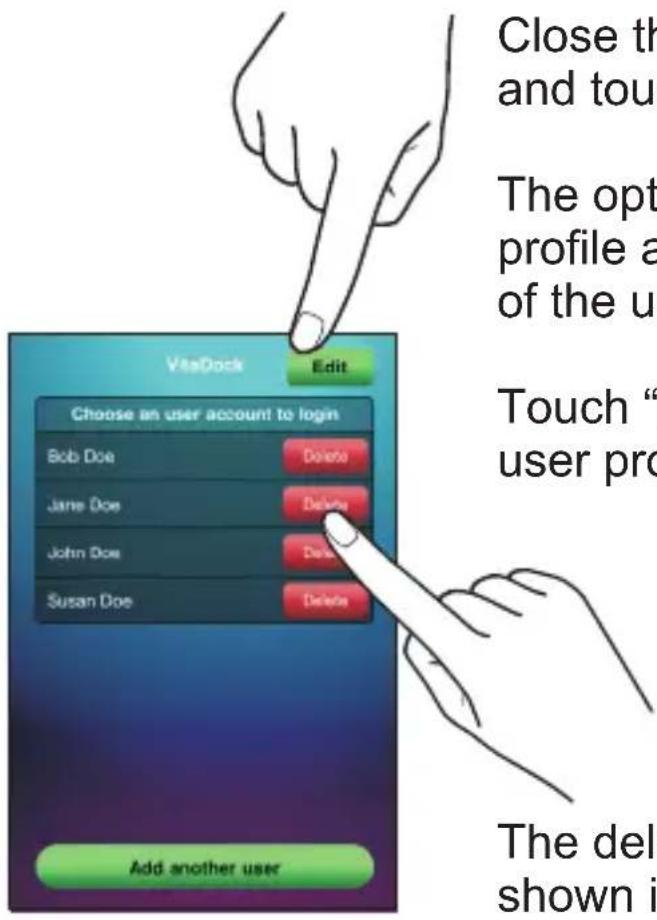
Close th and tou The opt profile a of the u Touch “ user pro Choose an user account to login Bob Doe Delete Jane Doe Delete John Doe Delete Susan Doe Delete Add another user The del shown iClose the actual user profile and touch "Edit".
The option of deleting the profile appears to the right of the user profile.
Touch "Delete" to delete the user profile.
The deleted user profile is shown in grey. For a period of 14 days, you have the option of reactivating the deleted user profile by touching it. After 14 days, the user profile is automatically deleted completely from the app.

CAUTION!
The user profile, all the readings and entries are irreversibly deleted. There is no way to restore them.
6.1 Error messages
Unusual reading
- Repeat the test.
- The cuff is not positioned correctly or the cuff is too small.
- You did not keep to the correct posture during the reading.
- During the reading, you spoke, moved your arm or body or you are excited or nervous.
- If you get another unusual reading, contact your doctor.
Irregular pulse (arrhythmia)
- This device is not suitable for persons with an acute irregular pulse.
The cuff does not pump up properly
- Check that the air hose is fitted correctly.
- The air hose is pinched or is leaking.
- The cuff is leaking.
The device does not respond
- The Apple device is not connected properly to the blood pressure module.
- The battery is too weak.
- Separate the Apple device and the module, re-start the software and reconnect the Apple device to the module.
- The LED of the start/stop-button flashes alternately yellow and blue: The CardioDock battery is defective.
6.2 Care and maintenance
Your CardioDock blood pressure module is a high-precision instrument. Handle with care to avoid damaging the electronics and prevent defects.
Observe the following instructions:
- Never use strong detergents or hard brushes.
- Clean the unit using a soft cloth lightly moistened with a mild soapy solution. Do not allow any water to get into the unit. Do not use the unit again until it is completely dry.
- Do not expose the unit to direct sunlight, and protect it from dust and moisture.
- Only inflate the cuff when it is in position around the upper arm.
- Keep the cuff clean. If it gets dirty, separate it from the device and clean it with mild soapy water. Rinse it thoroughly with cold water and let it dry in the air. Do not put the cuff in a dryer and do not iron it.
• Even if you do not use the device for a long time, charge it fully once a month.
- Put the module back in its carrying case after each use.
• Servicing and calibration
The unit has been calibrated by the manufacturer for a period of two years' use. In the case of commercial use, the unit must be serviced and recalibrated at least once every two years. This calibration will be charged for and can be carried out by an appropriate authority or an authorised service centre - in accordance with the regulations for users of medical equipment.
6.3 Guidelines / Standards
This blood pressure monitor meets the requirements of the EU standard 93/42/EEC for non-invasive blood pressure monitors. It is certified in accordance with EC Guidelines and carries the CE symbol (conformity symbol) „CE 0483“.
C€0483
The blood pressure monitor corresponds to European standards EN 60601-1/+A1/+A2, EN 60601-1-2, EN 1060-1/+A1, EN 1060-3/+A1.
Electromagnetic compatibility:
The device complies with the EN 60601-1-2 standard for electromagnetic compatibility.
Enquire at MEDISANA for details on this measurement data.
6.4 Disposal
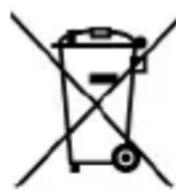
This module must not be disposed of together with domestic waste. All users are obliged to hand in all electrical or electronic devices, regardless of whether or not they contain toxic substances, at a municipal or commercial collection point so that they can be disposed of in an environmentally acceptable manner.
Please remove the battery before disposing of the device / unit. Do not dispose of old batteries with your household waste, but at a battery collection station at a recycling site or in a shop. Consult your local authority or your supplier for information about disposal.

The packaging can be reused or recycled. Please dispose properly of any packaging material no longer required.
6.5 Technical specifications
Product name CardioDock
Blood pressure module
Runs on
: Apple devices:
- iPhone 3GS, 4, 4S
- iPod touch 3 ^rd and 4 generation
- iPad 1 and 2
Operating system
: Apple iOS 5.0 or higher
Power supply
: via USB (5 V ≡, 500mAh)
or integrated battery
(3,7 V==, 500 mAh)
Measuring technique :
Oscillometric,
Single readings or
3MAM readings
Pressure generation
Automatic, using micro pump
Deflation
: Automatic
Blood pressure
measuring range
: 30 - 280 mmHg
Pulse measuring
range
: 40 – 200 beats / minute
Maximum error
tolerance for static
pressure
: ±3 mmHg
Maximum error
tolerance for pulse
rate
: ±5%
Memory depends on memory of the connected Apple iPhone, iPad or iPod touch device
Operating conditions : +10°C to +40°C, 15% to 90% humidity
Storage conditions : -20°C to +55°C, 15% to 90% humidity
Dimensions : approx. 120 mm x 93,5 mm (ø x H)
Cuff size : 22 – 32 cm adult cuff for average upper arm circumference (size M)
Weight : approx. 213 g
Article number : 51285
EAN number : 40 15588 51285 8
Spare cuffs : - Normal / medium (size M) 22 – 32 cm 51283 4015588 51283 4
- Large (size L) 30 - 42 cm 51284 4015588 51284 1
In accordance with our policy of continual product improvement, we reserve the right to make technical and visual changes without notice.
7.1 Warranty and repair terms
Please contact your dealer or the service centre in case of a claim under the warranty. If you have to return the unit, please enclose a copy of your receipt and state what the defect is.
The following warranty terms apply:
- The warranty period for MEDISANA products is three years from date of purchase. In case of a warranty claim, the date of purchase has to be proven by means of the sales receipt or invoice.
- Defects in material or workmanship will be removed free of charge within the warranty period.
- Repairs under warranty do not extend the warranty period either for the unit or for the replacement parts.
-
The following is excluded under the warranty:
a. All damage which has arisen due to improper treatment, e.g. non-observance of the user instructions.
b. All damage which is due to repairs or tampering by the customer or unauthorised third parties.
c. Damage which has arisen during transport from the manufacturer to the consumer or during transport to the service centre.
d. Accessories which are subject to normal wear and tear (cuffs, batteries etc.). -
Liability for direct or indirect consequential losses caused by the unit are excluded even if the damage to the unit is accepted as a warranty claim.

MEDISANA AG
Jagenbergstraße 19
41468 NEUSS
Germany
E-mail: info@medisana.de
For service, accessories and spare parts, please contact:
Medisana Healthcare UK Limited,
Emery House,
Greatbridge Road,
Romsey,
Hampshire, SO51 0AD
United Kingdom
Tel.: (+44) 0844 888 20 32
E-mail: customerservice@medisana.co.uk
web: www.medisana.co.uk
Downloaded from www.vandenborre.be
Français
natural_image
VitaDock game interface showing floating purple and blue bubbles with floating pink spheres (no text or symbols on bubbles)natural_image
Illustration of a person using a blood pressure monitor with an arrow indicating pressure direction (no text or symbols)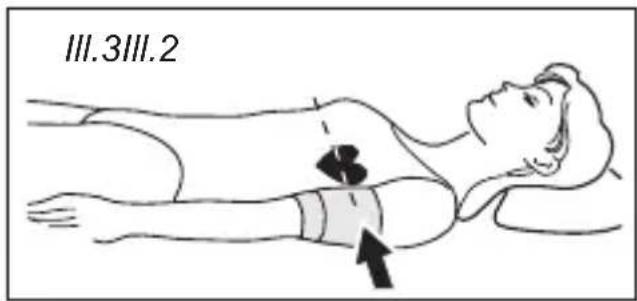
text_image
III.3III.26.3 Directives / Normes
natural_image
Symbol of a trash bin crossed with a diagonal line and a black rectangular block below (no text or labels)Downloaded from www.vandenborre.be
Italiano
natural_image
VitaDock interface displaying floating bubbles with purple and teal gradient background (no text or symbols on bubbles)natural_image
Illustration of a person receiving a blood pressure measurement device (no text or symbols present)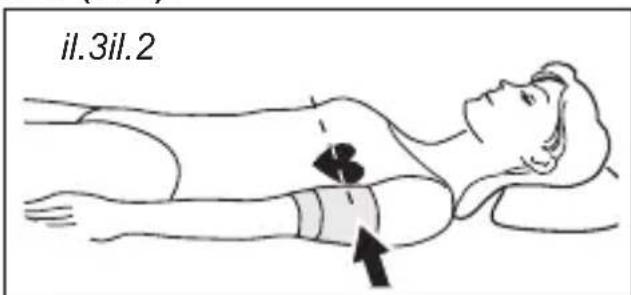
text_image
il.3il.2natural_image
Symbol of a trash bin with crossed lines indicating no waste or restriction, accompanied by a solid black rectangle below (no text or labels)Downloaded from www.vandenborre.be
Espanol
natural_image
VitaDeck game interface showing floating bubbles with purple and teal gradient background (no readable text or symbols)Pantalla "CardioDock"
Pie de imprenta
natural_image
Illustration of a person using a pressure monitor to measure blood pressure (no text or symbols present)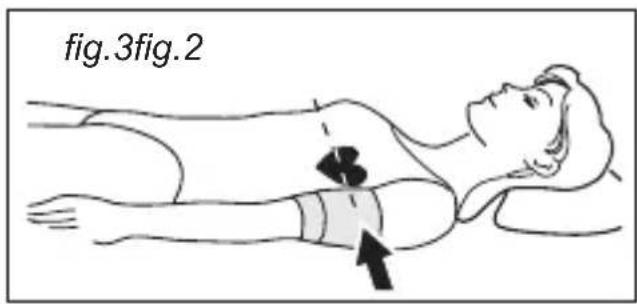
text_image
fig.3fig.2natural_image
Simple line drawing of a trash bin with crossed lines indicating no waste or discharge (no text or symbols)Medisana Healthcare, S.L.
Downloaded from www.vandenborre.be
Nederlands
text_image
Globale Instellingen Parent TargetScale Imaging CardiaDock The GoDock GlucDock"Zoom"
verbinding (afb.1 c).
natural_image
Illustration of a person using a blood pressure monitor to measure the blood (no text or symbols present)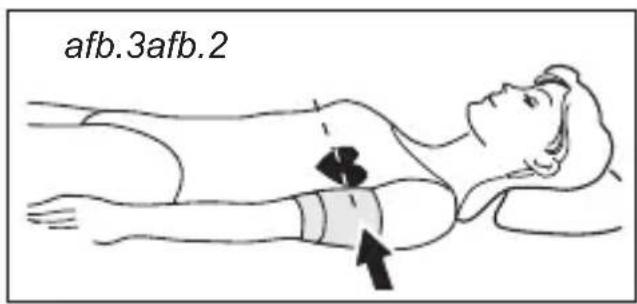
text_image
afb.3afb.2natural_image
Symbol of a trash bin with crossed lines and a solid black rectangle below (no text or labels)Downloaded from www.vandenborre.be
Downloaded from www.vandenborre.be
Downloaded from www.vandenborre.be
Downloaded from www.vandenborre.be

MEDISANA AG
Jagenbergstraße 19
41468 NEUSS
GERMANY
E-mail: info@medisana.de