INTERPHONEF4TPPLEU - Earphones Cellular Line - Free user manual and instructions
Find the device manual for free INTERPHONEF4TPPLEU Cellular Line in PDF.



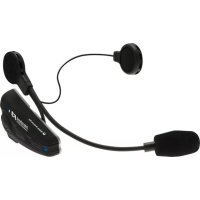
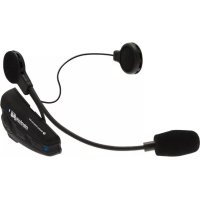
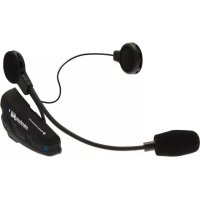
| Product Type | Bluetooth® system for motorcycle helmet (intercom, phone, GPS, stereo) |
| Brand | Cellular Line |
| Model | INTERPHONE F4 Stereo (INTERPHONEF4TPPLEU) |
| Dimensions | 90 x 46 x 20 mm |
| Weight | 83 g (Bluetooth module with earpiece and microphone) |
| Power supply type | Integrated rechargeable lithium battery |
| Charging time | Approximately 3 hours |
| Active usage battery life | Up to 10 hours (indicative, depending on usage) |
| Standby time | Up to 700 hours |
| Bluetooth version | Bluetooth® v2.1 + EDR |
| Supported Bluetooth profiles | Phone (hands-free), Intercom, Stereo (A2DP), GPS audio |
| Number of pairable devices | Up to 8 devices, multipoint connection up to 3 (e.g., 1 phone + 1 intercom + 1 stereo) |
| Intercom range | Up to 500 meters in open field |
| Noise reduction | Digital DSP filter (wind noise and background noise cancellation) |
| Automatic volume adjustment | Yes, compensation for speed and ambient noise level |
| Waterproofness | Yes, Weather Protection Skin membrane – waterproof when connector is plugged in |
| Installation | On any type of helmet, 5 minutes, adhesive or clip mount (removable) |
| Main functions | Full duplex communication, voice response (VOX), voice call, dual phone (Dualphone), remote music control |
| Maintenance and cleaning | Clean with a damp sponge and mild soap; recharge every 2-3 months if unused. Avoid solvents. |
| Safety | Removable anti-theft module. Use primarily when stopped or with caution while driving. |
| Spare parts and repairability | Information available at www.interphone.cellularline.com |
Frequently Asked Questions - INTERPHONEF4TPPLEU Cellular Line
User questions about INTERPHONEF4TPPLEU Cellular Line
0 question about this device. Answer the ones you know or ask your own.
Ask a new question about this device
Download the instructions for your Earphones in PDF format for free! Find your manual INTERPHONEF4TPPLEU - Cellular Line and take your electronic device back in hand. On this page are published all the documents necessary for the use of your device. INTERPHONEF4TPPLEU by Cellular Line.
USER MANUAL INTERPHONEF4TPPLEU Cellular Line
Wireless Telecom, Intercom, Navigation and Music
INSTRUCTION MANUAL

interphone stereo Wireless Telecom, Intercom, Navigation and Music

Get the most out of your
INTERPHONE F4
see:
www.interphone.cellularline.com

Listen to music in wireless mode on INTERPHONE F4 stereo and from your iPod® and iPhone®
iLink Stereo
iLink stereo transforms all your Apple devices in musical Bluetooth®.
The iLink battery is powered directly by the dock connector and does not need to be recharged

Ask your retailer for original INTERPHONE F4 accessories
interphone

Wireless Telecom, Intercom, Navigation and Music


intercomgpsmusictelecom
IT Motorbike Wireless Entertainment System
Manuale di istruzioni 16
EN Motorbike Wireless Entertainment System Instruction manual 26
FR Motorbike Wireless Entertainment System Mode d'emploi 36
ES Motorbike Wireless Entertainment System Manual operativo. 46
DE Bluetooth Entertainment System für Motorradhelme BEDIENUNGSPANLEITUNGEN 56
Motorbike Wireless Entertainment System Manual do utiliser 66
NL Draadloos entertainment system voor motorrijders Handleiding 76
RU BecepnoBHOoe neperoBOPhoe yctpoiCTBO dIa MOTOUKNICTOB (Hands Free rapHnIpya) RykoBoCTBO no EKcnnyatauui 86
Motorbike Wireless Entertainment System
Instrukcja obslugi 96
SV Tradlost kommunikationssystem for motorcyklar Bruksanvising 106
FI Motorbike Wireless Entertainment System
Käytöohje. 116
JP 126
INTERPHONE F4 UNIVERSAL
7
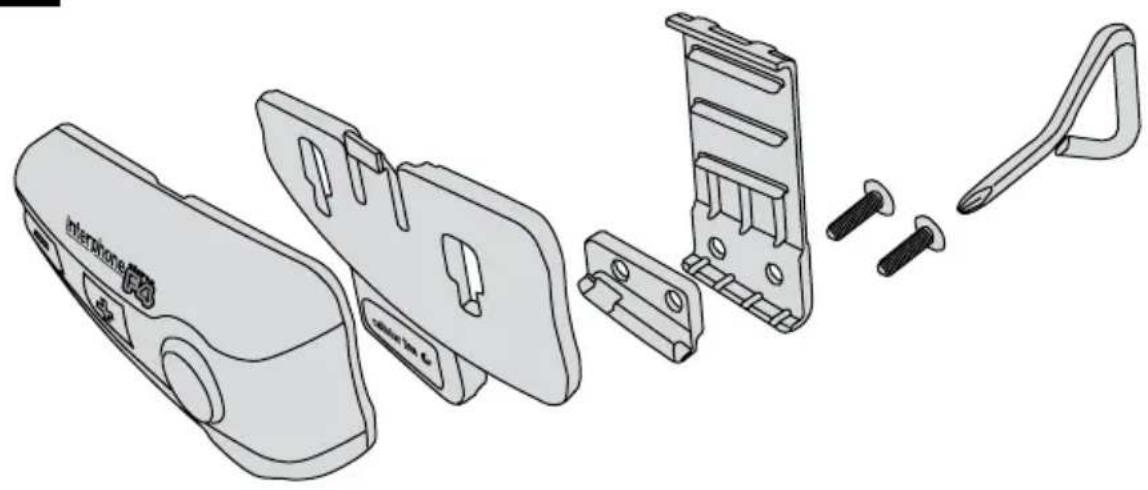
7.1
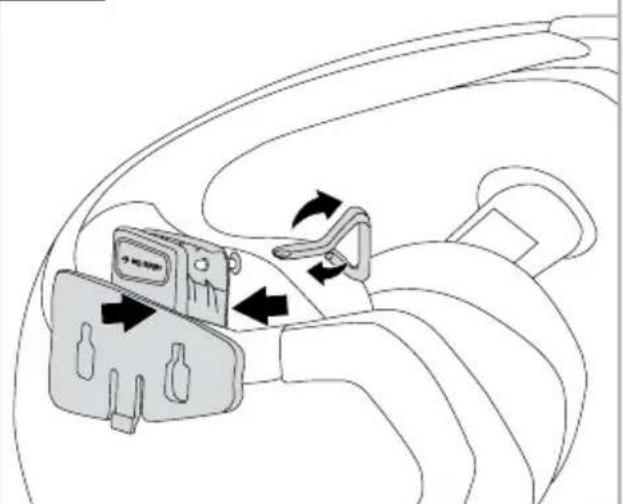
8
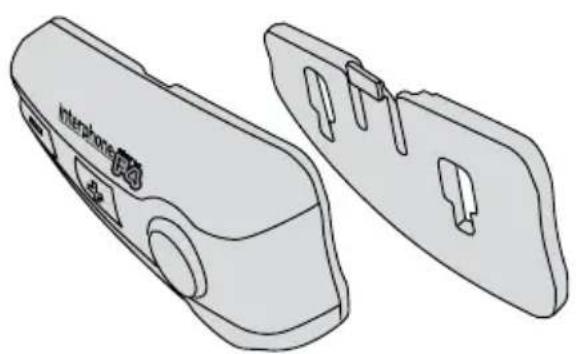
9
9a
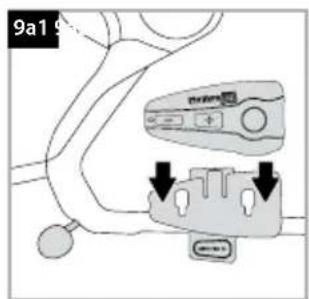
9b
MANUALE ISTRUZIONI
interphone stereo Wireless Telecom, Intercom, Navigation and Music F4
INDICE
interphone F4 Wireless Telecom, Intercostre, Navigation and Music
3.4 Music remote control

music
interphone F4 Wireless Telecom, Intercore, Navigation and Music
Headset - Handsfree - A2DP / AVRCP / SBC
Abbinamento:
interphone stereo Wireless Telecom, Intercom, Navigation and Music F4
SUMMARY
INSTALLATION 28
WHILSTRIDING 28
WHEN STOPPED 28
FUNCTIONS 28
Telephone functions 28
Intercom functions 28
GPS functions 28
Stereo functions 28
CHARACTERISTICS 29
NOTES ON AUTONOMY 29
PRODUCT DESCRIPTION 29
PACKAGE CONTENTS 29
1 FIRST USE 29
1.1 Charging 29
1.2 Installation 29
ASSEMBLY OF THE SLIDE SUPPORT
WITH REMOVABLE CLIP 30
ASSEMBLY OF THE ADHESIVE SLIDE SUPPORT 30
FIXING THE CONTROL PANEL 30
SPEAKER WITH MICROPHONE ASSEMBLY 30
REMOVING THE BLUETOOTH* CONTROL PANEL
FROM THE HELMET 30
1.3 Turning on /Turning off 30
2 PAIRING 30
2.1 Telephone 30
2.2 Intercom 31
2.3 Stereo (A2DP) 31
2.4 Audio GPS 31
3USE 32
3.1 Telephone function 32
3.2 Intercom function 32
3.3 Stereo function (A2DP) 32
3.4 Music remote control 32
3.5 Telephone + Intercom function 32
3.6 Telephone + Stereo function (A2DP) 33
3.7 Intercom + Stereo function (A2DP) 33
3.8 Telephone + Stereo (A2DP)
+Intercom function 33
3.9 Telephone + Telephone (Dualphone)
function 33
3.10 Telephone + Stereo (A2DP)
+Telephone function 33
3.11 Vocal response (VOX) 34
3.12 Vocal call 34
4 bLUETOOTH SPECIFICATIONS 34
5 CARE AND MAINTENANCE 34
6 ASSISTANCE AND WARRANTY 34
interphone F4 Wireless Telecom, Intercost, Navigation and Music
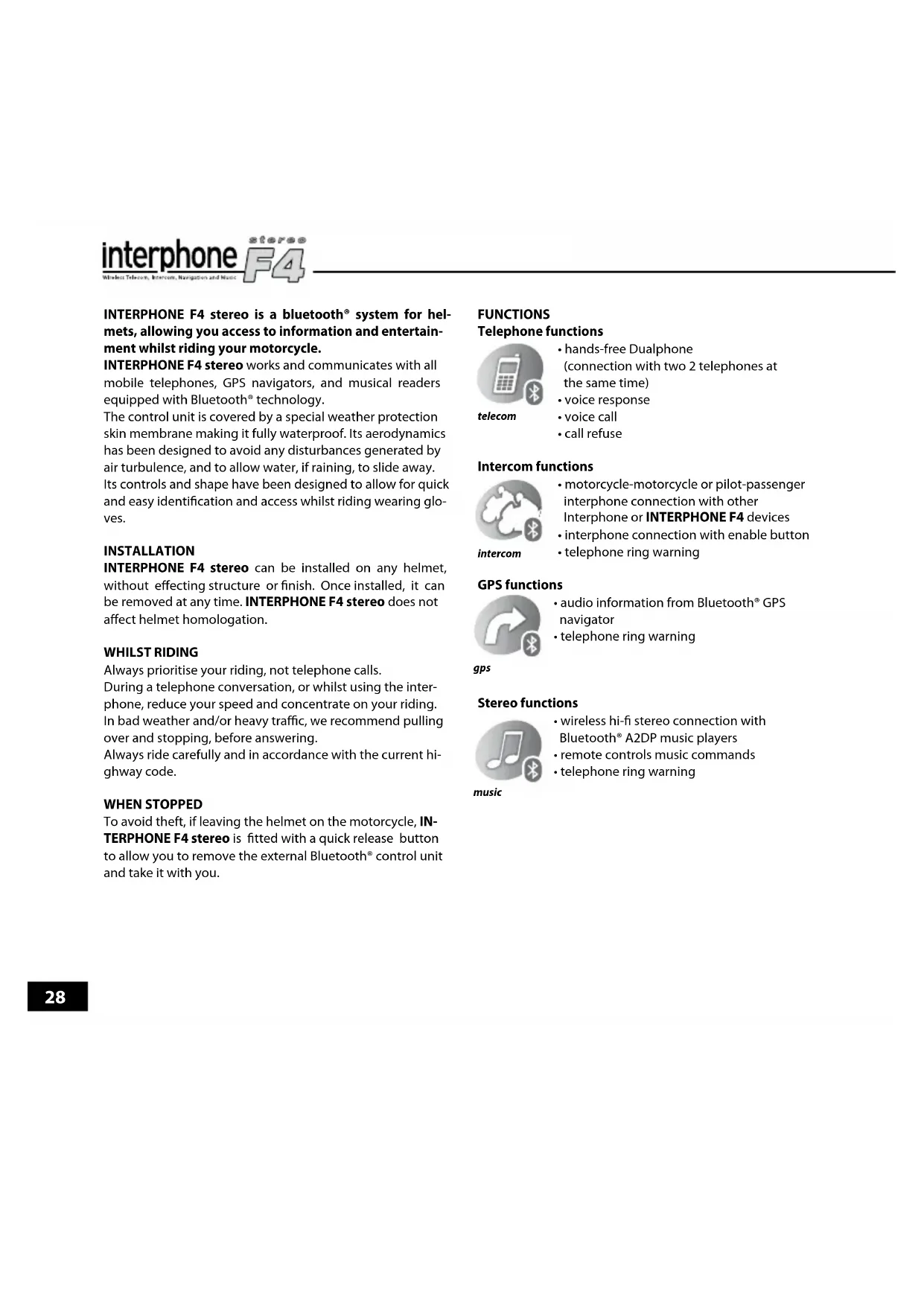
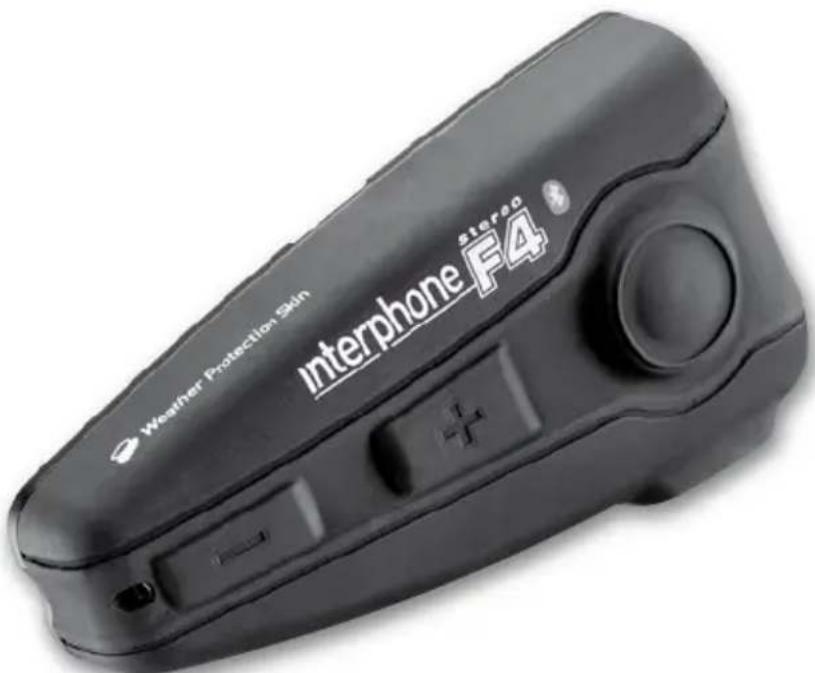
INTERPHONE F4 stereo is a bluetooth® system for helmets, allowing you access to information and entertainment whilst riding your motorcycle.
INTERPHONE F4 stereo works and communicates with all mobile telephones, GPS navigators, and musical readers equipped with Bluetooth® technology.
The control unit is covered by a special weather protection skin membrane making it fully waterproof. Its aerodynamics has been designed to avoid any disturbances generated by air turbulence, and to allow water, if raining, to slide away. Its controls and shape have been designed to allow for quick and easy identification and access whilst riding wearing gloves.
INSTALLATION
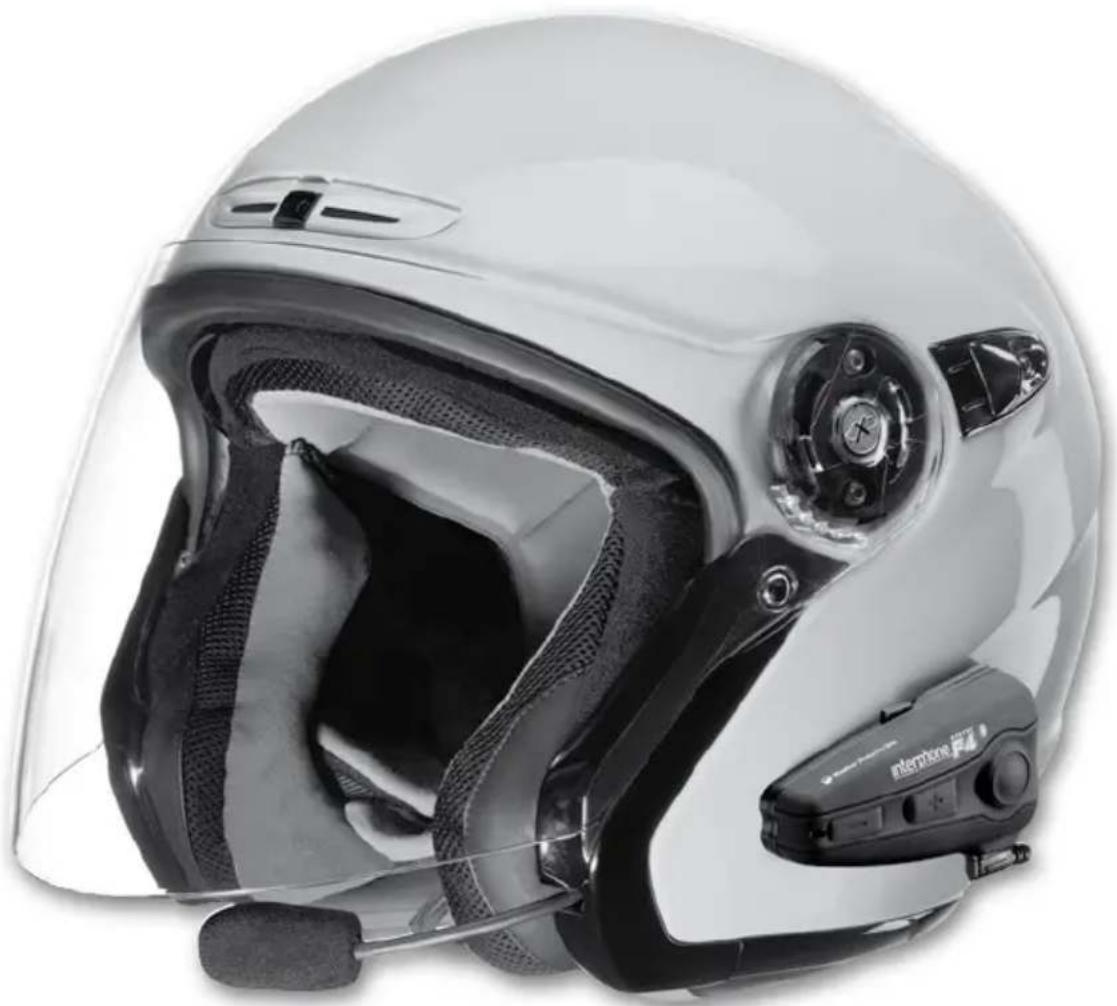
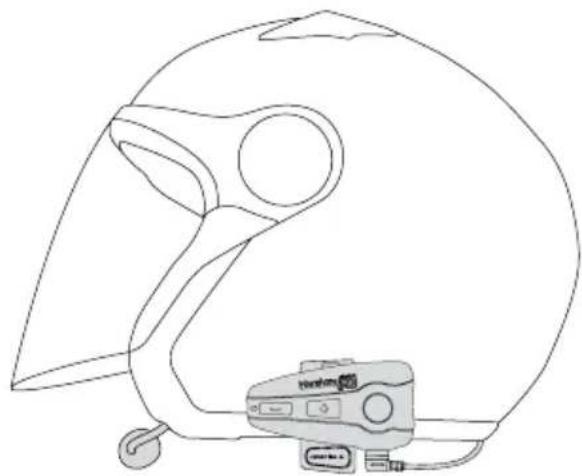
INTERPHONE F4 stereo can be installed on any helmet, without effecting structure or finish. Once installed, it can be removed at any time. INTERPHONE F4 stereo does not affect helmet homologation.
WHILST RIDING
Always prioritise your riding, not telephone calls.
During a telephone conversation, or whilst using the interphone, reduce your speed and concentrate on your riding. In bad weather and/or heavy traffic, we recommend pulling over and stopping, before answering.
Always ride carefully and in accordance with the current highway code.
WHEN STOPPED
To avoid theft, if leaving the helmet on the motorcycle, IN-TERPHONE F4 stereo is fitted with a quick release button to allow you to remove the external Bluetooth* control unit and take it with you.
FUNCTIONS
Telephone functions
telecom
- hands-free Dualphone (connection with two 2 telephones at the same time)
voice response
voice call - call refuse
Intercom functions

intercom
motorcycle-motorcycle or pilot-passenger interphone connection with other Interphone or INTERPHONE F4 devices
- interphone connection with enable button
- telephone ring warning
GPS functions

gps
- audio information from Bluetooth® GPS navigator
- telephone ring warning
gps
Stereo functions

music
- wireless hi-fi stereo connection with Bluetooth® A2DP music players
remote controls music commands - telephone ring warning
CHARACTERISTICS
Full duplex communication
DSP filter
(digital cancellation of wind and background noise)
- Communication up to 500m (in open field)
Automatic volume adjustment (adjusts automatically to suit speed and environmental noise)
- Fully waterproof
Installation in just 5 minutes
- Removable control panel
Lithium battery
Active use autonomy: up to 10 hours (indicative time of use alternating the various functions)
- Stand-by time: up to 700 hours
- Recharge time: 3 hours
- Dimensions: 90 × 46 × 20( mm)
- Weight: 83g including ear phones and microphone
NOTES ON AUTONOMY
Active use autonomy is indicative. It has been calculated by alternating the use of all the INTERPHONE F4 stereo functions and, given the varied use of these; it can vary significantly from one use to another.
During Intercom communication, one of the two Interphone or INTERPHONE F4 devices has a greater battery consumption: this is due to the wireless recharge procedure that one of the control panels carries out in order to remain connected to the other. It can even lead to a difference in autonomy of 60/90 minutes.
On long journeys, to optimise battery duration, we advise enabling Intercom mode only when you wish to communicate, remaining in stand-by or an alternative mode when not actually communicating.
PRODUCT DESCRIPTION
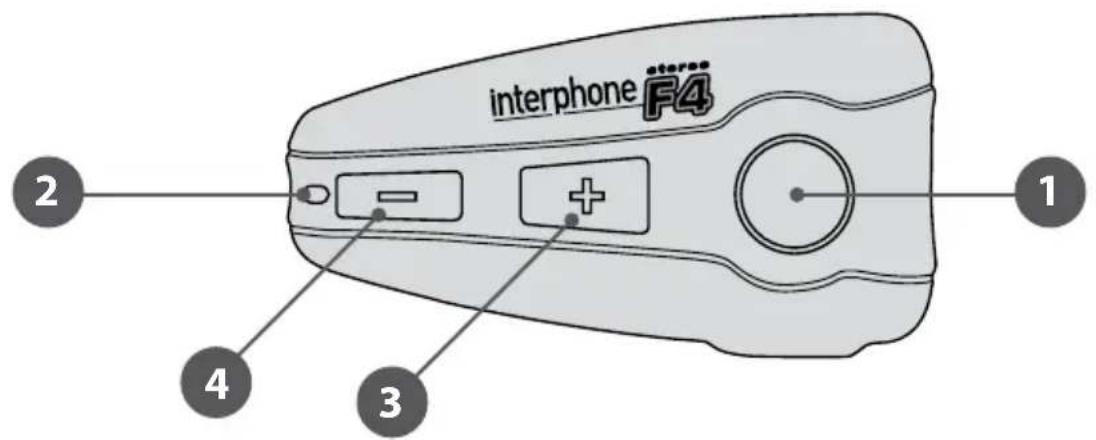
Bluetooth® control panel
- Multipurpose button
- Multipurpose LED
-
Volume adjustment button +
-
Volume adjustment button -
-
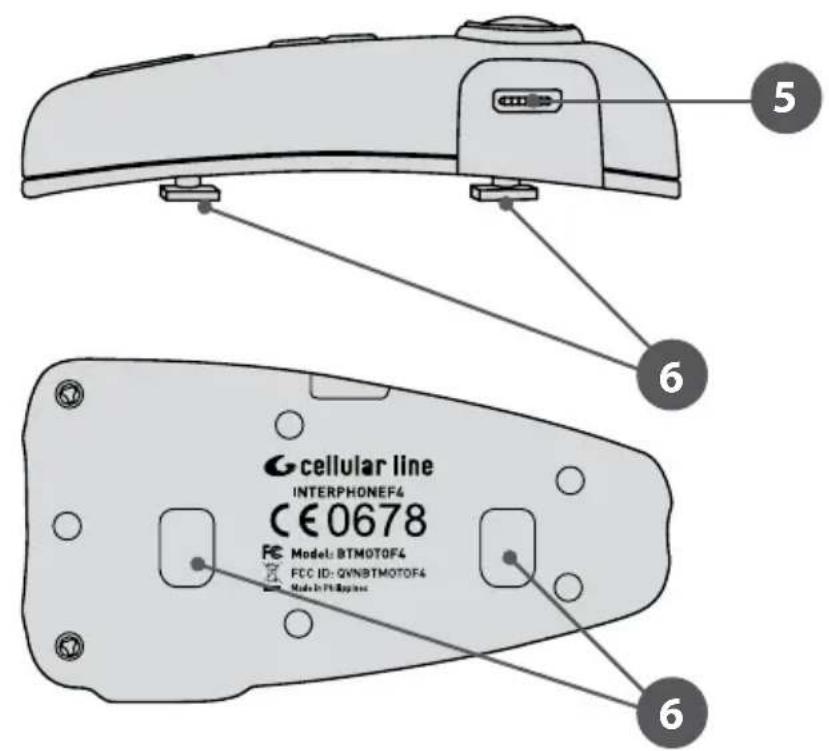
Recharge / Multipurpose socket and accessories
- Bluetooth® control panel connection guide
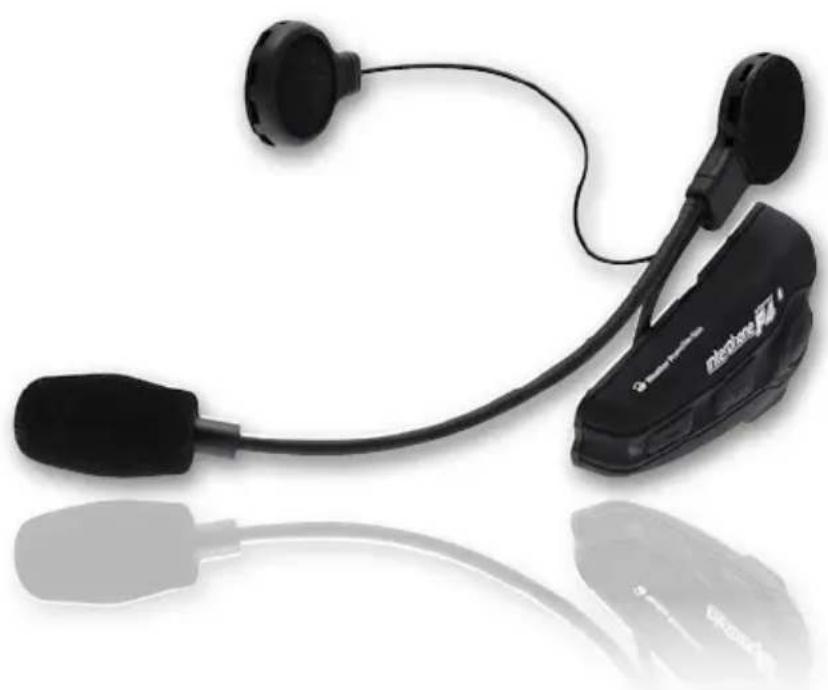
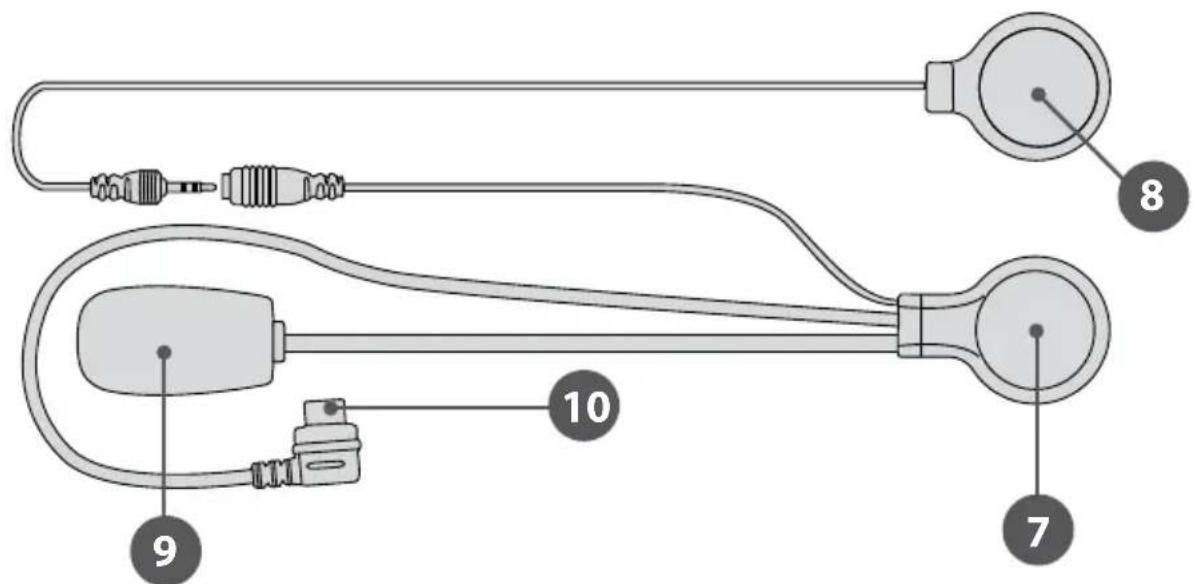
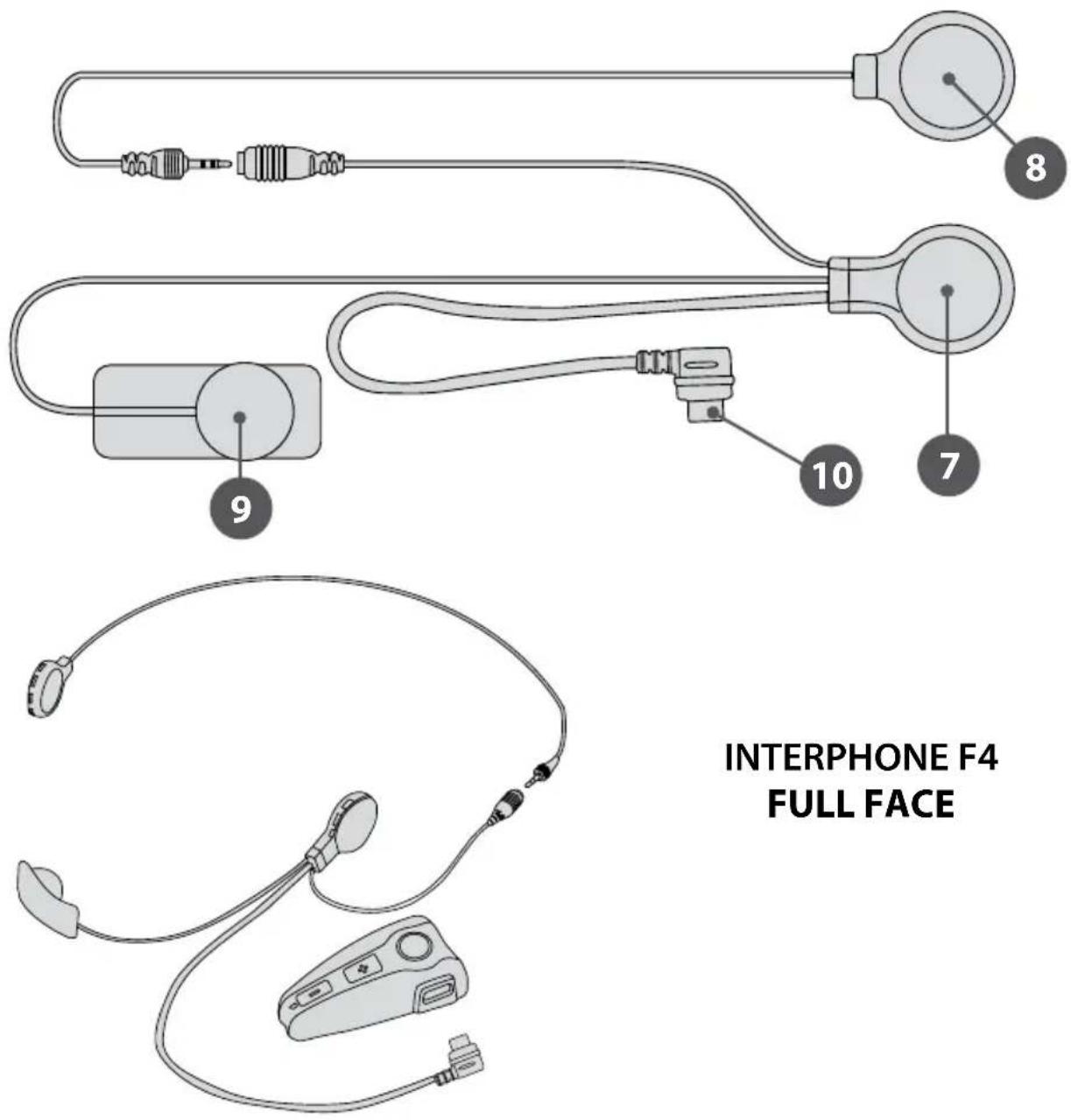
Speaker and speaker stereo with anti-wind microphone
7.Speaker
8. Speaker stereo
9. Microphone with anti-wind sock
10. Speaker/microphone connector
PACKAGE CONTENTS*
- Bluetooth® control panel
- Speaker with anti-wind microphone
- Speaker for stereo profile
- Removable control panel support with clip and screws (2 screws)
Adhesive control panel support - Clip adaptor
- Mains battery charger
Adhesive Velcro
Screwdriver
*Universal INTERPHONE F4 or Full Face in the Twin Pack versions: the package contains 2 complete kits for two helmets with one battery charger (dual wire) to recharge 2 control panels.
1 FIRST USE
1.1 Charging
Before using INTERPHONE F4 you will need to charge it up.
Connect the battery charger to a mains socket (110-220 V) and the recharger connector to the INTERPHONE F4 charging socket.
When charging, the LED indicator is red.
Once charging is complete, the LED turns green, to show that the battery has been fully charged.
1.2 Installation
The kit includes two types of slide support, one adhesive (fixed) and the other with clamp clips (removable). Use the support that best adapts to your use and helmet type.
interphone F4 Wireless Telecom, Intercore, Navigation and Music
NOTES ON POSITION
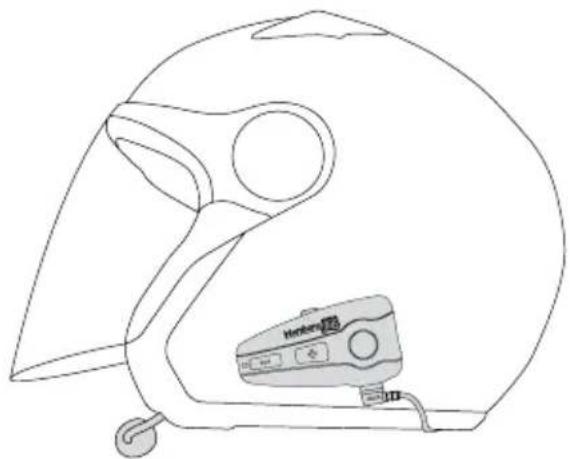
Although it can be mounted on either side of the helmet, INTERPHONE F4 stereo has been designed to be fixed on the left: this allows the motorcyclist to give commands with his left hand, keeping the right on the accelerator.
ASSEMBLY OF THE SLIDE SUPPORT WITH REMOVABLE CLIP (7)
Take the support and note the best place to fasten it to the side of the helmet. Insert the rear part of the clip into the helmet and couple the other part on the outside. Insert the screws and tighten gently. Check position and move the support if necessary, by sliding it along. Tighten the screws with the screwdriver supplied. N.B.: the support also includes an adaptor to offset any possible differences in thicknesses that there can be between helmets. Mount the adaptor between the two parts comprising the slide support using the longer screws supplied with the kit.
ASSEMBLY OF THE ADHESIVE SLIDE SUPPORT (8)
Take the adhesive support and look for the best side and place to position it. Clean and de-grease the part of the helmet where you are going to stick the support (do not use any detergents that could damage the helmet's finish). Remove the protective film from the bi-adhesive, and apply the support to the helmet.
As the support will not be able to be moved once stuck onto the helmet, take great care with its positioning, when applying.
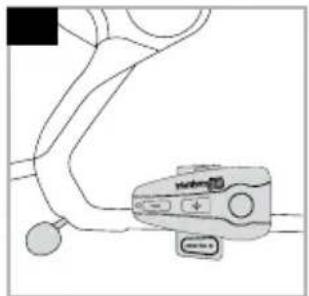
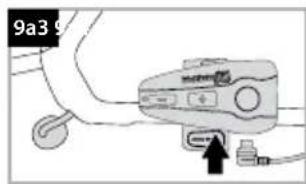
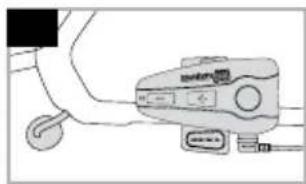
FIXING THE CONTROL PANEL (9)
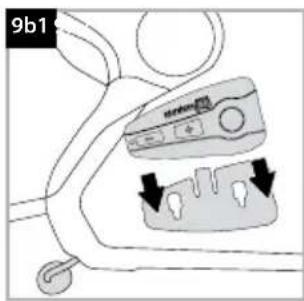
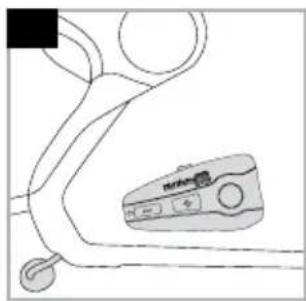
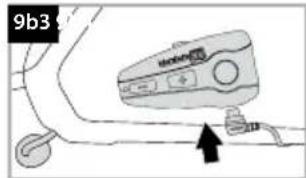
After having assembled the support onto the helmet, take the Bluetooth® control panel, and insert into the guide, from top to bottom. Check that the Bluetooth® control panel is correctly locked in its casing by trying to remove it, pulling upwards. The control panel must always be inserted from top to bottom, regardless of whether the kit is positioned to the right or left of the helmet. The connector for the speaker with microphone must always be beneath the Bluetooth® control panel.
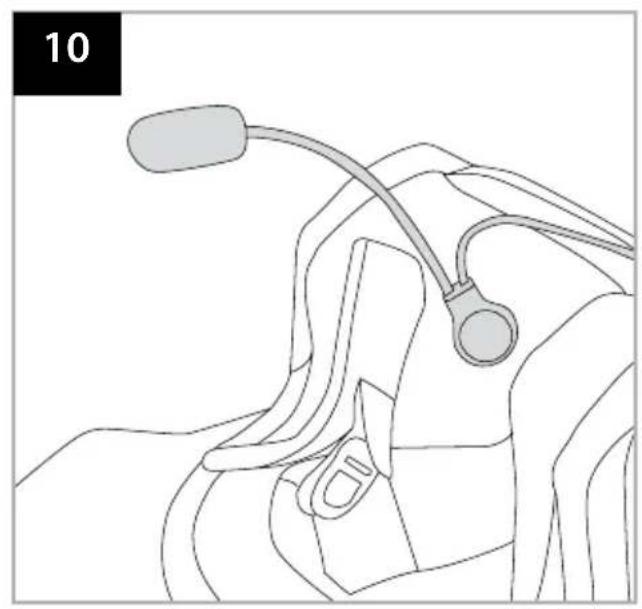
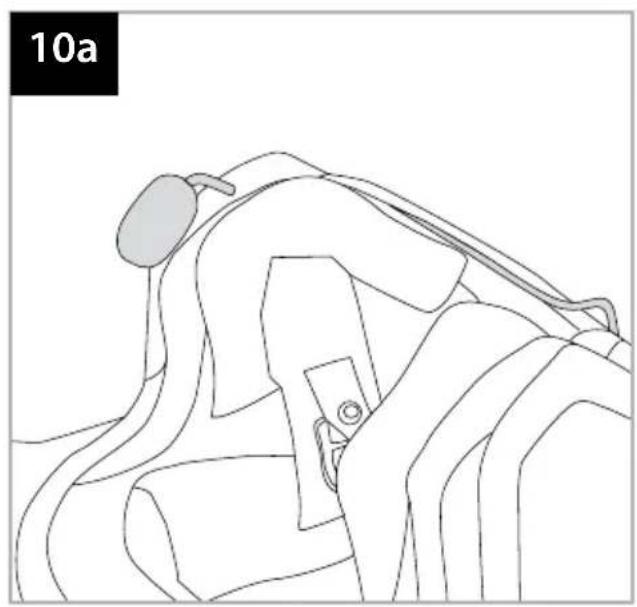
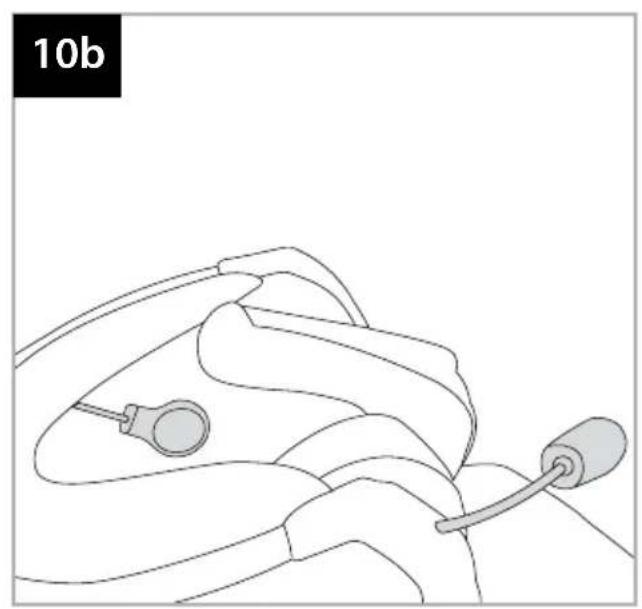
SPEAker WITH MICROPHONE ASSEMBLY (10)
Take the piece of Velcro and apply to the inside of the helmet with the bi-adhesive, positioning it at your ear.
N.B.: before positioning the Velcro, it is a good idea to try it out. Put the helmet on and check the most suitable position for fixing.
Apply the speaker with microphone to the Velcro you have just installed in the helmet.
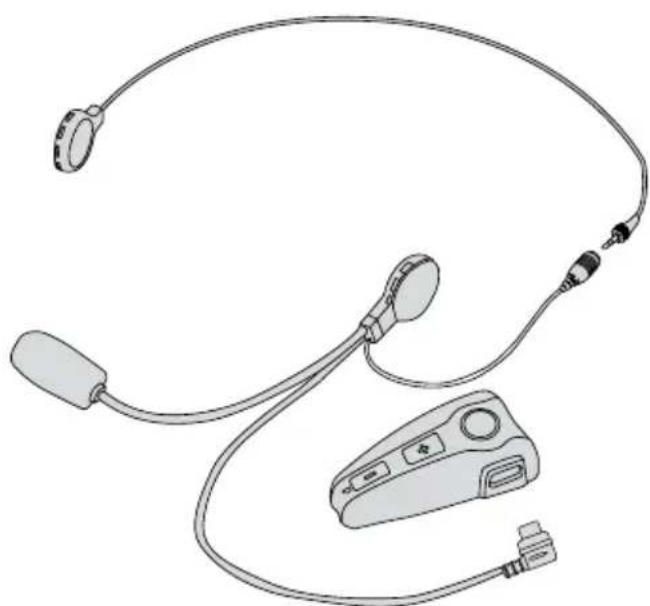
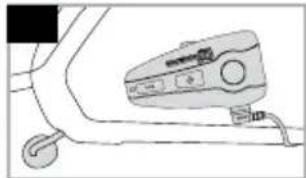
Connect the speaker with microphone connector to the socket on the Bluetooth® control panel (the connector can only be inserted in one position).
Any excess wire must be gathered up into the helmet, beneath the padding.
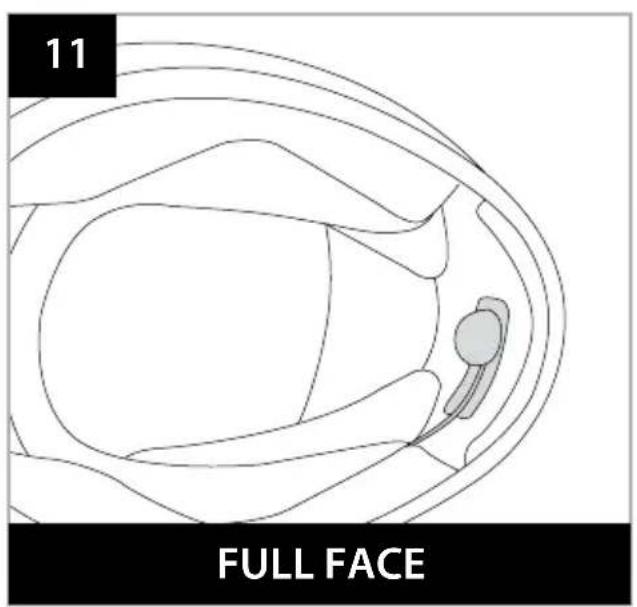
ONLY FOR INTERPHONE F4 FULL FACE (11): position the microphone Velcro into the chin guard, at the level of the mouth. Gather up any excess wire beneath the padding.
REMOVING THE BLUETOOTH\* CONTROL PANEL FROM THE HELMET
To remove the Bluetooth control panel, press the locking lever against the helmet shell and, keeping it pressed, allow the Bluetooth control panel to slide upwards.
1.3 Turning on /Turning off
TURNING ON
Press and hold the MFB button for approximately 3 seconds. The speaker will sound an acoustic warning and the LEDs will begin flashing quickly for around 3 seconds. Subsequently, in stand-by mode, the LED will flash approximately once every 5 seconds.
TURNING OFF
Press and hold the MFB button. The speaker will sound a prolonged acoustic warning and the LED will flash red prior to turning off.
2 PAIRING
INTERPHONE F4 is a Bluetooth device that is compatible with TELEPHONE - INTERCOM - STEREO (A2DP) profiles.
2.1 Telephone
Pairing
INTERPHONE F4 can be used with a mobile telephone.
After having turned INTERPHONE F4 off, press and hold the MFB button until the warning light alternates red and blue flashes. This will take about 8 seconds.
When the light is flashing red/blue alternately your INTERPHONE F4 is in pairing mode, go to the Bluetooth menu in your telephone and select search for devices (please refer to the telephone or navigator manual).
The telephone or navigator will detect INTERPHONE F4. Simply select it, and enter the numerical code 0000.
To use with a mobile telephone and GPS navigator at the same time, see point 2.4.
2.2 Intercom
Pairing
With two INTERPHONE F4 devices, you can use the Intercom function.
After having turned the two INTERPHONE F4s off, press and hold the MFB buttons on both until the warning light alternates red and blue flashes. This will take about 8 seconds.
When both LEDs flash red/blue alternately, press and release the MFB button on one of the two INTERPHONE F4s.
The two INTERPHONE F4s are connected when both LEDs show a fixed blue light.
NOTE ON COMPATIBILITY WITH OTHER INTERPHONE MODELS
The INTERPHONE F4 intercom connection is also compatible with previous INTERPHONE Cellular Line devices.
Pairing: press and hold the MFB buttons on both until the warning light alternates red and blue flashes. For INTERPHONE F4 this will take about 8 seconds, for INTERPHONE, about 5 seconds.
When both devices flash red/blue alternately, press and release the INTERPHONE F4 multipurpose button (the red and blue LED will flash more quickly).
Wait a few seconds, and when the devices are connected, the INTERPHONE F4 LED will remain fixed blue, whilst that of INTERPHONE will flash blue quickly.
2.3 Stereo (A2DP)
Pairing
To use the Stereo (A2DP) function, you will need INTERPHONE F4 in configuration mode: After having turned IN-
TERPHONE F4 off, press and hold the MFB button until the warning light alternates red and blue flashes. This will take about 8 seconds.
When the light is flashing red/blue alternately, ask the musical player you intend to use, to search for devices (please refer to the instructions given in the device manual). If the musical player so requires, enter the numerical code 0000. Once connected, the INTERPHONE F4 LED will flash blue.
2.4 Audio GPS
Pairing
GPS NAVIGATORS use the TELEPHONE (headset) profile for audio connection: to use a telephone whilst using a navigator, you will need to use the specific function of the GPS device. For further information and settings, please consult the navigator manual.
3 USE
3.1 Telephone function

To answer a call: as a call comes in, the speaker produces a warning sound or the telephone's ring: to answer, simply press and release the MFB button.
telecom
To end a call: to end a call, simply press and release the MFB button.
Vocal call: some telephones allow you to make a vocal call simply by pressing and releasing the MFB button.
To refuse a call: to refuse the call, press and hold the MFB button for approximately 4 seconds.
To refuse a call in VOX mode, follow the instructions given in the VOX FUNCTION section.
Volume adjustment: to adjust the volume, press the buttons Volume + or Volume -, depending on the desired volume level.
3.2 Intercom function

To enable intercom function: to enable the conversation in an intercom profile, press the MFB button on one of the two INTERPHONE
intercom F4s, and hold for about 3 seconds. An audible warning will advise you when connection has occurred.
Conversation in intercom mode is full-duplex.
To disable intercom function: to disable intercom function, simply press and release the MFB button.
Volume adjustment: to adjust the volume, press the buttons Volume + or Volume -, depending on the desired volume level.
3.3 Stereo function (A2DP)


telecom
Use of stereo A2DP profile of the telephone with INTERPHONE F4:
if the telephone has a Stereo A2DP profile, it can be used as musical pla
yer, connecting it up to INTERPHONE F4. To enable musical playing, please consult the telephone instruction manual.
To adjust the volume, press the buttons Volume + or Volume - depending on the desired volume level.
Use of a musical player with INTERPHONE F4:
a musical player other than the telephone, with Bluetooth technology, can be used: to connect it up, follow the instructions for the pairing of INTERPHONE F4 and refer to the musical player manual.
3.4 Music remote control

music
-
Play/Pause: press and release the MFB button twice.
-
Rew: press and hold the Volume - button for 3 seconds.
-
FF: press and hold the Volume + button for 3 seconds.
Volume: To adjust the volume, press the buttons Volume + or Volume -, depending on the desired volume level.
APPLE® IPOD®, IPHONE® OR IPHONE® 3G
Music can also be played on INTERPHONE F4 stereo by IPHO-NE or IPOD devices, if equipped with the specific Bluetooth* CELLULAR LINE 串 ILINK STEREO adaptor (not included).
3.5 Telephone + Intercom function

With this combination, the connection to the telephone function takes priority.
intercom telecom
interphone communication is not permitted.
- To enable the intercom function, there cannot be a telephone call underway: press and hold the MFB button for around 3 seconds. An acoustic sound will advise you of connection. Conversation in intercom mode is full-duplex.
To end a conversation in intercom mode, simply press and release the MFB button. - During an interphone conversation, you can answer or refuse a telephone call received. Intercom communication will be interrupted and re-activated automatically at the end of the call.
- To answer a telephone call, press and release the MFB button.
- To end a telephone call, press and release the MFB button.
- To refuse the call, press and hold the MFB button for approximately 4 seconds.
- To adjust the volume, press the buttons Volume + or Volume -, depending on the desired volume level.
3.6 Telephone + Stereo function (A2DP)


With this combination, the connection to the telephone function takes priority.
telecom
music
-
During a telephone conversation, not permitted.
-
When listening to music, you can answer a telephone call received. Press and release the MFB button to enable the call. At the end of the call, music will automatically continue playing from the exact point at which it had stopped.
- To refuse a call, press and hold the MFB button for approximately four seconds.
- To adjust the volume, press the buttons Volume + or Volume - depending on the desired volume level.
N.B.: In telephones equipped with musical players, and therefore which include a Stereo (A2DP) profile, the Telephone + Stereo (A2DP) function coincides. As such, it may not be possible to connect a further Stereo (A2DP) player.
3.7 Intercom + Stereo function (A2DP):


With this combination, the interphone conversation takes priority.
During an interphone conversation, the playing of music is not permitted.
Intercom
music
- When listening to music, you can make and interphone call. Press and hold the MFB button for around 3 seconds. An acoustic sound will advise you of connection. Conversation in intercom mode is full-duplex.
To end the interphone conversation, press and release the MFB button. After approximately 2 seconds, the Stereo A2DP connection will be restored and music will continue playing from the exact point at which it had stopped. - To adjust the volume, press the buttons Volume + or Volume - depending on the desired volume level.
3.8 Telephone + Stereo (A2DP) + Intercom function
telecom

intercom

music
With this combination, the connection to the telephone function takes priority.
Before connecting the devices, please ensure that all three
have been used at least once with INTERPHONE F4.
- During a telephone conversation, interphone conversation and the playing of music are not permitted.
- During an interphone conversation, you can answer or refuse a telephone call received. To answer, press and release the MFB button, to refuse press and hold the MFB button for approximately 4 seconds.
- During an interphone conversation, the playing of music is not permitted.
- Whilst listening to music on the Stereo A2DP, you can answer a telephone call received, or enable an interphone conversation. To answer, press and release the MFB button. To enable the intercom function, press and hold the MFB button for approximately 3 seconds. An acoustic sound will advise you of connection. Conversation in intercom mode is full-duplex.
- To adjust the volume, press the buttons Volume + or Volume -, depending on the desired volume level.
N.B.: In telephones equipped with musical players, and therefore which include a Stereo (A2DP) profile, the Telephone + Stereo (A2DP) function coincides. As such, it may not be possible to connect a further Stereo (A2DP) player.
3.9 Telephone + Telephone (Dualphone) function
telecomtelecom

This function allows for the simultaneous connection of two telephones.
- As a call comes in on the second te
lephone, whilst a conversation is underway on the first, you can press and release the MFB button to interrupt the first call and activate the second.
- You cannot refuse a call coming in on the second telephone whilst carrying out a conversation on the first.
- To adjust the volume, press the buttons Volume + or Volume -, depending on the desired volume level.
3.10 Telephone + Stereo (A2DP) + Telephone function


With this combination, the connection to the telephone function takes priority.
interphone F4 Wireless Telecom, Intercore, Navigation and Music
- During a telephone conversation, the playing of music is not permitted.
- As a call comes in on the second telephone, whilst a conversation is underway on the first, you can press and release the MFB button to interrupt the first call and activate the second.
- You cannot refuse a call coming in on the second telephone whilst carrying out a conversation on the first.
- When listening to music, you can answer a telephone call received. Press and release the MFB button to enable the call. At the end of the call, music will automatically continue playing from the exact point at which it had stopped.
- To adjust the volume, press the buttons Volume + or Volume -, depending on the desired volume level.
N.B.: In telephones equipped with musical players, and therefore which include a Stereo (A2DP) profile, the Telephone + Stereo (A2DP) function coincides. As such, it may not be possible to connect a further Stereo (A2DP) player.
3.11 Voice response (VOX)

The voice response function allows you to answer a call without having to press any buttons. Enabling voice response: Press and hold the
Volume + button for approximately 5 seconds.
An acoustic sound will advise you that this has been done. Disabling voice response: Press and hold the Volume - button for approximately 5 seconds. An acoustic sound will advise you that this has been done.
To answer a call: When receiving a call, simply say a word (e.g. 'HELLO') within ten seconds, to enable the line.
To refuse a call: When receiving a call, simply allow ten seconds to pass and it will be refused.
3.12 Voice call
The voice call function allows you to make a call without using the telephone keys. INTERPHONE
F4 stereo is compatible with the voice call fun
ction of various different mobile Bluetooth® telephones: to enable it and access the controls, please refer to your telephone instruction manual.
Please refer to the section Use - Telephone section.
4 BLUETOOTH® SPECIFICATIONS
Bluetooth®:
v2.1 EDR
Supported profiles:
Headset-Handsfree-A2DP/AVRCP/SBC
Pairing:
up to 8 devices
Multipoint connection:
up to three devices
(e.g. 1 telephone + 1 intercom + 1 stereo (A2DP)
5 CARE AND MAINTENANCE
If not using the kit for long periods of time, the battery must be charged every two/three months, to avoid damage.
Do not use solvents or de-greasers to clean the kit as these can damage it. Clean with a damp sponge and neutral soap if required.
N.B.: When cleaning, to avoid water filtering through the connector and damaging the control panel, please ensure that you have placed the battery charger plug into the socket. If mounted on the helmet, leave the speaker connector connected. Kit waterproofing is only guaranteed when the connector is connected.

(Applicable in those countries of the European Union with recycling systems)
The symbol shown on this product or on its documents indicates that the product must not be disposed of with other domestic refuse at the end of its life cycle. To avoid damage to the environment or to health caused by the inappropriate disposal of refuse, the user is requested to separate this product from other refuse and to recycle it responsibly to favour the sustainable re-use of material resources.
Domestic users are invited to contact the sales point where the product was purchased or the local office with information regarding recycling of this type of product.
Business users are invited to contact their suppliers and to check terms and conditions of purchase. This product must not be disposed of together with other commercial refuse.

This product bears the CE mark in conformity with the regulations of the R & TTE Directive (99/5/EC). Cellular Italia S.p.A. hereby declares that this product conforms to essential standards and other norms under Directive 1999/5/EC. The user is forbidden from making variations or modifications of any kind to the device. Any variations or modifications not expressly approved by Cellular Italia S.p.A. will cancel the user's authorisation for the use of the device. The Bluetooth® trademark is the property of Bluetooth SIG, Inc.
MODE D'EMPLOI
interphone stereo Wireless Telecom, Intercom, Navigation and Music F4
TABLE DES MATIÈRES:
INSTALLATION 38
PENDANT LA CONDUITE 38
PENDANT L'ARRET 38
FONCTIONS 38
1.1 Recharge 39
1.2 Installation 39
MONTAGE DU SUPPORT A GLISSIERE
AVECCLIPAMOVIBLE 40
MONTAGE DU SUPPORT A GLISSIERE ADHESIF 40
FIXATION DU MODULE 40
INSTALLATION DU MICRO/ECOUTEUR 40
RETRAIT DU MODULE BLUETOOTH* DU CASQUE 40
1.3 Marche / Arret 40
2 COUPLAGE 40
2.1 Telephone 40
2.2 Intercom 41
2.3 Stereo (A2DP) 41
2.4 Audio GPS 41
3 UTILISATION 42
3.1 Fonction Telephone 42
3.2 Fonction Intercom 42
3.3 Fonction Stereo (A2DP) 42
3.4 Music remote control 42
3.5 Fonction Telephone + Intercom 42
3.6 Fonction Télephone + Stereo (A2DP) 43
3.7 Fonction Intercom + Stereo (A2DP) 43
3.8 Fonction Telephone + Stéreo (A2DP) + Intercom 43
3.9 Fonction Télophone + Télophone (Dualphone) 43
interphone F4 Wireless Telecom, Intercore, Navigation and Music
interphone F4 Wireless Telecom, Intercore, Navigation and Music
NOTES SUR LA POSITION
APPLE IPOD, IPHONE OU IPHONE 3G
Headset-Handsfree-A2DP/AVRCP/SBC
Couplage:
interphone stereo Wireless Telecom, Intercom, Navigation and Music F4
INDICE
INSTALLACION 48
DURANTE LA CONDUCCION 48
DURANTE LA PARADA 48
FUNCTIONES 48
interphone F4 Wireless Telecom, Intercore, Navigation and Music
interphone F4 Wireless Telecom, Intercore, Navigation and Music
NOTAS SOBRE LA POSICION
interphone F4 Wireless Telecom, Intercost, Navigation and Music
3 USO
3.1 Función電話
APPLE IPOD, IPHONE O IPHONE 3G
interphone F4 Wireless Telephone, Internet, Navigation and Music
Headset-Handsfree-A2DP/AVRCP/SBC
Combinación:
interphone stereo Wireless Telecom, Intercom, Navigation and Music
INHALTSVERZEICHNIS
interphone F4 Wireless Telecom, Intercore, Navigation and Music
APPLE IPOD, IPHONE O PHONE 3G
Headset-Handsfree-A2DP/AVRCP/SBC
interphone stereo Wireless Telecom, Intercom, Navigation and Music F4
SUMÁRIO
INSTALAÇÃO 68
3.9 Funcao Telephone + Telefone (Dualphone) 73
3.10 Funcao Telefone ^+ Stereo (A2DP) +Telefone 74
3.11 Resposta Vocal (VOX) 74
3.12 Chamada vocal 74
interphone F4 Wireless Telecom, Intercore, Navigation and Music
3.4 Music remote control

music
APPLE IPOD, IPHONE O IPHONE 3G
interphone F4 Wireless Telecom, Intercostre, Navigation and Music
Headset-Handsfree-A2DP/AVRCP/SBC
Compactilitidae:
até 8 dispositivos
Ligação multipoint:
interphone stereo Wireless Telecom, Intercom, Navigation and Music
Inhoudsopgave
INSTALLATIE 78
TIJDENSHET RIJDEN 78
TIJDENS DE STILSTAND 78
FUNCTIES 78
Telefoonfunctie 78
Intercomfunctie 78
GPS functie 78
Stereo functies 78
EIGENSCHAPPEN 79
OPMERKINGEN BETREFFENDE DE AUTONOMIE 79
Beschrijving product 79
Inhoud van de doos 79
1 Eerste gebruik 79
1.1 Opladen 79
1.2 Installatie 79
MONTAGE VAN DE SLEEVORMIGE STEUN MET
DEMONTEERBARECLIP 80
MONTAGE VAN DE SLEEVORMIGE PLAKSTEUN 80
DE CENTRALE BEVESTIGEN 80
MONTAGE LUDSPREKER MET MICROFOON 80
DE BLUETOOTH°CENTRALE UIT DE HELM VERWJDEREN......80
1.3 In-/ Ultschakeling 80
2 Combinatie 81
2.1 Telefoon 81
2.2 Intercom 81
2.3 Stereo (A2DP) 81
2.4 Audio GPS 81
3 Gebruik 82
interphone F4 Wireless Telecom, Intercore, Navigation and Music
Full duplex communication
DPS filter
interphone F4 Wireless Telecom, Intercore, Navigation and Music
interphone F4 Wireless Telecom, Intelec, Navigation and Music
3 Gebruik
3.1 Telefoonfunctie

3.4 Music remote control

music
APPLE® IPOD®, IPHONE® O IP PHONE® 3G
interphone F4 Wireless Telecom, Intercore, Navigation and Music
Headset - Handsfree - A2DP / AVRCP / SBC
Combinatie:
tot 8 systemen
HnHAMNK n DnHAMNK Ctepeo C MKNpOFOHOM C yCTPOIcTBOM 3aunITbI OT BeTp a
7.ДинhamNK
8.ДиHamNK CTepeo
9. Minkpoohc yctpoiCTBOM 3aunTbI OT Betpa
10. CoeINHtBHyI npOBd dHaMK/MKpOHO
CoepKmoe ynaKOBkn
ПиемнкBluetooth
DInHAMIK C yCTPOINCTBOM 3aunITb OT BETpa
DInHaMnK C stpeOpnoHJEm
IIOOKOHaHH3apAKn CBeToNDnOCTaHOBHTCA
interphone F4 Wireless Telecom, Intercore, Navigation and Music
3eHOro UBeTa, YTO CBnTeTbCTByeT O nonHOJ 3apJKe aKKMyJlToPA.
1.2 yctaHObKa
Ha6obpi DnKpenHnBxOJaIe B KOMnKeTaIIO,
coepKaT DbA Tnna KpenHeN: OdHO KneiKoe
(ФИКСИРОВАHоe), a dpyroe c 3aXIMHbIMN KInncamn
(cbeMHO). NcNoJIb3yIte HaIbOoe IOnXoJrIcnCnocO6
KpenHeN B COOTBeTCTBm C BaIIM MTOUHMeMa.
INHOFPMAUO O IIOLOXEHNI
He cmToPra Ha To, yTo INTERPHONE F4 stereo MoKeT 6blb
yCTaHOBJeHn HIO60B CTOpOHe Wlme, OH 6bl pa3pa6oTaH
dIy UCTaHOBKn CJeBOI CTOpOHb, Ta KaK TaKOE IIOJOxEHnE
No3BOJREMT OMOUKNICHT YcNOJIb3OBA Tb JeByIO pyKy dIy
ynpabHeHn yCTpoIcTBOM, DePka IpaByIO pyKy Ha pyNe
TpaHCnOPTHOrO cpeDCTBa.
YCTAHOBKA DEPKATEJIa CO CbEMHOI KJINICOI (7)
OnpeJnte Han6oJee NOxOJaee MeTo dIy UCTaHOBKn rapHtypb Ha 7IeMe, yCTaHOBtte 3aDHIo YAcTb KINNCbl BHTpr 7IeMa, a BTopyu cAChb Ha BHeWHei CTOpoe 7IeMa. BCTaBnTB BNHTb IN CTeRka 3aBnHTnTB IN N IPOBepTu npABnLbHOCTb NIOXKeHn, PnH HeOBxOIMOCTN, NepemecNTb NOCTaBky, 3aTeM 3aBnHTnTB BNHTb IN N NOMOUs OTBePTKN, BXOJaee B KOMNLeKTAuHO. IPMUEAHHE: NOCTaBka IMeET TAKKe aAnTep DnK KomneHcaun Bo3MOXhBix pa3NJUmY ToJIuINbI 7IeMa. UCTaHOBt b aAdTep MExy DByMg CTOpOHAMn NOCTaBKn, INCNOB3yJ DA HANBOJe DInHHbIX BNHTa N3 Ha6opa.
YCTAHOBKA KJIENKOI DEPKATEJI (8)
B3aTb DepKaTeNb, Bb6paTb Han6Oone NoxOJaUe MeCTo ⅡIy UcTaHOBKn raphHTypbl, OuNCTNTb MeCTO yCTaHOBKn Ha WlneMe (He NcNoJIb3OBA Tb YnCTAunx CpeDCTB, KOTOpbl E MOrTy NOBpeDHTb OKpacky WlneMa), CHrTb 3aUnTHyIO IJIeHKy C DByCTOPOHReO KNeKORO 3JeMeHTa N YcTAHOBNTb NOCTAbkY Ha WlneM.
Heo6xoJIMO BHIMATEbHO BbIbpaTb MeTO KpeJIeHn, TAK KaK NocLe npIKJeBAHn NOCTaBKn NepeMeCTNTb ee 6yET HeBO3MOxHo.
KPEINJIENHE BLOKA (MOyJRA) (9)
Iocne yctahOBKn depkateHa 7nme, yCTaHOBNTb 6nOK Bluetooth no HapabnlouSei CBepx Bn3 IpoBepntb npabInhOcTb fNkCnpoBaHna 6noka Bluetoth*, nonItabuncb BblHyt bero, notaHyB BBepx.
Bnok yctaHaBnBaETc BcEpy Bn3, KaK c npaBoi, TaK n C neBOI CTOpOHIbIeMa, a coeINHITeIbHbI pa3bEm Ina HayuHnka C MmKpOfoHom DOnJxeh HaxoHTbcr Bcerda CHN3y NOmmoynem Bluetooth.
YCTAHOBKA DNHAMNKA C MUKPOOOHOM (10)
B3aTb Kcok KpennnHa JinyuKe (Velcro) uycTaHOBtB ero npi NOMOUs DByxCTOpOHHe JInKoJ neHTb BHyTpN IJema Ha ypOBHe yxa.
PnIMeAHHE: neped KpennneHem IINKoN neHTb JKeaTeNbHO ocuueCTBnTpMepky: HaeTb WneM INopeDenntb Han6Oone noXdoJee MeTO DnI KpeNHeHH MKNpoOHa C HayHNIKOM.
UcTaHOBtMbMKpOfoH C HayuHnKOM Ha KpenHe Hne Velcro, npNKpeNHeHHoe K Wlemy.
Pn nmooun coeHHntbHoro npoBda coeHHNTb yctpoCTBO C 6IOKOM Bluetooth (UtbipcoeHHntbHoro npoBda noxOHT TObKO JnOHO p3bema Ha 6Noke). I3nnk npoBDA moKHO cnpaTb C BHyTpHeHc TOpohbl Wnema NpD npoknaKo.
TOJIbKO IIN INTERPHONE F4 FULLFACE (11) yCTaHOBnTB MIKpOFOH BHTpy NOD6OpOHNKa Ha yPOBHe pTa, n3NIMKn IPOBOda MOxHc CNPraTb C BHYTpEHNe CTOPoHbI JIeMa NOd npOKlaKn.
CHATNE MOyIa BLUETOOTH CO WJIEMA
3aKOHHTb pa3roBOp: nIy OKOHuaHnpa3roBopa HaxKaTb KhoNkY MFB
Tolocobon 3BOHok: HeKoToPbIe TeneOHObl MOryT OcyuectBnIbTb TOLOCOBn Ha6Op nocne KopoTKoro HaxaTNk HonKn MFB.
OTKIOHHeHne 3BOHka: npn OTKa3e OT BXOJaUeRo 3BOHka, HaxaTb n DePxaTb B TaKOM NIOJoxeHm KHOJky MFB B TeueHne npImepHo 4 cek.
ДЯ OTKa3a OT 3BOHKA B rOLOCOBOM pexKIMe (VOX)ДЕСТВОВАТБСоOTBETCTBIMСИНСТPyKUЯМИ, nIHOKeHHbIMBaPazdeneФYHKUЯ VOX.
PerynpoBka rpoMkOCTN:IpyrnpoBaHnra rpoMkOCTN Heo6xOIMMo HaxaTb KhoNKn Volume+ Nnn Volume - B COOTBeTcTBn CKeJaembIM ypOBHEm 3Byka.
3.2ФункцьвHTpeHne CBa3n (Intercom)

BknoueHne fynkun Intercom—HaKaTaB KhoNky MFB Ha oDHom n3 yctpoiCTB INTERPHO- NE F4 Ha 3 cekyndbl, coo6ueHne o6 ycneuHOM
Intercom
akCTnueckoro CnHaJa.
Pa3roBOp NO BHTpeHHeC CB3N OcyueCTbIeTcB PexIMe DyIIeKCHO COeINHeHn.
BbIKIOeHne FyHKuIN Intercom: nIa BbIKIOueHn fyHKuIN BHyTpEHHcCB3n HaKaTb KOnKy MFB.
PerynpoBka rpmkoctn: nIpeRynpoBaHra IpromKocTn Heo6xOIMMO HaxKaTb KHOKnVolume+ NINVolume-BOOTBeTCTBm CKeJaEMbIM yPOBHeM 3ByKa.
3.3ФункцяСтrepo(A2DP)


music
telecom
McnoB3ObaHne npoФnA2DP TelefoHa c yctpoiCTbOM INTERPHONE F4:
ecnn TeneoH NMeET npoNb Ste
reO A2DP MoXHO nCnOJb3OaTb erO dNBA BOCpON3BeDeHNA My3blKn, coeINHB erO c yCTPOIcBOM INTERPHONE F4.ДЯ AKTNBnPOBaHNA fYHKUNB OBCPON3BeHNA 3aNcEe, CNeDyTe INHCTpyKUAM TepeHa
Длг Perуларовая Ррмкости Heo6xOДМо HaxKaTb KhoIKN Volurm + NIN Volurm - B COOTBeTCTBnC KeJaEMbIM yPoBHeM 3Byka.
IcnoB30BaHne My3bikalbHoro nleepa c yctpoiCTBOM INTERPHONE F4:
MOXHO NcNoB3OBaTb yCTPOINCTBO BOCPOn3BeHEnn 3aIncE C TexHoNOrne BluetoothOTnUHOn OT TeNeOHa, IraeroNDcoeHNHeHn CnDeyTe INCTpyKmM NO copJxKeHIO yCTPOINCTBa NTERPHONE F4 n pyKOBoDCTBa No EKcNPyatauMy3bKaJIbHOro npOnrpbBaTeJI.
3.4ДиctaHcnoHHe ynpabIeHne npourpBbATEJem

-
Play/Pause (xog/nay3a) HaxKaTb Dba pa3a KhoNky MFB
-
Rew (ha3a) HaxaTb n depKaTb 3 cekyHdbi KHONKY MFB
-FF(Bnpej):HaaTbNdePxaTb3ceKHyblKHONkyVolume+.
-ΓρomKocTB:ДляperуліровангтρOMKOCTN Heo6xOДIMO HaxKaTb KONKN Volume+ INI Volume -B COOTBETCTBUN C KEJaEMbIM VPOBHEM 3BYKa.
APPLE® IPOD®, IPHONE® O IPHONE® 3G
Moxho Bocnpo3B0Dntb My3bky Ha INTERPHONE F4 ste- roTo mncne npn nmoOn yctpoCTB IPHONE nnIPOD, ecn OHy YKOMPNEKTOBaHbI CnEuaJbHbIM aadTepom Bluetooth CELLULAR LINE ILINK STEREO (He BXoNT B KOMNKeT).
3.5Функцу Teneooh+BHytpenHra CB3b (Intercom)

telecom
Takon KOMnHaun npnopntHOABJETCA yHKua TeneoHa
-BoBpemTenefoHHoro pa3roBopa
He donyckaetc KOMMyHkaaBpeXMe BHyTpeHHe CB3n (Intercom).
- Aktubipobatb yHKuio Intercom MoXHO ToIbKO npIO OTCYCTBn TeneoHHoro pa3roBopa: HkaTb N epKaTaB
npimepno 3 ckyHdbi KhoNky MFB, 3bYkoBoi cnHan noTBePckdaet ycneuHoe coeHNHeHne. Pa3roBop no BHTpeHHe CBA3n OcyueCTBIAETcB peXmE dynKeKchoro coeHNHeHna.
-Дя OkOHuaHЯ pa3roBopa B peKIme Intercom HaxKaTb KhoNky MFB
- Bo Bpempa3roBopa B pexime Intercom MoxHo OTbeuATb Ha TeJefoHHb 3BOHOK NIN c6pocntb erO. CoeunHeHne B pexime Intercom 6ydt npepBaHO N BOCCTaHOBNeHO NO OKOHuaHH TeJefoHHoro pa3roBopa.
-ДлгOTBetaHa BXOДЯПИЗ 3BOHOK, KOPOTKO HaKaTb Ha KhoNky MFB.
-Дя Okончаня Tekyцero Teneфон Horo pa3roBopa, KopoTko HaxaTb Ha Khonky MFB.
- Пио OTказе OT BXODДцero 3BOHka,нжаТь И degжаТь В takOM NOJOXKeHn KONky MFBВ TeueHne npIMepHo 4 cek.
-ДяperynpoBaHnrgpOMKocn Heo6xOIMHOHaKaTb KHOIIVolume+INVVolume -B COOTBETCTBUN C JKeJaemblm yPoBHeM 3Byka.
3.6ФункцЯТeлфон+Стpeo(A2DP)


Pn Tako KOM6Haun npOpntHOJRAeTcFyHKUa TelefoHa
BoBpemTepeOHoro pa3roBopaaKaalbHoe Bocnpoun3BeDeHne.
BoBpem npocnyuBaHnMy3bIKM0XHOOTBeTntbHa TepeHHb 3BOHOKnnC6pocntbero.KopoTKo HaxaTb Ha KhoNkF MFB nA kTBAcua 3BOHka, no OKOHuaHn TepoHHoro pa3roBopa, My3bikalbHoe BOCpON3BeJeHne BO3O6HOBNTcABTomatueckn CTOREMeTa, B KOTOPOM OHO 6blno npepBaHo.
- PnO tKa3e O T BxOJaIeRo 3BOHka, HauKaTb N DePkaTb B TaKOM nIoXeHnn KhoNky MFB B TeueHne HeckoJbKnx ceKyHd.
-Дуpeулрованягрмкocн Heo6xOIMMo HaxaTb KhoIkn Volur+ NnIu Volur -B COOTBeTCTBnC Jxenaembl ypoBHem 3Byka.
ПРИМЕЧАНЕ:Втелфоанх,нмсюиxучрсьdo nbaBocponn3beHnMy3bIKN,TOecTBBOcPnHmMaemble npoФиEMStereo(A2DP),функц Telephone+ Stereo(A2DP)cobnaaet
c BwUeKa3aHHOfYHKUne. NOrToMHy He BcerHa BO3MOxHo noKnIOueHne dpynix npeepoB Stereo (A2DP).
3.7ФункциьВутpenнero coeMHHeHnra (Intercom) + Ctepeo(A2DP)

intercom

music
Pn TaKoN KOM6NaUHn
PnpOpTeTHOJ ABJIeTcYHKuNpa3roBopa B pexKmE BHyTpHeHero coeHNHeHn Intercom
-BoBpempa3roBopaBpeKMeIntercomHeDonycKaetcMy3bKaJIbHoeBOCpOuN3BeJeHne
-Bo Bpem npocnyuBaHnMy3bIK MoXHO OcyuEcTBnB pa3roBop B pexime Intercom.ДЯ 3toro HaxaTb n depKaTb npimepHo 3cekyndbl KhoNky MFB, npn nomouin 3BykOBoro CunHaHa coo6uaetcOyCneuHOM CoeHNHeHm. Pa3roBop NO BHTpeHHe CBaN OcyuEcTBnEeTcB Pexme DynNeKCHOrO CoeHNHeHn.
-KopoTko HaxaTb Ha KhoNky MFB dna OKoHuaHn pa3roBopa BpeXime Stereo A2DP n My3bikalbHoe BocIpon3BeJeHne BO3O6HOBnIeTcABTomatUeCKn CTOr MeCTa, B KOtOpom OHO 6bln npepBaHo.
-ДлpeунровангрOMKOTN Heo6xOIMHaxaTb KhoNKn Volurm+ NIVVolume -B COOTBeTCTBnC XeJaemblM yPoBHeM 3Byka.
3.8ФункиЯ TelefoH + Ctepeo (A2DP) + BHTpeHHra CB3b (Intercom)

telecom

Intercom

music
PnTakOn KOMbnuHaun npOpntetHo nBnEeTc yHKuTe nefoHa.
Ipeed coBmeHemem 3Tnx yHKn, y6eINTbCRA, yTO BCE cyHKn 6blnn cOpJxHeHb XOT8 6bl OINH pa3 B yCTpoiCTBE INTERPHONE F4.
- Bo Bpem TeneoHHoro pa3roBopa He donyckaetcpa3roBop B pexime BHyTpehHe CBA3n (Intercom) mMy3bKaJIbHoe BOCPON3BeJeHne.
- Bo Bpempa3roBopa B pexnme Intercom MoXHO OTBeuatab Ha TelefoHHb 3BOHOK mNc6pocntb erO. Ira OTBaHa 3BOHOK HaxaTb Ha KONky MFB. Ppu OTkaze ot BXoJauero 3BOHka, HaxaTb N depxkaTb TaKOM NIOJKeHN KONky MFB B TeueHne npumepHo 4 cek.
interphone F4 Wireless Telephone, Internet, Navigation and Music
Bo Bpempa3roBopa BpeKMe He donyckaetcMy3bikalbHoe BocnpOn3BeJeHne
BoBpMaMy3bikAnbHoro BocnpOn3BeHeNn Stereo A2DP MOxHO OTBeaTaHa TepeOHbI 3BOHOK nIaKTHBnPoBaTb BHyTpEHNO CB3b (Intercom).IJa OTbeta Ha 3BOHOK KOpOTko HaxaTb Ha KNkY MFB. IJa aKTHBaunn FyHKuIN Intercom HaxaTb N DepKaTb B TAKOM NIOXeHNn KHONKY MFB B TeueHne npImepHo 3 cek, 3ByKOBo CnHan Coo6uaeT o6 ycneHOM CoeHNHeHN. Pa3roBop No BHTpeHHeCBA3N OcyueCTBnEraTc B peXmme DynKeCHoro CoeHNHeHn.
-ДуpeулровангромкocTи Heo6xOIMMo HaKaTb KHOIIKn Volur + NIN Volur -B COOTBeTCTBnC JKeIaEMbl ypoBHeM 3Byka.
PINMEUHHE:B TeneoHax, Nmeoiux yctpoCTBO IyBocnpou3BeHnMy3bKn, To eCb BOCpInHnMaemble IpOphiNem Stereo (A2DP), FyHKuIaTeNeoOH+ Stereo (A2DP) coBnaaet C bblweyka3aHHoF oynKlneM. IToTOMYeBCrDa BO3MOxHO NOkIOueHe Dpynx Npeepo Stereo (A2DP).
3.9ФункцЯТeлфон+TeLefoN(Dualphone)

telecom
telecom
Pn nOMOuN daHHo fYHKUIN BO3MOxHO OJHOBpeMeHHoe NOcOeUNHeHne DByx TeneOHOB.
-Пипocулесни 3вовka Ha
BtOpO TeneoH BO BpMa Pa3roBopa n nopBOMy Teeneohy, Kopotko HaxaTb Ha KhoNky MFB, nepBbI 3BOHOK 6yET npepBaHn aKTHBnpyeTcBxOJaun 3BOHok.
- Hebo3MOxH0 OTka3aTbC8OT BXOJaIe9o 3BOHka Ha BTOPOI TeneoH BO BVpempa3roBopa no nepbomy Tepeohy.
-Дуpeунрованягомкости Heo6xOIMHaxaTb KhoIKN Volur + NIV Volume -B COOTBETCTBUN C JekelaembIM ypoBHem 3Byka.
3.10ФункцЯТефон+Стelve(O2DP)+ТelefфоH

telecom

music

telecom
Pn TaKoN KOM6HauCn npOpNTeTHO ABnEeTcA yHKuTeJefoHa
·BoBpeM
TeneoHHoro pa3roBopa He Donyckaetc My3bIkaIbHoe Bocnpoun3BeJeHne.
-Пи NOCTYINHEN 3BOHka HA BTOPOI TELEOH BO BPEMa pa3ROBOPa NO NEPBOMy TeneOHO, KopoTko HaxaTb Ha
KhONky MFB, nepBbI 3BOHOK 6yJeT npepBaH n aKTnBnpyetc BxOJaI 3BOHOK.
- Hebo3MOxH0 OTKa3aTbC8 OT BXOJaIeero 3BOHka Ha BTOPOI TelefoH BO BVpeM pa3roBopa No Nepbomy TetefoHy.
BoBpem npocnyuBaHnMy3bIKMOxHO OTBeTntb Ha TepeHHb 3BOHOKnn C6pocntb erO. KopOTko HaxaTb Ha KhoNky MFB dna AKTHBaun 3BOHka, no OKOHuaHn TepeHHoro pa3ROBopa, My3bikalbHoe BOCIpON3BeJeHne BO3o6HOBNTcABTomATUeCKn C TORO MeCTa, B KOTOPOM OHO 6blno npepbHo.
-ДяperynipobAHnI rpoMkOCTn HeoXoIMMo HaKaTb KHOIIK Volume+ NIVVolume -B COOTBeTCTBUN C JKeJaEMbIM yPOBHeM 3ByKa.
PINMEAHHE: B TeneoHax, ImeHOxuX yCTPOIcTB O nla Bocnpou3BeHnna My3bKn, To eTb BOCpHnHMaembIe npOHNem Stereo (A2DP), FyHKUa TeneoOH + Stereo (A2DP) coBnadaet C bblEuyka3aHNO fHyKUnei. PToTMy He BcerDa BO3MOxHo NOkIOueHHe dpyrN x Npeop Bo (A2DP).
3.11 TOnocobOy OTBET (VOX).

Функцуг rOLOCOBOrO OTBeTa N03BOJnEToTBeHaTb 3BOHOK, 6e3 nCNoIb3OBaHnKHOHOK.
telecom AktuBaIra rOIOBOrO OTBeta HaXaTb I depKaTb KHOKny Volume + B TeueHne npIMepHo 5 cekyHd. YcneHoe oCyueCTBnEHe nepeau nnoTBePxxdaetc 3ByKObblm CnHaJOM.
IeakTnBaunr roLoCOBOr OTBaTa: HaxaTb N DePkaTb KHOKny Volurme - B TeueHne npImepHo 5 cekyH. YcneHoe OcyuecTBnEHeonepaunnoTBepeXdaeTc3ByKObIM CnHaHOM.
OTBET Ha 3BOHOK:Пи OTBeTe Ha 3BOHOK ДЯ AkTINBaUHIMI Heo6xOdmo ПОИЗHeCTn OпрeДeNEHoe CLOBO (HaPmep «AJIIO»)В TeueHne DecaTn CeKHyN nocNe NOJyEHHa 3BOHka.
C6poc 3BOHka: Pocne nonyehnna 3BOHka BbIXdaTb DecaTb cekyHd. 3BOHOK 6ydt C6poWeH aBTOMaTuYeCKn.
3.12 TOnOCOB3BOHOK
Функцуг罗LOCOBOTO 3BOHka N03BOJNAETOCYUCTBNTb 3BOHOK, He NCIOJb3yK HONKITeNefoHa.YcTpoIcTB INTERPHONE F4 stereo
telecom
COBMECTMIO C ΦyHKUneI rOLOCOBOrO 3BOHka pa3JIuNHybIX MO6NJbHbIX TeJefoHOB Bluetooth®:ДЯ AKTNBaUN NToT ΦyHKUIN DeiCTBOBaTb B COOTBeTCTBUN C INHCTpyKUIN M TeJefoHa.
4 XapaKTePnCTnKn yctpOcnTba bluetooth® bluetooth®
v2.1 EDR
PndepKnBaembl npoHn:
Headset-Handsfree-A2DP/AVRCP/SBC
CobmeeHne do 8yctpoiCTB.
Mhoromecthoe coeHHeHne:
do Tpex ycTpoiCTB
(Hanpumep, 1 Tepeoh + 1 yctpoicBo Intercom + Stereo(A2DP)).
5 yxodntexhnueckoe 6cbnykBAHne
EcnrnapHntypa He nCnOJb3yETcB TeueHne DOnIro BpemeHn, Heo6xOAnMo 3apKaTb AkkMyIATop KaKdble dBa/tpn Mecua, BO n36eXaHne erO BblXoJa n3 cTpor.
He nCTnTb H6Op npn NOMOu pAcTBOpnteJe nn 063KnPBAIOUX CpeDCTB, KOToPbE MOrT NOBpeDHTb NOBepxHocTb, INcNoIb3yTe BnaXHyro r6Ky I, npn Heo6xOdMOCtN, HeITpaJIbHOeMbIIO.
PpmeaHHe: BO BpeMa YnCTKn, BO n36exKaHHe nnonaHaHn BoBb Upee3 pa3bEm N nobpeXJeHn 6noka, y6eInTeCb
B TOM, YTO B COOTBeTCTByIOUm pa3bEm BCTaBnEH WtBipb 3apAHHoro yCTpOINCTBa. Ecnn 6JOK yCTaHOBnEH Ha WJIeMe, HE OTCoeHNHnTE CoEHNHTeNBhI Ka6eN bIy C7POINCTBa rPOMKo CB83N. HEnpoHnCaEMocTB 6Ioka rapaHTnpYETc TaIbKO pnp NOCDcoEHNHeHOM Ka6eNe.
6 CepBnchoe 06cIyKmbaHne n TapaHTn
IpoNyKT NMeET rapaHTIO B COOTBETCTBUN C DeNCTBYIOUM N NOJOXEHNAIM 3aKoHa.
Heo6xOduMyu HhOpMaunu 06 06cnyXbAHn nn 3aIuaCTx npOdykTa MoJHO NOCMOTpeTb Ha caTe www.interphone.cellularline.com

INCHPTYKUINI INBIBEENIA N3CTPOA 3NEKTPOHHOOBOPOYIOBAHNA
(NIAHcNoIb3OBAHnB CtpaHx EBponeckoro Coo6ueCTBa, ININ B Ctpa-Hax, KOtOpbl EMeKTo DnΦΦepeHcnpoBaHHyIO cnCTemy c6opa OTXoOB)
CneuNbHa MapKnpOBKa, KOtOpA CTaBtCn Ha npOyKt, Hn Ha ero cnpOBOnTeNbHbIe DOKymHeTb, O3Haayet, YTO daHHb I npOyKT HeB3 PaCnpOdaBaTb, Hn NpepebaTaBb TaB BMeCe CpyHM NOMaWHMIM OTXoAMN NocE OKOHuaHn Cpoka INrOHOCTn. INr TORO, YTO6b IN36ExaTb CnyaHnoe HAnecHne Uep6a OkpykaIOSe CpeDe, INr 3DopOBbIO IN3-3a HEnpaBnBHO IN HeymecTHoN nepeapobTK nOTXoOB, Heo6xOIMO Bbl3BaTb NOJb3OBateJI, KOTOpB 3aHIMaETcN pepeapokTo DAHHbIX OTXoOB, INr TORO, YTO6b IO CMOr OTdennb DAHHb BpeDhN dINr 3DopOBbB npOyKT OT dpYnx BNIOB OTXODOB INCMOR nepeapobTaB ero NOD CBOIO OTBETBeH
HOCTb TaKIM O6pa3OM, YTO6bl MOxHO 6bIIO NcNOLb3OBaTB 3OTT pOyKT B KaueCTBe MATEpnaJIbHbIX pecypcoB. DomaHnM NOJb3OBaTeIaR BpeHOrO pOpyKT TpeJaRaETC CB8a3aTbC C nepekyIuNKOM, INIPO3HNuHbIM TOPROBcEM, y KOTOpBX 6bl npNo6bpTeH DaHHbI pOpyKT, INI Jc MeCThBIM OPAHOM caHTapHOrO HAn3Opa, KOTOpBI paCnolraet Heo6XoDmOIu INHofopMaueNe, KacaUeicra NfΦepeHcnpoBaHORO c6opa OTXODOB INX Nepepa60TKn.
3aBODCKIM NOTpe6NTeM NpeDnAraeTc Bc8aTbC C NoCTABUHKOM PNOyKuN IN PPOBepNTb YcIOBn IN CPOK NocTaBKN KOHTpaKaTk KyPiN-NpOdaXn.
Hactoui npoykt HnB3a nepepaabaB BmecTe c npytn M KOMMepueecknM OTXoamn.

3To n3dene 3aMapKupobAo HcMbONOM CE B COOTBeCTBnC yka3aHnMn DnpeKtnB R & TTE (99/5/CE).Pn3Tom, KOMnaHnCellular Italia S.p.A. 3aBnEET, yTo n3dene COOTBeCTByeT OCHOBhIM Tpe6oBaHnMn Yka3aHnMn DnpeKtnB 1999/5/CE. 3aNpeSeHO BHOCTb N3MeHeHnN Nm MoDnOHaKaunn B n3dJeIne. IpaANTn N pa3peSeHne Ha NoJb3oBaHne N3dEnEm He pacnpocTaPAHOTc H a Cnyan BHeceHn HecOrNaCoBaHHbIX KOMnaHne Cellular Italia S.p.A. n3MeHeHn. ToproBaar Mapka n Norotinu Bluetooth' ABnIOCTc Co6CTBeHHOCtBIO KOMnaHnbluetooth CnF, INHK. (Bluetooth'SIG, Inc.).
Instrukcja obstugi
interphone stereo Wireless Telecom, Intercom, Navigation and Music F4
Spistresci
INSTALACJA 98
PODCZAS PROWADZENIA 98
PODCZAS POSTOJU 98
FUNKCJE 98
Funkcje telefonu 98
Funkcje Interkom 98
Funkcje GPS 98
Funkcje stereo 98
CHARACTERYSTYKA 99
UWAGIDOTYCZACEZYWOTNOSCBATERII 99
Opisproduktu 99
Zawartosci zestawu 99
interphone F4 Wireless Telecom, Intercore, Navigation and Music
interphone F4 Wireless Telecom, Intercore, Navigation and Music
UWAGIDOTYCZACE WYBORU POZYCJI
interphone F4 Wireless Telecom, Intercost, Navigation and Music
3 Uzycie
3.1 Funkcja Telefon
APPLE® IPOD®, IPHONE® O IPHONE® 3G
interphone F4 Wireless Telecom, Intelec, Navigation and Music
Obslugiwane profile:
Headset - Handsfree - A2DP / AVRCP / SBC
PoIaczenia:
do 8 godzin
interphone stereo Wireless Telecom, Intercom, Navigation and Music
interphone F4 Wireless Telecom, Intercore, Navigation and Music
MONTERING AV bORTTAGbART SLIDFÄSTE MED CLIP (7)
APPLE IPOD, IPHONE O IPHONE 3G
interphone F4 Wireless Telecom, Intercost, Navigation and Music
Headset-Handsfree-A2DP/AVRCP/SBC
Anslutnng:
upp till 8 enheter
Multipoint-anslutting:
interphone stereo Wireless Telecom, Intercom, Navigation and Music F4
Sisallysluettelo
interphone F4 Wireless Telecom, Intercore, Navigation and Music
3.4 Music remote control

interphone F4 Wireless Telecom, Intercore, Navigation and Music
Headset-Handsfree-A2DP/AVRCP/SBC
Kytkenta:
8 laitetta
Multipoint Iitantä:
kolme laitetta
(esimerkiki 1 Puhelin + 1 Intercom + 1 Stereo(A2DP))
5 Hoito ja houlto
interphone stereo Wireless Telecom, Intercom, Navigation and Music
目次
interphone F4 Wireless Telecom, Intercore, Navigation and Music
一元一元一元一元一元一元一元一元一元一元一元一元一元一元一元一元一元一元一元一元一元一元一元一元一元一元一元一元一元一元一元一元一元一元一元一元一元一元一元一元一元一元一元一元一元一元一元一元一元一元一
www.cellularline.com
www.interphone.cellularline.com