HR1368 - Blender PHILIPS - Free user manual and instructions
Find the device manual for free HR1368 PHILIPS in PDF.



User questions about HR1368 PHILIPS
0 question about this device. Answer the ones you know or ask your own.
Ask a new question about this device
Download the instructions for your Blender in PDF format for free! Find your manual HR1368 - PHILIPS and take your electronic device back in hand. On this page are published all the documents necessary for the use of your device. HR1368 by PHILIPS.
USER MANUAL HR1368 PHILIPS
Congratulations on your purchase and welcome to Philips! To fully benefit from the support that Philips offers, register your product at www.philips.com/welcome.
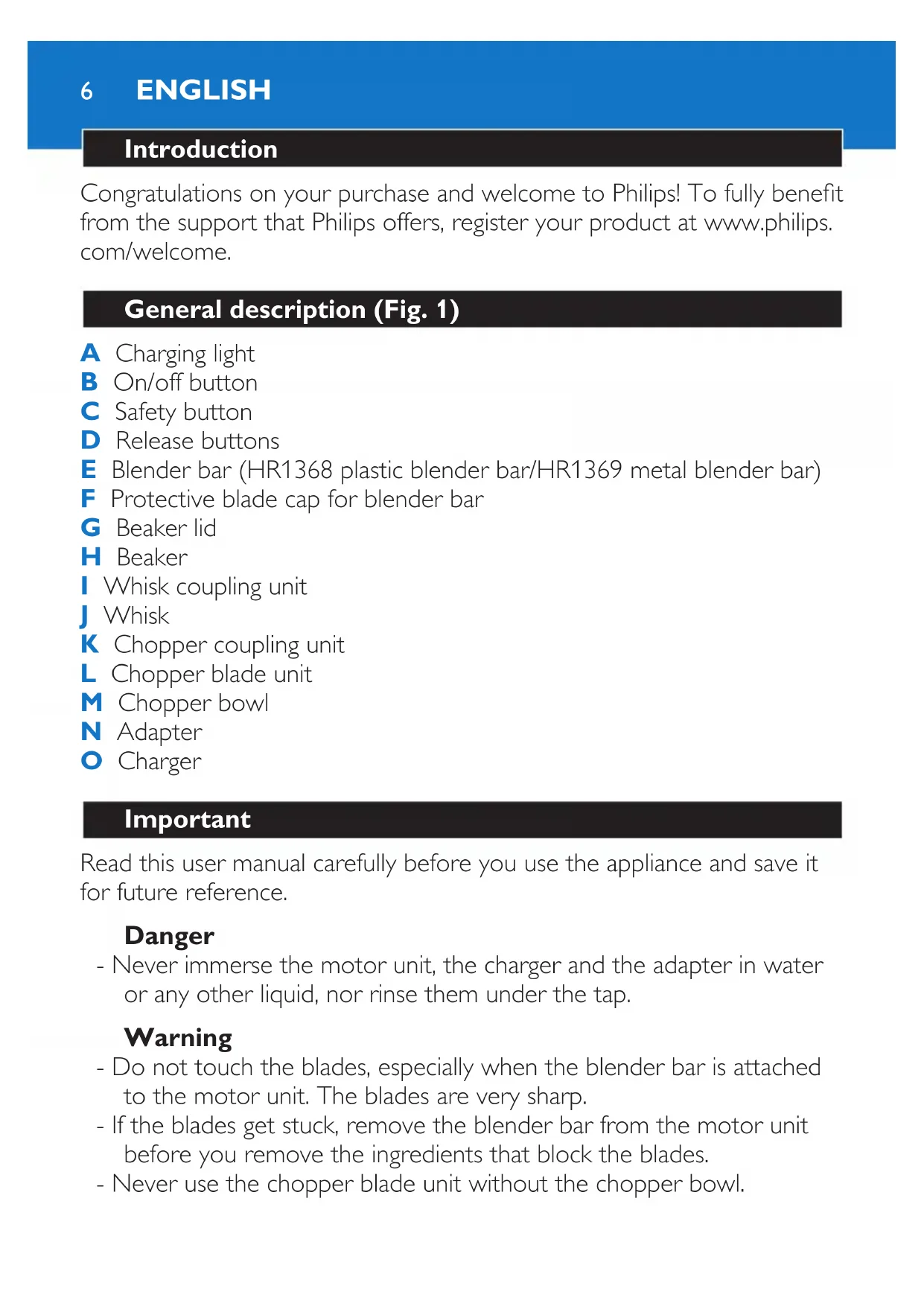
General description (Fig. 1)
A Charging light
B On/off button
C Safety button
D Release buttons
E Blender bar (HR1368 plastic blender bar/HR1369 metal blender bar)
F Protective blade cap for blender bar
G Beaker lid
H Beaker
Whisk coupling unit
J Whisk
K Chopper coupling unit
L Chopper blade unit
M Chopper bowl
N Adapter
O Charger
Important
Read this user manual carefully before you use the appliance and save it for future reference.
Danger
- Never immerse the motor unit, the charger and the adapter in water or any other liquid, nor rinse them under the tap.
Warning
- Do not touch the blades, especially when the blender bar is attached to the motor unit. The blades are very sharp.
- If the blades get stuck, remove the blender bar from the motor unit before you remove the ingredients that block the blades.
-
Never use the chopper blade unit without the chopper bowl.
-
Do not switch on the appliance when you attach or detach accessories.
- Check if the voltage indicated on the adapter corresponds to the local mains voltage before you connect the appliance.
- This appliance is not intended for use by persons (including children) with reduced physical, sensory or mental capabilities, or lack of experience and knowledge, unless they have been given supervision or instruction concerning use of the appliance by a person responsible for their safety.
- Children should be supervised to ensure that they do not play with the appliance.
- Do not allow children to use the hand blender without supervision.
- Only use the appliance for its intended purpose to avoid potential injury.
- Do not use the appliance if the adapter, the mains cord, the charger or the appliance itself is damaged.
- The adapter contains a transformer. Do not cut off the adapter to replace it with another plug, as this causes a hazardous situation.
- If the adapter or charger is damaged, always have it replaced with one of the original type in order to avoid a hazard.
- Keep the motor unit, the charger and the adapter away from heat, fire, moisture and dirt.
Caution
- Only use the adapter and the charger supplied.
- Charge, store and use the appliance at a temperature between 5^ and 35^ .
- Do not exceed the quantities and processing times indicated in the tables.
- Do not dismantle or short-circuit the batteries. Protect the batteries from fire, heat and direct sunlight.
- Never use any accessories or parts from other manufacturers or that Philips does not specifically recommend. If you use such accessories or parts, your guarantee becomes invalid.
- This appliance is intended for household use only.
ENGLISH8
- If the ingredients stick to the wall of the beaker or the chopper bowl, switch off the appliance and loosen the ingredients with a spatula or add some liquid.
- Never fill the beaker or the chopper bowl with ingredients that are hotter than 80^ C .
- Do not process more than three batches without interruption. Let the appliance cool down to room temperature before you continue processing.
Electromagnetic fields (EMF)
This Philips appliance complies with all standards regarding electromagnetic fields (EMF). If handled properly and according to the instructions in this user manual, the appliance is safe to use based on scientific evidence available today.
Safety system
The appliance is equipped with a built-in safety system. The appliance only functions if you press and hold the safety button while you press the on/off button. Release the safety button when the appliance starts to operate. As soon as you release the on/off button, the safety system automatically resets to its off position to protect against unintentional operation of the appliance. If you only press the on/off button, the charging light flashes red to indicate that the safety system is active.
Overheat protection
The appliance is equipped with a built-in overheat protection. If you process a heavy load, the motor unit may become hot. If this happens, the built-in safety system switches off the appliance and the charging light lights up red. Let the appliance cool down for 10 minutes before you continue to use it.
Before first use
Thoroughly clean the parts that come into contact with food before you use the appliance for the first time (see chapter 'Cleaning').
Preparing for use
There are two ways to install the charger:
1 Mount the charger on the wall, close to a socket. (Fig. 2)
2 Place the charger on the worktop.
Charging
Charge the hand blender:
- before you use the appliance for the first time, or
- when the blue charging light flashes to indicate that the batteries are low.
1 Put the adapter in the wall socket.
2 Put the motor unit in the charger. (Fig. 3)
The charging light flashes blue slowly to indicate that the appliance is charging (Fig. 4).
Note: The adapter feels warm during charging. This is normal.
- It takes 4 hours to fully charge the appliance.
- Charge the appliance for at least 15 minutes to use it for a light blending job (soup, puree).
3 You can place the blender bar in the charger next to the motor unit (your blender bar may differ from the one shown in the figure). (Fig. 5)
Charging light indications
Charging
When the appliance is charging, the charging light flashes blue slowly.
Batteries fully charged
When the batteries are fully charged, the charging light lights up blue continuously.
Batteries low
When the batteries are low, the blue charging light flashes. The lower the energy level in the batteries, the faster the charging light flashes.
ENGLISH10
Overheat protection
If you process a too heavy load, the motor unit may become hot. The built-in safety system switches off the appliance and the charging light lights up red.
Safety system
The appliance only functions if you press and hold the safety button and then press the on/off button. If you only press the on/off button, the charging light flashes red to indicate that the safety system is active.
Preparing the food
1 Let hot ingredients cool down before you chop them, blend them or pour them into the beaker (max. temperature 80^ / 175^ ).
2 Cut large ingredients into pieces of approximately 2cm before you process them.
Using the appliance
Hand blender
The hand blender is intended for:
- blending fluids, e.g. dairy products, sauces, fruit juices, soups, mixed drinks and shakes.
- mixing soft ingredients, e.g. pancake batter or mayonnaise.
- pureeing cooked ingredients, e.g. for making baby food.
1 Attach the blender bar to the motor unit ('click')(your blender bar may differ from the one shown in the figure) (Fig. 6).
2 Put the ingredients in the beaker.
See the table for the recommended quantities and processing times.
Blending quantities and processing times
Ingredients Blending quantity
(max.)
Time (max.)
Fruits & vegetables 100-200g 60sec.
Ingredients Blending quantity
(max.)
Time (max.)
Baby food, soups & sauces 100-400ml 60sec.
Batters 100-500ml 60sec.
Shakes & mixed drinks 100-1000ml 60sec.
3 Immense the blade guard completely in the ingredients to avoid splashing (your blender bar may differ from the one shown in the figure) (Fig. 7).
4 Press and hold the safety button (1) and then press and hold the on/off button (2) within 2 seconds (Fig. 8).
Note: If you do not press the on/off button within 2 seconds, the appliance remains locked. To unlock the appliance, repeat step 4.
The appliance starts to operate.
- Release the safety button when the appliance starts to operate.
- Once you release the on/off button, the appliance switches off.
5 Move the appliance slowly up and down and in circles to blend the ingredients (Fig. 9).
6 Place the blender bar in the protective blade cap after use (your blender bar may differ from the one shown in the figure).
Chopper
The chopper is intended for chopping ingredients such as nuts, meat, onions, hard cheese, boiled eggs, garlic, herbs, dry bread etc.
Be very careful when you handle the blade unit, the blades are very sharp. Be particularly careful when you remove the blade unit from the chopper bowl, when you empty the chopper bowl and during cleaning.
1 Put the chopper blade unit in the chopper bowl (Fig. 10).
2 Put the ingredients in the chopper bowl.
See the table for the recommended quantities and processing times.
Chopping quantities and processing times
Ingredients Chopping quantity
(max.)
Time (max.)
Onions & eggs 100g5× 1sec
Meat 100g 5sec.
Herbs 20g5 × 1sec .
Cheese 50-100g 15sec.
Nuts 100g 20sec.
3 Put the chopper coupling unit on the chopper bowl (Fig. 11).
4 Fasten the motor unit onto the chopper coupling unit ('click') (Fig. 12).
5 Press and hold the safety button (1) and then press and hold the on/off button (2) within 2 seconds (Fig. 8).
Note: If you do not press the on/off button within 2 seconds, the appliance remains locked. To unlock the appliance, repeat step 5.
The appliance starts to operate.
- Release the safety button when the appliance starts to operate.
- Once you release the on/off button, the appliance switches off.
- If the ingredients stick to the wall of the chopper bowl, loosen them with a spatula or by adding liquid.
- After processing one batch, let the appliance cool down to room temperature before you continue processing.
Whisk
The whisk is intended for whipping cream, whisking egg whites, desserts etc.
1 Connect the whisk to the whisk coupling unit.
2 Connect the coupling unit to the motor unit ('click') (Fig. 13).
3 Put the ingredients in a bowl.
See the table for the recommended quantities and processing times.
Tip: Use a large bowl for the best result.
Whisking quantities and processing times
Ingredients Whisking quantity (max.) Time (max.)
Cream 250ml 70-90sec.
Egg whites 4 eggs 120sec.
4 Press and hold the safety button (1) and then press and hold the on/off button (2) within 2 seconds (Fig. 8).
Note: If you do not press the on/off button within 2 seconds, the appliance remains locked. To unlock the appliance, repeat step 4.
The appliance starts to operate.
- Release the safety button when the appliance starts to operate.
- Once you release the on/off button, the appliance switches off.
Cleaning (Fig. 14)
Do not immerse the motor unit, the charger, the adapter, the chopper coupling unit and the whisk coupling unit in water.
Do not touch the blades when you clean them. They are very sharp.
Never use scouring pads, abrasive cleaning agents or aggressive liquids such as petrol or acetone to clean the appliance.
1 Release the on/off button to switch off the appliance.
Press the release buttons on the motor unit to remove the blender bar, the whisk or chopper coupling unit.
3 Disassemble the rest of the parts.
ENGLISH14
Tip: You can also clean the blade of the blender bar while it is still attached to the motor unit. Immerse the blade guard in warm water with some washing-up liquid and let the appliance run for a while.
Tip: You can also remove the rubber rings from the chopper bowl for extra thorough cleaning.
4 See the separate cleaning table for further instructions.
Environment
- Do not throw away the appliance with the normal household waste at the end of its life, but hand it in at an official collection point for recycling. By doing this, you help to preserve the environment (Fig. 15).
- The built-in rechargeable batteries contain substances that may pollute the environment. Always remove the batteries before you discard and hand in the appliance at an official collection point. Dispose of the batteries at an official collection point for batteries. If you have trouble removing the batteries, you can also take the appliance to a Philips service centre. The staff of this centre will remove the batteries for you and will dispose of them in an environmentally safe way (Fig. 16).
Removing the batteries
Only remove the batteries when they are completely empty to avoid a hazard. Never let the batteries come into contact with metal.
1 Take the appliance out of the charger.
2 Remove the blender bar, the whisk coupling unit or the chopper coupling unit from the motor unit.
3 Let the appliance run until it stops.
4 Press the safety button and fix it in this position with adhesive tape.
- The charging light starts flashing red and after 20 seconds the charging light lights up blue continuously. When the charging light goes out, the batteries should be completely empty.
5 Try to switch on the appliance again to check if the batteries are really empty. If the motor starts, repeat the procedure.
6 Remove the screw covers and undo the two screws in the bottom of the motor unit (Fig. 17).
7 Remove the front panel of the housing. (Fig. 18)
8 Undo the three screws of the power unit. (Fig. 19)
9 Remove the battery holder with the batteries from the appliance. (Fig. 20)
10 Put the battery holder with the batteries in a bowl with one litre of water and 1 teaspoon of salt and leave it in this bowl for 24 hours. (Fig. 21)
11 Take the holder with batteries from the bowl and hand them in at an official collection point for batteries.
Guarantee & service
If you need service or information or if you have a problem, please visit the Philips website at www.philips.com or contact the Philips Consumer Care Centre in your country (you find its phone number in the worldwide guarantee leaflet). If there is no Consumer Care Centre in your country, go to your local Philips dealer.
Troubleshooting
This chapter summarises the most common problems you could encounter with the appliance. If you are unable to solve the problem with the information below, contact the Consumer Care Centre in your country.
Problem Solution
The appliance does not work.
The batteries are empty. Recharge the batteries (see chapter 'Preparing for use', section 'Charging').
| Problem | Solution |
| The safety system is activated. In this case it is not possible to switch on the appliance and the charging light flashes red. Press and hold the safety button and then press and hold the on/off button to switch on the appliance (see chapter ‘Using the appliance’). | |
| The overheat protection may have switched off the appliance because the motor is too hot. The charging light lights up red. Let the appliance cool down for 10 minutes before you continue to use it. If the appliance still does not work, contact your Philips dealer or a service centre authorised by Philips. | |
| The appliance suddenly stops working. | Some hard ingredients may block the blades. Release the on/off button, detach the motor unit and remove the ingredients that block the blades. |
| The charging light flashes red. | The safety system is activated. In this case it is not possible to switch on the appliance and the charging light flashes red. Press and hold the safety button and then press and hold the on/off button to switch on the appliance (see chapter ‘Using the appliance’). |
| The charging light lights up red continuously. | The overheat protection has switched off the appliance, because the motor is too hot. The charging light lights up red. Let the appliance cool down for 10 minutes before you continue to use it. If the appliance still does not work, contact your Philips dealer or a service centre authorised by Philips. |
| The charging light flashes blue quickly. | The batteries are running low. Recharge the batteries (see section ‘Charging’ in chapter ‘Preparing for use’). |
Introduction
J 4 J
J 4 J
J 52 J
0504 2005
Pengenalan
A
B
C
D
E 1368 HR1369
F
G
H
1
J 1
K
L
M
N
0
yaa 77
#
-
n
-
-
-1772617777777777777777777777
- ()
- 1
- 1
- 1
-
y
-1
5-35
-
- 1
- 1
-67016yWwHnwnnnaa nnunnnn nnnnnnnnnnnnnnn
- 1
- 80°C
3 2
Electromagnetic fields (EMF)
Wnwnnnn nn nnnnnnnnnnnnnnnnnnnnnnnnnnnnnnnnnnnnnnnnnnnnnnnnnnnnnnnnnnnnnnnnnnnnnnnnnnnnnnnnnnnnnnnnnnnnnnnnnnnnnnnnnnnnnnnnnnnnnnnnnnnnnnnnnnnnnnnnnnnnnnnnn
WAN WNNNNT (w) 17 (w)
100-200 60
100-400 60
100-500 60
100-1000 60
3 1
4 nuiu 1 (1) uauuuiu/uaaun (2) nuu 2 uuu (8)
n nn nnnn nn nnnn nn nnnn 2 nnnn nnnn nn nnnn nn nnnn nn nnnn nn nnnn nn nnnn nn nnnn nn nnnn nn nnnn nn nnnn nn nnnn nn nnnn nn nnnn nn nnnn nn nnnn nn nnnn nn nnnn nn nnnn nn nnnn nn nnnn nn nnnn nn nnnn nn nnnn nn nnnn nn nnnn nn nnnn
Dn
-
5 1792-7777777777777777777777777777777777777
6 )
n
1
山
1 1
2
yannnnnnaaannnnnnnnnnnnnnnnnnnnnnnnnnnnnnnnnnnnnnnnnnnnnnnnnnnnnnnnnnnnnnnnnnnnnnnnnnnnnnnnnnnnnnnnnnnnnnnnnnnnnn
y
nwnnnn nnnnnnnnnnnnn (nannn) nnnn (nannn)
1005x1
100 5
205x1
50-100 n 15
100 20
3 11
4 1
5 1 (1) 2 2 2 2 2 2 2 2 2 2 2 2 2 2 2 2 2 2 2 2 2 2 2 2 2
May xay tay duoc dung de:
40x1y2y3y4y5y6y7y8y9y10y20y30y40y50y60
山
120J 会体能
JSSLJI 1
()
15 15 15
i 1
0001 0001
1
()
1
aai 1000
Y
is jy 1 olae
bln 11111111111111111111111111111111
12 Jals jss jss cgs 5s gaa s 1 y Ssiy 6a aaii i
a
cuij b
10 10 10 10 10 10 10 10 10 10 10 10 10 10 10 10 10 10 10 10 10 10 10 10 10 10 10 10 10 10 10 10 10 10 2
J 1
1
1 1
1
4
1
1
1
100
a
1
()()
1
s 01
oolai g j 0
| (العربية)العربية (العربية)العربية (العربية)العربية (العربية) |
| العربية 9-7.0.114.00.115.00.116.00.117.00.118.00.119.00.119.00.119.00.119.00.119.00.119.00.119.00.119.00.119.00.119.00.119.00.119.00.119.00.119.00.119.100.00.110.00.110.00.110.00.110.00.110.00.110.00.110.00.110.00.110.00.110.00.110.00.110.00.110.00.110.00.110. (12.5kbit/s) |
| (16 kbit/s) |
| (16 kbit/s) |
| (16 kbit/s) |
| (16 kbit/s) |
| (16 kbit/s) |
| (16 kbit/s) |
| (16 kbit/s) |
| (16 kbit/s) |
| (16 kbit/s) |
| (16 kbit/s) |
| (16kbit/s) |
| (16kbit/s) |
| (16kbit/s) |
| (16kbit/s) |
| (16kbit/s) |
| (16kbit/s) |
| (16kbit/s) |
| (16kbit/s) |
| (16kbit/s) |
| (16kbit/s) |
| (16 kbit/s) |
| (16kbit/s) |
| (16kbit/s) |
| (16kbit/s) |
| (16kbit/s) |
| (16kbit/s) |
| (16kbit/s) |
| (16kbit/s) |
| (16kbit/s) |
| (16 kbit/s) |
| (16 kbit/s) |
| (16kbit/s) |
| (16kbit/s) |
| (16kbit/s) |
| (16kbit/s) |
| (16kbit/s) |
| (16kbit/s) |
| (16kbit/s) |
| (16 kbit/s) |
| (16kbit/s) |
| (16 kbit/s) |
| (16kbit/s) |
| (16kbit/s) |
| (16kbit/s) |
| (16kbit/s) |
| (16kbit/s) |
| (16kbit/s) |
| (16kbit/s) |
| (16 kbit/s) |
| (16 kbit/s) |
| (16 kbit/s) |
| (16kbit/s) |
| (16kbit/s) |
| (16kbit/s) |
| (16kbit/s) |
| (16kbit/s) |
| (16kbit/s) |
| (16 kbit/s) |
| (16kbit/s) |
| (16kbit/s) |
| (16 kbit/s) |
| (16kbit/s) |
| (16kbit/s) |
| (16kbit/s) |
| (16kbit/s) |
| (16kbit/s) |
| (16kbit/s) |
| (16 kbit/s) |
| (16kbit/s) |
| (16 kbit/s) |
| (16 kbit/s) |
| (16kbit/s) |
| (16kbit/s) |
| (16kbit/s) |
| (16kbit/s) |
| (16kbit/s) |
| (16kbit/s) |
| (16 kbit/s) |
| (16 kbit/s) |
| (16kbit/s) |
| (16 kbit/s) |
| (16kbit/s) |
| (16kbit/s) |
| (16kbit/s) |
| (16kbit/s) |
| (16kbit/s) |
| (16kbit/s) |
| (16 kbit/s) |
| (16 kbit/s) |
| (16 kbit/s) |
| (16 kbit/s) |
| (16kbit/s) |
| (16kbit/s) |
| (16kbit/s) |
| (16kbit/s) |
| (16kbit/s) |
| (16 kbit/s) |
| (16kbit/s) |
| (16kbit/s) |
| (16kbit/s) |
| (16 kbit/s) |
| (16kbit/s) |
| (16kbit/s) |
| (16kbit/s) |
| (16kbit/s) |
| (16kbit/s) |
| (16 kbit/s) |
| (16kbit/s) |
| (16kbit/s) |
| (16 kbit/s) |
| (16 kbit/s) |
| (16kbit/s) |
| (16kbit/s) |
| (16kbit/s) |
| (16kbit/s) |
| (16kbit/s) |
| (16 kbit/s) |
| (16kbit/s) |
| (16 kbit/s) |
| (16kbit/s) |
| (16 kbit/s) |
| (16kbit/s) |
| (16kbit/s) |
| (16kbit/s) |
| (16kbit/s) |
| (16kbit/s) |
| (16 kbit/s) |
| (16kbit/s) |
| (16 kbit/s) |
| (16 kbit/s) |
| (16 kbit/s) |
| (16kbit/s) |
| (16kbit/s) |
| (16kbit/s) |
| (16kbit/s) |
| (16kbit/s) |
| (16 kbit/s) |
| (16 kbit/s) |
| (16kbit/s) |
| (16kbit/s) |
| (16 kbit/s) |
| (16kbit/s) |
| (16kbit/s) |
| (16kbit/s) |
| (16kbit/s) |
| (16kbit/s) |
| (16 kbit/s) |
| (16 kbit/s) |
| (16kbit/s) |
| (16 kbit/s) |
| (16 kbit/s) |
| (16kbit/s) |
| (16kbit/s) |
| (16kbit/s) |
| (16kbit/s) |
| (16kbit/s) |
| (16 kbit/s) |
| (16 kbit/s) |
| (16 kbit/s) |
| (16kbit/s) |
| (16 kbit/s) |
| (16kbit/s) |
| (16kbit/s) |
| (16kbit/s) |
| (16kbit/s) |
| (16kbit/s) |
| (16 kbit/s) |
| (16 kbit/s) |
| (16 kbit/s) |
| (16 kbit/s) |
| (16 kbit/s) |
| (16kbit/s) |
| (16kbit/s) |
| (16kbit/s) |
| (16kbit/s) |
| (16 kbit/s) |
| (16kbit/s) |
| (16kbit/s) |
| (16kbit/s) |
| (16kbit/s) |
| (16 kbit/s) |
| (16kbit/s) |
| (16kbit/s) |
| (16kbit/s) |
| (16 kbit/s) |
| (16 kbit/s) |
| (16kbit/s) |
| (16kbit/s) |
| (16kbit/s) |
| (16kbit/s) |
| (16 kbit/s) |
| (16kbit/s) |
| (16kbit/s) |
| (16 kbit/s) |
| (16kbit/s) |
| (16 kbit/s) |
| (16kbit/s) |
| (16kbit/s) |
| (16kbit/s) |
| (16kbit/s) |
| (16 kbit/s) |
| (16kbit/s) |
| (16kbit/s) |
| (16 kbit/s) |
| (16 kbit/s) |
| (16 kbit/s) |
| (16kbit/s) |
| (16kbit/s) |
| (16kbit/s) |
| (16kbit/s) |
| (16 kbit/s) |
| (16kbit/s) |
| (16 kbit/s) |
| (16kbit/s) |
| (16kbit/s) |
| (16 kbit/s) |
| (16kbit/s) |
| (16kbit/s) |
| (16kbit/s) |
| (16kbit/s) |
| (16 kbit/s) |
| (16kbit/s) |
| (16 kbit/s) |
| (16kbit/s) |
| (16 kbit/s) |
| (16 kbit/s) |
| (16kbit/s) |
| (16kbit/s) |
| (16kbit/s) |
| (16kbit/s) |
| (16 kbit/s) |
| (16kbit/s) |
| (16 kbit/s) |
| (16 kbit/s) |
| (16kbit/s) |
| (16 kbit/s) |
| (16kbit/s) |
| (16kbit/s) |
| (16kbit/s) |
| (16kbit/s) |
| (16 kbit/s) |
| (16kbit/s) |
| (16 kbit/s) |
| (16 kbit/s) |
| (16 kbit/s) |
| (16 kbit/s) |
| (16kbit/s) |
| (16kbit/s) |
| (16kbit/s) |
| (16kbit/s) |
| (16 kbit/s) |
| (16 kbit/s) |
| (16kbit/s) |
| (16kbit/s) |
| (16kbit/s) |
| (16 kbit/s) |
| (16kbit/s) |
| (16kbit/s) |
| (16kbit/s) |
| (16kbit/s) |
| (16 kbit/s) |
| (16 kbit/s) |
| (16kbit/s) |
| (16kbit/s) |
| (16 kbit/s) |
| (16 kbit/s) |
| (16kbit/s) |
| (16kbit/s) |
| (16kbit/s) |
| (16kbit/s) |
| (16 kbit/s) |
| (16 kbit/s) |
| (16kbit/s) |
| (16 kbit/s) |
| (16kbit/s) |
| (16 kbit/s) |
| (16kbit/s) |
| (16kbit/s) |
| (16kbit/s) |
| (16kbit/s) |
| (16 kbit/s) |
| (16 kbit/s) |
| (16kbit/s) |
| (16 kbit/s) |
| (16 kbit/s) |
| (16 kbit/s) |
| (16kbit/s) |
| (16kbit/s) |
| (16kbit/s) |
| (16kbit/s) |
| (16 kbit/s) |
| (16 kbit/s) |
| (16 kbit/s) |
| (16kbit/s) |
| (16kbit/s) |
| (16 kbit/s) |
| (16kbit/s) |
| (16kbit/s) |
| (16kbit/s) |
| (16kbit/s) |
| (16 kbit/s) |
| (16 kbit/s) |
| (16 kbit/s) |
| (16kbit/s) |
| (16 kbit/s) |
| (16 kbit/s) |
| (16kbit/s) |
| (16kbit/s) |
| (16kbit/s) |
| (16kbit/s) |
| (16 kbit/s) |
| (16 kbit/s) |
| (16 kbit/s) |
| (16 kbit/s) |
| (16kbit/s) |
| (16 kbit/s) |
| (16kbit/s) |
| (16kbit/s) |
| (16kbit/s) |
| (16kbit/s) |
| (16 kbit/s) |
| (16 kbit/s) |
| (16 kbit/s) |
| (16 kbit/s) |
| (16 kbit/s) |
| (16 kbit/s) |
| (16kbit/s) |
| (16kbit/s) |
| (16kbit/s) |
| (16 kbit/s) |
| (16kbit/s) |
| (16kbit/s) |
| (16kbit/s) |
| (16 kbit/s) |
| (16kbit/s) |
| (16 kbit/s) |
| (16kbit/s) |
| (16kbit/s) |
| (16kbit/s) |
| (16 kbit/s) |
| (16kbit/s) |
| (16kbit/s) |
| (16kbit/s) |
| (16 kbit/s) |
| (16 kbit/s) |
| (16 kbit/s) |
| (16kbit/s) |
| (16kbit/s) |
| (16kbit/s) |
| (16 kbit/s) |
| (16kbit/s) |
| (16kbit/s) |
| (16 kbit/s) |
| (16kbit/s) |
| (16kbit/s) |
| (16 kbit/s) |
| (16kbit/s) |
| (16kbit/s) |
| (16kbit/s) |
| (16 kbit/s) |
| (16kbit/s) |
| (16kbit/s) |
| (16 kbit/s) |
| (16kbit/s) |
| (16 kbit/s) |
| (16 kbit/s) |
| (16kbit/s) |
| (16kbit/s) |
| (16kbit/s) |
| (16 kbit/s) |
| (16kbit/s) |
| (16kbit/s) |
| (16 kbit/s) |
| (16 kbit/s) |
| (16kbit/s) |
| (16 kbit/s) |
| (16kbit/s) |
| (16kbit/s) |
| (16kbit/s) |
| (16 kbit/s) |
| (16kbit/s) |
| (16kbit/s) |
| (16 kbit/s) |
| (16 kbit/s) |
| (16 kbit/s) |
| (16 kbit/s) |
| (16kbit/s) |
| (16kbit/s) |
| (16kbit/s) |
| (16 kbit/s) |
| (16kbit/s) |
| (16 kbit/s) |
| (16kbit/s) |
| (16kbit/s) |
| (16 kbit/s) |
| (16 kbit/s) |
| (16kbit/s) |
| (16kbit/s) |
| (16kbit/s) |
| (16 kbit/s) |
| (16kbit/s) |
| (16 kbit/s) |
| (16kbit/s) |
| (16 kbit/s) |
| (16kbit/s) |
| (16 kbit/s) |
| (16kbit/s) |
| (16kbit/s) |
| (16kbit/s) |
| (16 kbit/s) |
| (16kbit/s) |
| (16 kbit/s) |
| (16kbit/s) |
| (16 kbit/s) |
| (16 kbit/s) |
| (16 kbit/s) |
| (16kbit/s) |
| (16kbit/s) |
| (16kbit/s) |
| (16 kbit/s) |
| (16kbit/s) |
| (16 kbit/s) |
| (16 kbit/s) |
| (16kbit/s) |
| (16kbit/s) |
| (16 kbit/s) |
| (16kbit/s) |
| (16kbit/s) |
| (16kbit/s) |
| (16 kbit/s) |
| (16kbit/s) |
| (16 kbit/s) |
| (16 kbit/s) |
| (16kbit/s) |
| (16 kbit/s) |
| (16 kbit/s) |
| (16kbit/s) |
| (16kbit/s) |
| (16kbit/s) |
| (16 kbit/s) |
| (16kbit/s) |
| (16 kbit/s) |
| (16 kbit/s) |
| (16 kbit/s) |
| (16kbit/s) |
| (16 kbit/s) |
| (16kbit/s) |
| (16kbit/s) |
| (16kbit/s) |
| (16 kbit/s) |
| (16kbit/s) |
| (16 kbit/s) |
| (16 kbit/s) |
| (16 kbit/s) |
| (16 kbit/s) |
| (16 kbit/s) |
| (16kbit/s) |
| (16kbit/s) |
| (16kbit/s) |
| (16 kbit/s) |
| (16 kbit/s) |
| (16kbit/s) |
| (16kbit/s) |
| (16kbit/s) |
| (16 kbit/s) |
| (16 kbit/s) |
| (16kbit/s) |
| (16kbit/s) |
| (16 kbit/s) |
| (16kbit/s) |
| (16 kbit/s) |
| (16kbit/s) |
| (16kbit/s) |
| (16kbit/s) |
| (16 kbit/s) |
| (16 kbit/s) |
| (16kbit/s) |
| (16kbit/s) |
| (16 kbit/s) |
| (16 kbit/s) |
| (16 kbit/s) |
| (16kbit/s) |
| (16kbit/s) |
| (16kbit/s) |
| (16 kbit/s) |
| (16 kbit/s) |
| (16kbit/s) |
| (16 kbit/s) |
| (16kbit/s) |
| (16kbit/s) |
| (16 kbit/s) |
| (16kbit/s) |
| (16kbit/s) |
| (16kbit/s) |
| (16 kbit/s) |
| (16 kbit/s) |
| (16kbit/s) |
| (16 kbit/s) |
| (16kbit/s) |
| (16 kbit/s) |
| (16 kbit/s) |
| (16kbit/s) |
| (16kbit/s) |
| (16kbit/s) |
| (16 kbit/s) |
| (16 kbit/s) |
| (16kbit/s) |
| (16 kbit/s) |
| (16 kbit/s) |
| (16kbit/s) |
| (16 kbit/s) |
| (16kbit/s) |
| (16kbit/s) |
| (16kbit/s) |
| (16 kbit/s) |
| (16 kbit/s) |
| (16kbit/s) |
| (16 kbit/s) |
| (16 kbit/s) |
| (16 kbit/s) |
| (16 kbit/s) |
| (16kbit/s) |
| (16kbit/s) |
| (16kbit/s) |
| (16 kbit/s) |
| (16 kbit/s) |
| (16 kbit/s) |
| (16kbit/s) |
| (16kbit/s) |
| (16 kbit/s) |
| (16 kbit/s) |
| (16kbit/s) |
| (16kbit/s) |
| (16kbit/s) |
| (16 kbit/s) |
| (16 kbit/s) |
| (16 kbit/s) |
| (16kbit/s) |
| (16 kbit/s) |
| (16kbit/s) |
| (16 kbit/s) |
| (16kbit/s) |
| (16kbit/s) |
| (16kbit/s) |
| (16 kbit/s) |
| (16 kbit/s) |
| (16 kbit/s) |
| (16kbit/s) |
| (16 kbit/s) |
| (16 kbit/s) |
| (16 kbit/s) |
| (16kbit/s) |
| (16kbit/s) |
| (16kbit/s) |
| (16 kbit/s) |
| (16 kbit/s) |
| (16 kbit/s) |
| (16 kbit/s) |
| (16kbit/s) |
| (16kbit/s) |
| (16 kbit/s) |
| (16kbit/s) |
| (16kbit/s) |
| (16kbit/s) |
| (16 kbit/s) |
| (16 kbit/s) |
| (16 kbit/s) |
| (16 kbit/s) |
| (16kbit/s) |
| (16 kbit/s) |
| (16 kbit/s) |
| (16kbit/s) |
| (16kbit/s) |
| (16kbit/s) |
| (16 kbit/s) |
| (16 kbit/s) |
| (16 kbit/s) |
| (16 kbit/s) |
| (16 kbit/s) |
| (16kbit/s) |
| (16 kbit/s) |
| (16kbit/s) |
| (16kbit/s) |
| (16 kbit/s) |
| (16kbit/s) |
| (16kbit/s) |
| (16 kbit/s) |
| (16kbit/s) |
| (16 kbit/s) |
| (16kbit/s) |
| (16 kbit/s) |
| (16kbit/s) |
| (16kbit/s) |
| (16 kbit/s) |
| (16kbit/s) |
| (16kbit/s) |
| (16 kbit/s) |
| (16 kbit/s) |
| (16kbit/s) |
| (16kbit/s) |
| (16 kbit/s) |
| (16kbit/s) |
| (16kbit/s) |
| (16 kbit/s) |
| (16kbit/s) |
| (16kbit/s) |
| (16 kbit/s) |
| (16 kbit/s) |
| (16 kbit/s) |
| (16kbit/s) |
| (16 kbit/s) |
| (16kbit/s) |
| (16kbit/s) |
| (16 kbit/s) |
| (16kbit/s) |
| (16 kbit/s) |
| (16kbit/s) |
| (16kbit/s) |
| (16 kbit/s) |
| (16kbit/s) |
| (16 kbit/s) |
| (16kbit/s) |
| (16 kbit/s) |
| (16 kbit/s) |
| (16kbit/s) |
| (16 kbit/s) |
| (16kbit/s) |
| (16kbit/s) |
| (16 kbit/s) |
| (16kbit/s) |
| (16 kbit/s) |
| (16 kbit/s) |
| (16kbit/s) |
| (16 kbit/s) |
| (16kbit/s) |
| (16 kbit/s) |
| (16kbit/s) |
| (16kbit/s) |
| (16 kbit/s) |
| (16kbit/s) |
| (16 kbit/s) |
| (16 kbit/s) |
| (16 kbit/s) |
| (16kbit/s) |
| (16kbit/s) |
| (16 kbit/s) |
| (16kbit/s) |
| (16kbit/s) |
| (16 kbit/s) |
| (16kbit/s) |
| (16 kbit/s) |
| (16 kbit/s) |
| (16 kbit/s) |
| (16 kbit/s) |
| (16kbit/s) |
| (16 kbit/s) |
| (16kbit/s) |
| (16kbit/s) |
| (16 kbit/s) |
| (16 kbit/s) |
| (16kbit/s) |
| (16kbit/s) |
| (16 kbit/s) |
| (16 kbit/s) |
| (16kbit/s) |
| (16 kbit/s) |
| (16kbit/s) |
| (16kbit/s) |
| (16 kbit/s) |
| (16 kbit/s) |
| (16kbit/s) |
| (16 kbit/s) |
| (16kbit/s) |
| (16 kbit/s) |
| (16kbit/s) |
| (16 kbit/s) |
| (16kbit/s) |
| (16kbit/s) |
| (16 kbit/s) |
| (16 kbit/s) |
| (16kbit/s) |
| (16 kbit/s) |
| (16 kbit/s) |
| (16kbit/s) |
| (16kbit/s) |
| (16 kbit/s) |
| (16kbit/s) |
| (16kbit/s) |
| (16 kbit/s) |
| (16 kbit/s) |
| (16kbit/s) |
| (16 kbit/s) |
| (16 kbit/s) |
| (16 kbit/s) |
| (16kbit/s) |
| (16 kbit/s) |
| (16kbit/s) |
| (16kbit/s) |
| (16 kbit/s) |
| (16 kbit/s) |
| (16 kbit/s) |
| (16kbit/s) |
| (16kbit/s) |
| (16 kbit/s) |
| (16kbit/s) |
| (16 kbit/s) |
| (16kbit/s) |
| (16kbit/s) |
| (16 kbit/s) |
| (16 kbit/s) |
| (16 kbit/s) |
| (16kbit/s) |
| (16 kbit/s) |
| (16 kbit/s) |
| (16kbit/s) |
| (16 kbit/s) |
| (16kbit/s) |
| (16kbit/s) |
| (16 kbit/s) |
| (16 kbit/s) |
| (16 kbit/s) |
| (16 kbit/s) |
| (16kbit/s) |
| (16 kbit/s) |
| (16kbit/s) |
| (16 kbit/s) |
| (16kbit/s) |
| (16kbit/s) |
| (16 kbit/s) |
| (16 kbit/s) |
| (16 kbit/s) |
| (16 kbit/s) |
| (16 kbit/s) |
| (16kbit/s) |
| (16kbit/s) |
| (16 kbit/s) |
| (16kbit/s) |
| (16kbit/s) |
| (16 kbit/s) |
| (16 kbit/s) |
| (16 kbit/s) |
| (16 kbit/s) |
| (16 kbit/s) |
| (16 kbit/s) |
| (16 kbit/s) |
| (16kbit/s) |
| (16kbit/s) |
| (16 kbit/s) |
| (16kbit/s) |
| (16 kbit/s) |
| (16kbit/s) |
| (16 kbit/s) |
| (16kbit/s) |
| (16 kbit/s) |
| (16 kbit/s) |
| (16kbit/s) |
| (16kbit/s) |
| (16 kbit/s) |
| (16kbit/s) |
| (16 kbit/s) |
| (16kbit/s) |
| (16 kbit/s) |
| (16 kbit/s) |
| (16 kbit/s) |
| (16 kbit/s) |
| (16 kbit/s) |
| (16 kbit/s) |
| (16 kbit/s) |
| (16 kbit/s) |
| (16 kbit/s) |
| (18.00.00.00.00.00.00.00.00.00.00.00.00.00.00.00.00.00.00.00.00.00.00.00.00.00.00.00.00.00.00.00.00.00.00. (3.5) (3.5) (3.5) (3.5) (3.5) (3.5) (3.5) (3.5) (3.5) (3.5) (3.5) (3.5) (3.5) (3.5) (3.5) (3.5) (3.5) (3.5) (3.5) (3.5) (3.5) |
14
1
| (العربية الحرفية) | (العربية الحرفية) | العربية |
| \( \textit{العربية} \times \textit{0} \) | \( \textit{العربية} \times \textit{1} \) | العربية |
| \( \textit{العربية} \times \textit{0} \) | \( \textit{العربية} \times \textit{1} \) | العربية |
| \( \textit{العربية} \times \textit{0} \) | \( \textit{العربية} \times \textit{1} \) | العربية |
| العربية | ||
| \( \textit{العربية} \times \textit{0} \) | \( \textit{العربية} \times \textit{1} \) | العربية |
| العربية |
1
aai j 1
(14)(”)gjgall jy
sLg sLiSall
4 1
L
4 1
y
| (العربية)العربية | (العربية)العربية | العربية |
| العربية | العربية | العربية |
| العربية | العربية | العربية |
| العربية | العربية | العربية |
| العربية | العربية | العربية |
y
0 0 0 0 0 0 0 0 0 0 0 0 0 0 0 0 0 0 0
Jglll 1
J 1
a
1 1