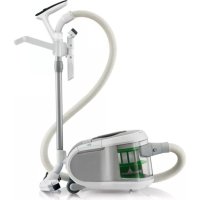
ErgoFit FC9258 - Vacuum Cleaner PHILIPS - Free user manual and instructions
Find the device manual for free ErgoFit FC9258 PHILIPS in PDF.


User questions about ErgoFit FC9258 PHILIPS
0 question about this device. Answer the ones you know or ask your own.
Ask a new question about this device
Download the instructions for your Vacuum Cleaner in PDF format for free! Find your manual ErgoFit FC9258 - PHILIPS and take your electronic device back in hand. On this page are published all the documents necessary for the use of your device. ErgoFit FC9258 by PHILIPS.
USER MANUAL ErgoFit FC9258 PHILIPS
Congratulations on your purchase and welcome to Philips! To fully benefit from the support that Philips offers, register your product at www.philips.com/welcome.
General description (Fig. 1)
1 Filter cylinder unit
A Filter cleaning handle (specific types only)
B Filter cylinder
C Filter cylinder case
2 Cover release button
3 Release button for filter cylinder unit
4 Cover
5 Motor protection filter
6 Soft rubber rear wheels
7 Hose release button
8 Hose connection opening
9 Cleaning brush
10 Dust bucket
11 Carrying handle
12 On/off button
13 Remote control receiver with standby light
14 Cord rewind button
15 Tri-active nozzle
16 Rocker switch for carpet/hard floor settings
17 Side brush
18 Parking/storage ridge
19 PostureProtect handgrip
20 Tube release button
21 3-button remote control on handle
22 4-button remote control on handle
23 Standard handgrip
24 Flexible hose connection
25 Hose
26 Screw cover strip
27 Accessory holder
28 Accessory holder release levers
29 2-piece XL telescopic tube with PostureProtect handgrip
30 3-piece XL telescopic tube with PostureProtect handgrip
31 HEPA filter cover
32 Release tabs of HEPA filter cover
33 Washable Ultra Clean Air HEPA 13 filter
34 Mains cord and plug
35 Parking slot
36 Small nozzle
37 Brush attachment
38 Crevice nozzle
39 Storage grip
40 Swivel wheel
41 Storage slot
42 Type plate
Important
Read this user manual carefully before you use the appliance and save it for future reference.
Danger
- Never suck up water or any other liquid. Never suck up flammable substances and do not suck up ashes until they are cold.
Warning
- Check if the voltage indicated on the appliance corresponds to the local mains voltage before you connect the appliance.
- Do not use the appliance if the mains cord, the plug or the appliance itself is damaged.
- If the mains cord is damaged, you must have it replaced by Philips, a service centre authorised by Philips or similarly qualified persons in order to avoid a hazard.
- This appliance is not intended for use by persons (including children) with reduced physical, sensory or mental capabilities, or lack of experience and knowledge, unless they have been given supervision or instruction concerning use of the appliance by a person responsible for their safety.
- Children should be supervised to ensure that they do not play with the appliance.
- Do not point the hose, the tube or any other accessory at the eyes or ears nor put it in your mouth when it is connected to the vacuum cleaner and the vacuum cleaner is switched on.
Caution
- Do not suck up large objects as this may cause the air passage in the tube or hose to become obstructed.
- When you use the vacuum cleaner to vacuum ashes, fine sand, lime, cement dust and similar substances, the pores of the filter cylinder become clogged. If you notice a strong decrease in suction power, clean the filter cylinder.
- Never use the appliance if the filter cylinder, filter cylinder case and the dust bucket are not properly installed or if the cover is not closed properly.
- Always unplug the appliance before you empty the dust bucket.
- Do not press the AutoClean button if the dust bucket, the filter cylinder and filter cylinder case are not properly installed or if the cover is not closed properly.
- Never use the appliance without the motor protection filter. This could damage the motor and shorten the life of the appliance.
- Only use the Philips filter cylinder supplied with the appliance.
- The filter cylinder is not waterproof and cannot be cleaned with water, cleaning agents or flammable substances. Only clean the filter cylinder with the AutoClean system or the cleaning brush supplied.
- During vacuum cleaning, especially in rooms with low air humidity, your vacuum cleaner builds up static electricity. As a result you can experience electric shocks when you touch the tube or other steel parts of your vacuum cleaner. These shocks are not harmful to you and do not damage the appliance. To reduce this inconvenience we advise you:
1 to discharge the appliance by frequently holding the tube against other metal objects in the room (for example legs of a table or chair, radiator etc.); (Fig. 2)
2 to raise the air humidity level in the room by placing water in the room. For example, you can hang containers filled with water from your radiators or place bowls filled with water on or near your radiators (Fig. 3).
Electromagnetic fields (EMF)
This Philips appliance complies with all standards regarding electromagnetic fields (EMF). If handled properly and according to the instructions in this user manual, the appliance is safe to use based on scientific evidence available today.
Before first use
Batteries for the remote control on the handle are supplied with the appliance. Insert the batteries into the battery compartment before you use the appliance. The batteries last at least 2 years.
1 Use a screwdriver to remove the screw of the battery compartment lid (1) and remove the battery compartment lid (2) (Fig. 4).
2 Insert two AAA 1.5-volt alkaline batteries into the handle. (Fig. 5)
Note: Make sure that the - and + poles of the batteries point in the right direction.
3 Reattach the battery compartment lid and fasten the screw with a screwdriver. The appliance is now ready for use.
Preparing for use
Attaching the handgrip
1 Attach the handgrip to the telescopic tube ('click'). (Fig. 6)
2 To disconnect the handgrip from the tube, hold the handgrip with one hand. With the other hand, hold the telescopic tube and press the tube release button (1) and pull the tube off the handgrip (2). (Fig. 7)
Note (specific types only): The holes at the end of the handgrip prevent objects from getting stuck or damaged when you use your vacuum cleaner without the tube or accessories supplied.
Hose
1 To connect the hose, push it firmly into the appliance ('click') (Fig. 8).
2 To disconnect the hose, press the release button and pull the hose out of the appliance.
Telescopic tube
Tip: For optimal ergonomy, we advise you to hold both handgrips when you move the nozzle to and fro. This prevents you from having to twist and bend your spine.
1 Adjust the length of the tube in such a way that the hand holding the standard handgrip is at hip level (Fig. 9).
2 For optimal ergonomy, we advise you to hold the tube in such a way that the standard handgrip is at hip level. (Fig. 10)
3 To connect the tube to a nozzle, press the spring-loaded lock button on the tube and insert the tube into the nozzle. Fit the spring-loaded lock button into the opening in the nozzle ('click') (Fig. 11).
Accessory holder
1 Slide the accessory holder onto the handgrip ('click') (Fig. 12).
2 Push the accessories onto the holder. (Fig. 13)
3 To detach the accessory holder, squeeze the release levers together (1) and slide the accessory holder off the handgrip (2) (Fig. 14).
Crevice nozzle, small nozzle and brush attachment
1 Connect the crevice nozzle (1) or small nozzle (2) with or without brush attachment directly to the standard handgrip or to the tube (Fig. 15).
Brush attachment
To assemble the brush attachment, slide it onto the bottom of the small nozzle ('click') (Fig. 16).
2 To disassemble the brush attachment, slide it off the bottom of the small nozzle.
Tri-Active nozzle
1 Use the hard floor setting to clean hard floors (for instance for tiled, parqueted, laminated and linoleumed flooring): push the rocker switch on top of the nozzle with your foot to make the brush strip come out of the housing. At the same time, the wheel is lifted to prevent scratching and to increase manoeuvrability (Fig. 17).
2 Use the carpet setting to clean carpets: push the rocker switch again to make the brush strip disappear into the nozzle housing. The wheel is lowered automatically (Fig. 18).
Remote control operation
- The remote control has three buttons (specific types only) or four buttons (specific types only) with which you operate the vacuum cleaner.
- The infrared-active light flashes when you press a button on the remote control. (Fig. 19)
Using the appliance
Pull the cord out of the appliance and put the mains plug in the wall socket.
Press the on/off button on top of the appliance to switch on the appliance (Fig. 20).
Tip: To avoid bending your back, press the on/off button with your foot.
The vacuum cleaner starts operating at the highest suction power level.
3 To switch off the appliance, press the on/off button on top of the appliance or the standby button on the remote control.
Adjusting suction power
1 During vacuuming, you can adjust the suction power level with the - and + buttons on the remote control.
- Use maximum suction power to vacuum very dirty carpets and hard floors.
- Use minimum suction power to vacuum curtains, tablecloths etc.
Paising during use
1 If you want to pause for a moment, press the standby button on the remote control to switch off the appliance temporarily.
2 Insert the ridge on the nozzle into the parking slot to park the tube in a convenient position (Fig. 21).
3 To ensure stable parking of the telescopic tube, adjust the tube to the shortest length.
4 To continue vacuum cleaning, simply press the standby button on the remote control again.
Cleaning the filter cylinder
A clean filter cylinder helps maintain high suction power.
After every vacuuming session, clean the filter cylinder in the way described below.
Always leave the hose connected to the appliance during the filter-cleaning process to prevent dust from coming out of the appliance.
ENGLISH10
Using the filter-cleaning handle to clean the filter cylinder (specific types only)
1 Switch off the appliance and unplug it (Fig. 20).
2 Keep the appliance in horizontal position, with all wheels touching the floor.
Press the cover release button (1) and open the cover (2) (Fig. 22).
4 Turn the filter-cleaning handle until it has made 6 full circles (Fig. 23).
5 Close the cover firmly ('click').
Using the AutoClean button to clean the filter cylinder (specific types only)
Always press the AutoClean button when you have finished vacuum cleaning.
Make sure the dust bucket, the filter cylinder and the filter cylinder case are installed properly and the cover is closed properly.
Switch off the appliance. Leave the mains plug in the wall socket (Fig. 20).
2 Keep the appliance in horizontal position, with all wheels touching the floor.
3 Press the AutoClean button on the remote control on the handgrip (Fig. 24).
You hear a beep and the filter-cleaning process starts.
During the filter-cleaning process, the appliance produces a rattling noise. This is completely normal.
- When the filter-cleaning process is finished, you hear a beep.
Using the AutoClean button during vacuuming (specific types only)
You can also press the AutoClean button during vacuum cleaning. When you do this, the motor stops running and the filter-cleaning process starts. During the filter-cleaning process, the appliance does not suck up dirt. When the filter-cleaning process is finished, the motor automatically starts running again and you can continue vacuum cleaning.
Reminder to clean the filter cylinder
You have to clean the filter cylinder after each vacuuming session. This prevents the filter cylinder from clogging and helps maintain optimal suction power.
- If you fail to clean the filter cylinder a number of vacuuming sessions in a row, the filter light flashes for 15 seconds. (Fig. 25)
Cleaning and maintenance
Cleaning the dust bucket and filter cylinder unit
Always unplug the appliance before you empty the dust bucket.
The dust bucket is not dishwasher-proof.
Empty the dust bucket as soon as the dust level has reached the round disc of the filter cylinder case.
Switch off the appliance and remove the mains plug from the wall socket.
2 To disconnect the hose, press the release button (1) and pull the hose out of the appliance (2) (Fig. 26).
3 To unlock the cover, press the cover release button. Swing open the cover.
4 Lift the dust bucket out of the appliance (Fig. 27).
Press the release button for the filter cylinder unit on the bucket handle (1) and remove the filter cylinder unit (2) (Fig. 28).
6 Hold the dust bucket over a dustbin and empty it (Fig. 29).
Clean the dust bucket with cold tap water and some washing-up liquid.
8 If you want to clean the filter cylinder unit, remove the filter cylinder from the filter cylinder case. Turn the handle on top of the filter cylinder anticlockwise (1) and lift the filter cylinder out of the case (2). (Fig. 30)
To clean the filter cylinder, gently tap it against the dustbin to release all fine dust from the filter cylinder. (Fig. 31)
- If you persistently fail to clean the filter cylinder after every use, the filter cylinder clogs up with dirt and the suction power decreases over time. If this happens, unclog the filter cylinder in the following way:
1 Hold the filter cylinder over a dustbin.
2 Clean it with the cleaning brush supplied. Gently brush from the top of the filter downwards along the ribs of the filter (Fig. 32).
Only use the cleaning brush that comes with the appliance. Other brushes may damage the filter cylinder.
The filter cylinder is not waterproof and cannot be cleaned with water, cleaning agents or flammable substances.
Note: Cleaning does not restore the original colour of the filter, but does restore its filtration power.
10 To clean the filter cylinder case, use a dry cloth or the cleaning brush supplied. You can also clean it with cold tap water and some washing-up liquid (Fig. 33).
- Do not clean the filter cylinder case with the filter cylinder in it under the tap, as the filter cylinder is not waterproof (Fig. 34).
11 Put the filter cylinder back into the filter cylinder case (1) and turn it clockwise to fix it (2) ('click') (Fig. 35).
Make sure that the filter cylinder case is dry before you reinsert the filter cylinder into it.
Put the filter cylinder unit back into the dust bucket ('click') (Fig. 36).
Make sure that the dust bucket is dry before you reinsert the filter cylinder unit.
Cleaning the motor protection filter
Clean the permanent motor protection filter every two months.
Unplug the appliance.
2 Take the motor protection filter out of the appliance and clean the filter by tapping the dust out of it over a dustbin (Fig. 37).
If you want to clean the motor protection filter more thoroughly, you can rinse it under a cold tap.
Do not use washing-up liquid, flammable substances or any other cleaning agent to clean the motor protection filter.
Make sure that the motor protection filter is completely dry before you put it back into the filter compartment.
3 Press the clean filter firmly back into the filter compartment to ensure that it is properly placed.
Washable Ultra Clean Air HEPA 13 filter
Note: To guarantee optimal dust retention and performance of the vacuum cleaner, always replace the HEPA filter with an original Philips filter of the correct type (see chapter 'Ordering accessories and filters').
ENGLISH12
Clean the washable HEPA 13 filter every 6 months. You can clean the washable HEPA 13 filter max. 4 times. Replace the filter after it has been cleaned 4 times.
Note: Do not clean the HEPA 13 filter in the washing machine, but follow the procedure below.
1 Unplug the appliance.
2 Grab the release tabs of the HEPA filter cover to open and remove the filter cover (Fig. 38).
3 Take out the washable HEPA 13 filter (Fig. 39).
4Rinse the pleated side of the HEPA 13 filter under a warm slow-running tap (Fig. 40).
- Hold the filter in such a way that the pleated side points upwards and the water flows parallel to the pleats. Hold the filter at an angle so that the water washes away the dirt inside the pleats.
- Turn the filter 180^ and let the water flow along the pleats in the opposite direction (Fig. 41).
- Continue this process until the filter is clean.
Never clean the washable filter with a brush (Fig. 42).
Note: Cleaning does not restore the original colour of the filter, but does restore its filtration power.
5 Carefully shake the water from the surface of the filter.
6 Let the HEPA filter dry completely.
Place the dry HEPA filter back into the appliance.
8 Reattach the top of the filter cover (1) and then close the cover (2) ('click') (Fig. 43).
Replacement
Batteries of remote control
1 Replace the batteries when the light on top of the remote control does not flash when you press any button (Fig. 44).
Note: Your remote control may differ from the one shown in the figure.
2 Follow steps 1 to 3 in chapter 'Before first use'.
Storage
Note: Before you store the appliance, always make sure you have cleaned the filter cylinder by pressing the AutoClean button (specific types only) or with the filter-cleaning handle (specific types only). See section 'Cleaning the filter cylinder' in chapter 'Using the appliance'.
Switch off the appliance and remove the mains plug from the wall socket (Fig. 20).
2 Press the cord rewind button to rewind the mains cord (Fig. 45).
3 Adjust the telescopic tube to the shortest length.
4 Put the Tri-Active nozzle in the carpet setting when you store it (brush strip retracted into the nozzle). Also prevent the side brushes from becoming bent (Fig. 18).
Use the storage grip to put the appliance in upright position. Insert the ridge on the nozzle into the storage slot on the appliance. (Fig. 46)
Tip: You can also detach the tube from the hose.
Tip: You can also store the appliance horizontally. In this case, insert the ridge on the nozzle into the parking slot.
Ordering accessories and filters
To purchase accessories and filters, visit our website www.philps.com, contact the Philips Consumer Care Centre in your country or visit your vacuum cleaner specialist.
If you have any difficulties obtaining filters or other accessories for this appliance, contact the Philips Consumer Care Centre in your country or consult the worldwide guarantee leaflet.
- Washable Ultra Clean Air HEPA 13 filters are available under service number 432200493350
-Filter cylinder for FC9262, dark aubergine: 432200909850
-Filter cylinder for FC9256, ice white: 4322 009 09840
-Filter cylinder for FC9258, pea green: 432200900090
Environment
- The batteries of the remote control contain substances that may pollute the environment. Do not throw away batteries with the normal household waste, but dispose of them at an official collection point for batteries. Always remove the batteries of the remote control before you discard and hand in the appliance at an official collection point (Fig. 47).
- Do not throw away the appliance with the normal household waste at the end of its life, but hand it in at an official collection point for recycling. By doing this, you help to preserve the environment (Fig. 48).
Guarantee and service
If you need service or information or if you have a problem, please visit the Philips website at www.philips.com or contact the Philips Consumer Care Centre in your country (you find its phone number in the worldwide guarantee leaflet). If there is no Consumer Care Centre in your country, go to your local Philips dealer.
Troubleshooting
This chapter summarises the most common problems you could encounter with the appliance. If you are unable to solve the problem with the information below, contact the Consumer Care Centre in your country.
Problem Possible cause Solution
| The light in the AutoClean button (specific types only) or the filter-cleaning reminder light (specific types only) flashes. | The filter cylinder needs to be cleaned. | Press the AutoClean button (specific types only) or turn the filter-cleaning handle (specific types only) to clean the filter cylinder. |
| The suction power is insufficient. | You have selected a low suction power setting. | Select a higher suction power setting. |
| The filter cylinder is clogged with dirt. | Clean the filter cylinder (see chapter ‘Cleaning and maintenance’). | |
| The motor protection filter and/or the HEPA filter are dirty. | Clean or replace the filters (see chapter ‘Cleaning and maintenance’). |
Problem Possible cause Solution
| The nozzle, hose or tube is blocked up. | To remove the obstruction, disconnect the blocked-up item and connect it (as far as possible) the other way around. Switch on the vacuum cleaner to force the air through the blocked-up item in opposite direction. | |
| The infrared remote control does not function. | You have not inserted the batteries properly or the batteries are empty. | Insert the batteries properly or replace them. See chapter 'Replacement'. |
| The appliance does not function and the standby light on the cover of the appliance flashes. | The dust bucket and/or the filter cylinder unit are not installed properly. | Unplug the appliance. Make sure that the filter cylinder is assembled properly into the filter cylinder case ('click'). Also make sure that the filter cylinder unit is inserted properly into the dust bucket ('click'). |
| The cover is not closed properly. | Make sure the cover is closed properly. Put the plug in the wall socket and try again. | |
| When I use my vacuum cleaner I sometimes feel electric shocks. | Your vacuum cleaner has built up static electricity. The lower the air humidity in the rooms, the more static electricity the appliance builds up. | To reduce this inconvenience, we advise you to discharge the appliance by frequently holding the tube against other metal objects in the room (for example legs of a table or chair, radiator etc.). |
| To reduce this inconvenience, we advise you to raise the air humidity level in the room by placing water in the room. For example, you can hang containers filled with water from your radiators or place bowls filled with water on or near your radiators. |
Removing the PostureProtect handgrip
If you do not find the PostureProtect handgrip comfortable to use, you can consider removing it.
1 Remove the screw cover strip from the PostureProtect handgrip. (Fig. 49)
Use a Torx T15 screwdriver to remove the screws of the PostureProtect handgrip (Fig. 50).
3 Remove the PostureProtect handgrip from the tube.
Introduccion
1 Takiil back, MaRbck, Aen hco r o Rgcln Rlncn Bbck and kcn nckh an bck to chso h a 17.
2 1
LIO
1
2 1
3 1unnoaannnnaeauanennnnn (1) nanaan anananaananaananaananaananaananaananaananaananaananaananaananaananaananaananaananaananaananaananaananaananaananaananaananaananaananaananaananaananaananaananaananaananaananaananaananaananaananaananaananaananaananaananaananaananaananaananaananaananaananaan ana
Wwovanou, wovwnan uasauuun nn
1 15
Jnnnnn nn nnnnnn
1 1
2 1
Tri-Active
1 17)
2 18)
nnnnnnnnnnnnnnnnnnnnnnnnnnnnnnnnnnnnnnnnnnnnnnnnnnnnnnnnnnnnnnnnnnnnnnnnnnnnnnnnnnnnnnnnnnnnnnnnnnnnnnn
aannnnnnaanennnnn nn nnnnnnnnnnnnnnnnnnnnnnnnnnnnnnnnnnnnnnnnnnnnnnnnnnnnnnnnnnnnnnnnnnnnnnnnnnnnnnnnnnnnnnnnnnnnnnnnnnnnnnnnnnnnnnnnnnn
- 90nnaWawwunzwnuunrnnnauunununnna (119)
n
1
2 nuiu/1naiyannnuuynwaiiunr (5v 20)
(20
1
3
mnuuunnnnnaa
1 1
- 1
mnnnnaaannnnnnnnnnnnnnn
1
2 2
3
4 1
mnnnnnneennnnnnn
mnnn nnnnnnnnnnnnnnnnnnnnnnnnnnnnnnnnnnnnnnnnnnnnnnnnnnnnnnnnnnnnnnnnnnnnnnnnnnnnnnnnnnnnnnnnnnn
nannnnnnnnnnnnnnnnnnnnnnnnnnnnnnnnnnnnnnnnnnnnnnnnnnnnnnnnnnnnnnnnnnnnnnnnnnnnnnnnnnnnnnnnnnnnnnnnnnnnnnnnnnnnnnnnnn
n nn nnnnnnnnnnnnnnnnnnnnnnnnnnnnnnnnnnnnnnnnnnnnnnnnnnnnnnnnnnnnnnnnnnnnnnnnnnnnnnnnnnnnnnnnnnnnnnn
1 1aauuaan (Jn20)
2 1
3 nuaaahaaau (1) uaiia ahaaau (2) (22)
4 nnnn nn nnnnnnnnnnnnnnnnnnn 6 sau (J1123)
5 Duaonanruiuunun (
muiu AutoCleanunnnnnaannnnnnaa (wnu
AutoClean
aannnnnnaaennnnnnnnnnnnnnnnnnnnnnnnnnnnnnnnnnnnnnnnnnnnnnnnnnnnnnnnnnnnnnnnnnnnnnnnnnnnnnnnnnnnnnnnnnnnnnnn
1 1
2 7
3 nuiu AutoClean uuiuunuaunueaunu (24)
1
1
Jnunnnnnnnnnnnnnnnnnnnnnnnnnnnnnnnnnnnnnnnnnnnnnnnnnnnnnnnnnnnnnnnnnnnnnnnnnnnnnnnnnnnnnnnnnnnnnnnnnnnnnnnnnnnnnnn
mlu AutoClean uun nnnn (nuu)
nnaeanaeauu AutoClean uusnnnnnne nnnnnnne nnneennnnn nnnnnnnnnnnnnnnnnnnnnnnnnnnnnnnnnnnnnnnnnnnnnnnnnnnnnnnnnnnnnnnnnnnnnnnnnnnnnnnnnnnnnnnnnnnnnnnnnnnnnnnnnnnnnnnnnnnnn
aannnnnnae annnnne
aannnnnne aannnnnnae annnnnne nnnnne anennnne nnnnne nnnnne nnnnne nnnnne nnnnne nnnnne nnnnne nnnnne nnnnne nnnnne nnnnne nnnnne nnnnne nnnnne nnnnne nnnnne nnnnne nnnnne nnnnne nnnnne nnnnne nnnnne nnnnne nnnnne nnnnne nannnee
nnnnaeennnnneennnnnnnnnnnnnnnnnnnnnnnnnnnnnnnnnnnnnnnnnnnnnnnnnnnnnnnnnnnnnnnnnnnnnnnnnnnnnnnnnnnnnnnnnnnnnnnnnnnnnnnnnnnnnnnnnnnnnnnnnnnnnnnn
mnnnnnnaaannnnn
mnnnnnnaaannnnnnnnnnnn
nannnnnnnnnnnnnnnnnnnnnnnnnnnnnnnnnnnnnnnnnnnnnnnnnnnnnnnnnnnnnnnnnnnnnnnnnnnnnnnnnnnnnnnnnnnnnnnnnn
1
n mnnnnnnnnnnnnnnnnnnnnnnnnnnnnnnnnnnnnnnnnnnnnnnnnnnnnnnnnnnnnnnnnnnnnnnnnnnnnnnnnnnnnnnnnnnnnnn
1
2 1unnaananaan (1) naaananaanannn (2) (26)
3 1
4 unuiuueuaanennnnae (gul 27)
5 nauanannnnaa (1) aonnnnnaaennnnaaan (2) 28
6 6
7 n nnnaaannnnnne annnnnnnnnnnnnnnnnnnnnnnnnnnnnnnnnnnnnnnnnnnnnnnnnnnnnnnnnnnnnnnnnnnnnnnnnnnnnnnnnnnnnnnnnnnn
8 1
9 31)
wnn nn nnnnnaeennnnnnaeau nnsnnnneaeaae aenannnneaeaae ananrnnnnae annnnnne e
1
2 n nnnaaannnnn anananaan anan anan anan anan anan anan anan anan anan anan anan anan anan anan anan anan anan anan anan anan anan anan anan anan anan anan anan anan anan anan anan anan anan anan anan anan anan anan anan anan anan anan anan
1
nssnnns nnnnnn nn nnnnnnnnnnnnnnnnnnnnnnnnnnnnnnnnnnnnnnnnnnnnnnnnnnnnnnnnnnnnnnnnnnnnnnnnnnnnnnnnnnnnnnnnnnnnnnnnnnnnnnn
nannnnn nn nannnnaanennn nn nnnnnnnnnnnnnnnnnnnnnnnnnnnnnnnnnnnnnnnnnnnnnnnnnnnnnnnnnnnnnnnnnnnnnnnnnnnnnnnnnnnnnnnnnnnnnnnnnnnnnnnnnnnnnnn
10 1
34
11 15nannnnnnaaunnaanennnnae nn nnnnnnna (1) naunnuuunnuuunnuuunnuu (2) (35)
aannnnnnae aennnnne nnnnne eannnnnne
12 Usznanuyanansuannsauhunulnuuunu (uuu'wn) (5n 36)
aee aee eae ee eae eae eae eae eae eae eae eae eae eae
nannnnnnnnnnnnnnnnnnnnnnnnnnnnnnnnnnnnnnnnnnnnnnnnnnnnnnnnnnnnnnnnnnnnnnnnnnnn
mnnnnnneennnnnnnnnnnnnnnnnnnnnnnnnnnnnnnnnnnnnnnnnnnnnnnnnnnnnnnnnnnnnnnnnnnnnnnnnnnnnnnnnnnnnnnnnnnnnnnnnnnnnn
HNNN NNNNNNNNNNNNEHEPA 13 HNNNNNNNNNNNNNN
1
2 2uunuaaannnnaaennnnnne HEPAA waiu uauanrnnnnaan (5)38
3 nannnnn HEPA 13 an (Jy 39)
HEPA 13 4
- 180° uuauiuuiuuiuuiuuiuuiuuiuuiuuiuuiuuiuuiuuiuuiuuiuuiuuiuuiuuiuuiuuiuuiuuiuuiuuiuuiuuiuuiuuiuuiuuiuuiuuiuuiuuiuuiuuiuuiuuiuuiuuiuuiuuiuuiuuiuuiuuiuuiuuiuuiuui
- n mnnnnaeennnnnnnnnnnnnnnnnnnnnn
42)
nwnnnn nnnnnaaon nn nnnnauunnneu nn nnnnauu uan nn nannnnnnnnnnnnnn
5
6
7 7
8 1nunnnnnnnnnnnn (1) nnnnnnnnnnnnnn (2) (n nn) (43)
Jusunnu
y
1 1
nVHJH: 1111111111111111111111111111
2 n nnannnnn 1 3 nn nn
m
n nn nnnnnnnnnnnnnnnnnnnnnnnnnnnnnnnnnnnnnnnnnnnnnnnnnnnnnnnnnnnnnnnnnnnnnnnnnnnnnnnnnnnnnnnnnnnnnnnnnnnnnnnnnnnnnnnnnnnnnnnnnnnnnnnnnnnnnnnnnnnnnnnnnnnnnnnnnnnnnnn
1 Waaanannnnaaennnnnaaennnnnnaaennnnnnaaennnnnnaaennnnnnaaennnnnnaaennnnnnaaennnnnnaaennnnnnaaennnnnnaaennnnnnaaennnnnnaaennnnnnaaennnnnnaaennnnnnaaennnnnnaaennnnnnaaennnnnnaaennnnnnaaennnnnnaaennnnnnaaennnn
2 nuiuunwwnnwnnn (Jn 45)
3 Telescopic
4 Tri-Active 11111111111111111111111111111111111111111111
5 1
1
111111111111111111111111111111
mnnnnaaannnnnnaaannnnn
wnnnnnaaannnnnnaanennn nnnnnnnnnnnnnnnnnnnnnnnnnnnnnnnnnnnnnnnnnnnnnnnnnnnnnnnnnnnnnnnnnnnnnnnnnnnnnnnnnnnnnnnnnnnnnnnnnnnnnnnnnnnnnnnnnnnnnnnnnnnnnnnnnnnnnnnnnn nn
wnnnn nn nnnn nn nnnn nn nnnnnnnnnnnnnnnnnnnnnnnnnnnnnnnnnnnnnnnnnnnnnnnnnnnnnnnnnnnnnnnnnnnnnnnnnnnnnnnnnnnnnnnnnnnnnnnnnnnnnnnnnnnnnnnnnnnnnnnnnnn
- uumrul Ultra Clean Air HEPA 13 mnnn mnnnnnnnnnnnnnnnnnnnnnnnnnnnnnnnnnnnnnnnnnnnnnnnnnnnnnnnnnnnnnnnnnnnnnnnnnnnnnnnnnnnnnnnnnnnnnnnnnnnnnnnnnn
- mssennnnnnaa FC9262, Dark aubergine: 432200909850
muaannnnnnaFC9256, Ice white: 4322 009 09840 - mssannnnnnaa FC9258 Pea green: 432200900090
JU
47
- 148
m
mnnnne nnnnnnnnnnnnnnnnnnnnnnnnnnnnnnnnnnnnnnnnnnnnnnnnnnnnnnnnnnnnnnnnnnnnnnnnnnnnnnnnnnnnnnnnnnnnnnnnnnnnnnnnnnnnnnnnnnnnnnnnnnnnnnnnnnnnnnnnnnnnnnnnnnnnnnnnnnnnnnnnnnnnnnnnnn nn
yun yuyun
aannnnaanennnnnne aannnnnne nnnnnnne nnnnnnne nnnnnnne nnnnnnne
mnnnnaaunlumn
A uOoClean a nuaaannnnnnae AutoClean (auanuun) naaannnnaaunnnae
(awununun) waiwau (wnunun) wen nnanaanennnnae
mnnnnnnaaannnnn
(wnununun) new
nuiuuee uuee eae nne ennnne nee eee
nnnnnnnnnnnnnnnnnnnnnnnnnnnnnnnnnnnnnnnnnnnnnnnnnnnnnnnnnnnnnnnnnnnnnnnnnnnnnnnnnnnnnnnnnnnnnnnnnnnnnnnnnnnnnnnnnnnnnnnnnnnnnnnnnnnnnnnnn
uunnuuuaaue uae/ n mnnnnaeannnneauuuuumn (mnnnnnnnnnnnnnnnnnnnnnnnnnnnnnnnnnnnnnnnnnnnnnnnnnnnnnnnnnnnnnnnnnnnnnnnnnnnnnnnnnnnnnnnnnnnnnnnnnnnnnnnnnnnnnnnnnnnnnnnn
nnaa nanaan anan anan anan anan anan anan anan anan anan anan anan anan anan anan anan anan anan anan anan anan anan anan anan anan anan anan anan anan anan anan anan anan anan anan anan anan anan anan anan anan anan anan anan
mnnnnaaannn nnnn nnnn nnne nnnn nnnn nnnn nnnn nnnn nnnn nnnn nnnn nnnn nnnn nnnn nnnn nnnn nnnn nnnn nnnn nnnn nnnn nnnn nnnn nnnn nnnn nnnn nnnn nnnn nnnn nnnn nnnn nnnn nnnn nnnn nnnn nnnn nnnn
nannnnnnaaennnnnnae nnnnnnnnne nnnnnnne nnnnnnne nnnnnnne nnnnnnne nnnnnnne nnnnnnne nnnnnnne nnnnnnne nnnnnnne nnnnnnne nnnnnnne nnnnnnne nnnnnnne nnnnnnne nnnnnnne nnnnnnne nnnnnnne nnnnnnne nnnnnnne nnnnnnne
aannnnn nnnnnnnnnnnnnnnnnnnnnnnnnnnnnnnnnnnnnnnnnnnnnnnnnnnnnnnnnnnnnnnnnnnnnnnnnnn
wzilnagduuunnae uanana wu wauanuuaaannnnn an nannnau nannn nannn aanrnnn
Waaanannnnaaannnnnnaaennnnnnnnnnnnnnnnnnnnnnnnnnnnnnnnnnnnnnnnnnnnnnnnnnnnnnnnnnnnnnnnnnnnnnnnnnnnnnnnnnnnnnnnnnnnnnnnnnnnnnnnnnnnnnnnnnnnnnnnnnnnnnnn
PostureProtect
mnnnne nnnnna PostureProtect laanennnns
1 PostureProtect (49)
2 Torx T15 Waaanannnnaa PostureProtect (50)
3 PostureProtect
Giomi thiieu
Chuc mung ban da mua duoc san pham Philips moi va chao mung ban den voi Philips! De co duoc lgi ich day du tu su h tro do Philips cung cap, hyd dang ky san pham tai www.philips.com/welcome.
Mô tâ chung (Hinh 1)
1 Bô xilanh loc
A Tay cām vê sinh bó lçc (chí có ò mòt sô kieu nhát dinh)
B Xilanh loc
C Vó xilanh loc
2 Nútháo vò
3 Nút tháo bó xilanh loc
4 Na
5 Bô loc bǎo vê mô-tô
6 Bānh sau bang cao su mēm
7 Nút tháo ñng
8 Lô nài čng
9 Ban chai lam sach
10 Thung bui
11 Tay xach
12 Nuthat/tat
13 Bônhàn diéu khién tú xá có dén à ché do chò
14 Nut cuon day
15 Ong hut Tri-active
16 Nút truot cho chê do hút tham/san cung
17 Bàn chái bèn
18 Sóng dûng/bǎo quán
19 Tay cam PostureProtect
20 Nút tháo ñng
21 Bó dieu khien tu xà 3 nut trén tay cam
22 Bó dieu khien tu x4 nut trn tan cam
23 Tay cam chuan
24 Ket noi ong mem
25 Ong
26 Nap vän
27 Bô phân giū phy kien
28 Can thao bo phan giu phi
29 Ong thu gong XL 2 phan voi tay cam PostureProtect
30 Ong thu gong XL 3 phan voi tay cam PostureProtect
31 Nap bo loc HEPA
32 Chôt tháo nap bó loc HEPA
33 Bô loc Ultra Clean Air HEPA 13 co the rua duoc
34 Day vaphich cam nguon
35 Ranh dung
36 Dau hut nhô
37 Phu kien bàn chai
38 Voi co ke hó
39 Kep bao quan
40 Bānh xé xoay
41 Ranh bao quan
42 Tam phan loai
Quan trong
Häy doc ký huóng dān sù dung nay truoc khi sù dung thiet bi va CAT giū dé tiên tham khǎo sau nay.
Nguy hiém
Dau hut co khe ho, dau hut nhov a phy kiên ban chai
1 Cam dau hut co khe hó (1) hoac dau hut nhô (2) co hoac khong co phu kien bàn chai truc tiêp vao tay cam chuan hoac ong (Hinh 15).
Phu kien bàn chai
1 De lap phu kien ban chai, hya truynt no xuong duoi cung cua dai voi nh (nghe tieng 'click') (Hinh 16).
2 De thao phu kien ban chai, hy truot nro ra khoi phan duoi cung cua dau voi nh.
Ong hút Tri-Active
1 Sur dung che do hut san cung de hut cac san cung (vi du san gach men, san lat go, san lat nhieu lop mong va san vai son): dung chan an vao nut truot phia tren dau voi de lam cho dai ban chai nhô ra khói hop. Cung luc, bàn xe sed uoc nang len de tranh lam xuoc va tang tinh tien dung (Hinh 17).
2 Sur dung ché do hut tham de hut tham: nhan lai vao nut truot de lam cho dai ban chai an vao vo dau voi. Banh xe se duoc tur dong ha xuong (Hinh 18).
Hoat dong cua dieu khien tu xa
Bó diéu khien tu xacobanut (chocmotskieunhat dinh) hoac bon nut (chocmotskieunhat dinh) déban diéu khien may huti.
- Den bao hong ngoai sē nhap nhay khi ban nhān nut trén bó diéu khieñ tú xa. (Hinh 19)
Sù dung may
1 KéoDay dan ra khoi thiet bi va cam phich cam vao o dien.
2 Nhan nut on/off (bāt/tāt) phia trèn cung thiet bi dé bāt thiet bi (Hinh 20).
Meo: Dé tranh phai cui lung, hy nhān nut on/off (bāt/tāt) bang chan.
May hut bui sie bat dau hoat dong o mrc cong suat hut cao nhat.
3 De tāt thiet bi, hyn hān nut on/off (bāt/tāt) ò phía tren thiet bi hoac nut standby (chò) tren bó dieu khien tu xa.
Dieu chinh suc hut
1 Trong khi hut bui, ban co the dieu chinh suc hut bang cac nut - va + trên dieu khien tu xa.
Surdung suc hut manh nhat de hut tham va san rat ban.
- Sur dung suc hut ttoi thie duh rem, khan traiban, v.v.
Tam dung trong khi su dung
1 Néu ban muôn tam dung trong giay lat, hyy nhân nut standby (cho) tren bó dieu khien tu xa dé tam thoi tát thiet bi.
2 Lap song trèn dàu voi vào rǎnh dùng dé giūr āng òv tri tién lòi (Hinh 21).
3 De dam bao ong thu gon duoc giu chac, hy dieu chinh ong vevi trcdo dai ngan nhat.
4 De tiep tuc hut bui, chi can nhan lai nut standby (cho) tren bo dieu khien tu xa.
Vé sinh xilanh loc
Xilanh bó loc sach sé giúp duy tri suc húc cao.
Sau moi lan hut bui, hyve sinh xilanh bo loc theo cach duoc mo tà duoi day.
Luôn de l'ong cam vao thiet bi trong qua trinh vê sinh bó loc de tranh khong cho bui bay ra khói thiet bi.
Srdung tay camve sinh bo loc de lam sach xilanh loc (chi co o mot so kiueu nhat dinh)
Tat thiet bi va rut phich cam dien ra khoi o dien (Hinh 20).
2 Giū thiēt bi òtu' thê nám ngang, tát ca cac bānh xe cham xuǒng sàn.
3 Nhan vao nut thao nap (1) va mo nap ra (2) (Hinh 22).
4 Xoay tay cam vê sinh bó loc 6 vong dày du (Hinh 23).
TIÉNG VIÊT86
Dong chat nap (nghe tieng 'click').
Srdung nut AutoClean de vê sinh xilanh loc (ch co o' moot so kieu nhat dinh)
Luon nhān nút AutoClean khi hút bui xong.
Dam bao thung bui, xilanh bo loc va vo xilanh bo loc duoc lap dung cach va nap duoc dong chat.
1 Tat thiet bi. De phich cam trong o dien (Hinh 20).
2 Giur thiiet bi o' tur the nam ngang, tata cac banh xe cham xuong san.
3 Nhan nut AutoClean trn bo dieu khien tu xa tren tay cam (Hinh 24).
Ban senghe thay tieng bip va qua trinh lam vé sinh bo loc se bat dau.
Trong qua trinh lam vê sinh bó loc, thiet bi sé phat ra tiếng kéu lach cach. Day la hiên tuếng hoànlandoi sinh thuong.
Khi két thuc qua trinh lam vé sinh bó loc, ban sē nghe thay tiēng bp.
Sudung nut AutoClean trong khi hut bui (ch co o mot so kiu nhat dinh)
Bàn cūng có the nhan nut AutoClean trong khi hut bui. Khi nhan nut nay, mo-to sē ngung chay va qua trinh lam vê sinh bó loc se bat dau. Trong qua trinh lam vê sinh bó loc, thiet bi se khòng hut bui. Khi qua trinh lam vê sinh bó loc két thuc, mo-to se tu dong chay lái va ban có the tiēp tuc hut bui.
a a a a a a a a a a a a a a a a a a a a a a a a a
Ljla g jla jla jla
sS 10000000000000000000000000000000000000000000000000000000
aLg 1
Philips 1
S 1
432200493350 4
432200909850:KFC9262JrJrJrJrJrJr
432200909840:FC9256
432200900090:FC9258 1
#
yglgla jyLal 14jylai Lai yllj ygi a s d lgy ggs
j 1 j 1 j 1 j 1 j 1 j 1 j 1 j 1 j 1 j 1 j 1 j 1 j 1 j 1 j 1 j 1 j 1 j 1 j 1 j 1 j 1 j 1 j 1 j 1 j 1 j 1 j 1 j
(4)(5)
a
(FVJS) 15
jssy jnil
ww.philips.com Philips
aepy Jn yogpns Philips jilj 1,HEPA jilj aee eae eae eae ee
()
HEPA 13 HEPA 13
S
HEPA 13
1
(A)
HEPA 13
HEPA 13 a
1 1
Lai jao Jia Lai aayjla jy S 45 45 45
(·J)yjyjyjyjyjyjyjyjyjyjyjyjyjyjyjyjyjy
aai jai jai 45jai jai
(1)jai jai yuyu Ly gianuiy jia jia
gge gjwjgljg j glswslg lal g jglal s y
0
auii HsHEPA jia as ojai
HEPA
()()
j01 j1 jii5 42j4
()
aall jaiai aiie gaii
432200493350 1
432200909850:FC9262jlll
43220 009 09840:FC9256 jdl
432200900090:JyjFC9258jlll
#
aiee eae aee eae ee eae eae eae eae eae eae eae eae eae eae eae eae eae eae eae eae eae eae eae eae eae eae eae eae eae eae eae eae eae eae eae eae eae eae eae eae eae eae eae
yie pail pli yjde laol gyalal yllk aas ayaaaai llgaiy
(1)
y gai yia jia jia jia jia jia jia jia jia jia jia jia jia jia jia jia jia jia jia jia jia jia jia jia jia jia jia jia jia jia jia jia jia jia jia jia jia jia jia jia jia jia jia jia
jlll 3 jnnn nnnn nn nnnn nnnn nnnn nnnn nnnn nnnn nnnn nnnn nnnn nnnn nnnn nnnn nnnn nnnn nnnn nnnn nnnn nnnn nnnn nnnn nnnn nnnn nnnn nnnn nnnn nnnn nnnn nnnn nnnn nnnn nnnn nnnn nnnn nnnn
pall jlll l jnssal jslal g kj jnal jilal 3 jg jy jilj jie jai
HEPA13
Hepa 1iie iie iie iie iie iie iie iie iie iie iie iie iie iie iie iie iie iie
"gilll glll lll lll lll lllll
y jlll JlllHEPA 13 jlllHEPA 13 jlll
iJt aikii
HEPA 13
y
HEPA 13
HEPA 13
HEPA 13 jia jao aai
aalj y aai jy jil 1000 1000 1000 1000
aee
(·J)wslalolglgcllllglgeaiaallgdsjzjulll
i jilai jia iia oia jy jai
(1)(5)
a a a a a a a a a a a a a a a a a a a a a a a a
jlll gale no oja slal aag
HEPA
HEPA
()()()(1)
1
jie pao j4a olu
(1)
aagall g aegall n da yalaln ae pail jia jus
3 1
piai y (aia iaa jy) jaiil lill jie bai aill jiall zjglai jie la 1jai jai jai jai jai jai jai jai jai jai jai jai jai jai jai jai jai jai jai jai jai jai jai jai jai jai jai jai jai jai jai jai jai jai jai jai jai jai jai jai jai jai jai jai jai jai jai jai jai jai jai
()
jlll laii i 100
Lai Jai jai dai yjdlly jiei liae liy jie jie jie jie
jao jaaa aag ylll lal ae qil
(1)
aae aee e ae gaae aee aee aee aee aee aee aee
a jlll gagall lillal kaiit aieae no agi yie gaiil kaiit aiae e i 1y jiall
ailllll lalil
jlllglb
(0j).a1t10d jlllgsyagbblgblgblgblgblgblg
aillally
jll 2ilglw 3.8g jll 1e g
jagaaegeaegae aee
y
y
1
()()j1g j()
1
(VJ)j4
()()j()
()
V
y
()()
()
a 1
ailll lalbgl bly jillll alg wj jclslllll jldy
aaiia aiai jai iaiy
(1)
i 1
Jaiuuiu uall gaiyaiiuiu oaiyaiyaiu ygaiyaiu yaiyaiu yaiyaiu
y 1
ylll lal ydl aaii dkiag jall bll iil ala aiae gaiin jllgaiie 1
()
(1)
()()()
4a jlll gaiuil 1jui i jia zai jaii aai
()()
aiisll jiei iipjiai i (bii iioo jbi) jjj j (bii iioo jbi) jjj j 1e y ie kail jgs
a_1 + 9d = 8
(19J) 1
j4ppl
1
(j)j4j4j4j4j4j4j4j4j4j4j4j4j4j4j4j4j4j4j4j4j4j4j4j4j4j4j4j4j4j4
a a
aagai gaae ie jae aaii aiaai i
y
图
baaill oya lao
1
ylll lgl ylll jlll klll bitll sjjn gailll
aalll jaiag jilaii kaiit bail ayj yaiai
jglplzaiwali zajgill
1
中
(1)
Jgss
1
jililzilgbw jbbii
biil 1s jie s iue 1e bll jil lal gla w
aaiiiaaiiaaiiaaiiaaiiaaiiaaiiaaiiaaiiaaiiaaiiaaiiaaiiaaiiaaiiaaiiaaiiaaiiaaiiaaiiaaiiaaiiaaiiaaiiaaiiaaiiaaiiaaiiaaiiaaiiaaiiaaiiaaiiaaiiaaiiaaiiaaiiaaiiaaiiaaiiaaiiaaiiaaiiaaiiaaiiaaiiaaiiaaiiaaiiaaiiaaiia
j4j j 1
()
(.)
4
()()
()
()p
(taa jnoj)jiallglawifgaii jiai
aillsslllaiislll lalil 1ie glllll jle bllllg lal
Lai jai lii Jsi blll 1000000000000000000000000000000000000000000000000000
()
a
Product group from well-managed forests and other controlled sources www.fsc.org Certno.CU-COC-813596 © 1996 Forest Stewardship Council


