SW40HTBK - Subwoofer KENWOOD - Free user manual and instructions
Find the device manual for free SW40HTBK KENWOOD in PDF.



| Brand | Kenwood |
| Model | SW40HTBK |
| Category | Subwoofer with built-in amplifier |
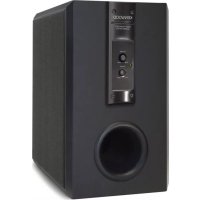
| Speaker type | 160 mm cone type, bass-reflex enclosure, floor-standing |
| Dimensions (W × H × D) | 215 mm × 350 mm × 342 mm |
| Net weight | 9.7 kg |
| Power supply required | AC 230 V (Europe/UK) or AC 120 V (USA/Canada) |
| Power consumption | 70 W |
| Dynamic power | 100 W (6 Ω) |
| Rated output power (FTC) | 75 W RMS into 6 Ω at 100 Hz, THD < 0.7% |
| Frequency response | 35 Hz - 200 Hz |
| Speaker nominal impedance | 6 Ω |
| Input sensitivity / Impedance | 300 mV / 37 kΩ |
| Inputs | LINE INPUT (RCA) × 1 pair |
| Controls and indicators | POWER switch, POWER indicator, volume control |
| Supplied accessories | Pin cord (×1) |
| Maintenance and cleaning | Clean with a clean, dry cloth; do not use thinner, benzine, or alcohol |
| Safety | Do not expose to rain or moisture; do not open the cabinet; unplug before cleaning |
| Spare parts and repairability | Use spare parts prescribed by the manufacturer; any repairs must be entrusted to qualified personnel |
| General information | Designed for use with compatible amplifiers/receivers; do not use two subwoofers |
Frequently Asked Questions - SW40HTBK KENWOOD
User questions about SW40HTBK KENWOOD
0 question about this device. Answer the ones you know or ask your own.
Ask a new question about this device
Download the instructions for your Subwoofer in PDF format for free! Find your manual SW40HTBK - KENWOOD and take your electronic device back in hand. On this page are published all the documents necessary for the use of your device. SW40HTBK by KENWOOD.
USER MANUAL SW40HTBK KENWOOD
SUBWOOFER AVEC AMPLIFICATEUR INCORPORE
MODE D'EMPLOI
SUBWOOFER CON AMPLIFICATORE INCORPORATO
ISTRUZIONI PER L'USO
SUBWOOFER AMPLIFICADOR
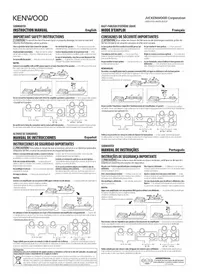
Caution: Read this page carefully to ensure safe operation.
Units are designed for operation as follows.
U.S.A. and Canada AC 120V only
Europe and U.K. AC 230V only
Australia AC 240V only
Other countries ...... AC 110-120 / 220-240 V switchable*
CAUTION
The power in this equipment will not be completely cut off from the AC wall outlet when the main switch is turned OFF.
\* AC voltage selection
The AC voltage selector switches on the rear panel are set to the voltage that prevails in the area to which the unit is shipped. Before connecting the power cord to your AC outlet, make sure that the setting positions of these switches match your line voltage. If not, they must be set to your voltage in accordance with the following direction.
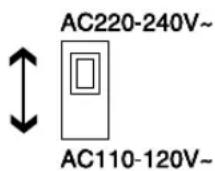
AC voltage selector switches
Move switch lever to match your line voltage with a small screwdriver or other pointed tool.
Note: Our warranty does not cover damage caused by excessive line voltage due to improper setting of the AC voltage selector switch.
Information on Disposal of Old Electrical and Electronic Equipment (applicable for EU countries that have adopted separate waste collection systems)
Products with the symbol (crossed-out wheeled bin) cannot be disposed as household waste. Old electrical and electronic equipment should be recycled at a facility capable of handling these items and their waste byproducts. Contact your local authority for details in locating a recycle facility nearest to you. Proper recycling and waste disposal will help conserve resources whilst preventing detrimental effects on our health and the environment.
Safety precautions
WARNING : TO PREVENT FIRE OR ELECTRIC SHOCK, DO NOT EXPOSE THIS APPLIANCE TO RAIN OR MOISTURE.
 | CAUTIONRISK OF ELECTRIC SHOCKDO NOT OPEN | ! | CAUTION: TO REDUCE THE RISK OF ELECTRIC SHOCK,DO NOT REMOVE COVER (OR BACK). NO USER-SER-VICEABLE PARTS INSIDE. REFER SERVICING TO QUALI-FIED SERVICE PERSONNEL. |
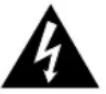 | THE LIGHTNING FLASH WITH ARROWHEAD SYMBOL, WITHIN AN EQUILATERAL TRIANGLE, IS IN-TENDED TO ALERT THE USER TO THE PRESENCE OF UNINSULATED "DANGEROUS VOLTAGE" WITHITHE PRODUCT'S ENCLOSURE THAT MAY BE OF SUFFICIENT MAGNITUDE TO CONSTITUTE A RISKOF ELECTRIC SHOCK TO PERSONS. | ||
 | THE EXCLAMATION POINT WITHIN AN EQUILATERAL TRIANGLE IS INTENDED TO ALERT THE USERTO THE PRESENCE OF IMPORTANT OPERATING AND MAINTENANCE (SERVICING) INSTRUCTIONSIN THE LITERATURE ACCOMPANYING THE APPLIANCE. | ||

Caution: Read this page carefully to ensure safe operation.
Read Instructions – All the safety and operating instructions should be read before the product is operated.
Retain Instructions – The safety and operating instructions should be retained for future reference.
Heed Warnings – All warnings on the product and in the operating instructions should be adhered to.
Follow Instructions – All operating and use instructions should be followed.
-
Cleaning – Unplug this product from the wall outlet before cleaning. Do not use liquid cleaners or aerosol cleaners. Use a damp cloth for cleaning.
-
Attachments - Do not use attachments not recommended by the product manufacturer as they may cause hazards.
-
Water and Moisture – This product shall not be exposed to dripping and splashing - for example, near a bath tub, wash bowl, kitchen sink, or laundry tub; in a wet basement; or near a swimming pool; and the like. Do not place an object containing liquid, such as a flower vase, on the appliance.
-
Accessories – Do not place this product on an unstable cart, stand, tripod, bracket, or table. The product may fall, causing serious injury to a child or adult, and serious damage to the product. Use only with a cart, stand, tripod, bracket, or table recommended by the manufacturer. Any mounting of the product should follow the manufacturer's instructions,
and should use a mounting accessory recommended by the manufacturer.
A product and cart combination should be moved with care. Quick stops, excessive force, and uneven surfaces may cause the product and cart combination to overturn.

-
Ventilation – Slots and openings in the cabinet are provided for ventilation and to ensure reliable operation of the product and to protect it from overheating, and these openings must not be blocked or covered. The openings should never be blocked by placing the product on a bed, sofa, rug, or other similar surface. This product should not be placed in a built-in installation such as a bookcase or rack unless proper ventilation is provided or the manufacturer's instructions have been adhered to.
-
Power Sources – This product should be operated only from the type of power source indicated on the product. If you are not sure of the type of power supply to your home, consult your product dealer or local power company.
-
CAUTION - Polarization - This product may be equipped with a polarized alternating-current line plug (a plug having one blade wider than the other). This plug will fit into the power outlet only one way. This is a safety feature. If you are unable to insert the plug fully into the outlet, try reversing the plug. If the plug should still fail to fit, contact your electrician to replace your obsolete outlet. Do not defeat the safety purpose of the polarized plug.
-
Power Cord Protection – Power-supply cords should be routed so that they are not likely to be walked on or pinched by items placed upon or against them, paying particular attention to cords at plugs, convenience receptacles, and the point where they exit from the product.
-
Lightning – For added protection for this product during a lightning storm, or when it is left unattended and unused for long periods of time, unplug it from the wall outlet and disconnect the antenna or cable system. This will prevent damage to the product due to lightning and power-line surges.
-
Overloading – Do not overload wall outlets, extension cords, or integral convenience receptacles as this can result in a risk of fire or electric shock.
-
Object and Liquid Entry – Never push objects of any kind into this product through openings as they may touch dangerous voltage points or short-out parts that could result in a fire or electric shock. Never spill liquid of any kind on the product.
-
Servicing – Do not attempt to service this product yourself as opening or removing covers may expose you to dangerous voltage or other hazards. Refer all servicing to qualified service personnel.
-
Damage Requiring Service – Unplug this product from the wall outlet and refer servicing to qualified service personnel under the following conditions:
a) When the power-supply cord or plug is damaged,
b) If liquid has been spilled, or objects have fallen into the product,
c) If the product has been exposed to rain or water,
d) If the product does not operate normally by following the operating instructions.
e) If the product has been dropped or damaged in any way, and
f) When the product exhibits a distinct change in performance – this indicates a need for service.
g) If an abnormal smell or smoke is detected.
-
Replacement Parts - When replacement parts are required, be sure the service technician has used replacement parts specified by the manufacturer or have the same characteristics as the original part. Unauthorized substitutions may result in fire, electric shock, or other hazards.
-
Safety Check – Upon completion of any service or repairs to this product, ask the service technician to perform safety checks to determine that the product is in proper operating condition.
-
Wall or Ceiling Mounting - This product should be mounted to a wall or ceiling only as recommended by the manufacturer.
-
Heat - This product should be situated away from heat sources such as radiators, heat registers, stoves, or other products that produce heat. Do not place a flaming object, such as a candle or lantern, or near the product.
-
Power Lines – An outside antenna system should not be located in the vicinity of overhead power lines or other electric light or power circuits, or where it can fall into such power lines or circuits. When installing an outside antenna system, extreme care should be taken to keep from touching such power lines or circuits as contact with them might be fatal.
-
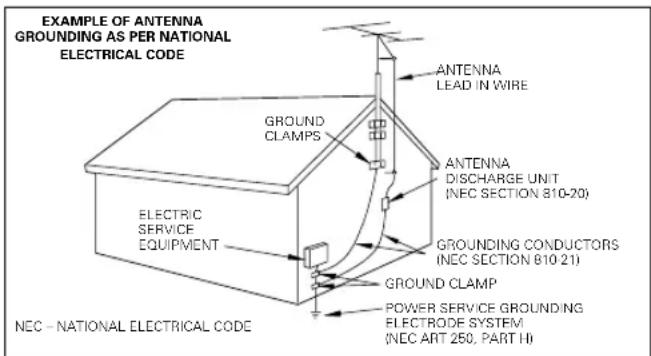
Outdoor Antenna Grounding – If an outside antenna or cable system is connected to the product, be sure the antenna or cable system is grounded so as to provide some protection against voltage surges and built-up static charges. Article 810 of the National Electrical Code, ANSI/NFPA 70, provides information with regard to proper grounding of the mast and supporting structure, grounding of the lead-in wire to an antenna discharge unit, size of grounding conductors, location of antenna-discharge unit, connection to grounding electrodes, and requirements for the grounding electrode.
Notes:
-
Item 7 is not required except for grounded or polarized equipment.
-
Item 19 complies with UL in the U.S.A.
Introduction
Thank you for selecting our speakers as part of your high-fidelity system. We at KENWOOD are confident that your choice will bring you years of rich listening pleasure. Please take the time to read through this booklet carefully. It will help you to obtain the peak performance for which the speakers were designed.
For your records
Record the serial number, found on the back of the unit, in the spaces designated on the warranty card, and in the space provided below.
Refer to these model and serial numbers whenever you call upon your KENWOOD dealer for information or service on this product.
SW-40HT Serial number
Unpacking
Unpack the unit carefully and make sure that all accessories are put aside so they will not be lost.
Examine the unit for any possibility of shipping damage. If your unit is damaged or fails to operate, notify your dealer immediately. If your unit was shipped to you directly, notify the shipping company without delay. Only the consignee (the person or company receiving the unit) can file a claim against the carrier for shipping damage. We recommend that you retain the original carton and packing materials for use should you transport or ship the unit in the future.
Keep this manual handy for future reference.
Accessories
Pin-plug cord (1) *AC plug adapter (1)
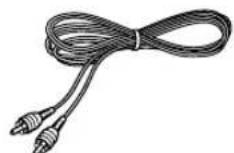
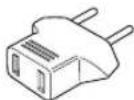
*Use to adapt the plug on the power cord to the shape of the wall outlet. (Accessory only for regions where use is necessary.)
Contents
Caution: Read the pages marked ⚠darefully to ensure safe operation.
Before applying power 2
⚠️ Safety precautions ...... 2
IMPORTANT SAFEGUARDS 3
Introduction ....4
Contents......4
Installation ....4
Connections 5
Controls and indicators 6
Maintenance ....6
Specifications 6
Installation
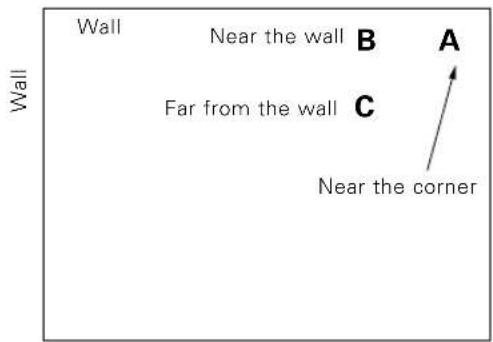
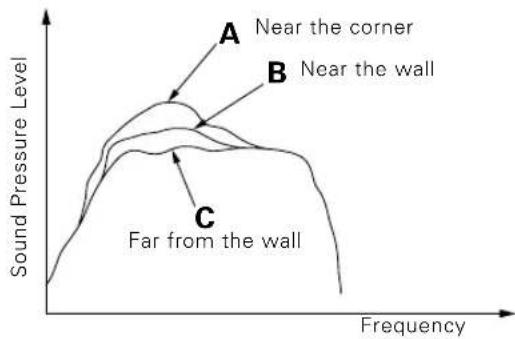
The Subwoofer is a virtually omnidirectional speaker, so it can be installed in almost any location. For example, the Subwoofer can be installed next to the component system (consisting of an amplifier, tuner, cassette deck, etc.), or in a corner of the room, etc.. The subwoofer's deep-bass reproduction characteristics are richest when the subwoofer is installed in a corner or near a wall. Since the low-bass component in music is usually monaural, only one subwoofer is necessary to obtain a sufficient stereo effect when used in combination with a stereo music system.
line
| Region | Frequency Range | Sound Pressure Level | | ---------------- | --------------- | -------------------- | | A Near the corner | Low to Medium | Peak around corner | | B Near the wall | Medium | Peak near wall | | C Far from the wall | High to Low | Low to Medium |CAUTION
To assure ventilation, observe the following points when installing the unit.
- Leave a distance of more than 10 cm between the Subwoofer back and the surrounding wall(s). Use special care not to cover the heat sink with a curtain, etc. when installing.
- Do not place the equipment onto a bed, a sofa, a carpet, or similar. Sucked-in dust can cause fire.
- Be sure to install the Subwoofer vertically.

natural_image
Line drawing of a speaker with a circular ring base (no text or symbols)Vertical installation
Howling
If the Subwoofer is installed near an analog record turntable, a howling sound may be generated. If this occurs, place the Subwoofer farther away from the turntable or reduce the Subwoofer volume (By rotating the VOLUME control counterclock-wise). The howling phenomenon may also occur due to cross interference with a cassette deck, compact disc player, or Laserdisc player, although this is very rare. If sound or picture seems to be distorted due to this reason, place the Subwoofer farther away from other components or reduce its volume.
Operation near a TV
If the Subwoofer is installed near a TV set, the TV reception may be affected and interfered with color irregularities. Should color irregularities observed on TV screen, separate the Subwoofer from the TV until its reception becomes normal.
Connections
If your amplifier or receiver outputs only the L/R separated, line-level signals, it is required to use an adapter for synthesizing the L and R signals (not provided) in order to connect the Subwoofer to such an amplifier or receiver.
●In case an associated system component is connected, also read the instruction manual of the component.
- Be sure to insert all connection cords securely. If their connections are imperfect, the sound may not be produced or noise may interfere.

CONNECTION PRECAUTIONS
Do not connect the power cord plug into the power outlet until all other connections are complete.
Before unplugging a cord or cable from the unit, be always sure to set the POWER switch to OFF and unplug the power plug from the power outlet.
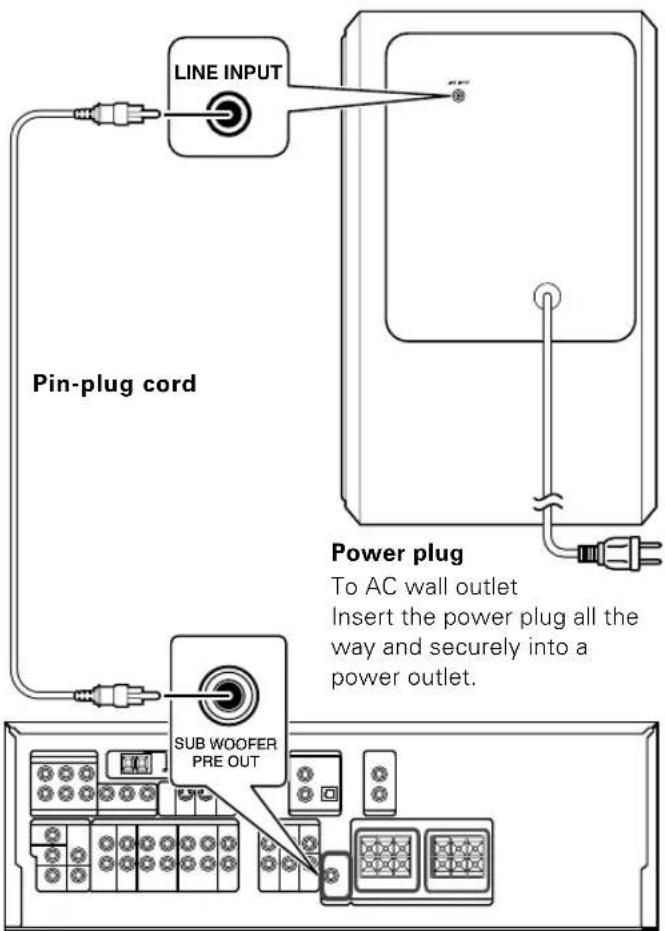
Amplifier or Audio Video control center

CAUTION
Simply setting the POWER switch to OFF does not shut down the power supplied to the unit completely. To isolate this unit completely from the power supply, it is necessary to unplug the power cord from the power outlet.
To shut down the power supply to the unit immediately in case of an emergency, connect the power plug to an easily accessible power outlet.
Controls and indicators
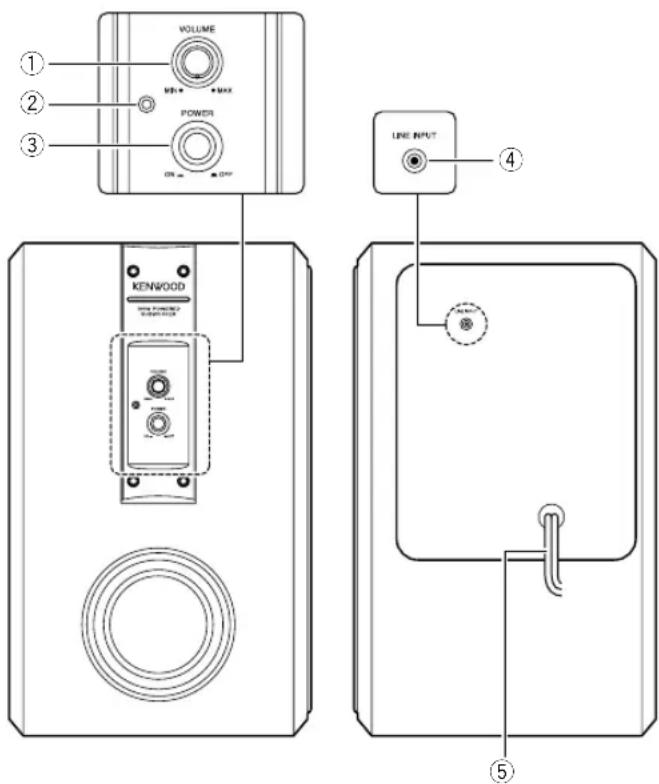
①VOLUME control knob
Adjusts the volume level of the output of the Subwoofer. Rotating the knob clockwise increases the volume level, and rotating the knob counterclockwise decreases the volume level.
②Power indicator
When the power is turned on, the power indicator lights.
③POWER switch
Switches the power ON and OFF.
④LINE INPUT jack (RCA-type pin-plug)
This jack is used to connect the subwoofer Pre-Out jack of the amplifier.
⑤Power cord
Connect to AC outlet.
Caution concerning operation
An excessive input level to the Subwoofer may impair the sound quality or damage the unit. Careful attention should therefore be paid to the following precautions.
Notes :
- Do not increase the output of the amplifier to a high level while the low-frequency level is enhanced by the amplifier's tone control or loudness control.
- When operating the amplifier switches or when placing the stylus on an analog record, set the amplifier volume to its minimum level.
Maintenance
Maintenance of the unit
When the front panel or case becomes dirty, wipe with a soft, dry cloth. Do not use thinner, benzine, alcohol, etc. for these agents may cause discoloration.
In regard to contact cleaner
Do not use contact cleaners because it could cause a malfunction. Be specially careful not to use contact cleaners containing oil, for they may deform the plastic component.
Specifications
Type ...... Subwoofer system with built-in amplifier
[Amplifier]
Dynamic Power 100 W (6 Ω)
(For the U.S.A. and Canada)
Rated Output Power (FTC)
75 W RMS, at 6 Ω 100 Hz, with no more than 0.7 % T.H.D.
Input Sensitivity & Input Impedance ...... 300 mV (37 kΩ)
(For other countries)
Rated Output Power 75 W RMS (100 Hz, 6 Ω)
Input Sensitivity & Input Impedance ..... 300 mV (37 kΩ)
[Speaker]
Enclosure ...... Bass-Reflex, Floor Standing Type
Speaker Unit 160 mm (6-1/2") Cone type
Nominal Impedance 6 Ω
[General]
Rated Power Consumption 70 W
Frequency Response 35 Hz \~ 200 Hz
Dimensions
Width 215 mm (8-7/16")
Height 350 mm (13-3/4")
Depth 342 mm (13-7/16")
Net Weight 9.7 kg (20.9 lb)
NOTE : THE GRILLE CANNOT BE REMOVED.
Notes :
- Kenwood follows a policy of continuous advancements in development. For this reason, specifications may be changed without notice.
●Full performance may not be exhibited in extremely cold locations (below 0 deg. C).

natural_image
Front view of a white electronic device with a speaker grille and control panel (no text or symbols visible)Installation verticale
Réaction acoustique
①Bouton de commande VOLUME
natural_image
Symbol of a trash bin crossed out by a diagonal line, indicating no waste or discharge (no text present)natural_image
Front view of a speaker with two buttons and a circular ring (no text or symbols)Vertikaler Einbau
①VOLUME-Knopf
natural_image
Front view of a speaker with two speakers and a circular ring (no text or symbols)Verticale installatie