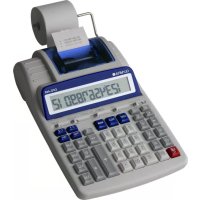
CPD 440 - Calculator OLYMPIA - Free user manual and instructions
Find the device manual for free CPD 440 OLYMPIA in PDF.



| Product type | Printing calculator |
| Brand | Olympia |
| Model | CPD 440 |
| Power supply | AC 120V, 60 Hz (UL) / AC 220-240V, 50 Hz (GS) |
| Calculation capacity | Up to 12 digits |
| Dimensions (W × D × H) | 287 mm × 188 mm × 65 mm |
| Paper width | 57 mm |
| Paper roll diameter | Up to 80 mm |
| Ink roller | IR40T |
| Main functions | Basic calculations, currency conversion, tax calculation, cost/sell price/margin calculation, metric conversion, date and time, printing, memory, subtotal, grand total |
| Decimal selection | Fixed or floating decimal point |
| Rounding | Round up, down, or 5/4 |
| Printing | Built-in printer with ON/OFF/ITEM switch |
| Reset | Reset button on the back of the device |
| Maintenance and cleaning | Dust with a dry cloth; do not use water, solvents, alcohol, or thinners |
| Safety | Do not insert metal objects; unplug before cleaning; do not expose to excessive heat; have repairs done only by an authorized center |
Frequently Asked Questions - CPD 440 OLYMPIA
User questions about CPD 440 OLYMPIA
0 question about this device. Answer the ones you know or ask your own.
Ask a new question about this device
Download the instructions for your Calculator in PDF format for free! Find your manual CPD 440 - OLYMPIA and take your electronic device back in hand. On this page are published all the documents necessary for the use of your device. CPD 440 by OLYMPIA.
USER MANUAL CPD 440 OLYMPIA
This printing calculator should be used exclusively for business indoors. Any other use is considered unintended use.
General information/Safety notes
Your calculator is a highly sophisticated piece of equipment. Never try to repair it yourself. If repairs are necessary, give the calculator to an authorized service center or your sales outlet. Never insert metallic objects such as screwdrivers, paper clips, etc. into the calculator. They may damage the cash register and present the danger of causing an electric shock.
Always switch off the calculator after having finished your work.
Clean the calculator by dusting it with a dry cloth. Never use water or solvents, such as paint thinner or alcohol, to clean the calculator.
In order to completely disconnect the cash register from the power supply, disconnect the power plug from the mains socket.
Do not expose the cash register to excessive heat.
Important transport note:
In the case of damage caused during transport, the unit must be returned with the packaging, operating instructions and accessories.
Connection to the power supply
Before connecting the calculator to the power supply, check that the voltage and frequency specifications on the rating plate correspond to the local power supply.
Safety note
The power socket must be located close to the calculator and be easily accessible. This enables the calculator to be disconnected from the power supply quickly in an emergency.
Note
All data is retained following disconnection from the power supply.
Keyboards Describe
| When performing a calculation, press once to clear the last entered value. Press again to clear all entered values, except memory. This key is also used for clearing the overflow error. | |
| 1 = 9, 0, 00 | Digit keys. |
| + , - , x , - , = , % | Function keys. |
| Sign change key. | |
| Scroll Right key (moves the number displayed to the right, deleting the last digit on the right-hand side). | |
| Paper feed. | |
| Used for calculating the currency. | |
| Used for calculating the cost, selling price and profit margin amount. Enter the value of any 2 items to obtain the remaining value (e.g. enter the value of the cost and the selling price to obtain the profit margin%). | |
| Used for setting the calendar and time. | |
| Used for calculating the tax. | |
| Used for calculating the metric conversion. | |
| #/P | Non-Add Key - Used for printing out information which does not affect the calculation such as dates and serial numbers. Figures are printed on the lefthand side of the paper. |
| 0 | Sub-total. |
| Total is printed. | |
| M! | Memory clear. |
| M | Recall memory. |
| M= | Memory minus. |
| M= | Memory plus. |
| Grand Total. |
Decimal Point Selector Switch

Designating the decimal point position for calculated results.

Addition and subtraction functions are performed with an 2-digit decimal place.

All effective numbers up to 12 digits are printed or displayed.
Rounding switch

Used for round-up round-off(5/4), round-down to the n -cted decimal digits in the result.
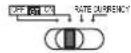
Grand Total/Rate/Currency Set Switch
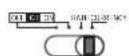
Used for setting or recalling the CURRENCY exchange rate.
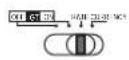
Used for setting or recalling the TAX rate.
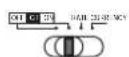
When the GT switch is set to "ON", the totals are in the grand total memory. Each issued, the subtotal number is printed 10 bits G^+ . When GT is pressed, the GRAND TOTAL IS PRINTED WITH LS G. Press GT successively to get all followed by the symbols G^
Print On/Off/Item Count Switch

Entries and results will appear on the display and printed out.

The entries and results will appear on the display in the printed out.
Set switch to ITEM to print the number of times the + and - keys have been pressed (up to 999). When the ,M or M^ keys are pressed the item count will be printed on the paper roll.
Power ON/OFF Switch

POWER ON

POWER OFF.
Overflow function
In the following cases, "E" will be displayed and the keyboard is electronically locked, the further operation is impossible. Press CE/C to clear the overflow.
Overflow Error Condition:
- When the calculated result exceeds 12 digits.
- Dividing by "0".
- The sequential operation speed is faster than the calculation processing speed.
Specifications
Power Source: AC120V, 60HZ(UL); AC220-240V, 50HZ(GS)
Calculating Capacity: 12 digits maximum.
Dimension: 287mm (L) × 188mm (W) × 65mm (H)
Ink Roll: IR40T
Paper Tape:Width:57 mm
Diameter: 80mm (max)
Note
If you experience problems with the calculator, please press the RESET button at the back of the calculator. After resetting, be sure to set the calendar, clock, currency exchange and tax rate again.
Replacing the ink roller
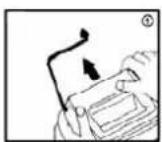
- Turn the power switch off.
- Remove the printer cover. (Figure 1)
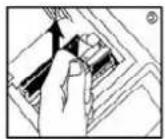
- Lift the ink roll out from the roll holder. (Figure 2)
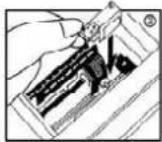
- Install a new ink roll into position. (Figure 3)
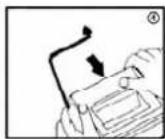
- Replace the printer cover. (Figure 4)
Installing printing paper
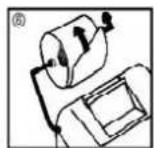
- Lift up the paper arm. (Figure 5)
- Place the new paper roll on the arm. The edge of the paper should be positioned as shown. (Figure 6)
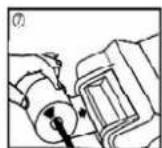
- Insert the paper into the slit at the back of the machine as indicated. (Figure 7)
- Turn the power switch on. Press the paper feed key to advance the paper as shown.(Figure 8)


Utilisation prévue
Date Setting Example: May 1,2003
Fixer la date Exemple:1 mai 2003
Cost-Sell-Margin Calculation
| Calculation Operation Display Print Out | |||
| Calculating Cost | 200 | SELL 200. | 200.** |
| Selling Price: 200 | |||
| Profit Margin: 12% | 12 | COST 176.00 | 12. M % |
| Cost = ? ( 176) | 176.00 C* | ||
| Calculating Profit Margin | 60 | COST 60. | 60. C* |
| Cost: 60 | |||
| Selling Price: 100 | 100 | MARGIN: 40.00 | 100.** |
| Profit Margin = ? (40%) | 40.00 M % | ||
| Calculating Selling Price | 20 | MARGIN: 20. | 20. M % |
| Profit Margin: 20% | |||
| Cost: 120 | 120 | SELL 150.00 | 120. C* |
| Selling price: ? ( 150) | 150.00 ** | ||
Tax Calculation
| Calculation Operation Display Print Out | ||
| Set Tax Rate Rate: 5 % | RATE0. 5 RATE5. TAX% 5. | 0.% |
| To add Tax to $ 120. Tax = ? (6) Selling Price with Tax = ? (126.00) | 120 TAX + | -TAX 126.00 |
| To subtract Tax from $ 120. Tax = ? (-5.71) Price without Tax = ? (114.29) | 120 TAX - | -TAX 114.29 |
| Recall Tax Rate | RATE5.5% | |
Currency exchange calculation
Item Count
| Calculation Operation Display Print Out | |||
| Set Exchange Rate Rate: 5 % | 5 | C11. | 1. CΔ |
| C15. | |||
| C15. | 5. CΔ | ||
| Exchange Rate is 5 The enter number is 120 Calculate C1/C2 = ? | 120 C1 | C1600.00 | 120. 5. CΔ 600.00 C |
| 120 C2 | C224.00 | 120. 5. CΔ 24.00 C | |
| Recall exchange Rate | C15. CΔ | ||

| Calculation Operation Display Print Out | |||
| 23 | 23+ | 23.00 | 23.00 + |
| 25 | 25+ | 48.00 | 25.00 + |
| + 42 | 42+ | 90.00 | 42.00 + |
| 90 | 003... | ||
| - 18 | ◇ | 90.00 | 90.00◇ |
| + 63 | 18+ | 72.00 | 18.00 - |
| 135 | 63+ | 135.00 | 63.00 + |
| 005... | |||
| * | 135.00 | 135.00 * | |
Percentage Calculation

| Calculation Operation Display Print Out | |||
| 20 + 20 x 52 % = 30.4 | 20 x 52 % | 20. | 20.x |
| 10.40 | 52.% | ||
| 10.40* | |||
| + | 30.40 | 30.40 + % | |
| 20 - 20 x 52 % = 9.6 | 20 x 52 % | 20. | 20.x |
| 10.40 | 52.% | ||
| 10.40* | |||
| - | 9.60 | 9.60 - % | |
Memory Calculation
| Calculation Operation Display Print Out | |||
| (2+6)-(5+1)=2 | 2+6+M+5+1 | 2.008.008.008.008.5.006.006.006.006.00 | 2.00+6.00+8.00*8.00 M+5.00+1.00+6.00*6.00 M-2.00 |
Data Printout
| Calculation Operation Display Print Out | |||
| May 10, 2003 | 5.10.2003 # | 5.10.2003 | # 5.10.2003 ....... |
| 2365 | 2365 | 2'365.00 | 2,365.00 + |
| 8456 | 8456 | 10'821.00 | 8,456.00 + |
| May 11, 2003 | 5.11.2003 # | 5.11.2003 | # 5.11.2003 ....... |
| 5230 | 5230 | 16'051.00 | 5,230.00 + |
| + ) 2578 | 2578 | 18'629.00 | 2,578.00 + |
| 18629 | 18'629.00 | 18,629.00 * | |
Metric Conversion
Grand Total Calculation
| Calculation Operation | Display | |
| inch \( \rightarrow \) centimeter | 17 | 2.54 |
| yard \( \rightarrow \) meter | 19 | 0.91 |
| foot \( \rightarrow \) meter | 14 | 0.30 |
| mile \( \rightarrow \) kilometer | 16 | 1.61 |
| ounce \( \rightarrow \) gram | 11 | 28.35 |
| pound \( \rightarrow \) kilogram | 12 | 0.45 |
| acre \( \rightarrow \) square meter | 13 | 4'046.80 |
| square inch \( \rightarrow \) square centimeter | 18 | 6.45 |
| square foot \( \rightarrow \) square meter | 15 | 0.09 |
| Calculation Operation Display Print Out | |||
| 1+2+3=64+5+6=157+8+9=2445 | 1+2+3+*4+5+6+*7+8+9+GTGTGTGT | 1.003.006.00GTG4.00GT9.00GT15.00GT15.00GT7.00GT15.00GT24.00GT24.00GT45.0045.000 | 1.00+2.00+3.00+6.00G+4.00+5.00+6.00+15.00G+7.00+8.00+9.00+24.00G+45.00G*0.G* |
Notes
This instruction manual is purely informative. The contents are not part of any offer for sale or contract. The specifications, extensions and options described may differ from country to country. Olympia Business Systems Vertriebs GmbH reserves the right to revise specifications, make modifications and technical changes to the product described here in without notification.