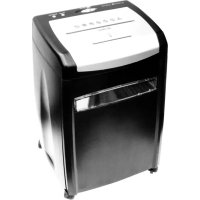
PS 950 CCD - Shredder OLYMPIA - Free user manual and instructions
Find the device manual for free PS 950 CCD OLYMPIA in PDF.



| Product type | Document shredder |
| Brand | Olympia |
| Model | PS 950 CCD |
| Paper cutting capacity (max) | 12 sheets (70 g/m²) |
| Paper cut type | Particle cut (4 × 48 mm) |
| CD/credit card cutting capacity | 1 per pass |
| CD/credit card cut type | Strip (22 mm) |
| Paper entry width | 220 mm (A4) |
| Cutting speed | 2.5 m/min |
| Input voltage | 220-240 V ~, 50 Hz, 0.9 A |
| Protection class | II |
| Noise level | 60 dB |
| Duty cycle | 5 min ON / 20 min OFF |
| Dimensions (W × D × H) | 367 × 260 × 570 mm |
| Weight | 12.1 kg |
| Main functions | Automatic start, stop, reverse (REV) for clearing jams |
| Safety device | Overheat protection, automatic stop in case of jam |
| Maintenance and cleaning | Clean the housing with a slightly damp cloth; do not use harsh chemicals |
| Delivery contents | Shredder, paper bin, CD/credit card bin, instruction manual |
| Warranty | 24 months |
Frequently Asked Questions - PS 950 CCD OLYMPIA
User questions about PS 950 CCD OLYMPIA
0 question about this device. Answer the ones you know or ask your own.
Ask a new question about this device
Download the instructions for your Shredder in PDF format for free! Find your manual PS 950 CCD - OLYMPIA and take your electronic device back in hand. On this page are published all the documents necessary for the use of your device. PS 950 CCD by OLYMPIA.
USER MANUAL PS 950 CCD OLYMPIA
Operating Instructions 15
Shredder
Mode d'emploi 24
Safety symbols 17
Risks through moving parts 18
Electrical safety guidelines 18
Exemption From Liability. 19
Scope of Delivery 19
Starting Up 19
Operating elements 19
Overheating protection 20
Emptying the waste bins 20
Troubleshooting 21
Motor overloading 21
Paper jam 21
Maintenance and Service. 21
Technical Data 22
Guarantee. 23
FRANÇAIS FR BE CH 24
Utilisation conforme aux prescriptions 24
Service-Center Hattingen
Only use the shredder to shred paper, CDs and credit cards by inserting them in the respective slot! The material being shredded must be dry and comply with the requirements stipulated in the Technical Data! Attempting to shred other material can lead to personal injury (e.g. through splinters from hard material, etc.) and damage to the equipment (e.g. damage to the cutting mechanism etc.).
Do not shred continuous forms in this device! Remove all paper clips and staples from paper before feeding it in the device!
Only use the device in dry, closed rooms.
Important Safety Information

ATTENTION!
- Read the operating instructions thoroughly before starting to use the device.
- Pay attention to all safety information to prevent injuries and damage through improper use.
- Keep this operating manual close to hand so that you can make reference to it in the future.
- Pay particular attention to the warnings on the device and in this operating manual.
- If the device is passed on to third-parties, this operating manual must be submitted with it.
- The power socket, to which the shredder is connected, must be easily accessible at all times and be in the immediate vicinity of the shredder. Disconnect the power plug from the socket immediately in the case of an emergency.
- Switch the shredder off and disconnect the power plug from the power socket if the device is not to be used for a longer period.
- Remove any paper clips and metallic staples from paper before feeding it into the shredder to prevent damaging the device.
- Do not use plastic bin liners in the waste bin. They could get caught in the shredder and damage the motor.
- The shredder must not be used outdoors.
- Empty the waste bins regularly.
- The device is not intended for continuous operation. Following operation for 5 minutes, the device must be stopped to cool down for 20 minutes. Avoid overloading the device.
-
The device should only be used in temperate climates, avoid tropical and particularly humid climates.
-
Prevent foreign bodies, spray and moisture getting inside the housing.
- Never place objects filled with water on the device, e.g. vases.
- Never place objects with naked flames on the device, e.g. candles.
- Do not position the device near a heater, fireplace, oven or another source of heat.
- Protect the device from all forms of liquid, i.e. including spray and moisture.
- Do not cover the device while it is in operation.

Risk of injury!
- Ensure that clothing, ties, hair, jewellery or other small objects do not get near the paper infeed in order to prevent them being drawn in and causing any injuries or damage.
- Do not reach into the paper infeed with your fingers or hands.
- Before cleaning or relocating the shredder, switch the device off and disconnect the power plug to prevent it being switched on again unintentionally.
- Do not start the machine up without having installed the waste bins beforehand.
- This device must not be used by persons (including children) with restricted physical, sensory or mental capabilities or those with no experience and/or knowledge of the product except in cases where they are supervised by someone who assumes responsible for their safety or who provides them with proper instruction regarding regarding how to operate the device. Children must be supervised to ensure they do not play with the device.
- If the device's power cable is damaged, it must be replaced by the manufacturer, their service center or similarly trained personnel to rule out any risks.
- Do not use the device in the direct vicinity of water, e.g. near a bathtub, wash basin or sink, in a damp cellar or close to a swimming pool.
- The connection cable/device must be checked regularly for signs of damage.
- When disconnecting the power plug from the power socket, only pull on the plug and not the cable itself.
Safety symbols
The ISO and IEC symbols listed below are attached to the product and have the following significance:
| ! | Caution, risk of injury! Failure to observe the safety information and instructions could lead to receiving an electric shock and/or serious injuries. |
| Caution, risk of injury! Pay attention to ties, loose pieces of clothing and other objects. They could be drawn in by the shredder. | |
| Caution, risk of injury! Never reach into the shredder's paper or CD infeed slot. Attention: When lifting the waste bin from the device (e.g. to clean or empty the waste bin), sharp and pointed parts of the cutting mechanism become accessible. | |
| Caution, risk of injury! Pay attention to long hair. It could be drawn in by the shredder. | |
| Caution, risk of injury! Remove all paper clips and staples from the paper before shredding! Otherwise there is a risk of injury through the splintering of hard material. Caution, risks through cutting mechanism! Remove all paper clips and staples from the paper before shredding! Otherwise the cutting mechanism will be damaged. | |
| Caution, risk of injury! Keep aerosol sprays, gas and small objects away from the shredder. | |
| Caution, risk of injury! This machine is not a toy. Ensure children and household pets cannot get near the shredder because they could be seriously injured if they do. |
Risks through moving parts

WARNING!
KEEP FINGERS AND OTHER LIMBS AWAY FROM THE PAPER/CD/CREDIT CARD INFEED SLOTS!
- Parts conduct electricity.
- Do not open the device.
- No parts in the device may be serviced or repaired by the end user.
- Please contact qualified service personnel for all maintenance requirements.
Electrical safety guidelines
- Disconnect the power plug prior to longer periods out of operation and cleaning the device.
- Do not put the device into operation in the case of damage to the power cable, the power plug or the device itself (risk of injury)!
- Do not exceed the recommended power consumption (0.9 A) of the power socket!
- Do not complete any modifications to the power cable because it is designed for the power supply specified.
The device meets the requirements for Safety Class II. Appropriate insulation has been installed to ensure no contact is possible with metal parts which could conduct electricity in the event of a fault. There is no protective earthing conductor.
Disposal instructions
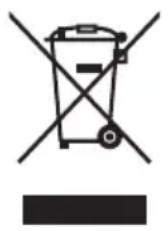
The integration of European law in domestic legislation and national regulations requires an appropriate disposal of durable goods. The aim is to protect persons and the environment. The adjacent symbol is used to indicate that old electrical and electronic goods and batteries do not belong in normal household waste. When devices or apparatus have reached the end of their service life, they must be brought to collection points approved by public waste authorities. Packaging material must be disposed of according to the applicable local regulations.

Exemption From Liability
We cannot guarantee that the information which relates to the technical properties of the product or to the product itself contained in this document is correct. The product and, where applicable, its accessories, described in this document are subject to constant improvement and further development. For this reason, we reserve the right to modify components, accessories, technical specifications and related documentation of the product at any time without notification.
Scope of Delivery
One PS 950 CCD shredder with power cable
- One waste bin for paper
- One waste bin for CDs and credit cards
- One operating instruction manual
Starting Up
Remove the device carefully from the packaging and set it down on a suitable, level base. Check that the CD and credit card waste bin is properly inserted in the waste paper bin.
Operating elements
The device can shred a maximum of 12 sheets of paper (70g / m^2) with a width of 22cm (A4) at a time. When you shred material such as envelopes or credit card vouchers, please be sure to insert them in the center of the paper infeed. Only insert CDs and credit cards in the front infeed slot intended for them. Do not insert CDs or other data media which is not made of paper in the paper infeed!
Switch positions
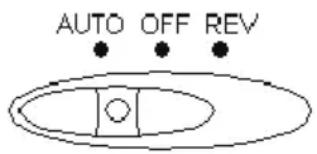
Switch position AUTO (automatic):
The device is ready to operate (standby). The paper is drawn in as soon as it is inserted in the paper infeed. When the paper has passed through the cutting mechanism, the cutting mechanism continues to run for a short time to ensure no paper remains in it. If you want to shred small size paper, ensure to insert it in the center of the paper infeed.
To shred CDs, only insert one CD at a time using a little force to feed them into the slot at the front. The CD is then drawn in automatically and shredded. To shred credit cards, feed them long side first into the CD and credit card slot.
Switch position OFF:
When the switch is in this position, the device is switched off.
Switch position REV (reverse):
This switch position serves to clear up paper jams, should they occur. The cutting mechanism runs backwards and the paper is fed back out of the paper infeed.
Overheating protection
The device is not designed for continuous operation (max. operating time of 5 minutes followed by a pause of 20 minutes). In the event of the motor overheating, a motor circuit breaker automatically switches the motor off. Example:
- You use the shredder uninterrupted for over 5 minutes and at the maximum capacity of 12 sheets.
- You exceed the shredder's load limit by inserting more than 12 sheets or not feeding the paper straight and flat, for example.
After the overheating protection has been triggered, let the shredder cool down for at least 20 minutes. Disconnect the power plug in this case.
Emptying the waste bins
Empty the waste bins regularly to prevent the cuttings overflowing and possibly causing damage to the device.
- Switch the device off.
- Pull the waste bins out of the device. Empty the CD and credit card bin and the waste paper bin.
Troubleshooting
Motor overloading
The following can lead to the device being shutdown:
- Motor overheating. If the device is used continuously for longer than 5 minutes, a motor circuit breaker switches the device off automatically.
- Exceeding the capacity, e.g. by inserting more than 12 sheet of 70g paper at a time.
- Jammed paper when it is not gripped properly at the paper infeed, i.e. it is drawn in crooked.
Paper jam
Always feed the paper straight into the paper infeed.

ATTENTION!
Never leave the shredder switched on when a paper jam occurs in order to prevent injuries.
- Disconnect the power plug from the power socket.
- Cut or tear off the remaining paper above the shredder.
- Connect the power plug to a power socket.
- Set the AUTO, OFF, REV switch to AUTO.
- If necessary, toggle the switch alternately between AUTO and REV to loosen the jammed paper.
- The residual paper is then ejected.
- The shredder can now be operated normally again.

Note:
Frequent paper jams which cause the device to be shutdown by the overheating protection facility can reduce the service life of the shredder.
Maintenance and Service
Disconnect the power plug prior to cleaning to prevent the risk of injuries.
Clean the housing with a slightly moist cloth.
Do not use any aggressive cleaning agents. Never use any chemicals (e.g.
cleaning solvent, alcohol) to clean the housing.
Technical Data
Model PS 950 CCD
Material for cutting Paper
CDs
Credit cards
Max. cutting capacity: paper 12 sheets of paper each 70g / m
Cut type: paper Particle-cut (strip size 4^*48mm
Paper infeed size 220 mm (A4)
Shredding speed 2.5 m/min.
Max. cutting capacity: One at a time
CDs/credit cards
Cut type: CDs/credit cards Strip-cut
strip size 22 mm
Input voltage: 220-240 VAC, 50 Hz, 0.9 A
Safety class: II
Noise emission 60 dB
Dimensions (W x D x H) 367 x 260 x 570 mm
Operating cycle 5 min. ON, 20 min. OFF
Weight 12.1
kg
Guarantee
ATTENTION!
IMPORTANT GUARANTEE DOCUMENT
PLEASE RETAIN!
Dear Customer,
We are pleased that you have chosen to purchase a high quality product from OLYMPIA. Should a technical problem arise with regard to the equipment, please observe the following points:
The period of guarantee for the equipment is 24 months.
It is essential to keep the purchase receipt and original packing.
If a problem occurs, please contact our hotline first under: 0180/500 7514 (0.14 Euro per minute) Our expert personnel can frequently provide help over the phone.
However, if the problem cannot be solved via telephone, please send the equipment to the following address in its original packing: Service-Center Hattingen Weg zum Wasserwerk 10 D45525 Hattingen
Repairs under the terms of guarantee can only be completed when the purchase receipt is enclosed. We are sorry for any inconvenience.
Service-Center Hattingen
Service-Center Hattingen
Service-Center Hattingen
The manufacturer hereby declares that the equipment complies with the stipulations defined in the following guidelines and standards
Hattingen, November 2008
Heinz Prygoda, Managing Director
Ort, Datum

- Important Safety Information
- ATTENTION!
- Risk of injury!
- Safety symbols
- Risks through moving parts
- WARNING!
- KEEP FINGERS AND OTHER LIMBS AWAY FROM THE PAPER/CD/CREDIT CARD INFEED SLOTS!
- Electrical safety guidelines
- Disposal instructions
- Exemption From Liability
- Scope of Delivery
- Starting Up
- Operating elements
- Switch positions
- Switch position AUTO (automatic):
- Switch position OFF:
- Switch position REV (reverse):
- Overheating protection
- Emptying the waste bins
- Troubleshooting
- Motor overloading
- Paper jam
- Note:
- Maintenance and Service
- Technical Data
- Model PS 950 CCD
- Guarantee
- IMPORTANT GUARANTEE DOCUMENT
- PLEASE RETAIN!
Brand : OLYMPIA
Model : PS 950 CCD
Category : Shredder