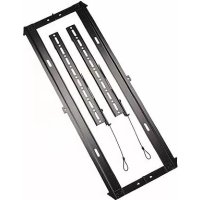
iCLPFM3B03 - Flat screen mount Chief - Free user manual and instructions
Find the device manual for free iCLPFM3B03 Chief in PDF.


| Product Type | Wall Mount for Flat Panel Display |
| Brand | Chief |
| Model | iCLPFM3B03 |
| Maximum Load Capacity | 56.7 kg (125 lbs) |
| Minimum VESA Compatibility | 200 x 200 mm |
| Material | High-strength Steel |
| Wall Plate Dimensions (approx.) | Width 610 mm, Height 280 mm |
| Depth | Varies with screen thickness (up to 50 mm) |
| Installation Type | Wall mount on wood studs, concrete, brick |
| Compatible Stud Spacing | 40.6 cm (16") or 61 cm (24") |
| Tilt | Fixed (no tilt) |
| Swivel | Fixed (no swivel) |
| Leveling | Non-adjustable (level installation required) |
| Cable Management | Integrated (retaining straps) |
| Theft Security | Eyelet for padlock or security cable |
| Maintenance | Clean with a soft, dry cloth |
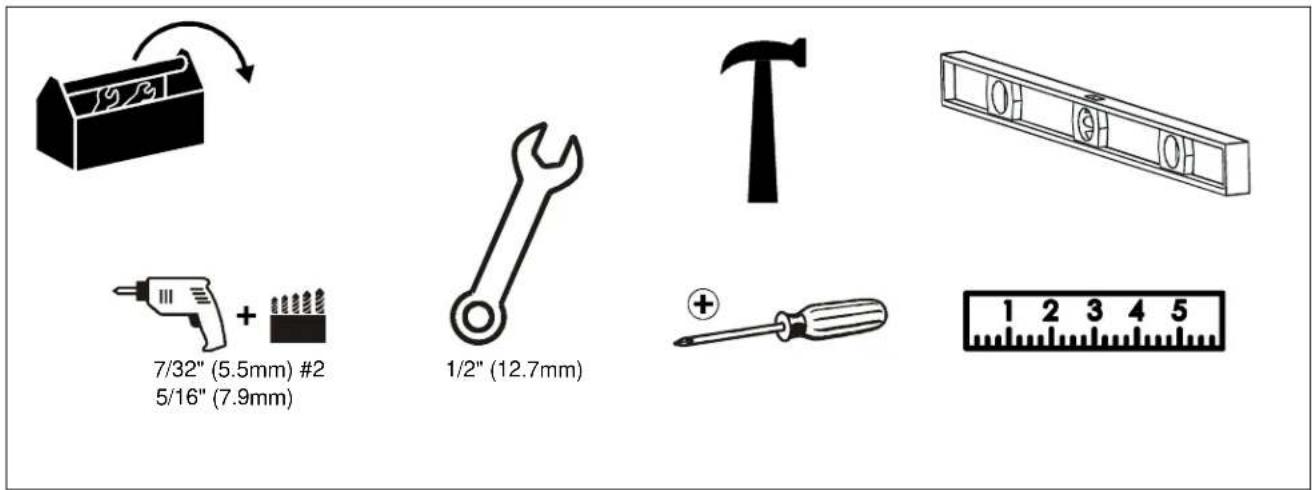
| Required Tools | Drill, bubble level, 12.7 mm (1/2") wrench, Phillips screwdriver |
| Warranty | Consult the manufacturer |
Frequently Asked Questions - iCLPFM3B03 Chief
User questions about iCLPFM3B03 Chief
0 question about this device. Answer the ones you know or ask your own.
Ask a new question about this device
Download the instructions for your Flat screen mount in PDF format for free! Find your manual iCLPFM3B03 - Chief and take your electronic device back in hand. On this page are published all the documents necessary for the use of your device. iCLPFM3B03 by Chief.
USER MANUAL iCLPFM3B03 Chief
Milestone AV Technologies, and its affiliated corporations and subsidiaries (collectively, "Milestone"), intend to make this manual accurate and complete. However, Milestone makes no claim that the information contained herein covers all details, conditions or variations, nor does it provide for every possible contingency in connection with the installation or use of this product. The information contained in this document is subject to change without notice or obligation of any kind. Milestone makes no representation of warranty, expressed or implied, regarding the information contained herein. Milestone assumes no responsibility for accuracy, completeness or sufficiency of the information contained in this document.
Chief® and Centris™ are trademarks of Milestone AV Technologies. All rights reserved.
IMPORTANT WARNINGS AND CAUTIONS!
WARNING: A WARNING alerts you to the possibility of serious injury or death if you do not follow the instructions.

CAUTION: A CAUTION alerts you to the possibility of damage or destruction of equipment if you do not follow the corresponding instructions.

WARNING: Failure to read, thoroughly understand, and follow all instructions can result in serious personal injury, damage to equipment, or voiding of factory warranty! It is the installer's responsibility to make sure all components are properly assembled and installed using the instructions provided.

WARNING: Failure to provide adequate structural strength for this component can result in serious personal injury or damage to equipment! It is the installer's responsibility to make sure the structure to which this component is attached can support five times the combined weight of all equipment. Reinforce the structure as required before installing the component. The wall to which the mount is being attached may have a maximum drywall thickness of 5/8" (15.9mm).

WARNING: Exceeding the weight capacity can result in serious personal injury or damage to equipment! It is the installer's responsibility to make sure the combined weight of all components attached does not exceed 125 lbs (56.7 kg) for the iCMPFM3 and iCLPFM3 or 175 lbs (79.4 kg) for the iCXPFM3. Use with products heavier than the maximum weight indicated may result in collapse of the mount and its accessories causing possible injury.

DIMENSIONS - iCMPFM3
![[558.8] 22.00 [449] 17.68 MAX [279.4] 11.00 [419.1] 16.50 [400] 15.75 MAX KICKSTAND CORDS [200] 7.87 TOP MOUNTING HOLE TO CENTERLINE ARROW ON THE WALL PLATE [63.5] 2.50 CENTERLINE TO BOTTOM OF WALL PLATE OPENING [177.8] 7.00 WALL PLATE OPENING [20.1] .79 [8.7] 4X .34 [501.7] 19.75 WALL PLATE OPENING [406.4] 2X 16.00 [25.40] 4X 1.00 [212.7] 8.38 [291.8" 11.49" ORIENTATION AND CENTERLINE ARROW DETAIL A SCALE 1 : 2 DISPLAY - CABLE ACCESS WHEN KICKSTAND IS ACTIVATED - DISPLAY TILTS BACK 5" WALL CENTERLINE DIAMOND DETAIL B SCALE 1 : 2](/content/2026/02/354870/images/5fb7e90e447f70f729f7c55f49ea80591a66929e02999721fcb196da85060c25.jpg)
DIMENSIONS - iCLPFM3
![[781.1] 30.75 [26.38] [670] MAX [390.5] 15.38 [419.1] 16.50 [200] 7.87 TOP MOUNTING HOLE TO CENTERLINE ARROW ON THE WALL PLATE [177.8] 7.00 WALL PLATE OPENING [400] 15.75 MAX KICKSTAND CORDS [63.5] 2.50 CENTERLINE TO BOTTOM OF WALL PLATE OPENING [723.9] 28.50 WALL PLATE OPENING [406.4] 2X 16.00 [25.4] 4X 1.00 [212.7] 8.38 [291.8] 11.49 [79] 4X .34 [8.7] DETAIL A SCALE 1 : 2 ORIENTATION AND CENTERLINE ARROW U DETAIL B SCALE 1 : 2 DISPLAY - CABLE ACCESS WHEN KICKSTAND IS ACTIVATED - DISPLAY TILTS BACK S* WALL](/content/2026/02/354870/images/13b902437ae6fd8c6cf4d393b1e649086f1dcb430b415ce50e16ff18c8a260cc.jpg)
DIMENSIONS - iCXPFM3
![[500] 19.65 MAX [965.2] 38.00 [855.4] 33.68 MAX [482.6] 19.00 [250] 9.84 TOP MOUNTING HOLE TO CENTERLINE ARROW ON THE WALL PLATE [177.8] 7.00 WALL PLATE OPENING [63.5] 2.50 CENTERLINE TO BOTTOM OF WALL PLATE OPENING KICKSTAND CORDS [520.7] 20.50 [908.1] 35.75 WALL PLATE OPENING [609.6] 2X 24.00 [609.6] 2X 24.00 [406.4] 2X 16.00 [25.4] 12X 1.00 [212.7] 8.38 [291.8] 11.49 DETAIL A SCALE 1 : 2 DISPLAY - CABLE ACCESS WHEN KICKSTAND IS ACTIVATED - DISPLAY TILLS BACK 5° WALL CENTERLINE DIAMOND DETAIL B SCALE 1 : 2](/content/2026/02/354870/images/289bf2b6903f9974361771f739c526b80e66e53ec2613d2500d347b1deb5e8f6.jpg)
LEGEND
| [Tighten Fastener] | Pencil Mark | ||||
| Mancar con lapiz | Byańtmanie | ||||
| Siftmarkierung | Ponnmarkering | ||||
| Mancar com lapis | Pimisty meriki | ||||
| Segno a malta | Oznaczanie obwkiem | ||||
| Potloodmehsiken | Ziguði uzi ukiúji | ||||
| Marquage au orayon | Kalem Ijareti | ||||
| Mapka Kapawpauwa | Ceruzajebiós | ||||
| [BW42] | Luason Fastener | Drill Hole | |||
| Afrojor elemento de fijadón | Parlorar | Borehul | |||
| Befestigungstell lösen | Bodrioch | Borna hál | |||
| Dasapertar fixador | Fazer turo | Porausnička | |||
| Allentare il fissaggio | Praticare un bro | Obwór wiercony | |||
| Bevestiging losdraalen | Gat boren | Adnprjon omrj | |||
| Das serez les fixations | Parasz un trau | Matkap Deligi | |||
| Ocnaśkire Stacrewny | Otraepctne Tprewpowsen | Lyukürdás | |||
| [rose] | Philips Screwdriver | Adjust | |||
| Destorniliador Philips | Ajustar | Justar | |||
| Kreuzschlitzschraubendrihar | Einstellen | Justara | |||
| Chave de fondias Philips | Ajustar | Sästaša | |||
| Cacdiante a stalla | Regolare | Wyregubewac | |||
| Knudskapschroevendraiser | Aftstellen | Προσαργοιης | |||
| Tournevis àpinte oruforme | Ajustar | Ayar | |||
| Otraepma | Πρωεποκοβυνα | Boállitás | |||
 | By Hand | Hex Head Wrench | |||
| A mano | Llave de cabza hexagonal | Sokukantet sleusnagle | |||
| Von Hand | Sedskantschnössel | Insoynydkel | |||
| Com a mão | Chave de caboça sextaveda | Kuusiokolovain | |||
| A mano | Chiavo esagonale | Klusz z libam szadokątnym | |||
| Mat de hand | Zaskantsteuál | Klóš dʒayuwućs kepolnić | |||
| Ala mán | Cló à tête hexagonale | Altogen Kafak (Allen) Anahtar | |||
TOOLS REQUIRED FOR INSTALLATION
PARTS
![A(1) [wall plate] B(2) (vertical bracket] C(6) M8 x 20 G(6) M6 x16 K(6) M5 x16 P(8) M4 x16 T(8) 1/4"(6.4mm) W(4 or 6) 5/16 x 2 1/2" D(6) M8 x 30 H(6) M6 x25 L(6) M5 x20 Q(6) M4 x20 U(8) 1/2"(12.7mm) X(4 or 6) 1/4" (6.4mm) E(6) M8 x 40 J(6) M6 x35 M(6) M5 x25 R(6) M4 x25 V(8) [universal washer] Y(4 or 6) [concrete anchor] F(6) M8 x 50 N(6) M5 x35 S(6) M4 x35 For below kit, quantities are 4 of iCMPTM3, ICLPTM3 6 for iCXPTM3.](/content/2026/02/354870/images/dfec2035ffa93e6f94db2af0a6da925e9feb4d2729153451f422415a3b5eaee8.jpg)
1
(iCLPFM shown)
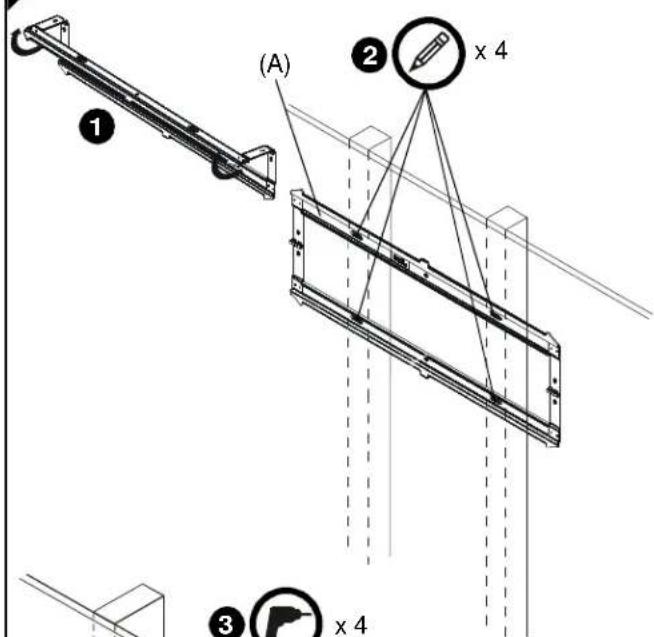
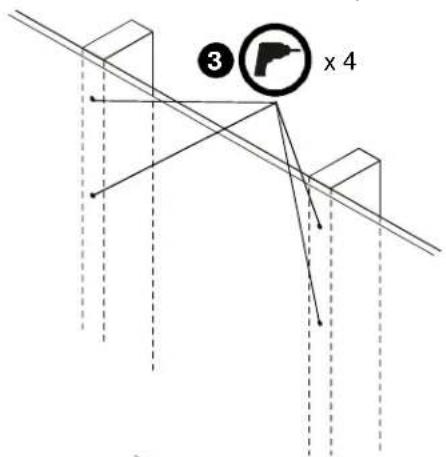
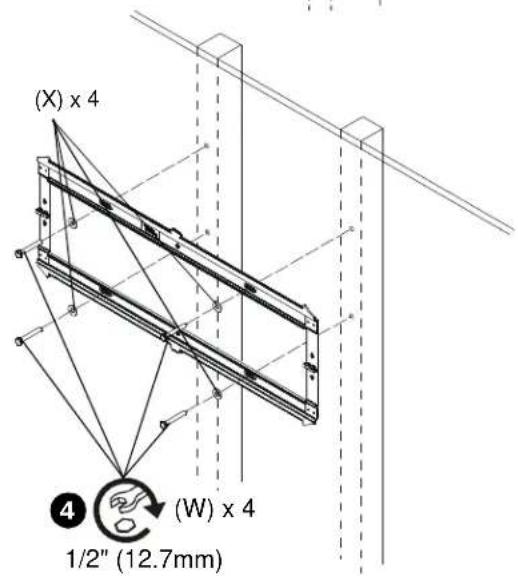
INSTALL WALL PLATE TO WALL - WOOD STUDS

WARNING: Failure to provide adequate structural strength for this component can result in serious personal injury or damage to equipment! It is the installer's responsibility to make sure the structure to which this component is attached can support five times the combined weight of all equipment. Reinforce the structure as required before installing the component. The wall to which the mount is being attached may have a maximum drywall thickness of 5/8" (1.6cm).
- Unfold wall plate (A) to prepare it for mounting to wall.
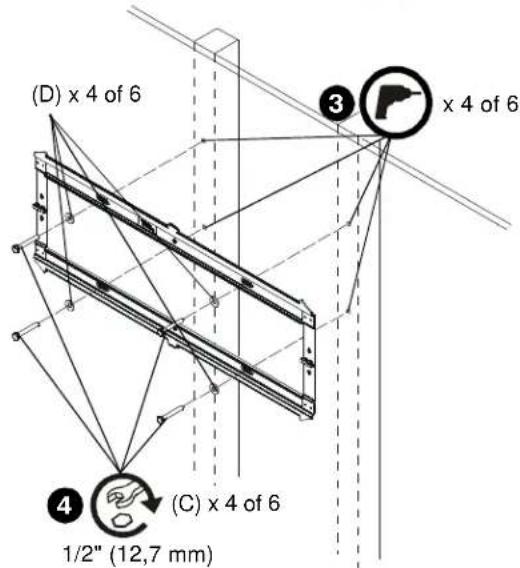
- Level wall plate (A) and mark locations of pilot holes.
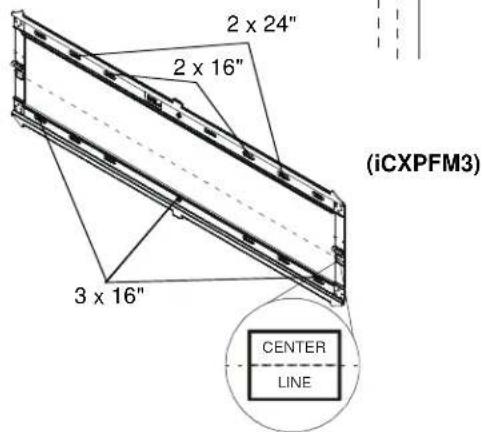
NOTE: For the iCXPFM3, any combination of holes can be used for mounting to 24" studs as long as they are 24" apart. If mounting to 16" studs, only the inner four holes may be used.
- Drill 7/32" (5.5mm) diameter pilot holes into wood studs.
- Using 1/2" (12.7mm) wrench, install screws (W) through flat washers (X), wall plate (A) and into wood studs.
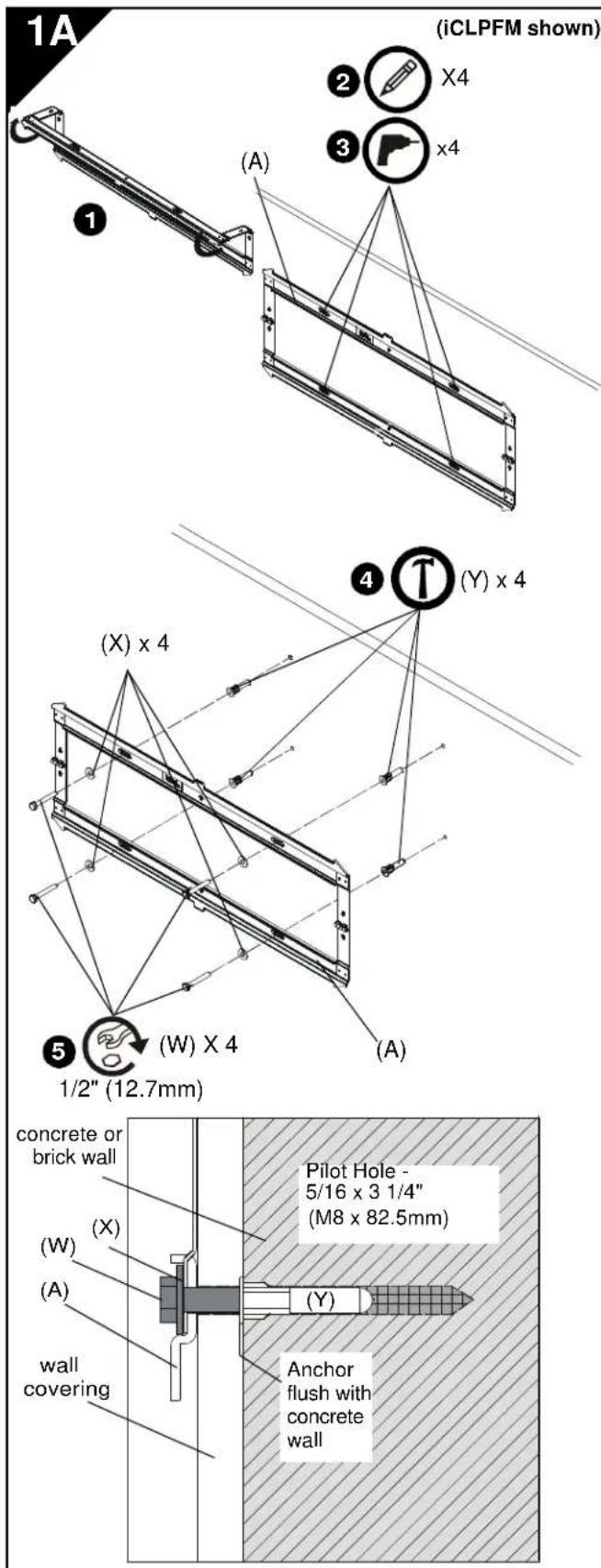
INSTALL WALL PLATE TO WALL - CONCRETE, CONCRETE BLOCK OR BRICK

WARNING: Failure to provide adequate structural strength for this component can result in serious personal injury or damage to equipment! It is the installer's responsibility to make sure the structure to which this component is attached can support five times the combined weight of all equipment. Reinforce the structure as required before installing the component. The wall to which the mount is being attached may have a maximum drywall thickness of 5/8" (1.6cm).

WARNING: ELECTRICAL SHOCK HAZARD! CUTTING OR DRILLING INTO ELECTRICAL CORDS OR CABLES CAN CAUSE DEATH OR SERIOUS PERSONAL INJURY! ALWAYS make certain area behind mounting surface is free of electrical wires and cables before drilling or installing fasteners.

WARNING: EXPLOSION AND FIRE HAZARD! CUTTING OR DRILLING INTO GAS PLUMBING CAN CAUSE DEATH OR SERIOUS PERSONAL INJURY! ALWAYS make certain area behind mounting surface is free of gas, water, waste, or any other plumbing before cutting, drilling, or installing fasteners.
- Unfold wall plate (A) to prepare it for mounting to wall.
- Level wall plate (A) and mark locations of pilot holes at desired mounting location.
NOTE: For the iCXPFM3, use the inner four holes on wall plate for installation.
- Drill 5/16" (8mm) diameter pilot holes into wall at marked locations. Holes must be drilled at least 3 1/4 inches deep.
- Install four concrete anchors (Y) into drilled holes. Use a hammer to tap anchors into holes.
IMPORTANT ! : The anchors must be installed through any wall covering until flush with the concrete wall.
- Using 1/2" (12.7mm) wrench, install screws (W) through flat washers (X), wall plate (A) and into concrete anchors (Y).
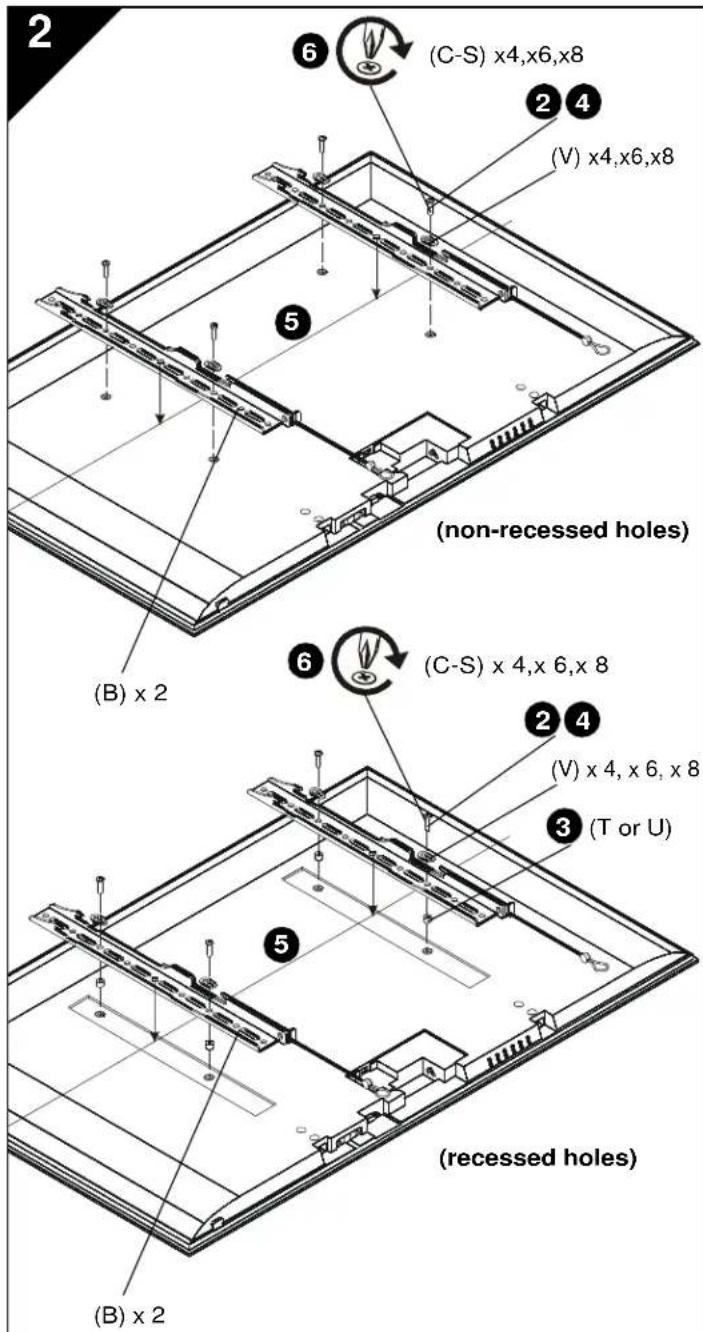
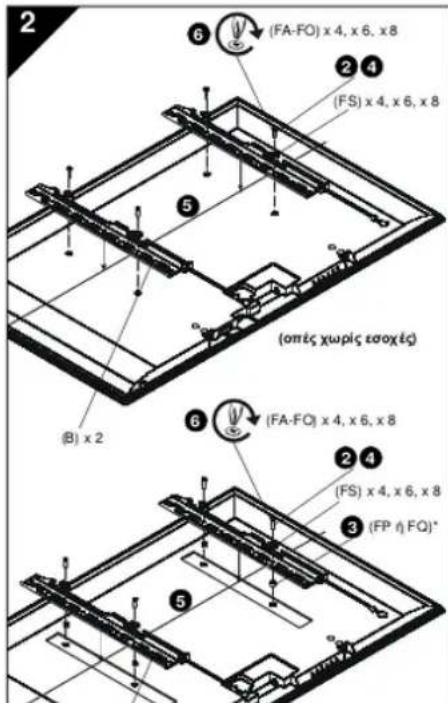
INSTALL BRACKETS TO DISPLAY

WARNING: The minimum hole pattern size is 100mm x 100mm for the iCMPFM3 and 200mm x 200mm for the iCLPFM3 and the iCXPFM3.
- Lay display face down on protective surface.

CAUTION: Using screws of improper diameter may damage your display! Proper screws will easily thread into display mounting holes.
-
Select screw diameter by examining hardware (C-S) (8mm, 6mm, 5mm, or 4mm) and comparing with mounting holes on display.
-
Select spacers:
-
If mounting holes are not recessed and both brackets (B) can lay flat against display, then no spacers are required.
- If mounting holes are recessed, or if protrusions prevent brackets (B) from laying flat, then spacers (T or U) must be used. Select shortest spacer which will provide adequate fill. All spacers must be same length.

CAUTION: Using screws of improper length may damage your display! Proper screws will have adequate thread engagement without contacting bottom of display mounting holes.
-
Select screw length:
-
Using your hand, insert SHORTEST length screw of selected diameter (C, G, K or P) through bracket (B), universal washer (V), selected spacer (T or U, if required), into display mounting hole. Do NOT thread screw into hole at this time.
-
Proper screw length requires base of screw head to protrude above flat washer a distance equal to or greater than the screw diameter. If screw length is inadequate, select longer screw. Select shortest screw which will protrude the required distance.
-
Place brackets (B) on display, ensuring:
• Upper hooks are towards top of display.
- Center of brackets (B) are as close to the center of the back of display as possible after being installed. Center of bracket is indicated by the diamond-shaped hole.
-
Using Phillips screwdriver, carefully install selected screws through universal washers (V), brackets (B), and spacers (T or U, if required), into display.
-
Tighten all screws. Ensure all applicable display mounting holes (4, 6, or 8) are used.
INSTALL DISPLAY TO WALL PLATE

WARNING: Exceeding the weight capacity can result in serious personal injury or damage to equipment! It is the installer's responsibility to make sure the combined weight of all components attached does not exceed 125 lbs (56.7 kg) for the iCMPFM3 and iCLPFM3 or 175 lbs (79.4 kg) for the iCXPFM3. Use with products heavier than the maximum weight indicated may result in collapse of the mount and its accessories causing possible injury.

WARNING: Display may be very heavy! Ensure display can be safely lifted and maneuvered as required to install on wall plate. Failure to take adequate precautions can result in serious personal injury or damage to equipment!

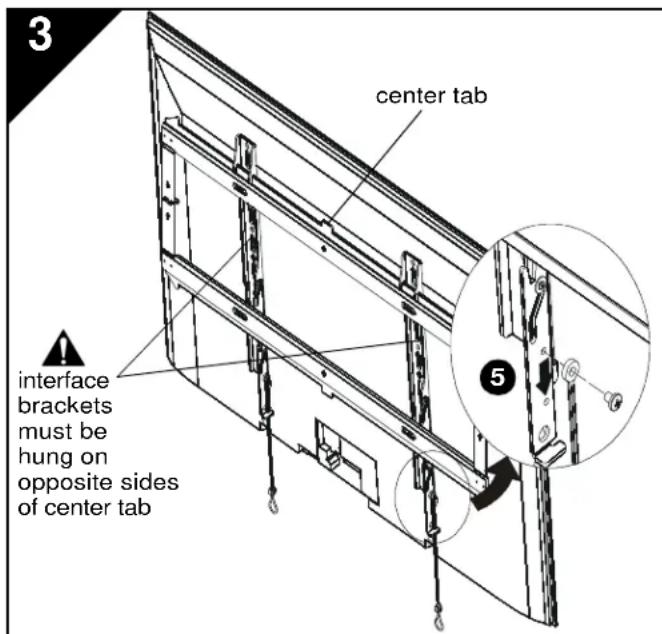
WARNING: Interface brackets must be hung on opposite sides of the center tab on wall plate!
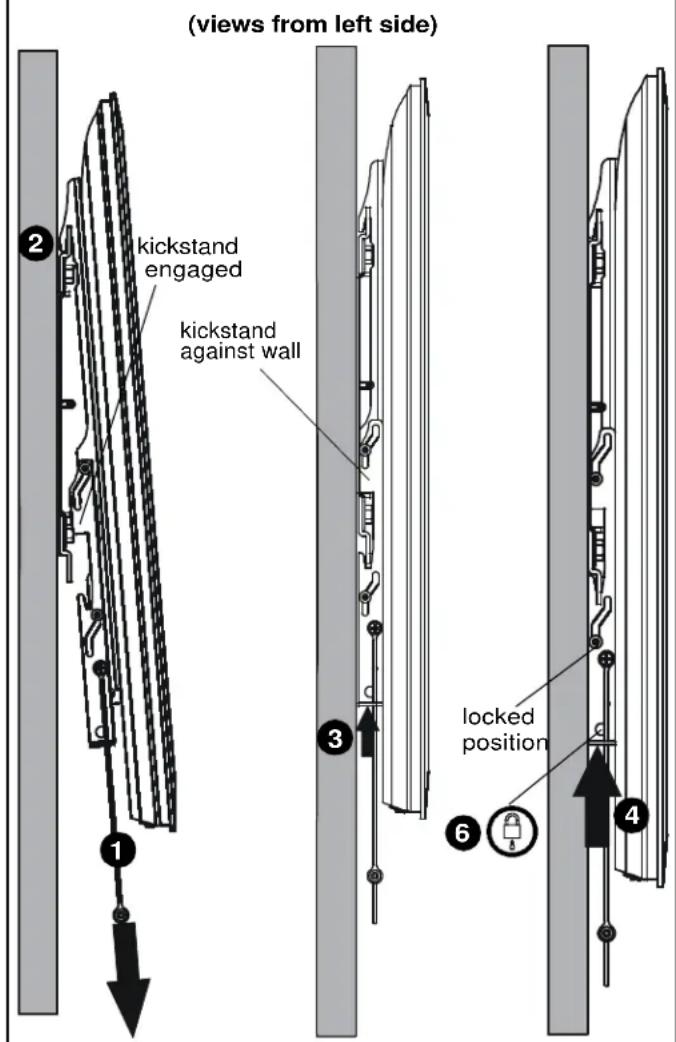
- Make sure interface brackets are in the kickstand position by pulling down on handles as far as possible.
- Hang display with brackets (B) on upper rail of wall plate (A). Kickstand should be engaged with lower portion of wall plate.
NOTE: Any cable management or rear display adjustments should be made when the display is resting on the kickstand.
- Unlock kickstand by pushing up on interface brackets until kickstand rests against the wall.
- Push up on the interface brackets further in order to lock display into position against wall.
NOTE: Straps can be either cut off or tucked behind display after installation is complete so that they will not be visible to the viewer.
- (Optional) The straps can be moved to the lower screw holes on interface brackets in order to improve access to the straps on larger displays.
- (Optional) Route padlock or cable lock (not included) through bottom holes on interface bracket to provide additional security.
INSTALLEER MUURPLAAT TEGEN MUUR - HOUTEN WANDSTIJLEN

THMEIOTH: For the CYDEAN unemploymenters in Hungary
DESTEKLERİ EKRANA MONTE ETME

©2011 Milestone AV Technologies. The iC Logo and StowAway are trademarks of Chief Manufacturing,
a products division of Milestone AV Technologies, a Duchossois Group Company. All rights reserved
Patents and patents pending. Milestone AV Technologies, Savage, MN 55378, USA
8800-002049 Rev 02
09/11