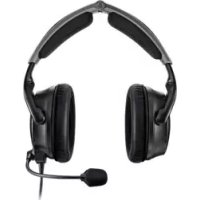
047901 - Wireless Earbuds BOSE - Free user manual and instructions
Find the device manual for free 047901 BOSE in PDF.



User questions about 047901 BOSE
0 question about this device. Answer the ones you know or ask your own.
Ask a new question about this device
Download the instructions for your Wireless Earbuds in PDF format for free! Find your manual 047901 - BOSE and take your electronic device back in hand. On this page are published all the documents necessary for the use of your device. 047901 by BOSE.
USER MANUAL 047901 BOSE
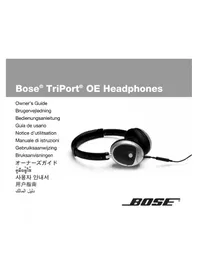
Bose® TriPort® OE Headphones
Owner's Guide
Brugervejledning
Bedienungsanleitung
Guía de usuario
Please read this owner's guide
Please take the time to follow the instructions in this owner's guide carefully. It will help you set up and properly use your new headphones. Please save this owner's guide for future reference.
CAUTIONS
- Long-term exposure to loud music may cause hearing damage. Please avoid extreme volume when using headphones, especially for extended periods.
- Do not use headphones when operating a motor vehicle or anywhere the inability to hear outside sounds may present a danger to you or others.
- Sounds that you rely on as reminders or warnings may have an unfamiliar character when using headphones. Be aware of how these sounds may vary in character so you can recognize them as needed.
- Do not drop, sit on, or allow the headphones to be immersed in water.
©2006 Bose Corporation. No part of this work may be reproduced, modified, distributed, or otherwise used without prior written permission. All trademarks referenced herein are property of Bose Corporation.
USING YOUR HEADPHONES
Introduction
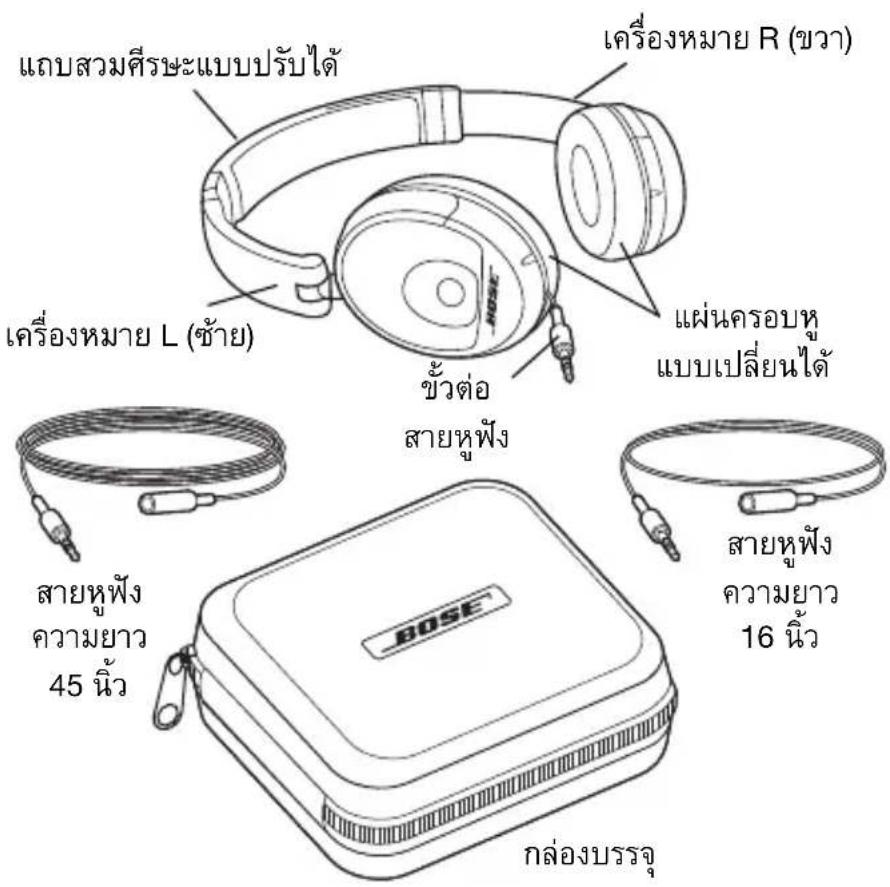
Thank you for purchasing the Bose® TriPort OE headphones. The TriPort OE headphones combine a comfortable fit with the high-quality audio performance you would expect from Bose. For traveling, they conveniently collapse to fit into a small carrying case.
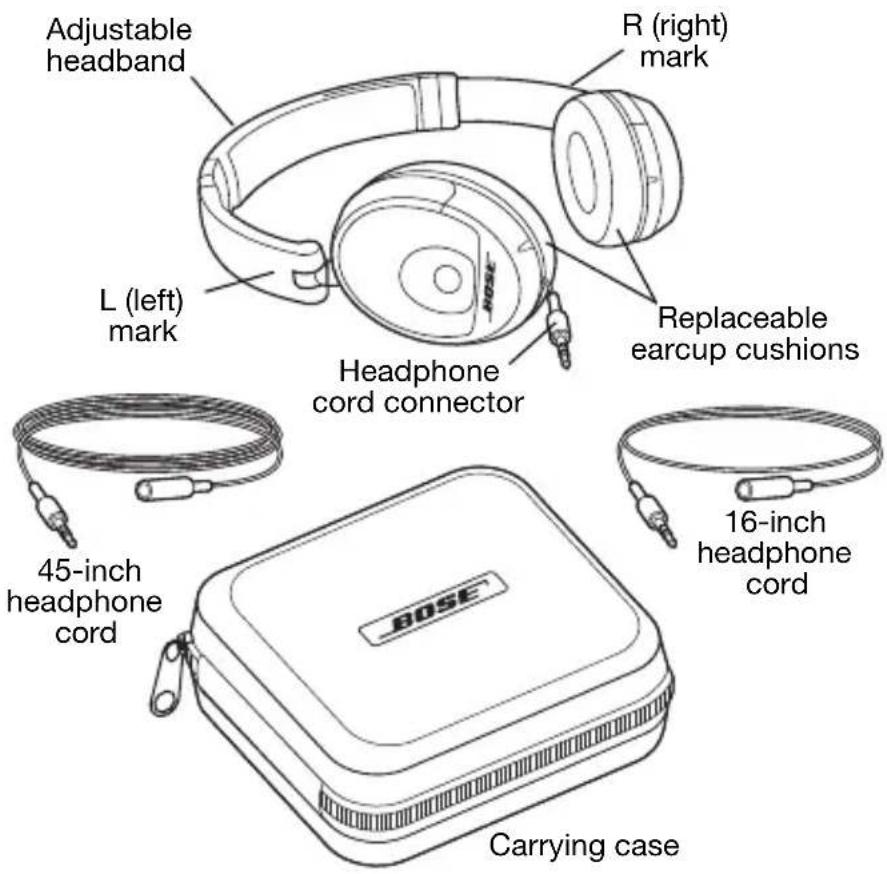
Your TriPort OE headphones include:
- Carrying case
- 45-inch general-purpose headache cord
16-inch headphone cord, for listening to an MP3 player located in your shirt pocket
For extra length, you can connect the two headphone cords together.
USING YOUR HEADPHONES
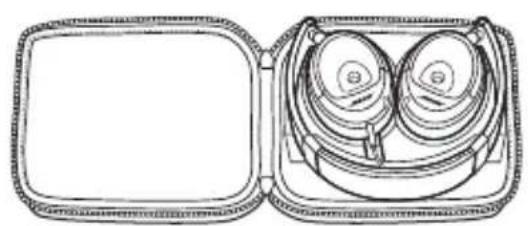
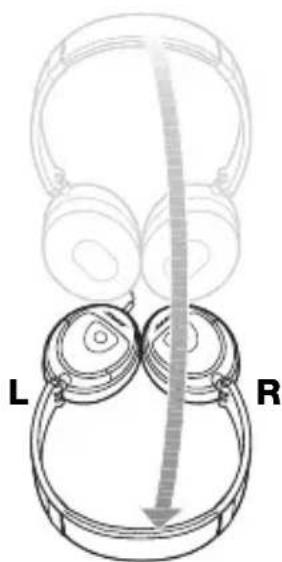
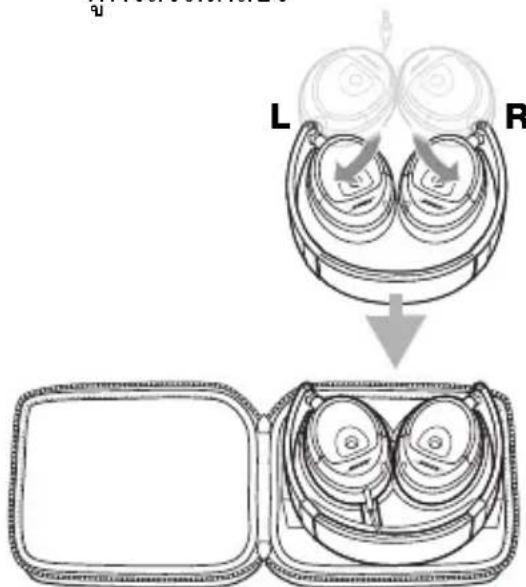
Putting the headphones in the case
Rotate the earmups until the cushions face you.
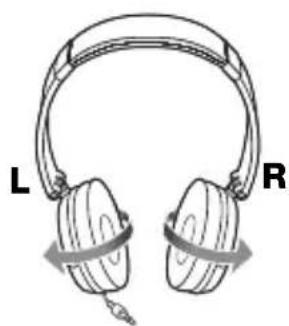
② Lay the headphones down in front of you.
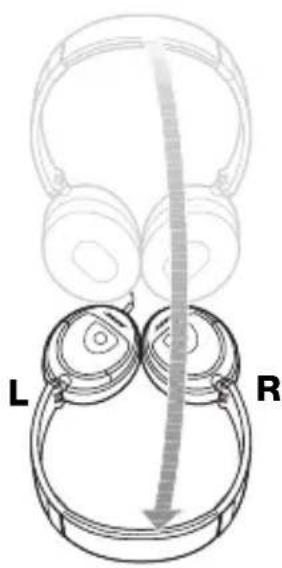
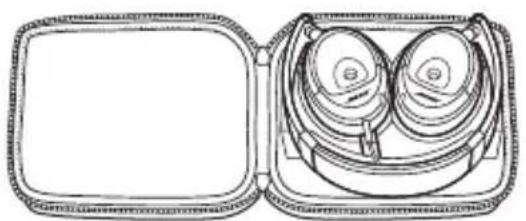
3 Pivot the earcups into the headband and place the headphones in the case.
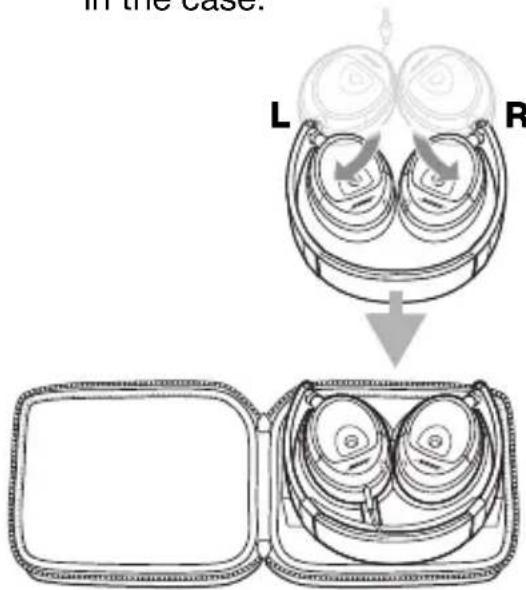
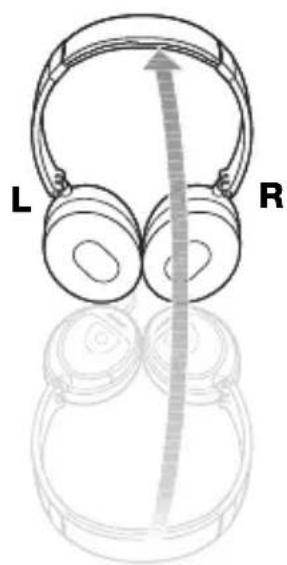
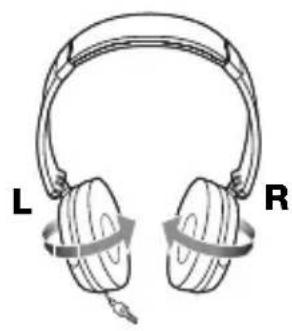
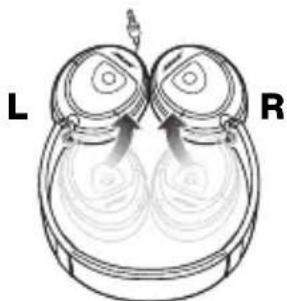
Taking the headphones out of the case
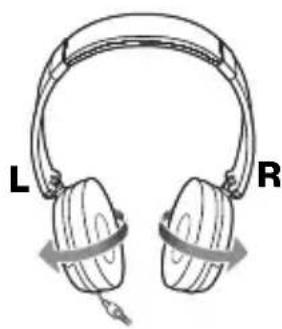
1 Lift the headphones out of the case and pivot the earcups out of the headband.
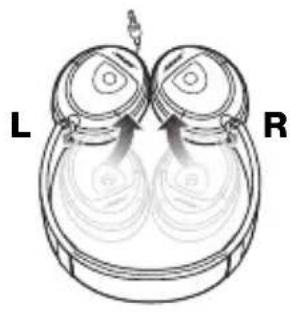
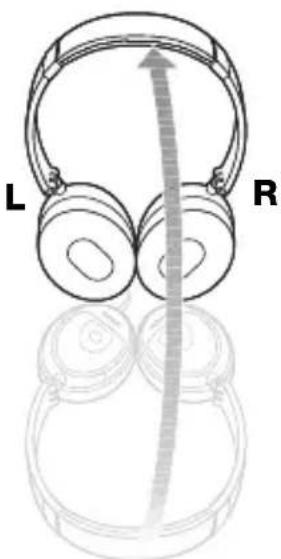
Hold the headphones with the headband up.
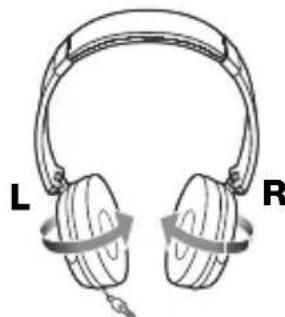
Rotate the earcups until the cushions face each other.
USING YOUR HEADPHONES
Wearing the headphones
For best performance, put on the headphones using the markings that identify the left (L) and right (R) earcups. Adjust the headband so it rests gently on top of your head and the earcup cushions rest comfortably and flush with your ears.
Using the bass boost feature of audio devices
Many portable audio devices include a bass boost feature, which electronically alters the audio signal sent to the headphone jack. The TriPort OE headphones deliver exceptional bass without the need for any artificial enhancement. Be sure to turn off any bass boost feature on the audio device when using the TriPort OE headphones.
Cleaning the headphones
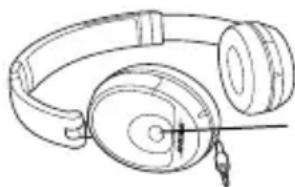
Should cleaning be necessary, simply wipe the outside surfaces with a damp cloth. Be sure the earcup ports are kept clear and that no moisture is allowed to get inside the earcup.
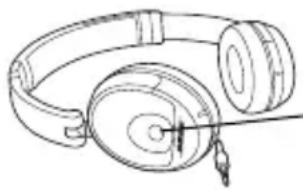
Earcup port
Replacement parts and accessories
You can purchase accessories from your Bose® dealer, on the Internet (www.bose.com), or by phone. See the inside back cover for contact information.
- Carrying case
- Headphone extension cord(s)
- Replacement Ear Cushion Kit
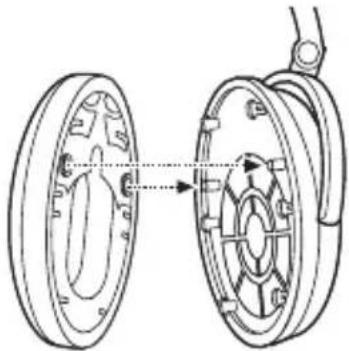
Reattaching earcup cushions
If an earcup cushion becomes detached from the earcup:
- Align the two holes on the back of the cushion with the two posts on the earcup.
- Push the cushion onto the earcup.
- Press in around the outside edge of the cushion to snap it in place.
Make sure the cushion is flush all the way around and that there are no gaps between the cushion and the earcup.
Troubleshooting
If you experience any trouble using your headphones, try the following troubleshooting instructions. If you still need help, call for assistance. See the contact information on the inside back cover.
| Problem What to | do |
| No audio Make sure that the headphone plug is securely connected to the headphone jack (not the line out jack) of the audio device. | |
| Intermittent audio Make sure each cord connection is securely attached. | |
| Excessive bass Turn off any bass boost features on the audio source when using the TriPort® OE headphones. | |
| Distorted bass | Make sure that the earmcup ports are not blocked in any way. If they are dirty, gently wipe away any debris. |
SIKKERHEDSINFORMATION
Wuoyuunnunwuyu
Wuyu Bose TriPort OE W
TriPort OE,wnwnwnnnn
Wuyuynanwnwnnnn nn
Wuyuynanwnwnnnn nn
Wuyuynanwnwnnnn nn
Wuyuynanwnwnnnn nn
Wuyuynanwnwnnnn nn
W TriPortOE 1
·
45
Wnwn 16 nnnn WJwauanuMP3 nunnuu u
n
n
1 1
②
3
nwnnnnaaannnnae
1
2 WwWuWuWuWuWuWuWuWuWuWuWuWuWuWuWuWuWuWuWuWuWuWuWuWuWuWuWuWuWuWuWuWuWuWuWuWuWuWuWuWuWuWuWuWuWuWuWuWuWuWuWw
3 1
n
W
(L)(R)
2
T 1
W
ywnnnaaannnnnnaanennnnnnnnnnnnnnnnnnnnnnnnnnnnnnnnnnnnnnnnnnnnnnnnnnnnnnnnnnnnnnnnnnnnnnnnnnnnnnnnnnnnnnnnnnnnnnnnnnnnnnnnnnnnnnnnnnnnnnnnnnnnnnnnnnnnnnnnnn
2
Bose, (www.bose.com)
W
- W
- 1
| jiangnan | jiangnan |
| jiangnan | jiangnan |
| jiangnan | jiangnan |
| jiangnan | jiangnan |
| jiangnan | jiangnan |
| jiangnan | jiangnan |
| jiangnan | jiangnan |
| jiangnan | jiangnan |
| jiangnan | jiangnan |
| jiangnan | jiangnan |
| jiangnan | jiangnan |
| jiangnan | jiangnan |
| jiangnan | jiangnan |
| jiangnan jiangnan | jiangnan |
#
本音用者如内,
©2006 Bose Corporation. <|im_start|>assistant ©2006 Bose Corporation. <|im_start|>assistant Bose Corporation. <|im_start|>assistant ©2006 Bose Corporation. <|im_start|>assistant ©2006 Bose Corporation. <|im_start|>assistant ©2006 Bose Corporation. <|im_start|>assistant ©2006 Bose Corporation. <|im_start|>assistant ©2006 Bose Corporation. <|im_start|>assistant ©2006 Bose Corporation. <|im_start|>assistant ©2006 Bose Corporation. <|im_start|>assistant ©2006 Bose Corporation. <|im_start|>assistant ©2006 Bose Corporation.
対応連続사용
全
Bose®TriPortOE海德thonを用ご日産部産産産産産産産産産産産産産産産産産産産産産産産産産産産産産産産産産産産産産産産産産産産産産産産産産産産産産産産産産産産産産産産産産産産産産産産産産産産産産産産産産産産産産産産産産産産産産産産産産産産産产産産産産産産産産産産産産産産産産産産産産産産産産産産産産産産産産産産産産産産産産産産産産産産産产
TriPort OE ト連は子はとせ我孕
Theorem 2.1.1. Suppose that is a finite field, and let (x) be the set of all prime factors of x . Then there exists an element x_0 (x) such that x_0 (x) .
BOSE Better sound through research
©2006 Bose Corporation, The Mountain, Framingham, MA 01701-9168 USA AM294496 Rev.01