ManualGo.com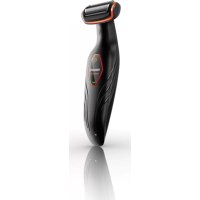
Bodygroom Series 3000 BG2024 - Beard trimmer PHILIPS - Free user manual and instructions
Find the device manual for free Bodygroom Series 3000 BG2024 PHILIPS in PDF.



Download the instructions for your Beard trimmer in PDF format for free! Find your manual Bodygroom Series 3000 BG2024 - PHILIPS and take your electronic device back in hand. On this page are published all the documents necessary for the use of your device. Bodygroom Series 3000 BG2024 by PHILIPS.
USER MANUAL Bodygroom Series 3000 BG2024 PHILIPS
4English 6 Dansk 17 Deutsch 28 Español 39 Français 50 Italiano 61 Nederlands 72 Norsk 83 Português 93 Suomi 104 Svenska 114 Türkçe 124 Ελληνικα 134English Introduction Congratulations on your purchase and welcome to Philips! To fully benefit from the support that Philips offers, register your product at www.philips.com/welcome. General description (Fig. 1) 1 Trimming comb 1 (3mm/0.11 inch) 2 Trimming comb 2 (5mm/0.19 inch) (BG2038/BG2036/BG2028/BG2026 only) 3 Trimming comb 3 (7mm/0.27 inch) (BG2038/BG2036/BG2028/BG2026 only) 4 Hair length indication (1, 2 or 3) 5 Shaving unit 6 On/off button 7 Battery status indicator 8 Supply unit (adapter, type HQ8500, BG2038/ BG2036 only) 9 Cleaning brush (BG2038/BG2036/BG2028/BG2026 only) 10 Back shaving attachment (BG2038/BG2036 only) 11 Battery status indicator 12 Supply unit (adapter, type HQ850, BG2028/BG2026/BG2025/BG2024 only) 13 Charging stand Important safety information Read this important information carefully before you use the appliance and its accessories and save it for future reference. The accessories supplied may vary for different products. Danger
Keep the supply unit dry. Warning
The supply unit contains a transformer. Do not cut off the supply unit to replace it with another plug, as this causes a hazardous situation.
Only charge the appliance with the supply unit provided.
English- This appliance can be used by children aged from 8 years and above and persons with reduced physical, sensory or mental capabilities or lack of experience and knowledge if they have been given supervision or instruction concerning use of the appliance in a safe way and understand the hazards involved. Children shall not play with the appliance. Cleaning and user maintenance shall not be made by children without supervision.
Always unplug the appliance before you clean it under the tap.
Always check the appliance before you use it. Do not use the appliance if it is damaged, as this may cause injury. Always replace a damaged part with one of the original type.
Do not open the appliance to replace the rechargeable battery. Caution
Never immerse the charging stand in water and do not rinse it under the tap.
Never use water hotter than 80°C to rinse the appliance.
Only use this appliance for its intended purpose as shown in the user manual.
For hygienic reasons, the appliance should only be used by one person.
Never use compressed air, scouring pads, abrasive cleaning agents or aggressive liquids such as petrol or acetone to clean the appliance.
English- Do not use the supply unit in or near wall sockets that contain or have contained an electric air freshener to prevent irreparable damage to the supply unit. Electromagnetic fields (EMF)
This Philips appliance complies with all applicable standards and regulations regarding exposure to electromagnetic fields. General
This appliance is waterproof. It is suitable for use in the bath or shower and for cleaning under the tap. For safety reasons, the appliance can therefore only be used without cord.
The appliance is suitable for mains voltages ranging from 100 to 240 volts.
The supply unit transforms 100-240 volts to a safe low voltage of less than 24 volts. Charging Charging takes 1 hour (BG2038/BG2036) or 8 hours (BG2028/BG2026/BG2025/BG2024) depending on the model. When the appliance is fully charged, it has an operating time of up to 50 minutes. When the battery status indicator flashes red, the battery is running low (approx. 10 minutes of operating time left) and you need to recharge the appliance. 1 Insert the small plug into the charging stand. 2 Put the appliance in the charging stand.
EnglishThe battery status indicator flashes green to indicate that the appliance is charging. Note: The battery status indicator of BG2028, BG2026, BG2025 and BG2024 looks different, but works in the same way. When the appliance is fully charged, the battery status indicator lights up green continuously. Note: If the fully charged appliance is still in the plugged-in charging stand after 30 minutes, the battery status indicator goes out to save energy. Using the appliance You can use the appliance wet or dry to shave or trim hair on all parts of the body below the neckline. Note: Do not use this appliance to shave or trim facial hair or scalp hair. Trimming and shaving tips
Take your time when you first start to shave sensitive areas. You have to acquire practice with the appliance. Your skin also needs some time to adjust to the procedure.
If the hairs are longer than 10 mm, you can trim them first with trimming comb 1 to a length of 3 mm to make shaving easier.
You get the best trimming results when the skin and hair are dry.
You can use the appliance to shave in the shower or bath. To ensure easier gliding, apply some shaving foam or shower gel to your skin. Trimming combs BG2025 and BG2024 come with trimming comb 1. BG2038, BG2036, BG2028 and BG2026 come with trimming combs 1, 2 and
The back of each comb has been numbered 1, 2 and 3 (see the table below for the corresponding hair lengths after trimming). A trimming comb allows you to cut hair to a specific length (see the table below). If your appliance comes with 3 combs, start trimming with trimming comb 3 to acquire practice with this appliance. Comb size indication Hair length after trimming
English1 3mm/0.11 inch 2 5mm/0.19 inch 3 7mm/0.27 inch Trimming 1 Snap the appropriate trimming comb onto the appliance. Make sure the teeth of the comb point in the direction in which you are going to move the appliance. When you move the appliance towards you, the teeth have to point towards you. When you move the appliance away from you, the teeth have to point away from you. 2 Press the on/off button to switch on the appliance. 3 Move the appliance against the direction of hair growth. Note: Make sure that the flat part of the trimming comb is always fully in contact with the skin.
EnglishShaving 1 If a trimming comb is still attached, remove it. Note: You can either push the trimming comb off the appliance or pull it off, depending on how the comb is placed on the appliance. 2 Press the on/off button once to switch on the appliance. 3 Place the shaving unit on the skin. 4 Move the appliance against the direction of hair growth with one hand, while you stretch the skin with the other hand. Note: Make sure that the shaving unit is always fully in contact with the skin. Shaving with the back shaving attachment (BG2038, BG2036 only) Note: The back shaving attachment is suitable for both wet and dry use.
1 Press and hold the release button (1) and open the back shaving attachment (2). 2 Place the bottom of the appliance in the lower part of the holder of the back shaving attachment. Then press the top against the top part of the holder until it locks into position with a click. 3 Shave your back by moving the back shaving attachment with the appliance up and down by its handle.
EnglishNote: For your convenience, the back shaving attachment can be folded to different angles. 4 To remove the appliance from the back shaving attachment, pull the top of the appliance towards you until it unlocks from the holder.
5 To close the back shaving attachment, press and hold the release button (1) and push the handle against the holder (2). Cleaning Clean the appliance after every use. Caution: Never use compressed air, scouring pads, abrasive cleaning agents or aggressive liquids such as petrol or acetone to clean the appliance. 1 Switch off the appliance.
English2 If a trimming comb is still attached, remove it. Note: You can either push the trimming comb off the appliance or pull it off, depending on how the comb is placed on the appliance. 3 Pull the shaving unit out of the appliance. 4 Use the cleaning brush supplied to clean the inside of the shaving head or rinse the inside under the tap. 5 Rinse the shaving unit under the tap. 6 Shake off excess water and place the shaving unit back into the appliance. 7 Clean the back shaving attachment (BG2038/BG2036 only) with a moist cloth. Rinse it under the tap if you used it to shave your back with shower gel or shaving foam. 8 Clean the charging stand with a moist cloth.
EnglishOrdering accessories To buy accessories or spare parts, visit www.shop.philips.com/service or go to your Philips dealer. You can also contact the Philips Consumer Care Centre in your country (see the worldwide guarantee leaflet for contact details). Shaving unit If you use the appliance very frequently, replace the shaving unit (type number BG2000) every year. Replace a damaged shaving unit immediately. Recycling
This symbol means that this product shall not be disposed of with normal household waste (2012/19/EU).
This symbol means that this product contains a built-in rechargeable battery which shall not be disposed of with normal household waste (2006/66/EC). We strongly advise you to take your product to an official collection point or a Philips service centre to have a professional remove the rechargeable battery.
Follow your country’s rules for the separate collection of electrical and electronic products and rechargeable batteries. Correct disposal helps prevent negative consequences for the environment and human health. Removing the rechargeable battery 1 Take the appliance out of the charging stand and let the motor run until the battery is completely empty. 2 Insert a flathead screwdriver into the slot at the bottom of the handle and turn it to unlock the rear panel of the housing. 3 Remove the rear panel of the housing and then remove the side panels.
English4 Undo the screws that connect the inner body of the appliance to the front panel of the housing and separate the inner body from the front panel. 5 Turn over the inner body. Then detach the cover of the inner body with the control panel from the inner body. 6 Lift the printed-circuit board out of the inner body, turn it over and cut the wires that connect the battery to the power unit. Guarantee and support If you need information or support, please visit www.philips.com/support or read the separate worldwide guarantee leaflet. Troubleshooting This chapter summarizes the most common problems you could encounter with the appliance. If you are unable to solve the problem with the information below, visit www.philips.com/support for a list of frequently asked questions or contact the Consumer Care Center in your country.
EnglishProblem Possible cause Solution The appliance does not work. The battery is empty and/or the appliance does not charge. Recharge the battery (see chapter ‘Charging’) and check if you have followed all instructions in chapters ‘Important’ and ‘Charging’. The appliance makes more noise and/or vibrates more strongly than usual. One or more parts are broken, perhaps because you dropped the appliance. Take the appliance to your dealer or to an authorized Philips service center for examination or repair. If this appliance is used professionally, it will reach the end of its life earlier Do not use the appliance professionally. The shaving unit is dirty. Clean the shaving unit (see chapter ‘Cleaning’). The shaving unit is worn. Replace the shaving unit. The operating time on a full charge decreases. The shaving unit is dirty. Clean the shaving unit (see chapter ‘Cleaning’). Reduced trimming and/or shaving performance You use the appliance in the wrong way. Follow the instructions in chapter ‘Using the appliance’. The shaving unit is dirty. Clean the shaving unit (see chapter ‘Cleaning’). The battery is running low. Recharge the battery (see chapter ‘Charging’). You have not attached the trimming comb properly. Remove the trimming comb and reattach it. If you are trimming very curly hair, the trimming comb may not be able to straighten the hair properly. Try straightening the hair with your hands during trimming.