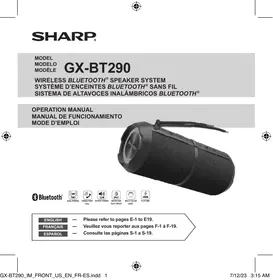
GX-BT290 - Bluetooth speaker SHARP - Free user manual and instructions
Find the device manual for free GX-BT290 SHARP in PDF.

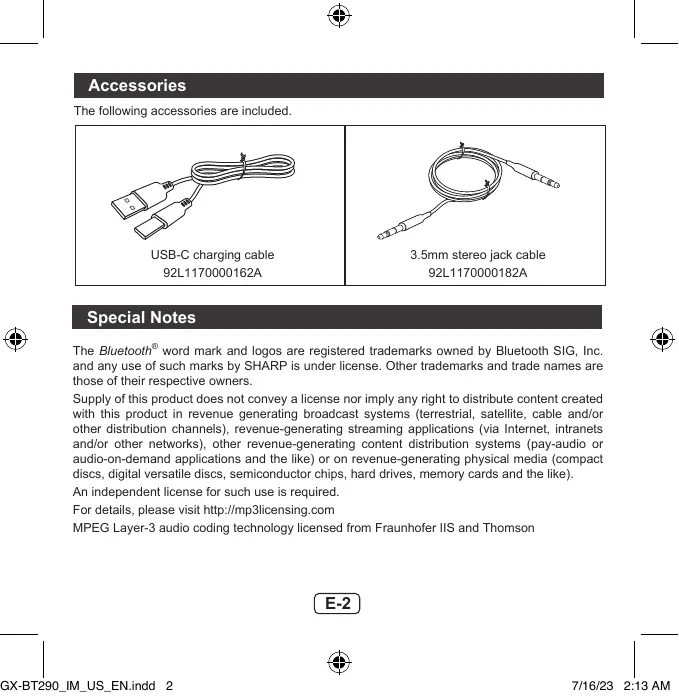


| Product type | Portable Bluetooth speaker |
| Brand | Sharp |
| Model | GX-BT290 |
| Dimensions (WxHxD) | 73 x 195 x 73 mm |
| Weight | 450 g |
| Power supply | DC 5V, 1A (via USB-C port) |
| Battery | Integrated Li-ion 3000 mAh |
| Battery life | Up to 10 hours of playback |
| Charging time | Approximately 3.5 hours |
| Bluetooth version | 5.0 |
| Bluetooth range | Up to 10 meters |
| Output power | 16 W RMS total |
| Frequency response | 80 Hz – 20 kHz |
| Signal-to-noise ratio | >65 dB |
| Protection | IP67 (water and dust resistant) |
| Main features | Bluetooth pairing, hands-free mode, TWS mode (dual speakers), auxiliary input, lighting effects (8 modes), built-in microphone |
| Maintenance and cleaning | Wipe with a soft, dry cloth. Keep the rubber cover closed to maintain waterproofness. |
| Safety | Do not expose to temperatures >40°C or <5°C. Do not open the casing. Use only the recommended adapter (5V, 0.6A min). |
| Spare parts and repairability | Non-user-replaceable battery. Have repairs done at a Sharp authorized center. |
| Included accessories | USB-C cable, 3.5 mm stereo jack cable |
| LED indicators | Red (charging), Blue (Bluetooth connection) |
| Microphone | Yes, for hands-free calls |
Frequently Asked Questions - GX-BT290 SHARP
User questions about GX-BT290 SHARP
0 question about this device. Answer the ones you know or ask your own.
Ask a new question about this device
Download the instructions for your Bluetooth speaker in PDF format for free! Find your manual GX-BT290 - SHARP and take your electronic device back in hand. On this page are published all the documents necessary for the use of your device. GX-BT290 by SHARP.
USER MANUAL GX-BT290 SHARP
WATER AND DUST PROOF

MULTI COLOR
LIGHT

PLAYTIME
ENGLISH
Please refer to pages E-1 to E19.
FRANÇAIS
Veuillez yous reporter aux pages F-1 a F-19.
ESPANOL
Thank you for purchasing this SHARP product. To obtain the best performance from this product, please read this manual carefully. It will guide you in operating your SHARP product.
Contents
Page
Page
Contents. 1
Accessories 2
Special notes 2
Getting started. 5
Important safety instructions. 7
Precautions. 8
Overview
Getting started. 10
Product features and functions. 11
Controls and indicators. 11
Bluetooth operation
Bluetooth Paring. 12
Reconnect/Timeout. 12
General control
Power on/off 13
Switch Bluetooth and Aux mode 13
Volume control. 13
Play and pause. 13
Forward/Backward track. 13
Light effect. 13
TWS Dual speaker mode. 14
Hands-free function. 14
Music mode and phone call mode
Various music functions. 15
Various phone call. 15
Charging operation
Charging the unit. 16
Troubleshooting chart. 17
Specification
General 18
Bluetooth. 19
E-1
Accessories
The following accessories are included.
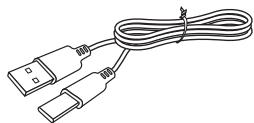
USB-C charging cable
92L1170000162A
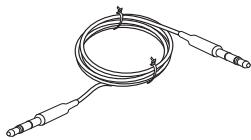
3.5mm stereo jack cable
92L1170000182A
Special Notes
The Bluetooth® word mark and logos are registered trademarks owned by Bluetooth SIG, Inc. and any use of such marks by SHARP is under license. Other trademarks and trade names are those of their respective owners.
Supply of this product does not convey a license nor imply any right to distribute content created with this product in revenue generating broadcast systems (terrestrial, satellite, cable and/or other distribution channels), revenue-generating streaming applications (via Internet, intranets and/or other networks), other revenue-generating content distribution systems (pay-audio or audio-on-demand applications and the like) or on revenue-generating physical media (compact discs, digital versatile discs, semiconductor chips, hard drives, memory cards and the like).
An independent license for such use is required.
For details, please visit http://mp3licensing.com
MPEG Layer-3 audio coding technology licensed from Fraunhofer IIS and Thomson
E-2
Special Notes (continued)
FCC Notice
Supplier's Declaration Of Conformity
This device complies with Part 15 of the FCC Rules. Operation is subject to the
following two conditions:
(1) This device may not cause harmful interference, and (2) this device must
accept any interference received, including interference that may cause undesired operation.
Responsible Party:
MIZARI ENTERPRISES, INC.
5455 WILSHIRE BOCULEVARD, SUITE 1410, LOS ANGELES, CA 90036
TEL:1-877-506-4900
NOTE
This equipment has been tested and found to comply with the limits for a Class B digital device, pursuant to Part 15 of the FCC Rules. These limits are designed to provide reasonable protection against harmful interference in a residential installation. This equipment generates, uses, and can radiate radio frequency energy and, if not installed and used in accordance with the instructions, may cause harmful interference to radio communications. However, there is no guarantee that interference will not occur in a particular installation. If this equipment does cause harmful interference to radio or television reception, which can be determined by turning the equipment off and on, the user is encouraged to try to correct the interference by one or more of the following measures:
- Reorient or relocate the receiving antenna.
- Increase the separation between the equipment and receiver.
- Connect the equipment into an outlet on a circuit different from that to which the receiver is connected.
- Consult the dealer or an experienced radio/TV technician for help.
Warning: Changes or modifications to this unit not expressly approved by the party responsible for compliance could void the user's authority to operate the equipment.
E-3
Special Notes (continued)
FCC Radiation Exposure Statement
This device complies with the limits for a Class B digital device, pursuant to Part
15 of the FCC Rules. It must not be co-located or operating in conjunction with any other antenna or transmitter.
Operation is subject to the following two conditions:
- This device may not cause harmful interference, and
- This device must accept any interference received, including interference that may cause undesired operation.
IC Radiation Exposure Statement (For Users in Canada)
This Class B digital apparatus complies with the Canadian ICES-003.
This device contains license-exempt transmitter(s)/receiver(s) that comply with Innovation, Science and Economic Development Canada's license-exempt RSS(s).
Operation is subject to the following two conditions:
- This device may not cause interference, and
- This device must accept any interference, including interference that may cause undesired operation.
FOR YOUR RECORDS
For your assistance in reporting this unit in case of loss or theft, please record below the model number and serial number which are located on the unit.
Please retain this information.
Model number
Serial number
Date of purchase
Place of purchase
Special Notes (continued)
Getting started
1. Radio frequency exposure
SHARP GX-BT290 WIRELESS BLUETOOTH® SPEAKER SYSTEM is a radio transmitter and receiver. When in operation it communicates with a Bluetooth® equipped mobile device by receiving and transmitting radio frequency (RF) electromagnetic fields (microwaves) in the frequency range 2.4 to 2.48 GHz. This product is designed to operate in compliance with the RF exposure guidelines and limits set by national authorities and international health agencies when using compatible mobile phone.
2. Battery information
- A rechargeable battery has a long service life if treated properly.
- A new battery or one that has not been used for a long period of time could have reduced capacity the first few times it is used. Do not expose the battery to extreme temperatures, never above 104^ (40^) or below 23^ (-5^) .
- For maximum battery capacity, use the battery at room temperature.
- If the battery is used in low temperatures, the battery capacity will be reduced.
- The battery can only be charged in temperatures between 41^ ( 5^ ) and 104^ ( 40^ ).
- RISK OF EXPLOSION IF BATTERY IS REPLACED BY AN INCORRECT TYPE. DISPOSE OF USED BATTERIES ACCORDING TO THE INSTRUCTIONS.
E-5
Special Notes (continued)
3. Removal of waste batteries and accumulators
(Product with embedded battery ONLY)
In case this product contains a battery incorporated within the product which cannot be readily removed by end users, SHARP recommends that only qualified professionals remove the battery, either for replacement or for recycling at the end of this product's working life.
To prevent damage to the product, and for their own safety, users should not attempt to remove the battery and should contact authorised independent service providers for advice.
Caution:
Internal lithium battery in the unit should not be replaced by end users due to danger of explosion if battery is incorrectly replaced and must be replaced with the exact type battery by authorised service providers.
Recycling lithium-ion batteries
Lithium-ion batteries are recyclable. You can help preserve our environment by returning your used rechargeable batteries to the collection and recycling location nearest you.
For more information regarding recycling of rechargeable batteries, call toll free
1-800-822-8837, or visit http://www.call2recycle.org/
CAUTION: Do not handle damaged or leaking Lithium-ion batteries.
The RBRC™ Battery Recycling Seal on the Lithium-ion (Li-ion) batteries/battery packs indicates SHARP is voluntarily participating in an industry program to collect and recycle these batteries/ battery packs at the end of their useful life, when taken out of service in the United States or
Canada. The RBRC™ program provides a convenient alternative to placing Li-ion batteries into the trash or municipal waste stream, which is illegal in some areas.
Please call1-800-822-8837 for information on Li-ion battery recycling in your area.
SHARP's involvement in this program is part our commitment to preserving our environment and conserving our natural resources.
(RBRC™ is a trademark of the Rechargeable Battery Recycling Corporation.)

E-6
Important Safety Instructions
Electricity is used to perform many useful functions, but it can also cause personal injuries and property damage if improperly handled. This product has been engineered and manufactured with the highest priority on safety. However, improper use can result in electric shock and/or fire. In order to prevent potential danger, please observe the following instructions when installing, operating and cleaning the product. To ensure your safety and prolong the service life of this product, please read the following precautions carefully before use.
1) Read these instructions.
2) Keep these instructions.
3) Heed all warnings.
4) Follow all instructions.
5) Clean only with water. Do not use chemicals.
6) Only use attachments/accessories specified by the manufacturer.
7) Refer all servicing to qualified service personnel. Servicing is required when the apparatus has been damaged in any way, such as power-supply cord or plug is damaged, does not operate normally, or has been dropped.
8) To prevent fire or shock hazard, do not dismantle the product. No objects shall be placed on the apparatus.
E-7
Precautions
The sound level at a given volume setting depends on speaker efficiency, location and various other factors. It is advisable to avoid exposure to high volume levels, which occurs while turning the unit on with the volume control setting up high, or while continually listening at high volumes. Adjust the volume to an appropriate level when using the unit.
- The IP67 Water and Dust proof protection is invalid when the rubber cover is open. Always keep the rubber cover closed when the hidden terminals are not in use.
- Do not cover the product with items, such as newspapers, tablecloths, curtains, etc. while charging.
- Keep the unit away from strong magnetic fields, excessive dust, humidity and electronic/electrical equipment (home computers, facsimiles, etc.) which generate electrical noise.
- Do not expose the unit to temperatures higher than 104^ ( 40^ ) or to extremely low temperatures.
- Do not remove the outer cover. Refer internal service to your local SHARP service facility.
- No naked flame sources, such as lighted candles, should be placed on the apparatus.
- Attention should be drawn to the environmental aspects of battery disposal.
- This unit should only be used within the range of 41^ - 104^ ( 5^ - 40^ ).
- SHARP is not responsible for damage due to improper use. Refer all servicing to a SHARP authorized service center.
- This product contains magnetic material. Consult your physician or whether this might affect your implantable medical device.
- Do not make unauthorized alterations to this product.
E-8
Precautions (continued)
- Use this product only with an agency approved power supply which meets local regulatory requirements (e.g., UL, CSA, VDE, CCC, etc.).
The product rating is located at the top of the product.

Note: The content of the rating is subject of change.

Caution:
- Risk of explosion if the battery is replaced with an incorrect type
- High or low extreme temperatures that a battery can be subjected to during use, storage or transportation; and low air pressure at high altitude.
- Replacement of a battery with an incorrect type that can defeat a safeguard (for example, in the case of some lithium battery types);
- Disposal of a battery into fire or a hot oven, or mechanically crushing or cutting of a battery, that can result in an explosion;
- Leaving a battery in an extremely high temperature surrounding environment that can result in an explosion or the leakage of flammable liquid or gas;
- A battery subjected to extremely low air pressure that may result in an explosion or the leakage of flammable liquid or gas.
- Batteries (battery pack or batteries installed) shall not be exposed to excessive heat such as sunshine, fire or the like.
E-9
Overview
Thank you for purchasing SHARP GX-BT290 WIRELESS BLUETOOTH® SPEAKER SYSTEM. Please read this instruction and warnings carefully before use to ensure safe and satisfactory enjoyment of this product.
Bluetooth® Wireless Technology
With this technology, you can connect the unit to its compatible Bluetooth® devices without using cables. The maximum distance between both devices cannot exceed about 32 feet (10 meters). The Bluetooth® wireless connection may be interfered by obstacles (such as walls) or other electronic devices nearby.
In some areas, the use of Bluetooth® wireless technology may be subjected to some constraints. Please consult your local authority or service provider for details.
Getting started
Fully charge the unit before using.
For details, refer "Charging operation" on page 16.
Meanwhile, choose a smartphone or other Bluetooth device that is compatible with this product.
E-10
Controls and indicators
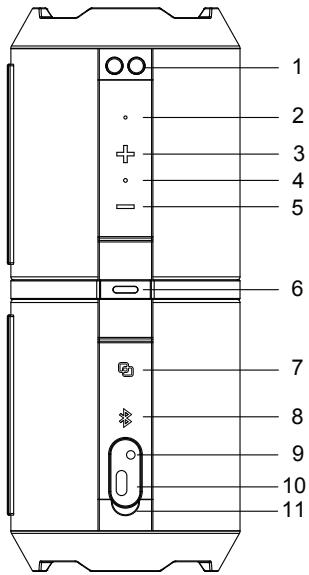
- Strap holes
- Microphone
- Next song / Volume up Button
- Charging indicator(Red), Function indicator(Blue)
- Previous song / Volume down Button
- Power / Light Button
- TWS button
- Bluetooth/Play/Pause/Hand-free Button
- Aux-In port
10.Type C charging port
11.Rubber cover
E-11
Bluetooth Operation
Bluetooth pairing
To pair your Bluetooth audio device to your Bluetooth Speaker for the first time, follow the steps below:
- Make sure your Bluetooth audio source is held within three meters of your speaker.
- Press and hold the button on your speaker to power it on. The LED light will blink blue to indicate that you have entered pairing status.
- Go to the Bluetooth Manager of your Bluetooth audio source. Please refer to the User's Manual of your Bluetooth audio source for more information.
- Search Bluetooth devices and select "GX-BT290 SHARP".
- Once paired, the blue LED light will be solid and you can use your speaker to listen to audio from your Bluetooth sound source.
- Press and hold button to disconnect the Bluetooth from the device.
Reconnect/Timeout
After the unit has paired and connected, it will reconnect automatically when the unit is powered on and device in range.
Bluetooth time out: 10 minutes.
Notes:
- The operation range between this unit and a Bluetooth device is approximately 10 meters (without any object between the Bluetooth device and the unit).
- Before you connect a Bluetooth device to this unit, ensure you know the device's capabilities.
- Compatibility with all Bluetooth devices is not guaranteed.
- Any obstacle between this unit and a Bluetooth device can reduce the operation range.
- If the signal strength is weak, your Bluetooth receiver may disconnect, but it will re-enter pairing mode automatically.
- Bluetooth playback from the source device is applicable at Bluetooth function only.
General control
Power on/off
To power on your speaker:
Press and hold the button.
To power off your speaker:
Press and hold the button.
Switch BT and Aux mode
Short press the button to switch BT and AUX modes.
Volume control
Volume up:
Press the button once.
Volume down:
Press the button once.
Play and pause
Play music:
Press the 串 button once.
Pause music:
Press the 串 button once.
Forward/backward track
Forward track:
Press and hold button.
Backward track:
Press and hold button.
Light effect (8 modes)
Double click the button to switch the light effect.
E-13
General control (continued)
TWS - Dual speaker mode
Two units of GX-BT290 can pair wirelessly and play music in stereo
- Power on both units and make sure none of unit has Bluetooth connection.
- Press the button on one of the unit, the two speakers will connect automatically. The blue LED blinks on one unit and stays on the other one.
- Search Bluetooth device and select "GX-BT290 SHARP".
- When the device and the units are connected, the blue LED of both units will stay on.
- Press and hold the buttons to disconnect the TWS connection.
Note:
Once connected for dual pairing, two speakers will re-connect TWS again automatically when the power is turned on.
In TWS mode, only the master speaker supports the phone call function.
Hands-free function
When the smartphone is connected to the speaker, follow the steps below to take hands-free calls on the speaker:
- Press the button to pick up the call;
- Press the button twice to reject the call;
- During a call, press button to hang up the call.
Aux-In mode
Plug in the supplied 3.5mm cable into the speaker. The other end is connected to your device. LED will stay illuminated.
- Press the button to increase the volume.
- Press the button to decrease the volume.
- Press to mute the speaker.
Music mode and Phone call mode
Various music functions
| Function | Button | Operation |
| Play | Bluetooth Button | Quick press |
| Pause | Bluetooth Button | Quick press |
| Next Track | Volume + Button | Long press |
| Previous Track | Volume - Button | Long press |
| Volume + | Volume + Button | Quick press |
| Volume - | Volume - Button | Quick press |
Various phone call
| Function | Button | Operation |
| Answer a Call | Bluetooth Button | Quick press |
| Reject or End a Call | Bluetooth Button | Press twice |
| Volume + | Volume + Button | Quick press |
| Volume - | Volume - Button | Quick press |
E-15
Charging operation
Charging the unit
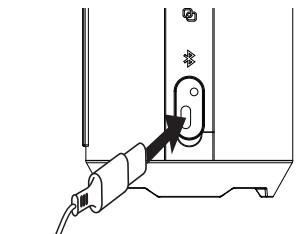
- Connect one end of the included TYPE-C Charging Cable to the Charging Port on your speaker. Then plug the other end of the USB Charging Cable into a suitable USB port on your computer, notebook or power bank to recharge your speaker's internal rechargeable battery.
- When charging, a red LED light will illuminate to indicate that the unit is charging. The red light will turn off when your unit is fully charged (under both turn-on/off speaker status)
Note:
LED charging indicator status: Red = Charging progress Off = Charging completed

Before using any adapter with the charging cable, check whether the specifications of the adapter meets the requirements. The recommended output voltage of the adapter is DC5V+/-0.25V, and the recommended output current is 1A. An over-high charging voltage may damage the charging cable and unit.
Warning:
Use the recommended adapter whenever possible. Use of other types of adapters may violate the warranty terms of the equipment and is hazardous. Use the provided charging cable to connect with a certified adapter or computer to charge the unit.
E-16
Troubleshooting chart
If something is wrong with this product, check the following before calling your authorised dealer or service center.
| Problem Description | Cause | Solution |
| The unit cannot be powered on. | The unit is out of power. | Charge the unit. |
| The POWER button is not pressed and held for sufficient time. | Press and hold the POWER button for more than 3 seconds. | |
| The unit cannot be charged. | The USB-C cable is not securely connected. | Unplug and plug the USB-C cable into the Type C charging port securely. |
| Bluetooth pairing fails. | Bluetooth device is located out of range. | Place this unit and bluetooth device closely together. |
| The unit cannot make bluetooth connection. | Bluetooth is not activated. | Ensure that bluetooth function is activated in the bluetooth device. |
Specifications
As part of our policy of continuous improvement, SHARP reserves the right to make design and specification changes for product improvement without prior notice. The performance specification figures indicated are nominal values of production units. There may be some deviations from these values in individual unit.
General
| Rated input voltage | DC 5V, 1A |
| Output power | RMS:Total 16W |
| Battery capacity | Li-ion 3000mAh |
| Frequency response | 80 Hz - 20 kHz |
| Music playback time | (*1) up to 10 hours |
| Battery charging time | (*1) Approx. 3.5 hours |
| Weight | 1 lb (450g) |
| Signal-to-noise ratio | >65dB |
| Dimensions | Width: 2-7/8" (73 mm) Height: 7 - 11/16" (195 mm) Depth: 2-7/8" (73 mm) |
(^*1) The time may vary depending on the ambient temperature and the conditions used.
E-18
Specifications (continued)
Bluetooth
| Version | V5.0 |
| Frequency bands | 2.402 GHz - 2.480 GHz |
| Operating range | 32 feet (10 meters) |

E-19
MEMO
FCC
This equipment has been tested and found to comply with the limits for a Class B digital device, pursuant to Part 15 of the FCC Rules. These limits are designed to provide reasonable protection against harmful interference in a residential installation. This equipment generates uses and can radiate radio frequency energy and, if not installed and used in accordance with the instructions, may cause harmful interference to radio communications. However, there is no guarantee that interference will not occur in a particular installation. If this equipment does cause harmful interference to radio or television reception, which can be determined by turning the equipment off and on, the user is encouraged to try to correct the interference by one or more of the following measures:
-- Reorient or relocate the receiving antenna.
-- Increase the separation between the equipment and receiver.
-- Connect the equipment into an outlet on a circuit different from that to which the receiver is connected.
-- Consult the dealer or an experienced radio/TV technician for help.
This device complies with part 15 of the FCC Rules. Operation is subject to the following two conditions: (1) This device may not cause harmful interference, and (2) this device must accept any interference received, including interference that may cause undesired operation.
Changes or modifications not expressly approved by the party responsible for compliance could void the user's authority to operate the equipment
FRANÇAIS
Introduction
Special Notes (continued)
Avis de la FCC
Partie responsible:MIZARI ENTERPRISES, INC.
5455 WILSHIRE BOULEVARD, SUITE 1410, LOS ANGELES, CA 90036
TEL:1-877-506-4900

REMARQUE
Important Safety Instructions
Electricity is used to perform many useful functions, but it can also cause personal injuries and property damage if improperly handled. This product has been engineered and manufactured with the highest priority on safety. However, improper use can result in electric shock and/or fire. In order to prevent potential danger, please observe the following instructions when installing, operating and cleaning the product. To ensure your safety and prolong the service life of this product, please read the following precautions carefully before use.
1) Read these instructions.
2) Keep these instructions.
3) Heed all warnings.
4) Follow all instructions.
5) Clean only with water. Do not use chemicals.
6) Only use attachments/accessories specified by the manufacturer.
7) Refer all servicing to qualified service personnel. Servicing is required when the apparatus has been damaged in any way, such as power-supply cord or plug is damaged, does not operate normally, or has been dropped.
8) To prevent fire or shock hazard, do not dismantle the product. No objects shall be placed on the apparatus.
F-7
Precautions
The sound level at a given volume setting depends on speaker efficiency, location and various other factors. It is advisable to avoid exposure to high volume levels, which occurs while turning the unit on with the volume control setting up high, or while continually listening at high volumes. Adjust the volume to an appropriate level when using the unit.
Specifications (suite)
Bluetooth
The following accessories are included.
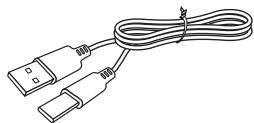
Cable de cargo USB-C
92L1170000162A
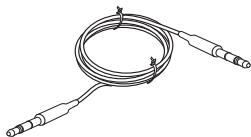
Cable jack estereo de 3,5 mm
92L1170000182A
Notas especiales
Special Notes (continued)
Empezando
- Contents
- Page
- E-1
- Accessories
- Special Notes
- Special Notes (continued)
- FCC Notice
- Supplier's Declaration Of Conformity
- NOTE
- IC Radiation Exposure Statement (For Users in Canada)
- FOR YOUR RECORDS
- Getting started
- Radio frequency exposure
- Battery information
- Removal of waste batteries and accumulators
- Caution:
- Recycling lithium-ion batteries
- Important Safety Instructions
- Precautions
- Precautions (continued)
- Overview
- Bluetooth® Wireless Technology
- Controls and indicators
- Bluetooth Operation
- Bluetooth pairing
- Reconnect/Timeout
- Notes:
- General control
- Power on/off
- Switch BT and Aux mode
- Volume control
- Play and pause
- Forward/backward track
- Light effect (8 modes)
- General control (continued)
- TWS - Dual speaker mode
- Note:
- Hands-free function
- Aux-In mode
- Music mode and Phone call mode
- Charging operation
- Charging the unit
- Warning:
- Troubleshooting chart
- Specifications
- General
- E-18
- Specifications (continued)
- Bluetooth
- MEMO
- FCC
- FRANÇAIS
- Introduction
- Avis de la FCC
- REMARQUE
- Specifications (suite)
- Notas especiales
- Empezando
Brand : SHARP
Model : GX-BT290
Category : Bluetooth speaker