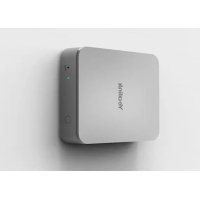
USER MANUAL VCM36-W Yealink
Wireless Video Conferencing Microphone Array
VCM36-W
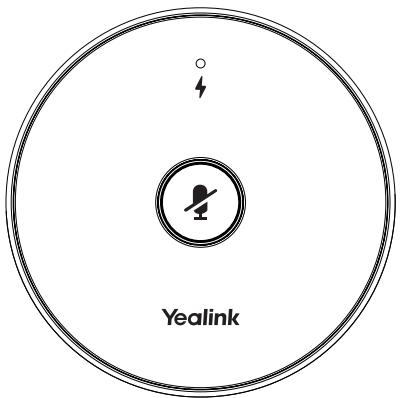
Table of Contents
English 1
简体中文 6
Deutsch. 10
Espanol. 15
Francais. 20
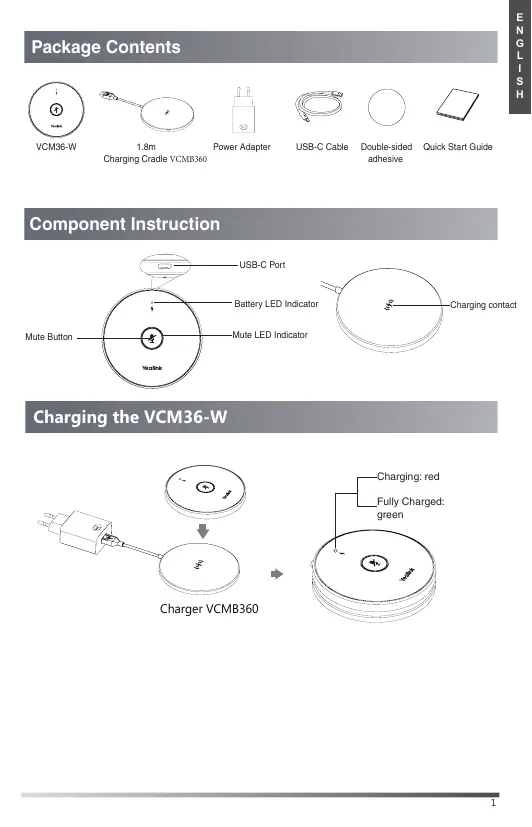
Package Contents

VCM36-W
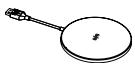
1.8m
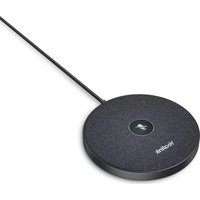
Charging Cradle VCMB360

Power Adapter

USB-C Cable

Double-sided adhesive

Quick Start Guide
Component Instruction
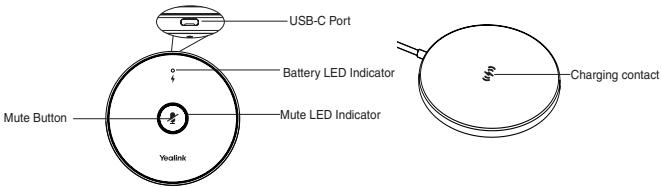
Charging the VCM36-W
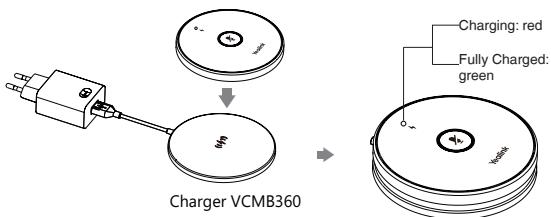
Powering on/off
- Long tap the mute button for 5 seconds to power on the VCM36-W. The battery LED indicator flashes green and then off.
- Long tap the mute button for 15 seconds to power off the VCM36-W. The battery LED indicator flashes red and then off.
Pairing the VCM36-W
- Pairing directly
- Connect the USB-C port on the VCM36-W to the USB port on the video conference system/UVC camera/AVHub using the USB-C cable.
- The Mute LED indicator fast flashes yellow during pairing. The display device will show: Wireless microphone is paired successfully.
- Disconnect the cable, then you can use the VCM36-W.
- Pairing by Yealink RoomConnect software
- Connect the USB-C port on the VCM36-W to the USB port on the PC using the USB-C cable.
- Connect the Video Out port on the UVC camera/AVHub to the same PC using the USB-B cable.
- Run the Yealink RoomConnect software on the PC. The Mute LED indicator fast flashes yellow during pairing. After paired successfully, the VCM36-W card appears on the Yealink RoomConnect software.
- Disconnect the cable, then you can use the VCM36-W.
Note: Currently, only wired pairing is available.
Muting or Unmuting the VCM36-W
- Tap the mute button to mute it.
The mute LED indicator glows red.
- Tap the mute button again to unmute it.
LED Instruction
| LED Status | Description |
| Solid red | The VCM36-W is muted. |
| Solid green | The VCM36-W is unmuted. |
| Fast flashing yellow | The VCM36-W is pairing. |
| Flashing yellow | The VCM36-W is searching for signal. |
| Flashing green | Ringing. |
| Flashing red and green alternately | The paired device is looking for the microphone. |
| Off | • The VCM36-W is in standby mode.
• The VCM36-W is powered off. |
| LED Status | Description |
| Solid red | Charging. |
| Solid green | Fully charged. |
| Slowly flashing red | The battery capacity is less than 20%. |
| Fast flashing red 3 times and then off | The battery capacity is too low to power on the VCM36-W. |
| Solid green for 3 seconds and then off | The VCM36-W is standby. |
| Solid green for one second and then off | The VCM36-W is powered on. |
| Off | • The VCM36-W is in standby mode.
• The VCM36-W is powered off. |
Note: When the VCM36-W is not used for a while, it will enter standby mode. You can wake up the VCM36-W by tapping the Mute button or placing it in the charging cradle. After wake-up, the VCM36-W will return to the state before standby.
Upgrading the VCM36-W
If the video conferencing system or UVC camera has a built-in wireless microphone firmware after pairing with VCM36-W successfully, the VCM36-W will be upgraded automatically.
Note: Make sure the VCM36-W has enough power before upgrading.
Regulatory Notices
Operating Ambient Temperatures
- Operating temperature: +14 to 113°F (-10 to 45°C)
Relative humidity: 5% to 90% noncondensing
Storage temperature: -22 to +158°F (-30 to +70°C)
Warranty
Our product warranty is limited only to the unit itself, when used normally in accordance with the operating instructions and the system environment. We are not liable for damage or loss resulting from the use of this product, or for any claim from a third party. We are not liable for problems with Tealink device arising from the use of this product; we are not liable for financial damages, lost profits, claims from third parties, etc., arising from the use of this product.
DC symbol
is the DC voltage symbol.
Restriction of Hazardous Substances Directive (RoHS)
This device complies with the requirements of the EU RoHS Directive. Statements of compliance can be obtained by contacting support@yaelink.com.
Safety Instructions
Save these instructions. Read these safety instructions before use!
The following basic safety precautions should always be followed to reduce risk of fire, electrical shock, and other personal injury.
Environmental Requirements
- Place the product on a stable, level and non-slip surface.
- Do not place the product close to heat sources, in direct sunlight or need to any household appliances with electromagnetic field or electromagnetic fields. Use a microwave oven for a longer time.
- Do not allow the product to come into contact with water, dust and chemicals.
- Protect the product from aggressive liquids and vapors.
- Do not place the product on or near any inflammable or firevulnerable object, such as rubber-made materials.
- Do not install the products in rooms with high humidity, for example, in bathrooms, laundry rooms and wet basements.
Safety Notes During Operation
- Use only spare parts and accessories supplied or authorized by Yealink. The operation of non-authorized parts cannot be guaranteed.
- Do not place heavy objects on top of the handset or the base station in case of damage and deformation caused by the heavy load.
- Do not open the handset or the base station by yourself for repair purpose, without the help of a professional or high voltages. Have all repairs carried out by authorized service personnel.
- Do not let a child operate the product without guidance.
- Keep the small accessories contained in your product out of reach of small children in case of accidental swallowing.
- Before plugging or unplugging any cable, make sure that your hands are completely dry.
- Do not hold the handset up to your ear when speakphone is on or when the voice calls as the column can be very loud, which may be harmful to your hearing.
- During a thunderstorm, stop using the product and disconnect it from the power supply to avoid lightning strike.
- If the product is left unused for a rather long time, disconnect the base station from the power supply and unplug the power adapter.
- When there is smoke emitted from the product, or some abnormal noise or smell, disconnect the product from the power supply, and unplug the power supply.
- Remove the electrical cord from an outlet by pulling gently on the power adapter, not by pulling the cord.
Battery Precautions
- Do not immerse the battery into water, which could short-circuit and damage the battery.
- Do not expose the battery to an open flame or leave the battery where it is exposed to extremely high temperatures, which could cause the battery to explode.
ISEDC Warning
This device complies with Innovation, Science, and Economic Development Canada licence-exempt RSS standard(s). Operation is subject to the following requirements:
(1) this device may not cause interference, and
(2) this device must accept any interference, including interference that may cause undesired operation of the device.
Le presentiapresenté est conformé aux CNR d'innovation,Sciences et Technologies (2014), 35(1-2), 17-26, 19-20, 21-22, 23-24, 25-26, 27-28, 29-30, 31-32, 33-34, 35-36, 37-38, 39-40, 41-42, 43-44, 45-46, 47-48, 49-50, 51-52, 53-54, 55-56, 57-58, 59-60, 61-62, 63-64, 65-66, 67-68, 69-70, 71-72, 73-74, 75-76, 77-78, 79-80, 81-82, 83-84, 85-86, 87-88, 89-90, 91-92, 93-94, 95-96, 97-98, 99-100, 101-102, 103-104, 105-106, 107-108, 109-110, 111-112, 113-114, 115-116, 117-118, 119-120, 121-122, 123-124, 125-126, 127-128, 129-130, 131-132, 133-134, 135-136, 137-138, 139-140, 141-142, 143-144, 145-146, 147-148, 149-150, 151-152, 153-154, 155-156, 157-158, 159-160, 161-162, 163-164, 165-166, 167-168, 169-170,
(1) l'appareil nedoit pas produit de brouillage, et
(2) Tullisatste der fappeel doit acceptet tout brouilage radioelectrique subi, même si le brouilage est susceptablen d'encomprement le fonctionnement.
The device is compliant with RF exposure guidelines, users can obtain Canadian information on RF exposure and compliance. The minimum distance from body to device is 10m
- Do power the handset off before removing the battery.
- Do not try to use the battery for the power supply of any device other than this handset.
- Do not open or mutilate the battery, released electrolyte is corrosive and may cause damage to your eyes or skin.
- Use only the rechargeable battery pack delivered with the handset or those rechargeable battery packs expressly recommended by Yealink.
- Defective or exhausted battery should never be disposed as of a municipal landfill.
- The disposal of the battery supplier, a licensed battery dealer, is designated collection facility.
A Notices of Cleaning
- Before cleaning the base station, stop using it and disconnect it from the power supply.
- Remove the battery before cleaning the handset to reduce risk of electric shock.
- Only clean your product with a piece of slightly moist and anti-static cloth.
- Keep the power plug clean and dry. Using a dirty or wet power plug may lead to electric shock or other perils.
ENVIRONMENTAL RECYCLING
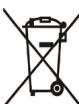
Never dispose of the device with domestic waste
Ask your Town Council about how to dispose of it in an environmentally friendly way. The cardboard box, plastic packaging and player components may be recycled in accordance with prevailing recycling regulations in your country.
Always adhere to prevailing regulations
Those who fail to do may be fined or prosecuted in accordance with the law. The crossed out garbage can that appears on the device means that it has reached the end of its useful life, it should be taken to the waste disposal center and treated separately to general refuse waste.
Batteries: Be sure that the batteries have been placed in the right position. This phone use rechargeable batteries only.
Compulsory information according to regulations for battery-operated devices. The battery is supplied with a battery of a wrong kind. Dispensing of batteries in accordance with the instructions.
Troubleshooting
The unit cannot supply power to Yealink device.
There is a bad connection with the plug.
-
Clean the plug with a dry cloth.
-
Connect it to another wall outlet.
The usage environment is out of operating temperature range.
- Use in the operating temperature range.
The cable between the unit and the Yealink device is connected incorrectly.
- Connect the cable correctly.
You cannot connect the cable properly.
-
You may have connected a wrong Yealink device.
-
Use the correct power supply.
Some dust, etc., may be in the port.
- Clean the port.
Contact your dealer or authorized service facility for any further questions.
YEALINK NETWORK TECHNOLOGY CO.,LTD.
309, 3rd Floor, No.16, Yun Ding North Road, Huli District, Xiamen City, Fujian, P.R.C.
YEALINK (EUROPE) NETWORK TECHNOLOGY B.V.
Strawinskiylan 3127, Atrium Building, 8th floor, 1077ZX Amsterdam, The Netherlands
YEALINK (USA) NETWORK TECHNOLOGY CO., LTD.
999 Peachtree Street Suite 2300, Fulton, Atlanta, GA, 30309, USA
Made in China
FCC Caution:
Any Changes or modifications not expressly approved by the party responsible for the proposed changes or modifications shall be made without事先 notice of the FCF. This device complies with part 15 of the FCC Rules. Operation is subject to the following two conditions: (1) This device may not cause harmful interference, and (2) It may not cause any other adverse effects, including, interference that may cause undesired operation.
IMPORTANT NOTE:
Note: This equipment has been tested and found to comply with the limits for a 1000 MHz radio. The device is designed to provide reasonable protection against harmful interference in a particular frequency range, and it is designed to be able to operate at the same bandwidth of radio frequency energy and, if not installed and used in accordance with the requirements of the test equipment, will not interfere with the intended use of the television reception, which can be determined by turning the equipment off and on, the user is encouraged to try to correct the interference by one or more methods.
—Reorient or relocate the receiving antenna.
Increase the separation between the equipment and receiver.
-Connect the equipment into an outlet on a circuit different from that to which the receiver is connected.
-Consult the dealer or an experienced radio/TV technician for help. FCC Radiation Exposure Statement:
This equipment complies with FCC radiation exposure limits set forth for an individual patient. The device is equipped with a 3D printed and operated with minimum distance 20cm between the radiotrak's body.

VCM36-W
1.8米
充电底座

电源适配器

USB数据线(A-C)

双面水晶贴

快速入门指南

Hinweis: Currently, coupling is only possible via cable.
309, 3rd Floor, No. 16, Yun Ding North Road, Huli District, Xiamen City, Fujian, VR China
YEALINK (EUROPE) NETWORK TECHNOLOGY B.V.
Strawinskiykan 3127, Atrium Building, 8th floor, 1077ZX Amsterdam, Niederlande YEALINK (USA) NETWORK TECHNOLOGY CO., LTD.
999 Peachtree Street Suite 2300, Fulton, Atlanta, GA 30309, USA
Hergestell in China
In case of inappentence, you shall dispute or more fully on proceedings to claim the right to be heard. If you are not able to prove that she/he has been a porto of declination or resolutus espertiaryus and is not subject to any other law than the law of the State, you shall be fined.
309, 3rd Floor, No.16, Yun Ding North Road, Huli District, Xiamen City, Fujian, P.R.C.
YEALINK (EUROPE) NETWORK TECHNOLOGY B.V.
Strawinskylaan 3127, Atrium Building, 8th floor, 1077ZX Amsterdam, The Netherlands
YEALINK (USA) NETWORK TECHNOLOGY CO., LTD.
999 Peachtree Street Suite 2300, Fulton, Atlanta, GA, 30309, USA
Made in China

Bande adhesivedouble-face
- Appariement direct
309, 3rd Floor, No.16, Yun Ding North Road, Huli District, Xiamen City, Fujian, China YEALINK (EUROPE) NETWORK TECHNOLOGY B.V.
Strawinskylaan 3127, Atrium Building, 8th floor, 1077ZX Amsterdam, Pays-Bas
YEALINK (USA) NETWORK TECHNOLOGY CO., LTD.
999 Peachtree Street Suite 2300, Fulton, Atlanta, GA, 30309, Etats-Unis
We,
YEALINK(XIAMEN) NETWORK TECHNOLOGY CO.,LTD
Address: 309, 3rd Floor, No.16, Yun Ding North Road, Huli District, Xiamen City, Fujian, P.R. China
Manufacturer: YEALINK(XIAMEN) NETWORK TECHNOLOGY CO.,LTD
Address: 309, 3rd Floor, No.16, Yun Ding North Road, Huli District, Xiamen City, Fujian, P.R. China
DATE: 20th/September/2021
Type: Wireless Video Conferencing Microphone Array
Model: VCM36-W
declare that the product meets the essential requirements and other relevant provisions according to the following EC directive Directive: 2014/30/EU, 2014/35/EU,RED 2014/53/EU
Conformity
The product complies with the following standards:
Safety: EN/IEC 62368-1:2020+A11:2020
EMC: EN 55032:2015+A11:2020
EN 55035:2017+A11:2020
EN61000-3-2:2019
EN61000-3-3:2013+A1:2019
Radio:ETSI EN 301489-1 V2.2.3
ETSI EN 301489-17 V3.2.2
ETSI EN 300 328 V2.2.2;
Health: EN 62479:2010;EN 50663:2017
Directive 2011/65/EU and (EU)2015/863 of the European Parliament and of the Council of 8 June 2011 and 4 June 2015 on the restriction of the use of certain hazardous substances in electrical and electronic equipment(RoHS 2.0)
Directive 2012/19/EU of the European Parliament and of the Council of 4.July.2012 on Waste electrical and electronic equipment(WEEE)
Regulation (EC) No.1907/2006 of the European Parliament and of the Council of 18.December.2006 on Registration, Evaluation, Authorization, and Restriction of Chemicals (REACH)
NAME: Huahu Wang
Aikawa Wang
DATE: 20th/September/2021
TITLE: Senior Manager
About Yealink
Yealink (Stock Code: 300628) is a global-leading provider of Unified Communication & Collaboration Solutions specialized in video conferencing, voice communications, and collaboration, dedicated to helping every person and organization embrace the power of "Easy Collaboration, High Productivity".
With best-in-class quality, innovative technology, and user-friendly experiences, Yealink is one of the best providers in more than 140 countries and regions, ranks No.1 in the global market share of IP Phone, and is the Top 5 leader in the video conferencing market (Frost & Sullivan, 2021).
For more information about Yealink, click https://www.yealink.com.
Copyright
Copyright © 2022 YEALINK(XIAMEN) NETWORK TECHNOLOGY CO., LTD.
All rights reserved. No parts of this publication may be reproduced or transmitted in any form or by any means, electronic or mechanical, photocopying, recording, or otherwise, for any purpose, without the express written permission of Yealink(Xiamen) Network Technology CO., LTD.
Technical Support
Visit Yealink WIKI (http://support.yealink.com/) for firmware downloads, product documents, FAQ, and more. For better service, we sincerely recommend you to use Yealink Ticketing system (https://ticket.yealink.com) to submit all your technical issues.