USER MANUAL COSMY 100 / 150 / 200 / 250 BWT
EN | Operating instructions
The robotic cleaner sweeps the pool floor and walls collecting dirt and debris in its filters. This user manual explains how to operate the robotic cleaner, including cleaning, maintenance and storage procedures.
Note: This manual reviews several different models with variations in components.
Robotic cleaner operation
Once the robotic cleaner is placed in the pool and activated, it operates according to its program. It moves along the floor and walls of the pool, covering the entire area of the pool floor and walls. When it has finished its program, it remains inactive on the pool floor. Power will automatically shut off. Note: It's not recommended to stop the pool cleaner prior to cycle end.
Note: Wall climbing is an optional feature. When the wall climbing feature is enabled, the robotic cleaner climbs the wall at intervals according to its internal program. Its ability to climb over stairs in swimming pool is subject to stair geometry and material.
Operating conditions
The robotic cleaner is intended for use in residential swimming pools only and in the following conditions: (1) Recommended water temperature 22^ C- 32^ C ( 72^ F- 90^ F). (2) Water pH : 7.2 - 7.6 (3) Chlorine level: pool is maintained according to the pool manufacturer's instructions. (Recommended Chlorine level: 2-4 ppm) Note: Failure to maintain the pool according to the recommended operating conditions could prevent the robotic cleaner from functioning properly.
Components

text_image
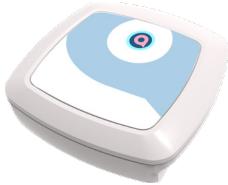
Power supply
Power cable
COSMT
Powered by BWT
Cart (optional)
Robotic pool cleaner

text_image
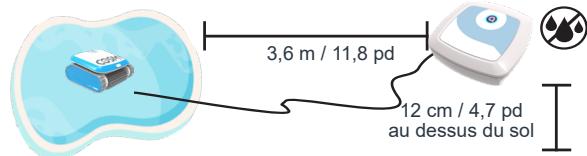
Please use as much cable as needed. Leave the remaining cable out of the pool.
You may turn on the cleaner when it reaches the floor.
3.6 m / 11.8 ft
12 cm / 4.7 inch above ground
Chlorine 2-4 ppm pH 7.2-7.6 Temp 13°C-35°C 55°F-95°F NaCl 4000 ppm (max) NO SWIMMING WHILE THE ROBOT IS IN THE POOL
Placement of the Power Supply
Place the power supply at least 3.6 meters / 11.8 feet from the pool and at least 12 cm above ground. CAUTION: The power supply is not water resistant; it must not be exposed to water or to direct sunlight.
Press the plastic snap on the zip ties in order to release the floating
cable. Use as much cable as needed in the the water.
Before placing the cleaner unit in the water
Make sure there are no people in the pool. Make sure that the filters are clean. Make sure the pool conditions are met; (see "Operating Conditions").
Placing cleaner in the water
Unroll the floating cable. It is recommended to extend a length of cable that is equal to the pool diagonal size plus an additional two meters. Smooth out coils or twists in the cable. Connect the floating cable to the socket located on the power supply. Roll extra cable, no in the pool, near the power supply. Place the cleaner unit in the pool. Let it sink to the bottom of the pool. Do not start operation before the robotic cleaner is settled on the pool floor.
CAUTION: Operating the cleaner out of water may cause immediate and severe damage resulting in loss of warranty.
Operation
Starting the robotic cleaner
Connect the power supply to the wall socket. The on/off button will lit and the robotic cleaner will start its cleaning program. If the power supply is already connected to the wall socket, the on/off button will flash to indicate that the robotic cleaner is in standby mode. Press the On/Off button in order to change the above mode (On to Off – standby, or vice versa). Note: if the full filter indication light is ON make sure to remove and clean the filter prior to putting the cleaner inside the pool water.
Cleaning cycle
During the cleaning cycle, the cleaner: (1) moves across the pool floor picking up dirt and debris. (2) Changes direction and rotates automatically according to the selected program. (3) Climbs the pool walls every few minutes, as set in its internal program. Note: The robotic cleaner might occasionally stop moving for a few seconds. This is part of normal operation, not a malfunction.
Stopping robotic cleaner operation
The robotic cleaner moves automatically to 'standby' after every cleaning cycle and the on/off button starts flashing. To stop the cleaner operation during a cleaning cycle, press the operation button once. On/off button starts flashing and the cleaner is in standby mode.
Pulling cleaner unit out of the water
(1) Unplug the floating cable from the power supply. (2) Pull the floating cable until the unit is close enough to reach the handle. (3) Using the handle, lift the cleaner out of the pool.
CAUTION: Do not use the floating cable to lift the cleaner out of the water.
This device complies with Industry Canada licence-exempt RSS standard(s). Operation is subject to two conditions: (1) This device may not cause harmful interference, and (2) this device must accept any interference that may be received or that may cause undesired operation. A distance of at least 20 cm. between the equipment and all persons should be maintained during the operation of the equipment.
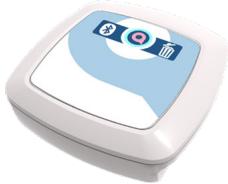
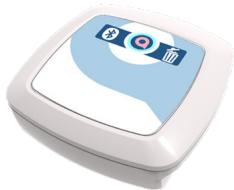
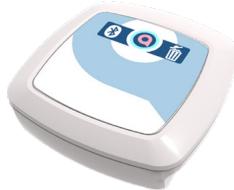
Power Supply
natural_image
White and blue square electronic device with a circular button on top (no text or symbols visible)

On/Off
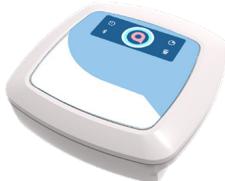
natural_image
White square electronic device with blue and white abstract design (no text or symbols)

On/Off

Full filter indicator

Bluetooth
natural_image
White and blue handheld device with a digital display (no visible text or symbols)

On/Off

Full filter indicator

Short cycle

Bluetooth

Delay operation
Maintenance and Storage
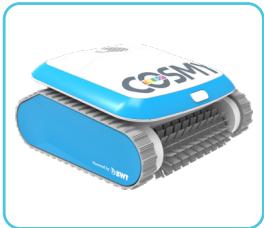
natural_image
Blue and white COSM robotic device with mesh wheels (no visible text or symbols)
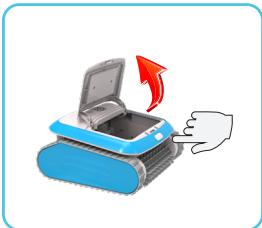
natural_image
Illustration of a blue printer with an open lid and a red arrow indicating rotation (no text or symbols)

natural_image
Illustration of a blue open box with a red upward arrow indicating growth or direction (no text or symbols)

natural_image
Diagram showing two 3D wireframe structures with a light blue triangular pointer pointing to one, and a small black human figure nearby (no text or symbols)
natural_image
Illustration of a robotic device and a small wooden structure with a door open, both showing a red arrow indicating rotation (no text or symbols present)
Cleaning the filters
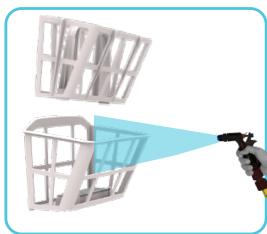
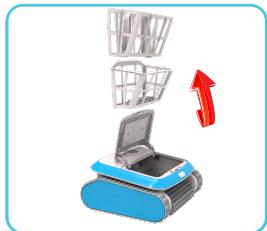
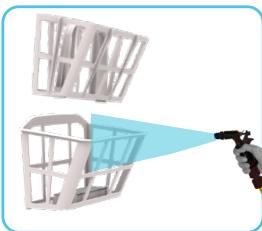
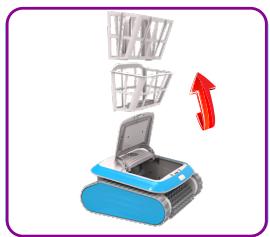
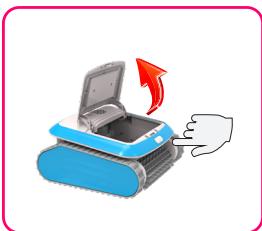
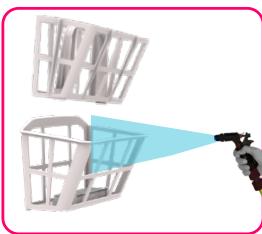
The two filters must be cleaned after each cleaning cycle. Press the buton to release the filter and pull it out of the cleaner. Open the filter case. Spray water on the outer sides of the filter and then spray water towards the inner side of the filter to clean all the dirt and debris. Reinsert the filter back into its location.
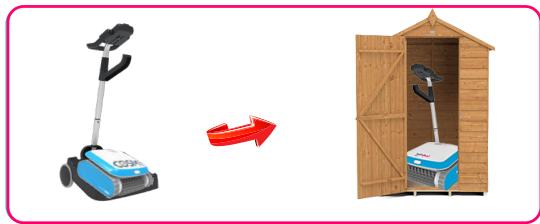
Storing the robotic cleaner
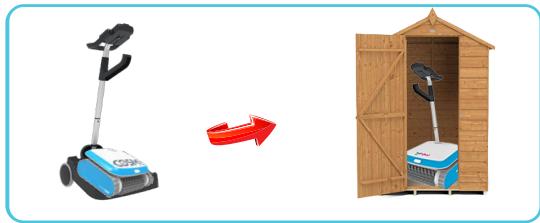
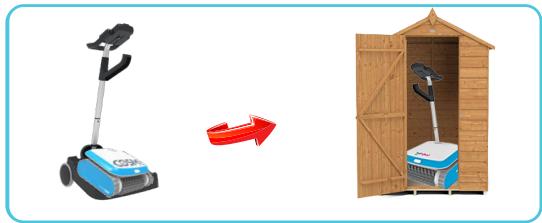
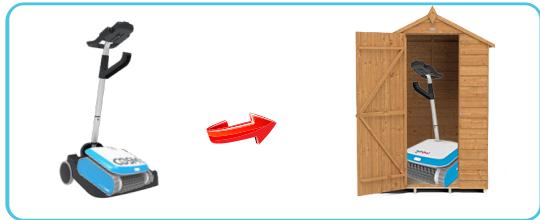
Follow these instructions to store the robotic cleaner when not in use: Disconnect the power cord from the wall outlet. Disconnect the floating cable from the power supply. Make sure that the power supply is not exposed to water Spread out the floating cable, and roll it. Wash the cleaner unit interior space with fresh water and let it dry. Roll the floating cable and place it on the cleaner unit. Caution: Do not roll the floating cable on the handle of the cleaner unit. Store the robotic cleaner components in a dry, closed location.
Checking water outlet propeller
It is recommended to periodically clean debris and hair from the propeller of the water outlet: Remove the filters. Remove the screws that hold the water outlet cover. Remove the water outlet cover. Clean any hairs, dirt, or debris. Return the cover and fasten it with the screw. Reinsert the filters.
Product Marketing Name(PMN): AQ11091W1
This device complies with Industry Canada licence-exempt RSS standard(s). Operation is subject to two conditions:
(1) This device may not cause harmful interference, and (2) this device must accept any interference that may be received or that may cause undesired operation. A distance of at least 20 cm. between the equipment and all persons should be maintained during the operation of the equipment.
Troubleshooting
CLEANER DOES NOT TURN ON
There is no electricity in the wall socket:
(1) Disconnect cleaner from the power and control unit.
(2) Disconnect power supply from the wall socket, wait 30 seconds and reconnect. (3) Turn power on. If not activated, connect the unit to a different wall socket.
Obstacle in the drive system of the cleaner unit: (1)
Turn the cleaner unit carefully to view the underside.
(2) Check that the scrubbing brush is not bent/broken.
(3) Clean and remove obstacles and debris if necessary.
Propeller is seized due to accumulation of hair:
Check if the propeller is broken or needs to be cleaned (see "Checking Water Outlet Propeller").
CLEANER MOVES BUT DOES NOT PUMP WATER
Filters are dirty: (1) Remove the filters and clean them.
Propeller is broken or seized due to accumulation of hair: Check if the propeller is broken or needs cleaning (see “Checking Water Outlet Propeller”).
CLEANER PUMPS WATER BUT DOES NOT MOVE
Obstacle in the drive system of the cleaner unit:
(1) Turn the cleaner unit carefully to view the underside. (2) Check that the scrubbing brush is not bent/broken. (3) Clean and remove obstacles and debris if necessary.
CLEANER STARTS AND SHUTS OFF AFTER A SHORT TIME
Filters are dirty: (1) Remove and clean the filters. (2) Restart the robot and try again.
Propeller is broken or seized due to accumulation of hair: (1) Remove the top screws on the top outlet.
(2) Check if the propeller is broken or needs to be cleaned.
Obstacle in the drive system of the cleaner unit: (1)
Turn the cleaner unit carefully to view the underside.
(2) Check that the scrubbing brush is not bent/broken.
(3) Clean and remove obstacles and debris if necessary.
CLEANER DOES NOT PICK UP DIRT
Filters are dirty or have holes.
Clean as needed and verify that there are no holes in the filters.
Propeller is broken or seized due to accumulation of hair.
Check if the propeller is broken or needs cleaning (see "Checking Water Outlet Propeller").
CLEANER UNIT DOES NOT COVER THE ENTIRE POOL
Clean the filters.
- Verify that there is enough length of the floating cable in the water to reach the far end of the pool.
- Make sure that the floating cable is properly spread out and is not tangled.
Propeller is broken or seized due to accumulation of hair: (1) Remove the top screws on the top outlet.
- Check if the propeller is broken or needs cleaning.
THE CLEANER DOES NOT CLIMB WALLS
(1) Verify that your robotic cleaner is not a floor-only model. (2) Verify that Program 1, floor cleaning only, is selected on the power supply unit. (3) Make sure to clean the filters (4) Make sure propeller isn't broken or tied up to debris/hair.

Warning
Do not stay in the pool and remove any and all items from the pool before operating the robotic pool cleaner. Do not leave the robot inside the pool if unused.
The power supply must be connected through a Ground Fault Current Interrupter (GFCI USA) or a Residual Current Device (RCD Europe) not exceeding 30 mA.
The connection to the power must meet local and national wiring rules.
All parts must be replaced with original parts supplied by Aquatron Robotic Technology.
Keep out of children's reach.
Warranty
2 YEARS WARRANTY POLICY
In application of the terms of Legislative Royal Decree 1/2007 of 16 November which approved the Revised Text of the Consumer and User Protection Act, BWT offers a two-year product warranty to consumers from the date on which they are delivered by the vendor, subject to the terms and conditions described in this warranty and without prejudice to the terms of the Royal Decree. This warranty will be valid in all Member States of the European Union, subject to the legal limitations in each country where it is enforced, in accordance with the rules for application. The legal warranty covers all components elements and accessories, including power supplies, pumps, motors, electric wires, brushes, belts, handles, wheels, bags, remote controls and other product components.
Warranty Conditions:
Products may be covered under the legal and sales warranties as long as the problem is reported by the consumer within two months of becoming aware of it. In order for the warranty to apply, the consumer must contact:
I) Contact with the Authorized Technical Assistance Service referred in the attached list and they will inform you about the procedure, or
ii) Call the vendor from whom the product was purchased, who will provide you with further information. Authorized Technical Assistance Service BWT recommends (but does not require) that maintenance and repairs be performed by an Authorized Technical Assistance Service of BWT. If the products are assembled, disassembled, handled and/or repaired by anyone who is not an Authorized Technical Assistance provider, the legal or sales warranties will NOT apply. The warranty will NOT be harmed in cases of DIY repairs as detailed and recommended in the instruction manual. This warranty covers the repair or the return and replacement of the product as mandated by law.
All repairs covered under the warranty must be performed by a Technical Assistance Service authorized by BWT. The agents, representatives or distributors, DO NOT have the authority to increase or alter the obligations of the warranty in the name and on behalf of BWT.
Exclusions:
Under no circumstances will the legal or sales warranty provided by BWT be applicable when the defect or malfunction of the product is due to :
I) Unauthorized modifications of the product ;
ii) Misuse, abuse or negligence ;
iii) Damages caused by force majeure or fortuitous events;
iv) Use of salt water levels, higher than 5,000 ppm )0.5%)
v) The failure to perform the preventive maintenance indicated in the instruction manual;
vi) Use of the product in anything other than private, residential pools.
Furthermore, BWT will not be liable under any circumstances and neither the legal warranty nor the sales warranty will apply, for any damages that may or will occur to any pool, including pool's plaster or pool's
vinyl liner, by reason of the use and/or operation of the BWT pool cleaner.
Introduction
natural_image
Illustration of a blue tracked robot labeled 'CGSM' with molecular structures above it, no text or symbols present.
natural_image
White and blue abstract icon resembling a stylized device or sensor (no text or symbols)

Marche/Arrêt

natural_image
White and blue abstract icon with a camera symbol on top (no text or symbols)

Marche/Arrêt
natural_image
Illustration of a white and blue handheld device with a digital display (no text or symbols visible)

Marche/Arrêt

natural_image
Blue and white COSM robot with visible mesh and wheels (no text or symbols)

natural_image
Illustration of a blue printer with an open lid and a red arrow indicating rotation (no text or symbols)

natural_image
Illustration of a blue open box with a red upward arrow indicating growth or direction (no text or symbols)
natural_image
Illustration of a robotic hand spraying water onto a grid structure (no text or symbols)
natural_image
Illustration of a robotic vacuum cleaner next to a wooden structure with a door open, showing no text or symbols.
natural_image
White and blue abstract device with a circular icon on top (no text or symbols)

Encendido/apagado
natural_image
Illustration of a stylized white and blue icon with a camera symbol on top (no text or symbols)

Encendido/apagado
natural_image
Illustration of a white and blue handheld device with a digital display (no text or symbols visible)

Encendido/apagado
natural_image
Blue and white COSM robot with visible mesh and control bands (no text or symbols on body)

natural_image
Illustration of a blue printer with an open lid and a red arrow indicating rotation (no text or symbols)
natural_image
Illustration of a blue printer with a paper basket emerging from it, accompanied by a red upward arrow (no text or symbols)
natural_image
Diagram showing two 3D wireframe structures with a light blue arrow pointing to one, and a small black object on the right (no text or symbols)
natural_image
Illustration of a robotic vacuum cleaner next to a wooden structure with a door open, showing no text or symbols.
Limpieza de filtros
natural_image
White and blue square button with a circular icon on top (no text or symbols)

Ein/Aus
natural_image
Illustration of a white appliance with a blue and white abstract design (no text or symbols)

Ein/Aus

Vollfilter-anzeige

Bluetooth

natural_image
Illustration of a white and blue handheld device with a digital display (no text or symbols visible)

Ein/Aus

Vollfilter-anzeige

Kurzer Zyklus

Bluetooth
natural_image
Blue and white COSMI robot with textured wheels (no visible text or symbols)

natural_image
Illustration of a blue printer with an open lid and a hand inserting a button, showing a red arrow indicating rotation (no text or symbols)
natural_image
Illustration of a blue printer with open lid and two shopping baskets above it, with a red upward arrow indicating growth (no text or symbols)

natural_image
3D rendering of a robotic arm spraying water onto a grid-like structure (no text or symbols visible)

natural_image
Illustration of a robotic arm and a small outdoor storage unit with a red arrow indicating rotation (no text or symbols)
natural_image
White and blue square electronic device with a circular button on top (no text or symbols visible)

On/Off

natural_image
White and blue electronic device with icons for Bluetooth, Wi-Fi, and app (no text or symbols)

On/Off
natural_image
White and blue medical device with a digital display (no visible text or symbols)

On/Off

natural_image
Blue and white COSM robotic device with visible mesh and wheels (no text or symbols)
natural_image
Illustration of a blue printer with an open lid and a red arrow indicating rotation (no text or symbols)

natural_image
Illustration of a blue printer with open lid and two shopping baskets above it, with a red upward arrow indicating upload or export (no text or symbols)
natural_image
Diagram showing a robotic arm projecting a light blue triangular object onto a grid-like structure (no text or symbols)
natural_image
Illustration of a robotic vacuum cleaner next to a wooden structure with a door open, showing no text or symbols.
Pulizia dei filtri
natural_image
Blue and white COSM1 robotic device with visible branding and 'Powered by DBWT' text (no additional signage or symbols)
Download BWT Home App for COSMY THE BOT 200 / 250
text_image
QR code image containing encoded data, no visible human-readable text


text_image
QR code image containing encoded data, no visible human-readable text