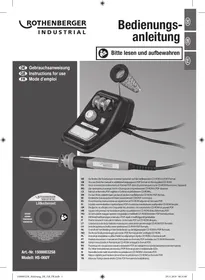
HS-060Y - Soldering iron ROTHENBERGER - Free user manual and instructions
Find the device manual for free HS-060Y ROTHENBERGER in PDF.



| Brand | ROTHENBERGER |
| Model | HS-060Y |
| Category | Adjustable soldering station |
| Type | Soldering iron with stand and control system |
| Rated power | 48 W |
| Mains voltage | 230-240 V ~ / 50 Hz |
| Protection class | I |
| Maximum temperature | Approx. 500 °C |
| Temperature adjustment | Continuous variable (levels 1 to 4) |
| Included tips | Flat tip and pointed tip (pre-assembled) |
| Included solder wire | 2 wires: Ø 1 mm and Ø 1.5 mm (with rosin) |
| Stand with holding spring | Yes, for the soldering iron |
| Cleaning sponge | Yes, with holder |
| Safety | Grounded (class I), mandatory shutdown after use, do not leave unattended |
| Intended use | DIY, fine soldering work on cables and circuit boards |
| Maintenance | Clean the tip with a damp sponge; sand the tips with fine sandpaper if necessary |
| Cleaning | With a soft, slightly damp cloth; no solvents or abrasives |
| Spare parts and repairability | Replaceable tips; repairs exclusively by the manufacturer or an authorized center |
| General information | Delivered with power cable, iron-control connecting cable, sponge support, sponge tray |
Frequently Asked Questions - HS-060Y ROTHENBERGER
User questions about HS-060Y ROTHENBERGER
0 question about this device. Answer the ones you know or ask your own.
Ask a new question about this device
Download the instructions for your Soldering iron in PDF format for free! Find your manual HS-060Y - ROTHENBERGER and take your electronic device back in hand. On this page are published all the documents necessary for the use of your device. HS-060Y by ROTHENBERGER.
USER MANUAL HS-060Y ROTHENBERGER
Read carefully and keep safe for future reference
Adjustable soldering station 48 W
Art.no.1500003258
Model: HS-060Y
Table of contents
Scope of delivery / parts list 19
General 20
Read the user manual and keep it safely for future reference 20
Symbols used in this operating manual 20
Safety 21
Intended Use 21
Safety instructions for soldering stations 22
Before Use 24
Check the soldering station and scope of delivery 24
Mounting the retaining spring 24
Mounting / replacing the soldering tip 24
Placing the cleaning sponge 25
Connecting the power supply 25
Usage 26
Switching on and off 26
Working temperature 27
Soldering 27
De-soldering 28
Maintenance, cleaning, storage and transport 28
Maintenance 29
Cleaning 29
Storage 29
Transport 29
Troubleshooting 30
Technical data 30
Disposal 31
Disposing of the used device 31
Disposal of packaging 31
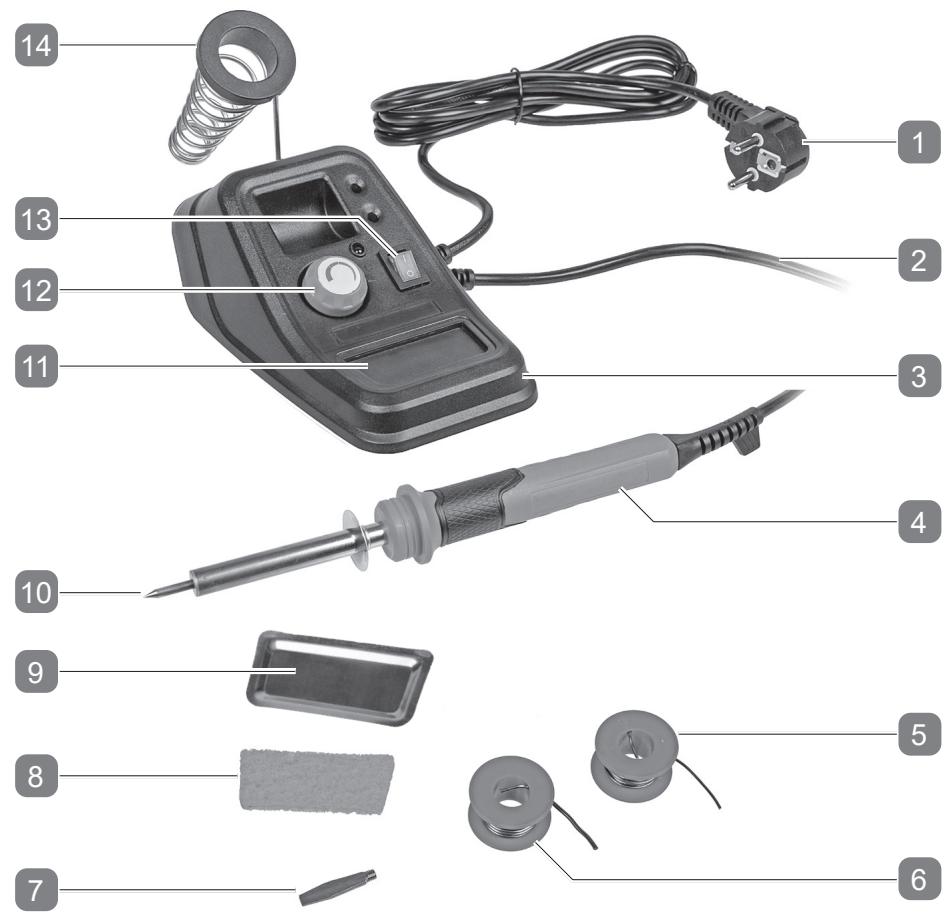
Scope of delivery / parts list
- Mains cable and plug
- Cleaning sponge
- Connection cable between soldering iron and controller
- Sponge pad
- Control unit and soldering stand
- Soldering tip (pre-assembled)
- Solder iron
- Pad for cleaning sponge
- Solder - 1x Ø1 mm
- Temperature controller
- Solder - 1x Ø1.5 mm
- On / Off switch
- Flat soldering tip
- Retaining spring

General
Read the user manual and keep it safely for future reference
This operating manual is an integral part of this 48 W adjustable soldering station (hereafter referred to only as the "soldering station"). It contains important information on safety, usage and maintenance. Please read the operating manual carefully before using the soldering station. Pay particular attention to the safety instructions and warnings. Failure to follow the instructions given in this manual may result in serious injury or damage to the soldering station. Comply with applicable local or national regulations concerning the use of this product. Keep this manual in a safe place for future reference. Always include the manual when you give the soldering station to others.
Symbols used in this operating manual
The following symbols and key words will be used in this manual, on the soldering station or the packaging.
| WARNING! | Indicates a hazardous situation that, if not avoided, could result in death or serious injury. |
| CAUTION! | Signals a hazard that can cause injuries when ignored. |
| NOTE! | Warns against possible damages. |
| i | This symbol refers to useful information on assembly or usage. |
| Read the operating manual. | |
| CE | Products marked with this symbol comply with all applicable regulations of the European economic area. |
Safety
Intended Use
This soldering station is exclusively designed for private use and for hobby and DIY projects for the following purposes:
- for fine soldering work on, for example, wires and PCBs
The soldering station should only be used in accordance with the instructions and safety information given in this operating manual. It should not be used for any other purpose. Neither the manufacturer nor the dealer accepts responsibility for any damage, loss or injury resulting from improper use of the soldering station. Examples of improper use include the following, in particular:
- Any use beyond the specified intended use.
- Failure to follow the safety, assembly, operating, cleaning and maintenance instructions given in this operating manual.
- Failure to comply with applicable health, safety and accident prevention regulations regarding the use of this soldering station.
- Using accessories and spare parts which are not suitable for this soldering station.
- Changes made to the soldering station or to the accessories.
- Excessive use.
Anyone using or maintaining this soldering station has to be familiar with these instructions and be aware of potential hazards. This soldering station should only be used by a skilled person - if in doubt ask an expert for advice.
Non-observance of the safety, assembly and operating instructions while operating the appliance counts as misuse. All the applicable health and safety regulations have to be followed. All other applicable local and national laws have to be complied with. The soldering station should not be modified. Any unauthorised modification increases the risk of injury or damage to property.

Safety instructions for soldering stations
WARNING!
Read all the warnings and safety instructions carefully. Failure to follow the warnings and safety instructions may result in electric shock, fire and/or serious injuries.
Retain all the warnings and safety instructions for future reference.
a) This device can be operated by children from 8 years of age and above, as well as by people with reduced physical, sensory or mental capacities or who lack knowledge or experience, if they have been supervised or instructed regarding safe use of the device, and understand the resultant dangers. Children should not play with the device. Cleaning and user maintenance shall not be performed by children without supervision.
b) To prevent the risk of injury, damaged mains cables may only be replaced by the manufacturer, by customer service or by a similarly qualified person.
c) Allow the soldering station to cool down completely in air after use before you put it away. WARNING! The soldering iron must be stored in the soldering stand when not in use.
d) Do not use the soldering station if the handle, the mains cable or the plug are damaged. Never open the device!
e) Do not expose the soldering station to moisture or rain.
f) Work close to the power socket so that you can disconnect the plug in an emergency.
g) Check the tightness of the soldering tip before heating it. The soldering tip has to be screwed in as far as it goes and tightened by hand.
h) Never heat the soldering iron without attaching a soldering tip.
i) Remove or change the soldering tip only when the soldering station is switched off and the soldering tip has cooled down.
j) Do not touch the hot soldering tip, the melted solder or hot components while soldering. There is a risk of burns.
k) The soldering stand can become hot when the soldering iron is placed on it. Danger of burns!
I) Do not bring flammable or heat-sensitive objects close to the hot soldering iron.
m) Avoid contact between the hot parts of the soldering iron and the plastic parts of the soldering iron stand.
n) Do not leave the soldering iron unattended while it is switched on.
o) Do not carry out any soldering work on live parts.
p) Always use in a well-ventilated space. Toxic fumes can be produced when soldering, which can lead to damage to the mucous membranes and/or chronic respiratory illness.
q) Wear eye protection.
r) The supplied solder wire contains resin. May give rise to allergic reactions.
s) Solder can contain lead. Do not eat, drink or smoke while soldering. Always wash your hands thoroughly after finishing work.
t) Always disconnect the soldering iron from the mains after use.
u) Do not cool the soldering iron using water.


Before Use
Check the soldering station and scope of delivery
- Remove the soldering station from its packaging.
- Check whether the delivery is complete (see chapter: "Scope of delivery / Description of parts")
- Check the soldering station and accessories for damages.
- If this is the case, do not use the soldering station. Contact the manufacturer at the service address indicated on the warranty card.
Mounting the retaining spring
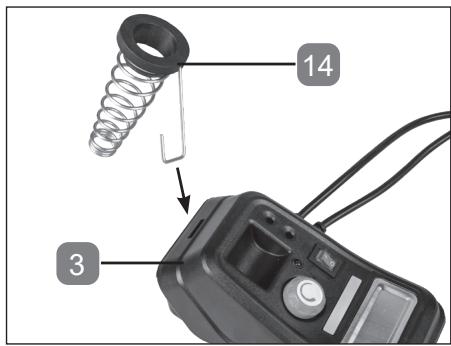
Press the retaining spring 14 firmly into the opening provided in the control unit and soldering stand 3 and fix it like this.
Mounting / replacing the soldering tip
CAUTION!
- Allow the soldering station to cool down completely before you change the soldering tip.
Some soldering tips are very sharp. Always wear protective gloves and / or use pliers when changing the soldering tips.
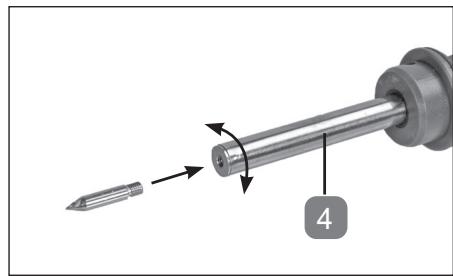
The pointed soldering tip 10 is particularly suitable for spot soldering and thin cables.
The flat soldering tip 7 is particularly suitable for light electrical soldering work.
Proceed as follows to change the soldering tip:
- Remove the existing soldering tip by turning it counterclockwise out of the soldering iron 4.
- Screw the new soldering tip by hand clockwise as far as it goes into the soldering iron. Do not over tighten the thread.
Placing the cleaning sponge
CAUTION!
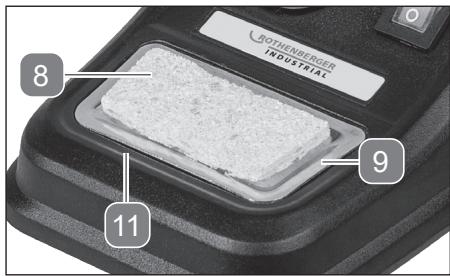
Always wet the cleaning sponge when using and do not use it without the sponge pad.
- Place the sponge pad 9 in the space provided for the cleaning sponge 11.
- Place the cleaning sponge 8 in the provided space.
- Wet the cleaning sponge.
Connecting the power supply
Connect the soldering station only to a socket that is properly earthed. The soldering station is designed for use with single phase alternating current 230-240 V AC / 50 Hz.


Usage
Switching on and off
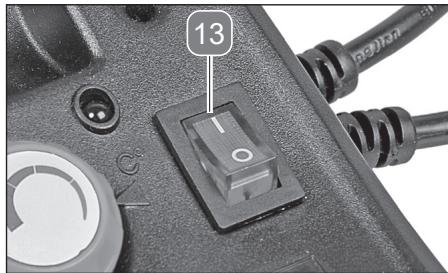
Switching on:
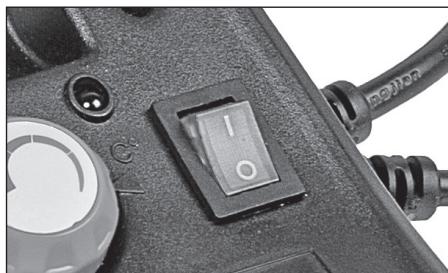
- Move the On/Off switch 13 to the 'I' position.
Regulating the temperature:
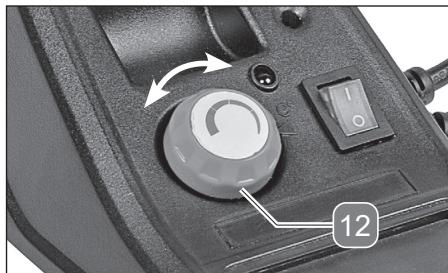
- The temperature can be adjusted continuously. At the highest setting, the tip reaches a temperature of about 500^ .
- Select the temperature setting suitable for your application by turning the regulator 12 (see chapter "Working temperature").
Switching off:
- Move the On/Off switch to the 'O' position.
- Place the soldering iron 4 in the holder 14 to allow it to cool down completely.
Working temperature
The correct working temperature depends on various factors such as:
- the solder used
- the size and thickness of the workpiece
-
the material and the thermal conductivity of the workpiece
-
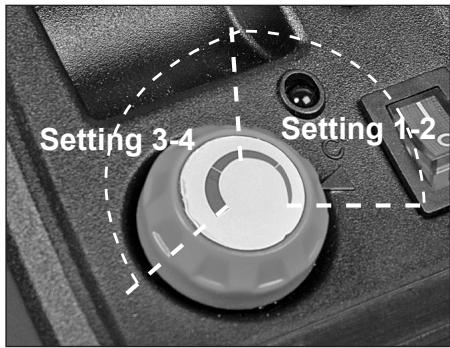
When soldering, start with a low working temperature (setting 1 - 2) and increase the temperature if necessary. The appropriate working temperature is reached when the solder begins to melt as soon as it comes into contact with the soldering tip.
- Use a higher temperature (setting 3 - 4) for desoldering, depending on the strength of the solder joint to be desoldered.

Soldering
NOTE!
For long breaks / work interruptions, disconnect the mains plug from the socket.
Before soldering, the soldering tip 7 / 10 has to be tinned. To do this, heat up a new or a soldering tip that has been cleaned using the cleaning sponge 8 and coat it by making contact with the solder wire.


Before starting work on the a particular workpiece and/or type of material, check for suitability by testing the soldering iron on a similar piece of (scrap) material.
- Clean the parts to be joined before soldering.
- Touch the edge of the appropriate flux-cored solder wire to the end of the soldering tip, to melt the solder wire. The workpiece is coated with the flux, which flows out of the solder wire, allowing the solder to join the metal.
- If the soldering iron is used for longer periods we recommend that you clean the tip occasionally with the cleaning sponge and re-tin the tip if necessary.
De-soldering
Use a de-soldering braid or a de-soldering pump (neither of them are included with the supply) to clean the joint, to de-solder and to remove excess solder from the joint.
De-soldering braid (not included in the supply):
- Place the de-soldering braid over the solder to be removed and heat it with the soldering tip. The melting solder is soaked up by the de-soldering braid.
De-soldering pump (not included in the supply):
- Heat the solder to be removed with the soldering tip. Once the solder melts, activate the de-soldering pump. The suction force removes the solder.
Maintenance, cleaning, storage and transport
WARNING!
Disconnect the machine from the mains before performing any maintenance or adjustments
Maintenance
The soldering station requires very little maintenance.
- Remove soot on the soldering tip using a fine
- sandpaper to ensure clean working.
- Only use spare parts / accessories from the manufacturer.
- Repairs should only be carried out
- by skilled personnel or an authorised service centre.
- Skilled personnel are those with appropriate training and
- experience, who know the construction and design requirements of the soldering station and understand the safety regulations.
- The tips 7 / 10 wear out after some time and need be replaced from time to time.
Cleaning
CAUTION!
Make sure that liquids do not get into the soldering station.
- Clean the soldering station with a slightly dampened cloth. Do not use aggressive cleaning agents, solvents or petroleum spirit.
Storage
- Allow the soldering station to cool down completely before storage.
- Clean the soldering station before storage.
- If the soldering station is not being used, keep it in a safe, cool, dry and well-ventilated place, out of the reach of children.
Transport
- Use the original packaging and secure the soldering iron in place during transport.

Troubleshooting
| Problem | Possible cause | Rectification |
| Soldering iron does not heat up. | No power supply. | Check if the mains supply (socket) is working properly. Ask a qualified person for advice if necessary. |
| Mains cable or plug defective. | Have the mains cable replaced by the manufacturer or the manufacturer's representative. | |
| The solder does not run smoothly on the soldering iron. | The working temperature is too low. | Select a higher working temperature. |
| Soldering tip is loose. | Turn the soldering station off, allow it to cool down completely and tighten the soldering tip. |
Technical data
| Model | HS-060Y |
| Mains Voltage | 230-240 V~ / 50 Hz |
| Rated power | 48 W |
| Protection class | I |
Disposal
Disposing of the used device

This symbol indicates that this soldering station may not be disposed of together with domestic waste in compliance with the (2012/19/EC) directive pertaining to waste electrical and electronic devices (WEEE). This soldering station should be handed over at a designated collection point. This can occur, for example, by returning it when a similar product is purchased or by handing it over to an authorised collecting point for the recycling of waste electrical and electronic equipment. Owing to potentially hazardous substances that are frequently contained in waste electronic equipment, incorrect handling of waste equipment may have a negative impact on the environment and on the health of human beings. By disposing of this soldering station correctly, you are also contributing towards an efficient use of natural resources. Information on collecting points for waste equipment can be obtained from your local authority, the public waste disposal authority, an authorised institution for the disposal of waste electrical and electronic equipment or the waste collection services.

Disposal of packaging

Dispose of the packaging material according to the type of material and according to any local regulations.
Copyright Rothenberger Industrial GmbH 2015 - 2020. All rights reserved.

- Adjustable soldering station 48 W
- Table of contents
- Scope of delivery / parts list
- General
- Read the user manual and keep it safely for future reference
- Symbols used in this operating manual
- Safety
- Intended Use
- Safety instructions for soldering stations
- WARNING!
- Before Use
- Check the soldering station and scope of delivery
- Mounting the retaining spring
- Mounting / replacing the soldering tip
- CAUTION!
- Placing the cleaning sponge
- Connecting the power supply
- Usage
- Switching on and off
- Switching on:
- Regulating the temperature:
- Switching off:
- Working temperature
- Soldering
- NOTE!
- De-soldering
- De-soldering braid (not included in the supply):
- De-soldering pump (not included in the supply):
- Maintenance, cleaning, storage and transport
- Maintenance
- Cleaning
- Make sure that liquids do not get into the soldering station.
- Storage
- Transport
- Disposal
- Disposing of the used device
- Disposal of packaging
Brand : ROTHENBERGER
Model : HS-060Y
Category : Soldering iron