
HOME ALARM ESSENTIAL - Alarm system SOMFY - Free user manual and instructions
Find the device manual for free HOME ALARM ESSENTIAL SOMFY in PDF.



| Product type | Connected alarm system |
| Brand | Somfy |
| Model | HOME ALARM ESSENTIAL |
| Dimensions (Link Essential) | 160 × 28 mm |
| Weight (Link Essential) | 340 g |
| Power supply (Link Essential) | Mains 100-240 V AC, 5 V-1 A / Lithium battery 2 Ah |
| Connectivity | Wi-Fi 2.4 GHz, proprietary radio 868 MHz, Somfy Around, LPWA |
| Backup battery life | 24 h |
| Remote badge - Dimensions | 34 x 10 mm |
| Remote badge - Weight | 12 g |
| Remote badge - Battery | 1x CR2032, battery life 1 year |
| IntelliTAG - Dimensions | 60 x 28 x 13.5 mm |
| IntelliTAG - Weight | 28 g |
| IntelliTAG - Battery | 1x AAA, battery life 1 year |
| IntelliTAG - Protection rating | IP54 |
| Motion detector - Dimensions | 47 x 47 mm |
| Motion detector - Weight | 55 g |
| Motion detector - Battery | 1x CR123A, battery life 2 years |
| Motion detector - Angle | 130°, pet immune -25 kg |
| Indoor siren - Dimensions | 175 x 45 mm |
| Indoor siren - Weight | 985 g |
| Indoor siren - Batteries | 4x D, battery life 2 years, 105 dB |
| Outdoor siren - Dimensions | 220 x 55 mm |
| Outdoor siren - Weight | 1200 g |
| Outdoor siren - Batteries | 4x D, battery life 2 years, 112 dB, IP43 |
Frequently Asked Questions - HOME ALARM ESSENTIAL SOMFY
User questions about HOME ALARM ESSENTIAL SOMFY
0 question about this device. Answer the ones you know or ask your own.
Ask a new question about this device
Download the instructions for your Alarm system in PDF format for free! Find your manual HOME ALARM ESSENTIAL - SOMFY and take your electronic device back in hand. On this page are published all the documents necessary for the use of your device. HOME ALARM ESSENTIAL by SOMFY.
USER MANUAL HOME ALARM ESSENTIAL SOMFY
HOME ALARM ESSENTIAL
User guide

Welcome
Bienvenue

FR
4
EN
10
DE
16
NL
22
ES
28
IT
34
PT
40
PL
46
We thank you for your recent purchase of a Somfy connected alarm. This guide as well as the mobile app "Somfy Protect" provides you with all the information you need to install and use it. Before you start the installation, please read the attached safety instructions carefully. If you need any additional information concerning this product, please refer to our FAQ or contact one of our advisers.
More information on www.somfyprotect.com/support
Install Home Alarm Essential

Download the "Somfy Protect" app, create your account and follow the step-by-step installation instructions.


More information on compatible versions at www.somfyprotect.com/apps.
To meet your needs and all home configurations, some components of your alarm can be either placed on a piece of furniture or glued or fixed to the wall. Select and follow the instructions!
| Placed on a piece of furniture | Glued with adhesive tape(1) | Fixed to the wall(2) | |
| Link Essential | ● | ||
| Indoor siren | ● | ● | |
| Outdoor siren | ● | ||
| Motion sensor | ● | ● | |
| IntelliTAG® | ● |
(1) 3M^TM stickers provided.
(2) Screws and wall plugs provided for the installation of the outdoor siren.
(i) Sources of radio interference: electrical switchboard, bundle of wires, metallic ground, TV, HiFi, etc.
Place your Link Essential
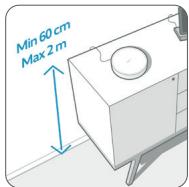
For optimal radio performance, place your Link Essential in the centre of your home, on a nonmetallic piece of furniture at a height of between 60~cm and 2m and at a distance of more than 1m from all sources of radio interference(3).
Fix the components to the wall
In the case of a wall installation, we recommend that you follow the instructions below.

- Do not fix any component until you are sure that your Link Essential is connected to Wi-Fi and communicates effectively via radio with
all accessories. 2. For products where screws are not provided, we recommend the use of 0.35mm countersunk or flat head screws. Make sure that you always use screws and plugs suitable for the materials in your wall to avoid any risk of falling.
Fixing the outdoor siren
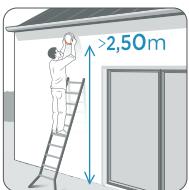
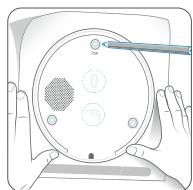
Fix in areas that are unobstructed and out of reach (minimum 2.50m from the ground recommended).
Fixing the indoor siren
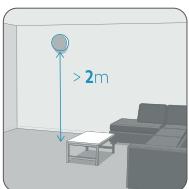
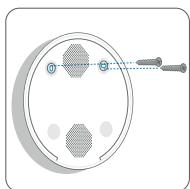
Fix close to the entrance door and protected leaves, at least 2m from the floor.
Discover the range
You can upgrade your installation at any time by adding accessories with your Link Essential(1).
System management
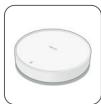
Link Essential
The brain of the system: it guarantees protection of your home, it communicates via radio with all the accessories and connects them to the Internet (except cameras).
Burglar deterrence
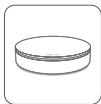
Indoor siren
Wireless 105 dB
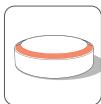
Outdoor siren
Wireless 112 dB with flash
Break-in detection
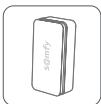
IntelliTAG* - Vibration and opening sensor for doors and windows. It detects an intrusion attempt and therefore triggers the alarm before the break-in.
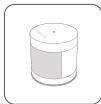
Indoor Motion Detector
Wide angle 130^ Compatible with pets (-25kg)
Accident prevention
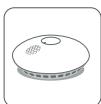
Smoke detector 85 dB siren
1Maximum combination of 50 sensors (IntelliTAG® or motion sensors), 50 key fobs, 2 keypads, 2 indoor sires, 2 outdoor sires, 10 smoke detectors, 2 radio extenders and 10 video devices. The number of cameras supported by your system can vary depending on the upload speed of your Internet router.
Protection control
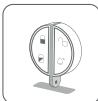
Key Fob
It allows you to activate / deactivate the protection. "Hands-free" function which automatically disarms the system.
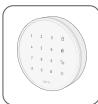
Indoor Keypad
Used to activate / deactivate the alarm via a code.
Remote surveillance
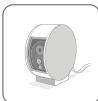
Indoor Camera
Indoor camera with privacy shutter
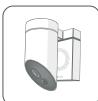
Outdoor Camera
Outdoor camera with 110 dB built-in siren
Zoom on the key fob
Activating the protection
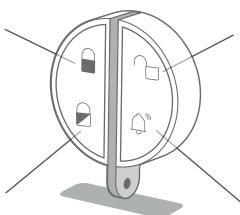
Deactivating the protection
Night-mode activation
Panic button
The night mode enables to protect your home even when you are present (activation of some sensors only). Configurable in the application's "Settings" menu
The panic button is used to alert in case of danger:
- Press once: you send an alert to the smartphones of all owners of the site.
- Press twice: you trigger the sirens.
Change the batteries
Before changing the batteries, remember to deactivate your system and read the instructions below.
Key fob
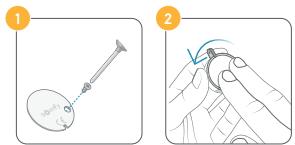
Remove the screw and then the cover of your key fob, and replace the battery (1x 3 V Lithium Panasonic or Energizer CR2032).
IntelliTAG
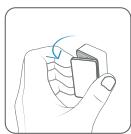
Open the cover and replace the battery (1x 1,5 V alkaline AAA).
Indoor motion sensor

Open the cover and replace the battery (1x 3 V Lithium CR123A).
Indoor siren
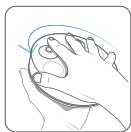
Open the siren cover in the direction indicated by the arrow, remove the battery protection cover and replace the batteries (4 x 1.5 V alkaline D).
Outdoor siren
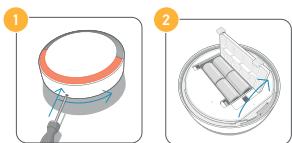
Deactivate the tamper protection[1] and then remove the siren from the wall using a screwdriver (hold down and turn in the direction of the arrow). Open the battery cover and replace the batteries (4× 1.5V alkaline D).
(1)Go to the application's "My devices" menu.
Technical information
Link Essential:
-
Connectivity: Wi-Fi 802.11 b/g/n Open, WPA, WPA2-Personal, WPA-WPA2 mixed mode, WPA3 (2.4 GHz, e.r.p < 100 mW) | Proprietary protocol (2.4 GHz, e.r.p < 100 mW) | Radio Somfy Protect (868 MHz - 870 MHz, e.r.p < 25 mW) | LPWA (868 MHz, e.r.p < 25 mW) | Somfy AroundTM, free emergency network in the event of Internet outage.
-
Indoor use only | Maximum installation height: 2m Cannot be installed at an altitude of more than 2,000m .
- Security: Continuous monitoring of the radio connection between system components | Radio interference detection on detectors and sirens (sending an alert to the user) | Encryption of radio communications | Tamper protection
- Detection of power cuts and autonomy on rechargeable battery (24 hours). Autonomy calculated on new battery.
- Power supply: Mains unit: Use only the mains unit supplied with the product (Input: 100-240 V AC, 50-60 Hz, 0.5 A max/Output: 5 V ....1 A) Lithium battery: 2 Ah. The battery can only be replaced with a Somfy compatible battery ref 1875294 and by following the instructions mentioned in the box of the replacement product.
Size: 160 × 28 ~mm | Weight: 340 ~g | Operating temperature: 10 - 35^ C
Key fob: Proprietary protocol (2.4 GHz, e.r.p < 100 mW) | Battery life under normal use: 1 year (1x 3 V Lithium CR2032) | Size: 34 x 10 mm | Weight: 12 g | Operating temperature: 0 - 45°C
IntelliTAG®: Radio range with Link Essential: 200 m in open air | Radio Sompty Protect (868 MHz-870 MHz, e.r.p<25 mW) | Indoor and outdoor use (IP54) on all types of leaves | Battery life under normal use: 1 year (1x 1.5 V alkaline AAA / LRO3) | Tamper protection | Size: 60 x 28 x 13.5 mm | Weight: 28 g | Operating temperature: 0-45°C
Indoor motion sensor: Radio range with Link Essential: 200 m in open air | Radio Somfy Protect (868 MHz-870 MHz, e.r.p<25 mW) | Battery life under normal use: 2 years [1x3 V Lithium CR123A] | Tamper protection | Size: 47 x 47 mm | Weight: 55 g | Operating temperature: 0-45°C
Indoor siren: Radio range with Link Essential: 200 m in open air | Radio Symphy Protect (868 MHz-870 MHz, e.r.p < 25 mW) Battery life under normal use: 2 years (4 x 1.5 V alkaline D / LR20) | Tamper protection | Size: 175 x 45 mm | Weight: 985 g | Operating temperature: 0 - 45°C
Outdoor siren: Radio range with Link Essential: 200 m in open air | Radio Somfy Protect (868 MHz-870 MHz, e.r.p. < 25mW ) | Outdoor use (IP43) | Battery life under normal use: 2 years (4 x 1.5 V alkaline D / LR20) | Tamper protection | Size: 220 x 55 mm | Weight: 1,200 g | Operating temperature: -10^ / 45^
Recycling and scrapping
Ensure batteries are separated from other types of waste and are recycled via your local recycling centre.
We care about our environment. Do not dispose of the appliance with usual household waste. Give it to an approved collection point for recycling.
Meaning of the logos mentioned on the product
This product must only be installed in a sheltered, dry location.
This product incorporates double electric insulation and therefore does not require any connection to the earth conductor.
Direct current
Alternating current
Safety isolating transformer, short-circuit proof
If the cover is lost, please contact us so that it can be replaced with a compatible cover. Risk of explosion if the battery or batteries are replaced by an incorrect type.
Installer Home Alarm Essential

Gaarylww.com/somflyprotect.com/apps/vooreermai formation over de compatibile versions
Mais infractions sobre as versoes compativel em www.msfprotect.com/apps



- HOME ALARM ESSENTIAL
- Welcome
- Bienvenue
- Install Home Alarm Essential
- Place your Link Essential
- Fix the components to the wall
- Fixing the outdoor siren
- Fixing the indoor siren
- Discover the range
- System management
- Link Essential
- Burglar deterrence
- Indoor siren
- Outdoor siren
- Break-in detection
- Indoor Motion Detector
- Accident prevention
- Smoke detector 85 dB siren
- Protection control
- Key Fob
- Indoor Keypad
- Remote surveillance
- Indoor Camera
- Outdoor Camera
- Zoom on the key fob
- Activating the protection
- Change the batteries
- IntelliTAG
- Indoor motion sensor
- Technical information
- Link Essential:
- Recycling and scrapping
- Meaning of the logos mentioned on the product
- Installer Home Alarm Essential
Brand : SOMFY
Model : HOME ALARM ESSENTIAL
Category : Alarm system